Node.js Basics
Server setup Methods / Modules –
Core Modules
Node.js supports JavaScript
•JavaScript syntax on Node.js is similar to the
browser's JavaScript syntax.
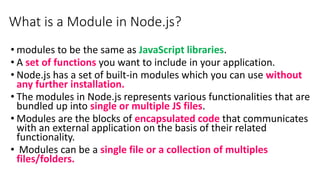
What is a Module in Node.js?
• modules to be the same as JavaScript libraries.
• A set of functions you want to include in your application.
• Node.js has a set of built-in modules which you can use without
any further installation.
• The modules in Node.js represents various functionalities that are
bundled up into single or multiple JS files.
• Modules are the blocks of encapsulated code that communicates
with an external application on the basis of their related
functionality.
• Modules can be a single file or a collection of multiples
files/folders.
Node.js Module
• Modules are of three types:
1. Core Modules
2. local Modules
3. Third-party Modules
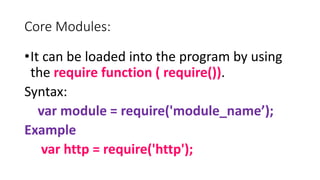
Core Modules:
•It can be loaded into the program by using
the require function ( require()).
Syntax:
var module = require('module_name’);
Example
var http = require('http');
•core modules are compiled into its binary
distribution and load automatically when
Node.js process starts.
•However, you need to import the core module
first in order to use it in your application.
Core Module Description
http http module includes classes, methods and events to create Node.js http server.
url url module includes methods for URL resolution and parsing.
querystring querystring module includes methods to deal with query string.
path path module includes methods to deal with file paths.
fs fs module includes classes, methods, and events to work with file I/O.
util util module includes utility functions useful for programmers.
Server setup methods / procedure
1. createServer() method of http creates a new HTTP server and returns
it.
2. The server is set to listen on the specified port and host name.
3. When the server is ready, the callback function is called, in this case
informing us that the server is running.
4. Whenever a new request is received, the request event is called,
providing two objects: a request (an http.IncomingMessage object)
and a response (an http.ServerResponse object).
5. Those 2 objects are essential to handle the HTTP call.
6. The first object access the request headers and request data.
7. The second is used to return data to the caller.
http.createServer() Method
• The http.createServer() method turns your computer into an HTTP
server.
• The http.createServer() method creates an HTTP Server object.
• The HTTP Server object can listen to ports on your computer and execute a
function, a requestListener, each time a request is made.
Syntax
http.createServer(requestListener);
Specifies a function to be executed every time the server gets a request.
This function is called a requestListener, and handles request from the user, as
well as response back to the user.
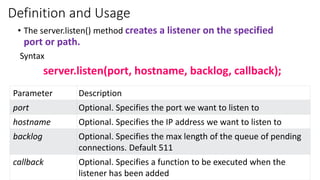
Definition and Usage
• The server.listen() method creates a listener on the specified
port or path.
Syntax
server.listen(port, hostname, backlog, callback);
Parameter Description
port Optional. Specifies the port we want to listen to
hostname Optional. Specifies the IP address we want to listen to
backlog Optional. Specifies the max length of the queue of pending
connections. Default 511
callback Optional. Specifies a function to be executed when the
listener has been added
port number
•It is a way to identify a specific process to which an
internet or other network message is to be forwarded
when it arrives at a server.
•All network-connected devices come equipped with
standardized ports that have an assigned number.
•16-bit integer port number.
•Port number is the part of the addressing information
used to identify the senders and receivers of messages
in computer networking
Node.js response.writeHead() Method
• response.writeHead() is an inbuilt property of the ‘http’ module which
sends a response header to the request.
• The status code is a 3-digit HTTP status code, like 404.
• The last argument, headers, are the response headers.
• Optionally one can give a human-readable statusMessage as the second
argument.
Syntax:
response.writeHead(statusCode[, statusMessage][, headers]);
• Parameters: It accepts three parameters
• statusCode <number>: It accepts the status codes that are of number type.
• statusMessage <string>: It accepts any string that shows the status
message.
• headers <Object>: It accepts any function, array, or string.
res.end() Function
• It is used to end the response process.
• response.end() method of HTTP.ServerResponse.
• Use to quickly end the response without any data.
Syntax:
response.end(data, Encodingtype, Callbackfunction)
Data: Chunk of data that has to be sent
Encoding Type: Type encoding for the data
Callback: Callback function for further operation if necessary.
Return Value: This method returns this Server Response object.
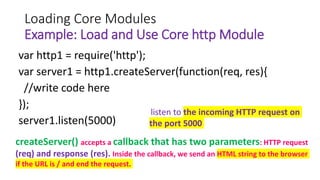
Loading Core Modules
Example: Load and Use Core http Module
var http1 = require('http');
var server1 = http1.createServer(function(req, res){
//write code here
});
server1.listen(5000)
createServer() accepts a callback that has two parameters: HTTP request
(req) and response (res). Inside the callback, we send an HTML string to the browser
if the URL is / and end the request.
listen to the incoming HTTP request on
the port 5000
Module Description
assert Provides a set of assertion tests
buffer To handle binary data
cluster
To split a single Node process into multiple
processes
crypto To handle OpenSSL cryptographic functions
dgram
Provides implementation of UDP datagram
sockets
dns
To do DNS lookups and name resolution
functions
events To handle events
fs To handle the file system
http To make Node.js act as an HTTP server
https To make Node.js act as an HTTPS server.
net To create servers and clients
os
Provides information about the operation
system
path To handle file paths
querystring To handle URL query strings
readline
To handle readable streams one
line at the time
stream To handle streaming data
string_decoder
To decode buffer objects into
strings
timers
To execute a function after a given
number of milliseconds
tls
To implement TLS and SSL
protocols
tty
Provides classes used by a text
terminal
url To parse URL strings
util To access utility functions
v8
To access information about V8
(the JavaScript engine)
vm
To compile JavaScript code in a
virtual machine
zlib To compress or decompress files
Node.js Built-in Modules
Primitive Types
• String
• Number
• Boolean
• Undefined
• Null
• RegExp
• Everything else is an object in Node.js.
Buffer
• Node.js includes an additional data type called Buffer
(not available in browser's JavaScript).
• Buffer is used to store binary data, while reading from
a file or receiving packets over the network.
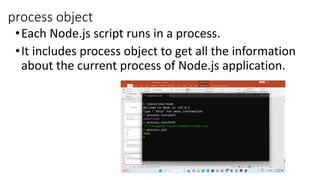
process object
•Each Node.js script runs in a process.
•It includes process object to get all the information
about the current process of Node.js application.
Node.js : Defaults to local
• Node's JavaScript is different from browser's JavaScript
when it comes to global scope.
• In the browser's JavaScript, variables declared without
var keyword become global.
• In Node.js, everything becomes local by default.
Access Global Scope
•In a browser, global scope is the window object.
•In Node.js, global object represents the global
scope.
•Node.js has a number of built-in global identifiers.
•These objects are available in all modules.
• Some of these objects are true globals and can be
accessed from anywhere, other exist at module
level in every module.

Node_basics.pptx

  • 1.
    Node.js Basics Server setupMethods / Modules – Core Modules
  • 2.
    Node.js supports JavaScript •JavaScriptsyntax on Node.js is similar to the browser's JavaScript syntax.
  • 3.
    What is aModule in Node.js? • modules to be the same as JavaScript libraries. • A set of functions you want to include in your application. • Node.js has a set of built-in modules which you can use without any further installation. • The modules in Node.js represents various functionalities that are bundled up into single or multiple JS files. • Modules are the blocks of encapsulated code that communicates with an external application on the basis of their related functionality. • Modules can be a single file or a collection of multiples files/folders.
  • 4.
    Node.js Module • Modulesare of three types: 1. Core Modules 2. local Modules 3. Third-party Modules
  • 5.
    Core Modules: •It canbe loaded into the program by using the require function ( require()). Syntax: var module = require('module_name’); Example var http = require('http');
  • 6.
    •core modules arecompiled into its binary distribution and load automatically when Node.js process starts. •However, you need to import the core module first in order to use it in your application. Core Module Description http http module includes classes, methods and events to create Node.js http server. url url module includes methods for URL resolution and parsing. querystring querystring module includes methods to deal with query string. path path module includes methods to deal with file paths. fs fs module includes classes, methods, and events to work with file I/O. util util module includes utility functions useful for programmers.
  • 7.
    Server setup methods/ procedure 1. createServer() method of http creates a new HTTP server and returns it. 2. The server is set to listen on the specified port and host name. 3. When the server is ready, the callback function is called, in this case informing us that the server is running. 4. Whenever a new request is received, the request event is called, providing two objects: a request (an http.IncomingMessage object) and a response (an http.ServerResponse object). 5. Those 2 objects are essential to handle the HTTP call. 6. The first object access the request headers and request data. 7. The second is used to return data to the caller.
  • 8.
    http.createServer() Method • Thehttp.createServer() method turns your computer into an HTTP server. • The http.createServer() method creates an HTTP Server object. • The HTTP Server object can listen to ports on your computer and execute a function, a requestListener, each time a request is made. Syntax http.createServer(requestListener); Specifies a function to be executed every time the server gets a request. This function is called a requestListener, and handles request from the user, as well as response back to the user.
  • 9.
    Definition and Usage •The server.listen() method creates a listener on the specified port or path. Syntax server.listen(port, hostname, backlog, callback); Parameter Description port Optional. Specifies the port we want to listen to hostname Optional. Specifies the IP address we want to listen to backlog Optional. Specifies the max length of the queue of pending connections. Default 511 callback Optional. Specifies a function to be executed when the listener has been added
  • 10.
    port number •It isa way to identify a specific process to which an internet or other network message is to be forwarded when it arrives at a server. •All network-connected devices come equipped with standardized ports that have an assigned number. •16-bit integer port number. •Port number is the part of the addressing information used to identify the senders and receivers of messages in computer networking
  • 11.
    Node.js response.writeHead() Method •response.writeHead() is an inbuilt property of the ‘http’ module which sends a response header to the request. • The status code is a 3-digit HTTP status code, like 404. • The last argument, headers, are the response headers. • Optionally one can give a human-readable statusMessage as the second argument. Syntax: response.writeHead(statusCode[, statusMessage][, headers]); • Parameters: It accepts three parameters • statusCode <number>: It accepts the status codes that are of number type. • statusMessage <string>: It accepts any string that shows the status message. • headers <Object>: It accepts any function, array, or string.
  • 12.
    res.end() Function • Itis used to end the response process. • response.end() method of HTTP.ServerResponse. • Use to quickly end the response without any data. Syntax: response.end(data, Encodingtype, Callbackfunction) Data: Chunk of data that has to be sent Encoding Type: Type encoding for the data Callback: Callback function for further operation if necessary. Return Value: This method returns this Server Response object.
  • 13.
    Loading Core Modules Example:Load and Use Core http Module var http1 = require('http'); var server1 = http1.createServer(function(req, res){ //write code here }); server1.listen(5000) createServer() accepts a callback that has two parameters: HTTP request (req) and response (res). Inside the callback, we send an HTML string to the browser if the URL is / and end the request. listen to the incoming HTTP request on the port 5000
  • 14.
    Module Description assert Providesa set of assertion tests buffer To handle binary data cluster To split a single Node process into multiple processes crypto To handle OpenSSL cryptographic functions dgram Provides implementation of UDP datagram sockets dns To do DNS lookups and name resolution functions events To handle events fs To handle the file system http To make Node.js act as an HTTP server https To make Node.js act as an HTTPS server. net To create servers and clients os Provides information about the operation system path To handle file paths querystring To handle URL query strings readline To handle readable streams one line at the time stream To handle streaming data string_decoder To decode buffer objects into strings timers To execute a function after a given number of milliseconds tls To implement TLS and SSL protocols tty Provides classes used by a text terminal url To parse URL strings util To access utility functions v8 To access information about V8 (the JavaScript engine) vm To compile JavaScript code in a virtual machine zlib To compress or decompress files Node.js Built-in Modules
  • 15.
    Primitive Types • String •Number • Boolean • Undefined • Null • RegExp • Everything else is an object in Node.js.
  • 16.
    Buffer • Node.js includesan additional data type called Buffer (not available in browser's JavaScript). • Buffer is used to store binary data, while reading from a file or receiving packets over the network.
  • 17.
    process object •Each Node.jsscript runs in a process. •It includes process object to get all the information about the current process of Node.js application.
  • 18.
    Node.js : Defaultsto local • Node's JavaScript is different from browser's JavaScript when it comes to global scope. • In the browser's JavaScript, variables declared without var keyword become global. • In Node.js, everything becomes local by default.
  • 19.
    Access Global Scope •Ina browser, global scope is the window object. •In Node.js, global object represents the global scope. •Node.js has a number of built-in global identifiers. •These objects are available in all modules. • Some of these objects are true globals and can be accessed from anywhere, other exist at module level in every module.