


node.js
        Hello World


Node.js – Web Framework
           By:Pravin Mishra
                pravinmisrha88@gmail.com
Contents
•   Why Node.js?
•   Node Overview
•   Benefits of Node.js
•   Create Server Request.
•   Write HTTP Header.
•   listen for new requests .
•   print out a message.
•   Run program.
•   Questions?
Why Node.js?


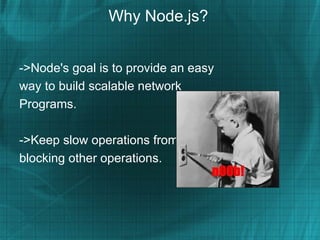
->Node's goal is to provide an easy
way to build scalable network
Programs.

->Keep slow operations from
blocking other operations.
What is Node.js?

->Standard library.
Timers, Process, Events, Util, Buffer,
Crypto, TLS/SSL, FileSystem, Net, DNS,
HTTP/HTTPS, URL, UDP.
-> I/O needs to be done differently
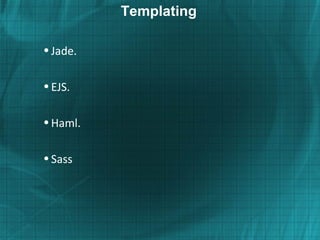
Templating

• Jade.

• EJS.

• Haml.

• Sass
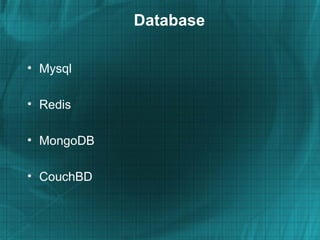
Database

• Mysql

• Redis

• MongoDB

• CouchBD
Deploy

• Heroku


• Nodejitsu


• Cluster
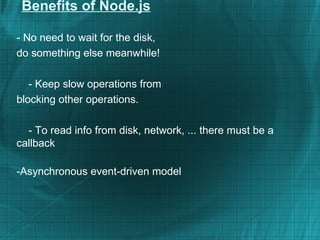
Benefits of Node.js

- No need to wait for the disk,
do something else meanwhile!

   - Keep slow operations from
blocking other operations.

  - To read info from disk, network, ... there must be a
callback

-Asynchronous event-driven model
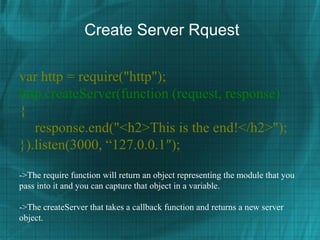
Create Server Rquest

var http = require("http");
http.createServer(function (request, response)
{
   response.end("<h2>This is the end!</h2>");
}).listen(3000, “127.0.0.1″);

->The require function will return an object representing the module that you
pass into it and you can capture that object in a variable.

->The createServer that takes a callback function and returns a new server
object.
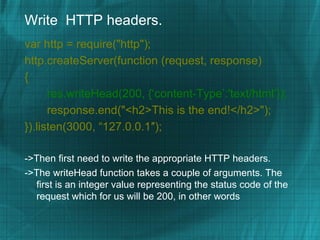
Write HTTP headers.
var http = require("http");
http.createServer(function (request, response)
{
      res.writeHead(200, {‘content-Type’:'text/html’});
      response.end("<h2>This is the end!</h2>");
}).listen(3000, “127.0.0.1″);

->Then first need to write the appropriate HTTP headers.
->The writeHead function takes a couple of arguments. The
  first is an integer value representing the status code of the
  request which for us will be 200, in other words
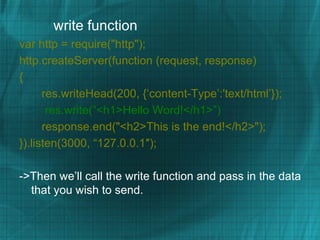
write function
var http = require("http");
http.createServer(function (request, response)
{
      res.writeHead(200, {‘content-Type’:'text/html’});
       res.write(“<h1>Hello Word!</h1>”)
      response.end("<h2>This is the end!</h2>");
}).listen(3000, “127.0.0.1″);

->Then we’ll call the write function and pass in the data
  that you wish to send.
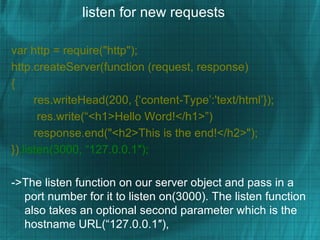
listen for new requests

var http = require("http");
http.createServer(function (request, response)
{
      res.writeHead(200, {‘content-Type’:'text/html’});
       res.write(“<h1>Hello Word!</h1>”)
      response.end("<h2>This is the end!</h2>");
}).listen(3000, “127.0.0.1″);

->The listen function on our server object and pass in a
  port number for it to listen on(3000). The listen function
  also takes an optional second parameter which is the
  hostname URL(“127.0.0.1″),
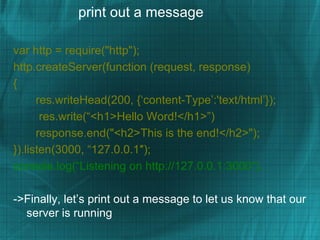
print out a message

var http = require("http");
http.createServer(function (request, response)
{
      res.writeHead(200, {‘content-Type’:'text/html’});
       res.write(“<h1>Hello Word!</h1>”)
      response.end("<h2>This is the end!</h2>");
}).listen(3000, “127.0.0.1″);
console.log(“Listening on http://127.0.0.1:3000“).

->Finally, let’s print out a message to let us know that our
  server is running
Run Program


There we go, now let’s run our app by calling node and passing
  to it the name of the file we want it to execute.


node hello_world.js and open browser “http://127.0.0.1:3000“


That’s it. Enjoy………………..
THANKS

     Questions?

     By:Pravin Mishra
    Rails/UI Developer
pravinmishra88@gmail.com

Node.js

  • 1.
    node.js Hello World Node.js – Web Framework By:Pravin Mishra pravinmisrha88@gmail.com
  • 2.
    Contents • Why Node.js? • Node Overview • Benefits of Node.js • Create Server Request. • Write HTTP Header. • listen for new requests . • print out a message. • Run program. • Questions?
  • 3.
    Why Node.js? ->Node's goalis to provide an easy way to build scalable network Programs. ->Keep slow operations from blocking other operations.
  • 4.
    What is Node.js? ->Standardlibrary. Timers, Process, Events, Util, Buffer, Crypto, TLS/SSL, FileSystem, Net, DNS, HTTP/HTTPS, URL, UDP. -> I/O needs to be done differently
  • 5.
  • 6.
  • 7.
  • 8.
    Benefits of Node.js -No need to wait for the disk, do something else meanwhile! - Keep slow operations from blocking other operations. - To read info from disk, network, ... there must be a callback -Asynchronous event-driven model
  • 9.
    Create Server Rquest varhttp = require("http"); http.createServer(function (request, response) { response.end("<h2>This is the end!</h2>"); }).listen(3000, “127.0.0.1″); ->The require function will return an object representing the module that you pass into it and you can capture that object in a variable. ->The createServer that takes a callback function and returns a new server object.
  • 10.
    Write HTTP headers. varhttp = require("http"); http.createServer(function (request, response) { res.writeHead(200, {‘content-Type’:'text/html’}); response.end("<h2>This is the end!</h2>"); }).listen(3000, “127.0.0.1″); ->Then first need to write the appropriate HTTP headers. ->The writeHead function takes a couple of arguments. The first is an integer value representing the status code of the request which for us will be 200, in other words
  • 11.
    write function var http= require("http"); http.createServer(function (request, response) { res.writeHead(200, {‘content-Type’:'text/html’}); res.write(“<h1>Hello Word!</h1>”) response.end("<h2>This is the end!</h2>"); }).listen(3000, “127.0.0.1″); ->Then we’ll call the write function and pass in the data that you wish to send.
  • 12.
    listen for newrequests var http = require("http"); http.createServer(function (request, response) { res.writeHead(200, {‘content-Type’:'text/html’}); res.write(“<h1>Hello Word!</h1>”) response.end("<h2>This is the end!</h2>"); }).listen(3000, “127.0.0.1″); ->The listen function on our server object and pass in a port number for it to listen on(3000). The listen function also takes an optional second parameter which is the hostname URL(“127.0.0.1″),
  • 13.
    print out amessage var http = require("http"); http.createServer(function (request, response) { res.writeHead(200, {‘content-Type’:'text/html’}); res.write(“<h1>Hello Word!</h1>”) response.end("<h2>This is the end!</h2>"); }).listen(3000, “127.0.0.1″); console.log(“Listening on http://127.0.0.1:3000“). ->Finally, let’s print out a message to let us know that our server is running
  • 14.
    Run Program There wego, now let’s run our app by calling node and passing to it the name of the file we want it to execute. node hello_world.js and open browser “http://127.0.0.1:3000“ That’s it. Enjoy………………..
  • 15.
    THANKS Questions? By:Pravin Mishra Rails/UI Developer pravinmishra88@gmail.com