NODE-LEVEL
SIMULATOR
Presented by Syed Ahamed G S M
4thYear Electronics and Communication
Node-Level Simulators
■ Node-level design methodologies are usually associated with
simulators that simulate the behavior of a sensor network
on a per-node basis.
■ Using simulation, designers can quickly study the performance
in terms of timing, power, bandwidth, and scalability of
potential algorithms without implementing them on actual
hardware.
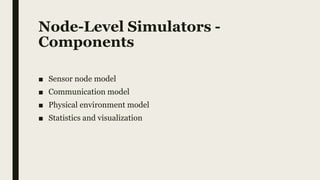
Node-Level Simulators -
Components
■ Sensor node model
■ Communication model
■ Physical environment model
■ Statistics and visualization
Node-Level Simulators –
Sensor Node Model
■ A node in a simulator acts as a software execution platform, a
sensor host, a communication terminal.
■ In order for designers to focus on the application-level code, a
node model simulates a communication protocol stack,
sensor behaviors and operating system services.
■ If the nodes are mobile, then the positions and motion
properties of the nodes need to be modeled.
■ If the nodes have energy characteristics, then the power
consumption of the nodes needs to be modeled.
Node-Level Simulators –
Communication Model
■ Depending on the details of modeling, communication may be
captured at different layers.
■ The most elaborate simulators, model the communication media at
the physical layer, simulating the RF propagation delay and
collision of simultaneous transmissions.
■ Alternately, the communication may be simulated at the MAC
layer or network layer, for example : stochastic processes to
represent low-level behaviors.
Node-Level Simulators –
Physical Environment Model
■ The environment can also be simulated at various levels of detail.
■ For example, a moving object in the physical world may be
abstracted into a point signal source.
■ If the sensor network is passive—that is, it does not impact the
behavior of the environment—then the environment can be
simulated separately.
■ If, in addition to sensing, the network also performs actions that
influence the behavior of the environment, then a more tightly
integrated simulation mechanism is required.
Node-Level Simulators –
Statistics and Visualization
■ The simulation results need to be collected for analysis.
■ Since the goal of a simulation is typically to derive global
properties from the execution of individual nodes, visualizing
global behaviors is extremely important.
■ An ideal visualization tool should allow users to easily observe on
demand the spatial distribution and mobility of the nodes, the
connectivity among nodes, link qualities, end-to-end
communication routes and delays, phenomena and their spatio-
temporal dynamics, sensor readings on each node, sensor node
states, and node lifetime parameters (e.g., battery power).
Node-Level Simulators –
Time concept
■ A sensor network simulator simulates the behavior of sensor
network with respect to time.
■ In which, time may advance in differ ways
– Cycle-Driven (CD).
– Discrete-Event (DE).
Node-Level Simulators –
Cycle-Driven (CD)
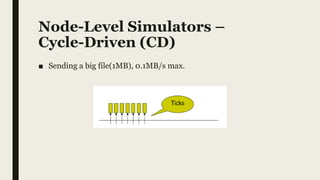
■ A cycle-driven (CD) discretize the continuous real time into ticks.
■ Simulator computes phenomenon at each tick. Like: physical
environment, sensing data, communication data, etc.
■ Communication by RF is assumed to be finished in a tick.
■ CD simulators are easy to implement and use.
■ Most CD simulators issue are detecting and dealing cycle
dependencies among nodes (ex: RF) or algorithms (ex: Thread).
Node-Level Simulators –
Cycle-Driven (CD)
■ Sending a big file(1MB), 0.1MB/s max.
Node-Level Simulators –
Discrete-Event (DE)
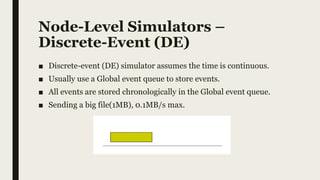
■ Discrete-event (DE) simulator assumes the time is continuous.
■ Usually use a Global event queue to store events.
■ All events are stored chronologically in the Global event queue.
■ Sending a big file(1MB), 0.1MB/s max.
Node-Level Simulators –
CD and DE Comparison
■ DE simulators are considered as better than CD simulators,
because they are more actual. But they’re more complex to design
and implement.
■ Most popular sensor network simulators are DE simulators, like
TOSSIM and NS2.
The ns2 Simulator
The ns2 Simulator -
Introduction
■ The simulator ns-2 is an open source network simulator that was
originally designed for wired, IP networks.
The ns2 Simulator –
Wireless Extension
■ Extensions have been made to simulate wireless/mobile networks (e.g.,
802.11 MAC and TDMA MAC) and more recently sensor networks.
■ While the original ns-2 only supports logical addresses for each node, the
wireless/mobile extension of it introduces the notion of node locations
and a simple wireless channel model.
■ This is not a trivial extension, since once the nodes move, the simulator
needs to check for each physical layer event whether the destination node
is within the communication range.
■ For a large network, this significantly slows down the simulation speed.
The ns2 Simulator –
Sensor Extension
■ There are at least two efforts to extend ns-2 to simulate sensor
networks
– Sensor Sim from UCLA
– NRL sensor network extension from the Navy Research
Laboratory
The ns2 Simulator –
Sensor Sim
■ Sensor Sim aims at providing an energy model for sensor nodes
and communication, so that power properties can be simulated.
■ Sensor Sim also supports hybrid simulation, where some real
sensor nodes, running real applications, can be executed together
with a simulation.
The ns2 Simulator –
NRL Sensor Network
■ The NRL sensor network extension provides a flexible way of
modeling physical phenomena in a discrete event simulator.
■ Physical phenomena are modeled as network nodes which
communicate with real nodes through physical layers.
■ Any interesting events are sent to the nodes that can sense them as
a form of communication.
■ The receiving nodes simply have a sensor stack parallel to the
network stack that processes these events.
The ns2 Simulator –
Protocols
■ The key advantage of ns-2 is its rich libraries of protocols for nearly all network
layers and for many routing mechanisms.
■ Examples include the following:
– TCP: reno, Tahoe, Vegas, and SACK implementations
– MAC: 802.3, 802.11, and TDMA
– Ad hoc routing: Destination sequenced distance vector (DSDV) routing,
dynamic source routing (DSR), ad hoc on-demand distance vector (AODV)
routing, and temporally ordered routing algorithm (TORA)
– Sensor network routing: Directed diffusion, geographical routing (GEAR)
and geographical adaptive fidelity (GAF) routing.
Thank You For Listening
Reference
■ Wireless Sensor Network – Feng Zhao, Leonidas Guibas
[Page : 266 – 272]
■ Sensor Network Platform and Tools

Node level simulators

  • 1.
    NODE-LEVEL SIMULATOR Presented by SyedAhamed G S M 4thYear Electronics and Communication
  • 2.
    Node-Level Simulators ■ Node-leveldesign methodologies are usually associated with simulators that simulate the behavior of a sensor network on a per-node basis. ■ Using simulation, designers can quickly study the performance in terms of timing, power, bandwidth, and scalability of potential algorithms without implementing them on actual hardware.
  • 3.
    Node-Level Simulators - Components ■Sensor node model ■ Communication model ■ Physical environment model ■ Statistics and visualization
  • 4.
    Node-Level Simulators – SensorNode Model ■ A node in a simulator acts as a software execution platform, a sensor host, a communication terminal. ■ In order for designers to focus on the application-level code, a node model simulates a communication protocol stack, sensor behaviors and operating system services. ■ If the nodes are mobile, then the positions and motion properties of the nodes need to be modeled. ■ If the nodes have energy characteristics, then the power consumption of the nodes needs to be modeled.
  • 5.
    Node-Level Simulators – CommunicationModel ■ Depending on the details of modeling, communication may be captured at different layers. ■ The most elaborate simulators, model the communication media at the physical layer, simulating the RF propagation delay and collision of simultaneous transmissions. ■ Alternately, the communication may be simulated at the MAC layer or network layer, for example : stochastic processes to represent low-level behaviors.
  • 6.
    Node-Level Simulators – PhysicalEnvironment Model ■ The environment can also be simulated at various levels of detail. ■ For example, a moving object in the physical world may be abstracted into a point signal source. ■ If the sensor network is passive—that is, it does not impact the behavior of the environment—then the environment can be simulated separately. ■ If, in addition to sensing, the network also performs actions that influence the behavior of the environment, then a more tightly integrated simulation mechanism is required.
  • 7.
    Node-Level Simulators – Statisticsand Visualization ■ The simulation results need to be collected for analysis. ■ Since the goal of a simulation is typically to derive global properties from the execution of individual nodes, visualizing global behaviors is extremely important. ■ An ideal visualization tool should allow users to easily observe on demand the spatial distribution and mobility of the nodes, the connectivity among nodes, link qualities, end-to-end communication routes and delays, phenomena and their spatio- temporal dynamics, sensor readings on each node, sensor node states, and node lifetime parameters (e.g., battery power).
  • 8.
    Node-Level Simulators – Timeconcept ■ A sensor network simulator simulates the behavior of sensor network with respect to time. ■ In which, time may advance in differ ways – Cycle-Driven (CD). – Discrete-Event (DE).
  • 9.
    Node-Level Simulators – Cycle-Driven(CD) ■ A cycle-driven (CD) discretize the continuous real time into ticks. ■ Simulator computes phenomenon at each tick. Like: physical environment, sensing data, communication data, etc. ■ Communication by RF is assumed to be finished in a tick. ■ CD simulators are easy to implement and use. ■ Most CD simulators issue are detecting and dealing cycle dependencies among nodes (ex: RF) or algorithms (ex: Thread).
  • 10.
    Node-Level Simulators – Cycle-Driven(CD) ■ Sending a big file(1MB), 0.1MB/s max.
  • 11.
    Node-Level Simulators – Discrete-Event(DE) ■ Discrete-event (DE) simulator assumes the time is continuous. ■ Usually use a Global event queue to store events. ■ All events are stored chronologically in the Global event queue. ■ Sending a big file(1MB), 0.1MB/s max.
  • 12.
    Node-Level Simulators – CDand DE Comparison ■ DE simulators are considered as better than CD simulators, because they are more actual. But they’re more complex to design and implement. ■ Most popular sensor network simulators are DE simulators, like TOSSIM and NS2.
  • 13.
  • 14.
    The ns2 Simulator- Introduction ■ The simulator ns-2 is an open source network simulator that was originally designed for wired, IP networks.
  • 15.
    The ns2 Simulator– Wireless Extension ■ Extensions have been made to simulate wireless/mobile networks (e.g., 802.11 MAC and TDMA MAC) and more recently sensor networks. ■ While the original ns-2 only supports logical addresses for each node, the wireless/mobile extension of it introduces the notion of node locations and a simple wireless channel model. ■ This is not a trivial extension, since once the nodes move, the simulator needs to check for each physical layer event whether the destination node is within the communication range. ■ For a large network, this significantly slows down the simulation speed.
  • 16.
    The ns2 Simulator– Sensor Extension ■ There are at least two efforts to extend ns-2 to simulate sensor networks – Sensor Sim from UCLA – NRL sensor network extension from the Navy Research Laboratory
  • 17.
    The ns2 Simulator– Sensor Sim ■ Sensor Sim aims at providing an energy model for sensor nodes and communication, so that power properties can be simulated. ■ Sensor Sim also supports hybrid simulation, where some real sensor nodes, running real applications, can be executed together with a simulation.
  • 18.
    The ns2 Simulator– NRL Sensor Network ■ The NRL sensor network extension provides a flexible way of modeling physical phenomena in a discrete event simulator. ■ Physical phenomena are modeled as network nodes which communicate with real nodes through physical layers. ■ Any interesting events are sent to the nodes that can sense them as a form of communication. ■ The receiving nodes simply have a sensor stack parallel to the network stack that processes these events.
  • 19.
    The ns2 Simulator– Protocols ■ The key advantage of ns-2 is its rich libraries of protocols for nearly all network layers and for many routing mechanisms. ■ Examples include the following: – TCP: reno, Tahoe, Vegas, and SACK implementations – MAC: 802.3, 802.11, and TDMA – Ad hoc routing: Destination sequenced distance vector (DSDV) routing, dynamic source routing (DSR), ad hoc on-demand distance vector (AODV) routing, and temporally ordered routing algorithm (TORA) – Sensor network routing: Directed diffusion, geographical routing (GEAR) and geographical adaptive fidelity (GAF) routing.
  • 20.
    Thank You ForListening
  • 21.
    Reference ■ Wireless SensorNetwork – Feng Zhao, Leonidas Guibas [Page : 266 – 272] ■ Sensor Network Platform and Tools