Netcasting

Manual page:
Logistics
   Welcome

         • Facilities orientation
         • Informal style, please ask questions.
         • If a question requires more discussion, I may
           defer it to the break.
         • Doug Foster
         • dfoster@performance-podcasts.com

         • Agenda …

Manual page:
Netcasting

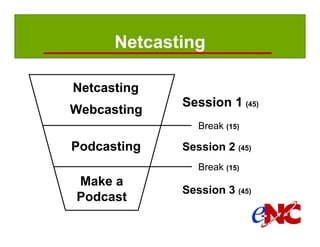
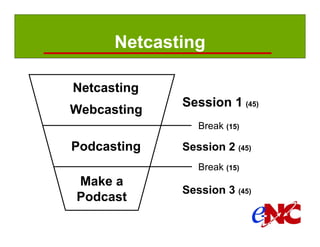
               Netcasting
                            Session 1 (45)
               Webcasting
                               Break (15)

               Podcasting   Session 2 (45)
                               Break (15)
               Make a
                            Session 3 (45)
               Podcast

Manual page:
Session 1
                 Netcasting
                   •   What is it?
                   •   Why would I use it?
                   •   What has influenced netcasting?
                   •   Who, what, when, where, and how?
                   •   How much does it cost?

                 Webcasting
                   •   Types
                   •   Planning, execution, and follow-up
                   •   Challenges of streaming applications
                   •   How much does a webcast cost?
Manual page: 2
Session 2

             Podcasting
                 •   What is it?
                 •   How do I find and subscribe?
                 •   How do I listen to or view?
                 •   How do I produce one?
                 •   How much does it cost?
                 •   What is copyright, how does it affect me?


Manual page: 2
Session 3

                 Create your first audio podcast
                   •   Planning
                   •   Record and edit the audio
                   •   Compress and tag the audio
                   •   Create the RSS feed
                   •   Publish
                   •   List it in a directory


Manual page: 2
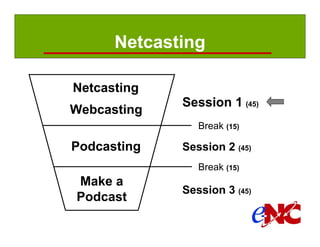
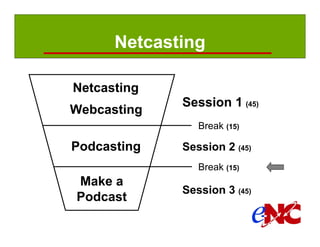
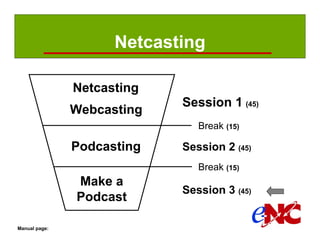
Netcasting

               Netcasting
                            Session 1 (45)
               Webcasting
                               Break (15)

               Podcasting   Session 2 (45)
                               Break (15)
               Make a
                            Session 3 (45)
               Podcast

Manual page:
What is netcasting?
    Netcasting
          • Delivering digital media content,
          • over a data network (Internet or intranet), in
          • real time (streaming) or time-shifted (downloaded).
    Webcasting … real time
          • One-way: Internet video broadcast
          • Two-way: web based seminar (webinar)
    Podcasting … time-shifted
          • Digital media file (audio, video, image, or PDF)
          • RSS (Really Simple Syndication) feed (file)
Manual page: 3
Why would I use a netcast?
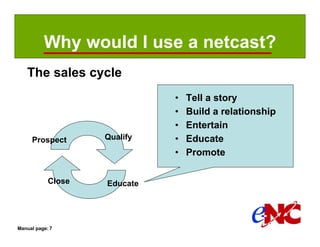
   The sales cycle
                              •   Tell a story
                              •   Build a relationship
                              •   Entertain
     Prospect       Qualify   •   Educate
                              •   Promote

            Close   Educate


Manual page: 7
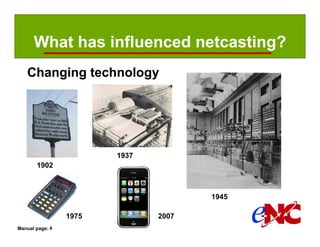
What has influenced netcasting?
   Changing technology


                        1937
       1902


                                      1945

                 1975          2007
Manual page: 4
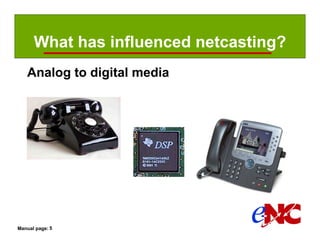
What has influenced netcasting?
   Analog to digital media


Manual page: 5
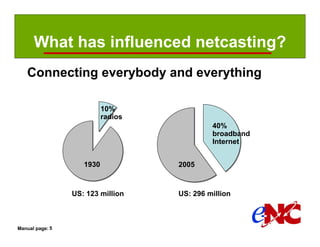
What has influenced netcasting?
   Connecting everybody and everything

                           10%
                           radios
                                             40%
                                             broadband
                                             Internet


                    1930            2005


                 US: 123 million    US: 296 million


Manual page: 5
What has influenced netcasting?
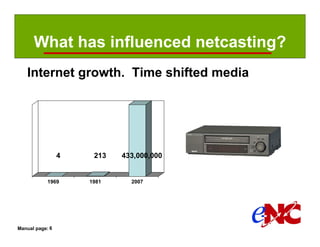
   Internet growth. Time shifted media


                 4    213   433,000,000


            1969     1981     2007


Manual page: 6
Who, what, when, where and how?

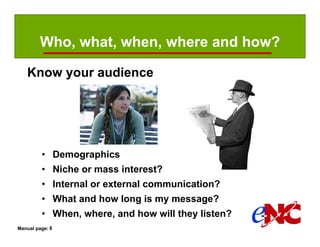
   Know your audience


         • Demographics
         • Niche or mass interest?
         • Internal or external communication?
         • What and how long is my message?
         • When, where, and how will they listen?
Manual page: 8
How much does it cost?
   It depends:
        •   Podcast or webcast? Video or audio?
        •   How often? One time event or a conversation?
        •   What quality does your audience expect?
        •   Produce it yourself or outsource?
        •   Format and length of the stories?
        •   Hire talent or will you be the host?
        •   Guests? Interviews? In-person or remote?
        •   In a studio, on location, or both?
        •   Core to your mission or business?
        •   What time and money are you willing to spend?

Manual page: 12
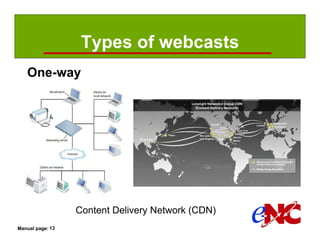
Types of webcasts
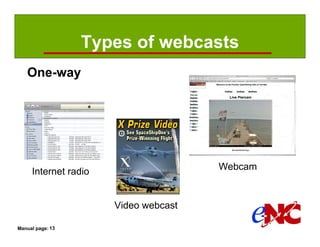
   One-way


                                      Webcam
     Internet radio


                      Video webcast

Manual page: 13
Types of webcasts
   One-way


                  Content Delivery Network (CDN)
Manual page: 13
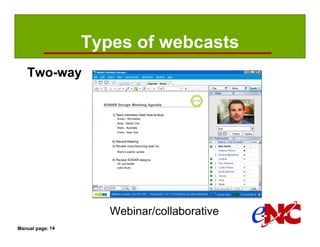
Types of webcasts
   Two-way


                     Webinar/collaborative
Manual page: 14
Planning , execution, & follow-up
   Live events require more work

     •    Integrated marketing plan
     •    Pre-event (awareness, generate interest, …)
     •    Event (logistics, contingency plans, …)
     •    Post event (thank you, nurturing, info, …)
     •    Follow-up is important, often ignored


Manual page: 15
How much does a webcast cost?
    Video webcast using a CDN
          • Production (camera, encoder, server): $1,000+
          • Distribution (2 hours for 1,000 viewers): $1,500
          • Planning, execution, follow-up: ?


    Webinar using WebEx
          • Production (computer, browser, phone): $0
          • Distribution: $3,900
                  - 100 attendees
                  - $0.32/min/attendee + $0.12/min/attendee (800# phone)
                  - Includes $1,200 for assistance (plan & execute)
          • Planning, execution, follow-up: ?
Manual page: 16
Challenges for streaming apps

          Quality Of Service (QOS)
                  •   Data capacity
                  •   Time delay
                  •   Variation of time delay
                  •   Prioritization
                  •   Fragmenting and interleaving

          Broadcasting (Internet multicast)

Manual page: 17
Webcast or podcast?
   Both have advantages


       If it has to be a live event: webcast.
       If not: podcast.


Manual page: 17
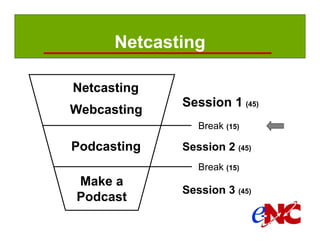
Netcasting

               Netcasting
                            Session 1 (45)
               Webcasting
                               Break (15)

               Podcasting   Session 2 (45)
                               Break (15)
               Make a
                            Session 3 (45)
               Podcast

Manual page:
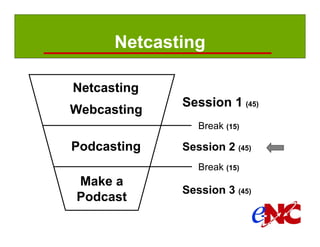
Netcasting

               Netcasting
                            Session 1 (45)
               Webcasting
                               Break (15)

               Podcasting   Session 2 (45)
                               Break (15)
               Make a
                            Session 3 (45)
               Podcast

Manual page:
Session 2

             Podcasting
                  •   What is it?
                  •   How do I find and subscribe?
                  •   How do I listen to or view?
                  •   How do I produce one?
                  •   How much does it cost?
                  •   What is copyright, how does it affect me?


Manual page: 18
What is a podcast?
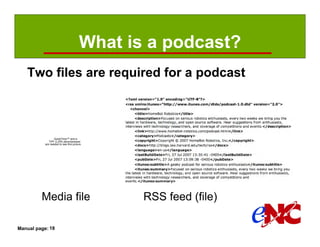
   Two files are required for a podcast


                  QuickTime™ and a
              TIFF (LZW) decompressor
           are needed to see this picture.


         Media file                           RSS feed (file)

Manual page: 18
What is a podcast?
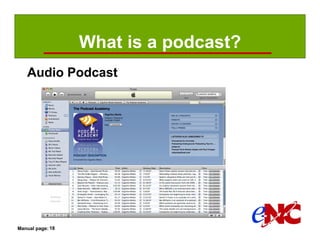
   Audio Podcast


Manual page: 18
What is a podcast?
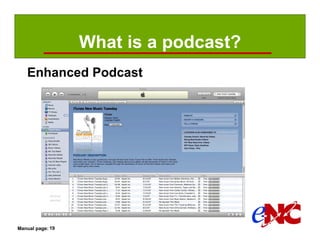
   Enhanced Podcast


Manual page: 19
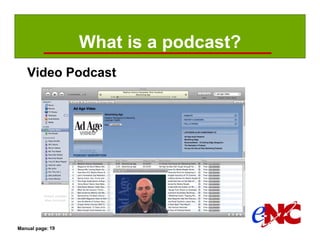
What is a podcast?
   Video Podcast


Manual page: 19
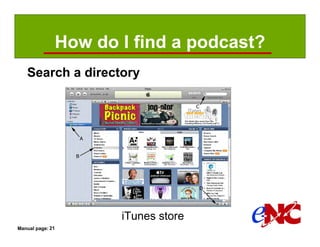
How do I find a podcast?
   Search a directory


                     iTunes store
Manual page: 21
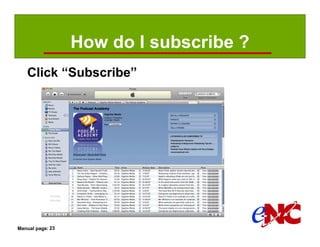
How do I subscribe ?
   Click “Subscribe”


Manual page: 23
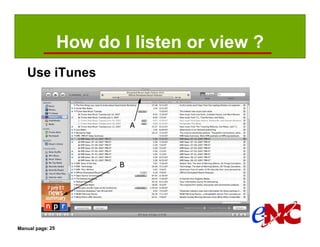
How do I listen or view ?
   Use iTunes


Manual page: 25
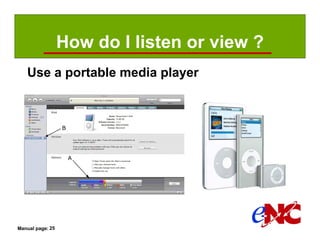
How do I listen or view ?
   Use a portable media player


Manual page: 25
How do I produce a podcast?
   Step 1: Capture sound
             •    Location
             •    Sound natural
             •    Address the microphone correctly
             •    Buy a good mic, holder, & cables
             •    Use a mic preamp & A/D converter
             •    Avoid mixers if possible
             •    Remote interviews?
             •    Practice and research

Manual page: 26
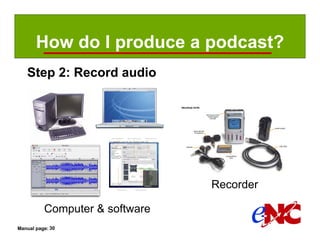
How do I produce a podcast?
   Step 2: Record audio


                                Recorder

          Computer & software
Manual page: 30
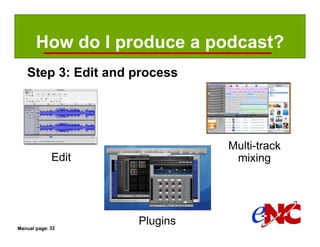
How do I produce a podcast?
   Step 3: Edit and process


                              Multi-track
             Edit              mixing


Manual page: 32
                    Plugins
How do I produce a podcast?
   Step 4: Compress and upload
          • File Transfer software (FTP or web browser)
          • Be careful of the size and # of viewers
                  - RSS files are small
                  - Audio files are large
                  - Video files can be huge
          • Pick an Internet Service Provider
                  - Traditional web hosting
                  - Podcast packages
                  - Podcast specific ISP

Manual page: 34
How do I produce a podcast?
   Step 5: Create the RSS feed
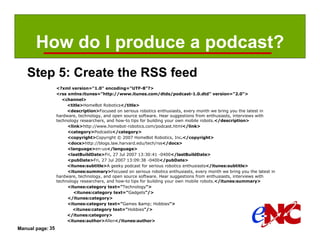
                  <?xml version="1.0" encoding="UTF-8"?>
                  <rss xmlns:itunes="http://www.itunes.com/dtds/podcast-1.0.dtd" version="2.0">
                     <channel>
                       <title>HomeBot Robotics</title>
                       <description>Focused on serious robotics enthusiasts, every month we bring you the latest in
                  hardware, technology, and open source software. Hear suggestions from enthusiasts, interviews with
                  technology researchers, and how-to tips for building your own mobile robots.</description>
                       <link>http://www.homebot-robotics.com/podcast.html</link>
                       <category>Podcasts</category>
                       <copyright>Copyright © 2007 HomeBot Robotics, Inc.</copyright>
                       <docs>http://blogs.law.harvard.edu/tech/rss</docs>
                       <language>en-us</language>
                       <lastBuildDate>Fri, 27 Jul 2007 13:30:41 -0400</lastBuildDate>
                       <pubDate>Fri, 27 Jul 2007 13:09:38 -0400</pubDate>
                       <itunes:subtitle>A geeky podcast for serious robotics enthusiasts</itunes:subtitle>
                       <itunes:summary>Focused on serious robotics enthusiasts, every month we bring you the latest in
                  hardware, technology, and open source software. Hear suggestions from enthusiasts, interviews with
                  technology researchers, and how-to tips for building your own mobile robots.</itunes:summary>
                       <itunes:category text="Technology">
                          <itunes:category text="Gadgets"/>
                       </itunes:category>
                       <itunes:category text="Games &amp; Hobbies">
                          <itunes:category text="Hobbies"/>
                       </itunes:category>
                       <itunes:author>Allen</itunes:author>
Manual page: 35
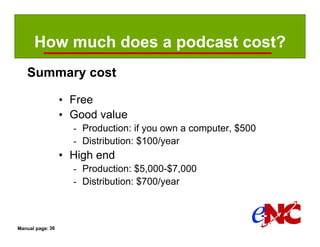
How much does a podcast cost?
   Summary cost

                  • Free
                  • Good value
                    - Production: if you own a computer, $500
                    - Distribution: $100/year
                  • High end
                    - Production: $5,000-$7,000
                    - Distribution: $700/year


Manual page: 36
What is copyright?
   Secure rights and permissions
        Copyright law - Applies to creative and expressive works such as
            performances, scripts, interviews, musical works and sound recordings.
        Publicity rights - Controls how an individual’s voice, image or likeness is
            used for commercial purposes in public. Examples: interviews,
            performances, singing, appearances.
        Trademark law - Protects consumers from being misled or deceived as to
                  the source of goods and services, or the endorsement, sponsorship or
                  affiliation of one good or service with another.
        Five instances - permission is not required when you are using a:
              •      Fact, an idea, a theory or slogan, title or short phrase.
              •      Work that is in the public domain.
              •      US Government work.
              •      Fair use.
              •      Creative Commons-licensed or “podsafe” content.

Manual page: 36
What is copyright?
   Fair use (Use caution, consult a lawyer)
    Fair use is copying any protected material (texts, sounds,
        images, etc.) for a limited and transformative purpose,
        like criticizing, commenting, parodying, news reporting,
        teaching the copyrighted work.

    Judges typically consider four factors that are set forth in the
       Copyright Act in determining fair use:
                  •   Purpose and character of your use
                  •   Nature of the copyrighted work
                  •   Amount and substantiality of the portion taken
                  •   Effect of the use upon the potential market

Manual page: 37
What is copyright?
   Creative Commons licensing
    Attribution - You may copy, distribute, display and perform the work
           and make derivative works based upon it only if you give the author
           or licensor credits in the manner specified by these.
    NoDerivatives - You may copy, distribute, display and perform only
           verbatim copies of the work, not derivative works based upon it.
    NonCommercial - You may copy, distribute, display, and perform the
           work and make derivative works based upon it only for
           noncommercial purposes.
    ShareAlike - Licensees may distribute derivative works only under a
           license identical to the license that governs your work


Manual page: 38
Netcasting

               Netcasting
                            Session 1 (45)
               Webcasting
                               Break (15)

               Podcasting   Session 2 (45)
                               Break (15)
               Make a
                            Session 3 (45)
               Podcast

Manual page:
Netcasting

               Netcasting
                            Session 1 (45)
               Webcasting
                               Break (15)

               Podcasting   Session 2 (45)
                               Break (15)
               Make a
                            Session 3 (45)
               Podcast

Manual page:
Session 3

                  Create your first audio podcast
                    •   Planning
                    •   Record and edit the audio
                    •   Compress and tag the audio
                    •   Create the RSS feed
                    •   Publish
                    •   List it in a directory


Manual page: 39
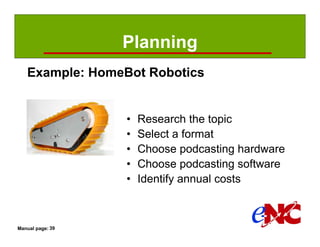
Planning
   Example: HomeBot Robotics


                  •   Research the topic
                  •   Select a format
                  •   Choose podcasting hardware
                  •   Choose podcasting software
                  •   Identify annual costs


Manual page: 39
Planning
   Welcome message
            “Hi. Welcome to the HomeBot Robotics podcast. I’m your host Allen.
            You know, a lot of people think building robots is for kids ... and other people
            think it’s for scientists. Ok - they’re both right - but there’s a middle ground;
            one with a large community of serious, amateur robotics enthusiasts like us.
            Our HomeBot Robotics podcast promises to bring you the latest in hardware,
            technology, and what’s happening with open source robotics software. Our
            mission at Homebot is to make personal mobile robotics available to the
            masses by providing affordable and robust hardware building blocks, coupled
            with open source software solutions to get robotics enthusiasts and
            researchers jumpstarted.
            We’re geeky - and have a pretty wry sense of humor - but you’ll always take
            away great ideas from our ten-minute podcast. We’ll bring you:
                  o    Ideas and How-to suggestions for creating your own mobile robots
                 o     Commentary on news and events in the world of robotics
                 o     A peek into our plans for cool and interesting new robotics building
                 blocks.
            So join us. Send us your ideas! If you like the podcast, tell a friend. We want to
            produce your show – one that helps all of us build the amateur robotics
            community.”


Manual page: 42
Record and edit the audio
   Record and edit


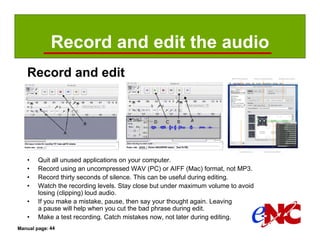
   •    Quit all unused applications on your computer.
   •    Record using an uncompressed WAV (PC) or AIFF (Mac) format, not MP3.
   •    Record thirty seconds of silence. This can be useful during editing.
   •    Watch the recording levels. Stay close but under maximum volume to avoid
        losing (clipping) loud audio.
   •    If you make a mistake, pause, then say your thought again. Leaving
        a pause will help when you cut the bad phrase during edit.
   •    Make a test recording. Catch mistakes now, not later during editing.
Manual page: 44
Compress and tag the audio
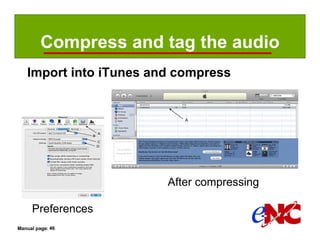
   Import into iTunes and compress


                        After compressing

     Preferences
Manual page: 46
Compress and tag the audio
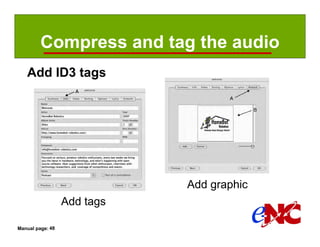
   Add ID3 tags


                             Add graphic
                  Add tags

Manual page: 48
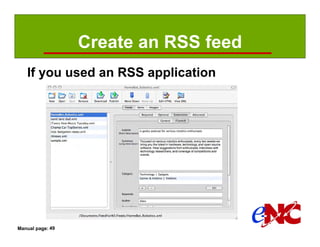
Create an RSS feed
   If you used an RSS application


Manual page: 49
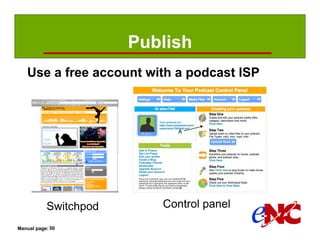
Publish
   Use a free account with a podcast ISP


           Switchpod      Control panel
Manual page: 50
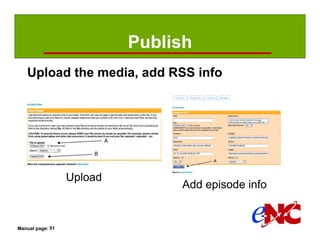
Publish
   Upload the media, add RSS info


                  Upload
                                Add episode info


Manual page: 51
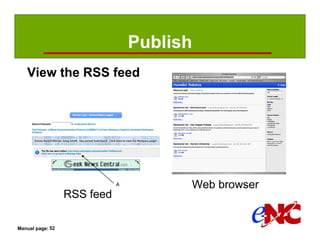
Publish
   View the RSS feed


                                   Web browser
                  RSS feed

Manual page: 52
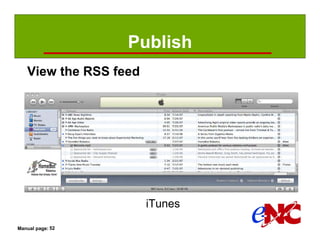
Publish
   View the RSS feed


                       iTunes

Manual page: 52
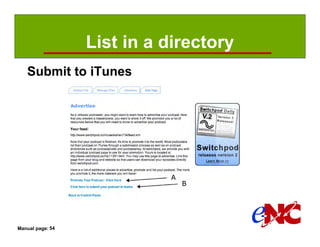
List in a directory
   Submit to iTunes


Manual page: 54
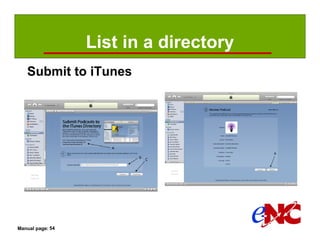
List in a directory
   Submit to iTunes


Manual page: 54
Closing thoughts

         •     Go to the end and work backwards.
         •     Does it need to be live?
         •     Decide on your purpose.
         •     Quality vs. cost
         •     Be committed.
         •     Be yourself. Have fun!


Manual page:
Netcasting

               Netcasting
                            Session 1 (45)
               Webcasting
                               Break (15)

               Podcasting   Session 2 (45)
                               Break (15)
               Make a
                            Session 3 (45)
               Podcast

Manual page:
Plase contact us with questions

         •     Doug Foster
         •     dfoster@performance-podcasts.com
         •     www.performance-podcasts.com
         •     info@e-nc.org
         •     http://e-nc.org/encManuals.asp
               (Netcasting manual)


Manual page:
Thank you!

Manual page:

Netcasting – Training slides

  • 1.
  • 2.
    Logistics Welcome • Facilities orientation • Informal style, please ask questions. • If a question requires more discussion, I may defer it to the break. • Doug Foster • dfoster@performance-podcasts.com • Agenda … Manual page:
  • 3.
    Netcasting Netcasting Session 1 (45) Webcasting Break (15) Podcasting Session 2 (45) Break (15) Make a Session 3 (45) Podcast Manual page:
  • 4.
    Session 1 Netcasting • What is it? • Why would I use it? • What has influenced netcasting? • Who, what, when, where, and how? • How much does it cost? Webcasting • Types • Planning, execution, and follow-up • Challenges of streaming applications • How much does a webcast cost? Manual page: 2
  • 5.
    Session 2 Podcasting • What is it? • How do I find and subscribe? • How do I listen to or view? • How do I produce one? • How much does it cost? • What is copyright, how does it affect me? Manual page: 2
  • 6.
    Session 3 Create your first audio podcast • Planning • Record and edit the audio • Compress and tag the audio • Create the RSS feed • Publish • List it in a directory Manual page: 2
  • 7.
    Netcasting Netcasting Session 1 (45) Webcasting Break (15) Podcasting Session 2 (45) Break (15) Make a Session 3 (45) Podcast Manual page:
  • 8.
    What is netcasting? Netcasting • Delivering digital media content, • over a data network (Internet or intranet), in • real time (streaming) or time-shifted (downloaded). Webcasting … real time • One-way: Internet video broadcast • Two-way: web based seminar (webinar) Podcasting … time-shifted • Digital media file (audio, video, image, or PDF) • RSS (Really Simple Syndication) feed (file) Manual page: 3
  • 9.
    Why would Iuse a netcast? The sales cycle • Tell a story • Build a relationship • Entertain Prospect Qualify • Educate • Promote Close Educate Manual page: 7
  • 10.
    What has influencednetcasting? Changing technology 1937 1902 1945 1975 2007 Manual page: 4
  • 11.
    What has influencednetcasting? Analog to digital media Manual page: 5
  • 12.
    What has influencednetcasting? Connecting everybody and everything 10% radios 40% broadband Internet 1930 2005 US: 123 million US: 296 million Manual page: 5
  • 13.
    What has influencednetcasting? Internet growth. Time shifted media 4 213 433,000,000 1969 1981 2007 Manual page: 6
  • 14.
    Who, what, when,where and how? Know your audience • Demographics • Niche or mass interest? • Internal or external communication? • What and how long is my message? • When, where, and how will they listen? Manual page: 8
  • 15.
    How much doesit cost? It depends: • Podcast or webcast? Video or audio? • How often? One time event or a conversation? • What quality does your audience expect? • Produce it yourself or outsource? • Format and length of the stories? • Hire talent or will you be the host? • Guests? Interviews? In-person or remote? • In a studio, on location, or both? • Core to your mission or business? • What time and money are you willing to spend? Manual page: 12
  • 16.
    Types of webcasts One-way Webcam Internet radio Video webcast Manual page: 13
  • 17.
    Types of webcasts One-way Content Delivery Network (CDN) Manual page: 13
  • 18.
    Types of webcasts Two-way Webinar/collaborative Manual page: 14
  • 19.
    Planning , execution,& follow-up Live events require more work • Integrated marketing plan • Pre-event (awareness, generate interest, …) • Event (logistics, contingency plans, …) • Post event (thank you, nurturing, info, …) • Follow-up is important, often ignored Manual page: 15
  • 20.
    How much doesa webcast cost? Video webcast using a CDN • Production (camera, encoder, server): $1,000+ • Distribution (2 hours for 1,000 viewers): $1,500 • Planning, execution, follow-up: ? Webinar using WebEx • Production (computer, browser, phone): $0 • Distribution: $3,900 - 100 attendees - $0.32/min/attendee + $0.12/min/attendee (800# phone) - Includes $1,200 for assistance (plan & execute) • Planning, execution, follow-up: ? Manual page: 16
  • 21.
    Challenges for streamingapps Quality Of Service (QOS) • Data capacity • Time delay • Variation of time delay • Prioritization • Fragmenting and interleaving Broadcasting (Internet multicast) Manual page: 17
  • 22.
    Webcast or podcast? Both have advantages If it has to be a live event: webcast. If not: podcast. Manual page: 17
  • 23.
    Netcasting Netcasting Session 1 (45) Webcasting Break (15) Podcasting Session 2 (45) Break (15) Make a Session 3 (45) Podcast Manual page:
  • 24.
    Netcasting Netcasting Session 1 (45) Webcasting Break (15) Podcasting Session 2 (45) Break (15) Make a Session 3 (45) Podcast Manual page:
  • 25.
    Session 2 Podcasting • What is it? • How do I find and subscribe? • How do I listen to or view? • How do I produce one? • How much does it cost? • What is copyright, how does it affect me? Manual page: 18
  • 26.
    What is apodcast? Two files are required for a podcast QuickTime™ and a TIFF (LZW) decompressor are needed to see this picture. Media file RSS feed (file) Manual page: 18
  • 27.
    What is apodcast? Audio Podcast Manual page: 18
  • 28.
    What is apodcast? Enhanced Podcast Manual page: 19
  • 29.
    What is apodcast? Video Podcast Manual page: 19
  • 30.
    How do Ifind a podcast? Search a directory iTunes store Manual page: 21
  • 31.
    How do Isubscribe ? Click “Subscribe” Manual page: 23
  • 32.
    How do Ilisten or view ? Use iTunes Manual page: 25
  • 33.
    How do Ilisten or view ? Use a portable media player Manual page: 25
  • 34.
    How do Iproduce a podcast? Step 1: Capture sound • Location • Sound natural • Address the microphone correctly • Buy a good mic, holder, & cables • Use a mic preamp & A/D converter • Avoid mixers if possible • Remote interviews? • Practice and research Manual page: 26
  • 35.
    How do Iproduce a podcast? Step 2: Record audio Recorder Computer & software Manual page: 30
  • 36.
    How do Iproduce a podcast? Step 3: Edit and process Multi-track Edit mixing Manual page: 32 Plugins
  • 37.
    How do Iproduce a podcast? Step 4: Compress and upload • File Transfer software (FTP or web browser) • Be careful of the size and # of viewers - RSS files are small - Audio files are large - Video files can be huge • Pick an Internet Service Provider - Traditional web hosting - Podcast packages - Podcast specific ISP Manual page: 34
  • 38.
    How do Iproduce a podcast? Step 5: Create the RSS feed <?xml version="1.0" encoding="UTF-8"?> <rss xmlns:itunes="http://www.itunes.com/dtds/podcast-1.0.dtd" version="2.0"> <channel> <title>HomeBot Robotics</title> <description>Focused on serious robotics enthusiasts, every month we bring you the latest in hardware, technology, and open source software. Hear suggestions from enthusiasts, interviews with technology researchers, and how-to tips for building your own mobile robots.</description> <link>http://www.homebot-robotics.com/podcast.html</link> <category>Podcasts</category> <copyright>Copyright © 2007 HomeBot Robotics, Inc.</copyright> <docs>http://blogs.law.harvard.edu/tech/rss</docs> <language>en-us</language> <lastBuildDate>Fri, 27 Jul 2007 13:30:41 -0400</lastBuildDate> <pubDate>Fri, 27 Jul 2007 13:09:38 -0400</pubDate> <itunes:subtitle>A geeky podcast for serious robotics enthusiasts</itunes:subtitle> <itunes:summary>Focused on serious robotics enthusiasts, every month we bring you the latest in hardware, technology, and open source software. Hear suggestions from enthusiasts, interviews with technology researchers, and how-to tips for building your own mobile robots.</itunes:summary> <itunes:category text="Technology"> <itunes:category text="Gadgets"/> </itunes:category> <itunes:category text="Games &amp; Hobbies"> <itunes:category text="Hobbies"/> </itunes:category> <itunes:author>Allen</itunes:author> Manual page: 35
  • 39.
    How much doesa podcast cost? Summary cost • Free • Good value - Production: if you own a computer, $500 - Distribution: $100/year • High end - Production: $5,000-$7,000 - Distribution: $700/year Manual page: 36
  • 40.
    What is copyright? Secure rights and permissions Copyright law - Applies to creative and expressive works such as performances, scripts, interviews, musical works and sound recordings. Publicity rights - Controls how an individual’s voice, image or likeness is used for commercial purposes in public. Examples: interviews, performances, singing, appearances. Trademark law - Protects consumers from being misled or deceived as to the source of goods and services, or the endorsement, sponsorship or affiliation of one good or service with another. Five instances - permission is not required when you are using a: • Fact, an idea, a theory or slogan, title or short phrase. • Work that is in the public domain. • US Government work. • Fair use. • Creative Commons-licensed or “podsafe” content. Manual page: 36
  • 41.
    What is copyright? Fair use (Use caution, consult a lawyer) Fair use is copying any protected material (texts, sounds, images, etc.) for a limited and transformative purpose, like criticizing, commenting, parodying, news reporting, teaching the copyrighted work. Judges typically consider four factors that are set forth in the Copyright Act in determining fair use: • Purpose and character of your use • Nature of the copyrighted work • Amount and substantiality of the portion taken • Effect of the use upon the potential market Manual page: 37
  • 42.
    What is copyright? Creative Commons licensing Attribution - You may copy, distribute, display and perform the work and make derivative works based upon it only if you give the author or licensor credits in the manner specified by these. NoDerivatives - You may copy, distribute, display and perform only verbatim copies of the work, not derivative works based upon it. NonCommercial - You may copy, distribute, display, and perform the work and make derivative works based upon it only for noncommercial purposes. ShareAlike - Licensees may distribute derivative works only under a license identical to the license that governs your work Manual page: 38
  • 43.
    Netcasting Netcasting Session 1 (45) Webcasting Break (15) Podcasting Session 2 (45) Break (15) Make a Session 3 (45) Podcast Manual page:
  • 44.
    Netcasting Netcasting Session 1 (45) Webcasting Break (15) Podcasting Session 2 (45) Break (15) Make a Session 3 (45) Podcast Manual page:
  • 45.
    Session 3 Create your first audio podcast • Planning • Record and edit the audio • Compress and tag the audio • Create the RSS feed • Publish • List it in a directory Manual page: 39
  • 46.
    Planning Example: HomeBot Robotics • Research the topic • Select a format • Choose podcasting hardware • Choose podcasting software • Identify annual costs Manual page: 39
  • 47.
    Planning Welcome message “Hi. Welcome to the HomeBot Robotics podcast. I’m your host Allen. You know, a lot of people think building robots is for kids ... and other people think it’s for scientists. Ok - they’re both right - but there’s a middle ground; one with a large community of serious, amateur robotics enthusiasts like us. Our HomeBot Robotics podcast promises to bring you the latest in hardware, technology, and what’s happening with open source robotics software. Our mission at Homebot is to make personal mobile robotics available to the masses by providing affordable and robust hardware building blocks, coupled with open source software solutions to get robotics enthusiasts and researchers jumpstarted. We’re geeky - and have a pretty wry sense of humor - but you’ll always take away great ideas from our ten-minute podcast. We’ll bring you: o Ideas and How-to suggestions for creating your own mobile robots o Commentary on news and events in the world of robotics o A peek into our plans for cool and interesting new robotics building blocks. So join us. Send us your ideas! If you like the podcast, tell a friend. We want to produce your show – one that helps all of us build the amateur robotics community.” Manual page: 42
  • 48.
    Record and editthe audio Record and edit • Quit all unused applications on your computer. • Record using an uncompressed WAV (PC) or AIFF (Mac) format, not MP3. • Record thirty seconds of silence. This can be useful during editing. • Watch the recording levels. Stay close but under maximum volume to avoid losing (clipping) loud audio. • If you make a mistake, pause, then say your thought again. Leaving a pause will help when you cut the bad phrase during edit. • Make a test recording. Catch mistakes now, not later during editing. Manual page: 44
  • 49.
    Compress and tagthe audio Import into iTunes and compress After compressing Preferences Manual page: 46
  • 50.
    Compress and tagthe audio Add ID3 tags Add graphic Add tags Manual page: 48
  • 51.
    Create an RSSfeed If you used an RSS application Manual page: 49
  • 52.
    Publish Use a free account with a podcast ISP Switchpod Control panel Manual page: 50
  • 53.
    Publish Upload the media, add RSS info Upload Add episode info Manual page: 51
  • 54.
    Publish View the RSS feed Web browser RSS feed Manual page: 52
  • 55.
    Publish View the RSS feed iTunes Manual page: 52
  • 56.
    List in adirectory Submit to iTunes Manual page: 54
  • 57.
    List in adirectory Submit to iTunes Manual page: 54
  • 58.
    Closing thoughts • Go to the end and work backwards. • Does it need to be live? • Decide on your purpose. • Quality vs. cost • Be committed. • Be yourself. Have fun! Manual page:
  • 59.
    Netcasting Netcasting Session 1 (45) Webcasting Break (15) Podcasting Session 2 (45) Break (15) Make a Session 3 (45) Podcast Manual page:
  • 60.
    Plase contact uswith questions • Doug Foster • dfoster@performance-podcasts.com • www.performance-podcasts.com • info@e-nc.org • http://e-nc.org/encManuals.asp (Netcasting manual) Manual page:
  • 61.