.NET? Mono for Android Does
Kevin McMahon
@klmcmahon
http://blog.kevfoo.com
Overview
• Overview of Android
• Mono for Android : What, How, Why
• Code Demo
• Mono for Android Resources
What is Android?
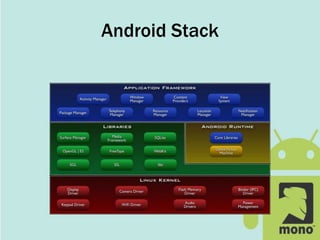
• Application Framework
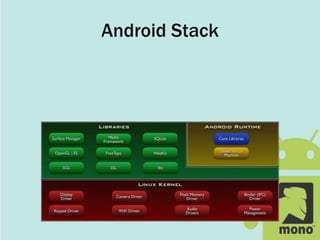
• Dalvik Virtual Machine
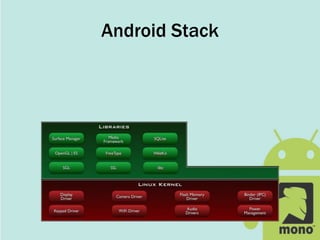
• Optimized OpenGL ES 1.0 graphics library
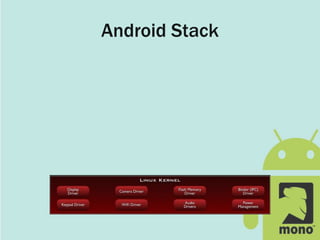
• Customized Linux 2.6 kernel
• Rich development environment
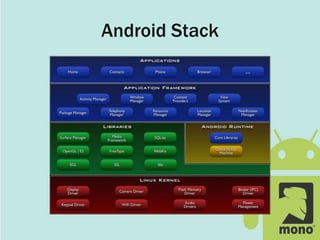
Android Stack
Android Stack
Android Stack
Android Stack
Android Stack
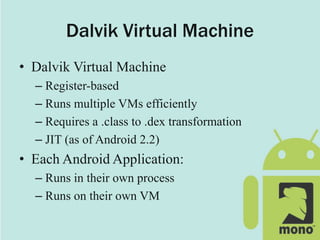
Dalvik Virtual Machine
• Dalvik Virtual Machine
– Register-based
– Runs multiple VMs efficiently
– Requires a .class to .dex transformation
– JIT (as of Android 2.2)
• Each Android Application:
– Runs in their own process
– Runs on their own VM
What is Mono for Android?
• Commercial Product from Novell
– $399 individual / ~$999 enterprise / ~$99 student
• Windows and Mac OS X (Linux soon)
• Open preview
– DOWNLOAD AND TRY IT!
• Project is getting really close to 1.0
– No ā€œGo Liveā€ license yet
– Not done with optimizations
– Still changing the API
How Does it Work?
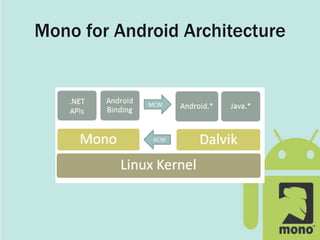
• Mono Runtime
– Native to the device
– Executes .Net code
– Runs side-by-side with Dalvik
• Mono to Android Communication
– Java proxies
• Android Callable Wrappers
• Managed Callable Wrappers
Mono for Android Architecture
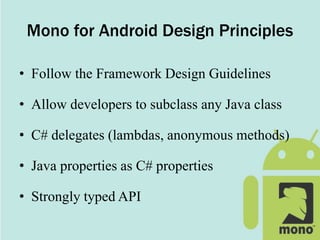
Mono for Android Design Principles
• Follow the Framework Design Guidelines
• Allow developers to subclass any Java class
• C# delegates (lambdas, anonymous methods)
• Java properties as C# properties
• Strongly typed API
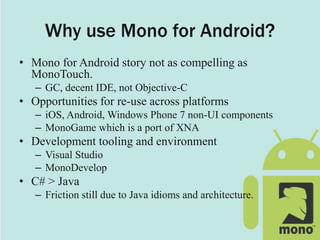
Why use Mono for Android?
• Mono for Android story not as compelling as
MonoTouch.
– GC, decent IDE, not Objective-C
• Opportunities for re-use across platforms
– iOS, Android, Windows Phone 7 non-UI components
– MonoGame which is a port of XNA
• Development tooling and environment
– Visual Studio
– MonoDevelop
• C# > Java
– Friction still due to Java idioms and architecture.
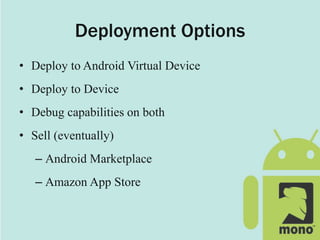
Deployment Options
• Deploy to Android Virtual Device
• Deploy to Device
• Debug capabilities on both
• Sell (eventually)
– Android Marketplace
– Amazon App Store
Android Application Concepts
• Activities
• Services
• Content Providers
• Intents
• Resources
Activities
• Orchestrates a UI view
• Applications are composed of 1-to-Many
activities
• One activity marked as main and shown first
upon launch
Activities - Views
• Each activity is given a default window to
draw in.
• Content of the window is provided by a
hierarchy of views
• A view hierarchy is placed within an activity's
window by the Activity.SetContentView()
Activity Life Cycle
• onCreate
• onStart
• onResume
• onPause
• onStop
• onDestroy
Services
• Android service are what you’d expect.
• Possible to bind to an ongoing service and
communicate via exposed interface
• Runs in main application process but doesn’t
block other components or UI
Content Providers
• Queryable application data stores
• Only way to share data amongst other apps
• Android ships with common providers
– Audio, video, images, contacts, etc.
• Making your application’s data public
– Create a new provider
– Add your data to existing provider
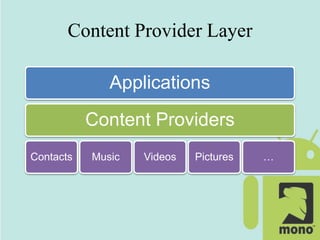
Content Provider Layer
Applications
Content Providers
Contacts Music Videos Pictures …
Intents
• Eventing mechanism
• Intent objects are passive data that is of interest
to the component that is receiving the intent
• Filterable
Resources
• Images, layout descriptions, binary blobs and
string dictionaries
• Abstraction layer which helps decouples code
• Makes managing assets easier
– Localization
– Multiple displays
– Different hardware configurations
Code Demo
https://github.com/kevinmcmahon/MonoDroid101
Mono for Android Resources
Download the Preview!
• http://mono-android.net/Welcome
Links
• http://www.mono-android.net
• http://developer.android.com/
IRC Support / Discussion
• #monodroid on irc.gnome.org
Code
• https://github.com/mono/monodroid-samples
• https://github.com/kevinmcmahon/MonoDroid101

.NET? MonoDroid Does

  • 1.
    .NET? Mono forAndroid Does Kevin McMahon @klmcmahon http://blog.kevfoo.com
  • 2.
    Overview • Overview ofAndroid • Mono for Android : What, How, Why • Code Demo • Mono for Android Resources
  • 3.
    What is Android? •Application Framework • Dalvik Virtual Machine • Optimized OpenGL ES 1.0 graphics library • Customized Linux 2.6 kernel • Rich development environment
  • 4.
  • 5.
  • 6.
  • 7.
  • 8.
  • 9.
    Dalvik Virtual Machine •Dalvik Virtual Machine – Register-based – Runs multiple VMs efficiently – Requires a .class to .dex transformation – JIT (as of Android 2.2) • Each Android Application: – Runs in their own process – Runs on their own VM
  • 10.
    What is Monofor Android? • Commercial Product from Novell – $399 individual / ~$999 enterprise / ~$99 student • Windows and Mac OS X (Linux soon) • Open preview – DOWNLOAD AND TRY IT! • Project is getting really close to 1.0 – No ā€œGo Liveā€ license yet – Not done with optimizations – Still changing the API
  • 11.
    How Does itWork? • Mono Runtime – Native to the device – Executes .Net code – Runs side-by-side with Dalvik • Mono to Android Communication – Java proxies • Android Callable Wrappers • Managed Callable Wrappers
  • 12.
    Mono for AndroidArchitecture
  • 13.
    Mono for AndroidDesign Principles • Follow the Framework Design Guidelines • Allow developers to subclass any Java class • C# delegates (lambdas, anonymous methods) • Java properties as C# properties • Strongly typed API
  • 14.
    Why use Monofor Android? • Mono for Android story not as compelling as MonoTouch. – GC, decent IDE, not Objective-C • Opportunities for re-use across platforms – iOS, Android, Windows Phone 7 non-UI components – MonoGame which is a port of XNA • Development tooling and environment – Visual Studio – MonoDevelop • C# > Java – Friction still due to Java idioms and architecture.
  • 15.
    Deployment Options • Deployto Android Virtual Device • Deploy to Device • Debug capabilities on both • Sell (eventually) – Android Marketplace – Amazon App Store
  • 16.
    Android Application Concepts •Activities • Services • Content Providers • Intents • Resources
  • 17.
    Activities • Orchestrates aUI view • Applications are composed of 1-to-Many activities • One activity marked as main and shown first upon launch
  • 18.
    Activities - Views •Each activity is given a default window to draw in. • Content of the window is provided by a hierarchy of views • A view hierarchy is placed within an activity's window by the Activity.SetContentView()
  • 19.
    Activity Life Cycle •onCreate • onStart • onResume • onPause • onStop • onDestroy
  • 20.
    Services • Android serviceare what you’d expect. • Possible to bind to an ongoing service and communicate via exposed interface • Runs in main application process but doesn’t block other components or UI
  • 21.
    Content Providers • Queryableapplication data stores • Only way to share data amongst other apps • Android ships with common providers – Audio, video, images, contacts, etc. • Making your application’s data public – Create a new provider – Add your data to existing provider
  • 22.
    Content Provider Layer Applications ContentProviders Contacts Music Videos Pictures …
  • 23.
    Intents • Eventing mechanism •Intent objects are passive data that is of interest to the component that is receiving the intent • Filterable
  • 24.
    Resources • Images, layoutdescriptions, binary blobs and string dictionaries • Abstraction layer which helps decouples code • Makes managing assets easier – Localization – Multiple displays – Different hardware configurations
  • 25.
  • 26.
    Mono for AndroidResources Download the Preview! • http://mono-android.net/Welcome Links • http://www.mono-android.net • http://developer.android.com/ IRC Support / Discussion • #monodroid on irc.gnome.org Code • https://github.com/mono/monodroid-samples • https://github.com/kevinmcmahon/MonoDroid101

Editor's Notes

  • #6Ā libc Media libraries based on OpenCORE LibWebCore SGL for 2D and OpenGL ES for 3D Graphics SQLite
  • #8Ā Views Content Providers Resource Manager Notification Manager Activity Manager
  • #13Ā System.*, System.IO.*, System.Net.* and the rest of the .NET class libraries to access the underlying Linux operating system facilities Audio, Graphics, OpenGL and Telephony are only exposed through the Dalvik Java APIs in Java.* or Android.* namespace
  • #26Ā ā€œThe native Android APIs do not operate directly with filenames, but instead operate on resource IDs. When you compile an Android application that uses resources, the build system will package the resources for distribution and generate a class called "R" (this is an Android convention) that contains the tokens for each one of the resources included.ā€ – http://http://monodroid.net/Documentation/API_Design
  • #27Ā Demo Order: HelloLinearLayout HelloListView HelloL10N CABarCode HelloSpinner GPSMap