

Navigation models… … how people find stuff David Humphreys … user preference vs. efficiency.
Who are we?  Some of our clients
About David & Peak Usability David Humphreys Senior Usability Consultant  Peak Usability are Brisbane based Usability & UX services & training
Our collective thoughts Our team had pretty strong opinions about a lot of nav models… … but we had no solid test data based on navigation models alone
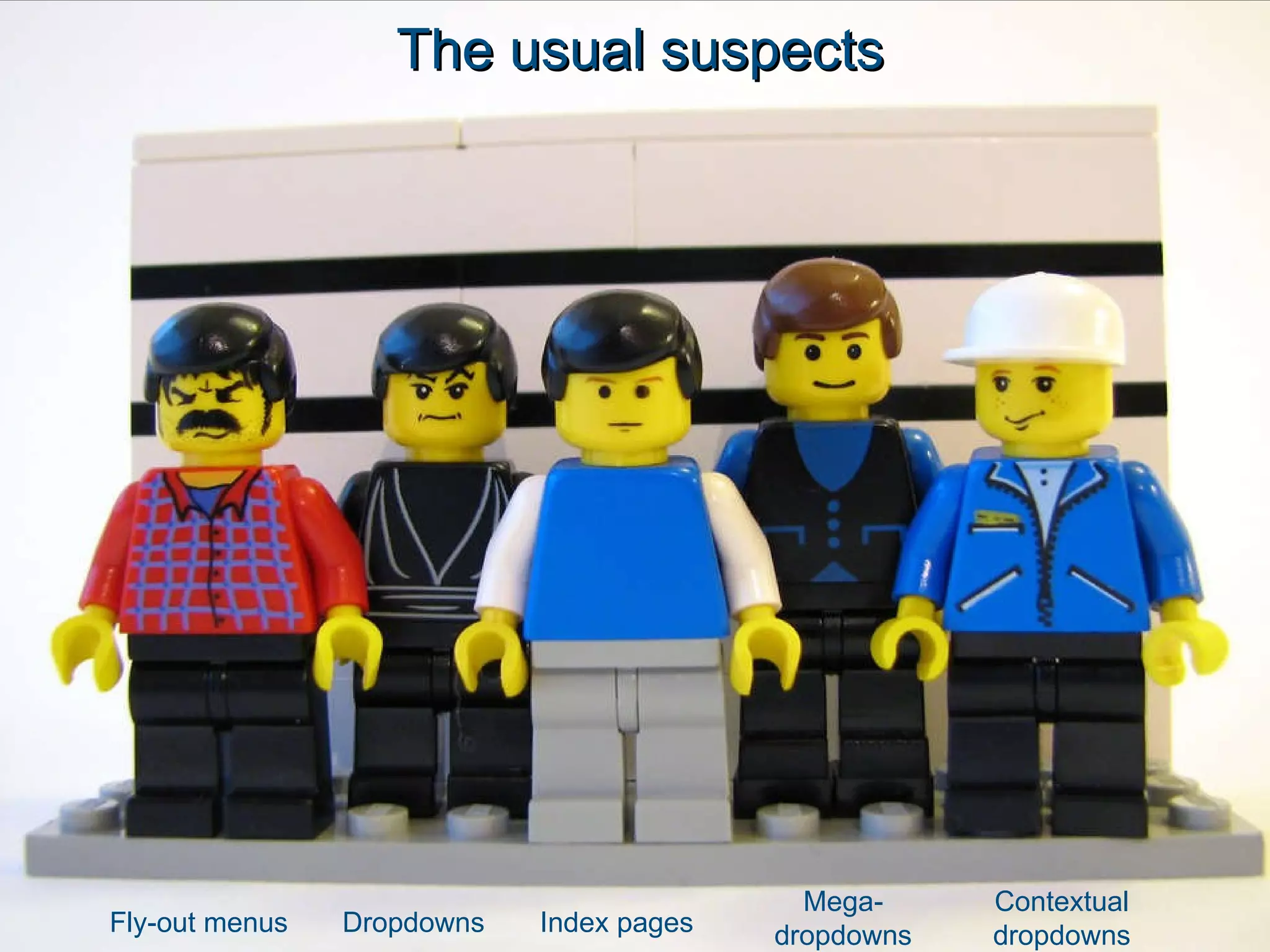
The usual suspects Fly-out menus Dropdowns Index pages Mega-dropdowns Contextual dropdowns
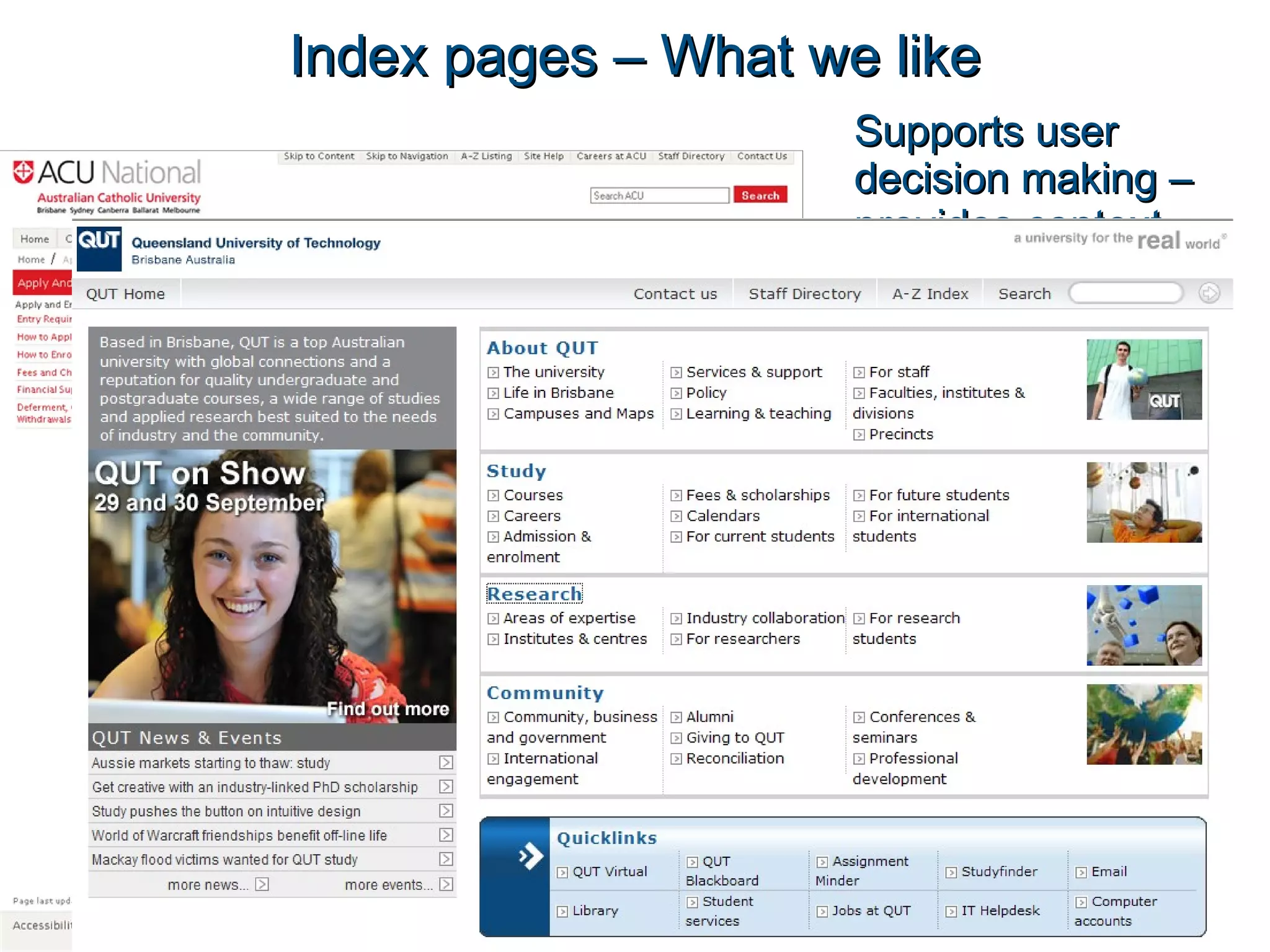
Index pages – What we like Supports user decision making – provides context
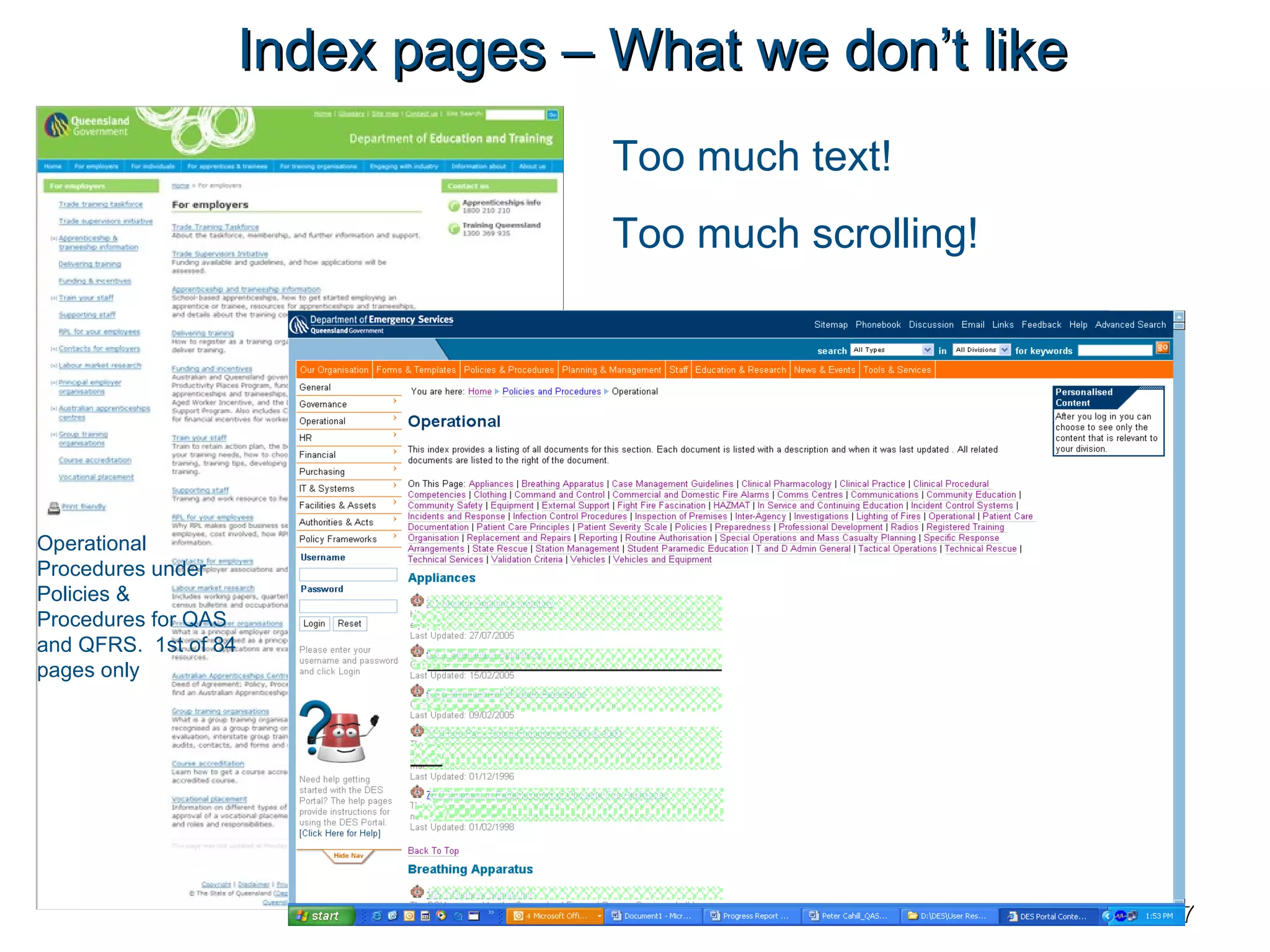
Index pages – What we don’t like Too much text!  Too much scrolling! Operational Procedures under Policies & Procedures for QAS and QFRS.  1st of 84 pages only Related information or form appears as a link here which just looks like another link. Related information or form appears as a link here which just looks like another link.
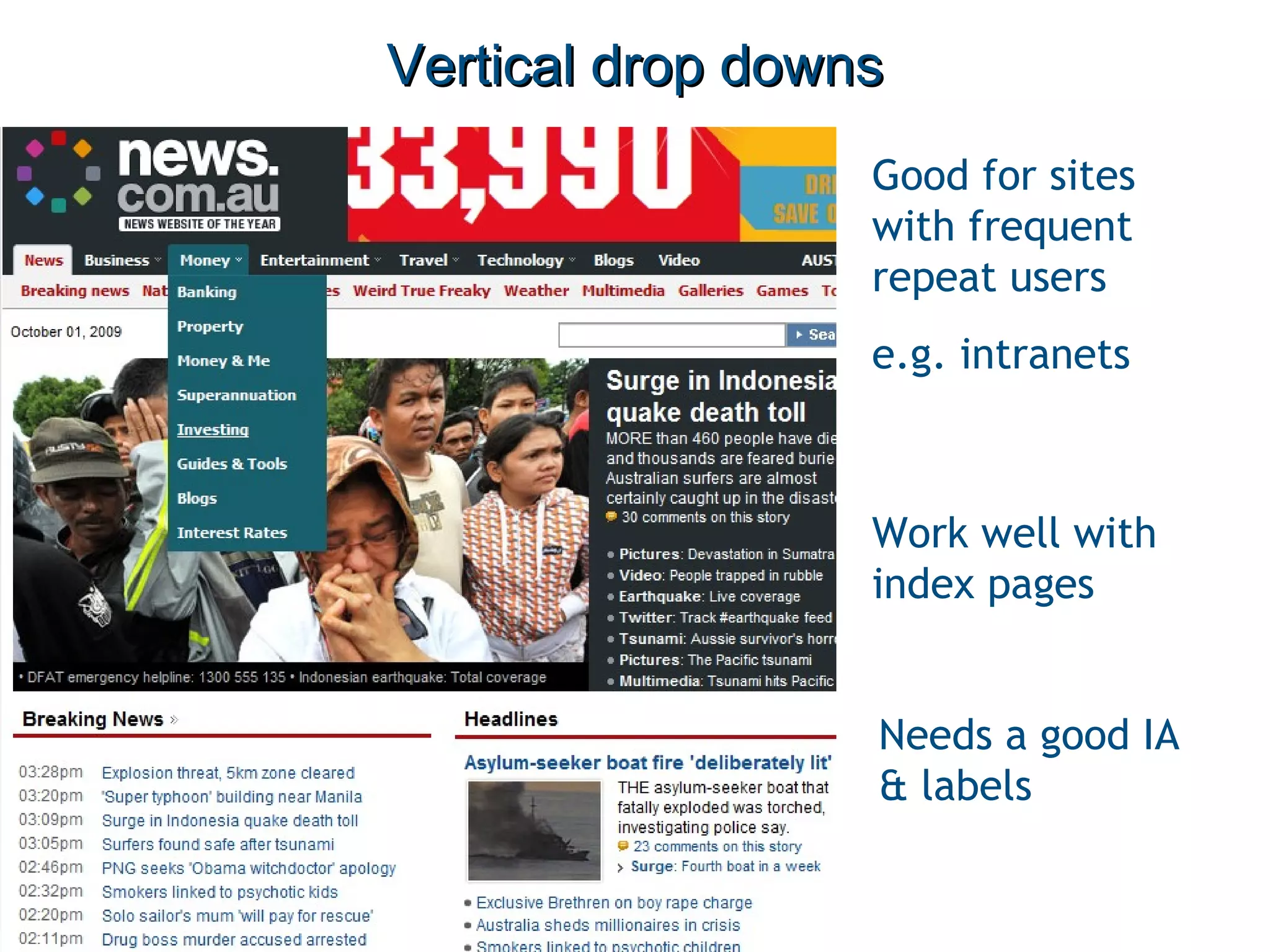
Vertical drop downs Good for sites with frequent repeat users e.g. intranets Work well with index pages Needs a good IA & labels
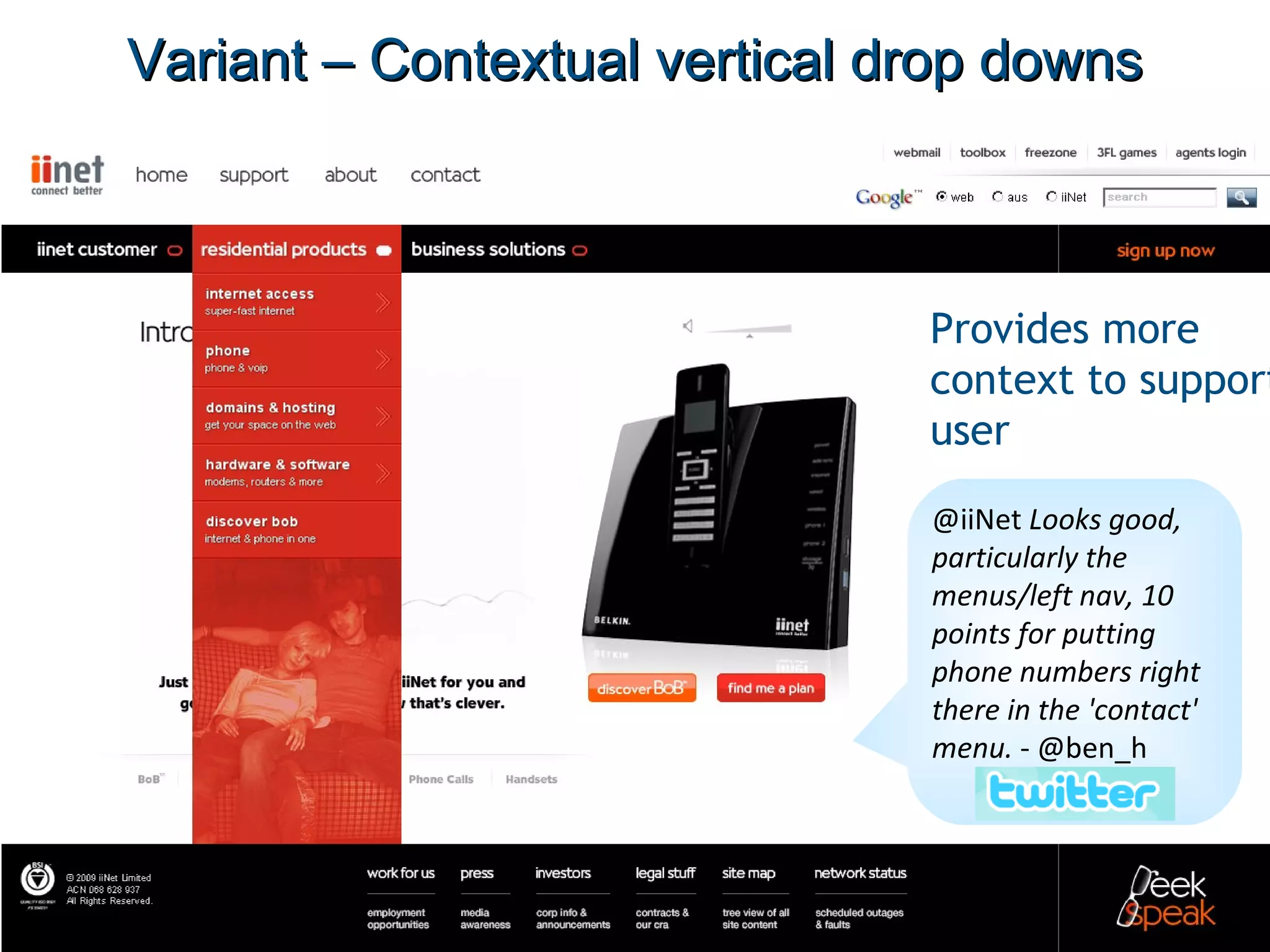
Variant – Contextual vertical drop downs Provides more context to support user @iiNet  Looks good, particularly the menus/left nav, 10 points for putting phone numbers right there in the 'contact' menu.  - @ben_h
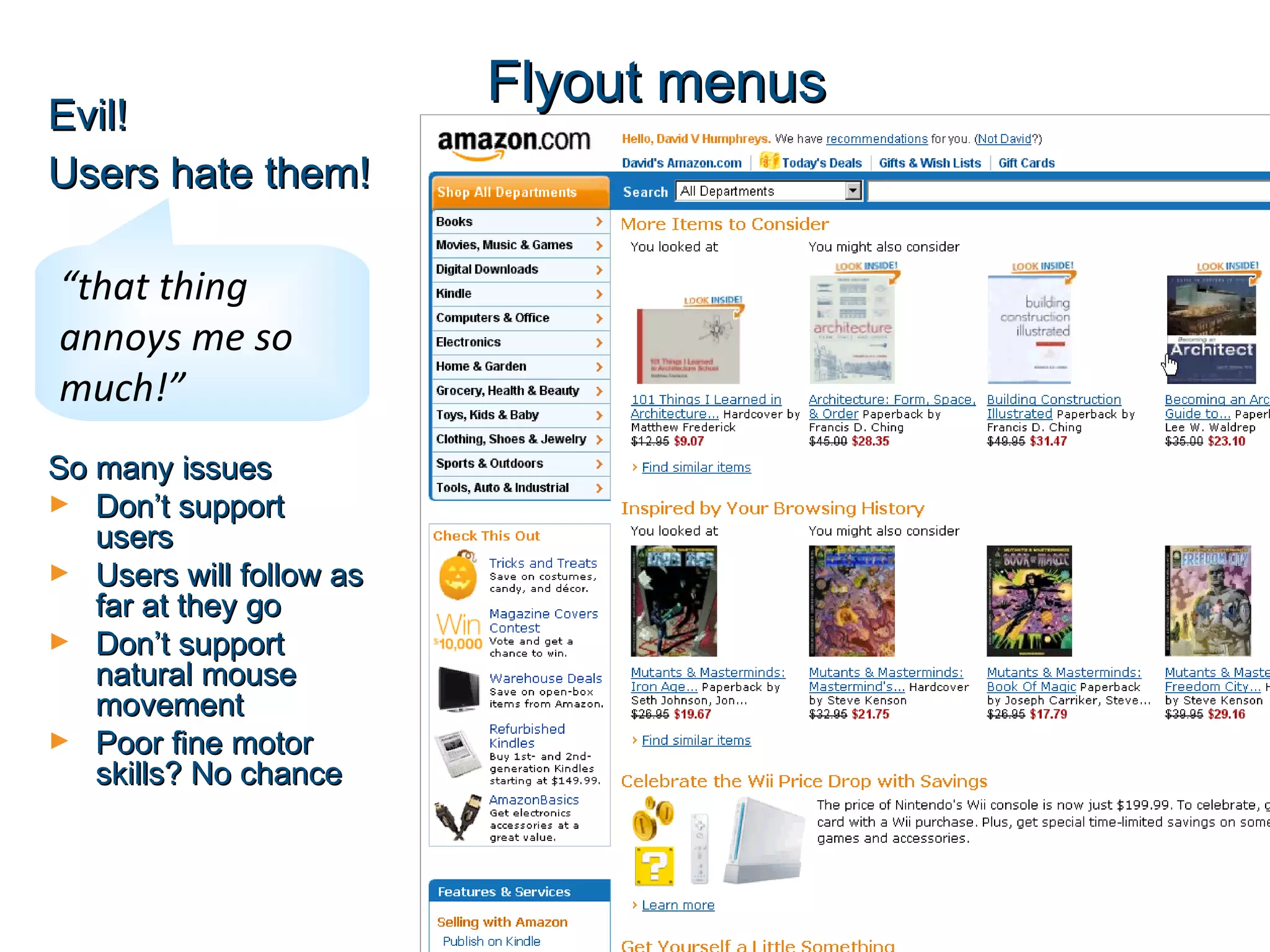
Flyout menus Evil! Users hate them! “ that thing annoys me so much!” So many issues Don’t support users Users will follow as far at they go Don’t support natural mouse movement Poor fine motor skills? No chance
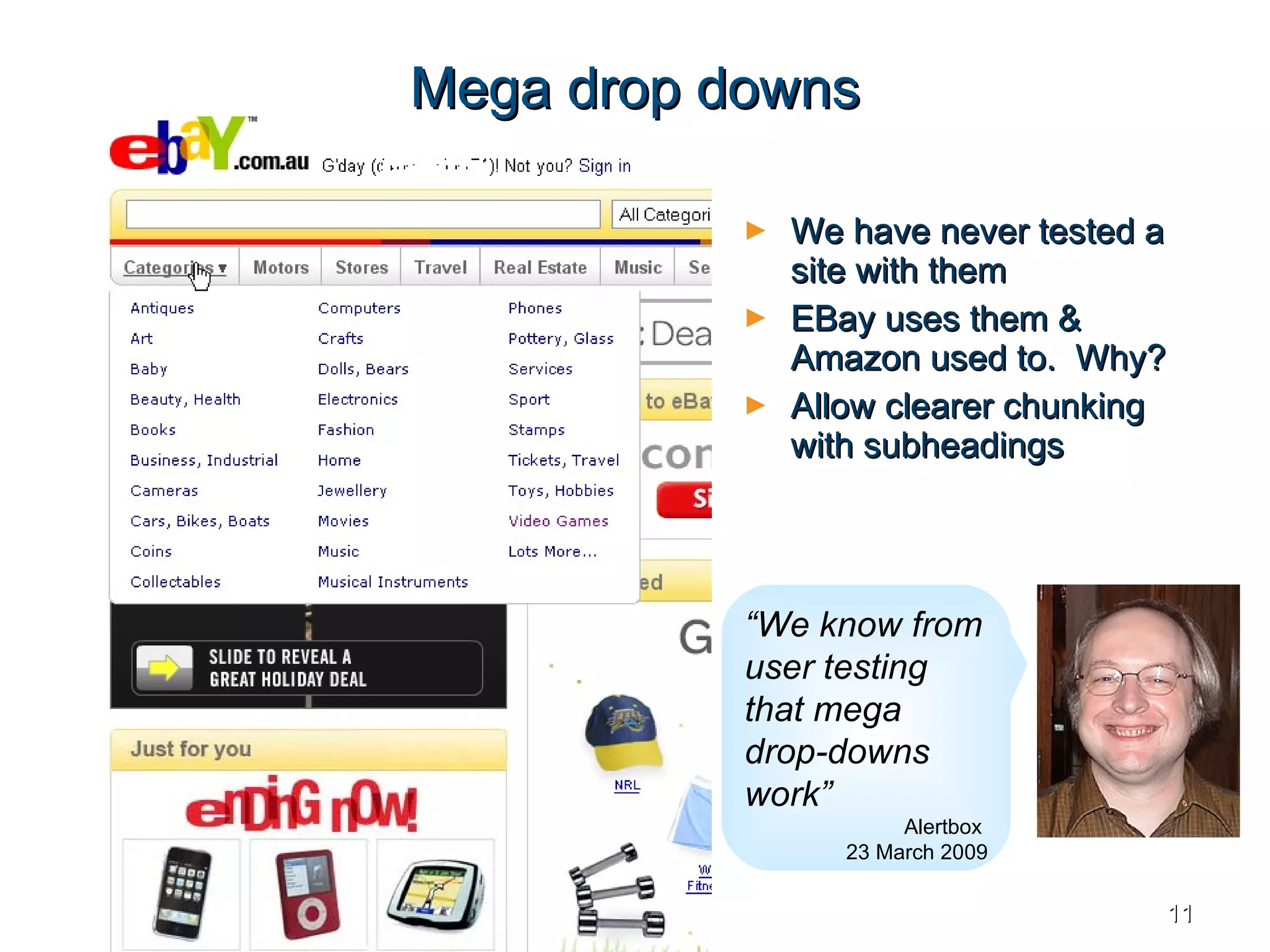
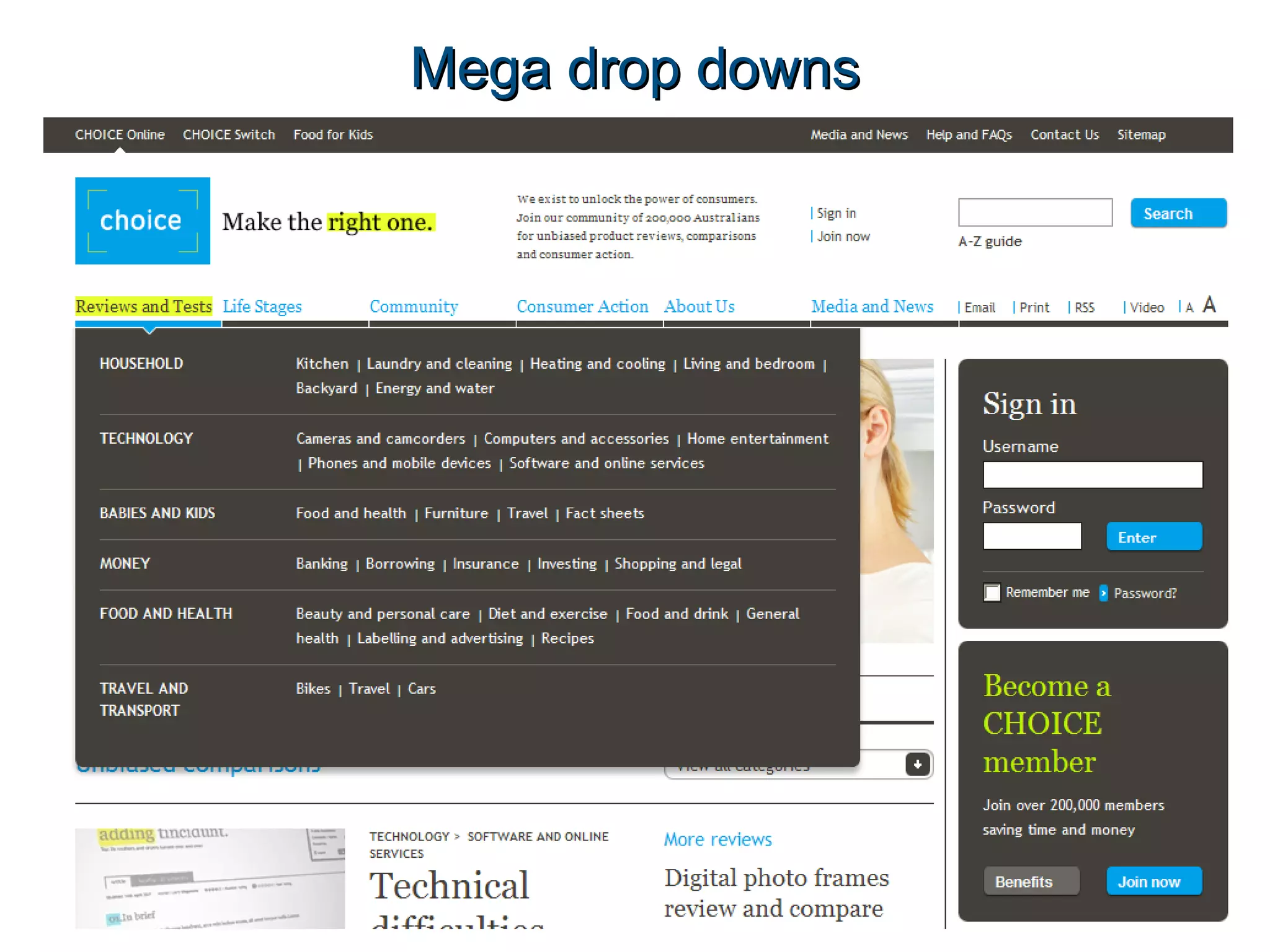
Mega drop downs We have never tested a site with them EBay uses them & Amazon used to.  Why? Allow clearer chunking with subheadings “ We know from user testing that mega drop-downs work”   Alertbox  23 March 2009
Mega drop downs
Mega drop downs
Aims of the research Meet our curiosity and provide evidence Resolve office arguments Which nav models: Do users  prefer ? Is the most  efficient  to use? Has the best  completion  rate? These became our test measures
Approach Worked with final year HCI students form University of Queensland 2 user groups using different user bases and website IAs QLD RSL (9 users) QUT Library (7 users)  Built ‘pure’ interfaces – ‘white sites’ The IA and the UI Fewer variables Tested 4 scenarios on each nav UI
Tool we recommended - Naview by Volkside
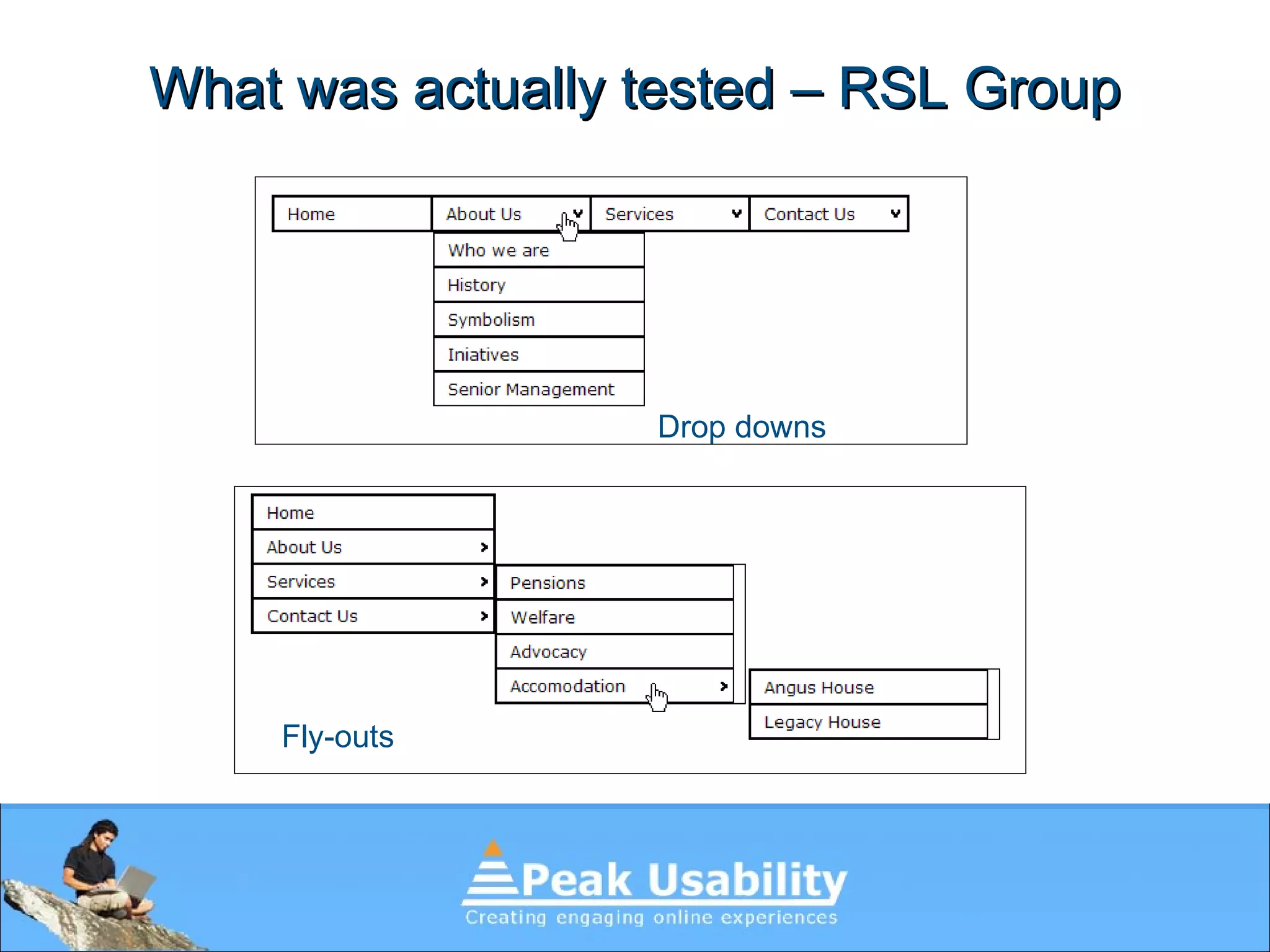
What was actually tested – RSL Group Drop downs Fly-outs
What was actually tested (RSL Group) Index pages “ Mega-menu” or contextual dropdowns
QUT Library prototypes for testing Drop downs Fly-outs
QUT Library prototypes for testing Index pages Mega drop down
Early results
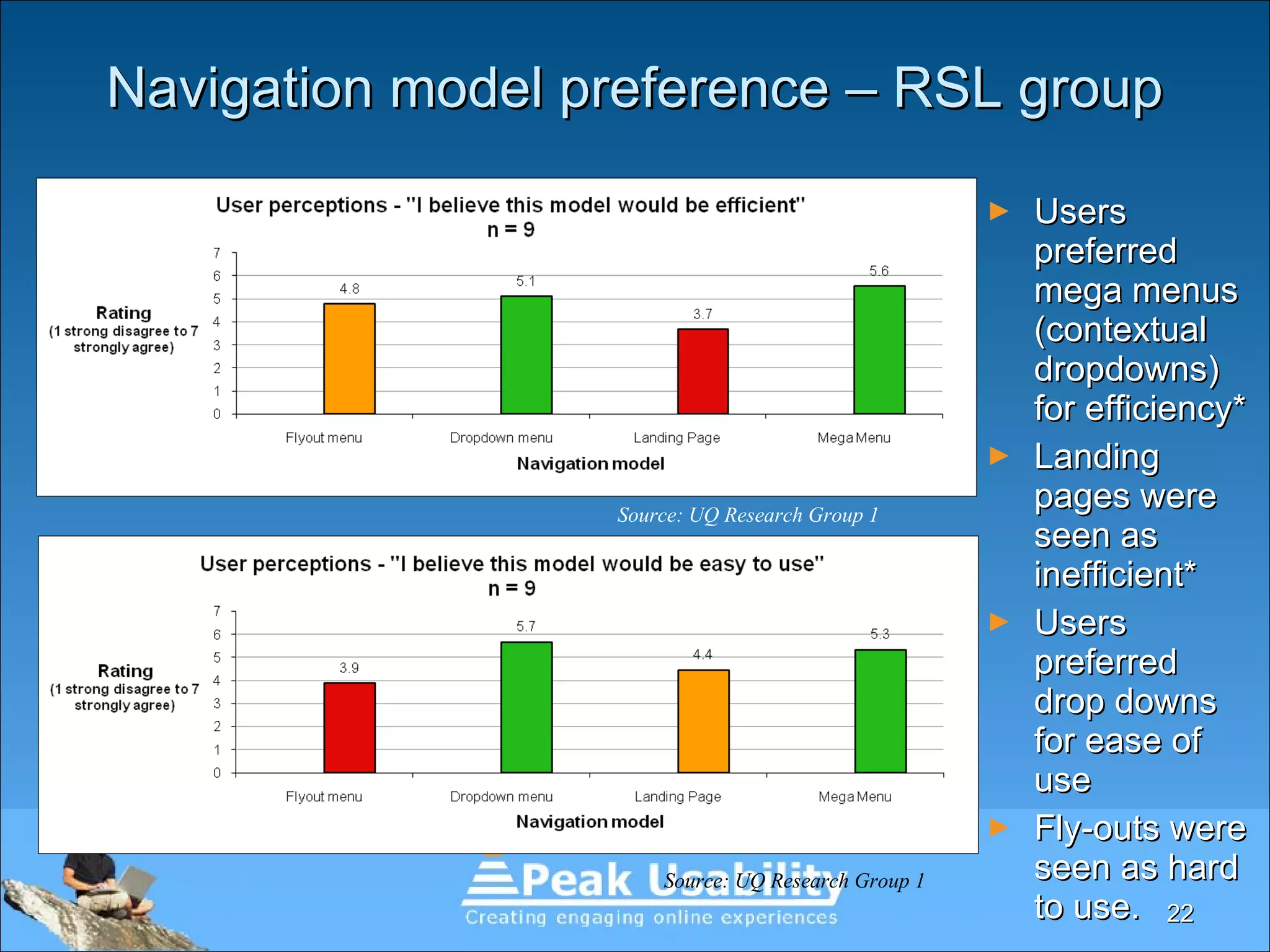
Navigation model preference – RSL group Users preferred mega menus (contextual dropdowns) for efficiency* Landing pages were seen as inefficient* Users preferred drop downs for ease of use Fly-outs were seen as hard to use. Source: UQ Research Group 1   Source: UQ Research Group 1
Single dropdowns & homepage landing pages were preferred The mega dropdown menu was least preferred Fly outs were better than expected Navigation model preference – QUT group Source: UQ Research Group 2
Efficiency (time) - RSL group Mega menus (contextual drop downs) were most efficient!* Split the difference between dropdowns & landing pages The fly-outs caused difficulty for this group Source: UQ Research Group 1   Source: UQ Research Group 1
Efficiency (time) – QUT Library The fly-outs performed well for this group What was different? Homepage style landing page also a strong  performer The two dropdowns were generally less efficient Source: UQ Research Group 2   Source: UQ Research Group 2
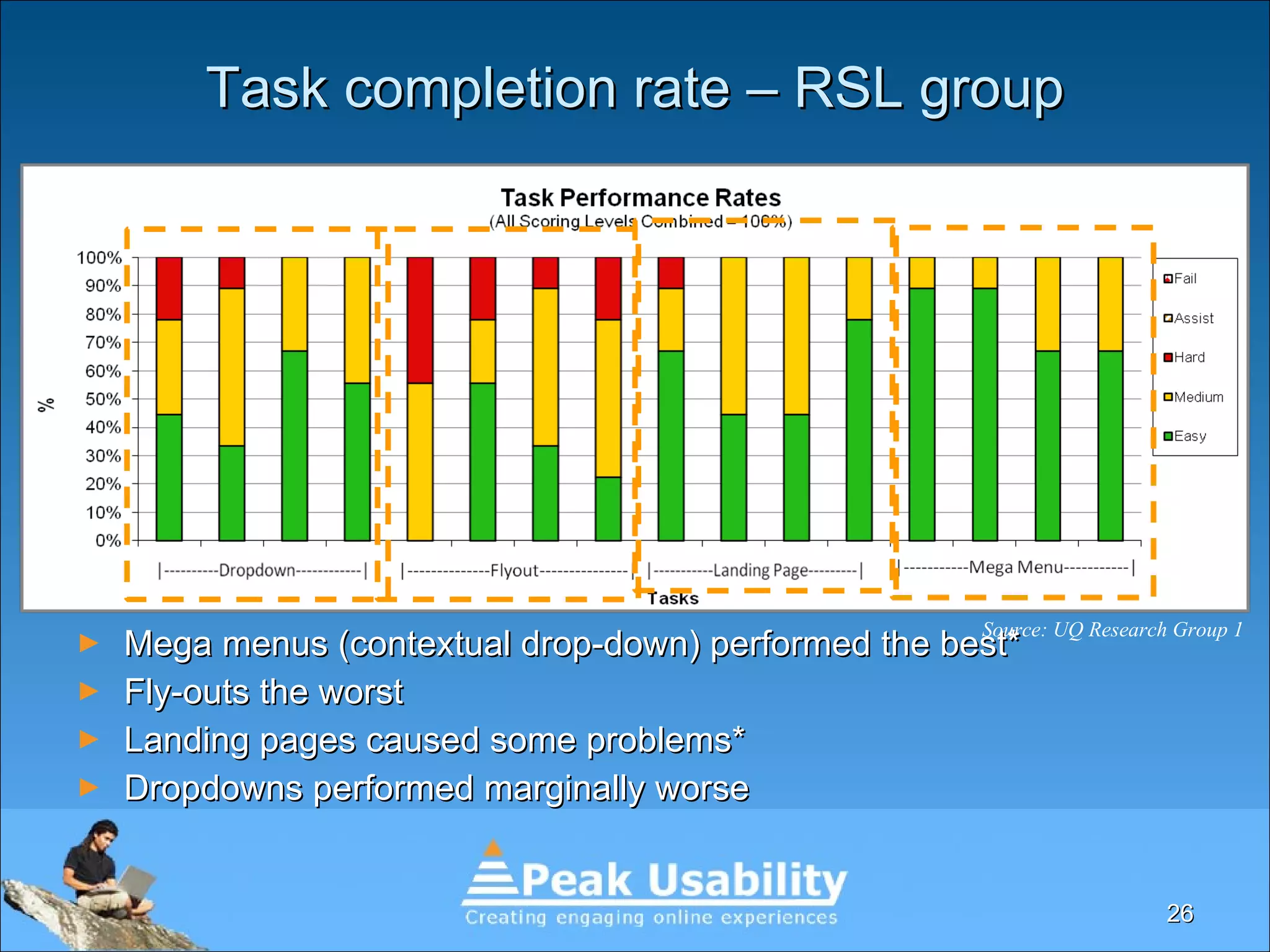
Task completion rate – RSL group Mega menus (contextual drop-down) performed the best* Fly-outs the worst Landing pages caused some problems* Dropdowns performed marginally worse Source: UQ Research Group 1
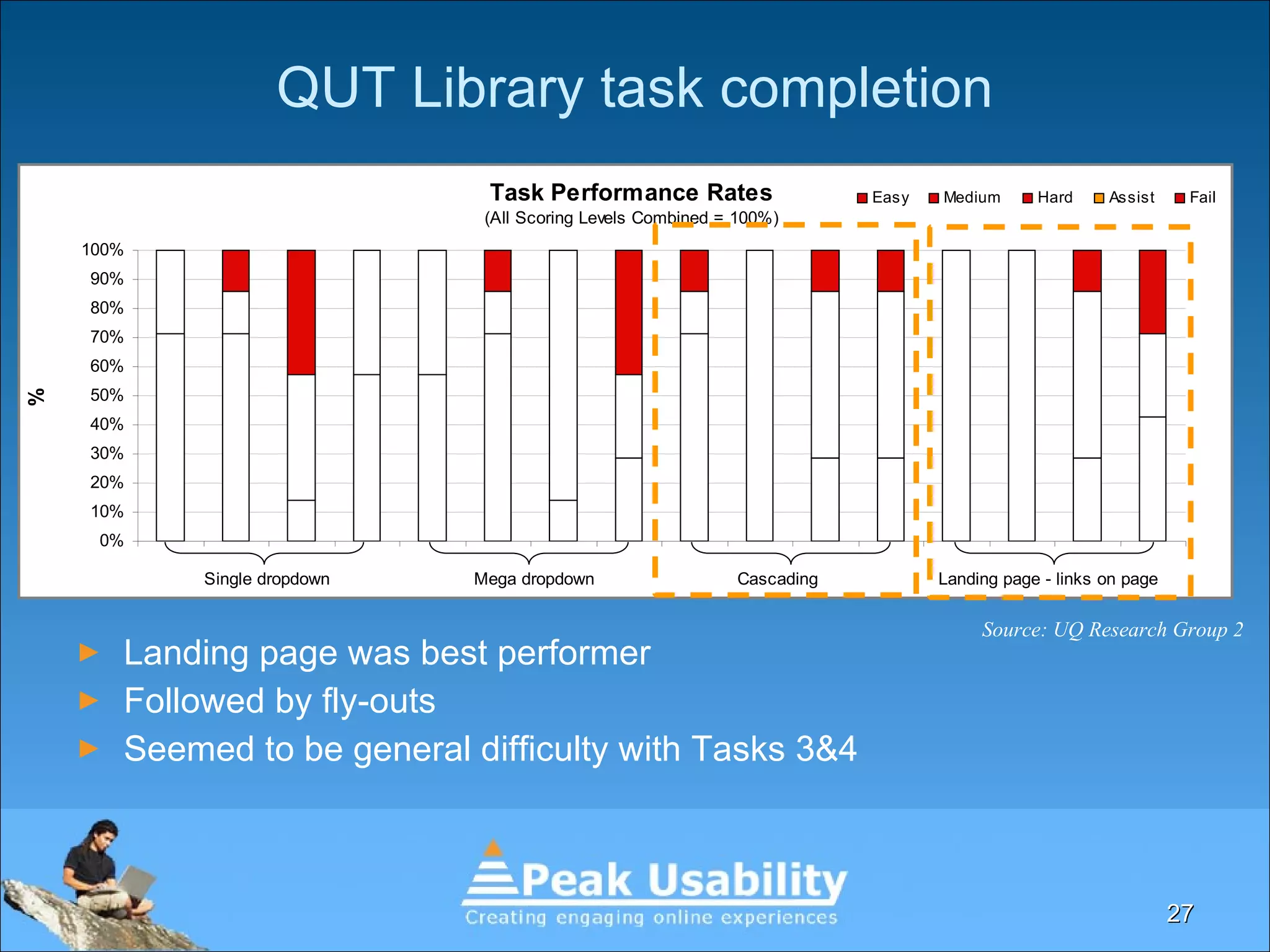
QUT Library task completion Landing page was best performer Followed by fly-outs Seemed to be general difficulty with Tasks 3&4 Source: UQ Research Group 2
Thanks to our Research Students Group 1 – RSL  Chin Zhun (Jerry) Ong Jason Antony Marles Chin Wai Ng Jared Robert Mallett Group 2 – QUT Library Daniel Jon Dawson Jacob Ryan Appleton Jenny Spiers
A few caveats We haven’t tested every nav model on the web Not statistically valid Not conclusive We have more to do! Raises more questions than it answers
Conclusions & Questions Refine further research - landing pages and dropdowns together Contextual drop downs are remarkably usable Should we stop using fly-outs? Can you have a good one? What about mega drop downs?   Was age a factor?
Which nav should I use on my site? It depends!
Thank you David Humphreys [email_address] @peakusability @davemonkey http:// www.volkside.com/go/ozia /

Navigation Models: Efficiency versus user preference

  • 1.
    Navigation models… …how people find stuff David Humphreys … user preference vs. efficiency.
  • 2.
    Who are we? Some of our clients
  • 3.
    About David &Peak Usability David Humphreys Senior Usability Consultant Peak Usability are Brisbane based Usability & UX services & training
  • 4.
    Our collective thoughtsOur team had pretty strong opinions about a lot of nav models… … but we had no solid test data based on navigation models alone
  • 5.
    The usual suspectsFly-out menus Dropdowns Index pages Mega-dropdowns Contextual dropdowns
  • 6.
    Index pages –What we like Supports user decision making – provides context
  • 7.
    Index pages –What we don’t like Too much text! Too much scrolling! Operational Procedures under Policies & Procedures for QAS and QFRS. 1st of 84 pages only Related information or form appears as a link here which just looks like another link. Related information or form appears as a link here which just looks like another link.
  • 8.
    Vertical drop downsGood for sites with frequent repeat users e.g. intranets Work well with index pages Needs a good IA & labels
  • 9.
    Variant – Contextualvertical drop downs Provides more context to support user @iiNet Looks good, particularly the menus/left nav, 10 points for putting phone numbers right there in the 'contact' menu. - @ben_h
  • 10.
    Flyout menus Evil!Users hate them! “ that thing annoys me so much!” So many issues Don’t support users Users will follow as far at they go Don’t support natural mouse movement Poor fine motor skills? No chance
  • 11.
    Mega drop downsWe have never tested a site with them EBay uses them & Amazon used to. Why? Allow clearer chunking with subheadings “ We know from user testing that mega drop-downs work” Alertbox 23 March 2009
  • 12.
  • 13.
  • 14.
    Aims of theresearch Meet our curiosity and provide evidence Resolve office arguments Which nav models: Do users prefer ? Is the most efficient to use? Has the best completion rate? These became our test measures
  • 15.
    Approach Worked withfinal year HCI students form University of Queensland 2 user groups using different user bases and website IAs QLD RSL (9 users) QUT Library (7 users) Built ‘pure’ interfaces – ‘white sites’ The IA and the UI Fewer variables Tested 4 scenarios on each nav UI
  • 16.
    Tool we recommended- Naview by Volkside
  • 17.
    What was actuallytested – RSL Group Drop downs Fly-outs
  • 18.
    What was actuallytested (RSL Group) Index pages “ Mega-menu” or contextual dropdowns
  • 19.
    QUT Library prototypesfor testing Drop downs Fly-outs
  • 20.
    QUT Library prototypesfor testing Index pages Mega drop down
  • 21.
  • 22.
    Navigation model preference– RSL group Users preferred mega menus (contextual dropdowns) for efficiency* Landing pages were seen as inefficient* Users preferred drop downs for ease of use Fly-outs were seen as hard to use. Source: UQ Research Group 1 Source: UQ Research Group 1
  • 23.
    Single dropdowns &homepage landing pages were preferred The mega dropdown menu was least preferred Fly outs were better than expected Navigation model preference – QUT group Source: UQ Research Group 2
  • 24.
    Efficiency (time) -RSL group Mega menus (contextual drop downs) were most efficient!* Split the difference between dropdowns & landing pages The fly-outs caused difficulty for this group Source: UQ Research Group 1 Source: UQ Research Group 1
  • 25.
    Efficiency (time) –QUT Library The fly-outs performed well for this group What was different? Homepage style landing page also a strong performer The two dropdowns were generally less efficient Source: UQ Research Group 2 Source: UQ Research Group 2
  • 26.
    Task completion rate– RSL group Mega menus (contextual drop-down) performed the best* Fly-outs the worst Landing pages caused some problems* Dropdowns performed marginally worse Source: UQ Research Group 1
  • 27.
    QUT Library taskcompletion Landing page was best performer Followed by fly-outs Seemed to be general difficulty with Tasks 3&4 Source: UQ Research Group 2
  • 28.
    Thanks to ourResearch Students Group 1 – RSL Chin Zhun (Jerry) Ong Jason Antony Marles Chin Wai Ng Jared Robert Mallett Group 2 – QUT Library Daniel Jon Dawson Jacob Ryan Appleton Jenny Spiers
  • 29.
    A few caveatsWe haven’t tested every nav model on the web Not statistically valid Not conclusive We have more to do! Raises more questions than it answers
  • 30.
    Conclusions & QuestionsRefine further research - landing pages and dropdowns together Contextual drop downs are remarkably usable Should we stop using fly-outs? Can you have a good one? What about mega drop downs? Was age a factor?
  • 31.
    Which nav shouldI use on my site? It depends!
  • 32.
    Thank you DavidHumphreys [email_address] @peakusability @davemonkey http:// www.volkside.com/go/ozia /

Editor's Notes

  • #2 Start with a definition What do we mean by nav models? Start – not talking about the IA (related) We are talking about how that IA is presented to the user How the user interacts with it to travel through the IA to locate the information they’re after
  • #5 We had pretty strong opinions about a lot of nav models 100s of usability test sessions between us Over the last 8-10 years A lot of that experience crammed into the last few Seen a lot of navigation models in action Good and bad We’ve noticed a few things about certain nav models Had no dedicated data All of our test sites – too many variables So we took four navigation models. 3 we’d seen a lot of and 1 we were curious about (+ 1 surprise inclusion!) Partnered with UQ who supplied some final year HCI students Start with those observations of the four models we evaluated What did we think about them based on our experience?
  • #7 Index pages What are they? Features Links Often supported by contextual information Provide that ‘scent of information’ Can include deep links – well grouped under headings Strengths Good for first time visitors – get their bearings Good for big complex websites (e.g. government – big content, diverse content sites Support other types of navigation well A very obvious manifestation of the IA Users don’t really mind clicking as long as they have a clear path to get where they need to go Breadcrumbs are a big help as well
  • #8 What doesn’t work? The content needs to be well chunked (ACU) Too much text can be as bad as too little (DES portal) Not too long – too much scrolling (DES example) 84 pages in print preview
  • #9 Widely used Almost a default Work well & users like them Especially for frequent use sites e.g. internets & extranets We like them if - tested IA & no ambiguous labels - Issues - Not a lot of support for users
  • #10 Widely used Almost a default Work well & users like them Especially for frequent use sites e.g. internets & extranets We like then if - tested IA & no ambiguous labels - Issues - Not a lot of support for users
  • #11 Tell the Fireman story
  • #15 Determine key target users - current and potential user groups Speak with business/content experts Speak with client facing staff Look at available customer data if available e.g. customer databases Look at any marketing reports or strategies
  • #23 * Caveat # 1 – not true megamenus – more contextual dropdowns * Caveat # 2 – landing page did not include in-page links on the home page which boss reckons completely invalidates the results.
  • #25 * Caveat – not true megamenu – contextual dropdowns
  • #27 Caveat
  • #30 We haven’t tested every nav model on the web e.g. overlooked horizontal tree/accordion style navs Pretty much correlates with other research conducted (except for megamenus and contextual dropdowns)
  • #31 Landing pages and dropdowns working together and apart in testing Testing with different types of fly-outs