2017

P H P W O R L D
MySQL 8.0:
PreviewWhat is coming?
Gabriela D. Ferrara

@gabidavila
http://gabriela.io
What We Will Cover
• Character Set
• Data Dictionary & Atomic DDL
• InnoDB Performance
• CTE - Common Table Expressions
• Window Functions
• JSON Improvements
• Roles
Quick Disclaimer:
8.0.3 RC1
I Am Gabi!
• over 30,000 Lego bricks
• Data Engineer / Software Engineer focused on Data
• Blogger wannabe at http://gabriela.io
• Extroverted introvert
• yes, that is a thing!
What Happened
to 6.0 and 7.0?
Character Set
New Default Charset
• Default:

5.7: latin1

8.0: utf8mb4
• Allows
• ➕ Mathematical Equations 𝑒=𝑚·𝑐²
• 😁🙄$
• & more SMP (Supplementary Multilingual Plane) Characters
New Default Collation
• utf8mb4_0900_ai_ci
• UTF-8 9.0 support
• Accent Insensitive
• Case Insensitive
• No more 🍣 = 🍺 bug
• Caused by utf8mb4_general_ci or utf8mb4_unicode_ci
More information on how collations behave here.
Data Dictionary &
Atomic DDL
Data Dictionary
• No more meta-data on MyIsam tables into the mysql schema
• No more meta-data on files: .FRM, .PAR, .TRG, .TRN
• System tables still exists, but in InnoDB tables
• information_schema:
• implemented as views over Data Dictionary
• uses the optimizer to read the meta-data from the Data Dictionary
• up to 100x faster
Atomic DDL
• Either all DDL works or no change is made
• DDL Executed as an internal InnoDB Transactions
• No more crashes when executing DDL (DROP TABLES, TRUNCATE TABLE)
InnoDB
Performance
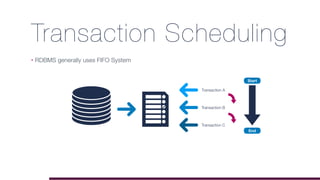
Transaction Scheduling
• RDBMS generally uses FIFO System
Transaction A
Transaction B
Transaction C
Start
End
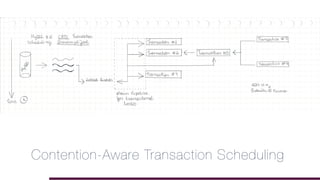
CATS
First Database in the
World To Implement
Contention-Aware Transaction Scheduling
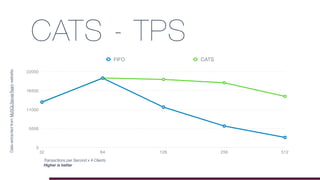
CATS - TPS
0
5500
11000
16500
22000
32 64 128 256 512
FIFO CATS
DataextractedfromMySQLServerTeamwebsite.
Transactions per Second x # Clients
Higher is better
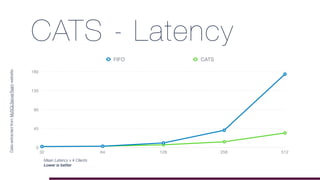
CATS - Latency
0
45
90
135
180
32 64 128 256 512
FIFO CATS
Mean Latency x # Clients
Lower is better
DataextractedfromMySQLServerTeamwebsite.
Indexes
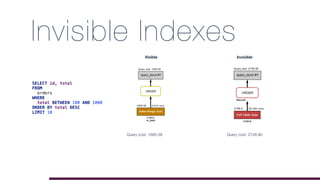
Invisible Indexes
• Not used by the optimizer
• Visible by default, to create an invisible index:
• Toggle visibility
ALTER TABLE orders ALTER INDEX ix_total INVISIBLE;
ALTER TABLE orders ALTER INDEX ix_total VISIBLE;
ALTER TABLE orders ADD INDEX ix_total (total) INVISIBLE;
Invisible Indexes
SELECT id, total
FROM
orders
WHERE
total BETWEEN 100 AND 1000
ORDER BY total DESC
LIMIT 10
Visible
Query cost: 1885.58
Invisible
Query cost: 2158.90
Descending Indexes
• Up to 5.7:
An index_col_name specification can end with ASC or DESC. These keywords are
permitted for future extensions for specifying ascending or descending index value
storage. Currently, they are parsed but ignored; index values are always stored in
ascending order.
MySQL 8.0 HAS IT!
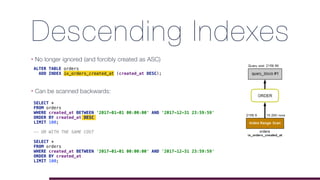
Descending Indexes
• No longer ignored (and forcibly created as ASC)

ALTER TABLE orders
ADD INDEX ix_orders_created_at (created_at DESC);
Descending Indexes
• No longer ignored (and forcibly created as ASC)
• Can be scanned backwards:

ALTER TABLE orders
ADD INDEX ix_orders_created_at (created_at DESC);
SELECT *
FROM orders
WHERE created_at BETWEEN '2017-01-01 00:00:00' AND '2017-12-31 23:59:59'
ORDER BY created_at DESC
LIMIT 100;
-- OR WITH THE SAME COST
SELECT *
FROM orders
WHERE created_at BETWEEN '2017-01-01 00:00:00' AND '2017-12-31 23:59:59'
ORDER BY created_at
LIMIT 100;
Descending Indexes
• No longer ignored (and forcibly created as ASC)
• Can be scanned backwards:

ALTER TABLE orders
ADD INDEX ix_orders_created_at (created_at DESC);
SELECT *
FROM orders
WHERE created_at BETWEEN '2017-01-01 00:00:00' AND '2017-12-31 23:59:59'
ORDER BY created_at DESC
LIMIT 100;
-- OR WITH THE SAME COST
SELECT *
FROM orders
WHERE created_at BETWEEN '2017-01-01 00:00:00' AND '2017-12-31 23:59:59'
ORDER BY created_at
LIMIT 100;
mysql> EXPLAIN SELECT * FROM orders WHERE created_at BETWEEN '2017-01-01 00:00:00' AND '2017-12-31 23:59:59' ORDER BY created_at
DESC LIMIT 100 G
*************************** 1. row ***************************
id: 1
select_type: SIMPLE
table: orders
partitions: NULL
type: range
possible_keys: ix_orders_created_at
key: ix_orders_created_at
key_len: 4
ref: NULL
rows: 10201
filtered: 100.00
Extra: Using index condition
1 row in set, 1 warning (0.00 sec)
mysql> EXPLAIN SELECT * FROM orders WHERE created_at BETWEEN '2017-01-01 00:00:00' AND '2017-12-31 23:59:59' ORDER BY created_at
LIMIT 100 G
*************************** 1. row ***************************
id: 1
select_type: SIMPLE
table: orders
partitions: NULL
type: range
possible_keys: ix_orders_created_at
key: ix_orders_created_at
key_len: 4
ref: NULL
rows: 10201
filtered: 100.00
Extra: Using index condition; Backward index scan
1 row in set, 1 warning (0.00 sec)
More information about EXPLAIN
Exercise
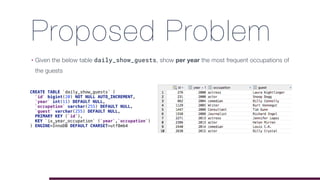
Proposed Problem
• Given the below table daily_show_guests, show per year the most frequent occupations of
the guests
CREATE TABLE `daily_show_guests` (
`id` bigint(20) NOT NULL AUTO_INCREMENT,
`year` int(11) DEFAULT NULL,
`occupation` varchar(255) DEFAULT NULL,
`guest` varchar(255) DEFAULT NULL,
PRIMARY KEY (`id`),
KEY `ix_year_occupation` (`year`,`occupation`)
) ENGINE=InnoDB DEFAULT CHARSET=utf8mb4
Step 1: Count Appearances
[42000][1055] Expression #1 of SELECT list is not in GROUP BY clause
and contains nonaggregated column 'phpworld.daily_show_guests.id'
which is not functionally dependent on columns in GROUP BY clause;
this is incompatible with sql_mode=only_full_group_by
SELECT *, COUNT(*) AS appearances FROM daily_show_guests GROUP BY year, occupation;
More information about only_full_group_by
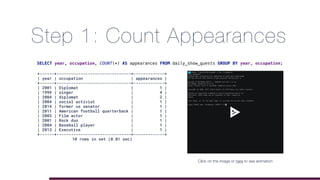
Step 1: Count Appearances
SELECT year, occupation, COUNT(*) AS appearances FROM daily_show_guests GROUP BY year, occupation;
+------+-------------------------------+-------------+
| year | occupation | appearances |
+------+-------------------------------+-------------+
| 2001 | Diplomat | 1 |
| 1999 | singer | 4 |
| 2004 | diplomat | 2 |
| 2004 | social activist | 1 |
| 2014 | former us senator | 1 |
| 2011 | American football quarterback | 1 |
| 2003 | Film actor | 1 |
| 2001 | Rock duo | 1 |
| 2004 | Baseball player | 1 |
| 2013 | Executive | 1 |
+------+-------------------------------+-------------+
10 rows in set (0.01 sec)
Click on the image or here to see animation
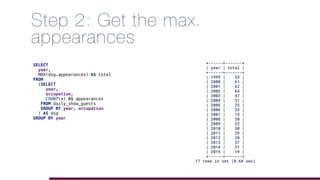
Step 2: Get the max.
appearances
SELECT
year,
MAX(dsg.appearances) AS total
FROM
(SELECT
year,
occupation,
COUNT(*) AS appearances
FROM daily_show_guests
GROUP BY year, occupation
) AS dsg
GROUP BY year
+------+-------+
| year | total |
+------+-------+
| 1999 | 53 |
| 2000 | 61 |
| 2001 | 62 |
| 2002 | 64 |
| 2003 | 47 |
| 2004 | 31 |
| 2005 | 25 |
| 2006 | 33 |
| 2007 | 15 |
| 2008 | 28 |
| 2009 | 22 |
| 2010 | 30 |
| 2011 | 29 |
| 2012 | 20 |
| 2013 | 37 |
| 2014 | 31 |
| 2015 | 19 |
+------+-------+
17 rows in set (0.60 sec)
Step 3: …
SELECT
b.year,
b.occupation,
c.total
FROM daily_show_guests b INNER JOIN
(SELECT
year,
MAX(dsg.appearances) AS total
FROM
(SELECT
year,
occupation,
COUNT(*) AS appearances
FROM daily_show_guests
GROUP BY year, occupation
) AS dsg
GROUP BY year) AS c ON c.year = b.year
GROUP BY year, occupation
HAVING c.total = COUNT(*);
+------+------------+-------+
| year | occupation | total |
+------+------------+-------+
| 1999 | actor | 53 |
| 2000 | actor | 61 |
| 2001 | actor | 62 |
| 2002 | actor | 64 |
| 2003 | actor | 47 |
| 2004 | actor | 31 |
| 2005 | actor | 25 |
| 2006 | actor | 33 |
| 2007 | actor | 15 |
| 2008 | journalist | 28 |
| 2009 | journalist | 22 |
| 2010 | actor | 30 |
| 2011 | actor | 29 |
| 2012 | actor | 20 |
| 2013 | actor | 37 |
| 2014 | actor | 31 |
| 2015 | actor | 19 |
+------+------------+-------+
17 rows in set (0.47 sec)
Step 3: WTH?
CTE- Common
Table Expressions
CTE
• Similar to CREATE [TEMPORARY] TABLE
• Doesn’t need CREATE privilege
• Can reference other CTEs
• Can be recursive
• Easier to read
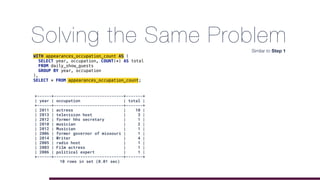
Solving the Same Problem
WITH appearances_occupation_count AS (
SELECT year, occupation, COUNT(*) AS total
FROM daily_show_guests
GROUP BY year, occupation
),
SELECT * FROM appearances_occupation_count;
+------+-----------------------------+-------+
| year | occupation | total |
+------+-----------------------------+-------+
| 2011 | actress | 10 |
| 2013 | television host | 3 |
| 2012 | former hhs secretary | 1 |
| 2010 | musician | 2 |
| 2012 | Musician | 1 |
| 2006 | former governor of missouri | 1 |
| 2014 | Writer | 4 |
| 2005 | radio host | 1 |
| 2003 | Film actress | 1 |
| 2006 | political expert | 1 |
+------+-----------------------------+-------+
10 rows in set (0.01 sec)
Similar to Step 1
Solving the Same Problem
WITH appearances_occupation_count AS (
SELECT year, occupation, COUNT(*) AS total
FROM daily_show_guests
GROUP BY year, occupation
),
years_count AS (
SELECT year, max(total) AS maximum
FROM appearances_occupation_count
GROUP BY year
)
SELECT * FROM years_count;
+------+---------+
| year | maximum |
+------+---------+
| 1999 | 53 |
| 2000 | 61 |
| 2001 | 62 |
| 2002 | 64 |
| 2003 | 47 |
+------+---------+
5 rows in set (0.01 sec)
Similar to Step 2
• References other CTE
Solving the Same Problem
WITH appearances_occupation_count AS (
SELECT year, occupation, COUNT(*) AS total
FROM daily_show_guests
GROUP BY year, occupation
),
years_count AS (
SELECT year, max(total) AS maximum
FROM appearances_occupation_count
GROUP BY year
)
SELECT aoc.*
FROM appearances_occupation_count aoc
INNER JOIN years_count yc
ON aoc.year = yc.year
AND yc.maximum = aoc.total;
+------+------------+-------+
| year | occupation | total |
+------+------------+-------+
| 1999 | actor | 53 |
| 2000 | actor | 61 |
| 2001 | actor | 62 |
| 2002 | actor | 64 |
| 2003 | actor | 47 |
| 2004 | actor | 31 |
| 2005 | actor | 25 |
| 2006 | actor | 33 |
| 2007 | actor | 15 |
| 2008 | journalist | 28 |
| 2009 | journalist | 22 |
| 2010 | actor | 30 |
| 2011 | actor | 29 |
| 2012 | actor | 20 |
| 2013 | actor | 37 |
| 2014 | actor | 31 |
| 2015 | actor | 19 |
+------+------------+-------+
17 rows in set (0.01 sec)
Similar to Step 3
Solving the Same Problem
WITH appearances_occupation_count AS (
SELECT year, occupation, COUNT(*) AS total
FROM daily_show_guests
GROUP BY year, occupation
),
years_count AS (
SELECT year, max(total) AS maximum
FROM appearances_occupation_count
GROUP BY year
)
SELECT aoc.*
FROM appearances_occupation_count aoc
INNER JOIN years_count yc
ON aoc.year = yc.year
AND yc.maximum = aoc.total;
+------+------------+-------+
| year | occupation | total |
+------+------------+-------+
| 1999 | actor | 53 |
| 2000 | actor | 61 |
| 2001 | actor | 62 |
| 2002 | actor | 64 |
| 2003 | actor | 47 |
| 2004 | actor | 31 |
| 2005 | actor | 25 |
| 2006 | actor | 33 |
| 2007 | actor | 15 |
| 2008 | journalist | 28 |
| 2009 | journalist | 22 |
| 2010 | actor | 30 |
| 2011 | actor | 29 |
| 2012 | actor | 20 |
| 2013 | actor | 37 |
| 2014 | actor | 31 |
| 2015 | actor | 19 |
+------+------------+-------+
17 rows in set (0.01 sec)
Similar to Step 3
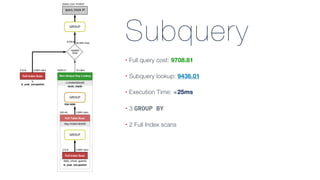
Subquery
• Full query cost: 9708.81
• Subquery lookup: 9436.01
• Execution Time: ≅25ms
• 3 GROUP BY
• 2 Full Index scans
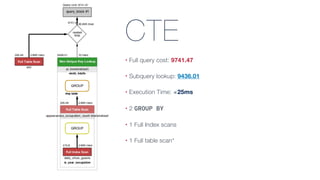
CTE
• Full query cost: 9741.47
• Subquery lookup: 9436.01
• Execution Time: ≅25ms
• 2 GROUP BY
• 1 Full Index scans
• 1 Full table scan*
Recursive CTE
• Base query comes first
• Second query comes after an UNION statement
• The stop condition should be on the recursive query part
Fibonacci
WITH RECURSIVE fibonacci(recursion_level, fibonacci_number, next_number)
AS (
# Base Case
SELECT 0 AS recursion_level,
0 AS fibonacci_number,
1 AS next_number
UNION ALL
# Recursion query
SELECT recursion_level + 1 AS recursion_level,
next_number AS fibonacci_number,
fibonacci_number + next_number AS next_number
FROM fibonacci
# Stopping condition
WHERE
recursion_level < 10
)
SELECT * FROM fibonacci;
+-----------------+------------------+-------------+
| recursion_level | fibonacci_number | next_number |
+-----------------+------------------+-------------+
| 0 | 0 | 1 |
| 1 | 1 | 1 |
| 2 | 1 | 2 |
| 3 | 2 | 3 |
| 4 | 3 | 5 |
| 5 | 5 | 8 |
| 6 | 8 | 13 |
| 7 | 13 | 21 |
| 8 | 21 | 34 |
| 9 | 34 | 55 |
| 10 | 55 | 89 |
+-----------------+------------------+-------------+
11 rows in set (0.00 sec)
Fibonacci
WITH RECURSIVE fibonacci(fibonacci_number, next_number)
AS (
# Base Condition
SELECT
0 AS fibonacci_number,
1 AS next_number
UNION ALL
# Recursion Query
SELECT
next_number AS fibonacci_number,
fibonacci_number + next_number AS next_number
FROM fibonacci
)
SELECT * FROM fibonacci LIMIT 10;
[22001][1690] Data truncation: BIGINT value is out of
range in '(`fibonacci`.`fibonacci_number` +
`fibonacci`.`next_number`)'
Details
Window
Functions
What They Do?
• Allows to analyze a row aggregations
• Can behave like a GROUP BY without changing the result
• Allows you to "peek" OVER a PARTITION of a window
Window Functions
• Examples:
• Enumerate rows - ROW_NUMBER()
• Show Aggregated sums - SUM()
• Rank results - RANK()
• Look at neighboring rows - LEAD(), LAG()
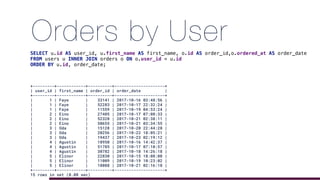
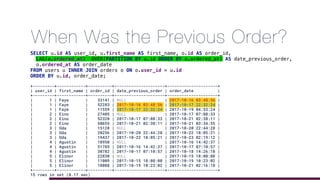
Orders by User
+---------+------------+----------+---------------------+
| user_id | first_name | order_id | order_date |
+---------+------------+----------+---------------------+
| 1 | Faye | 33141 | 2017-10-16 03:48:56 |
| 1 | Faye | 52283 | 2017-10-17 22:32:24 |
| 1 | Faye | 11559 | 2017-10-19 04:53:24 |
| 2 | Eino | 27405 | 2017-10-17 07:08:33 |
| 2 | Eino | 52328 | 2017-10-21 02:38:11 |
| 2 | Eino | 50655 | 2017-10-21 03:34:55 |
| 3 | Oda | 15128 | 2017-10-20 22:44:28 |
| 3 | Oda | 20256 | 2017-10-22 18:05:21 |
| 3 | Oda | 19437 | 2017-10-23 02:19:12 |
| 4 | Agustin | 18950 | 2017-10-16 14:42:37 |
| 4 | Agustin | 51785 | 2017-10-17 07:10:57 |
| 4 | Agustin | 30782 | 2017-10-18 14:26:18 |
| 5 | Elinor | 22830 | 2017-10-15 18:08:08 |
| 5 | Elinor | 11009 | 2017-10-19 10:23:02 |
| 5 | Elinor | 18088 | 2017-10-21 02:16:18 |
+---------+------------+----------+---------------------+
15 rows in set (0.08 sec)
SELECT u.id AS user_id, u.first_name AS first_name, o.id AS order_id,o.ordered_at AS order_date
FROM users u INNER JOIN orders o ON o.user_id = u.id
ORDER BY u.id, order_date;
+---------+------------+----------+---------------------+---------------------+
| user_id | first_name | order_id | date_previous_order | order_date |
+---------+------------+----------+---------------------+---------------------+
| 1 | Faye | 33141 | NULL | 2017-10-16 03:48:56 |
| 1 | Faye | 52283 | 2017-10-16 03:48:56 | 2017-10-17 22:32:24 |
| 1 | Faye | 11559 | 2017-10-17 22:32:24 | 2017-10-19 04:53:24 |
| 2 | Eino | 27405 | NULL | 2017-10-17 07:08:33 |
| 2 | Eino | 52328 | 2017-10-17 07:08:33 | 2017-10-21 02:38:11 |
| 2 | Eino | 50655 | 2017-10-21 02:38:11 | 2017-10-21 03:34:55 |
| 3 | Oda | 15128 | NULL | 2017-10-20 22:44:28 |
| 3 | Oda | 20256 | 2017-10-20 22:44:28 | 2017-10-22 18:05:21 |
| 3 | Oda | 19437 | 2017-10-22 18:05:21 | 2017-10-23 02:19:12 |
| 4 | Agustin | 18950 | NULL | 2017-10-16 14:42:37 |
| 4 | Agustin | 51785 | 2017-10-16 14:42:37 | 2017-10-17 07:10:57 |
| 4 | Agustin | 30782 | 2017-10-17 07:10:57 | 2017-10-18 14:26:18 |
| 5 | Elinor | 22830 | NULL | 2017-10-15 18:08:08 |
| 5 | Elinor | 11009 | 2017-10-15 18:08:08 | 2017-10-19 10:23:02 |
| 5 | Elinor | 18088 | 2017-10-19 10:23:02 | 2017-10-21 02:16:18 |
+---------+------------+----------+---------------------+---------------------+
15 rows in set (0.17 sec)
SELECT u.id AS user_id, u.first_name AS first_name, o.id AS order_id,
LAG(o.ordered_at) OVER(PARTITION BY u.id ORDER BY o.ordered_at) AS date_previous_order,
o.ordered_at AS order_date
FROM users u INNER JOIN orders o ON o.user_id = u.id
ORDER BY u.id, order_date;
When Was the Previous Order?
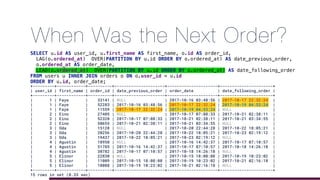
+---------+------------+----------+---------------------+---------------------+----------------------+
| user_id | first_name | order_id | date_previous_order | order_date | date_following_order |
+---------+------------+----------+---------------------+---------------------+----------------------+
| 1 | Faye | 33141 | NULL | 2017-10-16 03:48:56 | 2017-10-17 22:32:24 |
| 1 | Faye | 52283 | 2017-10-16 03:48:56 | 2017-10-17 22:32:24 | 2017-10-19 04:53:24 |
| 1 | Faye | 11559 | 2017-10-17 22:32:24 | 2017-10-19 04:53:24 | NULL |
| 2 | Eino | 27405 | NULL | 2017-10-17 07:08:33 | 2017-10-21 02:38:11 |
| 2 | Eino | 52328 | 2017-10-17 07:08:33 | 2017-10-21 02:38:11 | 2017-10-21 03:34:55 |
| 2 | Eino | 50655 | 2017-10-21 02:38:11 | 2017-10-21 03:34:55 | NULL |
| 3 | Oda | 15128 | NULL | 2017-10-20 22:44:28 | 2017-10-22 18:05:21 |
| 3 | Oda | 20256 | 2017-10-20 22:44:28 | 2017-10-22 18:05:21 | 2017-10-23 02:19:12 |
| 3 | Oda | 19437 | 2017-10-22 18:05:21 | 2017-10-23 02:19:12 | NULL |
| 4 | Agustin | 18950 | NULL | 2017-10-16 14:42:37 | 2017-10-17 07:10:57 |
| 4 | Agustin | 51785 | 2017-10-16 14:42:37 | 2017-10-17 07:10:57 | 2017-10-18 14:26:18 |
| 4 | Agustin | 30782 | 2017-10-17 07:10:57 | 2017-10-18 14:26:18 | NULL |
| 5 | Elinor | 22830 | NULL | 2017-10-15 18:08:08 | 2017-10-19 10:23:02 |
| 5 | Elinor | 11009 | 2017-10-15 18:08:08 | 2017-10-19 10:23:02 | 2017-10-21 02:16:18 |
| 5 | Elinor | 18088 | 2017-10-19 10:23:02 | 2017-10-21 02:16:18 | NULL |
+---------+------------+----------+---------------------+---------------------+----------------------+
15 rows in set (0.33 sec)
SELECT u.id AS user_id, u.first_name AS first_name, o.id AS order_id,
LAG(o.ordered_at) OVER(PARTITION BY u.id ORDER BY o.ordered_at) AS date_previous_order,
o.ordered_at AS order_date,
LEAD(o.ordered_at) OVER(PARTITION BY u.id ORDER BY o.ordered_at) AS date_following_order
FROM users u INNER JOIN orders o ON o.user_id = u.id
ORDER BY u.id, order_date;
When Was the Next Order?
Is It Possible To Improve?
SELECT
u.id AS user_id,
u.first_name AS first_name,
o.id AS order_id,
LAG(o.ordered_at) OVER(PARTITION BY u.id ORDER BY o.ordered_at) AS date_previous_order,
o.ordered_at AS order_date,
LEAD(o.ordered_at) OVER(PARTITION BY u.id ORDER BY o.ordered_at) AS date_following_order
FROM users u INNER JOIN orders o ON o.user_id = u.id
ORDER BY u.id, order_date;
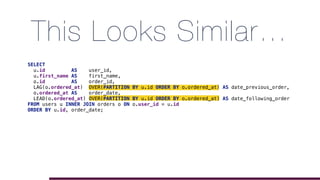
This Looks Similar…
SELECT
u.id AS user_id,
u.first_name AS first_name,
o.id AS order_id,
LAG(o.ordered_at) OVER(PARTITION BY u.id ORDER BY o.ordered_at) AS date_previous_order,
o.ordered_at AS order_date,
LEAD(o.ordered_at) OVER(PARTITION BY u.id ORDER BY o.ordered_at) AS date_following_order
FROM users u INNER JOIN orders o ON o.user_id = u.id
ORDER BY u.id, order_date;
Named Windows!
SELECT
u.id AS user_id,
u.first_name AS first_name,
o.id AS order_id,
LAG(o.ordered_at) OVER(dates) AS date_previous_order,
o.ordered_at AS order_date,
LEAD(o.ordered_at) OVER(dates) AS date_following_order
FROM users u INNER JOIN orders o ON o.user_id = u.id
WINDOW dates AS ( PARTITION BY u.id ORDER BY o.ordered_at)
ORDER BY u.id, order_date;
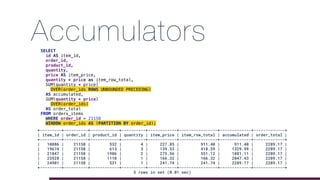
AccumulatorsSELECT
id AS item_id,
order_id,
product_id,
quantity,
price AS item_price,
quantity * price as item_row_total,
SUM(quantity * price)
OVER(order_ids ROWS UNBOUNDED PRECEDING)
AS accumulated,
SUM(quantity * price)
OVER(order_ids)
AS order_total
FROM orders_items
WHERE order_id = 21158
WINDOW order_ids AS (PARTITION BY order_id);
+---------+----------+------------+----------+------------+----------------+-------------+-------------+
| item_id | order_id | product_id | quantity | item_price | item_row_total | accumulated | order_total |
+---------+----------+------------+----------+------------+----------------+-------------+-------------+
| 10886 | 21158 | 532 | 4 | 227.85 | 911.40 | 911.40 | 2289.17 |
| 19674 | 21158 | 613 | 3 | 139.53 | 418.59 | 1329.99 | 2289.17 |
| 21847 | 21158 | 1986 | 2 | 275.56 | 551.12 | 1881.11 | 2289.17 |
| 23528 | 21158 | 1110 | 1 | 166.32 | 166.32 | 2047.43 | 2289.17 |
| 24901 | 21158 | 531 | 1 | 241.74 | 241.74 | 2289.17 | 2289.17 |
+---------+----------+------------+----------+------------+----------------+-------------+-------------+
5 rows in set (0.01 sec)
JSON
5.7: First Duplicate Wins
• In 5.7 the first definition is stored
SELECT JSON_OBJECT('clients', 32, 'options', '[active, inactive]',
'clients', 64, 'clients', 128) AS result;
+---------------------------------------------------+
| result |
+---------------------------------------------------+
| {"clients": 32 , "options": "[active, inactive]"} |
+---------------------------------------------------+
1 row in set (0.00 sec)
8.0: Last Duplicate Wins
• In 8.0 the last definition is stored
SELECT JSON_OBJECT('clients', 32, 'options', '[active, inactive]',
'clients', 64, 'clients', 128) AS result;
+---------------------------------------------------+
| result |
+---------------------------------------------------+
| {"clients": 128, "options": "[active, inactive]"} |
+---------------------------------------------------+
1 row in set (0.00 sec)
Partial in-place Update
• Possible if:
• uses JSON_SET, JSON_REPLACE or JSON_REMOVE functions
• no new elements are added to the object or array
• new values take up the same space as the previous element
• target and origin are the same column
UPDATE users SET extra_information = JSON_SET(twitter_api_response, '$.followers', 100);
UPDATE users SET twitter_api_response = JSON_SET(twitter_api_response, '$.followers', 100);in-place
new attribution
Merge
• JSON_MERGE is deprecated
• replaced by JSON_MERGE_PRESERVE
• Added JSON_MERGE_PATCH
• implements the RFC 7396 from IETF
Preserve & Patch
SELECT PRESERVE PATCH
('[1, 2]', '[true, false]') [1, 2, true, false] [true, false]
('{"name": "x"}', '{"id": 47}') {"id": 47, "name": "x"} {"id": 47, "name": "x"}
('1', 'true') [1, true] true
('[1, 2]', '{"id": 47}') [1, 2, {"id": 47}] {"id": 47}
('{"a": 1, "b": 2}', '{"a": 3, "c": 4}') {"a": [1, 3], "b": 2, "c": 4} {"a": 3, "b": 2, "c": 4}
('{"a": 1, "b":2}','{"a": 3, "c":4}',
'{"a": 5, "d":6}')
{"a": [1, 3, 5], "b": 2, "c": 4, "d": 6} {"a": 5, "b": 2, "c": 4, "d": 6}
Examples taken from the MySQL 8.0 documentation.
Roles
Roles
• Can be created or dropped
CREATE ROLE 'admin';
CREATE ROLE 'dba', 'developer', 'readonly';
Roles - Grants
• Can receive privileges
-- Grants access to all databases and tables to the role "dba"
GRANT ALL ON *.* TO 'dba';
-- Grants access to the database "store" to the role "readonly"
GRANT SELECT ON store.* TO 'readonly';
-- Grants access to developers
GRANT ALTER, DELETE, INDEX, INSERT, SELECT, UPDATE, CREATE VIEW,
SHOW VIEW, TRIGGER, CREATE TEMPORARY TABLES ON store.* TO 'developer';
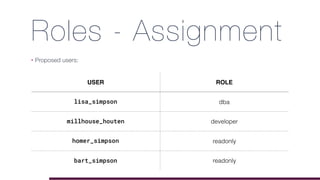
Roles - Assignment
• Proposed users:
USER ROLE
lisa_simpson dba
millhouse_houten developer
homer_simpson readonly
bart_simpson readonly
Create Users & Assign Roles
• Execute:
For more detailed information about Roles in MySQL 8.0 see this post.
CREATE USER 'lisa_simpson'@'%' IDENTIFIED BY '...'
DEFAULT ROLE dba;
CREATE USER 'millhouse_houten'@'localhost' IDENTIFIED BY '...'
DEFAULT ROLE developer;
CREATE USER 'homer_simpson'@'localhost' IDENTIFIED BY '...'
DEFAULT ROLE readonly;
CREATE USER 'bart_simpson'@'localhost' IDENTIFIED BY '...'
DEFAULT ROLE readonly;
Roles - Notes
• It's possible to set up mandatory_roles in the MySQL config file:
• Or set mandatory_roles at runtime:

• It’s possible to revoke a role for a user:

• Default role for root is NONE (SELECT CURRENT_ROLE())
[mysqld]
mandatory_roles='developer,readonly@localhost,dba@%'
SET PERSIST mandatory_roles = 'developer,readonly@localhost,dba@%';
REVOKE readonly FROM 'bart_simpson'@'localhost';
References
• http://www.mysqlserverteam.com
• http://dev.mysql.com/doc/refman/8.0/en
68
2017

P H P W O R L D
Thank You
• @gabidavila on Twitter
• http://gabriela.io
• Please leave your feedback on joind.in: https://joind.in/talk/0e88f
69
2017

P H P W O R L D

MySQL 8.0 Preview: What Is Coming?

  • 1.
    2017 P H PW O R L D MySQL 8.0: PreviewWhat is coming? Gabriela D. Ferrara
 @gabidavila http://gabriela.io
  • 2.
    What We WillCover • Character Set • Data Dictionary & Atomic DDL • InnoDB Performance • CTE - Common Table Expressions • Window Functions • JSON Improvements • Roles
  • 3.
  • 4.
    I Am Gabi! •over 30,000 Lego bricks • Data Engineer / Software Engineer focused on Data • Blogger wannabe at http://gabriela.io • Extroverted introvert • yes, that is a thing!
  • 5.
  • 6.
  • 7.
    New Default Charset •Default:
 5.7: latin1
 8.0: utf8mb4 • Allows • ➕ Mathematical Equations 𝑒=𝑚·𝑐² • 😁🙄$ • & more SMP (Supplementary Multilingual Plane) Characters
  • 8.
    New Default Collation •utf8mb4_0900_ai_ci • UTF-8 9.0 support • Accent Insensitive • Case Insensitive • No more 🍣 = 🍺 bug • Caused by utf8mb4_general_ci or utf8mb4_unicode_ci More information on how collations behave here.
  • 9.
  • 10.
    Data Dictionary • Nomore meta-data on MyIsam tables into the mysql schema • No more meta-data on files: .FRM, .PAR, .TRG, .TRN • System tables still exists, but in InnoDB tables • information_schema: • implemented as views over Data Dictionary • uses the optimizer to read the meta-data from the Data Dictionary • up to 100x faster
  • 11.
    Atomic DDL • Eitherall DDL works or no change is made • DDL Executed as an internal InnoDB Transactions • No more crashes when executing DDL (DROP TABLES, TRUNCATE TABLE)
  • 12.
  • 13.
    Transaction Scheduling • RDBMSgenerally uses FIFO System Transaction A Transaction B Transaction C Start End
  • 14.
    CATS First Database inthe World To Implement
  • 15.
  • 16.
    CATS - TPS 0 5500 11000 16500 22000 3264 128 256 512 FIFO CATS DataextractedfromMySQLServerTeamwebsite. Transactions per Second x # Clients Higher is better
  • 17.
    CATS - Latency 0 45 90 135 180 3264 128 256 512 FIFO CATS Mean Latency x # Clients Lower is better DataextractedfromMySQLServerTeamwebsite.
  • 18.
  • 19.
    Invisible Indexes • Notused by the optimizer • Visible by default, to create an invisible index: • Toggle visibility ALTER TABLE orders ALTER INDEX ix_total INVISIBLE; ALTER TABLE orders ALTER INDEX ix_total VISIBLE; ALTER TABLE orders ADD INDEX ix_total (total) INVISIBLE;
  • 20.
    Invisible Indexes SELECT id,total FROM orders WHERE total BETWEEN 100 AND 1000 ORDER BY total DESC LIMIT 10 Visible Query cost: 1885.58 Invisible Query cost: 2158.90
  • 21.
    Descending Indexes • Upto 5.7: An index_col_name specification can end with ASC or DESC. These keywords are permitted for future extensions for specifying ascending or descending index value storage. Currently, they are parsed but ignored; index values are always stored in ascending order.
  • 22.
  • 23.
    Descending Indexes • Nolonger ignored (and forcibly created as ASC)
 ALTER TABLE orders ADD INDEX ix_orders_created_at (created_at DESC);
  • 24.
    Descending Indexes • Nolonger ignored (and forcibly created as ASC) • Can be scanned backwards:
 ALTER TABLE orders ADD INDEX ix_orders_created_at (created_at DESC); SELECT * FROM orders WHERE created_at BETWEEN '2017-01-01 00:00:00' AND '2017-12-31 23:59:59' ORDER BY created_at DESC LIMIT 100; -- OR WITH THE SAME COST SELECT * FROM orders WHERE created_at BETWEEN '2017-01-01 00:00:00' AND '2017-12-31 23:59:59' ORDER BY created_at LIMIT 100;
  • 25.
    Descending Indexes • Nolonger ignored (and forcibly created as ASC) • Can be scanned backwards:
 ALTER TABLE orders ADD INDEX ix_orders_created_at (created_at DESC); SELECT * FROM orders WHERE created_at BETWEEN '2017-01-01 00:00:00' AND '2017-12-31 23:59:59' ORDER BY created_at DESC LIMIT 100; -- OR WITH THE SAME COST SELECT * FROM orders WHERE created_at BETWEEN '2017-01-01 00:00:00' AND '2017-12-31 23:59:59' ORDER BY created_at LIMIT 100;
  • 26.
    mysql> EXPLAIN SELECT* FROM orders WHERE created_at BETWEEN '2017-01-01 00:00:00' AND '2017-12-31 23:59:59' ORDER BY created_at DESC LIMIT 100 G *************************** 1. row *************************** id: 1 select_type: SIMPLE table: orders partitions: NULL type: range possible_keys: ix_orders_created_at key: ix_orders_created_at key_len: 4 ref: NULL rows: 10201 filtered: 100.00 Extra: Using index condition 1 row in set, 1 warning (0.00 sec) mysql> EXPLAIN SELECT * FROM orders WHERE created_at BETWEEN '2017-01-01 00:00:00' AND '2017-12-31 23:59:59' ORDER BY created_at LIMIT 100 G *************************** 1. row *************************** id: 1 select_type: SIMPLE table: orders partitions: NULL type: range possible_keys: ix_orders_created_at key: ix_orders_created_at key_len: 4 ref: NULL rows: 10201 filtered: 100.00 Extra: Using index condition; Backward index scan 1 row in set, 1 warning (0.00 sec) More information about EXPLAIN
  • 27.
  • 28.
    Proposed Problem • Giventhe below table daily_show_guests, show per year the most frequent occupations of the guests CREATE TABLE `daily_show_guests` ( `id` bigint(20) NOT NULL AUTO_INCREMENT, `year` int(11) DEFAULT NULL, `occupation` varchar(255) DEFAULT NULL, `guest` varchar(255) DEFAULT NULL, PRIMARY KEY (`id`), KEY `ix_year_occupation` (`year`,`occupation`) ) ENGINE=InnoDB DEFAULT CHARSET=utf8mb4
  • 29.
    Step 1: CountAppearances [42000][1055] Expression #1 of SELECT list is not in GROUP BY clause and contains nonaggregated column 'phpworld.daily_show_guests.id' which is not functionally dependent on columns in GROUP BY clause; this is incompatible with sql_mode=only_full_group_by SELECT *, COUNT(*) AS appearances FROM daily_show_guests GROUP BY year, occupation; More information about only_full_group_by
  • 30.
    Step 1: CountAppearances SELECT year, occupation, COUNT(*) AS appearances FROM daily_show_guests GROUP BY year, occupation; +------+-------------------------------+-------------+ | year | occupation | appearances | +------+-------------------------------+-------------+ | 2001 | Diplomat | 1 | | 1999 | singer | 4 | | 2004 | diplomat | 2 | | 2004 | social activist | 1 | | 2014 | former us senator | 1 | | 2011 | American football quarterback | 1 | | 2003 | Film actor | 1 | | 2001 | Rock duo | 1 | | 2004 | Baseball player | 1 | | 2013 | Executive | 1 | +------+-------------------------------+-------------+ 10 rows in set (0.01 sec) Click on the image or here to see animation
  • 31.
    Step 2: Getthe max. appearances SELECT year, MAX(dsg.appearances) AS total FROM (SELECT year, occupation, COUNT(*) AS appearances FROM daily_show_guests GROUP BY year, occupation ) AS dsg GROUP BY year +------+-------+ | year | total | +------+-------+ | 1999 | 53 | | 2000 | 61 | | 2001 | 62 | | 2002 | 64 | | 2003 | 47 | | 2004 | 31 | | 2005 | 25 | | 2006 | 33 | | 2007 | 15 | | 2008 | 28 | | 2009 | 22 | | 2010 | 30 | | 2011 | 29 | | 2012 | 20 | | 2013 | 37 | | 2014 | 31 | | 2015 | 19 | +------+-------+ 17 rows in set (0.60 sec)
  • 32.
    Step 3: … SELECT b.year, b.occupation, c.total FROMdaily_show_guests b INNER JOIN (SELECT year, MAX(dsg.appearances) AS total FROM (SELECT year, occupation, COUNT(*) AS appearances FROM daily_show_guests GROUP BY year, occupation ) AS dsg GROUP BY year) AS c ON c.year = b.year GROUP BY year, occupation HAVING c.total = COUNT(*); +------+------------+-------+ | year | occupation | total | +------+------------+-------+ | 1999 | actor | 53 | | 2000 | actor | 61 | | 2001 | actor | 62 | | 2002 | actor | 64 | | 2003 | actor | 47 | | 2004 | actor | 31 | | 2005 | actor | 25 | | 2006 | actor | 33 | | 2007 | actor | 15 | | 2008 | journalist | 28 | | 2009 | journalist | 22 | | 2010 | actor | 30 | | 2011 | actor | 29 | | 2012 | actor | 20 | | 2013 | actor | 37 | | 2014 | actor | 31 | | 2015 | actor | 19 | +------+------------+-------+ 17 rows in set (0.47 sec)
  • 33.
  • 34.
  • 35.
    CTE • Similar toCREATE [TEMPORARY] TABLE • Doesn’t need CREATE privilege • Can reference other CTEs • Can be recursive • Easier to read
  • 36.
    Solving the SameProblem WITH appearances_occupation_count AS ( SELECT year, occupation, COUNT(*) AS total FROM daily_show_guests GROUP BY year, occupation ), SELECT * FROM appearances_occupation_count; +------+-----------------------------+-------+ | year | occupation | total | +------+-----------------------------+-------+ | 2011 | actress | 10 | | 2013 | television host | 3 | | 2012 | former hhs secretary | 1 | | 2010 | musician | 2 | | 2012 | Musician | 1 | | 2006 | former governor of missouri | 1 | | 2014 | Writer | 4 | | 2005 | radio host | 1 | | 2003 | Film actress | 1 | | 2006 | political expert | 1 | +------+-----------------------------+-------+ 10 rows in set (0.01 sec) Similar to Step 1
  • 37.
    Solving the SameProblem WITH appearances_occupation_count AS ( SELECT year, occupation, COUNT(*) AS total FROM daily_show_guests GROUP BY year, occupation ), years_count AS ( SELECT year, max(total) AS maximum FROM appearances_occupation_count GROUP BY year ) SELECT * FROM years_count; +------+---------+ | year | maximum | +------+---------+ | 1999 | 53 | | 2000 | 61 | | 2001 | 62 | | 2002 | 64 | | 2003 | 47 | +------+---------+ 5 rows in set (0.01 sec) Similar to Step 2 • References other CTE
  • 38.
    Solving the SameProblem WITH appearances_occupation_count AS ( SELECT year, occupation, COUNT(*) AS total FROM daily_show_guests GROUP BY year, occupation ), years_count AS ( SELECT year, max(total) AS maximum FROM appearances_occupation_count GROUP BY year ) SELECT aoc.* FROM appearances_occupation_count aoc INNER JOIN years_count yc ON aoc.year = yc.year AND yc.maximum = aoc.total; +------+------------+-------+ | year | occupation | total | +------+------------+-------+ | 1999 | actor | 53 | | 2000 | actor | 61 | | 2001 | actor | 62 | | 2002 | actor | 64 | | 2003 | actor | 47 | | 2004 | actor | 31 | | 2005 | actor | 25 | | 2006 | actor | 33 | | 2007 | actor | 15 | | 2008 | journalist | 28 | | 2009 | journalist | 22 | | 2010 | actor | 30 | | 2011 | actor | 29 | | 2012 | actor | 20 | | 2013 | actor | 37 | | 2014 | actor | 31 | | 2015 | actor | 19 | +------+------------+-------+ 17 rows in set (0.01 sec) Similar to Step 3
  • 39.
    Solving the SameProblem WITH appearances_occupation_count AS ( SELECT year, occupation, COUNT(*) AS total FROM daily_show_guests GROUP BY year, occupation ), years_count AS ( SELECT year, max(total) AS maximum FROM appearances_occupation_count GROUP BY year ) SELECT aoc.* FROM appearances_occupation_count aoc INNER JOIN years_count yc ON aoc.year = yc.year AND yc.maximum = aoc.total; +------+------------+-------+ | year | occupation | total | +------+------------+-------+ | 1999 | actor | 53 | | 2000 | actor | 61 | | 2001 | actor | 62 | | 2002 | actor | 64 | | 2003 | actor | 47 | | 2004 | actor | 31 | | 2005 | actor | 25 | | 2006 | actor | 33 | | 2007 | actor | 15 | | 2008 | journalist | 28 | | 2009 | journalist | 22 | | 2010 | actor | 30 | | 2011 | actor | 29 | | 2012 | actor | 20 | | 2013 | actor | 37 | | 2014 | actor | 31 | | 2015 | actor | 19 | +------+------------+-------+ 17 rows in set (0.01 sec) Similar to Step 3
  • 40.
    Subquery • Full querycost: 9708.81 • Subquery lookup: 9436.01 • Execution Time: ≅25ms • 3 GROUP BY • 2 Full Index scans
  • 41.
    CTE • Full querycost: 9741.47 • Subquery lookup: 9436.01 • Execution Time: ≅25ms • 2 GROUP BY • 1 Full Index scans • 1 Full table scan*
  • 42.
    Recursive CTE • Basequery comes first • Second query comes after an UNION statement • The stop condition should be on the recursive query part
  • 43.
    Fibonacci WITH RECURSIVE fibonacci(recursion_level,fibonacci_number, next_number) AS ( # Base Case SELECT 0 AS recursion_level, 0 AS fibonacci_number, 1 AS next_number UNION ALL # Recursion query SELECT recursion_level + 1 AS recursion_level, next_number AS fibonacci_number, fibonacci_number + next_number AS next_number FROM fibonacci # Stopping condition WHERE recursion_level < 10 ) SELECT * FROM fibonacci; +-----------------+------------------+-------------+ | recursion_level | fibonacci_number | next_number | +-----------------+------------------+-------------+ | 0 | 0 | 1 | | 1 | 1 | 1 | | 2 | 1 | 2 | | 3 | 2 | 3 | | 4 | 3 | 5 | | 5 | 5 | 8 | | 6 | 8 | 13 | | 7 | 13 | 21 | | 8 | 21 | 34 | | 9 | 34 | 55 | | 10 | 55 | 89 | +-----------------+------------------+-------------+ 11 rows in set (0.00 sec)
  • 44.
    Fibonacci WITH RECURSIVE fibonacci(fibonacci_number,next_number) AS ( # Base Condition SELECT 0 AS fibonacci_number, 1 AS next_number UNION ALL # Recursion Query SELECT next_number AS fibonacci_number, fibonacci_number + next_number AS next_number FROM fibonacci ) SELECT * FROM fibonacci LIMIT 10; [22001][1690] Data truncation: BIGINT value is out of range in '(`fibonacci`.`fibonacci_number` + `fibonacci`.`next_number`)' Details
  • 45.
  • 46.
    What They Do? •Allows to analyze a row aggregations • Can behave like a GROUP BY without changing the result • Allows you to "peek" OVER a PARTITION of a window
  • 47.
    Window Functions • Examples: •Enumerate rows - ROW_NUMBER() • Show Aggregated sums - SUM() • Rank results - RANK() • Look at neighboring rows - LEAD(), LAG()
  • 49.
    Orders by User +---------+------------+----------+---------------------+ |user_id | first_name | order_id | order_date | +---------+------------+----------+---------------------+ | 1 | Faye | 33141 | 2017-10-16 03:48:56 | | 1 | Faye | 52283 | 2017-10-17 22:32:24 | | 1 | Faye | 11559 | 2017-10-19 04:53:24 | | 2 | Eino | 27405 | 2017-10-17 07:08:33 | | 2 | Eino | 52328 | 2017-10-21 02:38:11 | | 2 | Eino | 50655 | 2017-10-21 03:34:55 | | 3 | Oda | 15128 | 2017-10-20 22:44:28 | | 3 | Oda | 20256 | 2017-10-22 18:05:21 | | 3 | Oda | 19437 | 2017-10-23 02:19:12 | | 4 | Agustin | 18950 | 2017-10-16 14:42:37 | | 4 | Agustin | 51785 | 2017-10-17 07:10:57 | | 4 | Agustin | 30782 | 2017-10-18 14:26:18 | | 5 | Elinor | 22830 | 2017-10-15 18:08:08 | | 5 | Elinor | 11009 | 2017-10-19 10:23:02 | | 5 | Elinor | 18088 | 2017-10-21 02:16:18 | +---------+------------+----------+---------------------+ 15 rows in set (0.08 sec) SELECT u.id AS user_id, u.first_name AS first_name, o.id AS order_id,o.ordered_at AS order_date FROM users u INNER JOIN orders o ON o.user_id = u.id ORDER BY u.id, order_date;
  • 50.
    +---------+------------+----------+---------------------+---------------------+ | user_id |first_name | order_id | date_previous_order | order_date | +---------+------------+----------+---------------------+---------------------+ | 1 | Faye | 33141 | NULL | 2017-10-16 03:48:56 | | 1 | Faye | 52283 | 2017-10-16 03:48:56 | 2017-10-17 22:32:24 | | 1 | Faye | 11559 | 2017-10-17 22:32:24 | 2017-10-19 04:53:24 | | 2 | Eino | 27405 | NULL | 2017-10-17 07:08:33 | | 2 | Eino | 52328 | 2017-10-17 07:08:33 | 2017-10-21 02:38:11 | | 2 | Eino | 50655 | 2017-10-21 02:38:11 | 2017-10-21 03:34:55 | | 3 | Oda | 15128 | NULL | 2017-10-20 22:44:28 | | 3 | Oda | 20256 | 2017-10-20 22:44:28 | 2017-10-22 18:05:21 | | 3 | Oda | 19437 | 2017-10-22 18:05:21 | 2017-10-23 02:19:12 | | 4 | Agustin | 18950 | NULL | 2017-10-16 14:42:37 | | 4 | Agustin | 51785 | 2017-10-16 14:42:37 | 2017-10-17 07:10:57 | | 4 | Agustin | 30782 | 2017-10-17 07:10:57 | 2017-10-18 14:26:18 | | 5 | Elinor | 22830 | NULL | 2017-10-15 18:08:08 | | 5 | Elinor | 11009 | 2017-10-15 18:08:08 | 2017-10-19 10:23:02 | | 5 | Elinor | 18088 | 2017-10-19 10:23:02 | 2017-10-21 02:16:18 | +---------+------------+----------+---------------------+---------------------+ 15 rows in set (0.17 sec) SELECT u.id AS user_id, u.first_name AS first_name, o.id AS order_id, LAG(o.ordered_at) OVER(PARTITION BY u.id ORDER BY o.ordered_at) AS date_previous_order, o.ordered_at AS order_date FROM users u INNER JOIN orders o ON o.user_id = u.id ORDER BY u.id, order_date; When Was the Previous Order?
  • 51.
    +---------+------------+----------+---------------------+---------------------+----------------------+ | user_id |first_name | order_id | date_previous_order | order_date | date_following_order | +---------+------------+----------+---------------------+---------------------+----------------------+ | 1 | Faye | 33141 | NULL | 2017-10-16 03:48:56 | 2017-10-17 22:32:24 | | 1 | Faye | 52283 | 2017-10-16 03:48:56 | 2017-10-17 22:32:24 | 2017-10-19 04:53:24 | | 1 | Faye | 11559 | 2017-10-17 22:32:24 | 2017-10-19 04:53:24 | NULL | | 2 | Eino | 27405 | NULL | 2017-10-17 07:08:33 | 2017-10-21 02:38:11 | | 2 | Eino | 52328 | 2017-10-17 07:08:33 | 2017-10-21 02:38:11 | 2017-10-21 03:34:55 | | 2 | Eino | 50655 | 2017-10-21 02:38:11 | 2017-10-21 03:34:55 | NULL | | 3 | Oda | 15128 | NULL | 2017-10-20 22:44:28 | 2017-10-22 18:05:21 | | 3 | Oda | 20256 | 2017-10-20 22:44:28 | 2017-10-22 18:05:21 | 2017-10-23 02:19:12 | | 3 | Oda | 19437 | 2017-10-22 18:05:21 | 2017-10-23 02:19:12 | NULL | | 4 | Agustin | 18950 | NULL | 2017-10-16 14:42:37 | 2017-10-17 07:10:57 | | 4 | Agustin | 51785 | 2017-10-16 14:42:37 | 2017-10-17 07:10:57 | 2017-10-18 14:26:18 | | 4 | Agustin | 30782 | 2017-10-17 07:10:57 | 2017-10-18 14:26:18 | NULL | | 5 | Elinor | 22830 | NULL | 2017-10-15 18:08:08 | 2017-10-19 10:23:02 | | 5 | Elinor | 11009 | 2017-10-15 18:08:08 | 2017-10-19 10:23:02 | 2017-10-21 02:16:18 | | 5 | Elinor | 18088 | 2017-10-19 10:23:02 | 2017-10-21 02:16:18 | NULL | +---------+------------+----------+---------------------+---------------------+----------------------+ 15 rows in set (0.33 sec) SELECT u.id AS user_id, u.first_name AS first_name, o.id AS order_id, LAG(o.ordered_at) OVER(PARTITION BY u.id ORDER BY o.ordered_at) AS date_previous_order, o.ordered_at AS order_date, LEAD(o.ordered_at) OVER(PARTITION BY u.id ORDER BY o.ordered_at) AS date_following_order FROM users u INNER JOIN orders o ON o.user_id = u.id ORDER BY u.id, order_date; When Was the Next Order?
  • 52.
    Is It PossibleTo Improve? SELECT u.id AS user_id, u.first_name AS first_name, o.id AS order_id, LAG(o.ordered_at) OVER(PARTITION BY u.id ORDER BY o.ordered_at) AS date_previous_order, o.ordered_at AS order_date, LEAD(o.ordered_at) OVER(PARTITION BY u.id ORDER BY o.ordered_at) AS date_following_order FROM users u INNER JOIN orders o ON o.user_id = u.id ORDER BY u.id, order_date;
  • 53.
    This Looks Similar… SELECT u.idAS user_id, u.first_name AS first_name, o.id AS order_id, LAG(o.ordered_at) OVER(PARTITION BY u.id ORDER BY o.ordered_at) AS date_previous_order, o.ordered_at AS order_date, LEAD(o.ordered_at) OVER(PARTITION BY u.id ORDER BY o.ordered_at) AS date_following_order FROM users u INNER JOIN orders o ON o.user_id = u.id ORDER BY u.id, order_date;
  • 54.
    Named Windows! SELECT u.id ASuser_id, u.first_name AS first_name, o.id AS order_id, LAG(o.ordered_at) OVER(dates) AS date_previous_order, o.ordered_at AS order_date, LEAD(o.ordered_at) OVER(dates) AS date_following_order FROM users u INNER JOIN orders o ON o.user_id = u.id WINDOW dates AS ( PARTITION BY u.id ORDER BY o.ordered_at) ORDER BY u.id, order_date;
  • 55.
    AccumulatorsSELECT id AS item_id, order_id, product_id, quantity, priceAS item_price, quantity * price as item_row_total, SUM(quantity * price) OVER(order_ids ROWS UNBOUNDED PRECEDING) AS accumulated, SUM(quantity * price) OVER(order_ids) AS order_total FROM orders_items WHERE order_id = 21158 WINDOW order_ids AS (PARTITION BY order_id); +---------+----------+------------+----------+------------+----------------+-------------+-------------+ | item_id | order_id | product_id | quantity | item_price | item_row_total | accumulated | order_total | +---------+----------+------------+----------+------------+----------------+-------------+-------------+ | 10886 | 21158 | 532 | 4 | 227.85 | 911.40 | 911.40 | 2289.17 | | 19674 | 21158 | 613 | 3 | 139.53 | 418.59 | 1329.99 | 2289.17 | | 21847 | 21158 | 1986 | 2 | 275.56 | 551.12 | 1881.11 | 2289.17 | | 23528 | 21158 | 1110 | 1 | 166.32 | 166.32 | 2047.43 | 2289.17 | | 24901 | 21158 | 531 | 1 | 241.74 | 241.74 | 2289.17 | 2289.17 | +---------+----------+------------+----------+------------+----------------+-------------+-------------+ 5 rows in set (0.01 sec)
  • 56.
  • 57.
    5.7: First DuplicateWins • In 5.7 the first definition is stored SELECT JSON_OBJECT('clients', 32, 'options', '[active, inactive]', 'clients', 64, 'clients', 128) AS result; +---------------------------------------------------+ | result | +---------------------------------------------------+ | {"clients": 32 , "options": "[active, inactive]"} | +---------------------------------------------------+ 1 row in set (0.00 sec)
  • 58.
    8.0: Last DuplicateWins • In 8.0 the last definition is stored SELECT JSON_OBJECT('clients', 32, 'options', '[active, inactive]', 'clients', 64, 'clients', 128) AS result; +---------------------------------------------------+ | result | +---------------------------------------------------+ | {"clients": 128, "options": "[active, inactive]"} | +---------------------------------------------------+ 1 row in set (0.00 sec)
  • 59.
    Partial in-place Update •Possible if: • uses JSON_SET, JSON_REPLACE or JSON_REMOVE functions • no new elements are added to the object or array • new values take up the same space as the previous element • target and origin are the same column UPDATE users SET extra_information = JSON_SET(twitter_api_response, '$.followers', 100); UPDATE users SET twitter_api_response = JSON_SET(twitter_api_response, '$.followers', 100);in-place new attribution
  • 60.
    Merge • JSON_MERGE isdeprecated • replaced by JSON_MERGE_PRESERVE • Added JSON_MERGE_PATCH • implements the RFC 7396 from IETF
  • 61.
    Preserve & Patch SELECTPRESERVE PATCH ('[1, 2]', '[true, false]') [1, 2, true, false] [true, false] ('{"name": "x"}', '{"id": 47}') {"id": 47, "name": "x"} {"id": 47, "name": "x"} ('1', 'true') [1, true] true ('[1, 2]', '{"id": 47}') [1, 2, {"id": 47}] {"id": 47} ('{"a": 1, "b": 2}', '{"a": 3, "c": 4}') {"a": [1, 3], "b": 2, "c": 4} {"a": 3, "b": 2, "c": 4} ('{"a": 1, "b":2}','{"a": 3, "c":4}', '{"a": 5, "d":6}') {"a": [1, 3, 5], "b": 2, "c": 4, "d": 6} {"a": 5, "b": 2, "c": 4, "d": 6} Examples taken from the MySQL 8.0 documentation.
  • 62.
  • 63.
    Roles • Can becreated or dropped CREATE ROLE 'admin'; CREATE ROLE 'dba', 'developer', 'readonly';
  • 64.
    Roles - Grants •Can receive privileges -- Grants access to all databases and tables to the role "dba" GRANT ALL ON *.* TO 'dba'; -- Grants access to the database "store" to the role "readonly" GRANT SELECT ON store.* TO 'readonly'; -- Grants access to developers GRANT ALTER, DELETE, INDEX, INSERT, SELECT, UPDATE, CREATE VIEW, SHOW VIEW, TRIGGER, CREATE TEMPORARY TABLES ON store.* TO 'developer';
  • 65.
    Roles - Assignment •Proposed users: USER ROLE lisa_simpson dba millhouse_houten developer homer_simpson readonly bart_simpson readonly
  • 66.
    Create Users &Assign Roles • Execute: For more detailed information about Roles in MySQL 8.0 see this post. CREATE USER 'lisa_simpson'@'%' IDENTIFIED BY '...' DEFAULT ROLE dba; CREATE USER 'millhouse_houten'@'localhost' IDENTIFIED BY '...' DEFAULT ROLE developer; CREATE USER 'homer_simpson'@'localhost' IDENTIFIED BY '...' DEFAULT ROLE readonly; CREATE USER 'bart_simpson'@'localhost' IDENTIFIED BY '...' DEFAULT ROLE readonly;
  • 67.
    Roles - Notes •It's possible to set up mandatory_roles in the MySQL config file: • Or set mandatory_roles at runtime:
 • It’s possible to revoke a role for a user:
 • Default role for root is NONE (SELECT CURRENT_ROLE()) [mysqld] mandatory_roles='developer,readonly@localhost,dba@%' SET PERSIST mandatory_roles = 'developer,readonly@localhost,dba@%'; REVOKE readonly FROM 'bart_simpson'@'localhost';
  • 68.
  • 69.
    Thank You • @gabidavilaon Twitter • http://gabriela.io • Please leave your feedback on joind.in: https://joind.in/talk/0e88f 69 2017 P H P W O R L D