MUSIC VIDEO
ASSIGNMENT 2
Courtney chatten
TASK 1 Idea Generation and
Research
RESEARCH AND IDEAS
song – identity – xray spex
Music video ideas –
 Video expressing different identities and celebrating them
 Video showing people with no identities all looking the same
 Video showing the contrast between people who express themselves and those who
look the same
RESEARCH
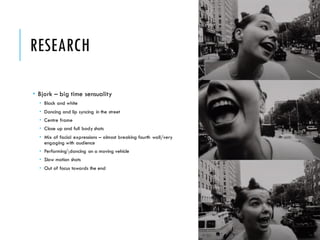
 Bjork – big time sensuality
 Black and white
 Dancing and lip syncing in the street
 Centre frame
 Close up and full body shots
 Mix of facial expressions – almost breaking fourth wall/very
engaging with audience
 Performingdancing on a moving vehicle
 Slow motion shots
 Out of focus towards the end
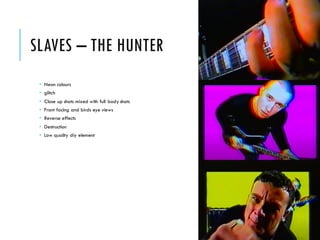
SLAVES – THE HUNTER
 Neon colours
 glitch
 Close up shots mixed with full body shots
 Front facing and birds eye views
 Reverse effects
 Destruction
 Low quality diy element
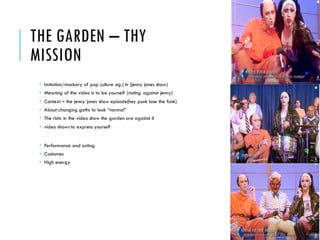
THE GARDEN – THY
MISSION
 Imitation/mockery of pop culture eg.) tv (jenny jones show)
 Meaning of the video is to be yourself (rioting against jenny)
 Context – the jenny jones show episode(hey punk lose the funk)
 About changing goths to look “normal”
 The riots in the video show the garden are against it
 video shows to express yourself
 Performance and acting
 Costumes
 High energy
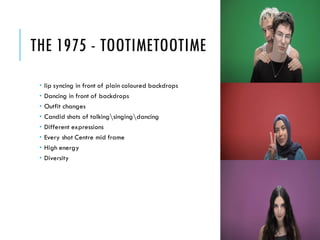
THE 1975 - TOOTIMETOOTIME
 lip syncing in front of plain coloured backdrops
 Dancing in front of backdrops
 Outfit changes
 Candid shots of talkingsingingdancing
 Different expressions
 Every shot Centre mid frame
 High energy
 Diversity
POTENTIAL SONGS
Identity – x-ray spex
Only shallow – my bloody valentine
Celebrity Skin – hole
POTENTIAL TECHNIQUES
Close up shots
full body shots
Front facing shots
Birds eye view shots
Reverse shots
CONVENTIONS YOU PLAN TO USE
Mid shots
Closeups
Use of artificial and natural lighting
Black and white
MIND MAP OF IDEAS
[SUMMARY OF IDEAS]
A day in the life style video of a guy in his early 20’s exhibiting angst
and a desire for escapism from his town and the politics within his
society. It will hold a strong 90’s theme to match the song and the
narrative of the angsty young man rebelling against society comes
from the meaning of the lyrics written by sonic youth.
SUMMARY
5 opportunitiesof your ideas
Using a phone rather than a camera allows for more candid shots
SUMMARY
5 restrictions for your ideas
Covid restrictions
Having to use a phone rather than a camera – lower quality
Having to wear a mask when Filming indoors in certain places –
doesn’t fit with the 90’s theme/setting:costume
Shots are sometimesunsteady due to not having a camera or tripod
Being autumn, it gets darker earlier so some shots may be darker than
preferred
FINAL IDEA – ARTIST/TITLE/INFO
Name of track / name of artist
Brief biographical background
Links to other artists
Genre info
FINAL IDEA – TRACK SUMMARY
Summary/analysis of track [consider meaning, content, duration,pace
and style of the song]
FINAL IDEA – YOUR IDEA
Your creative concept/video synopsis [describe your interpretation,
use of imagery or narrative, genre conventions, etc]
TASK 2 Pre-production Assessment
GUIDANCE:
PRE-PRODUCTION ASSESSMENT
You need to assess the viability of your production and investigate
what is required to enable you to make your music video
Much of this task is hypothetical, which means you will need to
investigate standard costings for such a production and apply these to
your planned production considering which equipmentyou would need
and resources, etc
Resourcesto support this are in the Pre-production assessment folder
on Blackboard
Delete the questions on each slide and insert your responses
TITLE OF PRODUCTION/PRODUCTION
OUTLINE
Summary of intended production
Detail here what you are going to make and the intended outcome
Detailed breakdown of the music track chosen and your interpretation
of it [rememberthe questionsin the workbook, e.g.
pace/mood/tone/structure]
Specific outline your intended technical/equipmentrequirements
Include any details that you think [you could use material from your
pitch]
LOCATIONS
You need to identify locations and plan a recce.
What are the limitations and risks, eg distance, access, cost, weather?
How will you manage this?
EQUIPMENT
What do you need? E.g. equipment, resources? Mostly from college,
but who do you need to speak to get this kit? What is available?
When?
Look at equipment hire places, etc
FACILITIES
Where will you edit your video? Do you need any other specialist
facilities…?
PERSONNEL
CREW: What is you team? Who is in it? What are each team
members strengths/weaknesses? When are they available?
CAST: Do you need any external performers? When are they
available? Cost implications? Will you have to feed them? Transport
them?
Other personnel? Is anyone else helping you?
PROPS/COSTUME/ETC
TASK 3.1 Visual Planning
PRE-PRODUCTION: VISUAL PLANNING
This section is concerned with the visual planning of your music video
You should use this section to develop the sequencing or your video,
establish the relationship between the visuals and the track itself and
create a structure for you to follow when filming
It is important that you ‘pre-visualise’ the video before you make it; it
will make filming and production a more streamlined process
The following tasks are part of your visual planning
 Pre-visualisation and concept boards
 Storyboarding
 Shot list
PRE-VISUALISATION/CONCEPT BOARDS
Tool for exploring the direction and visuals
Provides inspiration and information for the “look & feel”
Presents key moments in your video
A means to sketch/plan ideas
Information on colour/lighting
Defining the “mise-en-scene”
Include as much here as you like, but keep it relevant to the production,
the following slides have been left blank for you to approach in your own
way, add more as you need to
Extension suggestion: edit a short sequence of clips that have inspired or
influenced your video [similar to this: http://io9.com/5941145/this-
directors-video-pitch-for-hunger-games-might-be-better-than-the-real-
movie]
RIP-O-MATIC
You should also construct a 15-20second Rip-o-matic test reel using
existing footage to convey the type of video you want to make
STRUCTURAL BREAKDOWN
Breakdown your track into it basic sections [e.g. intro, verse, chorus,
verse, etc] and apply broad visual ideas to each section
You can use this as the master template for your production, then add
more shots to each section when you developyour full visual plan
You should create a slide showing all the sections of the song, then
add a slide for each section with timings, lyrics, what happens and
details on specific shots
You could storyboard and shot list each section as you go, to break up
the process.
STORYBOARDING
Your storyboard should bring your idea to life
Provide an idea of the sequencing of you video
Provides a basis for production
Suggested online storyboard creators are:
 https://www.storyboardthat.com
 http://www.pixton.com [very complicated]
 http://www.storyjumper.com [allows you to insert your own images]
Alternatively, hand draw or photograph your storyboard and scan or
copy to insert it onto your slides
There are lots of tips collected together on Blackboard!
SHOT LIST
Your shot list should contain the sequential breakdown of what you
need to shoot for your video
It should work in partnership with your storyboard
It will be your working document when you film
It should contain the shot number, scene number, shot description,
framing and action you will see
It should also have information on performersin the scene and other
props, etc
Shot list template is on Blackboard in the pre-production folder.
TASK 3.2 Organisational Planning
PRODUCTION GROUP INFO
Include names, contact info, and defined roles at difference stages of
production, using a table is suggested
LOCATION INFORMATION
Information and images of your location[s] for filming
You should have address details, clearance/premissions for filming,
recce photos and floorplans [including camera, equipmentand
cast/crew layouts]
Where possible, have a plan B fallback location option
Assess each location for any issues and suggest solutions
LOCATIONS
RISK ASSESSMENT
Risk Assess each separate filming location using the table in the
camera H&S PP on Bb as a staring point
Completing a generic filming assessment would be a start, then you
can add specialist/site specific risks as you progress your production
Remember, a Risk Assessment is an ongoing document, you should
evaluate if anything changes in production and when you put control
measures in place
You should add the table to each call sheet for each location
RISK ASSESSMENT
CONTINGENCY PLANNING
Things go wrong
Your contingency plan is there to give you a backup or to minimise the
effect on production
You should consider the following areas: Technical, Location, Personnel
and Organisational areas [about 5 potential issues for each]
Use the form in pre-production folder on Blackboard
CONTINGENCY PLAN
PRODUCTION SCHEDULE
Your schedule should budget a total of 10 hours for production, that is
for the filming and editing of your project.
You should plan when you’re filming and how you intend to use the in
class days on your timetable/classschedule
SCHEDULE
CLEARANCE AND PERMISSIONS
Any place you film and anyone you use in the filming of your video
must have a completed form
Blank forms are on Blackboard for you to complete and insert here

Mv assignment 01 2020 pro forma(1)

  • 1.
  • 2.
    TASK 1 IdeaGeneration and Research
  • 3.
    RESEARCH AND IDEAS song– identity – xray spex Music video ideas –  Video expressing different identities and celebrating them  Video showing people with no identities all looking the same  Video showing the contrast between people who express themselves and those who look the same
  • 4.
    RESEARCH  Bjork –big time sensuality  Black and white  Dancing and lip syncing in the street  Centre frame  Close up and full body shots  Mix of facial expressions – almost breaking fourth wall/very engaging with audience  Performingdancing on a moving vehicle  Slow motion shots  Out of focus towards the end
  • 5.
    SLAVES – THEHUNTER  Neon colours  glitch  Close up shots mixed with full body shots  Front facing and birds eye views  Reverse effects  Destruction  Low quality diy element
  • 6.
    THE GARDEN –THY MISSION  Imitation/mockery of pop culture eg.) tv (jenny jones show)  Meaning of the video is to be yourself (rioting against jenny)  Context – the jenny jones show episode(hey punk lose the funk)  About changing goths to look “normal”  The riots in the video show the garden are against it  video shows to express yourself  Performance and acting  Costumes  High energy
  • 7.
    THE 1975 -TOOTIMETOOTIME  lip syncing in front of plain coloured backdrops  Dancing in front of backdrops  Outfit changes  Candid shots of talkingsingingdancing  Different expressions  Every shot Centre mid frame  High energy  Diversity
  • 8.
    POTENTIAL SONGS Identity –x-ray spex Only shallow – my bloody valentine Celebrity Skin – hole
  • 9.
    POTENTIAL TECHNIQUES Close upshots full body shots Front facing shots Birds eye view shots Reverse shots
  • 10.
    CONVENTIONS YOU PLANTO USE Mid shots Closeups Use of artificial and natural lighting Black and white
  • 11.
    MIND MAP OFIDEAS [SUMMARY OF IDEAS] A day in the life style video of a guy in his early 20’s exhibiting angst and a desire for escapism from his town and the politics within his society. It will hold a strong 90’s theme to match the song and the narrative of the angsty young man rebelling against society comes from the meaning of the lyrics written by sonic youth.
  • 12.
    SUMMARY 5 opportunitiesof yourideas Using a phone rather than a camera allows for more candid shots
  • 13.
    SUMMARY 5 restrictions foryour ideas Covid restrictions Having to use a phone rather than a camera – lower quality Having to wear a mask when Filming indoors in certain places – doesn’t fit with the 90’s theme/setting:costume Shots are sometimesunsteady due to not having a camera or tripod Being autumn, it gets darker earlier so some shots may be darker than preferred
  • 14.
    FINAL IDEA –ARTIST/TITLE/INFO Name of track / name of artist Brief biographical background Links to other artists Genre info
  • 15.
    FINAL IDEA –TRACK SUMMARY Summary/analysis of track [consider meaning, content, duration,pace and style of the song]
  • 16.
    FINAL IDEA –YOUR IDEA Your creative concept/video synopsis [describe your interpretation, use of imagery or narrative, genre conventions, etc]
  • 17.
  • 18.
    GUIDANCE: PRE-PRODUCTION ASSESSMENT You needto assess the viability of your production and investigate what is required to enable you to make your music video Much of this task is hypothetical, which means you will need to investigate standard costings for such a production and apply these to your planned production considering which equipmentyou would need and resources, etc Resourcesto support this are in the Pre-production assessment folder on Blackboard Delete the questions on each slide and insert your responses
  • 19.
    TITLE OF PRODUCTION/PRODUCTION OUTLINE Summaryof intended production Detail here what you are going to make and the intended outcome Detailed breakdown of the music track chosen and your interpretation of it [rememberthe questionsin the workbook, e.g. pace/mood/tone/structure] Specific outline your intended technical/equipmentrequirements Include any details that you think [you could use material from your pitch]
  • 20.
    LOCATIONS You need toidentify locations and plan a recce. What are the limitations and risks, eg distance, access, cost, weather? How will you manage this?
  • 21.
    EQUIPMENT What do youneed? E.g. equipment, resources? Mostly from college, but who do you need to speak to get this kit? What is available? When? Look at equipment hire places, etc
  • 22.
    FACILITIES Where will youedit your video? Do you need any other specialist facilities…?
  • 23.
    PERSONNEL CREW: What isyou team? Who is in it? What are each team members strengths/weaknesses? When are they available? CAST: Do you need any external performers? When are they available? Cost implications? Will you have to feed them? Transport them? Other personnel? Is anyone else helping you?
  • 24.
  • 25.
  • 26.
    PRE-PRODUCTION: VISUAL PLANNING Thissection is concerned with the visual planning of your music video You should use this section to develop the sequencing or your video, establish the relationship between the visuals and the track itself and create a structure for you to follow when filming It is important that you ‘pre-visualise’ the video before you make it; it will make filming and production a more streamlined process The following tasks are part of your visual planning  Pre-visualisation and concept boards  Storyboarding  Shot list
  • 27.
    PRE-VISUALISATION/CONCEPT BOARDS Tool forexploring the direction and visuals Provides inspiration and information for the “look & feel” Presents key moments in your video A means to sketch/plan ideas Information on colour/lighting Defining the “mise-en-scene” Include as much here as you like, but keep it relevant to the production, the following slides have been left blank for you to approach in your own way, add more as you need to Extension suggestion: edit a short sequence of clips that have inspired or influenced your video [similar to this: http://io9.com/5941145/this- directors-video-pitch-for-hunger-games-might-be-better-than-the-real- movie]
  • 30.
    RIP-O-MATIC You should alsoconstruct a 15-20second Rip-o-matic test reel using existing footage to convey the type of video you want to make
  • 31.
    STRUCTURAL BREAKDOWN Breakdown yourtrack into it basic sections [e.g. intro, verse, chorus, verse, etc] and apply broad visual ideas to each section You can use this as the master template for your production, then add more shots to each section when you developyour full visual plan You should create a slide showing all the sections of the song, then add a slide for each section with timings, lyrics, what happens and details on specific shots You could storyboard and shot list each section as you go, to break up the process.
  • 32.
    STORYBOARDING Your storyboard shouldbring your idea to life Provide an idea of the sequencing of you video Provides a basis for production Suggested online storyboard creators are:  https://www.storyboardthat.com  http://www.pixton.com [very complicated]  http://www.storyjumper.com [allows you to insert your own images] Alternatively, hand draw or photograph your storyboard and scan or copy to insert it onto your slides There are lots of tips collected together on Blackboard!
  • 33.
    SHOT LIST Your shotlist should contain the sequential breakdown of what you need to shoot for your video It should work in partnership with your storyboard It will be your working document when you film It should contain the shot number, scene number, shot description, framing and action you will see It should also have information on performersin the scene and other props, etc Shot list template is on Blackboard in the pre-production folder.
  • 34.
  • 35.
    PRODUCTION GROUP INFO Includenames, contact info, and defined roles at difference stages of production, using a table is suggested
  • 36.
    LOCATION INFORMATION Information andimages of your location[s] for filming You should have address details, clearance/premissions for filming, recce photos and floorplans [including camera, equipmentand cast/crew layouts] Where possible, have a plan B fallback location option Assess each location for any issues and suggest solutions
  • 37.
  • 38.
    RISK ASSESSMENT Risk Assesseach separate filming location using the table in the camera H&S PP on Bb as a staring point Completing a generic filming assessment would be a start, then you can add specialist/site specific risks as you progress your production Remember, a Risk Assessment is an ongoing document, you should evaluate if anything changes in production and when you put control measures in place You should add the table to each call sheet for each location
  • 39.
  • 40.
    CONTINGENCY PLANNING Things gowrong Your contingency plan is there to give you a backup or to minimise the effect on production You should consider the following areas: Technical, Location, Personnel and Organisational areas [about 5 potential issues for each] Use the form in pre-production folder on Blackboard
  • 41.
  • 42.
    PRODUCTION SCHEDULE Your scheduleshould budget a total of 10 hours for production, that is for the filming and editing of your project. You should plan when you’re filming and how you intend to use the in class days on your timetable/classschedule
  • 43.
  • 44.
    CLEARANCE AND PERMISSIONS Anyplace you film and anyone you use in the filming of your video must have a completed form Blank forms are on Blackboard for you to complete and insert here