[10-07-2021]
[Kochi] MuleSoft Meetup Group
Error Handling in Mule
2
● Overview of Error Types in Mule
● Levels of Error Handler
● Error Handling Component
● Creating Custom Error Types
● Real time error handling scenarios
● Q&A
● Networking
Agenda
3
Organizers
⮚ Kochi MuleSoft Meetup Leader.
⮚ 7+ Years of Experience in Integrations and API Technologies.
⮚ Certified MuleSoft Developer, Integration Architect and platform Architect
⮚ Kochi Mulesoft Meetup Leader.
⮚ 5+ Years of Experience in Integrations and API Technologies.
⮚ Certified MuleSoft Developer, Integration Architect and platform Architect.
⮚ Kochi Mulesoft Meetup Leader.
⮚ Senior MuleSoft Developer | Integration Lead
⮚ 10+ years of Integration Experience Certified Mulesoft
Developer, Certified Mulesoft Platform Architect
4
Speakers
Sanjana Mishra
Technical Lead at Accenture
About the Speaker:
⮚ Having 5+ years of overall experience building integration solutions.
⮚ Certified MuleSoft Developer And Platform Architect.
About the Speaker:
⮚ 5+ Years of Experience in Integrations and API Technologies.
⮚ Certified MuleSoft Developer & Architect enthusiast.
Sajid Ali Qureshi
Senior Consultant at Apisero
Error Types In Mule
5
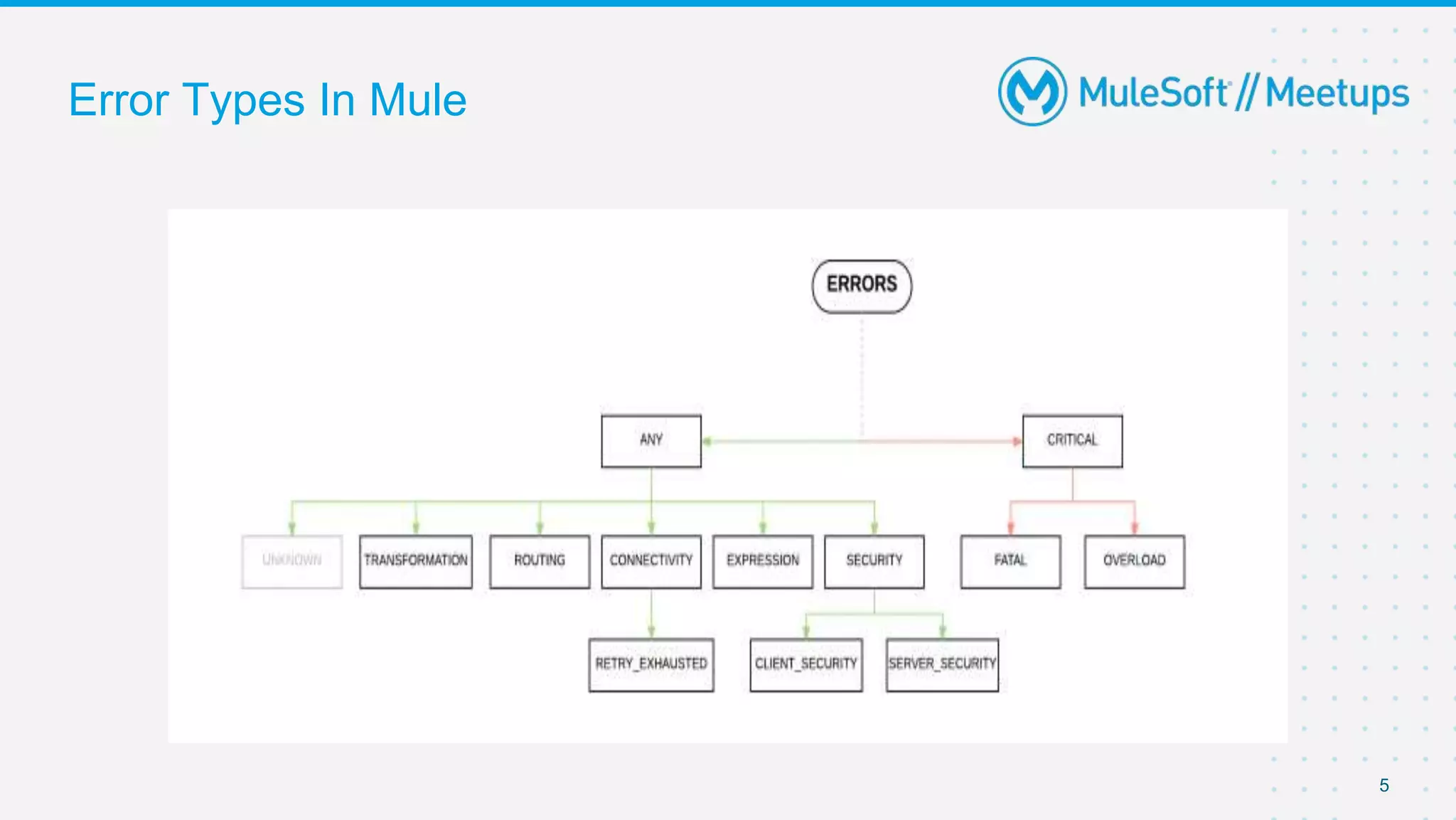
• Errors under ANY type can be handled whereas CRITICAL errors cannot be handled and are
only logged.
• ANY type does not include errors occurring at source
• Error on source components are system errors
• The SOURCE type errors indicates that an error occurred in the source of the flow and cannot
be handled
• The CRITICAL type indicates a severe error occurred. These errors cannot be handled E.g.,
Overload JVM Error
• UNKNOWN type is thrown by a component whenever there is no clear reason for a failure.
6
Levels of Error Handler
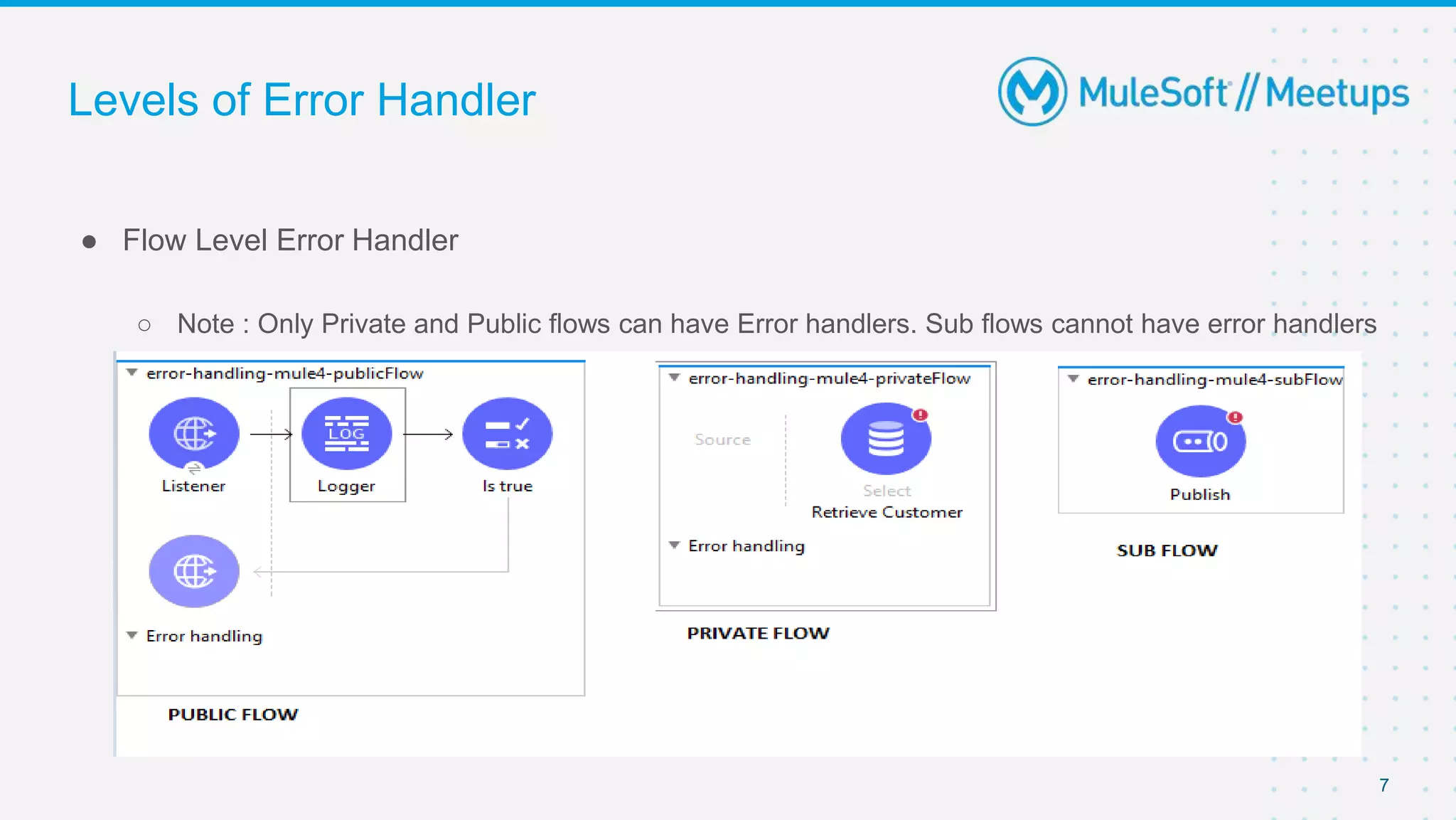
● Flow Level Error Handler
○ Note : Only Private and Public flows can have Error handlers. Sub flows cannot have error handlers
7
Levels of Error Handler
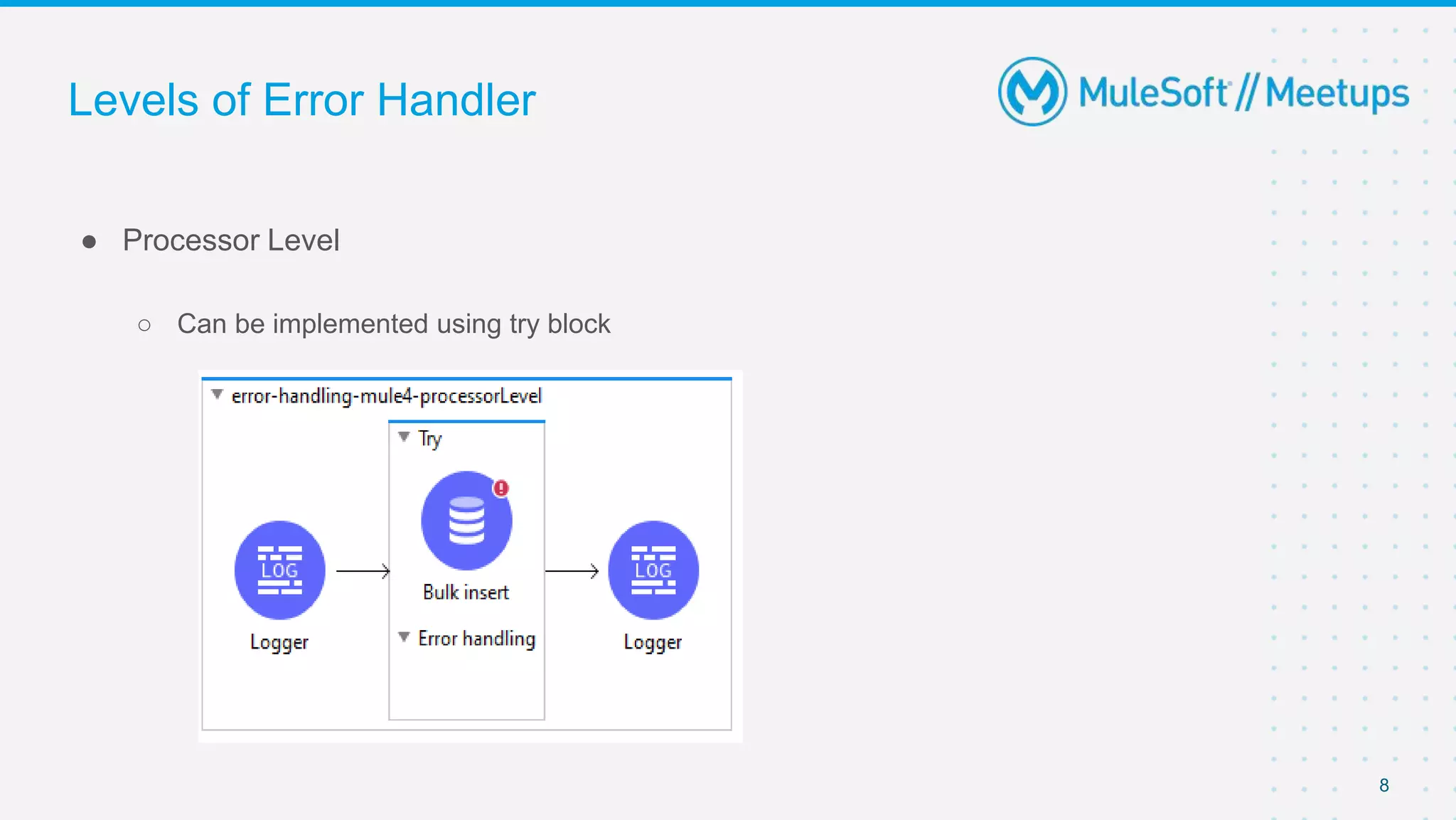
● Processor Level
○ Can be implemented using try block
8
Levels of Error Handler
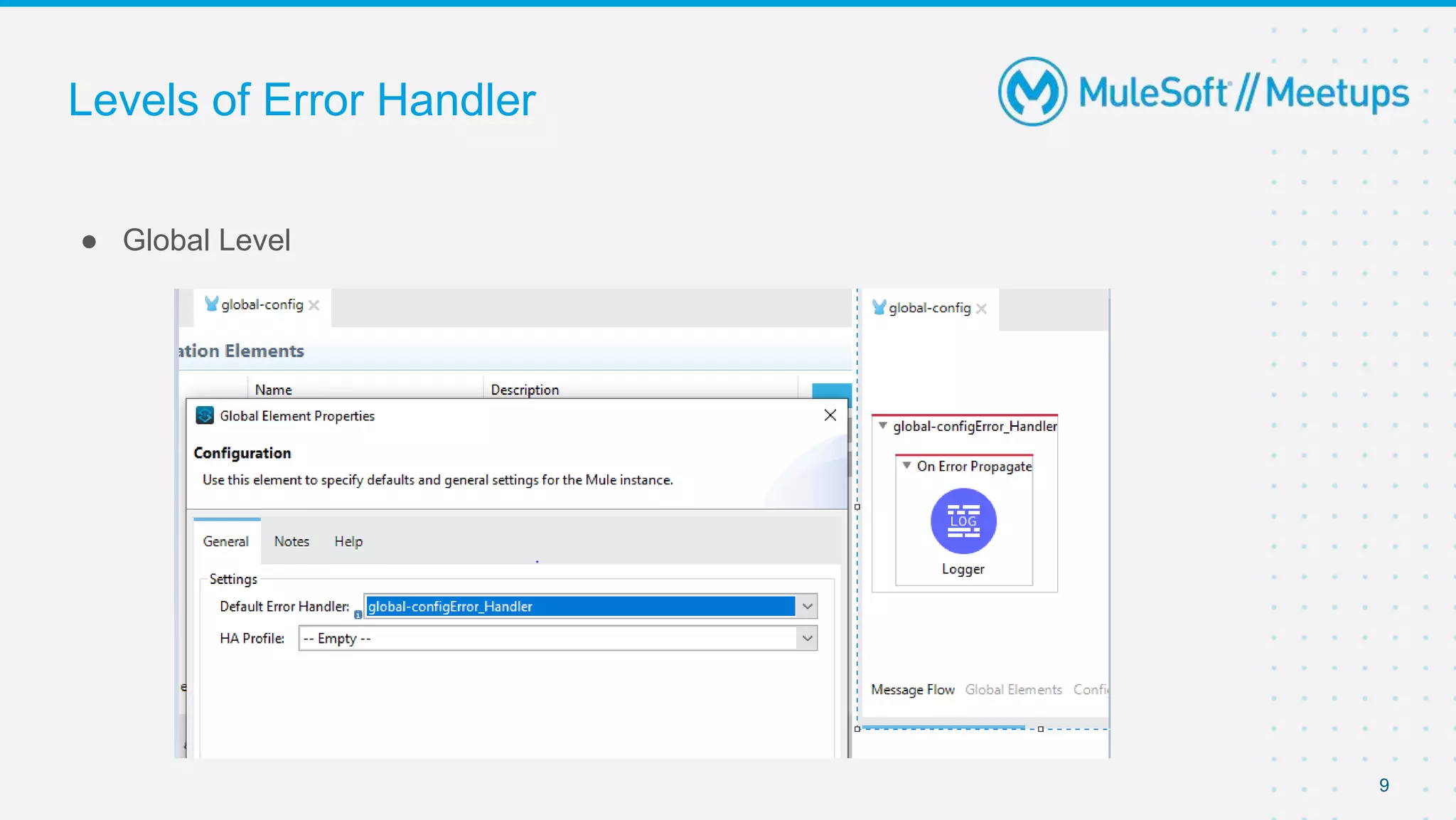
● Global Level
9
Levels of Error Handler
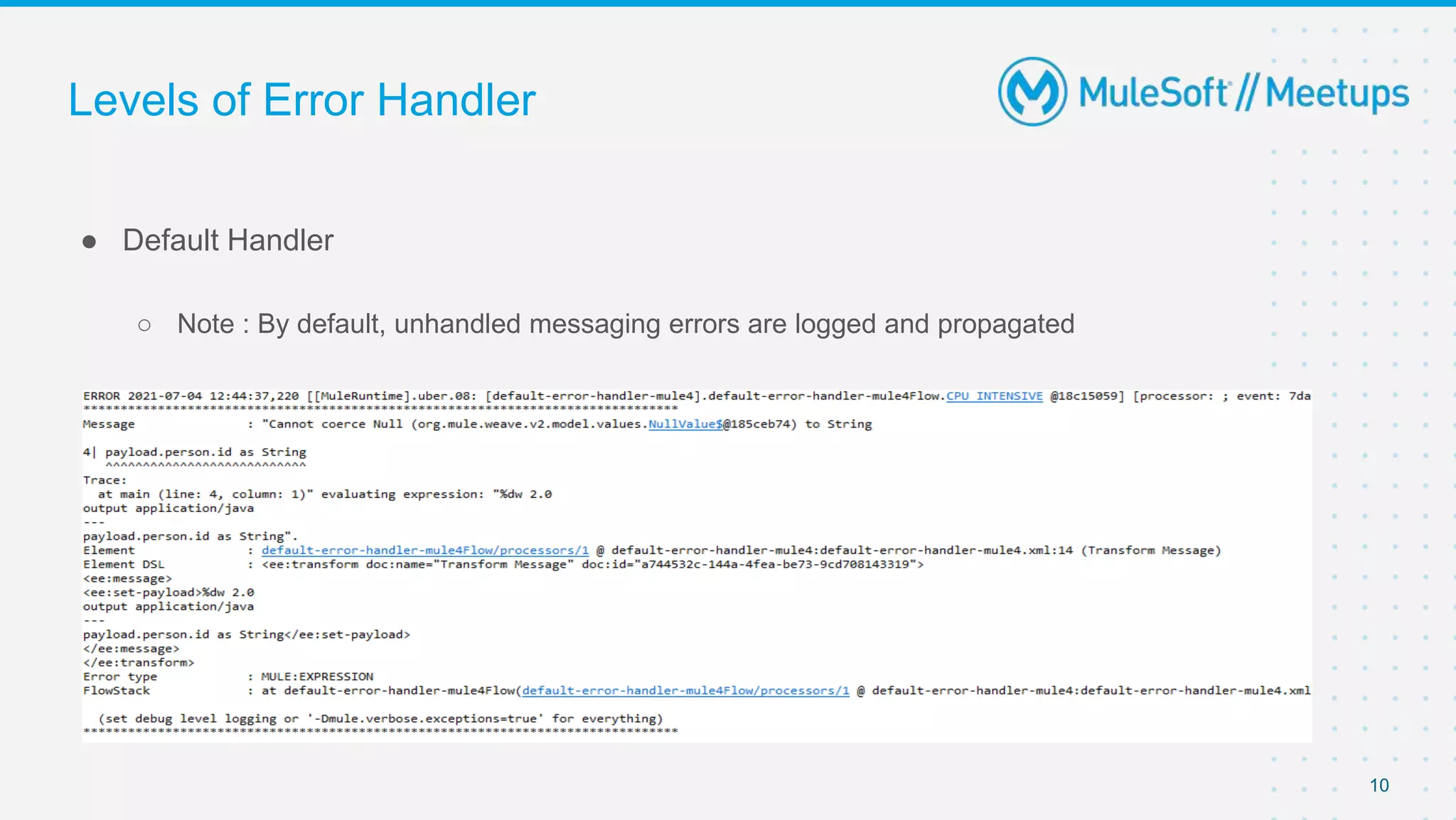
● Default Handler
○ Note : By default, unhandled messaging errors are logged and propagated
10
Error Handling Component
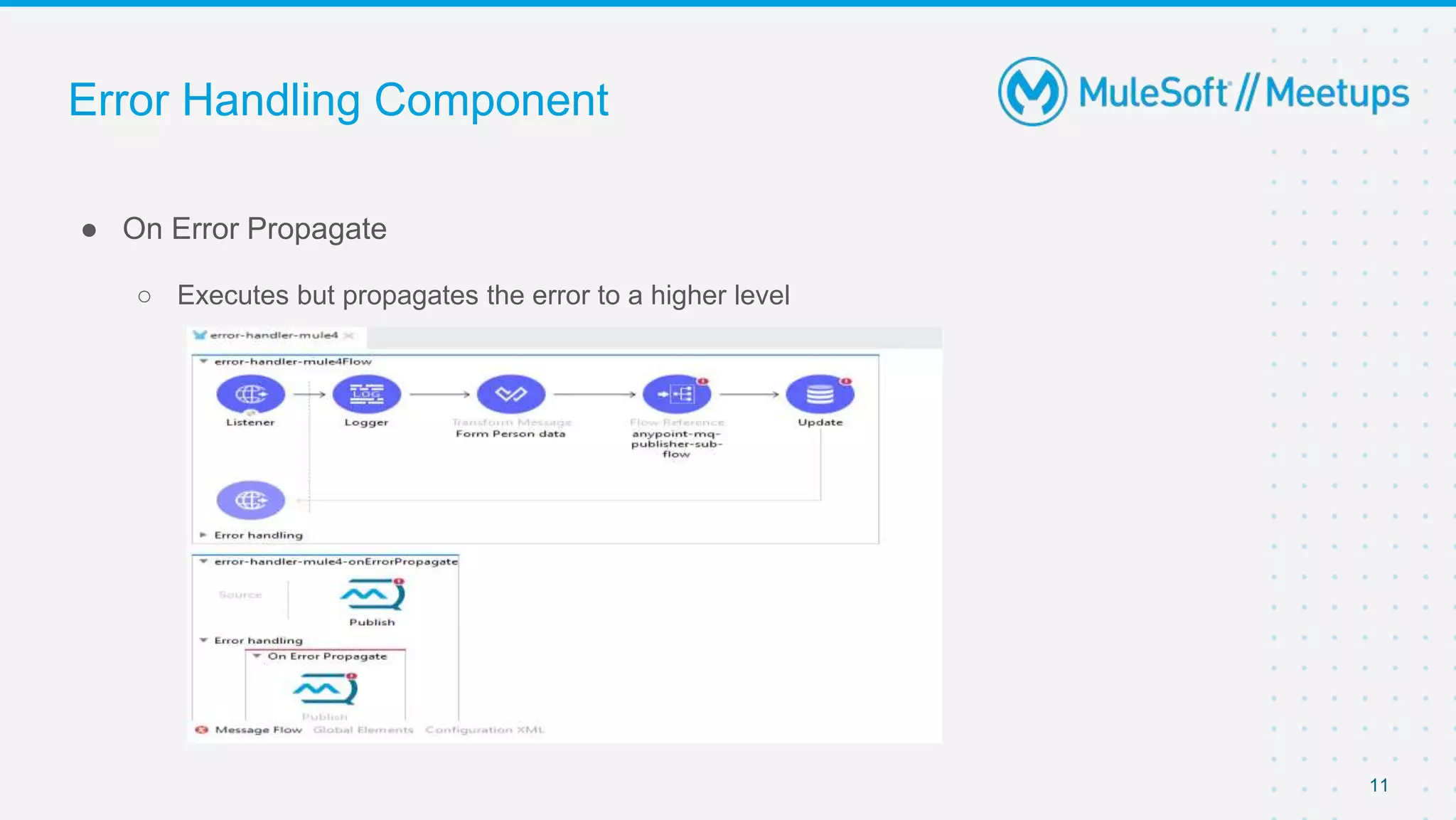
● On Error Propagate
○ Executes but propagates the error to a higher level
11
Error Handling Component
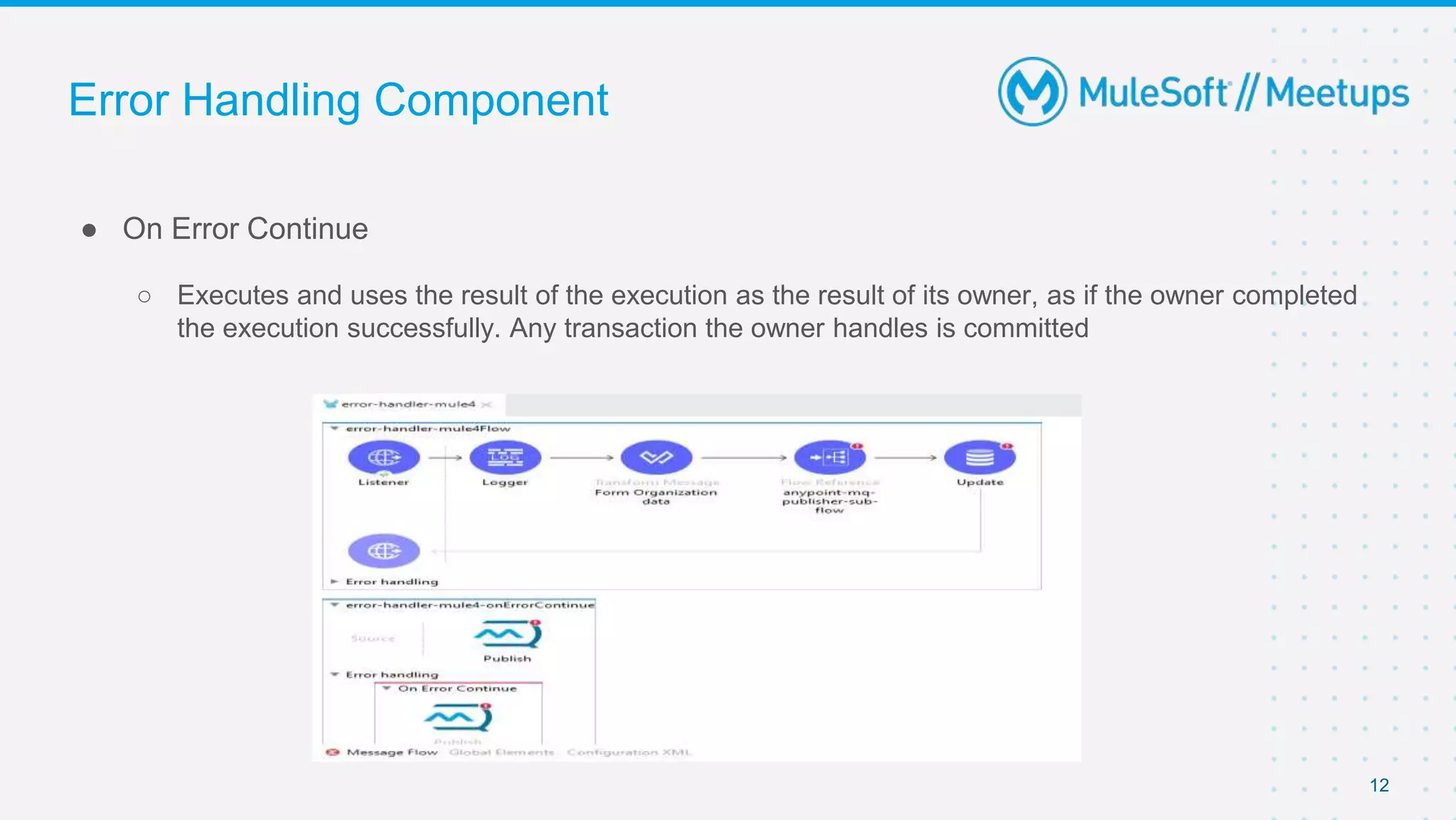
● On Error Continue
○ Executes and uses the result of the execution as the result of its owner, as if the owner completed
the execution successfully. Any transaction the owner handles is committed
12
Error Handling Component
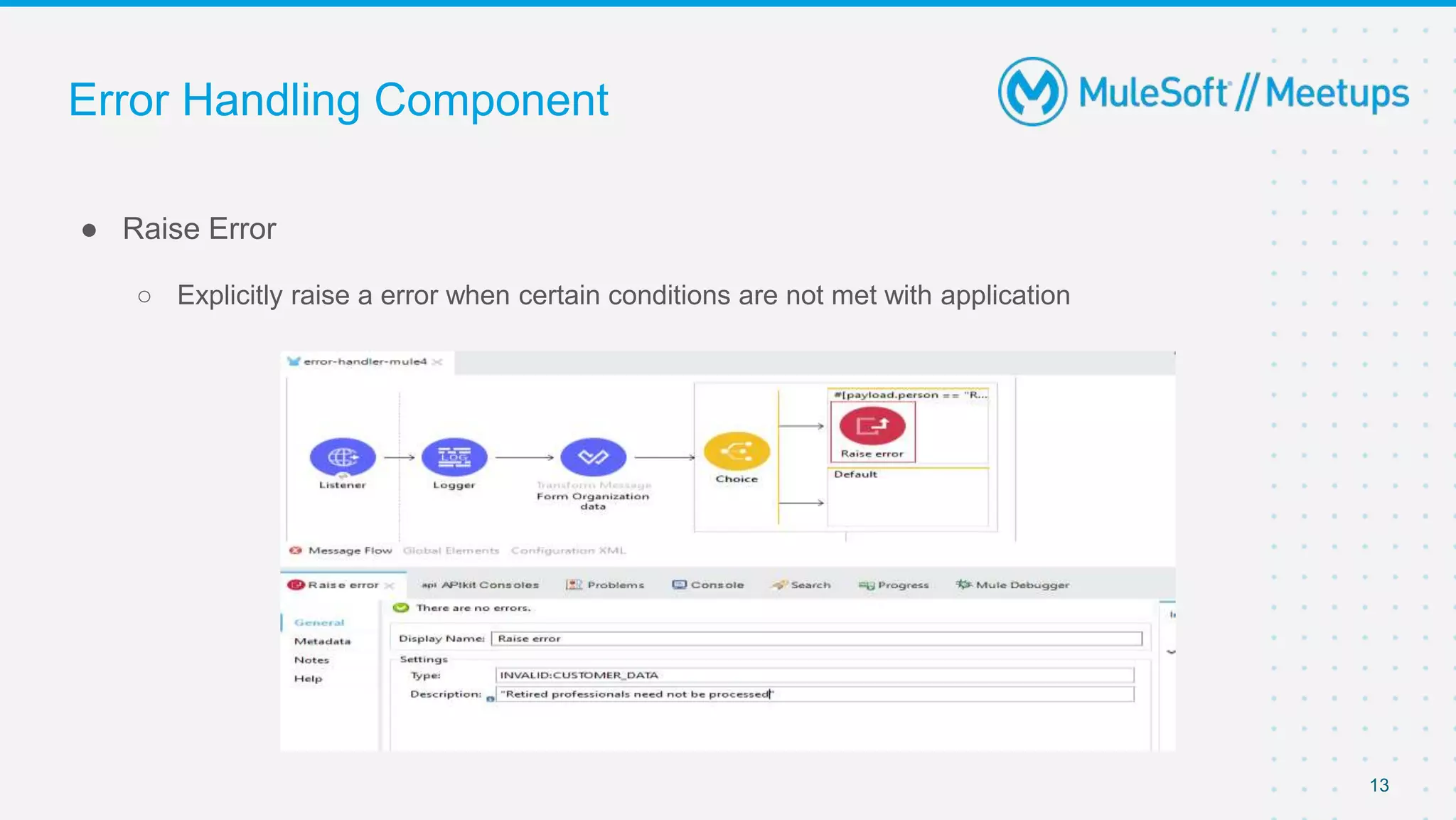
● Raise Error
○ Explicitly raise a error when certain conditions are not met with application
13
Error Handling Component
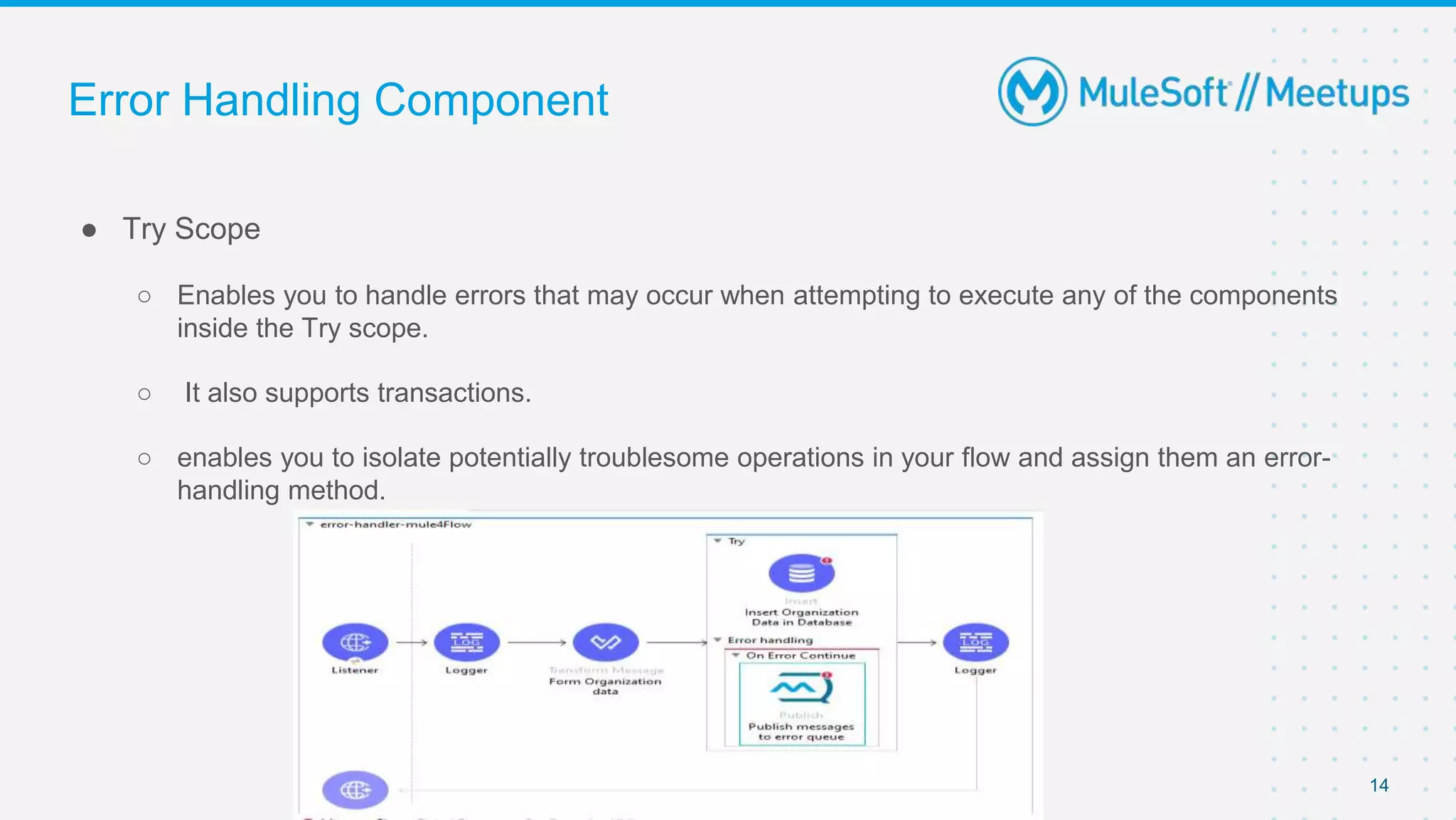
● Try Scope
○ Enables you to handle errors that may occur when attempting to execute any of the components
inside the Try scope.
○ It also supports transactions.
○ enables you to isolate potentially troublesome operations in your flow and assign them an error-
handling method.
14
Custom Error Types
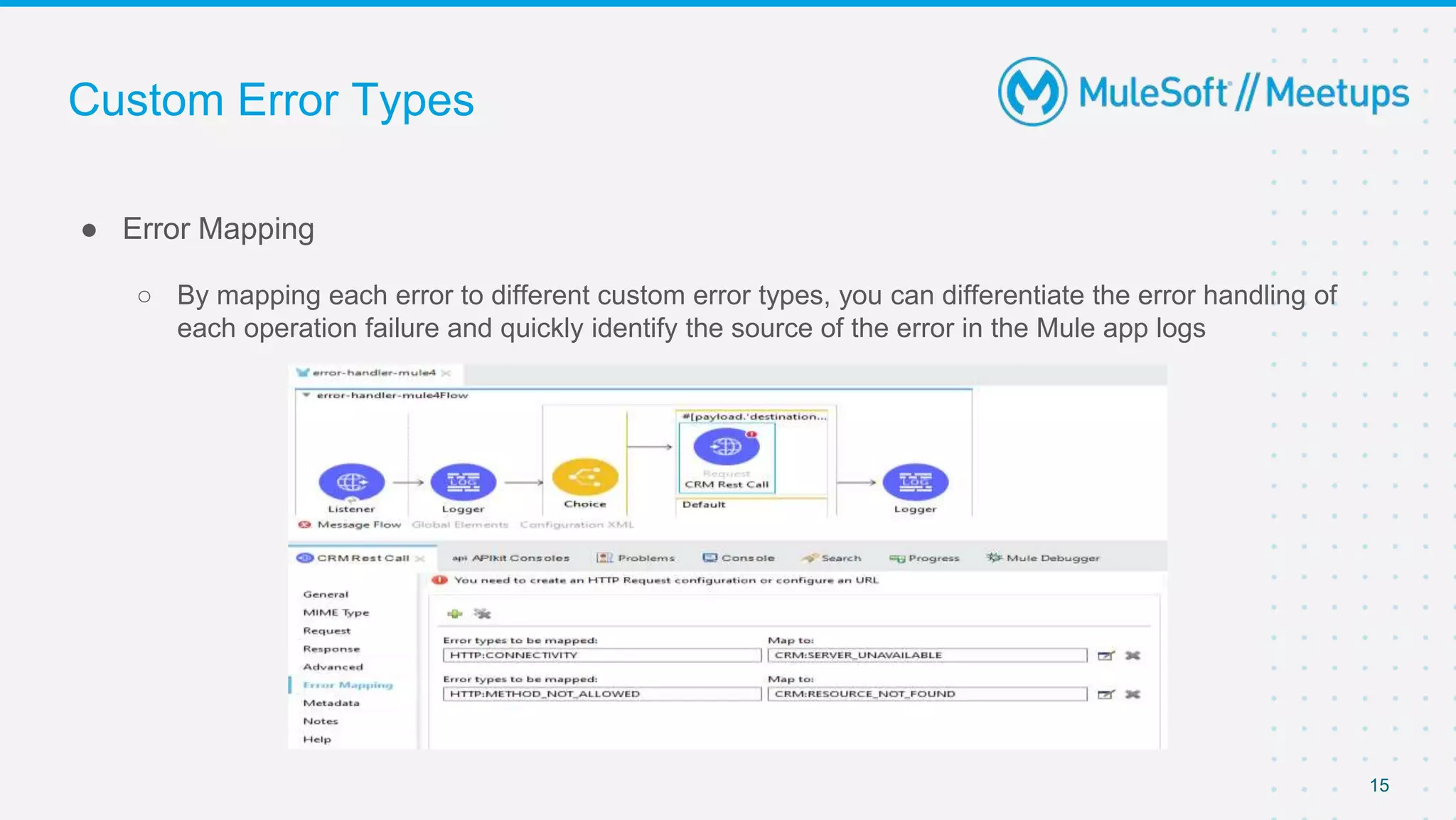
● Error Mapping
○ By mapping each error to different custom error types, you can differentiate the error handling of
each operation failure and quickly identify the source of the error in the Mule app logs
15
Custom Error Types
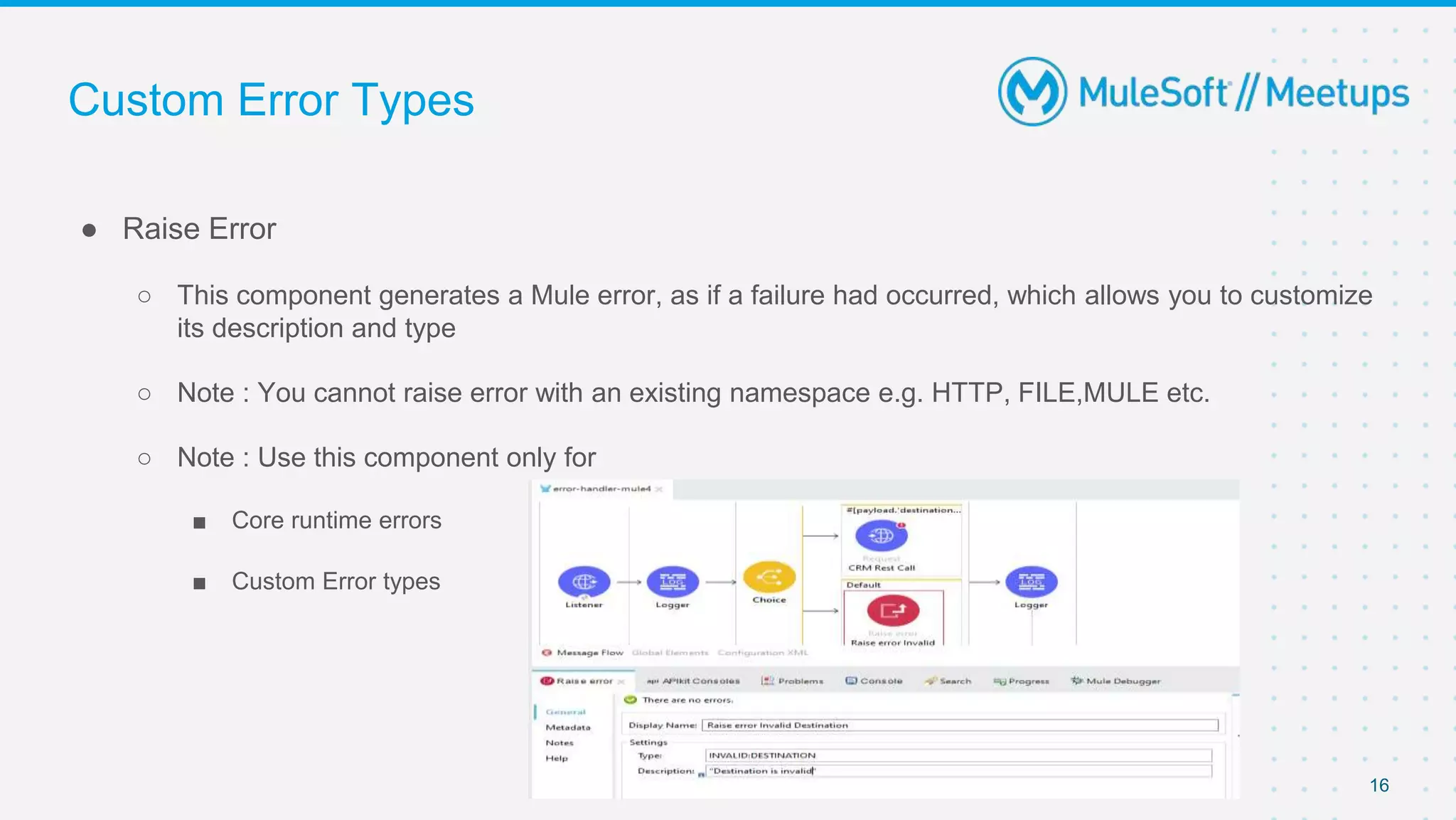
● Raise Error
○ This component generates a Mule error, as if a failure had occurred, which allows you to customize
its description and type
○ Note : You cannot raise error with an existing namespace e.g. HTTP, FILE,MULE etc.
○ Note : Use this component only for
■ Core runtime errors
■ Custom Error types
16
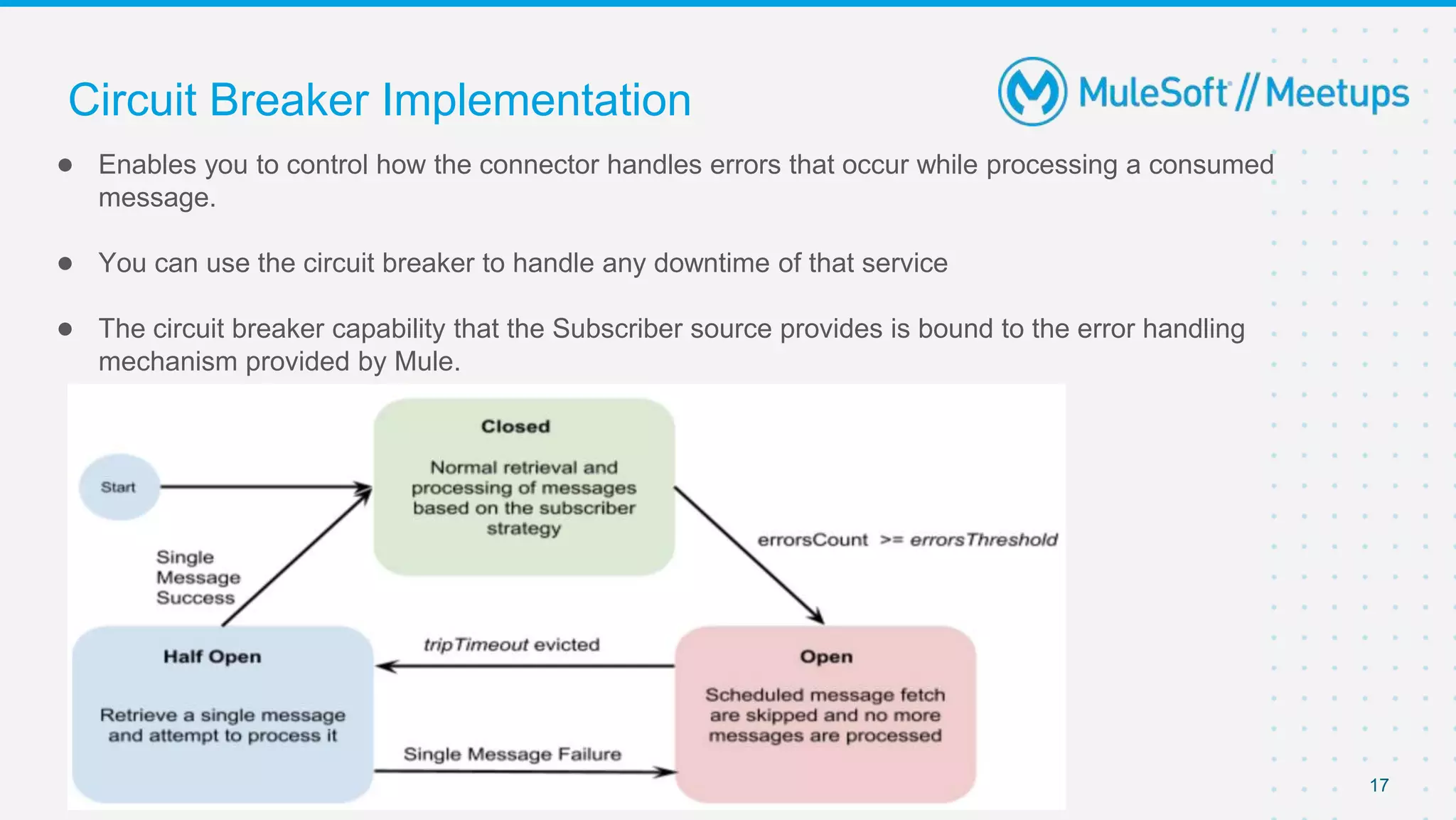
Circuit Breaker Implementation
● Enables you to control how the connector handles errors that occur while processing a consumed
message.
● You can use the circuit breaker to handle any downtime of that service
● The circuit breaker capability that the Subscriber source provides is bound to the error handling
mechanism provided by Mule.
17
Circuit Breaker Implementation
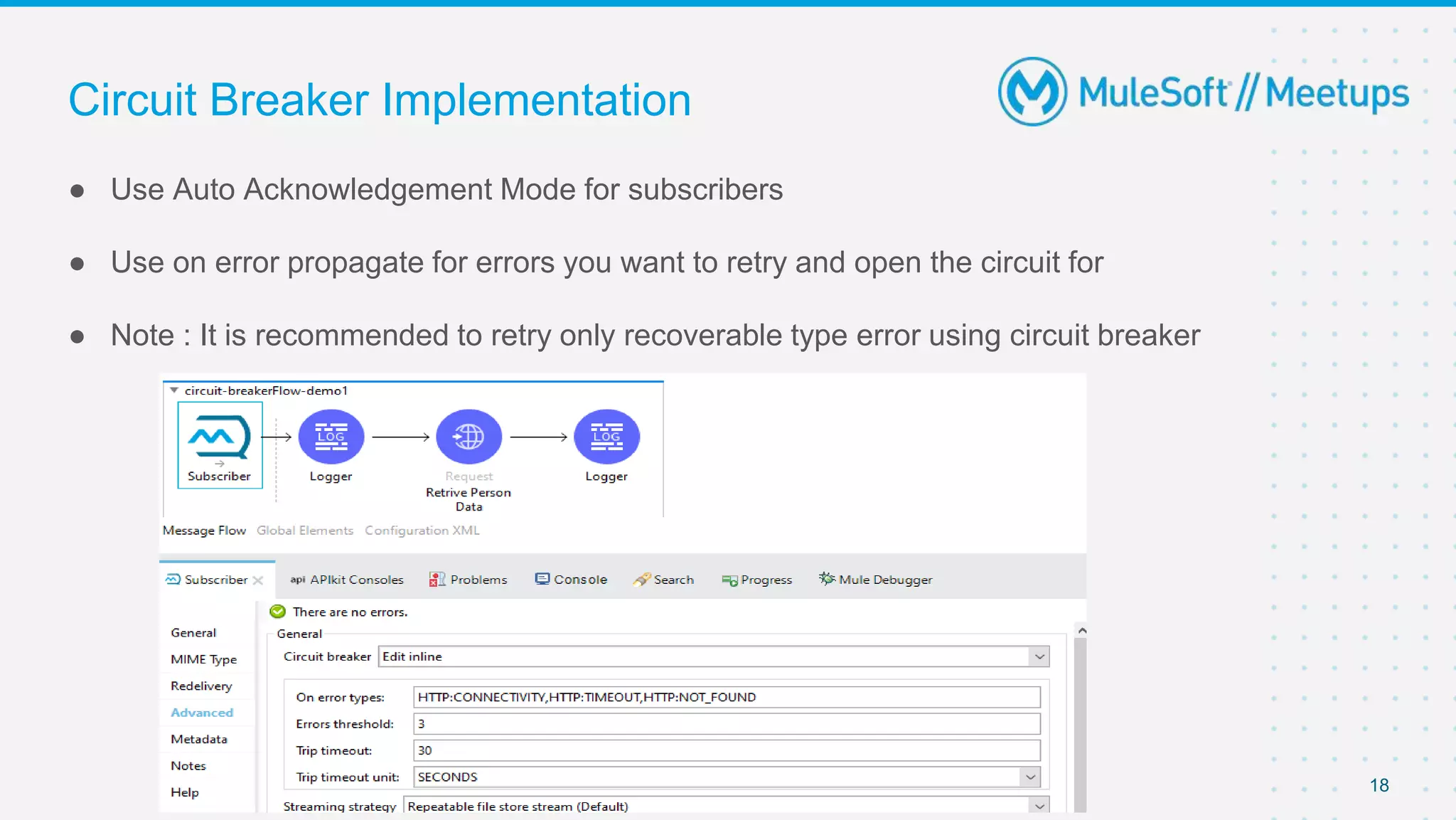
● Use Auto Acknowledgement Mode for subscribers
● Use on error propagate for errors you want to retry and open the circuit for
● Note : It is recommended to retry only recoverable type error using circuit breaker
18
Scatter Gather Router
● It is a routing event processor that processes a Mule event through different parallel
processing routes
● If any has failed with an error, then the Scatter-Gather component throws an error of type
MULE_COMPOSITE_ROUTING.
● Event processing does not proceed past the Scatter-Gather component in the flow
● The flow branches to your error-handling event processors.
● Error object gathers not only errors from routes that failed but also Mule events from
successfully completed routes
● Can be handled in following two ways shown in next slides
19
if any has failed with an error, then the Scatter-Gather component throws an error of type MULE:COMPOSITE_ROUTING
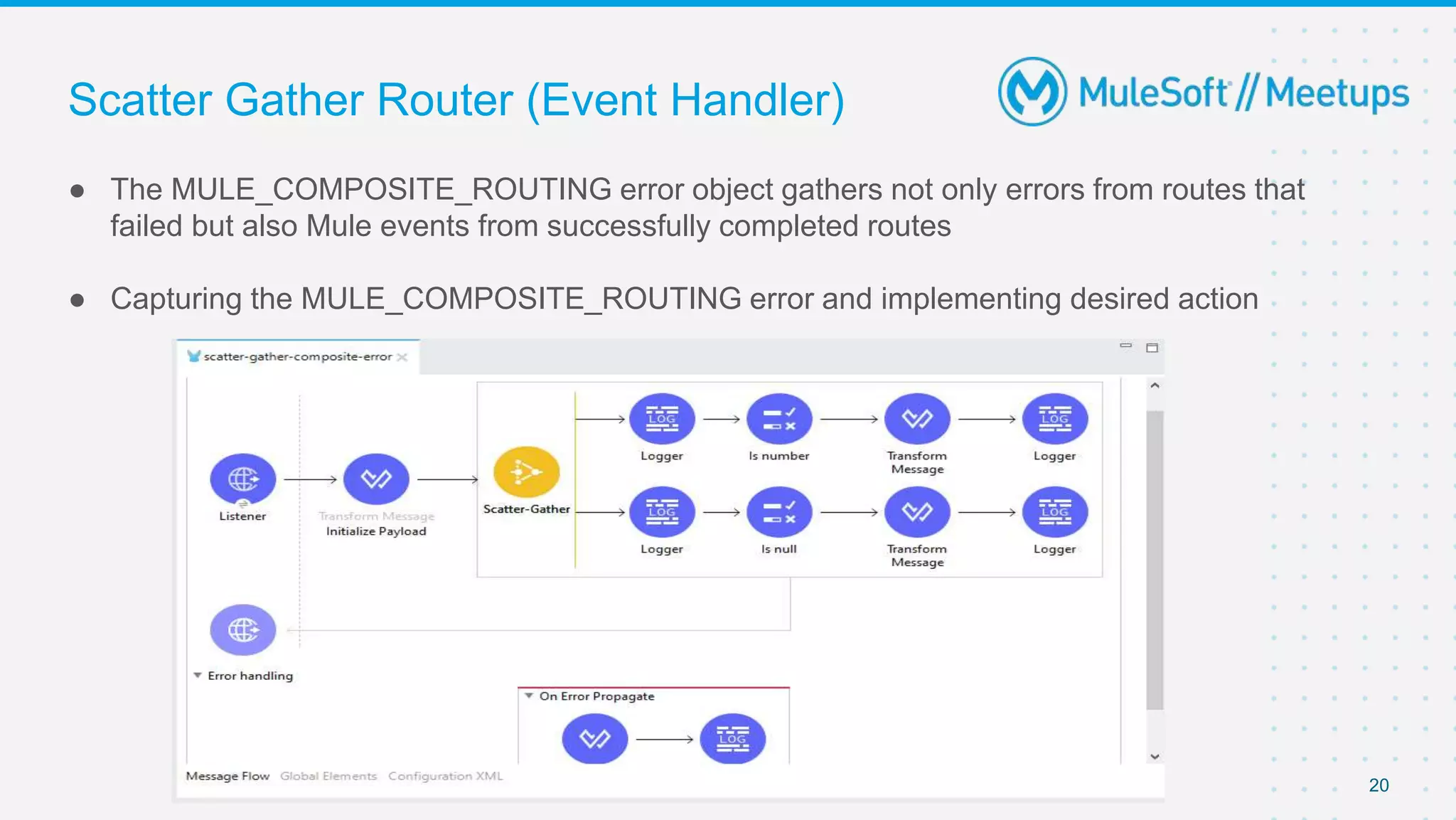
Scatter Gather Router (Event Handler)
● The MULE_COMPOSITE_ROUTING error object gathers not only errors from routes that
failed but also Mule events from successfully completed routes
● Capturing the MULE_COMPOSITE_ROUTING error and implementing desired action
20
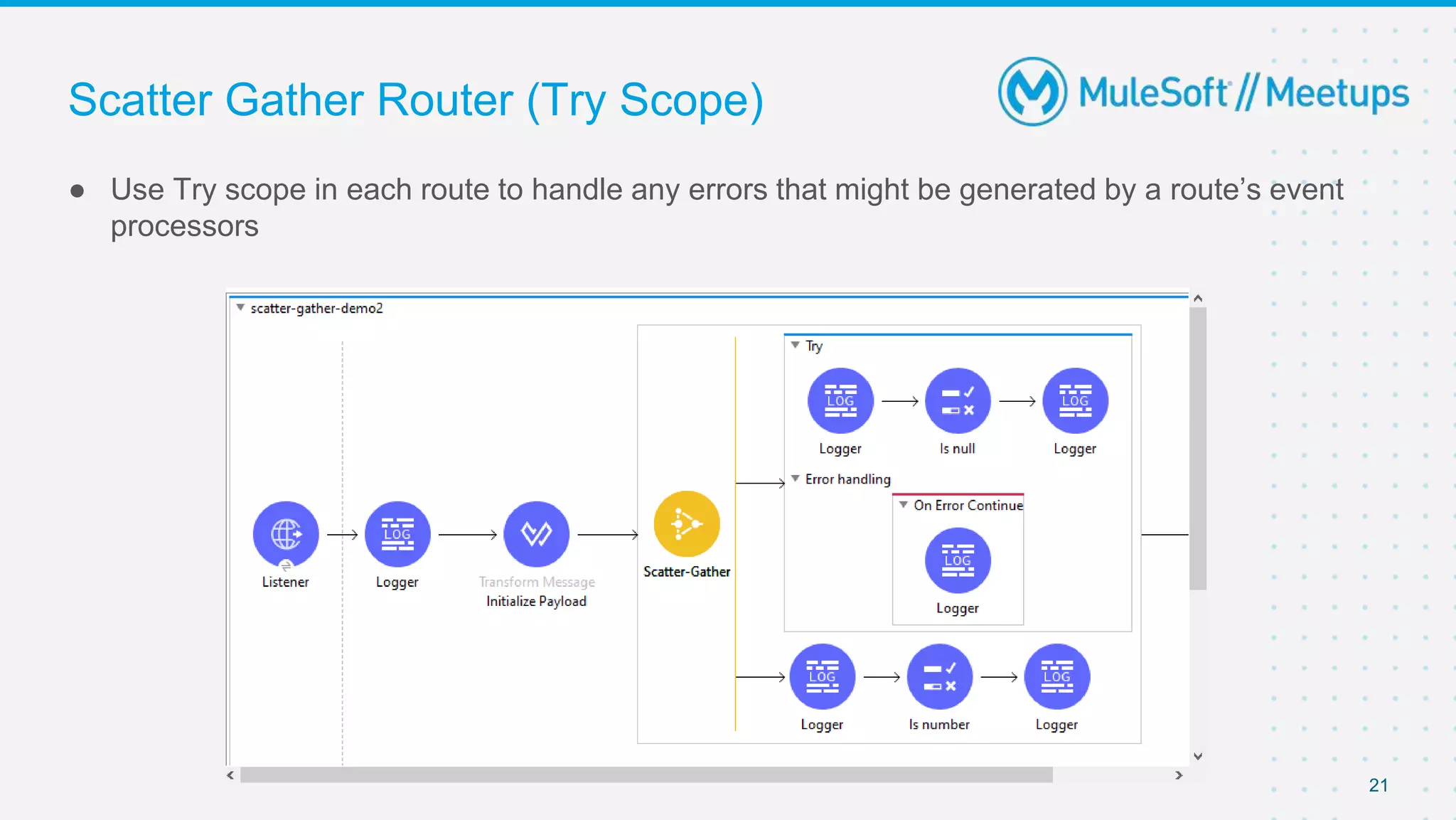
Scatter Gather Router (Try Scope)
● Use Try scope in each route to handle any errors that might be generated by a route’s event
processors
21
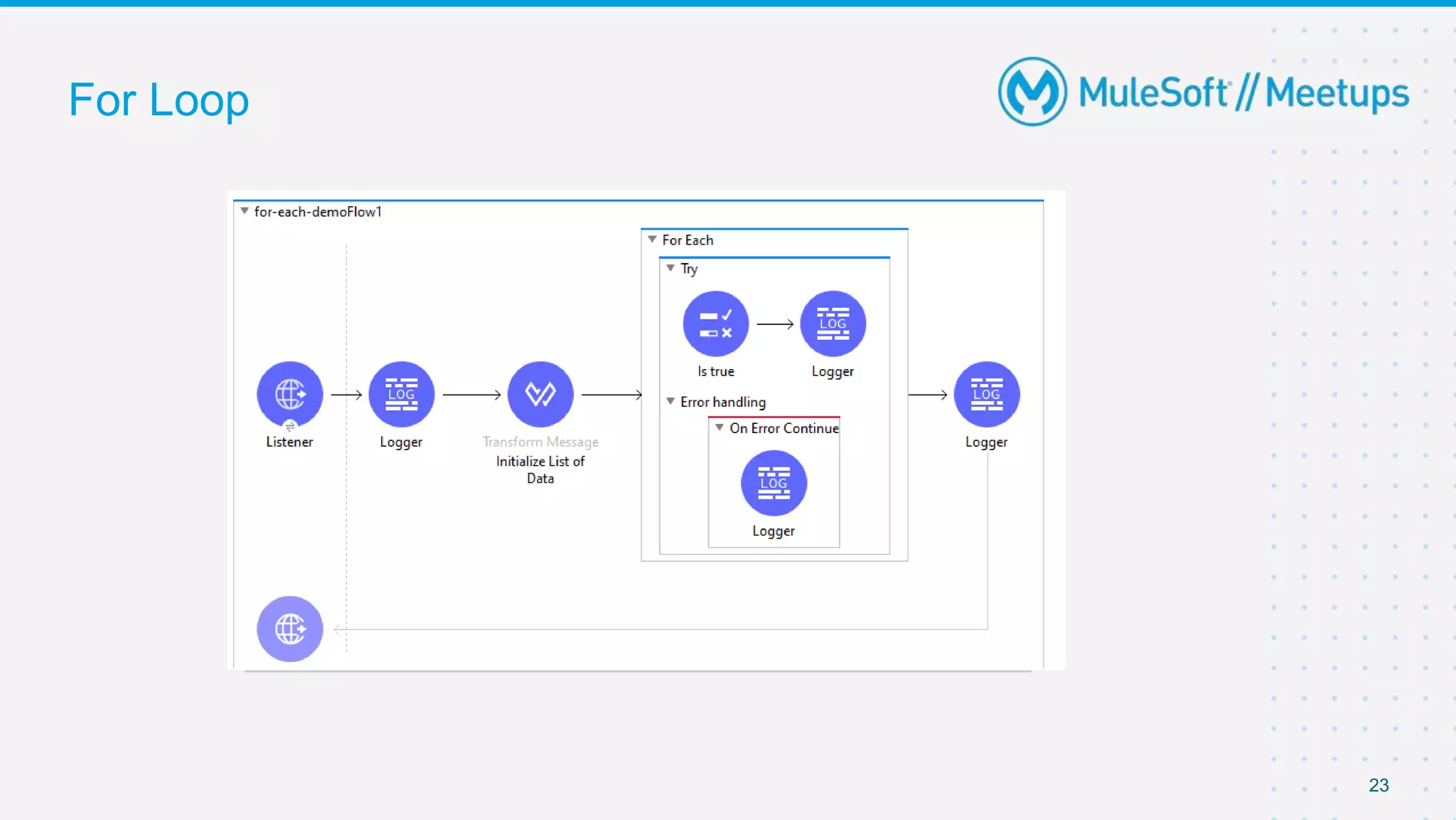
For Loop
● For Each scope splits a payload into elements and processes them one by one through the
components that you place in the scope
● If one of the elements in a collection throws an exception, the For Each scope stops
processing that collection and invokes the error handler
● Use Try Scope to handle errors
● You can use on Error Continue component to handle the errors as desired
22
For Loop
23
Batch Processing
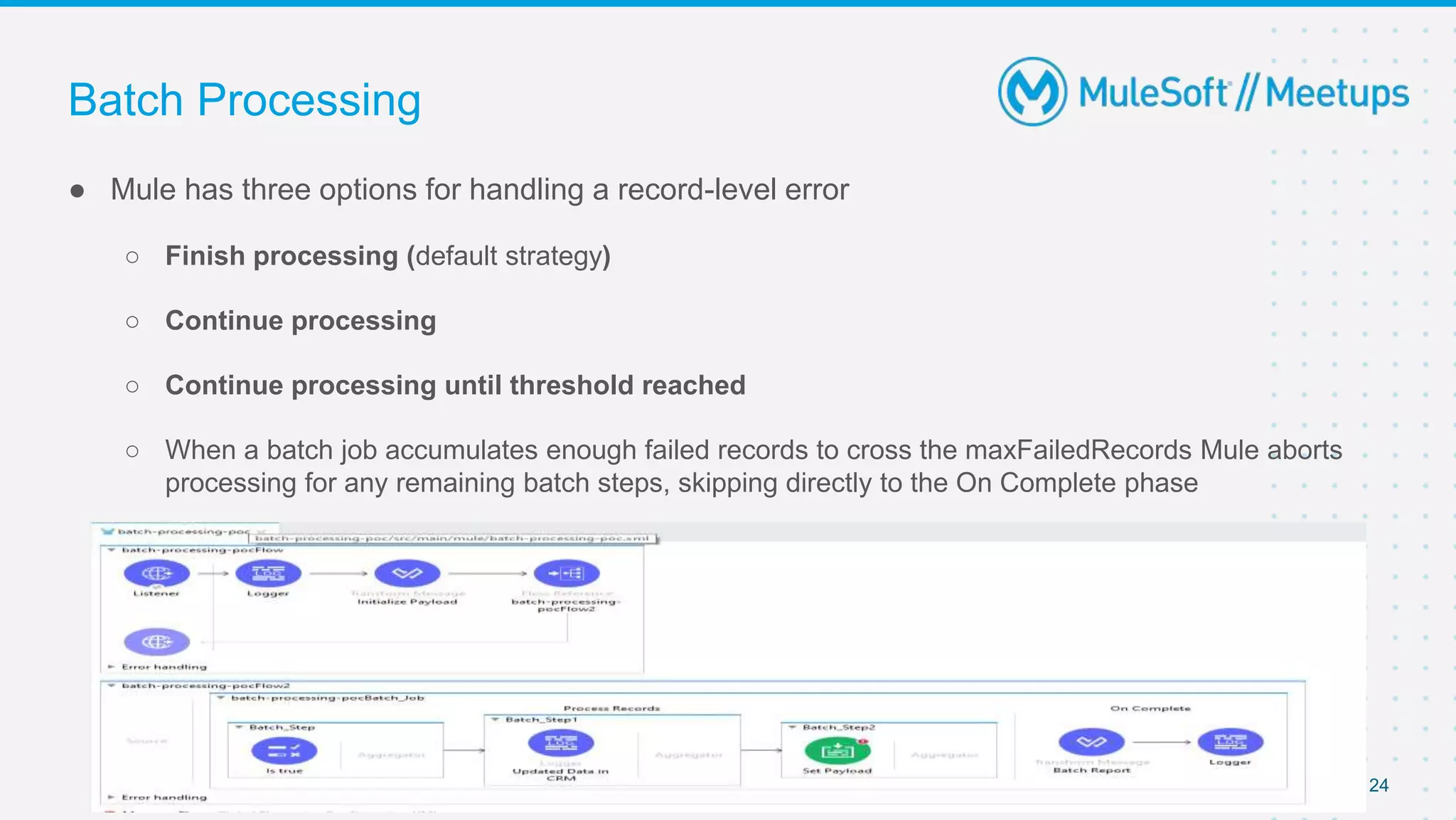
● Mule has three options for handling a record-level error
○ Finish processing (default strategy)
○ Continue processing
○ Continue processing until threshold reached
○ When a batch job accumulates enough failed records to cross the maxFailedRecords Mule aborts
processing for any remaining batch steps, skipping directly to the On Complete phase
24
Introduce yourself to your neighbor
Networking time
Thank you

MuleSoft Kochi Meetup #5– Handling Mule Exceptions

  • 1.
    [10-07-2021] [Kochi] MuleSoft MeetupGroup Error Handling in Mule
  • 2.
    2 ● Overview ofError Types in Mule ● Levels of Error Handler ● Error Handling Component ● Creating Custom Error Types ● Real time error handling scenarios ● Q&A ● Networking Agenda
  • 3.
    3 Organizers ⮚ Kochi MuleSoftMeetup Leader. ⮚ 7+ Years of Experience in Integrations and API Technologies. ⮚ Certified MuleSoft Developer, Integration Architect and platform Architect ⮚ Kochi Mulesoft Meetup Leader. ⮚ 5+ Years of Experience in Integrations and API Technologies. ⮚ Certified MuleSoft Developer, Integration Architect and platform Architect. ⮚ Kochi Mulesoft Meetup Leader. ⮚ Senior MuleSoft Developer | Integration Lead ⮚ 10+ years of Integration Experience Certified Mulesoft Developer, Certified Mulesoft Platform Architect
  • 4.
    4 Speakers Sanjana Mishra Technical Leadat Accenture About the Speaker: ⮚ Having 5+ years of overall experience building integration solutions. ⮚ Certified MuleSoft Developer And Platform Architect. About the Speaker: ⮚ 5+ Years of Experience in Integrations and API Technologies. ⮚ Certified MuleSoft Developer & Architect enthusiast. Sajid Ali Qureshi Senior Consultant at Apisero
  • 5.
  • 6.
    • Errors underANY type can be handled whereas CRITICAL errors cannot be handled and are only logged. • ANY type does not include errors occurring at source • Error on source components are system errors • The SOURCE type errors indicates that an error occurred in the source of the flow and cannot be handled • The CRITICAL type indicates a severe error occurred. These errors cannot be handled E.g., Overload JVM Error • UNKNOWN type is thrown by a component whenever there is no clear reason for a failure. 6
  • 7.
    Levels of ErrorHandler ● Flow Level Error Handler ○ Note : Only Private and Public flows can have Error handlers. Sub flows cannot have error handlers 7
  • 8.
    Levels of ErrorHandler ● Processor Level ○ Can be implemented using try block 8
  • 9.
    Levels of ErrorHandler ● Global Level 9
  • 10.
    Levels of ErrorHandler ● Default Handler ○ Note : By default, unhandled messaging errors are logged and propagated 10
  • 11.
    Error Handling Component ●On Error Propagate ○ Executes but propagates the error to a higher level 11
  • 12.
    Error Handling Component ●On Error Continue ○ Executes and uses the result of the execution as the result of its owner, as if the owner completed the execution successfully. Any transaction the owner handles is committed 12
  • 13.
    Error Handling Component ●Raise Error ○ Explicitly raise a error when certain conditions are not met with application 13
  • 14.
    Error Handling Component ●Try Scope ○ Enables you to handle errors that may occur when attempting to execute any of the components inside the Try scope. ○ It also supports transactions. ○ enables you to isolate potentially troublesome operations in your flow and assign them an error- handling method. 14
  • 15.
    Custom Error Types ●Error Mapping ○ By mapping each error to different custom error types, you can differentiate the error handling of each operation failure and quickly identify the source of the error in the Mule app logs 15
  • 16.
    Custom Error Types ●Raise Error ○ This component generates a Mule error, as if a failure had occurred, which allows you to customize its description and type ○ Note : You cannot raise error with an existing namespace e.g. HTTP, FILE,MULE etc. ○ Note : Use this component only for ■ Core runtime errors ■ Custom Error types 16
  • 17.
    Circuit Breaker Implementation ●Enables you to control how the connector handles errors that occur while processing a consumed message. ● You can use the circuit breaker to handle any downtime of that service ● The circuit breaker capability that the Subscriber source provides is bound to the error handling mechanism provided by Mule. 17
  • 18.
    Circuit Breaker Implementation ●Use Auto Acknowledgement Mode for subscribers ● Use on error propagate for errors you want to retry and open the circuit for ● Note : It is recommended to retry only recoverable type error using circuit breaker 18
  • 19.
    Scatter Gather Router ●It is a routing event processor that processes a Mule event through different parallel processing routes ● If any has failed with an error, then the Scatter-Gather component throws an error of type MULE_COMPOSITE_ROUTING. ● Event processing does not proceed past the Scatter-Gather component in the flow ● The flow branches to your error-handling event processors. ● Error object gathers not only errors from routes that failed but also Mule events from successfully completed routes ● Can be handled in following two ways shown in next slides 19 if any has failed with an error, then the Scatter-Gather component throws an error of type MULE:COMPOSITE_ROUTING
  • 20.
    Scatter Gather Router(Event Handler) ● The MULE_COMPOSITE_ROUTING error object gathers not only errors from routes that failed but also Mule events from successfully completed routes ● Capturing the MULE_COMPOSITE_ROUTING error and implementing desired action 20
  • 21.
    Scatter Gather Router(Try Scope) ● Use Try scope in each route to handle any errors that might be generated by a route’s event processors 21
  • 22.
    For Loop ● ForEach scope splits a payload into elements and processes them one by one through the components that you place in the scope ● If one of the elements in a collection throws an exception, the For Each scope stops processing that collection and invokes the error handler ● Use Try Scope to handle errors ● You can use on Error Continue component to handle the errors as desired 22
  • 23.
  • 24.
    Batch Processing ● Mulehas three options for handling a record-level error ○ Finish processing (default strategy) ○ Continue processing ○ Continue processing until threshold reached ○ When a batch job accumulates enough failed records to cross the maxFailedRecords Mule aborts processing for any remaining batch steps, skipping directly to the On Complete phase 24
  • 25.
    Introduce yourself toyour neighbor Networking time
  • 26.