[7th Aug 2021]
[Kochi] MuleSoft Meetup Group
Unleash the power of Anypoint
DataGraph
2
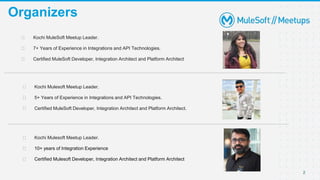
Organizers
⮚ Kochi MuleSoft Meetup Leader.
⮚ 7+ Years of Experience in Integrations and API Technologies.
⮚ Certified MuleSoft Developer, Integration Architect and Platform Architect
⮚ Kochi Mulesoft Meetup Leader.
⮚ 10+ years of Integration Experience
⮚ Certified Mulesoft Developer, Integration Architect and Platform Architect
⮚ Kochi Mulesoft Meetup Leader.
⮚ 5+ Years of Experience in Integrations and API Technologies.
⮚ Certified MuleSoft Developer, Integration Architect and Platform Architect.
3
Speakers
Jitendra Bafna
About the speaker:
⮚ MuleSoft Ambassador
⮚ Surat and Nashik MuleSoft Meetup Leader.
⮚ 12.5+ Years of Experience in Integrations and API Technologies.
⮚ Certified MuleSoft Integration Architect and platform Architect.
4
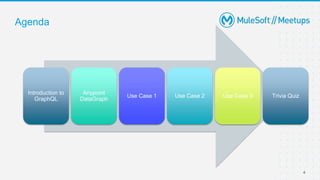
Agenda
Introduction to
GraphQL
Anypoint
DataGraph
Use Case 1 Use Case 2 Use Case 3 Trivia Quiz
What is GraphQL?
6
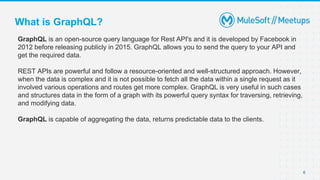
GraphQL is an open-source query language for Rest API's and it is developed by Facebook in
2012 before releasing publicly in 2015. GraphQL allows you to send the query to your API and
get the required data.
REST APIs are powerful and follow a resource-oriented and well-structured approach. However,
when the data is complex and it is not possible to fetch all the data within a single request as it
involved various operations and routes get more complex. GraphQL is very useful in such cases
and structures data in the form of a graph with its powerful query syntax for traversing, retrieving,
and modifying data.
GraphQL is capable of aggregating the data, returns predictable data to the clients.
What is GraphQL?
7
Anypoint DataGraph is component of Anypoint Platform which allows you to unify the multiple
APIs into single data service.
With Anypoint DataGraph, you can reuse multiple APIs in a single request. Enterprise architects
can easily unify APIs into one data service — all without writing more code. Developers can
consume multiple APIs from the data service in a single GraphQL request.
What is Anypoint DataGraph?
8
Unify APIs into powerful data services
● Explore and unify APIs into data services, without more code
● Serve data from multiple APIs instantly by securely sharing data services
Consume many APIs a single request
● Query the data service with a single, visually built GraphQL schema
● Focus on application logic, without understanding the complexities of the data service
Reach new levels of productivity
● Developers don’t write custom code to parse data from multiple APIs
● Data services are deployed as a SaaS app — no maintenance or patching for IT
Anypoint DataGraph
9
Unify the multiple APIs into the single data service. With Anypoint DataGraph, you can serve data from
multiple underlying APIs within a single request without writing any code.
• Consume the data from multiple APIs using a single request.
• Developer doesn't have to write the code to parse the data from multiple APIs.
• Anypoint DataGraph is managed service, no maintenance or patching for IT.
• Request the data you want, no more no less.
• Reduce development and maintenance efforts.
• Anypoint DataGraph is a managed service and no need to worry about underlying infrastructure and
maintenance.
Anypoint DataGraph Advantages
10
Monitor or Trace or Measure the API Performance
● With a single UI, it is possible to trace the query response time and logs, ensuring to measure the
performance of query or api request and meets expected SLA’s.
Authentication Mechanism
DataGraph support below list of Authentication mechanism while calling underlying APIs
Basic Authentication
● Client Id Enforcement via Headers
● Client Id Enforcement via Query Params
● Custom (Add Custom headers or Query Params)
Monitor and Authentication
11
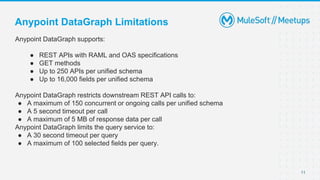
Anypoint DataGraph supports:
● REST APIs with RAML and OAS specifications
● GET methods
● Up to 250 APIs per unified schema
● Up to 16,000 fields per unified schema
Anypoint DataGraph restricts downstream REST API calls to:
● A maximum of 150 concurrent or ongoing calls per unified schema
● A 5 second timeout per call
● A maximum of 5 MB of response data per call
Anypoint DataGraph limits the query service to:
● A 30 second timeout per query
● A maximum of 100 selected fields per query.
Anypoint DataGraph Limitations
12
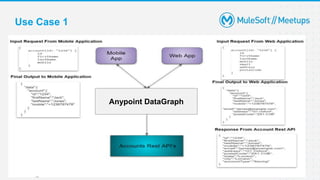
Let's consider the scenario, you have Rest API that returns 10 fields in response but web
application requires only 7 fields whereas mobile application requires only 4 fields. In such cases,
DataGraph is one of the most optimal options where the client can pass whatever data required as
an input request, and DataGraph will return the required fields to the Web Application and Mobile
Application. Below is the illustration of Use Case 1.
Use Case 1
13
Use Case 1
Anypoint DataGraph
14
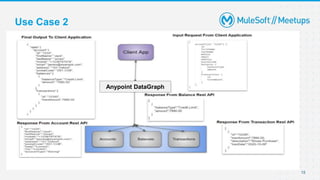
Let's consider the scenario where you have to call multiple Rest APIs or want to fetch data from
multiple rest API's and each APIs will respond with JSON payload. GraphQL will aggregate all the
responses and send back the required data to the client. Below is the illustration of Use Case 2.
Use Case 2
15
Use Case 2
Anypoint DataGraph
16
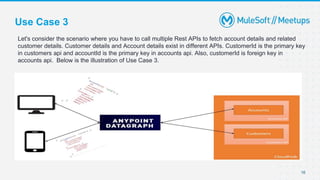
Let's consider the scenario where you have to call multiple Rest APIs to fetch account details and related
customer details. Customer details and Account details exist in different APIs. CustomerId is the primary key
in customers api and accountId is the primary key in accounts api. Also, customerId is foreign key in
accounts api. Below is the illustration of Use Case 3.
Use Case 3
17
Monitor or Trace or Measure the API Performance
● With a single UI, it is possible to trace the query response time and logs, ensuring to measure the
performance of query or api request and meets expected SLA’s.
Authentication Mechanism
DataGraph support below list of Authentication mechanism while calling underlying APIs
Basic Authentication
● Client Id Enforcement via Headers
● Client Id Enforcement via Query Params
● Custom (Add Custom headers or Query Params)
Monitor and Authentication
Live Demonstration
Get ready to WIN a Special Gift from MuleSoft Community
Quiz Time
Introduce yourself to your neighbor
Networking time
Thank you!

Kochi Mulesoft Meetup #6

  • 1.
    [7th Aug 2021] [Kochi]MuleSoft Meetup Group Unleash the power of Anypoint DataGraph
  • 2.
    2 Organizers ⮚ Kochi MuleSoftMeetup Leader. ⮚ 7+ Years of Experience in Integrations and API Technologies. ⮚ Certified MuleSoft Developer, Integration Architect and Platform Architect ⮚ Kochi Mulesoft Meetup Leader. ⮚ 10+ years of Integration Experience ⮚ Certified Mulesoft Developer, Integration Architect and Platform Architect ⮚ Kochi Mulesoft Meetup Leader. ⮚ 5+ Years of Experience in Integrations and API Technologies. ⮚ Certified MuleSoft Developer, Integration Architect and Platform Architect.
  • 3.
    3 Speakers Jitendra Bafna About thespeaker: ⮚ MuleSoft Ambassador ⮚ Surat and Nashik MuleSoft Meetup Leader. ⮚ 12.5+ Years of Experience in Integrations and API Technologies. ⮚ Certified MuleSoft Integration Architect and platform Architect.
  • 4.
  • 5.
  • 6.
    6 GraphQL is anopen-source query language for Rest API's and it is developed by Facebook in 2012 before releasing publicly in 2015. GraphQL allows you to send the query to your API and get the required data. REST APIs are powerful and follow a resource-oriented and well-structured approach. However, when the data is complex and it is not possible to fetch all the data within a single request as it involved various operations and routes get more complex. GraphQL is very useful in such cases and structures data in the form of a graph with its powerful query syntax for traversing, retrieving, and modifying data. GraphQL is capable of aggregating the data, returns predictable data to the clients. What is GraphQL?
  • 7.
    7 Anypoint DataGraph iscomponent of Anypoint Platform which allows you to unify the multiple APIs into single data service. With Anypoint DataGraph, you can reuse multiple APIs in a single request. Enterprise architects can easily unify APIs into one data service — all without writing more code. Developers can consume multiple APIs from the data service in a single GraphQL request. What is Anypoint DataGraph?
  • 8.
    8 Unify APIs intopowerful data services ● Explore and unify APIs into data services, without more code ● Serve data from multiple APIs instantly by securely sharing data services Consume many APIs a single request ● Query the data service with a single, visually built GraphQL schema ● Focus on application logic, without understanding the complexities of the data service Reach new levels of productivity ● Developers don’t write custom code to parse data from multiple APIs ● Data services are deployed as a SaaS app — no maintenance or patching for IT Anypoint DataGraph
  • 9.
    9 Unify the multipleAPIs into the single data service. With Anypoint DataGraph, you can serve data from multiple underlying APIs within a single request without writing any code. • Consume the data from multiple APIs using a single request. • Developer doesn't have to write the code to parse the data from multiple APIs. • Anypoint DataGraph is managed service, no maintenance or patching for IT. • Request the data you want, no more no less. • Reduce development and maintenance efforts. • Anypoint DataGraph is a managed service and no need to worry about underlying infrastructure and maintenance. Anypoint DataGraph Advantages
  • 10.
    10 Monitor or Traceor Measure the API Performance ● With a single UI, it is possible to trace the query response time and logs, ensuring to measure the performance of query or api request and meets expected SLA’s. Authentication Mechanism DataGraph support below list of Authentication mechanism while calling underlying APIs Basic Authentication ● Client Id Enforcement via Headers ● Client Id Enforcement via Query Params ● Custom (Add Custom headers or Query Params) Monitor and Authentication
  • 11.
    11 Anypoint DataGraph supports: ●REST APIs with RAML and OAS specifications ● GET methods ● Up to 250 APIs per unified schema ● Up to 16,000 fields per unified schema Anypoint DataGraph restricts downstream REST API calls to: ● A maximum of 150 concurrent or ongoing calls per unified schema ● A 5 second timeout per call ● A maximum of 5 MB of response data per call Anypoint DataGraph limits the query service to: ● A 30 second timeout per query ● A maximum of 100 selected fields per query. Anypoint DataGraph Limitations
  • 12.
    12 Let's consider thescenario, you have Rest API that returns 10 fields in response but web application requires only 7 fields whereas mobile application requires only 4 fields. In such cases, DataGraph is one of the most optimal options where the client can pass whatever data required as an input request, and DataGraph will return the required fields to the Web Application and Mobile Application. Below is the illustration of Use Case 1. Use Case 1
  • 13.
  • 14.
    14 Let's consider thescenario where you have to call multiple Rest APIs or want to fetch data from multiple rest API's and each APIs will respond with JSON payload. GraphQL will aggregate all the responses and send back the required data to the client. Below is the illustration of Use Case 2. Use Case 2
  • 15.
  • 16.
    16 Let's consider thescenario where you have to call multiple Rest APIs to fetch account details and related customer details. Customer details and Account details exist in different APIs. CustomerId is the primary key in customers api and accountId is the primary key in accounts api. Also, customerId is foreign key in accounts api. Below is the illustration of Use Case 3. Use Case 3
  • 17.
    17 Monitor or Traceor Measure the API Performance ● With a single UI, it is possible to trace the query response time and logs, ensuring to measure the performance of query or api request and meets expected SLA’s. Authentication Mechanism DataGraph support below list of Authentication mechanism while calling underlying APIs Basic Authentication ● Client Id Enforcement via Headers ● Client Id Enforcement via Query Params ● Custom (Add Custom headers or Query Params) Monitor and Authentication
  • 18.
  • 19.
    Get ready toWIN a Special Gift from MuleSoft Community Quiz Time
  • 20.
    Introduce yourself toyour neighbor Networking time
  • 21.