[Kochi] MuleSoft Meetup Group
1. Websocket
2. Demo (mule-chat-app)
[04-24-2021]
2
Organizers
⮚ Kochi MuleSoft Meetup Leader.
⮚ 7+ Years of Experience in Integrations and API Technologies.
⮚ Certified MuleSoft Developer, Integration Architect and platform Architect
⮚ Kochi Mulesoft Meetup Leader.
⮚ 5+ Years of Experience in Integrations and API Technologies.
⮚ Certified MuleSoft Developer, Integration Architect and platform Architect.
⮚ Kochi Mulesoft Meetup Leader.
⮚ Senior MuleSoft Developer | Integration Lead
⮚ 10+ years of Integration Experience Certified Mulesoft
Developer, Certified Mulesoft Platform Architect
3
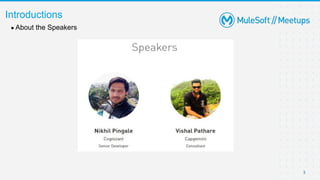
● About the Speakers
Introductions
Integration
with
Websocket
What are websockets?
5
“The WebSocket is an advanced technology
that makes it possible to open a two-way
interactive communication session between
the user's browser and a server. You can
send messages to a server and receive event-
driven responses without having to poll the
server for a reply.”
Where should you use websockets?
6
• Websockets are useful for real-time applications where
data shown in client is changing constantly.
• Some examples for this are:
1.chat application
2.collaborative document editing
3.stock trading applications
4.multiplayer online games
7
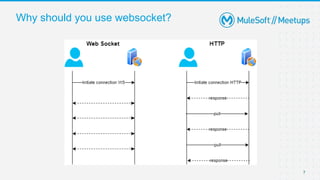
Why should you use websocket?
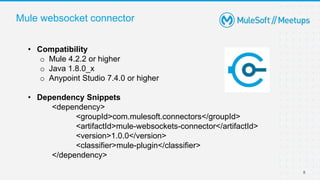
Mule websocket connector
8
• Compatibility
o Mule 4.2.2 or higher
o Java 1.8.0_x
o Anypoint Studio 7.4.0 or higher
• Dependency Snippets
<dependency>
<groupId>com.mulesoft.connectors</groupId>
<artifactId>mule-websockets-connector</artifactId>
<version>1.0.0</version>
<classifier>mule-plugin</classifier>
</dependency>
9
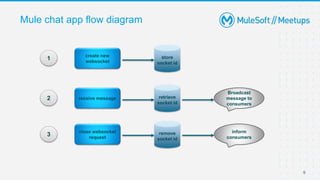
Mule chat app flow diagram
create new
websocket
store
socket id
receive message retrieve
socket id
Broadcast
message to
consumers
close websocket
request
remove
socket id
inform
consumers
1
2
3
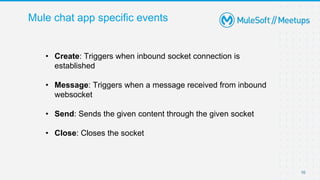
Mule chat app specific events
10
• Create: Triggers when inbound socket connection is
established
• Message: Triggers when a message received from inbound
websocket
• Send: Sends the given content through the given socket
• Close: Closes the socket
Code Implementation
Features of mule chat app
12
1. Anyone joins chat room – (“welcome to chat room”)
2. Anyone left the chat room – (“user_name has left the chat”)
3. Only person left in the chat room – (“No one is in the chat room”)
4. If user try to send empty message – (“Please write something..”)
5. To check who is/are available - @Available_users – (“user1,user2….”)
Demo
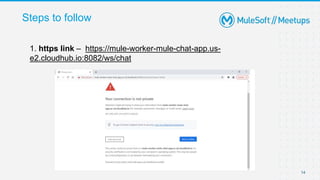
Steps to follow
14
1. https link – https://mule-worker-mule-chat-app.us-
e2.cloudhub.io:8082/ws/chat
Steps to follow continue…
15
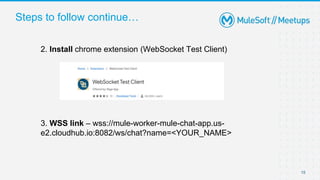
2. Install chrome extension (WebSocket Test Client)
3. WSS link – wss://mule-worker-mule-chat-app.us-
e2.cloudhub.io:8082/ws/chat?name=<YOUR_NAME>
Q & A
Thank you

MuleSoft Kochi Meetup #3– Integration with Web Sockets

  • 1.
    [Kochi] MuleSoft MeetupGroup 1. Websocket 2. Demo (mule-chat-app) [04-24-2021]
  • 2.
    2 Organizers ⮚ Kochi MuleSoftMeetup Leader. ⮚ 7+ Years of Experience in Integrations and API Technologies. ⮚ Certified MuleSoft Developer, Integration Architect and platform Architect ⮚ Kochi Mulesoft Meetup Leader. ⮚ 5+ Years of Experience in Integrations and API Technologies. ⮚ Certified MuleSoft Developer, Integration Architect and platform Architect. ⮚ Kochi Mulesoft Meetup Leader. ⮚ Senior MuleSoft Developer | Integration Lead ⮚ 10+ years of Integration Experience Certified Mulesoft Developer, Certified Mulesoft Platform Architect
  • 3.
    3 ● About theSpeakers Introductions
  • 4.
  • 5.
    What are websockets? 5 “TheWebSocket is an advanced technology that makes it possible to open a two-way interactive communication session between the user's browser and a server. You can send messages to a server and receive event- driven responses without having to poll the server for a reply.”
  • 6.
    Where should youuse websockets? 6 • Websockets are useful for real-time applications where data shown in client is changing constantly. • Some examples for this are: 1.chat application 2.collaborative document editing 3.stock trading applications 4.multiplayer online games
  • 7.
    7 Why should youuse websocket?
  • 8.
    Mule websocket connector 8 •Compatibility o Mule 4.2.2 or higher o Java 1.8.0_x o Anypoint Studio 7.4.0 or higher • Dependency Snippets <dependency> <groupId>com.mulesoft.connectors</groupId> <artifactId>mule-websockets-connector</artifactId> <version>1.0.0</version> <classifier>mule-plugin</classifier> </dependency>
  • 9.
    9 Mule chat appflow diagram create new websocket store socket id receive message retrieve socket id Broadcast message to consumers close websocket request remove socket id inform consumers 1 2 3
  • 10.
    Mule chat appspecific events 10 • Create: Triggers when inbound socket connection is established • Message: Triggers when a message received from inbound websocket • Send: Sends the given content through the given socket • Close: Closes the socket
  • 11.
  • 12.
    Features of mulechat app 12 1. Anyone joins chat room – (“welcome to chat room”) 2. Anyone left the chat room – (“user_name has left the chat”) 3. Only person left in the chat room – (“No one is in the chat room”) 4. If user try to send empty message – (“Please write something..”) 5. To check who is/are available - @Available_users – (“user1,user2….”)
  • 13.
  • 14.
    Steps to follow 14 1.https link – https://mule-worker-mule-chat-app.us- e2.cloudhub.io:8082/ws/chat
  • 15.
    Steps to followcontinue… 15 2. Install chrome extension (WebSocket Test Client) 3. WSS link – wss://mule-worker-mule-chat-app.us- e2.cloudhub.io:8082/ws/chat?name=<YOUR_NAME>
  • 16.
  • 17.