Mule
Properties
GSN-K
PROPERTIES
• A properties file is a simple collection of key-value pairs that can
be parsed by the java.util.Properties class. They are often used to
store configuration or localization data. In mule properties file
can be configured using property placeholders and system
properties.
Property Placeholders:
• Property placeholders allow you to upload the parameters from
a properties file. This enables you, for example, to have different
property files for different environments (Dev, QA, and Prod).
• It also allows you to reuse the same value in different parts of
your configuration.
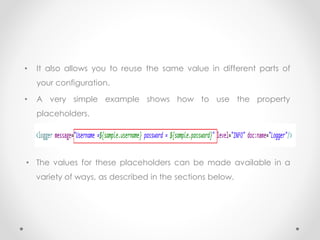
• A very simple example shows how to use the property
placeholders.
• The values for these placeholders can be made available in a
variety of ways, as described in the sections below.
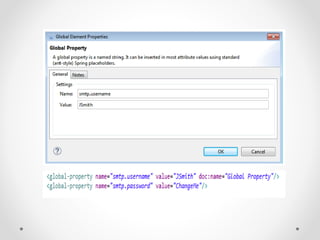
Global Properties:
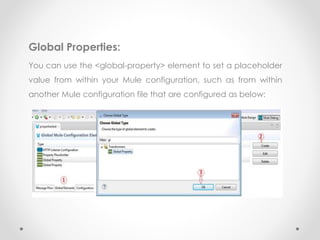
You can use the <global-property> element to set a placeholder
value from within your Mule configuration, such as from within
another Mule configuration file that are configured as below:
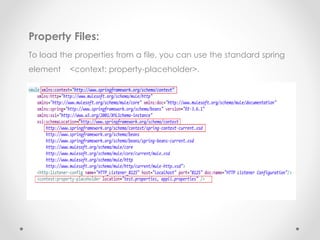
Property Files:
To load the properties from a file, you can use the standard spring
element <context: property-placeholder>.
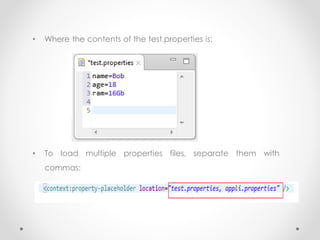
• Where the contents of the test.properties is:
• To load multiple properties files, separate them with
commas:
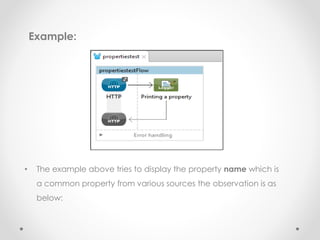
Example:
• The example above tries to display the property name which is
a common property from various sources the observation is as
below:
Observation:
• The property in the mule-app.properties is prioritized the most,
Global variables is prioritized the next most and next is the run
time arguments followed by Environment Variables and then
follows the property files in alphabetical order.
•Thank You All

Mule properties

  • 1.
  • 2.
    PROPERTIES • A propertiesfile is a simple collection of key-value pairs that can be parsed by the java.util.Properties class. They are often used to store configuration or localization data. In mule properties file can be configured using property placeholders and system properties. Property Placeholders: • Property placeholders allow you to upload the parameters from a properties file. This enables you, for example, to have different property files for different environments (Dev, QA, and Prod).
  • 3.
    • It alsoallows you to reuse the same value in different parts of your configuration. • A very simple example shows how to use the property placeholders. • The values for these placeholders can be made available in a variety of ways, as described in the sections below.
  • 4.
    Global Properties: You canuse the <global-property> element to set a placeholder value from within your Mule configuration, such as from within another Mule configuration file that are configured as below:
  • 6.
    Property Files: To loadthe properties from a file, you can use the standard spring element <context: property-placeholder>.
  • 7.
    • Where thecontents of the test.properties is: • To load multiple properties files, separate them with commas:
  • 8.
    Example: • The exampleabove tries to display the property name which is a common property from various sources the observation is as below:
  • 9.
    Observation: • The propertyin the mule-app.properties is prioritized the most, Global variables is prioritized the next most and next is the run time arguments followed by Environment Variables and then follows the property files in alphabetical order.
  • 10.