Database Connector
2
Database Connector
The Database connector allows you to connect with almost any Java
Database Connectivity (JDBC) relational database using a single interface
for every case. The Database connector allows you to run diverse SQL
operations on your database, including Select, Insert, Update, Delete, and
even Stored Procedures.
3
The Database connector lets you perform predefined queries as well as
queries that take the connector’s input to specify variable parameters or
even to construct sections of the query dynamically. The Database
connector also allows the use of template queries that are both self
sufficient and customizable. You can also perform multiple SQL requests in
a single bulk update. The connector also allows you to perform Data
Definition Language (DDL) requests, that alter the data structure rather
than the data itself. The Database connector is available with both Mule
Community and Mule Enterprise runtimes.
4
DataSense
When enabled, DataSense uses information in the query statement
(configured within the Database connector) to automatically extract
metadata about the message your application must deliver to, or can
expect from, the database. By enabling this functionality (in the Global
Database connector element), Mule does the heavy lifting of discovering
the type of data you must send to, or be prepared to receive from the
database.
5
DataMapper transformer
When used in conjunction with a DataSense-enabled Database connector,
DataMapper can automatically extract message metadata that you can use
to visually map and/or transform to a different data format or structure. For
example, if you configure a Database connector in your application, then
drop a DataMapper after it, the DataMapper uses the information that
DataSense extracted to pre-populate the input values for mapping, so that
you only need to confirm (or adjust) the selections, then proceed to
mapping to your desired output. In other words, DataSense makes sure
that DataMapper knows the data format and structure with which it must
work so you don’t have to figure it out manually.
6
Supported Operations
The database connector supports the following operations:
Select
Insert
Update
Delete
Stored Procedure
Bulk Execute
DDL operations such as CREATE, ALTER, etc.
Additionally, you can run a TRUNCATE query on the database by selecting
Update as the operation.
7
Configuring a Database Connector
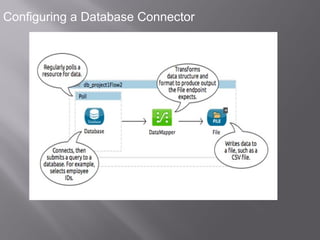
The example below illustrates a very simple Mule application in Studio that
meets the minimum configuration requirements: configured Database
connector, configured Global Database connector, and installed database
driver. Of course, the only one of these three required parts that is visible in
the graphical representation of the application is the Database connector
itself.
8
Configuring a Database Connector
Mule database connector

Mule database connector

  • 1.
  • 2.
    2 Database Connector The Databaseconnector allows you to connect with almost any Java Database Connectivity (JDBC) relational database using a single interface for every case. The Database connector allows you to run diverse SQL operations on your database, including Select, Insert, Update, Delete, and even Stored Procedures.
  • 3.
    3 The Database connectorlets you perform predefined queries as well as queries that take the connector’s input to specify variable parameters or even to construct sections of the query dynamically. The Database connector also allows the use of template queries that are both self sufficient and customizable. You can also perform multiple SQL requests in a single bulk update. The connector also allows you to perform Data Definition Language (DDL) requests, that alter the data structure rather than the data itself. The Database connector is available with both Mule Community and Mule Enterprise runtimes.
  • 4.
    4 DataSense When enabled, DataSenseuses information in the query statement (configured within the Database connector) to automatically extract metadata about the message your application must deliver to, or can expect from, the database. By enabling this functionality (in the Global Database connector element), Mule does the heavy lifting of discovering the type of data you must send to, or be prepared to receive from the database.
  • 5.
    5 DataMapper transformer When usedin conjunction with a DataSense-enabled Database connector, DataMapper can automatically extract message metadata that you can use to visually map and/or transform to a different data format or structure. For example, if you configure a Database connector in your application, then drop a DataMapper after it, the DataMapper uses the information that DataSense extracted to pre-populate the input values for mapping, so that you only need to confirm (or adjust) the selections, then proceed to mapping to your desired output. In other words, DataSense makes sure that DataMapper knows the data format and structure with which it must work so you don’t have to figure it out manually.
  • 6.
    6 Supported Operations The databaseconnector supports the following operations: Select Insert Update Delete Stored Procedure Bulk Execute DDL operations such as CREATE, ALTER, etc. Additionally, you can run a TRUNCATE query on the database by selecting Update as the operation.
  • 7.
    7 Configuring a DatabaseConnector The example below illustrates a very simple Mule application in Studio that meets the minimum configuration requirements: configured Database connector, configured Global Database connector, and installed database driver. Of course, the only one of these three required parts that is visible in the graphical representation of the application is the Database connector itself.
  • 8.