School of Computing & Informatics
Dilla University
Dr. Eng. Mesay Adinew
Mobile Computing: CN-6117
1. Introduction
 Mobile communication─ location of the device can vary either locally or
globally and communication takes place through a wireless, distributed, or
diversified network
Two ways of signals transmission through guided(wired) and Unguided
(wireless)
1.1. Mobile Computing Overview
Mobile computing is used in different situations with different
names. The most common names are
 Mobile computing is wireless technology that lets you to broadcast the
data, video, and audio through devices which are not attached along with
any physical medium.
 The main feature of mobile computing is that all computing devices are
portable nature and linked over a computer network.
 The computing environment is mobile and moves along with the user.
 This is similar to the telephone number of a GSM Global System for Mobile
communication) phone, which moves with the phone.
 Anywhere, Anytime Information: This is the generic definition of ubiquity,
where the information is available anywhere, all the time.
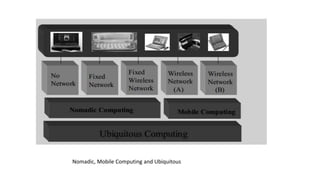
Nomadic Computing: The computing environment is nomadic and moves along with the
mobile user. This is true for both local and remote services.
Ubiquitous Computing: A disappearing (nobody will notice Its presence) everyplace
computing environment. User will be able to use both local and remote services.
Pervasive Computing: A computing environment, which is can occur with any device, at any
time, in any place and in any data format across any network and can hand tasks from one
computer to another.
Global Service Portability: Making a service portable and available in every environment.
Any service of any environment will be available globally.
Wearable Computers: Wearable computers are those computers that may be adorned by
humans like a hat, shoe or clothes (these are wearable accessories).
Wearable computers need to have some additional attributes compared to standard mobile
devices.
Wearable computers are always on; operational while on move; hands free, context aware
(with different types of sensors). Wearable computers need to be equipped with proactive
attention and notifications. The ultimate wearable computers will have sensors implanted
within the body and supposedly integrate with the human nervous system.
Nomadic, Mobile Computing and Ubiquitous
1.2. Mobility
• The ability to change locations while connected to the network increases the
volatility of some information. Certain data considered static for stationary
computing becomes dynamic for mobile computing. For example, although a
stationary computer can be configured statically to prefer the nearest server, a
mobile computer needs a mechanism to determine which server to use.
• As volatility increases, cost-benefit tradeoff points shift, calling for appropriate
modifications in the design.
 The main problems introduced by mobility:
 the network address of a mobile computer changes dynamically;
 Its current location affects configuration parameters as well as answers to user
queries;
As it away from a nearby server, the communication path between the two grows.
Cover large geographi location
6
Problems with Mobility in Internet
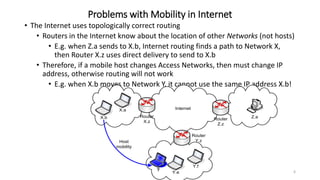
• The Internet uses topologically correct routing
• Routers in the Internet know about the location of other Networks (not hosts)
• E.g. when Z.a sends to X.b, Internet routing finds a path to Network X,
then Router X.z uses direct delivery to send to X.b
• Therefore, if a mobile host changes Access Networks, then must change IP
address, otherwise routing will not work
• E.g. when X.b moves to Network Y, it cannot use the same IP address X.b!
Internet
X.a
Router
X.z
X.b
Router
Y.z
Y.f
Y.e
Router
Z.z
Z.a
Host
mobility
?
7
cont...
• Application Sessions depend on IP address
• Most Internet applications (and all using TCP) define a session as using the same:
• Source IP address, Source Port, Destination IP address, Destination Port
• Changing one of these identifiers, requires ending of the current session and starting a new
session
• E.g. stop a file transfer, lose context for web browsing, reconnect for a voice call,
interrupt a database transaction
• These interruptions are acceptable for nomadicity
• Turning your laptop off, move to another location, and restart laptop
• DHCP (and similar techniques) can be used to give your mobile host a new IP address
• BUT these interruptions are not acceptable for true mobility
• A user changing access networks should not be aware of the change
• Mobility should be seamless (perhaps small delays of 10’s to 100’s of milliseconds
incurred)
• Very important for multimedia, streaming applications, e.g. voice over IP
• Solution: change the IP address, but hide the change from Transport/Application layers
• Solution is implemented by Mobile IP, an IETF (Internet Engineering Task Force) standard
1.2.1. Address Migration
As people move, their mobile computers will use different network access points,
or ‘addresses.’
Today’s networking is not designed for dynamically changing addresses. Active
network connections usually cannot be moved to a new address.
Once an address for a host name is known to a system, it is typically cached with
a long expiration time.
In the Internet Protocol (IP), for example, a host IP name is inextricably bound
with its network address, moving to a new location means acquiring a new IP
name. Human intervention is often required to coordinate the use of addresses.
• In order to communicate with a mobile computer, messages must be sent to its
most recent address.
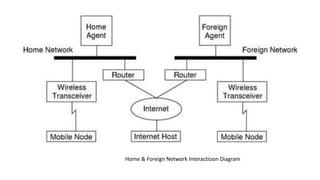
• There are four basic mechanisms for determining the current address of a mobile
computer: broadcast, central services, home bases, and forwarding pointers.
• These are the building blocks of the current proposals for ‘mobile-IP’ schemes.
• 1.Selective Broadcast: If a mobile computer is known to be in a set of cells,
then a message could be 'broadcasted' to these known cells asking the
required mobile unit to reply with its current network address.
• 2.Central Services: A logically centralized database contains the current
addresses of all mobile units. Whenever a mobile computer changes its
address, it sends a message to update the database.
• 3.Home Bases: This is essentially the limiting case of distributing a central
service, i.e. only a one server knows the current location of a mobile
computer.
• 4.Forwarding Pointers: This method places a copy of the new address at the
old location. Each message is forwarded along the chain of pointers leading to
the mobile computer. This requires an active entity at the old address to
receive and forward messages.
Home & Foreign Network Interactioon Diagram
1.2.2. Location Dependent Information
• Information that depends on location is configured statically, such as
the local name server, available printers, and the time zone. Because
traditional computers do not move.
• A challenge for mobile computing is to factor out this information
intelligently and provide mechanisms to obtain configuration data
appropriate to the present location.
1.2.3.Migrating Locality
• Mobile computing creates a new kind of locality that migrates as users move.
• Even if a mobile computer spends the effort to find the server that is nearest
for a given service, over time it may stop to be the nearest due to migration.
• Because the physical distance between two points does not necessarily reflect
the network distance, the communication path can grow disproportionately to
actual movement. For example, a small movement can result in a much longer
path when crossing network administrative boundaries.
• A longer network path means communication traverses more intermediaries,
resulting in longer latency and greater risk of disconnection.
• To avoid these disadvantages, service connections may be dynamically
transferred to servers that are closer.
1.2.4 Constraints(Challenges) of Mobility
• Mobile computing is characterized by four constraints:
● Mobile elements are resource-poor relative to static elements. For a given cost and level of technology,
considerations of weight, power, size and ergonomics will exact a penalty in computational resources such as
processor speed, memory size, and disk capacity.
● Mobility is inherently hazardous.
A Wall Street stockbroker carring his laptop on more mugged streets is easy stolen than to have his workstation
in a locked office be physically subverted. In addition to security concerns, portable computers are more
vulnerable to loss or damage.
● Mobile connectivity is highly variable in performance and reliability.
• Some buildings may offer reliable, high-bandwidth wireless connectivity while others may only offer low-
bandwidth connectivity.
• Outdoors, a mobile client may have to rely on a low-bandwidth wireless network with gaps in coverage.
● Mobile elements rely on a limited energy source.
While battery technology will improve over time, the need to be sensitive to power consumption will not reduce.
Concern for power consumption must span many levels of hardware and software to be fully effective.
• These constraints are not artifacts of current technology, but are intrinsic to mobility.
Limitations of Mobile Computing
1. Resource constraints: Battery
2. Interference: Radio transmission cannot be protected against interference using shielding and
result in higher loss rates for transmitted data or higher bit error rates respectively
3. Bandwidth: Although they are continuously increasing, transmission rates are still very low for
wireless devices compared to desktop systems. Researchers look for more efficient communication
protocols with low overhead.
4. Dynamic changes in communication environment: variations in signal power within a region,
thus link delays and connection losses
5. Network Issues: discovery of the connection-service to destination and connection stability
6. Interoperability issues: the varying protocol standards
7. Security constraints: Not only can portable devices be stolen more easily, but the radio interface
is also prone to the dangers of eavesdropping. Wireless access must always include encryption,
authentication, and other security mechanisms that must be efficient and simple to use.
1.3. Networks in Mobile computing/Types of Networks
• Mobile computing will use different types of networks. These can be fixed telephone network, GSM, GPRS, ATM (Asynchronous
Transfer Mode), Frame Relay, ISDN (Integrated Service Digital Network), CDMA, CDPD (Cellular Digital Packet data), DSL (Digital
Subscriber Loop), Dial-up, Wi-Fi (Wireless Fidelity), 802.11, Bluetooth, Ethernet, Broadband, etc.
1.3.1 Wireline Networks
• This is a network, which is designed over wire or tangible conductors.
• This network is called fixed or wireline network. Fixed telephone networks over copper and fiber-optic will be part of this network
family. Broadband networks over DSL or Cable will also be part of wireline networks. Wireline network are generally public
networks and cover wide areas. Though microwave or satellite networks do not use wire, when a telephone network uses
microwave or satellite as a part of its infrastructure, it is considered part of wireline networks.
• The Internet backbone is a wireline network as well.
1.3.2 Wireless Networks
• Mobile networks are generally termed as wireless network. This includes wireless networks used by radio taxis, one way and two-
way pager, cellular phones. Example will be PCS (Personal Cellular System), AMPS (Advanced Mobile Phone System), GSM,
CDMA,etc.
• In a wireless network ,the last mile is wireless and works over radio interface.
1.4. Wireless Telecommunicatins Networks
personal area network (PAN)
• A wireless telecommunications network for device-to-device connections within a very short
range
Bluetooth
• A set of telecommunications standards that enables wireless devices to communicate with each
other over short distances
Wireless Local Area Networks and Wi-fi
wireless local area network (WLAN)
• A telecommunications network that enables users to make short range wireless connections to
the Internet or another network
 Wi-Fi (wireless fidelity)
• The common name used to describe the IEEE 802.11 standard used on most WLANs
802.11b
• The most popular Wi-Fi standard; it is inexpensive and offers sufficient speed
for most devices; however, interference can be a problem
802.11a
• This Wi-Fi standard is faster than 802.11b but has a smaller range
802.11g
• This fast but expensive Wi-Fi standard is mostly used in businesses
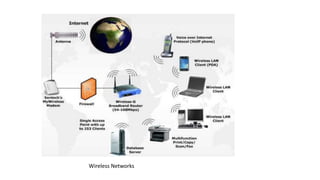
 wireless access point
• An antenna that connects a mobile device to a wired LAN
hotspot
• An area or point where a wireless device can make a connection to a wireless
local area network (using Wi-Fi)
Wireless Networks
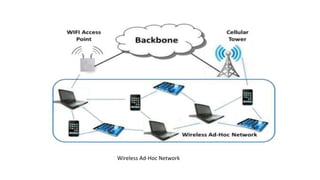
1.5. Ad-hoc Networks
In Latin, ad hoc literally means `for this purpose only'. An ad-hoc (or spontaneous)
network is a small area network, especially one with wireless or temporary plug-in
connections.
In these networks some of the devices are part of the network only for the duration of a
communication session.
An ad-hoc network is also formed when mobile, or portable devices, operate in close
proximity of each other or with the rest of the network.
When we beam a business card from our PDA (Personal Digital Assistant) to another, or
use an IrDA (Infrared Data Association) port to print document from our laptop, we have
formed an ad hoc network.
The term 'ad hoc' has been applied to networks in which new devices can be quickly
added using, for example, Bluetooth or wireless LAN (802.11x).
 In these networks devices communicate with the computer and other devices using
wireless transmission. Typically based on short-range wireless technology, these
networks don't require subscription services or carrier networks.
Wireless Ad-Hoc Network
2. Mobile networks
• This lecture covers cellular data technologies
• It does not cover:
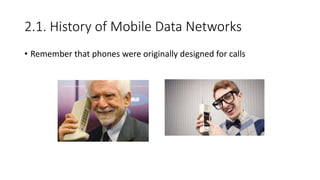
2.1. History of Mobile Data Networks
• Remember that phones were originally designed for calls
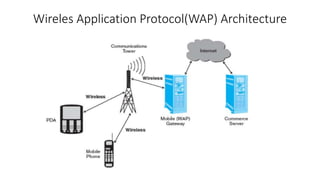
Wireles Application Protocol(WAP) Architecture
2.2.Cellular Network Basics
• There are many types of cellular services
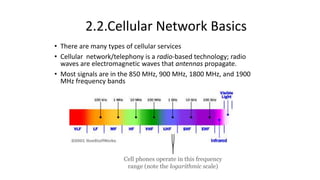
• Cellular network/telephony is a radio-based technology; radio
waves are electromagnetic waves that antennas propagate.
• Most signals are in the 850 MHz, 900 MHz, 1800 MHz, and 1900
MHz frequency bands
Cell phones operate in this frequency
range (note the logarithmic scale)
2.2.1. Cellular Network Generations
• It is useful to think of cellular Network/telephony in terms of
generations:
• 0G: Briefcase-size mobile radio telephones
• 1G: Analog cellular telephony
• 2G: Digital cellular telephony
• EDGE (Enhanced Data Rate For GSM Evolution) provides a higher rate of data
transmission than normal GSM.
• 3G: High-speed digital cellular telephony (including video telephony)
• UMTS (Universal Mobile Telecommunications Service)
• Long Term Evolution (LTE: 4G): IP-based “anytime, anywhere” voice, data,
and multimedia telephony at faster data rates than 3G
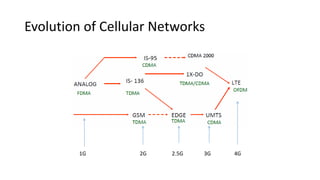
Evolution of Cellular Networks
1G 2G 3G 4G
2.5G
2.2.2. Cellular Network
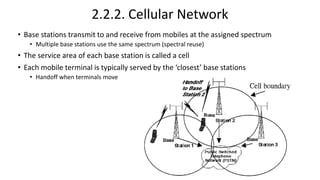
• Base stations transmit to and receive from mobiles at the assigned spectrum
• Multiple base stations use the same spectrum (spectral reuse)
• The service area of each base station is called a cell
• Each mobile terminal is typically served by the ‘closest’ base stations
• Handoff when terminals move
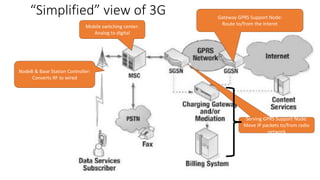
“Simplified” view of 3G
NodeB & Base Station Controller:
Converts RF to wired
Mobile switching center:
Analog to digital
Serving GPRS Support Node:
Move IP packets to/from radio
network
Gateway GPRS Support Node:
Route to/from the Interet
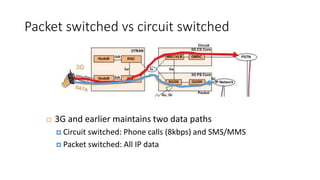
Packet switched vs circuit switched
 3G and earlier maintains two data paths
 Circuit switched: Phone calls (8kbps) and SMS/MMS
 Packet switched: All IP data
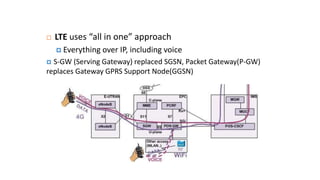
 LTE uses “all in one” approach
 Everything over IP, including voice
 S-GW (Serving Gateway) replaced SGSN, Packet Gateway(P-GW)
replaces Gateway GPRS Support Node(GGSN)
LTE Key Features
• Uses Multi-input Multi-output (MIMO) for enhanced throughput
• Reduced power consumption.
• Higher RF power amplifier efficiency (less battery power used by
handsets).
• Lower latency to get access to the medium.
• Performance sometimes better than WiFi.
2.3. The Multiple Access Problem
• In satellite telecommunication, a downlink is the link from a satellite
down to one or more ground stations or receivers, and an uplink is
the link from a ground station up to a satellite.
• In mobile communication the base stations serve many mobile
terminals at the same time (both downlink and uplink)
All mobiles in the cell need to transmit to the base station
interference among different senders and receivers
So it need multiple access scheme
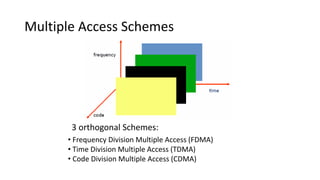
Multiple Access Schemes
• Frequency Division Multiple Access (FDMA)
• Time Division Multiple Access (TDMA)
• Code Division Multiple Access (CDMA)
3 orthogonal Schemes:
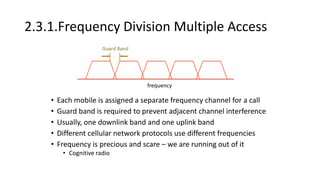
2.3.1.Frequency Division Multiple Access
• Each mobile is assigned a separate frequency channel for a call
• Guard band is required to prevent adjacent channel interference
• Usually, one downlink band and one uplink band
• Different cellular network protocols use different frequencies
• Frequency is precious and scare – we are running out of it
• Cognitive radio
frequency
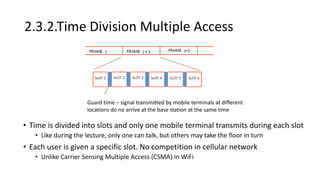
2.3.2.Time Division Multiple Access
• Time is divided into slots and only one mobile terminal transmits during each slot
• Like during the lecture, only one can talk, but others may take the floor in turn
• Each user is given a specific slot. No competition in cellular network
• Unlike Carrier Sensing Multiple Access (CSMA) in WiFi
Guard time – signal transmitted by mobile terminals at different
locations do no arrive at the base station at the same time
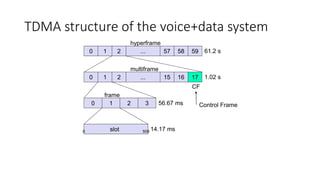
TDMA structure of the voice+data system
0 1 2 57 58 59
...
hyperframe
0 1 2 15 16 17
...
multiframe
0 1 2 3
0 slot 509
frame
14.17 ms
56.67 ms
1.02 s
61.2 s
CF
Control Frame
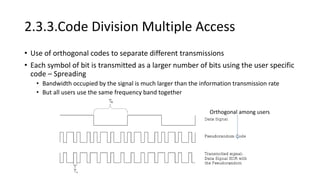
2.3.3.Code Division Multiple Access
• Use of orthogonal codes to separate different transmissions
• Each symbol of bit is transmitted as a larger number of bits using the user specific
code – Spreading
• Bandwidth occupied by the signal is much larger than the information transmission rate
• But all users use the same frequency band together
Orthogonal among users
2.4. Mobile Computing Services
Short Message Service (SMS)
• A service that supports the sending and receiving of short text messages on mobile
phones
 Enhanced Messaging Service (EMS)
• An extension of SMS that can send simple animation, tiny pictures, sounds, and
formatted text
Multimedia Messaging Service (MMS)
• The emerging generation of wireless messaging; MMS is able to deliver rich media
 E-payments
• Electronic payments for purchase amounts.
Location-based services
 global positioning system (GPS)
• A worldwide satellite-based tracking system that enables users to determine their
position anywhere on the earth
Voice-support services
 interactive voice response (IVR)
• A voice system that enables users to request and receive information and to enter and
change data through a telephone to a computerized system
Voice portal
• A Web site with an audio interface that can be accessed through a telephone call
3.Mobile Computing Architecture
• What is Mobile Computing Architecture?
• 3-Tier Architecture of Mobile Computing
• Mobile Computing Architecture Layers
• Characteristics of mobile computing architecture
• Mobile computing is enabled with three-tier architecture that has three major layers contains the
user interface or the presentation tier, the process management or the application tier and the
data management tier.
3.1. Three-Tier Architecture of Mobile Computing
• Presentation Layer (UI): This layer lets users to face device handling and rendering.
• Application Layer (AL): It allows executing business logic and rules.
• Data Access Layer (DM): It lets to get access and management data.
Mobile Computing Architecture
1-Tier Presentation Layer
• This presentation layer lets to execute all applications on the client devices and provide
complete user interfaces.
• It has main responsibility is to present information to edge-user.
• Users are able to grab all information via speakers, vibration, screens, etc.
• Users can sent the information with helping of input devices like pen drives, mouse,
keyboard, touch screens and so on.
• This layer is enabled with WAP browsers, customized client programs, web browsers, etc.
• Presentation layer allows accomplishing via client-side data source, Dynamic HTML and data
cursors.
• Presentation layer must be context aware and device-independent.
• In General:
 Responsible for presenting the information to the end user
 Run on the client device and offer all the user interfaces
 Includes web browsers, WAP browsers and client programs
2-Tier Application Layer
• In the application layer, business logic performs all tasks as server for client requests
from workstations.
• It works as business rules fetch or enter data through the Data Layer.
• It is enabled with few technologies such as PHP, .Net services, JSP, Java and so on.
• Presentation and database-independent
• This layer identifies that which types of data is required and performs as client in relation
to a third tier or programming that may be situated on a mainframe computer or locally.
• It takes decision on rendering, network management, security, data store access, need
for many types of middlewares.
Their components are not linked to certain client, so they can be
implemented by all applications and can be proceed to other
locations, as responding time frame and other needed rules.
Independent of presentation and database management
Handles functions related to middleware
Middleware layer of software sitting between the operating System
and user facing software
Many types of middleware: Message Oriented Middleware,
Transaction Processing Middleware, Communication Middleware,
Distributed Objects and Components, Transcoding Middleware, Web
Services, etc.
3-Tier Data Access Layer
• This layer is implemented to keep store data that is required by
application and work as repository for both temporary and
permanent data.
• Data access layer is built up of DBMS that offers all data for above two
layers.
• This layer is also known as ‘DBMS Access Layer’
• All data is stored into many format like as text files or relational DB.
• Used to store data needed by the application and acts as a Repository
for both temporary and permanent data Can use XML (Extensible
Markup Language) for interoperability of data with other systems And
data sources
• Might incorporate the use of Database Middleware and Sync ML
(Machine Language) ’
• Database Middleware : interfaces application programs and the
database
• Database Middleware : helps business logic run independent and
transparent from database technology and database vendor
Physical layer
• modulation/demodulation
• generation of the physical channel structure with a
guaranteed throughput
• controlling of radio transmission
• channel assignment on request of the MAC layer
• detection of incoming signals
• sender/receiver synchronization
• collecting status information for the management plane
MAC layer
• maintaining basic services, activating/deactivating
physical channels
• multiplexing of logical channels
• e.g., C: signaling, I: user data, P: paging, Q: broadcast
• segmentation/reassembly
• error control/error correction
3.2. Mobile Layered Network Architecture
Data link control layer
• creation and keeping up reliable connections between the mobile terminal and
basestation
• two DLC protocols for the control plane (C-Plane)
• connectionless broadcast service:
paging functionality
• Lc+LAPC protocol:
in-call signaling (similar to LAPD within ISDN), adapted to the underlying MAC service
• several services specified for the user plane (U-Plane)
• null-service: offers unmodified MAC services
• frame relay: simple packet transmission
• frame switching: time-bounded packet transmission
• error correcting transmission: uses FEC, for delay critical, time-bounded services
• bandwidth adaptive transmission
• „Escape“ service: for further enhancements of the standard
Network layer
• similar to ISDN (Q.931) and GSM (04.08)
• offers services to request, check, reserve, control, and release resources at
the basestation and mobile terminal
• resources
• necessary for a wireless connection
• necessary for the connection of the DECT system to the fixed network
• main tasks
• call control: setup, release, negotiation, control
• call independent services: call forwarding, accounting, call redirecting
• mobility management: identity management, authentication, management of the
location register
Characteristics of mobile computing architecture
It allowing the enhancing the performance
Maintainability
Flexibility
 Re-usability and
Scalability to architecture,
It also helps to invisible complexity of distributed processing from the
user.
4. Wireless Telecommunication Systems
GSM
 Overview
 Services
 Sub-systems
 Components
Handover
4.1.GSM
Global System For Mobile(GSM) is a second generation cellular standard developed to cater voice
services and data delivery using digital modulation GSM digitizes and compresses data,then sends it don a channel
with two other streams of user data ,each in its own time slot.It operates at either the 900 megahertz(MHZ)or 1800
MHZ frequency band
GSM:
formerly: Groupe Spéciale Mobile (founded 1982 in European )
now: Global System for Mobile Communication
 Today many providers all over the world use GSM (more than 184 countries in Asia, Africa, Europe, Australia,
America
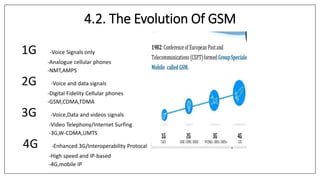
4.2. The Evolution Of GSM
1G -Voice Signals only
-Analogue cellular phones
-NMT,AMPS
2G -Voice and data signals
-Digital Fidelity Cellular phones
-GSM,CDMA,TDMA
3G -Voice,Data and videos signals
-Video Telephony/Internet Surfing
-3G,W-CDMA,UMTS
4G -Enhanced 3G/Interoperability Protocal
-High speed and IP-based
-4G,mobile IP
4.3. Performance characteristics of GSM
• Communication
• mobile, wireless communication; support for voice and data
services
• Total mobility
• international access, chip-card enables use of access points
of different providers
• Worldwide connectivity
• one number, the network handles localization
• High capacity
• better frequency efficiency, smaller cells, more customers
per cell
• High transmission quality
• high audio quality and reliability for wireless, uninterrupted
phone calls at higher speeds (e.g., from cars, trains)
• Security functions
• access control, authentication via chip-card and PIN
4.4.Advantages Of GSM
 Communication
-Mobile,Wireless communication support for voice and data services
 Total mobility
-International access,Chip-card enables use os access point of different
providers
 Worldwide connectivity
-One number the network handles every location
 High capacity
-better frequency efficiency,Smaller cells,More customer per cells.
 High transmission quality
-High audio quality and reliability for wireless,Uninterrupted phone calls
at higher speeds(e.g.,from cars,trains)
4.5. Disadvantages of GSM
• There is no perfect system!!
 no end-to-end encryption of user data
 no full ISDN bandwidth of 64 kbit/s to the user, no transparent B-channel
 reduced concentration while driving
 electromagnetic radiation
 abuse of private data possible
 roaming profiles accessible
 high complexity of the system
 several incompatibilities within the GSM standards
 Dropped and missed calls
 Less efficiency
 Security Issues

M.Sc Mobile computing.pptx

  • 1.
    School of Computing& Informatics Dilla University Dr. Eng. Mesay Adinew Mobile Computing: CN-6117
  • 2.
    1. Introduction  Mobilecommunication─ location of the device can vary either locally or globally and communication takes place through a wireless, distributed, or diversified network Two ways of signals transmission through guided(wired) and Unguided (wireless) 1.1. Mobile Computing Overview Mobile computing is used in different situations with different names. The most common names are  Mobile computing is wireless technology that lets you to broadcast the data, video, and audio through devices which are not attached along with any physical medium.  The main feature of mobile computing is that all computing devices are portable nature and linked over a computer network.  The computing environment is mobile and moves along with the user.  This is similar to the telephone number of a GSM Global System for Mobile communication) phone, which moves with the phone.  Anywhere, Anytime Information: This is the generic definition of ubiquity, where the information is available anywhere, all the time.
  • 3.
    Nomadic Computing: Thecomputing environment is nomadic and moves along with the mobile user. This is true for both local and remote services. Ubiquitous Computing: A disappearing (nobody will notice Its presence) everyplace computing environment. User will be able to use both local and remote services. Pervasive Computing: A computing environment, which is can occur with any device, at any time, in any place and in any data format across any network and can hand tasks from one computer to another. Global Service Portability: Making a service portable and available in every environment. Any service of any environment will be available globally. Wearable Computers: Wearable computers are those computers that may be adorned by humans like a hat, shoe or clothes (these are wearable accessories). Wearable computers need to have some additional attributes compared to standard mobile devices. Wearable computers are always on; operational while on move; hands free, context aware (with different types of sensors). Wearable computers need to be equipped with proactive attention and notifications. The ultimate wearable computers will have sensors implanted within the body and supposedly integrate with the human nervous system.
  • 4.
  • 5.
    1.2. Mobility • Theability to change locations while connected to the network increases the volatility of some information. Certain data considered static for stationary computing becomes dynamic for mobile computing. For example, although a stationary computer can be configured statically to prefer the nearest server, a mobile computer needs a mechanism to determine which server to use. • As volatility increases, cost-benefit tradeoff points shift, calling for appropriate modifications in the design.  The main problems introduced by mobility:  the network address of a mobile computer changes dynamically;  Its current location affects configuration parameters as well as answers to user queries; As it away from a nearby server, the communication path between the two grows. Cover large geographi location
  • 6.
    6 Problems with Mobilityin Internet • The Internet uses topologically correct routing • Routers in the Internet know about the location of other Networks (not hosts) • E.g. when Z.a sends to X.b, Internet routing finds a path to Network X, then Router X.z uses direct delivery to send to X.b • Therefore, if a mobile host changes Access Networks, then must change IP address, otherwise routing will not work • E.g. when X.b moves to Network Y, it cannot use the same IP address X.b! Internet X.a Router X.z X.b Router Y.z Y.f Y.e Router Z.z Z.a Host mobility ?
  • 7.
    7 cont... • Application Sessionsdepend on IP address • Most Internet applications (and all using TCP) define a session as using the same: • Source IP address, Source Port, Destination IP address, Destination Port • Changing one of these identifiers, requires ending of the current session and starting a new session • E.g. stop a file transfer, lose context for web browsing, reconnect for a voice call, interrupt a database transaction • These interruptions are acceptable for nomadicity • Turning your laptop off, move to another location, and restart laptop • DHCP (and similar techniques) can be used to give your mobile host a new IP address • BUT these interruptions are not acceptable for true mobility • A user changing access networks should not be aware of the change • Mobility should be seamless (perhaps small delays of 10’s to 100’s of milliseconds incurred) • Very important for multimedia, streaming applications, e.g. voice over IP • Solution: change the IP address, but hide the change from Transport/Application layers • Solution is implemented by Mobile IP, an IETF (Internet Engineering Task Force) standard
  • 8.
    1.2.1. Address Migration Aspeople move, their mobile computers will use different network access points, or ‘addresses.’ Today’s networking is not designed for dynamically changing addresses. Active network connections usually cannot be moved to a new address. Once an address for a host name is known to a system, it is typically cached with a long expiration time. In the Internet Protocol (IP), for example, a host IP name is inextricably bound with its network address, moving to a new location means acquiring a new IP name. Human intervention is often required to coordinate the use of addresses. • In order to communicate with a mobile computer, messages must be sent to its most recent address. • There are four basic mechanisms for determining the current address of a mobile computer: broadcast, central services, home bases, and forwarding pointers.
  • 9.
    • These arethe building blocks of the current proposals for ‘mobile-IP’ schemes. • 1.Selective Broadcast: If a mobile computer is known to be in a set of cells, then a message could be 'broadcasted' to these known cells asking the required mobile unit to reply with its current network address. • 2.Central Services: A logically centralized database contains the current addresses of all mobile units. Whenever a mobile computer changes its address, it sends a message to update the database. • 3.Home Bases: This is essentially the limiting case of distributing a central service, i.e. only a one server knows the current location of a mobile computer. • 4.Forwarding Pointers: This method places a copy of the new address at the old location. Each message is forwarded along the chain of pointers leading to the mobile computer. This requires an active entity at the old address to receive and forward messages.
  • 10.
    Home & ForeignNetwork Interactioon Diagram
  • 11.
    1.2.2. Location DependentInformation • Information that depends on location is configured statically, such as the local name server, available printers, and the time zone. Because traditional computers do not move. • A challenge for mobile computing is to factor out this information intelligently and provide mechanisms to obtain configuration data appropriate to the present location.
  • 12.
    1.2.3.Migrating Locality • Mobilecomputing creates a new kind of locality that migrates as users move. • Even if a mobile computer spends the effort to find the server that is nearest for a given service, over time it may stop to be the nearest due to migration. • Because the physical distance between two points does not necessarily reflect the network distance, the communication path can grow disproportionately to actual movement. For example, a small movement can result in a much longer path when crossing network administrative boundaries. • A longer network path means communication traverses more intermediaries, resulting in longer latency and greater risk of disconnection. • To avoid these disadvantages, service connections may be dynamically transferred to servers that are closer.
  • 13.
    1.2.4 Constraints(Challenges) ofMobility • Mobile computing is characterized by four constraints: ● Mobile elements are resource-poor relative to static elements. For a given cost and level of technology, considerations of weight, power, size and ergonomics will exact a penalty in computational resources such as processor speed, memory size, and disk capacity. ● Mobility is inherently hazardous. A Wall Street stockbroker carring his laptop on more mugged streets is easy stolen than to have his workstation in a locked office be physically subverted. In addition to security concerns, portable computers are more vulnerable to loss or damage. ● Mobile connectivity is highly variable in performance and reliability. • Some buildings may offer reliable, high-bandwidth wireless connectivity while others may only offer low- bandwidth connectivity. • Outdoors, a mobile client may have to rely on a low-bandwidth wireless network with gaps in coverage. ● Mobile elements rely on a limited energy source. While battery technology will improve over time, the need to be sensitive to power consumption will not reduce. Concern for power consumption must span many levels of hardware and software to be fully effective. • These constraints are not artifacts of current technology, but are intrinsic to mobility.
  • 14.
    Limitations of MobileComputing 1. Resource constraints: Battery 2. Interference: Radio transmission cannot be protected against interference using shielding and result in higher loss rates for transmitted data or higher bit error rates respectively 3. Bandwidth: Although they are continuously increasing, transmission rates are still very low for wireless devices compared to desktop systems. Researchers look for more efficient communication protocols with low overhead. 4. Dynamic changes in communication environment: variations in signal power within a region, thus link delays and connection losses 5. Network Issues: discovery of the connection-service to destination and connection stability 6. Interoperability issues: the varying protocol standards 7. Security constraints: Not only can portable devices be stolen more easily, but the radio interface is also prone to the dangers of eavesdropping. Wireless access must always include encryption, authentication, and other security mechanisms that must be efficient and simple to use.
  • 15.
    1.3. Networks inMobile computing/Types of Networks • Mobile computing will use different types of networks. These can be fixed telephone network, GSM, GPRS, ATM (Asynchronous Transfer Mode), Frame Relay, ISDN (Integrated Service Digital Network), CDMA, CDPD (Cellular Digital Packet data), DSL (Digital Subscriber Loop), Dial-up, Wi-Fi (Wireless Fidelity), 802.11, Bluetooth, Ethernet, Broadband, etc. 1.3.1 Wireline Networks • This is a network, which is designed over wire or tangible conductors. • This network is called fixed or wireline network. Fixed telephone networks over copper and fiber-optic will be part of this network family. Broadband networks over DSL or Cable will also be part of wireline networks. Wireline network are generally public networks and cover wide areas. Though microwave or satellite networks do not use wire, when a telephone network uses microwave or satellite as a part of its infrastructure, it is considered part of wireline networks. • The Internet backbone is a wireline network as well. 1.3.2 Wireless Networks • Mobile networks are generally termed as wireless network. This includes wireless networks used by radio taxis, one way and two- way pager, cellular phones. Example will be PCS (Personal Cellular System), AMPS (Advanced Mobile Phone System), GSM, CDMA,etc. • In a wireless network ,the last mile is wireless and works over radio interface.
  • 16.
    1.4. Wireless TelecommunicatinsNetworks personal area network (PAN) • A wireless telecommunications network for device-to-device connections within a very short range Bluetooth • A set of telecommunications standards that enables wireless devices to communicate with each other over short distances Wireless Local Area Networks and Wi-fi wireless local area network (WLAN) • A telecommunications network that enables users to make short range wireless connections to the Internet or another network  Wi-Fi (wireless fidelity) • The common name used to describe the IEEE 802.11 standard used on most WLANs
  • 17.
    802.11b • The mostpopular Wi-Fi standard; it is inexpensive and offers sufficient speed for most devices; however, interference can be a problem 802.11a • This Wi-Fi standard is faster than 802.11b but has a smaller range 802.11g • This fast but expensive Wi-Fi standard is mostly used in businesses  wireless access point • An antenna that connects a mobile device to a wired LAN hotspot • An area or point where a wireless device can make a connection to a wireless local area network (using Wi-Fi)
  • 18.
  • 19.
    1.5. Ad-hoc Networks InLatin, ad hoc literally means `for this purpose only'. An ad-hoc (or spontaneous) network is a small area network, especially one with wireless or temporary plug-in connections. In these networks some of the devices are part of the network only for the duration of a communication session. An ad-hoc network is also formed when mobile, or portable devices, operate in close proximity of each other or with the rest of the network. When we beam a business card from our PDA (Personal Digital Assistant) to another, or use an IrDA (Infrared Data Association) port to print document from our laptop, we have formed an ad hoc network. The term 'ad hoc' has been applied to networks in which new devices can be quickly added using, for example, Bluetooth or wireless LAN (802.11x).  In these networks devices communicate with the computer and other devices using wireless transmission. Typically based on short-range wireless technology, these networks don't require subscription services or carrier networks.
  • 20.
  • 21.
    2. Mobile networks •This lecture covers cellular data technologies • It does not cover:
  • 22.
    2.1. History ofMobile Data Networks • Remember that phones were originally designed for calls
  • 23.
  • 24.
    2.2.Cellular Network Basics •There are many types of cellular services • Cellular network/telephony is a radio-based technology; radio waves are electromagnetic waves that antennas propagate. • Most signals are in the 850 MHz, 900 MHz, 1800 MHz, and 1900 MHz frequency bands Cell phones operate in this frequency range (note the logarithmic scale)
  • 25.
    2.2.1. Cellular NetworkGenerations • It is useful to think of cellular Network/telephony in terms of generations: • 0G: Briefcase-size mobile radio telephones • 1G: Analog cellular telephony • 2G: Digital cellular telephony • EDGE (Enhanced Data Rate For GSM Evolution) provides a higher rate of data transmission than normal GSM. • 3G: High-speed digital cellular telephony (including video telephony) • UMTS (Universal Mobile Telecommunications Service) • Long Term Evolution (LTE: 4G): IP-based “anytime, anywhere” voice, data, and multimedia telephony at faster data rates than 3G
  • 26.
    Evolution of CellularNetworks 1G 2G 3G 4G 2.5G
  • 27.
    2.2.2. Cellular Network •Base stations transmit to and receive from mobiles at the assigned spectrum • Multiple base stations use the same spectrum (spectral reuse) • The service area of each base station is called a cell • Each mobile terminal is typically served by the ‘closest’ base stations • Handoff when terminals move
  • 28.
    “Simplified” view of3G NodeB & Base Station Controller: Converts RF to wired Mobile switching center: Analog to digital Serving GPRS Support Node: Move IP packets to/from radio network Gateway GPRS Support Node: Route to/from the Interet
  • 29.
    Packet switched vscircuit switched  3G and earlier maintains two data paths  Circuit switched: Phone calls (8kbps) and SMS/MMS  Packet switched: All IP data
  • 30.
     LTE uses“all in one” approach  Everything over IP, including voice  S-GW (Serving Gateway) replaced SGSN, Packet Gateway(P-GW) replaces Gateway GPRS Support Node(GGSN)
  • 31.
    LTE Key Features •Uses Multi-input Multi-output (MIMO) for enhanced throughput • Reduced power consumption. • Higher RF power amplifier efficiency (less battery power used by handsets). • Lower latency to get access to the medium. • Performance sometimes better than WiFi.
  • 32.
    2.3. The MultipleAccess Problem • In satellite telecommunication, a downlink is the link from a satellite down to one or more ground stations or receivers, and an uplink is the link from a ground station up to a satellite. • In mobile communication the base stations serve many mobile terminals at the same time (both downlink and uplink) All mobiles in the cell need to transmit to the base station interference among different senders and receivers So it need multiple access scheme
  • 33.
    Multiple Access Schemes •Frequency Division Multiple Access (FDMA) • Time Division Multiple Access (TDMA) • Code Division Multiple Access (CDMA) 3 orthogonal Schemes:
  • 34.
    2.3.1.Frequency Division MultipleAccess • Each mobile is assigned a separate frequency channel for a call • Guard band is required to prevent adjacent channel interference • Usually, one downlink band and one uplink band • Different cellular network protocols use different frequencies • Frequency is precious and scare – we are running out of it • Cognitive radio frequency
  • 35.
    2.3.2.Time Division MultipleAccess • Time is divided into slots and only one mobile terminal transmits during each slot • Like during the lecture, only one can talk, but others may take the floor in turn • Each user is given a specific slot. No competition in cellular network • Unlike Carrier Sensing Multiple Access (CSMA) in WiFi Guard time – signal transmitted by mobile terminals at different locations do no arrive at the base station at the same time
  • 36.
    TDMA structure ofthe voice+data system 0 1 2 57 58 59 ... hyperframe 0 1 2 15 16 17 ... multiframe 0 1 2 3 0 slot 509 frame 14.17 ms 56.67 ms 1.02 s 61.2 s CF Control Frame
  • 37.
    2.3.3.Code Division MultipleAccess • Use of orthogonal codes to separate different transmissions • Each symbol of bit is transmitted as a larger number of bits using the user specific code – Spreading • Bandwidth occupied by the signal is much larger than the information transmission rate • But all users use the same frequency band together Orthogonal among users
  • 38.
    2.4. Mobile ComputingServices Short Message Service (SMS) • A service that supports the sending and receiving of short text messages on mobile phones  Enhanced Messaging Service (EMS) • An extension of SMS that can send simple animation, tiny pictures, sounds, and formatted text Multimedia Messaging Service (MMS) • The emerging generation of wireless messaging; MMS is able to deliver rich media  E-payments • Electronic payments for purchase amounts.
  • 39.
    Location-based services  globalpositioning system (GPS) • A worldwide satellite-based tracking system that enables users to determine their position anywhere on the earth Voice-support services  interactive voice response (IVR) • A voice system that enables users to request and receive information and to enter and change data through a telephone to a computerized system Voice portal • A Web site with an audio interface that can be accessed through a telephone call
  • 40.
    3.Mobile Computing Architecture •What is Mobile Computing Architecture? • 3-Tier Architecture of Mobile Computing • Mobile Computing Architecture Layers • Characteristics of mobile computing architecture
  • 41.
    • Mobile computingis enabled with three-tier architecture that has three major layers contains the user interface or the presentation tier, the process management or the application tier and the data management tier. 3.1. Three-Tier Architecture of Mobile Computing • Presentation Layer (UI): This layer lets users to face device handling and rendering. • Application Layer (AL): It allows executing business logic and rules. • Data Access Layer (DM): It lets to get access and management data. Mobile Computing Architecture
  • 42.
    1-Tier Presentation Layer •This presentation layer lets to execute all applications on the client devices and provide complete user interfaces. • It has main responsibility is to present information to edge-user. • Users are able to grab all information via speakers, vibration, screens, etc. • Users can sent the information with helping of input devices like pen drives, mouse, keyboard, touch screens and so on. • This layer is enabled with WAP browsers, customized client programs, web browsers, etc. • Presentation layer allows accomplishing via client-side data source, Dynamic HTML and data cursors. • Presentation layer must be context aware and device-independent. • In General:  Responsible for presenting the information to the end user  Run on the client device and offer all the user interfaces  Includes web browsers, WAP browsers and client programs
  • 43.
    2-Tier Application Layer •In the application layer, business logic performs all tasks as server for client requests from workstations. • It works as business rules fetch or enter data through the Data Layer. • It is enabled with few technologies such as PHP, .Net services, JSP, Java and so on. • Presentation and database-independent • This layer identifies that which types of data is required and performs as client in relation to a third tier or programming that may be situated on a mainframe computer or locally. • It takes decision on rendering, network management, security, data store access, need for many types of middlewares.
  • 44.
    Their components arenot linked to certain client, so they can be implemented by all applications and can be proceed to other locations, as responding time frame and other needed rules. Independent of presentation and database management Handles functions related to middleware Middleware layer of software sitting between the operating System and user facing software Many types of middleware: Message Oriented Middleware, Transaction Processing Middleware, Communication Middleware, Distributed Objects and Components, Transcoding Middleware, Web Services, etc.
  • 45.
    3-Tier Data AccessLayer • This layer is implemented to keep store data that is required by application and work as repository for both temporary and permanent data. • Data access layer is built up of DBMS that offers all data for above two layers. • This layer is also known as ‘DBMS Access Layer’ • All data is stored into many format like as text files or relational DB.
  • 46.
    • Used tostore data needed by the application and acts as a Repository for both temporary and permanent data Can use XML (Extensible Markup Language) for interoperability of data with other systems And data sources • Might incorporate the use of Database Middleware and Sync ML (Machine Language) ’ • Database Middleware : interfaces application programs and the database • Database Middleware : helps business logic run independent and transparent from database technology and database vendor
  • 47.
    Physical layer • modulation/demodulation •generation of the physical channel structure with a guaranteed throughput • controlling of radio transmission • channel assignment on request of the MAC layer • detection of incoming signals • sender/receiver synchronization • collecting status information for the management plane MAC layer • maintaining basic services, activating/deactivating physical channels • multiplexing of logical channels • e.g., C: signaling, I: user data, P: paging, Q: broadcast • segmentation/reassembly • error control/error correction 3.2. Mobile Layered Network Architecture
  • 48.
    Data link controllayer • creation and keeping up reliable connections between the mobile terminal and basestation • two DLC protocols for the control plane (C-Plane) • connectionless broadcast service: paging functionality • Lc+LAPC protocol: in-call signaling (similar to LAPD within ISDN), adapted to the underlying MAC service • several services specified for the user plane (U-Plane) • null-service: offers unmodified MAC services • frame relay: simple packet transmission • frame switching: time-bounded packet transmission • error correcting transmission: uses FEC, for delay critical, time-bounded services • bandwidth adaptive transmission • „Escape“ service: for further enhancements of the standard
  • 49.
    Network layer • similarto ISDN (Q.931) and GSM (04.08) • offers services to request, check, reserve, control, and release resources at the basestation and mobile terminal • resources • necessary for a wireless connection • necessary for the connection of the DECT system to the fixed network • main tasks • call control: setup, release, negotiation, control • call independent services: call forwarding, accounting, call redirecting • mobility management: identity management, authentication, management of the location register
  • 50.
    Characteristics of mobilecomputing architecture It allowing the enhancing the performance Maintainability Flexibility  Re-usability and Scalability to architecture, It also helps to invisible complexity of distributed processing from the user.
  • 51.
    4. Wireless TelecommunicationSystems GSM  Overview  Services  Sub-systems  Components Handover
  • 52.
    4.1.GSM Global System ForMobile(GSM) is a second generation cellular standard developed to cater voice services and data delivery using digital modulation GSM digitizes and compresses data,then sends it don a channel with two other streams of user data ,each in its own time slot.It operates at either the 900 megahertz(MHZ)or 1800 MHZ frequency band GSM: formerly: Groupe Spéciale Mobile (founded 1982 in European ) now: Global System for Mobile Communication  Today many providers all over the world use GSM (more than 184 countries in Asia, Africa, Europe, Australia, America
  • 53.
    4.2. The EvolutionOf GSM 1G -Voice Signals only -Analogue cellular phones -NMT,AMPS 2G -Voice and data signals -Digital Fidelity Cellular phones -GSM,CDMA,TDMA 3G -Voice,Data and videos signals -Video Telephony/Internet Surfing -3G,W-CDMA,UMTS 4G -Enhanced 3G/Interoperability Protocal -High speed and IP-based -4G,mobile IP
  • 54.
    4.3. Performance characteristicsof GSM • Communication • mobile, wireless communication; support for voice and data services • Total mobility • international access, chip-card enables use of access points of different providers • Worldwide connectivity • one number, the network handles localization • High capacity • better frequency efficiency, smaller cells, more customers per cell • High transmission quality • high audio quality and reliability for wireless, uninterrupted phone calls at higher speeds (e.g., from cars, trains) • Security functions • access control, authentication via chip-card and PIN
  • 55.
    4.4.Advantages Of GSM Communication -Mobile,Wireless communication support for voice and data services  Total mobility -International access,Chip-card enables use os access point of different providers  Worldwide connectivity -One number the network handles every location  High capacity -better frequency efficiency,Smaller cells,More customer per cells.  High transmission quality -High audio quality and reliability for wireless,Uninterrupted phone calls at higher speeds(e.g.,from cars,trains)
  • 56.
    4.5. Disadvantages ofGSM • There is no perfect system!!  no end-to-end encryption of user data  no full ISDN bandwidth of 64 kbit/s to the user, no transparent B-channel  reduced concentration while driving  electromagnetic radiation  abuse of private data possible  roaming profiles accessible  high complexity of the system  several incompatibilities within the GSM standards  Dropped and missed calls  Less efficiency  Security Issues