09/08/11 Microsoft Dynamics CRM 2011 Techinical. Author – Anil Chelasani Microsoft Dynamics CRM 2011 Technical
Agenda 09/08/11 Microsoft Dynamics CRM 2011 Techinical. Author – Anil Chelasani Developer Features Customizations Processes and Solutions Web Resources (Java Script, HTML) Java Script variables and Methods and Framework Programming Models used in CRM 2011 SDK SDK Assemblies explained Write Code using services CRUD operations using Organization Service Plug-in Development and deployment
Developer Features 09/08/11 Microsoft Dynamics CRM 2011 Techinical. Author – Anil Chelasani Windows Communication Foundation (WCF) based programming Extended use of Windows Workflow Foundation 4.0 Support for .NET Language-Integrated Query (LINQ)  Inclusion of the REST Endpoint (Representational State Transfer) for ASP.NET AJAX and Microsoft Silverlight clients 5. xRM based SDK 6. Indexes can be added in tables 7. Support for .NET Framework
Don'ts 09/08/11 Microsoft Dynamics CRM 2011 Techinical. Author – Anil Chelasani Development on Microsoft Windows XP Modifications to files in the wwwroot 3.  Modifications to the physical schema of the database,  other than adding or updating indexes 4. U se of custom HttpModules. 5.  Microsoft Dynamics CRM 3.0 callouts are not supported 6.  Creating an IIS application inside the CRM Website
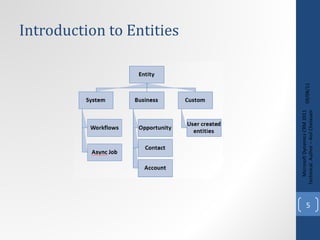
Introduction to Entities 09/08/11 Microsoft Dynamics CRM 2011 Techinical. Author – Anil Chelasani
Customizations 09/08/11 Microsoft Dynamics CRM 2011 Techinical. Author – Anil Chelasani
09/08/11 Microsoft Dynamics CRM 2011 Techinical. Author – Anil Chelasani
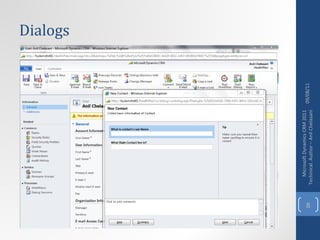
Dialogs 09/08/11 Microsoft Dynamics CRM 2011 Techinical. Author – Anil Chelasani
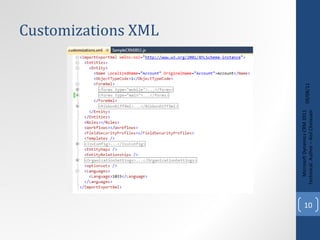
Customizations XML 09/08/11 Microsoft Dynamics CRM 2011 Techinical. Author – Anil Chelasani
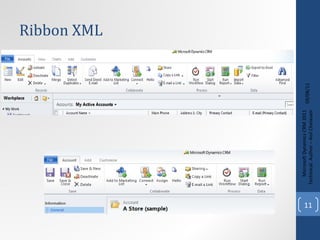
Ribbon XML 09/08/11 Microsoft Dynamics CRM 2011 Techinical. Author – Anil Chelasani
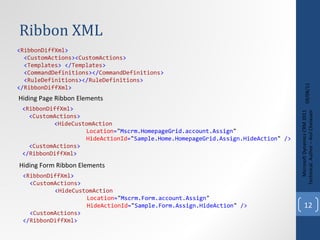
Ribbon XML 09/08/11 Microsoft Dynamics CRM 2011 Techinical. Author – Anil Chelasani < RibbonDiffXml > < CustomActions > < HideCustomAction   Location = &quot; Mscrm.HomepageGrid.account.Assign &quot; HideActionId = &quot; Sample.Home.HomepageGrid.Assign.HideAction &quot;  /> < CustomActions > </ RibbonDiffXml > < RibbonDiffXml > < CustomActions >< CustomActions > < Templates > </ Templates > < CommandDefinitions ></ CommandDefinitions > < RuleDefinitions ></ RuleDefinitions > </ RibbonDiffXml > Hiding Page Ribbon Elements < RibbonDiffXml > < CustomActions > < HideCustomAction   Location = &quot; Mscrm.Form.account.Assign &quot; HideActionId = &quot; Sample.Form.Assign.HideAction &quot;  /> < CustomActions > </ RibbonDiffXml > Hiding Form Ribbon Elements
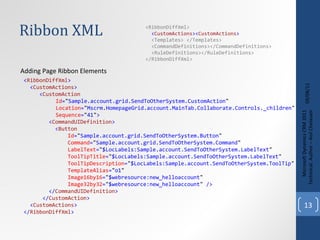
Ribbon XML 09/08/11 Microsoft Dynamics CRM 2011 Techinical. Author – Anil Chelasani < RibbonDiffXml > < CustomActions > < CustomAction   Id = &quot; Sample.account.grid.SendToOtherSystem.CustomAction &quot; Location = &quot; Mscrm.HomepageGrid.account.MainTab.Collaborate.Controls._children &quot; Sequence = &quot; 41 &quot; > < CommandUIDefinition > < Button   Id = &quot; Sample.account.grid.SendToOtherSystem.Button &quot; Command = &quot; Sample.account.grid.SendToOtherSystem.Command &quot; LabelText = &quot; $LocLabels:Sample.account.SendToOtherSystem.LabelText &quot; ToolTipTitle = &quot; $LocLabels:Sample.account.SendToOtherSystem.LabelText &quot; ToolTipDescription = &quot; $LocLabels:Sample.account.SendToOtherSystem.ToolTip &quot; TemplateAlias = &quot; o1 &quot; Image16by16 = &quot; $webresource:new_helloaccount &quot; Image32by32 = &quot; $webresource:new_helloaccount &quot;  /> </ CommandUIDefinition > </ CustomAction > < CustomActions > </ RibbonDiffXml > Adding Page Ribbon Elements <RibbonDiffXml> < CustomActions >< CustomActions > <Templates> </Templates> <CommandDefinitions></CommandDefinitions> <RuleDefinitions></RuleDefinitions> </RibbonDiffXml>
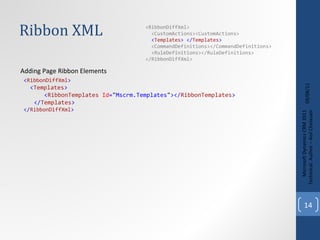
Ribbon XML 09/08/11 Microsoft Dynamics CRM 2011 Techinical. Author – Anil Chelasani < RibbonDiffXml > < Templates > < RibbonTemplates   Id = &quot; Mscrm.Templates &quot; ></ RibbonTemplates > </ Templates > </ RibbonDiffXml > Adding Page Ribbon Elements <RibbonDiffXml> <CustomActions><CustomActions> < Templates > </ Templates > <CommandDefinitions></CommandDefinitions> <RuleDefinitions></RuleDefinitions> </RibbonDiffXml>
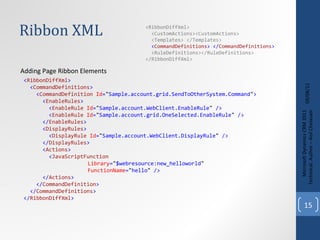
Ribbon XML 09/08/11 Microsoft Dynamics CRM 2011 Techinical. Author – Anil Chelasani < RibbonDiffXml > < CommandDefinitions > < CommandDefinition   Id = &quot; Sample.account.grid.SendToOtherSystem.Command &quot; > < EnableRules > < EnableRule   Id = &quot; Sample.account.WebClient.EnableRule &quot;  /> < EnableRule   Id = &quot; Sample.account.grid.OneSelected.EnableRule &quot;  /> </ EnableRules > < DisplayRules > < DisplayRule   Id = &quot; Sample.account.WebClient.DisplayRule &quot;  /> </ DisplayRules > < Actions > < JavaScriptFunction   Library = &quot; $webresource:new_helloworld &quot; FunctionName = &quot; hello &quot;  /> </ Actions > </ CommandDefinition > </ CommandDefinitions > </ RibbonDiffXml > Adding Page Ribbon Elements <RibbonDiffXml> <CustomActions><CustomActions> <Templates> </Templates> < CommandDefinitions > </ CommandDefinitions > <RuleDefinitions></RuleDefinitions> </RibbonDiffXml>
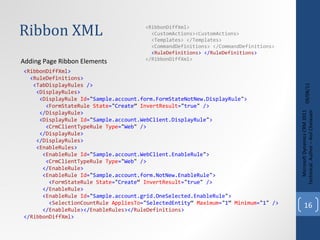
Ribbon XML 09/08/11 Microsoft Dynamics CRM 2011 Techinical. Author – Anil Chelasani < RibbonDiffXml > < RuleDefinitions > < TabDisplayRules  /> < DisplayRules > < DisplayRule   Id = &quot; Sample.account.form.FormStateNotNew.DisplayRule &quot; > < FormStateRule   State = &quot; Create ”  InvertResult = &quot; true &quot;  /> </ DisplayRule > < DisplayRule   Id = &quot; Sample.account.WebClient.DisplayRule &quot; > < CrmClientTypeRule   Type = &quot; Web &quot;  /> </ DisplayRule > </ DisplayRules > < EnableRules > < EnableRule   Id = &quot; Sample.account.WebClient.EnableRule &quot; > < CrmClientTypeRule   Type = &quot; Web &quot;  /> </ EnableRule > < EnableRule   Id = &quot; Sample.account.form.NotNew.EnableRule &quot; > < FormStateRule   State = &quot; Create “  InvertResult = &quot; true &quot;  /> </ EnableRule > < EnableRule   Id = &quot; Sample.account.grid.OneSelected.EnableRule &quot; > < SelectionCountRule   AppliesTo = &quot; SelectedEntity “  Maximum = &quot; 1 “  Minimum = &quot; 1 &quot;  /> </ EnableRule ></ EnableRules ></ RuleDefinitions > </ RibbonDiffXml > Adding Page Ribbon Elements <RibbonDiffXml> <CustomActions><CustomActions> <Templates> </Templates> <CommandDefinitions> </CommandDefinitions> < RuleDefinitions > </ RuleDefinitions > </RibbonDiffXml>
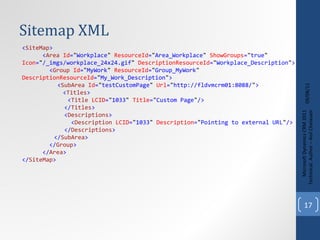
Sitemap XML 09/08/11 Microsoft Dynamics CRM 2011 Techinical. Author – Anil Chelasani < SiteMap > < Area   Id = &quot; Workplace &quot;   ResourceId = &quot; Area_Workplace &quot;   ShowGroups = &quot; true &quot;   Icon = &quot; /_imgs/workplace_24x24.gif &quot;   DescriptionResourceId = &quot; Workplace_Description &quot; > < Group   Id = &quot; MyWork &quot;   ResourceId = &quot; Group_MyWork &quot;   DescriptionResourceId = &quot; My_Work_Description &quot; >   < SubArea   Id = &quot; testCustomPage &quot;   Url = &quot; http://fldvmcrm01:8088/ &quot; > < Titles >   < Title   LCID = &quot; 1033 &quot;   Title = &quot; Custom Page &quot; />   </ Titles >   < Descriptions >   < Description   LCID = &quot; 1033 &quot;   Description = &quot; Pointing to external URL &quot; />   </ Descriptions > </ SubArea > </ Group > </ Area > < / SiteMap >
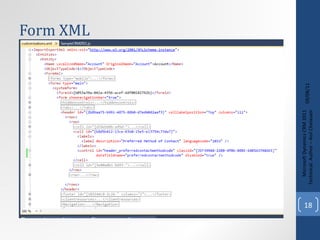
Form XML 09/08/11 Microsoft Dynamics CRM 2011 Techinical. Author – Anil Chelasani
Java Script 09/08/11 Microsoft Dynamics CRM 2011 Techinical. Author – Anil Chelasani
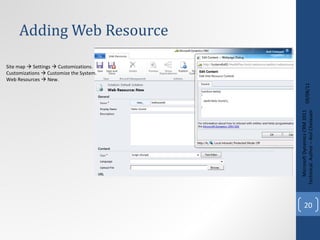
Adding Web Resource 09/08/11 Microsoft Dynamics CRM 2011 Techinical. Author – Anil Chelasani Site map    Settings    Customizations. Customizations    Customize the System. Web Resources    New.
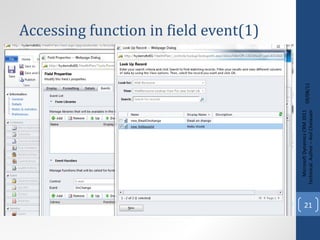
Accessing function in field event(1) 09/08/11 Microsoft Dynamics CRM 2011 Techinical. Author – Anil Chelasani
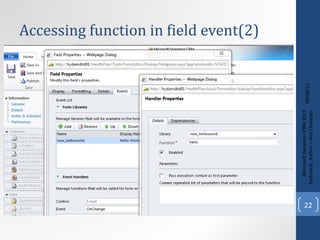
Accessing function in field event(2) 09/08/11 Microsoft Dynamics CRM 2011 Techinical. Author – Anil Chelasani
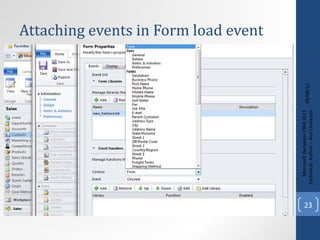
Attaching events in Form load event 09/08/11 Microsoft Dynamics CRM 2011 Techinical. Author – Anil Chelasani
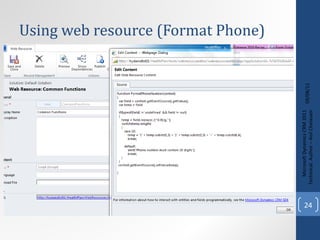
Using web resource (Format Phone) 09/08/11 Microsoft Dynamics CRM 2011 Techinical. Author – Anil Chelasani
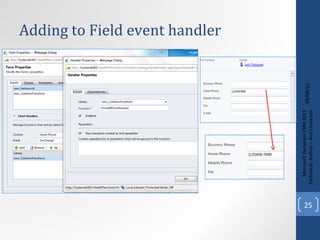
09/08/11 Microsoft Dynamics CRM 2011 Techinical. Author – Anil Chelasani Adding to Field event handler
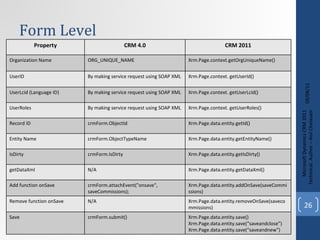
Form Level 09/08/11 Microsoft Dynamics CRM 2011 Techinical. Author – Anil Chelasani Property CRM 4.0 CRM 2011 Organization Name ORG_UNIQUE_NAME Xrm.Page.context.getOrgUniqueName() UserID By making service request using SOAP XML Xrm.Page.context. getUserId() UserLcid (Language ID) By making service request using SOAP XML Xrm.Page.context. getUserLcid() UserRoles By making service request using SOAP XML Xrm.Page.context. getUserRoles() Record ID crmForm.ObjectId Xrm.Page.data.entity.getId() Entity Name crmForm.ObjectTypeName Xrm.Page.data.entity.getEntityName() IsDirty crmForm.IsDirty Xrm.Page.data.entity.getIsDirty() getDataXml N/A Xrm.Page.data.entity.getDataXml() Add function onSave crmForm.attachEvent(&quot;onsave&quot;, saveCommissions); Xrm.Page.data.entity.addOnSave(saveCommissions) Remove function onSave N/A Xrm.Page.data.entity.removeOnSave(savecommissions) Save crmForm.submit() Xrm.Page.data.entity.save() Xrm.Page.data.entity.save(“saveandclose”) Xrm.Page.data.entity.save(“saveandnew”)
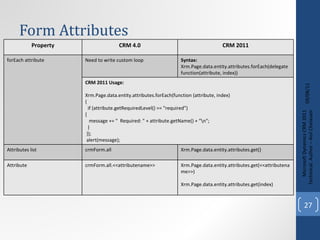
Form Attributes 09/08/11 Microsoft Dynamics CRM 2011 Techinical. Author – Anil Chelasani Property CRM 4.0 CRM 2011 forEach attribute Need to write custom loop Syntax: Xrm.Page.data.entity.attributes.forEach(delegate function(attribute, index)) CRM 2011 Usage: Xrm.Page.data.entity.attributes.forEach(function (attribute, index)  { if (attribute.getRequiredLevel() == &quot;required&quot;)  { message += &quot;  Required: &quot; + attribute.getName() + &quot;\n&quot;; } }); alert(message); Attributes list crmForm.all Xrm.Page.data.entity.attributes.get() Attribute crmForm.all.<<attributename>> Xrm.Page.data.entity.attributes.get(<<attributename>>) Xrm.Page.data.entity.attributes.get(index)
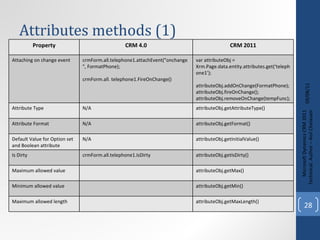
Attributes methods (1) 09/08/11 Microsoft Dynamics CRM 2011 Techinical. Author – Anil Chelasani Property CRM 4.0 CRM 2011 Attaching on change event crmForm.all.telephone1.attachEvent(&quot;onchange&quot;, FormatPhone); crmForm.all. telephone1.FireOnChange() var attributeObj = Xrm.Page.data.entity.attributes.get(‘telephone1’); attributeObj.addOnChange(FormatPhone); attributeObj.fireOnChange(); attributeObj.removeOnChange(tempFunc); Attribute Type N/A attributeObj.getAttributeType()  Attribute Format N/A attributeObj.getFormat() Default Value for Option set and Boolean attribute N/A attributeObj.getInitialValue() Is Dirty crmForm.all.telephone1.IsDirty attributeObj.getIsDirty() Maximum allowed value attributeObj.getMax() Minimum allowed value attributeObj.getMin() Maximum allowed length attributeObj.getMaxLength()
Attributes methods (2) 09/08/11 Microsoft Dynamics CRM 2011 Techinical. Author – Anil Chelasani Property CRM 4.0 CRM 2011 Logical Name attributeObj. getName() Get Option name attributeObj.getOption(value) Get options attributeObj.getOptions() Digits allowed to the right of the decimal point attributeObj.getPrecision() Get required level attributeObj.getRequiredLevel() Set Required Level attributes[i].setRequiredLevel(&quot;required&quot;); Get selected Option var option = attributeObj.getSelectedOption() Option.text Option.value attributeObj.getText() Submit Mode attributeObj.getSubmitMode() Returns: Never, Always, Dirty
Attributes methods (3) 09/08/11 Microsoft Dynamics CRM 2011 Techinical. Author – Anil Chelasani Property CRM 4.0 CRM 2011 Set Submit mode attributeObj.setSubmitMode(&quot;always&quot;); Get user privilege N/A var privileges = attribute.getUserPrivilege(); privileges.canRead  privileges.canUpdate  privileges.canCreate  Get attribute value var value = attribute.getValue();  For Lookups value[i].entityType  value[i].id  value[i].name  For Option sets Value
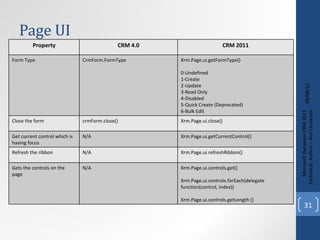
Page UI 09/08/11 Microsoft Dynamics CRM 2011 Techinical. Author – Anil Chelasani Property CRM 4.0 CRM 2011 Form Type CrmForm.FormType Xrm.Page.ui.getFormType()  0-Undefined 1-Create 2-Update 3 -Read Only 4-Disabled 5-Quick Create (Deprecated) 6-Bulk Edit Close the form crmForm.close() Xrm.Page.ui.close() Get current control which is having focus N/A Xrm.Page.ui.getCurrentControl() Refresh the ribbon N/A Xrm.Page.ui.refreshRibbon() Gets the controls on the page N/A Xrm.Page.ui.controls.get() Xrm.Page.ui.controls.forEach(delegate function(control, index)) Xrm.Page.ui.controls.getLength ()
Page UI Control methods 09/08/11 Microsoft Dynamics CRM 2011 Techinical. Author – Anil Chelasani Property CRM 4.0 CRM 2011 Add custom view for Lookup dialog N/A controlObj.addCustomView(viewId, entityName, viewDisplayName, fetchXml, layoutXml, isDefault) Add an Option to Option set N/A controlObj.addOption(option, [index]) Clear options N/A controlObj.clearOptions() Get the attribute that the control bound to N/A controlObj.getAttribute() Get the control type N/A controlObj.getControlType() Returns  Standard, iframe, lookup, optionset, subgrid, webresource Gets default lookup view N/A controlObj.getDefaultView() Check the control is disabled N/A controlObj.getDisabled() Disable control N/A control.setDisabled(false) Gets the URL of Iframe N/A IFrameControlObj.getSrc()
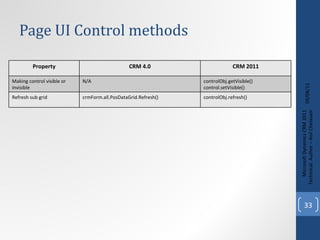
Page UI Control methods 09/08/11 Microsoft Dynamics CRM 2011 Techinical. Author – Anil Chelasani Property CRM 4.0 CRM 2011 Making control visible or invisible N/A controlObj.getVisible() control.setVisible() Refresh sub grid crmForm.all.PosDataGrid.Refresh() controlObj.refresh()
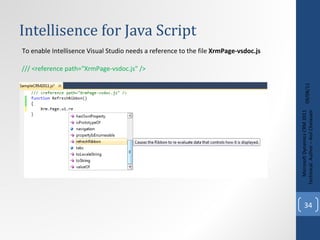
Intellisence for Java Script  09/08/11 Microsoft Dynamics CRM 2011 Techinical. Author – Anil Chelasani To enable Intellisence Visual Studio needs a reference to the file  XrmPage-vsdoc.js /// <reference path=&quot;XrmPage-vsdoc.js&quot; />
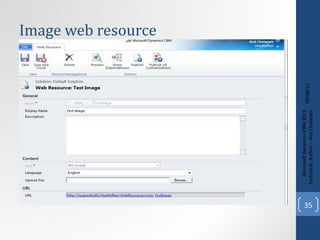
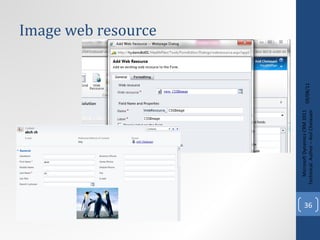
Image web resource 09/08/11 Microsoft Dynamics CRM 2011 Techinical. Author – Anil Chelasani
SDK 09/08/11 Microsoft Dynamics CRM 2011 Techinical. Author – Anil Chelasani
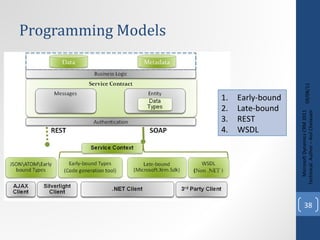
Programming Models 09/08/11 Microsoft Dynamics CRM 2011 Techinical. Author – Anil Chelasani Early-bound  Late-bound  REST  WSDL
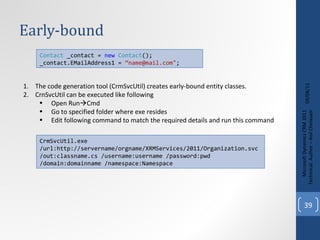
Early-bound 09/08/11 Microsoft Dynamics CRM 2011 Techinical. Author – Anil Chelasani Contact  _contact =  new   Contact (); _contact.EMailAddress1 =  “name@mail.com&quot; ; The code generation tool (CrmSvcUtil) creates early-bound entity classes. CrnSvcUtil can be executed like following Open Run  Cmd Go to specified folder where exe resides Edit following command to match the required details and run this command  CrmSvcUtil.exe /url:http://servername/orgname/XRMServices/2011/Organization.svc /out:classname.cs /username:username /password:pwd /domain:domainname /namespace:Namespace
Late-bound 09/08/11 Microsoft Dynamics CRM 2011 Techinical. Author – Anil Chelasani Entity  account =  new   Entity ( &quot;account&quot; );  account[ &quot;name&quot; ] =  &quot;Fourth Coffee&quot; ;  Entity  is the base class which is part of the Xrm.Sdk namespace Microsoft.Crm.Sdk. DynamicEntity (CRM 4.0) Microsoft.Xrm.Sdk. Entity (CRM 2011)
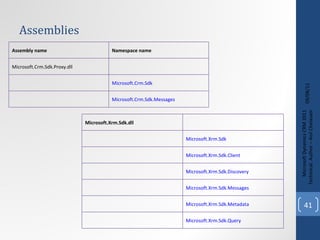
Assemblies 09/08/11 Microsoft Dynamics CRM 2011 Techinical. Author – Anil Chelasani Assembly name  Namespace name  Microsoft.Crm.Sdk.Proxy.dll Microsoft.Crm.Sdk   Microsoft.Crm.Sdk.Messages   Microsoft.Xrm.Sdk.dll Microsoft.Xrm.Sdk   Microsoft.Xrm.Sdk.Client   Microsoft.Xrm.Sdk.Discovery   Microsoft.Xrm.Sdk.Messages   Microsoft.Xrm.Sdk.Metadata   Microsoft.Xrm.Sdk.Query
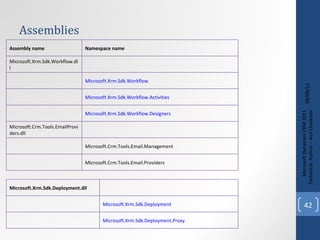
Assemblies 09/08/11 Microsoft Dynamics CRM 2011 Techinical. Author – Anil Chelasani Assembly name  Namespace name  Microsoft.Xrm.Sdk.Workflow.dll Microsoft.Xrm.Sdk.Workflow   Microsoft.Xrm.Sdk.Workflow.Activities   Microsoft.Xrm.Sdk.Workflow.Designers   Microsoft.Crm.Tools.EmailProviders.dll Microsoft.Crm.Tools.Email.Management  Microsoft.Crm.Tools.Email.Providers  Microsoft.Xrm.Sdk.Deployment.dll Microsoft.Xrm.Sdk.Deployment   Microsoft.Xrm.Sdk.Deployment.Proxy
Type Mapping 09/08/11 Microsoft Dynamics CRM 2011 Techinical. Author – Anil Chelasani Attribute Type  CRM 2011 Type  CRM 4.0 Type  AttributeTypeCode .Boolean bool or System.Boolean CrmBoolean   AttributeType . CalendarRules EntityCollection   DynamicEntity [] or  calendarrule [] AttributeType. DateTime System.DateTime  CrmDateTime   AttributeType. Decimal decimal or System.Decimal CrmDecimal   AttributeType. Double double or System.Double CrmFloat   AttributeType. Integer int or System.Integer CrmNumber   AttributeType. Lookup EntityReference  Lookup   AttributeType. Memo string or System.String  System.String
Type Mapping 09/08/11 Microsoft Dynamics CRM 2011 Techinical. Author – Anil Chelasani Attribute Type  CRM 2011 Type  CRM 4.0 Type  AttributeType. Money   Money CrmMoney   AttributeType. Owner EntityReference  Owner   AttributeType. PartyList   EntityCollection or ActivityParty[] activityparty[]  or  DynamicEntity  [] AttributeType. Picklist OptionSetValue   Picklist   AttributeType.PrimaryKey System.Guid  Key   AttributeType. String System.String  System.String  AttributeType. State OptionSetValue or enumeration generated for the entity state EntityNameStateInfo AttributeType. Status OptionSetValue or int Status   AttributeType. Uniqueidentifier System.Guid  UniqueIdentifier
New Entity Data Model 09/08/11 Microsoft Dynamics CRM 2011 Techinical. Author – Anil Chelasani Feature CRM 4.0 CRM 2011 Set property value to null account entity;  entity.industrycode = null;  Account entity;  entity.Remove( &quot;industrycode&quot; ); Check for a NULL value account entity;  if  ( null  != entity.industrycode && entity.industrycode.IsNull)  {        //This attribute is null   }  Account entity;  if  (entity.Contains( &quot;industrycode&quot; ) &&  null  == entity[ &quot;industrycode&quot; ])  {         //This attribute is null   }  Set NULL value Account entity;  entity.IndustryCode =  null ;  account entity;  entity.industrycode =  new  Picklist(); entity.industrycode.IsNull =  true ;  Entity and Attribute names contact newEntity =  new  contact(); newEntity.contactid =  new  Key(Guid.NewGuid()); newEntity.firstname =  &quot;Michael&quot; ;  Contact newEntity =  new  Contact(); newEntity.ContactId = Guid.NewGuid(); newEntity.FirstName =  &quot;Michael&quot; ;  Entity name and Type code int  objectTypeCode = ( int )EntityName.account;  string  entityName = EntityName.account.ToString();  int  objectTypeCode = Account.EntityTypeCode;  string  entityName = Account.EntityLogicalName;
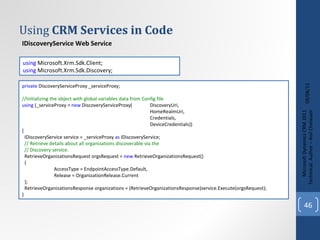
Using  CRM Services in Code 09/08/11 Microsoft Dynamics CRM 2011 Techinical. Author – Anil Chelasani IDiscoveryService Web Service IOrganizationService Web Service using  Microsoft.Xrm.Sdk.Client;  using  Microsoft.Xrm.Sdk.Discovery;  private  DiscoveryServiceProxy _serviceProxy;  //Initializing the object with global variables data from Config file using  (_serviceProxy =  new  DiscoveryServiceProxy( DiscoveryUri,  HomeRealmUri,  Credentials,  DeviceCredentials))  {  IDiscoveryService service = _serviceProxy  as  IDiscoveryService;  // Retrieve details about all organizations discoverable via the   // Discovery service.   RetrieveOrganizationsRequest orgsRequest =  new  RetrieveOrganizationsRequest()  {  AccessType = EndpointAccessType.Default,  Release = OrganizationRelease.Current  };  RetrieveOrganizationsResponse organizations = (RetrieveOrganizationsResponse)service.Execute(orgsRequest); }
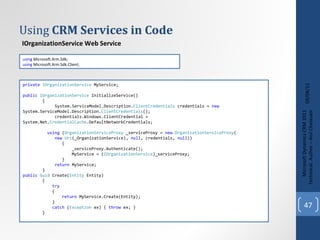
Using  CRM Services in Code 09/08/11 Microsoft Dynamics CRM 2011 Techinical. Author – Anil Chelasani IOrganizationService Web Service using  Microsoft.Xrm.Sdk; using  Microsoft.Xrm.Sdk.Client;  private   IOrganizationService  MyService; public   IOrganizationService  InitializeService() { System.ServiceModel.Description. ClientCredentials  credentials =  new   System.ServiceModel.Description. ClientCredentials (); credentials.Windows.ClientCredential =  System.Net. CredentialCache .DefaultNetworkCredentials; using  ( OrganizationServiceProxy  _serviceProxy =  new   OrganizationServiceProxy ( new  Uri (_OrganizationService),  null , credentials,  null )) { _serviceProxy.Authenticate(); MyService = ( IOrganizationService )_serviceProxy; } return  MyService; } public   Guid  Create( Entity  Entity) { try { return  MyService.Create(Entity); } catch  ( Exception  ex) {  throw  ex; } }
Create 09/08/11 Microsoft Dynamics CRM 2011 Techinical. Author – Anil Chelasani Entity  primaryContact =  new   Entity ( &quot;contact&quot; ); primaryContact.Attributes[ &quot;firstname&quot; ] = txtFirstName.Text; primaryContact.Attributes[ &quot;lastname&quot; ] = txtLastName.Text; primaryContact.Attributes[ &quot;address1_line1&quot; ] = txtAddress.Text; primaryContact.Attributes[ &quot;address1_city&quot; ] = txtCity.Text; primaryContact.Attributes[ &quot;address1_stateorprovince&quot; ] = ddlState.SelectedItem.Text; primaryContact.Attributes[ &quot;address1_postalcode&quot; ] = txtZip.Text; primaryContact.Attributes[ &quot;emailaddress1&quot; ] = txtEmail.Text; primaryContact.Attributes[ &quot;preferredcontactmethodcode&quot; ] =  new   OptionSetValue ( Convert .ToInt32(ddlPrefrredContactMethod.SelectedValue)); primaryContact.Attributes[ &quot;preferredappointmentdaycode&quot; ] =  new   OptionSetValue ( Convert .ToInt32(ddlPreferredDay.SelectedValue)); primaryContact.Attributes[ &quot;preferredappointmenttimecode&quot; ] =  new   OptionSetValue ( Convert .ToInt32(ddlPreferredTime.SelectedValue)); Common  common =  new   Common (); return  common.Create(primaryContact); using  Microsoft.Xrm.Sdk; Entity  Opp =  new   Entity ( &quot;opportunity&quot; ); Opp.Attributes[ &quot;name&quot; ] = txtLastName.Text +  &quot; &quot;  + txtFirstName.Text; Opp.Attributes[ &quot;customerid&quot; ] =  new   EntityReference ( &quot;contact&quot; , PrimaryContactID); Common  common =  new   Common (); return  common.Create(Opp);
Retrieve 09/08/11 Microsoft Dynamics CRM 2011 Techinical. Author – Anil Chelasani Entity  account =  new   Entity ( &quot;account&quot; ); account[ &quot;name&quot; ] =  “Sample Account&quot; ; _accountId = _service.Create(account); // Create a column set to define which attributes should be retrieved. ColumnSet  attributes =  new   ColumnSet ( new   string [] {  &quot;name&quot; ,  &quot;ownerid&quot;  }); // Retrieve the account and its name and ownerid attributes. account = _service.Retrieve(account.LogicalName, _accountId, attributes); using  Microsoft.Xrm.Sdk; using  Microsoft.Xrm.Sdk.Client; using  Microsoft.Xrm.Sdk.Query;
Update 09/08/11 Microsoft Dynamics CRM 2011 Techinical. Author – Anil Chelasani // Retrieve the account containing several of its attributes. ColumnSet  cols =  new   ColumnSet ( new   String [] {  &quot;name&quot; ,  &quot;address1_postalcode&quot; ,  &quot;lastusedincampaign&quot;  }); Account  retrievedAccount = ( Account )_service.Retrieve( &quot;account&quot; , _accountId, cols); Console .Write( &quot;retrieved, &quot; ); // Update the postal code attribute. retrievedAccount.Address1_PostalCode =  &quot;98052&quot; ; // The address 2 postal code was set accidentally, so set it to null. retrievedAccount.Address2_PostalCode =  null ; // Shows use of a Money value. retrievedAccount.Revenue =  new   Money (5000000); // Shows use of a boolean value. retrievedAccount.CreditOnHold =  false ; // Update the account record. _service.Update(retrievedAccount); using  Microsoft.Xrm.Sdk; using  Microsoft.Xrm.Sdk.Client; using  Microsoft.Xrm.Sdk.Query;
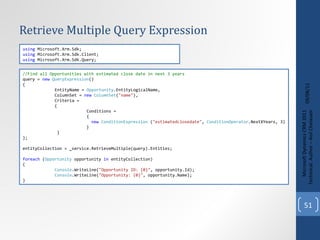
Retrieve Multiple Query Expression 09/08/11 Microsoft Dynamics CRM 2011 Techinical. Author – Anil Chelasani //Find all Opportunities with estimated close date in next 3 years query =  new   QueryExpression () { EntityName =  Opportunity .EntityLogicalName, ColumnSet =  new   ColumnSet ( &quot;name&quot; ), Criteria = { Conditions = { new   ConditionExpression  ( &quot;estimatedclosedate&quot; ,  ConditionOperator .NextXYears, 3) } } }; entityCollection = _service.RetrieveMultiple(query).Entities; foreach  ( Opportunity  opportunity  in  entityCollection) { Console .WriteLine( &quot;Opportunity ID: {0}&quot; , opportunity.Id); Console .WriteLine( &quot;Opportunity: {0}&quot; , opportunity.Name); } using  Microsoft.Xrm.Sdk; using  Microsoft.Xrm.Sdk.Client; using  Microsoft.Xrm.Sdk.Query;
Retrieve Multiple Fetch XML 09/08/11 Microsoft Dynamics CRM 2011 Techinical. Author – Anil Chelasani fetchXml=  @&quot;<fetch> <entity name='opportunity'> <attribute name='name'/> <filter type='and'> <condition attribute='estimatedclosedate' operator='next-x-years' value='3'/> </filter> </entity> </fetch>&quot; ; // Build fetch request and obtain results. RetrieveMultipleRequest  efr =  new   RetrieveMultipleRequest () { Query =  new   FetchExpression (fetchXml) }; entityResults = (( RetrieveMultipleResponse )_service.Execute(efr)).EntityCollection; foreach  ( var  e  in  entityResults.Entities) { Console .WriteLine( &quot;Fetch Retrieved: {0}&quot; , e.Attributes[ &quot;name&quot; ]); }; using  Microsoft.Xrm.Sdk; using  Microsoft.Xrm.Sdk.Client; using  Microsoft.Xrm.Sdk.Query;
Retrieve Multiple using LINQ 09/08/11 Microsoft Dynamics CRM 2011 Techinical. Author – Anil Chelasani OrganizationServiceContext   context  =  new   OrganizationServiceContext ( service ); var   accounts  = ( from  a   in  context.CreateQuery ( &quot;account&quot; )                  where  (( string ) a [ &quot;name&quot; ]). StartsWith ( &quot;Microsoft&quot; )                  select   new                  {                      Id   =  ( Guid ) a [ &quot;accountid&quot; ],                      Name =  ( string ) a [ &quot;name&quot; ]                  }).ToList(); using  Microsoft.Xrm.Sdk; using  Microsoft.Xrm.Sdk.Client; using  Microsoft.Xrm.Sdk.Query;
Compound Create or Update 09/08/11 Microsoft Dynamics CRM 2011 Techinical. Author – Anil Chelasani Entity  accountToCreate =  new   Entity ( &quot;account&quot; ); accountToCreate[ &quot;name&quot; ] =  &quot;Example Account&quot; ; //Define the IDs of the related letters we will create _letterIds =  new [] {  Guid .NewGuid(),  Guid .NewGuid(),  Guid .NewGuid() }; // Letter 1 for creation Entity  letter1 =  new   Entity ( &quot;letter&quot; ); letter1[ &quot;subject&quot; ] =  &quot;Letter 1&quot; ; letter1[ &quot;activityid&quot; ] = _letterIds[0]; // Letter 2 for creation Entity  letter2 =  new   Entity ( &quot;letter&quot; ); letter2[ &quot;subject&quot; ] =  &quot;Letter 2&quot; ; letter2[ &quot;activityid&quot; ] = _letterIds[1]; EntityCollection  relatedLettersToCreate =  new   EntityCollection { EntityName =  &quot;letter&quot; , Entities = { letter1, letter2} }; Relationship  letterRelationship =  new   Relationship ( &quot;Account_Letters&quot; ); //Adds the letters to the account under the specified relationship accountToCreate.RelatedEntities.Add(letterRelationship, relatedLettersToCreate); //Passes the Account (which contains the letters)  _accountId = _service.Create(accountToCreate); using  Microsoft.Xrm.Sdk; using  Microsoft.Xrm.Sdk.Client; using  Microsoft.Xrm.Sdk.Query;
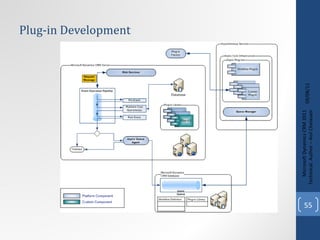
Plug-in Development 09/08/11 Microsoft Dynamics CRM 2011 Techinical. Author – Anil Chelasani
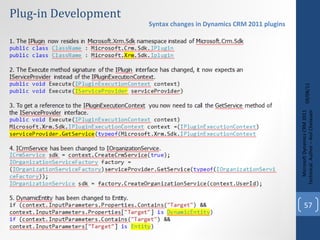
Plug-in Development 09/08/11 Microsoft Dynamics CRM 2011 Techinical. Author – Anil Chelasani // Microsoft Dynamics CRM namespace(s) using  Microsoft.Xrm.Sdk; public   class   SamplePlugin :  IPlugin { public   void  Execute( IServiceProvider  serviceProvider) { ITracingService  tracingService = ( ITracingService )serviceProvider.GetService( typeof ( ITracingService )); // Obtain the execution context from the service provider. Microsoft.Xrm.Sdk. IPluginExecutionContext  context = (Microsoft.Xrm.Sdk. IPluginExecutionContext ) serviceProvider.GetService( typeof (Microsoft.Xrm.Sdk. IPluginExecutionContext )); // The InputParameters collection contains all the data passed in the message request. if  (context.InputParameters.Contains( &quot;Target&quot; ) && context.InputParameters[ &quot;Target&quot; ]  is   Entity ) { // Obtain the organization service reference. IOrganizationServiceFactory  serviceFactory =  ( IOrganizationServiceFactory )serviceProvider.GetService( typeof ( IOrganizationServiceFactory )); IOrganizationService  service = serviceFactory.CreateOrganizationService(context.UserId); //Plugin functionality goes here } } } public  SamplePlugin() public  SamplePlugin( string  unsecure) public  SamplePlugin( string  unsecure,  string  secure)
Plug-in Development 09/08/11 Microsoft Dynamics CRM 2011 Techinical. Author – Anil Chelasani Syntax changes in Dynamics CRM 2011 plugins
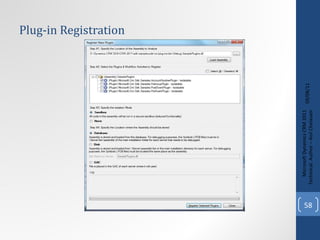
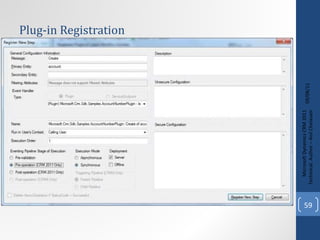
Plug-in Registration 09/08/11 Microsoft Dynamics CRM 2011 Techinical. Author – Anil Chelasani
Q &A 09/08/11 Microsoft Dynamics CRM 2011 Techinical. Author – Anil Chelasani
Thanks 09/08/11 Microsoft Dynamics CRM 2011 Techinical. Author – Anil Chelasani

MS Dynamics CRM 2011 Technical

  • 1.
    09/08/11 Microsoft DynamicsCRM 2011 Techinical. Author – Anil Chelasani Microsoft Dynamics CRM 2011 Technical
  • 2.
    Agenda 09/08/11 MicrosoftDynamics CRM 2011 Techinical. Author – Anil Chelasani Developer Features Customizations Processes and Solutions Web Resources (Java Script, HTML) Java Script variables and Methods and Framework Programming Models used in CRM 2011 SDK SDK Assemblies explained Write Code using services CRUD operations using Organization Service Plug-in Development and deployment
  • 3.
    Developer Features 09/08/11Microsoft Dynamics CRM 2011 Techinical. Author – Anil Chelasani Windows Communication Foundation (WCF) based programming Extended use of Windows Workflow Foundation 4.0 Support for .NET Language-Integrated Query (LINQ) Inclusion of the REST Endpoint (Representational State Transfer) for ASP.NET AJAX and Microsoft Silverlight clients 5. xRM based SDK 6. Indexes can be added in tables 7. Support for .NET Framework
  • 4.
    Don'ts 09/08/11 MicrosoftDynamics CRM 2011 Techinical. Author – Anil Chelasani Development on Microsoft Windows XP Modifications to files in the wwwroot 3. Modifications to the physical schema of the database, other than adding or updating indexes 4. U se of custom HttpModules. 5. Microsoft Dynamics CRM 3.0 callouts are not supported 6. Creating an IIS application inside the CRM Website
  • 5.
    Introduction to Entities09/08/11 Microsoft Dynamics CRM 2011 Techinical. Author – Anil Chelasani
  • 6.
    Customizations 09/08/11 MicrosoftDynamics CRM 2011 Techinical. Author – Anil Chelasani
  • 7.
    09/08/11 Microsoft DynamicsCRM 2011 Techinical. Author – Anil Chelasani
  • 8.
    Dialogs 09/08/11 MicrosoftDynamics CRM 2011 Techinical. Author – Anil Chelasani
  • 9.
    Customizations XML 09/08/11Microsoft Dynamics CRM 2011 Techinical. Author – Anil Chelasani
  • 10.
    Customizations XML 09/08/11Microsoft Dynamics CRM 2011 Techinical. Author – Anil Chelasani
  • 11.
    Ribbon XML 09/08/11Microsoft Dynamics CRM 2011 Techinical. Author – Anil Chelasani
  • 12.
    Ribbon XML 09/08/11Microsoft Dynamics CRM 2011 Techinical. Author – Anil Chelasani < RibbonDiffXml > < CustomActions > < HideCustomAction Location = &quot; Mscrm.HomepageGrid.account.Assign &quot; HideActionId = &quot; Sample.Home.HomepageGrid.Assign.HideAction &quot; /> < CustomActions > </ RibbonDiffXml > < RibbonDiffXml > < CustomActions >< CustomActions > < Templates > </ Templates > < CommandDefinitions ></ CommandDefinitions > < RuleDefinitions ></ RuleDefinitions > </ RibbonDiffXml > Hiding Page Ribbon Elements < RibbonDiffXml > < CustomActions > < HideCustomAction Location = &quot; Mscrm.Form.account.Assign &quot; HideActionId = &quot; Sample.Form.Assign.HideAction &quot; /> < CustomActions > </ RibbonDiffXml > Hiding Form Ribbon Elements
  • 13.
    Ribbon XML 09/08/11Microsoft Dynamics CRM 2011 Techinical. Author – Anil Chelasani < RibbonDiffXml > < CustomActions > < CustomAction Id = &quot; Sample.account.grid.SendToOtherSystem.CustomAction &quot; Location = &quot; Mscrm.HomepageGrid.account.MainTab.Collaborate.Controls._children &quot; Sequence = &quot; 41 &quot; > < CommandUIDefinition > < Button Id = &quot; Sample.account.grid.SendToOtherSystem.Button &quot; Command = &quot; Sample.account.grid.SendToOtherSystem.Command &quot; LabelText = &quot; $LocLabels:Sample.account.SendToOtherSystem.LabelText &quot; ToolTipTitle = &quot; $LocLabels:Sample.account.SendToOtherSystem.LabelText &quot; ToolTipDescription = &quot; $LocLabels:Sample.account.SendToOtherSystem.ToolTip &quot; TemplateAlias = &quot; o1 &quot; Image16by16 = &quot; $webresource:new_helloaccount &quot; Image32by32 = &quot; $webresource:new_helloaccount &quot; /> </ CommandUIDefinition > </ CustomAction > < CustomActions > </ RibbonDiffXml > Adding Page Ribbon Elements <RibbonDiffXml> < CustomActions >< CustomActions > <Templates> </Templates> <CommandDefinitions></CommandDefinitions> <RuleDefinitions></RuleDefinitions> </RibbonDiffXml>
  • 14.
    Ribbon XML 09/08/11Microsoft Dynamics CRM 2011 Techinical. Author – Anil Chelasani < RibbonDiffXml > < Templates > < RibbonTemplates Id = &quot; Mscrm.Templates &quot; ></ RibbonTemplates > </ Templates > </ RibbonDiffXml > Adding Page Ribbon Elements <RibbonDiffXml> <CustomActions><CustomActions> < Templates > </ Templates > <CommandDefinitions></CommandDefinitions> <RuleDefinitions></RuleDefinitions> </RibbonDiffXml>
  • 15.
    Ribbon XML 09/08/11Microsoft Dynamics CRM 2011 Techinical. Author – Anil Chelasani < RibbonDiffXml > < CommandDefinitions > < CommandDefinition Id = &quot; Sample.account.grid.SendToOtherSystem.Command &quot; > < EnableRules > < EnableRule Id = &quot; Sample.account.WebClient.EnableRule &quot; /> < EnableRule Id = &quot; Sample.account.grid.OneSelected.EnableRule &quot; /> </ EnableRules > < DisplayRules > < DisplayRule Id = &quot; Sample.account.WebClient.DisplayRule &quot; /> </ DisplayRules > < Actions > < JavaScriptFunction Library = &quot; $webresource:new_helloworld &quot; FunctionName = &quot; hello &quot; /> </ Actions > </ CommandDefinition > </ CommandDefinitions > </ RibbonDiffXml > Adding Page Ribbon Elements <RibbonDiffXml> <CustomActions><CustomActions> <Templates> </Templates> < CommandDefinitions > </ CommandDefinitions > <RuleDefinitions></RuleDefinitions> </RibbonDiffXml>
  • 16.
    Ribbon XML 09/08/11Microsoft Dynamics CRM 2011 Techinical. Author – Anil Chelasani < RibbonDiffXml > < RuleDefinitions > < TabDisplayRules /> < DisplayRules > < DisplayRule Id = &quot; Sample.account.form.FormStateNotNew.DisplayRule &quot; > < FormStateRule State = &quot; Create ” InvertResult = &quot; true &quot; /> </ DisplayRule > < DisplayRule Id = &quot; Sample.account.WebClient.DisplayRule &quot; > < CrmClientTypeRule Type = &quot; Web &quot; /> </ DisplayRule > </ DisplayRules > < EnableRules > < EnableRule Id = &quot; Sample.account.WebClient.EnableRule &quot; > < CrmClientTypeRule Type = &quot; Web &quot; /> </ EnableRule > < EnableRule Id = &quot; Sample.account.form.NotNew.EnableRule &quot; > < FormStateRule State = &quot; Create “ InvertResult = &quot; true &quot; /> </ EnableRule > < EnableRule Id = &quot; Sample.account.grid.OneSelected.EnableRule &quot; > < SelectionCountRule AppliesTo = &quot; SelectedEntity “ Maximum = &quot; 1 “ Minimum = &quot; 1 &quot; /> </ EnableRule ></ EnableRules ></ RuleDefinitions > </ RibbonDiffXml > Adding Page Ribbon Elements <RibbonDiffXml> <CustomActions><CustomActions> <Templates> </Templates> <CommandDefinitions> </CommandDefinitions> < RuleDefinitions > </ RuleDefinitions > </RibbonDiffXml>
  • 17.
    Sitemap XML 09/08/11Microsoft Dynamics CRM 2011 Techinical. Author – Anil Chelasani < SiteMap > < Area Id = &quot; Workplace &quot; ResourceId = &quot; Area_Workplace &quot; ShowGroups = &quot; true &quot; Icon = &quot; /_imgs/workplace_24x24.gif &quot; DescriptionResourceId = &quot; Workplace_Description &quot; > < Group Id = &quot; MyWork &quot; ResourceId = &quot; Group_MyWork &quot; DescriptionResourceId = &quot; My_Work_Description &quot; > < SubArea Id = &quot; testCustomPage &quot; Url = &quot; http://fldvmcrm01:8088/ &quot; > < Titles > < Title LCID = &quot; 1033 &quot; Title = &quot; Custom Page &quot; /> </ Titles > < Descriptions > < Description LCID = &quot; 1033 &quot; Description = &quot; Pointing to external URL &quot; /> </ Descriptions > </ SubArea > </ Group > </ Area > < / SiteMap >
  • 18.
    Form XML 09/08/11Microsoft Dynamics CRM 2011 Techinical. Author – Anil Chelasani
  • 19.
    Java Script 09/08/11Microsoft Dynamics CRM 2011 Techinical. Author – Anil Chelasani
  • 20.
    Adding Web Resource09/08/11 Microsoft Dynamics CRM 2011 Techinical. Author – Anil Chelasani Site map  Settings  Customizations. Customizations  Customize the System. Web Resources  New.
  • 21.
    Accessing function infield event(1) 09/08/11 Microsoft Dynamics CRM 2011 Techinical. Author – Anil Chelasani
  • 22.
    Accessing function infield event(2) 09/08/11 Microsoft Dynamics CRM 2011 Techinical. Author – Anil Chelasani
  • 23.
    Attaching events inForm load event 09/08/11 Microsoft Dynamics CRM 2011 Techinical. Author – Anil Chelasani
  • 24.
    Using web resource(Format Phone) 09/08/11 Microsoft Dynamics CRM 2011 Techinical. Author – Anil Chelasani
  • 25.
    09/08/11 Microsoft DynamicsCRM 2011 Techinical. Author – Anil Chelasani Adding to Field event handler
  • 26.
    Form Level 09/08/11Microsoft Dynamics CRM 2011 Techinical. Author – Anil Chelasani Property CRM 4.0 CRM 2011 Organization Name ORG_UNIQUE_NAME Xrm.Page.context.getOrgUniqueName() UserID By making service request using SOAP XML Xrm.Page.context. getUserId() UserLcid (Language ID) By making service request using SOAP XML Xrm.Page.context. getUserLcid() UserRoles By making service request using SOAP XML Xrm.Page.context. getUserRoles() Record ID crmForm.ObjectId Xrm.Page.data.entity.getId() Entity Name crmForm.ObjectTypeName Xrm.Page.data.entity.getEntityName() IsDirty crmForm.IsDirty Xrm.Page.data.entity.getIsDirty() getDataXml N/A Xrm.Page.data.entity.getDataXml() Add function onSave crmForm.attachEvent(&quot;onsave&quot;, saveCommissions); Xrm.Page.data.entity.addOnSave(saveCommissions) Remove function onSave N/A Xrm.Page.data.entity.removeOnSave(savecommissions) Save crmForm.submit() Xrm.Page.data.entity.save() Xrm.Page.data.entity.save(“saveandclose”) Xrm.Page.data.entity.save(“saveandnew”)
  • 27.
    Form Attributes 09/08/11Microsoft Dynamics CRM 2011 Techinical. Author – Anil Chelasani Property CRM 4.0 CRM 2011 forEach attribute Need to write custom loop Syntax: Xrm.Page.data.entity.attributes.forEach(delegate function(attribute, index)) CRM 2011 Usage: Xrm.Page.data.entity.attributes.forEach(function (attribute, index) { if (attribute.getRequiredLevel() == &quot;required&quot;) { message += &quot; Required: &quot; + attribute.getName() + &quot;\n&quot;; } }); alert(message); Attributes list crmForm.all Xrm.Page.data.entity.attributes.get() Attribute crmForm.all.<<attributename>> Xrm.Page.data.entity.attributes.get(<<attributename>>) Xrm.Page.data.entity.attributes.get(index)
  • 28.
    Attributes methods (1)09/08/11 Microsoft Dynamics CRM 2011 Techinical. Author – Anil Chelasani Property CRM 4.0 CRM 2011 Attaching on change event crmForm.all.telephone1.attachEvent(&quot;onchange&quot;, FormatPhone); crmForm.all. telephone1.FireOnChange() var attributeObj = Xrm.Page.data.entity.attributes.get(‘telephone1’); attributeObj.addOnChange(FormatPhone); attributeObj.fireOnChange(); attributeObj.removeOnChange(tempFunc); Attribute Type N/A attributeObj.getAttributeType() Attribute Format N/A attributeObj.getFormat() Default Value for Option set and Boolean attribute N/A attributeObj.getInitialValue() Is Dirty crmForm.all.telephone1.IsDirty attributeObj.getIsDirty() Maximum allowed value attributeObj.getMax() Minimum allowed value attributeObj.getMin() Maximum allowed length attributeObj.getMaxLength()
  • 29.
    Attributes methods (2)09/08/11 Microsoft Dynamics CRM 2011 Techinical. Author – Anil Chelasani Property CRM 4.0 CRM 2011 Logical Name attributeObj. getName() Get Option name attributeObj.getOption(value) Get options attributeObj.getOptions() Digits allowed to the right of the decimal point attributeObj.getPrecision() Get required level attributeObj.getRequiredLevel() Set Required Level attributes[i].setRequiredLevel(&quot;required&quot;); Get selected Option var option = attributeObj.getSelectedOption() Option.text Option.value attributeObj.getText() Submit Mode attributeObj.getSubmitMode() Returns: Never, Always, Dirty
  • 30.
    Attributes methods (3)09/08/11 Microsoft Dynamics CRM 2011 Techinical. Author – Anil Chelasani Property CRM 4.0 CRM 2011 Set Submit mode attributeObj.setSubmitMode(&quot;always&quot;); Get user privilege N/A var privileges = attribute.getUserPrivilege(); privileges.canRead privileges.canUpdate privileges.canCreate Get attribute value var value = attribute.getValue(); For Lookups value[i].entityType value[i].id value[i].name For Option sets Value
  • 31.
    Page UI 09/08/11Microsoft Dynamics CRM 2011 Techinical. Author – Anil Chelasani Property CRM 4.0 CRM 2011 Form Type CrmForm.FormType Xrm.Page.ui.getFormType() 0-Undefined 1-Create 2-Update 3 -Read Only 4-Disabled 5-Quick Create (Deprecated) 6-Bulk Edit Close the form crmForm.close() Xrm.Page.ui.close() Get current control which is having focus N/A Xrm.Page.ui.getCurrentControl() Refresh the ribbon N/A Xrm.Page.ui.refreshRibbon() Gets the controls on the page N/A Xrm.Page.ui.controls.get() Xrm.Page.ui.controls.forEach(delegate function(control, index)) Xrm.Page.ui.controls.getLength ()
  • 32.
    Page UI Controlmethods 09/08/11 Microsoft Dynamics CRM 2011 Techinical. Author – Anil Chelasani Property CRM 4.0 CRM 2011 Add custom view for Lookup dialog N/A controlObj.addCustomView(viewId, entityName, viewDisplayName, fetchXml, layoutXml, isDefault) Add an Option to Option set N/A controlObj.addOption(option, [index]) Clear options N/A controlObj.clearOptions() Get the attribute that the control bound to N/A controlObj.getAttribute() Get the control type N/A controlObj.getControlType() Returns Standard, iframe, lookup, optionset, subgrid, webresource Gets default lookup view N/A controlObj.getDefaultView() Check the control is disabled N/A controlObj.getDisabled() Disable control N/A control.setDisabled(false) Gets the URL of Iframe N/A IFrameControlObj.getSrc()
  • 33.
    Page UI Controlmethods 09/08/11 Microsoft Dynamics CRM 2011 Techinical. Author – Anil Chelasani Property CRM 4.0 CRM 2011 Making control visible or invisible N/A controlObj.getVisible() control.setVisible() Refresh sub grid crmForm.all.PosDataGrid.Refresh() controlObj.refresh()
  • 34.
    Intellisence for JavaScript 09/08/11 Microsoft Dynamics CRM 2011 Techinical. Author – Anil Chelasani To enable Intellisence Visual Studio needs a reference to the file XrmPage-vsdoc.js /// <reference path=&quot;XrmPage-vsdoc.js&quot; />
  • 35.
    Image web resource09/08/11 Microsoft Dynamics CRM 2011 Techinical. Author – Anil Chelasani
  • 36.
    Image web resource09/08/11 Microsoft Dynamics CRM 2011 Techinical. Author – Anil Chelasani
  • 37.
    SDK 09/08/11 MicrosoftDynamics CRM 2011 Techinical. Author – Anil Chelasani
  • 38.
    Programming Models 09/08/11Microsoft Dynamics CRM 2011 Techinical. Author – Anil Chelasani Early-bound Late-bound REST WSDL
  • 39.
    Early-bound 09/08/11 MicrosoftDynamics CRM 2011 Techinical. Author – Anil Chelasani Contact _contact = new Contact (); _contact.EMailAddress1 = “name@mail.com&quot; ; The code generation tool (CrmSvcUtil) creates early-bound entity classes. CrnSvcUtil can be executed like following Open Run  Cmd Go to specified folder where exe resides Edit following command to match the required details and run this command CrmSvcUtil.exe /url:http://servername/orgname/XRMServices/2011/Organization.svc /out:classname.cs /username:username /password:pwd /domain:domainname /namespace:Namespace
  • 40.
    Late-bound 09/08/11 MicrosoftDynamics CRM 2011 Techinical. Author – Anil Chelasani Entity account = new Entity ( &quot;account&quot; ); account[ &quot;name&quot; ] = &quot;Fourth Coffee&quot; ; Entity is the base class which is part of the Xrm.Sdk namespace Microsoft.Crm.Sdk. DynamicEntity (CRM 4.0) Microsoft.Xrm.Sdk. Entity (CRM 2011)
  • 41.
    Assemblies 09/08/11 MicrosoftDynamics CRM 2011 Techinical. Author – Anil Chelasani Assembly name Namespace name Microsoft.Crm.Sdk.Proxy.dll Microsoft.Crm.Sdk Microsoft.Crm.Sdk.Messages Microsoft.Xrm.Sdk.dll Microsoft.Xrm.Sdk Microsoft.Xrm.Sdk.Client Microsoft.Xrm.Sdk.Discovery Microsoft.Xrm.Sdk.Messages Microsoft.Xrm.Sdk.Metadata Microsoft.Xrm.Sdk.Query
  • 42.
    Assemblies 09/08/11 MicrosoftDynamics CRM 2011 Techinical. Author – Anil Chelasani Assembly name Namespace name Microsoft.Xrm.Sdk.Workflow.dll Microsoft.Xrm.Sdk.Workflow Microsoft.Xrm.Sdk.Workflow.Activities Microsoft.Xrm.Sdk.Workflow.Designers Microsoft.Crm.Tools.EmailProviders.dll Microsoft.Crm.Tools.Email.Management Microsoft.Crm.Tools.Email.Providers Microsoft.Xrm.Sdk.Deployment.dll Microsoft.Xrm.Sdk.Deployment Microsoft.Xrm.Sdk.Deployment.Proxy
  • 43.
    Type Mapping 09/08/11Microsoft Dynamics CRM 2011 Techinical. Author – Anil Chelasani Attribute Type CRM 2011 Type CRM 4.0 Type AttributeTypeCode .Boolean bool or System.Boolean CrmBoolean AttributeType . CalendarRules EntityCollection DynamicEntity [] or calendarrule [] AttributeType. DateTime System.DateTime CrmDateTime AttributeType. Decimal decimal or System.Decimal CrmDecimal AttributeType. Double double or System.Double CrmFloat AttributeType. Integer int or System.Integer CrmNumber AttributeType. Lookup EntityReference Lookup AttributeType. Memo string or System.String  System.String
  • 44.
    Type Mapping 09/08/11Microsoft Dynamics CRM 2011 Techinical. Author – Anil Chelasani Attribute Type CRM 2011 Type CRM 4.0 Type AttributeType. Money   Money CrmMoney AttributeType. Owner EntityReference Owner AttributeType. PartyList   EntityCollection or ActivityParty[] activityparty[] or DynamicEntity [] AttributeType. Picklist OptionSetValue Picklist AttributeType.PrimaryKey System.Guid Key AttributeType. String System.String System.String AttributeType. State OptionSetValue or enumeration generated for the entity state EntityNameStateInfo AttributeType. Status OptionSetValue or int Status AttributeType. Uniqueidentifier System.Guid UniqueIdentifier
  • 45.
    New Entity DataModel 09/08/11 Microsoft Dynamics CRM 2011 Techinical. Author – Anil Chelasani Feature CRM 4.0 CRM 2011 Set property value to null account entity; entity.industrycode = null; Account entity; entity.Remove( &quot;industrycode&quot; ); Check for a NULL value account entity; if ( null != entity.industrycode && entity.industrycode.IsNull) {       //This attribute is null } Account entity; if (entity.Contains( &quot;industrycode&quot; ) &&  null  == entity[ &quot;industrycode&quot; ]) {        //This attribute is null } Set NULL value Account entity; entity.IndustryCode = null ; account entity; entity.industrycode = new Picklist(); entity.industrycode.IsNull = true ; Entity and Attribute names contact newEntity = new contact(); newEntity.contactid = new Key(Guid.NewGuid()); newEntity.firstname = &quot;Michael&quot; ; Contact newEntity = new Contact(); newEntity.ContactId = Guid.NewGuid(); newEntity.FirstName = &quot;Michael&quot; ; Entity name and Type code int objectTypeCode = ( int )EntityName.account; string entityName = EntityName.account.ToString(); int objectTypeCode = Account.EntityTypeCode; string entityName = Account.EntityLogicalName;
  • 46.
    Using CRMServices in Code 09/08/11 Microsoft Dynamics CRM 2011 Techinical. Author – Anil Chelasani IDiscoveryService Web Service IOrganizationService Web Service using Microsoft.Xrm.Sdk.Client; using Microsoft.Xrm.Sdk.Discovery; private DiscoveryServiceProxy _serviceProxy; //Initializing the object with global variables data from Config file using (_serviceProxy = new DiscoveryServiceProxy( DiscoveryUri, HomeRealmUri, Credentials, DeviceCredentials)) { IDiscoveryService service = _serviceProxy as IDiscoveryService; // Retrieve details about all organizations discoverable via the // Discovery service. RetrieveOrganizationsRequest orgsRequest = new RetrieveOrganizationsRequest() { AccessType = EndpointAccessType.Default, Release = OrganizationRelease.Current }; RetrieveOrganizationsResponse organizations = (RetrieveOrganizationsResponse)service.Execute(orgsRequest); }
  • 47.
    Using CRMServices in Code 09/08/11 Microsoft Dynamics CRM 2011 Techinical. Author – Anil Chelasani IOrganizationService Web Service using Microsoft.Xrm.Sdk; using Microsoft.Xrm.Sdk.Client; private IOrganizationService MyService; public IOrganizationService InitializeService() { System.ServiceModel.Description. ClientCredentials credentials = new System.ServiceModel.Description. ClientCredentials (); credentials.Windows.ClientCredential = System.Net. CredentialCache .DefaultNetworkCredentials; using ( OrganizationServiceProxy _serviceProxy = new OrganizationServiceProxy ( new Uri (_OrganizationService), null , credentials, null )) { _serviceProxy.Authenticate(); MyService = ( IOrganizationService )_serviceProxy; } return MyService; } public Guid Create( Entity Entity) { try { return MyService.Create(Entity); } catch ( Exception ex) { throw ex; } }
  • 48.
    Create 09/08/11 MicrosoftDynamics CRM 2011 Techinical. Author – Anil Chelasani Entity primaryContact = new Entity ( &quot;contact&quot; ); primaryContact.Attributes[ &quot;firstname&quot; ] = txtFirstName.Text; primaryContact.Attributes[ &quot;lastname&quot; ] = txtLastName.Text; primaryContact.Attributes[ &quot;address1_line1&quot; ] = txtAddress.Text; primaryContact.Attributes[ &quot;address1_city&quot; ] = txtCity.Text; primaryContact.Attributes[ &quot;address1_stateorprovince&quot; ] = ddlState.SelectedItem.Text; primaryContact.Attributes[ &quot;address1_postalcode&quot; ] = txtZip.Text; primaryContact.Attributes[ &quot;emailaddress1&quot; ] = txtEmail.Text; primaryContact.Attributes[ &quot;preferredcontactmethodcode&quot; ] = new OptionSetValue ( Convert .ToInt32(ddlPrefrredContactMethod.SelectedValue)); primaryContact.Attributes[ &quot;preferredappointmentdaycode&quot; ] = new OptionSetValue ( Convert .ToInt32(ddlPreferredDay.SelectedValue)); primaryContact.Attributes[ &quot;preferredappointmenttimecode&quot; ] = new OptionSetValue ( Convert .ToInt32(ddlPreferredTime.SelectedValue)); Common common = new Common (); return common.Create(primaryContact); using Microsoft.Xrm.Sdk; Entity Opp = new Entity ( &quot;opportunity&quot; ); Opp.Attributes[ &quot;name&quot; ] = txtLastName.Text + &quot; &quot; + txtFirstName.Text; Opp.Attributes[ &quot;customerid&quot; ] = new EntityReference ( &quot;contact&quot; , PrimaryContactID); Common common = new Common (); return common.Create(Opp);
  • 49.
    Retrieve 09/08/11 MicrosoftDynamics CRM 2011 Techinical. Author – Anil Chelasani Entity account = new Entity ( &quot;account&quot; ); account[ &quot;name&quot; ] = “Sample Account&quot; ; _accountId = _service.Create(account); // Create a column set to define which attributes should be retrieved. ColumnSet attributes = new ColumnSet ( new string [] { &quot;name&quot; , &quot;ownerid&quot; }); // Retrieve the account and its name and ownerid attributes. account = _service.Retrieve(account.LogicalName, _accountId, attributes); using Microsoft.Xrm.Sdk; using Microsoft.Xrm.Sdk.Client; using Microsoft.Xrm.Sdk.Query;
  • 50.
    Update 09/08/11 MicrosoftDynamics CRM 2011 Techinical. Author – Anil Chelasani // Retrieve the account containing several of its attributes. ColumnSet cols = new ColumnSet ( new String [] { &quot;name&quot; , &quot;address1_postalcode&quot; , &quot;lastusedincampaign&quot; }); Account retrievedAccount = ( Account )_service.Retrieve( &quot;account&quot; , _accountId, cols); Console .Write( &quot;retrieved, &quot; ); // Update the postal code attribute. retrievedAccount.Address1_PostalCode = &quot;98052&quot; ; // The address 2 postal code was set accidentally, so set it to null. retrievedAccount.Address2_PostalCode = null ; // Shows use of a Money value. retrievedAccount.Revenue = new Money (5000000); // Shows use of a boolean value. retrievedAccount.CreditOnHold = false ; // Update the account record. _service.Update(retrievedAccount); using Microsoft.Xrm.Sdk; using Microsoft.Xrm.Sdk.Client; using Microsoft.Xrm.Sdk.Query;
  • 51.
    Retrieve Multiple QueryExpression 09/08/11 Microsoft Dynamics CRM 2011 Techinical. Author – Anil Chelasani //Find all Opportunities with estimated close date in next 3 years query = new QueryExpression () { EntityName = Opportunity .EntityLogicalName, ColumnSet = new ColumnSet ( &quot;name&quot; ), Criteria = { Conditions = { new ConditionExpression ( &quot;estimatedclosedate&quot; , ConditionOperator .NextXYears, 3) } } }; entityCollection = _service.RetrieveMultiple(query).Entities; foreach ( Opportunity opportunity in entityCollection) { Console .WriteLine( &quot;Opportunity ID: {0}&quot; , opportunity.Id); Console .WriteLine( &quot;Opportunity: {0}&quot; , opportunity.Name); } using Microsoft.Xrm.Sdk; using Microsoft.Xrm.Sdk.Client; using Microsoft.Xrm.Sdk.Query;
  • 52.
    Retrieve Multiple FetchXML 09/08/11 Microsoft Dynamics CRM 2011 Techinical. Author – Anil Chelasani fetchXml= @&quot;<fetch> <entity name='opportunity'> <attribute name='name'/> <filter type='and'> <condition attribute='estimatedclosedate' operator='next-x-years' value='3'/> </filter> </entity> </fetch>&quot; ; // Build fetch request and obtain results. RetrieveMultipleRequest efr = new RetrieveMultipleRequest () { Query = new FetchExpression (fetchXml) }; entityResults = (( RetrieveMultipleResponse )_service.Execute(efr)).EntityCollection; foreach ( var e in entityResults.Entities) { Console .WriteLine( &quot;Fetch Retrieved: {0}&quot; , e.Attributes[ &quot;name&quot; ]); }; using Microsoft.Xrm.Sdk; using Microsoft.Xrm.Sdk.Client; using Microsoft.Xrm.Sdk.Query;
  • 53.
    Retrieve Multiple usingLINQ 09/08/11 Microsoft Dynamics CRM 2011 Techinical. Author – Anil Chelasani OrganizationServiceContext   context  =  new   OrganizationServiceContext ( service ); var   accounts  = ( from  a   in  context.CreateQuery ( &quot;account&quot; )                  where  (( string ) a [ &quot;name&quot; ]). StartsWith ( &quot;Microsoft&quot; )                  select   new                  {                      Id   =  ( Guid ) a [ &quot;accountid&quot; ],                      Name =  ( string ) a [ &quot;name&quot; ]                  }).ToList(); using Microsoft.Xrm.Sdk; using Microsoft.Xrm.Sdk.Client; using Microsoft.Xrm.Sdk.Query;
  • 54.
    Compound Create orUpdate 09/08/11 Microsoft Dynamics CRM 2011 Techinical. Author – Anil Chelasani Entity accountToCreate = new Entity ( &quot;account&quot; ); accountToCreate[ &quot;name&quot; ] = &quot;Example Account&quot; ; //Define the IDs of the related letters we will create _letterIds = new [] { Guid .NewGuid(), Guid .NewGuid(), Guid .NewGuid() }; // Letter 1 for creation Entity letter1 = new Entity ( &quot;letter&quot; ); letter1[ &quot;subject&quot; ] = &quot;Letter 1&quot; ; letter1[ &quot;activityid&quot; ] = _letterIds[0]; // Letter 2 for creation Entity letter2 = new Entity ( &quot;letter&quot; ); letter2[ &quot;subject&quot; ] = &quot;Letter 2&quot; ; letter2[ &quot;activityid&quot; ] = _letterIds[1]; EntityCollection relatedLettersToCreate = new EntityCollection { EntityName = &quot;letter&quot; , Entities = { letter1, letter2} }; Relationship letterRelationship = new Relationship ( &quot;Account_Letters&quot; ); //Adds the letters to the account under the specified relationship accountToCreate.RelatedEntities.Add(letterRelationship, relatedLettersToCreate); //Passes the Account (which contains the letters) _accountId = _service.Create(accountToCreate); using Microsoft.Xrm.Sdk; using Microsoft.Xrm.Sdk.Client; using Microsoft.Xrm.Sdk.Query;
  • 55.
    Plug-in Development 09/08/11Microsoft Dynamics CRM 2011 Techinical. Author – Anil Chelasani
  • 56.
    Plug-in Development 09/08/11Microsoft Dynamics CRM 2011 Techinical. Author – Anil Chelasani // Microsoft Dynamics CRM namespace(s) using Microsoft.Xrm.Sdk; public class SamplePlugin : IPlugin { public void Execute( IServiceProvider serviceProvider) { ITracingService tracingService = ( ITracingService )serviceProvider.GetService( typeof ( ITracingService )); // Obtain the execution context from the service provider. Microsoft.Xrm.Sdk. IPluginExecutionContext context = (Microsoft.Xrm.Sdk. IPluginExecutionContext ) serviceProvider.GetService( typeof (Microsoft.Xrm.Sdk. IPluginExecutionContext )); // The InputParameters collection contains all the data passed in the message request. if (context.InputParameters.Contains( &quot;Target&quot; ) && context.InputParameters[ &quot;Target&quot; ] is Entity ) { // Obtain the organization service reference. IOrganizationServiceFactory serviceFactory = ( IOrganizationServiceFactory )serviceProvider.GetService( typeof ( IOrganizationServiceFactory )); IOrganizationService service = serviceFactory.CreateOrganizationService(context.UserId); //Plugin functionality goes here } } } public SamplePlugin() public SamplePlugin( string unsecure) public SamplePlugin( string unsecure, string secure)
  • 57.
    Plug-in Development 09/08/11Microsoft Dynamics CRM 2011 Techinical. Author – Anil Chelasani Syntax changes in Dynamics CRM 2011 plugins
  • 58.
    Plug-in Registration 09/08/11Microsoft Dynamics CRM 2011 Techinical. Author – Anil Chelasani
  • 59.
    Plug-in Registration 09/08/11Microsoft Dynamics CRM 2011 Techinical. Author – Anil Chelasani
  • 60.
    Q &A 09/08/11Microsoft Dynamics CRM 2011 Techinical. Author – Anil Chelasani
  • 61.
    Thanks 09/08/11 MicrosoftDynamics CRM 2011 Techinical. Author – Anil Chelasani

Editor's Notes

  • #13 &lt;BoolParameter&gt; (RibbonDiffXml) Specifies a value with a boolean data type that may be passed as a parameter. &lt;Button&gt; (RibbonDiffXml) Specifies a simple button used to perform an action. &lt;CheckBox&gt; (RibbonDiffXml) Specifies a check box used to select an option. &lt;ComboBox&gt; (RibbonDiffXml) Specifies a list used to select a value by clicking or typing. &lt;Controls&gt; (RibbonDiffXml) Contains a collection of controls. &lt;CrmClientTypeRule&gt; (RibbonDiffXml) A rule that detects the type of Microsoft Dynamics CRM client. &lt;CrmParameter&gt; (RibbonDiffXml) Represents data retrieved from the Microsoft Dynamics CRM application that may be passed as a parameter. &lt;CustomAction&gt; (RibbonDiffXml) Defines an action to add or replace items in the ribbon. &lt;CustomRule&gt; (RibbonDiffXml) A rule used with an EnableRule definition that is composed of a reference to a function within a JScript library. &lt;DropDown&gt; (RibbonDiffXml) Specifies a list used to select a value by clicking. &lt;EnableRule&gt; (RibbonDiffXml) Specifies either: 1. The definition of a rule used to enable or disable a ribbon element. 2. A reference to an EnableRule from a command definition. &lt;HideCustomAction&gt; (RibbonDiffXml) Removes an existing ribbon element from being processed for the ribbon. &lt;IntParameter&gt; (RibbonDiffXml) Specifies a value with a integer data type that may be passed as a parameter. &lt;JavaScriptFunction&gt; (RibbonDiffXml) An action that calls a function from a specific JScript library. &lt;RecordPrivilegeRule&gt; (RibbonDiffXml) A rule that detects a user’s privileges for a specific record in order to enable a ribbon element. &lt;Url&gt; (RibbonDiffXml) An action that opens a web page at a specified address.
  • #14 Types: CustomAction HideCustomAction Steps: Export Account entity Locate Group where the new button needs to be inserted Extract and open Customizations.XML file Locate default RibbonDiffXml Edit XML to insert button xml