Siebel Maintenance
Release Guide for
Innovation Pack 2013
Version 8.1.1.11, Rev. A
October 2013
Copyright © 2005, 2013 Oracle and/or its affiliates. All rights reserved.
This software and related documentation are provided under a license agreement containing restrictions
on use and disclosure and are protected by intellectual property laws. Except as expressly permitted in
your license agreement or allowed by law, you may not use, copy, reproduce, translate, broadcast,
modify, license, transmit, distribute, exhibit, perform, publish, or display any part, in any form, or by any
means. Reverse engineering, disassembly, or decompilation of this software, unless required by law for
interoperability, is prohibited.
The information contained herein is subject to change without notice and is not warranted to be errorfree. If you find any errors, please report them to us in writing.
If this is software or related documentation that is delivered to the U.S. Government or anyone licensing
it on behalf of the U.S. Government, the following notice is applicable:
U.S. GOVERNMENT END USERS: Oracle programs, including any operating system, integrated software,
any programs installed on the hardware, and/or documentation, delivered to U.S. Government end users
are “commercial computer software” pursuant to the applicable Federal Acquisition Regulation and
agency-specific supplemental regulations. As such, use, duplication, disclosure, modification, and
adaptation of the programs, including any operating system, integrated software, any programs installed
on the hardware, and/or documentation, shall be subject to license terms and license restrictions
applicable to the programs. No other rights are granted to the U.S. Government.
This software or hardware is developed for general use in a variety of information management
applications. It is not developed or intended for use in any inherently dangerous applications, including
applications that may create a risk of personal injury. If you use this software or hardware in dangerous
applications, then you shall be responsible to take all appropriate fail-safe, backup, redundancy, and
other measures to ensure its safe use. Oracle Corporation and its affiliates disclaim any liability for any
damages caused by use of this software or hardware in dangerous applications.
Oracle and Java are registered trademarks of Oracle and/or its affiliates. Other names may be
trademarks of their respective owners.
Intel and Intel Xeon are trademarks or registered trademarks of Intel Corporation. All SPARC trademarks
are used under license and are trademarks or registered trademarks of SPARC International, Inc. AMD,
Opteron, the AMD logo, and the AMD Opteron logo are trademarks or registered trademarks of Advanced
Micro Devices. UNIX is a registered trademark of The Open Group.
This software or hardware and documentation may provide access to or information on content,
products, and services from third parties. Oracle Corporation and its affiliates are not responsible for and
expressly disclaim all warranties of any kind with respect to third-party content, products, and services.
Oracle Corporation and its affiliates will not be responsible for any loss, costs, or damages incurred due
to your access to or use of third-party content, products, or services.
Documentation Accessibility
For information about Oracle's commitment to accessibility, visit the Oracle Accessibility Program website
at http://www.oracle.com/pls/topic/lookup?ctx=acc&id=docacc.
Access to Oracle Support
Oracle customers have access to electronic support through My Oracle Support. For information,
visit http://www.oracle.com/pls/topic/lookup?ctx=acc&id=info or visit
http://www.oracle.com/pls/topic/lookup?ctx=acc&id=trs if you are hearing impaired.
Contents

How To Use This Guide

7

Siebel Maintenance Release Guides for Siebel Fix Pack 8.1.1.x Releases
Additional Documentation 9

What’s New in This Revision

10

Release Notes for Siebel Fix Pack 8.1.1.11
Installing the Siebel Fix Pack

8

10

11

Overview of Siebel Fix Pack Installation 11
Installing the Siebel Fix Pack on Microsoft Windows
Installing the Siebel Fix Pack on UNIX 18
Postinstallation Tasks 18
Uninstalling Siebel Fix Packs 19

18

Enhancements and Updates in Siebel Fix Pack 8.1.1.11

19

RF 971: Extensibility Features of Siebel Open UI 20
RF 1007: Siebel Multisite Ordering Module 20
RF 1021: Telecommunications Subscription Management: Siebel Open UI 20
RF 1025: Orders for Fleet Management 21
RF 1029: Siebel eService Customer Self-Service Portal 21
RF 1030: Siebel Open UI Partner Portal 22
Siebel Clinical (CTMS) Enhancements: RF 967, RF 1011, and RF 1137 23
RF 1059: Siebel Catalog Browse Enhancements 24
RF 1061: Siebel Open UI Chat 24
Siebel Loyalty Enhancements: RF 1095 and RF 1222 25
RF 1128: Siebel Open UI Field Service Dispatch Board 25
RF 1129: Siebel Hospitality: Siebel Open UI Function Space Diary 26
RF 1131: Siebel Marketing for Siebel Open UI 26
RF 1166: Customer Order Management Administration Views for Siebel Open UI
RF 1189: Siebel Calendar Integration 27
RF 1192: Siebel Disconnected Mobile 27
RF 1193: Siebel Disconnected Mobile for Service 27
RF 1202: Siebel Installation and Patching Enhancements 28
RF 1214: JMS Multithreading Support 29
RF 1239: Siebel Search Enhancement: Siebel Open UI Find 29

Configuration Instructions for Enhancements and Updates
Instructions for RF 1239

27

29

30

Quick Fixes Included in Siebel Fix Pack 8.1.1.11

30

Siebel Maintenance Release Guide for Innovation Pack 2013 Version
8.1.1.11, Rev. A

3
Contents ■

Resolved Bugs in Siebel Fix Pack 8.1.1.11
Siebel
Siebel
Siebel
Siebel
Siebel
Siebel
Siebel
Siebel
Siebel
Siebel
Siebel
Siebel
Siebel
Siebel
Siebel
Siebel
Siebel
Siebel
Siebel
Siebel
Siebel
Siebel
Siebel
Siebel
Siebel
Siebel
Siebel
Siebel
Siebel
Siebel
Siebel
Siebel
Siebel
Siebel
Siebel
Siebel
Siebel
Siebel
Siebel
Siebel
Siebel

4

37

Application Integration 38
Apps - Customer Order Management 39
Data Quality 48
Apps - Field Service 50
Apps - Handheld Client 52
Apps - Marketing 52
Apps - Multichannel Technologies 55
Apps - Oracle Customer Hub 59
Apps - PRM 59
Apps - Sales 59
Apps - Search & Knowledge Management 60
Apps - Service 65
Apps - UCM 67
Calendar 68
Communications & Energy 70
Consumer Goods 71
Core - Automation 71
Core - Common Components 71
Core - DB Deployment and Configuration 72
Core - EAI 72
Core - EIM/Database 74
Core - PIM Integration 74
Core - Server BizLogic Script 75
Core - Server BizLogic WF 76
Core - Server Infrastructure 77
Core - Server OM Frwks 77
Core - Social 79
Core - Tools 80
Core - Unix/Windows 81
Core - zSeries 81
CRM Desktop 81
CRM Integration to Oracle Realtime Scheduler
Data Model 84
Documents 85
Engineering - Installer 85
Engineering - Rel Eng 86
Financial Services 87
Life Sciences 87
Loyalty 90
Mobile Applications 92
Public Sector 96

82

Siebel Maintenance Release Guide for Innovation Pack 2013 Version
8.1.1.11, Rev. A
Contents ■

Siebel
Siebel
Siebel
Siebel

Reports 96
Server Remote 103
Travel & Transportation
UI Framework 108

103

Oracle Welcomes Your Comments

120

Siebel Maintenance Release Guide for Innovation Pack 2013 Version
8.1.1.11, Rev. A

5
Contents ■

6

Siebel Maintenance Release Guide for Innovation Pack 2013 Version
8.1.1.11, Rev. A
Siebel Maintenance Release
Guide for Innovation Pack 2013,
Version 8.1.1.11, Rev. A

October 2013
NOTE: Always check My Oracle Support for the latest revision of this guide. From within My Oracle
Support, navigate to the Knowledge tab and search for Article ID 880452.1. See also “Siebel
Maintenance Release Guides for Siebel Fix Pack 8.1.1.x Releases” on page 8.

What’s in This Guide
This guide includes the following information:
■

How To Use This Guide on page 7

■

What’s New in This Revision on page 10

■

Release Notes for Siebel Fix Pack 8.1.1.11 on page 10

■

Installing the Siebel Fix Pack on page 11

■

Enhancements and Updates in Siebel Fix Pack 8.1.1.11 on page 19

■

Configuration Instructions for Enhancements and Updates on page 29

■

Quick Fixes Included in Siebel Fix Pack 8.1.1.11 on page 30

■

Resolved Bugs in Siebel Fix Pack 8.1.1.11 on page 37

■

Oracle Welcomes Your Comments on page 120

How To Use This Guide
This document, Siebel Maintenance Release Guide, Version 8.1.1.11, applies to Siebel Fix Pack
8.1.1.11.
This guide provides the installation information, enhancements, instructions for enhancements,
Quick Fixes, and bug fixes that apply to or that are included in the applicable Siebel Fix Pack 8.1.1.x
release. Detailed installation instructions are now provided in the Siebel Installation Guide for the
operating system you are using. You can install the current Siebel Fix Pack 8.1.1.x as a patch
installation for an existing installation of Siebel Business Applications version 8.1.1 or a prior Siebel
Fix Pack 8.1.1.x release. You can also install the current Siebel Fix Pack as a new installation.
Use this Siebel Maintenance Release Guide in conjunction with Siebel Bookshelf documents,
particularly the Siebel Installation Guide for the operating system you are using. You might also need
to refer to the Siebel Maintenance Release Guides or the Siebel Installation Guides for previous
Siebel Fix Pack 8.1.1.x releases.

Siebel Maintenance Release Guide for Innovation Pack 2013 Version
8.1.1.11, Rev. A

7
Siebel Maintenance Release Guide for Innovation Pack 2013, Version 8.1.1.11, Rev.
A ■ How To Use This Guide

NOTE: Verify the availability and applicability of all applicable Siebel Fix Pack or Quick Fix releases
with Oracle Global Customer Support before you install. For more information about the available
patch releases for Siebel CRM, see 975515.1 (Article ID) on My Oracle Support. For more information
about finding and downloading patch releases for Siebel CRM, see 975535.1 (Article ID) on My Oracle
Support.
The information contained herein supersedes, for warranty and other purposes, the contents of all
other documentation that may accompany this product, including the following:
■

My Oracle Support (https://support.oracle.com)

■

The Certifications application on My Oracle Support (https://support.oracle.com)
The Certifications tab on My Oracle Support is a self-service certification application that is part
of My Oracle Support (MOS) and that provides a structured display of certification data. You can
search by platform, release version, product, and more. For version 8.1.1.9 and later, the
Certifications application on My Oracle Support replaces Siebel System Requirements and
Supported Platforms on Oracle Technology Network. For more information, see 1492194.1
(Article ID) on My Oracle Support.

NOTE: This guide might include references to functionality, products, platforms, and language
support that are not available as part of the products that your organization has licensed. Consult
Oracle Global Customer Support on My Oracle Support with questions regarding the applicability of
Siebel Maintenance Release Guide items to your deployment.

Siebel Maintenance Release Guides for Siebel Fix Pack
8.1.1.x Releases
Separate Siebel Maintenance Release Guides are provided for each Siebel Fix Pack 8.1.1.x release,
starting with version 8.1.1.5. This approach to publishing these guides is intended to make each
version-specific guide more manageable to use. Siebel Fix Pack releases are cumulative and include
all of the content of previous Fix Packs in the same series. For this reason, information in previous
guides is also relevant to your implementation of Siebel Business Applications.
For information about previous Siebel Fix Packs 8.1.1.x, see the applicable Siebel Maintenance
Release Guide on My Oracle Support. Each guide provides only the installation information,
enhancements, instructions for enhancements, Quick Fixes, and bug fixes that apply to or that are
included in the applicable Siebel Fix Pack 8.1.1.x release.
NOTE: For Siebel Fix Pack 8.1.1.10 and later (when it is installed as a patch release for an existing
installation with an existing database), the Incremental Repository Merge feature replaces parts of
the configuration instructions that were provided for ACRs and other enhancements in the Siebel
Maintenance Release Guides for previous Siebel Fix Pack 8.1.1.x releases. You use Incremental
Repository Merge to implement new enhancements. For an existing installation of Siebel CRM version
8.1.1.x, running Incremental Repository Merge is required after you install Siebel Fix Pack 8.1.1.11
in a migration installation. For more information about Incremental Repository Merge, see
“Enhancements and Updates in Siebel Fix Pack 8.1.1.11” on page 19.
For more information about migration installations for Siebel Enterprise Server and Siebel Web
Server Extension, see “Overview of Siebel Fix Pack Installation” on page 11.

8

Siebel Maintenance Release Guide for Innovation Pack 2013 Version
8.1.1.11, Rev. A
Siebel Maintenance Release Guide for Innovation Pack 2013, Version 8.1.1.11, Rev.
A ■ How To Use This Guide

To access the latest revision of any of the Siebel Maintenance Release Guides for Siebel Fix Pack
8.1.1.x releases, from within My Oracle Support, navigate to the Knowledge tab, and search for
Article ID 880452.1.
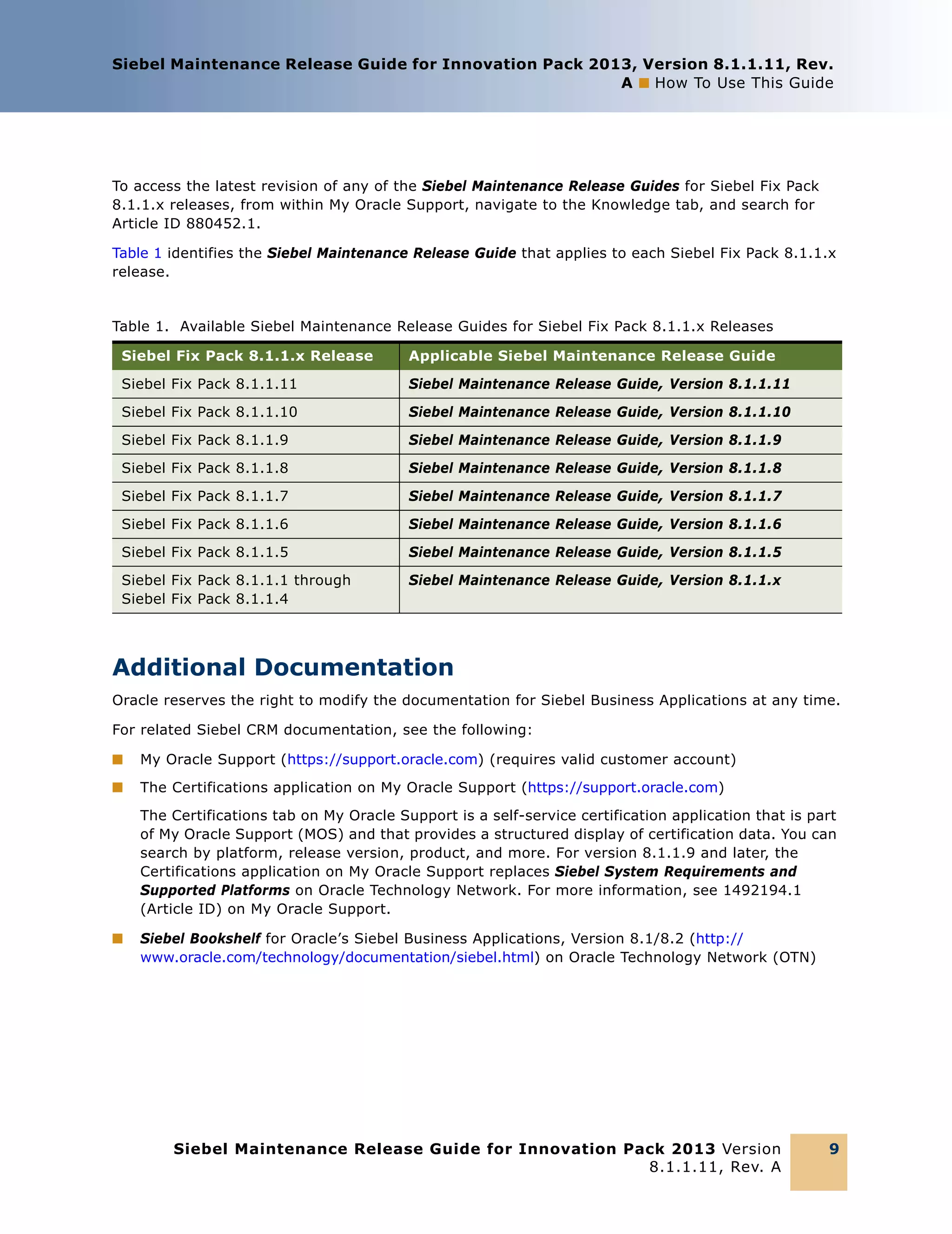
Table 1 identifies the Siebel Maintenance Release Guide that applies to each Siebel Fix Pack 8.1.1.x
release.

Table 1. Available Siebel Maintenance Release Guides for Siebel Fix Pack 8.1.1.x Releases
Siebel Fix Pack 8.1.1.x Release

Applicable Siebel Maintenance Release Guide

Siebel Fix Pack 8.1.1.11

Siebel Maintenance Release Guide, Version 8.1.1.11

Siebel Fix Pack 8.1.1.10

Siebel Maintenance Release Guide, Version 8.1.1.10

Siebel Fix Pack 8.1.1.9

Siebel Maintenance Release Guide, Version 8.1.1.9

Siebel Fix Pack 8.1.1.8

Siebel Maintenance Release Guide, Version 8.1.1.8

Siebel Fix Pack 8.1.1.7

Siebel Maintenance Release Guide, Version 8.1.1.7

Siebel Fix Pack 8.1.1.6

Siebel Maintenance Release Guide, Version 8.1.1.6

Siebel Fix Pack 8.1.1.5

Siebel Maintenance Release Guide, Version 8.1.1.5

Siebel Fix Pack 8.1.1.1 through
Siebel Fix Pack 8.1.1.4

Siebel Maintenance Release Guide, Version 8.1.1.x

Additional Documentation
Oracle reserves the right to modify the documentation for Siebel Business Applications at any time.
For related Siebel CRM documentation, see the following:
■

My Oracle Support (https://support.oracle.com) (requires valid customer account)

■

The Certifications application on My Oracle Support (https://support.oracle.com)
The Certifications tab on My Oracle Support is a self-service certification application that is part
of My Oracle Support (MOS) and that provides a structured display of certification data. You can
search by platform, release version, product, and more. For version 8.1.1.9 and later, the
Certifications application on My Oracle Support replaces Siebel System Requirements and
Supported Platforms on Oracle Technology Network. For more information, see 1492194.1
(Article ID) on My Oracle Support.

■

Siebel Bookshelf for Oracle’s Siebel Business Applications, Version 8.1/8.2 (http://
www.oracle.com/technology/documentation/siebel.html) on Oracle Technology Network (OTN)

Siebel Maintenance Release Guide for Innovation Pack 2013 Version
8.1.1.11, Rev. A

9
Siebel Maintenance Release Guide for Innovation Pack 2013, Version 8.1.1.11, Rev.
A ■ What’s New in This Revision

What’s New in This Revision
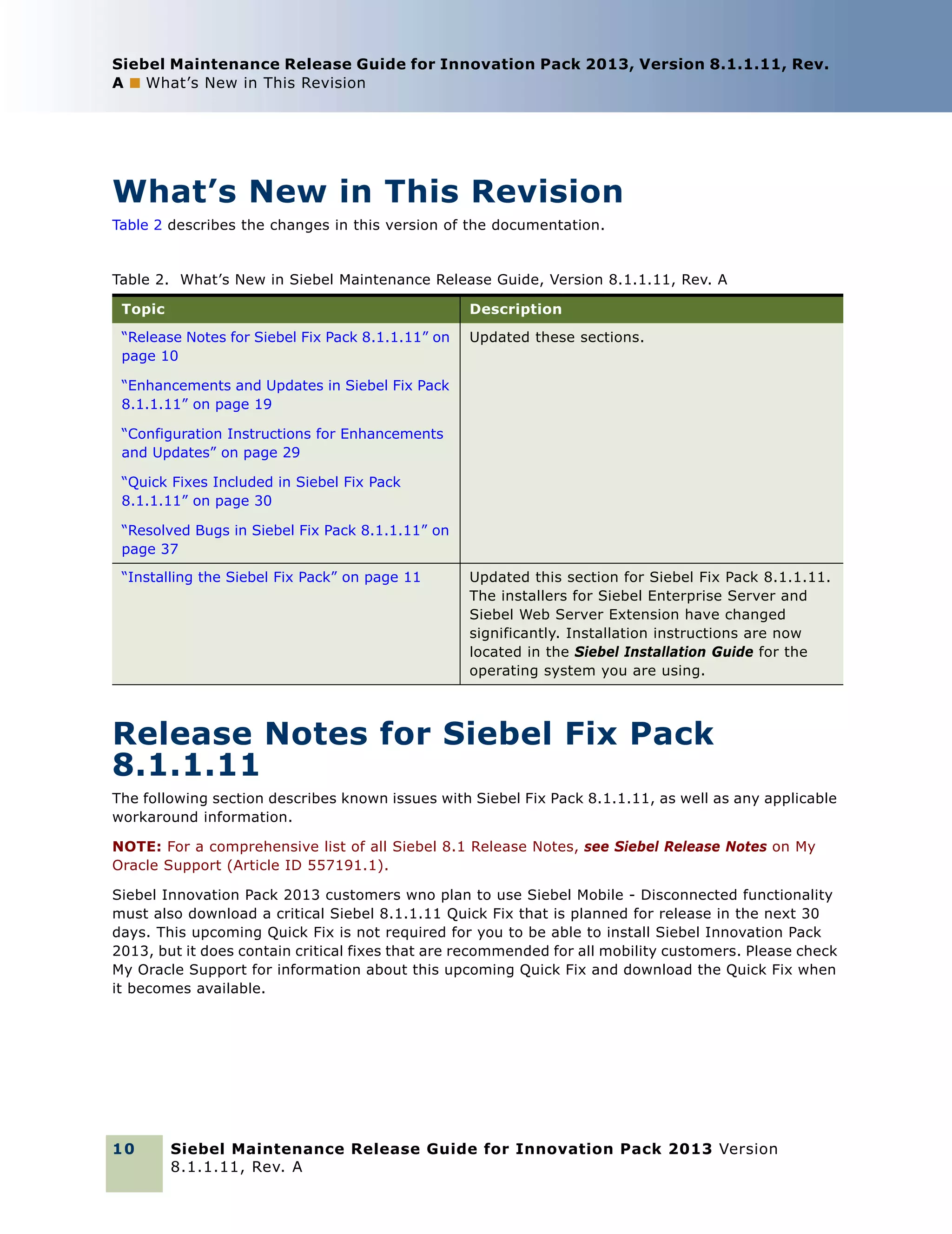
Table 2 describes the changes in this version of the documentation.

Table 2. What’s New in Siebel Maintenance Release Guide, Version 8.1.1.11, Rev. A
Topic

Description

“Release Notes for Siebel Fix Pack 8.1.1.11” on
page 10

Updated these sections.

“Enhancements and Updates in Siebel Fix Pack
8.1.1.11” on page 19
“Configuration Instructions for Enhancements
and Updates” on page 29
“Quick Fixes Included in Siebel Fix Pack
8.1.1.11” on page 30
“Resolved Bugs in Siebel Fix Pack 8.1.1.11” on
page 37
“Installing the Siebel Fix Pack” on page 11

Updated this section for Siebel Fix Pack 8.1.1.11.
The installers for Siebel Enterprise Server and
Siebel Web Server Extension have changed
significantly. Installation instructions are now
located in the Siebel Installation Guide for the
operating system you are using.

Release Notes for Siebel Fix Pack
8.1.1.11
The following section describes known issues with Siebel Fix Pack 8.1.1.11, as well as any applicable
workaround information.
NOTE: For a comprehensive list of all Siebel 8.1 Release Notes, see Siebel Release Notes on My
Oracle Support (Article ID 557191.1).
Siebel Innovation Pack 2013 customers wno plan to use Siebel Mobile - Disconnected functionality
must also download a critical Siebel 8.1.1.11 Quick Fix that is planned for release in the next 30
days. This upcoming Quick Fix is not required for you to be able to install Siebel Innovation Pack
2013, but it does contain critical fixes that are recommended for all mobility customers. Please check
My Oracle Support for information about this upcoming Quick Fix and download the Quick Fix when
it becomes available.

10

Siebel Maintenance Release Guide for Innovation Pack 2013 Version
8.1.1.11, Rev. A
Siebel Maintenance Release Guide for Innovation Pack 2013, Version 8.1.1.11, Rev.
A ■ Installing the Siebel Fix Pack

Installing the Siebel Fix Pack
This topic includes the following information:
■

“Overview of Siebel Fix Pack Installation” on page 11

■

“Installing the Siebel Fix Pack on Microsoft Windows” on page 18

■

“Installing the Siebel Fix Pack on UNIX” on page 18

■

“Postinstallation Tasks” on page 18

■

“Uninstalling Siebel Fix Packs” on page 19

Overview of Siebel Fix Pack Installation
This topic is part of “Installing the Siebel Fix Pack” on page 11.
In order to receive the full benefit of all of the product enhancements contained in the Siebel
Business Applications releases covered by this guide, and to maintain a fully supported Siebel
Business Applications installation, install each product component shown on the Bill of Materials by
following the Siebel Fix Pack 8.1.1.x installation instructions. For general installation information,
read this section, “Installing the Siebel Fix Pack” on page 11. For detailed installation instructions, see
the Siebel Installation Guide for the operating system you are using. Install the Siebel Fix Pack for
all of the applicable products in your existing deployment.
NOTE: This Siebel Maintenance Release Guide includes information for the applicable Siebel Fix Pack
8.1.1.x release. Each Fix Pack is cumulative and includes all of the fixes that were included in
previous Siebel Fix Pack 8.1.1.x releases. You can install the latest Siebel Fix Pack 8.1.1.x release
for an existing installation of Siebel CRM version 8.1.1 or any prior version 8.1.1.x release. Siebel
Fix Pack 8.1.1.11 supports new installation and uninstallation options. You can use the Fix Pack
installer to perform new installations of Siebel Enterprise Server and Siebel Web Server Extension
(SWSE) from the Siebel installation image.
Siebel Fix Pack 8.1.1.11 is also known as Siebel Innovation Pack 2013.
Before you install this Fix Pack, it is strongly recommended that you read all of the information in
the topics in this section, “Installing the Siebel Fix Pack” on page 11, and in other applicable sections
of this guide. See also any relevant articles on My Oracle Support.
The Siebel Installation Guide for the operating system you are using describes Siebel Fix Pack
installation and related tasks for several key products, but not for all of the Siebel Business
Applications products that might apply to your deployment.
NOTE: After you install the Siebel Fix Pack 8.1.1.x release, you might have to perform additional
configuration tasks in order to implement any enhancements and updates that you plan to use. For
more information, see “Enhancements and Updates in Siebel Fix Pack 8.1.1.11” on page 19 and
“Configuration Instructions for Enhancements and Updates” on page 29. It is strongly recommended
that you review the configuration instructions before installing. The instructions for some of the
enhancements and updates might also include steps to be performed before you install the Siebel
Fix Pack. See also “Quick Fixes Included in Siebel Fix Pack 8.1.1.11” on page 30.

Siebel Maintenance Release Guide for Innovation Pack 2013 Version
8.1.1.11, Rev. A

11
Siebel Maintenance Release Guide for Innovation Pack 2013, Version 8.1.1.11, Rev.
A ■ Installing the Siebel Fix Pack

For more information about the available patch releases for Siebel CRM, see 975515.1 (Article ID)
on My Oracle Support. For more information about finding and downloading patch releases for Siebel
CRM, see 975535.1 (Article ID) on My Oracle Support.
This topic includes the following information:
■

“Installation Scenarios Described in This Guide” on page 12

■

“Applicable Base Releases” on page 13

■

“About Obtaining the Siebel Fix Pack Media” on page 14

■

“About Running Siebel Image Creator” on page 14

■

“About Installing Siebel Fix Packs” on page 16

■

“About Installing Languages” on page 17

■

“About Installing Siebel Quick Fix Releases” on page 18

Installation Scenarios Described in This Guide
This topic is part of “Overview of Siebel Fix Pack Installation” on page 11.
The installation instructions in the Siebel Installation Guide for the operating system you are using
apply to the following scenarios for installing Siebel CRM software:
■

Performing a new installation of Siebel CRM version 8.1.1.11. If you are installing Siebel
CRM version 8.1.1.11 as a new installation, then follow the installation instructions in the latest
Siebel Installation Guide for the operating system you are using.
When you run the Siebel Fix Pack 8.1.1.11 installer for Siebel Enterprise Server and Siebel Web
Server Extension (SWSE), you can choose whether to perform a new installation of version
8.1.1.11 or to install version 8.1.1.11 as a patch for an existing installation of version 8.1.1.x
(version 8.1.1 through version 8.1.1.10). The installers use the Oracle Universal Installer (OUI)
framework. For version 8.1.1.11 and later, you can install the Siebel Enterprise Server and SWSE
as a new installation without any version 8.1.1 files required in the network image.
The ability to perform any installation depends on your having used the Siebel Image Creator
utility to correctly set up the Siebel installation images for all applicable versions.
Use the latest version of the Siebel Installation Guide for the operating system you are using
(such as version 8.1/8.2). This book is available on the version 8.1/8.2 Siebel Bookshelf. See the
latest version for information about creating the Siebel installation image, installing Siebel Fix
Pack 8.1.1.11, installing the Siebel database, configuring the server modules, uninstalling the
software, and more. See also related Siebel Bookshelf guides, such as Deploying Siebel Open UI.
You install most of the Siebel modules other than Siebel Enterprise Server and SWSE in the
traditional way. You install version 8.1.1 as a new installation, then install Siebel Fix Pack
8.1.1.11 as a patch installation for version 8.1.1 (or for a prior version 8.1.1.x). These tasks are
described in the Siebel Installation Guide for the operating system you are using.

12

Siebel Maintenance Release Guide for Innovation Pack 2013 Version
8.1.1.11, Rev. A
Siebel Maintenance Release Guide for Innovation Pack 2013, Version 8.1.1.11, Rev.
A ■ Installing the Siebel Fix Pack

■

Installing Siebel Fix Pack 8.1.1.11 (patching an existing Siebel CRM version 8.1.1
installation or a prior version 8.1.1.x installation). If you have already installed Siebel CRM
version 8.1.1 or version 8.1.1.8 or later as a new installation, and are now installing Siebel Fix
Pack 8.1.1.11 for version 8.1.1 (or for a prior version 8.1.1.x release, through version 8.1.1.10),
then follow the instructions in the latest Siebel Installation Guide for the operating system you
are using for installing the current release as a patch installation.
For Siebel Enterprise Server and SWSE, the patch installation option is called a migration
installation. The installer first renames your existing instance to a new location, then installs a
new instance of the Siebel software using the original Oracle Home name and location. Finally,
the installer migrates your custom settings and files to the new instance. If necessary, you can
roll back the current release and revert to the original installation instance.
Use the latest version of the Siebel Installation Guide for the operating system you are using
(such as version 8.1/8.2). This book is available on the version 8.1/8.2 Siebel Bookshelf. See the
latest version for information about creating the Siebel installation image, installing Siebel Fix
Pack 8.1.1.11, rolling back the current release, and more. See also related Siebel Bookshelf
guides, such as Deploying Siebel Open UI.
When you installed Siebel CRM version 8.1.1 or 8.1.1.x as a new installation, you would have
already referred to the Siebel Installation Guide for the operating system you are using.
■

If you are installing the Siebel Fix Pack for an existing installation of version 8.1.1 through
version 8.1.1.7, or any existing installation that was originally installed as version 8.1.1, then
you would have used a guide like version 8.1, Rev. A.

■

If you are installing the Siebel Fix Pack for an existing installation that was originally installed
as version 8.1.1.8 through version 8.1.1.10, then you would have used a guide like version
8.1, Rev. B, Rev. C, or Rev. D.

For previous versions of the Siebel Installation Guide for the operating system you are using
(such as version 8.1, Rev. A through Rev. D), see 1461732.1 (Article ID) on My Oracle Support.
■

Adding languages. When you perform a new installation of Siebel CRM version 8.1.1.11, it is
strongly recommended that you include any supported languages (language packs) that you
require or expect to require. You can also use the installer for Siebel CRM 8.1.1.11 to add new
languages, subject to limitations. For information about adding and deploying new languages,
see the latest version of the Siebel Installation Guide for the operating system you are using.

Applicable Base Releases
This topic is part of “Overview of Siebel Fix Pack Installation” on page 11.
In general, each Siebel Fix Pack can be installed as a patch installation for an existing Siebel CRM
installation that is at a valid base version level for installing this Fix Pack.
Installing any Siebel Fix Pack as a patch installation requires an existing installation of a qualified
base release. Here, base release means the current version of the existing installation, including
Siebel CRM version 8.1.1 software and optionally including any installed Siebel Fix Pack 8.1.1.x of a
lower version or other installed patch releases, where applicable. Valid base releases are Siebel
Industry Applications, version 8.1.1 or version 8.1.1.x.

Siebel Maintenance Release Guide for Innovation Pack 2013 Version
8.1.1.11, Rev. A

13
Siebel Maintenance Release Guide for Innovation Pack 2013, Version 8.1.1.11, Rev.
A ■ Installing the Siebel Fix Pack

NOTE: In order to run Siebel Business Applications software, all of the components of the Siebel
Enterprise must be at the same version 8.1.1.x release level.

About Obtaining the Siebel Fix Pack Media
This topic is part of “Overview of Siebel Fix Pack Installation” on page 11.
For patch installations, you obtain the Siebel Fix Pack 8.1.1.11 media files from My Oracle Support.
For new installations, you obtain the Siebel Fix Pack 8.1.1.11 media files and the applicable version
8.1.1 media files from Oracle Software Delivery Cloud. For more information, see 1461640.1 (Article
ID) on My Oracle Support. See also the Siebel Installation Guide for the operating system you are
using.
For more information about the available patch releases for Siebel CRM, see 975515.1 (Article ID)
on My Oracle Support. For more information about finding and downloading patch releases for Siebel
CRM, see 975535.1 (Article ID) on My Oracle Support.

About Running Siebel Image Creator
This topic is part of “Overview of Siebel Fix Pack Installation” on page 11.
You use the Siebel Image Creator utility to create a Siebel installation image (sometimes called a
network image) for any Siebel Fix Pack 8.1.1.x release. The installation image can include any Siebel
installable product and language provided as part of this product release. You can also add products
or languages to an existing installation image of the same version, for products or languages that
were not previously included in the installation image.
Installing any Siebel Business Applications release, including a new installation or patch installation
of version 8.1.1.11, must be done from an installation image that was created using Siebel Image
Creator.
For more information about using the version of Siebel Image Creator provided with version 8.1.1.11
and about performing new installations or patch installations, see the latest version of the Siebel
Installation Guide for the operating system you are using. This guide is located on the version 8.1/
8.2 Siebel Bookshelf. For information about using the version of Siebel Image Creator provided with
version 8.1.1, see version 8.1, Rev. A of the Siebel Installation Guide for the operating system you
are using. This guide is available at 1461732.1 (Article ID) on My Oracle Support.
NOTE: The Image Creator executable file is called snic.bat for Windows or snic.sh for UNIX and
Linux. Always use the version of Siebel Image Creator that is provided with the Siebel Business
Applications release for which you are creating the installation image.

14

Siebel Maintenance Release Guide for Innovation Pack 2013 Version
8.1.1.11, Rev. A
Siebel Maintenance Release Guide for Innovation Pack 2013, Version 8.1.1.11, Rev.
A ■ Installing the Siebel Fix Pack

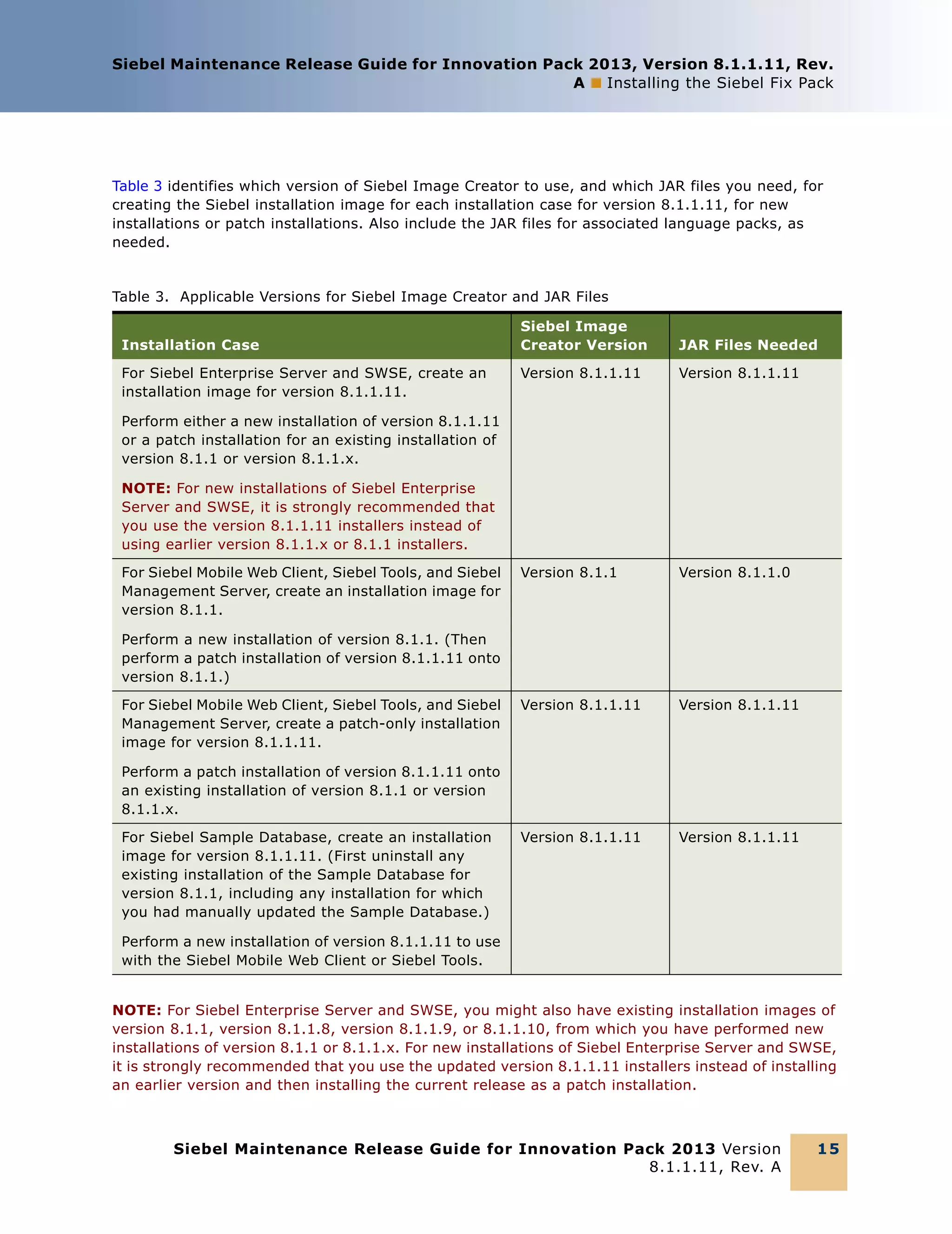
Table 3 identifies which version of Siebel Image Creator to use, and which JAR files you need, for
creating the Siebel installation image for each installation case for version 8.1.1.11, for new
installations or patch installations. Also include the JAR files for associated language packs, as
needed.

Table 3. Applicable Versions for Siebel Image Creator and JAR Files
Installation Case
For Siebel Enterprise Server and SWSE, create an
installation image for version 8.1.1.11.

Siebel Image
Creator Version

JAR Files Needed

Version 8.1.1.11

Version 8.1.1.11

Version 8.1.1

Version 8.1.1.0

Version 8.1.1.11

Version 8.1.1.11

Version 8.1.1.11

Version 8.1.1.11

Perform either a new installation of version 8.1.1.11
or a patch installation for an existing installation of
version 8.1.1 or version 8.1.1.x.
NOTE: For new installations of Siebel Enterprise
Server and SWSE, it is strongly recommended that
you use the version 8.1.1.11 installers instead of
using earlier version 8.1.1.x or 8.1.1 installers.
For Siebel Mobile Web Client, Siebel Tools, and Siebel
Management Server, create an installation image for
version 8.1.1.
Perform a new installation of version 8.1.1. (Then
perform a patch installation of version 8.1.1.11 onto
version 8.1.1.)
For Siebel Mobile Web Client, Siebel Tools, and Siebel
Management Server, create a patch-only installation
image for version 8.1.1.11.
Perform a patch installation of version 8.1.1.11 onto
an existing installation of version 8.1.1 or version
8.1.1.x.
For Siebel Sample Database, create an installation
image for version 8.1.1.11. (First uninstall any
existing installation of the Sample Database for
version 8.1.1, including any installation for which
you had manually updated the Sample Database.)
Perform a new installation of version 8.1.1.11 to use
with the Siebel Mobile Web Client or Siebel Tools.
NOTE: For Siebel Enterprise Server and SWSE, you might also have existing installation images of
version 8.1.1, version 8.1.1.8, version 8.1.1.9, or 8.1.1.10, from which you have performed new
installations of version 8.1.1 or 8.1.1.x. For new installations of Siebel Enterprise Server and SWSE,
it is strongly recommended that you use the updated version 8.1.1.11 installers instead of installing
an earlier version and then installing the current release as a patch installation.

Siebel Maintenance Release Guide for Innovation Pack 2013 Version
8.1.1.11, Rev. A

15
Siebel Maintenance Release Guide for Innovation Pack 2013, Version 8.1.1.11, Rev.
A ■ Installing the Siebel Fix Pack

About Installing Siebel Fix Packs
This topic is part of “Overview of Siebel Fix Pack Installation” on page 11.
For each Siebel Business Applications product module, installing the latest Siebel Fix Pack 8.1.1.x
release for an existing base installation replaces existing executable files and provides new files in
addition to the base installation. For supported base releases, see “Applicable Base Releases” on
page 13.
When you run the Siebel Fix Pack 8.1.1.11 installer for Siebel Enterprise Server and Siebel Web
Server Extension (SWSE), you can choose to perform a new installation or to perform a migration
installation for an existing installation of version 8.1.1.x. If you choose to perform a new installation,
then the installer installs version 8.1.1.11. If you choose to perform a migration installation of
version 8.1.1.11, then you can install a new instance of version 8.1.1.11, to which you will migrate
files and settings from your existing instance of version 8.1.1 or version 8.1.1.x.
NOTE: After you perform a migration installation of the Siebel Fix Pack for Siebel Enterprise Server
or SWSE, the installer reports on any conflicts that might have prevented some of your customermodified files from being migrated. You can review the report and migrate files manually, as needed.
For more information, see the Siebel Installation Guide for the operating system you are using.
If you plan to install any additional Siebel language packs, then review “About Installing Languages”
on page 17 before you install any Siebel Fix Pack. Installing a Siebel Fix Pack also patches any
installed languages.
NOTE: References in this guide to Siebel Fix Pack 8.1.1.x releases might refer to the current Siebel
Fix Pack release or might refer to a prior Siebel Fix Pack release. You must verify the availability,
characteristics, and requirements of any Fix Pack releases, including new Siebel Fix Pack 8.1.1.x
releases. Installation tasks and requirements for all future releases are subject to change and will
be covered by updated documentation. For example, Siebel Fix Pack 8.1.1.11 introduces significant
new installation changes.
The Siebel Fix Pack must be installed from an installation image that you create using the Siebel
Image Creator utility. This utility is described in version 8.1/8.2 of the Siebel Installation Guide for
the operating system you are using. You must use the correct version of Image Creator, depending
on what you are installing. For more information, see “About Running Siebel Image Creator” on
page 14.
For more information about stopping and restarting Siebel components, which is a required part of
the Fix Pack installation process, see Siebel System Administration Guide. This guide is available on
the Siebel Bookshelf.
After you install version 8.1.1.x, you can also install any applicable Quick Fix release onto version
8.1.1.x. For more information, see “About Installing Siebel Quick Fix Releases” on page 18.

Related Topics
“Installing the Siebel Fix Pack on Microsoft Windows” on page 18
“Installing the Siebel Fix Pack on UNIX” on page 18
“Uninstalling Siebel Fix Packs” on page 19

16

Siebel Maintenance Release Guide for Innovation Pack 2013 Version
8.1.1.11, Rev. A
Siebel Maintenance Release Guide for Innovation Pack 2013, Version 8.1.1.11, Rev.
A ■ Installing the Siebel Fix Pack

About Installing Languages
This topic is part of “Overview of Siebel Fix Pack Installation” on page 11.
Include or add all of the languages that you will require in your Siebel CRM version 8.1.1 or version
8.1.1.x installation image (network image), which you create by using the Siebel Image Creator
utility. Include the same set of languages for all of the installation images for version 8.1.1 and
version 8.1.1.x. Then install the software with the languages that you require. When you configure
each installed Siebel Server and Siebel Web Server Extension (SWSE), you specify which installed
languages you are deploying.
You can add languages to an existing installation of version 8.1.1.11. However, some restrictions on
adding languages apply. As an alternative, it is always an option to perform a new installation that
includes the languages that you require. For more information about installing languages, including
applicable limitations, see the Siebel Installation Guide for the operating system you are using,
version 8.1/8.2.
If you are not adding languages, then you do not need to perform the tasks described in this topic.
Some postinstallation tasks are required in order to deploy a language that you added after the initial
product installation and configuration:
■

If you add a language after you have configured an installed Siebel Server, then start the Siebel
Server Configuration Wizard and run the configuration task Add Language Support for the Siebel
Server. (It is not necessary to reconfigure the Siebel Server.)

■

If you add a language after you have configured an installed SWSE, then start the SWSE
Configuration Wizard and run the configuration task Add Language Support for the SWSE
Configuration. (It is not necessary to reconfigure the SWSE.)

■

After you add a language to your installed software, you must add the language to the Siebel
database, import Siebel Repository data into the database for this language, and run the MLOV
(multilingual LOV) conversion utility. It is strongly recommended that you perform databaserelated tasks after installing applicable Fix Packs or other patch releases.

Related Topics
“About Running Siebel Image Creator” on page 14
“Uninstalling Siebel Fix Packs” on page 19

Related Books
Siebel Installation Guide for the operating system you are using
Siebel Global Deployment Guide
Configuring Siebel Business Applications
The Certifications application on My Oracle Support

Siebel Maintenance Release Guide for Innovation Pack 2013 Version
8.1.1.11, Rev. A

17
Siebel Maintenance Release Guide for Innovation Pack 2013, Version 8.1.1.11, Rev.
A ■ Installing the Siebel Fix Pack

About Installing Siebel Quick Fix Releases
This topic is part of “Overview of Siebel Fix Pack Installation” on page 11.
After installing a Siebel Fix Pack 8.1.1.x release as described in this guide, you can also install any
applicable Siebel Quick Fix release onto version 8.1.1.x. When you install a Quick Fix, the installed
languages might also be patched, depending on the content of the Quick Fix release.
NOTE: Installing a Quick Fix might entail restrictions for some subsequent installations, such as new
Siebel languages or later Siebel Fix Pack releases. You can uninstall a Quick Fix before adding new
languages, then reinstall it later.
For detailed information about a particular Siebel Quick Fix, see the documentation that is provided
separately with the Quick Fix.
In some cases, installing particular Siebel Quick Fixes might be required after installing a Siebel Fix
Pack release. If so, this requirement will be documented in the release notes section of this guide.
The following related topic lists the Quick Fix releases that are included in the current Siebel Fix Pack
8.1.1.x release.

Related Topic
“Quick Fixes Included in Siebel Fix Pack 8.1.1.11” on page 30

Installing the Siebel Fix Pack on Microsoft Windows
This topic is part of “Installing the Siebel Fix Pack” on page 11.
The procedures for installing Siebel Fix Pack 8.1.1.11 on Microsoft Windows are described in Siebel
Installation Guide for Microsoft Windows.

Installing the Siebel Fix Pack on UNIX
This topic is part of “Installing the Siebel Fix Pack” on page 11.
The procedures for installing Siebel Fix Pack 8.1.1.11 on supported UNIX and Linux operating
systems are described in Siebel Installation Guide for UNIX.

Postinstallation Tasks
This topic is part of “Installing the Siebel Fix Pack” on page 11.
The postinstallation tasks for Siebel Fix Pack 8.1.1.11 are described in the Siebel Installation Guide
for the operating system you are using.

18

Siebel Maintenance Release Guide for Innovation Pack 2013 Version
8.1.1.11, Rev. A
Siebel Maintenance Release Guide for Innovation Pack 2013, Version 8.1.1.11, Rev.
A ■ Enhancements and Updates in Siebel Fix Pack 8.1.1.11

Uninstalling Siebel Fix Packs
This topic is part of “Installing the Siebel Fix Pack” on page 11.
The uninstallation procedures for Siebel Fix Pack 8.1.1.11 are described in the Siebel Installation
Guide for the operating system you are using.

Enhancements and Updates in Siebel Fix
Pack 8.1.1.11
Siebel Fix Pack 8.1.1.11 contains several product enhancements.
This topic contains the following information:
■

“RF 971: Extensibility Features of Siebel Open UI” on page 20

■

“RF 1007: Siebel Multisite Ordering Module” on page 20

■

“RF 1021: Telecommunications Subscription Management: Siebel Open UI” on page 20

■

“RF 1025: Orders for Fleet Management” on page 21

■

“RF 1029: Siebel eService Customer Self-Service Portal” on page 21

■

“RF 1030: Siebel Open UI Partner Portal” on page 22

■

“Siebel Clinical (CTMS) Enhancements: RF 967, RF 1011, and RF 1137” on page 23

■

“RF 1059: Siebel Catalog Browse Enhancements” on page 24

■

“RF 1061: Siebel Open UI Chat” on page 24

■

“Siebel Loyalty Enhancements: RF 1095 and RF 1222” on page 25

■

“RF 1128: Siebel Open UI Field Service Dispatch Board” on page 25

■

“RF 1129: Siebel Hospitality: Siebel Open UI Function Space Diary” on page 26

■

“RF 1131: Siebel Marketing for Siebel Open UI” on page 26

■

“RF 1166: Customer Order Management Administration Views for Siebel Open UI” on page 27

■

“RF 1189: Siebel Calendar Integration” on page 27

■

“RF 1192: Siebel Disconnected Mobile” on page 27

■

“RF 1193: Siebel Disconnected Mobile for Service” on page 27

■

“RF 1202: Siebel Installation and Patching Enhancements” on page 28

■

“RF 1214: JMS Multithreading Support” on page 29

■

“RF 1239: Siebel Search Enhancement: Siebel Open UI Find” on page 29

Siebel Maintenance Release Guide for Innovation Pack 2013 Version
8.1.1.11, Rev. A

19
Siebel Maintenance Release Guide for Innovation Pack 2013, Version 8.1.1.11, Rev.
A ■ Enhancements and Updates in Siebel Fix Pack 8.1.1.11

RF 971: Extensibility Features of Siebel Open UI
For more information about the functionality provided by RF 971, see Configuring Siebel Open UI on
the Siebel Bookshelf on Oracle Technology Network (http://www.oracle.com/technetwork/indexes/
documentation/index.html).

RF 1007: Siebel Multisite Ordering Module
RF 1007 delivers the Siebel Multisite ordering module, which is a complete Configure, Quote, and
Order solution that allows users to create and manage contracts, contract modifications, and
changes of service for large multisite customers. With this enhancement, users can do the following:
■

Structure quotes in groups of service accounts and service points (sites) for association to sets
of products and billing accounts, so that users do not have to associate service accounts and
service points individually.

■

Create new services and modify existing service contracts directly from groups.

■

Manage the date when sites and products enter and exit from groups.

■

Change the configuration of products and transfer sites to different billing accounts with an
effective date that the users select.

■

Create and manage multiple versions of quotes for products and prices so that users can retain
several different versions of quotes and not have to reenter data to test out quotes. This allows
users to be able to propose the best possible options for quotes.

■

Decompose the multisite quotes onto standard Siebel order line items for submission to the
Billing application.

For more information about Siebel Multisite Ordering functionality, see Siebel Energy Guide on the
Siebel Bookshelf.

RF 1021: Telecommunications Subscription
Management: Siebel Open UI
RF 1021 simplifies telecommunication subscription processes using a touch-based user interface that
requires minimum user navigation and that guides users through key operations.
Telecommunications Subscription Management in Siebel Open UI includes the following key features:
■

Customer Dashboard. Provides a snapshot of key attributes, installed services and products,
and interactions for each customer.

■

Billing Analytics. Provides a bill summary and information about billing trends, unbilled usage,
and anomalies in usage and costs for each customer.

■

Action Launchpad and Navigation Pane. Provides new portal features to initiate guided tasks
and icons to allow customers to access transactional information quickly.

■

Specialized User Interfaces. Provides support for common processes such as SIM Swap with
simpler data entry.

20

Siebel Maintenance Release Guide for Innovation Pack 2013 Version
8.1.1.11, Rev. A
Siebel Maintenance Release Guide for Innovation Pack 2013, Version 8.1.1.11, Rev.
A ■ Enhancements and Updates in Siebel Fix Pack 8.1.1.11

For more information about Telecommunications Subscription Management in Siebel Open UI, see
Siebel Order Management Guide Addendum for Communications on the Siebel Bookshelf.

RF 1025: Orders for Fleet Management
RF 1025 ports Orders for Fleet Management functionality to Siebel version 8.1.1.x applications.
Orders for Fleet Management is part of the AIA Oracle Order Management Integration Pack for Oracle
Transportation Management, which includes Oracle E-Business Suite and Siebel CRM.
Oracle Fleet Management allows users to do the following:
■

Manage individual assets

■

Plan the use of a fleet of assets

■

Take orders for use of assets

■

Dispatch assets

■

Monitor and track assets in real time

■

Settle costs associated with a fleet

■

Manage human resources (drivers) for a fleet

■

Manage the lifecycles of assets

Oracle Fleet Management involves the integration of the following applications:
■

Siebel Customer Order Management (CRM). Order capture

■

Oracle Transportation Management. Fleet planning and execution, and driver management

■

Enterprise Business Suite Asset Lifecycle Management. Asset definition, management, and
maintenance

■

Enterprise Business Suite Human Resources. Drives human resources, such as scheduling
and payment

■

Enterprise Business Suite Financials. Settlement, accruals, and financial management

■

Application Integration Architecture. Integration using Process Integration Packs

RF 1029: Siebel eService Customer Self-Service Portal
Siebel eService Customer Self-Service Portal has been redesigned using a new Object Manager that
uses the Siebel Open UI framework. This provides a mobile-like Web user experience built on the
principles of Customer Experience (CX), which includes modern UI paradigms and social media
integration. The Customer Self-Service Portal allows users to create service requests, and presents
new navigation methods, such as carousels and tiles. It also allows users to complete user
registration, update their profiles, and search for branch locations.
This enhancement’s key features include:
■

The ability to create service requests

Siebel Maintenance Release Guide for Innovation Pack 2013 Version
8.1.1.11, Rev. A

21
Siebel Maintenance Release Guide for Innovation Pack 2013, Version 8.1.1.11, Rev.
A ■ Enhancements and Updates in Siebel Fix Pack 8.1.1.11

■

Transaction carousel

■

Tile-based records

■

Siebel Open UI framework across all views

For more information about Siebel eService Customer Self-Service Portal functionality, see Siebel
eService Administration Guide for Siebel Open UI on the Siebel Bookshelf.

RF 1030: Siebel Open UI Partner Portal
Siebel Partner Portal for Siebel Open UI has been made available in Siebel Fix Pack 8.1.1.11, so
certain processes and views within the application have been redesigned to work with Siebel Open
UI. Customers who plan to deploy Siebel Partner Portal on Siebel Open UI now will have access to
this Partner Portal application through a new object manager. Customers who use Siebel Partner
Portal in standard interactivity or high interactivity can continue to use their existing object manager
from previous Siebel releases.
Some of the changes in Siebel Partner Portal for Siebel Open UI include:
■

Pre-Login Launch Page. A pre-login launch page is now available with a configurable news
carousel and a transaction carousel. Customers can configure banners and icons to launch URLs
or Siebel application screens.

■

Post-Login Home Page. A post-login home page is available with a configurable news carousel
and a transaction carousel. Customers can configure banners and icons to launch URLs or Siebel
application screens.

■

Application-Level Menu. The application-level menu has a new look and feel with Notifications
and Search. By default, only the Home screen tab is visible. As users navigate to more screens,
more screen tabs are added.

■

New Partner Self-Registration. The partner self-registration flow has been redesigned to
require fewer steps to complete the process and a new user interface has been provided.

■

Partner Employee Self-Registration. The partner employee self-registration flow has been
redesigned to require fewer steps to complete the process and a new user interface has been
provided.

■

Partner Locator. The user interface has been redesigned so that Search applets and Search
results are now in the same view.

■

User interface redesign. The user interface has been redesigned for the following Partner
Portal screens:
■
■

Info Center

■

22

Partner Program

Product Catalog

Siebel Maintenance Release Guide for Innovation Pack 2013 Version
8.1.1.11, Rev. A
Siebel Maintenance Release Guide for Innovation Pack 2013, Version 8.1.1.11, Rev.
A ■ Enhancements and Updates in Siebel Fix Pack 8.1.1.11

Siebel Clinical (CTMS) Enhancements: RF 967, RF 1011,
and RF 1137
This topic describes the functionality provided by RF 967, RF 1011, and RF 1137.

RF 967: Enhanced Data Capture for EDC Integration
NOTE: You must have installed ACR 539 to be able to implement RF 967. ACR 539 was first provided
in Siebel Fix Pack 8.1.1.3. For more information about ACR 539, see Siebel Maintenance Release
Guide, Version 8.1.1.x (for version 8.1.1.1 through version 8.1.1.4) on My Oracle Support.
RF 967 allows users to access the functionality in the Health Sciences suite, and allows the
applications to work together to improve the end-to-end process. RF 967 also provides users with
the ability to capture additional data for EDC integration.
For more information about enhanced data capture for EDC integration, see Siebel Clinical Trial
Management System Guide on the Siebel Bookshelf.

RF 1011: Data-Driven Clinical Trip Reports
RF 1011 improves base trip reports and includes the following enhancements:
■

The ability to design separate trip report templates based on protocol, region, and visit type.
Users see only the relevant templates for their protocol, region, and visit type.

■

Allows users to capture several data points and complete several tasks by using dynamic
questions and checklists to focus on completing trip reports during site visits.

■

Provides a new Summary view to give users an overall view of the trip report completion status.

■

Provides a new Snapshot view to give users a picture of subject enrollment statuses while the
users are at the site.

■

Provides the ability to capture additional data during case reports from trips to reduce the need
for customization at the customer’s end.

For more information about enhanced data-driven clinical trip reports, see Siebel Clinical Trial
Management System Guide on the Siebel Bookshelf.

RF 1137: Payment Enhancements
RF 1137 provides Clinical Payment enhancements that allow users to process split and revert
payments and to capture country-specific VAT amounts. Some visit activities are paid to multiple
payees based on the site contracts, and the payments can be split to pay different people. An
example of this would be a payment for a complete blood screening, where 60% of the payment
needs to go the lab and 40% of the payment needs to go to the investigator. The Clinical Payments
enhancements allow users to revert payments to modify their underlying details. Finally, users can
capture the VAT amounts paid and summarize them at the protocol, region, and site levels.
RF 1137 includes the following enhancements:
■

The ability to define split details for any payment activity at the site level based on site contracts.
These details are used to generate payments for every subject who completes this activity.

Siebel Maintenance Release Guide for Innovation Pack 2013 Version
8.1.1.11, Rev. A

23
Siebel Maintenance Release Guide for Innovation Pack 2013, Version 8.1.1.11, Rev.
A ■ Enhancements and Updates in Siebel Fix Pack 8.1.1.11

■

The ability to consolidate payments generated for the same payee into a single payment record.

■

The ability to copy split details from one activity to multiple activities through a single action.

■

The ability to remove split details from multiple payment activities through a single action.

■

The ability to revert payment activities before the payments are made. The activities can be
updated and reprocessed for payment.

■

Provides a new field at the site payment level to capture the VAT amount paid.

■

Rolls up the VAT amount from the site level to the region level and to the protocol level so that
users can obtain a consolidated view of the VAT amounts at each of the three levels.

For more information about payment enhancements for Siebel Clinical, see Siebel Clinical Trial
Management System Guide on the Siebel Bookshelf.

RF 1059: Siebel Catalog Browse Enhancements
Siebel Catalog Browse has been enhanced for Siebel Open UI to provide a new and improved user
experience. By incorporating new Siebel Open UI controls for catalog, category and a product
selection, the user is able to browse and shop a catalog within a single HTML page with better visual
indicators that prevent the need for drilling down. The Browse Catalog user experience supports the
features Add To Cart, Customize, and Edit Promotion. The Product Compare and Parametric Search
provide the same features that have been provided in high interactivity, but with improvements to
the layout of each view.

RF 1061: Siebel Open UI Chat
Siebel Open UI Chat is a customer-contact channel that allows a user to chat with a customer-service
representative (agent) in real time if they encounter a problem, thus allowing the agent to
troubleshoot a user’s problem and be able to resolve it successfully. It allows companies to interact
with their Web site visitors in new ways and turns their Web site into a live environment. The new
and improved user experience makes it easier for agents to accept multiple chat sessions and work
on them.
Siebel Open UI Chat provides the following benefits:
■

Online customer support

■

Reduces customer support costs

■

Improves customer satisfaction and loyalty

■

Converts more visitors to customers

■

Reduces shopping cart abandonment

For more information about Siebel Open UI Chat, see Siebel Chat Guide on the Siebel Bookshelf.

24

Siebel Maintenance Release Guide for Innovation Pack 2013 Version
8.1.1.11, Rev. A
Siebel Maintenance Release Guide for Innovation Pack 2013, Version 8.1.1.11, Rev.
A ■ Enhancements and Updates in Siebel Fix Pack 8.1.1.11

Siebel Loyalty Enhancements: RF 1095 and RF 1222
This topic describes the Siebel Loyalty enhancements in Siebel Fix Pack 8.1.1.11.

RF 1095: Siebel Loyalty Promotion and Designer Workflow
RF 1095 provides support for the Siebel Loyalty Promotion Designer functionality with the Siebel
Open UI user interface framework.

RF 1222: Siebel Loyalty Enhancements
Siebel Fix Pack 8.1.1.11 provides the following enhancements to the Siebel Loyalty application:
■

Bucket Promotion Transaction Expiry. The start date for calculating the expiration date of
points earned by a member for accrual transactions that update promotion attributes can be
either the processing date or the creation date of the last transaction for the user.

■

Parent-Child Transaction Cancellation. If a transaction that rolls up points from a child
member to a parent member is cancelled, then the transaction that accrues points to the parent
member is also cancelled. The points are redeemed from the parent member and credited to the
appropriate point block.

■

Promotion Import. Users can import one or more loyalty promotions to their Siebel Loyalty
implementation. They can associate the imported program with a new program or with an
existing program.

■

Redemption Performance. The LOY Redemption Web service now includes a method called
ProcessRealTimeRedemption that reduces the time that it takes to process real-time redemption
requests.

For more information about the Siebel Loyalty enhancements provided in Siebel Fix Pack 8.1.1.11,
see Siebel Loyalty Administration Guide on the Siebel Bookshelf.

RF 1128: Siebel Open UI Field Service Dispatch Board
Siebel Field Service Dispatch Board for Siebel Scheduling has been redesigned to work with Siebel
Open UI. Users who deploy Siebel Open UI will have access to the Dispatch Board.
This enhancement includes the following new features:
■

Improved date picker

■

Show More/Show Less functionality for employees in the Dispatch Board

■

Color-coding of employee names based on employee attributes

■

Ability to change activity duration using drag and drop

■

Display of all overlapping activities

■

Configurable activity attributes for color coding

■

Ability to select the days to be displayed on Dispatch Board using user preferences.

Siebel Maintenance Release Guide for Innovation Pack 2013 Version
8.1.1.11, Rev. A

25
Siebel Maintenance Release Guide for Innovation Pack 2013, Version 8.1.1.11, Rev.
A ■ Enhancements and Updates in Siebel Fix Pack 8.1.1.11

Note the following about interactivity:
■

Users who continue to deploy their application in high interactivity will have access to their
existing Dispatch Board.

■

Users who have the Siebel Integration with Oracle Real-Time Scheduler for scheduling purposes
will continue to use ORS Dispatch Board.

For more information about Siebel Field Service Dispatch Board for Siebel Open UI, see Siebel Field
Service Guide on the Siebel Bookshelf.

RF 1129: Siebel Hospitality: Siebel Open UI Function
Space Diary
RF 1129 provides Function Space Diary functionality on Siebel Open UI for the Siebel Group Sales
and Event Management application. The Function Space Diary provides a graphical user interface for
visually managing function space bookings at properties.
This enhancement includes the following functionality that allows users to do the following:
■

Modify bookings using drag and drop, extend and shrink, and direction function edit capabilities

■

Personalize diary settings to best fit their job responsibilities

■

Manage complex bookings such as reserves, options, overbooks, and unreserved space

■

View daily group availability directly from the diary

RF 1129 also provides enhanced usability features that include new search and filter capabilities,
improved mouse-over tooltips, and a detailed legend.
These enhanced features allow users to quickly and easily manage function space inventory for a
property from a single location. This improves user efficiency and shortens the length of time
required to make changes to function agendas.
For more information about Siebel Hospitality, see Siebel Hospitality Guide on the Siebel Bookshelf.

RF 1131: Siebel Marketing for Siebel Open UI
RF 1131 provides CK Editor and Marketing calendars for Siebel Open UI. Users can now access CK
Editors and Marketing calendars on any device, and using any browser.
For more information about Siebel Marketing for Siebel Open UI, see Siebel Marketing Installation
and Administration Guide on the Siebel Bookshelf.

26

Siebel Maintenance Release Guide for Innovation Pack 2013 Version
8.1.1.11, Rev. A
Siebel Maintenance Release Guide for Innovation Pack 2013, Version 8.1.1.11, Rev.
A ■ Enhancements and Updates in Siebel Fix Pack 8.1.1.11

RF 1166: Customer Order Management Administration
Views for Siebel Open UI
RF 1166 allows product and pricing administration views to be rendered in Siebel Open UI. RF 1166
also enables edit promotion user interface and Unified Messaging Framework (UMF)
recommendations in Siebel Open UI. These capabilities are accessible from quote or sales order
views.
NOTE: The Configurator structure view and iLog constraint views are not certified in Siebel Open UI.
Users who require these views must access them from the high-interactivity application.

RF 1189: Siebel Calendar Integration
RF 1189 provides an integration between the Siebel Calendar and any CalDAV-compliant client,
including native iOS and Android calendars.
This integration provides the following functionality:
■

Exposes a user’s Siebel Calendar as an additional calendar in the native device calendar or inside
popular desktop applications, such as Microsoft Outlook or Lotus Notes. (Note that desktop
applications might require third-party plug-ins.)

■

Allows users to capture customer meetings in the device that they use every day, without
accessing the Siebel application directly.

For more information about configuring this type of integration for the Siebel Calendar, see
1574546.1 (Article ID) on My Oracle Support. See also the relevant parameters in Siebel System
Administration Guide on the Siebel Bookshelf.

RF 1192: Siebel Disconnected Mobile
RF 1192 provides the Disconnected Mobile Server framework for Siebel CRM applications. For more
information about Siebel Disconnected Mobile, see Siebel Mobile Guide: Disconnected on the Siebel
Bookshelf. See also “RF 1193: Siebel Disconnected Mobile for Service” on page 27.

RF 1193: Siebel Disconnected Mobile for Service
Siebel Disconnected Mobile for Service allows field service technicians to access and update
information related to their work when they are not connected to a network. When connectivity is
available, all of the updates that field service technicians make are automatically updated to the
server incrementally, and updates that were made on the server while the technician was offline are
incrementally downloaded to the mobile device. The Siebel Disconnected Mobile for Service
application uses the Siebel Open UI framework to deliver a user experience that is contemporary and
well-suited for iPad and other mobile devices. Technicians can use Siebel application metadata that
is defined in views and applets to extend and configure the Siebel Disconnected Mobile for Service
application with other objects that they choose. They can also write client-side Javascript to
implement business logic when the technicians are offline.

Siebel Maintenance Release Guide for Innovation Pack 2013 Version
8.1.1.11, Rev. A

27
Siebel Maintenance Release Guide for Innovation Pack 2013, Version 8.1.1.11, Rev.
A ■ Enhancements and Updates in Siebel Fix Pack 8.1.1.11

This enhancement includes the following key features that allow users to do the following:
■

View Service Activity details and child items such as child information, affected assets, and
service history

■

Check parts availability and place an order for unavailable parts

■

Update the status of an activity to Accept, Enroute, In Progress, Done, and so forth

■

Track time, parts, and expenses

■

Create RMA

■

Capture asset readings

RF 1202: Siebel Installation and Patching
Enhancements
Beginning with Siebel Fix Pack 8.1.1.11, each Fix Pack release is packaged as a base release. The
Siebel Enterprise Server and Siebel Web Server Extension installations install the OUI base and the
current Fix Pack using a one-step process. The installation interface has been improved to provide a
new look and feel for installing Siebel Enterprise Server and Siebel Web Server Extension. The
complete installation flow is now displayed on the left side of the screen to show key steps and the
progress of the installation. RF 1202 also includes built-in postinstallation validation so that users
can verify that the installation completed successfully, and installations now reference the log files
to help users with the verification.

Enhancements to Patch Installation
RF 1202 enhances the patching model to provide more reliable results. For users who have an
existing installation of version 8.1.1 through version 8.1.1.10 and who want to upgrade to version
8.1.1.11, the new Siebel Enterprise Server and Siebel Web Server Extension patch installers rename
the existing Oracle Home directory to the backup directory and install the new release into the
existing location. The necessary server configurations and custom application files are automatically
applied to the new instance. A report is generated at the end of the migration process to identify any
conflicts between custom files and the files delivered by the Siebel Fix Pack installation. This allows
customers to decide if they want to keep the custom changes. Customers can also optionally roll back
the current version and revert to the previously installed software version.
RF 1202 provides the following benefits:
■

A flexible framework to support installing future Siebel CRM releases

■

A consistent user experience for new installations and patch installations

■

A streamlined flow for installation and patching

■

Improved reliability for installation and patching

■

Improved performance for installation and patching

28

Siebel Maintenance Release Guide for Innovation Pack 2013 Version
8.1.1.11, Rev. A
Siebel Maintenance Release Guide for Innovation Pack 2013, Version 8.1.1.11, Rev.
A ■ Configuration Instructions for Enhancements and Updates

For more information about these enhancements in Siebel Fix Pack 8.1.1.11, and for instructions for
performing both new installations and patch installations, see the Siebel Installation Guide for the
operating system you are using. See also “Installing the Siebel Fix Pack” on page 11.

RF 1214: JMS Multithreading Support
RF 1214 allows users to operate the EAI JMS Transport in a multithreaded mode, which allows nondependent message architectures to scale more efficiently with higher loads.

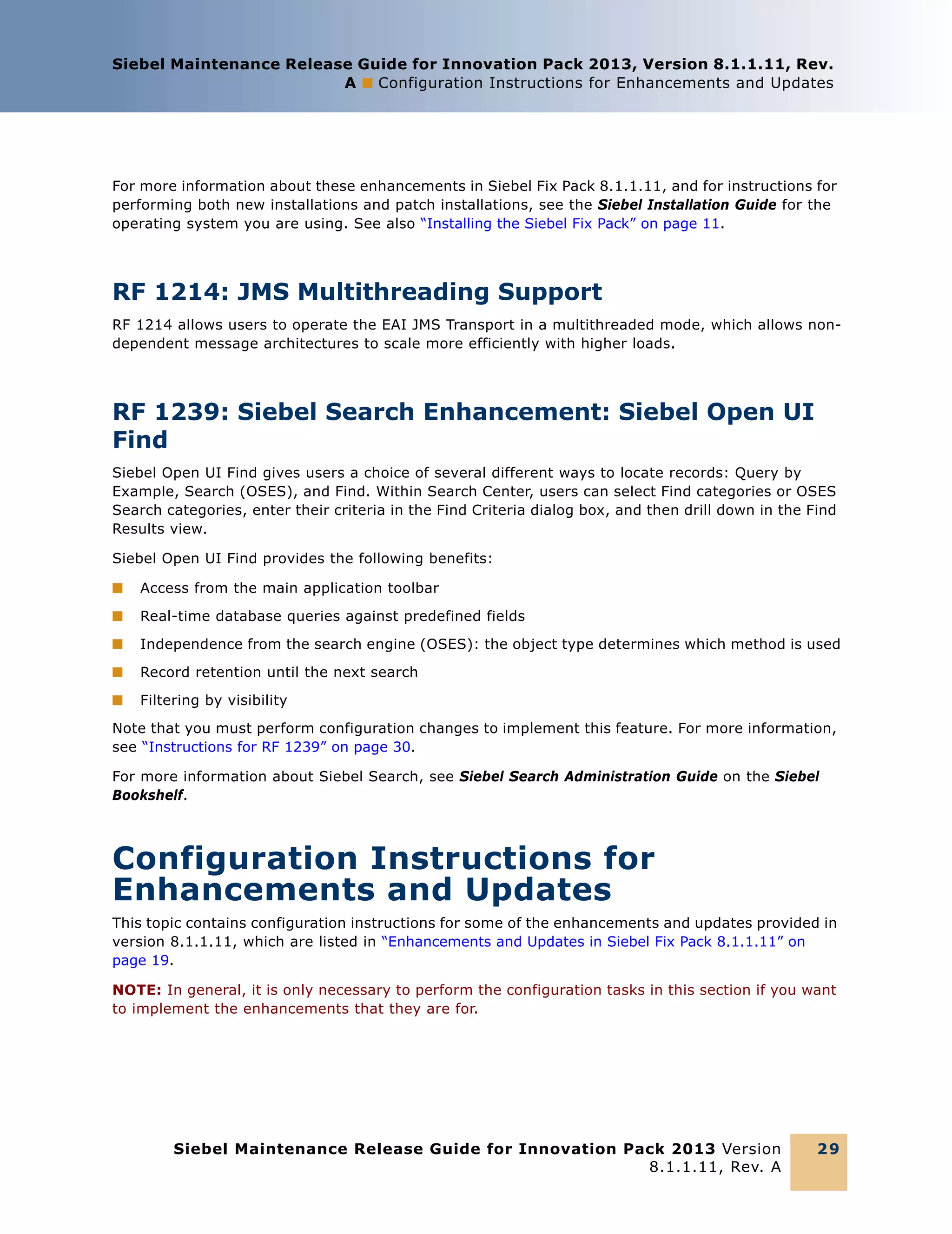
RF 1239: Siebel Search Enhancement: Siebel Open UI
Find
Siebel Open UI Find gives users a choice of several different ways to locate records: Query by
Example, Search (OSES), and Find. Within Search Center, users can select Find categories or OSES
Search categories, enter their criteria in the Find Criteria dialog box, and then drill down in the Find
Results view.
Siebel Open UI Find provides the following benefits:
■

Access from the main application toolbar

■

Real-time database queries against predefined fields

■

Independence from the search engine (OSES): the object type determines which method is used

■

Record retention until the next search

■

Filtering by visibility

Note that you must perform configuration changes to implement this feature. For more information,
see “Instructions for RF 1239” on page 30.
For more information about Siebel Search, see Siebel Search Administration Guide on the Siebel
Bookshelf.

Configuration Instructions for
Enhancements and Updates
This topic contains configuration instructions for some of the enhancements and updates provided in
version 8.1.1.11, which are listed in “Enhancements and Updates in Siebel Fix Pack 8.1.1.11” on
page 19.
NOTE: In general, it is only necessary to perform the configuration tasks in this section if you want
to implement the enhancements that they are for.

Siebel Maintenance Release Guide for Innovation Pack 2013 Version
8.1.1.11, Rev. A

29
Siebel Maintenance Release Guide for Innovation Pack 2013, Version 8.1.1.11, Rev.
A ■ Quick Fixes Included in Siebel Fix Pack 8.1.1.11

In general, you perform the instructions described in the subtopics listed below after you install the
current Siebel Fix Pack, as described in “Installing the Siebel Fix Pack” on page 11. However, some of
these instructions might include steps that you must perform before you install. For this reason, it
is strongly recommended that you review all of the configuration instructions before you install the
Siebel Fix Pack.
NOTE: For more information about activities performed in Siebel Tools, see Using Siebel Tools and
Configuring Siebel Business Applications. For more information about activities performed in the
Siebel application, see Siebel Applications Administration Guide and related books. These guides are
available on the version 8.1/8.2 Siebel Bookshelf on Oracle Technology Network (OTN) at http://
www.oracle.com/technology/documentation/siebel.html.
This topic contains the following subtopics:
■

“Instructions for RF 1239” on page 30

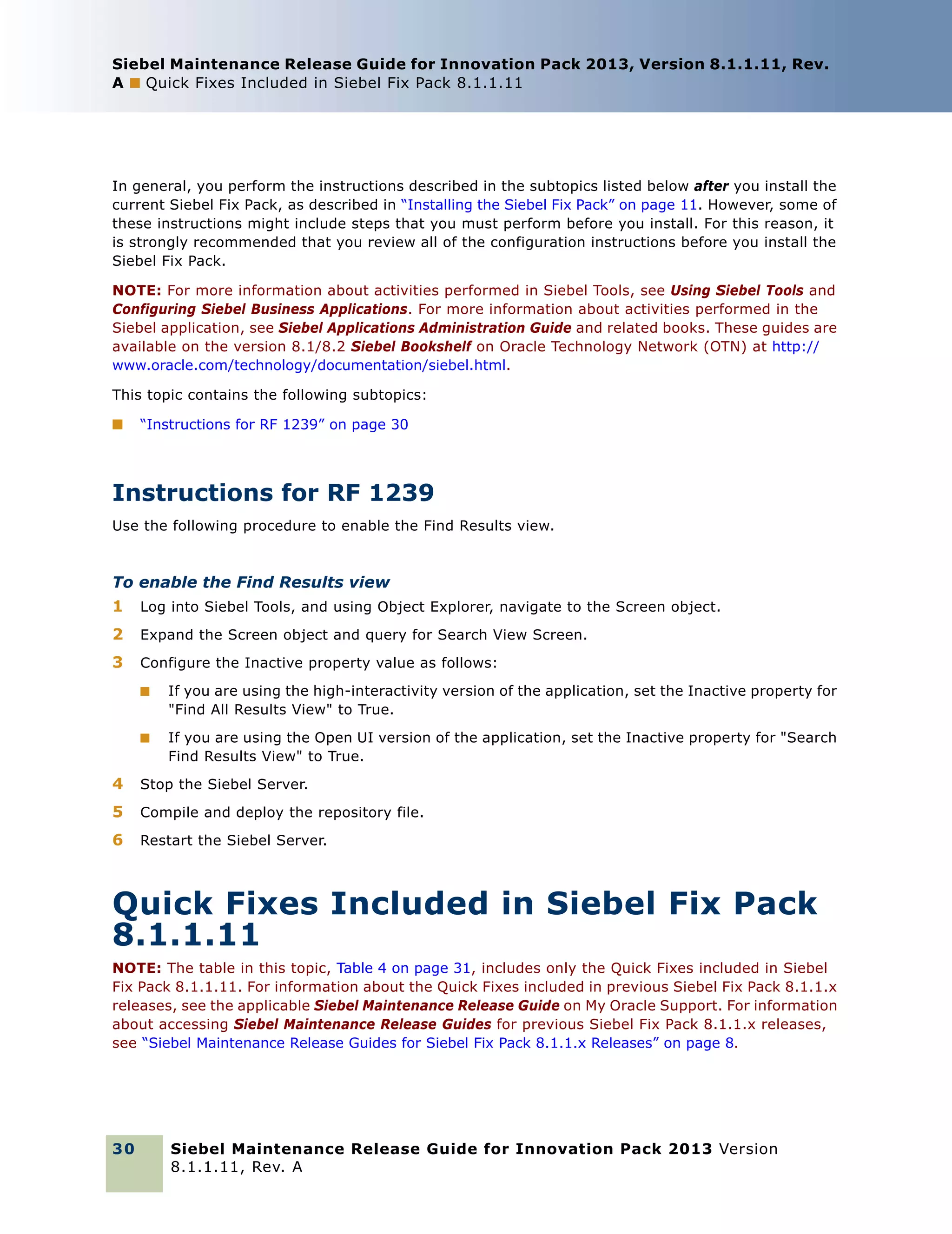
Instructions for RF 1239
Use the following procedure to enable the Find Results view.

To enable the Find Results view
1

Log into Siebel Tools, and using Object Explorer, navigate to the Screen object.

2

Expand the Screen object and query for Search View Screen.

3

Configure the Inactive property value as follows:
■

If you are using the high-interactivity version of the application, set the Inactive property for
"Find All Results View" to True.

■

If you are using the Open UI version of the application, set the Inactive property for "Search
Find Results View" to True.

4

Stop the Siebel Server.

5

Compile and deploy the repository file.

6

Restart the Siebel Server.

Quick Fixes Included in Siebel Fix Pack
8.1.1.11
NOTE: The table in this topic, Table 4 on page 31, includes only the Quick Fixes included in Siebel
Fix Pack 8.1.1.11. For information about the Quick Fixes included in previous Siebel Fix Pack 8.1.1.x
releases, see the applicable Siebel Maintenance Release Guide on My Oracle Support. For information
about accessing Siebel Maintenance Release Guides for previous Siebel Fix Pack 8.1.1.x releases,
see “Siebel Maintenance Release Guides for Siebel Fix Pack 8.1.1.x Releases” on page 8.

30

Siebel Maintenance Release Guide for Innovation Pack 2013 Version
8.1.1.11, Rev. A
Siebel Maintenance Release Guide for Innovation Pack 2013, Version 8.1.1.11, Rev.
A ■ Quick Fixes Included in Siebel Fix Pack 8.1.1.11

Siebel Quick Fix releases are developed to address immediate critical issues for specific customers,
and can be installed on top of Siebel Fix Packs. Quick Fixes address a small number of defects, and
the fixes are typically rolled into the next available Fix Pack for wider distribution to the Siebel
Business Applications customer base. Testing for Quick Fixes is focused and is usually limited to
verifying that the fix works on the specific platforms that the affected customer is using.
CAUTION: If you do not see your Quick Fix number in the table or in any similar table for prior Siebel
Fix Pack 8.1.1.x releases, then do not install the latest Siebel Fix Pack 8.1.1.x. This list is updated
for each new Siebel Fix Pack. Wait until your Quick Fix is listed before applying the latest Fix Pack.
If you have questions, contact Global Customer Support or your Oracle representative.

Table 4.

Quick Fixes Included in Siebel Fix Pack 8.1.1.11

Base Bug ID

Bug ID

Fix Pack Base

Quick Fix
Version

Merged Into
Fix Pack

10643165

10643175

8.1.1 [21112]

QF0020

8.1.1.11

10586035

10586036

8.1.1 [21112]

QF00BR

8.1.1.11

10566360

10568728

8.1.1 [21211]

QF1102

8.1.1.11

10582011

10582013

8.1.1.1 [21211]

QF0165

8.1.1.11

10643136

10643426

8.1.1.1 [21211]

QF0186

8.1.1.11

10582480

10582482

8.1.1.1 [21211]

QF1104

8.1.1.11

10587512

10587636

8.1.1.1 [21211]

QF1106

8.1.1.11

10588493

10588494

8.1.1.1 [21211]

QF7101

8.1.1.11

10588150

10588151

8.1.1.1 [21211]

QF7102

8.1.1.11

10588152

10588153

8.1.1.1 [21211]

QF7102

8.1.1.11

10588164

10588165

8.1.1.1 [21211]

QF7102

8.1.1.11

10588504

10588505

8.1.1.1 [21211]

QF7102

8.1.1.11

10589256

10589261

8.1.1.1 [21211]

QF7102

8.1.1.11

10587512

10591433

8.1.1.1 [21211]

QF7103

8.1.1.11

10643136

10643322

8.1.1.2 [21215]

QF0227

8.1.1.11

13521643

8.1.1.2 [21215]

QF02CX

8.1.1.11

14073432

14041232

8.1.1.2 [21215]

QF02CY

8.1.1.11

13894904

13936415

8.1.1.2 [21215]

QF02CY

8.1.1.11

13090315

13242164

8.1.1.2 [21215]

QF2213

8.1.1.11

14142816

14142914

8.1.1.2 [21215]

QF2220

8.1.1.11

14064853

14065397

8.1.1.2 [21215]

QF2220

8.1.1.11

14147782

14147879

8.1.1.2 [21215]

QF2220

8.1.1.11

Siebel Maintenance Release Guide for Innovation Pack 2013 Version
8.1.1.11, Rev. A

31
Siebel Maintenance Release Guide for Innovation Pack 2013, Version 8.1.1.11, Rev.
A ■ Quick Fixes Included in Siebel Fix Pack 8.1.1.11

Table 4.

Quick Fixes Included in Siebel Fix Pack 8.1.1.11

Base Bug ID

Bug ID

Fix Pack Base

Quick Fix
Version

Merged Into
Fix Pack

13710359

14349921

8.1.1.2 [21215]

QF2221

8.1.1.11

13912242

13923220

8.1.1.2 [21215]

QF2221

8.1.1.11

14343300

14393709

8.1.1.2 [21215]

QF2221

8.1.1.11

13889223

13889292

8.1.1.2 [21215]

QF2222

8.1.1.11

12565537

14499716

8.1.1.2 [21215]

QF2222

8.1.1.11

14361048

14361090

8.1.1.2 [21215]

QF2222

8.1.1.11

12561457

13817841

8.1.1.3 [21219]

QF03CK

8.1.1.11

12561457

14585617

8.1.1.3 [21219]

QF03CK

8.1.1.11

12561457

16926503

8.1.1.3 [21219]

QF03CK

8.1.1.11

13876727

13881076

8.1.1.3 [21219]

QF03CS

8.1.1.11

13840378

13867104

8.1.1.3 [21219]

QF03CU

8.1.1.11

13793684

14068819

8.1.1.3 [21219]

QF03CV

8.1.1.11

14354700

14354902

8.1.1.3 [21219]

QF03CZ

8.1.1.11

13865802

13875976

8.1.1.3 [21219]

QF03DA

8.1.1.11

13692820

16404807

8.1.1.3 [21219]

QF03DR

8.1.1.11

12561457

12529920

8.1.1.3 [21219]

QF3303

8.1.1.11

12561457

13585590

8.1.1.4 [21225]

QF0475

8.1.1.11

13976274

13979557

8.1.1.4 [21225]

QF0480

8.1.1.11

14054095

14070215

8.1.1.4 [21225]

QF0484

8.1.1.11

13976875

13993421

8.1.1.4 [21225]

QF0487

8.1.1.11

13886892

13890678

8.1.1.4 [21225]

QF0488

8.1.1.11

11677160

14031862

8.1.1.4 [21225]

QF0489

8.1.1.11

14059444

14146770

8.1.1.4 [21225]

QF0490

8.1.1.11

12747643

13480638

8.1.1.4 [21225]

QF0492

8.1.1.11

14128017

14128045

8.1.1.4 [21225]

QF0493

8.1.1.11

14086230

14090290

8.1.1.4 [21225]

QF0497

8.1.1.11

13692820

14292049

8.1.1.4 [21225]

QF0498

8.1.1.11

14146462

14247909

8.1.1.4 [21225]

QF0499

8.1.1.11

13710359

16430128

8.1.1.4 [21225]

QF04AL

8.1.1.11

14113292

14145147

8.1.1.4 [21225]

QF05BA

8.1.1.11

32

Siebel Maintenance Release Guide for Innovation Pack 2013 Version
8.1.1.11, Rev. A
Siebel Maintenance Release Guide for Innovation Pack 2013, Version 8.1.1.11, Rev.
A ■ Quick Fixes Included in Siebel Fix Pack 8.1.1.11

Table 4.

Quick Fixes Included in Siebel Fix Pack 8.1.1.11

Base Bug ID

Bug ID

Fix Pack Base

Quick Fix
Version

Merged Into
Fix Pack

12807300

12652414

8.1.1.5 [21229]

QF0511

8.1.1.11

13059364

13059431

8.1.1.5 [21229]

QF0541

8.1.1.11

12641734

12806531

8.1.1.5 [21229]

QF0562

8.1.1.11

12561457

13817850

8.1.1.5 [21229]

QF0591

8.1.1.11

13555867

13569966

8.1.1.5 [21229]

QF0596

8.1.1.11

13626477

13630693

8.1.1.5 [21229]

QF0596

8.1.1.11

11714954

13850154

8.1.1.5 [21229]

QF05AA

8.1.1.11

13703793

13693322

8.1.1.5 [21229]

QF05AB

8.1.1.11

13878942

8.1.1.5 [21229]

QF05AD

8.1.1.11

12986061

13051247

8.1.1.5 [21229]

QF05AE

8.1.1.11

13710359

13727202

8.1.1.5 [21229]

QF05AG

8.1.1.11

14000130

13986493

8.1.1.5 [21229]

QF05AP

8.1.1.11

14211018

14162249

8.1.1.5 [21229]

QF05AP

8.1.1.11

14148737

14216990

8.1.1.5 [21229]

QF05AR

8.1.1.11

13791769

13949623

8.1.1.5 [21229]

QF05AU

8.1.1.11

13987456

14064395

8.1.1.5 [21229]

QF05AV

8.1.1.11

14108022

14179596

8.1.1.5 [21229]

QF05AY

8.1.1.11

14070368

14076086

8.1.1.5 [21229]

QF05AZ

8.1.1.11

13636380

13641364

8.1.1.5 [21229]

QF05BC

8.1.1.11

13742027

13742069

8.1.1.5 [21229]

QF05BD

8.1.1.11

14160171

14175943

8.1.1.5 [21229]

QF05BF

8.1.1.11

14320292

14320317

8.1.1.5 [21229]

QF05BG

8.1.1.11

14113718

14238254

8.1.1.5 [21229]

QF05BJ

8.1.1.11

14394151

14365035

8.1.1.5 [21229]

QF05BK

8.1.1.11

14238628

14249892

8.1.1.5 [21229]

QF05BM

8.1.1.11

13991317

14035495

8.1.1.5 [21229]

QF05BN

8.1.1.11

13981408

14007909

8.1.1.5 [21229]

QF05BP

8.1.1.11

14197591

14224529

8.1.1.5 [21229]

QF05BY

8.1.1.11

14199189

14205625

8.1.1.5 [21229]

QF05BZ

8.1.1.11

14134980

14778486

8.1.1.5 [21229]

QF05CT

8.1.1.11

Siebel Maintenance Release Guide for Innovation Pack 2013 Version
8.1.1.11, Rev. A

33
Siebel Maintenance Release Guide for Innovation Pack 2013, Version 8.1.1.11, Rev.
A ■ Quick Fixes Included in Siebel Fix Pack 8.1.1.11

Table 4.

Quick Fixes Included in Siebel Fix Pack 8.1.1.11

Base Bug ID

Bug ID

Fix Pack Base

Quick Fix
Version

Merged Into
Fix Pack

13976875

14248261

8.1.1.5 [21229]

QF05DI

8.1.1.11

14078329

14094932

8.1.1.5 [21229]

QF05DO

8.1.1.11

10643402

16402383

8.1.1.5 [21229]

QF05DY

8.1.1.11

14006440

16283969

8.1.1.5 [21229]

QF05EF

8.1.1.11

12561457

13409300

8.1.1.5 [21229]

QF4501

8.1.1.11

12747643

14119117

8.1.1.5 [21229]

QF4503

8.1.1.11

13519322

8.1.1.6 [21233]

QF0610

8.1.1.11

13710359

14088486

8.1.1.6 [21233]

QF0633

8.1.1.11

13844669

14029638

8.1.1.6 [21233]

QF0634

8.1.1.11

12561457

14215289

8.1.1.6 [21233]

QF0637

8.1.1.11

14046255

14230212

8.1.1.6 [21233]

QF0640

8.1.1.11

14134341

14404731

8.1.1.6 [21233]

QF0647

8.1.1.11

14057921

14092708

8.1.1.6 [21233]

QF0651

8.1.1.11

14323604

14370922

8.1.1.6 [21233]

QF0652

8.1.1.11

14012946

16082346

8.1.1.6 [21233]

QF0665

8.1.1.11

14220155

16207069

8.1.1.6 [21233]

QF0672

8.1.1.11

12971571

13528849

8.1.1.6 [21233_3]

8.1.1.6
[21233_3]

8.1.1.11

12641734

13792236

8.1.1.7 [21238]

QF0715

8.1.1.11

12381104

13947326

8.1.1.7 [21238]

QF0717

8.1.1.11

13861430

8.1.1.7 [21238]

QF0720

8.1.1.11

12561457

13897099

8.1.1.7 [21238]

QF0723

8.1.1.11

14006036

14006069

8.1.1.7 [21238]

QF0726

8.1.1.11

14006266

14006294

8.1.1.7 [21238]

QF0726

8.1.1.11

13918287

14125390

8.1.1.7 [21238]

QF0729

8.1.1.11

13885280

13929545

8.1.1.7 [21238]

QF0732

8.1.1.11

13871314

13886867

8.1.1.7 [21238]

QF0733

8.1.1.11

14009394

14009411

8.1.1.7 [21238]

QF0734

8.1.1.11

14092901

14102632

8.1.1.7 [21238]

QF0736

8.1.1.11

13904224

13904414

8.1.1.7 [21238]

QF0742

8.1.1.11

34

Siebel Maintenance Release Guide for Innovation Pack 2013 Version
8.1.1.11, Rev. A
Siebel Maintenance Release Guide for Innovation Pack 2013, Version 8.1.1.11, Rev.
A ■ Quick Fixes Included in Siebel Fix Pack 8.1.1.11

Table 4.

Quick Fixes Included in Siebel Fix Pack 8.1.1.11

Base Bug ID

Bug ID

Fix Pack Base

Quick Fix
Version

Merged Into
Fix Pack

13710359

14188296

8.1.1.7 [21238]

QF0743

8.1.1.11

13870820

13871430

8.1.1.7 [21238]

QF0744

8.1.1.11

13886892

13900761

8.1.1.7 [21238]

QF0746

8.1.1.11

11720901

14262788

8.1.1.7 [21238]

QF0749

8.1.1.11

14012946

14091595

8.1.1.7 [21238]

QF0750

8.1.1.11

13840903

14057597

8.1.1.7 [21238]

QF0751

8.1.1.11

13920155

14047155

8.1.1.7 [21238]

QF0753

8.1.1.11

13976875

14382120

8.1.1.7 [21238]

QF0754

8.1.1.11

14386986

14382476

8.1.1.7 [21238]

QF0755

8.1.1.11

13975467

14189851

8.1.1.7 [21238]

QF0756

8.1.1.11

10584817

14343234

8.1.1.7 [21238]

QF0757

8.1.1.11

14343234

14687602

8.1.1.7 [21238]

QF0757

8.1.1.11

14138314

14142051

8.1.1.7 [21238]

QF0758

8.1.1.11

14260395

14349279

8.1.1.7 [21238]

QF0760

8.1.1.11

13943071

14135418

8.1.1.7 [21238]

QF0762

8.1.1.11

14011901

14080109

8.1.1.7 [21238]

QF0765

8.1.1.11

14376458

14408398

8.1.1.7 [21238]

QF0768

8.1.1.11

14085022

14095078

8.1.1.7 [21238]

QF0773

8.1.1.11

14569957

16070105

8.1.1.7 [21238]

QF0778

8.1.1.11

14569957

16010612

8.1.1.7 [21238]

QF0778

8.1.1.11

14569957

14569957

8.1.1.7 [21238]

QF0778

8.1.1.11

14108022

14550602

8.1.1.7 [21238]

QF0781

8.1.1.11

13920155

14556000

8.1.1.7 [21238]

QF0782

8.1.1.11

10565866

14776624

8.1.1.7 [21238]

QF0795

8.1.1.11

14113718

14825307

8.1.1.7 [21238]

QF07AU

8.1.1.11

14054095

16000374

8.1.1.7 [21238]

QF07BC

8.1.1.11

13692820

16460533

8.1.1.7 [21238]

QF07DP

8.1.1.11

13555867

16666233

8.1.1.7 [21238]

QF07DZ

8.1.1.11

14059444

16815621

8.1.1.7 [21238]

QF07DZ

8.1.1.11

14146462

16683769

8.1.1.7 [21238]

QF07EL

8.1.1.11

Siebel Maintenance Release Guide for Innovation Pack 2013 Version
8.1.1.11, Rev. A

35
Siebel Maintenance Release Guide for Innovation Pack 2013, Version 8.1.1.11, Rev.
A ■ Quick Fixes Included in Siebel Fix Pack 8.1.1.11

Table 4.

Quick Fixes Included in Siebel Fix Pack 8.1.1.11

Base Bug ID

Bug ID

Fix Pack Base

Quick Fix
Version

Merged Into
Fix Pack

12561457

13683395

8.1.1.7 [21238]

QF1701

8.1.1.11

12747643

14080595

8.1.1.7 [21238]

QF1703

8.1.1.11

16006248

8.1.1.7 [21238]

QF1705

8.1.1.11

10520097

8.1.1.8_8.2.2.1 [23012]

QF0000001

8.1.1.11

13886892

14519760

8.1.1.8_8.2.2.1 [23012]

QF0000002

8.1.1.11

14092901

14516814

8.1.1.8_8.2.2.1 [23012]

QF0000005

8.1.1.11

13976274

14519620

8.1.1.8_8.2.2.1 [23012]

QF0000006

8.1.1.11

14514993

14526260

8.1.1.8_8.2.2.1 [23012]

QF0000008

8.1.1.11

14343300

14461322

8.1.1.8_8.2.2.1 [23012]

QF0000011

8.1.1.11

13912242

14313408

8.1.1.8_8.2.2.1 [23012]

QF0000013

8.1.1.11

13944628

14755084

8.1.1.8_8.2.2.1 [23012]

QF0000014

8.1.1.11

13889223

14548509

8.1.1.8_8.2.2.1 [23012]

QF0000014

8.1.1.11

14064853

14065429

8.1.1.8_8.2.2.1 [23012]

QF0000014

8.1.1.11

14147782

14212722

8.1.1.8_8.2.2.1 [23012]

QF0000014

8.1.1.11

14361048

14361117

8.1.1.8_8.2.2.1 [23012]

QF0000014

8.1.1.11

13939333

14783589

8.1.1.8_8.2.2.1 [23012]

QF0000014

8.1.1.11

12565537

14474876

8.1.1.8_8.2.2.1 [23012]

QF0000018

8.1.1.11

13976875

14380887

8.1.1.8_8.2.2.1 [23012]

QF0000022

8.1.1.11

14146462

16197727

8.1.1.8_8.2.2.1 [23012]

QF0000024

8.1.1.11

14146462

14840689

8.1.1.8_8.2.2.1 [23012]

QF0000024

8.1.1.11

13876727

15872113

8.1.1.8_8.2.2.1 [23012]

QF0000027

8.1.1.11

13529123

15917320

8.1.1.8_8.2.2.1 [23012]

QF0000032

8.1.1.11

13908101

14666012

8.1.1.8_8.2.2.1 [23012]

QF0000035

8.1.1.11

13692820

16451131

8.1.1.8_8.2.2.1 [23012]

QF0000049

8.1.1.11

13981385

16546532

8.1.1.8_8.2.2.1 [23012]

QF0000051

8.1.1.11

13860086

16699143

8.1.1.8_8.2.2.1 [23012]

QF0000053

8.1.1.11

14148737

16901734

8.1.1.8_8.2.2.1 [23012]

QF0000067

8.1.1.11

10589736

10589738

8.1.1.8_8.2.2.1 [23012]

QF0801

8.1.1.11

12971571

16399785

8.1.1.8_8.2.2.1 [23012_7]

8.1.1.8_8.2.2.1
[23012_7]

8.1.1.11

36

Siebel Maintenance Release Guide for Innovation Pack 2013 Version
8.1.1.11, Rev. A
Siebel Maintenance Release Guide for Innovation Pack 2013, Version 8.1.1.11, Rev.
A ■ Resolved Bugs in Siebel Fix Pack 8.1.1.11

Table 4.

Quick Fixes Included in Siebel Fix Pack 8.1.1.11

Base Bug ID

Bug ID

Fix Pack Base

Quick Fix
Version

Merged Into
Fix Pack

13886892

16610574

8.1.1.9_8.2.2.2 [23016]

QF0001052

8.1.1.11

14553387

14732680

8.1.1.9_8.2.2.2 [23016]

QF1001

8.1.1.11

Resolved Bugs in Siebel Fix Pack
8.1.1.11
The table in this topic provides a list of resolved bugs that are included in Siebel Fix Pack 8.1.1.11.
Customers using version 8.1.1 or a prior Siebel Fix Pack 8.1.1.x are advised to install the latest
8.1.1.x Fix Pack.
NOTE: For information about the bug fixes included in previous Siebel Fix Pack 8.1.1.x releases, see
the applicable Siebel Maintenance Release Guide on My Oracle Support. For information about
accessing Siebel Maintenance Release Guides for previous Siebel Fix Pack 8.1.1.x releases, see
“Siebel Maintenance Release Guides for Siebel Fix Pack 8.1.1.x Releases” on page 8.
Unless specifically noted in the table, all known anomalies from the base version remain unresolved.
NOTE: Although Siebel Fix Packs are cumulative, the Resolved Bugs table only includes information
about the Fix Pack described in this guide.
For each release, the Resolved Bugs table includes the following columns:
■

Issue Addressed. The description of the issue.

■

Bug ID. The tracking number for the bug associated to the product defect.

■

Base Bug ID. The tracking number for the product defect associated with the bug.

■

Subcomponent. The second-level categorization for the product defect.

■

Special Instructions. Yes in this column means that in order to incorporate the fix into your
Siebel implementation, you must make some configuration changes to your Siebel repository file
using Siebel Tools.

NOTE: If you have installed a Quick Fix, see “Quick Fixes Included in Siebel Fix Pack 8.1.1.11” on
page 30.

Siebel Maintenance Release Guide for Innovation Pack 2013 Version
8.1.1.11, Rev. A

37
Siebel Maintenance Release Guide for Innovation Pack 2013, Version 8.1.1.11, Rev.
A ■ Resolved Bugs in Siebel Fix Pack 8.1.1.11

Table 5 lists the bugs that were resolved in Siebel Fix Pack 8.1.1.11.

Table 5.

Resolved Bugs in Siebel Fix Pack 8.1.1.11

Issue Addressed

Bug ID

Base Bug
ID

Subarea

Special
Instructions

Siebel Application
Integration
Infrastructure
If the SAI Siebel Resource Adapter
is deployed and set to use
"CredentialsMapping", then the
adapter cannot reuse an opened
connection to the Siebel EAI
Object Manager, and it quickly
maxes out of available connections

16393876

Resource
Adapter

When users enter the
SERVICE_NAME value and then
press Test Connection, they
receive the following error
message: "Unable to connect
SQLGate = 66000. Listener
refused the connection with the
following error: ORA-12505, TNS:
listener does not currently know of
SID given in connect descriptor"

16301601

Resource
Adapter

When the Siebel SAI Extension has
been imported and its preferences
have been set in Jdev, when users
try to deploy it into WebLogic, the
process fails at the final step with
the following error message:
"Error occurred while deploying
resource adapter to web logic
server"

16608066

Resource
Adapter

Services

38

Siebel Maintenance Release Guide for Innovation Pack 2013 Version
8.1.1.11, Rev. A
Siebel Maintenance Release Guide for Innovation Pack 2013, Version 8.1.1.11, Rev.
A ■ Resolved Bugs in Siebel Fix Pack 8.1.1.11

Table 5.

Resolved Bugs in Siebel Fix Pack 8.1.1.11
Base Bug
ID

Issue Addressed

Bug ID

Subarea

When users deploy an RA, launch
the RA Deployment Wizard again,
click on the RA.xml Edit page, click
Cancel, and then click Next to
deploy the RA, they receive the
following error message:
"Validation failed. Some of the
required parameters are not saved
for ra.xml file creation."

13828375

Inbound SOAP
Services

Allows Inbound, Outbound, and
ReST XSD to be deployed with the
DDOnly and
CustomRolesAndPolicies security
models

14083712

Inbound SOAP
Services

When a bulk request is generated
to modify an order that deletes an
asset (Prod A) from a
customizable product with the rule
"Prod 1" requires "Prod A", the
bulk request status remains as
Processing, a crash file is
generated, and bulk request
processing never completes

14008471

Asset Based
Ordering

When a bulk request is defined for
an account and products that are
not in the default organization and
that have the same names as
those in the default organization
are used, the "Component
Product,<xx> in 'ABO Bulk
Request Actions' is not valid.
Product does not exist in the
product definition" error message
occurs when the request is
submitted

14508716

Special
Instructions

Asset Based
Ordering

Siebel Apps Customer Order
Management
Bulk Requests

Siebel Maintenance Release Guide for Innovation Pack 2013 Version
8.1.1.11, Rev. A

39
Siebel Maintenance Release Guide for Innovation Pack 2013, Version 8.1.1.11, Rev.
A ■ Resolved Bugs in Siebel Fix Pack 8.1.1.11

Table 5.

Resolved Bugs in Siebel Fix Pack 8.1.1.11
Base Bug
ID

Issue Addressed

Bug ID

Hidden attributes are displayed n
the ABO Bulk Request Actions list
applet

13442120

When Service Start Date or
Service End Date values are
updated through Bulk Requests
when the mode is Quote, the
values for Service Start Date or
Service End Date are not carried
over to quote line items

16240554

Asset Based
Ordering

With Bulk Orders, promotions
cannot be separated into separate
objects

16528068

Asset Based
Ordering

Custom field values in the Bulk
Request Action business
component are not copied in order
line items

10578441

Asset Based
Ordering

Bulk Requests exception error
messages are not generated
correctly

16409339

When users add a child product to
an existing customizable product
and then apply a promotion, the
record is not updated correctly

16035792

Promotion
Issues

Bulk Requests does not throw an
error message for Scope = All
when the Promotion Instance limit
is exceeded

16035852

Promotion
Issues

Dynamic hide with the Check Box
UI control does not work
consistently for subproducts
whose component products have
even sequence numbers

16013807

Administration

When an object name contains a
large number of characters, the
cache memory does not work
correctly for that object

16165996

Special
Instructions

Asset Based
Ordering

Administration

14372244

Subarea

Configurator

Customizable Prod/
Configurator

40

Siebel Maintenance Release Guide for Innovation Pack 2013 Version
8.1.1.11, Rev. A
Siebel Maintenance Release Guide for Innovation Pack 2013, Version 8.1.1.11, Rev.
A ■ Resolved Bugs in Siebel Fix Pack 8.1.1.11

Table 5.

Resolved Bugs in Siebel Fix Pack 8.1.1.11
Base Bug
ID

Issue Addressed

Bug ID

When remote configurator has
been enabled and a promotion is
being used, attributes are
duplicated when the Get Instance
method of the Remote Complex
Object Instance Service is used

14822197

This fix provides the following
Configurator enhancements:

16495554

APIs

An error message appears
because RCOIS takes the start
date of products that were
previously queried for

16061336

APIs

There are duplicate XML tags for
the Integration component

14649437

BackOffice
Integration

The field length of the Integration
Component field is longer than its
corresponding business
component field

14649229

BackOffice
Integration

Cfg_ItemChanged is called with
the incorrect old and new product
quantities after SetAttribute has
been actioned in
Cfg_ChildItemChanged

16556405

Special
Instructions

APIs

Runtime

■

Makes the Orderable Check
Flag a property that users can
use instead of it being checked
as the default setting for ADD
and DEFAULT Instantiation.

■

Moves InputPACPropSet to the
workflow level to provide
flexibility.

■

Subarea

Within the
ConfiguratorWebChannelBegin
Config workflow, if the
SkipCfgEligibilityCheck value
is set to N, eligibility and
compatibility is not calculated
for ADD, SET, and LOAD
operations, but it is calculated
if the value is set to Y

Siebel Maintenance Release Guide for Innovation Pack 2013 Version
8.1.1.11, Rev. A

41
Siebel Maintenance Release Guide for Innovation Pack 2013, Version 8.1.1.11, Rev.
A ■ Resolved Bugs in Siebel Fix Pack 8.1.1.11

Table 5.

Resolved Bugs in Siebel Fix Pack 8.1.1.11
Base Bug
ID

Issue Addressed

Bug ID

Subarea

Within Configurator, when an error
message displays and the users
refresh Internet Explorer and then
click the Explanation button, the
application crashes

16672876

User Interface

When the LineItemICField
property is used in a child product,
when users click Done, the SBLBPR-00162 and SBL-EAI-04381
error messages occur

16991639

Special
Instructions

User Interface

Integrations
Product bundle sync fails from PIM
to the Siebel application

16785875

In version 8.1.1.10, the order
payload that comes to AIA from
the Siebel application does not
contain the dates in UTC format

16817458

When a collection run is delayed
from its scheduled time, the BRM
Due Date is pushed for the next
action item in the scenario and
ODI fetches the updated due dates
from the Billing Relationship
Management Collection views to
the Siebel EIM tables, but after an
EIM job is run, the Due Date
information is not updated

16832532

16249414

AIA for Comms

The start date is incorrect in the
Siebel Web service that AIA uses
to create or sync products

16785731

16178601

AIA for Comms

ACR 474: Integration object field
type and length do not correspond
to the underlying business
component field type and length

14584941

When an ATP check is performed
for the second line item in an
order, the line number displays as
1

16534260

42

16222817

AIA for Comms
AIA for Comms

AIA

16002920

AIA

Siebel Maintenance Release Guide for Innovation Pack 2013 Version
8.1.1.11, Rev. A
Siebel Maintenance Release Guide for Innovation Pack 2013, Version 8.1.1.11, Rev.
A ■ Resolved Bugs in Siebel Fix Pack 8.1.1.11

Table 5.

Resolved Bugs in Siebel Fix Pack 8.1.1.11

Issue Addressed

Bug ID

Base Bug
ID

Subarea

After an order is successfully
completed, the Billing Profile
Name and Profile Link information
is not updated in the Billing Items
applet

16759099

16753234

AIA

When users create three accounts
(BA1, SA1, SA2) with the
hierarchy as parent account = BA1
and child accounts = SA1 and SA2,
create an order from the SA1 child
account, click Order # to open the
order, update the Created Date
field to the current date in the
sales order, and then try to change
the service account, the Service
Account applet does not display
any accounts

16767983

16758710

AIA

AIA: Updates from Distributed
Order Orchestration to the Siebel
application fail and the status is
not updated in the Siebel order's
line items

16533624

14832738

DOO

When users revise an order to
change the ship-to address at the
line-item level and submit the
order, they receive the following
error message: "A cross-reference
was not found for attribute site in
source system SIEBEL."

16760274

16598377

DOO

Orchestration line items are not
able to accept multiple rows for
the same line

16534177

15850331

DOO

When users change the ship-to
address of an order at the line
level and then submit the order,
they receive the following error
message: "A cross-referenced
value was not found for attribute
site in source system SIEBEL"

16534291

16283422

DOO

Users cannot submit an order with
different Ship To and Bill To
address

16534343

16196454

Special
Instructions

DOO

Siebel Maintenance Release Guide for Innovation Pack 2013 Version
8.1.1.11, Rev. A

43
Siebel Maintenance Release Guide for Innovation Pack 2013, Version 8.1.1.11, Rev.
A ■ Resolved Bugs in Siebel Fix Pack 8.1.1.11

Table 5.

Resolved Bugs in Siebel Fix Pack 8.1.1.11
Base Bug
ID

Issue Addressed

Bug ID

The Account Sync workflow errors
out

16196286

Required Start Date and Required
End Date cannot be set using the
SWI Product Import business
service

16759679

MDM - Product

ACR 474: With SWI Product
Import, child products are
removed from relationships during
updates

16542367

Special
Instructions

MDM - Customer

10600005

Subarea

MDM - Product

Order Administration
Within Sales Order > Catalog >
Favorites, when users check an
existing compound product that is
not also a customizable product,
find Frame Relay Network in the
sample database, create a sales
order and add Frame Relay
Network as a line item, select Save
As Favorite from the Order menu,
create a new sales order, navigate
to the Catalog > Favorites detail
view, select the F1 favorite and
click Add Items, they receive the
following error message: "This
operation is not available for readonly field "Network Element Type"
(SBL-DAT00402)."

10602319

Memory usage in version 8.1.1.10
of the application is much higher
than in version 8.1.1.8

16284798

Copy Service

16021526

Quote/Order
Validation

Product Administration
Within Administration - Data >
Favorites > Product Favorite Item
List > Attributes, users can delete
attributes that were defined as
required at the product level

16233197

Products

In version 8.1.1.9, no records
display within Catalog > Navigator

16474459

Products

44

Siebel Maintenance Release Guide for Innovation Pack 2013 Version
8.1.1.11, Rev. A
Siebel Maintenance Release Guide for Innovation Pack 2013, Version 8.1.1.11, Rev.
A ■ Resolved Bugs in Siebel Fix Pack 8.1.1.11

Table 5.

Resolved Bugs in Siebel Fix Pack 8.1.1.11
Base Bug
ID

Issue Addressed

Bug ID

Subarea

Within Documentation
Administration > Literature
Administration > Translations,
users are allowed to associate
literature items in different
languages than the application
language

16172319

Products

In version 8.1.1.9 of eConfigurator
running in Open UI mode, the
sequence of the Save, Cancel,
Done, Finish It, and Verify buttons
is the reverse of the order of the
buttons in high-interactivity mode

16280009

Products

With the application running on
Windows 7 with Internet Explorer
8, and when a product has a large
structure, when users customize
the product in eConfigurator, when
they scroll down to reach the
product and select or deselect it,
the session is refreshed and the
control remains at that product

13687128

Special
Instructions

Scenario Builder

Product Offers
Within Open UI mode, when users
navigate from Site Map >
Administration - Product screen,
navigate to the Product Offers
view, and then navigate to the
Response - Actions view, the
fourth-level tabs display one level
higher than they should

14367870

16518161

Administration

ACR 643: The Recommendation
applet displays products that are
outside of the effective date range

15953513

Run time

When users accept an offer to
apply a promotion to an existing
assets, they receive error
messages

16215933

Run time

Product Promotions

Siebel Maintenance Release Guide for Innovation Pack 2013 Version
8.1.1.11, Rev. A

45
Siebel Maintenance Release Guide for Innovation Pack 2013, Version 8.1.1.11, Rev.
A ■ Resolved Bugs in Siebel Fix Pack 8.1.1.11

Table 5.

Resolved Bugs in Siebel Fix Pack 8.1.1.11
Base Bug
ID

Issue Addressed

Bug ID

After QF03BS has been installed
within the Account screen, when
users query for an account,
navigate to the Orders tab, create
a new order with the New Install
type, drill down on the new order,
navigate to the Catalog tab, drill
down on Commercial Launch
Promotion, add a value, select Edit
Promotion, validate, and then try
to add products, they receive the
following error message: "Bundle
promotion cardinality rule is
violated. Please check the
maximum allowed number of
products, the last changes were
discarded (SBL-EXL-00151)."

16284379

When the EligibilityDisplaymode
applet user property is set to 2,
both eligible and ineligible
promotions display in the Upgrade
Promotion applet

16967934

Runtime

When users complete a product
configuration, they receive the
following error message: "The
configuration you are trying to
save is incomplete"

16594603

Runtime

ACR 500 provides Component
Commitments functionality, but if
a promotion is applied after the
components exist, only the root
components have PROM_ITEM_ID
set

16461365

Runtime

The Add button does not work
within the Edit Promotion UI

14688053

When trying to set the default
quantity for a class product in a
relationship to zero, the product is
deleted from the class

16401533

Special
Instructions

Administration

46

14610085

Subarea

Runtime
Runtime

Siebel Maintenance Release Guide for Innovation Pack 2013 Version
8.1.1.11, Rev. A
Siebel Maintenance Release Guide for Innovation Pack 2013, Version 8.1.1.11, Rev.
A ■ Resolved Bugs in Siebel Fix Pack 8.1.1.11

Table 5.

Resolved Bugs in Siebel Fix Pack 8.1.1.11
Base Bug
ID

Issue Addressed

Bug ID

Subarea

Users cannot query for fields other
than Promotion Name and
Description within the ISS
Promotion Add to Promotion
applet

16248120

Runtime

When more than one promotion
exists in an order, when users click
Validate, they receive an error
message

16482554

Runtime

The ABOWebService inbound Web
service ModifyAssetToOrder
operation terminates

16879201

Asset Based
Ordering

When users customize the root
product in a Modify Order
scenario, the grandchild products
are deleted

16317578

Asset Based
Ordering

When users navigate from Site
Map > Quotes > More Info (Quote
List Detail view), and click on the
List Amazon link, the All Quote list
view does not appear and users
receive the following error
message: "An error has occurred
executing a sql statement. Please
continue or ask your systems
administrator to check your
application configuration if the
problem persists (SBL-DBC00105)."

16281722

COMMON

Within Order Line Items >
Attributes, the attribute value
display names do not display when
the attribute type is a number

16884325

Line Item Details

Within the Event Checks screen,
when users click the Post Check
button, they receive the following
error message: 'Error invoking
service 'SHM For', method
'Accumulate' at step 'For Each.
(SBL-BPR-00162)"

16448638

Special
Instructions

Line Item Details

Quotes & Orders

Siebel Maintenance Release Guide for Innovation Pack 2013 Version
8.1.1.11, Rev. A

47
Siebel Maintenance Release Guide for Innovation Pack 2013, Version 8.1.1.11, Rev.
A ■ Resolved Bugs in Siebel Fix Pack 8.1.1.11

Table 5.

Resolved Bugs in Siebel Fix Pack 8.1.1.11
Base Bug
ID

Issue Addressed

Bug ID

Subarea

Object Manager crashes when
users log out of the application

16164519

Line Item Details

When users navigate to Site Map >
Quotes > All Quotes, create a new
quote, drill down on the quote,
navigate to the Line Items tab,
and add a new product, they
receive the following error
message: "Error invoking service
'ISS PSP Dispatch Service',
method 'CallPSPWorkflow' at step
'Dispatch Service' (SBL-BPR00162)."

10598083

Line Item Details

When users create a new product
with a product structure that has
mandatory customization, add the
product to an order, and then click
Customize, the red asterisks
appear one line down from the
product names and tabs

16308293

Orders

When users import a workflow to
create a simple product with a
class and an attribute, use the EAI
XML Read from File business
service simulator and the
ReadEAIMsg function to read the
XML, and then use the EAI Siebel
Adapter business service Upsert
method to pass the output of the
previous step to the next step, an
error message appears

16714001

Orders

When the Siebel Server is set up
with a remote Product
Configurator Object Manager, it
fails on the BeginConfiguration
Web service call

16245831

Product
Administration

When users click Verify within an
order, a special constrain error
message displays when the
promotion structure is valid

16914045

Special
Instructions

Validation &
Approval

Siebel Data Quality
48

Siebel Maintenance Release Guide for Innovation Pack 2013 Version
8.1.1.11, Rev. A
Siebel Maintenance Release Guide for Innovation Pack 2013, Version 8.1.1.11, Rev.
A ■ Resolved Bugs in Siebel Fix Pack 8.1.1.11

Table 5.

Resolved Bugs in Siebel Fix Pack 8.1.1.11

Issue Addressed

Bug ID

Base Bug
ID

Subarea

Special
Instructions

Data Quality
All records that have associated
addresses where the country is not
specifically defined in either ISS
System Service business service
user properties or the
'ssadq_cfg.xml' file should be
directed at the default 'siebdq'
system

14124150

ODQ Connector

When users run the Generate and
Refresh Key jobs for accounts and
contacts, the jobs fail with the
following error message: "SBLDQM-00017: An error occurred
while invoking a method inside the
Data Quality Business Service."

13607581

Other

When the environment is
configured using Ref Adapter and
the Contact business component is
the last entry for deduplication for
the Siebel application within Data
Quality > Third-Party Admin, when
users post a contact record in
SOAP UI, and query for the record
created using the Person Match
Web service, the application
returns an error message

16360893

Other

Within UCM, when users create a
contact with an address, create a
similar contact with an address,
select Edit > Merge Records,
navigate to Merge Request, select
the contact to be merged, and
click Merge, they receive the
following error message:
"Argument 'SiebelMessage' in step
'Store Relationship For Unmerge'
is not correctly initialized or does
not return valid data (SBL-BPR00107)."

10596295

Other

Siebel Maintenance Release Guide for Innovation Pack 2013 Version
8.1.1.11, Rev. A

49
Siebel Maintenance Release Guide for Innovation Pack 2013, Version 8.1.1.11, Rev.
A ■ Resolved Bugs in Siebel Fix Pack 8.1.1.11

Table 5.

Resolved Bugs in Siebel Fix Pack 8.1.1.11

Issue Addressed

Bug ID

Base Bug
ID

Subarea

Special
Instructions

Siebel Apps - Field
Service
Activities
The GetElapsedTime method does
not allow minutes or second as
Time Unit values or return the
elapsed time with the
corresponding precision down to a
second

16276521

Activities

With Agreement > Agreement List,
when users create a new
agreement and then click the
Revise button within the form
applet without having saved the
new record, the agreement name
changes to <Name of the new
record>.1 with a revision value of
1

15991117

Agreements

Within the Service Request Detail
applet (Verify Entitlement), when
users query for the Agreement
Entitlement, it retrieves over
10,000 rows and the SBL-DAT00500 error message appears

14133104

When users drill down from
Agreements to Change Plan, and
click the Change button, the
application hangs

16735467

Pricing

Within Agreement > Change Plan,
when users click the Charge
button, the dates up to the
activation date are not added to
the charges

16735469

Pricing

Agreements

11658177

Entitlements

Inventory Management

50

Siebel Maintenance Release Guide for Innovation Pack 2013 Version
8.1.1.11, Rev. A
Siebel Maintenance Release Guide for Innovation Pack 2013, Version 8.1.1.11, Rev.
A ■ Resolved Bugs in Siebel Fix Pack 8.1.1.11

Table 5.

Resolved Bugs in Siebel Fix Pack 8.1.1.11

Issue Addressed

Bug ID

Base Bug
ID

Subarea

When source = service location
and destination = service trunk
have been set and the AutoReceive flag has been checked,
when users click the Process
Shipment button, they receive the
following error message: "The
ability to insert records is not
available in this form or applet
(SBL-DAT-00279)."

16875447

10511427

Receiving

When users enter an invalid serial
number in the Serial # field,
Allocated Lines becomes blank and
error messages display, but when
users close the application and
navigate to Service Order > Line
Items > Line Item Actions, a ship
action was created even though
the serial number entered was
incorrect

16538808

Shipping

Within Administration - Data >
Addresses, when users click the
Get Geocode button, they receive
the following error message: "An
error has occurred creating
business component 'FM Location'
used by business object 'CUT
Address'. Please ask your systems
administrator to check your
application configuration (SBLDAT-00222)."

16415128

Administration

When users click the Cancel
Activity for an activity that
displays as FREE on the bar within
Oracle Real-Time Scheduler, they
receive an error message

16420900

Special
Instructions

Appointment
Booking

ORS Scheduling

Time Sheets

Siebel Maintenance Release Guide for Innovation Pack 2013 Version
8.1.1.11, Rev. A

51
Siebel Maintenance Release Guide for Innovation Pack 2013, Version 8.1.1.11, Rev.
A ■ Resolved Bugs in Siebel Fix Pack 8.1.1.11

Table 5.

Resolved Bugs in Siebel Fix Pack 8.1.1.11
Base Bug
ID

Issue Addressed

Bug ID

Subarea

Within Project > Activity > Time
Tracker, when users edit a time
tracker, the application moves to a
different user's time sheet

16748616

Time Line Units

16388062

SMQ Messaging

When users navigate to the
Campaign Leads view, they
receive the following error
message: "This operation is not
allowed when there are no records
displayed. Please execute a query
that returns at least one record or
add a new record."

16677666

Campaign
Manager UI

The Allow Repeated Contacts
Within Loads option is not working
for campaigns

16065413

Campaign
Processing

Users can launch expired
treatments

14666140

Campaign
Processing

When users click Publish > Admin
> Tags and enter Siebel
credentials, the application
returns all campaigns, even if the
campaigns are inactive

16757727

Special
Instructions

Campaign
Processing

Siebel Apps Handheld Client
Handheld Client
When the MQe client reports an
error, the application becomes
stuck and needs to be restarted

Siebel Apps Marketing
Mktg/Campaign Mgmt

52

Siebel Maintenance Release Guide for Innovation Pack 2013 Version
8.1.1.11, Rev. A
Siebel Maintenance Release Guide for Innovation Pack 2013, Version 8.1.1.11, Rev.
A ■ Resolved Bugs in Siebel Fix Pack 8.1.1.11

Table 5.

Resolved Bugs in Siebel Fix Pack 8.1.1.11
Base Bug
ID

Issue Addressed

Bug ID

Subarea

When a campaign contains
multiple treatments and segments
and the campaign is configured for
direct database load, the
campaign load fails with the
following error message:
"[Oracle][ODBC][Ora]ORA-00001:
unique constraint
(ORATC139.S_CAMP_CON_P1)
violated."

16344337

Segments

Within Offers > Web Treatments >
Edit Web Treatments, when users
confirm that a Web treatment
record has a template and then
click the Save Template button,
they receive the following error
message: "Field 'File Type' does
not exist in definition for business
component 'Web Offer Template'.
Please ask your systems
administrator to check your
application configuration (SBLDAT-00398)."

10599045

Templates Offer (Email
etc.)

Within the Allocation view,
Treatment Dynamic Columns are
displayed in a random sequence

16616583

Treatment

In Email Marketing Server build
623, ESD crashes with the
following error message: "Problem
copying recipients list: Csv:
Unexpected EOF"

16394301

Server Sending/Content
Gen. (ESD)

When a job has been paused,
resumed, cancelled, or completed
within the Siebel application, ESD
does not correctly update the
status of the job

16569635

16544536

Server Sending/Content
Gen. (ESD)

Users cannot save each email that
was sent to disk

10525786

10476973

Special
Instructions

Server Sending/Content
Gen. (ESD)

Mktg/Email Marketing

Mktg/Events

Siebel Maintenance Release Guide for Innovation Pack 2013 Version
8.1.1.11, Rev. A

53
Siebel Maintenance Release Guide for Innovation Pack 2013, Version 8.1.1.11, Rev.
A ■ Resolved Bugs in Siebel Fix Pack 8.1.1.11

Table 5.

Resolved Bugs in Siebel Fix Pack 8.1.1.11
Base Bug
ID

Issue Addressed

Bug ID

Subarea

When a status is manually
changed, a record is created in the
Registration History applet

14733464

Employee Views

Leads are not converted to
opportunities when the position is
changed

14463155

Lead Promotion

Within the Leads > My Team Lead
view, when users change the
primary position in the Sales Team
field, the Lead list applet becomes
empty

14598239

Lead UI

When a file contains duplicate
contacts, jobs stop importing
contacts in subsequent batches

14166497

List Import

When users click the Purge button
in the FINS List Mgmt Lists Entry
applet is always displayed in
English regardless of the language
of the application

13703349

List Management

Provides the Gantt control for
Open UI for Siebel Marketing

16833178

Home Page

With Open UI, when users
navigate to Program, create a
record, drill down on it, the
application navigates to the
Program Flow applet, but the
program flow chart does not
display

15958484

Home Page

Provides the Open UI Gantt control
for the Marketing calendar
campaign component

16820275

Special
Instructions

Home Page

Mktg/Leads

Mktg/List Management

Mktg/Marketing

Mktg/Responses

54

Siebel Maintenance Release Guide for Innovation Pack 2013 Version
8.1.1.11, Rev. A
Siebel Maintenance Release Guide for Innovation Pack 2013, Version 8.1.1.11, Rev.
A ■ Resolved Bugs in Siebel Fix Pack 8.1.1.11

Table 5.

Resolved Bugs in Siebel Fix Pack 8.1.1.11
Base Bug
ID

Issue Addressed

Bug ID

Subarea

Within Campaigns > Execute > All
Contacts/Prospects view, when
users click in the Done flag, the
Object Manager crashes

16802388

Responses

The Object Manager crashes with
the SBL-OSD-01000 error
message

16224120

Infrastructure

The Client Chat AX control causes
problems with side-by-side
installation

16797660

Infrastructure

The Object Manager crashes when
users invoke Siebel Chat actions

16306325

Infrastructure

Within CTI toolbar, when users
submit a chat and the chat is
answered and a service request is
automatically created, when users
leave the chat active for a few
minutes, end the chat, and wrap
up, they can see the duration of
the chat, but when users check the
Chat - Inbound Activity by drilling
down, the start and end times of
the chat display but the duration
field displays 0.

16936157

UI: Agent Facing

Removes the Accessibility
parameter for CTI so that
Accessibility is always on

16186615

Accessibility

Provides an aria-label for CTI
toolbar

16087228

Accessibility

In version 8.1.1.8, the CTI buttons
on the toolbar are inactive

16576035

Special
Instructions

Client

Siebel Apps Multichannel
Technologies
CRM Chat

CTI

Siebel Maintenance Release Guide for Innovation Pack 2013 Version
8.1.1.11, Rev. A

55
Siebel Maintenance Release Guide for Innovation Pack 2013, Version 8.1.1.11, Rev.
A ■ Resolved Bugs in Siebel Fix Pack 8.1.1.11

Table 5.

Resolved Bugs in Siebel Fix Pack 8.1.1.11
Base Bug
ID

Issue Addressed

Bug ID

Subarea

Within Open UI Dashboard, new
Dashboard form applets appear as
blank except for the Contact field

16306252

Client

Within Call Center in Open UI
mode, when users open the
Customer Dashboard, update a
contact's information, verify that
the Close Customer Dashboard
and Clear Customer Dashboard
options are available on the View
menu, and then press F5 to
refresh, the Customer Dashboard
closes, but within the View menu,
the Close Customer Dashboard
and Clear Customer Dashboard
options are still available

16199772

Client

In version 8.1.1.9, after users log
in, the CTI toolbar button is not
updated, so the Login button is
still enabled and the Logout button
is disabled

16500759

Client

CTI requests loop at the Web
server after IIS is restarted

16908527

Server

When users log in as a Siebel CTI
user with the CTI toolbar enabled,
initiate a call, accept the call, and
then leave the call active for four
hours, WebSEAL times out and the
session is discontinued, but
WebSEAL audit logs show that the
application is still receiving
requests and that the invalid CTI
requests ran for hours

16079110

Special
Instructions

Server

Email Issues

56

Siebel Maintenance Release Guide for Innovation Pack 2013 Version
8.1.1.11, Rev. A
Siebel Maintenance Release Guide for Innovation Pack 2013, Version 8.1.1.11, Rev.
A ■ Resolved Bugs in Siebel Fix Pack 8.1.1.11

Table 5.

Resolved Bugs in Siebel Fix Pack 8.1.1.11

Issue Addressed

Bug ID

Base Bug
ID

When users send email to more
than one recipient and one
recipient has a valid email address
and the other recipient has an
invalid email address, users are
not notified that the invalid email
was not sent to the invalid email
address and the status of the
activity is Done

16265009

13717920

Log-level 1 informational
messages display

16460132

Comm Outbound
Business Service

With HTML templates, the body
template is added after the
template is closed

16246424

Communications
Templates

When the Set Parentemail Status
business service is executed in
Siebel outbound emails, a memory
leak occurs in the Action business
component

16590287

Within the Communication screen,
the Reply, Reply All, and Forward
buttons are disabled

16898944

Email Response /
Workflows

When users send email using F9
within Outlook and drag an email
into the message as an
attachment, the email is uploaded
to the Siebel application, but there
is no file type for the attachment

15932804

Mail Client
Integration (F9)

Within the Contacts list, when
users focus on a contact with a fax
number, press CTRL+F9, replace
the email address with a valid
email address, and then click
send, they receive the "invalid
email address (SBL-EML-00050)"
error message

16234287

Mail Client
Integration (F9)

14183186

Subarea

Special
Instructions

Comm Outbound
Business Service

Email Response /
Workflows

Siebel Maintenance Release Guide for Innovation Pack 2013 Version
8.1.1.11, Rev. A

57
Siebel Maintenance Release Guide for Innovation Pack 2013, Version 8.1.1.11, Rev.
A ■ Resolved Bugs in Siebel Fix Pack 8.1.1.11

Table 5.

Resolved Bugs in Siebel Fix Pack 8.1.1.11
Base Bug
ID

Issue Addressed

Bug ID

Subarea

With F9 Outlook integration, when
users modify the recipients in the
Outlook window, the recipients are
not updated in the Email Outbound
activity created in the Siebel
application

14805346

Mail Client
Integration (F9)

Substitution fields for multi-line
fields used in HTML templates are
not rendered as they are in the
email body

15841134

Mail Client
Integration (F9)

When users navigate to
Communications > History, and
open the assistive technology
Landmarks list using
Insert+CTRL; two landmarks
display with the Communications
form applet name

14591733

User Interface
(Comm Views)

Within the Caption column in
QuickFill templates, the field name
displays as Check Spelling instead
of as Comments

14351877

Spell Checker

Within Service > Service Request
list, when users click on a service
request, navigate to the form
applet, type incorrect text in the
Summary field, change the service
request status to Closed, and then
select Spell Checker from the
menu, the Spell Checker dialog
box opens, and the system
updates the fields even though
Spell Checker should become
read-only because the service
request is closed

14594261

Special
Instructions

Spell Checker

10460180

Spell Checker

Universal Inbox
The SiebelAx_Uinbox.dll causes
problems with deployment

58

16797656

Universal Inbox

Siebel Maintenance Release Guide for Innovation Pack 2013 Version
8.1.1.11, Rev. A
Siebel Maintenance Release Guide for Innovation Pack 2013, Version 8.1.1.11, Rev.
A ■ Resolved Bugs in Siebel Fix Pack 8.1.1.11

Table 5.

Resolved Bugs in Siebel Fix Pack 8.1.1.11

Issue Addressed

Bug ID

Base Bug
ID

Subarea

Special
Instructions

Siebel Apps Oracle Customer
Hub
Universal Customer
Master
With UCM version 8.1.1.4 with
ACR 475A and ACR 475B
implemented, when the
createPerson and updatePerson
methods are tested, an error with
a user key violation is generated
on the S_CON_ADDR table when
an incoming record has a different
street address but the same city,
state, and zip code

15868685

Data
Management

For accounts and contacts, the Pub
Sub process publishes the first
record in the batch multiple times

16424858

Publish/
Subscribe

13848340

Other

16363695

Accounts

Within the Activity > Contacts
view, crud controls should not be
available on the top left applet

14379801

Open UI Mobile

Salesm and Servicem are not
declared in make files

16541722

Siebel Apps - PRM
PRM Partner Manager
Within the Zip Code Administration
page, the state information is
translated incorrectly

Siebel Apps - Sales
Accounts
Users cannot create Account Skill
records from the Account Skill
view (the UI)

Open UI Mobile

Siebel Maintenance Release Guide for Innovation Pack 2013 Version
8.1.1.11, Rev. A

59
Siebel Maintenance Release Guide for Innovation Pack 2013, Version 8.1.1.11, Rev.
A ■ Resolved Bugs in Siebel Fix Pack 8.1.1.11

Table 5.

Resolved Bugs in Siebel Fix Pack 8.1.1.11

Issue Addressed

Bug ID

Base Bug
ID

Subarea

Special
Instructions

Siebel Apps Search &
Knowledge
Management
Accessibility
Users do not hear the applet name
along with the Show All, Next,
Previous, and More Suggestions
buttons

16437595

Accessibility

When users log into the Call
Center Open UI application and
Search has been configured, when
they press CTRL+Home to focus
on the top of the page, press the
Tab key to focus on the Search
button and press Enter, press
Enter on the Show All button,
press the Tab key, and then press
Enter on the More Suggestions
button, they hear the Options
Dialog Automotives button instead
of hearing the Search Filter
Options Form Applet Region
Automotives button

16442753

Accessibility

When users log into the Call
Center Open UI application and
Search has been configured, when
they press CTRL+Home to focus
on the top of the page, press Enter
on Search, press the Tab key, and
then press the Tab key and the
Shift tab key, they hear Search
Dialog Close Button Move Dialog,
but they are not able to close the
dialog with the keyboard

16443861

Accessibility

60

Siebel Maintenance Release Guide for Innovation Pack 2013 Version
8.1.1.11, Rev. A
Siebel Maintenance Release Guide for Innovation Pack 2013, Version 8.1.1.11, Rev.
A ■ Resolved Bugs in Siebel Fix Pack 8.1.1.11

Table 5.

Resolved Bugs in Siebel Fix Pack 8.1.1.11
Base Bug
ID

Issue Addressed

Bug ID

Subarea

When users log into the Call
Center Open UI application and
Search has been configured, when
they press CTRL+Home to focus
on the top of the page, press the
Tab key, press Enter on Search,
press the Tab key, and then press
Enter on Search, they hear the
Search Dialog Show All Button two
times, and when users press enter
on the Show All button, press the
Tab key, and press Enter on the
More Suggestions button, they
hear Options Dialog Automotives
Button two times

16442870

Accessibility

When users log into the Siebel Call
Center application where Search
has been configured, press
CTRL+Home to focus on the top of
the page, press the Tab key, press
Enter on Search, press the Tab
key, press Enter on the Search
button, and press Insert+CTRL+T
to invoke the assistive technology
tables list, they hear the column
names instead of the table
summary, and when the users
press Enter on the Show All
button, and either press the letter
T or press Insert+CTRL+T to
invoke the assistive technology
tables list, they do not hear the
table summary

16444177

Accessibility

ACR 452: When users change the
ACR 452 Engine parameter to
FALSE, all ACR 452 buttons are
disabled

15946111

Administration

Indexing does not work with
Advanced Batching and Indexing
= TRUE in HTTP mode with user
session mode as both TRUE and
FALSE

16215733

Special
Instructions

Administration

Search: Oracle SES

Siebel Maintenance Release Guide for Innovation Pack 2013 Version
8.1.1.11, Rev. A

61
Siebel Maintenance Release Guide for Innovation Pack 2013, Version 8.1.1.11, Rev.
A ■ Resolved Bugs in Siebel Fix Pack 8.1.1.11

Table 5.

Resolved Bugs in Siebel Fix Pack 8.1.1.11
Base Bug
ID

Issue Addressed

Bug ID

Subarea

When ACR 505 has been applied,
the auto suggest functionality
does not work for Open UI mode

16028982

Administration

When users try to select a child
business component for a parent
search category, they receive
error messages

13645041

Administration

In Open UI Search, text for
searches does not display in
higher pages

16699980

Error Messages

In Open UI Search, when users
perform a basic search, click Show
All, navigate to the fourth or fifth
page and then click the Previous
button, Internet Explorer throws a
session warning and logs the users
out

16700477

Error Messages

Implements context-sensitivity
functionality for Open UI Search

16189200

Search
Preferences

15977577

Special
Instructions

Service

Siebel Find
Within the FINS application, when
users open Search Center, search
for a contact, go to the business
service simulator, add the Search
Client service to the simulator with
AutoSearch as the method, set
Execute Search > Y, SearchType >
Find, Category > Contact (FINS),
and Last Name > *B, and then
execute the method, they receive
the following error messages:
"The search did not bring back any
records. Please modify your
search values to refine your
search. (SBL-SRH-00169) or "This
operation is not allowed when
there are no records displayed.
Please execute a query which
brings back one or more records
(SBL-DAT-00215)."

Siebel Search

62

Siebel Maintenance Release Guide for Innovation Pack 2013 Version
8.1.1.11, Rev. A
Siebel Maintenance Release Guide for Innovation Pack 2013, Version 8.1.1.11, Rev.
A ■ Resolved Bugs in Siebel Fix Pack 8.1.1.11

Table 5.

Resolved Bugs in Siebel Fix Pack 8.1.1.11
Base Bug
ID

Issue Addressed

Bug ID

Subarea

When searches contain a character
that cannot be represented in
XML, incremental indexing fails

16304576

Indexing

With ACR 506 applied, within the
Status Details column > Index
Settings page, the number of
records doubles and refresh/
delete/incremental indexing does
not work

16393406

Indexing

Search-related dialog boxes have
invalid title names

16683424

Search

Within eSearch, when users
perform a search, click Show All,
and then click the Next button on
the Search Results view, or when
users perform a search using
eSearch immediately after they
log into the application, they
receive the following error
message: Index out of bounds for
NotifyDeleteWorkSet!

16700153

Search

When users perform consecutive
searches, the search results do not
display correctly because the
results do not refresh between
searches

16525909

Search

Filesystem searches performed
immediately after login retrieve
non-filesystem records, such as
Resolution Documents or
Solutions

16491031

Search

When users attempt to drill down
into the search results where the
row id of the record contains the +
signal, they receive the following
error message: "The selected
search result cannot be found
(SBL-SRH-00167)."

16389793

Special
Instructions

Search

Siebel Maintenance Release Guide for Innovation Pack 2013 Version
8.1.1.11, Rev. A

63
Siebel Maintenance Release Guide for Innovation Pack 2013, Version 8.1.1.11, Rev.
A ■ Resolved Bugs in Siebel Fix Pack 8.1.1.11

Table 5.

Resolved Bugs in Siebel Fix Pack 8.1.1.11
Base Bug
ID

Issue Addressed

Bug ID

Subarea

Open UI: Provides a style change
for the Basic Search dialog box,
the Advanced Search page, the
Search Preference page, and the
Search Results page

16248788

Search

With Open UI, tooltips are not
translated for non-ENU languages

16296955

Search

With Open UI, when users select
All in the Search Lookin drop-down
list, click Go, navigate to the next
search results by clicking the
arrow key, enter valid search text,
and click Go again, the search fails
and no results display

16526441

Search

With Open UI enabled for Siebel
Search, when users click Advanced
Search, enter text in the Exact Fit
field, click Show All to display all of
the results, and then enter text in
the Search field, the search results
displayed are for both the first
search (the exact search) and the
regular search

16535687

Search

Open UI Search: Saves Sort
Ascending field parameters

16287749

Special
Instructions

Search
Preferences

Smart Answer

64

Siebel Maintenance Release Guide for Innovation Pack 2013 Version
8.1.1.11, Rev. A
Siebel Maintenance Release Guide for Innovation Pack 2013, Version 8.1.1.11, Rev.
A ■ Resolved Bugs in Siebel Fix Pack 8.1.1.11

Table 5.

Resolved Bugs in Siebel Fix Pack 8.1.1.11

Issue Addressed

Bug ID

Base Bug
ID

Subarea

Addresses the following issues:
Bug 14398782:

16445482

14703626

Smart Answer

■

Smart Answer Server creates
huge files in the postgresdata-1pg_xlog folder when
using a master and alternate
server

■

Bug 14581768: Smart Answer
Server crashes when
identifying the language for
categorization

■

Special
Instructions

Bug 14581836: Smart Answer
Server fails to categorize when
a large number of requests are
sent

ACR 574: In Corpus/Browse
views, when no records are
displayed, the Edit and Delete
options are enabled

11767219

Smart Answer

ACR 574: Entries should refresh
automatically

11767220

Smart Answer

Siebel Apps Service
Assignment Manager
Users cannot specify case
insensitive for values entered in
the Assignment Criteria Values
applet

10441304

10441303

Administration Client

When skill items are based on
composite criteria with more than
one skill item in the value, skill
item records do not display

15843083

Administration Tools

The Assignment Manager
component crashes with a memory
issue

16227128

Interactive
Assignment

Customer Dashboard

Siebel Maintenance Release Guide for Innovation Pack 2013 Version
8.1.1.11, Rev. A

65
Siebel Maintenance Release Guide for Innovation Pack 2013, Version 8.1.1.11, Rev.
A ■ Resolved Bugs in Siebel Fix Pack 8.1.1.11

Table 5.

Resolved Bugs in Siebel Fix Pack 8.1.1.11
Base Bug
ID

Issue Addressed

Bug ID

Subarea

In Call Center running in Open UI
mode, within the SmartScript
view, when users query for a
SmartScript and drill down on it,
the Customer Dashboard does not
automatically open

16097160

Customer
Dashboard

16049111

Home Page- Call
Center

When users try to add a question
with more than 200 answers, the
session crashes

15944409

Designer

When agents invoke SmartScripts
using RunCallScript, navigate
away from the session, and close
the session using
CancelSmartScript, they cannot
invoke a new session using
RunCallScript

14327224

eScript

The Path Name field within the Call
Script Edges and Call Script Path
Translation business components
is incorrectly mapped to the Path
field instead of the Path Name field

16358944

SmartScript

In the Save Answer table, the
SmartScript Date Format value
should be the same as the locale
setting in the Object Manager and
not in native format

14735896

SmartScript

When SmartScripts are executed
for seed and imported scripts in
the Smart Script screen, a "server
busy" error message displays

17049183

Special
Instructions

SmartScript

Home Page - Call Center
When users invoke Landmark from
the home page, Contact Cases
Main is listed instead of Siebel Web
Call Center Home

SmartScript

66

Siebel Maintenance Release Guide for Innovation Pack 2013 Version
8.1.1.11, Rev. A
Siebel Maintenance Release Guide for Innovation Pack 2013, Version 8.1.1.11, Rev.
A ■ Resolved Bugs in Siebel Fix Pack 8.1.1.11

Table 5.

Resolved Bugs in Siebel Fix Pack 8.1.1.11

Issue Addressed

Bug ID

Base Bug
ID

Subarea

When users run a SmartScript with
a multi-select check box question,
select more than one answer for
the question, and click Finish
Later, the answers that they
selected are correctly saved, but
when users click Resume, only one
of the selected answers displays in
SmartScript Player

16399524

10585375

Special
Instructions

SmartScript

Siebel Apps - UCM
Universal Customer
Master
The XML Hierarchy Converter for
Data Quality call crashes with an
account that has 14 or more
addresses

16563066

Deduplication

A crash occurs when the
Deduplication Business Service
Simulator is run for 10000
iterations

16284381

Deduplication

When ACR 437 and ACR 475A/B
have been installed, after Guided
Merge is performed, the surviving
record is removed from the
Duplicates view even if there are
still more duplicate records

13362333

12802129

Merge Request

The multi-value lists in the
Dynamic Hierarchy Relationship
DRM, UCM Account Source Data
and History - Incomplete, UCM
Contact Source Data and History Incomplete, Victim Account, and
UCM Hierarchy Relationship
Source Data and History business
components have the Check No
Match flag checked, which affects
performance

16590337

16020655

Other

Non-ENU translations are missing
for the UCM_HE-ADDR_TYPE,
UCM_IDENTITY_TYPE, and
UCM_NAME_TYPE LOVs

16093414

Other

Siebel Maintenance Release Guide for Innovation Pack 2013 Version
8.1.1.11, Rev. A

67
Siebel Maintenance Release Guide for Innovation Pack 2013, Version 8.1.1.11, Rev.
A ■ Resolved Bugs in Siebel Fix Pack 8.1.1.11

Table 5.

Resolved Bugs in Siebel Fix Pack 8.1.1.11
Base Bug
ID

Issue Addressed

Bug ID

Subarea

RF 1042: Provides the Universal
Customer Master/Enterprise Data
Quality Address Validation
connector real-time cleanse
enhancement

16903330

Other

QF3104: Survivorship does not
work for Households through EAI

10597433

Other

14779713

Calendar API

In version 8.1, when Calendar
description text exceeds the
applet layout, the text does not
wrap to the next line so the values
for the remaining fields are hidden

16730645

Core ActiveX/HI

Within the Activity High
Interactivity Calendar applet,
when users click the Print button,
no Print Format dialog box appears
to prompt the users to select
Weekly or Monthly displays, and
some appointments do not display
on the printout

13776682

Core ActiveX/HI

Within Calendar > LS Pharma HI
Calendar View and HI Activity
Outlook Calendar view, the Print
icon is missing from between the
Today and New icons

13743929

Special
Instructions

Siebel Calendar
Calendar API
The Five Day and Seven Day
Calendar modes do not display the
same type of calendar

Calendar UI

68

16064125

Core Open UI

Siebel Maintenance Release Guide for Innovation Pack 2013 Version
8.1.1.11, Rev. A
Siebel Maintenance Release Guide for Innovation Pack 2013, Version 8.1.1.11, Rev.
A ■ Resolved Bugs in Siebel Fix Pack 8.1.1.11

Table 5.

Resolved Bugs in Siebel Fix Pack 8.1.1.11
Base Bug
ID

Issue Addressed

Bug ID

Subarea

Within the Public Sector
application, when users press
CTRL+Insert+; to navigate to the
Calendar screen tab, navigate to
the Four Calendar View tab, press
Enter, invoke Landmark Region,
focus on the All Accessible Daily
Calendars applet, they cannot
focus on the buttons in the applet

16069850

Core Open UI

The Calendar date-selection field
does not consider the locale
format correctly

16223880

Core Open UI

In Calendar views, when users
change an appointment end time
using drag and drop, the calendar
appears to resize and the users
cannot change the end time, and
when the users attempt to change
the end time using drag and drop
a second time, the calendar
resizes itself to the correct size,
and finally when the users attempt
to change the end time a third
time, they are successful

16789921

Core Open UI

Improves the quality of calendar
printouts

16064125

Core Open UI

The Calendar screen should not
scroll down by more than two lines

16297000

Core Open UI

The width of the Calendar Date
titles is not consistent

16480385

Core Open UI

In version 8.1.1.10 running in
Open UI mode, the symbolic URL
does not display

16790317

Core Open UI

In Open UI mode, users cannot
drill down on a schedule within
Accounts > Calendar: eCalendar
Monthly Applet Without Employee

16366420

Special
Instructions

Core Open UI

Siebel Maintenance Release Guide for Innovation Pack 2013 Version
8.1.1.11, Rev. A

69
Siebel Maintenance Release Guide for Innovation Pack 2013, Version 8.1.1.11, Rev.
A ■ Resolved Bugs in Siebel Fix Pack 8.1.1.11

Table 5.

Resolved Bugs in Siebel Fix Pack 8.1.1.11

Issue Addressed

Bug ID

Base Bug
ID

Subarea

Special
Instructions

Siebel
Communications &
Energy
Integrations
The Pricing Commit Type and
Dynamic Discount Method fields
do not populate correctly

16580235

AIA

MS Quote Revision
When users create a multi-site
quote, submit it, and then try to
revise it, they receive the SBLDAT-00322 error message

17034717

With a product group item, if the
action code is deleted, when the
product group item is submitted,
the Retirement Date field is not
populated with the effective date
of the last revised multi-site quote

17049502

Order Management
RF 1007: Provides the Siebel
Multisite Ordering module, which
allows users to create and manage
contracts, contract modifications,
and changes of service for large
multisite customers

16945305

When users modify an order for an
asset or create a new order for an
account, query the database to
check the value of the Depends on
ID field, navigate to the Sales
Order screen, click the Customize
button within the line items view,
click Done in eConfigurator, and
then query the database again to
check the value of the Depends on
Id field, the value is populated by
the line item id of the same order.

16482794

70

Siebel Maintenance Release Guide for Innovation Pack 2013 Version
8.1.1.11, Rev. A
Siebel Maintenance Release Guide for Innovation Pack 2013, Version 8.1.1.11, Rev.
A ■ Resolved Bugs in Siebel Fix Pack 8.1.1.11

Table 5.

Resolved Bugs in Siebel Fix Pack 8.1.1.11

Issue Addressed

Bug ID

Base Bug
ID

The version 8.1.1.10 application
performs more slowly than prior
8.1.1.x versions

16869223

16020655

The Siebel Server crashes while
executing the Modify Order
scenario

10593334

Subarea

Special
Instructions

Siebel Consumer
Goods
Promotions
When users navigate to Site Map >
Promotions > Promotions List View
with the Plan picklist exposed and
then create a record, the newlycreated record does not maintain
its position in the list applet after
the users step off of the record

16411365

Siebel Core Automation
Automation
When buttons are clicked through
MyClick, an API error occurs

16678903

When scripts are run in unit mode,
an Internet Explorer script error
occurs

16678949

Scripts are not picked in karta

16664598

16678903

Siebel Core Common
Components
Application Deployment
Manager

Siebel Maintenance Release Guide for Innovation Pack 2013 Version
8.1.1.11, Rev. A

71
Siebel Maintenance Release Guide for Innovation Pack 2013, Version 8.1.1.11, Rev.
A ■ Resolved Bugs in Siebel Fix Pack 8.1.1.11

Table 5.

Resolved Bugs in Siebel Fix Pack 8.1.1.11
Base Bug
ID

Issue Addressed

Bug ID

Subarea

Within Site Map > Application
Deployment Manager >
Deployment Projects, when users
create a new project with data
type LOVs, do not specify a filter,
enable the project, create a new
deployment session with the
newly-created project, start the
deployment, and mention the
shared file path for exporting files,
a session warning occurs and the
files are not exported

10598253

List of Values

Version 8.1.1.10 DDLIMP does not
create indexes with the
descending option because /9
defaults to N

16808534

Ddlsync

Dbchck results in failures when the
/ 9 Y switch is used

17000323

Special
Instructions

Siebel Core - DB
Deployment and
Configuration
Repository Utilities

14549118

Ddlsync

Upgrade
After an upgrade from version
8.1.1 of Siebel Enterprise
Applications to version 8.1.1.9 of
Siebel Industry Applications,
accounts are not visible in any of
the views within the application

16389197

Repository

When creating upgrade scripts
(upgrep) for upgrading from
version 8.1 to version 8.1.1.9, the
preschm_sia.sql file is missing
some SQL statements

16355066

Repository

Siebel Core - EAI
Automation

72

Siebel Maintenance Release Guide for Innovation Pack 2013 Version
8.1.1.11, Rev. A
Siebel Maintenance Release Guide for Innovation Pack 2013, Version 8.1.1.11, Rev.
A ■ Resolved Bugs in Siebel Fix Pack 8.1.1.11

Table 5.

Resolved Bugs in Siebel Fix Pack 8.1.1.11

Issue Addressed

Bug ID

When users select a workflow that
has an integration object as an
output argument and that is
defined as hierarchy in Workflow
Process Properties and verify that
the integration object is not
initialized during the workflow call,
create an extra step called Error
Module with the type as Business
Service (as an example), put
exception handlers from all steps
in the workflow and connect to the
Error module step, and then pass
any condition to the workflow so
that the workflow fails at a step
where the integration object is still
not initialized, the worfklow does
not capture the actual error code
and message and record it in the
error module

Base Bug
ID

Subarea

Special
Instructions

14392948

Integration Transports
An exception error occurs when
using Send from Business
Simulator while switching the JMS
nodes in a clustered environment

15971394

JMS.

When a credit card number is
provided in a SOAP request, the
information displays in the log file

16033268

EAI Siebel
Adapter

In version 7.8 and versions prior
to version 8.1.1.7, when the EAI
UI Data Adapter is called with a
predefined query, it also passes
sort spec parameters but this is
ignored in version 8.1.1.8

16230877

Other EAI
Business Service

16167047

Error Messages

Integration Business
Services

Java Integration
Improves the quality of SBL-JCA
error messages

Siebel Maintenance Release Guide for Innovation Pack 2013 Version
8.1.1.11, Rev. A

73
Siebel Maintenance Release Guide for Innovation Pack 2013, Version 8.1.1.11, Rev.
A ■ Resolved Bugs in Siebel Fix Pack 8.1.1.11

Table 5.

Resolved Bugs in Siebel Fix Pack 8.1.1.11
Base Bug
ID

Issue Addressed

Bug ID

Subarea

Calls to JNI_CreateJavaVM fail

16036081

Java Data Bean

16321076

Special
Instructions

REST Operations

Rest Service
REST APIs raise the following error
message and the insert/upsert
fails: 'SBL-EAI-04008: Integration
component type 'Main Phone
Number' is not a valid child type
for component type 'Account'.

Web Services
When a configurator exception
error is displayed and users click
the Explanation button, Internet
Explorer refreshes and the
application crashes

16945322

16479488

Inbound

SOAP messages that are larger
than 100 MB cause the EAI Object
Manager to crash

16945363

Inbound

When users execute a predefined
query that contains a function, the
reports do not contain the same
number records as the list applet
contains

16323251

Outbound

16384729

IBM DB2 UDB

Siebel Core - EIM/
Database
Database
In Windows, DB2/UDB is missing
the siebprocEMT64.dll file

Siebel Core - PIM
Integration
SSSE

74

Siebel Maintenance Release Guide for Innovation Pack 2013 Version
8.1.1.11, Rev. A
Siebel Maintenance Release Guide for Innovation Pack 2013, Version 8.1.1.11, Rev.
A ■ Resolved Bugs in Siebel Fix Pack 8.1.1.11

Table 5.

Resolved Bugs in Siebel Fix Pack 8.1.1.11
Base Bug
ID

Issue Addressed

Bug ID

Subarea

When users install version 8.1.1.9
or version 8.1.1.10, navigate to
<Siebel Tools installation
directory>REPPATCH, extract the
ACR560RepSeedFiles_v811.zip
file, and then edit the import.bat
file, the first command refers to
the TableBase Import .sif file
instead of the TableDocImp .sif
file

16369399

Administration

When users edit repeating
appointments in the Siebel
Calendar, Microsoft Exchange
Server duplicates the
appointments rather than
overwriting them

16004597

Calendar

Within S_SD_USER_MAP, the
CURR_VERSION column is not
populated with the Exch2010
value

16363268

Performance

When users create tasks in
Outlook, the Start Date and End
Date information does not remain
the same after the tasks are
synched to the Siebel application

16507835

Tasks

16907649

Special
Instructions

New eScript
Engine

Siebel Core Server BizLogic
Script
Integration - Scripting
When calling selectSingleNode
method against the COM object
MSXML2.DOMDocument, the
Object Manager crashes when the
xpath parameter references a
nonexistent node in the XML
document

Siebel Maintenance Release Guide for Innovation Pack 2013 Version
8.1.1.11, Rev. A

75
Siebel Maintenance Release Guide for Innovation Pack 2013, Version 8.1.1.11, Rev.
A ■ Resolved Bugs in Siebel Fix Pack 8.1.1.11

Table 5.

Resolved Bugs in Siebel Fix Pack 8.1.1.11
Base Bug
ID

Issue Addressed

Bug ID

Subarea

When the ST engine is used, it
takes around 2 minutes to
populate 5000 cells, but when
Siebel Visual Basic is used, it takes
between 4 and 7 seconds

14541878

New eScript
Engine

After an upgrade from Siebel
Enterprise Applications version
8.1.1.7 to Siebel Industry
Applications version 8.1.1.8,
Workflow Monitor Agent
encounters errors because SQL
syntax is generated incorrectly
against the existing rules

16018813

Workflow Policies

In version 8.1.1.9, Query and
QueryBIDirectional operations do
not clear search specifications

16304111

Workflow
Process
Execution

Within Siebel Tools, when users
navigate to Workflow Process,
create a worfklow with Start >
Business Service > End, rename
one of the connectors, save the
record, and then try to close out,
Siebel Tools crashes and does not
rename the connector

16183671

Workflow
Process
Execution

With a simple workflow developed
in Siebel Tools, when users publish
and activate the workflow, execute
the workflow in Client Simulator
with log level set to 5 and
verchecktime set to 1, go back to
Siebel Tools, revise the workflow,
and then test it again in Client
Simulator, the workflow is loaded
in the cache the first time, but it is
not loaded the second time and
the old version of the worfklow is
used

16402362

Special
Instructions

Workflow
Process
Execution

Siebel Core Server BizLogic WF
Config - Rules

76

Siebel Maintenance Release Guide for Innovation Pack 2013 Version
8.1.1.11, Rev. A
Siebel Maintenance Release Guide for Innovation Pack 2013, Version 8.1.1.11, Rev.
A ■ Resolved Bugs in Siebel Fix Pack 8.1.1.11

Table 5.

Resolved Bugs in Siebel Fix Pack 8.1.1.11
Base Bug
ID

Issue Addressed

Bug ID

Subarea

After an upgrade to version
8.1.1.8, when users revise an
existing workflow in Siebel Tools,
start the Business Service
Simulator within the application,
and provide Service Name =
Workflow Admin Service, Method
Name = Deploy, Input Property:
Property Name = FlowSearchSpec,
and Value = [Process Name] =
'<name of the workflow that was
revised>', the workflow is
deployed, but the application goes
into an infinite loop

16368253

Workflow
Process
Execution

The Gateway Server crashes when
trying to authenticate users
without the privilege to select
Siebel tables

16268113

Siebsrvr and
Shells

Removes Multiple Page Size
Support from the server startup
script for Oracle Solaris 10 and
above

14186836

Siebsrvr and
Shells

16040617

Special
Instructions

Task
Transaction:
Other

Siebel Core Server
Infrastructure
Server Infrastructure

Siebel Core Server OM Frwks
Business Process
Framework
The Audit Trail does not work for
joined fields in the task-based UI

Siebel Maintenance Release Guide for Innovation Pack 2013 Version
8.1.1.11, Rev. A

77
Siebel Maintenance Release Guide for Innovation Pack 2013, Version 8.1.1.11, Rev.
A ■ Resolved Bugs in Siebel Fix Pack 8.1.1.11

Table 5.

Resolved Bugs in Siebel Fix Pack 8.1.1.11
Base Bug
ID

Issue Addressed

Bug ID

Subarea

In version 8.1.1.5, when users
start a task to create an
opportunity, the organization is
not set to the default organization
in the UI when a script runs on
account selection and an account
with the default organization is set

16085303

Task
Transaction:
Other

When users create a task with
Start > Siebel Operation
(Opportunity, Insert) > Task View
1 > Siebel Operation 2 (Contact,
Insert), > Task View 2 > End
where the first Siebel operation is
used to create an opportunity and
the second Siebel operation is
used to create a contact, when
users click Submit, they receive
Object Manager log error
messages

16789570

Task
Transaction:
Other

ACR 491: Users cannot upload
records for newly-created people

16507415

Business
Components

BI Publisher: Maintains the sort
order from the UI to a report

16354962

Business
Components

When the NamedSearchSpec
parameter is used, when a
business service is executed, the
following error message appears:
"An error setting the named query
has occurred. Please execute
another query or ask your systems
administrator to check your
application configuration if the
problem persists (SBL-DAT00312)."

16526227

Special
Instructions

Business
Components

Object Manager

78

Siebel Maintenance Release Guide for Innovation Pack 2013 Version
8.1.1.11, Rev. A
Siebel Maintenance Release Guide for Innovation Pack 2013, Version 8.1.1.11, Rev.
A ■ Resolved Bugs in Siebel Fix Pack 8.1.1.11

Table 5.

Resolved Bugs in Siebel Fix Pack 8.1.1.11
Base Bug
ID

Issue Addressed

Bug ID

Subarea

Within the Allocation screen, when
users click the Expand button to
see the nodes of the segment tree,
all nodes expand, but when users
scroll down to the bottom of the
applet and then back up, some end
notes are automatically collapsed
and the icons of the node folders
display the - sign but the
subfolders do not display

15883148

Business
Components

Queries against MLOVs make the
application run slowly

16329960

Business
Components

RF 946: Replaces the LDAP client
library

16605481

Business
Components

When an applet contains a search
specification like [A Calculated
Field] = Y, when users attempt to
export records from the applet,
they receive the SBL-DAT-00416
error message

12910662

Business
Components

Within Siebel Financial Services,
when users navigate to Activities
> Activities List, select a PDQ,
navigate to Query > Save Query
As, the list of PDQs are not
displayed in the Save Query As
dialog box, and when users try to
resave the query with a different
name, they receive an error
message when they click OK

15876175

Business
Components

During social profile creation, the
Create SR workflow does not
check Author ID or Author Name

16416478

User Interface

Removes an extra space from the
SM All Posts 1 view in the seed
data

16439399

Special
Instructions

User Interface

Siebel Core - Social
Social

Siebel Maintenance Release Guide for Innovation Pack 2013 Version
8.1.1.11, Rev. A

79
Siebel Maintenance Release Guide for Innovation Pack 2013, Version 8.1.1.11, Rev.
A ■ Resolved Bugs in Siebel Fix Pack 8.1.1.11

Table 5.

Resolved Bugs in Siebel Fix Pack 8.1.1.11
Base Bug
ID

Issue Addressed

Bug ID

Subarea

The data type is incorrect for SM
Post Id, SM Author Id, and SM
Native ID

16431991

User Interface

When users create a service
request, the SR ID field returns
instead of the SR Number field

16431922

User Interface

Within the Social Media
Administration screen, the Source
No. field should read Source
Number instead

14225643

User Interface

Attributes do not display within
the SM Social Profile view

14225659

User Interface

ADR 725: Provides the integration
to Oracle Social Relationship
Management

16859615

User Interface

Allows users to create a service
request through the Create SR
workflow without having to pass a
unique value in the Service
Request ID or Activity ID fields

16416533

User Interface

Within Siebel Tools, when users
select an applet, lock it, select the
applet, right-click on it, and select
the Edit Web Layout option, the
application crashes

16049595

Applet and View
Configuration

During a development upgrade
from version 8.0 to version 8.1.1.9
SIA on MSSQL 2008, the
repository merge takes an
extremely long time to run, and
most of the time is spent on
integration object, integration
components, and child objects

16481607

Special
Instructions

Other

Siebel Core - Tools
Config - Repository

Upgrade

80

Siebel Maintenance Release Guide for Innovation Pack 2013 Version
8.1.1.11, Rev. A
Siebel Maintenance Release Guide for Innovation Pack 2013, Version 8.1.1.11, Rev.
A ■ Resolved Bugs in Siebel Fix Pack 8.1.1.11

Table 5.

Resolved Bugs in Siebel Fix Pack 8.1.1.11

Issue Addressed

Bug ID

Base Bug
ID

During a repository merge from
version 8.0.0.13 to version
8.1.1.10, the following error
message appears, "!! ERROR:
SBL-DEV-62158: MergeType Type
- Integration Component - exiting
with error. The query could not be
run because it is too big. Please
refine the query to make sure it is
more selective or refine the query
using parentheses."

16779338

16621764

Subarea

Special
Instructions

Web Client
Migration

Siebel Core - Unix/
Windows
Platform Support
Autoinstallation of the version
8.1.1.9 Portuguese application
fails because lang-pt_PT.UTF8@euro locale is not available

14784294

Solaris 11

DB2/390 upgrades fail to report
the staging job status correctly

16978875

390 Database

The DB2/390 upgrade job status is
not recorded when defaults are
not used

16978798

390 Database

Provides the ability to upgrade
from version 8.1.1.x Siebel
Enterprise Applications to version
8.1.1.x Siebel Industry
Applications on IBM DB2 UDB for
z/OS

16062440

390 Database

Siebel Core zSeries
Upgrade

Siebel CRM
Desktop
CRM Desktop

Siebel Maintenance Release Guide for Innovation Pack 2013 Version
8.1.1.11, Rev. A

81
Siebel Maintenance Release Guide for Innovation Pack 2013, Version 8.1.1.11, Rev.
A ■ Resolved Bugs in Siebel Fix Pack 8.1.1.11

Table 5.

Resolved Bugs in Siebel Fix Pack 8.1.1.11
Base Bug
ID

Issue Addressed

Bug ID

Subarea

When an email is synchronized
from the Siebel application to CRM
Desktop, the To field of the email
is not synchronized

15983437

Data Sync

When users attempt to schedule a
contract for an activity that has
skills, they receive an error
message

16543730

Cut Over,
Employee, Addr
Real-time

When the Siebel - ORS connector
AdminDataManagementService
synchronizes an employee after a
specific product line was added as
a skill for the employee, when the
ORS Employee workflow tries to
sync the data, an error message
appears

16555087

Cut Over,
Employee, Addr
Real-time

A patch for
AdminDataManagement_EBF to fix
an issue with country mapping
causes another error message to
display

16621532

Cut Over,
Employee, Addr
Real-time

When the connector is deployed,
the Ant Deployall command fails
with an error message

16322478

Miscellaneous
areas

Provides the Siebel CRM
Integration to Oracle Realtime
Scheduler version 2.0.3 patch

16922673

Special
Instructions

Miscellaneous
areas

Siebel CRM
Integration to
Oracle Realtime
Scheduler
Integration
Components

82

Siebel Maintenance Release Guide for Innovation Pack 2013 Version
8.1.1.11, Rev. A
Siebel Maintenance Release Guide for Innovation Pack 2013, Version 8.1.1.11, Rev.
A ■ Resolved Bugs in Siebel Fix Pack 8.1.1.11

Table 5.

Resolved Bugs in Siebel Fix Pack 8.1.1.11

Issue Addressed

Bug ID

The Siebel ORS connector uses the
Parent Activity Id field of an
activity to indicate a dependency
between activities and stops, but
the field is already populated for
activities that were created using
activity plans or templates

16369240

ACR 669: Tabbing out does not
work properly in the Activity form
applet

16416133

AppointmentBookingSystemSBLO
RS_EBF/ABS_WS does not
perform lookup on country code

16416192

The
RealTimeSingleAddressGeoCoding
service does not map country in
responses so users cannot use a
returned address to populate the
address information in the Siebel
application

Subarea

Special
Instructions

15975254

The
AdminDataMgmtWebServiceSoap
Upsert_Employee method does
not contain Employee ID

Base Bug
ID

16516267

Miscellaneous
areas

Siebel Components
When an appointment with the
Latest Start Date (Due) field set,
the following error returns from
the ABS_Orchestrator integration
BPEL: "Unexpected error during
request processing. Unable to
convert element 'startDateTime'
value " from xsd.dateTime to
internal dateTime format."

16774402

The ORS Schedule Exception
workflow fails because the
Employee ID is required

ABS - Book,
Confirm, Cancel

16416235

Siebel Maintenance Release Guide for Innovation Pack 2013 Version
8.1.1.11, Rev. A

83
Siebel Maintenance Release Guide for Innovation Pack 2013, Version 8.1.1.11, Rev.
A ■ Resolved Bugs in Siebel Fix Pack 8.1.1.11

Table 5.

Resolved Bugs in Siebel Fix Pack 8.1.1.11

Issue Addressed

Bug ID

The response from the
TransferScheduleSBLORS process
method to the Siebel application
fails because it does not contain
the shift name

Base Bug
ID

Subarea

16369240

Special
Instructions

Schema

16416342

Siebel Data Model
Data Model
Provides a new column under
S_EVT_ACT to store Parent
Activity ID for bound jobs in
Advanced Scheduler (Siebel Field
Service Integration with Oracle
Real-Time Scheduler)

16604713

EIM
After version 8.1.1.8 has been
installed, the EIM46.SQL,
EIM47SQL, and EIM48.SQL files
are empty

16043570

EIM SQL
Template files

Although within the
S_PROD_CONSUME_U1 Index,
ZIPCODE is part of the index, but
within Siebel Tools > Table >
S_PROD_CONSUME > Userkey >
S_PROD_CONSUME_U1, Userkey
Attribute, ZIPCODE is not part of
userkey, so EIM is used to insert a
record with the same userkey
values and different ZIPCODE, EIM
tries to update the ZIPCODE value

10567490

EIM Table
Mappings

The is no interface table to
populate the S_DOC_AGREE_ATT
table

10442366

In version 8.1.1.8, the definition
for EIM_SAMPLE_LS is not correct

16453851

10442365

EIM Table
Mappings
EIM User Key
Mappings

IRM & Converged
Repository

84

Siebel Maintenance Release Guide for Innovation Pack 2013 Version
8.1.1.11, Rev. A
Siebel Maintenance Release Guide for Innovation Pack 2013, Version 8.1.1.11, Rev.
A ■ Resolved Bugs in Siebel Fix Pack 8.1.1.11

Table 5.

Resolved Bugs in Siebel Fix Pack 8.1.1.11
Base Bug
ID

Issue Addressed

Bug ID

Subarea

Seed data for Universal Customer
Master - Enterprise Data Quality
that was added as part of ACR 900
is unavailable in Incremental
Repository Merge

16662691

Seed Data Merge

16441987

Database

16297353

Special
Instructions

Proposal
Templates

Upgrade
Users receive an error message
when importing the ancestor
repository from
<Drive>:siebel8.1.1.0sesdbsr
vercommonHORhor811.dat

Siebel Documents
Document
Administration
The Organization Id field is not
required in the Proposal Template
business component, but at the
table level (S_DOC_PPSL), the
BU_ID column is set as required

Siebel Engineering
- Installer
Install - Configuration
The RepeatForLanguage step fails
in dbsrvr configuration for DB2/
390 upgrades

16827794

14239211

Other

Users cannot do silent installation
for the migration installation
process because the response file
created is incorrect

16884825

Siebel_Server

In the Siebel Enterprise Server
migration finish screen, the report
log location is incorrect

16945384

Siebel_Server

The http.conf file contains a
duplicate entry, which causes
problems when users restart the
HTTP service on HP-UX.

16394920

Web_Server

Siebel Maintenance Release Guide for Innovation Pack 2013 Version
8.1.1.11, Rev. A

85
Siebel Maintenance Release Guide for Innovation Pack 2013, Version 8.1.1.11, Rev.
A ■ Resolved Bugs in Siebel Fix Pack 8.1.1.11

Table 5.

Resolved Bugs in Siebel Fix Pack 8.1.1.11

Issue Addressed

Bug ID

Base Bug
ID

Subarea

Special
Instructions

Install - Server
The version 8.1.1.9 clone utility
fails to deploy to the target
location

16241702

Other

Siebel Engineering
- Rel Eng
Automation
The libprocinteract.so DLL is
missing on UNIX platforms

14615425

Rel Eng/Build System
When users upgrade from Siebel
Enterprise Applications version 7.8
to Siebel Industry Applications
version 8.1.1.7, several views are
missing from the application

15837241

Build System

The jca.xml file is not included in
the regular string catalog
compilation process

11799338

Build System

A Solaris linking error occurs in
vobs/siebel/src/apps/shared/
xmlp/osv

10563463

Semantics

A Solaris linking error occurs in
vobs/siebel/src/core/uifmwk/
server/framemgr

10563464

Semantics

A linking error occurs in vobs/
siebel/src/apps/shared/xmlp/bc

10563465

Semantics

A linking error occurs in vobs/
siebel/src/apps/shared/search/
newsearch/wfr

10563466

Semantics

NT fails in linking for the
siebelsrccoremobilesmqcom
siebelsmqshell directory

10579958

Semantics

Link/compile fails in the
siebelsrccoredatasvcssautil
directory

10602060

Semantics

Rel Eng/Coding

86

Siebel Maintenance Release Guide for Innovation Pack 2013 Version
8.1.1.11, Rev. A
Siebel Maintenance Release Guide for Innovation Pack 2013, Version 8.1.1.11, Rev.
A ■ Resolved Bugs in Siebel Fix Pack 8.1.1.11

Table 5.

Resolved Bugs in Siebel Fix Pack 8.1.1.11

Issue Addressed

Bug ID

Packaging fails in baseses and
baseseatools

11767237

Base Bug
ID

Subarea

Special
Instructions

Semantics

Release Engineering/
PSX
ACR 744: String translations are
missing for the following newlyadded views: UCM Entity Rule Set
View, UCM Contact Name Cross
Reference View, UCM Contact
Communication Address Cross
Reference View, and UCM Contact
Alternate Phone Cross Reference
View

14380016

Siebel Financial
Services
Accounts
Replaces the value of the symbolic
string for Account Name in the
CUT Automatic Debit form applet
from SBL_ACCOUNT_NAME100909412-OOR, definition:
Name of a business external to the
company to
SBL_ACCOUNT_NAME1009090647-1AE, definition:
financial account name

10594874

Siebel Life
Sciences
Clinical Payments

Siebel Maintenance Release Guide for Innovation Pack 2013 Version
8.1.1.11, Rev. A

87
Siebel Maintenance Release Guide for Innovation Pack 2013, Version 8.1.1.11, Rev.
A ■ Resolved Bugs in Siebel Fix Pack 8.1.1.11

Table 5.

Resolved Bugs in Siebel Fix Pack 8.1.1.11

Issue Addressed

Bug ID

Base Bug
ID

When users create a site with an
active SVT version, create a
subject, schedule the subject,
navigate to the Payment Activities
tab, enter the current date in the
Completed Date field, enter the
same information in the next
record, and then save their
changes, the Completed and
Status fields in the second record
become blank

14555522

15977943

Within Site Management, when
users drill down on a Site #,
navigate to the Clinical Protocol
Site Payments view, select a
payment record, and copy it, the
system performs a cascade copy
of the payment record along with
its underlying payment activities,
which should not be allowed

16163176

Subarea

Special
Instructions

Clinical Programs/
Protocols
Provides the ability to automate
Generate Payment functionality

10577547

10530057

When users delete an employee
from the Selected Employees list,
the employee data is not removed

16274454

16078877

During rollups/rolldowns, the end
date of an employee is not
updated in the Team History tab

16274753

16078877

RF 967: Provides enhancements to
support the Inform integration

13824367

88

Siebel Maintenance Release Guide for Innovation Pack 2013 Version
8.1.1.11, Rev. A
Siebel Maintenance Release Guide for Innovation Pack 2013, Version 8.1.1.11, Rev.
A ■ Resolved Bugs in Siebel Fix Pack 8.1.1.11

Table 5.

Resolved Bugs in Siebel Fix Pack 8.1.1.11

Issue Addressed

Bug ID

Base Bug
ID

Within Administration - Clinical >
Protocol List/Region List > Site
Management, when users add a
person to the Team MVG, remove
the person, navigate to the Team
History tab and verify that the
record was updated, add the same
person again that they previously
added, and then remove the
person again, two Assignment
History records for two different
periods of the same user are not
displayed

16274478

16078877

Subarea

Special
Instructions

Clinical Trip Report
When users navigate to the Trip
Report screen > Approvals tab,
press CTRL+INSERT+; to invoke
the Landmark Region list, the
applet name reads as Product
Issue Approval Main instead of
Site Visits Main

16056318

Regulatory Reports
ACR 426: Seed data is missing for
the LSeMDRTransmitFDA Web
service, so calling the Web service
yields a null pointer exception
error

15842251

Site Management
Within Site Management > Visits,
when users drill down on the Visit
Start link to navigate to the Geo
Location Details tab, the title on
the browser displays as ':<Visit
Name>' instead of as 'Geo
Location Details: <Visit Name>
and when users click the
Approvals/Audit Trail tab, the
browser title displays as 'Product
Issue Approvals/Audit Trail'
instead of 'Trip Report Approvals/
Audit Trail'

16061275

Siebel Maintenance Release Guide for Innovation Pack 2013 Version
8.1.1.11, Rev. A

89
Siebel Maintenance Release Guide for Innovation Pack 2013, Version 8.1.1.11, Rev.
A ■ Resolved Bugs in Siebel Fix Pack 8.1.1.11

Table 5.

Resolved Bugs in Siebel Fix Pack 8.1.1.11

Issue Addressed

Bug ID

When users navigate to Site Map >
Administration Clinical > Protocol
List, drill down on Protocol #,
focus on the form applet, and tab
through the fields, the buttons
move to the third-level tabs
instead of moving through the
fields in the form applet. This issue
also occurs within Accounts >
Account List when users drill down
to the Account Name screen.

16832619

When users create a SVT template
for a protocol, create two versions
of templates, create a site, apply
the first version with the first
version of the template, screen
the subject with a date, apply the
second version of the template,
enter the date, and screen the
subject with one date later, users
must perform a Query Go
operation to display the second
SVT record

16399417

Suppresses the "Would you like to
delete uncompleted visits form the
old version and completed visits
from the new version?" dialog box
while scheduling visits after a
subject visit template has been
changed

Subarea

Special
Instructions

16327059

Within Administration Clinical >
Regions list, when users click the
New button in the list applet, fill in
the mandatory fields, users are
asked to enter a value in the
Product field, but the field is not
available in the list applet

Base Bug
ID

16265595

Subjects
The application collects the
subjects' initials and birth dates

16103736

Siebel Loyalty
90

Siebel Maintenance Release Guide for Innovation Pack 2013 Version
8.1.1.11, Rev. A
Siebel Maintenance Release Guide for Innovation Pack 2013, Version 8.1.1.11, Rev.
A ■ Resolved Bugs in Siebel Fix Pack 8.1.1.11

Table 5.

Resolved Bugs in Siebel Fix Pack 8.1.1.11

Issue Addressed

Bug ID

Base Bug
ID

Subarea

Special
Instructions

Promotions
When a promotion rule is
triggered, the expiration date is
calculated incorrectly

16441942

Transactions are processed when
partner points are below the credit
limit

13536849

When users click the Validate
button for a Promotion Designer
that contains missing connectors
or orphan nodes, they receive a
dialog box that indicates that the
validation has failed, but the
dialog box does not show the
reason why

16975268

Provides the ability to navigate
across Loyalty Promotion Designer
records in the parent applet using
navigation keys

16975245

Corrects the following issues with
the cascading PSFC menu:

16995930

■

Menus and submenus show up
as expanded lists

■

Separated and non-command
menu items are clickable

■

Submenus under an inactive
menu display

■

Promotion
Designer

There are problems with the
alignment of the menu

When users create a promotion
with criteria that include an "IS
EMPTY" condition, they cannot
activate the promotion and the
following error message displays:
"The criteria <criteria name> of
promotion rule <promotion rule
name> has no criteria values
specified, but is of type Compare
to Values (SBL-LTY-00141)."

12948642

Siebel Maintenance Release Guide for Innovation Pack 2013 Version
8.1.1.11, Rev. A

91
Siebel Maintenance Release Guide for Innovation Pack 2013, Version 8.1.1.11, Rev.
A ■ Resolved Bugs in Siebel Fix Pack 8.1.1.11

Table 5.

Resolved Bugs in Siebel Fix Pack 8.1.1.11

Issue Addressed

Bug ID

Base Bug
ID

Subarea

Special
Instructions

Redemptions
Accrual To functionality does not
redeem from the parent members

16386751

Base
Redemption

Allows users to import one or more
programs into a specified Loyalty
program

16565240

Web Services

Performance is degraded when a
redemption needs to access a
large number of accruals

16526670

Web Services

The Base Points field only shows
an integer value when the users
cancel redemption transactions
through Web services

12971223

When redemption is performed so
that a member is short of the
required amount of points and the
member has a tier-based loan
setup, the decimal digits in the
member's available points balance
are not redeemed after the load
and redemption transaction are
processed

16365853

Transaction Engine
After an accrual transaction has
been successfully processed, the
substatus is not set

16184029

The LOY Promotion Designer
Promotion List view and LOY
Promotion Flowchart Designer
view are missing from the
application

16842123

When users attempt to redeem
accrual items that contain decimal
values, they receive the SBL-DAT00521 error message

15849676

Siebel Mobile
Applications
Mobile Framework
92

Siebel Maintenance Release Guide for Innovation Pack 2013 Version
8.1.1.11, Rev. A
Siebel Maintenance Release Guide for Innovation Pack 2013, Version 8.1.1.11, Rev.
A ■ Resolved Bugs in Siebel Fix Pack 8.1.1.11

Table 5.

Resolved Bugs in Siebel Fix Pack 8.1.1.11

Issue Addressed

Bug ID

When users click on screen tabs, a
console error occurs in
jqmjsnavbar.js.

14754933

Adds the following enhancements
to Launchpad navigation:

17050734

■

Site Map structure changes

■

Modifies existing class names
to follow the Siebel standard
and prefix them with siebui

■

Separate container to hold
non-icon screens

■

Provides siebui-showingsitemap class at the sweclient
level to edit toolbar icons

■

Adds actual large images for
screen tab icons

■

Subarea

Special
Instructions

17019400

When users click the close icon (X)
in the Selected Columns window
right after they log in, the
Columns Displayed dialog box
closes completely

Base Bug
ID

Adds highlighted images for
screen tab icons

After Site Map screen icons are
loaded, the hourglass remains on
the screen for a few seconds

17025671

Some detailed views are missing
from the default Open UI Sales
Enterprise Mobile application

16892588

When users create a contact call
and add a contact call, the grid is
misaligned

16354611

Siebel Maintenance Release Guide for Innovation Pack 2013 Version
8.1.1.11, Rev. A

93
Siebel Maintenance Release Guide for Innovation Pack 2013, Version 8.1.1.11, Rev.
A ■ Resolved Bugs in Siebel Fix Pack 8.1.1.11

Table 5.

Resolved Bugs in Siebel Fix Pack 8.1.1.11

Issue Addressed

Bug ID

Within the Consumer Goods
mobile application, when users
navigate to Account, click the PDQ
icon, select the first PDQ in the
menu, and then click in the area
where the New/Edit button is
located on the detail applet, the
form applet displays instead of the
PDQ result

Subarea

Special
Instructions

16298813

The Delete confirmation dialog box
should not display if the Delete
button is disabled

Base Bug
ID

16202415

Pharma Mobile
Connected
When users navigate to Admin Communications > Message
Broadcasting and create a new
message with message body as
[U] Urgent, [N] Normal, and [H]
High, the Normal text displays in
red font

16084534

When users click the notification
icon, the message summary
displays with a shadow effect, and
the message opens to the right of
the message summary pane

16360445

Within Accounts, when users
create a new contact, enter phone
numbers for the contact, and save
the record, the Mobile Phone #
field is blank

16360495

When users add a new call, add a
detailed product, create a second
call, add a detailed product,
navigate back to the first call's
Product Detail applet, and submit
the call, the call is submitted, but
the second call's details display

15848435

Service Mobile
Connected

94

Siebel Maintenance Release Guide for Innovation Pack 2013 Version
8.1.1.11, Rev. A
Siebel Maintenance Release Guide for Innovation Pack 2013, Version 8.1.1.11, Rev.
A ■ Resolved Bugs in Siebel Fix Pack 8.1.1.11

Table 5.

Resolved Bugs in Siebel Fix Pack 8.1.1.11

Issue Addressed

Bug ID

Extra buttons display on the
menus within order and asset line
items

15841223

Within the Service Mobile
application, when users navigate
to the Activities > Line Items,
create a Part Tracker record, and
click on RMA/RMA Repair to
generate an order number, two
Order Number entries display in
the form applet and the duplicate
field is empty

16373826

Within Orders > Order Line items,
the menu at the top of the Order
Line Item list applet displays extra
options, but the extra options are
unavailable

16430486

Within Invoice Line Item Details,
the Next and Previous buttons do
not work

16430655

After QF0003 and QF1003 have
been applied, users cannot drill
down on Account Name in the
Service Request form applet

16669789

After QF0003 and QF1003 have
been applied, users cannot drill
down on Account Name in the
Service Request form applet

16805067

Subarea

Special
Instructions

16430862

When users click on RMA in Part
Tracker, the Row ID displays
instead of the order number

Base Bug
ID

16669789

Service Mobile
Disconnected
17016040

Siebel Maintenance Release Guide for Innovation Pack 2013 Version
8.1.1.11, Rev. A

95
Siebel Maintenance Release Guide for Innovation Pack 2013, Version 8.1.1.11, Rev.
A ■ Resolved Bugs in Siebel Fix Pack 8.1.1.11

Table 5.

Resolved Bugs in Siebel Fix Pack 8.1.1.11

Issue Addressed

Bug ID

Base Bug
ID

Within the Service Mobile
application, when users perform a
metadata download to bring up
the application in offline mode,
navigate to the Service Requests
screen, click on the Activities child
view, and then click the + button
to create a new activity for the
service request, there is no
Contact pick applet

16805034

16670393

Subarea

Special
Instructions

Siebel Public
Sector
Home Page
When users launch the
application, and then click the
Home tab, the Home page does
not display and the following error
message displays: "An error has
occurred creating business
component 'Calendar Users' used
by business object 'HLS Home'.
Please ask your systems
administrator to check your
application configuration." (SBLDAT00222).

16584798

Section 508/
Accessibility
Within the Public Sector
application, when users press
CTRL+Insert+; to navigate to the
Cases screen > Case list applet,
tab through the applet, and then
navigate to the Case List grid view,
they cannot use the left and right
keys to focus on the grid view and
the column headers of the list
applets

17020640

Accessibility

Siebel Reports

96

Siebel Maintenance Release Guide for Innovation Pack 2013 Version
8.1.1.11, Rev. A
Siebel Maintenance Release Guide for Innovation Pack 2013, Version 8.1.1.11, Rev.
A ■ Resolved Bugs in Siebel Fix Pack 8.1.1.11

Table 5.

Resolved Bugs in Siebel Fix Pack 8.1.1.11

Issue Addressed

Bug ID

Base Bug
ID

Subarea

Special
Instructions

Reports BI Publisher App
The Partner Relationship
Management portal page displays
an error message before users log
in, and again after the users log in

14341855

Error Messages

BI Publisher reports ignore the
Selected Records flag and criteria
that have been explicitly specified
in queries

16924265

Error Messages

In version 8.1.1.9, the Reports
icon is not visible within the Open
UI FINS Object manager

16408227

In the French version of the
8.1.1.7 application, when users
click on the Reports menu, they
receive the following error
message instead of the drop-down
list: "Cette opération n'est pas
autorisée quand aucun
enregistrement n'est affiché.
Veuillez exécuter une requête qui
ratourne au moins un
enregistrement ou qui en ajoute
un nouveau (SBL-DAT-00215)."

16210322

16396118

Error Messages

Error Messages

Siebel Maintenance Release Guide for Innovation Pack 2013 Version
8.1.1.11, Rev. A

97
Siebel Maintenance Release Guide for Innovation Pack 2013, Version 8.1.1.11, Rev.
A ■ Resolved Bugs in Siebel Fix Pack 8.1.1.11

Table 5.

Resolved Bugs in Siebel Fix Pack 8.1.1.11

Issue Addressed

Bug ID

Base Bug
ID

Subarea

In the German version of Call
Center, when users log in,
configure Schedule Report,
navigate to Admin - BI Publisher
Reports > Schedule Reports,
create a new record for Contact
with the template as cntlist.rtf and
XLIFF as cntlist.xliff and translated
name as Contact, add an
integration object with parameter
values and add a translation file to
it, upload the files successfully and
associate them to the All Contact
List view, navigate to the Contact
screen, query for a record, and
select "Contact" in the record
name, the parameter values are
not visible

16451657

16451368

Localization

Scheduled Reports are not
translated in non-ENU versions of
the application

16406895

Localization

When users log into the German
version of Call Center, configure
Schedule Report, navigate to
Admin - BI Publisher Reports >
Reports - Custom Template, create
a new record for Contact with
template as cntlist.rtf and XLIFF as
cntlist.xlliff, attach an integration
object, upload the file successfully,
associate it to the All Contact List
view, navigate to the Contact
screen and query for a few
records, click the BI Publisher
icon, select the record that they
created previously, select Report
Locale as DEU, Schedule
Frequency as Run Once, Run
Monthly, or Run Daily/Weekly,
click Submit, and then click the My
Report button, no jobs are created
for any of the selected frequencies

16406988

Localization

98

Special
Instructions

Siebel Maintenance Release Guide for Innovation Pack 2013 Version
8.1.1.11, Rev. A
Siebel Maintenance Release Guide for Innovation Pack 2013, Version 8.1.1.11, Rev.
A ■ Resolved Bugs in Siebel Fix Pack 8.1.1.11

Table 5.

Resolved Bugs in Siebel Fix Pack 8.1.1.11
Base Bug
ID

Issue Addressed

Bug ID

Subarea

Within the French version of Call
Center, when users navigate to the
Account screen, click BIP Report
Account, LOVs are not displayed in
the Output Type, Report Locale, or
Frequency fields

16400720

Localization

When users log into the Siebel Call
Center application where BI
Publisher Reports has been
configured, when they navigate to
Accounts > Accounts List, click the
Report button, press the Tab key,
press Enter on Schedule, press the
Tab and Shift keys to focus on the
Public button, and then press the
Tab key, they do not hear what
action has been performed

16177239

Connector

When users log into the Siebel
Public Sector application where BI
Publisher has been configured,
when they navigate to Cases >
Case list applet, and click on the
Report icon to open the Generate
Report applet, assistive
technology reads the Close icon as
a link instead of as a button and
this occurs across all of the MVGs
and pick applets within the
application

14695445

Connector

Interactive reports cannot be
recorded using OATS

16475499

Connector

Scheduler flows cannot be
recorded using OATS

16475536

Connector

Includes default report usage
statistic reports that are assigned
to the relevant My BI Publisher
view

17005241

Special
Instructions

Connector

Reports BI Publisher Infra

Siebel Maintenance Release Guide for Innovation Pack 2013 Version
8.1.1.11, Rev. A

99
Siebel Maintenance Release Guide for Innovation Pack 2013, Version 8.1.1.11, Rev.
A ■ Resolved Bugs in Siebel Fix Pack 8.1.1.11

Table 5.

Resolved Bugs in Siebel Fix Pack 8.1.1.11
Base Bug
ID

Issue Addressed

Bug ID

The width of the Report Parameter
applet is different between
interactive report generation and
scheduled report generation

13903047

Within the Call Center highinteractivity application with BI
Publisher Reports configured,
when users invoke the Run Report
applet, select values, click
Schedule, select Run Immediately
or other options from the
Frequency dialog box, and then
press the Tab and Shift keys, they
are unable to check boxes in the
dialog box

16560810

Connector

When running multiple
repositories and selecting an
integration object to associate to a
report, integration objects from all
repositories display

11877494

Connector

Within the Message Broadcasting
list, Notification Items are not
removed after they are read

16078832

Connector

Within Call Center running in Open
UI mode, when users navigate to a
view, click the Report icon,
generate any interactive report,
and click the My Reports button,
the Task ID is not populated in the
My Reports view

15989838

Connector

Within Call Center with automation
enabled, when users click the
Report pane, click the Scheduler
section, enter information in Start
Date, End Date, Number Type
Parameters, Date Type
Parameters, and DateTime Type
Parameters, when they open the
inspect element to check the
attribute, it shows JText instead
JDate, JDateTime, and JCalculator

16290551

Special
Instructions

Connector

Connector

100

Subarea

Siebel Maintenance Release Guide for Innovation Pack 2013 Version
8.1.1.11, Rev. A
Siebel Maintenance Release Guide for Innovation Pack 2013, Version 8.1.1.11, Rev.
A ■ Resolved Bugs in Siebel Fix Pack 8.1.1.11

Table 5.

Resolved Bugs in Siebel Fix Pack 8.1.1.11
Base Bug
ID

Issue Addressed

Bug ID

Subarea

With Open UI, when users
generate a few interactive reports
that have long names that include
a colon or a semicolon, the reports
generate successfully, but there is
no notification in the message
broadcasting pane

16355214

Connector

With Open UI, report names
display in the message
broadcasting pane

16355192

Connector

Users cannot generate custom
template reports

16002828

Connector

When users navigate to
Administration BIP Reports, create
a template for parameterization
and add multiple parameters for
the template, they are unable to
select and edit the multiple
parameters that they added

16002847

Connector

Within Administration - BI
Publisher Reports > Standard
Templates, when users select the
Account list and click the File
Upload button, an "upload
successful" message displays with
an error message in the
background

16002800

Connector

Within Call Center, when users
navigate to Administrator > BI
Publisher Reports > View
Association, select a category, and
click the Add button in the Report
list applet, within the list of
reports, the Query button is
missing

11773861

Connector

In version 8.1.1.9, the Reports
icon is not visible within the Open
UI FINS Object Manager

16396118

Special
Instructions

Connector

Siebel Maintenance Release Guide for Innovation Pack 2013 Version
8.1.1.11, Rev. A

10 1
Siebel Maintenance Release Guide for Innovation Pack 2013, Version 8.1.1.11, Rev.
A ■ Resolved Bugs in Siebel Fix Pack 8.1.1.11

Table 5.

Resolved Bugs in Siebel Fix Pack 8.1.1.11
Base Bug
ID

Issue Addressed

Bug ID

In version 8.1.1.5, when users
generate WSDL for Dataservice,
copy it to the
<BIPHome>oc4jbin folder,
upload a report template to the BI
Publisher server, log into the BIP
server and edit the report, the
Language and
OutputIntegrationObject field
values are swapped

12349054

With Call Center running in Open
UI mode, when users navigate to
Administration - Inbound
Webservice and query for
BIPDataService, two records with
the same name return

15950995

Connector

Within the application running on
Solaris, when user navigate to a
view, query for a few records,
select a custom template with
multiple integration objects, fill in
all of the mandatory fields, and
click Schedule, a Job Id is created
and the report status is Successful
but the report does not contain
any data, and when users perform
the same steps after selecting a
custom template with parameters,
a Job Id is created and the report
status is Successful again, but the
parameter values are null, and the
report sometimes displays data
and sometimes does not

16407047

Connector

The value in the Time field within
BIP Reports Server > My Jobs >
Schedules view, the value in the
Time field does not reflect the time
set in the Schedule a Report
applet, and the START_DATE and
END_DATE values in the
XMLP_SCHED_JOB table do not
reflect the time value set either

10586346

Special
Instructions

Connector

102

10586194

Subarea

Connector

Siebel Maintenance Release Guide for Innovation Pack 2013 Version
8.1.1.11, Rev. A
Siebel Maintenance Release Guide for Innovation Pack 2013, Version 8.1.1.11, Rev.
A ■ Resolved Bugs in Siebel Fix Pack 8.1.1.11

Table 5.

Resolved Bugs in Siebel Fix Pack 8.1.1.11
Base Bug
ID

Issue Addressed

Bug ID

Subarea

When users sort a list applet in the
Siebel UI and then run a report,
the sort order is not carried over in
the report

16199154

Connector

Within Administration - BI
Publisher Reports > Reports
Standard Templates or Reports
Custom Templates, when users
query for a standard or custom
template that is not available, no
records are returned but the
Upload Files button is enabled.

14243053

Error Messages

When users register a
parameterized template, if they
provide a negative value in the
Order field, the negative value is
accepted when the users save the
record, and the users do not
receive an error message

14001610

Special
Instructions

Error Messages

Siebel Server
Remote
Remote
In version 8.1.1.7, remote clients
do not support columns with
sequence objects

16445481

16278211

DB Init

Siebel Travel &
Transportation
Diary
Provides the framework changes
required to support implementing
Gantt charts for Dispatch Board

16876272

Siebel Maintenance Release Guide for Innovation Pack 2013 Version
8.1.1.11, Rev. A

10 3
Siebel Maintenance Release Guide for Innovation Pack 2013, Version 8.1.1.11, Rev.
A ■ Resolved Bugs in Siebel Fix Pack 8.1.1.11

Table 5.

Resolved Bugs in Siebel Fix Pack 8.1.1.11

Issue Addressed

Bug ID

Within Function Space Diary, when
users set Time Scale as Month/
Day-of-Week/Day-Part and
Display as Function Type/Business
Type, the drop-down lists in the
Gantt control show text that is
longer than the space available for
it

Subarea

Special
Instructions

16320611

Within Function Space Diary, when
users set the property, set
Today+2 in the Start Date field,
and tab off of the field, the date is
changed in the time scale and in
the booking, but when users
navigate to the Home tab,
navigate to Function Space Diary,
set the property, set Today+2 in
the Start Date field, and tab off of
the field a second time, the date is
not changed in the time scale and
in the booking

Base Bug
ID

16320892

Event Templates
Display Name, Tax, and Service
Charge Flag information is not
copied to event templates, so
when an event template is applied
to a quote, all of that information
is lost

16163080

Functions
When "Do Not Move" has been set
on a function, no confirmation
dialog box is triggered when a user
tries to change the parameters for
the function

16757346

When users add On Consumption
menu items to functions, the
function revenue is calculated
incorrectly

16599741

104

Siebel Maintenance Release Guide for Innovation Pack 2013 Version
8.1.1.11, Rev. A
Siebel Maintenance Release Guide for Innovation Pack 2013, Version 8.1.1.11, Rev.
A ■ Resolved Bugs in Siebel Fix Pack 8.1.1.11

Table 5.

Resolved Bugs in Siebel Fix Pack 8.1.1.11

Issue Addressed

Bug ID

When users copy an opportunity
that has more than 200 function
records, select multiple properties
on the opportunity, make the CI
active, delete random function
records, create a few new records
(including a few copied function
records), add subfunctions for
some records, and then click
Create Quote by selecting all of
the records in the Entry view >
Properties applet, all of the quotes
with CI active properties are
created with function revenue
records

Subarea

Special
Instructions

16766063

Within Quote > Functions, when
users create a function, set the
number in the Contracted and
Projected fields to 11, click Update
Revenue or Refresh to populate
the Revenue Estimates field,
expand Rental Row on the
Revenue Estimates field and enter
$100 within Functional Rental >
Projected Revenue - Function
column, and click Refresh, the
value in the Function Rental field
changes to $99.99, so the
incorrect price displays for
contracts, event orders, and event
checks

Base Bug
ID

16582144

Inventory
The Suite Availability Quote detail
applet only displays one room
block per quote

16599759

Siebel Maintenance Release Guide for Innovation Pack 2013 Version
8.1.1.11, Rev. A

10 5
Siebel Maintenance Release Guide for Innovation Pack 2013, Version 8.1.1.11, Rev.
A ■ Resolved Bugs in Siebel Fix Pack 8.1.1.11

Table 5.

Resolved Bugs in Siebel Fix Pack 8.1.1.11

Issue Addressed

Bug ID

When a sleeping room is not
marked as a suite, when users
create an opportunity, create a
quote and update its status to
Definite, create a first room block
(Room Block - Attendees), add a
line item to the room block with
the room type the same as the
first property that they looked up,
update the Projected and Blocked
fields to 11 for the first day, create
a second room block (Room Block
- Staff), add a line item to the
room block of the same type as
the first property, update the
Projected and Blocked fields to 12,
navigate to Inventory > Room
Available for the property, enter
the date of the first day, and then
scroll to the Quote Detail applet,
only one room block line item
appears

Base Bug
ID

Subarea

Special
Instructions

16599780

Line Items
Package items display as
individual line items and not in a
hierarchy

16731668

When a discount is applied within
the Quote Function Line Items
view, the extended net price is
calculated incorrectly

16598674

Subcategory discounts are not
applied automatically for order
line items and event checks

16599732

Other

106

Siebel Maintenance Release Guide for Innovation Pack 2013 Version
8.1.1.11, Rev. A
Siebel Maintenance Release Guide for Innovation Pack 2013, Version 8.1.1.11, Rev.
A ■ Resolved Bugs in Siebel Fix Pack 8.1.1.11

Table 5.

Resolved Bugs in Siebel Fix Pack 8.1.1.11

Issue Addressed

Bug ID

Within Quotes > My Quotes, when
users select a quote that is readonly and has a status other than
Prospect, when users drill down on
the quote, select a record in the
Functions applet, scroll to the
right, and open the pick applet for
the Column : Order Number
column, the application crashes

16598500

When users create a quote, apply
a meeting package, select a core
function that contains hierarchical
line items, and click the Copy
button to copy the function, the
Meeting Package ID value is
copied for the child line items

Subarea

Special
Instructions

16806457

After 8.1.1.7 QF07AQ has been
applied, when users create an
opportunity, add a function and a
subfunction for Day =-1, add a CI
property, create a quote, add
billable items to the function or
subfunction, copy the function and
create another function for Day =2, click Assign/Reserve to reserve
the function space for both of the
functions, upgrade the quote
status to Definite, copy a function
and create another function for
Day = -1 or Day = -2, and then
run the Actualization workflow, the
quote is still in the Definite state,
but only one of the functions turns
to Actual and the other functions
remain in the Definite state

Base Bug
ID

16215816

Siebel Maintenance Release Guide for Innovation Pack 2013 Version
8.1.1.11, Rev. A

10 7
Siebel Maintenance Release Guide for Innovation Pack 2013, Version 8.1.1.11, Rev.
A ■ Resolved Bugs in Siebel Fix Pack 8.1.1.11

Table 5.

Resolved Bugs in Siebel Fix Pack 8.1.1.11

Issue Addressed

Bug ID

When users create an opportunity
or quote with at least one function,
reserve the first function space,
select the same function space for
the second function as they did for
the first function and select
Overbook, create a third function,
select the same function space for
the third function as they did for
the first function, select Optioned,
navigate to the first function and
update the start time, the first
function remains reserved and the
start and end time are updated,
the second function remains in the
Overbook status, but the third
function remains in Optioned
status

Subarea

Special
Instructions

16612795

Within the Quotes screen, when
users query for a quote that has a
meeting package applied,
navigate to the Non Function Line
Items view, click Modify Meeting
Package, enter price information,
click OK, navigate to Meeting
Package > Meeting Package
applet, change the attendees, and
then reapply the package, users
are unable to query for the quote
to verify the change in quote
revenue

Base Bug
ID

15997613

Room Blocks
When users create a quote, add a
room block line item, and set the
value in the Neg Rate field lower
than the value in the Avg Floor
Rate field, the wrong error
message displays

14596582

Siebel UI
Framework
Automation

108

Siebel Maintenance Release Guide for Innovation Pack 2013 Version
8.1.1.11, Rev. A
Siebel Maintenance Release Guide for Innovation Pack 2013, Version 8.1.1.11, Rev.
A ■ Resolved Bugs in Siebel Fix Pack 8.1.1.11

Table 5.

Resolved Bugs in Siebel Fix Pack 8.1.1.11

Issue Addressed

Bug ID

The date format changes to YYMM-DD when users open the
Calendar dialog box

16714499

Within the Account list applet,
when users place the cursor within
the Search Text field, enter a
character, select Name from the
Search drop-down list, and hit
Enter, no records are returned and
the focus is no longer in the
Search text field

16683488

Within the Account screen >
Account form applet, when users
click New and create a new record,
query for the record, and then
delete it, the deleted record still
displays in the Account Name field
within the Account form applet

16676753

Automation tag attributes are not
available for the Show Available
button within Account Team
Members screen > Coverage Team
dialog box

16096303

Automation tag attributes are not
available for third-level view bars

16209219

There are no identifiable attributes
to identify record levels in
hierarchical list applets

Subarea

Special
Instructions

16626881

The repository name is the same
for all of the application-level
menu items

Base Bug
ID

16435842

16626881

AX/HI Web UI
Changes made in Administration Application > Responsibilities and
Views Web Layout are not retained
and the application is not updated

16091144

Accessibility

The Siebel HI client Active X
control does not function properly
and causes Internet Explorer 8 to
crash

16022653

ActiveX Controls

Siebel Maintenance Release Guide for Innovation Pack 2013 Version
8.1.1.11, Rev. A

10 9
Siebel Maintenance Release Guide for Innovation Pack 2013, Version 8.1.1.11, Rev.
A ■ Resolved Bugs in Siebel Fix Pack 8.1.1.11

Table 5.

Resolved Bugs in Siebel Fix Pack 8.1.1.11
Base Bug
ID

Issue Addressed

Bug ID

In version 8.1.1.4 running
Internet Explorer 8, when users
press F2 to open a pick applet and
the cursor is placed in another
applet, the pick applet minimizes
to the task bar

16856744

With Windows 7 running Internet
Explorer 8, the Siebel highinteractivity client crashes when
an inbound call comes in

16069871

ActiveX Controls

Within Administration - Application
> Responsibility, when users click
Add in the Views applet, type
Employee in the Find field, and
then press Enter to invoke the
search, results do display, but
when users change the value in
the Find field to User and then
press Enter, the content in the Find
field is reset to Employee and no
search is invoked. However, if
users click Go after entering User
in the Find field, the search
returns results.

14838801

ActiveX Controls

If a toggle applet displays in a
view, if an error occurs, the wrong
error message displays

16182695

Notifications/
Message bar

Within the Accounts screen, when
users drill down on an account,
navigate to the Attachments Detail
view, click Add New file, add a BMP
file whose file name contains an
apostrophe, and then save the file,
the file name contains &#039
instead of an apostrophe

16411345

In the task-based UI, closing the
browser crashes the Object
Manager

16204080

Task Based UI

After users disable the toolbar
buttons, when they navigate to a
child applet, the toolbar buttons
become enabled again

16363974

Special
Instructions

ActiveX Controls

Toolbar, Menus,
Keyboard

110

10563640

Subarea

Task Based UI

Siebel Maintenance Release Guide for Innovation Pack 2013 Version
8.1.1.11, Rev. A
Siebel Maintenance Release Guide for Innovation Pack 2013, Version 8.1.1.11, Rev.
A ■ Resolved Bugs in Siebel Fix Pack 8.1.1.11

Table 5.

Resolved Bugs in Siebel Fix Pack 8.1.1.11

Issue Addressed

Bug ID

Base Bug
ID

Subarea

Special
Instructions

Open_UI
Provides a template-driven layout
for the Map popup window

16950766

Framework

The CTI toolbar only displays in
the Communication view and the
buttons are inactive

16726549

Framework

Travel and Transportation: Within
the Opportunity list view, the
Project Property dialog box does
not list properties

15891066

Framework

Within Administration - User >
Employees, when users drill down
on an employee, add a record in
the Assignment Skills applet, and
then try to add a record in the
Assignment Skills Items applet,
the New and Query buttons are
unavailable, and the users cannot
access the applet menu

16321471

Framework

Within the Contact List applet,
when users drill down on any
record in the Account column,
delete the value in the Account
Name field in the form applet,
enter a new value in the field, and
press CTRL+S to save the value,
and then click the thread button,
Account Name is displayed as text
instead of as a link

14755778

Allows users to change the
application logo by theme

16500907

The CKEditor applet does not load
the presentation model and
physical renderer files

16878297

When users click the NextSet
button in form applets, they
receive an error message

16580665

Framework

Confirm dialog box methods are
not executed when they are
invoked from custom dialog boxes

14753994

Framework

14695106

Framework

Framework
16953237

Framework

Siebel Maintenance Release Guide for Innovation Pack 2013 Version
8.1.1.11, Rev. A

11 1
Siebel Maintenance Release Guide for Innovation Pack 2013, Version 8.1.1.11, Rev.
A ■ Resolved Bugs in Siebel Fix Pack 8.1.1.11

Table 5.

Resolved Bugs in Siebel Fix Pack 8.1.1.11
Base Bug
ID

Issue Addressed

Bug ID

Adding more entries in
core_manifest crashes the
component in the server

16780520

With contract expenses or
financial assets, when users click
the Link History button, the
application crashes

16845262

Framework

Within Sales Volume Planning
screen, when users navigate to the
Shipment tab, the buttons are not
enabled, but when users enter a
query and click Go, the applet
buttons become enabled

16354302

Framework

Customized buttons are not
available in Open UI mode

16189812

Framework

With Internet Explorer, after
QF1005 has been applied, the
client does not launch

16506188

Framework

Open UI APIs are accessible from
the browser console

16320403

Framework

Provides the drag-and-drop
framework for Open UI mode

16747957

Framework

Allows dynamic generation of flip
layout buttons based on
expression rules

16955300

Framework

The New Query and Execute Query
toolbar items do not display within
Open UI mode

16384862

Framework

Home Page alerts with hyperlinks
to Web pages display the HTML
reference incorrectly

16318522

Framework

There is a typo in the Import
dialog box

17016202

Special
Instructions

Framework

Framework

112

Subarea

Siebel Maintenance Release Guide for Innovation Pack 2013 Version
8.1.1.11, Rev. A
Siebel Maintenance Release Guide for Innovation Pack 2013, Version 8.1.1.11, Rev.
A ■ Resolved Bugs in Siebel Fix Pack 8.1.1.11

Table 5.

Resolved Bugs in Siebel Fix Pack 8.1.1.11
Base Bug
ID

Issue Addressed

Bug ID

When users run a query that does
not return any records and then
click on a third-party control such
as the calculator or the date
picker, the control opens and users
can select values that do display in
the fields, but the users cannot
save their changes

16234556

Backslashes that precede double
quotes cause errors in generated
language files

16191979

Framework

Within Siebel Tools, when users
query for the Activity List Applet
with Navigation applet, query for
ListColumn Due, modify the
display format from Date
TimeNoSec to DD-MM-YYYY,
compile the applet, log into the
Open UI application, navigate to
the Activities screen, and try to
change the Value in the Due field,
they receive an error message.

16579844

Within Siebel Tools, when users
query for the Activity List Applet
with Navigation applet, query for
ListColumn Due, modify the
display format from Date
TimeNoSec to DD-MM-YYYY,
compile the applet, log into the
Open UI application, navigate to
the Activities screen, and try to
change the Value in the Due field,
they receive an error message.

16001488

Framework

Within the Opportunity list applet,
when users click the Revenue
field, click on the calculator within
the Amount field, select digits, and
click Use, the value is selected in
the Amount field, but after users
click Erase and then click on the
calculator again, junk characters
display in the Amount field

16662922

Special
Instructions

Framework

Framework

16001488

Subarea

Framework

Siebel Maintenance Release Guide for Innovation Pack 2013 Version
8.1.1.11, Rev. A

11 3
Siebel Maintenance Release Guide for Innovation Pack 2013, Version 8.1.1.11, Rev.
A ■ Resolved Bugs in Siebel Fix Pack 8.1.1.11

Table 5.

Resolved Bugs in Siebel Fix Pack 8.1.1.11
Base Bug
ID

Issue Addressed

Bug ID

Within the home page, under
Frequently Viewed, the My
Accounts and All Accounts links
are missing and the text is
disabled

15911132

In a list applet with about 70
fields, navigating from one record
to another takes longer than two
seconds

16370881

Framework

In the customer-facing
application, when High
Interactivity and EnableOpenUI
are set to TRUE in
eServiceObjMgr_enu object
manager, when users log into
eService, after they click the OK
button on the login screen, the
start.swe file downloads files to
the client

16873157

Framework

Within Accounts > Accounts List,
when users select a value that
contains an apostrophe from the
Status drop-down list, they
receive the SBL-DAT-00403 or
SBL-DAT-60236 error messages

16385076

Framework

The Menu toolbar does not display
in Open UI, so users cannot access
the File, Edit, View, Navigate,
Query, Tools, or Help options

16599540

Framework

Provides custom folders for storing
custom CSS and images

16440529

Framework

Calendar dialog boxes are not
translated in any non-ENU
versions of the application

14501046

Framework

Read-only fields within applets are
not designated with a different
color than editable fields

16319760

Special
Instructions

Framework

Framework

114

Subarea

Siebel Maintenance Release Guide for Innovation Pack 2013 Version
8.1.1.11, Rev. A
Siebel Maintenance Release Guide for Innovation Pack 2013, Version 8.1.1.11, Rev.
A ■ Resolved Bugs in Siebel Fix Pack 8.1.1.11

Table 5.

Resolved Bugs in Siebel Fix Pack 8.1.1.11
Base Bug
ID

Issue Addressed

Bug ID

Within Siebel ePharma version
8.1.1.9, when users navigate to
the MedEd view, query using a
date field or when users query by
the Planned Start Date field or
another date/time field, they
receive the SBL-DAT-00359 error
message

16302102

Users cannot control the range of
years that can be selected in the
DateTimePicker control

16262574

Framework

On the iPad, when users select a
predefined query, a blank page
displays before the query results
display

16389959

Framework

Controls that are supposed to be
on the right side of applets are not
visible within the Open UI
application

16078047

Framework

Open UI prompts users to install
the ActiveX control, which is not
supported for Open UI

16633696

Framework

Within Accounts > Accounts
Summary, when users drill down
on Order Number, they receive an
error message

15871956

Framework

Within the Quote/Sales Order
screen, when users associate a
price list to a sales order/quote,
navigate to Catalog > Search, click
the Search button, select two
operating systems, and then click
Compare, the result screen has
the same URL as the previous URL,
and when users click Back, the
screen from two pages back
displays

14849441

Special
Instructions

Framework

14734900

Subarea

Framework

Siebel Maintenance Release Guide for Innovation Pack 2013 Version
8.1.1.11, Rev. A

11 5
Siebel Maintenance Release Guide for Innovation Pack 2013, Version 8.1.1.11, Rev.
A ■ Resolved Bugs in Siebel Fix Pack 8.1.1.11

Table 5.

Resolved Bugs in Siebel Fix Pack 8.1.1.11
Base Bug
ID

Issue Addressed

Bug ID

With Open UI used on a tablet
device, the application performs
slowly when users create a new
action, enter a service request, or
enter time information

16812795

Provides the capability to have
high-resolution images for Open
UI and low-resolution files for
high-interactivity object managers

15984582

Framework

When HighInteractivity = TRUE
and EnableOpenUI = TRUE, when
users log into eService, the
application crashes

17003779

Framework

When users create a quote,
navigate to Quote > Non Function
Line Items, add a few line items,
click Create Order, click Open
Check, navigate to the Event
Check list view, search for an
event check with the order
number, drill down on Package
Event Check, add and apply a
meeting package, navigate back
to the Event Check view, drill down
on Package Event Check again,
add the same meeting package
with a different display name, and
then check the Meeting Package
Details applet, the hierarchy of the
room blocks is lost

16077649

Framework

With Open UI running on Google
Chrome, within Admin - Siebel
Remote: Mobile Clients, when
users click New in the lower
applet, add a record, and then
open the Routing Model picklist,
the Query, Go, OK, and Cancel
buttons are out of alignment

17017582

Special
Instructions

Framework

Framework

116

Subarea

Siebel Maintenance Release Guide for Innovation Pack 2013 Version
8.1.1.11, Rev. A
Siebel Maintenance Release Guide for Innovation Pack 2013, Version 8.1.1.11, Rev.
A ■ Resolved Bugs in Siebel Fix Pack 8.1.1.11

Table 5.

Resolved Bugs in Siebel Fix Pack 8.1.1.11
Base Bug
ID

Issue Addressed

Bug ID

Subarea

In version 8.1.1.9, when users
query for the first time in a custom
applet, no records are retrieved,
but when users query the second
time, results do display

16428298

Framework

In Open UI mode, when users
enter the first letter of a word, the
auto-fill drop-down list displays
values, but users are unable to
select them

16213599

Framework

HTML tags display within captions
in Open UI mode

16036662

Framework

When users navigate from Site
Map to any item, the screen tab is
at the bottom

16357904

Framework

Supports multiple portlet requests
from a portal to the Siebel
application

16597995

Framework

In Open UI mode, when users try
to click a button where a symbolic
URL is configured, they receive a
Java script error

16200090

Framework

With Chrome as the browser, when
user navigate to the Opportunity
Home view, enter a date in the
Arrival Date field under Add
Applet, and then press the Tab
key, the date changes to the long
date format, but the year is
incorrect

15982342

Framework

With Internet Explorer 8 as the
browser, a Javascript error occurs
when a toggle applet is triggered

16032341

Framework

Within Site Management >
Protocol Site List, when users drill
down on a site that has payments
generated for it, and then navigate
to the Payments tab, totals are not
displayed in the Earned Amount
and Check Amount fields

16206589

Special
Instructions

Framework

Siebel Maintenance Release Guide for Innovation Pack 2013 Version
8.1.1.11, Rev. A

11 7
Siebel Maintenance Release Guide for Innovation Pack 2013, Version 8.1.1.11, Rev.
A ■ Resolved Bugs in Siebel Fix Pack 8.1.1.11

Table 5.

Resolved Bugs in Siebel Fix Pack 8.1.1.11
Base Bug
ID

Issue Addressed

Bug ID

Subarea

When users create a query that
will not return any records, save
the query as a PDQ, navigate to
User Preference > Default Queries
> My Account > Default Queries
and set the PDQ, navigate to
Account > Account List, click the
Query button, and enter a valid
value in the Name field, the Name
field is disabled in the query
results, but if users change My
Account to All Accounts within
User Preferences, they can drill
down on the Name field

16526583

Framework

In version 8.1.1.10, the vertical
scroll bar does not display

16613899

Framework

In the Open UI application,
grandchild detail views appear
before the child applet

16518161

Framework

When users delete and add a
meeting package and then apply
the meeting package, they receive
an end of file error message

15994668

Internal Defects/
Functional Gaps

The pmodel.js script throws errors

14782164

Internal Defects/
Functional Gaps

Within the order screen, multiple
function spaces appear for
meeting package functions

15995329

Internal Defects/
Functional Gaps

Provides the mobile theme flipper
to allow users to change the theme
to a custom theme by changing
the user preference

16411573

Framework

Supports the Blackberry Z10 for
Siebel Mobile applications

16484750

Framework

When users tap in empty areas of
the application, the Menu and
Predefined Queries dialog boxes
do not close

Special
Instructions

16310323

OPENUI_MOB

118

Siebel Maintenance Release Guide for Innovation Pack 2013 Version
8.1.1.11, Rev. A
Siebel Maintenance Release Guide for Innovation Pack 2013, Version 8.1.1.11, Rev.
A ■ Resolved Bugs in Siebel Fix Pack 8.1.1.11

Table 5.

Resolved Bugs in Siebel Fix Pack 8.1.1.11

Issue Addressed

Bug ID

On the Android device, the tablet
theme loads instead of the phone
theme

Subarea

10598981

Special
Instructions

Caching

16359793

Removes the GetProxy() calls from
the mobile renderers

Base Bug
ID

16354400

Portal Framework
When users launch a symbolic
URL, the last dialog box used in
the applet automatically opens

16489376

The "enablesecurecookie"
attribute does not work

16493375

Other

Users are not allowed to select
additional recipients from the
address book when they use F9 to
send an email from a read-only
view

15920267

SWSE Server
Infrastructure

When Mozilla Firefox is the
browser, in the standard
interactivity application, if an
attachment file name contains
spaces, when the file is
downloaded, the file name is
truncated up to the first space

14843514

Attachments

After QF1005 has been applied,
eService does not work

16894448

Others

Reverts error handling to being
inline in the Web page

16752618

Popups

In Linux-based environments, the
applet button color is the same as
the frame border color

13807617

UI Behavior

In version 8.1.1.8, when Google
Chrome is the browser, users
cannot enter the lowercase x
character in any field but other
characters are permitted

16807313

UI Behavior

Siebel Web UI

Siebel Maintenance Release Guide for Innovation Pack 2013 Version
8.1.1.11, Rev. A

11 9
Siebel Maintenance Release Guide for Innovation Pack 2013, Version 8.1.1.11, Rev.
A ■ Oracle Welcomes Your Comments

Oracle Welcomes Your Comments
To help us improve our products, we want to know about any corrections or clarifications to this guide
that you would find useful. Please include in your message:
■

The title and version of the guide (very important)

■

The name and version number of the Siebel application you are using

■

Your name, job title or functional area, company name, phone number, and email address

Contact us through regular mail or email at:
Oracle
Siebel Technical Publications Department
500 Oracle Parkway
Redwood Shores, CA 94065
Siebeldoc_ww@oracle.com
We appreciate your feedback.

120

Siebel Maintenance Release Guide for Innovation Pack 2013 Version
8.1.1.11, Rev. A

Mr guide innovation_pack_2013_version_8.1.1.11_rev_a (1)

  • 1.
    Siebel Maintenance Release Guidefor Innovation Pack 2013 Version 8.1.1.11, Rev. A October 2013
  • 2.
    Copyright © 2005,2013 Oracle and/or its affiliates. All rights reserved. This software and related documentation are provided under a license agreement containing restrictions on use and disclosure and are protected by intellectual property laws. Except as expressly permitted in your license agreement or allowed by law, you may not use, copy, reproduce, translate, broadcast, modify, license, transmit, distribute, exhibit, perform, publish, or display any part, in any form, or by any means. Reverse engineering, disassembly, or decompilation of this software, unless required by law for interoperability, is prohibited. The information contained herein is subject to change without notice and is not warranted to be errorfree. If you find any errors, please report them to us in writing. If this is software or related documentation that is delivered to the U.S. Government or anyone licensing it on behalf of the U.S. Government, the following notice is applicable: U.S. GOVERNMENT END USERS: Oracle programs, including any operating system, integrated software, any programs installed on the hardware, and/or documentation, delivered to U.S. Government end users are “commercial computer software” pursuant to the applicable Federal Acquisition Regulation and agency-specific supplemental regulations. As such, use, duplication, disclosure, modification, and adaptation of the programs, including any operating system, integrated software, any programs installed on the hardware, and/or documentation, shall be subject to license terms and license restrictions applicable to the programs. No other rights are granted to the U.S. Government. This software or hardware is developed for general use in a variety of information management applications. It is not developed or intended for use in any inherently dangerous applications, including applications that may create a risk of personal injury. If you use this software or hardware in dangerous applications, then you shall be responsible to take all appropriate fail-safe, backup, redundancy, and other measures to ensure its safe use. Oracle Corporation and its affiliates disclaim any liability for any damages caused by use of this software or hardware in dangerous applications. Oracle and Java are registered trademarks of Oracle and/or its affiliates. Other names may be trademarks of their respective owners. Intel and Intel Xeon are trademarks or registered trademarks of Intel Corporation. All SPARC trademarks are used under license and are trademarks or registered trademarks of SPARC International, Inc. AMD, Opteron, the AMD logo, and the AMD Opteron logo are trademarks or registered trademarks of Advanced Micro Devices. UNIX is a registered trademark of The Open Group. This software or hardware and documentation may provide access to or information on content, products, and services from third parties. Oracle Corporation and its affiliates are not responsible for and expressly disclaim all warranties of any kind with respect to third-party content, products, and services. Oracle Corporation and its affiliates will not be responsible for any loss, costs, or damages incurred due to your access to or use of third-party content, products, or services. Documentation Accessibility For information about Oracle's commitment to accessibility, visit the Oracle Accessibility Program website at http://www.oracle.com/pls/topic/lookup?ctx=acc&id=docacc. Access to Oracle Support Oracle customers have access to electronic support through My Oracle Support. For information, visit http://www.oracle.com/pls/topic/lookup?ctx=acc&id=info or visit http://www.oracle.com/pls/topic/lookup?ctx=acc&id=trs if you are hearing impaired.
  • 3.
    Contents How To UseThis Guide 7 Siebel Maintenance Release Guides for Siebel Fix Pack 8.1.1.x Releases Additional Documentation 9 What’s New in This Revision 10 Release Notes for Siebel Fix Pack 8.1.1.11 Installing the Siebel Fix Pack 8 10 11 Overview of Siebel Fix Pack Installation 11 Installing the Siebel Fix Pack on Microsoft Windows Installing the Siebel Fix Pack on UNIX 18 Postinstallation Tasks 18 Uninstalling Siebel Fix Packs 19 18 Enhancements and Updates in Siebel Fix Pack 8.1.1.11 19 RF 971: Extensibility Features of Siebel Open UI 20 RF 1007: Siebel Multisite Ordering Module 20 RF 1021: Telecommunications Subscription Management: Siebel Open UI 20 RF 1025: Orders for Fleet Management 21 RF 1029: Siebel eService Customer Self-Service Portal 21 RF 1030: Siebel Open UI Partner Portal 22 Siebel Clinical (CTMS) Enhancements: RF 967, RF 1011, and RF 1137 23 RF 1059: Siebel Catalog Browse Enhancements 24 RF 1061: Siebel Open UI Chat 24 Siebel Loyalty Enhancements: RF 1095 and RF 1222 25 RF 1128: Siebel Open UI Field Service Dispatch Board 25 RF 1129: Siebel Hospitality: Siebel Open UI Function Space Diary 26 RF 1131: Siebel Marketing for Siebel Open UI 26 RF 1166: Customer Order Management Administration Views for Siebel Open UI RF 1189: Siebel Calendar Integration 27 RF 1192: Siebel Disconnected Mobile 27 RF 1193: Siebel Disconnected Mobile for Service 27 RF 1202: Siebel Installation and Patching Enhancements 28 RF 1214: JMS Multithreading Support 29 RF 1239: Siebel Search Enhancement: Siebel Open UI Find 29 Configuration Instructions for Enhancements and Updates Instructions for RF 1239 27 29 30 Quick Fixes Included in Siebel Fix Pack 8.1.1.11 30 Siebel Maintenance Release Guide for Innovation Pack 2013 Version 8.1.1.11, Rev. A 3
  • 4.
    Contents ■ Resolved Bugsin Siebel Fix Pack 8.1.1.11 Siebel Siebel Siebel Siebel Siebel Siebel Siebel Siebel Siebel Siebel Siebel Siebel Siebel Siebel Siebel Siebel Siebel Siebel Siebel Siebel Siebel Siebel Siebel Siebel Siebel Siebel Siebel Siebel Siebel Siebel Siebel Siebel Siebel Siebel Siebel Siebel Siebel Siebel Siebel Siebel Siebel 4 37 Application Integration 38 Apps - Customer Order Management 39 Data Quality 48 Apps - Field Service 50 Apps - Handheld Client 52 Apps - Marketing 52 Apps - Multichannel Technologies 55 Apps - Oracle Customer Hub 59 Apps - PRM 59 Apps - Sales 59 Apps - Search & Knowledge Management 60 Apps - Service 65 Apps - UCM 67 Calendar 68 Communications & Energy 70 Consumer Goods 71 Core - Automation 71 Core - Common Components 71 Core - DB Deployment and Configuration 72 Core - EAI 72 Core - EIM/Database 74 Core - PIM Integration 74 Core - Server BizLogic Script 75 Core - Server BizLogic WF 76 Core - Server Infrastructure 77 Core - Server OM Frwks 77 Core - Social 79 Core - Tools 80 Core - Unix/Windows 81 Core - zSeries 81 CRM Desktop 81 CRM Integration to Oracle Realtime Scheduler Data Model 84 Documents 85 Engineering - Installer 85 Engineering - Rel Eng 86 Financial Services 87 Life Sciences 87 Loyalty 90 Mobile Applications 92 Public Sector 96 82 Siebel Maintenance Release Guide for Innovation Pack 2013 Version 8.1.1.11, Rev. A
  • 5.
    Contents ■ Siebel Siebel Siebel Siebel Reports 96 ServerRemote 103 Travel & Transportation UI Framework 108 103 Oracle Welcomes Your Comments 120 Siebel Maintenance Release Guide for Innovation Pack 2013 Version 8.1.1.11, Rev. A 5
  • 6.
    Contents ■ 6 Siebel MaintenanceRelease Guide for Innovation Pack 2013 Version 8.1.1.11, Rev. A
  • 7.
    Siebel Maintenance Release Guidefor Innovation Pack 2013, Version 8.1.1.11, Rev. A October 2013 NOTE: Always check My Oracle Support for the latest revision of this guide. From within My Oracle Support, navigate to the Knowledge tab and search for Article ID 880452.1. See also “Siebel Maintenance Release Guides for Siebel Fix Pack 8.1.1.x Releases” on page 8. What’s in This Guide This guide includes the following information: ■ How To Use This Guide on page 7 ■ What’s New in This Revision on page 10 ■ Release Notes for Siebel Fix Pack 8.1.1.11 on page 10 ■ Installing the Siebel Fix Pack on page 11 ■ Enhancements and Updates in Siebel Fix Pack 8.1.1.11 on page 19 ■ Configuration Instructions for Enhancements and Updates on page 29 ■ Quick Fixes Included in Siebel Fix Pack 8.1.1.11 on page 30 ■ Resolved Bugs in Siebel Fix Pack 8.1.1.11 on page 37 ■ Oracle Welcomes Your Comments on page 120 How To Use This Guide This document, Siebel Maintenance Release Guide, Version 8.1.1.11, applies to Siebel Fix Pack 8.1.1.11. This guide provides the installation information, enhancements, instructions for enhancements, Quick Fixes, and bug fixes that apply to or that are included in the applicable Siebel Fix Pack 8.1.1.x release. Detailed installation instructions are now provided in the Siebel Installation Guide for the operating system you are using. You can install the current Siebel Fix Pack 8.1.1.x as a patch installation for an existing installation of Siebel Business Applications version 8.1.1 or a prior Siebel Fix Pack 8.1.1.x release. You can also install the current Siebel Fix Pack as a new installation. Use this Siebel Maintenance Release Guide in conjunction with Siebel Bookshelf documents, particularly the Siebel Installation Guide for the operating system you are using. You might also need to refer to the Siebel Maintenance Release Guides or the Siebel Installation Guides for previous Siebel Fix Pack 8.1.1.x releases. Siebel Maintenance Release Guide for Innovation Pack 2013 Version 8.1.1.11, Rev. A 7
  • 8.
    Siebel Maintenance ReleaseGuide for Innovation Pack 2013, Version 8.1.1.11, Rev. A ■ How To Use This Guide NOTE: Verify the availability and applicability of all applicable Siebel Fix Pack or Quick Fix releases with Oracle Global Customer Support before you install. For more information about the available patch releases for Siebel CRM, see 975515.1 (Article ID) on My Oracle Support. For more information about finding and downloading patch releases for Siebel CRM, see 975535.1 (Article ID) on My Oracle Support. The information contained herein supersedes, for warranty and other purposes, the contents of all other documentation that may accompany this product, including the following: ■ My Oracle Support (https://support.oracle.com) ■ The Certifications application on My Oracle Support (https://support.oracle.com) The Certifications tab on My Oracle Support is a self-service certification application that is part of My Oracle Support (MOS) and that provides a structured display of certification data. You can search by platform, release version, product, and more. For version 8.1.1.9 and later, the Certifications application on My Oracle Support replaces Siebel System Requirements and Supported Platforms on Oracle Technology Network. For more information, see 1492194.1 (Article ID) on My Oracle Support. NOTE: This guide might include references to functionality, products, platforms, and language support that are not available as part of the products that your organization has licensed. Consult Oracle Global Customer Support on My Oracle Support with questions regarding the applicability of Siebel Maintenance Release Guide items to your deployment. Siebel Maintenance Release Guides for Siebel Fix Pack 8.1.1.x Releases Separate Siebel Maintenance Release Guides are provided for each Siebel Fix Pack 8.1.1.x release, starting with version 8.1.1.5. This approach to publishing these guides is intended to make each version-specific guide more manageable to use. Siebel Fix Pack releases are cumulative and include all of the content of previous Fix Packs in the same series. For this reason, information in previous guides is also relevant to your implementation of Siebel Business Applications. For information about previous Siebel Fix Packs 8.1.1.x, see the applicable Siebel Maintenance Release Guide on My Oracle Support. Each guide provides only the installation information, enhancements, instructions for enhancements, Quick Fixes, and bug fixes that apply to or that are included in the applicable Siebel Fix Pack 8.1.1.x release. NOTE: For Siebel Fix Pack 8.1.1.10 and later (when it is installed as a patch release for an existing installation with an existing database), the Incremental Repository Merge feature replaces parts of the configuration instructions that were provided for ACRs and other enhancements in the Siebel Maintenance Release Guides for previous Siebel Fix Pack 8.1.1.x releases. You use Incremental Repository Merge to implement new enhancements. For an existing installation of Siebel CRM version 8.1.1.x, running Incremental Repository Merge is required after you install Siebel Fix Pack 8.1.1.11 in a migration installation. For more information about Incremental Repository Merge, see “Enhancements and Updates in Siebel Fix Pack 8.1.1.11” on page 19. For more information about migration installations for Siebel Enterprise Server and Siebel Web Server Extension, see “Overview of Siebel Fix Pack Installation” on page 11. 8 Siebel Maintenance Release Guide for Innovation Pack 2013 Version 8.1.1.11, Rev. A
  • 9.
    Siebel Maintenance ReleaseGuide for Innovation Pack 2013, Version 8.1.1.11, Rev. A ■ How To Use This Guide To access the latest revision of any of the Siebel Maintenance Release Guides for Siebel Fix Pack 8.1.1.x releases, from within My Oracle Support, navigate to the Knowledge tab, and search for Article ID 880452.1. Table 1 identifies the Siebel Maintenance Release Guide that applies to each Siebel Fix Pack 8.1.1.x release. Table 1. Available Siebel Maintenance Release Guides for Siebel Fix Pack 8.1.1.x Releases Siebel Fix Pack 8.1.1.x Release Applicable Siebel Maintenance Release Guide Siebel Fix Pack 8.1.1.11 Siebel Maintenance Release Guide, Version 8.1.1.11 Siebel Fix Pack 8.1.1.10 Siebel Maintenance Release Guide, Version 8.1.1.10 Siebel Fix Pack 8.1.1.9 Siebel Maintenance Release Guide, Version 8.1.1.9 Siebel Fix Pack 8.1.1.8 Siebel Maintenance Release Guide, Version 8.1.1.8 Siebel Fix Pack 8.1.1.7 Siebel Maintenance Release Guide, Version 8.1.1.7 Siebel Fix Pack 8.1.1.6 Siebel Maintenance Release Guide, Version 8.1.1.6 Siebel Fix Pack 8.1.1.5 Siebel Maintenance Release Guide, Version 8.1.1.5 Siebel Fix Pack 8.1.1.1 through Siebel Fix Pack 8.1.1.4 Siebel Maintenance Release Guide, Version 8.1.1.x Additional Documentation Oracle reserves the right to modify the documentation for Siebel Business Applications at any time. For related Siebel CRM documentation, see the following: ■ My Oracle Support (https://support.oracle.com) (requires valid customer account) ■ The Certifications application on My Oracle Support (https://support.oracle.com) The Certifications tab on My Oracle Support is a self-service certification application that is part of My Oracle Support (MOS) and that provides a structured display of certification data. You can search by platform, release version, product, and more. For version 8.1.1.9 and later, the Certifications application on My Oracle Support replaces Siebel System Requirements and Supported Platforms on Oracle Technology Network. For more information, see 1492194.1 (Article ID) on My Oracle Support. ■ Siebel Bookshelf for Oracle’s Siebel Business Applications, Version 8.1/8.2 (http:// www.oracle.com/technology/documentation/siebel.html) on Oracle Technology Network (OTN) Siebel Maintenance Release Guide for Innovation Pack 2013 Version 8.1.1.11, Rev. A 9
  • 10.
    Siebel Maintenance ReleaseGuide for Innovation Pack 2013, Version 8.1.1.11, Rev. A ■ What’s New in This Revision What’s New in This Revision Table 2 describes the changes in this version of the documentation. Table 2. What’s New in Siebel Maintenance Release Guide, Version 8.1.1.11, Rev. A Topic Description “Release Notes for Siebel Fix Pack 8.1.1.11” on page 10 Updated these sections. “Enhancements and Updates in Siebel Fix Pack 8.1.1.11” on page 19 “Configuration Instructions for Enhancements and Updates” on page 29 “Quick Fixes Included in Siebel Fix Pack 8.1.1.11” on page 30 “Resolved Bugs in Siebel Fix Pack 8.1.1.11” on page 37 “Installing the Siebel Fix Pack” on page 11 Updated this section for Siebel Fix Pack 8.1.1.11. The installers for Siebel Enterprise Server and Siebel Web Server Extension have changed significantly. Installation instructions are now located in the Siebel Installation Guide for the operating system you are using. Release Notes for Siebel Fix Pack 8.1.1.11 The following section describes known issues with Siebel Fix Pack 8.1.1.11, as well as any applicable workaround information. NOTE: For a comprehensive list of all Siebel 8.1 Release Notes, see Siebel Release Notes on My Oracle Support (Article ID 557191.1). Siebel Innovation Pack 2013 customers wno plan to use Siebel Mobile - Disconnected functionality must also download a critical Siebel 8.1.1.11 Quick Fix that is planned for release in the next 30 days. This upcoming Quick Fix is not required for you to be able to install Siebel Innovation Pack 2013, but it does contain critical fixes that are recommended for all mobility customers. Please check My Oracle Support for information about this upcoming Quick Fix and download the Quick Fix when it becomes available. 10 Siebel Maintenance Release Guide for Innovation Pack 2013 Version 8.1.1.11, Rev. A
  • 11.
    Siebel Maintenance ReleaseGuide for Innovation Pack 2013, Version 8.1.1.11, Rev. A ■ Installing the Siebel Fix Pack Installing the Siebel Fix Pack This topic includes the following information: ■ “Overview of Siebel Fix Pack Installation” on page 11 ■ “Installing the Siebel Fix Pack on Microsoft Windows” on page 18 ■ “Installing the Siebel Fix Pack on UNIX” on page 18 ■ “Postinstallation Tasks” on page 18 ■ “Uninstalling Siebel Fix Packs” on page 19 Overview of Siebel Fix Pack Installation This topic is part of “Installing the Siebel Fix Pack” on page 11. In order to receive the full benefit of all of the product enhancements contained in the Siebel Business Applications releases covered by this guide, and to maintain a fully supported Siebel Business Applications installation, install each product component shown on the Bill of Materials by following the Siebel Fix Pack 8.1.1.x installation instructions. For general installation information, read this section, “Installing the Siebel Fix Pack” on page 11. For detailed installation instructions, see the Siebel Installation Guide for the operating system you are using. Install the Siebel Fix Pack for all of the applicable products in your existing deployment. NOTE: This Siebel Maintenance Release Guide includes information for the applicable Siebel Fix Pack 8.1.1.x release. Each Fix Pack is cumulative and includes all of the fixes that were included in previous Siebel Fix Pack 8.1.1.x releases. You can install the latest Siebel Fix Pack 8.1.1.x release for an existing installation of Siebel CRM version 8.1.1 or any prior version 8.1.1.x release. Siebel Fix Pack 8.1.1.11 supports new installation and uninstallation options. You can use the Fix Pack installer to perform new installations of Siebel Enterprise Server and Siebel Web Server Extension (SWSE) from the Siebel installation image. Siebel Fix Pack 8.1.1.11 is also known as Siebel Innovation Pack 2013. Before you install this Fix Pack, it is strongly recommended that you read all of the information in the topics in this section, “Installing the Siebel Fix Pack” on page 11, and in other applicable sections of this guide. See also any relevant articles on My Oracle Support. The Siebel Installation Guide for the operating system you are using describes Siebel Fix Pack installation and related tasks for several key products, but not for all of the Siebel Business Applications products that might apply to your deployment. NOTE: After you install the Siebel Fix Pack 8.1.1.x release, you might have to perform additional configuration tasks in order to implement any enhancements and updates that you plan to use. For more information, see “Enhancements and Updates in Siebel Fix Pack 8.1.1.11” on page 19 and “Configuration Instructions for Enhancements and Updates” on page 29. It is strongly recommended that you review the configuration instructions before installing. The instructions for some of the enhancements and updates might also include steps to be performed before you install the Siebel Fix Pack. See also “Quick Fixes Included in Siebel Fix Pack 8.1.1.11” on page 30. Siebel Maintenance Release Guide for Innovation Pack 2013 Version 8.1.1.11, Rev. A 11
  • 12.
    Siebel Maintenance ReleaseGuide for Innovation Pack 2013, Version 8.1.1.11, Rev. A ■ Installing the Siebel Fix Pack For more information about the available patch releases for Siebel CRM, see 975515.1 (Article ID) on My Oracle Support. For more information about finding and downloading patch releases for Siebel CRM, see 975535.1 (Article ID) on My Oracle Support. This topic includes the following information: ■ “Installation Scenarios Described in This Guide” on page 12 ■ “Applicable Base Releases” on page 13 ■ “About Obtaining the Siebel Fix Pack Media” on page 14 ■ “About Running Siebel Image Creator” on page 14 ■ “About Installing Siebel Fix Packs” on page 16 ■ “About Installing Languages” on page 17 ■ “About Installing Siebel Quick Fix Releases” on page 18 Installation Scenarios Described in This Guide This topic is part of “Overview of Siebel Fix Pack Installation” on page 11. The installation instructions in the Siebel Installation Guide for the operating system you are using apply to the following scenarios for installing Siebel CRM software: ■ Performing a new installation of Siebel CRM version 8.1.1.11. If you are installing Siebel CRM version 8.1.1.11 as a new installation, then follow the installation instructions in the latest Siebel Installation Guide for the operating system you are using. When you run the Siebel Fix Pack 8.1.1.11 installer for Siebel Enterprise Server and Siebel Web Server Extension (SWSE), you can choose whether to perform a new installation of version 8.1.1.11 or to install version 8.1.1.11 as a patch for an existing installation of version 8.1.1.x (version 8.1.1 through version 8.1.1.10). The installers use the Oracle Universal Installer (OUI) framework. For version 8.1.1.11 and later, you can install the Siebel Enterprise Server and SWSE as a new installation without any version 8.1.1 files required in the network image. The ability to perform any installation depends on your having used the Siebel Image Creator utility to correctly set up the Siebel installation images for all applicable versions. Use the latest version of the Siebel Installation Guide for the operating system you are using (such as version 8.1/8.2). This book is available on the version 8.1/8.2 Siebel Bookshelf. See the latest version for information about creating the Siebel installation image, installing Siebel Fix Pack 8.1.1.11, installing the Siebel database, configuring the server modules, uninstalling the software, and more. See also related Siebel Bookshelf guides, such as Deploying Siebel Open UI. You install most of the Siebel modules other than Siebel Enterprise Server and SWSE in the traditional way. You install version 8.1.1 as a new installation, then install Siebel Fix Pack 8.1.1.11 as a patch installation for version 8.1.1 (or for a prior version 8.1.1.x). These tasks are described in the Siebel Installation Guide for the operating system you are using. 12 Siebel Maintenance Release Guide for Innovation Pack 2013 Version 8.1.1.11, Rev. A
  • 13.
    Siebel Maintenance ReleaseGuide for Innovation Pack 2013, Version 8.1.1.11, Rev. A ■ Installing the Siebel Fix Pack ■ Installing Siebel Fix Pack 8.1.1.11 (patching an existing Siebel CRM version 8.1.1 installation or a prior version 8.1.1.x installation). If you have already installed Siebel CRM version 8.1.1 or version 8.1.1.8 or later as a new installation, and are now installing Siebel Fix Pack 8.1.1.11 for version 8.1.1 (or for a prior version 8.1.1.x release, through version 8.1.1.10), then follow the instructions in the latest Siebel Installation Guide for the operating system you are using for installing the current release as a patch installation. For Siebel Enterprise Server and SWSE, the patch installation option is called a migration installation. The installer first renames your existing instance to a new location, then installs a new instance of the Siebel software using the original Oracle Home name and location. Finally, the installer migrates your custom settings and files to the new instance. If necessary, you can roll back the current release and revert to the original installation instance. Use the latest version of the Siebel Installation Guide for the operating system you are using (such as version 8.1/8.2). This book is available on the version 8.1/8.2 Siebel Bookshelf. See the latest version for information about creating the Siebel installation image, installing Siebel Fix Pack 8.1.1.11, rolling back the current release, and more. See also related Siebel Bookshelf guides, such as Deploying Siebel Open UI. When you installed Siebel CRM version 8.1.1 or 8.1.1.x as a new installation, you would have already referred to the Siebel Installation Guide for the operating system you are using. ■ If you are installing the Siebel Fix Pack for an existing installation of version 8.1.1 through version 8.1.1.7, or any existing installation that was originally installed as version 8.1.1, then you would have used a guide like version 8.1, Rev. A. ■ If you are installing the Siebel Fix Pack for an existing installation that was originally installed as version 8.1.1.8 through version 8.1.1.10, then you would have used a guide like version 8.1, Rev. B, Rev. C, or Rev. D. For previous versions of the Siebel Installation Guide for the operating system you are using (such as version 8.1, Rev. A through Rev. D), see 1461732.1 (Article ID) on My Oracle Support. ■ Adding languages. When you perform a new installation of Siebel CRM version 8.1.1.11, it is strongly recommended that you include any supported languages (language packs) that you require or expect to require. You can also use the installer for Siebel CRM 8.1.1.11 to add new languages, subject to limitations. For information about adding and deploying new languages, see the latest version of the Siebel Installation Guide for the operating system you are using. Applicable Base Releases This topic is part of “Overview of Siebel Fix Pack Installation” on page 11. In general, each Siebel Fix Pack can be installed as a patch installation for an existing Siebel CRM installation that is at a valid base version level for installing this Fix Pack. Installing any Siebel Fix Pack as a patch installation requires an existing installation of a qualified base release. Here, base release means the current version of the existing installation, including Siebel CRM version 8.1.1 software and optionally including any installed Siebel Fix Pack 8.1.1.x of a lower version or other installed patch releases, where applicable. Valid base releases are Siebel Industry Applications, version 8.1.1 or version 8.1.1.x. Siebel Maintenance Release Guide for Innovation Pack 2013 Version 8.1.1.11, Rev. A 13
  • 14.
    Siebel Maintenance ReleaseGuide for Innovation Pack 2013, Version 8.1.1.11, Rev. A ■ Installing the Siebel Fix Pack NOTE: In order to run Siebel Business Applications software, all of the components of the Siebel Enterprise must be at the same version 8.1.1.x release level. About Obtaining the Siebel Fix Pack Media This topic is part of “Overview of Siebel Fix Pack Installation” on page 11. For patch installations, you obtain the Siebel Fix Pack 8.1.1.11 media files from My Oracle Support. For new installations, you obtain the Siebel Fix Pack 8.1.1.11 media files and the applicable version 8.1.1 media files from Oracle Software Delivery Cloud. For more information, see 1461640.1 (Article ID) on My Oracle Support. See also the Siebel Installation Guide for the operating system you are using. For more information about the available patch releases for Siebel CRM, see 975515.1 (Article ID) on My Oracle Support. For more information about finding and downloading patch releases for Siebel CRM, see 975535.1 (Article ID) on My Oracle Support. About Running Siebel Image Creator This topic is part of “Overview of Siebel Fix Pack Installation” on page 11. You use the Siebel Image Creator utility to create a Siebel installation image (sometimes called a network image) for any Siebel Fix Pack 8.1.1.x release. The installation image can include any Siebel installable product and language provided as part of this product release. You can also add products or languages to an existing installation image of the same version, for products or languages that were not previously included in the installation image. Installing any Siebel Business Applications release, including a new installation or patch installation of version 8.1.1.11, must be done from an installation image that was created using Siebel Image Creator. For more information about using the version of Siebel Image Creator provided with version 8.1.1.11 and about performing new installations or patch installations, see the latest version of the Siebel Installation Guide for the operating system you are using. This guide is located on the version 8.1/ 8.2 Siebel Bookshelf. For information about using the version of Siebel Image Creator provided with version 8.1.1, see version 8.1, Rev. A of the Siebel Installation Guide for the operating system you are using. This guide is available at 1461732.1 (Article ID) on My Oracle Support. NOTE: The Image Creator executable file is called snic.bat for Windows or snic.sh for UNIX and Linux. Always use the version of Siebel Image Creator that is provided with the Siebel Business Applications release for which you are creating the installation image. 14 Siebel Maintenance Release Guide for Innovation Pack 2013 Version 8.1.1.11, Rev. A
  • 15.
    Siebel Maintenance ReleaseGuide for Innovation Pack 2013, Version 8.1.1.11, Rev. A ■ Installing the Siebel Fix Pack Table 3 identifies which version of Siebel Image Creator to use, and which JAR files you need, for creating the Siebel installation image for each installation case for version 8.1.1.11, for new installations or patch installations. Also include the JAR files for associated language packs, as needed. Table 3. Applicable Versions for Siebel Image Creator and JAR Files Installation Case For Siebel Enterprise Server and SWSE, create an installation image for version 8.1.1.11. Siebel Image Creator Version JAR Files Needed Version 8.1.1.11 Version 8.1.1.11 Version 8.1.1 Version 8.1.1.0 Version 8.1.1.11 Version 8.1.1.11 Version 8.1.1.11 Version 8.1.1.11 Perform either a new installation of version 8.1.1.11 or a patch installation for an existing installation of version 8.1.1 or version 8.1.1.x. NOTE: For new installations of Siebel Enterprise Server and SWSE, it is strongly recommended that you use the version 8.1.1.11 installers instead of using earlier version 8.1.1.x or 8.1.1 installers. For Siebel Mobile Web Client, Siebel Tools, and Siebel Management Server, create an installation image for version 8.1.1. Perform a new installation of version 8.1.1. (Then perform a patch installation of version 8.1.1.11 onto version 8.1.1.) For Siebel Mobile Web Client, Siebel Tools, and Siebel Management Server, create a patch-only installation image for version 8.1.1.11. Perform a patch installation of version 8.1.1.11 onto an existing installation of version 8.1.1 or version 8.1.1.x. For Siebel Sample Database, create an installation image for version 8.1.1.11. (First uninstall any existing installation of the Sample Database for version 8.1.1, including any installation for which you had manually updated the Sample Database.) Perform a new installation of version 8.1.1.11 to use with the Siebel Mobile Web Client or Siebel Tools. NOTE: For Siebel Enterprise Server and SWSE, you might also have existing installation images of version 8.1.1, version 8.1.1.8, version 8.1.1.9, or 8.1.1.10, from which you have performed new installations of version 8.1.1 or 8.1.1.x. For new installations of Siebel Enterprise Server and SWSE, it is strongly recommended that you use the updated version 8.1.1.11 installers instead of installing an earlier version and then installing the current release as a patch installation. Siebel Maintenance Release Guide for Innovation Pack 2013 Version 8.1.1.11, Rev. A 15
  • 16.
    Siebel Maintenance ReleaseGuide for Innovation Pack 2013, Version 8.1.1.11, Rev. A ■ Installing the Siebel Fix Pack About Installing Siebel Fix Packs This topic is part of “Overview of Siebel Fix Pack Installation” on page 11. For each Siebel Business Applications product module, installing the latest Siebel Fix Pack 8.1.1.x release for an existing base installation replaces existing executable files and provides new files in addition to the base installation. For supported base releases, see “Applicable Base Releases” on page 13. When you run the Siebel Fix Pack 8.1.1.11 installer for Siebel Enterprise Server and Siebel Web Server Extension (SWSE), you can choose to perform a new installation or to perform a migration installation for an existing installation of version 8.1.1.x. If you choose to perform a new installation, then the installer installs version 8.1.1.11. If you choose to perform a migration installation of version 8.1.1.11, then you can install a new instance of version 8.1.1.11, to which you will migrate files and settings from your existing instance of version 8.1.1 or version 8.1.1.x. NOTE: After you perform a migration installation of the Siebel Fix Pack for Siebel Enterprise Server or SWSE, the installer reports on any conflicts that might have prevented some of your customermodified files from being migrated. You can review the report and migrate files manually, as needed. For more information, see the Siebel Installation Guide for the operating system you are using. If you plan to install any additional Siebel language packs, then review “About Installing Languages” on page 17 before you install any Siebel Fix Pack. Installing a Siebel Fix Pack also patches any installed languages. NOTE: References in this guide to Siebel Fix Pack 8.1.1.x releases might refer to the current Siebel Fix Pack release or might refer to a prior Siebel Fix Pack release. You must verify the availability, characteristics, and requirements of any Fix Pack releases, including new Siebel Fix Pack 8.1.1.x releases. Installation tasks and requirements for all future releases are subject to change and will be covered by updated documentation. For example, Siebel Fix Pack 8.1.1.11 introduces significant new installation changes. The Siebel Fix Pack must be installed from an installation image that you create using the Siebel Image Creator utility. This utility is described in version 8.1/8.2 of the Siebel Installation Guide for the operating system you are using. You must use the correct version of Image Creator, depending on what you are installing. For more information, see “About Running Siebel Image Creator” on page 14. For more information about stopping and restarting Siebel components, which is a required part of the Fix Pack installation process, see Siebel System Administration Guide. This guide is available on the Siebel Bookshelf. After you install version 8.1.1.x, you can also install any applicable Quick Fix release onto version 8.1.1.x. For more information, see “About Installing Siebel Quick Fix Releases” on page 18. Related Topics “Installing the Siebel Fix Pack on Microsoft Windows” on page 18 “Installing the Siebel Fix Pack on UNIX” on page 18 “Uninstalling Siebel Fix Packs” on page 19 16 Siebel Maintenance Release Guide for Innovation Pack 2013 Version 8.1.1.11, Rev. A
  • 17.
    Siebel Maintenance ReleaseGuide for Innovation Pack 2013, Version 8.1.1.11, Rev. A ■ Installing the Siebel Fix Pack About Installing Languages This topic is part of “Overview of Siebel Fix Pack Installation” on page 11. Include or add all of the languages that you will require in your Siebel CRM version 8.1.1 or version 8.1.1.x installation image (network image), which you create by using the Siebel Image Creator utility. Include the same set of languages for all of the installation images for version 8.1.1 and version 8.1.1.x. Then install the software with the languages that you require. When you configure each installed Siebel Server and Siebel Web Server Extension (SWSE), you specify which installed languages you are deploying. You can add languages to an existing installation of version 8.1.1.11. However, some restrictions on adding languages apply. As an alternative, it is always an option to perform a new installation that includes the languages that you require. For more information about installing languages, including applicable limitations, see the Siebel Installation Guide for the operating system you are using, version 8.1/8.2. If you are not adding languages, then you do not need to perform the tasks described in this topic. Some postinstallation tasks are required in order to deploy a language that you added after the initial product installation and configuration: ■ If you add a language after you have configured an installed Siebel Server, then start the Siebel Server Configuration Wizard and run the configuration task Add Language Support for the Siebel Server. (It is not necessary to reconfigure the Siebel Server.) ■ If you add a language after you have configured an installed SWSE, then start the SWSE Configuration Wizard and run the configuration task Add Language Support for the SWSE Configuration. (It is not necessary to reconfigure the SWSE.) ■ After you add a language to your installed software, you must add the language to the Siebel database, import Siebel Repository data into the database for this language, and run the MLOV (multilingual LOV) conversion utility. It is strongly recommended that you perform databaserelated tasks after installing applicable Fix Packs or other patch releases. Related Topics “About Running Siebel Image Creator” on page 14 “Uninstalling Siebel Fix Packs” on page 19 Related Books Siebel Installation Guide for the operating system you are using Siebel Global Deployment Guide Configuring Siebel Business Applications The Certifications application on My Oracle Support Siebel Maintenance Release Guide for Innovation Pack 2013 Version 8.1.1.11, Rev. A 17
  • 18.
    Siebel Maintenance ReleaseGuide for Innovation Pack 2013, Version 8.1.1.11, Rev. A ■ Installing the Siebel Fix Pack About Installing Siebel Quick Fix Releases This topic is part of “Overview of Siebel Fix Pack Installation” on page 11. After installing a Siebel Fix Pack 8.1.1.x release as described in this guide, you can also install any applicable Siebel Quick Fix release onto version 8.1.1.x. When you install a Quick Fix, the installed languages might also be patched, depending on the content of the Quick Fix release. NOTE: Installing a Quick Fix might entail restrictions for some subsequent installations, such as new Siebel languages or later Siebel Fix Pack releases. You can uninstall a Quick Fix before adding new languages, then reinstall it later. For detailed information about a particular Siebel Quick Fix, see the documentation that is provided separately with the Quick Fix. In some cases, installing particular Siebel Quick Fixes might be required after installing a Siebel Fix Pack release. If so, this requirement will be documented in the release notes section of this guide. The following related topic lists the Quick Fix releases that are included in the current Siebel Fix Pack 8.1.1.x release. Related Topic “Quick Fixes Included in Siebel Fix Pack 8.1.1.11” on page 30 Installing the Siebel Fix Pack on Microsoft Windows This topic is part of “Installing the Siebel Fix Pack” on page 11. The procedures for installing Siebel Fix Pack 8.1.1.11 on Microsoft Windows are described in Siebel Installation Guide for Microsoft Windows. Installing the Siebel Fix Pack on UNIX This topic is part of “Installing the Siebel Fix Pack” on page 11. The procedures for installing Siebel Fix Pack 8.1.1.11 on supported UNIX and Linux operating systems are described in Siebel Installation Guide for UNIX. Postinstallation Tasks This topic is part of “Installing the Siebel Fix Pack” on page 11. The postinstallation tasks for Siebel Fix Pack 8.1.1.11 are described in the Siebel Installation Guide for the operating system you are using. 18 Siebel Maintenance Release Guide for Innovation Pack 2013 Version 8.1.1.11, Rev. A
  • 19.
    Siebel Maintenance ReleaseGuide for Innovation Pack 2013, Version 8.1.1.11, Rev. A ■ Enhancements and Updates in Siebel Fix Pack 8.1.1.11 Uninstalling Siebel Fix Packs This topic is part of “Installing the Siebel Fix Pack” on page 11. The uninstallation procedures for Siebel Fix Pack 8.1.1.11 are described in the Siebel Installation Guide for the operating system you are using. Enhancements and Updates in Siebel Fix Pack 8.1.1.11 Siebel Fix Pack 8.1.1.11 contains several product enhancements. This topic contains the following information: ■ “RF 971: Extensibility Features of Siebel Open UI” on page 20 ■ “RF 1007: Siebel Multisite Ordering Module” on page 20 ■ “RF 1021: Telecommunications Subscription Management: Siebel Open UI” on page 20 ■ “RF 1025: Orders for Fleet Management” on page 21 ■ “RF 1029: Siebel eService Customer Self-Service Portal” on page 21 ■ “RF 1030: Siebel Open UI Partner Portal” on page 22 ■ “Siebel Clinical (CTMS) Enhancements: RF 967, RF 1011, and RF 1137” on page 23 ■ “RF 1059: Siebel Catalog Browse Enhancements” on page 24 ■ “RF 1061: Siebel Open UI Chat” on page 24 ■ “Siebel Loyalty Enhancements: RF 1095 and RF 1222” on page 25 ■ “RF 1128: Siebel Open UI Field Service Dispatch Board” on page 25 ■ “RF 1129: Siebel Hospitality: Siebel Open UI Function Space Diary” on page 26 ■ “RF 1131: Siebel Marketing for Siebel Open UI” on page 26 ■ “RF 1166: Customer Order Management Administration Views for Siebel Open UI” on page 27 ■ “RF 1189: Siebel Calendar Integration” on page 27 ■ “RF 1192: Siebel Disconnected Mobile” on page 27 ■ “RF 1193: Siebel Disconnected Mobile for Service” on page 27 ■ “RF 1202: Siebel Installation and Patching Enhancements” on page 28 ■ “RF 1214: JMS Multithreading Support” on page 29 ■ “RF 1239: Siebel Search Enhancement: Siebel Open UI Find” on page 29 Siebel Maintenance Release Guide for Innovation Pack 2013 Version 8.1.1.11, Rev. A 19
  • 20.
    Siebel Maintenance ReleaseGuide for Innovation Pack 2013, Version 8.1.1.11, Rev. A ■ Enhancements and Updates in Siebel Fix Pack 8.1.1.11 RF 971: Extensibility Features of Siebel Open UI For more information about the functionality provided by RF 971, see Configuring Siebel Open UI on the Siebel Bookshelf on Oracle Technology Network (http://www.oracle.com/technetwork/indexes/ documentation/index.html). RF 1007: Siebel Multisite Ordering Module RF 1007 delivers the Siebel Multisite ordering module, which is a complete Configure, Quote, and Order solution that allows users to create and manage contracts, contract modifications, and changes of service for large multisite customers. With this enhancement, users can do the following: ■ Structure quotes in groups of service accounts and service points (sites) for association to sets of products and billing accounts, so that users do not have to associate service accounts and service points individually. ■ Create new services and modify existing service contracts directly from groups. ■ Manage the date when sites and products enter and exit from groups. ■ Change the configuration of products and transfer sites to different billing accounts with an effective date that the users select. ■ Create and manage multiple versions of quotes for products and prices so that users can retain several different versions of quotes and not have to reenter data to test out quotes. This allows users to be able to propose the best possible options for quotes. ■ Decompose the multisite quotes onto standard Siebel order line items for submission to the Billing application. For more information about Siebel Multisite Ordering functionality, see Siebel Energy Guide on the Siebel Bookshelf. RF 1021: Telecommunications Subscription Management: Siebel Open UI RF 1021 simplifies telecommunication subscription processes using a touch-based user interface that requires minimum user navigation and that guides users through key operations. Telecommunications Subscription Management in Siebel Open UI includes the following key features: ■ Customer Dashboard. Provides a snapshot of key attributes, installed services and products, and interactions for each customer. ■ Billing Analytics. Provides a bill summary and information about billing trends, unbilled usage, and anomalies in usage and costs for each customer. ■ Action Launchpad and Navigation Pane. Provides new portal features to initiate guided tasks and icons to allow customers to access transactional information quickly. ■ Specialized User Interfaces. Provides support for common processes such as SIM Swap with simpler data entry. 20 Siebel Maintenance Release Guide for Innovation Pack 2013 Version 8.1.1.11, Rev. A
  • 21.
    Siebel Maintenance ReleaseGuide for Innovation Pack 2013, Version 8.1.1.11, Rev. A ■ Enhancements and Updates in Siebel Fix Pack 8.1.1.11 For more information about Telecommunications Subscription Management in Siebel Open UI, see Siebel Order Management Guide Addendum for Communications on the Siebel Bookshelf. RF 1025: Orders for Fleet Management RF 1025 ports Orders for Fleet Management functionality to Siebel version 8.1.1.x applications. Orders for Fleet Management is part of the AIA Oracle Order Management Integration Pack for Oracle Transportation Management, which includes Oracle E-Business Suite and Siebel CRM. Oracle Fleet Management allows users to do the following: ■ Manage individual assets ■ Plan the use of a fleet of assets ■ Take orders for use of assets ■ Dispatch assets ■ Monitor and track assets in real time ■ Settle costs associated with a fleet ■ Manage human resources (drivers) for a fleet ■ Manage the lifecycles of assets Oracle Fleet Management involves the integration of the following applications: ■ Siebel Customer Order Management (CRM). Order capture ■ Oracle Transportation Management. Fleet planning and execution, and driver management ■ Enterprise Business Suite Asset Lifecycle Management. Asset definition, management, and maintenance ■ Enterprise Business Suite Human Resources. Drives human resources, such as scheduling and payment ■ Enterprise Business Suite Financials. Settlement, accruals, and financial management ■ Application Integration Architecture. Integration using Process Integration Packs RF 1029: Siebel eService Customer Self-Service Portal Siebel eService Customer Self-Service Portal has been redesigned using a new Object Manager that uses the Siebel Open UI framework. This provides a mobile-like Web user experience built on the principles of Customer Experience (CX), which includes modern UI paradigms and social media integration. The Customer Self-Service Portal allows users to create service requests, and presents new navigation methods, such as carousels and tiles. It also allows users to complete user registration, update their profiles, and search for branch locations. This enhancement’s key features include: ■ The ability to create service requests Siebel Maintenance Release Guide for Innovation Pack 2013 Version 8.1.1.11, Rev. A 21
  • 22.
    Siebel Maintenance ReleaseGuide for Innovation Pack 2013, Version 8.1.1.11, Rev. A ■ Enhancements and Updates in Siebel Fix Pack 8.1.1.11 ■ Transaction carousel ■ Tile-based records ■ Siebel Open UI framework across all views For more information about Siebel eService Customer Self-Service Portal functionality, see Siebel eService Administration Guide for Siebel Open UI on the Siebel Bookshelf. RF 1030: Siebel Open UI Partner Portal Siebel Partner Portal for Siebel Open UI has been made available in Siebel Fix Pack 8.1.1.11, so certain processes and views within the application have been redesigned to work with Siebel Open UI. Customers who plan to deploy Siebel Partner Portal on Siebel Open UI now will have access to this Partner Portal application through a new object manager. Customers who use Siebel Partner Portal in standard interactivity or high interactivity can continue to use their existing object manager from previous Siebel releases. Some of the changes in Siebel Partner Portal for Siebel Open UI include: ■ Pre-Login Launch Page. A pre-login launch page is now available with a configurable news carousel and a transaction carousel. Customers can configure banners and icons to launch URLs or Siebel application screens. ■ Post-Login Home Page. A post-login home page is available with a configurable news carousel and a transaction carousel. Customers can configure banners and icons to launch URLs or Siebel application screens. ■ Application-Level Menu. The application-level menu has a new look and feel with Notifications and Search. By default, only the Home screen tab is visible. As users navigate to more screens, more screen tabs are added. ■ New Partner Self-Registration. The partner self-registration flow has been redesigned to require fewer steps to complete the process and a new user interface has been provided. ■ Partner Employee Self-Registration. The partner employee self-registration flow has been redesigned to require fewer steps to complete the process and a new user interface has been provided. ■ Partner Locator. The user interface has been redesigned so that Search applets and Search results are now in the same view. ■ User interface redesign. The user interface has been redesigned for the following Partner Portal screens: ■ ■ Info Center ■ 22 Partner Program Product Catalog Siebel Maintenance Release Guide for Innovation Pack 2013 Version 8.1.1.11, Rev. A
  • 23.
    Siebel Maintenance ReleaseGuide for Innovation Pack 2013, Version 8.1.1.11, Rev. A ■ Enhancements and Updates in Siebel Fix Pack 8.1.1.11 Siebel Clinical (CTMS) Enhancements: RF 967, RF 1011, and RF 1137 This topic describes the functionality provided by RF 967, RF 1011, and RF 1137. RF 967: Enhanced Data Capture for EDC Integration NOTE: You must have installed ACR 539 to be able to implement RF 967. ACR 539 was first provided in Siebel Fix Pack 8.1.1.3. For more information about ACR 539, see Siebel Maintenance Release Guide, Version 8.1.1.x (for version 8.1.1.1 through version 8.1.1.4) on My Oracle Support. RF 967 allows users to access the functionality in the Health Sciences suite, and allows the applications to work together to improve the end-to-end process. RF 967 also provides users with the ability to capture additional data for EDC integration. For more information about enhanced data capture for EDC integration, see Siebel Clinical Trial Management System Guide on the Siebel Bookshelf. RF 1011: Data-Driven Clinical Trip Reports RF 1011 improves base trip reports and includes the following enhancements: ■ The ability to design separate trip report templates based on protocol, region, and visit type. Users see only the relevant templates for their protocol, region, and visit type. ■ Allows users to capture several data points and complete several tasks by using dynamic questions and checklists to focus on completing trip reports during site visits. ■ Provides a new Summary view to give users an overall view of the trip report completion status. ■ Provides a new Snapshot view to give users a picture of subject enrollment statuses while the users are at the site. ■ Provides the ability to capture additional data during case reports from trips to reduce the need for customization at the customer’s end. For more information about enhanced data-driven clinical trip reports, see Siebel Clinical Trial Management System Guide on the Siebel Bookshelf. RF 1137: Payment Enhancements RF 1137 provides Clinical Payment enhancements that allow users to process split and revert payments and to capture country-specific VAT amounts. Some visit activities are paid to multiple payees based on the site contracts, and the payments can be split to pay different people. An example of this would be a payment for a complete blood screening, where 60% of the payment needs to go the lab and 40% of the payment needs to go to the investigator. The Clinical Payments enhancements allow users to revert payments to modify their underlying details. Finally, users can capture the VAT amounts paid and summarize them at the protocol, region, and site levels. RF 1137 includes the following enhancements: ■ The ability to define split details for any payment activity at the site level based on site contracts. These details are used to generate payments for every subject who completes this activity. Siebel Maintenance Release Guide for Innovation Pack 2013 Version 8.1.1.11, Rev. A 23
  • 24.
    Siebel Maintenance ReleaseGuide for Innovation Pack 2013, Version 8.1.1.11, Rev. A ■ Enhancements and Updates in Siebel Fix Pack 8.1.1.11 ■ The ability to consolidate payments generated for the same payee into a single payment record. ■ The ability to copy split details from one activity to multiple activities through a single action. ■ The ability to remove split details from multiple payment activities through a single action. ■ The ability to revert payment activities before the payments are made. The activities can be updated and reprocessed for payment. ■ Provides a new field at the site payment level to capture the VAT amount paid. ■ Rolls up the VAT amount from the site level to the region level and to the protocol level so that users can obtain a consolidated view of the VAT amounts at each of the three levels. For more information about payment enhancements for Siebel Clinical, see Siebel Clinical Trial Management System Guide on the Siebel Bookshelf. RF 1059: Siebel Catalog Browse Enhancements Siebel Catalog Browse has been enhanced for Siebel Open UI to provide a new and improved user experience. By incorporating new Siebel Open UI controls for catalog, category and a product selection, the user is able to browse and shop a catalog within a single HTML page with better visual indicators that prevent the need for drilling down. The Browse Catalog user experience supports the features Add To Cart, Customize, and Edit Promotion. The Product Compare and Parametric Search provide the same features that have been provided in high interactivity, but with improvements to the layout of each view. RF 1061: Siebel Open UI Chat Siebel Open UI Chat is a customer-contact channel that allows a user to chat with a customer-service representative (agent) in real time if they encounter a problem, thus allowing the agent to troubleshoot a user’s problem and be able to resolve it successfully. It allows companies to interact with their Web site visitors in new ways and turns their Web site into a live environment. The new and improved user experience makes it easier for agents to accept multiple chat sessions and work on them. Siebel Open UI Chat provides the following benefits: ■ Online customer support ■ Reduces customer support costs ■ Improves customer satisfaction and loyalty ■ Converts more visitors to customers ■ Reduces shopping cart abandonment For more information about Siebel Open UI Chat, see Siebel Chat Guide on the Siebel Bookshelf. 24 Siebel Maintenance Release Guide for Innovation Pack 2013 Version 8.1.1.11, Rev. A
  • 25.
    Siebel Maintenance ReleaseGuide for Innovation Pack 2013, Version 8.1.1.11, Rev. A ■ Enhancements and Updates in Siebel Fix Pack 8.1.1.11 Siebel Loyalty Enhancements: RF 1095 and RF 1222 This topic describes the Siebel Loyalty enhancements in Siebel Fix Pack 8.1.1.11. RF 1095: Siebel Loyalty Promotion and Designer Workflow RF 1095 provides support for the Siebel Loyalty Promotion Designer functionality with the Siebel Open UI user interface framework. RF 1222: Siebel Loyalty Enhancements Siebel Fix Pack 8.1.1.11 provides the following enhancements to the Siebel Loyalty application: ■ Bucket Promotion Transaction Expiry. The start date for calculating the expiration date of points earned by a member for accrual transactions that update promotion attributes can be either the processing date or the creation date of the last transaction for the user. ■ Parent-Child Transaction Cancellation. If a transaction that rolls up points from a child member to a parent member is cancelled, then the transaction that accrues points to the parent member is also cancelled. The points are redeemed from the parent member and credited to the appropriate point block. ■ Promotion Import. Users can import one or more loyalty promotions to their Siebel Loyalty implementation. They can associate the imported program with a new program or with an existing program. ■ Redemption Performance. The LOY Redemption Web service now includes a method called ProcessRealTimeRedemption that reduces the time that it takes to process real-time redemption requests. For more information about the Siebel Loyalty enhancements provided in Siebel Fix Pack 8.1.1.11, see Siebel Loyalty Administration Guide on the Siebel Bookshelf. RF 1128: Siebel Open UI Field Service Dispatch Board Siebel Field Service Dispatch Board for Siebel Scheduling has been redesigned to work with Siebel Open UI. Users who deploy Siebel Open UI will have access to the Dispatch Board. This enhancement includes the following new features: ■ Improved date picker ■ Show More/Show Less functionality for employees in the Dispatch Board ■ Color-coding of employee names based on employee attributes ■ Ability to change activity duration using drag and drop ■ Display of all overlapping activities ■ Configurable activity attributes for color coding ■ Ability to select the days to be displayed on Dispatch Board using user preferences. Siebel Maintenance Release Guide for Innovation Pack 2013 Version 8.1.1.11, Rev. A 25
  • 26.
    Siebel Maintenance ReleaseGuide for Innovation Pack 2013, Version 8.1.1.11, Rev. A ■ Enhancements and Updates in Siebel Fix Pack 8.1.1.11 Note the following about interactivity: ■ Users who continue to deploy their application in high interactivity will have access to their existing Dispatch Board. ■ Users who have the Siebel Integration with Oracle Real-Time Scheduler for scheduling purposes will continue to use ORS Dispatch Board. For more information about Siebel Field Service Dispatch Board for Siebel Open UI, see Siebel Field Service Guide on the Siebel Bookshelf. RF 1129: Siebel Hospitality: Siebel Open UI Function Space Diary RF 1129 provides Function Space Diary functionality on Siebel Open UI for the Siebel Group Sales and Event Management application. The Function Space Diary provides a graphical user interface for visually managing function space bookings at properties. This enhancement includes the following functionality that allows users to do the following: ■ Modify bookings using drag and drop, extend and shrink, and direction function edit capabilities ■ Personalize diary settings to best fit their job responsibilities ■ Manage complex bookings such as reserves, options, overbooks, and unreserved space ■ View daily group availability directly from the diary RF 1129 also provides enhanced usability features that include new search and filter capabilities, improved mouse-over tooltips, and a detailed legend. These enhanced features allow users to quickly and easily manage function space inventory for a property from a single location. This improves user efficiency and shortens the length of time required to make changes to function agendas. For more information about Siebel Hospitality, see Siebel Hospitality Guide on the Siebel Bookshelf. RF 1131: Siebel Marketing for Siebel Open UI RF 1131 provides CK Editor and Marketing calendars for Siebel Open UI. Users can now access CK Editors and Marketing calendars on any device, and using any browser. For more information about Siebel Marketing for Siebel Open UI, see Siebel Marketing Installation and Administration Guide on the Siebel Bookshelf. 26 Siebel Maintenance Release Guide for Innovation Pack 2013 Version 8.1.1.11, Rev. A
  • 27.
    Siebel Maintenance ReleaseGuide for Innovation Pack 2013, Version 8.1.1.11, Rev. A ■ Enhancements and Updates in Siebel Fix Pack 8.1.1.11 RF 1166: Customer Order Management Administration Views for Siebel Open UI RF 1166 allows product and pricing administration views to be rendered in Siebel Open UI. RF 1166 also enables edit promotion user interface and Unified Messaging Framework (UMF) recommendations in Siebel Open UI. These capabilities are accessible from quote or sales order views. NOTE: The Configurator structure view and iLog constraint views are not certified in Siebel Open UI. Users who require these views must access them from the high-interactivity application. RF 1189: Siebel Calendar Integration RF 1189 provides an integration between the Siebel Calendar and any CalDAV-compliant client, including native iOS and Android calendars. This integration provides the following functionality: ■ Exposes a user’s Siebel Calendar as an additional calendar in the native device calendar or inside popular desktop applications, such as Microsoft Outlook or Lotus Notes. (Note that desktop applications might require third-party plug-ins.) ■ Allows users to capture customer meetings in the device that they use every day, without accessing the Siebel application directly. For more information about configuring this type of integration for the Siebel Calendar, see 1574546.1 (Article ID) on My Oracle Support. See also the relevant parameters in Siebel System Administration Guide on the Siebel Bookshelf. RF 1192: Siebel Disconnected Mobile RF 1192 provides the Disconnected Mobile Server framework for Siebel CRM applications. For more information about Siebel Disconnected Mobile, see Siebel Mobile Guide: Disconnected on the Siebel Bookshelf. See also “RF 1193: Siebel Disconnected Mobile for Service” on page 27. RF 1193: Siebel Disconnected Mobile for Service Siebel Disconnected Mobile for Service allows field service technicians to access and update information related to their work when they are not connected to a network. When connectivity is available, all of the updates that field service technicians make are automatically updated to the server incrementally, and updates that were made on the server while the technician was offline are incrementally downloaded to the mobile device. The Siebel Disconnected Mobile for Service application uses the Siebel Open UI framework to deliver a user experience that is contemporary and well-suited for iPad and other mobile devices. Technicians can use Siebel application metadata that is defined in views and applets to extend and configure the Siebel Disconnected Mobile for Service application with other objects that they choose. They can also write client-side Javascript to implement business logic when the technicians are offline. Siebel Maintenance Release Guide for Innovation Pack 2013 Version 8.1.1.11, Rev. A 27
  • 28.
    Siebel Maintenance ReleaseGuide for Innovation Pack 2013, Version 8.1.1.11, Rev. A ■ Enhancements and Updates in Siebel Fix Pack 8.1.1.11 This enhancement includes the following key features that allow users to do the following: ■ View Service Activity details and child items such as child information, affected assets, and service history ■ Check parts availability and place an order for unavailable parts ■ Update the status of an activity to Accept, Enroute, In Progress, Done, and so forth ■ Track time, parts, and expenses ■ Create RMA ■ Capture asset readings RF 1202: Siebel Installation and Patching Enhancements Beginning with Siebel Fix Pack 8.1.1.11, each Fix Pack release is packaged as a base release. The Siebel Enterprise Server and Siebel Web Server Extension installations install the OUI base and the current Fix Pack using a one-step process. The installation interface has been improved to provide a new look and feel for installing Siebel Enterprise Server and Siebel Web Server Extension. The complete installation flow is now displayed on the left side of the screen to show key steps and the progress of the installation. RF 1202 also includes built-in postinstallation validation so that users can verify that the installation completed successfully, and installations now reference the log files to help users with the verification. Enhancements to Patch Installation RF 1202 enhances the patching model to provide more reliable results. For users who have an existing installation of version 8.1.1 through version 8.1.1.10 and who want to upgrade to version 8.1.1.11, the new Siebel Enterprise Server and Siebel Web Server Extension patch installers rename the existing Oracle Home directory to the backup directory and install the new release into the existing location. The necessary server configurations and custom application files are automatically applied to the new instance. A report is generated at the end of the migration process to identify any conflicts between custom files and the files delivered by the Siebel Fix Pack installation. This allows customers to decide if they want to keep the custom changes. Customers can also optionally roll back the current version and revert to the previously installed software version. RF 1202 provides the following benefits: ■ A flexible framework to support installing future Siebel CRM releases ■ A consistent user experience for new installations and patch installations ■ A streamlined flow for installation and patching ■ Improved reliability for installation and patching ■ Improved performance for installation and patching 28 Siebel Maintenance Release Guide for Innovation Pack 2013 Version 8.1.1.11, Rev. A
  • 29.
    Siebel Maintenance ReleaseGuide for Innovation Pack 2013, Version 8.1.1.11, Rev. A ■ Configuration Instructions for Enhancements and Updates For more information about these enhancements in Siebel Fix Pack 8.1.1.11, and for instructions for performing both new installations and patch installations, see the Siebel Installation Guide for the operating system you are using. See also “Installing the Siebel Fix Pack” on page 11. RF 1214: JMS Multithreading Support RF 1214 allows users to operate the EAI JMS Transport in a multithreaded mode, which allows nondependent message architectures to scale more efficiently with higher loads. RF 1239: Siebel Search Enhancement: Siebel Open UI Find Siebel Open UI Find gives users a choice of several different ways to locate records: Query by Example, Search (OSES), and Find. Within Search Center, users can select Find categories or OSES Search categories, enter their criteria in the Find Criteria dialog box, and then drill down in the Find Results view. Siebel Open UI Find provides the following benefits: ■ Access from the main application toolbar ■ Real-time database queries against predefined fields ■ Independence from the search engine (OSES): the object type determines which method is used ■ Record retention until the next search ■ Filtering by visibility Note that you must perform configuration changes to implement this feature. For more information, see “Instructions for RF 1239” on page 30. For more information about Siebel Search, see Siebel Search Administration Guide on the Siebel Bookshelf. Configuration Instructions for Enhancements and Updates This topic contains configuration instructions for some of the enhancements and updates provided in version 8.1.1.11, which are listed in “Enhancements and Updates in Siebel Fix Pack 8.1.1.11” on page 19. NOTE: In general, it is only necessary to perform the configuration tasks in this section if you want to implement the enhancements that they are for. Siebel Maintenance Release Guide for Innovation Pack 2013 Version 8.1.1.11, Rev. A 29
  • 30.
    Siebel Maintenance ReleaseGuide for Innovation Pack 2013, Version 8.1.1.11, Rev. A ■ Quick Fixes Included in Siebel Fix Pack 8.1.1.11 In general, you perform the instructions described in the subtopics listed below after you install the current Siebel Fix Pack, as described in “Installing the Siebel Fix Pack” on page 11. However, some of these instructions might include steps that you must perform before you install. For this reason, it is strongly recommended that you review all of the configuration instructions before you install the Siebel Fix Pack. NOTE: For more information about activities performed in Siebel Tools, see Using Siebel Tools and Configuring Siebel Business Applications. For more information about activities performed in the Siebel application, see Siebel Applications Administration Guide and related books. These guides are available on the version 8.1/8.2 Siebel Bookshelf on Oracle Technology Network (OTN) at http:// www.oracle.com/technology/documentation/siebel.html. This topic contains the following subtopics: ■ “Instructions for RF 1239” on page 30 Instructions for RF 1239 Use the following procedure to enable the Find Results view. To enable the Find Results view 1 Log into Siebel Tools, and using Object Explorer, navigate to the Screen object. 2 Expand the Screen object and query for Search View Screen. 3 Configure the Inactive property value as follows: ■ If you are using the high-interactivity version of the application, set the Inactive property for "Find All Results View" to True. ■ If you are using the Open UI version of the application, set the Inactive property for "Search Find Results View" to True. 4 Stop the Siebel Server. 5 Compile and deploy the repository file. 6 Restart the Siebel Server. Quick Fixes Included in Siebel Fix Pack 8.1.1.11 NOTE: The table in this topic, Table 4 on page 31, includes only the Quick Fixes included in Siebel Fix Pack 8.1.1.11. For information about the Quick Fixes included in previous Siebel Fix Pack 8.1.1.x releases, see the applicable Siebel Maintenance Release Guide on My Oracle Support. For information about accessing Siebel Maintenance Release Guides for previous Siebel Fix Pack 8.1.1.x releases, see “Siebel Maintenance Release Guides for Siebel Fix Pack 8.1.1.x Releases” on page 8. 30 Siebel Maintenance Release Guide for Innovation Pack 2013 Version 8.1.1.11, Rev. A
  • 31.
    Siebel Maintenance ReleaseGuide for Innovation Pack 2013, Version 8.1.1.11, Rev. A ■ Quick Fixes Included in Siebel Fix Pack 8.1.1.11 Siebel Quick Fix releases are developed to address immediate critical issues for specific customers, and can be installed on top of Siebel Fix Packs. Quick Fixes address a small number of defects, and the fixes are typically rolled into the next available Fix Pack for wider distribution to the Siebel Business Applications customer base. Testing for Quick Fixes is focused and is usually limited to verifying that the fix works on the specific platforms that the affected customer is using. CAUTION: If you do not see your Quick Fix number in the table or in any similar table for prior Siebel Fix Pack 8.1.1.x releases, then do not install the latest Siebel Fix Pack 8.1.1.x. This list is updated for each new Siebel Fix Pack. Wait until your Quick Fix is listed before applying the latest Fix Pack. If you have questions, contact Global Customer Support or your Oracle representative. Table 4. Quick Fixes Included in Siebel Fix Pack 8.1.1.11 Base Bug ID Bug ID Fix Pack Base Quick Fix Version Merged Into Fix Pack 10643165 10643175 8.1.1 [21112] QF0020 8.1.1.11 10586035 10586036 8.1.1 [21112] QF00BR 8.1.1.11 10566360 10568728 8.1.1 [21211] QF1102 8.1.1.11 10582011 10582013 8.1.1.1 [21211] QF0165 8.1.1.11 10643136 10643426 8.1.1.1 [21211] QF0186 8.1.1.11 10582480 10582482 8.1.1.1 [21211] QF1104 8.1.1.11 10587512 10587636 8.1.1.1 [21211] QF1106 8.1.1.11 10588493 10588494 8.1.1.1 [21211] QF7101 8.1.1.11 10588150 10588151 8.1.1.1 [21211] QF7102 8.1.1.11 10588152 10588153 8.1.1.1 [21211] QF7102 8.1.1.11 10588164 10588165 8.1.1.1 [21211] QF7102 8.1.1.11 10588504 10588505 8.1.1.1 [21211] QF7102 8.1.1.11 10589256 10589261 8.1.1.1 [21211] QF7102 8.1.1.11 10587512 10591433 8.1.1.1 [21211] QF7103 8.1.1.11 10643136 10643322 8.1.1.2 [21215] QF0227 8.1.1.11 13521643 8.1.1.2 [21215] QF02CX 8.1.1.11 14073432 14041232 8.1.1.2 [21215] QF02CY 8.1.1.11 13894904 13936415 8.1.1.2 [21215] QF02CY 8.1.1.11 13090315 13242164 8.1.1.2 [21215] QF2213 8.1.1.11 14142816 14142914 8.1.1.2 [21215] QF2220 8.1.1.11 14064853 14065397 8.1.1.2 [21215] QF2220 8.1.1.11 14147782 14147879 8.1.1.2 [21215] QF2220 8.1.1.11 Siebel Maintenance Release Guide for Innovation Pack 2013 Version 8.1.1.11, Rev. A 31
  • 32.
    Siebel Maintenance ReleaseGuide for Innovation Pack 2013, Version 8.1.1.11, Rev. A ■ Quick Fixes Included in Siebel Fix Pack 8.1.1.11 Table 4. Quick Fixes Included in Siebel Fix Pack 8.1.1.11 Base Bug ID Bug ID Fix Pack Base Quick Fix Version Merged Into Fix Pack 13710359 14349921 8.1.1.2 [21215] QF2221 8.1.1.11 13912242 13923220 8.1.1.2 [21215] QF2221 8.1.1.11 14343300 14393709 8.1.1.2 [21215] QF2221 8.1.1.11 13889223 13889292 8.1.1.2 [21215] QF2222 8.1.1.11 12565537 14499716 8.1.1.2 [21215] QF2222 8.1.1.11 14361048 14361090 8.1.1.2 [21215] QF2222 8.1.1.11 12561457 13817841 8.1.1.3 [21219] QF03CK 8.1.1.11 12561457 14585617 8.1.1.3 [21219] QF03CK 8.1.1.11 12561457 16926503 8.1.1.3 [21219] QF03CK 8.1.1.11 13876727 13881076 8.1.1.3 [21219] QF03CS 8.1.1.11 13840378 13867104 8.1.1.3 [21219] QF03CU 8.1.1.11 13793684 14068819 8.1.1.3 [21219] QF03CV 8.1.1.11 14354700 14354902 8.1.1.3 [21219] QF03CZ 8.1.1.11 13865802 13875976 8.1.1.3 [21219] QF03DA 8.1.1.11 13692820 16404807 8.1.1.3 [21219] QF03DR 8.1.1.11 12561457 12529920 8.1.1.3 [21219] QF3303 8.1.1.11 12561457 13585590 8.1.1.4 [21225] QF0475 8.1.1.11 13976274 13979557 8.1.1.4 [21225] QF0480 8.1.1.11 14054095 14070215 8.1.1.4 [21225] QF0484 8.1.1.11 13976875 13993421 8.1.1.4 [21225] QF0487 8.1.1.11 13886892 13890678 8.1.1.4 [21225] QF0488 8.1.1.11 11677160 14031862 8.1.1.4 [21225] QF0489 8.1.1.11 14059444 14146770 8.1.1.4 [21225] QF0490 8.1.1.11 12747643 13480638 8.1.1.4 [21225] QF0492 8.1.1.11 14128017 14128045 8.1.1.4 [21225] QF0493 8.1.1.11 14086230 14090290 8.1.1.4 [21225] QF0497 8.1.1.11 13692820 14292049 8.1.1.4 [21225] QF0498 8.1.1.11 14146462 14247909 8.1.1.4 [21225] QF0499 8.1.1.11 13710359 16430128 8.1.1.4 [21225] QF04AL 8.1.1.11 14113292 14145147 8.1.1.4 [21225] QF05BA 8.1.1.11 32 Siebel Maintenance Release Guide for Innovation Pack 2013 Version 8.1.1.11, Rev. A
  • 33.
    Siebel Maintenance ReleaseGuide for Innovation Pack 2013, Version 8.1.1.11, Rev. A ■ Quick Fixes Included in Siebel Fix Pack 8.1.1.11 Table 4. Quick Fixes Included in Siebel Fix Pack 8.1.1.11 Base Bug ID Bug ID Fix Pack Base Quick Fix Version Merged Into Fix Pack 12807300 12652414 8.1.1.5 [21229] QF0511 8.1.1.11 13059364 13059431 8.1.1.5 [21229] QF0541 8.1.1.11 12641734 12806531 8.1.1.5 [21229] QF0562 8.1.1.11 12561457 13817850 8.1.1.5 [21229] QF0591 8.1.1.11 13555867 13569966 8.1.1.5 [21229] QF0596 8.1.1.11 13626477 13630693 8.1.1.5 [21229] QF0596 8.1.1.11 11714954 13850154 8.1.1.5 [21229] QF05AA 8.1.1.11 13703793 13693322 8.1.1.5 [21229] QF05AB 8.1.1.11 13878942 8.1.1.5 [21229] QF05AD 8.1.1.11 12986061 13051247 8.1.1.5 [21229] QF05AE 8.1.1.11 13710359 13727202 8.1.1.5 [21229] QF05AG 8.1.1.11 14000130 13986493 8.1.1.5 [21229] QF05AP 8.1.1.11 14211018 14162249 8.1.1.5 [21229] QF05AP 8.1.1.11 14148737 14216990 8.1.1.5 [21229] QF05AR 8.1.1.11 13791769 13949623 8.1.1.5 [21229] QF05AU 8.1.1.11 13987456 14064395 8.1.1.5 [21229] QF05AV 8.1.1.11 14108022 14179596 8.1.1.5 [21229] QF05AY 8.1.1.11 14070368 14076086 8.1.1.5 [21229] QF05AZ 8.1.1.11 13636380 13641364 8.1.1.5 [21229] QF05BC 8.1.1.11 13742027 13742069 8.1.1.5 [21229] QF05BD 8.1.1.11 14160171 14175943 8.1.1.5 [21229] QF05BF 8.1.1.11 14320292 14320317 8.1.1.5 [21229] QF05BG 8.1.1.11 14113718 14238254 8.1.1.5 [21229] QF05BJ 8.1.1.11 14394151 14365035 8.1.1.5 [21229] QF05BK 8.1.1.11 14238628 14249892 8.1.1.5 [21229] QF05BM 8.1.1.11 13991317 14035495 8.1.1.5 [21229] QF05BN 8.1.1.11 13981408 14007909 8.1.1.5 [21229] QF05BP 8.1.1.11 14197591 14224529 8.1.1.5 [21229] QF05BY 8.1.1.11 14199189 14205625 8.1.1.5 [21229] QF05BZ 8.1.1.11 14134980 14778486 8.1.1.5 [21229] QF05CT 8.1.1.11 Siebel Maintenance Release Guide for Innovation Pack 2013 Version 8.1.1.11, Rev. A 33
  • 34.
    Siebel Maintenance ReleaseGuide for Innovation Pack 2013, Version 8.1.1.11, Rev. A ■ Quick Fixes Included in Siebel Fix Pack 8.1.1.11 Table 4. Quick Fixes Included in Siebel Fix Pack 8.1.1.11 Base Bug ID Bug ID Fix Pack Base Quick Fix Version Merged Into Fix Pack 13976875 14248261 8.1.1.5 [21229] QF05DI 8.1.1.11 14078329 14094932 8.1.1.5 [21229] QF05DO 8.1.1.11 10643402 16402383 8.1.1.5 [21229] QF05DY 8.1.1.11 14006440 16283969 8.1.1.5 [21229] QF05EF 8.1.1.11 12561457 13409300 8.1.1.5 [21229] QF4501 8.1.1.11 12747643 14119117 8.1.1.5 [21229] QF4503 8.1.1.11 13519322 8.1.1.6 [21233] QF0610 8.1.1.11 13710359 14088486 8.1.1.6 [21233] QF0633 8.1.1.11 13844669 14029638 8.1.1.6 [21233] QF0634 8.1.1.11 12561457 14215289 8.1.1.6 [21233] QF0637 8.1.1.11 14046255 14230212 8.1.1.6 [21233] QF0640 8.1.1.11 14134341 14404731 8.1.1.6 [21233] QF0647 8.1.1.11 14057921 14092708 8.1.1.6 [21233] QF0651 8.1.1.11 14323604 14370922 8.1.1.6 [21233] QF0652 8.1.1.11 14012946 16082346 8.1.1.6 [21233] QF0665 8.1.1.11 14220155 16207069 8.1.1.6 [21233] QF0672 8.1.1.11 12971571 13528849 8.1.1.6 [21233_3] 8.1.1.6 [21233_3] 8.1.1.11 12641734 13792236 8.1.1.7 [21238] QF0715 8.1.1.11 12381104 13947326 8.1.1.7 [21238] QF0717 8.1.1.11 13861430 8.1.1.7 [21238] QF0720 8.1.1.11 12561457 13897099 8.1.1.7 [21238] QF0723 8.1.1.11 14006036 14006069 8.1.1.7 [21238] QF0726 8.1.1.11 14006266 14006294 8.1.1.7 [21238] QF0726 8.1.1.11 13918287 14125390 8.1.1.7 [21238] QF0729 8.1.1.11 13885280 13929545 8.1.1.7 [21238] QF0732 8.1.1.11 13871314 13886867 8.1.1.7 [21238] QF0733 8.1.1.11 14009394 14009411 8.1.1.7 [21238] QF0734 8.1.1.11 14092901 14102632 8.1.1.7 [21238] QF0736 8.1.1.11 13904224 13904414 8.1.1.7 [21238] QF0742 8.1.1.11 34 Siebel Maintenance Release Guide for Innovation Pack 2013 Version 8.1.1.11, Rev. A
  • 35.
    Siebel Maintenance ReleaseGuide for Innovation Pack 2013, Version 8.1.1.11, Rev. A ■ Quick Fixes Included in Siebel Fix Pack 8.1.1.11 Table 4. Quick Fixes Included in Siebel Fix Pack 8.1.1.11 Base Bug ID Bug ID Fix Pack Base Quick Fix Version Merged Into Fix Pack 13710359 14188296 8.1.1.7 [21238] QF0743 8.1.1.11 13870820 13871430 8.1.1.7 [21238] QF0744 8.1.1.11 13886892 13900761 8.1.1.7 [21238] QF0746 8.1.1.11 11720901 14262788 8.1.1.7 [21238] QF0749 8.1.1.11 14012946 14091595 8.1.1.7 [21238] QF0750 8.1.1.11 13840903 14057597 8.1.1.7 [21238] QF0751 8.1.1.11 13920155 14047155 8.1.1.7 [21238] QF0753 8.1.1.11 13976875 14382120 8.1.1.7 [21238] QF0754 8.1.1.11 14386986 14382476 8.1.1.7 [21238] QF0755 8.1.1.11 13975467 14189851 8.1.1.7 [21238] QF0756 8.1.1.11 10584817 14343234 8.1.1.7 [21238] QF0757 8.1.1.11 14343234 14687602 8.1.1.7 [21238] QF0757 8.1.1.11 14138314 14142051 8.1.1.7 [21238] QF0758 8.1.1.11 14260395 14349279 8.1.1.7 [21238] QF0760 8.1.1.11 13943071 14135418 8.1.1.7 [21238] QF0762 8.1.1.11 14011901 14080109 8.1.1.7 [21238] QF0765 8.1.1.11 14376458 14408398 8.1.1.7 [21238] QF0768 8.1.1.11 14085022 14095078 8.1.1.7 [21238] QF0773 8.1.1.11 14569957 16070105 8.1.1.7 [21238] QF0778 8.1.1.11 14569957 16010612 8.1.1.7 [21238] QF0778 8.1.1.11 14569957 14569957 8.1.1.7 [21238] QF0778 8.1.1.11 14108022 14550602 8.1.1.7 [21238] QF0781 8.1.1.11 13920155 14556000 8.1.1.7 [21238] QF0782 8.1.1.11 10565866 14776624 8.1.1.7 [21238] QF0795 8.1.1.11 14113718 14825307 8.1.1.7 [21238] QF07AU 8.1.1.11 14054095 16000374 8.1.1.7 [21238] QF07BC 8.1.1.11 13692820 16460533 8.1.1.7 [21238] QF07DP 8.1.1.11 13555867 16666233 8.1.1.7 [21238] QF07DZ 8.1.1.11 14059444 16815621 8.1.1.7 [21238] QF07DZ 8.1.1.11 14146462 16683769 8.1.1.7 [21238] QF07EL 8.1.1.11 Siebel Maintenance Release Guide for Innovation Pack 2013 Version 8.1.1.11, Rev. A 35
  • 36.
    Siebel Maintenance ReleaseGuide for Innovation Pack 2013, Version 8.1.1.11, Rev. A ■ Quick Fixes Included in Siebel Fix Pack 8.1.1.11 Table 4. Quick Fixes Included in Siebel Fix Pack 8.1.1.11 Base Bug ID Bug ID Fix Pack Base Quick Fix Version Merged Into Fix Pack 12561457 13683395 8.1.1.7 [21238] QF1701 8.1.1.11 12747643 14080595 8.1.1.7 [21238] QF1703 8.1.1.11 16006248 8.1.1.7 [21238] QF1705 8.1.1.11 10520097 8.1.1.8_8.2.2.1 [23012] QF0000001 8.1.1.11 13886892 14519760 8.1.1.8_8.2.2.1 [23012] QF0000002 8.1.1.11 14092901 14516814 8.1.1.8_8.2.2.1 [23012] QF0000005 8.1.1.11 13976274 14519620 8.1.1.8_8.2.2.1 [23012] QF0000006 8.1.1.11 14514993 14526260 8.1.1.8_8.2.2.1 [23012] QF0000008 8.1.1.11 14343300 14461322 8.1.1.8_8.2.2.1 [23012] QF0000011 8.1.1.11 13912242 14313408 8.1.1.8_8.2.2.1 [23012] QF0000013 8.1.1.11 13944628 14755084 8.1.1.8_8.2.2.1 [23012] QF0000014 8.1.1.11 13889223 14548509 8.1.1.8_8.2.2.1 [23012] QF0000014 8.1.1.11 14064853 14065429 8.1.1.8_8.2.2.1 [23012] QF0000014 8.1.1.11 14147782 14212722 8.1.1.8_8.2.2.1 [23012] QF0000014 8.1.1.11 14361048 14361117 8.1.1.8_8.2.2.1 [23012] QF0000014 8.1.1.11 13939333 14783589 8.1.1.8_8.2.2.1 [23012] QF0000014 8.1.1.11 12565537 14474876 8.1.1.8_8.2.2.1 [23012] QF0000018 8.1.1.11 13976875 14380887 8.1.1.8_8.2.2.1 [23012] QF0000022 8.1.1.11 14146462 16197727 8.1.1.8_8.2.2.1 [23012] QF0000024 8.1.1.11 14146462 14840689 8.1.1.8_8.2.2.1 [23012] QF0000024 8.1.1.11 13876727 15872113 8.1.1.8_8.2.2.1 [23012] QF0000027 8.1.1.11 13529123 15917320 8.1.1.8_8.2.2.1 [23012] QF0000032 8.1.1.11 13908101 14666012 8.1.1.8_8.2.2.1 [23012] QF0000035 8.1.1.11 13692820 16451131 8.1.1.8_8.2.2.1 [23012] QF0000049 8.1.1.11 13981385 16546532 8.1.1.8_8.2.2.1 [23012] QF0000051 8.1.1.11 13860086 16699143 8.1.1.8_8.2.2.1 [23012] QF0000053 8.1.1.11 14148737 16901734 8.1.1.8_8.2.2.1 [23012] QF0000067 8.1.1.11 10589736 10589738 8.1.1.8_8.2.2.1 [23012] QF0801 8.1.1.11 12971571 16399785 8.1.1.8_8.2.2.1 [23012_7] 8.1.1.8_8.2.2.1 [23012_7] 8.1.1.11 36 Siebel Maintenance Release Guide for Innovation Pack 2013 Version 8.1.1.11, Rev. A
  • 37.
    Siebel Maintenance ReleaseGuide for Innovation Pack 2013, Version 8.1.1.11, Rev. A ■ Resolved Bugs in Siebel Fix Pack 8.1.1.11 Table 4. Quick Fixes Included in Siebel Fix Pack 8.1.1.11 Base Bug ID Bug ID Fix Pack Base Quick Fix Version Merged Into Fix Pack 13886892 16610574 8.1.1.9_8.2.2.2 [23016] QF0001052 8.1.1.11 14553387 14732680 8.1.1.9_8.2.2.2 [23016] QF1001 8.1.1.11 Resolved Bugs in Siebel Fix Pack 8.1.1.11 The table in this topic provides a list of resolved bugs that are included in Siebel Fix Pack 8.1.1.11. Customers using version 8.1.1 or a prior Siebel Fix Pack 8.1.1.x are advised to install the latest 8.1.1.x Fix Pack. NOTE: For information about the bug fixes included in previous Siebel Fix Pack 8.1.1.x releases, see the applicable Siebel Maintenance Release Guide on My Oracle Support. For information about accessing Siebel Maintenance Release Guides for previous Siebel Fix Pack 8.1.1.x releases, see “Siebel Maintenance Release Guides for Siebel Fix Pack 8.1.1.x Releases” on page 8. Unless specifically noted in the table, all known anomalies from the base version remain unresolved. NOTE: Although Siebel Fix Packs are cumulative, the Resolved Bugs table only includes information about the Fix Pack described in this guide. For each release, the Resolved Bugs table includes the following columns: ■ Issue Addressed. The description of the issue. ■ Bug ID. The tracking number for the bug associated to the product defect. ■ Base Bug ID. The tracking number for the product defect associated with the bug. ■ Subcomponent. The second-level categorization for the product defect. ■ Special Instructions. Yes in this column means that in order to incorporate the fix into your Siebel implementation, you must make some configuration changes to your Siebel repository file using Siebel Tools. NOTE: If you have installed a Quick Fix, see “Quick Fixes Included in Siebel Fix Pack 8.1.1.11” on page 30. Siebel Maintenance Release Guide for Innovation Pack 2013 Version 8.1.1.11, Rev. A 37
  • 38.
    Siebel Maintenance ReleaseGuide for Innovation Pack 2013, Version 8.1.1.11, Rev. A ■ Resolved Bugs in Siebel Fix Pack 8.1.1.11 Table 5 lists the bugs that were resolved in Siebel Fix Pack 8.1.1.11. Table 5. Resolved Bugs in Siebel Fix Pack 8.1.1.11 Issue Addressed Bug ID Base Bug ID Subarea Special Instructions Siebel Application Integration Infrastructure If the SAI Siebel Resource Adapter is deployed and set to use "CredentialsMapping", then the adapter cannot reuse an opened connection to the Siebel EAI Object Manager, and it quickly maxes out of available connections 16393876 Resource Adapter When users enter the SERVICE_NAME value and then press Test Connection, they receive the following error message: "Unable to connect SQLGate = 66000. Listener refused the connection with the following error: ORA-12505, TNS: listener does not currently know of SID given in connect descriptor" 16301601 Resource Adapter When the Siebel SAI Extension has been imported and its preferences have been set in Jdev, when users try to deploy it into WebLogic, the process fails at the final step with the following error message: "Error occurred while deploying resource adapter to web logic server" 16608066 Resource Adapter Services 38 Siebel Maintenance Release Guide for Innovation Pack 2013 Version 8.1.1.11, Rev. A
  • 39.
    Siebel Maintenance ReleaseGuide for Innovation Pack 2013, Version 8.1.1.11, Rev. A ■ Resolved Bugs in Siebel Fix Pack 8.1.1.11 Table 5. Resolved Bugs in Siebel Fix Pack 8.1.1.11 Base Bug ID Issue Addressed Bug ID Subarea When users deploy an RA, launch the RA Deployment Wizard again, click on the RA.xml Edit page, click Cancel, and then click Next to deploy the RA, they receive the following error message: "Validation failed. Some of the required parameters are not saved for ra.xml file creation." 13828375 Inbound SOAP Services Allows Inbound, Outbound, and ReST XSD to be deployed with the DDOnly and CustomRolesAndPolicies security models 14083712 Inbound SOAP Services When a bulk request is generated to modify an order that deletes an asset (Prod A) from a customizable product with the rule "Prod 1" requires "Prod A", the bulk request status remains as Processing, a crash file is generated, and bulk request processing never completes 14008471 Asset Based Ordering When a bulk request is defined for an account and products that are not in the default organization and that have the same names as those in the default organization are used, the "Component Product,<xx> in 'ABO Bulk Request Actions' is not valid. Product does not exist in the product definition" error message occurs when the request is submitted 14508716 Special Instructions Asset Based Ordering Siebel Apps Customer Order Management Bulk Requests Siebel Maintenance Release Guide for Innovation Pack 2013 Version 8.1.1.11, Rev. A 39
  • 40.
    Siebel Maintenance ReleaseGuide for Innovation Pack 2013, Version 8.1.1.11, Rev. A ■ Resolved Bugs in Siebel Fix Pack 8.1.1.11 Table 5. Resolved Bugs in Siebel Fix Pack 8.1.1.11 Base Bug ID Issue Addressed Bug ID Hidden attributes are displayed n the ABO Bulk Request Actions list applet 13442120 When Service Start Date or Service End Date values are updated through Bulk Requests when the mode is Quote, the values for Service Start Date or Service End Date are not carried over to quote line items 16240554 Asset Based Ordering With Bulk Orders, promotions cannot be separated into separate objects 16528068 Asset Based Ordering Custom field values in the Bulk Request Action business component are not copied in order line items 10578441 Asset Based Ordering Bulk Requests exception error messages are not generated correctly 16409339 When users add a child product to an existing customizable product and then apply a promotion, the record is not updated correctly 16035792 Promotion Issues Bulk Requests does not throw an error message for Scope = All when the Promotion Instance limit is exceeded 16035852 Promotion Issues Dynamic hide with the Check Box UI control does not work consistently for subproducts whose component products have even sequence numbers 16013807 Administration When an object name contains a large number of characters, the cache memory does not work correctly for that object 16165996 Special Instructions Asset Based Ordering Administration 14372244 Subarea Configurator Customizable Prod/ Configurator 40 Siebel Maintenance Release Guide for Innovation Pack 2013 Version 8.1.1.11, Rev. A
  • 41.
    Siebel Maintenance ReleaseGuide for Innovation Pack 2013, Version 8.1.1.11, Rev. A ■ Resolved Bugs in Siebel Fix Pack 8.1.1.11 Table 5. Resolved Bugs in Siebel Fix Pack 8.1.1.11 Base Bug ID Issue Addressed Bug ID When remote configurator has been enabled and a promotion is being used, attributes are duplicated when the Get Instance method of the Remote Complex Object Instance Service is used 14822197 This fix provides the following Configurator enhancements: 16495554 APIs An error message appears because RCOIS takes the start date of products that were previously queried for 16061336 APIs There are duplicate XML tags for the Integration component 14649437 BackOffice Integration The field length of the Integration Component field is longer than its corresponding business component field 14649229 BackOffice Integration Cfg_ItemChanged is called with the incorrect old and new product quantities after SetAttribute has been actioned in Cfg_ChildItemChanged 16556405 Special Instructions APIs Runtime ■ Makes the Orderable Check Flag a property that users can use instead of it being checked as the default setting for ADD and DEFAULT Instantiation. ■ Moves InputPACPropSet to the workflow level to provide flexibility. ■ Subarea Within the ConfiguratorWebChannelBegin Config workflow, if the SkipCfgEligibilityCheck value is set to N, eligibility and compatibility is not calculated for ADD, SET, and LOAD operations, but it is calculated if the value is set to Y Siebel Maintenance Release Guide for Innovation Pack 2013 Version 8.1.1.11, Rev. A 41
  • 42.
    Siebel Maintenance ReleaseGuide for Innovation Pack 2013, Version 8.1.1.11, Rev. A ■ Resolved Bugs in Siebel Fix Pack 8.1.1.11 Table 5. Resolved Bugs in Siebel Fix Pack 8.1.1.11 Base Bug ID Issue Addressed Bug ID Subarea Within Configurator, when an error message displays and the users refresh Internet Explorer and then click the Explanation button, the application crashes 16672876 User Interface When the LineItemICField property is used in a child product, when users click Done, the SBLBPR-00162 and SBL-EAI-04381 error messages occur 16991639 Special Instructions User Interface Integrations Product bundle sync fails from PIM to the Siebel application 16785875 In version 8.1.1.10, the order payload that comes to AIA from the Siebel application does not contain the dates in UTC format 16817458 When a collection run is delayed from its scheduled time, the BRM Due Date is pushed for the next action item in the scenario and ODI fetches the updated due dates from the Billing Relationship Management Collection views to the Siebel EIM tables, but after an EIM job is run, the Due Date information is not updated 16832532 16249414 AIA for Comms The start date is incorrect in the Siebel Web service that AIA uses to create or sync products 16785731 16178601 AIA for Comms ACR 474: Integration object field type and length do not correspond to the underlying business component field type and length 14584941 When an ATP check is performed for the second line item in an order, the line number displays as 1 16534260 42 16222817 AIA for Comms AIA for Comms AIA 16002920 AIA Siebel Maintenance Release Guide for Innovation Pack 2013 Version 8.1.1.11, Rev. A
  • 43.
    Siebel Maintenance ReleaseGuide for Innovation Pack 2013, Version 8.1.1.11, Rev. A ■ Resolved Bugs in Siebel Fix Pack 8.1.1.11 Table 5. Resolved Bugs in Siebel Fix Pack 8.1.1.11 Issue Addressed Bug ID Base Bug ID Subarea After an order is successfully completed, the Billing Profile Name and Profile Link information is not updated in the Billing Items applet 16759099 16753234 AIA When users create three accounts (BA1, SA1, SA2) with the hierarchy as parent account = BA1 and child accounts = SA1 and SA2, create an order from the SA1 child account, click Order # to open the order, update the Created Date field to the current date in the sales order, and then try to change the service account, the Service Account applet does not display any accounts 16767983 16758710 AIA AIA: Updates from Distributed Order Orchestration to the Siebel application fail and the status is not updated in the Siebel order's line items 16533624 14832738 DOO When users revise an order to change the ship-to address at the line-item level and submit the order, they receive the following error message: "A cross-reference was not found for attribute site in source system SIEBEL." 16760274 16598377 DOO Orchestration line items are not able to accept multiple rows for the same line 16534177 15850331 DOO When users change the ship-to address of an order at the line level and then submit the order, they receive the following error message: "A cross-referenced value was not found for attribute site in source system SIEBEL" 16534291 16283422 DOO Users cannot submit an order with different Ship To and Bill To address 16534343 16196454 Special Instructions DOO Siebel Maintenance Release Guide for Innovation Pack 2013 Version 8.1.1.11, Rev. A 43
  • 44.
    Siebel Maintenance ReleaseGuide for Innovation Pack 2013, Version 8.1.1.11, Rev. A ■ Resolved Bugs in Siebel Fix Pack 8.1.1.11 Table 5. Resolved Bugs in Siebel Fix Pack 8.1.1.11 Base Bug ID Issue Addressed Bug ID The Account Sync workflow errors out 16196286 Required Start Date and Required End Date cannot be set using the SWI Product Import business service 16759679 MDM - Product ACR 474: With SWI Product Import, child products are removed from relationships during updates 16542367 Special Instructions MDM - Customer 10600005 Subarea MDM - Product Order Administration Within Sales Order > Catalog > Favorites, when users check an existing compound product that is not also a customizable product, find Frame Relay Network in the sample database, create a sales order and add Frame Relay Network as a line item, select Save As Favorite from the Order menu, create a new sales order, navigate to the Catalog > Favorites detail view, select the F1 favorite and click Add Items, they receive the following error message: "This operation is not available for readonly field "Network Element Type" (SBL-DAT00402)." 10602319 Memory usage in version 8.1.1.10 of the application is much higher than in version 8.1.1.8 16284798 Copy Service 16021526 Quote/Order Validation Product Administration Within Administration - Data > Favorites > Product Favorite Item List > Attributes, users can delete attributes that were defined as required at the product level 16233197 Products In version 8.1.1.9, no records display within Catalog > Navigator 16474459 Products 44 Siebel Maintenance Release Guide for Innovation Pack 2013 Version 8.1.1.11, Rev. A
  • 45.
    Siebel Maintenance ReleaseGuide for Innovation Pack 2013, Version 8.1.1.11, Rev. A ■ Resolved Bugs in Siebel Fix Pack 8.1.1.11 Table 5. Resolved Bugs in Siebel Fix Pack 8.1.1.11 Base Bug ID Issue Addressed Bug ID Subarea Within Documentation Administration > Literature Administration > Translations, users are allowed to associate literature items in different languages than the application language 16172319 Products In version 8.1.1.9 of eConfigurator running in Open UI mode, the sequence of the Save, Cancel, Done, Finish It, and Verify buttons is the reverse of the order of the buttons in high-interactivity mode 16280009 Products With the application running on Windows 7 with Internet Explorer 8, and when a product has a large structure, when users customize the product in eConfigurator, when they scroll down to reach the product and select or deselect it, the session is refreshed and the control remains at that product 13687128 Special Instructions Scenario Builder Product Offers Within Open UI mode, when users navigate from Site Map > Administration - Product screen, navigate to the Product Offers view, and then navigate to the Response - Actions view, the fourth-level tabs display one level higher than they should 14367870 16518161 Administration ACR 643: The Recommendation applet displays products that are outside of the effective date range 15953513 Run time When users accept an offer to apply a promotion to an existing assets, they receive error messages 16215933 Run time Product Promotions Siebel Maintenance Release Guide for Innovation Pack 2013 Version 8.1.1.11, Rev. A 45
  • 46.
    Siebel Maintenance ReleaseGuide for Innovation Pack 2013, Version 8.1.1.11, Rev. A ■ Resolved Bugs in Siebel Fix Pack 8.1.1.11 Table 5. Resolved Bugs in Siebel Fix Pack 8.1.1.11 Base Bug ID Issue Addressed Bug ID After QF03BS has been installed within the Account screen, when users query for an account, navigate to the Orders tab, create a new order with the New Install type, drill down on the new order, navigate to the Catalog tab, drill down on Commercial Launch Promotion, add a value, select Edit Promotion, validate, and then try to add products, they receive the following error message: "Bundle promotion cardinality rule is violated. Please check the maximum allowed number of products, the last changes were discarded (SBL-EXL-00151)." 16284379 When the EligibilityDisplaymode applet user property is set to 2, both eligible and ineligible promotions display in the Upgrade Promotion applet 16967934 Runtime When users complete a product configuration, they receive the following error message: "The configuration you are trying to save is incomplete" 16594603 Runtime ACR 500 provides Component Commitments functionality, but if a promotion is applied after the components exist, only the root components have PROM_ITEM_ID set 16461365 Runtime The Add button does not work within the Edit Promotion UI 14688053 When trying to set the default quantity for a class product in a relationship to zero, the product is deleted from the class 16401533 Special Instructions Administration 46 14610085 Subarea Runtime Runtime Siebel Maintenance Release Guide for Innovation Pack 2013 Version 8.1.1.11, Rev. A
  • 47.
    Siebel Maintenance ReleaseGuide for Innovation Pack 2013, Version 8.1.1.11, Rev. A ■ Resolved Bugs in Siebel Fix Pack 8.1.1.11 Table 5. Resolved Bugs in Siebel Fix Pack 8.1.1.11 Base Bug ID Issue Addressed Bug ID Subarea Users cannot query for fields other than Promotion Name and Description within the ISS Promotion Add to Promotion applet 16248120 Runtime When more than one promotion exists in an order, when users click Validate, they receive an error message 16482554 Runtime The ABOWebService inbound Web service ModifyAssetToOrder operation terminates 16879201 Asset Based Ordering When users customize the root product in a Modify Order scenario, the grandchild products are deleted 16317578 Asset Based Ordering When users navigate from Site Map > Quotes > More Info (Quote List Detail view), and click on the List Amazon link, the All Quote list view does not appear and users receive the following error message: "An error has occurred executing a sql statement. Please continue or ask your systems administrator to check your application configuration if the problem persists (SBL-DBC00105)." 16281722 COMMON Within Order Line Items > Attributes, the attribute value display names do not display when the attribute type is a number 16884325 Line Item Details Within the Event Checks screen, when users click the Post Check button, they receive the following error message: 'Error invoking service 'SHM For', method 'Accumulate' at step 'For Each. (SBL-BPR-00162)" 16448638 Special Instructions Line Item Details Quotes & Orders Siebel Maintenance Release Guide for Innovation Pack 2013 Version 8.1.1.11, Rev. A 47
  • 48.
    Siebel Maintenance ReleaseGuide for Innovation Pack 2013, Version 8.1.1.11, Rev. A ■ Resolved Bugs in Siebel Fix Pack 8.1.1.11 Table 5. Resolved Bugs in Siebel Fix Pack 8.1.1.11 Base Bug ID Issue Addressed Bug ID Subarea Object Manager crashes when users log out of the application 16164519 Line Item Details When users navigate to Site Map > Quotes > All Quotes, create a new quote, drill down on the quote, navigate to the Line Items tab, and add a new product, they receive the following error message: "Error invoking service 'ISS PSP Dispatch Service', method 'CallPSPWorkflow' at step 'Dispatch Service' (SBL-BPR00162)." 10598083 Line Item Details When users create a new product with a product structure that has mandatory customization, add the product to an order, and then click Customize, the red asterisks appear one line down from the product names and tabs 16308293 Orders When users import a workflow to create a simple product with a class and an attribute, use the EAI XML Read from File business service simulator and the ReadEAIMsg function to read the XML, and then use the EAI Siebel Adapter business service Upsert method to pass the output of the previous step to the next step, an error message appears 16714001 Orders When the Siebel Server is set up with a remote Product Configurator Object Manager, it fails on the BeginConfiguration Web service call 16245831 Product Administration When users click Verify within an order, a special constrain error message displays when the promotion structure is valid 16914045 Special Instructions Validation & Approval Siebel Data Quality 48 Siebel Maintenance Release Guide for Innovation Pack 2013 Version 8.1.1.11, Rev. A
  • 49.
    Siebel Maintenance ReleaseGuide for Innovation Pack 2013, Version 8.1.1.11, Rev. A ■ Resolved Bugs in Siebel Fix Pack 8.1.1.11 Table 5. Resolved Bugs in Siebel Fix Pack 8.1.1.11 Issue Addressed Bug ID Base Bug ID Subarea Special Instructions Data Quality All records that have associated addresses where the country is not specifically defined in either ISS System Service business service user properties or the 'ssadq_cfg.xml' file should be directed at the default 'siebdq' system 14124150 ODQ Connector When users run the Generate and Refresh Key jobs for accounts and contacts, the jobs fail with the following error message: "SBLDQM-00017: An error occurred while invoking a method inside the Data Quality Business Service." 13607581 Other When the environment is configured using Ref Adapter and the Contact business component is the last entry for deduplication for the Siebel application within Data Quality > Third-Party Admin, when users post a contact record in SOAP UI, and query for the record created using the Person Match Web service, the application returns an error message 16360893 Other Within UCM, when users create a contact with an address, create a similar contact with an address, select Edit > Merge Records, navigate to Merge Request, select the contact to be merged, and click Merge, they receive the following error message: "Argument 'SiebelMessage' in step 'Store Relationship For Unmerge' is not correctly initialized or does not return valid data (SBL-BPR00107)." 10596295 Other Siebel Maintenance Release Guide for Innovation Pack 2013 Version 8.1.1.11, Rev. A 49
  • 50.
    Siebel Maintenance ReleaseGuide for Innovation Pack 2013, Version 8.1.1.11, Rev. A ■ Resolved Bugs in Siebel Fix Pack 8.1.1.11 Table 5. Resolved Bugs in Siebel Fix Pack 8.1.1.11 Issue Addressed Bug ID Base Bug ID Subarea Special Instructions Siebel Apps - Field Service Activities The GetElapsedTime method does not allow minutes or second as Time Unit values or return the elapsed time with the corresponding precision down to a second 16276521 Activities With Agreement > Agreement List, when users create a new agreement and then click the Revise button within the form applet without having saved the new record, the agreement name changes to <Name of the new record>.1 with a revision value of 1 15991117 Agreements Within the Service Request Detail applet (Verify Entitlement), when users query for the Agreement Entitlement, it retrieves over 10,000 rows and the SBL-DAT00500 error message appears 14133104 When users drill down from Agreements to Change Plan, and click the Change button, the application hangs 16735467 Pricing Within Agreement > Change Plan, when users click the Charge button, the dates up to the activation date are not added to the charges 16735469 Pricing Agreements 11658177 Entitlements Inventory Management 50 Siebel Maintenance Release Guide for Innovation Pack 2013 Version 8.1.1.11, Rev. A
  • 51.
    Siebel Maintenance ReleaseGuide for Innovation Pack 2013, Version 8.1.1.11, Rev. A ■ Resolved Bugs in Siebel Fix Pack 8.1.1.11 Table 5. Resolved Bugs in Siebel Fix Pack 8.1.1.11 Issue Addressed Bug ID Base Bug ID Subarea When source = service location and destination = service trunk have been set and the AutoReceive flag has been checked, when users click the Process Shipment button, they receive the following error message: "The ability to insert records is not available in this form or applet (SBL-DAT-00279)." 16875447 10511427 Receiving When users enter an invalid serial number in the Serial # field, Allocated Lines becomes blank and error messages display, but when users close the application and navigate to Service Order > Line Items > Line Item Actions, a ship action was created even though the serial number entered was incorrect 16538808 Shipping Within Administration - Data > Addresses, when users click the Get Geocode button, they receive the following error message: "An error has occurred creating business component 'FM Location' used by business object 'CUT Address'. Please ask your systems administrator to check your application configuration (SBLDAT-00222)." 16415128 Administration When users click the Cancel Activity for an activity that displays as FREE on the bar within Oracle Real-Time Scheduler, they receive an error message 16420900 Special Instructions Appointment Booking ORS Scheduling Time Sheets Siebel Maintenance Release Guide for Innovation Pack 2013 Version 8.1.1.11, Rev. A 51
  • 52.
    Siebel Maintenance ReleaseGuide for Innovation Pack 2013, Version 8.1.1.11, Rev. A ■ Resolved Bugs in Siebel Fix Pack 8.1.1.11 Table 5. Resolved Bugs in Siebel Fix Pack 8.1.1.11 Base Bug ID Issue Addressed Bug ID Subarea Within Project > Activity > Time Tracker, when users edit a time tracker, the application moves to a different user's time sheet 16748616 Time Line Units 16388062 SMQ Messaging When users navigate to the Campaign Leads view, they receive the following error message: "This operation is not allowed when there are no records displayed. Please execute a query that returns at least one record or add a new record." 16677666 Campaign Manager UI The Allow Repeated Contacts Within Loads option is not working for campaigns 16065413 Campaign Processing Users can launch expired treatments 14666140 Campaign Processing When users click Publish > Admin > Tags and enter Siebel credentials, the application returns all campaigns, even if the campaigns are inactive 16757727 Special Instructions Campaign Processing Siebel Apps Handheld Client Handheld Client When the MQe client reports an error, the application becomes stuck and needs to be restarted Siebel Apps Marketing Mktg/Campaign Mgmt 52 Siebel Maintenance Release Guide for Innovation Pack 2013 Version 8.1.1.11, Rev. A
  • 53.
    Siebel Maintenance ReleaseGuide for Innovation Pack 2013, Version 8.1.1.11, Rev. A ■ Resolved Bugs in Siebel Fix Pack 8.1.1.11 Table 5. Resolved Bugs in Siebel Fix Pack 8.1.1.11 Base Bug ID Issue Addressed Bug ID Subarea When a campaign contains multiple treatments and segments and the campaign is configured for direct database load, the campaign load fails with the following error message: "[Oracle][ODBC][Ora]ORA-00001: unique constraint (ORATC139.S_CAMP_CON_P1) violated." 16344337 Segments Within Offers > Web Treatments > Edit Web Treatments, when users confirm that a Web treatment record has a template and then click the Save Template button, they receive the following error message: "Field 'File Type' does not exist in definition for business component 'Web Offer Template'. Please ask your systems administrator to check your application configuration (SBLDAT-00398)." 10599045 Templates Offer (Email etc.) Within the Allocation view, Treatment Dynamic Columns are displayed in a random sequence 16616583 Treatment In Email Marketing Server build 623, ESD crashes with the following error message: "Problem copying recipients list: Csv: Unexpected EOF" 16394301 Server Sending/Content Gen. (ESD) When a job has been paused, resumed, cancelled, or completed within the Siebel application, ESD does not correctly update the status of the job 16569635 16544536 Server Sending/Content Gen. (ESD) Users cannot save each email that was sent to disk 10525786 10476973 Special Instructions Server Sending/Content Gen. (ESD) Mktg/Email Marketing Mktg/Events Siebel Maintenance Release Guide for Innovation Pack 2013 Version 8.1.1.11, Rev. A 53
  • 54.
    Siebel Maintenance ReleaseGuide for Innovation Pack 2013, Version 8.1.1.11, Rev. A ■ Resolved Bugs in Siebel Fix Pack 8.1.1.11 Table 5. Resolved Bugs in Siebel Fix Pack 8.1.1.11 Base Bug ID Issue Addressed Bug ID Subarea When a status is manually changed, a record is created in the Registration History applet 14733464 Employee Views Leads are not converted to opportunities when the position is changed 14463155 Lead Promotion Within the Leads > My Team Lead view, when users change the primary position in the Sales Team field, the Lead list applet becomes empty 14598239 Lead UI When a file contains duplicate contacts, jobs stop importing contacts in subsequent batches 14166497 List Import When users click the Purge button in the FINS List Mgmt Lists Entry applet is always displayed in English regardless of the language of the application 13703349 List Management Provides the Gantt control for Open UI for Siebel Marketing 16833178 Home Page With Open UI, when users navigate to Program, create a record, drill down on it, the application navigates to the Program Flow applet, but the program flow chart does not display 15958484 Home Page Provides the Open UI Gantt control for the Marketing calendar campaign component 16820275 Special Instructions Home Page Mktg/Leads Mktg/List Management Mktg/Marketing Mktg/Responses 54 Siebel Maintenance Release Guide for Innovation Pack 2013 Version 8.1.1.11, Rev. A
  • 55.
    Siebel Maintenance ReleaseGuide for Innovation Pack 2013, Version 8.1.1.11, Rev. A ■ Resolved Bugs in Siebel Fix Pack 8.1.1.11 Table 5. Resolved Bugs in Siebel Fix Pack 8.1.1.11 Base Bug ID Issue Addressed Bug ID Subarea Within Campaigns > Execute > All Contacts/Prospects view, when users click in the Done flag, the Object Manager crashes 16802388 Responses The Object Manager crashes with the SBL-OSD-01000 error message 16224120 Infrastructure The Client Chat AX control causes problems with side-by-side installation 16797660 Infrastructure The Object Manager crashes when users invoke Siebel Chat actions 16306325 Infrastructure Within CTI toolbar, when users submit a chat and the chat is answered and a service request is automatically created, when users leave the chat active for a few minutes, end the chat, and wrap up, they can see the duration of the chat, but when users check the Chat - Inbound Activity by drilling down, the start and end times of the chat display but the duration field displays 0. 16936157 UI: Agent Facing Removes the Accessibility parameter for CTI so that Accessibility is always on 16186615 Accessibility Provides an aria-label for CTI toolbar 16087228 Accessibility In version 8.1.1.8, the CTI buttons on the toolbar are inactive 16576035 Special Instructions Client Siebel Apps Multichannel Technologies CRM Chat CTI Siebel Maintenance Release Guide for Innovation Pack 2013 Version 8.1.1.11, Rev. A 55
  • 56.
    Siebel Maintenance ReleaseGuide for Innovation Pack 2013, Version 8.1.1.11, Rev. A ■ Resolved Bugs in Siebel Fix Pack 8.1.1.11 Table 5. Resolved Bugs in Siebel Fix Pack 8.1.1.11 Base Bug ID Issue Addressed Bug ID Subarea Within Open UI Dashboard, new Dashboard form applets appear as blank except for the Contact field 16306252 Client Within Call Center in Open UI mode, when users open the Customer Dashboard, update a contact's information, verify that the Close Customer Dashboard and Clear Customer Dashboard options are available on the View menu, and then press F5 to refresh, the Customer Dashboard closes, but within the View menu, the Close Customer Dashboard and Clear Customer Dashboard options are still available 16199772 Client In version 8.1.1.9, after users log in, the CTI toolbar button is not updated, so the Login button is still enabled and the Logout button is disabled 16500759 Client CTI requests loop at the Web server after IIS is restarted 16908527 Server When users log in as a Siebel CTI user with the CTI toolbar enabled, initiate a call, accept the call, and then leave the call active for four hours, WebSEAL times out and the session is discontinued, but WebSEAL audit logs show that the application is still receiving requests and that the invalid CTI requests ran for hours 16079110 Special Instructions Server Email Issues 56 Siebel Maintenance Release Guide for Innovation Pack 2013 Version 8.1.1.11, Rev. A
  • 57.
    Siebel Maintenance ReleaseGuide for Innovation Pack 2013, Version 8.1.1.11, Rev. A ■ Resolved Bugs in Siebel Fix Pack 8.1.1.11 Table 5. Resolved Bugs in Siebel Fix Pack 8.1.1.11 Issue Addressed Bug ID Base Bug ID When users send email to more than one recipient and one recipient has a valid email address and the other recipient has an invalid email address, users are not notified that the invalid email was not sent to the invalid email address and the status of the activity is Done 16265009 13717920 Log-level 1 informational messages display 16460132 Comm Outbound Business Service With HTML templates, the body template is added after the template is closed 16246424 Communications Templates When the Set Parentemail Status business service is executed in Siebel outbound emails, a memory leak occurs in the Action business component 16590287 Within the Communication screen, the Reply, Reply All, and Forward buttons are disabled 16898944 Email Response / Workflows When users send email using F9 within Outlook and drag an email into the message as an attachment, the email is uploaded to the Siebel application, but there is no file type for the attachment 15932804 Mail Client Integration (F9) Within the Contacts list, when users focus on a contact with a fax number, press CTRL+F9, replace the email address with a valid email address, and then click send, they receive the "invalid email address (SBL-EML-00050)" error message 16234287 Mail Client Integration (F9) 14183186 Subarea Special Instructions Comm Outbound Business Service Email Response / Workflows Siebel Maintenance Release Guide for Innovation Pack 2013 Version 8.1.1.11, Rev. A 57
  • 58.
    Siebel Maintenance ReleaseGuide for Innovation Pack 2013, Version 8.1.1.11, Rev. A ■ Resolved Bugs in Siebel Fix Pack 8.1.1.11 Table 5. Resolved Bugs in Siebel Fix Pack 8.1.1.11 Base Bug ID Issue Addressed Bug ID Subarea With F9 Outlook integration, when users modify the recipients in the Outlook window, the recipients are not updated in the Email Outbound activity created in the Siebel application 14805346 Mail Client Integration (F9) Substitution fields for multi-line fields used in HTML templates are not rendered as they are in the email body 15841134 Mail Client Integration (F9) When users navigate to Communications > History, and open the assistive technology Landmarks list using Insert+CTRL; two landmarks display with the Communications form applet name 14591733 User Interface (Comm Views) Within the Caption column in QuickFill templates, the field name displays as Check Spelling instead of as Comments 14351877 Spell Checker Within Service > Service Request list, when users click on a service request, navigate to the form applet, type incorrect text in the Summary field, change the service request status to Closed, and then select Spell Checker from the menu, the Spell Checker dialog box opens, and the system updates the fields even though Spell Checker should become read-only because the service request is closed 14594261 Special Instructions Spell Checker 10460180 Spell Checker Universal Inbox The SiebelAx_Uinbox.dll causes problems with deployment 58 16797656 Universal Inbox Siebel Maintenance Release Guide for Innovation Pack 2013 Version 8.1.1.11, Rev. A
  • 59.
    Siebel Maintenance ReleaseGuide for Innovation Pack 2013, Version 8.1.1.11, Rev. A ■ Resolved Bugs in Siebel Fix Pack 8.1.1.11 Table 5. Resolved Bugs in Siebel Fix Pack 8.1.1.11 Issue Addressed Bug ID Base Bug ID Subarea Special Instructions Siebel Apps Oracle Customer Hub Universal Customer Master With UCM version 8.1.1.4 with ACR 475A and ACR 475B implemented, when the createPerson and updatePerson methods are tested, an error with a user key violation is generated on the S_CON_ADDR table when an incoming record has a different street address but the same city, state, and zip code 15868685 Data Management For accounts and contacts, the Pub Sub process publishes the first record in the batch multiple times 16424858 Publish/ Subscribe 13848340 Other 16363695 Accounts Within the Activity > Contacts view, crud controls should not be available on the top left applet 14379801 Open UI Mobile Salesm and Servicem are not declared in make files 16541722 Siebel Apps - PRM PRM Partner Manager Within the Zip Code Administration page, the state information is translated incorrectly Siebel Apps - Sales Accounts Users cannot create Account Skill records from the Account Skill view (the UI) Open UI Mobile Siebel Maintenance Release Guide for Innovation Pack 2013 Version 8.1.1.11, Rev. A 59
  • 60.
    Siebel Maintenance ReleaseGuide for Innovation Pack 2013, Version 8.1.1.11, Rev. A ■ Resolved Bugs in Siebel Fix Pack 8.1.1.11 Table 5. Resolved Bugs in Siebel Fix Pack 8.1.1.11 Issue Addressed Bug ID Base Bug ID Subarea Special Instructions Siebel Apps Search & Knowledge Management Accessibility Users do not hear the applet name along with the Show All, Next, Previous, and More Suggestions buttons 16437595 Accessibility When users log into the Call Center Open UI application and Search has been configured, when they press CTRL+Home to focus on the top of the page, press the Tab key to focus on the Search button and press Enter, press Enter on the Show All button, press the Tab key, and then press Enter on the More Suggestions button, they hear the Options Dialog Automotives button instead of hearing the Search Filter Options Form Applet Region Automotives button 16442753 Accessibility When users log into the Call Center Open UI application and Search has been configured, when they press CTRL+Home to focus on the top of the page, press Enter on Search, press the Tab key, and then press the Tab key and the Shift tab key, they hear Search Dialog Close Button Move Dialog, but they are not able to close the dialog with the keyboard 16443861 Accessibility 60 Siebel Maintenance Release Guide for Innovation Pack 2013 Version 8.1.1.11, Rev. A
  • 61.
    Siebel Maintenance ReleaseGuide for Innovation Pack 2013, Version 8.1.1.11, Rev. A ■ Resolved Bugs in Siebel Fix Pack 8.1.1.11 Table 5. Resolved Bugs in Siebel Fix Pack 8.1.1.11 Base Bug ID Issue Addressed Bug ID Subarea When users log into the Call Center Open UI application and Search has been configured, when they press CTRL+Home to focus on the top of the page, press the Tab key, press Enter on Search, press the Tab key, and then press Enter on Search, they hear the Search Dialog Show All Button two times, and when users press enter on the Show All button, press the Tab key, and press Enter on the More Suggestions button, they hear Options Dialog Automotives Button two times 16442870 Accessibility When users log into the Siebel Call Center application where Search has been configured, press CTRL+Home to focus on the top of the page, press the Tab key, press Enter on Search, press the Tab key, press Enter on the Search button, and press Insert+CTRL+T to invoke the assistive technology tables list, they hear the column names instead of the table summary, and when the users press Enter on the Show All button, and either press the letter T or press Insert+CTRL+T to invoke the assistive technology tables list, they do not hear the table summary 16444177 Accessibility ACR 452: When users change the ACR 452 Engine parameter to FALSE, all ACR 452 buttons are disabled 15946111 Administration Indexing does not work with Advanced Batching and Indexing = TRUE in HTTP mode with user session mode as both TRUE and FALSE 16215733 Special Instructions Administration Search: Oracle SES Siebel Maintenance Release Guide for Innovation Pack 2013 Version 8.1.1.11, Rev. A 61
  • 62.
    Siebel Maintenance ReleaseGuide for Innovation Pack 2013, Version 8.1.1.11, Rev. A ■ Resolved Bugs in Siebel Fix Pack 8.1.1.11 Table 5. Resolved Bugs in Siebel Fix Pack 8.1.1.11 Base Bug ID Issue Addressed Bug ID Subarea When ACR 505 has been applied, the auto suggest functionality does not work for Open UI mode 16028982 Administration When users try to select a child business component for a parent search category, they receive error messages 13645041 Administration In Open UI Search, text for searches does not display in higher pages 16699980 Error Messages In Open UI Search, when users perform a basic search, click Show All, navigate to the fourth or fifth page and then click the Previous button, Internet Explorer throws a session warning and logs the users out 16700477 Error Messages Implements context-sensitivity functionality for Open UI Search 16189200 Search Preferences 15977577 Special Instructions Service Siebel Find Within the FINS application, when users open Search Center, search for a contact, go to the business service simulator, add the Search Client service to the simulator with AutoSearch as the method, set Execute Search > Y, SearchType > Find, Category > Contact (FINS), and Last Name > *B, and then execute the method, they receive the following error messages: "The search did not bring back any records. Please modify your search values to refine your search. (SBL-SRH-00169) or "This operation is not allowed when there are no records displayed. Please execute a query which brings back one or more records (SBL-DAT-00215)." Siebel Search 62 Siebel Maintenance Release Guide for Innovation Pack 2013 Version 8.1.1.11, Rev. A
  • 63.
    Siebel Maintenance ReleaseGuide for Innovation Pack 2013, Version 8.1.1.11, Rev. A ■ Resolved Bugs in Siebel Fix Pack 8.1.1.11 Table 5. Resolved Bugs in Siebel Fix Pack 8.1.1.11 Base Bug ID Issue Addressed Bug ID Subarea When searches contain a character that cannot be represented in XML, incremental indexing fails 16304576 Indexing With ACR 506 applied, within the Status Details column > Index Settings page, the number of records doubles and refresh/ delete/incremental indexing does not work 16393406 Indexing Search-related dialog boxes have invalid title names 16683424 Search Within eSearch, when users perform a search, click Show All, and then click the Next button on the Search Results view, or when users perform a search using eSearch immediately after they log into the application, they receive the following error message: Index out of bounds for NotifyDeleteWorkSet! 16700153 Search When users perform consecutive searches, the search results do not display correctly because the results do not refresh between searches 16525909 Search Filesystem searches performed immediately after login retrieve non-filesystem records, such as Resolution Documents or Solutions 16491031 Search When users attempt to drill down into the search results where the row id of the record contains the + signal, they receive the following error message: "The selected search result cannot be found (SBL-SRH-00167)." 16389793 Special Instructions Search Siebel Maintenance Release Guide for Innovation Pack 2013 Version 8.1.1.11, Rev. A 63
  • 64.
    Siebel Maintenance ReleaseGuide for Innovation Pack 2013, Version 8.1.1.11, Rev. A ■ Resolved Bugs in Siebel Fix Pack 8.1.1.11 Table 5. Resolved Bugs in Siebel Fix Pack 8.1.1.11 Base Bug ID Issue Addressed Bug ID Subarea Open UI: Provides a style change for the Basic Search dialog box, the Advanced Search page, the Search Preference page, and the Search Results page 16248788 Search With Open UI, tooltips are not translated for non-ENU languages 16296955 Search With Open UI, when users select All in the Search Lookin drop-down list, click Go, navigate to the next search results by clicking the arrow key, enter valid search text, and click Go again, the search fails and no results display 16526441 Search With Open UI enabled for Siebel Search, when users click Advanced Search, enter text in the Exact Fit field, click Show All to display all of the results, and then enter text in the Search field, the search results displayed are for both the first search (the exact search) and the regular search 16535687 Search Open UI Search: Saves Sort Ascending field parameters 16287749 Special Instructions Search Preferences Smart Answer 64 Siebel Maintenance Release Guide for Innovation Pack 2013 Version 8.1.1.11, Rev. A
  • 65.
    Siebel Maintenance ReleaseGuide for Innovation Pack 2013, Version 8.1.1.11, Rev. A ■ Resolved Bugs in Siebel Fix Pack 8.1.1.11 Table 5. Resolved Bugs in Siebel Fix Pack 8.1.1.11 Issue Addressed Bug ID Base Bug ID Subarea Addresses the following issues: Bug 14398782: 16445482 14703626 Smart Answer ■ Smart Answer Server creates huge files in the postgresdata-1pg_xlog folder when using a master and alternate server ■ Bug 14581768: Smart Answer Server crashes when identifying the language for categorization ■ Special Instructions Bug 14581836: Smart Answer Server fails to categorize when a large number of requests are sent ACR 574: In Corpus/Browse views, when no records are displayed, the Edit and Delete options are enabled 11767219 Smart Answer ACR 574: Entries should refresh automatically 11767220 Smart Answer Siebel Apps Service Assignment Manager Users cannot specify case insensitive for values entered in the Assignment Criteria Values applet 10441304 10441303 Administration Client When skill items are based on composite criteria with more than one skill item in the value, skill item records do not display 15843083 Administration Tools The Assignment Manager component crashes with a memory issue 16227128 Interactive Assignment Customer Dashboard Siebel Maintenance Release Guide for Innovation Pack 2013 Version 8.1.1.11, Rev. A 65
  • 66.
    Siebel Maintenance ReleaseGuide for Innovation Pack 2013, Version 8.1.1.11, Rev. A ■ Resolved Bugs in Siebel Fix Pack 8.1.1.11 Table 5. Resolved Bugs in Siebel Fix Pack 8.1.1.11 Base Bug ID Issue Addressed Bug ID Subarea In Call Center running in Open UI mode, within the SmartScript view, when users query for a SmartScript and drill down on it, the Customer Dashboard does not automatically open 16097160 Customer Dashboard 16049111 Home Page- Call Center When users try to add a question with more than 200 answers, the session crashes 15944409 Designer When agents invoke SmartScripts using RunCallScript, navigate away from the session, and close the session using CancelSmartScript, they cannot invoke a new session using RunCallScript 14327224 eScript The Path Name field within the Call Script Edges and Call Script Path Translation business components is incorrectly mapped to the Path field instead of the Path Name field 16358944 SmartScript In the Save Answer table, the SmartScript Date Format value should be the same as the locale setting in the Object Manager and not in native format 14735896 SmartScript When SmartScripts are executed for seed and imported scripts in the Smart Script screen, a "server busy" error message displays 17049183 Special Instructions SmartScript Home Page - Call Center When users invoke Landmark from the home page, Contact Cases Main is listed instead of Siebel Web Call Center Home SmartScript 66 Siebel Maintenance Release Guide for Innovation Pack 2013 Version 8.1.1.11, Rev. A
  • 67.
    Siebel Maintenance ReleaseGuide for Innovation Pack 2013, Version 8.1.1.11, Rev. A ■ Resolved Bugs in Siebel Fix Pack 8.1.1.11 Table 5. Resolved Bugs in Siebel Fix Pack 8.1.1.11 Issue Addressed Bug ID Base Bug ID Subarea When users run a SmartScript with a multi-select check box question, select more than one answer for the question, and click Finish Later, the answers that they selected are correctly saved, but when users click Resume, only one of the selected answers displays in SmartScript Player 16399524 10585375 Special Instructions SmartScript Siebel Apps - UCM Universal Customer Master The XML Hierarchy Converter for Data Quality call crashes with an account that has 14 or more addresses 16563066 Deduplication A crash occurs when the Deduplication Business Service Simulator is run for 10000 iterations 16284381 Deduplication When ACR 437 and ACR 475A/B have been installed, after Guided Merge is performed, the surviving record is removed from the Duplicates view even if there are still more duplicate records 13362333 12802129 Merge Request The multi-value lists in the Dynamic Hierarchy Relationship DRM, UCM Account Source Data and History - Incomplete, UCM Contact Source Data and History Incomplete, Victim Account, and UCM Hierarchy Relationship Source Data and History business components have the Check No Match flag checked, which affects performance 16590337 16020655 Other Non-ENU translations are missing for the UCM_HE-ADDR_TYPE, UCM_IDENTITY_TYPE, and UCM_NAME_TYPE LOVs 16093414 Other Siebel Maintenance Release Guide for Innovation Pack 2013 Version 8.1.1.11, Rev. A 67
  • 68.
    Siebel Maintenance ReleaseGuide for Innovation Pack 2013, Version 8.1.1.11, Rev. A ■ Resolved Bugs in Siebel Fix Pack 8.1.1.11 Table 5. Resolved Bugs in Siebel Fix Pack 8.1.1.11 Base Bug ID Issue Addressed Bug ID Subarea RF 1042: Provides the Universal Customer Master/Enterprise Data Quality Address Validation connector real-time cleanse enhancement 16903330 Other QF3104: Survivorship does not work for Households through EAI 10597433 Other 14779713 Calendar API In version 8.1, when Calendar description text exceeds the applet layout, the text does not wrap to the next line so the values for the remaining fields are hidden 16730645 Core ActiveX/HI Within the Activity High Interactivity Calendar applet, when users click the Print button, no Print Format dialog box appears to prompt the users to select Weekly or Monthly displays, and some appointments do not display on the printout 13776682 Core ActiveX/HI Within Calendar > LS Pharma HI Calendar View and HI Activity Outlook Calendar view, the Print icon is missing from between the Today and New icons 13743929 Special Instructions Siebel Calendar Calendar API The Five Day and Seven Day Calendar modes do not display the same type of calendar Calendar UI 68 16064125 Core Open UI Siebel Maintenance Release Guide for Innovation Pack 2013 Version 8.1.1.11, Rev. A
  • 69.
    Siebel Maintenance ReleaseGuide for Innovation Pack 2013, Version 8.1.1.11, Rev. A ■ Resolved Bugs in Siebel Fix Pack 8.1.1.11 Table 5. Resolved Bugs in Siebel Fix Pack 8.1.1.11 Base Bug ID Issue Addressed Bug ID Subarea Within the Public Sector application, when users press CTRL+Insert+; to navigate to the Calendar screen tab, navigate to the Four Calendar View tab, press Enter, invoke Landmark Region, focus on the All Accessible Daily Calendars applet, they cannot focus on the buttons in the applet 16069850 Core Open UI The Calendar date-selection field does not consider the locale format correctly 16223880 Core Open UI In Calendar views, when users change an appointment end time using drag and drop, the calendar appears to resize and the users cannot change the end time, and when the users attempt to change the end time using drag and drop a second time, the calendar resizes itself to the correct size, and finally when the users attempt to change the end time a third time, they are successful 16789921 Core Open UI Improves the quality of calendar printouts 16064125 Core Open UI The Calendar screen should not scroll down by more than two lines 16297000 Core Open UI The width of the Calendar Date titles is not consistent 16480385 Core Open UI In version 8.1.1.10 running in Open UI mode, the symbolic URL does not display 16790317 Core Open UI In Open UI mode, users cannot drill down on a schedule within Accounts > Calendar: eCalendar Monthly Applet Without Employee 16366420 Special Instructions Core Open UI Siebel Maintenance Release Guide for Innovation Pack 2013 Version 8.1.1.11, Rev. A 69
  • 70.
    Siebel Maintenance ReleaseGuide for Innovation Pack 2013, Version 8.1.1.11, Rev. A ■ Resolved Bugs in Siebel Fix Pack 8.1.1.11 Table 5. Resolved Bugs in Siebel Fix Pack 8.1.1.11 Issue Addressed Bug ID Base Bug ID Subarea Special Instructions Siebel Communications & Energy Integrations The Pricing Commit Type and Dynamic Discount Method fields do not populate correctly 16580235 AIA MS Quote Revision When users create a multi-site quote, submit it, and then try to revise it, they receive the SBLDAT-00322 error message 17034717 With a product group item, if the action code is deleted, when the product group item is submitted, the Retirement Date field is not populated with the effective date of the last revised multi-site quote 17049502 Order Management RF 1007: Provides the Siebel Multisite Ordering module, which allows users to create and manage contracts, contract modifications, and changes of service for large multisite customers 16945305 When users modify an order for an asset or create a new order for an account, query the database to check the value of the Depends on ID field, navigate to the Sales Order screen, click the Customize button within the line items view, click Done in eConfigurator, and then query the database again to check the value of the Depends on Id field, the value is populated by the line item id of the same order. 16482794 70 Siebel Maintenance Release Guide for Innovation Pack 2013 Version 8.1.1.11, Rev. A
  • 71.
    Siebel Maintenance ReleaseGuide for Innovation Pack 2013, Version 8.1.1.11, Rev. A ■ Resolved Bugs in Siebel Fix Pack 8.1.1.11 Table 5. Resolved Bugs in Siebel Fix Pack 8.1.1.11 Issue Addressed Bug ID Base Bug ID The version 8.1.1.10 application performs more slowly than prior 8.1.1.x versions 16869223 16020655 The Siebel Server crashes while executing the Modify Order scenario 10593334 Subarea Special Instructions Siebel Consumer Goods Promotions When users navigate to Site Map > Promotions > Promotions List View with the Plan picklist exposed and then create a record, the newlycreated record does not maintain its position in the list applet after the users step off of the record 16411365 Siebel Core Automation Automation When buttons are clicked through MyClick, an API error occurs 16678903 When scripts are run in unit mode, an Internet Explorer script error occurs 16678949 Scripts are not picked in karta 16664598 16678903 Siebel Core Common Components Application Deployment Manager Siebel Maintenance Release Guide for Innovation Pack 2013 Version 8.1.1.11, Rev. A 71
  • 72.
    Siebel Maintenance ReleaseGuide for Innovation Pack 2013, Version 8.1.1.11, Rev. A ■ Resolved Bugs in Siebel Fix Pack 8.1.1.11 Table 5. Resolved Bugs in Siebel Fix Pack 8.1.1.11 Base Bug ID Issue Addressed Bug ID Subarea Within Site Map > Application Deployment Manager > Deployment Projects, when users create a new project with data type LOVs, do not specify a filter, enable the project, create a new deployment session with the newly-created project, start the deployment, and mention the shared file path for exporting files, a session warning occurs and the files are not exported 10598253 List of Values Version 8.1.1.10 DDLIMP does not create indexes with the descending option because /9 defaults to N 16808534 Ddlsync Dbchck results in failures when the / 9 Y switch is used 17000323 Special Instructions Siebel Core - DB Deployment and Configuration Repository Utilities 14549118 Ddlsync Upgrade After an upgrade from version 8.1.1 of Siebel Enterprise Applications to version 8.1.1.9 of Siebel Industry Applications, accounts are not visible in any of the views within the application 16389197 Repository When creating upgrade scripts (upgrep) for upgrading from version 8.1 to version 8.1.1.9, the preschm_sia.sql file is missing some SQL statements 16355066 Repository Siebel Core - EAI Automation 72 Siebel Maintenance Release Guide for Innovation Pack 2013 Version 8.1.1.11, Rev. A
  • 73.
    Siebel Maintenance ReleaseGuide for Innovation Pack 2013, Version 8.1.1.11, Rev. A ■ Resolved Bugs in Siebel Fix Pack 8.1.1.11 Table 5. Resolved Bugs in Siebel Fix Pack 8.1.1.11 Issue Addressed Bug ID When users select a workflow that has an integration object as an output argument and that is defined as hierarchy in Workflow Process Properties and verify that the integration object is not initialized during the workflow call, create an extra step called Error Module with the type as Business Service (as an example), put exception handlers from all steps in the workflow and connect to the Error module step, and then pass any condition to the workflow so that the workflow fails at a step where the integration object is still not initialized, the worfklow does not capture the actual error code and message and record it in the error module Base Bug ID Subarea Special Instructions 14392948 Integration Transports An exception error occurs when using Send from Business Simulator while switching the JMS nodes in a clustered environment 15971394 JMS. When a credit card number is provided in a SOAP request, the information displays in the log file 16033268 EAI Siebel Adapter In version 7.8 and versions prior to version 8.1.1.7, when the EAI UI Data Adapter is called with a predefined query, it also passes sort spec parameters but this is ignored in version 8.1.1.8 16230877 Other EAI Business Service 16167047 Error Messages Integration Business Services Java Integration Improves the quality of SBL-JCA error messages Siebel Maintenance Release Guide for Innovation Pack 2013 Version 8.1.1.11, Rev. A 73
  • 74.
    Siebel Maintenance ReleaseGuide for Innovation Pack 2013, Version 8.1.1.11, Rev. A ■ Resolved Bugs in Siebel Fix Pack 8.1.1.11 Table 5. Resolved Bugs in Siebel Fix Pack 8.1.1.11 Base Bug ID Issue Addressed Bug ID Subarea Calls to JNI_CreateJavaVM fail 16036081 Java Data Bean 16321076 Special Instructions REST Operations Rest Service REST APIs raise the following error message and the insert/upsert fails: 'SBL-EAI-04008: Integration component type 'Main Phone Number' is not a valid child type for component type 'Account'. Web Services When a configurator exception error is displayed and users click the Explanation button, Internet Explorer refreshes and the application crashes 16945322 16479488 Inbound SOAP messages that are larger than 100 MB cause the EAI Object Manager to crash 16945363 Inbound When users execute a predefined query that contains a function, the reports do not contain the same number records as the list applet contains 16323251 Outbound 16384729 IBM DB2 UDB Siebel Core - EIM/ Database Database In Windows, DB2/UDB is missing the siebprocEMT64.dll file Siebel Core - PIM Integration SSSE 74 Siebel Maintenance Release Guide for Innovation Pack 2013 Version 8.1.1.11, Rev. A
  • 75.
    Siebel Maintenance ReleaseGuide for Innovation Pack 2013, Version 8.1.1.11, Rev. A ■ Resolved Bugs in Siebel Fix Pack 8.1.1.11 Table 5. Resolved Bugs in Siebel Fix Pack 8.1.1.11 Base Bug ID Issue Addressed Bug ID Subarea When users install version 8.1.1.9 or version 8.1.1.10, navigate to <Siebel Tools installation directory>REPPATCH, extract the ACR560RepSeedFiles_v811.zip file, and then edit the import.bat file, the first command refers to the TableBase Import .sif file instead of the TableDocImp .sif file 16369399 Administration When users edit repeating appointments in the Siebel Calendar, Microsoft Exchange Server duplicates the appointments rather than overwriting them 16004597 Calendar Within S_SD_USER_MAP, the CURR_VERSION column is not populated with the Exch2010 value 16363268 Performance When users create tasks in Outlook, the Start Date and End Date information does not remain the same after the tasks are synched to the Siebel application 16507835 Tasks 16907649 Special Instructions New eScript Engine Siebel Core Server BizLogic Script Integration - Scripting When calling selectSingleNode method against the COM object MSXML2.DOMDocument, the Object Manager crashes when the xpath parameter references a nonexistent node in the XML document Siebel Maintenance Release Guide for Innovation Pack 2013 Version 8.1.1.11, Rev. A 75
  • 76.
    Siebel Maintenance ReleaseGuide for Innovation Pack 2013, Version 8.1.1.11, Rev. A ■ Resolved Bugs in Siebel Fix Pack 8.1.1.11 Table 5. Resolved Bugs in Siebel Fix Pack 8.1.1.11 Base Bug ID Issue Addressed Bug ID Subarea When the ST engine is used, it takes around 2 minutes to populate 5000 cells, but when Siebel Visual Basic is used, it takes between 4 and 7 seconds 14541878 New eScript Engine After an upgrade from Siebel Enterprise Applications version 8.1.1.7 to Siebel Industry Applications version 8.1.1.8, Workflow Monitor Agent encounters errors because SQL syntax is generated incorrectly against the existing rules 16018813 Workflow Policies In version 8.1.1.9, Query and QueryBIDirectional operations do not clear search specifications 16304111 Workflow Process Execution Within Siebel Tools, when users navigate to Workflow Process, create a worfklow with Start > Business Service > End, rename one of the connectors, save the record, and then try to close out, Siebel Tools crashes and does not rename the connector 16183671 Workflow Process Execution With a simple workflow developed in Siebel Tools, when users publish and activate the workflow, execute the workflow in Client Simulator with log level set to 5 and verchecktime set to 1, go back to Siebel Tools, revise the workflow, and then test it again in Client Simulator, the workflow is loaded in the cache the first time, but it is not loaded the second time and the old version of the worfklow is used 16402362 Special Instructions Workflow Process Execution Siebel Core Server BizLogic WF Config - Rules 76 Siebel Maintenance Release Guide for Innovation Pack 2013 Version 8.1.1.11, Rev. A
  • 77.
    Siebel Maintenance ReleaseGuide for Innovation Pack 2013, Version 8.1.1.11, Rev. A ■ Resolved Bugs in Siebel Fix Pack 8.1.1.11 Table 5. Resolved Bugs in Siebel Fix Pack 8.1.1.11 Base Bug ID Issue Addressed Bug ID Subarea After an upgrade to version 8.1.1.8, when users revise an existing workflow in Siebel Tools, start the Business Service Simulator within the application, and provide Service Name = Workflow Admin Service, Method Name = Deploy, Input Property: Property Name = FlowSearchSpec, and Value = [Process Name] = '<name of the workflow that was revised>', the workflow is deployed, but the application goes into an infinite loop 16368253 Workflow Process Execution The Gateway Server crashes when trying to authenticate users without the privilege to select Siebel tables 16268113 Siebsrvr and Shells Removes Multiple Page Size Support from the server startup script for Oracle Solaris 10 and above 14186836 Siebsrvr and Shells 16040617 Special Instructions Task Transaction: Other Siebel Core Server Infrastructure Server Infrastructure Siebel Core Server OM Frwks Business Process Framework The Audit Trail does not work for joined fields in the task-based UI Siebel Maintenance Release Guide for Innovation Pack 2013 Version 8.1.1.11, Rev. A 77
  • 78.
    Siebel Maintenance ReleaseGuide for Innovation Pack 2013, Version 8.1.1.11, Rev. A ■ Resolved Bugs in Siebel Fix Pack 8.1.1.11 Table 5. Resolved Bugs in Siebel Fix Pack 8.1.1.11 Base Bug ID Issue Addressed Bug ID Subarea In version 8.1.1.5, when users start a task to create an opportunity, the organization is not set to the default organization in the UI when a script runs on account selection and an account with the default organization is set 16085303 Task Transaction: Other When users create a task with Start > Siebel Operation (Opportunity, Insert) > Task View 1 > Siebel Operation 2 (Contact, Insert), > Task View 2 > End where the first Siebel operation is used to create an opportunity and the second Siebel operation is used to create a contact, when users click Submit, they receive Object Manager log error messages 16789570 Task Transaction: Other ACR 491: Users cannot upload records for newly-created people 16507415 Business Components BI Publisher: Maintains the sort order from the UI to a report 16354962 Business Components When the NamedSearchSpec parameter is used, when a business service is executed, the following error message appears: "An error setting the named query has occurred. Please execute another query or ask your systems administrator to check your application configuration if the problem persists (SBL-DAT00312)." 16526227 Special Instructions Business Components Object Manager 78 Siebel Maintenance Release Guide for Innovation Pack 2013 Version 8.1.1.11, Rev. A
  • 79.
    Siebel Maintenance ReleaseGuide for Innovation Pack 2013, Version 8.1.1.11, Rev. A ■ Resolved Bugs in Siebel Fix Pack 8.1.1.11 Table 5. Resolved Bugs in Siebel Fix Pack 8.1.1.11 Base Bug ID Issue Addressed Bug ID Subarea Within the Allocation screen, when users click the Expand button to see the nodes of the segment tree, all nodes expand, but when users scroll down to the bottom of the applet and then back up, some end notes are automatically collapsed and the icons of the node folders display the - sign but the subfolders do not display 15883148 Business Components Queries against MLOVs make the application run slowly 16329960 Business Components RF 946: Replaces the LDAP client library 16605481 Business Components When an applet contains a search specification like [A Calculated Field] = Y, when users attempt to export records from the applet, they receive the SBL-DAT-00416 error message 12910662 Business Components Within Siebel Financial Services, when users navigate to Activities > Activities List, select a PDQ, navigate to Query > Save Query As, the list of PDQs are not displayed in the Save Query As dialog box, and when users try to resave the query with a different name, they receive an error message when they click OK 15876175 Business Components During social profile creation, the Create SR workflow does not check Author ID or Author Name 16416478 User Interface Removes an extra space from the SM All Posts 1 view in the seed data 16439399 Special Instructions User Interface Siebel Core - Social Social Siebel Maintenance Release Guide for Innovation Pack 2013 Version 8.1.1.11, Rev. A 79
  • 80.
    Siebel Maintenance ReleaseGuide for Innovation Pack 2013, Version 8.1.1.11, Rev. A ■ Resolved Bugs in Siebel Fix Pack 8.1.1.11 Table 5. Resolved Bugs in Siebel Fix Pack 8.1.1.11 Base Bug ID Issue Addressed Bug ID Subarea The data type is incorrect for SM Post Id, SM Author Id, and SM Native ID 16431991 User Interface When users create a service request, the SR ID field returns instead of the SR Number field 16431922 User Interface Within the Social Media Administration screen, the Source No. field should read Source Number instead 14225643 User Interface Attributes do not display within the SM Social Profile view 14225659 User Interface ADR 725: Provides the integration to Oracle Social Relationship Management 16859615 User Interface Allows users to create a service request through the Create SR workflow without having to pass a unique value in the Service Request ID or Activity ID fields 16416533 User Interface Within Siebel Tools, when users select an applet, lock it, select the applet, right-click on it, and select the Edit Web Layout option, the application crashes 16049595 Applet and View Configuration During a development upgrade from version 8.0 to version 8.1.1.9 SIA on MSSQL 2008, the repository merge takes an extremely long time to run, and most of the time is spent on integration object, integration components, and child objects 16481607 Special Instructions Other Siebel Core - Tools Config - Repository Upgrade 80 Siebel Maintenance Release Guide for Innovation Pack 2013 Version 8.1.1.11, Rev. A
  • 81.
    Siebel Maintenance ReleaseGuide for Innovation Pack 2013, Version 8.1.1.11, Rev. A ■ Resolved Bugs in Siebel Fix Pack 8.1.1.11 Table 5. Resolved Bugs in Siebel Fix Pack 8.1.1.11 Issue Addressed Bug ID Base Bug ID During a repository merge from version 8.0.0.13 to version 8.1.1.10, the following error message appears, "!! ERROR: SBL-DEV-62158: MergeType Type - Integration Component - exiting with error. The query could not be run because it is too big. Please refine the query to make sure it is more selective or refine the query using parentheses." 16779338 16621764 Subarea Special Instructions Web Client Migration Siebel Core - Unix/ Windows Platform Support Autoinstallation of the version 8.1.1.9 Portuguese application fails because lang-pt_PT.UTF8@euro locale is not available 14784294 Solaris 11 DB2/390 upgrades fail to report the staging job status correctly 16978875 390 Database The DB2/390 upgrade job status is not recorded when defaults are not used 16978798 390 Database Provides the ability to upgrade from version 8.1.1.x Siebel Enterprise Applications to version 8.1.1.x Siebel Industry Applications on IBM DB2 UDB for z/OS 16062440 390 Database Siebel Core zSeries Upgrade Siebel CRM Desktop CRM Desktop Siebel Maintenance Release Guide for Innovation Pack 2013 Version 8.1.1.11, Rev. A 81
  • 82.
    Siebel Maintenance ReleaseGuide for Innovation Pack 2013, Version 8.1.1.11, Rev. A ■ Resolved Bugs in Siebel Fix Pack 8.1.1.11 Table 5. Resolved Bugs in Siebel Fix Pack 8.1.1.11 Base Bug ID Issue Addressed Bug ID Subarea When an email is synchronized from the Siebel application to CRM Desktop, the To field of the email is not synchronized 15983437 Data Sync When users attempt to schedule a contract for an activity that has skills, they receive an error message 16543730 Cut Over, Employee, Addr Real-time When the Siebel - ORS connector AdminDataManagementService synchronizes an employee after a specific product line was added as a skill for the employee, when the ORS Employee workflow tries to sync the data, an error message appears 16555087 Cut Over, Employee, Addr Real-time A patch for AdminDataManagement_EBF to fix an issue with country mapping causes another error message to display 16621532 Cut Over, Employee, Addr Real-time When the connector is deployed, the Ant Deployall command fails with an error message 16322478 Miscellaneous areas Provides the Siebel CRM Integration to Oracle Realtime Scheduler version 2.0.3 patch 16922673 Special Instructions Miscellaneous areas Siebel CRM Integration to Oracle Realtime Scheduler Integration Components 82 Siebel Maintenance Release Guide for Innovation Pack 2013 Version 8.1.1.11, Rev. A
  • 83.
    Siebel Maintenance ReleaseGuide for Innovation Pack 2013, Version 8.1.1.11, Rev. A ■ Resolved Bugs in Siebel Fix Pack 8.1.1.11 Table 5. Resolved Bugs in Siebel Fix Pack 8.1.1.11 Issue Addressed Bug ID The Siebel ORS connector uses the Parent Activity Id field of an activity to indicate a dependency between activities and stops, but the field is already populated for activities that were created using activity plans or templates 16369240 ACR 669: Tabbing out does not work properly in the Activity form applet 16416133 AppointmentBookingSystemSBLO RS_EBF/ABS_WS does not perform lookup on country code 16416192 The RealTimeSingleAddressGeoCoding service does not map country in responses so users cannot use a returned address to populate the address information in the Siebel application Subarea Special Instructions 15975254 The AdminDataMgmtWebServiceSoap Upsert_Employee method does not contain Employee ID Base Bug ID 16516267 Miscellaneous areas Siebel Components When an appointment with the Latest Start Date (Due) field set, the following error returns from the ABS_Orchestrator integration BPEL: "Unexpected error during request processing. Unable to convert element 'startDateTime' value " from xsd.dateTime to internal dateTime format." 16774402 The ORS Schedule Exception workflow fails because the Employee ID is required ABS - Book, Confirm, Cancel 16416235 Siebel Maintenance Release Guide for Innovation Pack 2013 Version 8.1.1.11, Rev. A 83
  • 84.
    Siebel Maintenance ReleaseGuide for Innovation Pack 2013, Version 8.1.1.11, Rev. A ■ Resolved Bugs in Siebel Fix Pack 8.1.1.11 Table 5. Resolved Bugs in Siebel Fix Pack 8.1.1.11 Issue Addressed Bug ID The response from the TransferScheduleSBLORS process method to the Siebel application fails because it does not contain the shift name Base Bug ID Subarea 16369240 Special Instructions Schema 16416342 Siebel Data Model Data Model Provides a new column under S_EVT_ACT to store Parent Activity ID for bound jobs in Advanced Scheduler (Siebel Field Service Integration with Oracle Real-Time Scheduler) 16604713 EIM After version 8.1.1.8 has been installed, the EIM46.SQL, EIM47SQL, and EIM48.SQL files are empty 16043570 EIM SQL Template files Although within the S_PROD_CONSUME_U1 Index, ZIPCODE is part of the index, but within Siebel Tools > Table > S_PROD_CONSUME > Userkey > S_PROD_CONSUME_U1, Userkey Attribute, ZIPCODE is not part of userkey, so EIM is used to insert a record with the same userkey values and different ZIPCODE, EIM tries to update the ZIPCODE value 10567490 EIM Table Mappings The is no interface table to populate the S_DOC_AGREE_ATT table 10442366 In version 8.1.1.8, the definition for EIM_SAMPLE_LS is not correct 16453851 10442365 EIM Table Mappings EIM User Key Mappings IRM & Converged Repository 84 Siebel Maintenance Release Guide for Innovation Pack 2013 Version 8.1.1.11, Rev. A
  • 85.
    Siebel Maintenance ReleaseGuide for Innovation Pack 2013, Version 8.1.1.11, Rev. A ■ Resolved Bugs in Siebel Fix Pack 8.1.1.11 Table 5. Resolved Bugs in Siebel Fix Pack 8.1.1.11 Base Bug ID Issue Addressed Bug ID Subarea Seed data for Universal Customer Master - Enterprise Data Quality that was added as part of ACR 900 is unavailable in Incremental Repository Merge 16662691 Seed Data Merge 16441987 Database 16297353 Special Instructions Proposal Templates Upgrade Users receive an error message when importing the ancestor repository from <Drive>:siebel8.1.1.0sesdbsr vercommonHORhor811.dat Siebel Documents Document Administration The Organization Id field is not required in the Proposal Template business component, but at the table level (S_DOC_PPSL), the BU_ID column is set as required Siebel Engineering - Installer Install - Configuration The RepeatForLanguage step fails in dbsrvr configuration for DB2/ 390 upgrades 16827794 14239211 Other Users cannot do silent installation for the migration installation process because the response file created is incorrect 16884825 Siebel_Server In the Siebel Enterprise Server migration finish screen, the report log location is incorrect 16945384 Siebel_Server The http.conf file contains a duplicate entry, which causes problems when users restart the HTTP service on HP-UX. 16394920 Web_Server Siebel Maintenance Release Guide for Innovation Pack 2013 Version 8.1.1.11, Rev. A 85
  • 86.
    Siebel Maintenance ReleaseGuide for Innovation Pack 2013, Version 8.1.1.11, Rev. A ■ Resolved Bugs in Siebel Fix Pack 8.1.1.11 Table 5. Resolved Bugs in Siebel Fix Pack 8.1.1.11 Issue Addressed Bug ID Base Bug ID Subarea Special Instructions Install - Server The version 8.1.1.9 clone utility fails to deploy to the target location 16241702 Other Siebel Engineering - Rel Eng Automation The libprocinteract.so DLL is missing on UNIX platforms 14615425 Rel Eng/Build System When users upgrade from Siebel Enterprise Applications version 7.8 to Siebel Industry Applications version 8.1.1.7, several views are missing from the application 15837241 Build System The jca.xml file is not included in the regular string catalog compilation process 11799338 Build System A Solaris linking error occurs in vobs/siebel/src/apps/shared/ xmlp/osv 10563463 Semantics A Solaris linking error occurs in vobs/siebel/src/core/uifmwk/ server/framemgr 10563464 Semantics A linking error occurs in vobs/ siebel/src/apps/shared/xmlp/bc 10563465 Semantics A linking error occurs in vobs/ siebel/src/apps/shared/search/ newsearch/wfr 10563466 Semantics NT fails in linking for the siebelsrccoremobilesmqcom siebelsmqshell directory 10579958 Semantics Link/compile fails in the siebelsrccoredatasvcssautil directory 10602060 Semantics Rel Eng/Coding 86 Siebel Maintenance Release Guide for Innovation Pack 2013 Version 8.1.1.11, Rev. A
  • 87.
    Siebel Maintenance ReleaseGuide for Innovation Pack 2013, Version 8.1.1.11, Rev. A ■ Resolved Bugs in Siebel Fix Pack 8.1.1.11 Table 5. Resolved Bugs in Siebel Fix Pack 8.1.1.11 Issue Addressed Bug ID Packaging fails in baseses and baseseatools 11767237 Base Bug ID Subarea Special Instructions Semantics Release Engineering/ PSX ACR 744: String translations are missing for the following newlyadded views: UCM Entity Rule Set View, UCM Contact Name Cross Reference View, UCM Contact Communication Address Cross Reference View, and UCM Contact Alternate Phone Cross Reference View 14380016 Siebel Financial Services Accounts Replaces the value of the symbolic string for Account Name in the CUT Automatic Debit form applet from SBL_ACCOUNT_NAME100909412-OOR, definition: Name of a business external to the company to SBL_ACCOUNT_NAME1009090647-1AE, definition: financial account name 10594874 Siebel Life Sciences Clinical Payments Siebel Maintenance Release Guide for Innovation Pack 2013 Version 8.1.1.11, Rev. A 87
  • 88.
    Siebel Maintenance ReleaseGuide for Innovation Pack 2013, Version 8.1.1.11, Rev. A ■ Resolved Bugs in Siebel Fix Pack 8.1.1.11 Table 5. Resolved Bugs in Siebel Fix Pack 8.1.1.11 Issue Addressed Bug ID Base Bug ID When users create a site with an active SVT version, create a subject, schedule the subject, navigate to the Payment Activities tab, enter the current date in the Completed Date field, enter the same information in the next record, and then save their changes, the Completed and Status fields in the second record become blank 14555522 15977943 Within Site Management, when users drill down on a Site #, navigate to the Clinical Protocol Site Payments view, select a payment record, and copy it, the system performs a cascade copy of the payment record along with its underlying payment activities, which should not be allowed 16163176 Subarea Special Instructions Clinical Programs/ Protocols Provides the ability to automate Generate Payment functionality 10577547 10530057 When users delete an employee from the Selected Employees list, the employee data is not removed 16274454 16078877 During rollups/rolldowns, the end date of an employee is not updated in the Team History tab 16274753 16078877 RF 967: Provides enhancements to support the Inform integration 13824367 88 Siebel Maintenance Release Guide for Innovation Pack 2013 Version 8.1.1.11, Rev. A
  • 89.
    Siebel Maintenance ReleaseGuide for Innovation Pack 2013, Version 8.1.1.11, Rev. A ■ Resolved Bugs in Siebel Fix Pack 8.1.1.11 Table 5. Resolved Bugs in Siebel Fix Pack 8.1.1.11 Issue Addressed Bug ID Base Bug ID Within Administration - Clinical > Protocol List/Region List > Site Management, when users add a person to the Team MVG, remove the person, navigate to the Team History tab and verify that the record was updated, add the same person again that they previously added, and then remove the person again, two Assignment History records for two different periods of the same user are not displayed 16274478 16078877 Subarea Special Instructions Clinical Trip Report When users navigate to the Trip Report screen > Approvals tab, press CTRL+INSERT+; to invoke the Landmark Region list, the applet name reads as Product Issue Approval Main instead of Site Visits Main 16056318 Regulatory Reports ACR 426: Seed data is missing for the LSeMDRTransmitFDA Web service, so calling the Web service yields a null pointer exception error 15842251 Site Management Within Site Management > Visits, when users drill down on the Visit Start link to navigate to the Geo Location Details tab, the title on the browser displays as ':<Visit Name>' instead of as 'Geo Location Details: <Visit Name> and when users click the Approvals/Audit Trail tab, the browser title displays as 'Product Issue Approvals/Audit Trail' instead of 'Trip Report Approvals/ Audit Trail' 16061275 Siebel Maintenance Release Guide for Innovation Pack 2013 Version 8.1.1.11, Rev. A 89
  • 90.
    Siebel Maintenance ReleaseGuide for Innovation Pack 2013, Version 8.1.1.11, Rev. A ■ Resolved Bugs in Siebel Fix Pack 8.1.1.11 Table 5. Resolved Bugs in Siebel Fix Pack 8.1.1.11 Issue Addressed Bug ID When users navigate to Site Map > Administration Clinical > Protocol List, drill down on Protocol #, focus on the form applet, and tab through the fields, the buttons move to the third-level tabs instead of moving through the fields in the form applet. This issue also occurs within Accounts > Account List when users drill down to the Account Name screen. 16832619 When users create a SVT template for a protocol, create two versions of templates, create a site, apply the first version with the first version of the template, screen the subject with a date, apply the second version of the template, enter the date, and screen the subject with one date later, users must perform a Query Go operation to display the second SVT record 16399417 Suppresses the "Would you like to delete uncompleted visits form the old version and completed visits from the new version?" dialog box while scheduling visits after a subject visit template has been changed Subarea Special Instructions 16327059 Within Administration Clinical > Regions list, when users click the New button in the list applet, fill in the mandatory fields, users are asked to enter a value in the Product field, but the field is not available in the list applet Base Bug ID 16265595 Subjects The application collects the subjects' initials and birth dates 16103736 Siebel Loyalty 90 Siebel Maintenance Release Guide for Innovation Pack 2013 Version 8.1.1.11, Rev. A
  • 91.
    Siebel Maintenance ReleaseGuide for Innovation Pack 2013, Version 8.1.1.11, Rev. A ■ Resolved Bugs in Siebel Fix Pack 8.1.1.11 Table 5. Resolved Bugs in Siebel Fix Pack 8.1.1.11 Issue Addressed Bug ID Base Bug ID Subarea Special Instructions Promotions When a promotion rule is triggered, the expiration date is calculated incorrectly 16441942 Transactions are processed when partner points are below the credit limit 13536849 When users click the Validate button for a Promotion Designer that contains missing connectors or orphan nodes, they receive a dialog box that indicates that the validation has failed, but the dialog box does not show the reason why 16975268 Provides the ability to navigate across Loyalty Promotion Designer records in the parent applet using navigation keys 16975245 Corrects the following issues with the cascading PSFC menu: 16995930 ■ Menus and submenus show up as expanded lists ■ Separated and non-command menu items are clickable ■ Submenus under an inactive menu display ■ Promotion Designer There are problems with the alignment of the menu When users create a promotion with criteria that include an "IS EMPTY" condition, they cannot activate the promotion and the following error message displays: "The criteria <criteria name> of promotion rule <promotion rule name> has no criteria values specified, but is of type Compare to Values (SBL-LTY-00141)." 12948642 Siebel Maintenance Release Guide for Innovation Pack 2013 Version 8.1.1.11, Rev. A 91
  • 92.
    Siebel Maintenance ReleaseGuide for Innovation Pack 2013, Version 8.1.1.11, Rev. A ■ Resolved Bugs in Siebel Fix Pack 8.1.1.11 Table 5. Resolved Bugs in Siebel Fix Pack 8.1.1.11 Issue Addressed Bug ID Base Bug ID Subarea Special Instructions Redemptions Accrual To functionality does not redeem from the parent members 16386751 Base Redemption Allows users to import one or more programs into a specified Loyalty program 16565240 Web Services Performance is degraded when a redemption needs to access a large number of accruals 16526670 Web Services The Base Points field only shows an integer value when the users cancel redemption transactions through Web services 12971223 When redemption is performed so that a member is short of the required amount of points and the member has a tier-based loan setup, the decimal digits in the member's available points balance are not redeemed after the load and redemption transaction are processed 16365853 Transaction Engine After an accrual transaction has been successfully processed, the substatus is not set 16184029 The LOY Promotion Designer Promotion List view and LOY Promotion Flowchart Designer view are missing from the application 16842123 When users attempt to redeem accrual items that contain decimal values, they receive the SBL-DAT00521 error message 15849676 Siebel Mobile Applications Mobile Framework 92 Siebel Maintenance Release Guide for Innovation Pack 2013 Version 8.1.1.11, Rev. A
  • 93.
    Siebel Maintenance ReleaseGuide for Innovation Pack 2013, Version 8.1.1.11, Rev. A ■ Resolved Bugs in Siebel Fix Pack 8.1.1.11 Table 5. Resolved Bugs in Siebel Fix Pack 8.1.1.11 Issue Addressed Bug ID When users click on screen tabs, a console error occurs in jqmjsnavbar.js. 14754933 Adds the following enhancements to Launchpad navigation: 17050734 ■ Site Map structure changes ■ Modifies existing class names to follow the Siebel standard and prefix them with siebui ■ Separate container to hold non-icon screens ■ Provides siebui-showingsitemap class at the sweclient level to edit toolbar icons ■ Adds actual large images for screen tab icons ■ Subarea Special Instructions 17019400 When users click the close icon (X) in the Selected Columns window right after they log in, the Columns Displayed dialog box closes completely Base Bug ID Adds highlighted images for screen tab icons After Site Map screen icons are loaded, the hourglass remains on the screen for a few seconds 17025671 Some detailed views are missing from the default Open UI Sales Enterprise Mobile application 16892588 When users create a contact call and add a contact call, the grid is misaligned 16354611 Siebel Maintenance Release Guide for Innovation Pack 2013 Version 8.1.1.11, Rev. A 93
  • 94.
    Siebel Maintenance ReleaseGuide for Innovation Pack 2013, Version 8.1.1.11, Rev. A ■ Resolved Bugs in Siebel Fix Pack 8.1.1.11 Table 5. Resolved Bugs in Siebel Fix Pack 8.1.1.11 Issue Addressed Bug ID Within the Consumer Goods mobile application, when users navigate to Account, click the PDQ icon, select the first PDQ in the menu, and then click in the area where the New/Edit button is located on the detail applet, the form applet displays instead of the PDQ result Subarea Special Instructions 16298813 The Delete confirmation dialog box should not display if the Delete button is disabled Base Bug ID 16202415 Pharma Mobile Connected When users navigate to Admin Communications > Message Broadcasting and create a new message with message body as [U] Urgent, [N] Normal, and [H] High, the Normal text displays in red font 16084534 When users click the notification icon, the message summary displays with a shadow effect, and the message opens to the right of the message summary pane 16360445 Within Accounts, when users create a new contact, enter phone numbers for the contact, and save the record, the Mobile Phone # field is blank 16360495 When users add a new call, add a detailed product, create a second call, add a detailed product, navigate back to the first call's Product Detail applet, and submit the call, the call is submitted, but the second call's details display 15848435 Service Mobile Connected 94 Siebel Maintenance Release Guide for Innovation Pack 2013 Version 8.1.1.11, Rev. A
  • 95.
    Siebel Maintenance ReleaseGuide for Innovation Pack 2013, Version 8.1.1.11, Rev. A ■ Resolved Bugs in Siebel Fix Pack 8.1.1.11 Table 5. Resolved Bugs in Siebel Fix Pack 8.1.1.11 Issue Addressed Bug ID Extra buttons display on the menus within order and asset line items 15841223 Within the Service Mobile application, when users navigate to the Activities > Line Items, create a Part Tracker record, and click on RMA/RMA Repair to generate an order number, two Order Number entries display in the form applet and the duplicate field is empty 16373826 Within Orders > Order Line items, the menu at the top of the Order Line Item list applet displays extra options, but the extra options are unavailable 16430486 Within Invoice Line Item Details, the Next and Previous buttons do not work 16430655 After QF0003 and QF1003 have been applied, users cannot drill down on Account Name in the Service Request form applet 16669789 After QF0003 and QF1003 have been applied, users cannot drill down on Account Name in the Service Request form applet 16805067 Subarea Special Instructions 16430862 When users click on RMA in Part Tracker, the Row ID displays instead of the order number Base Bug ID 16669789 Service Mobile Disconnected 17016040 Siebel Maintenance Release Guide for Innovation Pack 2013 Version 8.1.1.11, Rev. A 95
  • 96.
    Siebel Maintenance ReleaseGuide for Innovation Pack 2013, Version 8.1.1.11, Rev. A ■ Resolved Bugs in Siebel Fix Pack 8.1.1.11 Table 5. Resolved Bugs in Siebel Fix Pack 8.1.1.11 Issue Addressed Bug ID Base Bug ID Within the Service Mobile application, when users perform a metadata download to bring up the application in offline mode, navigate to the Service Requests screen, click on the Activities child view, and then click the + button to create a new activity for the service request, there is no Contact pick applet 16805034 16670393 Subarea Special Instructions Siebel Public Sector Home Page When users launch the application, and then click the Home tab, the Home page does not display and the following error message displays: "An error has occurred creating business component 'Calendar Users' used by business object 'HLS Home'. Please ask your systems administrator to check your application configuration." (SBLDAT00222). 16584798 Section 508/ Accessibility Within the Public Sector application, when users press CTRL+Insert+; to navigate to the Cases screen > Case list applet, tab through the applet, and then navigate to the Case List grid view, they cannot use the left and right keys to focus on the grid view and the column headers of the list applets 17020640 Accessibility Siebel Reports 96 Siebel Maintenance Release Guide for Innovation Pack 2013 Version 8.1.1.11, Rev. A
  • 97.
    Siebel Maintenance ReleaseGuide for Innovation Pack 2013, Version 8.1.1.11, Rev. A ■ Resolved Bugs in Siebel Fix Pack 8.1.1.11 Table 5. Resolved Bugs in Siebel Fix Pack 8.1.1.11 Issue Addressed Bug ID Base Bug ID Subarea Special Instructions Reports BI Publisher App The Partner Relationship Management portal page displays an error message before users log in, and again after the users log in 14341855 Error Messages BI Publisher reports ignore the Selected Records flag and criteria that have been explicitly specified in queries 16924265 Error Messages In version 8.1.1.9, the Reports icon is not visible within the Open UI FINS Object manager 16408227 In the French version of the 8.1.1.7 application, when users click on the Reports menu, they receive the following error message instead of the drop-down list: "Cette opération n'est pas autorisée quand aucun enregistrement n'est affiché. Veuillez exécuter une requête qui ratourne au moins un enregistrement ou qui en ajoute un nouveau (SBL-DAT-00215)." 16210322 16396118 Error Messages Error Messages Siebel Maintenance Release Guide for Innovation Pack 2013 Version 8.1.1.11, Rev. A 97
  • 98.
    Siebel Maintenance ReleaseGuide for Innovation Pack 2013, Version 8.1.1.11, Rev. A ■ Resolved Bugs in Siebel Fix Pack 8.1.1.11 Table 5. Resolved Bugs in Siebel Fix Pack 8.1.1.11 Issue Addressed Bug ID Base Bug ID Subarea In the German version of Call Center, when users log in, configure Schedule Report, navigate to Admin - BI Publisher Reports > Schedule Reports, create a new record for Contact with the template as cntlist.rtf and XLIFF as cntlist.xliff and translated name as Contact, add an integration object with parameter values and add a translation file to it, upload the files successfully and associate them to the All Contact List view, navigate to the Contact screen, query for a record, and select "Contact" in the record name, the parameter values are not visible 16451657 16451368 Localization Scheduled Reports are not translated in non-ENU versions of the application 16406895 Localization When users log into the German version of Call Center, configure Schedule Report, navigate to Admin - BI Publisher Reports > Reports - Custom Template, create a new record for Contact with template as cntlist.rtf and XLIFF as cntlist.xlliff, attach an integration object, upload the file successfully, associate it to the All Contact List view, navigate to the Contact screen and query for a few records, click the BI Publisher icon, select the record that they created previously, select Report Locale as DEU, Schedule Frequency as Run Once, Run Monthly, or Run Daily/Weekly, click Submit, and then click the My Report button, no jobs are created for any of the selected frequencies 16406988 Localization 98 Special Instructions Siebel Maintenance Release Guide for Innovation Pack 2013 Version 8.1.1.11, Rev. A
  • 99.
    Siebel Maintenance ReleaseGuide for Innovation Pack 2013, Version 8.1.1.11, Rev. A ■ Resolved Bugs in Siebel Fix Pack 8.1.1.11 Table 5. Resolved Bugs in Siebel Fix Pack 8.1.1.11 Base Bug ID Issue Addressed Bug ID Subarea Within the French version of Call Center, when users navigate to the Account screen, click BIP Report Account, LOVs are not displayed in the Output Type, Report Locale, or Frequency fields 16400720 Localization When users log into the Siebel Call Center application where BI Publisher Reports has been configured, when they navigate to Accounts > Accounts List, click the Report button, press the Tab key, press Enter on Schedule, press the Tab and Shift keys to focus on the Public button, and then press the Tab key, they do not hear what action has been performed 16177239 Connector When users log into the Siebel Public Sector application where BI Publisher has been configured, when they navigate to Cases > Case list applet, and click on the Report icon to open the Generate Report applet, assistive technology reads the Close icon as a link instead of as a button and this occurs across all of the MVGs and pick applets within the application 14695445 Connector Interactive reports cannot be recorded using OATS 16475499 Connector Scheduler flows cannot be recorded using OATS 16475536 Connector Includes default report usage statistic reports that are assigned to the relevant My BI Publisher view 17005241 Special Instructions Connector Reports BI Publisher Infra Siebel Maintenance Release Guide for Innovation Pack 2013 Version 8.1.1.11, Rev. A 99
  • 100.
    Siebel Maintenance ReleaseGuide for Innovation Pack 2013, Version 8.1.1.11, Rev. A ■ Resolved Bugs in Siebel Fix Pack 8.1.1.11 Table 5. Resolved Bugs in Siebel Fix Pack 8.1.1.11 Base Bug ID Issue Addressed Bug ID The width of the Report Parameter applet is different between interactive report generation and scheduled report generation 13903047 Within the Call Center highinteractivity application with BI Publisher Reports configured, when users invoke the Run Report applet, select values, click Schedule, select Run Immediately or other options from the Frequency dialog box, and then press the Tab and Shift keys, they are unable to check boxes in the dialog box 16560810 Connector When running multiple repositories and selecting an integration object to associate to a report, integration objects from all repositories display 11877494 Connector Within the Message Broadcasting list, Notification Items are not removed after they are read 16078832 Connector Within Call Center running in Open UI mode, when users navigate to a view, click the Report icon, generate any interactive report, and click the My Reports button, the Task ID is not populated in the My Reports view 15989838 Connector Within Call Center with automation enabled, when users click the Report pane, click the Scheduler section, enter information in Start Date, End Date, Number Type Parameters, Date Type Parameters, and DateTime Type Parameters, when they open the inspect element to check the attribute, it shows JText instead JDate, JDateTime, and JCalculator 16290551 Special Instructions Connector Connector 100 Subarea Siebel Maintenance Release Guide for Innovation Pack 2013 Version 8.1.1.11, Rev. A
  • 101.
    Siebel Maintenance ReleaseGuide for Innovation Pack 2013, Version 8.1.1.11, Rev. A ■ Resolved Bugs in Siebel Fix Pack 8.1.1.11 Table 5. Resolved Bugs in Siebel Fix Pack 8.1.1.11 Base Bug ID Issue Addressed Bug ID Subarea With Open UI, when users generate a few interactive reports that have long names that include a colon or a semicolon, the reports generate successfully, but there is no notification in the message broadcasting pane 16355214 Connector With Open UI, report names display in the message broadcasting pane 16355192 Connector Users cannot generate custom template reports 16002828 Connector When users navigate to Administration BIP Reports, create a template for parameterization and add multiple parameters for the template, they are unable to select and edit the multiple parameters that they added 16002847 Connector Within Administration - BI Publisher Reports > Standard Templates, when users select the Account list and click the File Upload button, an "upload successful" message displays with an error message in the background 16002800 Connector Within Call Center, when users navigate to Administrator > BI Publisher Reports > View Association, select a category, and click the Add button in the Report list applet, within the list of reports, the Query button is missing 11773861 Connector In version 8.1.1.9, the Reports icon is not visible within the Open UI FINS Object Manager 16396118 Special Instructions Connector Siebel Maintenance Release Guide for Innovation Pack 2013 Version 8.1.1.11, Rev. A 10 1
  • 102.
    Siebel Maintenance ReleaseGuide for Innovation Pack 2013, Version 8.1.1.11, Rev. A ■ Resolved Bugs in Siebel Fix Pack 8.1.1.11 Table 5. Resolved Bugs in Siebel Fix Pack 8.1.1.11 Base Bug ID Issue Addressed Bug ID In version 8.1.1.5, when users generate WSDL for Dataservice, copy it to the <BIPHome>oc4jbin folder, upload a report template to the BI Publisher server, log into the BIP server and edit the report, the Language and OutputIntegrationObject field values are swapped 12349054 With Call Center running in Open UI mode, when users navigate to Administration - Inbound Webservice and query for BIPDataService, two records with the same name return 15950995 Connector Within the application running on Solaris, when user navigate to a view, query for a few records, select a custom template with multiple integration objects, fill in all of the mandatory fields, and click Schedule, a Job Id is created and the report status is Successful but the report does not contain any data, and when users perform the same steps after selecting a custom template with parameters, a Job Id is created and the report status is Successful again, but the parameter values are null, and the report sometimes displays data and sometimes does not 16407047 Connector The value in the Time field within BIP Reports Server > My Jobs > Schedules view, the value in the Time field does not reflect the time set in the Schedule a Report applet, and the START_DATE and END_DATE values in the XMLP_SCHED_JOB table do not reflect the time value set either 10586346 Special Instructions Connector 102 10586194 Subarea Connector Siebel Maintenance Release Guide for Innovation Pack 2013 Version 8.1.1.11, Rev. A
  • 103.
    Siebel Maintenance ReleaseGuide for Innovation Pack 2013, Version 8.1.1.11, Rev. A ■ Resolved Bugs in Siebel Fix Pack 8.1.1.11 Table 5. Resolved Bugs in Siebel Fix Pack 8.1.1.11 Base Bug ID Issue Addressed Bug ID Subarea When users sort a list applet in the Siebel UI and then run a report, the sort order is not carried over in the report 16199154 Connector Within Administration - BI Publisher Reports > Reports Standard Templates or Reports Custom Templates, when users query for a standard or custom template that is not available, no records are returned but the Upload Files button is enabled. 14243053 Error Messages When users register a parameterized template, if they provide a negative value in the Order field, the negative value is accepted when the users save the record, and the users do not receive an error message 14001610 Special Instructions Error Messages Siebel Server Remote Remote In version 8.1.1.7, remote clients do not support columns with sequence objects 16445481 16278211 DB Init Siebel Travel & Transportation Diary Provides the framework changes required to support implementing Gantt charts for Dispatch Board 16876272 Siebel Maintenance Release Guide for Innovation Pack 2013 Version 8.1.1.11, Rev. A 10 3
  • 104.
    Siebel Maintenance ReleaseGuide for Innovation Pack 2013, Version 8.1.1.11, Rev. A ■ Resolved Bugs in Siebel Fix Pack 8.1.1.11 Table 5. Resolved Bugs in Siebel Fix Pack 8.1.1.11 Issue Addressed Bug ID Within Function Space Diary, when users set Time Scale as Month/ Day-of-Week/Day-Part and Display as Function Type/Business Type, the drop-down lists in the Gantt control show text that is longer than the space available for it Subarea Special Instructions 16320611 Within Function Space Diary, when users set the property, set Today+2 in the Start Date field, and tab off of the field, the date is changed in the time scale and in the booking, but when users navigate to the Home tab, navigate to Function Space Diary, set the property, set Today+2 in the Start Date field, and tab off of the field a second time, the date is not changed in the time scale and in the booking Base Bug ID 16320892 Event Templates Display Name, Tax, and Service Charge Flag information is not copied to event templates, so when an event template is applied to a quote, all of that information is lost 16163080 Functions When "Do Not Move" has been set on a function, no confirmation dialog box is triggered when a user tries to change the parameters for the function 16757346 When users add On Consumption menu items to functions, the function revenue is calculated incorrectly 16599741 104 Siebel Maintenance Release Guide for Innovation Pack 2013 Version 8.1.1.11, Rev. A
  • 105.
    Siebel Maintenance ReleaseGuide for Innovation Pack 2013, Version 8.1.1.11, Rev. A ■ Resolved Bugs in Siebel Fix Pack 8.1.1.11 Table 5. Resolved Bugs in Siebel Fix Pack 8.1.1.11 Issue Addressed Bug ID When users copy an opportunity that has more than 200 function records, select multiple properties on the opportunity, make the CI active, delete random function records, create a few new records (including a few copied function records), add subfunctions for some records, and then click Create Quote by selecting all of the records in the Entry view > Properties applet, all of the quotes with CI active properties are created with function revenue records Subarea Special Instructions 16766063 Within Quote > Functions, when users create a function, set the number in the Contracted and Projected fields to 11, click Update Revenue or Refresh to populate the Revenue Estimates field, expand Rental Row on the Revenue Estimates field and enter $100 within Functional Rental > Projected Revenue - Function column, and click Refresh, the value in the Function Rental field changes to $99.99, so the incorrect price displays for contracts, event orders, and event checks Base Bug ID 16582144 Inventory The Suite Availability Quote detail applet only displays one room block per quote 16599759 Siebel Maintenance Release Guide for Innovation Pack 2013 Version 8.1.1.11, Rev. A 10 5
  • 106.
    Siebel Maintenance ReleaseGuide for Innovation Pack 2013, Version 8.1.1.11, Rev. A ■ Resolved Bugs in Siebel Fix Pack 8.1.1.11 Table 5. Resolved Bugs in Siebel Fix Pack 8.1.1.11 Issue Addressed Bug ID When a sleeping room is not marked as a suite, when users create an opportunity, create a quote and update its status to Definite, create a first room block (Room Block - Attendees), add a line item to the room block with the room type the same as the first property that they looked up, update the Projected and Blocked fields to 11 for the first day, create a second room block (Room Block - Staff), add a line item to the room block of the same type as the first property, update the Projected and Blocked fields to 12, navigate to Inventory > Room Available for the property, enter the date of the first day, and then scroll to the Quote Detail applet, only one room block line item appears Base Bug ID Subarea Special Instructions 16599780 Line Items Package items display as individual line items and not in a hierarchy 16731668 When a discount is applied within the Quote Function Line Items view, the extended net price is calculated incorrectly 16598674 Subcategory discounts are not applied automatically for order line items and event checks 16599732 Other 106 Siebel Maintenance Release Guide for Innovation Pack 2013 Version 8.1.1.11, Rev. A
  • 107.
    Siebel Maintenance ReleaseGuide for Innovation Pack 2013, Version 8.1.1.11, Rev. A ■ Resolved Bugs in Siebel Fix Pack 8.1.1.11 Table 5. Resolved Bugs in Siebel Fix Pack 8.1.1.11 Issue Addressed Bug ID Within Quotes > My Quotes, when users select a quote that is readonly and has a status other than Prospect, when users drill down on the quote, select a record in the Functions applet, scroll to the right, and open the pick applet for the Column : Order Number column, the application crashes 16598500 When users create a quote, apply a meeting package, select a core function that contains hierarchical line items, and click the Copy button to copy the function, the Meeting Package ID value is copied for the child line items Subarea Special Instructions 16806457 After 8.1.1.7 QF07AQ has been applied, when users create an opportunity, add a function and a subfunction for Day =-1, add a CI property, create a quote, add billable items to the function or subfunction, copy the function and create another function for Day =2, click Assign/Reserve to reserve the function space for both of the functions, upgrade the quote status to Definite, copy a function and create another function for Day = -1 or Day = -2, and then run the Actualization workflow, the quote is still in the Definite state, but only one of the functions turns to Actual and the other functions remain in the Definite state Base Bug ID 16215816 Siebel Maintenance Release Guide for Innovation Pack 2013 Version 8.1.1.11, Rev. A 10 7
  • 108.
    Siebel Maintenance ReleaseGuide for Innovation Pack 2013, Version 8.1.1.11, Rev. A ■ Resolved Bugs in Siebel Fix Pack 8.1.1.11 Table 5. Resolved Bugs in Siebel Fix Pack 8.1.1.11 Issue Addressed Bug ID When users create an opportunity or quote with at least one function, reserve the first function space, select the same function space for the second function as they did for the first function and select Overbook, create a third function, select the same function space for the third function as they did for the first function, select Optioned, navigate to the first function and update the start time, the first function remains reserved and the start and end time are updated, the second function remains in the Overbook status, but the third function remains in Optioned status Subarea Special Instructions 16612795 Within the Quotes screen, when users query for a quote that has a meeting package applied, navigate to the Non Function Line Items view, click Modify Meeting Package, enter price information, click OK, navigate to Meeting Package > Meeting Package applet, change the attendees, and then reapply the package, users are unable to query for the quote to verify the change in quote revenue Base Bug ID 15997613 Room Blocks When users create a quote, add a room block line item, and set the value in the Neg Rate field lower than the value in the Avg Floor Rate field, the wrong error message displays 14596582 Siebel UI Framework Automation 108 Siebel Maintenance Release Guide for Innovation Pack 2013 Version 8.1.1.11, Rev. A
  • 109.
    Siebel Maintenance ReleaseGuide for Innovation Pack 2013, Version 8.1.1.11, Rev. A ■ Resolved Bugs in Siebel Fix Pack 8.1.1.11 Table 5. Resolved Bugs in Siebel Fix Pack 8.1.1.11 Issue Addressed Bug ID The date format changes to YYMM-DD when users open the Calendar dialog box 16714499 Within the Account list applet, when users place the cursor within the Search Text field, enter a character, select Name from the Search drop-down list, and hit Enter, no records are returned and the focus is no longer in the Search text field 16683488 Within the Account screen > Account form applet, when users click New and create a new record, query for the record, and then delete it, the deleted record still displays in the Account Name field within the Account form applet 16676753 Automation tag attributes are not available for the Show Available button within Account Team Members screen > Coverage Team dialog box 16096303 Automation tag attributes are not available for third-level view bars 16209219 There are no identifiable attributes to identify record levels in hierarchical list applets Subarea Special Instructions 16626881 The repository name is the same for all of the application-level menu items Base Bug ID 16435842 16626881 AX/HI Web UI Changes made in Administration Application > Responsibilities and Views Web Layout are not retained and the application is not updated 16091144 Accessibility The Siebel HI client Active X control does not function properly and causes Internet Explorer 8 to crash 16022653 ActiveX Controls Siebel Maintenance Release Guide for Innovation Pack 2013 Version 8.1.1.11, Rev. A 10 9
  • 110.
    Siebel Maintenance ReleaseGuide for Innovation Pack 2013, Version 8.1.1.11, Rev. A ■ Resolved Bugs in Siebel Fix Pack 8.1.1.11 Table 5. Resolved Bugs in Siebel Fix Pack 8.1.1.11 Base Bug ID Issue Addressed Bug ID In version 8.1.1.4 running Internet Explorer 8, when users press F2 to open a pick applet and the cursor is placed in another applet, the pick applet minimizes to the task bar 16856744 With Windows 7 running Internet Explorer 8, the Siebel highinteractivity client crashes when an inbound call comes in 16069871 ActiveX Controls Within Administration - Application > Responsibility, when users click Add in the Views applet, type Employee in the Find field, and then press Enter to invoke the search, results do display, but when users change the value in the Find field to User and then press Enter, the content in the Find field is reset to Employee and no search is invoked. However, if users click Go after entering User in the Find field, the search returns results. 14838801 ActiveX Controls If a toggle applet displays in a view, if an error occurs, the wrong error message displays 16182695 Notifications/ Message bar Within the Accounts screen, when users drill down on an account, navigate to the Attachments Detail view, click Add New file, add a BMP file whose file name contains an apostrophe, and then save the file, the file name contains &#039 instead of an apostrophe 16411345 In the task-based UI, closing the browser crashes the Object Manager 16204080 Task Based UI After users disable the toolbar buttons, when they navigate to a child applet, the toolbar buttons become enabled again 16363974 Special Instructions ActiveX Controls Toolbar, Menus, Keyboard 110 10563640 Subarea Task Based UI Siebel Maintenance Release Guide for Innovation Pack 2013 Version 8.1.1.11, Rev. A
  • 111.
    Siebel Maintenance ReleaseGuide for Innovation Pack 2013, Version 8.1.1.11, Rev. A ■ Resolved Bugs in Siebel Fix Pack 8.1.1.11 Table 5. Resolved Bugs in Siebel Fix Pack 8.1.1.11 Issue Addressed Bug ID Base Bug ID Subarea Special Instructions Open_UI Provides a template-driven layout for the Map popup window 16950766 Framework The CTI toolbar only displays in the Communication view and the buttons are inactive 16726549 Framework Travel and Transportation: Within the Opportunity list view, the Project Property dialog box does not list properties 15891066 Framework Within Administration - User > Employees, when users drill down on an employee, add a record in the Assignment Skills applet, and then try to add a record in the Assignment Skills Items applet, the New and Query buttons are unavailable, and the users cannot access the applet menu 16321471 Framework Within the Contact List applet, when users drill down on any record in the Account column, delete the value in the Account Name field in the form applet, enter a new value in the field, and press CTRL+S to save the value, and then click the thread button, Account Name is displayed as text instead of as a link 14755778 Allows users to change the application logo by theme 16500907 The CKEditor applet does not load the presentation model and physical renderer files 16878297 When users click the NextSet button in form applets, they receive an error message 16580665 Framework Confirm dialog box methods are not executed when they are invoked from custom dialog boxes 14753994 Framework 14695106 Framework Framework 16953237 Framework Siebel Maintenance Release Guide for Innovation Pack 2013 Version 8.1.1.11, Rev. A 11 1
  • 112.
    Siebel Maintenance ReleaseGuide for Innovation Pack 2013, Version 8.1.1.11, Rev. A ■ Resolved Bugs in Siebel Fix Pack 8.1.1.11 Table 5. Resolved Bugs in Siebel Fix Pack 8.1.1.11 Base Bug ID Issue Addressed Bug ID Adding more entries in core_manifest crashes the component in the server 16780520 With contract expenses or financial assets, when users click the Link History button, the application crashes 16845262 Framework Within Sales Volume Planning screen, when users navigate to the Shipment tab, the buttons are not enabled, but when users enter a query and click Go, the applet buttons become enabled 16354302 Framework Customized buttons are not available in Open UI mode 16189812 Framework With Internet Explorer, after QF1005 has been applied, the client does not launch 16506188 Framework Open UI APIs are accessible from the browser console 16320403 Framework Provides the drag-and-drop framework for Open UI mode 16747957 Framework Allows dynamic generation of flip layout buttons based on expression rules 16955300 Framework The New Query and Execute Query toolbar items do not display within Open UI mode 16384862 Framework Home Page alerts with hyperlinks to Web pages display the HTML reference incorrectly 16318522 Framework There is a typo in the Import dialog box 17016202 Special Instructions Framework Framework 112 Subarea Siebel Maintenance Release Guide for Innovation Pack 2013 Version 8.1.1.11, Rev. A
  • 113.
    Siebel Maintenance ReleaseGuide for Innovation Pack 2013, Version 8.1.1.11, Rev. A ■ Resolved Bugs in Siebel Fix Pack 8.1.1.11 Table 5. Resolved Bugs in Siebel Fix Pack 8.1.1.11 Base Bug ID Issue Addressed Bug ID When users run a query that does not return any records and then click on a third-party control such as the calculator or the date picker, the control opens and users can select values that do display in the fields, but the users cannot save their changes 16234556 Backslashes that precede double quotes cause errors in generated language files 16191979 Framework Within Siebel Tools, when users query for the Activity List Applet with Navigation applet, query for ListColumn Due, modify the display format from Date TimeNoSec to DD-MM-YYYY, compile the applet, log into the Open UI application, navigate to the Activities screen, and try to change the Value in the Due field, they receive an error message. 16579844 Within Siebel Tools, when users query for the Activity List Applet with Navigation applet, query for ListColumn Due, modify the display format from Date TimeNoSec to DD-MM-YYYY, compile the applet, log into the Open UI application, navigate to the Activities screen, and try to change the Value in the Due field, they receive an error message. 16001488 Framework Within the Opportunity list applet, when users click the Revenue field, click on the calculator within the Amount field, select digits, and click Use, the value is selected in the Amount field, but after users click Erase and then click on the calculator again, junk characters display in the Amount field 16662922 Special Instructions Framework Framework 16001488 Subarea Framework Siebel Maintenance Release Guide for Innovation Pack 2013 Version 8.1.1.11, Rev. A 11 3
  • 114.
    Siebel Maintenance ReleaseGuide for Innovation Pack 2013, Version 8.1.1.11, Rev. A ■ Resolved Bugs in Siebel Fix Pack 8.1.1.11 Table 5. Resolved Bugs in Siebel Fix Pack 8.1.1.11 Base Bug ID Issue Addressed Bug ID Within the home page, under Frequently Viewed, the My Accounts and All Accounts links are missing and the text is disabled 15911132 In a list applet with about 70 fields, navigating from one record to another takes longer than two seconds 16370881 Framework In the customer-facing application, when High Interactivity and EnableOpenUI are set to TRUE in eServiceObjMgr_enu object manager, when users log into eService, after they click the OK button on the login screen, the start.swe file downloads files to the client 16873157 Framework Within Accounts > Accounts List, when users select a value that contains an apostrophe from the Status drop-down list, they receive the SBL-DAT-00403 or SBL-DAT-60236 error messages 16385076 Framework The Menu toolbar does not display in Open UI, so users cannot access the File, Edit, View, Navigate, Query, Tools, or Help options 16599540 Framework Provides custom folders for storing custom CSS and images 16440529 Framework Calendar dialog boxes are not translated in any non-ENU versions of the application 14501046 Framework Read-only fields within applets are not designated with a different color than editable fields 16319760 Special Instructions Framework Framework 114 Subarea Siebel Maintenance Release Guide for Innovation Pack 2013 Version 8.1.1.11, Rev. A
  • 115.
    Siebel Maintenance ReleaseGuide for Innovation Pack 2013, Version 8.1.1.11, Rev. A ■ Resolved Bugs in Siebel Fix Pack 8.1.1.11 Table 5. Resolved Bugs in Siebel Fix Pack 8.1.1.11 Base Bug ID Issue Addressed Bug ID Within Siebel ePharma version 8.1.1.9, when users navigate to the MedEd view, query using a date field or when users query by the Planned Start Date field or another date/time field, they receive the SBL-DAT-00359 error message 16302102 Users cannot control the range of years that can be selected in the DateTimePicker control 16262574 Framework On the iPad, when users select a predefined query, a blank page displays before the query results display 16389959 Framework Controls that are supposed to be on the right side of applets are not visible within the Open UI application 16078047 Framework Open UI prompts users to install the ActiveX control, which is not supported for Open UI 16633696 Framework Within Accounts > Accounts Summary, when users drill down on Order Number, they receive an error message 15871956 Framework Within the Quote/Sales Order screen, when users associate a price list to a sales order/quote, navigate to Catalog > Search, click the Search button, select two operating systems, and then click Compare, the result screen has the same URL as the previous URL, and when users click Back, the screen from two pages back displays 14849441 Special Instructions Framework 14734900 Subarea Framework Siebel Maintenance Release Guide for Innovation Pack 2013 Version 8.1.1.11, Rev. A 11 5
  • 116.
    Siebel Maintenance ReleaseGuide for Innovation Pack 2013, Version 8.1.1.11, Rev. A ■ Resolved Bugs in Siebel Fix Pack 8.1.1.11 Table 5. Resolved Bugs in Siebel Fix Pack 8.1.1.11 Base Bug ID Issue Addressed Bug ID With Open UI used on a tablet device, the application performs slowly when users create a new action, enter a service request, or enter time information 16812795 Provides the capability to have high-resolution images for Open UI and low-resolution files for high-interactivity object managers 15984582 Framework When HighInteractivity = TRUE and EnableOpenUI = TRUE, when users log into eService, the application crashes 17003779 Framework When users create a quote, navigate to Quote > Non Function Line Items, add a few line items, click Create Order, click Open Check, navigate to the Event Check list view, search for an event check with the order number, drill down on Package Event Check, add and apply a meeting package, navigate back to the Event Check view, drill down on Package Event Check again, add the same meeting package with a different display name, and then check the Meeting Package Details applet, the hierarchy of the room blocks is lost 16077649 Framework With Open UI running on Google Chrome, within Admin - Siebel Remote: Mobile Clients, when users click New in the lower applet, add a record, and then open the Routing Model picklist, the Query, Go, OK, and Cancel buttons are out of alignment 17017582 Special Instructions Framework Framework 116 Subarea Siebel Maintenance Release Guide for Innovation Pack 2013 Version 8.1.1.11, Rev. A
  • 117.
    Siebel Maintenance ReleaseGuide for Innovation Pack 2013, Version 8.1.1.11, Rev. A ■ Resolved Bugs in Siebel Fix Pack 8.1.1.11 Table 5. Resolved Bugs in Siebel Fix Pack 8.1.1.11 Base Bug ID Issue Addressed Bug ID Subarea In version 8.1.1.9, when users query for the first time in a custom applet, no records are retrieved, but when users query the second time, results do display 16428298 Framework In Open UI mode, when users enter the first letter of a word, the auto-fill drop-down list displays values, but users are unable to select them 16213599 Framework HTML tags display within captions in Open UI mode 16036662 Framework When users navigate from Site Map to any item, the screen tab is at the bottom 16357904 Framework Supports multiple portlet requests from a portal to the Siebel application 16597995 Framework In Open UI mode, when users try to click a button where a symbolic URL is configured, they receive a Java script error 16200090 Framework With Chrome as the browser, when user navigate to the Opportunity Home view, enter a date in the Arrival Date field under Add Applet, and then press the Tab key, the date changes to the long date format, but the year is incorrect 15982342 Framework With Internet Explorer 8 as the browser, a Javascript error occurs when a toggle applet is triggered 16032341 Framework Within Site Management > Protocol Site List, when users drill down on a site that has payments generated for it, and then navigate to the Payments tab, totals are not displayed in the Earned Amount and Check Amount fields 16206589 Special Instructions Framework Siebel Maintenance Release Guide for Innovation Pack 2013 Version 8.1.1.11, Rev. A 11 7
  • 118.
    Siebel Maintenance ReleaseGuide for Innovation Pack 2013, Version 8.1.1.11, Rev. A ■ Resolved Bugs in Siebel Fix Pack 8.1.1.11 Table 5. Resolved Bugs in Siebel Fix Pack 8.1.1.11 Base Bug ID Issue Addressed Bug ID Subarea When users create a query that will not return any records, save the query as a PDQ, navigate to User Preference > Default Queries > My Account > Default Queries and set the PDQ, navigate to Account > Account List, click the Query button, and enter a valid value in the Name field, the Name field is disabled in the query results, but if users change My Account to All Accounts within User Preferences, they can drill down on the Name field 16526583 Framework In version 8.1.1.10, the vertical scroll bar does not display 16613899 Framework In the Open UI application, grandchild detail views appear before the child applet 16518161 Framework When users delete and add a meeting package and then apply the meeting package, they receive an end of file error message 15994668 Internal Defects/ Functional Gaps The pmodel.js script throws errors 14782164 Internal Defects/ Functional Gaps Within the order screen, multiple function spaces appear for meeting package functions 15995329 Internal Defects/ Functional Gaps Provides the mobile theme flipper to allow users to change the theme to a custom theme by changing the user preference 16411573 Framework Supports the Blackberry Z10 for Siebel Mobile applications 16484750 Framework When users tap in empty areas of the application, the Menu and Predefined Queries dialog boxes do not close Special Instructions 16310323 OPENUI_MOB 118 Siebel Maintenance Release Guide for Innovation Pack 2013 Version 8.1.1.11, Rev. A
  • 119.
    Siebel Maintenance ReleaseGuide for Innovation Pack 2013, Version 8.1.1.11, Rev. A ■ Resolved Bugs in Siebel Fix Pack 8.1.1.11 Table 5. Resolved Bugs in Siebel Fix Pack 8.1.1.11 Issue Addressed Bug ID On the Android device, the tablet theme loads instead of the phone theme Subarea 10598981 Special Instructions Caching 16359793 Removes the GetProxy() calls from the mobile renderers Base Bug ID 16354400 Portal Framework When users launch a symbolic URL, the last dialog box used in the applet automatically opens 16489376 The "enablesecurecookie" attribute does not work 16493375 Other Users are not allowed to select additional recipients from the address book when they use F9 to send an email from a read-only view 15920267 SWSE Server Infrastructure When Mozilla Firefox is the browser, in the standard interactivity application, if an attachment file name contains spaces, when the file is downloaded, the file name is truncated up to the first space 14843514 Attachments After QF1005 has been applied, eService does not work 16894448 Others Reverts error handling to being inline in the Web page 16752618 Popups In Linux-based environments, the applet button color is the same as the frame border color 13807617 UI Behavior In version 8.1.1.8, when Google Chrome is the browser, users cannot enter the lowercase x character in any field but other characters are permitted 16807313 UI Behavior Siebel Web UI Siebel Maintenance Release Guide for Innovation Pack 2013 Version 8.1.1.11, Rev. A 11 9
  • 120.
    Siebel Maintenance ReleaseGuide for Innovation Pack 2013, Version 8.1.1.11, Rev. A ■ Oracle Welcomes Your Comments Oracle Welcomes Your Comments To help us improve our products, we want to know about any corrections or clarifications to this guide that you would find useful. Please include in your message: ■ The title and version of the guide (very important) ■ The name and version number of the Siebel application you are using ■ Your name, job title or functional area, company name, phone number, and email address Contact us through regular mail or email at: Oracle Siebel Technical Publications Department 500 Oracle Parkway Redwood Shores, CA 94065 Siebeldoc_ww@oracle.com We appreciate your feedback. 120 Siebel Maintenance Release Guide for Innovation Pack 2013 Version 8.1.1.11, Rev. A