Enter
 
Dear students,  See this interesting video and guess  what our topic will be about. After you learn how to use the Movie Maker program to produce video, you will produce video about this topic. http:// www.youtube.com/watch?v =l7HhXHzRONk&feature=related
 
 
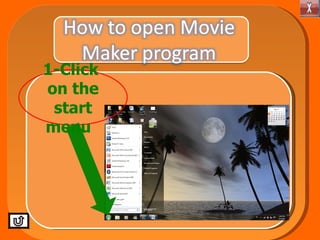
1-Click  on the start menu
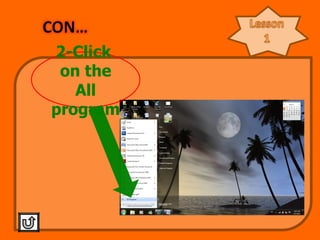
2-Click  on the All program
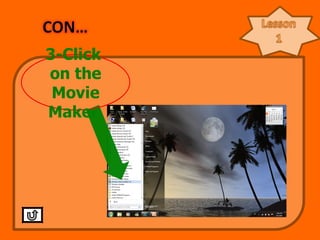
3-Click  on the Movie Maker
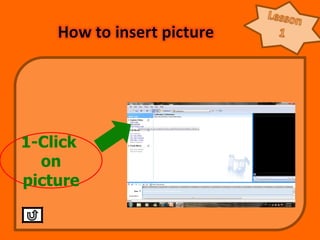
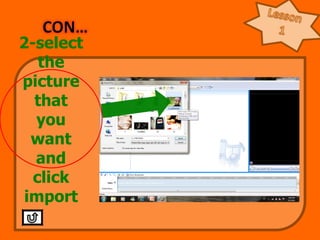
1-Click  on picture
2-select the picture that you want and click import
Lesson 1 You can choose more than one picture by press the ctrl button and select picture.
http :// images.google.com/search?tbm = isch&hl = ar&source = hp&biw =1276&bih=461&q=%D8%A7%D9%84%D8%A7%D8%B3%D8%B1%D8%A7%D9%81+%D8%A8%D8%A7%D9%84%D9%85%D8%A7%D8%A1&gbv=2&aq= f&aqi =g1&aql=& oq =
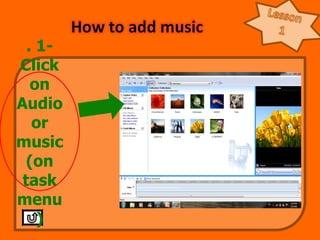
. 1-Click on Audio or music(on task menu)
2-choose library  Music
3- choose the music that you  Want Click import
http://www.4shared.com/audio/hukNeE8E/__online.htm

Movi maker