Introduction to Motors
and Motor Controllers
Programming for
Embedded Systems
MAHDI BABAEI
MBABAEI@DEAKIN.EDU.AU
Intro
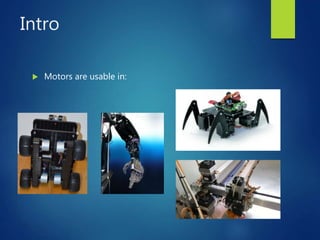
 Motors are usable in:
Popular motor types for
embedded systems
 Stepper Motors
 Servo Motors
 DC Motors
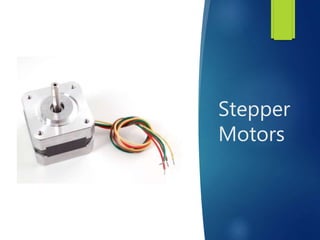
Stepper
Motors
How do they work?
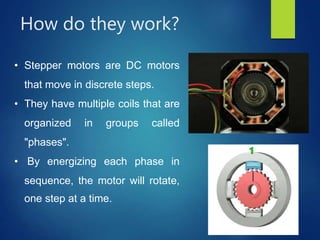
• Stepper motors are DC motors
that move in discrete steps.
• They have multiple coils that are
organized in groups called
"phases".
• By energizing each phase in
sequence, the motor will rotate,
one step at a time.
Stepper Motors
connection
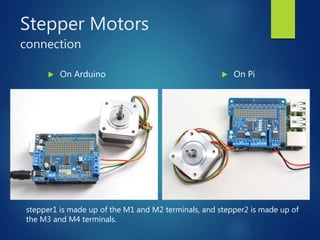
 On Arduino  On Pi
stepper1 is made up of the M1 and M2 terminals, and stepper2 is made up of
the M3 and M4 terminals.
How to drive it?
 To drive a stepper we need to know 3 elements:
1. Number of steps: how many steps we want
2. Direction of Steps: Forward/Backward
3. Steps’ Style:
1. "Single" means single-coil activation
2. "Double" means 2 coils are activated at once (for higher torque)
3. "Interleave" means that it alternates between single and double to
get twice the resolution (but of course its half the speed).
4. "Microstepping" is a method where the coils are PWM'd to create
smooth motion between steps.
Run a stepper
 Direction: which should be one of the following constant values:
• stepper.FORWARD (default)
• stepper.BACKWARD
 Style: which should be one of the values:
• stepper.SINGLE (default) for a full step rotation to a position where one
single coil is powered
• stepper.DOUBLE for a full step rotation to position where two coils
are powered providing more torque
• stepper.INTERLEAVED for a half step rotation interleaving single and
double coil positions and torque
• stepper.MICROSTEP for a microstep rotation to a position where two
coils are partially active.
Run a stepper
 Pi:
from adafruit_motorkit import MotorKit
kit = MotorKit()
kit.stepper1.onestep(direction=stepper.BACKWARD, style=stepper.DOUBLE)
OR
for i in range(200):
kit.stepper1.onestep(style=stepper.MICROSTEP)
 Photon:
#include <Adafruit_MotorShield.h>
Adafruit_MotorShield AFMS = Adafruit_MotorShield();
AFMS.begin();
// Connect a stepper motor with 200 steps per revolution (1.8 degree)
Adafruit_StepperMotor *myStepper = AFMS.getStepper(200, 2);
myStepper->setSpeed(10);
for (i=0; i<255; i++) {
myStepper->step(1, FORWARD, INTERLEAVE); }
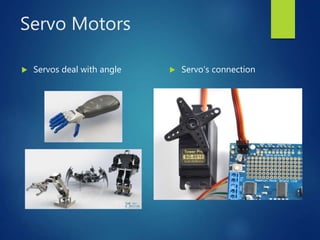
Servo Motors
 Servos deal with angle  Servo’s connection
Run a Servo
 Pi:
import RPi.GPIO as GPIO
import time
servoPIN = 17
GPIO.setmode(GPIO.BCM)
GPIO.setup(servoPIN, GPIO.OUT)
p = GPIO.PWM(servoPIN, 50) # GPIO 17 for
PWM
p.start(2.5) # Initialization
try:
p.ChangeDutyCycle(5)
time.sleep(0.5)
 Photon:
(There is no need to include Servo.h)
Servo myservo;
myservo.attach(3); //digital pin
myservo.write(90); //set servo to 90
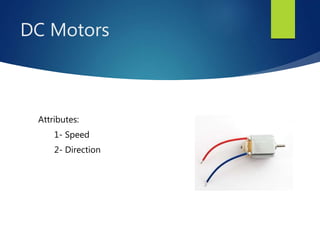
DC Motors
Attributes:
1- Speed
2- Direction
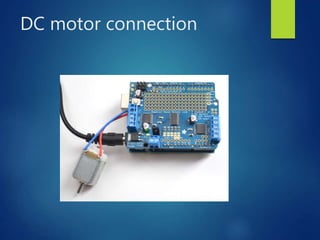
DC motor connection
Drive a DC motor
 The four motor spots on the Shield are available as motor1,
motor2, motor3, and motor4.
 To move a motor you can set the throttle attribute.
 Speed:
Full Speed: throttle = 1.0 OR -1.0
Stop: throttle = 0.0
Half Speed: throttle = 0.5
Run a DC motor
 On Pi:
import time
from adafruit_motorkit import
MotorKit
kit = MotorKit()
kit.motor1.throttle = 1.0
time.sleep(0.5)
kit.motor1.throttle = 0
 On Photon:
#include <Wire.h>
#include <Adafruit_MotorShield.h>
Adafruit_MotorShield AFMS = Adafruit_MotorShield();
Adafruit_DCMotor *myMotor = AFMS.getMotor(1);
AFMS.begin();
myMotor->setSpeed(150);
myMotor->run(FORWARD);
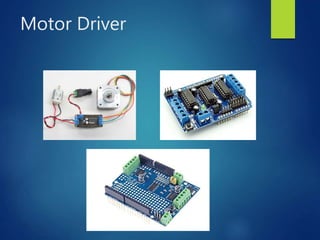
Motor Driver
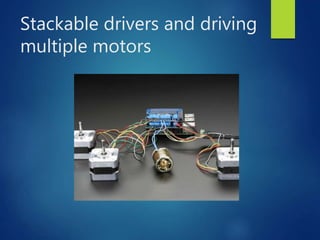
Stackable drivers and driving
multiple motors
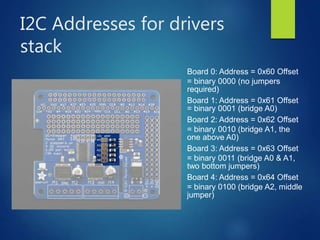
I2C Addresses for drivers
stack
Board 0: Address = 0x60 Offset
= binary 0000 (no jumpers
required)
Board 1: Address = 0x61 Offset
= binary 0001 (bridge A0)
Board 2: Address = 0x62 Offset
= binary 0010 (bridge A1, the
one above A0)
Board 3: Address = 0x63 Offset
= binary 0011 (bridge A0 & A1,
two bottom jumpers)
Board 4: Address = 0x64 Offset
= binary 0100 (bridge A2, middle
jumper)
Program the stack
 On Pi:
from adafruit_motorkit import MotorKit
kit1 = MotorKit()
kit2 = MotorKit(address=0x61)
 On Photon:
#include <Adafruit-MotorShield-V2.h>
Adafruit_MotorShield AF = Adafruit_MotorShield();
Adafruit_MotorShield AF2 = Adafruit_MotorShield(0x61);
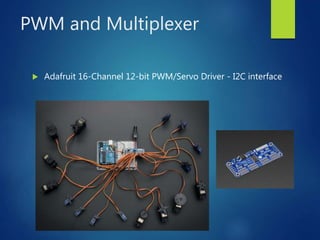
PWM and Multiplexer
 Adafruit 16-Channel 12-bit PWM/Servo Driver - I2C interface
Thank You
Q&A

Motordrive

  • 1.
    Introduction to Motors andMotor Controllers Programming for Embedded Systems MAHDI BABAEI MBABAEI@DEAKIN.EDU.AU
  • 2.
  • 3.
    Popular motor typesfor embedded systems  Stepper Motors  Servo Motors  DC Motors
  • 4.
  • 5.
    How do theywork? • Stepper motors are DC motors that move in discrete steps. • They have multiple coils that are organized in groups called "phases". • By energizing each phase in sequence, the motor will rotate, one step at a time.
  • 6.
    Stepper Motors connection  OnArduino  On Pi stepper1 is made up of the M1 and M2 terminals, and stepper2 is made up of the M3 and M4 terminals.
  • 7.
    How to driveit?  To drive a stepper we need to know 3 elements: 1. Number of steps: how many steps we want 2. Direction of Steps: Forward/Backward 3. Steps’ Style: 1. "Single" means single-coil activation 2. "Double" means 2 coils are activated at once (for higher torque) 3. "Interleave" means that it alternates between single and double to get twice the resolution (but of course its half the speed). 4. "Microstepping" is a method where the coils are PWM'd to create smooth motion between steps.
  • 8.
    Run a stepper Direction: which should be one of the following constant values: • stepper.FORWARD (default) • stepper.BACKWARD  Style: which should be one of the values: • stepper.SINGLE (default) for a full step rotation to a position where one single coil is powered • stepper.DOUBLE for a full step rotation to position where two coils are powered providing more torque • stepper.INTERLEAVED for a half step rotation interleaving single and double coil positions and torque • stepper.MICROSTEP for a microstep rotation to a position where two coils are partially active.
  • 9.
    Run a stepper Pi: from adafruit_motorkit import MotorKit kit = MotorKit() kit.stepper1.onestep(direction=stepper.BACKWARD, style=stepper.DOUBLE) OR for i in range(200): kit.stepper1.onestep(style=stepper.MICROSTEP)  Photon: #include <Adafruit_MotorShield.h> Adafruit_MotorShield AFMS = Adafruit_MotorShield(); AFMS.begin(); // Connect a stepper motor with 200 steps per revolution (1.8 degree) Adafruit_StepperMotor *myStepper = AFMS.getStepper(200, 2); myStepper->setSpeed(10); for (i=0; i<255; i++) { myStepper->step(1, FORWARD, INTERLEAVE); }
  • 10.
    Servo Motors  Servosdeal with angle  Servo’s connection
  • 11.
    Run a Servo Pi: import RPi.GPIO as GPIO import time servoPIN = 17 GPIO.setmode(GPIO.BCM) GPIO.setup(servoPIN, GPIO.OUT) p = GPIO.PWM(servoPIN, 50) # GPIO 17 for PWM p.start(2.5) # Initialization try: p.ChangeDutyCycle(5) time.sleep(0.5)  Photon: (There is no need to include Servo.h) Servo myservo; myservo.attach(3); //digital pin myservo.write(90); //set servo to 90
  • 12.
  • 13.
  • 14.
    Drive a DCmotor  The four motor spots on the Shield are available as motor1, motor2, motor3, and motor4.  To move a motor you can set the throttle attribute.  Speed: Full Speed: throttle = 1.0 OR -1.0 Stop: throttle = 0.0 Half Speed: throttle = 0.5
  • 15.
    Run a DCmotor  On Pi: import time from adafruit_motorkit import MotorKit kit = MotorKit() kit.motor1.throttle = 1.0 time.sleep(0.5) kit.motor1.throttle = 0  On Photon: #include <Wire.h> #include <Adafruit_MotorShield.h> Adafruit_MotorShield AFMS = Adafruit_MotorShield(); Adafruit_DCMotor *myMotor = AFMS.getMotor(1); AFMS.begin(); myMotor->setSpeed(150); myMotor->run(FORWARD);
  • 16.
  • 17.
    Stackable drivers anddriving multiple motors
  • 18.
    I2C Addresses fordrivers stack Board 0: Address = 0x60 Offset = binary 0000 (no jumpers required) Board 1: Address = 0x61 Offset = binary 0001 (bridge A0) Board 2: Address = 0x62 Offset = binary 0010 (bridge A1, the one above A0) Board 3: Address = 0x63 Offset = binary 0011 (bridge A0 & A1, two bottom jumpers) Board 4: Address = 0x64 Offset = binary 0100 (bridge A2, middle jumper)
  • 19.
    Program the stack On Pi: from adafruit_motorkit import MotorKit kit1 = MotorKit() kit2 = MotorKit(address=0x61)  On Photon: #include <Adafruit-MotorShield-V2.h> Adafruit_MotorShield AF = Adafruit_MotorShield(); Adafruit_MotorShield AF2 = Adafruit_MotorShield(0x61);
  • 20.
    PWM and Multiplexer Adafruit 16-Channel 12-bit PWM/Servo Driver - I2C interface
  • 21.
  • 22.