Moodle 2 – Features For TeachersMichelle MooreChief Evangelist
Features for TeachersRepository SupportCompletion TrackingConditional ActivitiesQuizWikiWorkshopBlogs
Repository SupportBetter access to files and contentEasier to re-use contentFile securityImproved course backupsSimplified file managementhttp://docs.moodle.org/20/en/Repositories
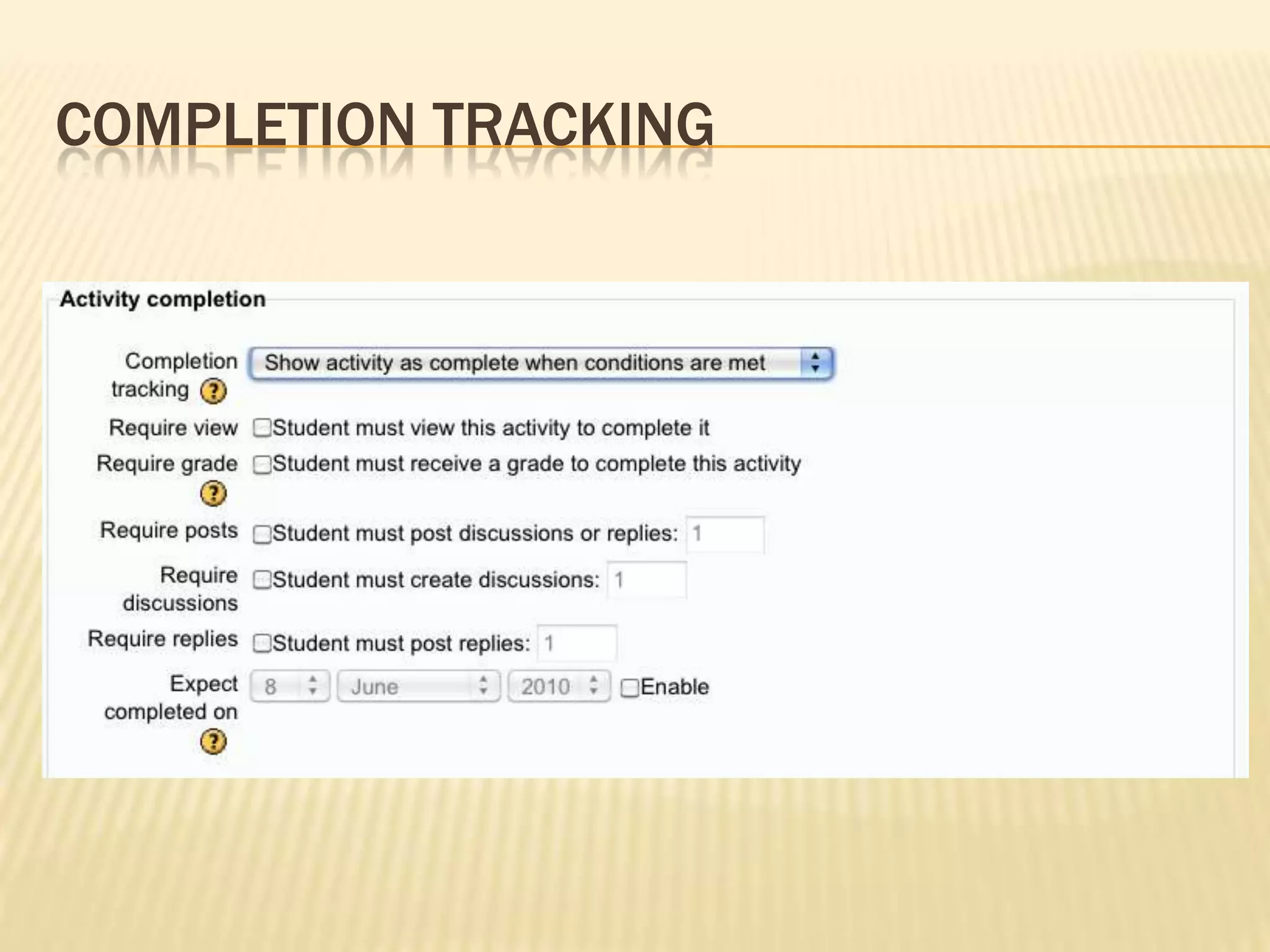
Completion TrackingIdentify activities and courses as completeAutomatically based on conditionsManually by the studentCompletion ReportsCourse reportshttp://docs.moodle.org/20/en/Course_completion_tracking_settings
Completion tracking
CoNditional ActivitiesControl access to activitiesGradeCompletionDateshttp://docs.moodle.org/20/en/Conditional_activities
Quiz Module and Question bank“Quiz navigation improvements for students”Ability to flag questions during attemptSimpler interface for quiz developmentNew and improved question typesImproved reporting and item analysishttp://docs.moodle.org/20/en/Quiz_module
WikiCollaborative content generation“a webpage with an edit button”Brand new wiki!Simplified creation of group or individual wikishttp://docs.moodle.org/20/en/Wiki
WorkshopCool Tool!Peer assessmentVariety of scoring mechanismsManages distribution and collectionSummary and compilation of resultsImprovements to the teacher interfacehttp://docs.moodle.org/20/en/Workshop
BlogCommenting capabilities!Course specific blog (forum type)http://docs.moodle.org/20/en/Blogs_2.0
More to ExploreHTML editorFiltersMessagingCommentsPrivate filesDragmath equation editor
Questions?Michelle Mooremichelle@remote-learner.net@michelledmooreRemote-Learnerhttp://remote-learner.net

Moodle 2 - Features for Teachers

Editor's Notes

  • #4 Easier access to content (your own and others!):With new file management interface, your files belong to you and your activities rather than to your course—easier to find your own files no matter where you are on the Moodle siteWith the built-in Flickr integration and the ability to connect to other repositories, it’s much easier to take advantage of other content that is available across the web. Organizations can support and promote content repositories and give teachers ready accessEasier to re-use content: can use the same content in multiple courses without having to have two copies of the same file in two different placesFile security: before, if students knew or guessed your url, they could access any file in your course files. Now, permissions and structure make sure that only the appropriate users can access filesImproved course backups: before, if you backed up a single activity to share with a colleague or another course, all of your course files came with it, whether you needed it or not . . . Now, because the files are linked to the activities, the backup only includes the files you needSimplified file management: before, if you moved your files around within your course files and the file was in use in the course, then the link to the file would break. Now, because the file is linked to the activity, you probably won’t find yourself in a position of having a mess of files and if you were to move files, you won’t break your course.Note:Legacy files exist if you upgrade from 1.9; at some point, want to graduate to using repositories.
  • #5 Even labels have an option for completion tracking Can set course prerequisitesSelf completion blockCourse completion block
  • #8 Simpler interface for teachers who build “one-off” quizzesSeveral new varieties of calculated questions with easier interfaces