Klassisch oder Cloud - egal.
Monitoring ohne Spagat mit OMD
– Part II Cloud Monitoring –
Ulrike Klusik
22.11.2019
Event Digitalisierung - Monitoring Folie 2
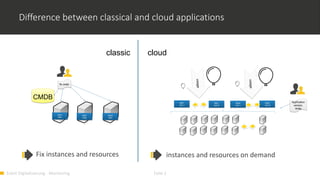
Difference between classical and cloud applications
App1
Inst1
App1
Inst2
App2
Inst1
App1
Inst 1
App1
Inst N
App2
Inst 1
App2
Inst N
CMDB
classic cloud
Application
version,
limits
Fix instances and resources instances and resources on demand
fix order
Event Digitalisierung - Monitoring Folie 3
Monitoring Challenges in the Cloud
• A Cloud infrastructure is a platform for High Available Applications with scaling on
demand
• Hence the infrastructure must also be scalable, to satisfy the needs
• Monitoring of Central Services: immediate alerts about reduced availability
• Monitoring Resource Usage: early alerts for extensions
• Rapidly Changing Applications:
• Fix checks are rapidly outdated
• It is important to have more performance metrics available than used for the current
alerting. E.g. for detailed post mortem analysis
The Monitoring solution needs to know what is exactly running at the moment
and needs collect many metrics
Event Digitalisierung - Monitoring Folie 4
Prometheus for monitoring in the Cloud
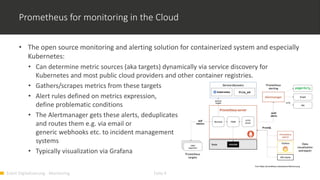
• The open source monitoring and alerting solution for containerized system and especially
Kubernetes:
• Can determine metric sources (aka targets) dynamically via service discovery for
Kubernetes and most public cloud providers and other container registries.
• Gathers/scrapes metrics from these targets
• Alert rules defined on metrics expression,
define problematic conditions
• The Alertmanager gets these alerts, deduplicates
and routes them e.g. via email or
generic webhooks etc. to incident management
systems
• Typically visualization via Grafana
from https://prometheus.io/assets/architecture.png
Event Digitalisierung - Monitoring Folie 5
Example: Monitoring OpenShift Clusters
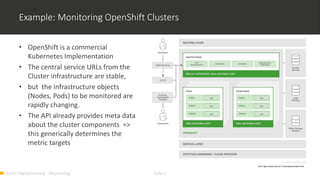
• OpenShift is a commercial
Kubernetes Implementation
• The central service URLs from the
Cluster infrastructure are stable,
• but the infrastructure objects
(Nodes, Pods) to be monitored are
rapidly changing.
• The API already provides meta data
about the cluster components =>
this generically determines the
metric targets
from https://docs.okd.io/3.11/architecture/index.html
Event Digitalisierung - Monitoring Folie 6
namespace
Nodes
host
NODE-
EXPORTER9100
OMD server
INFLUXDB8086
ALERTMGR
(cluster possible)443
Container
OMD-Service
Grafana443
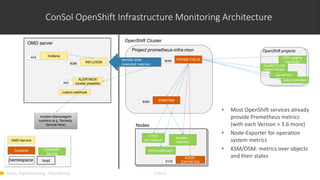
ConSol OpenShift Infrastructure Monitoring Architecture
Kubelet +
cAdvisor
Openshift-
Service
HAProxy(Router)
ETCD
(on masters)
OpenShift projects
remote write
(selected metrics)
Incident Mananagent
systems (e.g. Remedy,
Service Now)
custom webhook
api-servers
kube controllers
EFK Logging
(via Pods)
GlusterFS (via
Heketi-Route)
Project prometheus-infra-mon
9090 PROMETHEUS
KSM/OSM8080
OpenShift Cluster
• Most OpenShift services already
provide Prometheus metrics
(with each Version > 3.6 more)
• Node-Exporter for operation
system metrics
• KSM/OSM: metrics over objects
and their states
Event Digitalisierung - Monitoring Folie 7
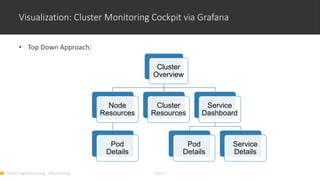
Visualization: Cluster Monitoring Cockpit via Grafana
• Top Down Approach:
Cluster
Overview
Node
Resources
Pod
Details
Cluster
Resources
Service
Dashboard
Pod
Details
Service
Details
Event Digitalisierung - Monitoring Folie 8
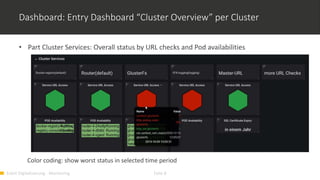
Dashboard: Entry Dashboard “Cluster Overview” per Cluster
• Part Cluster Services: Overall status by URL checks and Pod availabilities
Color coding: show worst status in selected time period
Event Digitalisierung - Monitoring Folie 9
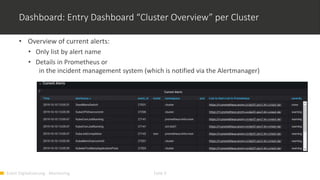
Dashboard: Entry Dashboard “Cluster Overview” per Cluster
• Overview of current alerts:
• Only list by alert name
• Details in Prometheus or
in the incident management system (which is notified via the Alertmanager)
Event Digitalisierung - Monitoring Folie 10
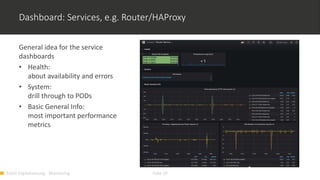
Dashboard: Services, e.g. Router/HAProxy
General idea for the service
dashboards
• Health:
about availability and errors
• System:
drill through to PODs
• Basic General Info:
most important performance
metrics
Event Digitalisierung - Monitoring Folie 11
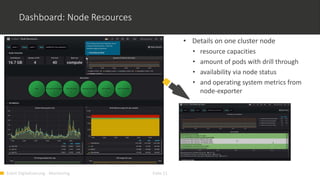
Dashboard: Node Resources
• Details on one cluster node
• resource capacities
• amount of pods with drill through
• availability via node status
• and operating system metrics from
node-exporter
• Details on one cluster node
• resource capacities
• amount of pods with drill through
• availability via node status
• and operating system metrics from
node-exporter
Event Digitalisierung - Monitoring Folie 12
Conclusion
• OMD Labs integrates the tools needed to monitor all kinds of infrastructures.
• It is open source.
• We have a lot of experience implementing monitoring solutions based on OMD Labs for
complex and dynamically changing IT infrastructures.
• We can customize it for your convenience.
• Check it out
https://labs.consol.de/de/omd/index.html
https://labs.consol.de/de/omd/getting_started.html
Vielen Dank!

Monitoring klassisch oder Cloud

  • 1.
    Klassisch oder Cloud- egal. Monitoring ohne Spagat mit OMD – Part II Cloud Monitoring – Ulrike Klusik 22.11.2019
  • 2.
    Event Digitalisierung -Monitoring Folie 2 Difference between classical and cloud applications App1 Inst1 App1 Inst2 App2 Inst1 App1 Inst 1 App1 Inst N App2 Inst 1 App2 Inst N CMDB classic cloud Application version, limits Fix instances and resources instances and resources on demand fix order
  • 3.
    Event Digitalisierung -Monitoring Folie 3 Monitoring Challenges in the Cloud • A Cloud infrastructure is a platform for High Available Applications with scaling on demand • Hence the infrastructure must also be scalable, to satisfy the needs • Monitoring of Central Services: immediate alerts about reduced availability • Monitoring Resource Usage: early alerts for extensions • Rapidly Changing Applications: • Fix checks are rapidly outdated • It is important to have more performance metrics available than used for the current alerting. E.g. for detailed post mortem analysis The Monitoring solution needs to know what is exactly running at the moment and needs collect many metrics
  • 4.
    Event Digitalisierung -Monitoring Folie 4 Prometheus for monitoring in the Cloud • The open source monitoring and alerting solution for containerized system and especially Kubernetes: • Can determine metric sources (aka targets) dynamically via service discovery for Kubernetes and most public cloud providers and other container registries. • Gathers/scrapes metrics from these targets • Alert rules defined on metrics expression, define problematic conditions • The Alertmanager gets these alerts, deduplicates and routes them e.g. via email or generic webhooks etc. to incident management systems • Typically visualization via Grafana from https://prometheus.io/assets/architecture.png
  • 5.
    Event Digitalisierung -Monitoring Folie 5 Example: Monitoring OpenShift Clusters • OpenShift is a commercial Kubernetes Implementation • The central service URLs from the Cluster infrastructure are stable, • but the infrastructure objects (Nodes, Pods) to be monitored are rapidly changing. • The API already provides meta data about the cluster components => this generically determines the metric targets from https://docs.okd.io/3.11/architecture/index.html
  • 6.
    Event Digitalisierung -Monitoring Folie 6 namespace Nodes host NODE- EXPORTER9100 OMD server INFLUXDB8086 ALERTMGR (cluster possible)443 Container OMD-Service Grafana443 ConSol OpenShift Infrastructure Monitoring Architecture Kubelet + cAdvisor Openshift- Service HAProxy(Router) ETCD (on masters) OpenShift projects remote write (selected metrics) Incident Mananagent systems (e.g. Remedy, Service Now) custom webhook api-servers kube controllers EFK Logging (via Pods) GlusterFS (via Heketi-Route) Project prometheus-infra-mon 9090 PROMETHEUS KSM/OSM8080 OpenShift Cluster • Most OpenShift services already provide Prometheus metrics (with each Version > 3.6 more) • Node-Exporter for operation system metrics • KSM/OSM: metrics over objects and their states
  • 7.
    Event Digitalisierung -Monitoring Folie 7 Visualization: Cluster Monitoring Cockpit via Grafana • Top Down Approach: Cluster Overview Node Resources Pod Details Cluster Resources Service Dashboard Pod Details Service Details
  • 8.
    Event Digitalisierung -Monitoring Folie 8 Dashboard: Entry Dashboard “Cluster Overview” per Cluster • Part Cluster Services: Overall status by URL checks and Pod availabilities Color coding: show worst status in selected time period
  • 9.
    Event Digitalisierung -Monitoring Folie 9 Dashboard: Entry Dashboard “Cluster Overview” per Cluster • Overview of current alerts: • Only list by alert name • Details in Prometheus or in the incident management system (which is notified via the Alertmanager)
  • 10.
    Event Digitalisierung -Monitoring Folie 10 Dashboard: Services, e.g. Router/HAProxy General idea for the service dashboards • Health: about availability and errors • System: drill through to PODs • Basic General Info: most important performance metrics
  • 11.
    Event Digitalisierung -Monitoring Folie 11 Dashboard: Node Resources • Details on one cluster node • resource capacities • amount of pods with drill through • availability via node status • and operating system metrics from node-exporter • Details on one cluster node • resource capacities • amount of pods with drill through • availability via node status • and operating system metrics from node-exporter
  • 12.
    Event Digitalisierung -Monitoring Folie 12 Conclusion • OMD Labs integrates the tools needed to monitor all kinds of infrastructures. • It is open source. • We have a lot of experience implementing monitoring solutions based on OMD Labs for complex and dynamically changing IT infrastructures. • We can customize it for your convenience. • Check it out https://labs.consol.de/de/omd/index.html https://labs.consol.de/de/omd/getting_started.html
  • 13.