Functioning incessantly
of Data Science Platform
with Kubeflow
Author: Albert Lewandowski
•Big Data DevOps Engineer in Getindata
•DevOps and Cloud consultant
•Focused on infrastructure, cloud, Internet of Things and
Big Data
Who am I?
Agenda
1. Platform overview.
2. Observability.
a. Metrics.
b. Logs.
c. Actions.
3. Best practices.
a. CICD.
b. How to work with modern Data
Science platform?
4. Q&A
© Copyright. All rights reserved. Not to be reproduced without prior written consent.
Data Science
Kubeflow
Kubeflow Overview
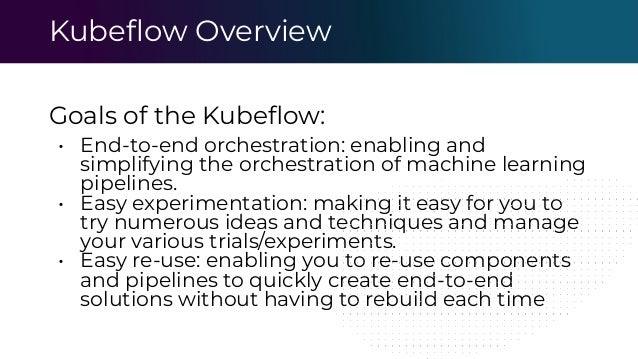
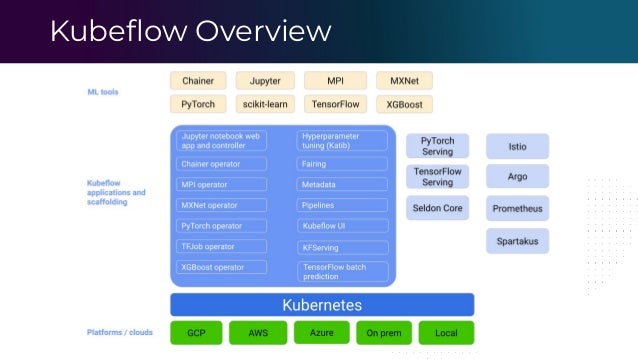
Goals of the Kubeflow:
• End-to-end orchestration: enabling and
simplifying the orchestration of machine learning
pipelines.
• Easy experimentation: making it easy for you to
try numerous ideas and techniques and manage
your various trials/experiments.
• Easy re-use: enabling you to re-use components
and pipelines to quickly create end-to-end
solutions without having to rebuild each time
What is the pipeline in Kubeflow?
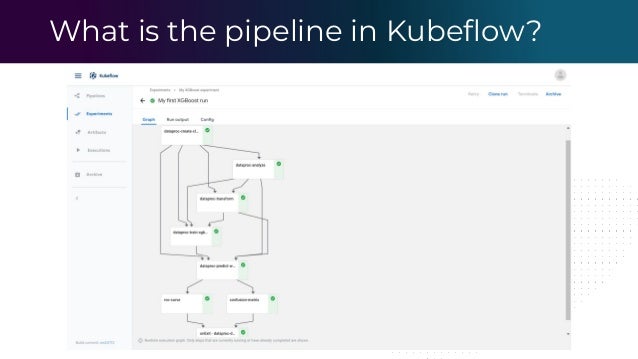
A pipeline is a description of an ML
workflow, including all of the components
in the workflow and how they combine in
the form of a graph.
What is the pipeline in Kubeflow?
Kubeflow Overview
Kubeflow Overview
© Copyright. All rights reserved. Not to be reproduced without prior written consent.
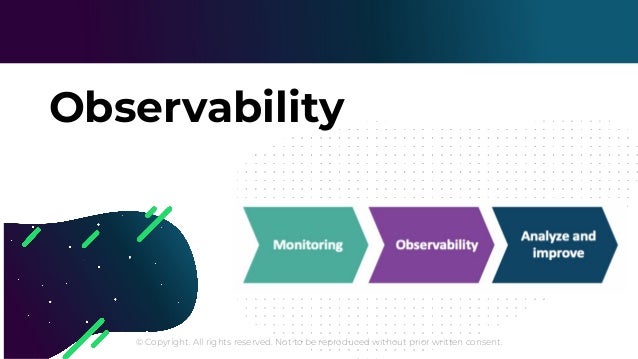
Observability
Observability
Monitoring describes the process of gathering metrics about IT
environment, running applications and observing the system
performance
Observability is about measuring how well internal states of the
system can be inferred from knowledge of its external outputs
(according to the control theory).
Observability
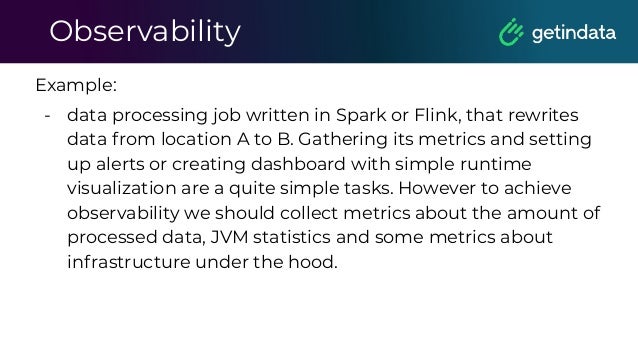
Example:
- data processing job written in Spark or Flink, that rewrites
data from location A to B. Gathering its metrics and setting
up alerts or creating dashboard with simple runtime
visualization are a quite simple tasks. However to achieve
observability we should collect metrics about the amount of
processed data, JVM statistics and some metrics about
infrastructure under the hood.
© Copyright. All rights reserved. Not to be reproduced without prior written consent.
Metrics
Kubeflow Pipeline Monitoring
■ Write a JSON file specifying metrics to render.
■ Export a file output artifact with an artifact name.
■ Done :)
Expose metrics and use Prometheus-based exporters to
detect any issue or problem with the released application.
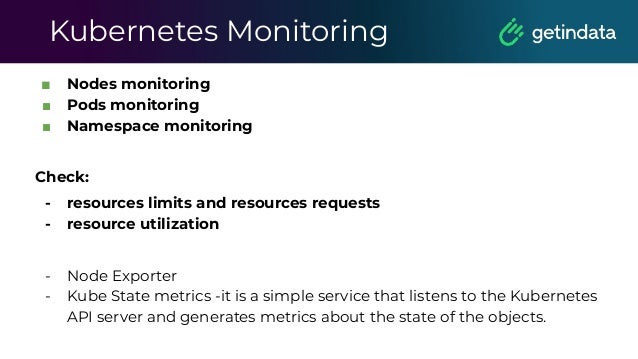
Kubernetes Monitoring
■ Nodes monitoring
■ Pods monitoring
■ Namespace monitoring
Check:
- resources limits and resources requests
- resource utilization
- Node Exporter
- Kube State metrics -it is a simple service that listens to the Kubernetes
API server and generates metrics about the state of the objects.
Servers Monitoring
■ Using Node Exporter or any custom exporter
■ Predict disk usage
■ Send alerts in case of any issue or any dangerous
situation
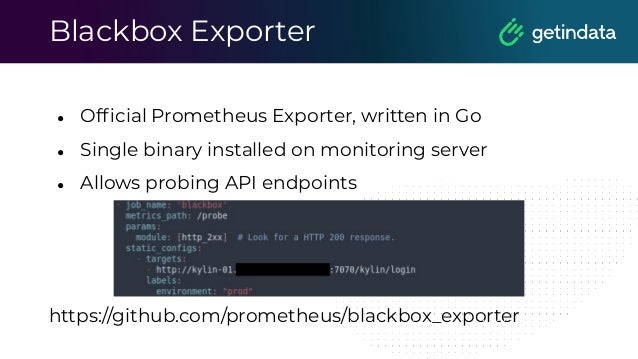
Blackbox Exporter
● Official Prometheus Exporter, written in Go
● Single binary installed on monitoring server
● Allows probing API endpoints
https://github.com/prometheus/blackbox_exporter
Don’t forget about alerts
Alerts signify that a human needs to take
action immediately in response to
something that is either happening or
about to happen, in order to improve the
situation.
Flink monitoring
The most important processing tool.
Flink jobs must run all the time.
Flink monitoring
Processing metrics
• Number of processed events
• Lag of processing that may trigger
alerts
• JVM parameters
Flink stability
• How many restarts does Flink have?
• Can it finish making checkpoints
and savepoints?
What about Spark jobs?
• Let’s connect Prometheus with
statsd_exporter
• Use built in sink for statsd in Spark
Spark & Prometheus
The best way to achieve stable metrics system
with right timestamp is about using statsd_sink.
These metrics can be sent to statsd_exporter
(https://github.com/prometheus/statsd_exporter)
and then can be exposed to the Prometheus.
Spark & Prometheus
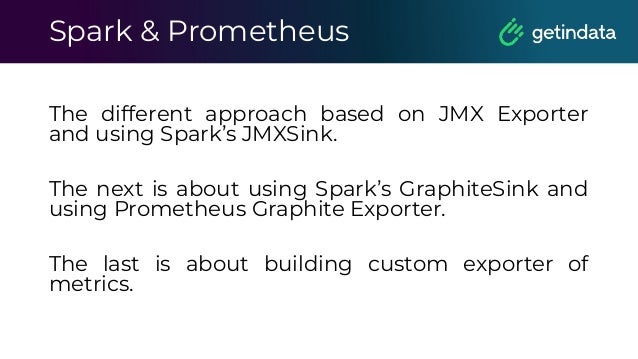
The different approach based on JMX Exporter
and using Spark’s JMXSink.
The next is about using Spark’s GraphiteSink and
using Prometheus Graphite Exporter.
The last is about building custom exporter of
metrics.
Spark & Prometheus
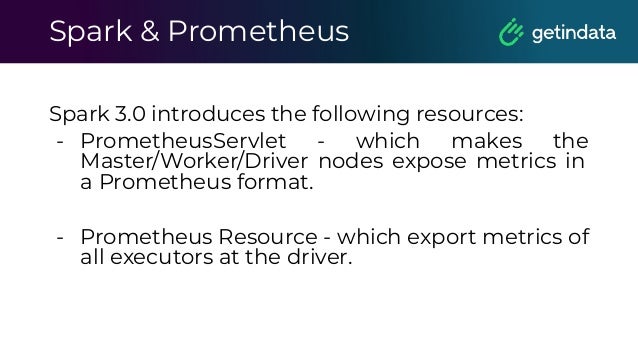
Spark 3.0 introduces the following resources:
- PrometheusServlet - which makes the
Master/Worker/Driver nodes expose metrics in
a Prometheus format.
- Prometheus Resource - which export metrics of
all executors at the driver.
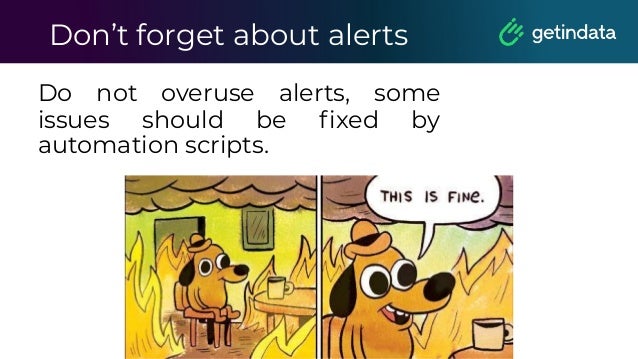
Don’t forget about alerts
Do not overuse alerts, some
issues should be fixed by
automation scripts.
Prometheus Security
Remember:
■ It should not by default be possible for a target to expose data
that impersonates a different target. The honor_labels option
removes this protection, as can certain relabelling setups.
■ --web.enable-admin-api flag controls access to the
administrative HTTP API which includes functionality such as
deleting time series. This is disabled by default. If enabled,
administrative and mutating functionality will be accessible
under the /api/*/admin/ paths.
■ Any secrets stored in template files could be exfiltrated by
anyone able to configure receivers in the Alertmanager
configuration file.
Prometheus Security
Remember:
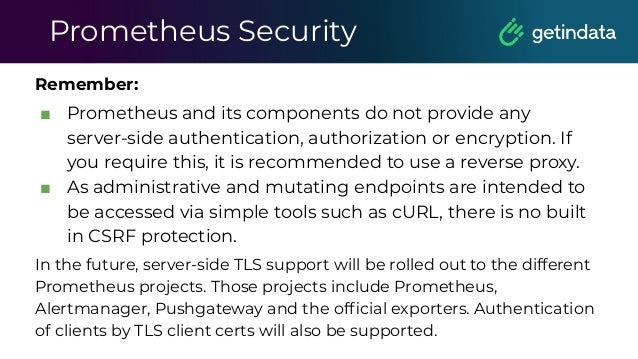
■ Prometheus and its components do not provide any
server-side authentication, authorization or encryption. If
you require this, it is recommended to use a reverse proxy.
■ As administrative and mutating endpoints are intended to
be accessed via simple tools such as cURL, there is no built
in CSRF protection.
In the future, server-side TLS support will be rolled out to the different
Prometheus projects. Those projects include Prometheus,
Alertmanager, Pushgateway and the official exporters. Authentication
of clients by TLS client certs will also be supported.
© Copyright. All rights reserved. Not to be reproduced without prior written consent.
Logs
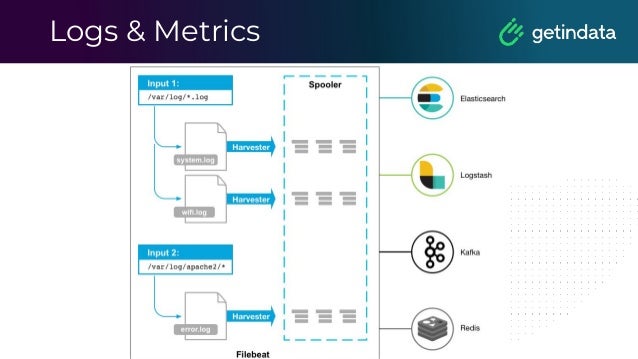
Logs & Metrics
Log analytics
ELK
Log analytics
Loki
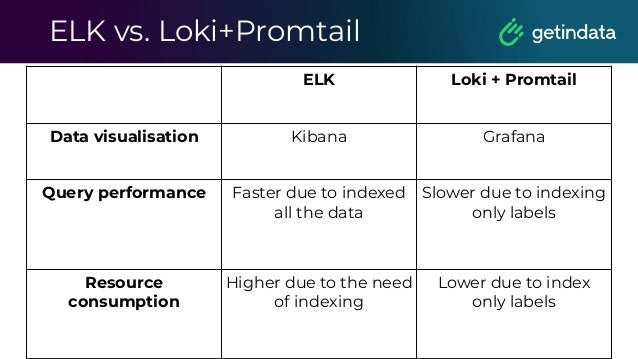
ELK vs. Loki+Promtail
ELK Loki + Promtail
Data visualisation Kibana Grafana
Query performance Faster due to indexed
all the data
Slower due to indexing
only labels
Resource
consumption
Higher due to the need
of indexing
Lower due to index
only labels
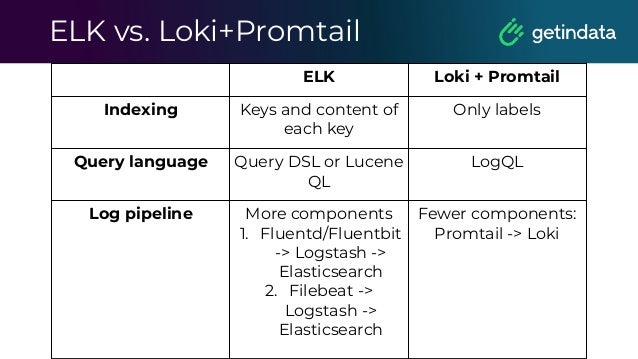
ELK vs. Loki+Promtail
ELK Loki + Promtail
Indexing Keys and content of
each key
Only labels
Query language Query DSL or Lucene
QL
LogQL
Log pipeline More components
1. Fluentd/Fluentbit
-> Logstash ->
Elasticsearch
2. Filebeat ->
Logstash ->
Elasticsearch
Fewer components:
Promtail -> Loki
© Copyright. All rights reserved. Not to be reproduced without prior written consent.
Maintaining and
updating
© Copyright. All rights reserved. Not to be reproduced without prior written consent.
CICD
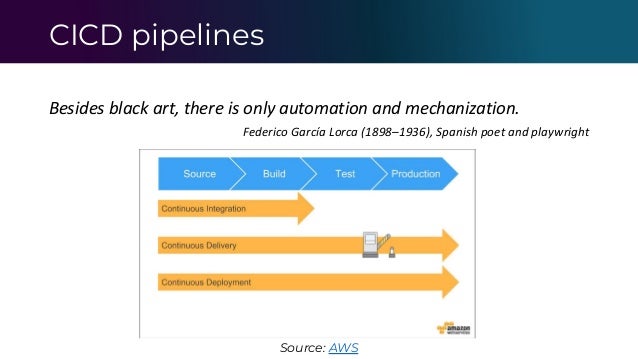
CICD pipelines
Besides black art, there is only automation and mechanization.
Federico García Lorca (1898–1936), Spanish poet and playwright
Source: AWS
Continuous Integration
Do not forget about tests on each step.
Automate deploy to development environment to
validate quickly your application.
Define strategy for branches name and how they
impact on deployment.
Continuous Deployment
Deploy to development after merge to branch x.
Evaluate metrics if, for example, the accuracy of ML
model is OK or not and then trigger next step in
CICD pipeline.
Example pipeline:
merge to branch dev -> build an image -> deploy to
dev -> test, validate -> deploy to qa -> test, validate
-> deploy to prod
Infrastructure as a Code
Infrastructure as a Code helps us in maintaining the
platform in Kubernetes world.
We can simply update, move, redeploy platform and
we can be sure that everything will be as we expect
it.
Code + GIT is better than manual actions.
Infrastructure as a Code
Spotify has open-sourced their Terraform module for
running Kubeflow on Google Kubernetes engine.
https://github.com/spotify/terraform-gke-kubeflow-c
luster
You can easily automate installation in any
Kubernetes cluster.
© Copyright. All rights reserved. Not to be reproduced without prior written consent.
How to work with modern
Data Science platform?
SLI, SLA & SLO
• SLA - Service Level Agreements
• SLI - Service Level Indicators
• SLO - Service Level Objectives
SLI, SLA & SLO
SLA is a contract that the service provider promises
customers on service availability, performance.
SLO is a goal that service provider wants to reach.
SLI is a measurement the service provider uses for
the goal.
Measuring Service Risk
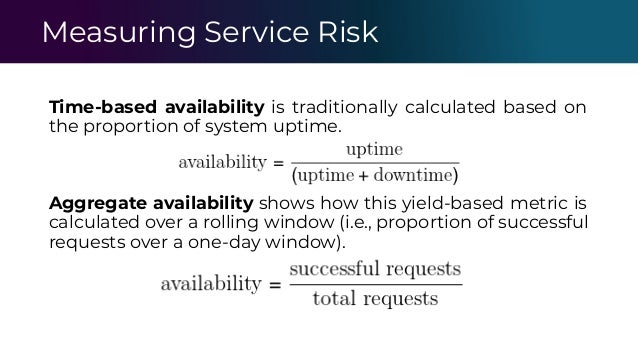
Time-based availability is traditionally calculated based on
the proportion of system uptime.
Aggregate availability shows how this yield-based metric is
calculated over a rolling window (i.e., proportion of successful
requests over a one-day window).
Postmortems
It should be written for all significant incidents, regardless of
whether or not they paged; postmortems that did not
trigger a page are even more valuable.
Key features:
- real-time collaboration
- an open commenting/annotation system
- email notification
Automate platform
- Trigger action based on metrics
- Deploy automatically
- Do not waste time on repetitive tasks
Automate platform
If a human operator needs to touch your system
during normal operations, you have a bug. The
definition of normal changes as your systems
grow.
- Carla Geisser, Google SRE
© Copyright. All rights reserved. Not to be reproduced without prior written consent.
Q&A
Thank you
for your attention!

Functioning incessantly of Data Science Platform with Kubeflow - Albert Lewandowski, GetInData

  • 1.
    Functioning incessantly of DataScience Platform with Kubeflow Author: Albert Lewandowski
  • 2.
    •Big Data DevOpsEngineer in Getindata •DevOps and Cloud consultant •Focused on infrastructure, cloud, Internet of Things and Big Data Who am I?
  • 3.
    Agenda 1. Platform overview. 2.Observability. a. Metrics. b. Logs. c. Actions. 3. Best practices. a. CICD. b. How to work with modern Data Science platform? 4. Q&A
  • 4.
    © Copyright. Allrights reserved. Not to be reproduced without prior written consent. Data Science Kubeflow
  • 5.
    Kubeflow Overview Goals ofthe Kubeflow: • End-to-end orchestration: enabling and simplifying the orchestration of machine learning pipelines. • Easy experimentation: making it easy for you to try numerous ideas and techniques and manage your various trials/experiments. • Easy re-use: enabling you to re-use components and pipelines to quickly create end-to-end solutions without having to rebuild each time
  • 6.
    What is thepipeline in Kubeflow? A pipeline is a description of an ML workflow, including all of the components in the workflow and how they combine in the form of a graph.
  • 7.
    What is thepipeline in Kubeflow?
  • 8.
  • 9.
  • 10.
    © Copyright. Allrights reserved. Not to be reproduced without prior written consent. Observability
  • 11.
    Observability Monitoring describes theprocess of gathering metrics about IT environment, running applications and observing the system performance Observability is about measuring how well internal states of the system can be inferred from knowledge of its external outputs (according to the control theory).
  • 12.
    Observability Example: - data processingjob written in Spark or Flink, that rewrites data from location A to B. Gathering its metrics and setting up alerts or creating dashboard with simple runtime visualization are a quite simple tasks. However to achieve observability we should collect metrics about the amount of processed data, JVM statistics and some metrics about infrastructure under the hood.
  • 13.
    © Copyright. Allrights reserved. Not to be reproduced without prior written consent. Metrics
  • 14.
    Kubeflow Pipeline Monitoring ■Write a JSON file specifying metrics to render. ■ Export a file output artifact with an artifact name. ■ Done :) Expose metrics and use Prometheus-based exporters to detect any issue or problem with the released application.
  • 15.
    Kubernetes Monitoring ■ Nodesmonitoring ■ Pods monitoring ■ Namespace monitoring Check: - resources limits and resources requests - resource utilization - Node Exporter - Kube State metrics -it is a simple service that listens to the Kubernetes API server and generates metrics about the state of the objects.
  • 16.
    Servers Monitoring ■ UsingNode Exporter or any custom exporter ■ Predict disk usage ■ Send alerts in case of any issue or any dangerous situation
  • 17.
    Blackbox Exporter ● OfficialPrometheus Exporter, written in Go ● Single binary installed on monitoring server ● Allows probing API endpoints https://github.com/prometheus/blackbox_exporter
  • 18.
    Don’t forget aboutalerts Alerts signify that a human needs to take action immediately in response to something that is either happening or about to happen, in order to improve the situation.
  • 19.
    Flink monitoring The mostimportant processing tool. Flink jobs must run all the time.
  • 20.
    Flink monitoring Processing metrics •Number of processed events • Lag of processing that may trigger alerts • JVM parameters Flink stability • How many restarts does Flink have? • Can it finish making checkpoints and savepoints?
  • 21.
    What about Sparkjobs? • Let’s connect Prometheus with statsd_exporter • Use built in sink for statsd in Spark
  • 22.
    Spark & Prometheus Thebest way to achieve stable metrics system with right timestamp is about using statsd_sink. These metrics can be sent to statsd_exporter (https://github.com/prometheus/statsd_exporter) and then can be exposed to the Prometheus.
  • 23.
    Spark & Prometheus Thedifferent approach based on JMX Exporter and using Spark’s JMXSink. The next is about using Spark’s GraphiteSink and using Prometheus Graphite Exporter. The last is about building custom exporter of metrics.
  • 24.
    Spark & Prometheus Spark3.0 introduces the following resources: - PrometheusServlet - which makes the Master/Worker/Driver nodes expose metrics in a Prometheus format. - Prometheus Resource - which export metrics of all executors at the driver.
  • 25.
    Don’t forget aboutalerts Do not overuse alerts, some issues should be fixed by automation scripts.
  • 26.
    Prometheus Security Remember: ■ Itshould not by default be possible for a target to expose data that impersonates a different target. The honor_labels option removes this protection, as can certain relabelling setups. ■ --web.enable-admin-api flag controls access to the administrative HTTP API which includes functionality such as deleting time series. This is disabled by default. If enabled, administrative and mutating functionality will be accessible under the /api/*/admin/ paths. ■ Any secrets stored in template files could be exfiltrated by anyone able to configure receivers in the Alertmanager configuration file.
  • 27.
    Prometheus Security Remember: ■ Prometheusand its components do not provide any server-side authentication, authorization or encryption. If you require this, it is recommended to use a reverse proxy. ■ As administrative and mutating endpoints are intended to be accessed via simple tools such as cURL, there is no built in CSRF protection. In the future, server-side TLS support will be rolled out to the different Prometheus projects. Those projects include Prometheus, Alertmanager, Pushgateway and the official exporters. Authentication of clients by TLS client certs will also be supported.
  • 28.
    © Copyright. Allrights reserved. Not to be reproduced without prior written consent. Logs
  • 29.
  • 30.
  • 31.
  • 32.
    ELK vs. Loki+Promtail ELKLoki + Promtail Data visualisation Kibana Grafana Query performance Faster due to indexed all the data Slower due to indexing only labels Resource consumption Higher due to the need of indexing Lower due to index only labels
  • 33.
    ELK vs. Loki+Promtail ELKLoki + Promtail Indexing Keys and content of each key Only labels Query language Query DSL or Lucene QL LogQL Log pipeline More components 1. Fluentd/Fluentbit -> Logstash -> Elasticsearch 2. Filebeat -> Logstash -> Elasticsearch Fewer components: Promtail -> Loki
  • 34.
    © Copyright. Allrights reserved. Not to be reproduced without prior written consent. Maintaining and updating
  • 35.
    © Copyright. Allrights reserved. Not to be reproduced without prior written consent. CICD
  • 36.
    CICD pipelines Besides blackart, there is only automation and mechanization. Federico García Lorca (1898–1936), Spanish poet and playwright Source: AWS
  • 37.
    Continuous Integration Do notforget about tests on each step. Automate deploy to development environment to validate quickly your application. Define strategy for branches name and how they impact on deployment.
  • 38.
    Continuous Deployment Deploy todevelopment after merge to branch x. Evaluate metrics if, for example, the accuracy of ML model is OK or not and then trigger next step in CICD pipeline. Example pipeline: merge to branch dev -> build an image -> deploy to dev -> test, validate -> deploy to qa -> test, validate -> deploy to prod
  • 39.
    Infrastructure as aCode Infrastructure as a Code helps us in maintaining the platform in Kubernetes world. We can simply update, move, redeploy platform and we can be sure that everything will be as we expect it. Code + GIT is better than manual actions.
  • 40.
    Infrastructure as aCode Spotify has open-sourced their Terraform module for running Kubeflow on Google Kubernetes engine. https://github.com/spotify/terraform-gke-kubeflow-c luster You can easily automate installation in any Kubernetes cluster.
  • 41.
    © Copyright. Allrights reserved. Not to be reproduced without prior written consent. How to work with modern Data Science platform?
  • 42.
    SLI, SLA &SLO • SLA - Service Level Agreements • SLI - Service Level Indicators • SLO - Service Level Objectives
  • 43.
    SLI, SLA &SLO SLA is a contract that the service provider promises customers on service availability, performance. SLO is a goal that service provider wants to reach. SLI is a measurement the service provider uses for the goal.
  • 44.
    Measuring Service Risk Time-basedavailability is traditionally calculated based on the proportion of system uptime. Aggregate availability shows how this yield-based metric is calculated over a rolling window (i.e., proportion of successful requests over a one-day window).
  • 45.
    Postmortems It should bewritten for all significant incidents, regardless of whether or not they paged; postmortems that did not trigger a page are even more valuable. Key features: - real-time collaboration - an open commenting/annotation system - email notification
  • 46.
    Automate platform - Triggeraction based on metrics - Deploy automatically - Do not waste time on repetitive tasks
  • 47.
    Automate platform If ahuman operator needs to touch your system during normal operations, you have a bug. The definition of normal changes as your systems grow. - Carla Geisser, Google SRE
  • 48.
    © Copyright. Allrights reserved. Not to be reproduced without prior written consent.
  • 49.
    © Copyright. Allrights reserved. Not to be reproduced without prior written consent. Q&A
  • 50.