Performance Monitoring
in Spark Applications
ROHITASH JAIN,
SOFTWARE ENGINEER, SIGMOID
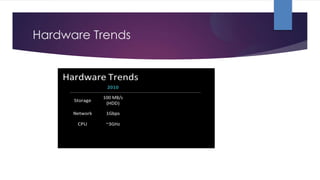
Hardware Trends
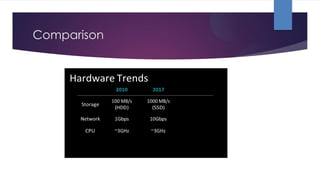
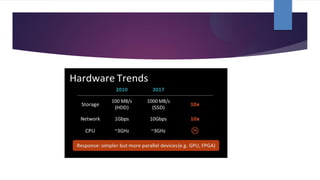
Comparison
Data Locality Concept
Bottleneck factors
▶ CPU
▶ DISK
▶ Memory
▶ Network
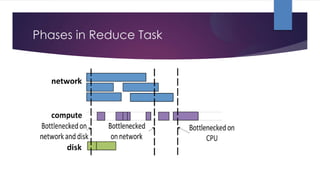
Phases in Reduce Task
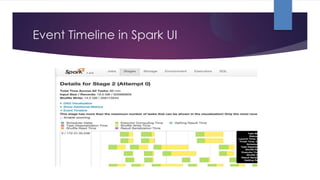
Event Timeline in Spark UI
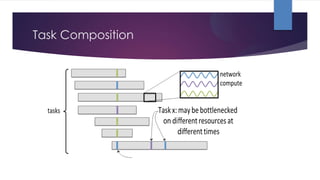
Task Composition
PROFILING TOOLS
▶ SPARKLINT
▶ FLAME GRAPHS
▶ GC LOGS from JVM
∙Live view of batch & streaming application stats or
Event by event analysis of historical event logs
∙Stats and graphs for:
∙Idle time
∙Core usage
∙Task locality
SPARKLINT
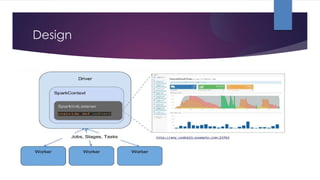
Design
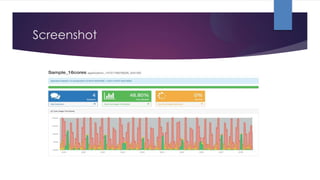
Screenshot
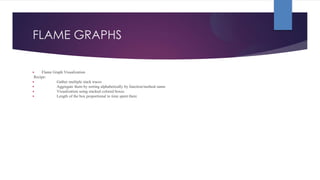
FLAME GRAPHS
▶ Flame Graph Visualization
Recipe:
▶ Gather multiple stack traces
▶ Aggregate them by sorting alphabetically by function/method name
▶ Visualization using stacked colored boxes
▶ Length of the box proportional to time spent there
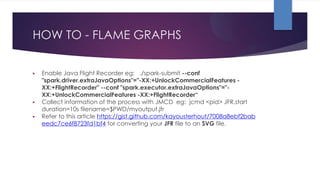
HOW TO - FLAME GRAPHS
▶ Enable Java Flight Recorder eg: ./spark-submit --conf
"spark.driver.extraJavaOptions"="-XX:+UnlockCommercialFeatures -
XX:+FlightRecorder" --conf "spark.executor.extraJavaOptions"="-
XX:+UnlockCommercialFeatures -XX:+FlightRecorder“
▶ Collect information of the process with JMCD eg: jcmd <pid> JFR.start
duration=10s filename=$PWD/myoutput.jfr
▶ Refer to this article https://gist.github.com/kayousterhout/7008a8ebf2bab
eedc7ce6f8723fd1bf4 for converting your JFR file to an SVG file.
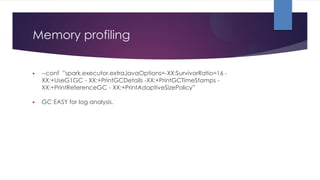
Memory profiling
▶ --conf ”spark.executor.extraJavaOptions=-XX:SurvivorRatio=16 -
XX:+UseG1GC - XX:+PrintGCDetails -XX:+PrintGCTimeStamps -
XX:+PrintReferenceGC - XX:+PrintAdaptiveSizePolicy”
▶ GC EASY for log analysis.
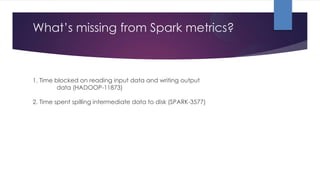
What’s missing from Spark metrics?
1. Time blocked on reading input data and writing output
data (HADOOP-11873)
2. Time spent spilling intermediate data to disk (SPARK-3577)
Questions ??

Monitoring and tuning Spark applications

  • 1.
    Performance Monitoring in SparkApplications ROHITASH JAIN, SOFTWARE ENGINEER, SIGMOID
  • 2.
  • 3.
  • 6.
  • 7.
    Bottleneck factors ▶ CPU ▶DISK ▶ Memory ▶ Network
  • 8.
  • 9.
  • 10.
  • 11.
    PROFILING TOOLS ▶ SPARKLINT ▶FLAME GRAPHS ▶ GC LOGS from JVM
  • 12.
    ∙Live view ofbatch & streaming application stats or Event by event analysis of historical event logs ∙Stats and graphs for: ∙Idle time ∙Core usage ∙Task locality SPARKLINT
  • 13.
  • 14.
  • 16.
    FLAME GRAPHS ▶ FlameGraph Visualization Recipe: ▶ Gather multiple stack traces ▶ Aggregate them by sorting alphabetically by function/method name ▶ Visualization using stacked colored boxes ▶ Length of the box proportional to time spent there
  • 17.
    HOW TO -FLAME GRAPHS ▶ Enable Java Flight Recorder eg: ./spark-submit --conf "spark.driver.extraJavaOptions"="-XX:+UnlockCommercialFeatures - XX:+FlightRecorder" --conf "spark.executor.extraJavaOptions"="- XX:+UnlockCommercialFeatures -XX:+FlightRecorder“ ▶ Collect information of the process with JMCD eg: jcmd <pid> JFR.start duration=10s filename=$PWD/myoutput.jfr ▶ Refer to this article https://gist.github.com/kayousterhout/7008a8ebf2bab eedc7ce6f8723fd1bf4 for converting your JFR file to an SVG file.
  • 18.
    Memory profiling ▶ --conf”spark.executor.extraJavaOptions=-XX:SurvivorRatio=16 - XX:+UseG1GC - XX:+PrintGCDetails -XX:+PrintGCTimeStamps - XX:+PrintReferenceGC - XX:+PrintAdaptiveSizePolicy” ▶ GC EASY for log analysis.
  • 19.
    What’s missing fromSpark metrics? 1. Time blocked on reading input data and writing output data (HADOOP-11873) 2. Time spent spilling intermediate data to disk (SPARK-3577)
  • 20.