Tokutek, Inc.
57 Bedford Road, Suite 101
Lexington, MA 02420
Performance Database Company
www.tokutek.com
Get More Out of MongoDB
with TokuMX
Presented by Tim Callaghan
VP/Engineering, Tokutek
tim@tokutek.com; @tmcallaghan
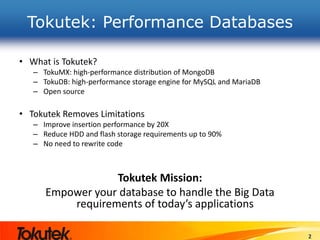
Tokutek: Performance Databases
• What is Tokutek?
– TokuMX: high-performance distribution of MongoDB
– TokuDB: high-performance storage engine for MySQL and MariaDB
– Open source
• Tokutek Removes Limitations
– Improve insertion performance by 20X
– Reduce HDD and flash storage requirements up to 90%
– No need to rewrite code
Tokutek Mission:
Empower your database to handle the Big Data
requirements of today’s applications
2
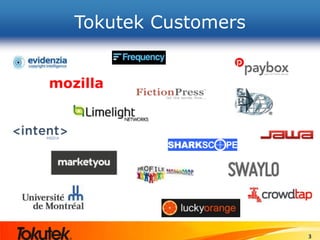
Tokutek Customers
3
Webinar Housekeeping
• This webinar is being recorded
• A link to the recording and to a copy of the slides
will be posted on tokutek.com
• We welcome questions: enter questions into the
chat box and we will respond at the end of the
presentation
• Think of something later?
– Email us at contact@tokutek.com
– Visit tokutek.com/contact
4
Agenda
• [Brief] MongoDB overview
• What is TokuMX?
• Getting started with TokuMX
• Maximizing performance
• Configuring compression
• Transactions
• Support
• Q+A
MongoDB Overview
From a MySQL perspective
• Ease of use
– Get started with a 1 binary and 1 folder (storage)
– Very few server knobs
• Schema-free
– No downtime for column changes or index creation
– Rapid prototyping and continuous deployment
• Better replication
– Automatic promotion in failure scenarios
– No statement-based vs. row-based choices
– No divergence of secondaries
• Sharding is “in-the-box”
– Horizontal scale-out without 3rd party tools
What is TokuMX?
• TokuMX = MongoDB with improved storage
• Drop in replacement for MongoDB v2.4 applications
– Including replication and sharding
– Same data model
– Same query language
– Drivers just work
– But, no Full Text or Geospatial indexing
• Open Source
– http://github.com/Tokutek/mongo
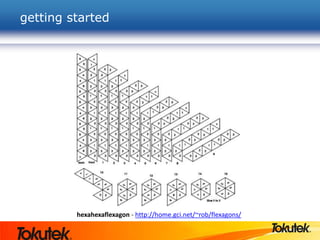
getting started
hexahexaflexagon - http://home.gci.net/~rob/flexagons/
installation
MongoDB
$ tar xzvf mongodb-linux-x86_64-2.4.9.tgz
$ ls */bin
[abbreviated]
mongo
mongod
mongodump
mongoexport
mongoimport
mongorestore
mongos
mongostat
TokuMX
$ tar xzvf mongodb-linux-x86_64-2.4.9.tgz
$ ls */bin
[abbreviated]
mongo
mongo2toku
mongod
mongodump
mongoexport
mongoimport
mongorestore
mongos
mongostat
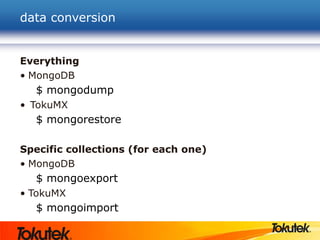
data conversion
Everything
• MongoDB
$ mongodump
• TokuMX
$ mongorestore
Specific collections (for each one)
• MongoDB
$ mongoexport
• TokuMX
$ mongoimport
mongo2toku?
TokuMX
$ tar xzvf tokumx-1.3.3-linux-x86_64.tgz
$ ls */bin
[abbreviated]
mongo
mongo2toku
mongod
mongodump
mongoexport
mongoimport
mongorestore
mongos
mongostat
• mongo2toku is a utility that
enables a TokuMX server to
process replication traffic
from a MongoDB master.
• The oplog format of
MongoDB is incompatible
with TokuMX, so they
cannot co-exist in a replica
set.
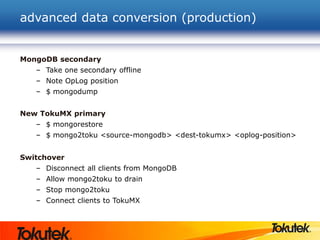
advanced data conversion (production)
MongoDB secondary
– Take one secondary offline
– Note OpLog position
– $ mongodump
New TokuMX primary
– $ mongorestore
– $ mongo2toku <source-mongodb> <dest-tokumx> <oplog-position>
Switchover
– Disconnect all clients from MongoDB
– Allow mongo2toku to drain
– Stop mongo2toku
– Connect clients to TokuMX
mongo2toku and evaluations
• mongo2toku is an excellent way to try out TokuMX
– How much does your data compress?
– What is the query performance?
• More details in our users guide available at
http://www.tokutek.com/resources/product-docs
memory usage
• MongoDB uses memory-mapped files
– mongod will attempt to use all available RAM
– Operating system determines what stays cached
– Server performance suffers if running other memory
hungry applications running on the server
• TokuMX manages a fixed-size cache
– mongod constrained to this value
– We determine what stays cached
– Easily run several TokuMX instances on a single server
without memory contention
TokuMX and IO
• TokuMX supports two types of IO
– Direct IO
– Writes go straight to disk
– Declare larger cache size, better cache hit ratios
– 75% of free RAM is a good starting point
– Buffered IO
– Writes are “buffered” by operating system
– Declare smaller cache size, some cache hits will come from
OS buffers
– OS buffers contain compressed data, more data can fit
• I recommend Direct IO
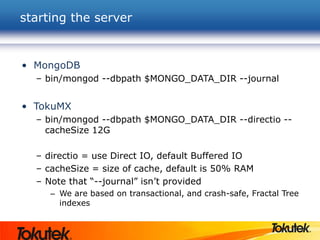
starting the server
• MongoDB
– bin/mongod --dbpath $MONGO_DATA_DIR --journal
• TokuMX
– bin/mongod --dbpath $MONGO_DATA_DIR --directio --
cacheSize 12G
– directio = use Direct IO, default Buffered IO
– cacheSize = size of cache, default is 50% RAM
– Note that “--journal” isn’t provided
– We are based on transactional, and crash-safe, Fractal Tree
indexes
maximizing performance
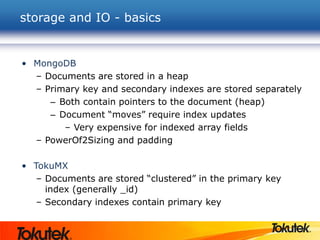
storage and IO - basics
• MongoDB
– Documents are stored in a heap
– Primary key and secondary indexes are stored separately
– Both contain pointers to the document (heap)
– Document “moves” require index updates
– Very expensive for indexed array fields
– PowerOf2Sizing and padding
• TokuMX
– Documents are stored “clustered” in the primary key
index (generally _id)
– Secondary indexes contain primary key
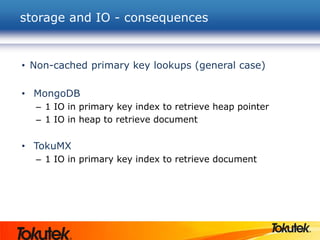
storage and IO - consequences
• Non-cached primary key lookups (general case)
• MongoDB
– 1 IO in primary key index to retrieve heap pointer
– 1 IO in heap to retrieve document
• TokuMX
– 1 IO in primary key index to retrieve document
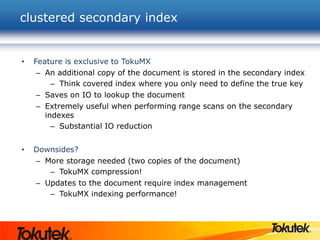
clustered secondary index
• Feature is exclusive to TokuMX
– An additional copy of the document is stored in the secondary index
– Think covered index where you only need to define the true key
– Saves on IO to lookup the document
– Extremely useful when performing range scans on the secondary
indexes
– Substantial IO reduction
• Downsides?
– More storage needed (two copies of the document)
– TokuMX compression!
– Updates to the document require index management
– TokuMX indexing performance!
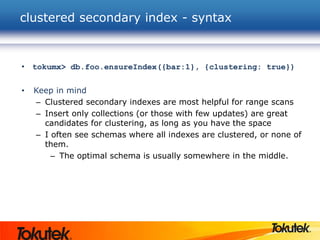
clustered secondary index - syntax
• tokumx> db.foo.ensureIndex({bar:1}, {clustering: true})
• Keep in mind
– Clustered secondary indexes are most helpful for range scans
– Insert only collections (or those with few updates) are great
candidates for clustering, as long as you have the space
– I often see schemas where all indexes are clustered, or none of
them.
– The optimal schema is usually somewhere in the middle.
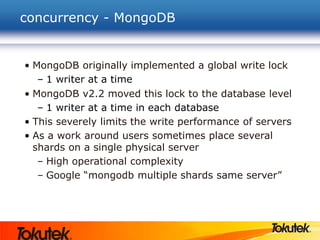
concurrency - MongoDB
• MongoDB originally implemented a global write lock
– 1 writer at a time
• MongoDB v2.2 moved this lock to the database level
– 1 writer at a time in each database
• This severely limits the write performance of servers
• As a work around users sometimes place several
shards on a single physical server
– High operational complexity
– Google “mongodb multiple shards same server”
23
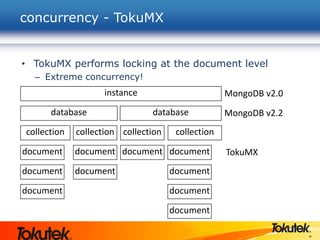
• TokuMX performs locking at the document level
– Extreme concurrency!
concurrency - TokuMX
instance
database database
collection collection collection collection
document
document
document
document
document
document document
document
document
document
MongoDB v2.2
MongoDB v2.0
TokuMX
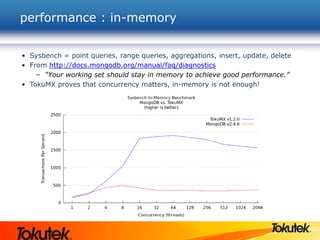
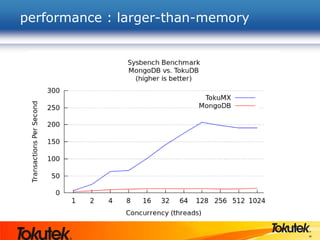
performance : in-memory
• Sysbench = point queries, range queries, aggregations, insert, update, delete
• From http://docs.mongodb.org/manual/faq/diagnostics
– “Your working set should stay in memory to achieve good performance.”
• TokuMX proves that concurrency matters, in-memory is not enough!
25
performance : larger-than-memory
26
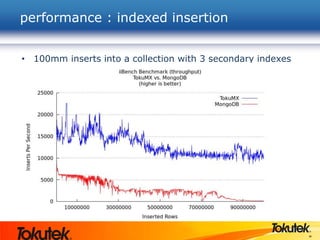
• 100mm inserts into a collection with 3 secondary indexes
performance : indexed insertion
27
performance : your application
How fast will your application go?
replication
• MongoDB did a great job including support for replication
– read scaling to secondary servers
– high availability (failover)
– add/remove servers without downtime
• However, the MongoDB secondary servers do just as much work
as the primary with respect to writes (insert, update, delete)
– Limits how much of secondary is available for read-scaling
• TokuMX replication is nearly effortless on secondaries
– Leverages the message based architecture of Fractal Tree
indexes
– Nearly 100% of secondaries available for read-scaling
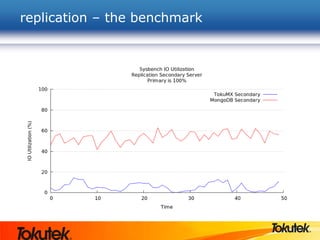
replication – the benchmark
sharding
• MongoDB also did a great job including support for
horizontal scaling via sharding
– many use-cases can go faster with multiple clusters
• However...
– Shard migration can be painful and disruptive
– Lots of querying, deleting, inserting
– Each shard is only as performant as MongoDB allows
• TokuMX sharding improves this
– Clustered index on shard key improves range scans and
migration performance
– Better per-server performance
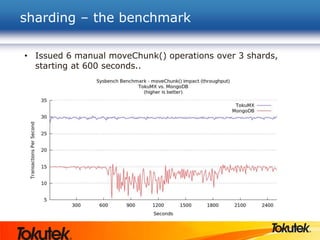
sharding – the benchmark
• Issued 6 manual moveChunk() operations over 3 shards,
starting at 600 seconds..
“partitioned” collections?
• New in TokuMX v1.5.0!
• Similar to partitioned tables in MySQL
• Allows for a collection to be broken up into smaller
collections
• Appears to the user as a single collection
• Partition is defined on PK
• Unsharded environments only (for now)
• Queries and insert/update/delete just work
• Why?
• Lightweight removal of time-series or temporal data
• Partition by week, month, other
• Great blog at http://bit.ly/1rkEoyk
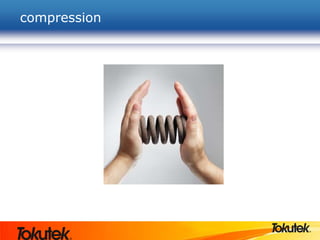
compression
MongoDB disk space needs
• MongoDB databases often grow quite large
– it easily allows users to...
– store large documents
– keep them around for a long time
– de-normalized data needs more space
• Operational challenges
– Big disks are cheap, but not fast
– Cloud storage is even slower
– Fast disks (flash) are VERY expensive
– Backups are large as well
• Unfortunately, MongoDB does not offer compression
TokuMX needs less disk space
• TokuMX offers built-in compression
– More efficient use of space, even without
compression
– 4 compression algorithms
– quicklz, zlib, lzma, (none)
– Everything is compressed
– Field names and values
– Secondary indexes too
36
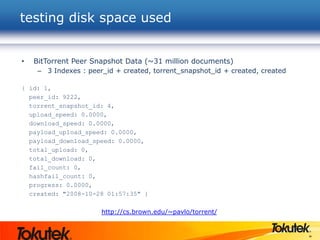
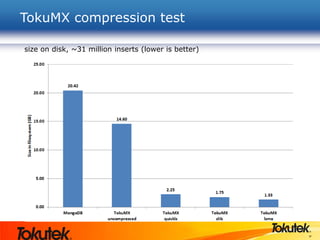
• BitTorrent Peer Snapshot Data (~31 million documents)
– 3 Indexes : peer_id + created, torrent_snapshot_id + created, created
{ id: 1,
peer_id: 9222,
torrent_snapshot_id: 4,
upload_speed: 0.0000,
download_speed: 0.0000,
payload_upload_speed: 0.0000,
payload_download_speed: 0.0000,
total_upload: 0,
total_download: 0,
fail_count: 0,
hashfail_count: 0,
progress: 0.0000,
created: "2008-10-28 01:57:35" }
http://cs.brown.edu/~pavlo/torrent/
testing disk space used
37
TokuMX compression test
size on disk, ~31 million inserts (lower is better)
38
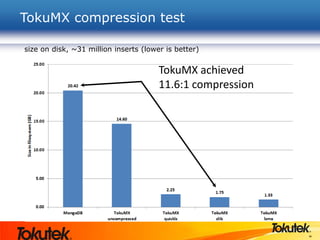
TokuMX compression test
size on disk, ~31 million inserts (lower is better)
TokuMX achieved
11.6:1 compression
39
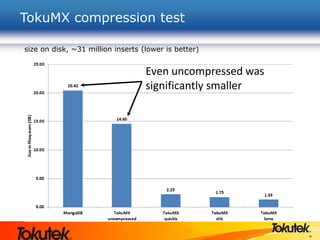
TokuMX compression test
size on disk, ~31 million inserts (lower is better)
Even uncompressed was
significantly smaller
40
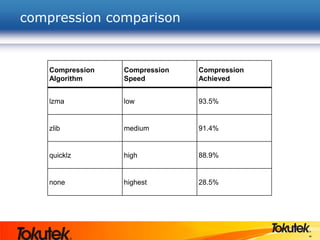
compression comparison
Compression
Algorithm
Compression
Speed
Compression
Achieved
lzma low 93.5%
zlib medium 91.4%
quicklz high 88.9%
none highest 28.5%
41
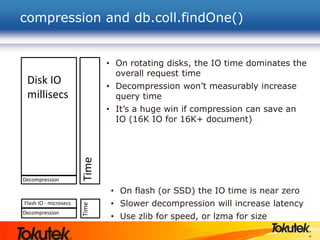
compression and db.coll.findOne()
Disk IO
millisecs
Decompression
Flash IO - microsecs
Decompression
TimeTime
• On rotating disks, the IO time dominates the
overall request time
• Decompression won’t measurably increase
query time
• It’s a huge win if compression can save an
IO (16K IO for 16K+ document)
• On flash (or SSD) the IO time is near zero
• Slower decompression will increase latency
• Use zlib for speed, or lzma for size
transactions
transactions in MongoDB
• MongoDB does not support “transactions”
• Each operation is visible to everyone
• There are work-arounds, Google “mongodb transactions”
– http://docs.mongodb.org/manual/tutorial/perform-two-phase-
commits/
This document provides a pattern for doing multi-document
updates or “transactions” using a two-phase commit approach for
writing data to multiple documents. Additionally, you can extend
this process to provide a rollback like functionality.
(the document is 8 web pages long)
• MongoDB does not support multi-version concurrency control (MVCC)
• Readers do not get a consistent view of the data, as they can be
interrupted by writers
• People try, Google “mongodb mvcc”
44
• ACID
– TokuMX offers multi-statement transactions in unsharded
environments
– Locking is performed at the document level
– No changes are visible to other sessions until commit
– Rollback is offered as well
– Crash recovery of all committed transactions
• MVCC
– TokuMX offers true read consistency
• Reads are consistent as of the operation start
transactions in TokuMX
45
• Example transaction
–> db.runCommand({“beginTransaction”})
–> db.foo.insert({name : “George”})
–> db.foo.insert({name : “Larry”})
–> db.foo.insert({name : “Frank”})
–> db.runCommand(“commitTransaction”)
– None of the above inserts were visible to other connections until the
“commitTransaction” was executed.
– db.runCommand(“rollbackTransaction”) would have removed the
inserts
• For more information
http://www.tokutek.com/2013/04/mongodb-transactions-yes/
http://www.tokutek.com/2013/04/mongodb-multi-statement-transactions-yes-we-can/
TokuMX transaction syntax
support
47
• TokuMX is offered in 2 editions
• Community
– Community support (Google Groups “tokumx-user”)
• Enterprise subscription
– Commercial support
– Wouldn’t you rather be developing another
application?
– Extra features
– Hot backup, more on the way
– Access to TokuMX experts
– Input to the product roadmap
supporting TokuMX
Any Questions?
Thank you for attending! Enter
questions into the chat box
• Download TokuDB: www.tokutek.com/downloads
• Contact us: contact@tokutek.com
Join the Conversation
48

Get More Out of MongoDB with TokuMX

  • 1.
    Tokutek, Inc. 57 BedfordRoad, Suite 101 Lexington, MA 02420 Performance Database Company www.tokutek.com Get More Out of MongoDB with TokuMX Presented by Tim Callaghan VP/Engineering, Tokutek tim@tokutek.com; @tmcallaghan
  • 2.
    Tokutek: Performance Databases •What is Tokutek? – TokuMX: high-performance distribution of MongoDB – TokuDB: high-performance storage engine for MySQL and MariaDB – Open source • Tokutek Removes Limitations – Improve insertion performance by 20X – Reduce HDD and flash storage requirements up to 90% – No need to rewrite code Tokutek Mission: Empower your database to handle the Big Data requirements of today’s applications 2
  • 3.
  • 4.
    Webinar Housekeeping • Thiswebinar is being recorded • A link to the recording and to a copy of the slides will be posted on tokutek.com • We welcome questions: enter questions into the chat box and we will respond at the end of the presentation • Think of something later? – Email us at contact@tokutek.com – Visit tokutek.com/contact 4
  • 5.
    Agenda • [Brief] MongoDBoverview • What is TokuMX? • Getting started with TokuMX • Maximizing performance • Configuring compression • Transactions • Support • Q+A
  • 6.
    MongoDB Overview From aMySQL perspective • Ease of use – Get started with a 1 binary and 1 folder (storage) – Very few server knobs • Schema-free – No downtime for column changes or index creation – Rapid prototyping and continuous deployment • Better replication – Automatic promotion in failure scenarios – No statement-based vs. row-based choices – No divergence of secondaries • Sharding is “in-the-box” – Horizontal scale-out without 3rd party tools
  • 7.
    What is TokuMX? •TokuMX = MongoDB with improved storage • Drop in replacement for MongoDB v2.4 applications – Including replication and sharding – Same data model – Same query language – Drivers just work – But, no Full Text or Geospatial indexing • Open Source – http://github.com/Tokutek/mongo
  • 8.
    getting started hexahexaflexagon -http://home.gci.net/~rob/flexagons/
  • 9.
    installation MongoDB $ tar xzvfmongodb-linux-x86_64-2.4.9.tgz $ ls */bin [abbreviated] mongo mongod mongodump mongoexport mongoimport mongorestore mongos mongostat TokuMX $ tar xzvf mongodb-linux-x86_64-2.4.9.tgz $ ls */bin [abbreviated] mongo mongo2toku mongod mongodump mongoexport mongoimport mongorestore mongos mongostat
  • 10.
    data conversion Everything • MongoDB $mongodump • TokuMX $ mongorestore Specific collections (for each one) • MongoDB $ mongoexport • TokuMX $ mongoimport
  • 11.
    mongo2toku? TokuMX $ tar xzvftokumx-1.3.3-linux-x86_64.tgz $ ls */bin [abbreviated] mongo mongo2toku mongod mongodump mongoexport mongoimport mongorestore mongos mongostat • mongo2toku is a utility that enables a TokuMX server to process replication traffic from a MongoDB master. • The oplog format of MongoDB is incompatible with TokuMX, so they cannot co-exist in a replica set.
  • 12.
    advanced data conversion(production) MongoDB secondary – Take one secondary offline – Note OpLog position – $ mongodump New TokuMX primary – $ mongorestore – $ mongo2toku <source-mongodb> <dest-tokumx> <oplog-position> Switchover – Disconnect all clients from MongoDB – Allow mongo2toku to drain – Stop mongo2toku – Connect clients to TokuMX
  • 13.
    mongo2toku and evaluations •mongo2toku is an excellent way to try out TokuMX – How much does your data compress? – What is the query performance? • More details in our users guide available at http://www.tokutek.com/resources/product-docs
  • 14.
    memory usage • MongoDBuses memory-mapped files – mongod will attempt to use all available RAM – Operating system determines what stays cached – Server performance suffers if running other memory hungry applications running on the server • TokuMX manages a fixed-size cache – mongod constrained to this value – We determine what stays cached – Easily run several TokuMX instances on a single server without memory contention
  • 15.
    TokuMX and IO •TokuMX supports two types of IO – Direct IO – Writes go straight to disk – Declare larger cache size, better cache hit ratios – 75% of free RAM is a good starting point – Buffered IO – Writes are “buffered” by operating system – Declare smaller cache size, some cache hits will come from OS buffers – OS buffers contain compressed data, more data can fit • I recommend Direct IO
  • 16.
    starting the server •MongoDB – bin/mongod --dbpath $MONGO_DATA_DIR --journal • TokuMX – bin/mongod --dbpath $MONGO_DATA_DIR --directio -- cacheSize 12G – directio = use Direct IO, default Buffered IO – cacheSize = size of cache, default is 50% RAM – Note that “--journal” isn’t provided – We are based on transactional, and crash-safe, Fractal Tree indexes
  • 17.
  • 18.
    storage and IO- basics • MongoDB – Documents are stored in a heap – Primary key and secondary indexes are stored separately – Both contain pointers to the document (heap) – Document “moves” require index updates – Very expensive for indexed array fields – PowerOf2Sizing and padding • TokuMX – Documents are stored “clustered” in the primary key index (generally _id) – Secondary indexes contain primary key
  • 19.
    storage and IO- consequences • Non-cached primary key lookups (general case) • MongoDB – 1 IO in primary key index to retrieve heap pointer – 1 IO in heap to retrieve document • TokuMX – 1 IO in primary key index to retrieve document
  • 20.
    clustered secondary index •Feature is exclusive to TokuMX – An additional copy of the document is stored in the secondary index – Think covered index where you only need to define the true key – Saves on IO to lookup the document – Extremely useful when performing range scans on the secondary indexes – Substantial IO reduction • Downsides? – More storage needed (two copies of the document) – TokuMX compression! – Updates to the document require index management – TokuMX indexing performance!
  • 21.
    clustered secondary index- syntax • tokumx> db.foo.ensureIndex({bar:1}, {clustering: true}) • Keep in mind – Clustered secondary indexes are most helpful for range scans – Insert only collections (or those with few updates) are great candidates for clustering, as long as you have the space – I often see schemas where all indexes are clustered, or none of them. – The optimal schema is usually somewhere in the middle.
  • 22.
    concurrency - MongoDB •MongoDB originally implemented a global write lock – 1 writer at a time • MongoDB v2.2 moved this lock to the database level – 1 writer at a time in each database • This severely limits the write performance of servers • As a work around users sometimes place several shards on a single physical server – High operational complexity – Google “mongodb multiple shards same server”
  • 23.
    23 • TokuMX performslocking at the document level – Extreme concurrency! concurrency - TokuMX instance database database collection collection collection collection document document document document document document document document document document MongoDB v2.2 MongoDB v2.0 TokuMX
  • 24.
    performance : in-memory •Sysbench = point queries, range queries, aggregations, insert, update, delete • From http://docs.mongodb.org/manual/faq/diagnostics – “Your working set should stay in memory to achieve good performance.” • TokuMX proves that concurrency matters, in-memory is not enough!
  • 25.
  • 26.
    26 • 100mm insertsinto a collection with 3 secondary indexes performance : indexed insertion
  • 27.
    27 performance : yourapplication How fast will your application go?
  • 28.
    replication • MongoDB dida great job including support for replication – read scaling to secondary servers – high availability (failover) – add/remove servers without downtime • However, the MongoDB secondary servers do just as much work as the primary with respect to writes (insert, update, delete) – Limits how much of secondary is available for read-scaling • TokuMX replication is nearly effortless on secondaries – Leverages the message based architecture of Fractal Tree indexes – Nearly 100% of secondaries available for read-scaling
  • 29.
  • 30.
    sharding • MongoDB alsodid a great job including support for horizontal scaling via sharding – many use-cases can go faster with multiple clusters • However... – Shard migration can be painful and disruptive – Lots of querying, deleting, inserting – Each shard is only as performant as MongoDB allows • TokuMX sharding improves this – Clustered index on shard key improves range scans and migration performance – Better per-server performance
  • 31.
    sharding – thebenchmark • Issued 6 manual moveChunk() operations over 3 shards, starting at 600 seconds..
  • 32.
    “partitioned” collections? • Newin TokuMX v1.5.0! • Similar to partitioned tables in MySQL • Allows for a collection to be broken up into smaller collections • Appears to the user as a single collection • Partition is defined on PK • Unsharded environments only (for now) • Queries and insert/update/delete just work • Why? • Lightweight removal of time-series or temporal data • Partition by week, month, other • Great blog at http://bit.ly/1rkEoyk
  • 33.
  • 34.
    MongoDB disk spaceneeds • MongoDB databases often grow quite large – it easily allows users to... – store large documents – keep them around for a long time – de-normalized data needs more space • Operational challenges – Big disks are cheap, but not fast – Cloud storage is even slower – Fast disks (flash) are VERY expensive – Backups are large as well • Unfortunately, MongoDB does not offer compression
  • 35.
    TokuMX needs lessdisk space • TokuMX offers built-in compression – More efficient use of space, even without compression – 4 compression algorithms – quicklz, zlib, lzma, (none) – Everything is compressed – Field names and values – Secondary indexes too
  • 36.
    36 • BitTorrent PeerSnapshot Data (~31 million documents) – 3 Indexes : peer_id + created, torrent_snapshot_id + created, created { id: 1, peer_id: 9222, torrent_snapshot_id: 4, upload_speed: 0.0000, download_speed: 0.0000, payload_upload_speed: 0.0000, payload_download_speed: 0.0000, total_upload: 0, total_download: 0, fail_count: 0, hashfail_count: 0, progress: 0.0000, created: "2008-10-28 01:57:35" } http://cs.brown.edu/~pavlo/torrent/ testing disk space used
  • 37.
    37 TokuMX compression test sizeon disk, ~31 million inserts (lower is better)
  • 38.
    38 TokuMX compression test sizeon disk, ~31 million inserts (lower is better) TokuMX achieved 11.6:1 compression
  • 39.
    39 TokuMX compression test sizeon disk, ~31 million inserts (lower is better) Even uncompressed was significantly smaller
  • 40.
  • 41.
    41 compression and db.coll.findOne() DiskIO millisecs Decompression Flash IO - microsecs Decompression TimeTime • On rotating disks, the IO time dominates the overall request time • Decompression won’t measurably increase query time • It’s a huge win if compression can save an IO (16K IO for 16K+ document) • On flash (or SSD) the IO time is near zero • Slower decompression will increase latency • Use zlib for speed, or lzma for size
  • 42.
  • 43.
    transactions in MongoDB •MongoDB does not support “transactions” • Each operation is visible to everyone • There are work-arounds, Google “mongodb transactions” – http://docs.mongodb.org/manual/tutorial/perform-two-phase- commits/ This document provides a pattern for doing multi-document updates or “transactions” using a two-phase commit approach for writing data to multiple documents. Additionally, you can extend this process to provide a rollback like functionality. (the document is 8 web pages long) • MongoDB does not support multi-version concurrency control (MVCC) • Readers do not get a consistent view of the data, as they can be interrupted by writers • People try, Google “mongodb mvcc”
  • 44.
    44 • ACID – TokuMXoffers multi-statement transactions in unsharded environments – Locking is performed at the document level – No changes are visible to other sessions until commit – Rollback is offered as well – Crash recovery of all committed transactions • MVCC – TokuMX offers true read consistency • Reads are consistent as of the operation start transactions in TokuMX
  • 45.
    45 • Example transaction –>db.runCommand({“beginTransaction”}) –> db.foo.insert({name : “George”}) –> db.foo.insert({name : “Larry”}) –> db.foo.insert({name : “Frank”}) –> db.runCommand(“commitTransaction”) – None of the above inserts were visible to other connections until the “commitTransaction” was executed. – db.runCommand(“rollbackTransaction”) would have removed the inserts • For more information http://www.tokutek.com/2013/04/mongodb-transactions-yes/ http://www.tokutek.com/2013/04/mongodb-multi-statement-transactions-yes-we-can/ TokuMX transaction syntax
  • 46.
  • 47.
    47 • TokuMX isoffered in 2 editions • Community – Community support (Google Groups “tokumx-user”) • Enterprise subscription – Commercial support – Wouldn’t you rather be developing another application? – Extra features – Hot backup, more on the way – Access to TokuMX experts – Input to the product roadmap supporting TokuMX
  • 48.
    Any Questions? Thank youfor attending! Enter questions into the chat box • Download TokuDB: www.tokutek.com/downloads • Contact us: contact@tokutek.com Join the Conversation 48