SME network facilitator
Module 3: Moderating, visualising, problem-solving
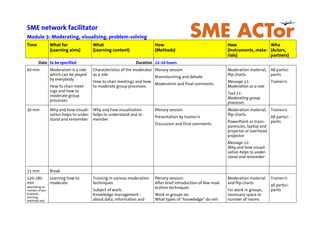
Time What for
(Learning aims)
What
(Learning content)
How
(Methods)
How
(Instruments, mate-
rials)
Who
(Actors,
partners)
Date to be specified Duration 12-16 hours
60 min Moderation is a role
which can be played
by everybody.
How to chair meet-
ings and how to
moderate group
processes
Characteristics of the moderator
as a role
How to chair meetings and how
to moderate group processes
Plenary session
Brainstorming and debate
Moderation and final comments
Moderation material,
flip charts
Message 11:
Moderation as a role
Tool 11:
Moderating group
processes
All partici-
pants
Trainer/s
30 min Why and how visuali-
sation helps to under-
stand and remember
Why and how visualisation
helps to understand and re-
member
Plenary session
Presentation by trainer/s
Discussion and final comments
Moderation material,
flip charts
PowerPoint or trans-
parencies, laptop and
projector or overhead
projector
Message 12:
Why and how visuali-
sation helps to under-
stand and remember
Trainer/s
All partici-
pants
15 min Break
120-180
min
depending on
number of par-
ticipants,
learning
methods and
Learning how to
moderate
Training in various moderation
techniques
Subject of work:
Knowledge management -
about data, information and
Plenary session:
After brief introduction of few mod-
eration techniques
Work in groups on:
What types of “knowledge” do net-
Moderation material
and flip charts
For work in groups,
necessary space or
number of rooms
Trainer/s
all partici-
pants
SME network facilitator
Module 3: Moderating, visualising, problem-solving
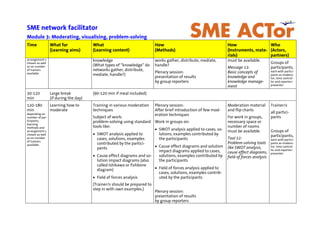
Time What for
(Learning aims)
What
(Learning content)
How
(Methods)
How
(Instruments, mate-
rials)
Who
(Actors,
partners)
arrangement s
chosen as well
as on number
of trainers
available
knowledge
(What types of “knowledge” do
networks gather, distribute,
mediate, handle?)
works gather, distribute, mediate,
handle?
Plenary session:
presentation of results
by group reporters
must be available.
Message 13:
Basic concepts of
knowledge and
knowledge manage-
ment
Groups of
participants,
each with partici-
pants as modera-
tor, time control-
ler and reporter/
presenter
30-120
min
Large break
(if during the day)
(90-120 min if meal included)
120-180
min
depending on
number of par-
ticipants,
learning
methods and
arrangement s
chosen as well
as on number
of trainers
available
Learning how to
moderate
Training in various moderation
techniques
Subject of work:
problem-solving using standard
tools like:
• SWOT analysis applied to
cases, solutions, examples
contributed by the partici-
pants
• Cause effect diagrams and so-
lution impact diagrams (also
called Ishikawa or fishbone
diagram)
• Field of forces analysis
(Trainer/s should be prepared to
step in with own examples.)
Plenary session:
After brief introduction of few mod-
eration techniques
Work in groups on:
• SWOT analysis applied to cases, so-
lutions, examples contributed by
the participants
• Cause effect diagrams and solution
impact diagrams applied to cases,
solutions, examples contributed by
the participants
• Field of forces analysis applied to
cases, solutions, examples contrib-
uted by the participants
Plenary session:
presentation of results
by group reporters
Moderation material
and flip charts
For work in groups,
necessary space or
number of rooms
must be available.
Tool 12:
Problem-solving tools
like SWOT analysis,
cause effect diagrams,
field of forces analysis
Trainer/s
all partici-
pants
Groups of
participants,
each with partici-
pants as modera-
tor, time control-
ler and reporter/
presenter
SME network facilitator
Module 3: Moderating, visualising, problem-solving
Time What for
(Learning aims)
What
(Learning content)
How
(Methods)
How
(Instruments, mate-
rials)
Who
(Actors,
partners)
15 min Break
120-180
min
depending on
number of par-
ticipants,
learning
methods and
arrangement s
chosen as well
as on number
of trainers
available
Learning how to
moderate
Training in various moderation
techniques
Subject of work:
Case studies (context analysis
report on participants’ regions,
clusters, networks)
Plenary session:
After brief introduction of few mod-
eration techniques
Work in groups on:
Development of case study designs for
the participants’ regions, clusters,
networks, etc.
Plenary session:
presentation of results
by group reporters
Moderation material
and flip charts
For work in groups,
necessary space or
number of rooms
must be available.
Tool 13:
Case studies
Trainer/s
all partici-
pants
Groups of
participants,
each with partici-
pants as modera-
tor, time control-
ler and reporter/
presenter
30-120
min
Large break
(if during the day)
(90-120 min if meal included)
120-180
min
depending on
number of par-
ticipants,
learning
methods and
arrangement s
chosen as well
as on number
of trainers
available
Learning how to
moderate
Training in various moderation
techniques
Subjects of work:
• Semi-standardised
in-depth interviews with rele-
vant representatives of re-
gional network or cluster ex-
perts
• Focus groups
Plenary session:
After brief introduction of few mod-
eration techniques
Work in groups on:
• Development of semi-standardised
in-depth interview guide with rele-
vant representatives of regional
network or cluster experts
• Development of focus group (or ex-
pert panel) approach for specific
context suggested by participants
Plenary session:
Moderation material
and flip charts
For work in groups,
necessary space or
number of rooms
must be available.
Tool 14:
Semi-standardised
in-depth interviews
with relevant repre-
sentatives of regional
network or cluster ex-
perts
Trainer/s
all partici-
pants
Groups of
participants,
each with partici-
pants as modera-
tor, time control-
ler and reporter/
presenter
SME network facilitator
Module 3: Moderating, visualising, problem-solving
Time What for
(Learning aims)
What
(Learning content)
How
(Methods)
How
(Instruments, mate-
rials)
Who
(Actors,
partners)
presentation of results
by group reporters
Tool 15:
Focus groups
30-45 min Learning about per-
sonal shortcomings or
practice which need
change or improve-
ment
(own judgement)
During the common learning
process, participants take note
of perceived personal improve-
ment possibilities and decide on
which to tackle first.
In this session, they also briefly
present experiences made with
different ways of tackling prob-
lems or situations.
Plenary session
Contract with myself Tool 2:
Form “Contract with
myself”
All partici-
pants
15 min Break
60-120
min
depending on
number of
participants
Learning from own
projects which allow
to practice things
learned in the SME
ACTor training
Participants present and discuss
progress reports on own pro-
jects in their organisations of
origin (running or to be initial-
ised) which can constitute a
meaningful and useful context
for applying things learned.
Plenary session or first small groups
and then plenary session
Participants present projects (one per
participant) that are noted in a poster
(matrix) which stays on a wall of the
plenary room for the time of the train-
ing.
Presentations are discussed in terms
of content and modes of presentation.
PowerPoint presenta-
tions
Moderation tools and
flip charts
Tool 3:
To-do form
Participants
Trainer
SME network facilitator
Module 3: Moderating, visualising, problem-solving
Time What for
(Learning aims)
What
(Learning content)
How
(Methods)
How
(Instruments, mate-
rials)
Who
(Actors,
partners)
30 min How to reflect on
successful learning
Analysing and learning how to
analyse learning processes
This time:
using learner satisfaction ques-
tionnaires
Plenary session
Learner satisfaction analysis using a
basic questionnaire (filling in and
evaluation)
Critical analysis (and self-evaluation)
of all structural aspects of the learn-
ing arrangement (context conditions,
aims, contents, methods, instruments,
materials, roles) and its implementa-
tion
Moderation material,
flip charts
Tool 16:
Learner satisfaction
analysis
Trainer/s

Module 3: Moderating, visualising, problem-solving

  • 1.
    SME network facilitator Module3: Moderating, visualising, problem-solving Time What for (Learning aims) What (Learning content) How (Methods) How (Instruments, mate- rials) Who (Actors, partners) Date to be specified Duration 12-16 hours 60 min Moderation is a role which can be played by everybody. How to chair meet- ings and how to moderate group processes Characteristics of the moderator as a role How to chair meetings and how to moderate group processes Plenary session Brainstorming and debate Moderation and final comments Moderation material, flip charts Message 11: Moderation as a role Tool 11: Moderating group processes All partici- pants Trainer/s 30 min Why and how visuali- sation helps to under- stand and remember Why and how visualisation helps to understand and re- member Plenary session Presentation by trainer/s Discussion and final comments Moderation material, flip charts PowerPoint or trans- parencies, laptop and projector or overhead projector Message 12: Why and how visuali- sation helps to under- stand and remember Trainer/s All partici- pants 15 min Break 120-180 min depending on number of par- ticipants, learning methods and Learning how to moderate Training in various moderation techniques Subject of work: Knowledge management - about data, information and Plenary session: After brief introduction of few mod- eration techniques Work in groups on: What types of “knowledge” do net- Moderation material and flip charts For work in groups, necessary space or number of rooms Trainer/s all partici- pants
  • 2.
    SME network facilitator Module3: Moderating, visualising, problem-solving Time What for (Learning aims) What (Learning content) How (Methods) How (Instruments, mate- rials) Who (Actors, partners) arrangement s chosen as well as on number of trainers available knowledge (What types of “knowledge” do networks gather, distribute, mediate, handle?) works gather, distribute, mediate, handle? Plenary session: presentation of results by group reporters must be available. Message 13: Basic concepts of knowledge and knowledge manage- ment Groups of participants, each with partici- pants as modera- tor, time control- ler and reporter/ presenter 30-120 min Large break (if during the day) (90-120 min if meal included) 120-180 min depending on number of par- ticipants, learning methods and arrangement s chosen as well as on number of trainers available Learning how to moderate Training in various moderation techniques Subject of work: problem-solving using standard tools like: • SWOT analysis applied to cases, solutions, examples contributed by the partici- pants • Cause effect diagrams and so- lution impact diagrams (also called Ishikawa or fishbone diagram) • Field of forces analysis (Trainer/s should be prepared to step in with own examples.) Plenary session: After brief introduction of few mod- eration techniques Work in groups on: • SWOT analysis applied to cases, so- lutions, examples contributed by the participants • Cause effect diagrams and solution impact diagrams applied to cases, solutions, examples contributed by the participants • Field of forces analysis applied to cases, solutions, examples contrib- uted by the participants Plenary session: presentation of results by group reporters Moderation material and flip charts For work in groups, necessary space or number of rooms must be available. Tool 12: Problem-solving tools like SWOT analysis, cause effect diagrams, field of forces analysis Trainer/s all partici- pants Groups of participants, each with partici- pants as modera- tor, time control- ler and reporter/ presenter
  • 3.
    SME network facilitator Module3: Moderating, visualising, problem-solving Time What for (Learning aims) What (Learning content) How (Methods) How (Instruments, mate- rials) Who (Actors, partners) 15 min Break 120-180 min depending on number of par- ticipants, learning methods and arrangement s chosen as well as on number of trainers available Learning how to moderate Training in various moderation techniques Subject of work: Case studies (context analysis report on participants’ regions, clusters, networks) Plenary session: After brief introduction of few mod- eration techniques Work in groups on: Development of case study designs for the participants’ regions, clusters, networks, etc. Plenary session: presentation of results by group reporters Moderation material and flip charts For work in groups, necessary space or number of rooms must be available. Tool 13: Case studies Trainer/s all partici- pants Groups of participants, each with partici- pants as modera- tor, time control- ler and reporter/ presenter 30-120 min Large break (if during the day) (90-120 min if meal included) 120-180 min depending on number of par- ticipants, learning methods and arrangement s chosen as well as on number of trainers available Learning how to moderate Training in various moderation techniques Subjects of work: • Semi-standardised in-depth interviews with rele- vant representatives of re- gional network or cluster ex- perts • Focus groups Plenary session: After brief introduction of few mod- eration techniques Work in groups on: • Development of semi-standardised in-depth interview guide with rele- vant representatives of regional network or cluster experts • Development of focus group (or ex- pert panel) approach for specific context suggested by participants Plenary session: Moderation material and flip charts For work in groups, necessary space or number of rooms must be available. Tool 14: Semi-standardised in-depth interviews with relevant repre- sentatives of regional network or cluster ex- perts Trainer/s all partici- pants Groups of participants, each with partici- pants as modera- tor, time control- ler and reporter/ presenter
  • 4.
    SME network facilitator Module3: Moderating, visualising, problem-solving Time What for (Learning aims) What (Learning content) How (Methods) How (Instruments, mate- rials) Who (Actors, partners) presentation of results by group reporters Tool 15: Focus groups 30-45 min Learning about per- sonal shortcomings or practice which need change or improve- ment (own judgement) During the common learning process, participants take note of perceived personal improve- ment possibilities and decide on which to tackle first. In this session, they also briefly present experiences made with different ways of tackling prob- lems or situations. Plenary session Contract with myself Tool 2: Form “Contract with myself” All partici- pants 15 min Break 60-120 min depending on number of participants Learning from own projects which allow to practice things learned in the SME ACTor training Participants present and discuss progress reports on own pro- jects in their organisations of origin (running or to be initial- ised) which can constitute a meaningful and useful context for applying things learned. Plenary session or first small groups and then plenary session Participants present projects (one per participant) that are noted in a poster (matrix) which stays on a wall of the plenary room for the time of the train- ing. Presentations are discussed in terms of content and modes of presentation. PowerPoint presenta- tions Moderation tools and flip charts Tool 3: To-do form Participants Trainer
  • 5.
    SME network facilitator Module3: Moderating, visualising, problem-solving Time What for (Learning aims) What (Learning content) How (Methods) How (Instruments, mate- rials) Who (Actors, partners) 30 min How to reflect on successful learning Analysing and learning how to analyse learning processes This time: using learner satisfaction ques- tionnaires Plenary session Learner satisfaction analysis using a basic questionnaire (filling in and evaluation) Critical analysis (and self-evaluation) of all structural aspects of the learn- ing arrangement (context conditions, aims, contents, methods, instruments, materials, roles) and its implementa- tion Moderation material, flip charts Tool 16: Learner satisfaction analysis Trainer/s