1
Module 2 Application: Web2.0 Tools
Module 2 Application: Web 2.0 Tools
Erin Bennett
American College of Education
2
Module 2 Application: Web2.0 Tools
Introduction
The following will define Web 2.0 tools per the internet, and per the writer’s understanding. It
will also discuss the differences between Web 2.0 tools and a webpage. Finally, it will identify
specific Web-based tools and learning activities that correlate with the six levels of Bloom’s
Taxonomy.
3
Module 2 Application: Web2.0 Tools
Module 2 Application: Web 2.0 Tools
Part 1:
Wolcott (2008) states, “Web 2.0 describes a set of next-generation Internet technologies. They're
also highly social, encouraging users to manipulate and interact with content in new ways.”
Wolcott continues with the following characteristics:
 Web-based applications can be accessed from anywhere
 Simple applications solve specific problems
 Value lies in content, not the software used to display content
 Data can be readily shared
 Distribution is bottom-up, not top-down
 Employees and customers can access and use tools on their own
 Social tools encourage people to create, collaborate, edit, categorize, exchange, and
promote information
 Network effects are encouraged; the more people who contribute, the better the content
gets
In addition to Wolcott’s definition, WhatIs.com (2016) defines Web 2.0 tools as “…the current
state of online technology as it compares to the early days of the Web, characterized by greater
user interactivity and collaboration, more pervasive network connectivity and enhanced
communication channels. After reviewing many definitions, I believe the best way to describe
Web 2.0 tools is by saying they are interactive, accessible, collaborative learning tools. They are
different from websites in that websites provide the user with information on a topic. Web 2.0
4
Module 2 Application: Web2.0 Tools
tools allow information to be shared and transformed by multiple users no matter where they are
located and give the opportunity for users to communicate on the topic.
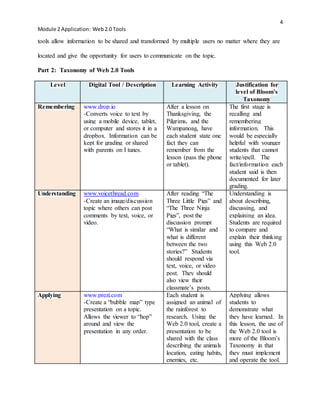
Part 2: Taxonomy of Web 2.0 Tools
Level Digital Tool / Description Learning Activity Justification for
level of Bloom’s
Taxonomy
Remembering www.drop.io
-Converts voice to text by
using a mobile device, tablet,
or computer and stores it in a
dropbox. Information can be
kept for grading or shared
with parents on I tunes.
After a lesson on
Thanksgiving, the
Pilgrims, and the
Wampanoag, have
each student state one
fact they can
remember from the
lesson (pass the phone
or tablet).
The first stage is
recalling and
remembering
information. This
would be especially
helpful with younger
students that cannot
write/spell. The
fact/information each
student said is then
documented for later
grading.
Understanding www.voicethread.com
-Create an image/discussion
topic where others can post
comments by text, voice, or
video.
After reading “The
Three Little Pigs” and
“The Three Ninja
Pigs”, post the
discussion prompt
“What is similar and
what is different
between the two
stories?” Students
should respond via
text, voice, or video
post. They should
also view their
classmate’s posts.
Understanding is
about describing,
discussing, and
explaining an idea.
Students are required
to compare and
explain their thinking
using this Web 2.0
tool.
Applying www.prezi.com
-Create a “bubble map” type
presentation on a topic.
Allows the viewer to “hop”
around and view the
presentation in any order.
Each student is
assigned an animal of
the rainforest to
research. Using the
Web 2.0 tool, create a
presentation to be
shared with the class
describing the animals
location, eating habits,
enemies, etc.
Applying allows
students to
demonstrate what
they have learned. In
this lesson, the use of
the Web 2.0 tool is
more of the Bloom’s
Taxonomy in that
they must implement
and operate the tool.
5
Module 2 Application: Web2.0 Tools
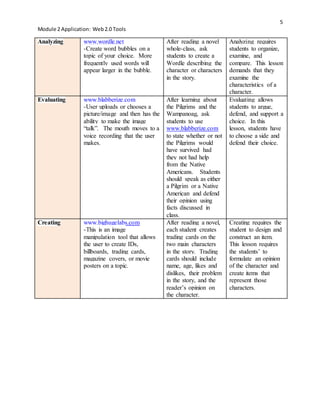
Analyzing www.wordle.net
-Create word bubbles on a
topic of your choice. More
frequently used words will
appear larger in the bubble.
After reading a novel
whole-class, ask
students to create a
Wordle describing the
character or characters
in the story.
Analyzing requires
students to organize,
examine, and
compare. This lesson
demands that they
examine the
characteristics of a
character.
Evaluating www.blabberize.com
-User uploads or chooses a
picture/image and then has the
ability to make the image
“talk”. The mouth moves to a
voice recording that the user
makes.
After learning about
the Pilgrims and the
Wampanoag, ask
students to use
www.blabberize.com
to state whether or not
the Pilgrims would
have survived had
they not had help
from the Native
Americans. Students
should speak as either
a Pilgrim or a Native
American and defend
their opinion using
facts discussed in
class.
Evaluating allows
students to argue,
defend, and support a
choice. In this
lesson, students have
to choose a side and
defend their choice.
Creating www.bighugelabs.com
-This is an image
manipulation tool that allows
the user to create IDs,
billboards, trading cards,
magazine covers, or movie
posters on a topic.
After reading a novel,
each student creates
trading cards on the
two main characters
in the story. Trading
cards should include
name, age, likes and
dislikes, their problem
in the story, and the
reader’s opinion on
the character.
Creating requires the
student to design and
construct an item.
This lesson requires
the students’ to
formulate an opinion
of the character and
create items that
represent those
characters.
6
Module 2 Application: Web2.0 Tools
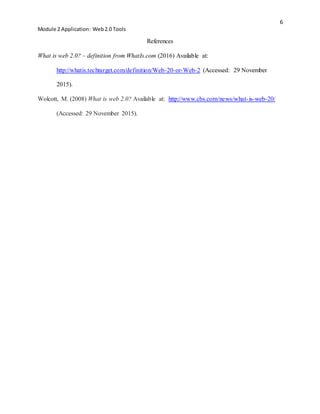
References
What is web 2.0? – definition from WhatIs.com (2016) Available at:
http://whatis.techtarget.com/definition/Web-20-or-Web-2 (Accessed: 29 November
2015).
Wolcott, M. (2008) What is web 2.0? Available at: http://www.cbs.com/news/what-is-web-20/
(Accessed: 29 November 2015).

Module 2 Application Web 2.0 Erin Bennett

  • 1.
    1 Module 2 Application:Web2.0 Tools Module 2 Application: Web 2.0 Tools Erin Bennett American College of Education
  • 2.
    2 Module 2 Application:Web2.0 Tools Introduction The following will define Web 2.0 tools per the internet, and per the writer’s understanding. It will also discuss the differences between Web 2.0 tools and a webpage. Finally, it will identify specific Web-based tools and learning activities that correlate with the six levels of Bloom’s Taxonomy.
  • 3.
    3 Module 2 Application:Web2.0 Tools Module 2 Application: Web 2.0 Tools Part 1: Wolcott (2008) states, “Web 2.0 describes a set of next-generation Internet technologies. They're also highly social, encouraging users to manipulate and interact with content in new ways.” Wolcott continues with the following characteristics:  Web-based applications can be accessed from anywhere  Simple applications solve specific problems  Value lies in content, not the software used to display content  Data can be readily shared  Distribution is bottom-up, not top-down  Employees and customers can access and use tools on their own  Social tools encourage people to create, collaborate, edit, categorize, exchange, and promote information  Network effects are encouraged; the more people who contribute, the better the content gets In addition to Wolcott’s definition, WhatIs.com (2016) defines Web 2.0 tools as “…the current state of online technology as it compares to the early days of the Web, characterized by greater user interactivity and collaboration, more pervasive network connectivity and enhanced communication channels. After reviewing many definitions, I believe the best way to describe Web 2.0 tools is by saying they are interactive, accessible, collaborative learning tools. They are different from websites in that websites provide the user with information on a topic. Web 2.0
  • 4.
    4 Module 2 Application:Web2.0 Tools tools allow information to be shared and transformed by multiple users no matter where they are located and give the opportunity for users to communicate on the topic. Part 2: Taxonomy of Web 2.0 Tools Level Digital Tool / Description Learning Activity Justification for level of Bloom’s Taxonomy Remembering www.drop.io -Converts voice to text by using a mobile device, tablet, or computer and stores it in a dropbox. Information can be kept for grading or shared with parents on I tunes. After a lesson on Thanksgiving, the Pilgrims, and the Wampanoag, have each student state one fact they can remember from the lesson (pass the phone or tablet). The first stage is recalling and remembering information. This would be especially helpful with younger students that cannot write/spell. The fact/information each student said is then documented for later grading. Understanding www.voicethread.com -Create an image/discussion topic where others can post comments by text, voice, or video. After reading “The Three Little Pigs” and “The Three Ninja Pigs”, post the discussion prompt “What is similar and what is different between the two stories?” Students should respond via text, voice, or video post. They should also view their classmate’s posts. Understanding is about describing, discussing, and explaining an idea. Students are required to compare and explain their thinking using this Web 2.0 tool. Applying www.prezi.com -Create a “bubble map” type presentation on a topic. Allows the viewer to “hop” around and view the presentation in any order. Each student is assigned an animal of the rainforest to research. Using the Web 2.0 tool, create a presentation to be shared with the class describing the animals location, eating habits, enemies, etc. Applying allows students to demonstrate what they have learned. In this lesson, the use of the Web 2.0 tool is more of the Bloom’s Taxonomy in that they must implement and operate the tool.
  • 5.
    5 Module 2 Application:Web2.0 Tools Analyzing www.wordle.net -Create word bubbles on a topic of your choice. More frequently used words will appear larger in the bubble. After reading a novel whole-class, ask students to create a Wordle describing the character or characters in the story. Analyzing requires students to organize, examine, and compare. This lesson demands that they examine the characteristics of a character. Evaluating www.blabberize.com -User uploads or chooses a picture/image and then has the ability to make the image “talk”. The mouth moves to a voice recording that the user makes. After learning about the Pilgrims and the Wampanoag, ask students to use www.blabberize.com to state whether or not the Pilgrims would have survived had they not had help from the Native Americans. Students should speak as either a Pilgrim or a Native American and defend their opinion using facts discussed in class. Evaluating allows students to argue, defend, and support a choice. In this lesson, students have to choose a side and defend their choice. Creating www.bighugelabs.com -This is an image manipulation tool that allows the user to create IDs, billboards, trading cards, magazine covers, or movie posters on a topic. After reading a novel, each student creates trading cards on the two main characters in the story. Trading cards should include name, age, likes and dislikes, their problem in the story, and the reader’s opinion on the character. Creating requires the student to design and construct an item. This lesson requires the students’ to formulate an opinion of the character and create items that represent those characters.
  • 6.
    6 Module 2 Application:Web2.0 Tools References What is web 2.0? – definition from WhatIs.com (2016) Available at: http://whatis.techtarget.com/definition/Web-20-or-Web-2 (Accessed: 29 November 2015). Wolcott, M. (2008) What is web 2.0? Available at: http://www.cbs.com/news/what-is-web-20/ (Accessed: 29 November 2015).