Dr. SURESHA V
A Simplified Notes As per VTU Syllabus
2022 Scheme
Introduction to
Python
Programming
Code: BPLCK105B/205B
Professor
Dept. of E&CE
K.V.G. College of Engineering, Sullia, D.K-574 327
Affiliated to Visvesvaraya Technological University
Belagavi - 590018
MODULE 1
Python: Basics
Flow Control and Functions
Introduction to Python Programming(BPLCK105B) - Module 1: Python: Basics, Flow control & Functions
Dr. Suresha V, Professor, Dept. of E&C. K V G C E, Sullia, D.K-57432 Page 1
MODULE 1
PYTHON: BASICS, FLOW CONTROL & FUNCTIONS
Learning Outcomes
After reading this Module, the student will be able to:
o Understand the fundamental concepts of Python programming language,
including variables, data types, and basic operations.
o Demonstrate proficiency in using Python's control flow statements such as if-elif-
else, loops and exception handling to write efficient and robust code.
o Apply Boolean logical operators and conditional statements effectively to control
the flow of program execution based on different conditions.
o Define and implement user-defined functions to modularise code and improve
code reusability.
o Utilize built-in functions and standard libraries in Python to perform common
tasks efficiently.
o Chapter 1: Python Basics (Textbook 1: Page 14-28): Python language features,
History, Entering Expressions into the Interactive Shell, The Integer, Floating-Point,
and String Data Types, String Concatenation and Replication, Storing Values in
Variables, Your First Program, Dissecting Your Program,
o Chapter 2: Flow control (Textbook 1: Page 32-58): Boolean Values, Comparison
Operators, Boolean Operators, Mixing Boolean and Comparison Operators, Elements
of Flow Control, Program Execution, Flow Control Statements, Importing Modules,
Ending a Program Early with sys. exit(),
o Chapter 3: Functions (Textbook 1: Page 63-75): def Statements with Parameters,
Return Values and return Statements, The None Value, Keyword Arguments and
print(), Local and Global Scope, The global Statement, Exception Handling, A Short
Program: Guess the Number.
o Text Book 1: Al Sweigart, “Automate the Boring Stuff with Python”,1st Edition,
No Starch Press, 2015.
o Web links (e-Resources):
1. https://www.w3schools.com/python/
2. https://www.geeksforgeeks.org/python-programming-language/
Introduction to Python Programming(BPLCK105B) - Module 1: Python: Basics, Flow control & Functions
Dr. Suresha V, Professor, Dept. of E&C. K V G C E, Sullia, D.K-57432 Page 2
Chapter 1: Python Basics
 What is a Computer Program: A computer program is a sequence of instructions
that specifies how to perform a computation.
 What is Python: Python is a general-purpose, interpreted, object-oriented,
powerful high-level programming language with dynamic semantics.
 Python language features / Advantages / Characteristics ***
1. Simple and Readable Syntax: Python's syntax is clear and easy to read, making
it an ideal language for both beginners and experienced programmers. This
simplicity can lead to faster development and reduce the complexity of code.
2. Rich Standard Library: Python has several standard libraries that provide
ready-to-use modules and functions for various tasks.
3. High-level Language: It is easier for humans to understand and write. This
nature makes Python suitable for rapid development and prototyping.
4. Dynamically Typed: The data types of variables are determined during run-
time. We do not need to specify the data type of a variable during writing codes.
5. Object-Oriented Programming (OOP) Support: Python supports OOP
paradigms, allowing developers to create reusable and modular code through
classes and objects, encapsulation, inheritance, etc.
6. Interpreted Language: Python is an interpreted language, meaning that code is
executed line by line without the need for compilation. This enables rapid
development cycles and facilitates interactive programming.
7. Integrated Language: We can easily integrate it with other languages such as C,
C++, etc.
8. Cross-platform Compatibility: Python can be easily installed on Windows,
macOS, and various Linux distributions, allowing developers to create software
that runs seamlessly across different operating systems.
9. Open source and free: It is an open-source language which means that anyone
can download it, use it, and share it. Moreover, it is free of cost.
10. Garbage Collected: Memory allocation and de-allocation are automatically
managed. Programmers do not specifically need to manage the memory.
Introduction to Python Programming(BPLCK105B) - Module 1: Python: Basics, Flow control & Functions
Dr. Suresha V, Professor, Dept. of E&C. K V G C E, Sullia, D.K-57432 Page 3
11. Supports GUI programming: Python has support for creating various GUI
applications. Furthermore, these applications can work in many system software
and libraries. PyQt5 is the most popular for making graphical apps.
12. Community Support and Documentation: Python has an active developer
community that provides support through forums, mailing lists, and online
resources. Its official documentation is comprehensive and well-maintained, with
detailed explanations, tutorials, and examples for all levels of developers.
 Terminology: Interpreter and Compiler :
1. Compilers: A compiler translates code from a high-level programming language
into machine code before the program runs. It takes the entire program as
input, hence memory requirement is greater. Errors are displayed after the
entire program is checked. For example C compiler.
2. Interpreter: An interpreter translates code written in a high-level programming
language into machine code line-by-line as the code runs. Memory
requirement is less. Errors are displayed for every instruction that is interpreted.
Examples are Python, JavaScript, Ruby etc.
1.1. Entering expressions into the interactive shell:
 Python IDLE: Python interpreter is the software that runs Python programs in the
Integrated Development and Learning Environment (IDLE). IDLE that comes as a
default implementation when you install Python. It has two main window types, the
Shell window and the Editor window. An IDE includes
1. A source code editor
2. A compiler or interpreter
3. An integrated debugger
4. A graphical user interface (GUI)
 Python interpreter can be used in two basic modes:
1. Interactive mode: This mode is used when a user wants to run one single line or
one block of code. Entering the command and expression at any prompt (>>>) of
the shell. Faster results but I can’t save and edit the code.
2. Script mode: Script Mode, is used when the user is working with a block of code.
This mode facilitates the development of more extensive, more structured
programs. It is suitable for prototype development & can save and edit the code.
Introduction to Python Programming(BPLCK105B) - Module 1: Python: Basics, Flow control & Functions
Dr. Suresha V, Professor, Dept. of E&C. K V G C E, Sullia, D.K-57432 Page 4
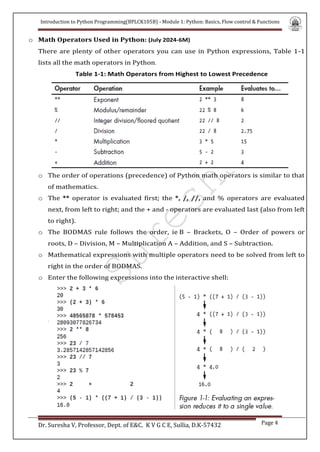
o Math Operators Used in Python: (July 2024-6M)
There are plenty of other operators you can use in Python expressions, Table 1-1
lists all the math operators in Python.
Table 1-1: Math Operators from Highest to Lowest Precedence
o The order of operations (precedence) of Python math operators is similar to that
of mathematics.
o The ** operator is evaluated first; the *, /, //, and % operators are evaluated
next, from left to right; and the + and - operators are evaluated last (also from left
to right).
o The BODMAS rule follows the order, ie B – Brackets, O – Order of powers or
roots, D – Division, M – Multiplication A – Addition, and S – Subtraction.
o Mathematical expressions with multiple operators need to be solved from left to
right in the order of BODMAS.
o Enter the following expressions into the interactive shell:
  
Introduction to Python Programming(BPLCK105B) - Module 1: Python: Basics, Flow control & Functions
Dr. Suresha V, Professor, Dept. of E&C. K V G C E, Sullia, D.K-57432 Page 5
1.2 Python Data Types: The Integer, floating-point and String***
o These datatypes are built-in datatypes in Python. In programming, datatype is an
important concept.
o A data type is a category for values, and every value belongs to one data type. Some
types od data types are as follows with example
 Integer type(int):
- It is a numeric data type in Python used to hold numeric values.
- The integer (or int) data type indicates values that are whole numbers.
- It is represented as int and it holds signed integers of non-limited length.
- For example int: 2, 3, 0, -13, 78, -132, etc.
 Float type(float):
- It is also a numeric data type in Python used to hold numeric values.
- The float (or float) data type indicates values that are decimal numbers.
- It is represented as float and it holds floating decimal points and it's accurate up
to 15 decimal places. Ex Float: 2.345, -0.234, 5.0, 1.23, etc..
 String Type(str):
- Python programs can also have text values called strings, or str.
- Strings in Python are surrounded by either single quotation marks or double
quotation marks. Ex: 'Hello' is the same as "Hello".
- It displays a string literal with the print() function.
- The string with no characters, ' ', is called a blank string.
- Data type can be identified of any object by using the type( ) function
Example Complied output
o If the error message SyntaxError: EOL while scanning string literal, the final
single quote character at the end of the string is probably missing.
Introduction to Python Programming(BPLCK105B) - Module 1: Python: Basics, Flow control & Functions
Dr. Suresha V, Professor, Dept. of E&C. K V G C E, Sullia, D.K-57432 Page 6
1.3 String concatenation and replication: (Dec 2023-6M)
 String concatenation:
o Concatenation is the process of joining two or more strings together and
forming one single string.
o Different ways to concatenate strings using the + operator, join() method, %
operator, format() function, Using “,” (comma) and Using f-string.
o For example, + is the addition operator when it operates on two integers or
floating-point values.
o However, when + is used on two string values, it joins the strings as the string
concatenation operator.
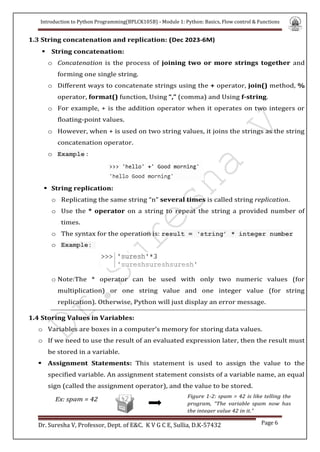
o Example :
 String replication:
o Replicating the same string “n” several times is called string replication.
o Use the * operator on a string to repeat the string a provided number of
times.
o The syntax for the operation is: result = ‘string’ * integer number
o Example:
o Note:The * operator can be used with only two numeric values (for
multiplication) or one string value and one integer value (for string
replication). Otherwise, Python will just display an error message.
1.4 Storing Values in Variables:
o Variables are boxes in a computer’s memory for storing data values.
o If we need to use the result of an evaluated expression later, then the result must
be stored in a variable.
 Assignment Statements: This statement is used to assign the value to the
specified variable. An assignment statement consists of a variable name, an equal
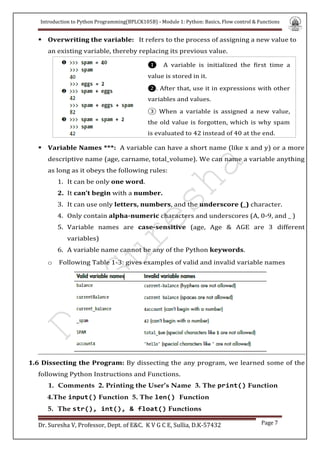
sign (called the assignment operator), and the value to be stored.
 
Figure 1-2: spam = 42 is like telling the
program, “The variable spam now has
the integer value 42 in it.”
Ex: spam = 42
Introduction to Python Programming(BPLCK105B) - Module 1: Python: Basics, Flow control & Functions
Dr. Suresha V, Professor, Dept. of E&C. K V G C E, Sullia, D.K-57432 Page 7
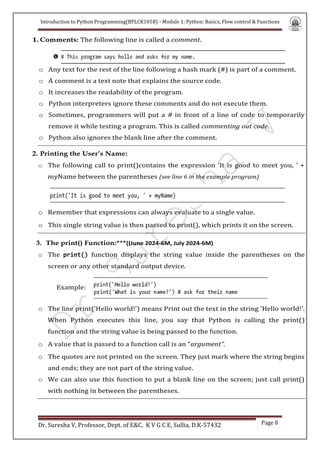
 Overwriting the variable: It refers to the process of assigning a new value to
an existing variable, thereby replacing its previous value.
 Variable Names ***: A variable can have a short name (like x and y) or a more
descriptive name (age, carname, total_volume). We can name a variable anything
as long as it obeys the following rules:
1. It can be only one word.
2. It can’t begin with a number.
3. It can use only letters, numbers, and the underscore (_) character.
4. Only contain alpha-numeric characters and underscores (A, 0-9, and _ )
5. Variable names are case-sensitive (age, Age & AGE are 3 different
variables)
6. A variable name cannot be any of the Python keywords.
o Following Table 1-3: gives examples of valid and invalid variable names
1.6 Dissecting the Program: By dissecting the any program, we learned some of the
following Python Instructions and Functions.
1. Comments 2. Printing the User’s Name 3. The print() Function
4.The input() Function 5. The len() Function
5. The str(), int(), & float() Functions
❶ A variable is initialized the first time a
value is stored in it.
❷. After that, use it in expressions with other
variables and values.
③ When a variable is assigned a new value,
the old value is forgotten, which is why spam
is evaluated to 42 instead of 40 at the end.
Introduction to Python Programming(BPLCK105B) - Module 1: Python: Basics, Flow control & Functions
Dr. Suresha V, Professor, Dept. of E&C. K V G C E, Sullia, D.K-57432 Page 8
1. Comments: The following line is called a comment.
o Any text for the rest of the line following a hash mark (#) is part of a comment.
o A comment is a text note that explains the source code.
o It increases the readability of the program.
o Python interpreters ignore these comments and do not execute them.
o Sometimes, programmers will put a # in front of a line of code to temporarily
remove it while testing a program. This is called commenting out code.
o Python also ignores the blank line after the comment.
2. Printing the User’s Name:
o The following call to print()contains the expression 'It is good to meet you, ' +
myName between the parentheses (see line 6 in the example program)
o Remember that expressions can always evaluate to a single value.
o This single string value is then passed to print(), which prints it on the screen.
3. The print() Function:***((June 2024-6M, July 2024-6M)
o The print() function displays the string value inside the parentheses on the
screen or any other standard output device.
o The line print('Hello world!') means Print out the text in the string 'Hello world!'.
When Python executes this line, you say that Python is calling the print()
function and the string value is being passed to the function.
o A value that is passed to a function call is an “argument”.
o The quotes are not printed on the screen. They just mark where the string begins
and ends; they are not part of the string value.
o We can also use this function to put a blank line on the screen; just call print()
with nothing in between the parentheses.
Example:
Introduction to Python Programming(BPLCK105B) - Module 1: Python: Basics, Flow control & Functions
Dr. Suresha V, Professor, Dept. of E&C. K V G C E, Sullia, D.K-57432 Page 9
4. The input() Function***:(June 2024-6M,July 2024-6M)
o The input() function allows takes a user input. By default, it returns the user
input in the form of a string.
o The input() function waits for the user to type some text on the keyboard and
press ENTER.
o The input() function calls as an expression that evaluates to whatever string the
user typed in.
5. The len() Function***:(June 2024-6M, July 2024-6M)
o The len() function evaluates to the integer value of the number of characters in
that string.
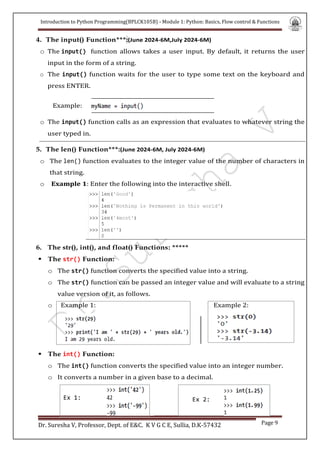
o Example 1: Enter the following into the interactive shell.
6. The str(), int(), and float() Functions: *****
 The str() Function:
o The str() function converts the specified value into a string.
o The str() function can be passed an integer value and will evaluate to a string
value version of it, as follows.
o Example 1: Example 2:
 The int() Function:
o The int() function converts the specified value into an integer number.
o It converts a number in a given base to a decimal.
Ex 1: Ex 2:
Example:
Introduction to Python Programming(BPLCK105B) - Module 1: Python: Basics, Flow control & Functions
Dr. Suresha V, Professor, Dept. of E&C. K V G C E, Sullia, D.K-57432 Page 10
 The float() Function:
o The float() function converts the specified value into a floating point
number.
CHAPTER 2: FLOW CONTROL
o Introduction:
o Control statements direct the flow of a Python program's execution. They
introduce logic, decision-making, and looping.
o Flow control statements can decide which Python instructions to execute under
which conditions.
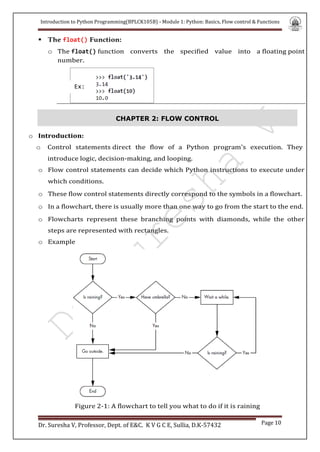
o These flow control statements directly correspond to the symbols in a flowchart.
o In a flowchart, there is usually more than one way to go from the start to the end.
o Flowcharts represent these branching points with diamonds, while the other
steps are represented with rectangles.
o Example
Figure 2-1: A flowchart to tell you what to do if it is raining
C
Ex:
Introduction to Python Programming(BPLCK105B) - Module 1: Python: Basics, Flow control & Functions
Dr. Suresha V, Professor, Dept. of E&C. K V G C E, Sullia, D.K-57432 Page 11
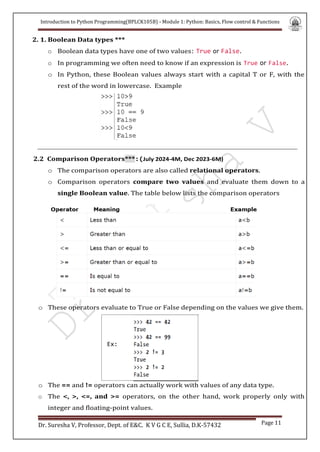
2. 1. Boolean Data types ***
o Boolean data types have one of two values: True or False.
o In programming we often need to know if an expression is True or False.
o In Python, these Boolean values always start with a capital T or F, with the
rest of the word in lowercase. Example
2.2 Comparison Operators***:(July 2024-4M, Dec 2023-6M)
o The comparison operators are also called relational operators.
o Comparison operators compare two values and evaluate them down to a
single Boolean value. The table below lists the comparison operators
o These operators evaluate to True or False depending on the values we give them.
o The == and != operators can actually work with values of any data type.
o The <, >, <=, and >= operators, on the other hand, work properly only with
integer and floating-point values.
Ex:
C
Introduction to Python Programming(BPLCK105B) - Module 1: Python: Basics, Flow control & Functions
Dr. Suresha V, Professor, Dept. of E&C. K V G C E, Sullia, D.K-57432 Page 12
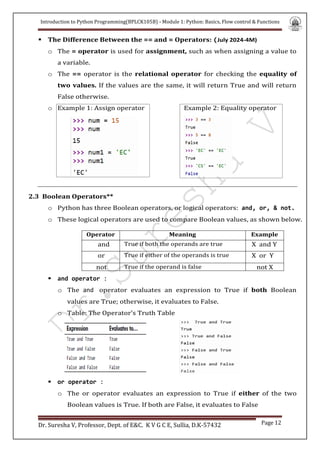
 The Difference Between the == and = Operators: (July 2024-4M)
o The = operator is used for assignment, such as when assigning a value to
a variable.
o The == operator is the relational operator for checking the equality of
two values. If the values are the same, it will return True and will return
False otherwise.
o Example 1: Assign operator Example 2: Equality operator
2.3 Boolean Operators**
o Python has three Boolean operators, or logical operators: and, or, & not.
o These logical operators are used to compare Boolean values, as shown below.
Operator Meaning Example
and True if both the operands are true X and Y
or True if either of the operands is true X or Y
not True if the operand is false not X
 and operator :
o The and operator evaluates an expression to True if both Boolean
values are True; otherwise, it evaluates to False.
o Table: The Operator’s Truth Table
 or operator :
o The or operator evaluates an expression to True if either of the two
Boolean values is True. If both are False, it evaluates to False
C C
Introduction to Python Programming(BPLCK105B) - Module 1: Python: Basics, Flow control & Functions
Dr. Suresha V, Professor, Dept. of E&C. K V G C E, Sullia, D.K-57432 Page 13
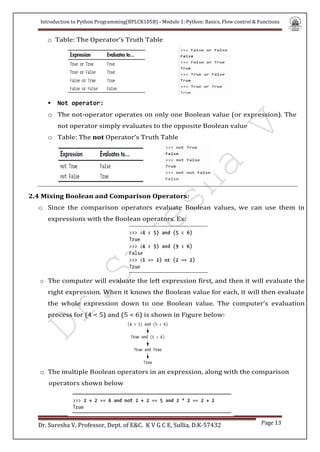
o Table: The Operator’s Truth Table
 Not operator:
o The not-operator operates on only one Boolean value (or expression). The
not operator simply evaluates to the opposite Boolean value
o Table: The not Operator’s Truth Table
2.4 Mixing Boolean and Comparison Operators:
o Since the comparison operators evaluate Boolean values, we can use them in
expressions with the Boolean operators. Ex:
o The computer will evaluate the left expression first, and then it will evaluate the
right expression. When it knows the Boolean value for each, it will then evaluate
the whole expression down to one Boolean value. The computer’s evaluation
process for (4 < 5) and (5 < 6) is shown in Figure below:
o The multiple Boolean operators in an expression, along with the comparison
operators shown below
Introduction to Python Programming(BPLCK105B) - Module 1: Python: Basics, Flow control & Functions
Dr. Suresha V, Professor, Dept. of E&C. K V G C E, Sullia, D.K-57432 Page 14
o The Boolean operators have an order of operations just like the math operators
do. After any math and comparison operators are evaluated, Python evaluates the
not operators first, then the and, and then the or operators
2.5. Elements of Flow Control: Flow control includes (Dec 2023-6M)
1. Conditional statements
2. Block of codes
1. Conditional statements:
o Condition is just a more specific name in the context of flow control
statements. Eg (if, elif, else), loops (for, while).
o Conditions always evaluate down to a Boolean value, True or False.
o A flow control statement decides what to do based on whether its condition
is True or False, and almost every flow control statement uses a condition.
2. Block of codes:
o Lines of Python code can be grouped together in blocks. There are three
rules for blocks.
a. Blocks begin when the indentation increases.
b. Blocks can contain other blocks.
c. Blocks end when the indentation decreases to zero or to a containing
block’s indentation.
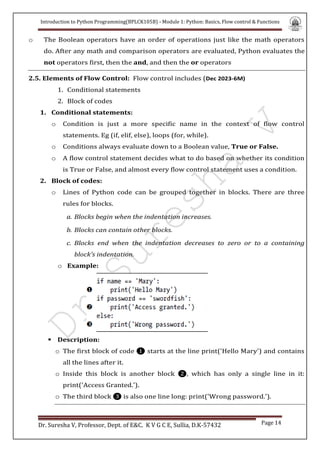
o Example:
 Description:
o The first block of code ❶ starts at the line print('Hello Mary') and contains
all the lines after it.
o Inside this block is another block ❷, which has only a single line in it:
print('Access Granted.').
o The third block ❸ is also one line long: print('Wrong password.').
Introduction to Python Programming(BPLCK105B) - Module 1: Python: Basics, Flow control & Functions
Dr. Suresha V, Professor, Dept. of E&C. K V G C E, Sullia, D.K-57432 Page 15
2.6 Flow Control Statements:***** Major control statements used in python
programming are
1. if Statements
2. else Statements
3. elif Statements
4. while loop Statements
5. break Statements
6. Continue statements
7. for loops and the range() function
8. The Starting, Stopping, and Stepping Arguments to range()
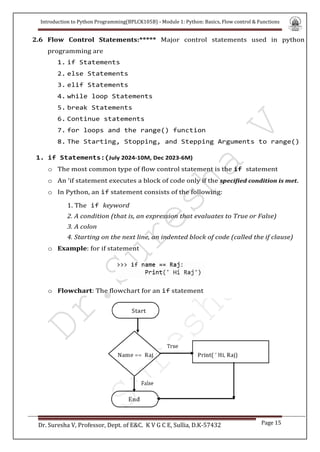
1. if Statements:(July 2024-10M, Dec 2023-6M)
o The most common type of flow control statement is the if statement
o An ‘if statement executes a block of code only if the specified condition is met.
o In Python, an if statement consists of the following:
1. The if keyword
2. A condition (that is, an expression that evaluates to True or False)
3. A colon
4. Starting on the next line, an indented block of code (called the if clause)
o Example: for if statement
o Flowchart: The flowchart for an if statement
Introduction to Python Programming(BPLCK105B) - Module 1: Python: Basics, Flow control & Functions
Dr. Suresha V, Professor, Dept. of E&C. K V G C E, Sullia, D.K-57432 Page 16
2. else Statements:(July 2024-10M,Dec 2023-6M)
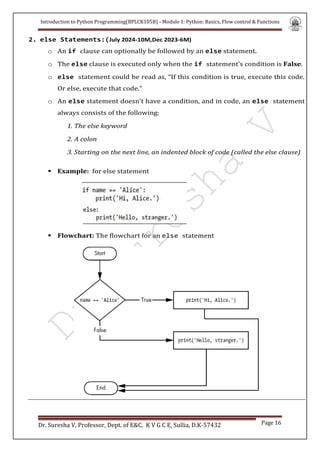
o An if clause can optionally be followed by an else statement.
o The else clause is executed only when the if statement’s condition is False.
o else statement could be read as, “If this condition is true, execute this code.
Or else, execute that code.”
o An else statement doesn’t have a condition, and in code, an else statement
always consists of the following:
1. The else keyword
2. A colon
3. Starting on the next line, an indented block of code (called the else clause)
 Example: for else statement
 Flowchart: The flowchart for an else statement
Introduction to Python Programming(BPLCK105B) - Module 1: Python: Basics, Flow control & Functions
Dr. Suresha V, Professor, Dept. of E&C. K V G C E, Sullia, D.K-57432 Page 17
3. elif Statements: (June 2024-6M, July 2024-6M,Dec 2023-6M)
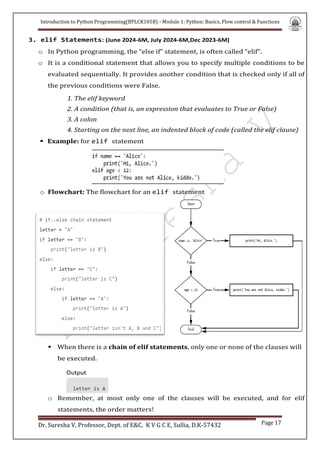
o In Python programming, the “else if” statement, is often called “elif”.
o It is a conditional statement that allows you to specify multiple conditions to be
evaluated sequentially. It provides another condition that is checked only if all of
the previous conditions were False.
1. The elif keyword
2. A condition (that is, an expression that evaluates to True or False)
3. A colon
4. Starting on the next line, an indented block of code (called the elif clause)
 Example: for elif statement
o Flowchart: The flowchart for an elif statement
 When there is a chain of elif statements, only one or none of the clauses will
be executed.
o Remember, at most only one of the clauses will be executed, and for elif
statements, the order matters!
Introduction to Python Programming(BPLCK105B) - Module 1: Python: Basics, Flow control & Functions
Dr. Suresha V, Professor, Dept. of E&C. K V G C E, Sullia, D.K-57432 Page 18
4. While loop Statements:(June 2024-6M, July 2024-6M)
o Python While Loop is used to execute a block of statements repeatedly until a
given condition is satisfied. When the condition becomes false, the line
immediately after the loop in the program is executed.
o In code, a while statement always consists of the following:
1. The while keyword
2. A condition (that is an expression that evaluates to True or False.
3. A colon
4. Starting on the next line, an indented block of code (called the while clause)
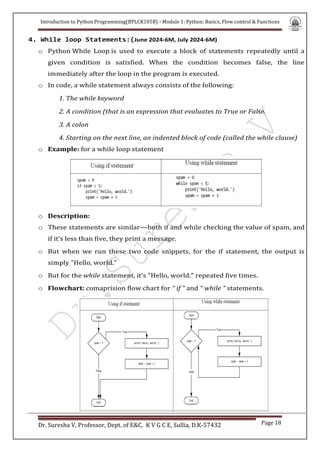
o Example: for a while loop statement
o Description:
o These statements are similar—both if and while checking the value of spam, and
if it’s less than five, they print a message.
o But when we run these two code snippets, for the if statement, the output is
simply "Hello, world."
o But for the while statement, it’s "Hello, world." repeated five times.
o Flowchart: comaprision flow chart for “ if ” and “ while ” statements.
Introduction to Python Programming(BPLCK105B) - Module 1: Python: Basics, Flow control & Functions
Dr. Suresha V, Professor, Dept. of E&C. K V G C E, Sullia, D.K-57432 Page 19
5. for loop::(June 2024-6M, July 2024-6M)
o A for loop is used for iterating over a sequence.
o With the for loop we can execute a set of statements, once for each item in a list,
tuple, set etc.
o In code, a for statement always consists of the following:
1. The for keyword
2. A variable name
3. The in Keyword
4. A call on the range
5. A Colon
o Example:
fruits = ["apple", "banana", "cherry"]
for x in fruits:
print(x)
5. break Statements:
o 'Break' in Python is a loop control statement. It is used to control the sequence of
the loop.
o The break keyword is used to break out a for loop, or a while loop. If the
execution reaches a break statement, it immediately exits the while loop’s clause.
o In code, a break statement simply contains the break keyword.
o Example: for break statement
o Description:
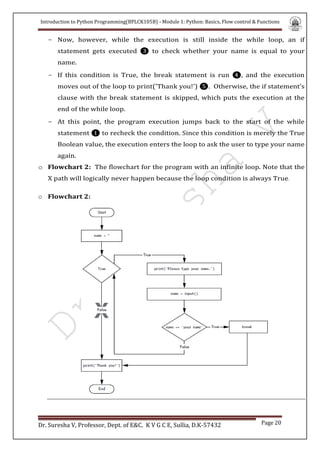
- The first line ❶ creates an infinite loop; it is a while loop whose condition is
always True.
- The program execution will always enter the loop and will exit it only when a
break statement is executed.
- This program asks the user to type your name ❷.
Introduction to Python Programming(BPLCK105B) - Module 1: Python: Basics, Flow control & Functions
Dr. Suresha V, Professor, Dept. of E&C. K V G C E, Sullia, D.K-57432 Page 20
- Now, however, while the execution is still inside the while loop, an if
statement gets executed ❸ to check whether your name is equal to your
name.
- If this condition is True, the break statement is run ❹, and the execution
moves out of the loop to print('Thank you!') ❺. Otherwise, the if statement’s
clause with the break statement is skipped, which puts the execution at the
end of the while loop.
- At this point, the program execution jumps back to the start of the while
statement ❶ to recheck the condition. Since this condition is merely the True
Boolean value, the execution enters the loop to ask the user to type your name
again.
o Flowchart 2: The flowchart for the program with an infinite loop. Note that the
X path will logically never happen because the loop condition is always True.
o Flowchart 2:
Introduction to Python Programming(BPLCK105B) - Module 1: Python: Basics, Flow control & Functions
Dr. Suresha V, Professor, Dept. of E&C. K V G C E, Sullia, D.K-57432 Page 21
6. Continue statements:
o The continue keyword is used to end the current iteration in a for loop (or
a while loop) and continues to the next iteration. It is used inside the loop.
o When the program execution reaches a continue statement, the program
execution immediately jumps back to the start of the loop and reevaluates the
loop’s condition.
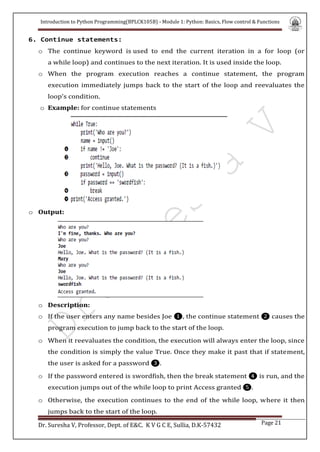
o Example: for continue statements
o Output:
o Description:
o If the user enters any name besides Joe ❶, the continue statement ❷ causes the
program execution to jump back to the start of the loop.
o When it reevaluates the condition, the execution will always enter the loop, since
the condition is simply the value True. Once they make it past that if statement,
the user is asked for a password ❸.
o If the password entered is swordfish, then the break statement ❹ is run, and the
execution jumps out of the while loop to print Access granted ❺.
o Otherwise, the execution continues to the end of the while loop, where it then
jumps back to the start of the loop.
Introduction to Python Programming(BPLCK105B) - Module 1: Python: Basics, Flow control & Functions
Dr. Suresha V, Professor, Dept. of E&C. K V G C E, Sullia, D.K-57432 Page 22
7. for loops and the range() function:
o Execute a block of code only a certain number of times with a for loop
statement and the range() function.
o In code, a for statement looks something like for i in range(5): and always
includes the following:
1. The for keyword 2. A variable name 3. The in keyword
4. A call to the range() method with up to three integers passed to it
5. A colon 6. Starting on the next line, an indented block of code
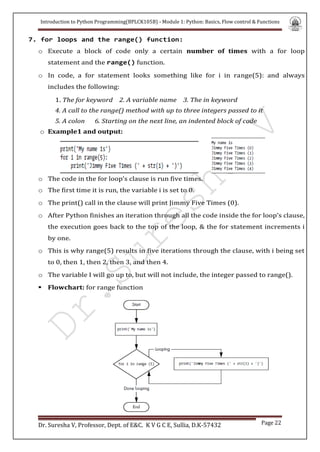
o Example1 and output:
  
o The code in the for loop’s clause is run five times.
o The first time it is run, the variable i is set to 0.
o The print() call in the clause will print Jimmy Five Times (0).
o After Python finishes an iteration through all the code inside the for loop’s clause,
the execution goes back to the top of the loop, & the for statement increments i
by one.
o This is why range(5) results in five iterations through the clause, with i being set
to 0, then 1, then 2, then 3, and then 4.
o The variable I will go up to, but will not include, the integer passed to range().
 Flowchart: for range function


Introduction to Python Programming(BPLCK105B) - Module 1: Python: Basics, Flow control & Functions
Dr. Suresha V, Professor, Dept. of E&C. K V G C E, Sullia, D.K-57432 Page 23
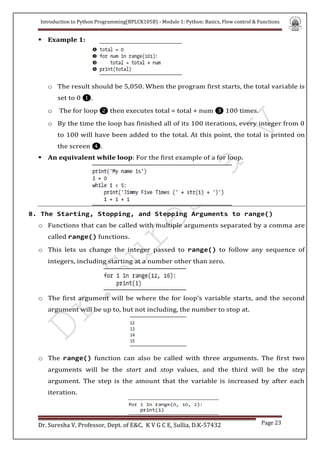
 Example 1:
o The result should be 5,050. When the program first starts, the total variable is
set to 0 ❶.
o The for loop ❷ then executes total = total + num ❸ 100 times.
o By the time the loop has finished all of its 100 iterations, every integer from 0
to 100 will have been added to the total. At this point, the total is printed on
the screen ❹.
 An equivalent while loop: For the first example of a for loop.
8. The Starting, Stopping, and Stepping Arguments to range()
o Functions that can be called with multiple arguments separated by a comma are
called range() functions.
o This lets us change the integer passed to range() to follow any sequence of
integers, including starting at a number other than zero.
o The first argument will be where the for loop’s variable starts, and the second
argument will be up to, but not including, the number to stop at.
o The range() function can also be called with three arguments. The first two
arguments will be the start and stop values, and the third will be the step
argument. The step is the amount that the variable is increased by after each
iteration.
Introduction to Python Programming(BPLCK105B) - Module 1: Python: Basics, Flow control & Functions
Dr. Suresha V, Professor, Dept. of E&C. K V G C E, Sullia, D.K-57432 Page 24
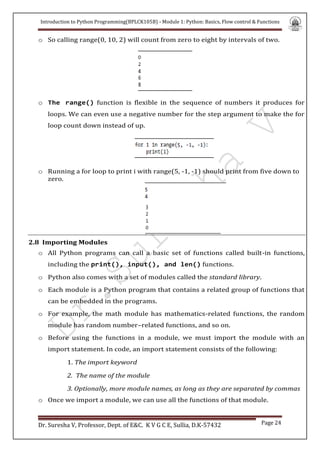
o So calling range(0, 10, 2) will count from zero to eight by intervals of two.
o The range() function is flexible in the sequence of numbers it produces for
loops. We can even use a negative number for the step argument to make the for
loop count down instead of up.
o Running a for loop to print i with range(5, -1, -1) should print from five down to
zero.
2.8 Importing Modules
o All Python programs can call a basic set of functions called built-in functions,
including the print(), input(), and len() functions.
o Python also comes with a set of modules called the standard library.
o Each module is a Python program that contains a related group of functions that
can be embedded in the programs.
o For example, the math module has mathematics-related functions, the random
module has random number–related functions, and so on.
o Before using the functions in a module, we must import the module with an
import statement. In code, an import statement consists of the following:
1. The import keyword
2. The name of the module
3. Optionally, more module names, as long as they are separated by commas
o Once we import a module, we can use all the functions of that module.
Introduction to Python Programming(BPLCK105B) - Module 1: Python: Basics, Flow control & Functions
Dr. Suresha V, Professor, Dept. of E&C. K V G C E, Sullia, D.K-57432 Page 25
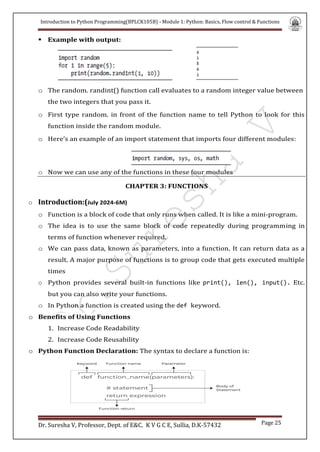
 Example with output:
o The random. randint() function call evaluates to a random integer value between
the two integers that you pass it.
o First type random. in front of the function name to tell Python to look for this
function inside the random module.
o Here’s an example of an import statement that imports four different modules:
o Now we can use any of the functions in these four modules
CHAPTER 3: FUNCTIONS
o Introduction:(July 2024-6M)
o Function is a block of code that only runs when called. It is like a mini-program.
o The idea is to use the same block of code repeatedly during programming in
terms of function whenever required.
o We can pass data, known as parameters, into a function. It can return data as a
result. A major purpose of functions is to group code that gets executed multiple
times
o Python provides several built-in functions like print(), len(), input(). Etc.
but you can also write your functions.
o In Python a function is created using the def keyword.
o Benefits of Using Functions
1. Increase Code Readability
2. Increase Code Reusability
o Python Function Declaration: The syntax to declare a function is:
Introduction to Python Programming(BPLCK105B) - Module 1: Python: Basics, Flow control & Functions
Dr. Suresha V, Professor, Dept. of E&C. K V G C E, Sullia, D.K-57432 Page 26
o Types of Functions in Python:
1. Built-in library function: These are Standard functions in Python that are
available to use. Example print(), len() etc..
2. User-defined function: We can create our own functions based on our
requirements.
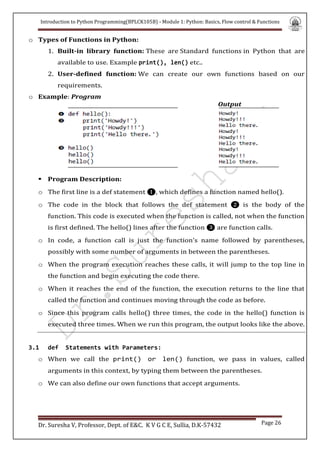
o Example: Program
Output
 Program Description:
o The first line is a def statement ❶, which defines a function named hello().
o The code in the block that follows the def statement ❷ is the body of the
function. This code is executed when the function is called, not when the function
is first defined. The hello() lines after the function ❸ are function calls.
o In code, a function call is just the function’s name followed by parentheses,
possibly with some number of arguments in between the parentheses.
o When the program execution reaches these calls, it will jump to the top line in
the function and begin executing the code there.
o When it reaches the end of the function, the execution returns to the line that
called the function and continues moving through the code as before.
o Since this program calls hello() three times, the code in the hello() function is
executed three times. When we run this program, the output looks like the above.
3.1 def Statements with Parameters:
o When we call the print() or len() function, we pass in values, called
arguments in this context, by typing them between the parentheses.
o We can also define our own functions that accept arguments.
Introduction to Python Programming(BPLCK105B) - Module 1: Python: Basics, Flow control & Functions
Dr. Suresha V, Professor, Dept. of E&C. K V G C E, Sullia, D.K-57432 Page 27
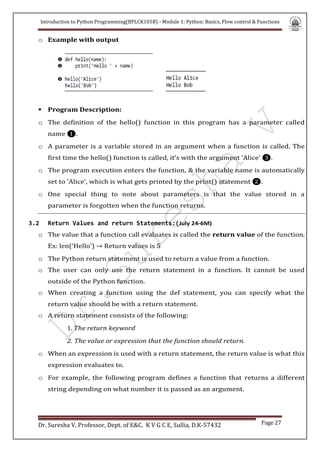
o Example with output

 Program Description:
o The definition of the hello() function in this program has a parameter called
name ❶.
o A parameter is a variable stored in an argument when a function is called. The
first time the hello() function is called, it’s with the argument 'Alice' ❸.
o The program execution enters the function, & the variable name is automatically
set to 'Alice', which is what gets printed by the print() statement ❷.
o One special thing to note about parameters is that the value stored in a
parameter is forgotten when the function returns.
3.2 Return Values and return Statements:(July 24-6M)
o The value that a function call evaluates is called the return value of the function.
Ex: len(‘Hello’) → Return values is 5
o The Python return statement is used to return a value from a function.
o The user can only use the return statement in a function. It cannot be used
outside of the Python function.
o When creating a function using the def statement, you can specify what the
return value should be with a return statement.
o A return statement consists of the following:
1. The return keyword
2. The value or expression that the function should return.
o When an expression is used with a return statement, the return value is what this
expression evaluates to.
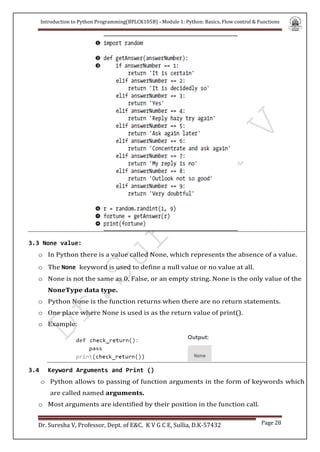
o For example, the following program defines a function that returns a different
string depending on what number it is passed as an argument.
Introduction to Python Programming(BPLCK105B) - Module 1: Python: Basics, Flow control & Functions
Dr. Suresha V, Professor, Dept. of E&C. K V G C E, Sullia, D.K-57432 Page 28
3.3 None value:
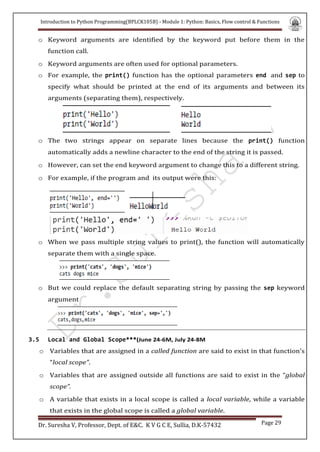
o In Python there is a value called None, which represents the absence of a value.
o The None keyword is used to define a null value or no value at all.
o None is not the same as 0, False, or an empty string. None is the only value of the
NoneType data type.
o Python None is the function returns when there are no return statements.
o One place where None is used is as the return value of print().
o Example:
3.4 Keyword Arguments and Print ()
o Python allows to passing of function arguments in the form of keywords which
are called named arguments.
o Most arguments are identified by their position in the function call.
Introduction to Python Programming(BPLCK105B) - Module 1: Python: Basics, Flow control & Functions
Dr. Suresha V, Professor, Dept. of E&C. K V G C E, Sullia, D.K-57432 Page 29
o Keyword arguments are identified by the keyword put before them in the
function call.
o Keyword arguments are often used for optional parameters.
o For example, the print() function has the optional parameters end and sep to
specify what should be printed at the end of its arguments and between its
arguments (separating them), respectively.
o The two strings appear on separate lines because the print() function
automatically adds a newline character to the end of the string it is passed.
o However, can set the end keyword argument to change this to a different string.
o For example, if the program and its output were this:
o When we pass multiple string values to print(), the function will automatically
separate them with a single space.
o But we could replace the default separating string by passing the sep keyword
argument
3.5 Local and Global Scope***(June 24-6M, July 24-8M
o Variables that are assigned in a called function are said to exist in that function’s
“local scope”.
o Variables that are assigned outside all functions are said to exist in the “global
scope”.
o A variable that exists in a local scope is called a local variable, while a variable
that exists in the global scope is called a global variable.
Introduction to Python Programming(BPLCK105B) - Module 1: Python: Basics, Flow control & Functions
Dr. Suresha V, Professor, Dept. of E&C. K V G C E, Sullia, D.K-57432 Page 30
o A variable must be one or the other; it cannot be both local and global.
o When a scope is destroyed, all the values stored in the scope’s variables are
forgotten.
o There is only one global scope, and it is created when your program begins.
When your program terminates, the global scope is destroyed, and all its
variables are forgotten.
o A local scope is created whenever a function is called. Any variables assigned in
this function exist within the local scope. When the function returns, the local
scope is destroyed, and these variables are forgotten.
o Scopes matter for several reasons:
1. Code in the global scope cannot use any local variables.
2. However, a local scope can access global variables.
3. Code in a function’s local scope cannot use variables in any other local scope.
4. We can use the same name for different variables if they are in different
scopes. That is, there can be a local variable named spam and a global variable
also named spam.
 Local variables cannot be used in the global scope
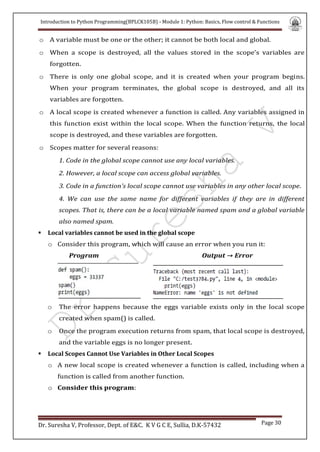
o Consider this program, which will cause an error when you run it:
Program Output → Error
o The error happens because the eggs variable exists only in the local scope
created when spam() is called.
o Once the program execution returns from spam, that local scope is destroyed,
and the variable eggs is no longer present.
 Local Scopes Cannot Use Variables in Other Local Scopes
o A new local scope is created whenever a function is called, including when a
function is called from another function.
o Consider this program:
Introduction to Python Programming(BPLCK105B) - Module 1: Python: Basics, Flow control & Functions
Dr. Suresha V, Professor, Dept. of E&C. K V G C E, Sullia, D.K-57432 Page 31
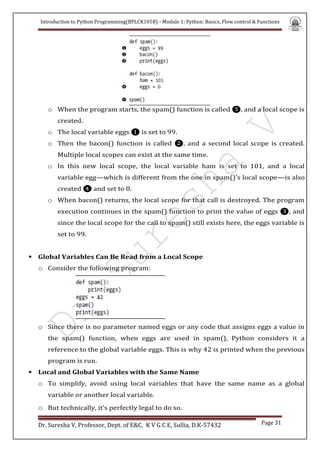
o When the program starts, the spam() function is called ❺, and a local scope is
created.
o The local variable eggs ❶ is set to 99.
o Then the bacon() function is called ❷, and a second local scope is created.
Multiple local scopes can exist at the same time.
o In this new local scope, the local variable ham is set to 101, and a local
variable egg—which is different from the one in spam()’s local scope—is also
created ❹ and set to 0.
o When bacon() returns, the local scope for that call is destroyed. The program
execution continues in the spam() function to print the value of eggs ❸, and
since the local scope for the call to spam() still exists here, the eggs variable is
set to 99.
 Global Variables Can Be Read from a Local Scope
o Consider the following program:
o Since there is no parameter named eggs or any code that assigns eggs a value in
the spam() function, when eggs are used in spam(), Python considers it a
reference to the global variable eggs. This is why 42 is printed when the previous
program is run.
 Local and Global Variables with the Same Name
o To simplify, avoid using local variables that have the same name as a global
variable or another local variable.
o But technically, it’s perfectly legal to do so.
Introduction to Python Programming(BPLCK105B) - Module 1: Python: Basics, Flow control & Functions
Dr. Suresha V, Professor, Dept. of E&C. K V G C E, Sullia, D.K-57432 Page 32
Example program
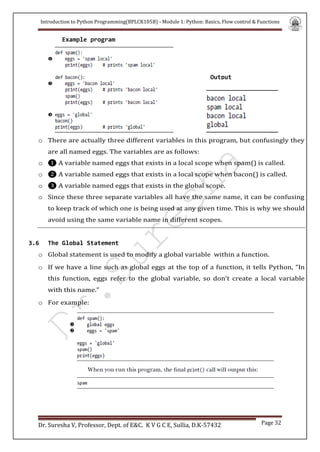
o There are actually three different variables in this program, but confusingly they
are all named eggs. The variables are as follows:
o ❶ A variable named eggs that exists in a local scope when spam() is called.
o ❷ A variable named eggs that exists in a local scope when bacon() is called.
o ❸ A variable named eggs that exists in the global scope.
o Since these three separate variables all have the same name, it can be confusing
to keep track of which one is being used at any given time. This is why we should
avoid using the same variable name in different scopes.
3.6 The Global Statement
o Global statement is used to modify a global variable within a function.
o If we have a line such as global eggs at the top of a function, it tells Python, “In
this function, eggs refer to the global variable, so don’t create a local variable
with this name.”
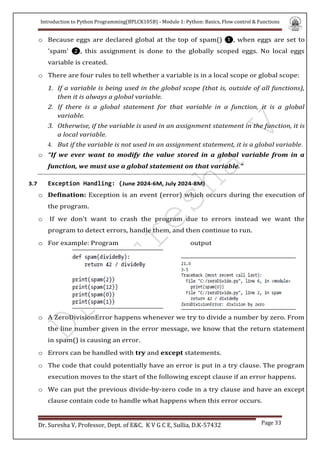
o For example:
Output
Introduction to Python Programming(BPLCK105B) - Module 1: Python: Basics, Flow control & Functions
Dr. Suresha V, Professor, Dept. of E&C. K V G C E, Sullia, D.K-57432 Page 33
o Because eggs are declared global at the top of spam() ❶, when eggs are set to
'spam' ❷, this assignment is done to the globally scoped eggs. No local eggs
variable is created.
o There are four rules to tell whether a variable is in a local scope or global scope:
1. If a variable is being used in the global scope (that is, outside of all functions),
then it is always a global variable.
2. If there is a global statement for that variable in a function, it is a global
variable.
3. Otherwise, if the variable is used in an assignment statement in the function, it is
a local variable.
4. But if the variable is not used in an assignment statement, it is a global variable.
o “If we ever want to modify the value stored in a global variable from in a
function, we must use a global statement on that variable.”
3.7 Exception Handling: (June 2024-6M, July 2024-8M)
o Defination: Exception is an event (error) which occurs during the execution of
the program.
o If we don’t want to crash the program due to errors instead we want the
program to detect errors, handle them, and then continue to run.
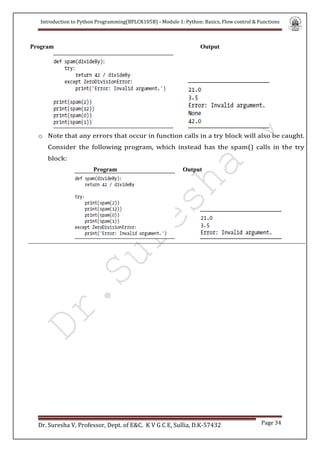
o For example: Program output
o A ZeroDivisionError happens whenever we try to divide a number by zero. From
the line number given in the error message, we know that the return statement
in spam() is causing an error.
o Errors can be handled with try and except statements.
o The code that could potentially have an error is put in a try clause. The program
execution moves to the start of the following except clause if an error happens.
o We can put the previous divide-by-zero code in a try clause and have an except
clause contain code to handle what happens when this error occurs.
Introduction to Python Programming(BPLCK105B) - Module 1: Python: Basics, Flow control & Functions
Dr. Suresha V, Professor, Dept. of E&C. K V G C E, Sullia, D.K-57432 Page 34
Program Output
o Note that any errors that occur in function calls in a try block will also be caught.
Consider the following program, which instead has the spam() calls in the try
block:
Program Output
Introduction to Python Programming(BPLCK105B) - Module 1: Python: Basics, Flow control & Functions
Dr. Suresha V, Professor, Dept. of E&C. K V G C E, Sullia, D.K-57432 Page 35
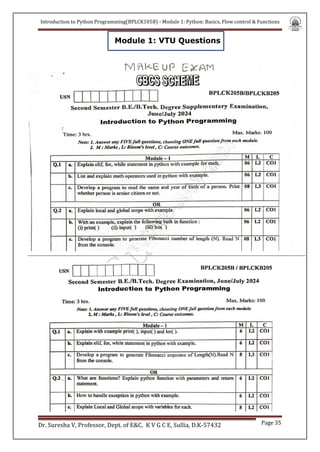
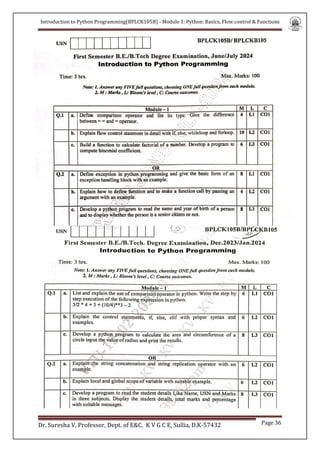
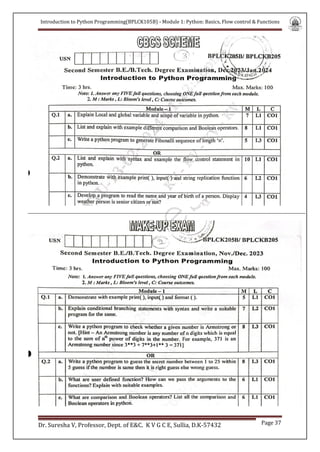
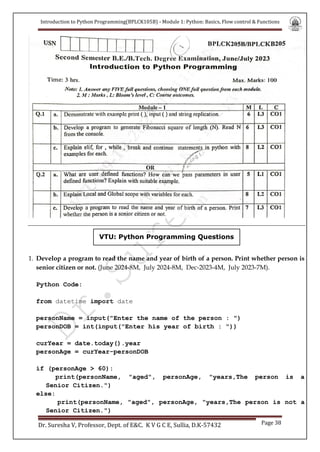
Module 1: VTU Questions
Introduction to Python Programming(BPLCK105B) - Module 1: Python: Basics, Flow control & Functions
Dr. Suresha V, Professor, Dept. of E&C. K V G C E, Sullia, D.K-57432 Page 36
Introduction to Python Programming(BPLCK105B) - Module 1: Python: Basics, Flow control & Functions
Dr. Suresha V, Professor, Dept. of E&C. K V G C E, Sullia, D.K-57432 Page 37
Introduction to Python Programming(BPLCK105B) - Module 1: Python: Basics, Flow control & Functions
Dr. Suresha V, Professor, Dept. of E&C. K V G C E, Sullia, D.K-57432 Page 38
VTU: Python Programming Questions
1. Develop a program to read the name and year of birth of a person. Print whether person is
senior citizen or not. (June 2024-8M, July 2024-8M, Dec-2023-4M, July 2023-7M).
Python Code:
from datetime import date
personName = input("Enter the name of the person : ")
personDOB = int(input("Enter his year of birth : "))
curYear = date.today().year
personAge = curYear-personDOB
if (personAge > 60):
print(personName, "aged", personAge, "years,The person is a
Senior Citizen.")
else:
print(personName, "aged", personAge, "years,The person is not a
Senior Citizen.")
Introduction to Python Programming(BPLCK105B) - Module 1: Python: Basics, Flow control & Functions
Dr. Suresha V, Professor, Dept. of E&C. K V G C E, Sullia, D.K-57432 Page 39
 Expected Output:
Test 1:
Enter the name of the person : Suresh
Enter his year of birth : 1971
Suresh aged 53 years,The person is not a Senior Citizen.
Test 2:
Enter the name of the person : Raj
Enter his year of birth : 1959
Raj aged 65 years,The person is a Senior Citizen.
2. Develop a program to generate Fibonacci numbe of length (N). Read N from the console.
(June/july 2024-8M, July 2024-8M, Dec-2023-5M, July 2023-6M).
Python Code 1:
N = int(input('Enter the length of the Fibonacci Number:'))
num1 = 0
num2 = 1
next_number = num2
count = 1
while count <= N:
print(next_number, end=" ")
count += 1
num1, num2 = num2, next_number
next_number = num1 + num2
print()
 Expected Output:
Test 1:
Enter the length of the Fibonacci Number:5
1 2 3 5 8
Test 2:
Enter the length of the Fibonacci Number: 12
1 2 3 5 8 13 21 34 55 89 144 233
Pthon Code: 2
N = int(input('Enter the length of fibonacci Number: '))
dp = [0,1]
for i in range(N-1):
dp.append(dp[-1] + dp[-2])
for i in dp:
print(i," ",end=" ")
Output:
Enter the length of fibonacci Number: 12
0 1 1 2 3 5 8 13 21 34 55 89 144
Introduction to Python Programming(BPLCK105B) - Module 1: Python: Basics, Flow control & Functions
Dr. Suresha V, Professor, Dept. of E&C. K V G C E, Sullia, D.K-57432 Page 40
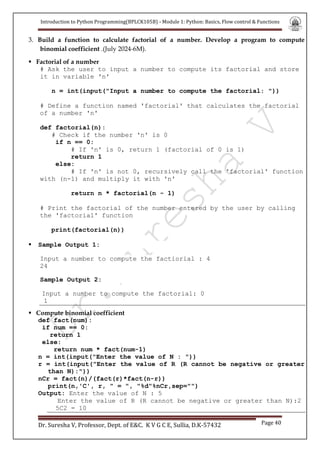
3. Build a function to calculate factorial of a number. Develop a program to compute
binomial coefficient .(July 2024-6M).
 Factorial of a number
# Ask the user to input a number to compute its factorial and store
it in variable 'n'
n = int(input("Input a number to compute the factorial: "))
# Define a function named 'factorial' that calculates the factorial
of a number 'n'
def factorial(n):
# Check if the number 'n' is 0
if n == 0:
# If 'n' is 0, return 1 (factorial of 0 is 1)
return 1
else:
# If 'n' is not 0, recursively call the 'factorial' function
with (n-1) and multiply it with 'n'
return n * factorial(n - 1)
# Print the factorial of the number entered by the user by calling
the 'factorial' function
print(factorial(n))
 Sample Output 1:
Input a number to compute the factiorial : 4
24
Sample Output 2:
Input a number to compute the factorial: 0
1
 Compute binomial coefficient
def fact(num):
if num == 0:
return 1
else:
return num * fact(num-1)
n = int(input("Enter the value of N : "))
r = int(input("Enter the value of R (R cannot be negative or greater
than N):"))
nCr = fact(n)/(fact(r)*fact(n-r))
print(n,'C', r, " = ", "%d"%nCr,sep="")
Output: Enter the value of N : 5
Enter the value of R (R cannot be negative or greater than N):2
5C2 = 10
Introduction to Python Programming(BPLCK105B) - Module 1: Python: Basics, Flow control & Functions
Dr. Suresha V, Professor, Dept. of E&C. K V G C E, Sullia, D.K-57432 Page 41
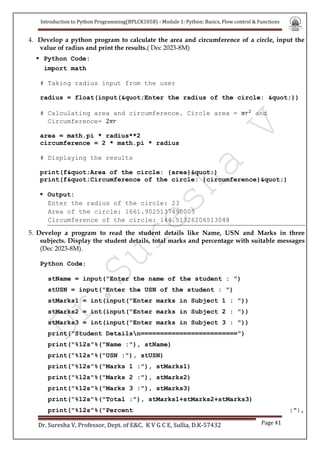
4. Develop a python program to calculate the area and circumference of a circle, input the
value of radius and print the results.( Dec 2023-8M)
 Python Code:
import math
# Taking radius input from the user
radius = float(input(&quot;Enter the radius of the circle: &quot;))
# Calculating area and circumference. Circle area = 𝜋𝑟2
and
Circumference= 2𝜋𝑟
area = math.pi * radius**2
circumference = 2 * math.pi * radius
# Displaying the results
print(f&quot;Area of the circle: {area}&quot;)
print(f&quot;Circumference of the circle: {circumference}&quot;)
 Output:
Enter the radius of the circle: 23
Area of the circle: 1661.9025137490005
Circumference of the circle: 144.51326206513048
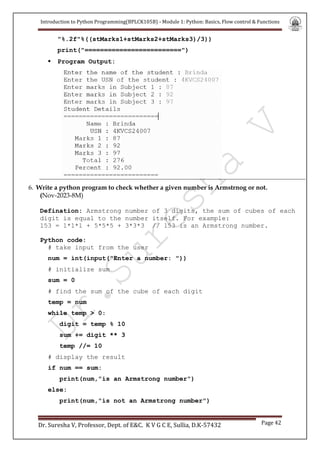
5. Develop a program to read the student details like Name, USN and Marks in three
subjects. Display the student details, total marks and percentage with suitable messages
(Dec 2023-8M).
Python Code:
stName = input("Enter the name of the student : ")
stUSN = input("Enter the USN of the student : ")
stMarks1 = int(input("Enter marks in Subject 1 : "))
stMarks2 = int(input("Enter marks in Subject 2 : "))
stMarks3 = int(input("Enter marks in Subject 3 : "))
print("Student Detailsn=========================")
print("%12s"%("Name :"), stName)
print("%12s"%("USN :"), stUSN)
print("%12s"%("Marks 1 :"), stMarks1)
print("%12s"%("Marks 2 :"), stMarks2)
print("%12s"%("Marks 3 :"), stMarks3)
print("%12s"%("Total :"), stMarks1+stMarks2+stMarks3)
print("%12s"%("Percent :"),
Introduction to Python Programming(BPLCK105B) - Module 1: Python: Basics, Flow control & Functions
Dr. Suresha V, Professor, Dept. of E&C. K V G C E, Sullia, D.K-57432 Page 42
"%.2f"%((stMarks1+stMarks2+stMarks3)/3))
print("=========================")
 Program Output:
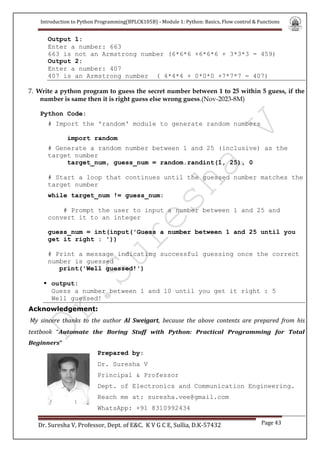
6. Write a python program to check whether a given number is Armstrnog or not.
(Nov-2023-8M)
Defination: Armstrong number of 3 digits, the sum of cubes of each
digit is equal to the number itself. For example:
153 = 1*1*1 + 5*5*5 + 3*3*3 // 153 is an Armstrong number.
Python code:
# take input from the user
num = int(input("Enter a number: "))
# initialize sum
sum = 0
# find the sum of the cube of each digit
temp = num
while temp > 0:
digit = temp % 10
sum += digit ** 3
temp //= 10
# display the result
if num == sum:
print(num,"is an Armstrong number")
else:
print(num,"is not an Armstrong number")
Introduction to Python Programming(BPLCK105B) - Module 1: Python: Basics, Flow control & Functions
Dr. Suresha V, Professor, Dept. of E&C. K V G C E, Sullia, D.K-57432 Page 43
Output 1:
Enter a number: 663
663 is not an Armstrong number (6*6*6 +6*6*6 + 3*3*3 = 459)
Output 2:
Enter a number: 407
407 is an Armstrong number ( 4*4*4 + 0*0*0 +7*7*7 = 407)
7. Write a python program to guess the secret number between 1 to 25 within 5 guess, if the
number is same then it is right guess else wrong guess.(Nov-2023-8M)
Python Code:
# Import the 'random' module to generate random numbers
import random
# Generate a random number between 1 and 25 (inclusive) as the
target number
target_num, guess_num = random.randint(1, 25), 0
# Start a loop that continues until the guessed number matches the
target number
while target_num != guess_num:
# Prompt the user to input a number between 1 and 25 and
convert it to an integer
guess_num = int(input('Guess a number between 1 and 25 until you
get it right : '))
# Print a message indicating successful guessing once the correct
number is guessed
print('Well guessed!')
 output:
Guess a number between 1 and 10 until you get it right : 5
Well guessed!
Acknowledgement:
My sincere thanks to the author Al Sweigart, because the above contents are prepared from his
textbook “Automate the Boring Stuff with Python: Practical Programming for Total
Beginners”
Prepared by:
Dr. Suresha V
Principal & Professor
Dept. of Electronics and Communication Engineering.
Reach me at: suresha.vee@gmail.com
WhatsApp: +91 8310992434

Module 1-Python prog.-BPLCK105B by Dr.SV.pdf

  • 1.
    Dr. SURESHA V ASimplified Notes As per VTU Syllabus 2022 Scheme Introduction to Python Programming Code: BPLCK105B/205B Professor Dept. of E&CE K.V.G. College of Engineering, Sullia, D.K-574 327 Affiliated to Visvesvaraya Technological University Belagavi - 590018 MODULE 1 Python: Basics Flow Control and Functions
  • 2.
    Introduction to PythonProgramming(BPLCK105B) - Module 1: Python: Basics, Flow control & Functions Dr. Suresha V, Professor, Dept. of E&C. K V G C E, Sullia, D.K-57432 Page 1 MODULE 1 PYTHON: BASICS, FLOW CONTROL & FUNCTIONS Learning Outcomes After reading this Module, the student will be able to: o Understand the fundamental concepts of Python programming language, including variables, data types, and basic operations. o Demonstrate proficiency in using Python's control flow statements such as if-elif- else, loops and exception handling to write efficient and robust code. o Apply Boolean logical operators and conditional statements effectively to control the flow of program execution based on different conditions. o Define and implement user-defined functions to modularise code and improve code reusability. o Utilize built-in functions and standard libraries in Python to perform common tasks efficiently. o Chapter 1: Python Basics (Textbook 1: Page 14-28): Python language features, History, Entering Expressions into the Interactive Shell, The Integer, Floating-Point, and String Data Types, String Concatenation and Replication, Storing Values in Variables, Your First Program, Dissecting Your Program, o Chapter 2: Flow control (Textbook 1: Page 32-58): Boolean Values, Comparison Operators, Boolean Operators, Mixing Boolean and Comparison Operators, Elements of Flow Control, Program Execution, Flow Control Statements, Importing Modules, Ending a Program Early with sys. exit(), o Chapter 3: Functions (Textbook 1: Page 63-75): def Statements with Parameters, Return Values and return Statements, The None Value, Keyword Arguments and print(), Local and Global Scope, The global Statement, Exception Handling, A Short Program: Guess the Number. o Text Book 1: Al Sweigart, “Automate the Boring Stuff with Python”,1st Edition, No Starch Press, 2015. o Web links (e-Resources): 1. https://www.w3schools.com/python/ 2. https://www.geeksforgeeks.org/python-programming-language/
  • 3.
    Introduction to PythonProgramming(BPLCK105B) - Module 1: Python: Basics, Flow control & Functions Dr. Suresha V, Professor, Dept. of E&C. K V G C E, Sullia, D.K-57432 Page 2 Chapter 1: Python Basics  What is a Computer Program: A computer program is a sequence of instructions that specifies how to perform a computation.  What is Python: Python is a general-purpose, interpreted, object-oriented, powerful high-level programming language with dynamic semantics.  Python language features / Advantages / Characteristics *** 1. Simple and Readable Syntax: Python's syntax is clear and easy to read, making it an ideal language for both beginners and experienced programmers. This simplicity can lead to faster development and reduce the complexity of code. 2. Rich Standard Library: Python has several standard libraries that provide ready-to-use modules and functions for various tasks. 3. High-level Language: It is easier for humans to understand and write. This nature makes Python suitable for rapid development and prototyping. 4. Dynamically Typed: The data types of variables are determined during run- time. We do not need to specify the data type of a variable during writing codes. 5. Object-Oriented Programming (OOP) Support: Python supports OOP paradigms, allowing developers to create reusable and modular code through classes and objects, encapsulation, inheritance, etc. 6. Interpreted Language: Python is an interpreted language, meaning that code is executed line by line without the need for compilation. This enables rapid development cycles and facilitates interactive programming. 7. Integrated Language: We can easily integrate it with other languages such as C, C++, etc. 8. Cross-platform Compatibility: Python can be easily installed on Windows, macOS, and various Linux distributions, allowing developers to create software that runs seamlessly across different operating systems. 9. Open source and free: It is an open-source language which means that anyone can download it, use it, and share it. Moreover, it is free of cost. 10. Garbage Collected: Memory allocation and de-allocation are automatically managed. Programmers do not specifically need to manage the memory.
  • 4.
    Introduction to PythonProgramming(BPLCK105B) - Module 1: Python: Basics, Flow control & Functions Dr. Suresha V, Professor, Dept. of E&C. K V G C E, Sullia, D.K-57432 Page 3 11. Supports GUI programming: Python has support for creating various GUI applications. Furthermore, these applications can work in many system software and libraries. PyQt5 is the most popular for making graphical apps. 12. Community Support and Documentation: Python has an active developer community that provides support through forums, mailing lists, and online resources. Its official documentation is comprehensive and well-maintained, with detailed explanations, tutorials, and examples for all levels of developers.  Terminology: Interpreter and Compiler : 1. Compilers: A compiler translates code from a high-level programming language into machine code before the program runs. It takes the entire program as input, hence memory requirement is greater. Errors are displayed after the entire program is checked. For example C compiler. 2. Interpreter: An interpreter translates code written in a high-level programming language into machine code line-by-line as the code runs. Memory requirement is less. Errors are displayed for every instruction that is interpreted. Examples are Python, JavaScript, Ruby etc. 1.1. Entering expressions into the interactive shell:  Python IDLE: Python interpreter is the software that runs Python programs in the Integrated Development and Learning Environment (IDLE). IDLE that comes as a default implementation when you install Python. It has two main window types, the Shell window and the Editor window. An IDE includes 1. A source code editor 2. A compiler or interpreter 3. An integrated debugger 4. A graphical user interface (GUI)  Python interpreter can be used in two basic modes: 1. Interactive mode: This mode is used when a user wants to run one single line or one block of code. Entering the command and expression at any prompt (>>>) of the shell. Faster results but I can’t save and edit the code. 2. Script mode: Script Mode, is used when the user is working with a block of code. This mode facilitates the development of more extensive, more structured programs. It is suitable for prototype development & can save and edit the code.
  • 5.
    Introduction to PythonProgramming(BPLCK105B) - Module 1: Python: Basics, Flow control & Functions Dr. Suresha V, Professor, Dept. of E&C. K V G C E, Sullia, D.K-57432 Page 4 o Math Operators Used in Python: (July 2024-6M) There are plenty of other operators you can use in Python expressions, Table 1-1 lists all the math operators in Python. Table 1-1: Math Operators from Highest to Lowest Precedence o The order of operations (precedence) of Python math operators is similar to that of mathematics. o The ** operator is evaluated first; the *, /, //, and % operators are evaluated next, from left to right; and the + and - operators are evaluated last (also from left to right). o The BODMAS rule follows the order, ie B – Brackets, O – Order of powers or roots, D – Division, M – Multiplication A – Addition, and S – Subtraction. o Mathematical expressions with multiple operators need to be solved from left to right in the order of BODMAS. o Enter the following expressions into the interactive shell:   
  • 6.
    Introduction to PythonProgramming(BPLCK105B) - Module 1: Python: Basics, Flow control & Functions Dr. Suresha V, Professor, Dept. of E&C. K V G C E, Sullia, D.K-57432 Page 5 1.2 Python Data Types: The Integer, floating-point and String*** o These datatypes are built-in datatypes in Python. In programming, datatype is an important concept. o A data type is a category for values, and every value belongs to one data type. Some types od data types are as follows with example  Integer type(int): - It is a numeric data type in Python used to hold numeric values. - The integer (or int) data type indicates values that are whole numbers. - It is represented as int and it holds signed integers of non-limited length. - For example int: 2, 3, 0, -13, 78, -132, etc.  Float type(float): - It is also a numeric data type in Python used to hold numeric values. - The float (or float) data type indicates values that are decimal numbers. - It is represented as float and it holds floating decimal points and it's accurate up to 15 decimal places. Ex Float: 2.345, -0.234, 5.0, 1.23, etc..  String Type(str): - Python programs can also have text values called strings, or str. - Strings in Python are surrounded by either single quotation marks or double quotation marks. Ex: 'Hello' is the same as "Hello". - It displays a string literal with the print() function. - The string with no characters, ' ', is called a blank string. - Data type can be identified of any object by using the type( ) function Example Complied output o If the error message SyntaxError: EOL while scanning string literal, the final single quote character at the end of the string is probably missing.
  • 7.
    Introduction to PythonProgramming(BPLCK105B) - Module 1: Python: Basics, Flow control & Functions Dr. Suresha V, Professor, Dept. of E&C. K V G C E, Sullia, D.K-57432 Page 6 1.3 String concatenation and replication: (Dec 2023-6M)  String concatenation: o Concatenation is the process of joining two or more strings together and forming one single string. o Different ways to concatenate strings using the + operator, join() method, % operator, format() function, Using “,” (comma) and Using f-string. o For example, + is the addition operator when it operates on two integers or floating-point values. o However, when + is used on two string values, it joins the strings as the string concatenation operator. o Example :  String replication: o Replicating the same string “n” several times is called string replication. o Use the * operator on a string to repeat the string a provided number of times. o The syntax for the operation is: result = ‘string’ * integer number o Example: o Note:The * operator can be used with only two numeric values (for multiplication) or one string value and one integer value (for string replication). Otherwise, Python will just display an error message. 1.4 Storing Values in Variables: o Variables are boxes in a computer’s memory for storing data values. o If we need to use the result of an evaluated expression later, then the result must be stored in a variable.  Assignment Statements: This statement is used to assign the value to the specified variable. An assignment statement consists of a variable name, an equal sign (called the assignment operator), and the value to be stored.   Figure 1-2: spam = 42 is like telling the program, “The variable spam now has the integer value 42 in it.” Ex: spam = 42
  • 8.
    Introduction to PythonProgramming(BPLCK105B) - Module 1: Python: Basics, Flow control & Functions Dr. Suresha V, Professor, Dept. of E&C. K V G C E, Sullia, D.K-57432 Page 7  Overwriting the variable: It refers to the process of assigning a new value to an existing variable, thereby replacing its previous value.  Variable Names ***: A variable can have a short name (like x and y) or a more descriptive name (age, carname, total_volume). We can name a variable anything as long as it obeys the following rules: 1. It can be only one word. 2. It can’t begin with a number. 3. It can use only letters, numbers, and the underscore (_) character. 4. Only contain alpha-numeric characters and underscores (A, 0-9, and _ ) 5. Variable names are case-sensitive (age, Age & AGE are 3 different variables) 6. A variable name cannot be any of the Python keywords. o Following Table 1-3: gives examples of valid and invalid variable names 1.6 Dissecting the Program: By dissecting the any program, we learned some of the following Python Instructions and Functions. 1. Comments 2. Printing the User’s Name 3. The print() Function 4.The input() Function 5. The len() Function 5. The str(), int(), & float() Functions ❶ A variable is initialized the first time a value is stored in it. ❷. After that, use it in expressions with other variables and values. ③ When a variable is assigned a new value, the old value is forgotten, which is why spam is evaluated to 42 instead of 40 at the end.
  • 9.
    Introduction to PythonProgramming(BPLCK105B) - Module 1: Python: Basics, Flow control & Functions Dr. Suresha V, Professor, Dept. of E&C. K V G C E, Sullia, D.K-57432 Page 8 1. Comments: The following line is called a comment. o Any text for the rest of the line following a hash mark (#) is part of a comment. o A comment is a text note that explains the source code. o It increases the readability of the program. o Python interpreters ignore these comments and do not execute them. o Sometimes, programmers will put a # in front of a line of code to temporarily remove it while testing a program. This is called commenting out code. o Python also ignores the blank line after the comment. 2. Printing the User’s Name: o The following call to print()contains the expression 'It is good to meet you, ' + myName between the parentheses (see line 6 in the example program) o Remember that expressions can always evaluate to a single value. o This single string value is then passed to print(), which prints it on the screen. 3. The print() Function:***((June 2024-6M, July 2024-6M) o The print() function displays the string value inside the parentheses on the screen or any other standard output device. o The line print('Hello world!') means Print out the text in the string 'Hello world!'. When Python executes this line, you say that Python is calling the print() function and the string value is being passed to the function. o A value that is passed to a function call is an “argument”. o The quotes are not printed on the screen. They just mark where the string begins and ends; they are not part of the string value. o We can also use this function to put a blank line on the screen; just call print() with nothing in between the parentheses. Example:
  • 10.
    Introduction to PythonProgramming(BPLCK105B) - Module 1: Python: Basics, Flow control & Functions Dr. Suresha V, Professor, Dept. of E&C. K V G C E, Sullia, D.K-57432 Page 9 4. The input() Function***:(June 2024-6M,July 2024-6M) o The input() function allows takes a user input. By default, it returns the user input in the form of a string. o The input() function waits for the user to type some text on the keyboard and press ENTER. o The input() function calls as an expression that evaluates to whatever string the user typed in. 5. The len() Function***:(June 2024-6M, July 2024-6M) o The len() function evaluates to the integer value of the number of characters in that string. o Example 1: Enter the following into the interactive shell. 6. The str(), int(), and float() Functions: *****  The str() Function: o The str() function converts the specified value into a string. o The str() function can be passed an integer value and will evaluate to a string value version of it, as follows. o Example 1: Example 2:  The int() Function: o The int() function converts the specified value into an integer number. o It converts a number in a given base to a decimal. Ex 1: Ex 2: Example:
  • 11.
    Introduction to PythonProgramming(BPLCK105B) - Module 1: Python: Basics, Flow control & Functions Dr. Suresha V, Professor, Dept. of E&C. K V G C E, Sullia, D.K-57432 Page 10  The float() Function: o The float() function converts the specified value into a floating point number. CHAPTER 2: FLOW CONTROL o Introduction: o Control statements direct the flow of a Python program's execution. They introduce logic, decision-making, and looping. o Flow control statements can decide which Python instructions to execute under which conditions. o These flow control statements directly correspond to the symbols in a flowchart. o In a flowchart, there is usually more than one way to go from the start to the end. o Flowcharts represent these branching points with diamonds, while the other steps are represented with rectangles. o Example Figure 2-1: A flowchart to tell you what to do if it is raining C Ex:
  • 12.
    Introduction to PythonProgramming(BPLCK105B) - Module 1: Python: Basics, Flow control & Functions Dr. Suresha V, Professor, Dept. of E&C. K V G C E, Sullia, D.K-57432 Page 11 2. 1. Boolean Data types *** o Boolean data types have one of two values: True or False. o In programming we often need to know if an expression is True or False. o In Python, these Boolean values always start with a capital T or F, with the rest of the word in lowercase. Example 2.2 Comparison Operators***:(July 2024-4M, Dec 2023-6M) o The comparison operators are also called relational operators. o Comparison operators compare two values and evaluate them down to a single Boolean value. The table below lists the comparison operators o These operators evaluate to True or False depending on the values we give them. o The == and != operators can actually work with values of any data type. o The <, >, <=, and >= operators, on the other hand, work properly only with integer and floating-point values. Ex: C
  • 13.
    Introduction to PythonProgramming(BPLCK105B) - Module 1: Python: Basics, Flow control & Functions Dr. Suresha V, Professor, Dept. of E&C. K V G C E, Sullia, D.K-57432 Page 12  The Difference Between the == and = Operators: (July 2024-4M) o The = operator is used for assignment, such as when assigning a value to a variable. o The == operator is the relational operator for checking the equality of two values. If the values are the same, it will return True and will return False otherwise. o Example 1: Assign operator Example 2: Equality operator 2.3 Boolean Operators** o Python has three Boolean operators, or logical operators: and, or, & not. o These logical operators are used to compare Boolean values, as shown below. Operator Meaning Example and True if both the operands are true X and Y or True if either of the operands is true X or Y not True if the operand is false not X  and operator : o The and operator evaluates an expression to True if both Boolean values are True; otherwise, it evaluates to False. o Table: The Operator’s Truth Table  or operator : o The or operator evaluates an expression to True if either of the two Boolean values is True. If both are False, it evaluates to False C C
  • 14.
    Introduction to PythonProgramming(BPLCK105B) - Module 1: Python: Basics, Flow control & Functions Dr. Suresha V, Professor, Dept. of E&C. K V G C E, Sullia, D.K-57432 Page 13 o Table: The Operator’s Truth Table  Not operator: o The not-operator operates on only one Boolean value (or expression). The not operator simply evaluates to the opposite Boolean value o Table: The not Operator’s Truth Table 2.4 Mixing Boolean and Comparison Operators: o Since the comparison operators evaluate Boolean values, we can use them in expressions with the Boolean operators. Ex: o The computer will evaluate the left expression first, and then it will evaluate the right expression. When it knows the Boolean value for each, it will then evaluate the whole expression down to one Boolean value. The computer’s evaluation process for (4 < 5) and (5 < 6) is shown in Figure below: o The multiple Boolean operators in an expression, along with the comparison operators shown below
  • 15.
    Introduction to PythonProgramming(BPLCK105B) - Module 1: Python: Basics, Flow control & Functions Dr. Suresha V, Professor, Dept. of E&C. K V G C E, Sullia, D.K-57432 Page 14 o The Boolean operators have an order of operations just like the math operators do. After any math and comparison operators are evaluated, Python evaluates the not operators first, then the and, and then the or operators 2.5. Elements of Flow Control: Flow control includes (Dec 2023-6M) 1. Conditional statements 2. Block of codes 1. Conditional statements: o Condition is just a more specific name in the context of flow control statements. Eg (if, elif, else), loops (for, while). o Conditions always evaluate down to a Boolean value, True or False. o A flow control statement decides what to do based on whether its condition is True or False, and almost every flow control statement uses a condition. 2. Block of codes: o Lines of Python code can be grouped together in blocks. There are three rules for blocks. a. Blocks begin when the indentation increases. b. Blocks can contain other blocks. c. Blocks end when the indentation decreases to zero or to a containing block’s indentation. o Example:  Description: o The first block of code ❶ starts at the line print('Hello Mary') and contains all the lines after it. o Inside this block is another block ❷, which has only a single line in it: print('Access Granted.'). o The third block ❸ is also one line long: print('Wrong password.').
  • 16.
    Introduction to PythonProgramming(BPLCK105B) - Module 1: Python: Basics, Flow control & Functions Dr. Suresha V, Professor, Dept. of E&C. K V G C E, Sullia, D.K-57432 Page 15 2.6 Flow Control Statements:***** Major control statements used in python programming are 1. if Statements 2. else Statements 3. elif Statements 4. while loop Statements 5. break Statements 6. Continue statements 7. for loops and the range() function 8. The Starting, Stopping, and Stepping Arguments to range() 1. if Statements:(July 2024-10M, Dec 2023-6M) o The most common type of flow control statement is the if statement o An ‘if statement executes a block of code only if the specified condition is met. o In Python, an if statement consists of the following: 1. The if keyword 2. A condition (that is, an expression that evaluates to True or False) 3. A colon 4. Starting on the next line, an indented block of code (called the if clause) o Example: for if statement o Flowchart: The flowchart for an if statement
  • 17.
    Introduction to PythonProgramming(BPLCK105B) - Module 1: Python: Basics, Flow control & Functions Dr. Suresha V, Professor, Dept. of E&C. K V G C E, Sullia, D.K-57432 Page 16 2. else Statements:(July 2024-10M,Dec 2023-6M) o An if clause can optionally be followed by an else statement. o The else clause is executed only when the if statement’s condition is False. o else statement could be read as, “If this condition is true, execute this code. Or else, execute that code.” o An else statement doesn’t have a condition, and in code, an else statement always consists of the following: 1. The else keyword 2. A colon 3. Starting on the next line, an indented block of code (called the else clause)  Example: for else statement  Flowchart: The flowchart for an else statement
  • 18.
    Introduction to PythonProgramming(BPLCK105B) - Module 1: Python: Basics, Flow control & Functions Dr. Suresha V, Professor, Dept. of E&C. K V G C E, Sullia, D.K-57432 Page 17 3. elif Statements: (June 2024-6M, July 2024-6M,Dec 2023-6M) o In Python programming, the “else if” statement, is often called “elif”. o It is a conditional statement that allows you to specify multiple conditions to be evaluated sequentially. It provides another condition that is checked only if all of the previous conditions were False. 1. The elif keyword 2. A condition (that is, an expression that evaluates to True or False) 3. A colon 4. Starting on the next line, an indented block of code (called the elif clause)  Example: for elif statement o Flowchart: The flowchart for an elif statement  When there is a chain of elif statements, only one or none of the clauses will be executed. o Remember, at most only one of the clauses will be executed, and for elif statements, the order matters!
  • 19.
    Introduction to PythonProgramming(BPLCK105B) - Module 1: Python: Basics, Flow control & Functions Dr. Suresha V, Professor, Dept. of E&C. K V G C E, Sullia, D.K-57432 Page 18 4. While loop Statements:(June 2024-6M, July 2024-6M) o Python While Loop is used to execute a block of statements repeatedly until a given condition is satisfied. When the condition becomes false, the line immediately after the loop in the program is executed. o In code, a while statement always consists of the following: 1. The while keyword 2. A condition (that is an expression that evaluates to True or False. 3. A colon 4. Starting on the next line, an indented block of code (called the while clause) o Example: for a while loop statement o Description: o These statements are similar—both if and while checking the value of spam, and if it’s less than five, they print a message. o But when we run these two code snippets, for the if statement, the output is simply "Hello, world." o But for the while statement, it’s "Hello, world." repeated five times. o Flowchart: comaprision flow chart for “ if ” and “ while ” statements.
  • 20.
    Introduction to PythonProgramming(BPLCK105B) - Module 1: Python: Basics, Flow control & Functions Dr. Suresha V, Professor, Dept. of E&C. K V G C E, Sullia, D.K-57432 Page 19 5. for loop::(June 2024-6M, July 2024-6M) o A for loop is used for iterating over a sequence. o With the for loop we can execute a set of statements, once for each item in a list, tuple, set etc. o In code, a for statement always consists of the following: 1. The for keyword 2. A variable name 3. The in Keyword 4. A call on the range 5. A Colon o Example: fruits = ["apple", "banana", "cherry"] for x in fruits: print(x) 5. break Statements: o 'Break' in Python is a loop control statement. It is used to control the sequence of the loop. o The break keyword is used to break out a for loop, or a while loop. If the execution reaches a break statement, it immediately exits the while loop’s clause. o In code, a break statement simply contains the break keyword. o Example: for break statement o Description: - The first line ❶ creates an infinite loop; it is a while loop whose condition is always True. - The program execution will always enter the loop and will exit it only when a break statement is executed. - This program asks the user to type your name ❷.
  • 21.
    Introduction to PythonProgramming(BPLCK105B) - Module 1: Python: Basics, Flow control & Functions Dr. Suresha V, Professor, Dept. of E&C. K V G C E, Sullia, D.K-57432 Page 20 - Now, however, while the execution is still inside the while loop, an if statement gets executed ❸ to check whether your name is equal to your name. - If this condition is True, the break statement is run ❹, and the execution moves out of the loop to print('Thank you!') ❺. Otherwise, the if statement’s clause with the break statement is skipped, which puts the execution at the end of the while loop. - At this point, the program execution jumps back to the start of the while statement ❶ to recheck the condition. Since this condition is merely the True Boolean value, the execution enters the loop to ask the user to type your name again. o Flowchart 2: The flowchart for the program with an infinite loop. Note that the X path will logically never happen because the loop condition is always True. o Flowchart 2:
  • 22.
    Introduction to PythonProgramming(BPLCK105B) - Module 1: Python: Basics, Flow control & Functions Dr. Suresha V, Professor, Dept. of E&C. K V G C E, Sullia, D.K-57432 Page 21 6. Continue statements: o The continue keyword is used to end the current iteration in a for loop (or a while loop) and continues to the next iteration. It is used inside the loop. o When the program execution reaches a continue statement, the program execution immediately jumps back to the start of the loop and reevaluates the loop’s condition. o Example: for continue statements o Output: o Description: o If the user enters any name besides Joe ❶, the continue statement ❷ causes the program execution to jump back to the start of the loop. o When it reevaluates the condition, the execution will always enter the loop, since the condition is simply the value True. Once they make it past that if statement, the user is asked for a password ❸. o If the password entered is swordfish, then the break statement ❹ is run, and the execution jumps out of the while loop to print Access granted ❺. o Otherwise, the execution continues to the end of the while loop, where it then jumps back to the start of the loop.
  • 23.
    Introduction to PythonProgramming(BPLCK105B) - Module 1: Python: Basics, Flow control & Functions Dr. Suresha V, Professor, Dept. of E&C. K V G C E, Sullia, D.K-57432 Page 22 7. for loops and the range() function: o Execute a block of code only a certain number of times with a for loop statement and the range() function. o In code, a for statement looks something like for i in range(5): and always includes the following: 1. The for keyword 2. A variable name 3. The in keyword 4. A call to the range() method with up to three integers passed to it 5. A colon 6. Starting on the next line, an indented block of code o Example1 and output:    o The code in the for loop’s clause is run five times. o The first time it is run, the variable i is set to 0. o The print() call in the clause will print Jimmy Five Times (0). o After Python finishes an iteration through all the code inside the for loop’s clause, the execution goes back to the top of the loop, & the for statement increments i by one. o This is why range(5) results in five iterations through the clause, with i being set to 0, then 1, then 2, then 3, and then 4. o The variable I will go up to, but will not include, the integer passed to range().  Flowchart: for range function  
  • 24.
    Introduction to PythonProgramming(BPLCK105B) - Module 1: Python: Basics, Flow control & Functions Dr. Suresha V, Professor, Dept. of E&C. K V G C E, Sullia, D.K-57432 Page 23  Example 1: o The result should be 5,050. When the program first starts, the total variable is set to 0 ❶. o The for loop ❷ then executes total = total + num ❸ 100 times. o By the time the loop has finished all of its 100 iterations, every integer from 0 to 100 will have been added to the total. At this point, the total is printed on the screen ❹.  An equivalent while loop: For the first example of a for loop. 8. The Starting, Stopping, and Stepping Arguments to range() o Functions that can be called with multiple arguments separated by a comma are called range() functions. o This lets us change the integer passed to range() to follow any sequence of integers, including starting at a number other than zero. o The first argument will be where the for loop’s variable starts, and the second argument will be up to, but not including, the number to stop at. o The range() function can also be called with three arguments. The first two arguments will be the start and stop values, and the third will be the step argument. The step is the amount that the variable is increased by after each iteration.
  • 25.
    Introduction to PythonProgramming(BPLCK105B) - Module 1: Python: Basics, Flow control & Functions Dr. Suresha V, Professor, Dept. of E&C. K V G C E, Sullia, D.K-57432 Page 24 o So calling range(0, 10, 2) will count from zero to eight by intervals of two. o The range() function is flexible in the sequence of numbers it produces for loops. We can even use a negative number for the step argument to make the for loop count down instead of up. o Running a for loop to print i with range(5, -1, -1) should print from five down to zero. 2.8 Importing Modules o All Python programs can call a basic set of functions called built-in functions, including the print(), input(), and len() functions. o Python also comes with a set of modules called the standard library. o Each module is a Python program that contains a related group of functions that can be embedded in the programs. o For example, the math module has mathematics-related functions, the random module has random number–related functions, and so on. o Before using the functions in a module, we must import the module with an import statement. In code, an import statement consists of the following: 1. The import keyword 2. The name of the module 3. Optionally, more module names, as long as they are separated by commas o Once we import a module, we can use all the functions of that module.
  • 26.
    Introduction to PythonProgramming(BPLCK105B) - Module 1: Python: Basics, Flow control & Functions Dr. Suresha V, Professor, Dept. of E&C. K V G C E, Sullia, D.K-57432 Page 25  Example with output: o The random. randint() function call evaluates to a random integer value between the two integers that you pass it. o First type random. in front of the function name to tell Python to look for this function inside the random module. o Here’s an example of an import statement that imports four different modules: o Now we can use any of the functions in these four modules CHAPTER 3: FUNCTIONS o Introduction:(July 2024-6M) o Function is a block of code that only runs when called. It is like a mini-program. o The idea is to use the same block of code repeatedly during programming in terms of function whenever required. o We can pass data, known as parameters, into a function. It can return data as a result. A major purpose of functions is to group code that gets executed multiple times o Python provides several built-in functions like print(), len(), input(). Etc. but you can also write your functions. o In Python a function is created using the def keyword. o Benefits of Using Functions 1. Increase Code Readability 2. Increase Code Reusability o Python Function Declaration: The syntax to declare a function is:
  • 27.
    Introduction to PythonProgramming(BPLCK105B) - Module 1: Python: Basics, Flow control & Functions Dr. Suresha V, Professor, Dept. of E&C. K V G C E, Sullia, D.K-57432 Page 26 o Types of Functions in Python: 1. Built-in library function: These are Standard functions in Python that are available to use. Example print(), len() etc.. 2. User-defined function: We can create our own functions based on our requirements. o Example: Program Output  Program Description: o The first line is a def statement ❶, which defines a function named hello(). o The code in the block that follows the def statement ❷ is the body of the function. This code is executed when the function is called, not when the function is first defined. The hello() lines after the function ❸ are function calls. o In code, a function call is just the function’s name followed by parentheses, possibly with some number of arguments in between the parentheses. o When the program execution reaches these calls, it will jump to the top line in the function and begin executing the code there. o When it reaches the end of the function, the execution returns to the line that called the function and continues moving through the code as before. o Since this program calls hello() three times, the code in the hello() function is executed three times. When we run this program, the output looks like the above. 3.1 def Statements with Parameters: o When we call the print() or len() function, we pass in values, called arguments in this context, by typing them between the parentheses. o We can also define our own functions that accept arguments.
  • 28.
    Introduction to PythonProgramming(BPLCK105B) - Module 1: Python: Basics, Flow control & Functions Dr. Suresha V, Professor, Dept. of E&C. K V G C E, Sullia, D.K-57432 Page 27 o Example with output   Program Description: o The definition of the hello() function in this program has a parameter called name ❶. o A parameter is a variable stored in an argument when a function is called. The first time the hello() function is called, it’s with the argument 'Alice' ❸. o The program execution enters the function, & the variable name is automatically set to 'Alice', which is what gets printed by the print() statement ❷. o One special thing to note about parameters is that the value stored in a parameter is forgotten when the function returns. 3.2 Return Values and return Statements:(July 24-6M) o The value that a function call evaluates is called the return value of the function. Ex: len(‘Hello’) → Return values is 5 o The Python return statement is used to return a value from a function. o The user can only use the return statement in a function. It cannot be used outside of the Python function. o When creating a function using the def statement, you can specify what the return value should be with a return statement. o A return statement consists of the following: 1. The return keyword 2. The value or expression that the function should return. o When an expression is used with a return statement, the return value is what this expression evaluates to. o For example, the following program defines a function that returns a different string depending on what number it is passed as an argument.
  • 29.
    Introduction to PythonProgramming(BPLCK105B) - Module 1: Python: Basics, Flow control & Functions Dr. Suresha V, Professor, Dept. of E&C. K V G C E, Sullia, D.K-57432 Page 28 3.3 None value: o In Python there is a value called None, which represents the absence of a value. o The None keyword is used to define a null value or no value at all. o None is not the same as 0, False, or an empty string. None is the only value of the NoneType data type. o Python None is the function returns when there are no return statements. o One place where None is used is as the return value of print(). o Example: 3.4 Keyword Arguments and Print () o Python allows to passing of function arguments in the form of keywords which are called named arguments. o Most arguments are identified by their position in the function call.
  • 30.
    Introduction to PythonProgramming(BPLCK105B) - Module 1: Python: Basics, Flow control & Functions Dr. Suresha V, Professor, Dept. of E&C. K V G C E, Sullia, D.K-57432 Page 29 o Keyword arguments are identified by the keyword put before them in the function call. o Keyword arguments are often used for optional parameters. o For example, the print() function has the optional parameters end and sep to specify what should be printed at the end of its arguments and between its arguments (separating them), respectively. o The two strings appear on separate lines because the print() function automatically adds a newline character to the end of the string it is passed. o However, can set the end keyword argument to change this to a different string. o For example, if the program and its output were this: o When we pass multiple string values to print(), the function will automatically separate them with a single space. o But we could replace the default separating string by passing the sep keyword argument 3.5 Local and Global Scope***(June 24-6M, July 24-8M o Variables that are assigned in a called function are said to exist in that function’s “local scope”. o Variables that are assigned outside all functions are said to exist in the “global scope”. o A variable that exists in a local scope is called a local variable, while a variable that exists in the global scope is called a global variable.
  • 31.
    Introduction to PythonProgramming(BPLCK105B) - Module 1: Python: Basics, Flow control & Functions Dr. Suresha V, Professor, Dept. of E&C. K V G C E, Sullia, D.K-57432 Page 30 o A variable must be one or the other; it cannot be both local and global. o When a scope is destroyed, all the values stored in the scope’s variables are forgotten. o There is only one global scope, and it is created when your program begins. When your program terminates, the global scope is destroyed, and all its variables are forgotten. o A local scope is created whenever a function is called. Any variables assigned in this function exist within the local scope. When the function returns, the local scope is destroyed, and these variables are forgotten. o Scopes matter for several reasons: 1. Code in the global scope cannot use any local variables. 2. However, a local scope can access global variables. 3. Code in a function’s local scope cannot use variables in any other local scope. 4. We can use the same name for different variables if they are in different scopes. That is, there can be a local variable named spam and a global variable also named spam.  Local variables cannot be used in the global scope o Consider this program, which will cause an error when you run it: Program Output → Error o The error happens because the eggs variable exists only in the local scope created when spam() is called. o Once the program execution returns from spam, that local scope is destroyed, and the variable eggs is no longer present.  Local Scopes Cannot Use Variables in Other Local Scopes o A new local scope is created whenever a function is called, including when a function is called from another function. o Consider this program:
  • 32.
    Introduction to PythonProgramming(BPLCK105B) - Module 1: Python: Basics, Flow control & Functions Dr. Suresha V, Professor, Dept. of E&C. K V G C E, Sullia, D.K-57432 Page 31 o When the program starts, the spam() function is called ❺, and a local scope is created. o The local variable eggs ❶ is set to 99. o Then the bacon() function is called ❷, and a second local scope is created. Multiple local scopes can exist at the same time. o In this new local scope, the local variable ham is set to 101, and a local variable egg—which is different from the one in spam()’s local scope—is also created ❹ and set to 0. o When bacon() returns, the local scope for that call is destroyed. The program execution continues in the spam() function to print the value of eggs ❸, and since the local scope for the call to spam() still exists here, the eggs variable is set to 99.  Global Variables Can Be Read from a Local Scope o Consider the following program: o Since there is no parameter named eggs or any code that assigns eggs a value in the spam() function, when eggs are used in spam(), Python considers it a reference to the global variable eggs. This is why 42 is printed when the previous program is run.  Local and Global Variables with the Same Name o To simplify, avoid using local variables that have the same name as a global variable or another local variable. o But technically, it’s perfectly legal to do so.
  • 33.
    Introduction to PythonProgramming(BPLCK105B) - Module 1: Python: Basics, Flow control & Functions Dr. Suresha V, Professor, Dept. of E&C. K V G C E, Sullia, D.K-57432 Page 32 Example program o There are actually three different variables in this program, but confusingly they are all named eggs. The variables are as follows: o ❶ A variable named eggs that exists in a local scope when spam() is called. o ❷ A variable named eggs that exists in a local scope when bacon() is called. o ❸ A variable named eggs that exists in the global scope. o Since these three separate variables all have the same name, it can be confusing to keep track of which one is being used at any given time. This is why we should avoid using the same variable name in different scopes. 3.6 The Global Statement o Global statement is used to modify a global variable within a function. o If we have a line such as global eggs at the top of a function, it tells Python, “In this function, eggs refer to the global variable, so don’t create a local variable with this name.” o For example: Output
  • 34.
    Introduction to PythonProgramming(BPLCK105B) - Module 1: Python: Basics, Flow control & Functions Dr. Suresha V, Professor, Dept. of E&C. K V G C E, Sullia, D.K-57432 Page 33 o Because eggs are declared global at the top of spam() ❶, when eggs are set to 'spam' ❷, this assignment is done to the globally scoped eggs. No local eggs variable is created. o There are four rules to tell whether a variable is in a local scope or global scope: 1. If a variable is being used in the global scope (that is, outside of all functions), then it is always a global variable. 2. If there is a global statement for that variable in a function, it is a global variable. 3. Otherwise, if the variable is used in an assignment statement in the function, it is a local variable. 4. But if the variable is not used in an assignment statement, it is a global variable. o “If we ever want to modify the value stored in a global variable from in a function, we must use a global statement on that variable.” 3.7 Exception Handling: (June 2024-6M, July 2024-8M) o Defination: Exception is an event (error) which occurs during the execution of the program. o If we don’t want to crash the program due to errors instead we want the program to detect errors, handle them, and then continue to run. o For example: Program output o A ZeroDivisionError happens whenever we try to divide a number by zero. From the line number given in the error message, we know that the return statement in spam() is causing an error. o Errors can be handled with try and except statements. o The code that could potentially have an error is put in a try clause. The program execution moves to the start of the following except clause if an error happens. o We can put the previous divide-by-zero code in a try clause and have an except clause contain code to handle what happens when this error occurs.
  • 35.
    Introduction to PythonProgramming(BPLCK105B) - Module 1: Python: Basics, Flow control & Functions Dr. Suresha V, Professor, Dept. of E&C. K V G C E, Sullia, D.K-57432 Page 34 Program Output o Note that any errors that occur in function calls in a try block will also be caught. Consider the following program, which instead has the spam() calls in the try block: Program Output
  • 36.
    Introduction to PythonProgramming(BPLCK105B) - Module 1: Python: Basics, Flow control & Functions Dr. Suresha V, Professor, Dept. of E&C. K V G C E, Sullia, D.K-57432 Page 35 Module 1: VTU Questions
  • 37.
    Introduction to PythonProgramming(BPLCK105B) - Module 1: Python: Basics, Flow control & Functions Dr. Suresha V, Professor, Dept. of E&C. K V G C E, Sullia, D.K-57432 Page 36
  • 38.
    Introduction to PythonProgramming(BPLCK105B) - Module 1: Python: Basics, Flow control & Functions Dr. Suresha V, Professor, Dept. of E&C. K V G C E, Sullia, D.K-57432 Page 37
  • 39.
    Introduction to PythonProgramming(BPLCK105B) - Module 1: Python: Basics, Flow control & Functions Dr. Suresha V, Professor, Dept. of E&C. K V G C E, Sullia, D.K-57432 Page 38 VTU: Python Programming Questions 1. Develop a program to read the name and year of birth of a person. Print whether person is senior citizen or not. (June 2024-8M, July 2024-8M, Dec-2023-4M, July 2023-7M). Python Code: from datetime import date personName = input("Enter the name of the person : ") personDOB = int(input("Enter his year of birth : ")) curYear = date.today().year personAge = curYear-personDOB if (personAge > 60): print(personName, "aged", personAge, "years,The person is a Senior Citizen.") else: print(personName, "aged", personAge, "years,The person is not a Senior Citizen.")
  • 40.
    Introduction to PythonProgramming(BPLCK105B) - Module 1: Python: Basics, Flow control & Functions Dr. Suresha V, Professor, Dept. of E&C. K V G C E, Sullia, D.K-57432 Page 39  Expected Output: Test 1: Enter the name of the person : Suresh Enter his year of birth : 1971 Suresh aged 53 years,The person is not a Senior Citizen. Test 2: Enter the name of the person : Raj Enter his year of birth : 1959 Raj aged 65 years,The person is a Senior Citizen. 2. Develop a program to generate Fibonacci numbe of length (N). Read N from the console. (June/july 2024-8M, July 2024-8M, Dec-2023-5M, July 2023-6M). Python Code 1: N = int(input('Enter the length of the Fibonacci Number:')) num1 = 0 num2 = 1 next_number = num2 count = 1 while count <= N: print(next_number, end=" ") count += 1 num1, num2 = num2, next_number next_number = num1 + num2 print()  Expected Output: Test 1: Enter the length of the Fibonacci Number:5 1 2 3 5 8 Test 2: Enter the length of the Fibonacci Number: 12 1 2 3 5 8 13 21 34 55 89 144 233 Pthon Code: 2 N = int(input('Enter the length of fibonacci Number: ')) dp = [0,1] for i in range(N-1): dp.append(dp[-1] + dp[-2]) for i in dp: print(i," ",end=" ") Output: Enter the length of fibonacci Number: 12 0 1 1 2 3 5 8 13 21 34 55 89 144
  • 41.
    Introduction to PythonProgramming(BPLCK105B) - Module 1: Python: Basics, Flow control & Functions Dr. Suresha V, Professor, Dept. of E&C. K V G C E, Sullia, D.K-57432 Page 40 3. Build a function to calculate factorial of a number. Develop a program to compute binomial coefficient .(July 2024-6M).  Factorial of a number # Ask the user to input a number to compute its factorial and store it in variable 'n' n = int(input("Input a number to compute the factorial: ")) # Define a function named 'factorial' that calculates the factorial of a number 'n' def factorial(n): # Check if the number 'n' is 0 if n == 0: # If 'n' is 0, return 1 (factorial of 0 is 1) return 1 else: # If 'n' is not 0, recursively call the 'factorial' function with (n-1) and multiply it with 'n' return n * factorial(n - 1) # Print the factorial of the number entered by the user by calling the 'factorial' function print(factorial(n))  Sample Output 1: Input a number to compute the factiorial : 4 24 Sample Output 2: Input a number to compute the factorial: 0 1  Compute binomial coefficient def fact(num): if num == 0: return 1 else: return num * fact(num-1) n = int(input("Enter the value of N : ")) r = int(input("Enter the value of R (R cannot be negative or greater than N):")) nCr = fact(n)/(fact(r)*fact(n-r)) print(n,'C', r, " = ", "%d"%nCr,sep="") Output: Enter the value of N : 5 Enter the value of R (R cannot be negative or greater than N):2 5C2 = 10
  • 42.
    Introduction to PythonProgramming(BPLCK105B) - Module 1: Python: Basics, Flow control & Functions Dr. Suresha V, Professor, Dept. of E&C. K V G C E, Sullia, D.K-57432 Page 41 4. Develop a python program to calculate the area and circumference of a circle, input the value of radius and print the results.( Dec 2023-8M)  Python Code: import math # Taking radius input from the user radius = float(input(&quot;Enter the radius of the circle: &quot;)) # Calculating area and circumference. Circle area = 𝜋𝑟2 and Circumference= 2𝜋𝑟 area = math.pi * radius**2 circumference = 2 * math.pi * radius # Displaying the results print(f&quot;Area of the circle: {area}&quot;) print(f&quot;Circumference of the circle: {circumference}&quot;)  Output: Enter the radius of the circle: 23 Area of the circle: 1661.9025137490005 Circumference of the circle: 144.51326206513048 5. Develop a program to read the student details like Name, USN and Marks in three subjects. Display the student details, total marks and percentage with suitable messages (Dec 2023-8M). Python Code: stName = input("Enter the name of the student : ") stUSN = input("Enter the USN of the student : ") stMarks1 = int(input("Enter marks in Subject 1 : ")) stMarks2 = int(input("Enter marks in Subject 2 : ")) stMarks3 = int(input("Enter marks in Subject 3 : ")) print("Student Detailsn=========================") print("%12s"%("Name :"), stName) print("%12s"%("USN :"), stUSN) print("%12s"%("Marks 1 :"), stMarks1) print("%12s"%("Marks 2 :"), stMarks2) print("%12s"%("Marks 3 :"), stMarks3) print("%12s"%("Total :"), stMarks1+stMarks2+stMarks3) print("%12s"%("Percent :"),
  • 43.
    Introduction to PythonProgramming(BPLCK105B) - Module 1: Python: Basics, Flow control & Functions Dr. Suresha V, Professor, Dept. of E&C. K V G C E, Sullia, D.K-57432 Page 42 "%.2f"%((stMarks1+stMarks2+stMarks3)/3)) print("=========================")  Program Output: 6. Write a python program to check whether a given number is Armstrnog or not. (Nov-2023-8M) Defination: Armstrong number of 3 digits, the sum of cubes of each digit is equal to the number itself. For example: 153 = 1*1*1 + 5*5*5 + 3*3*3 // 153 is an Armstrong number. Python code: # take input from the user num = int(input("Enter a number: ")) # initialize sum sum = 0 # find the sum of the cube of each digit temp = num while temp > 0: digit = temp % 10 sum += digit ** 3 temp //= 10 # display the result if num == sum: print(num,"is an Armstrong number") else: print(num,"is not an Armstrong number")
  • 44.
    Introduction to PythonProgramming(BPLCK105B) - Module 1: Python: Basics, Flow control & Functions Dr. Suresha V, Professor, Dept. of E&C. K V G C E, Sullia, D.K-57432 Page 43 Output 1: Enter a number: 663 663 is not an Armstrong number (6*6*6 +6*6*6 + 3*3*3 = 459) Output 2: Enter a number: 407 407 is an Armstrong number ( 4*4*4 + 0*0*0 +7*7*7 = 407) 7. Write a python program to guess the secret number between 1 to 25 within 5 guess, if the number is same then it is right guess else wrong guess.(Nov-2023-8M) Python Code: # Import the 'random' module to generate random numbers import random # Generate a random number between 1 and 25 (inclusive) as the target number target_num, guess_num = random.randint(1, 25), 0 # Start a loop that continues until the guessed number matches the target number while target_num != guess_num: # Prompt the user to input a number between 1 and 25 and convert it to an integer guess_num = int(input('Guess a number between 1 and 25 until you get it right : ')) # Print a message indicating successful guessing once the correct number is guessed print('Well guessed!')  output: Guess a number between 1 and 10 until you get it right : 5 Well guessed! Acknowledgement: My sincere thanks to the author Al Sweigart, because the above contents are prepared from his textbook “Automate the Boring Stuff with Python: Practical Programming for Total Beginners” Prepared by: Dr. Suresha V Principal & Professor Dept. of Electronics and Communication Engineering. Reach me at: suresha.vee@gmail.com WhatsApp: +91 8310992434