COMPUTER ARCHITECTURE
DATA REPRESENTATIONS
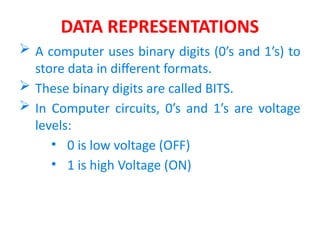
 A computer uses binary digits (0’s and 1’s) to
store data in different formats.
 These binary digits are called BITS.
 In Computer circuits, 0’s and 1’s are voltage
levels:
• 0 is low voltage (OFF)
• 1 is high Voltage (ON)
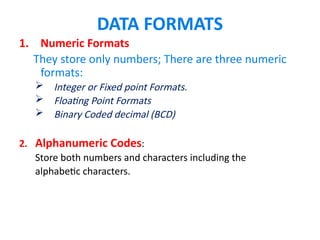
DATA FORMATS
1. Numeric Formats
They store only numbers; There are three numeric
formats:
 Integer or Fixed point Formats.
 Floating Point Formats
 Binary Coded decimal (BCD)
2. Alphanumeric Codes:
Store both numbers and characters including the
alphabetic characters.
NUMERIC FORMATS
Integer Formats
Binary:
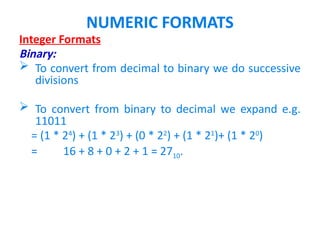
 To convert from decimal to binary we do successive
divisions
 To convert from binary to decimal we expand e.g.
11011
= (1 * 24
) + (1 * 23
) + (0 * 22
) + (1 * 21
)+ (1 * 20
)
= 16 + 8 + 0 + 2 + 1 = 2710.
NUMERIC FORMATS
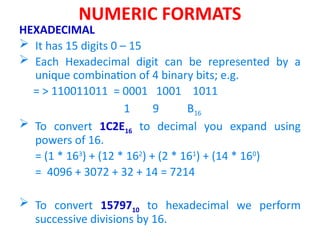
HEXADECIMAL
 It has 15 digits 0 – 15
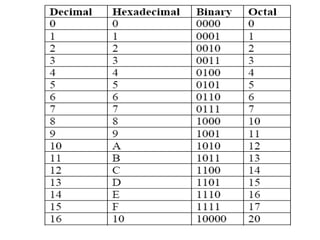
 Each Hexadecimal digit can be represented by a
unique combination of 4 binary bits; e.g.
= > 110011011 = 0001 1001 1011
1 9 B16
 To convert 1C2E16 to decimal you expand using
powers of 16.
= (1 * 163
) + (12 * 162
) + (2 * 161
) + (14 * 160
)
= 4096 + 3072 + 32 + 14 = 7214
 To convert 1579710 to hexadecimal we perform
successive divisions by 16.
NUMERIC FORMATS
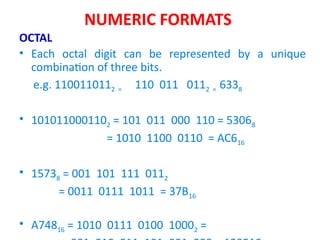
OCTAL
• Each octal digit can be represented by a unique
combination of three bits.
e.g. 1100110112 = 110 011 0112 = 6338
• 1010110001102 = 101 011 000 110 = 53068
= 1010 1100 0110 = AC616
• 15738 = 001 101 111 0112
= 0011 0111 1011 = 37B16
• A74816 = 1010 0111 0100 10002 =
• Discuss
BINARY ARITHMETICS
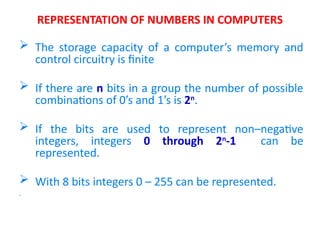
REPRESENTATION OF NUMBERS IN COMPUTERS
 The storage capacity of a computer’s memory and
control circuitry is finite
 If there are n bits in a group the number of possible
combinations of 0’s and 1’s is 2n
.
 If the bits are used to represent non–negative
integers, integers 0 through 2n
-1 can be
represented.
 With 8 bits integers 0 – 255 can be represented.
.
REPRESENTATION OF NUMBERS IN COMPUTERS
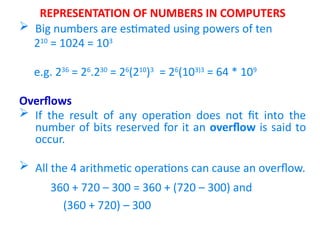
 Big numbers are estimated using powers of ten
210
= 1024 = 103
e.g. 236
= 26
.230
= 26
(210
)3
= 26
(103)3
= 64 * 109
Overflows
 If the result of any operation does not fit into the
number of bits reserved for it an overflow is said to
occur.
 All the 4 arithmetic operations can cause an overflow.
360 + 720 – 300 = 360 + (720 – 300) and
(360 + 720) – 300
SIGNED INTEGERS
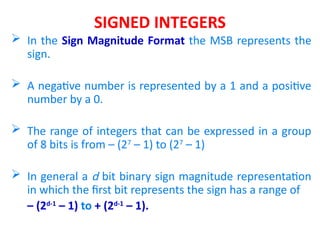
 In the Sign Magnitude Format the MSB represents the
sign.
 A negative number is represented by a 1 and a positive
number by a 0.
 The range of integers that can be expressed in a group
of 8 bits is from – (27
– 1) to (27
– 1)
 In general a d bit binary sign magnitude representation
in which the first bit represents the sign has a range of
– (2d-1
– 1) to + (2d-1
– 1).
SIGNED INTEGERS
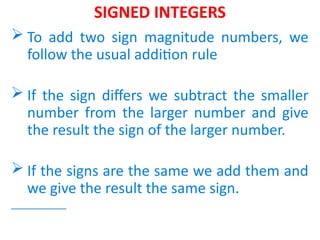
 To add two sign magnitude numbers, we
follow the usual addition rule
 If the sign differs we subtract the smaller
number from the larger number and give
the result the sign of the larger number.
 If the signs are the same we add them and
we give the result the same sign.
SIGNED INTEGERS
Discuss – Calculate Arithmetic's with signed integers
COMPLEMENTS
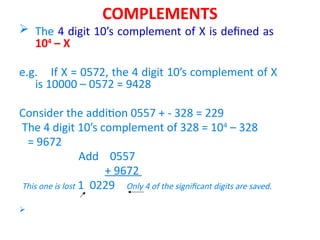
 The 4 digit 10’s complement of X is defined as
104
– X
e.g. If X = 0572, the 4 digit 10’s complement of X
is 10000 – 0572 = 9428
Consider the addition 0557 + - 328 = 229
The 4 digit 10’s complement of 328 = 104
– 328
= 9672
Add 0557
+ 9672
This one is lost 1 0229 Only 4 of the significant digits are saved.

COMPLEMENTS
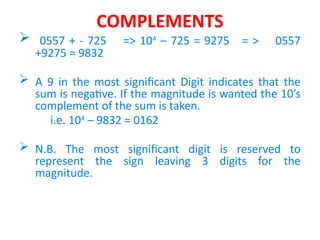
 0557 + - 725 => 104
– 725 = 9275 = > 0557
+9275 = 9832
 A 9 in the most significant Digit indicates that the
sum is negative. If the magnitude is wanted the 10’s
complement of the sum is taken.
i.e. 104
– 9832 = 0162
 N.B. The most significant digit is reserved to
represent the sign leaving 3 digits for the
magnitude.
2’s Complement
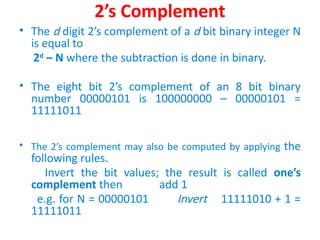
• The d digit 2’s complement of a d bit binary integer N
is equal to
2d
– N where the subtraction is done in binary.
• The eight bit 2’s complement of an 8 bit binary
number 00000101 is 100000000 – 00000101 =
11111011
• The 2’s complement may also be computed by applying the
following rules.
Invert the bit values; the result is called one’s
complement then add 1
e.g. for N = 00000101 Invert 11111010 + 1 =
11111011
2’s Complement
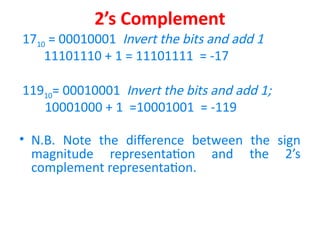
1710 = 00010001 Invert the bits and add 1
11101110 + 1 = 11101111 = -17
11910= 00010001 Invert the bits and add 1;
10001000 + 1 =10001001 = -119
• N.B. Note the difference between the sign
magnitude representation and the 2’s
complement representation.
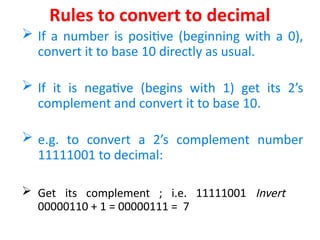
Rules to convert to decimal
 If a number is positive (beginning with a 0),
convert it to base 10 directly as usual.
 If it is negative (begins with 1) get its 2’s
complement and convert it to base 10.
 e.g. to convert a 2’s complement number
11111001 to decimal:
 Get its complement ; i.e. 11111001 Invert
00000110 + 1 = 00000111 = 7
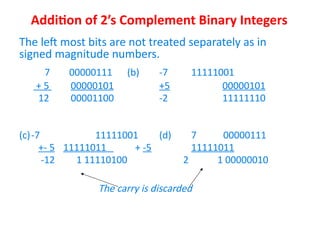
Addition of 2’s Complement Binary Integers
The left most bits are not treated separately as in
signed magnitude numbers.
7 00000111 (b) -7 11111001
+ 5 00000101 +5 00000101
12 00001100 -2 11111110
(c)-7 11111001 (d) 7 00000111
+- 5 11111011 + -5 11111011
-12 1 11110100 2 1 00000010
The carry is discarded
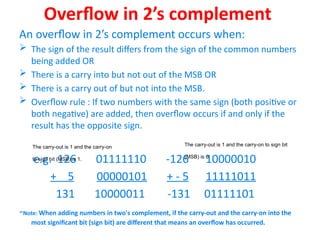
Overflow in 2’s complement
An overflow in 2’s complement occurs when:
 The sign of the result differs from the sign of the common numbers
being added OR
 There is a carry into but not out of the MSB OR
 There is a carry out of but not into the MSB.
 Overflow rule : If two numbers with the same sign (both positive or
both negative) are added, then overflow occurs if and only if the
result has the opposite sign.
e.g. 126 01111110 -126 10000010
+ 5 00000101 + - 5 11111011
131 10000011 -131 01111101
-Note: When adding numbers in two's complement, if the carry-out and the carry-on into the
most significant bit (sign bit) are different that means an overflow has occurred.
The carry-out is 1 and the carry-on
to sign bit (MSB) is 1.
The carry-out is 1 and the carry-on to sign bit
(MSB) is 0.
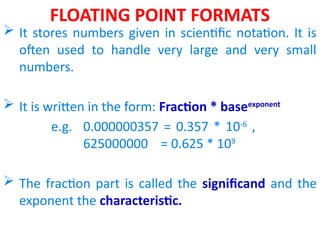
FLOATING POINT FORMATS
 It stores numbers given in scientific notation. It is
often used to handle very large and very small
numbers.
 It is written in the form: Fraction * baseexponent
e.g. 0.000000357 = 0.357 * 10-6
,
625000000 = 0.625 * 109
 The fraction part is called the significand and the
exponent the characteristic.
Floating Point Numbers
A floating point format is designated by:
 The base
 The number of bits reserved for the exponent
 The number of bits reserved for the fraction
 The method for storing the sign and magnitude of the
exponent
 The method for storing the sign and magnitude of the
fraction.
 The order in which the two signs and the two magnitudes are
to occur.
• The combination of the above factors for a given
computer depends upon the designer.
BINARY CODED DECIMAL (BCD)
• Each figure in base 10 is represented by its 4 bit binary equivalent
e.g.
8159 = 1000 0001 0101 1001
• There are two BCD formats.
 Packed (Condensed) BCD: In this format each figure occupies
half a byte
e.g. 341 = 0011 0100 0001
 Extended (unpacked) BCD: Each decimal figure is represented
by a byte. In this case the first 4 bits of a byte can be filled with
zeros or ones depending on the manufacturer, e.g.
341 = 00000011 00000100 00000001
BCD
• Hardware designed for BCD is more complex than that for binary
formats. E.g. 16 bits are used to write 8159 in BCD while only 13
bits (1111111011111) would be required in binary.
• The advantage of BCD format is that it is closer to the
alphanumeric codes used for I/Os.
• Numbers in text data formats must be converted from text form
to binary form. Conversion is usually done by converting text
input data to BCD, converting BCD to binary, do calculations then
convert the result to BCD, then BCD to text output.
ALPHANUMERIC CODES
• It is the assignment of bit combinations to the letters
of the alphabet, decimal digits 0 – 9, punctuation
marks and several special characters.
• The two most prominent Alphanumeric Codes are:
EBCDIC (Extended Binary Coded Decimal
Interchange Code); this is mostly used by IBM.
ASCII: (American Standard Code for Information
Interchange); used by other manufacturers.
ALPHANUMERIC CODES
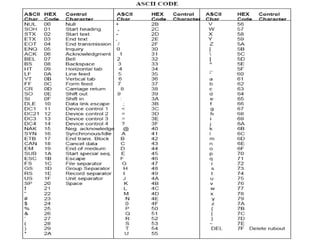
• ASCII represents each character with a 7 bit string
The total number of characters that can be represented
is 27
= 128
e.g. J o h n = 4A 6F 68 6E
= 1001010 1101111 1101000 1101110
• Since most computers manipulate an 8 bit quantity, the
extra bit when 7 bit ASCII is used depends on the
designer. It can be set to a particular value or ignored.

Lecture 7 Data Representation (1).pptx for computer organization and architecture

Lecture 7 Data Representation (1).pptx for computer organization and architecture

  • 1.
  • 2.
    DATA REPRESENTATIONS  Acomputer uses binary digits (0’s and 1’s) to store data in different formats.  These binary digits are called BITS.  In Computer circuits, 0’s and 1’s are voltage levels: • 0 is low voltage (OFF) • 1 is high Voltage (ON)
  • 3.
    DATA FORMATS 1. NumericFormats They store only numbers; There are three numeric formats:  Integer or Fixed point Formats.  Floating Point Formats  Binary Coded decimal (BCD) 2. Alphanumeric Codes: Store both numbers and characters including the alphabetic characters.
  • 4.
    NUMERIC FORMATS Integer Formats Binary: To convert from decimal to binary we do successive divisions  To convert from binary to decimal we expand e.g. 11011 = (1 * 24 ) + (1 * 23 ) + (0 * 22 ) + (1 * 21 )+ (1 * 20 ) = 16 + 8 + 0 + 2 + 1 = 2710.
  • 6.
    NUMERIC FORMATS HEXADECIMAL  Ithas 15 digits 0 – 15  Each Hexadecimal digit can be represented by a unique combination of 4 binary bits; e.g. = > 110011011 = 0001 1001 1011 1 9 B16  To convert 1C2E16 to decimal you expand using powers of 16. = (1 * 163 ) + (12 * 162 ) + (2 * 161 ) + (14 * 160 ) = 4096 + 3072 + 32 + 14 = 7214  To convert 1579710 to hexadecimal we perform successive divisions by 16.
  • 7.
    NUMERIC FORMATS OCTAL • Eachoctal digit can be represented by a unique combination of three bits. e.g. 1100110112 = 110 011 0112 = 6338 • 1010110001102 = 101 011 000 110 = 53068 = 1010 1100 0110 = AC616 • 15738 = 001 101 111 0112 = 0011 0111 1011 = 37B16 • A74816 = 1010 0111 0100 10002 =
  • 8.
  • 9.
    REPRESENTATION OF NUMBERSIN COMPUTERS  The storage capacity of a computer’s memory and control circuitry is finite  If there are n bits in a group the number of possible combinations of 0’s and 1’s is 2n .  If the bits are used to represent non–negative integers, integers 0 through 2n -1 can be represented.  With 8 bits integers 0 – 255 can be represented. .
  • 10.
    REPRESENTATION OF NUMBERSIN COMPUTERS  Big numbers are estimated using powers of ten 210 = 1024 = 103 e.g. 236 = 26 .230 = 26 (210 )3 = 26 (103)3 = 64 * 109 Overflows  If the result of any operation does not fit into the number of bits reserved for it an overflow is said to occur.  All the 4 arithmetic operations can cause an overflow. 360 + 720 – 300 = 360 + (720 – 300) and (360 + 720) – 300
  • 11.
    SIGNED INTEGERS  Inthe Sign Magnitude Format the MSB represents the sign.  A negative number is represented by a 1 and a positive number by a 0.  The range of integers that can be expressed in a group of 8 bits is from – (27 – 1) to (27 – 1)  In general a d bit binary sign magnitude representation in which the first bit represents the sign has a range of – (2d-1 – 1) to + (2d-1 – 1).
  • 12.
    SIGNED INTEGERS  Toadd two sign magnitude numbers, we follow the usual addition rule  If the sign differs we subtract the smaller number from the larger number and give the result the sign of the larger number.  If the signs are the same we add them and we give the result the same sign.
  • 13.
    SIGNED INTEGERS Discuss –Calculate Arithmetic's with signed integers
  • 14.
    COMPLEMENTS  The 4digit 10’s complement of X is defined as 104 – X e.g. If X = 0572, the 4 digit 10’s complement of X is 10000 – 0572 = 9428 Consider the addition 0557 + - 328 = 229 The 4 digit 10’s complement of 328 = 104 – 328 = 9672 Add 0557 + 9672 This one is lost 1 0229 Only 4 of the significant digits are saved. 
  • 15.
    COMPLEMENTS  0557 +- 725 => 104 – 725 = 9275 = > 0557 +9275 = 9832  A 9 in the most significant Digit indicates that the sum is negative. If the magnitude is wanted the 10’s complement of the sum is taken. i.e. 104 – 9832 = 0162  N.B. The most significant digit is reserved to represent the sign leaving 3 digits for the magnitude.
  • 16.
    2’s Complement • Thed digit 2’s complement of a d bit binary integer N is equal to 2d – N where the subtraction is done in binary. • The eight bit 2’s complement of an 8 bit binary number 00000101 is 100000000 – 00000101 = 11111011 • The 2’s complement may also be computed by applying the following rules. Invert the bit values; the result is called one’s complement then add 1 e.g. for N = 00000101 Invert 11111010 + 1 = 11111011
  • 17.
    2’s Complement 1710 =00010001 Invert the bits and add 1 11101110 + 1 = 11101111 = -17 11910= 00010001 Invert the bits and add 1; 10001000 + 1 =10001001 = -119 • N.B. Note the difference between the sign magnitude representation and the 2’s complement representation.
  • 18.
    Rules to convertto decimal  If a number is positive (beginning with a 0), convert it to base 10 directly as usual.  If it is negative (begins with 1) get its 2’s complement and convert it to base 10.  e.g. to convert a 2’s complement number 11111001 to decimal:  Get its complement ; i.e. 11111001 Invert 00000110 + 1 = 00000111 = 7
  • 19.
    Addition of 2’sComplement Binary Integers The left most bits are not treated separately as in signed magnitude numbers. 7 00000111 (b) -7 11111001 + 5 00000101 +5 00000101 12 00001100 -2 11111110 (c)-7 11111001 (d) 7 00000111 +- 5 11111011 + -5 11111011 -12 1 11110100 2 1 00000010 The carry is discarded
  • 20.
    Overflow in 2’scomplement An overflow in 2’s complement occurs when:  The sign of the result differs from the sign of the common numbers being added OR  There is a carry into but not out of the MSB OR  There is a carry out of but not into the MSB.  Overflow rule : If two numbers with the same sign (both positive or both negative) are added, then overflow occurs if and only if the result has the opposite sign. e.g. 126 01111110 -126 10000010 + 5 00000101 + - 5 11111011 131 10000011 -131 01111101 -Note: When adding numbers in two's complement, if the carry-out and the carry-on into the most significant bit (sign bit) are different that means an overflow has occurred. The carry-out is 1 and the carry-on to sign bit (MSB) is 1. The carry-out is 1 and the carry-on to sign bit (MSB) is 0.
  • 21.
    FLOATING POINT FORMATS It stores numbers given in scientific notation. It is often used to handle very large and very small numbers.  It is written in the form: Fraction * baseexponent e.g. 0.000000357 = 0.357 * 10-6 , 625000000 = 0.625 * 109  The fraction part is called the significand and the exponent the characteristic.
  • 22.
    Floating Point Numbers Afloating point format is designated by:  The base  The number of bits reserved for the exponent  The number of bits reserved for the fraction  The method for storing the sign and magnitude of the exponent  The method for storing the sign and magnitude of the fraction.  The order in which the two signs and the two magnitudes are to occur. • The combination of the above factors for a given computer depends upon the designer.
  • 23.
    BINARY CODED DECIMAL(BCD) • Each figure in base 10 is represented by its 4 bit binary equivalent e.g. 8159 = 1000 0001 0101 1001 • There are two BCD formats.  Packed (Condensed) BCD: In this format each figure occupies half a byte e.g. 341 = 0011 0100 0001  Extended (unpacked) BCD: Each decimal figure is represented by a byte. In this case the first 4 bits of a byte can be filled with zeros or ones depending on the manufacturer, e.g. 341 = 00000011 00000100 00000001
  • 24.
    BCD • Hardware designedfor BCD is more complex than that for binary formats. E.g. 16 bits are used to write 8159 in BCD while only 13 bits (1111111011111) would be required in binary. • The advantage of BCD format is that it is closer to the alphanumeric codes used for I/Os. • Numbers in text data formats must be converted from text form to binary form. Conversion is usually done by converting text input data to BCD, converting BCD to binary, do calculations then convert the result to BCD, then BCD to text output.
  • 25.
    ALPHANUMERIC CODES • Itis the assignment of bit combinations to the letters of the alphabet, decimal digits 0 – 9, punctuation marks and several special characters. • The two most prominent Alphanumeric Codes are: EBCDIC (Extended Binary Coded Decimal Interchange Code); this is mostly used by IBM. ASCII: (American Standard Code for Information Interchange); used by other manufacturers.
  • 26.
    ALPHANUMERIC CODES • ASCIIrepresents each character with a 7 bit string The total number of characters that can be represented is 27 = 128 e.g. J o h n = 4A 6F 68 6E = 1001010 1101111 1101000 1101110 • Since most computers manipulate an 8 bit quantity, the extra bit when 7 bit ASCII is used depends on the designer. It can be set to a particular value or ignored.