

Introduction to Mod Security
-Shruthi Kamath
Null Bangalore Meet - March
Who am I
• Co-Founder Infosecgirls (infosecgirls.in)
• Security Consultant at Synopsys
• Active member of Null Bangalore
• Committee member at OWASP Women in Appsec
• Twitter : @ShruthiKamath30
Agenda
• What is WAF?
• What is mod security?
• Mod security rules examples
• Setup
• Demo
Introduction to WAF
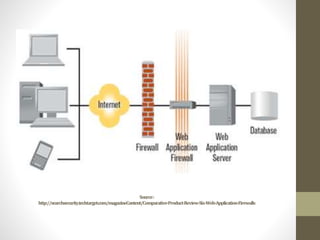
• A web application firewall is used as a security device
protecting the web server from attack.
• Web application firewalls (WAF) are an evolving information
security technology designed to protect web sites from attack.
• WAF solutions are capable of preventing attacks that network
firewalls and intrusion detection systems can't.
• They do not require modification of application source code.
Source:
http://searchsecurity.techtarget.com/magazineContent/Comparative-Product-Review-Six-Web-Application-Firewalls
Introduction to Mod Security
• ModSecurity is a popular Open-source Web application
firewall (WAF).
• Originally designed as a module for the Apache HTTP
Server.
• Used across a number of different platforms including
Apache HTTP Server, Microsoft IIS and NGINX.
• The platform itself provides a rule configuration language
known as 'SecRules' .
• It is used for real-time monitoring, logging, and filtering of
Hypertext Transfer Protocol communications based on user-
defined rules.
• ModSecurity is known to have the following capabilities:
Security monitoring and access control
Full HTTP traffic logging
Security assessment
Web application hardening
Simple request or Regular expression based Filtering
URL Encoding Validation
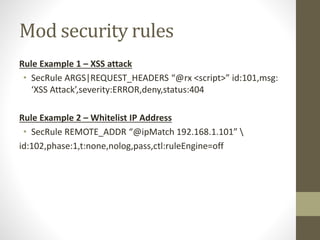
Mod security rules
Rule Example 1 – XSS attack
• SecRule ARGS|REQUEST_HEADERS “@rx <script>” id:101,msg:
‘XSS Attack’,severity:ERROR,deny,status:404
Rule Example 2 – Whitelist IP Address
• SecRule REMOTE_ADDR “@ipMatch 192.168.1.101” 
id:102,phase:1,t:none,nolog,pass,ctl:ruleEngine=off
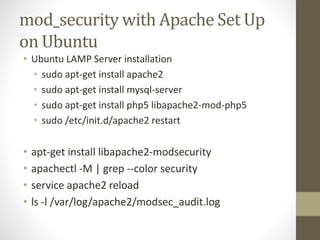
mod_security with Apache Set Up
on Ubuntu
• Ubuntu LAMP Server installation
• sudo apt-get install apache2
• sudo apt-get install mysql-server
• sudo apt-get install php5 libapache2-mod-php5
• sudo /etc/init.d/apache2 restart
• apt-get install libapache2-modsecurity
• apachectl -M | grep --color security
• service apache2 reload
• ls -l /var/log/apache2/modsec_audit.log
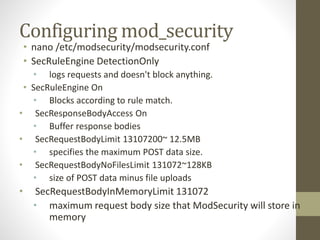
Configuring mod_security
• nano /etc/modsecurity/modsecurity.conf
• SecRuleEngine DetectionOnly
• logs requests and doesn't block anything.
• SecRuleEngine On
• Blocks according to rule match.
• SecResponseBodyAccess On
• Buffer response bodies
• SecRequestBodyLimit 13107200~ 12.5MB
• specifies the maximum POST data size.
• SecRequestBodyNoFilesLimit 131072~128KB
• size of POST data minus file uploads
• SecRequestBodyInMemoryLimit 131072
• maximum request body size that ModSecurity will store in
memory
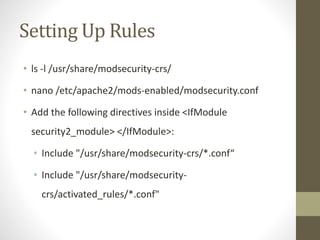
Setting Up Rules
• ls -l /usr/share/modsecurity-crs/
• nano /etc/apache2/mods-enabled/modsecurity.conf
• Add the following directives inside <IfModule
security2_module> </IfModule>:
• Include "/usr/share/modsecurity-crs/*.conf“
• Include "/usr/share/modsecurity-
crs/activated_rules/*.conf"
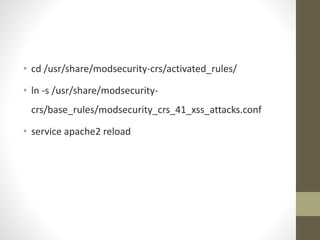
• cd /usr/share/modsecurity-crs/activated_rules/
• ln -s /usr/share/modsecurity-
crs/base_rules/modsecurity_crs_41_xss_attacks.conf
• service apache2 reload
Demo Time
Useful links
• http://www.modsecurity.org/about.html
• https://github.com/SpiderLabs/ModSecurity/wiki/Reference-
Manual
• https://modsecurity.org/crs/
Thank You

Mod security

  • 1.
    Introduction to ModSecurity -Shruthi Kamath Null Bangalore Meet - March
  • 2.
    Who am I •Co-Founder Infosecgirls (infosecgirls.in) • Security Consultant at Synopsys • Active member of Null Bangalore • Committee member at OWASP Women in Appsec • Twitter : @ShruthiKamath30
  • 3.
    Agenda • What isWAF? • What is mod security? • Mod security rules examples • Setup • Demo
  • 4.
    Introduction to WAF •A web application firewall is used as a security device protecting the web server from attack. • Web application firewalls (WAF) are an evolving information security technology designed to protect web sites from attack. • WAF solutions are capable of preventing attacks that network firewalls and intrusion detection systems can't. • They do not require modification of application source code.
  • 5.
  • 6.
    Introduction to ModSecurity • ModSecurity is a popular Open-source Web application firewall (WAF). • Originally designed as a module for the Apache HTTP Server. • Used across a number of different platforms including Apache HTTP Server, Microsoft IIS and NGINX.
  • 7.
    • The platformitself provides a rule configuration language known as 'SecRules' . • It is used for real-time monitoring, logging, and filtering of Hypertext Transfer Protocol communications based on user- defined rules. • ModSecurity is known to have the following capabilities: Security monitoring and access control Full HTTP traffic logging Security assessment Web application hardening Simple request or Regular expression based Filtering URL Encoding Validation
  • 8.
    Mod security rules RuleExample 1 – XSS attack • SecRule ARGS|REQUEST_HEADERS “@rx <script>” id:101,msg: ‘XSS Attack’,severity:ERROR,deny,status:404 Rule Example 2 – Whitelist IP Address • SecRule REMOTE_ADDR “@ipMatch 192.168.1.101” id:102,phase:1,t:none,nolog,pass,ctl:ruleEngine=off
  • 9.
    mod_security with ApacheSet Up on Ubuntu • Ubuntu LAMP Server installation • sudo apt-get install apache2 • sudo apt-get install mysql-server • sudo apt-get install php5 libapache2-mod-php5 • sudo /etc/init.d/apache2 restart • apt-get install libapache2-modsecurity • apachectl -M | grep --color security • service apache2 reload • ls -l /var/log/apache2/modsec_audit.log
  • 10.
    Configuring mod_security • nano/etc/modsecurity/modsecurity.conf • SecRuleEngine DetectionOnly • logs requests and doesn't block anything. • SecRuleEngine On • Blocks according to rule match. • SecResponseBodyAccess On • Buffer response bodies • SecRequestBodyLimit 13107200~ 12.5MB • specifies the maximum POST data size. • SecRequestBodyNoFilesLimit 131072~128KB • size of POST data minus file uploads • SecRequestBodyInMemoryLimit 131072 • maximum request body size that ModSecurity will store in memory
  • 11.
    Setting Up Rules •ls -l /usr/share/modsecurity-crs/ • nano /etc/apache2/mods-enabled/modsecurity.conf • Add the following directives inside <IfModule security2_module> </IfModule>: • Include "/usr/share/modsecurity-crs/*.conf“ • Include "/usr/share/modsecurity- crs/activated_rules/*.conf"
  • 12.
    • cd /usr/share/modsecurity-crs/activated_rules/ •ln -s /usr/share/modsecurity- crs/base_rules/modsecurity_crs_41_xss_attacks.conf • service apache2 reload
  • 13.
  • 14.
    Useful links • http://www.modsecurity.org/about.html •https://github.com/SpiderLabs/ModSecurity/wiki/Reference- Manual • https://modsecurity.org/crs/
  • 15.

Editor's Notes

  • #5 References: http://projects.webappsec.org/w/page/13246985/Web%20Application%20Firewall%20Evaluation%20Criteria http://www.sahara.com/blog/en/web-application-firewall-waf/ http://www.infosectoday.com/Articles/Web_Application_Firewalls/Web_Application_Firewalls.htm
  • #7 https://en.wikipedia.org/wiki/ModSecurity
  • #9 https://support.kemptechnologies.com/hc/en-us/articles/209635223-How-to-write-a-WAF-rule-Modsecurity-Rule-Writing
  • #10 Apache Webroot: /var/www/html/ Apache Config: 1/etc/apache2/ Apache Log folder: /var/log/apache2/ PHP config: /etc/php5/
  • #11 https://www.digitalocean.com/community/tutorials/how-to-set-up-mod_security-with-apache-on-debian-ubuntu
  • #12 OWASP ModSecurity Core Rule Set (CRS) is a set of generic attack detection rules for use with ModSecurity or compatible web application firewalls.