Mobility with SharePoint 2013
• What is available?
• What are the
limitations/considerations?
• Strategies for success
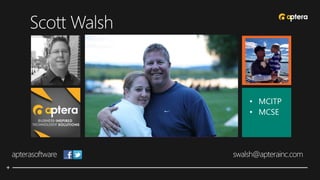
• MCITP
• MCSE
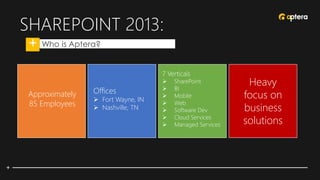
SHAREPOINT 2013:
• Who is Aptera?
7 Verticals
 SharePoint
 BI
 Mobile
 Web
 Software Dev
 Cloud Services
 Managed Services
Offices
 Fort Wayne, IN
 Nashville, TN
Approximately
85 Employees
Heavy
focus on
business
solutions
Mobility with SharePoint 2013
• Today’s Format
• Presentation (45-60 minutes)
• Review/Questions
• (we reserve the right to change the format
without notice)
Mobility with SharePoint 2013
• Today’s focus
• Providing Strategic Access to SP 2013
• Planning
• Apps & Compatibility
• Considerations
• Best Practices
SHAREPOINT 2013:
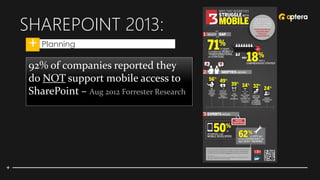
• Planning
92% of companies reported they
do NOT support mobile access to
SharePoint – Aug 2012 Forrester Research
SHAREPOINT 2013:
• Planning
BYOD
(whether you like
it or not)
Mobile
Roadmap
What’s my
mobile SLA?
Adoption
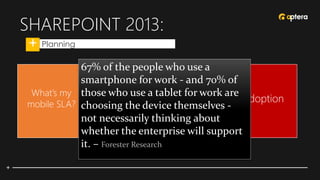
67% of the people who use a
smartphone for work - and 70% of
those who use a tablet for work are
choosing the device themselves -
not necessarily thinking about
whether the enterprise will support
it. – Forester Research
SHAREPOINT 2013:
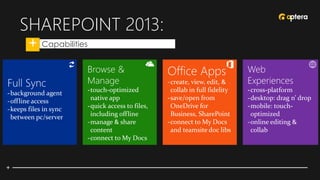
• Capabilities
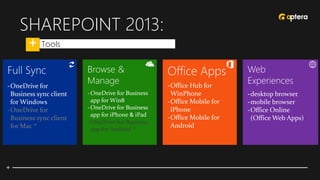
SHAREPOINT 2013:
• Tools
-OneDrive for
Business sync client
for Mac *
-OneDrive for Business
app for Android *
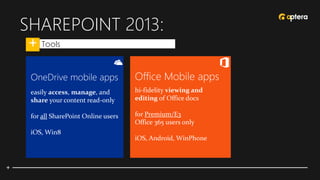
SHAREPOINT 2013:
• Tools
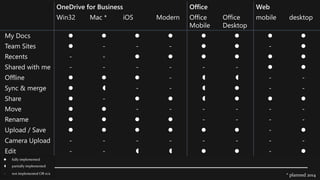
* planned 2014
OneDrive for Business Office Web
Win32 Mac * iOS Modern Office
Mobile
Office
Desktop
mobile desktop
My Docs        
Team Sites  - - -   - 
Recents - -      
Shared with me - - - - - -  
Offline    -   - -
Sync & merge   - -   - -
Share  -      
Move   - - - - - -
Rename     - - - -
Upload / Save       - 
Camera Upload - - - - - - - -
Edit - -     - 
 fully implemented
 partially implemented
- not implemented OR n/a
SHAREPOINT 2013:
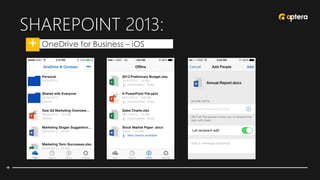
• OneDrive for Business – iOS
SHAREPOINT 2013:
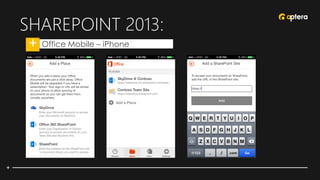
• Office Mobile – iPhone
SHAREPOINT 2013:
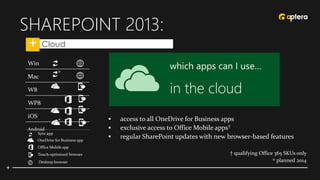
• Cloud
 access to all OneDrive for Business apps
 exclusive access to Office Mobile apps†
 regular SharePoint updates with new browser-based features
† qualifying Office 365 SKUs only
planned 2014
Win
Mac
W8
WP8
iOS
Android
*
Sync app
OneDrive for Business app
Office Mobile app
Touch-optimized browser
Desktop browser *
*
SHAREPOINT 2013:
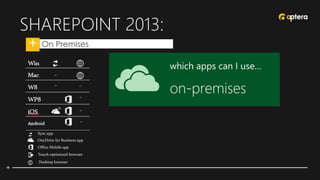
• On Premises
Sync app
OneDrive for Business app
Office Mobile app
Touch-optimized browser
Desktop browser
SHAREPOINT 2013:
• Mobile apps and SP on-premises
Mobile apps and SharePoint on-premises
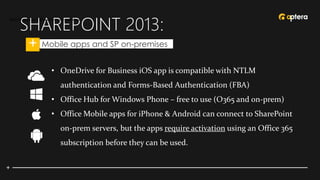
• OneDrive for Business iOS app is compatible with NTLM
authentication and Forms-Based Authentication (FBA)
• Office Hub for Windows Phone – free to use (O365 and on-prem)
• Office Mobile apps for iPhone & Android can connect to SharePoint
on-prem servers, but the apps require activation using an Office 365
subscription before they can be used.
SHAREPOINT 2013:
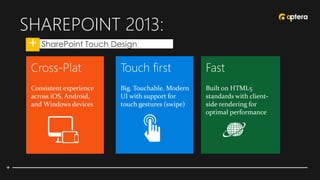
• SharePoint Touch Design
SHAREPOINT 2013:
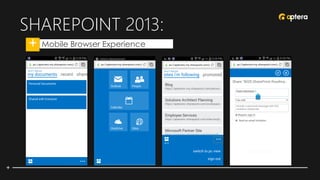
• Mobile Browser Experience
SHAREPOINT 2013:
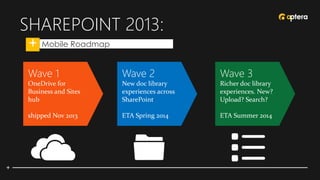
• Mobile Roadmap
SHAREPOINT 2013:
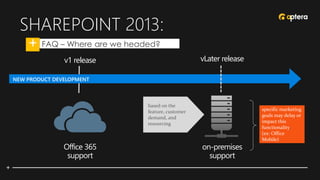
• FAQ – Where are we headed?
Office 365
support
on-premises
support
v1 release vLater release
based on the
feature, customer
demand, and
resourcing
specific marketing
goals may delay or
impact this
functionality
(ex: Office
Mobile)
SHAREPOINT 2013:
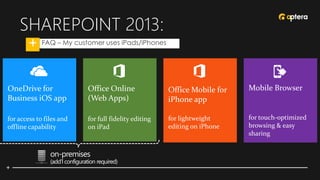
• FAQ – My customer uses iPads/iPhones
Mobile Browser
for touch-optimized
browsing & easy
sharing
OneDrive for
Business iOS app
for access to files and
offline capability
Office Online
(Web Apps)
for full fidelity editing
on iPad
on-premises
(add’l configuration required)
Office Mobile for
iPhone app
for lightweight
editing on iPhone
SHAREPOINT 2013:
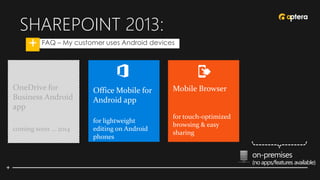
• FAQ – My customer uses Android devices
Mobile Browser
for touch-optimized
browsing & easy
sharing
Office Mobile for
Android app
for lightweight
editing on Android
phones
on-premises
(no apps/features available)
OneDrive for
Business Android
app
coming soon … 2014
SHAREPOINT 2013:
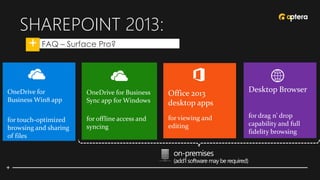
• FAQ – Surface Pro?
Desktop Browser
for drag n’ drop
capability and full
fidelity browsing
OneDrive for
Business Win8 app
for touch-optimized
browsing and sharing
of files
OneDrive for Business
Sync app for Windows
for offline access and
syncing
on-premises
(add’l software may be required)
Office 2013
desktop apps
for viewing and
editing
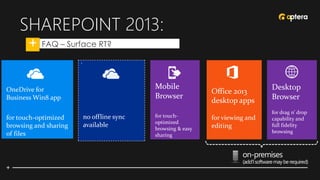
SHAREPOINT 2013:
• FAQ – Surface RT?
Desktop
Browser
for drag n’ drop
capability and
full fidelity
browsing
OneDrive for
Business Win8 app
for touch-optimized
browsing and sharing
of files
`
no offline sync
available
on-premises
(add’lsoftwaremayberequired)
Office 2013
desktop apps
for viewing and
editing
Mobile
Browser
for touch-
optimized
browsing & easy
sharing
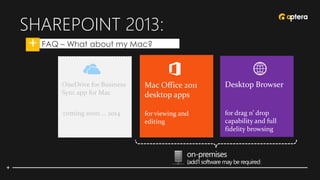
SHAREPOINT 2013:
• FAQ – What about my Mac?
OneDrive for Business
Sync app for Mac
coming soon … 2014
Desktop Browser
for drag n’ drop
capability and full
fidelity browsing
Mac Office 2011
desktop apps
for viewing and
editing
on-premises
(add’l software may be required)
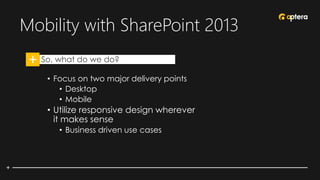
Mobility with SharePoint 2013
• So, what do we do?
• Focus on two major delivery points
• Desktop
• Mobile
• Utilize responsive design wherever
it makes sense
• Business driven use cases
QUESTIONS…
Do you have any
@apterasoftware
Facebook.com/apterasoftware
YouTube.com/apterainc
webinars@apterainc.com
THANK YOU!

Testing Your Mobility in SharePoint 2013

  • 1.
    Mobility with SharePoint2013 • What is available? • What are the limitations/considerations? • Strategies for success
  • 2.
  • 3.
    SHAREPOINT 2013: • Whois Aptera? 7 Verticals  SharePoint  BI  Mobile  Web  Software Dev  Cloud Services  Managed Services Offices  Fort Wayne, IN  Nashville, TN Approximately 85 Employees Heavy focus on business solutions
  • 4.
    Mobility with SharePoint2013 • Today’s Format • Presentation (45-60 minutes) • Review/Questions • (we reserve the right to change the format without notice)
  • 5.
    Mobility with SharePoint2013 • Today’s focus • Providing Strategic Access to SP 2013 • Planning • Apps & Compatibility • Considerations • Best Practices
  • 6.
    SHAREPOINT 2013: • Planning 92%of companies reported they do NOT support mobile access to SharePoint – Aug 2012 Forrester Research
  • 7.
    SHAREPOINT 2013: • Planning BYOD (whetheryou like it or not) Mobile Roadmap What’s my mobile SLA? Adoption 67% of the people who use a smartphone for work - and 70% of those who use a tablet for work are choosing the device themselves - not necessarily thinking about whether the enterprise will support it. – Forester Research
  • 8.
  • 9.
    SHAREPOINT 2013: • Tools -OneDrivefor Business sync client for Mac * -OneDrive for Business app for Android *
  • 10.
  • 11.
    * planned 2014 OneDrivefor Business Office Web Win32 Mac * iOS Modern Office Mobile Office Desktop mobile desktop My Docs         Team Sites  - - -   -  Recents - -       Shared with me - - - - - -   Offline    -   - - Sync & merge   - -   - - Share  -       Move   - - - - - - Rename     - - - - Upload / Save       -  Camera Upload - - - - - - - - Edit - -     -   fully implemented  partially implemented - not implemented OR n/a
  • 12.
    SHAREPOINT 2013: • OneDrivefor Business – iOS
  • 13.
    SHAREPOINT 2013: • OfficeMobile – iPhone
  • 14.
    SHAREPOINT 2013: • Cloud access to all OneDrive for Business apps  exclusive access to Office Mobile apps†  regular SharePoint updates with new browser-based features † qualifying Office 365 SKUs only planned 2014 Win Mac W8 WP8 iOS Android * Sync app OneDrive for Business app Office Mobile app Touch-optimized browser Desktop browser * *
  • 15.
    SHAREPOINT 2013: • OnPremises Sync app OneDrive for Business app Office Mobile app Touch-optimized browser Desktop browser
  • 16.
    SHAREPOINT 2013: • Mobileapps and SP on-premises Mobile apps and SharePoint on-premises • OneDrive for Business iOS app is compatible with NTLM authentication and Forms-Based Authentication (FBA) • Office Hub for Windows Phone – free to use (O365 and on-prem) • Office Mobile apps for iPhone & Android can connect to SharePoint on-prem servers, but the apps require activation using an Office 365 subscription before they can be used.
  • 17.
  • 18.
    SHAREPOINT 2013: • MobileBrowser Experience
  • 19.
  • 20.
    SHAREPOINT 2013: • FAQ– Where are we headed? Office 365 support on-premises support v1 release vLater release based on the feature, customer demand, and resourcing specific marketing goals may delay or impact this functionality (ex: Office Mobile)
  • 21.
    SHAREPOINT 2013: • FAQ– My customer uses iPads/iPhones Mobile Browser for touch-optimized browsing & easy sharing OneDrive for Business iOS app for access to files and offline capability Office Online (Web Apps) for full fidelity editing on iPad on-premises (add’l configuration required) Office Mobile for iPhone app for lightweight editing on iPhone
  • 22.
    SHAREPOINT 2013: • FAQ– My customer uses Android devices Mobile Browser for touch-optimized browsing & easy sharing Office Mobile for Android app for lightweight editing on Android phones on-premises (no apps/features available) OneDrive for Business Android app coming soon … 2014
  • 23.
    SHAREPOINT 2013: • FAQ– Surface Pro? Desktop Browser for drag n’ drop capability and full fidelity browsing OneDrive for Business Win8 app for touch-optimized browsing and sharing of files OneDrive for Business Sync app for Windows for offline access and syncing on-premises (add’l software may be required) Office 2013 desktop apps for viewing and editing
  • 24.
    SHAREPOINT 2013: • FAQ– Surface RT? Desktop Browser for drag n’ drop capability and full fidelity browsing OneDrive for Business Win8 app for touch-optimized browsing and sharing of files ` no offline sync available on-premises (add’lsoftwaremayberequired) Office 2013 desktop apps for viewing and editing Mobile Browser for touch- optimized browsing & easy sharing
  • 25.
    SHAREPOINT 2013: • FAQ– What about my Mac? OneDrive for Business Sync app for Mac coming soon … 2014 Desktop Browser for drag n’ drop capability and full fidelity browsing Mac Office 2011 desktop apps for viewing and editing on-premises (add’l software may be required)
  • 26.
    Mobility with SharePoint2013 • So, what do we do? • Focus on two major delivery points • Desktop • Mobile • Utilize responsive design wherever it makes sense • Business driven use cases
  • 27.
    QUESTIONS… Do you haveany @apterasoftware Facebook.com/apterasoftware YouTube.com/apterainc webinars@apterainc.com
  • 28.