Mobile and Personal technologies supporting learning in the field Dr Stuart Downward, School of Geography, Geology and the Environment Dr. Tim Linsey, ADC, @timku Kingston University Mobile Learning – Now and the Future
Overview MoRSE Project Overview and context Fieldtrip context in academic Geography Pilot Activities Main Phase Developments Findings
Project Context Joint project between Kingston University and De Montfort University Builds on earlier HEA Pathfinder projects at KU and DMU To develop a situated understanding of the impact of mobile and personal technologies on student and staff practices, beyond the institution, and on institutional processes Work Placements (DMU) Fieldwork (KU)
The KU MoRSE Team School of Geography, Geology and the Environment, KU Dr Stuart Downward Dr Ken Field, Kingston Centre for GIS Dr James O’Brien, Kingston Centre for GIS Faculty of Health and Social Care Sciences, KU Dr Ann Ooms
Context “ When students use social technologies outside university (in the informal domain) they often engage in activities that would be valued if enacted in formal learning in higher education”. Trinder et al. 2008 Sharing  Peer group collaboration Sophisticated Information seeking Contribution  Collective wisdom Self generation   Active Participation
But… “ Most learners, despite access to technology and self-reported confidence, aren’t appropriating the technology they know into their study” Sharpe et. al. 2009
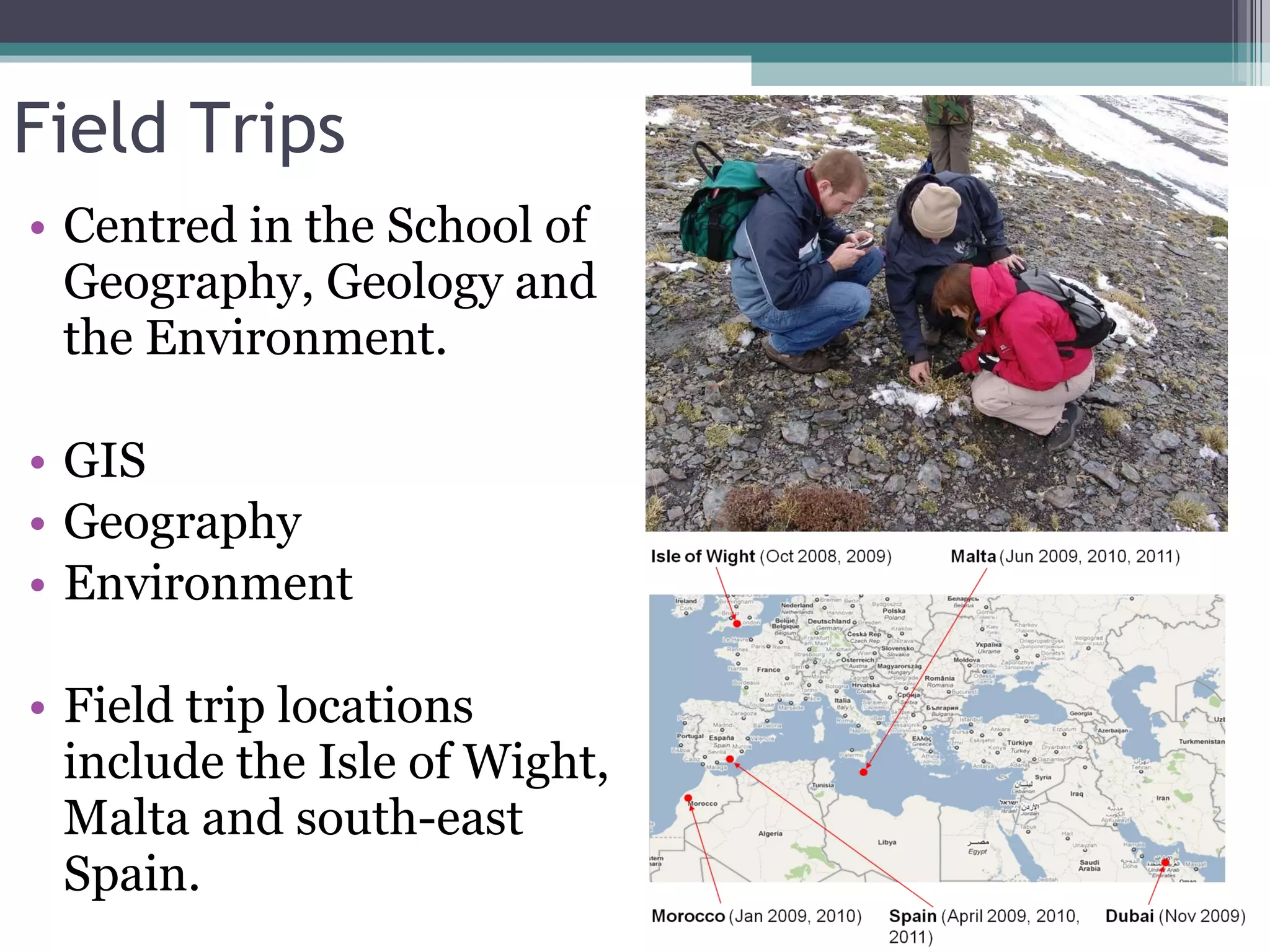
Field Trips Centred in the School of Geography, Geology and the Environment. GIS  Geography Environment Field trip locations include the Isle of Wight, Malta and south-east Spain.
Specific Issues Integration of fieldwork and other aspects of the curriculum Co-ordination and collaboration amongst staff and student groups distributed over a study area. Sharing resources/collaborating Access to resources, real-time databases, ‘experts’ and support from the field.
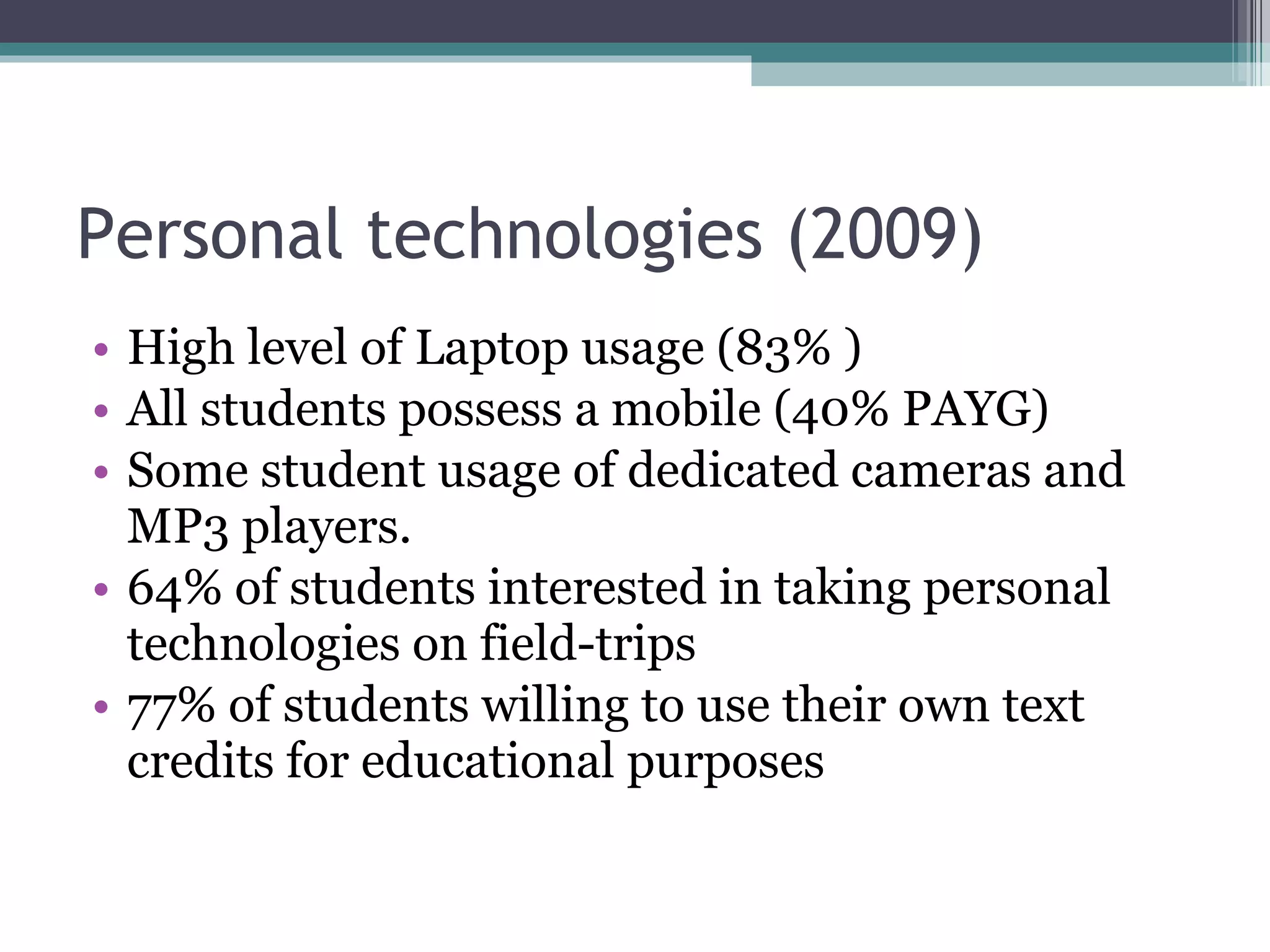
Personal technologies (2009) High level of Laptop usage (83% ) All students possess a mobile (40% PAYG) Some student usage of dedicated cameras and MP3 players. 64% of students interested in taking personal technologies on field-trips 77% of students willing to use their own text credits for educational purposes
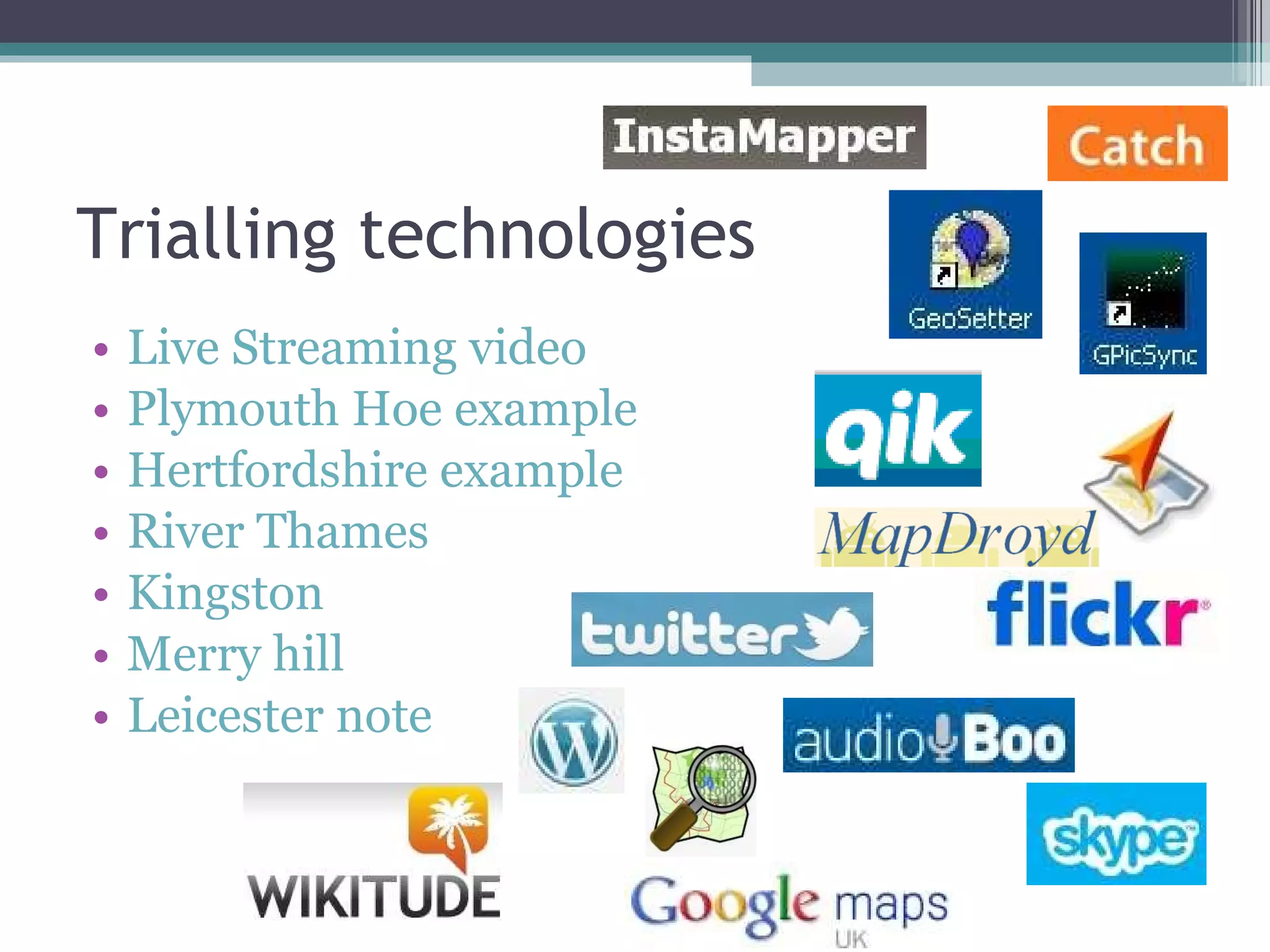
Trialling technologies Live Streaming video Plymouth Hoe example Hertfordshire example River Thames Kingston Merry hill Leicester note
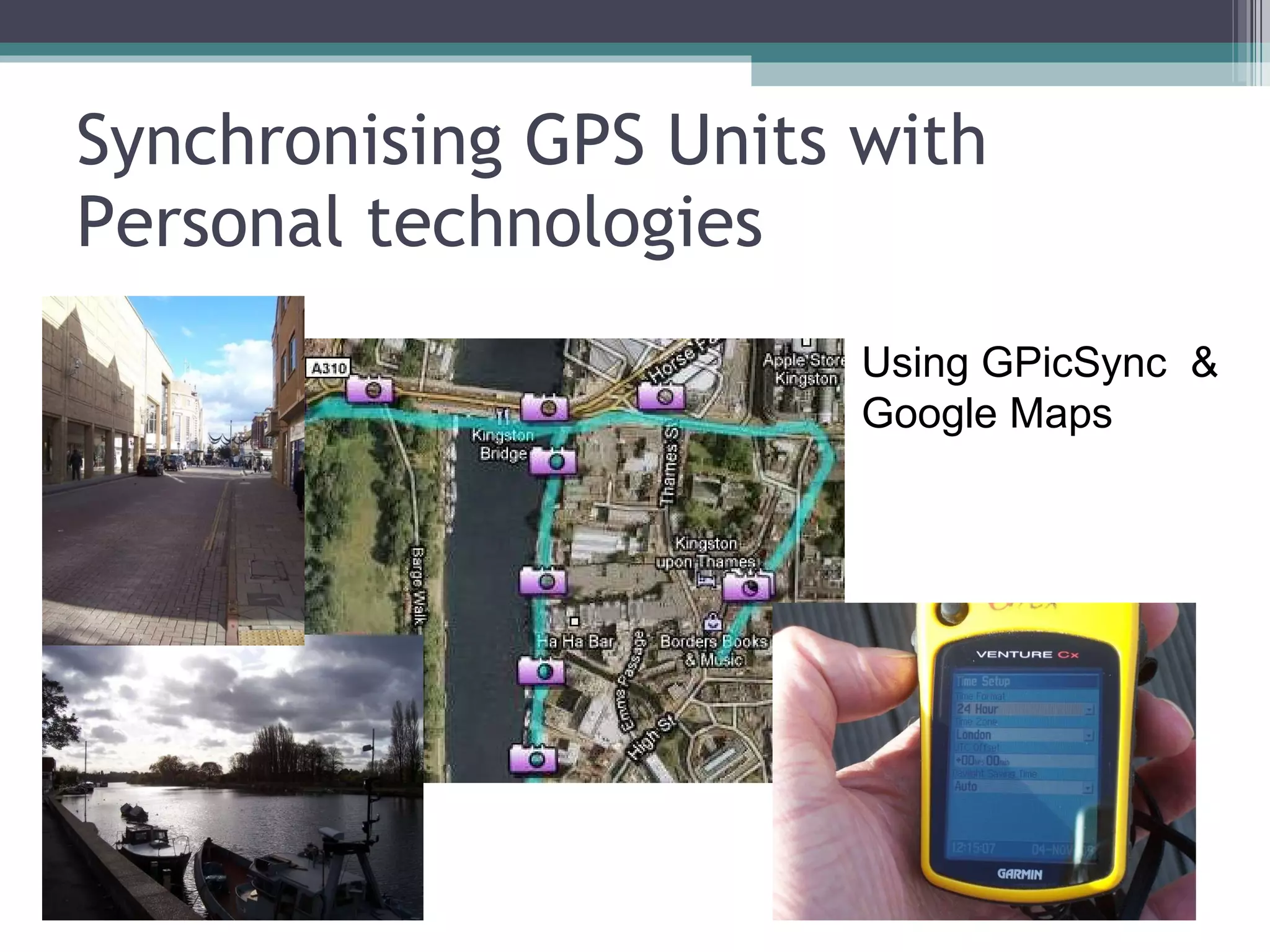
Synchronising GPS Units with Personal technologies Using GPicSync  & Google Maps
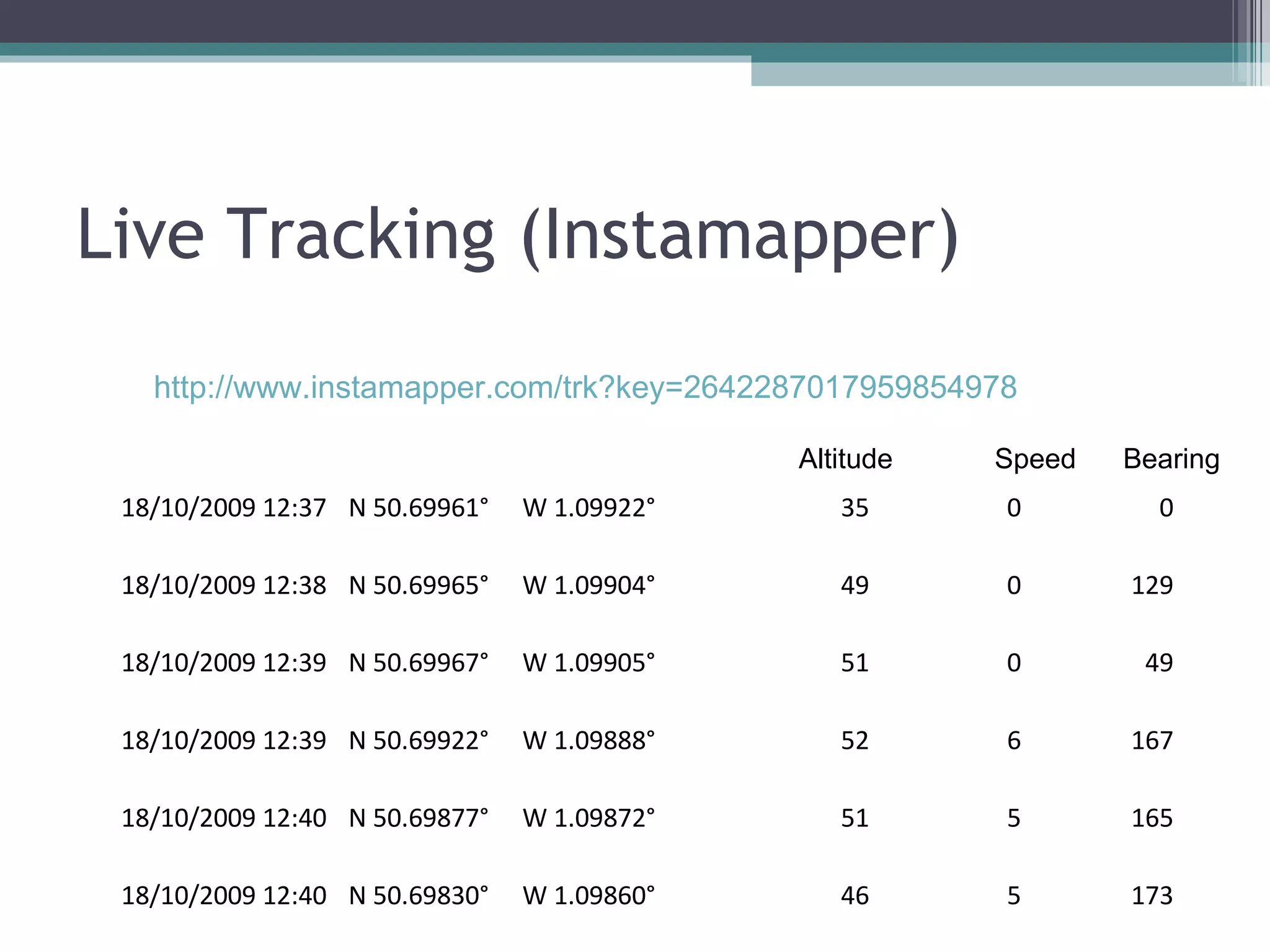
Live Tracking (Instamapper) http://www.instamapper.com/trk?key=2642287017959854978  Altitude  Speed  Bearing 18/10/2009 12:37 N 50.69961° W 1.09922° 35 0 0 18/10/2009 12:38 N 50.69965° W 1.09904° 49 0 129 18/10/2009 12:39 N 50.69967° W 1.09905° 51 0 49 18/10/2009 12:39 N 50.69922° W 1.09888° 52 6 167 18/10/2009 12:40 N 50.69877° W 1.09872° 51 5 165 18/10/2009 12:40 N 50.69830° W 1.09860° 46 5 173
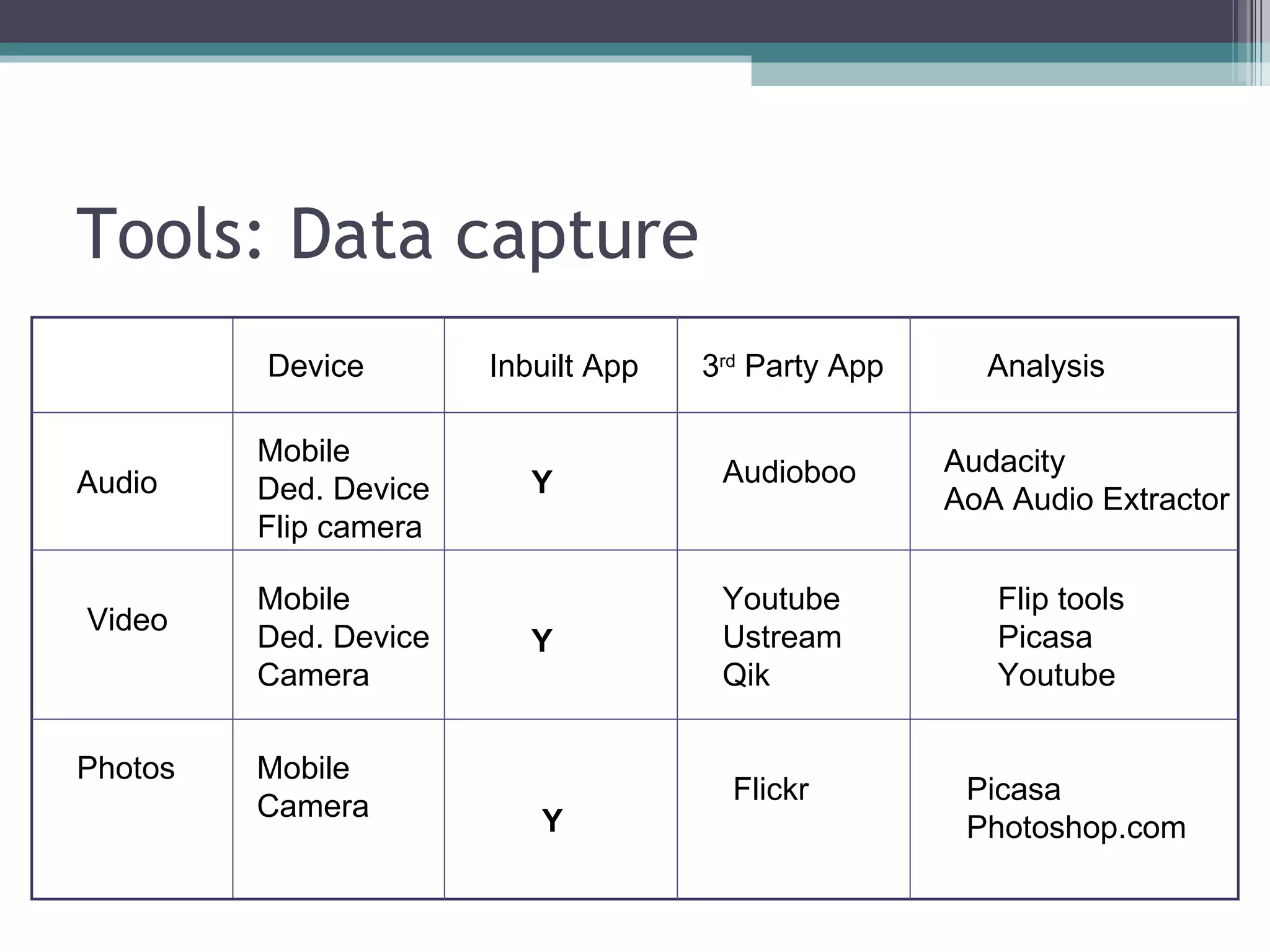
Tools: Data capture Audio Audioboo Audacity AoA Audio Extractor Video Youtube Ustream Qik Mobile Ded. Device Flip camera Flip tools Picasa Youtube Mobile Ded. Device Camera Photos Flickr Picasa Photoshop.com Mobile Camera Inbuilt App 3 rd  Party App Analysis Device Y Y Y
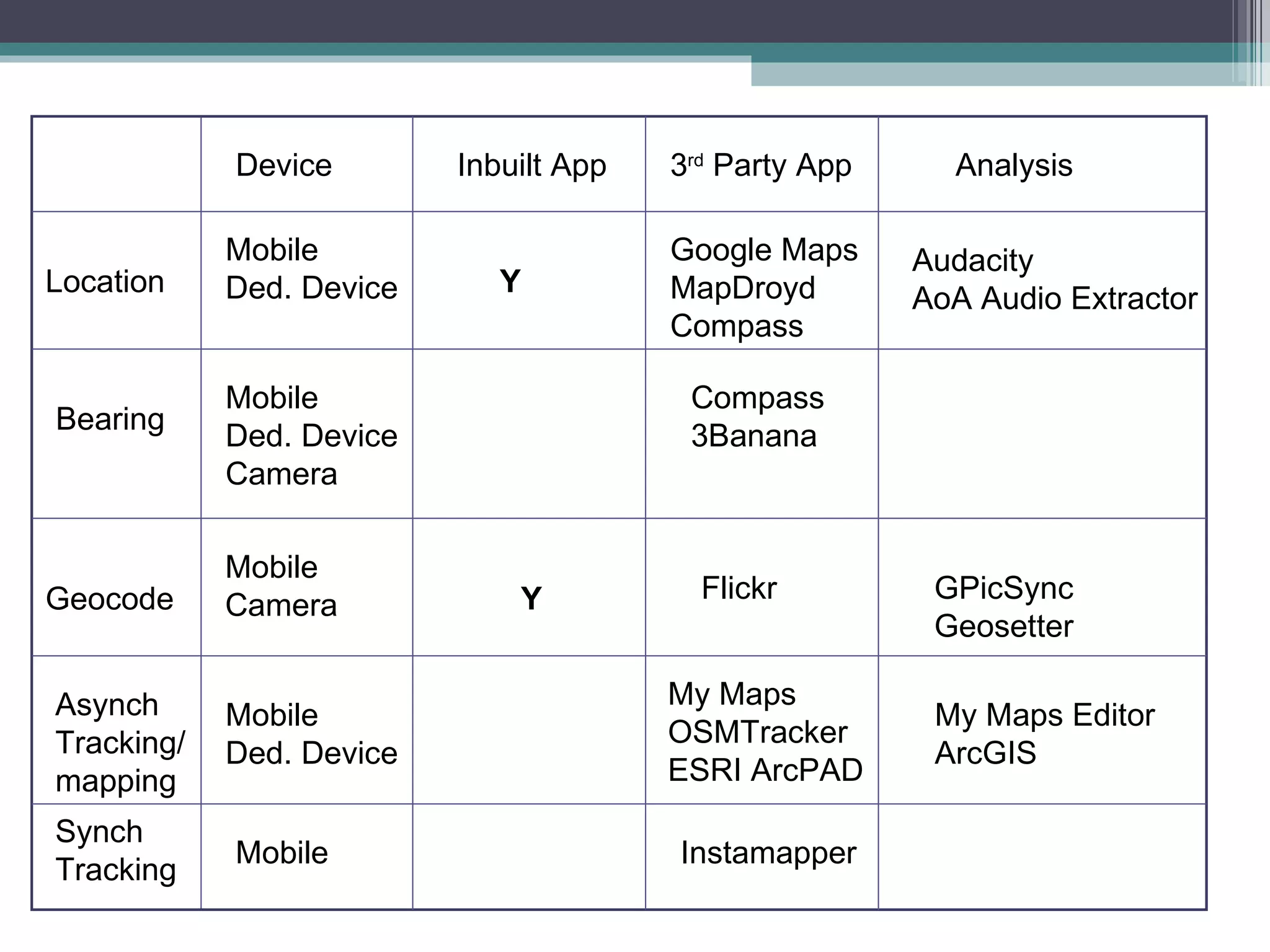
Location Google Maps MapDroyd Compass Audacity AoA Audio Extractor Bearing Compass 3Banana Mobile Ded. Device Mobile Ded. Device Camera Geocode Flickr GPicSync Geosetter Mobile Camera Inbuilt App 3 rd  Party App Analysis Device Y Asynch Tracking/ mapping Mobile Ded. Device My Maps OSMTracker ESRI ArcPAD My Maps Editor ArcGIS Synch Tracking Mobile Instamapper Y
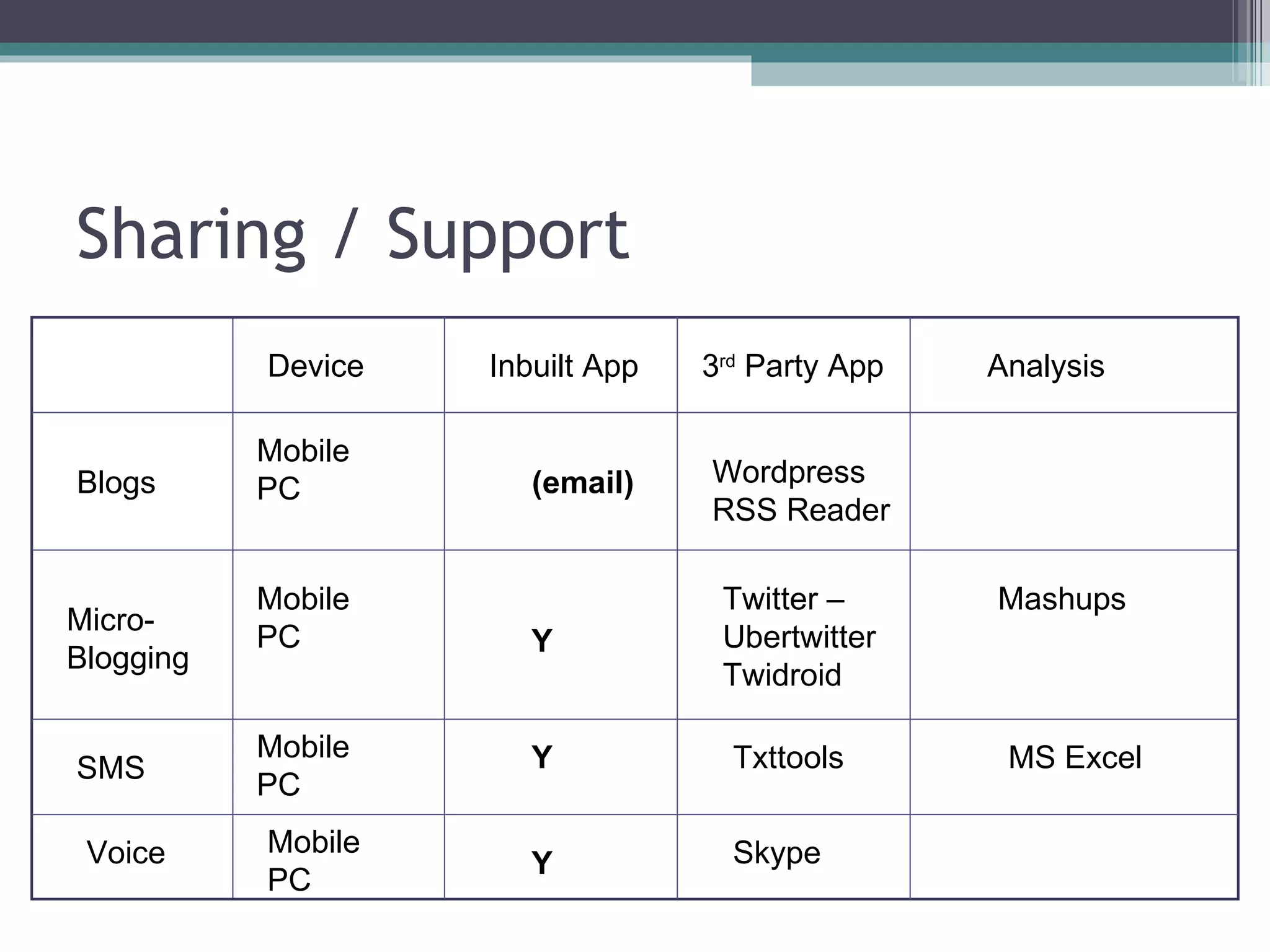
Sharing / Support Blogs Wordpress RSS Reader Micro- Blogging Twitter – Ubertwitter Twidroid  Mobile PC Mashups Mobile PC SMS Txttools MS Excel Mobile PC Inbuilt App 3 rd  Party App Analysis Device (email) Y Y Voice Mobile PC Y Skype
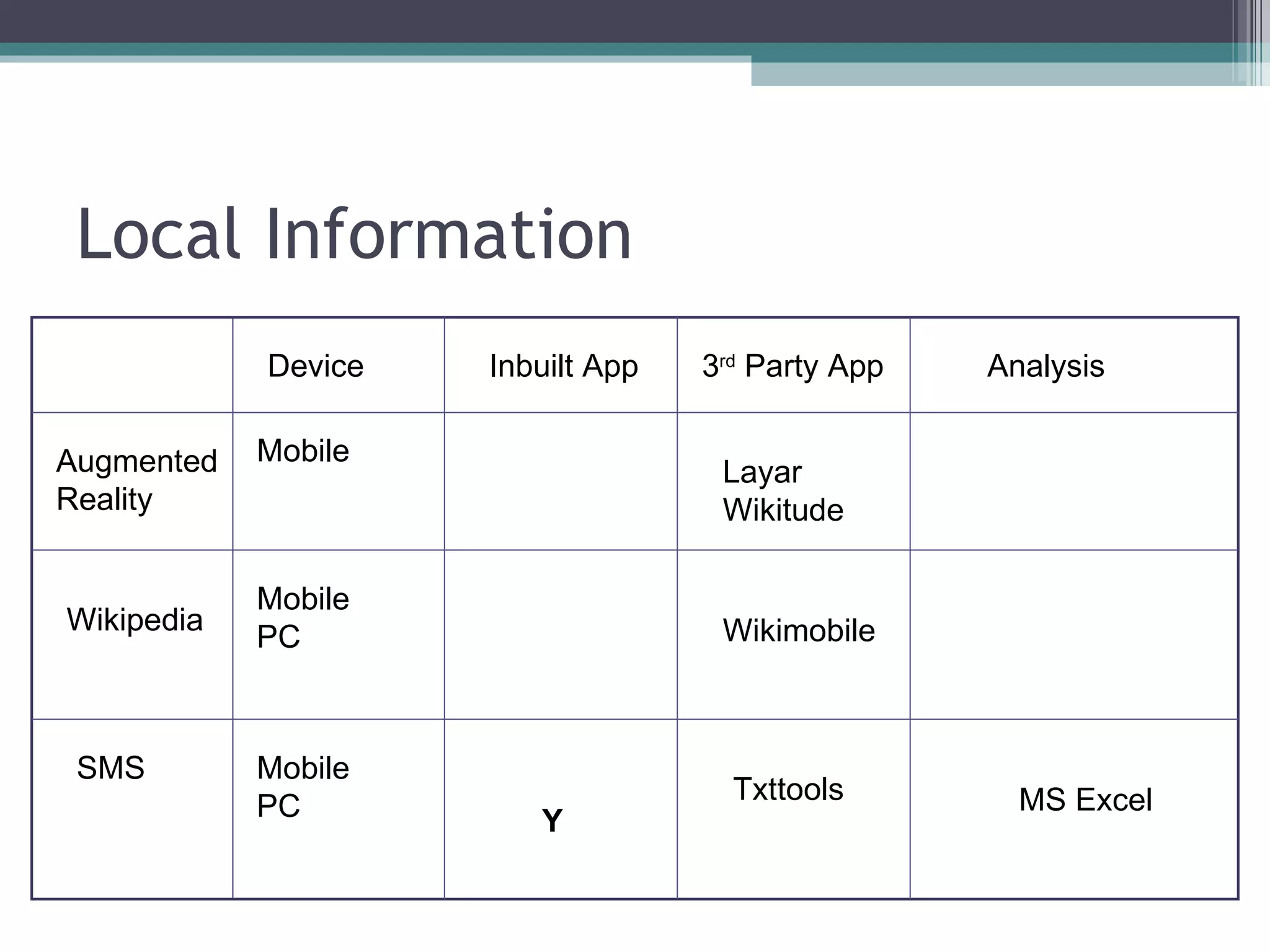
Local Information Augmented Reality Layar Wikitude Wikipedia Wikimobile Mobile Mobile PC SMS Txttools MS Excel Mobile PC Inbuilt App 3 rd  Party App Analysis Device Y
Preparatory Event Presentation on field techniques and the use of the field notebook.  Overview on the potential of personal technologies on fieldtrips and how they might be used to enhance student contributions to learning activities. Field activity around the campus Laboratory session and feedback.  Students were given access to the devices (e.g. GPS, laptops) in advance of the fieldtrip and encouraged to practice and develop the acquired skills prior to leaving for their field destinations .
Student Mentors 4 mentors appointed (2010 and 1 in 2011) Student mentors are ideally suited to the role: they can be selected from students one year above who are already familiar with the field-sites and it is hoped that they will be viewed as highly approachable with a certain informality that they may not perceive of staff. Attended Briefing sessions
“ It is less daunting as going up to lecturers; it is less pressurised having formulated the best sort of question to approach a lecturer than it is just to go up to someone that’s say a year older than you in academic levels and just ask them a question ” (Mentor) “ ..unexpectedly, they would ask those mentors not only about the mobile technology, but also about things to do with the environment; those guys had been there before…..the mentors were able to help….in the environmental objectives of the trip ” (Staff)  (2010)
Student attitudes (and frustrations) towards the use and issues of personal technologies supporting their learning activities:
“ … Today this has been very useful in resolving issues that have arisen. I took a while to follow everyone and set up text forwarding but it was worth it. If it wasn’t for the ridiculous roaming charges, it got me thinking about the use of Skype to contact students and tutors either over video, audio or text. Also you could use the conference calling feature to contact many people at once…”
“ Understanding and learning the different ways of importing and collating different sources of media and tagging spatial location to them (i.e. long/lat values for example) has given more interest in the subject and found some of the features pretty cool to analyse and present!” “ I think the technologies I used and the way I used them helped my learning; in conjunction with other research they will give a broader and fuller picture of an environment ”
“ We took tons of photo’s but in the end we were only able to use the ones off my camera as its was the only one that had a memory card that would fit in the laptop, so I may have been lying  about not having any technical difficulties.   Later that evening we got all the data downloaded of the units were able to geotag the photos (pretty slick) and throw them up on Google earth ”
“ Some lecturers don’t know much about technology and we are quite fortunate that XXXX was up-to-date with this kind of stuff. But then in a way I think some lecturers can overdose on the technology, they think oh we’ll have a blog, we’ll have a forum, we’ll have a this, we’ll have a that but what is the point if it is not used? But we are learning and I suppose they want to show us the ways we can use technologies in our future work, this is the idea, you don’t have to use it but you might find it helpful in your future work ”
Impact Over 75% of GIS students reported that the use of the technologies made the fieldtrips more enjoyable and that they had a positive impact on their motivation to study.  When asked if the use of the technologies had an impact on their understanding: 40% of the students said they agreed 37% somewhat agreed.  (2008-10)
The Geography field trip Leader (Almeria, 2010) perceived that the preparatory activities had had a positive impact on the quality of geography student fieldwork notebooks and that students had being using their personal technologies for recording locations and cross referencing with the notebook.  The student mentors also reported positive engagement with students on their use of personal technologies to support learning activities.
2011 Developments Student Guides to technologies updated Mentor student appointed Placement Student Allocated New video guides for Staff
Student Guides to using Mobile & Personal Technologies Updated Introduction to Personal Technologies on Field Trips Guide Mapping Photographs and other Resources Guide Sharing Photographs Georeferencing Photographs Guide
Student Mentor Student mentor attended the 2011 Malta and Spain Fieldtrips Mentor took on additional roles covering evaluation and capturing audio, video and imagery. Mentor worked with a student placed with the central e-developer team to edit and develop resources between the two field trips
Mentor Support role Available each evening to students Technical support Maintained a blog Met with each project group  “ I would not have been able to do this a year ago” “ Do not assume it is going to be a holiday”
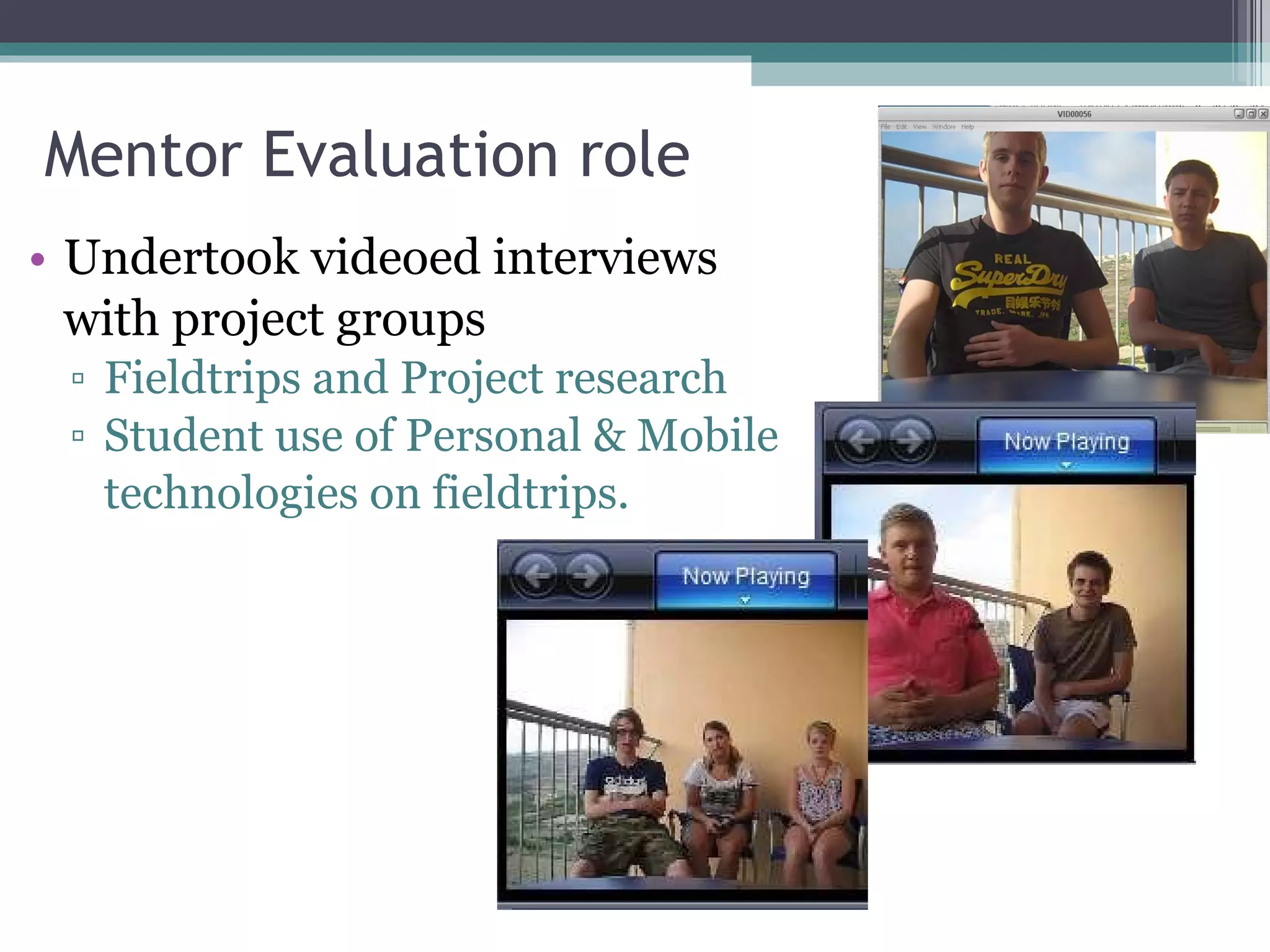
Mentor Evaluation role Undertook videoed interviews  with project groups Fieldtrips and Project research Student use of Personal & Mobile  technologies on fieldtrips.
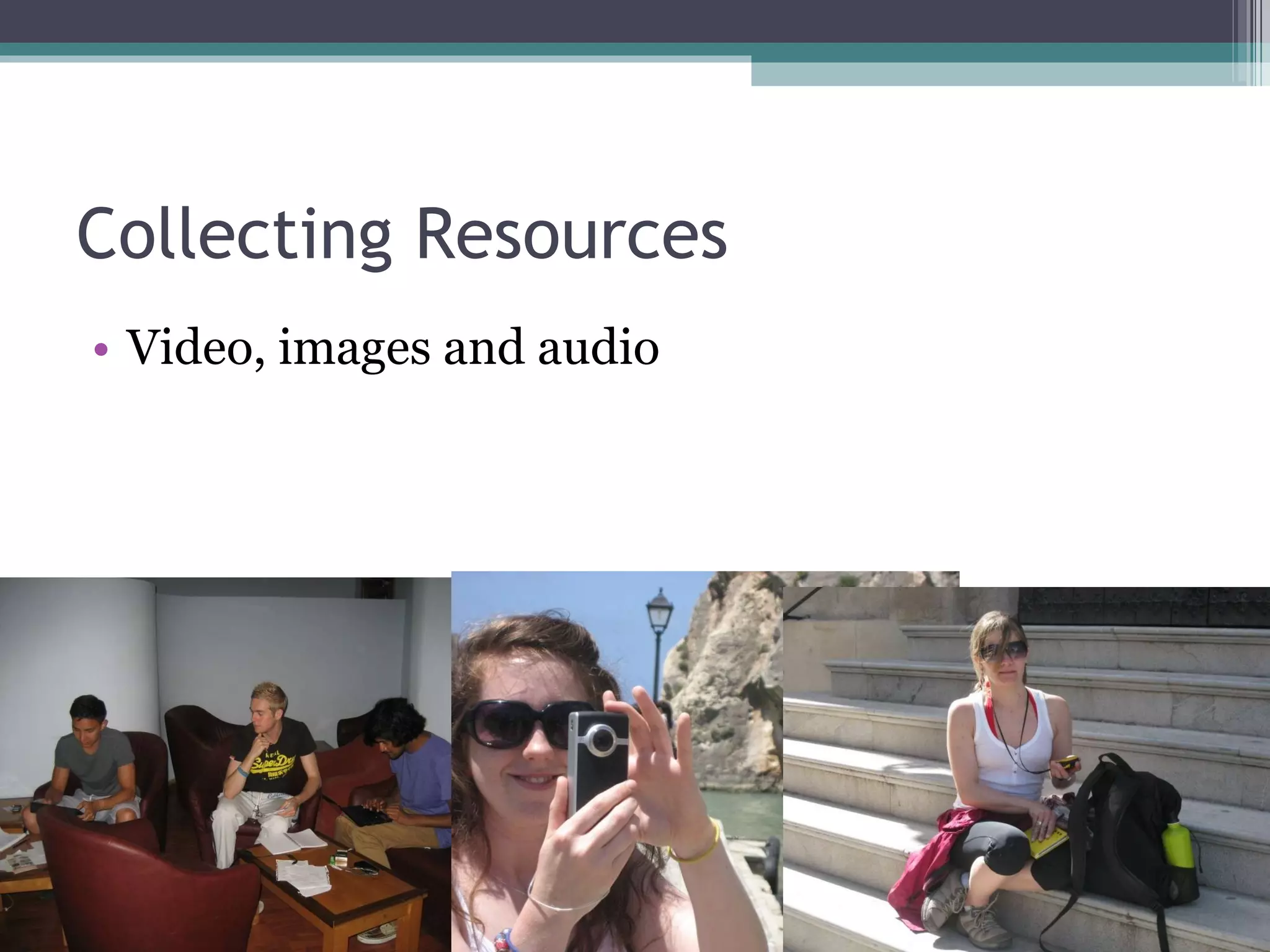
Collecting Resources Video, images and audio
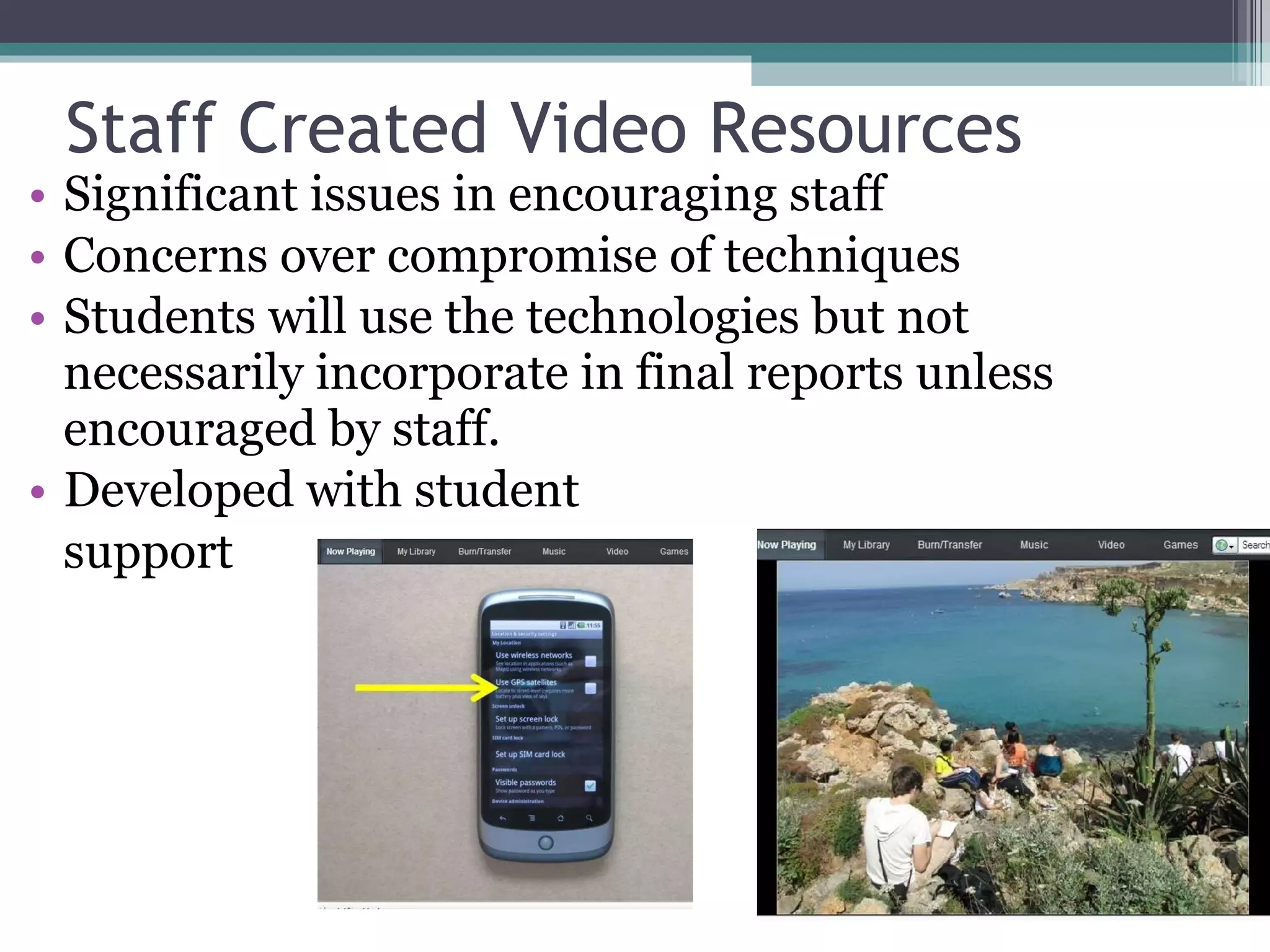
Staff Created Video Resources Significant issues in encouraging staff Concerns over compromise of techniques Students will use the technologies but not necessarily incorporate in final reports unless encouraged by staff. Developed with student  support
Student created Resources Audio Guide for Staff Edited staff guide by cutting in mentor captured video and audio resources from the fieldtrips. Screen videos of using specific software tools.
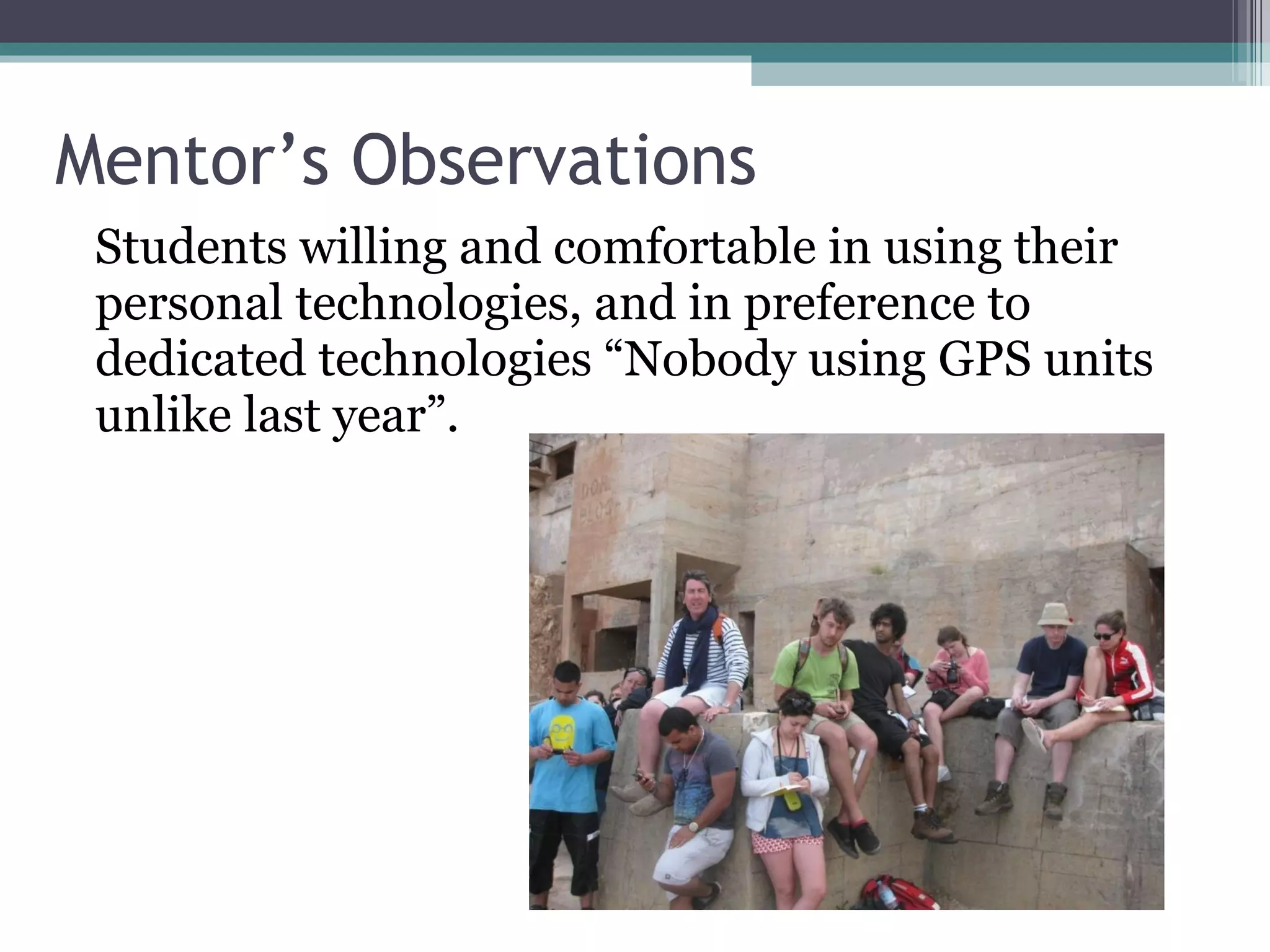
Mentor’s Observations Students willing and comfortable in using their personal technologies, and in preference to dedicated technologies “Nobody using GPS units unlike last year”.
Role of Technologies Primary data capture and Immediacy of data analysis On-site reference to key data Use of primary data in conjunction with secondary data.  Use of GIS in the field to identify and analyse relationships between variables  - enhances higher level cognition and construction of meaning (Fletcher et. al. 2007; Latham & McCormack, 2007)) Engaging with students at the institution Enhancing ‘extended’ group work through sharing Enhancing autonomy
Using Blogs: Public Vs Private blogs – not an issue as it the views of their peers that were most important. May be seen as over studious. Needs an element of compulsion. Will it cost me a fortune? Using the phone for everything: Voice notes Geocoding Photographs Video
Mentor Recommendations Introduce Skills in the first year Encourage greater preparation in advance Individual activities during preparatory events Need to follow up and discuss how the information can be used in their reports / dissertations.
Funded by JISC through the Transforming Curriculum Delivery through Technology programme. http://Morse.ac.uk

Mobilising Remote Student Engagement: Mobile and Personal technologies supporting learning in the field

  • 1.
    Mobile and Personaltechnologies supporting learning in the field Dr Stuart Downward, School of Geography, Geology and the Environment Dr. Tim Linsey, ADC, @timku Kingston University Mobile Learning – Now and the Future
  • 2.
    Overview MoRSE ProjectOverview and context Fieldtrip context in academic Geography Pilot Activities Main Phase Developments Findings
  • 3.
    Project Context Jointproject between Kingston University and De Montfort University Builds on earlier HEA Pathfinder projects at KU and DMU To develop a situated understanding of the impact of mobile and personal technologies on student and staff practices, beyond the institution, and on institutional processes Work Placements (DMU) Fieldwork (KU)
  • 4.
    The KU MoRSETeam School of Geography, Geology and the Environment, KU Dr Stuart Downward Dr Ken Field, Kingston Centre for GIS Dr James O’Brien, Kingston Centre for GIS Faculty of Health and Social Care Sciences, KU Dr Ann Ooms
  • 5.
    Context “ Whenstudents use social technologies outside university (in the informal domain) they often engage in activities that would be valued if enacted in formal learning in higher education”. Trinder et al. 2008 Sharing Peer group collaboration Sophisticated Information seeking Contribution Collective wisdom Self generation Active Participation
  • 6.
    But… “ Mostlearners, despite access to technology and self-reported confidence, aren’t appropriating the technology they know into their study” Sharpe et. al. 2009
  • 7.
    Field Trips Centredin the School of Geography, Geology and the Environment. GIS Geography Environment Field trip locations include the Isle of Wight, Malta and south-east Spain.
  • 8.
    Specific Issues Integrationof fieldwork and other aspects of the curriculum Co-ordination and collaboration amongst staff and student groups distributed over a study area. Sharing resources/collaborating Access to resources, real-time databases, ‘experts’ and support from the field.
  • 9.
    Personal technologies (2009)High level of Laptop usage (83% ) All students possess a mobile (40% PAYG) Some student usage of dedicated cameras and MP3 players. 64% of students interested in taking personal technologies on field-trips 77% of students willing to use their own text credits for educational purposes
  • 10.
    Trialling technologies LiveStreaming video Plymouth Hoe example Hertfordshire example River Thames Kingston Merry hill Leicester note
  • 11.
    Synchronising GPS Unitswith Personal technologies Using GPicSync & Google Maps
  • 12.
    Live Tracking (Instamapper)http://www.instamapper.com/trk?key=2642287017959854978 Altitude Speed Bearing 18/10/2009 12:37 N 50.69961° W 1.09922° 35 0 0 18/10/2009 12:38 N 50.69965° W 1.09904° 49 0 129 18/10/2009 12:39 N 50.69967° W 1.09905° 51 0 49 18/10/2009 12:39 N 50.69922° W 1.09888° 52 6 167 18/10/2009 12:40 N 50.69877° W 1.09872° 51 5 165 18/10/2009 12:40 N 50.69830° W 1.09860° 46 5 173
  • 13.
    Tools: Data captureAudio Audioboo Audacity AoA Audio Extractor Video Youtube Ustream Qik Mobile Ded. Device Flip camera Flip tools Picasa Youtube Mobile Ded. Device Camera Photos Flickr Picasa Photoshop.com Mobile Camera Inbuilt App 3 rd Party App Analysis Device Y Y Y
  • 14.
    Location Google MapsMapDroyd Compass Audacity AoA Audio Extractor Bearing Compass 3Banana Mobile Ded. Device Mobile Ded. Device Camera Geocode Flickr GPicSync Geosetter Mobile Camera Inbuilt App 3 rd Party App Analysis Device Y Asynch Tracking/ mapping Mobile Ded. Device My Maps OSMTracker ESRI ArcPAD My Maps Editor ArcGIS Synch Tracking Mobile Instamapper Y
  • 15.
    Sharing / SupportBlogs Wordpress RSS Reader Micro- Blogging Twitter – Ubertwitter Twidroid Mobile PC Mashups Mobile PC SMS Txttools MS Excel Mobile PC Inbuilt App 3 rd Party App Analysis Device (email) Y Y Voice Mobile PC Y Skype
  • 16.
    Local Information AugmentedReality Layar Wikitude Wikipedia Wikimobile Mobile Mobile PC SMS Txttools MS Excel Mobile PC Inbuilt App 3 rd Party App Analysis Device Y
  • 17.
    Preparatory Event Presentationon field techniques and the use of the field notebook. Overview on the potential of personal technologies on fieldtrips and how they might be used to enhance student contributions to learning activities. Field activity around the campus Laboratory session and feedback. Students were given access to the devices (e.g. GPS, laptops) in advance of the fieldtrip and encouraged to practice and develop the acquired skills prior to leaving for their field destinations .
  • 18.
    Student Mentors 4mentors appointed (2010 and 1 in 2011) Student mentors are ideally suited to the role: they can be selected from students one year above who are already familiar with the field-sites and it is hoped that they will be viewed as highly approachable with a certain informality that they may not perceive of staff. Attended Briefing sessions
  • 19.
    “ It isless daunting as going up to lecturers; it is less pressurised having formulated the best sort of question to approach a lecturer than it is just to go up to someone that’s say a year older than you in academic levels and just ask them a question ” (Mentor) “ ..unexpectedly, they would ask those mentors not only about the mobile technology, but also about things to do with the environment; those guys had been there before…..the mentors were able to help….in the environmental objectives of the trip ” (Staff) (2010)
  • 20.
    Student attitudes (andfrustrations) towards the use and issues of personal technologies supporting their learning activities:
  • 21.
    “ … Todaythis has been very useful in resolving issues that have arisen. I took a while to follow everyone and set up text forwarding but it was worth it. If it wasn’t for the ridiculous roaming charges, it got me thinking about the use of Skype to contact students and tutors either over video, audio or text. Also you could use the conference calling feature to contact many people at once…”
  • 22.
    “ Understanding andlearning the different ways of importing and collating different sources of media and tagging spatial location to them (i.e. long/lat values for example) has given more interest in the subject and found some of the features pretty cool to analyse and present!” “ I think the technologies I used and the way I used them helped my learning; in conjunction with other research they will give a broader and fuller picture of an environment ”
  • 23.
    “ We tooktons of photo’s but in the end we were only able to use the ones off my camera as its was the only one that had a memory card that would fit in the laptop, so I may have been lying  about not having any technical difficulties.   Later that evening we got all the data downloaded of the units were able to geotag the photos (pretty slick) and throw them up on Google earth ”
  • 24.
    “ Some lecturersdon’t know much about technology and we are quite fortunate that XXXX was up-to-date with this kind of stuff. But then in a way I think some lecturers can overdose on the technology, they think oh we’ll have a blog, we’ll have a forum, we’ll have a this, we’ll have a that but what is the point if it is not used? But we are learning and I suppose they want to show us the ways we can use technologies in our future work, this is the idea, you don’t have to use it but you might find it helpful in your future work ”
  • 25.
    Impact Over 75%of GIS students reported that the use of the technologies made the fieldtrips more enjoyable and that they had a positive impact on their motivation to study. When asked if the use of the technologies had an impact on their understanding: 40% of the students said they agreed 37% somewhat agreed. (2008-10)
  • 26.
    The Geography fieldtrip Leader (Almeria, 2010) perceived that the preparatory activities had had a positive impact on the quality of geography student fieldwork notebooks and that students had being using their personal technologies for recording locations and cross referencing with the notebook. The student mentors also reported positive engagement with students on their use of personal technologies to support learning activities.
  • 27.
    2011 Developments StudentGuides to technologies updated Mentor student appointed Placement Student Allocated New video guides for Staff
  • 28.
    Student Guides tousing Mobile & Personal Technologies Updated Introduction to Personal Technologies on Field Trips Guide Mapping Photographs and other Resources Guide Sharing Photographs Georeferencing Photographs Guide
  • 29.
    Student Mentor Studentmentor attended the 2011 Malta and Spain Fieldtrips Mentor took on additional roles covering evaluation and capturing audio, video and imagery. Mentor worked with a student placed with the central e-developer team to edit and develop resources between the two field trips
  • 30.
    Mentor Support roleAvailable each evening to students Technical support Maintained a blog Met with each project group “ I would not have been able to do this a year ago” “ Do not assume it is going to be a holiday”
  • 31.
    Mentor Evaluation roleUndertook videoed interviews with project groups Fieldtrips and Project research Student use of Personal & Mobile technologies on fieldtrips.
  • 32.
  • 33.
    Staff Created VideoResources Significant issues in encouraging staff Concerns over compromise of techniques Students will use the technologies but not necessarily incorporate in final reports unless encouraged by staff. Developed with student support
  • 34.
    Student created ResourcesAudio Guide for Staff Edited staff guide by cutting in mentor captured video and audio resources from the fieldtrips. Screen videos of using specific software tools.
  • 35.
    Mentor’s Observations Studentswilling and comfortable in using their personal technologies, and in preference to dedicated technologies “Nobody using GPS units unlike last year”.
  • 36.
    Role of TechnologiesPrimary data capture and Immediacy of data analysis On-site reference to key data Use of primary data in conjunction with secondary data. Use of GIS in the field to identify and analyse relationships between variables - enhances higher level cognition and construction of meaning (Fletcher et. al. 2007; Latham & McCormack, 2007)) Engaging with students at the institution Enhancing ‘extended’ group work through sharing Enhancing autonomy
  • 37.
    Using Blogs: PublicVs Private blogs – not an issue as it the views of their peers that were most important. May be seen as over studious. Needs an element of compulsion. Will it cost me a fortune? Using the phone for everything: Voice notes Geocoding Photographs Video
  • 38.
    Mentor Recommendations IntroduceSkills in the first year Encourage greater preparation in advance Individual activities during preparatory events Need to follow up and discuss how the information can be used in their reports / dissertations.
  • 39.
    Funded by JISCthrough the Transforming Curriculum Delivery through Technology programme. http://Morse.ac.uk

Editor's Notes

  • #4 This is a joint project between Kingston University and De Montfort University Builds on two earlier HE Academy funded projects: Rapid Reaction and Response (R3) at KU focussing on mobile classroom technologies Web 2.0 tools and approaches at DMU to develop institutional knowledge and understanding of these tools and environments and associated professional development.
  • #8 The School of Geography, Geology and the Environment (GGE) at Kingston University run a series of fieldstrips, both nationally and internationally throughout the year. The project focusses on fieldtrips attended by students studying on both the GIS and Geography Degree programmes.
  • #13 Live tracking using a mobile phone with integrated GPS. The Instamapper mobile phone application was used which broadcasts a geographical reference (in addition to altitude, speed and bearing) at a given time interval which can be fed to a public website.  to: - enable students back at the institution tThe track is also recorded and can be exported and displayed via Google maps.  This facility could be used o access relevant resources / real-time databases / perform analyses relevant to the location and feedback to the field group confirm sampling strategies / geographical gaps in data collection. The link provided is one of the interactive tracks recorded on The Duver as part of the Isle of Wight field trip.