Backbone.js
(and underscore.js)
What is
Backbone.js ?
Backbone.js is a library
that gives structure to
your javascript app by
providing models,
collections and views.
Benefits
Gives some structure to
your JS
Lightweight (6.9kb - +/-
1300 LOC)
Low learning curve (in
comparison…)
Drawbacks
No automatic data binding
You need to write more code
(in comparison…) but you
have a wide ranges of helper
libraries (marionette,
supermodels,…)
With freedom comes
responsibility
Dependencies
Underscore.JS or Lo-Dash
as utility belt
jQuery for DOM scripting
_.template, handlebars.js,
mustache.js, … for
templating
MV*
Backbone is more a Model - View - Presenter library
than MVC. Although a lot of internet sources will
(wrongfully imho) describe it as MVC
You can transform it in a MVC framework by using the
third party library Backbone.Controller
Potato - Potatoe
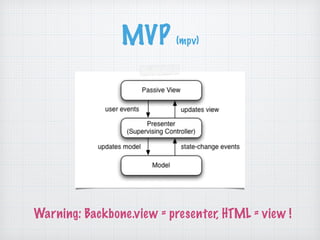
MVP (mpv)
Warning: Backbone.view = presenter, HTML = view !
Used by
http://backbonejs.org/#examples
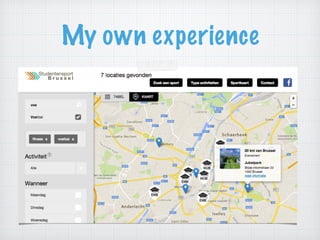
My own experience
Backbone.View
Backbone.Model
Backbone.Collection
Backbone.Router
The bits and pieces of
Backbone
You don’t need to use all parts !
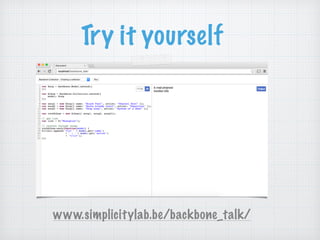
Try it yourself
www.simplicitylab.be/backbone_talk/
Backbone.View
Backbone.Model
Backbone.Collection
Backbone.Router
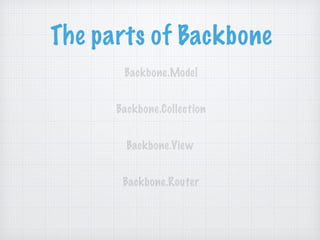
The parts of Backbone
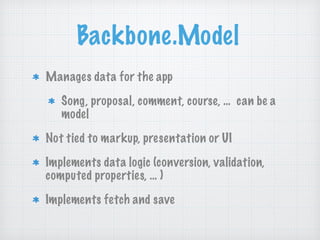
Backbone.Model
Manages data for the app
Song, proposal, comment, course, … can be a
model
Not tied to markup, presentation or UI
Implements data logic (conversion, validation,
computed properties, … )
Implements fetch and save
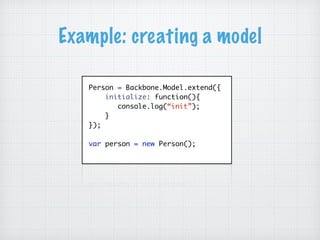
Example: creating a model
Person = Backbone.Model.extend({
initialize: function(){
console.log(“init”);
}
});
var person = new Person();
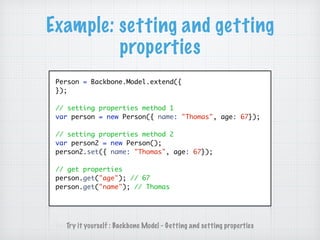
Example: setting and getting
properties
Person = Backbone.Model.extend({
});
// setting properties method 1
var person = new Person({ name: "Thomas", age: 67});
// setting properties method 2
var person2 = new Person();
person2.set({ name: "Thomas", age: 67});
// get properties
person.get("age"); // 67
person.get("name"); // Thomas
Try it yourself : Backbone Model - Getting and setting properties
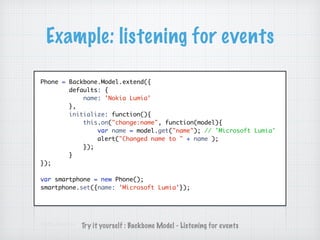
Example: listening for events
Phone = Backbone.Model.extend({
defaults: {
name: 'Nokia Lumia'
},
initialize: function(){
this.on("change:name", function(model){
var name = model.get("name"); // 'Microsoft Lumia'
alert("Changed name to " + name );
});
}
});
var smartphone = new Phone();
smartphone.set({name: 'Microsoft Lumia'});
Try it yourself : Backbone Model - Listening for events
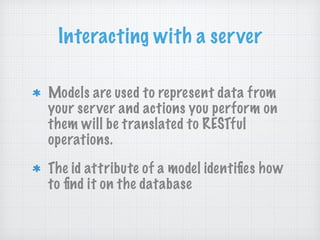
Interacting with a server
Models are used to represent data from
your server and actions you perform on
them will be translated to RESTful
operations.
The id attribute of a model identifies how
to find it on the database
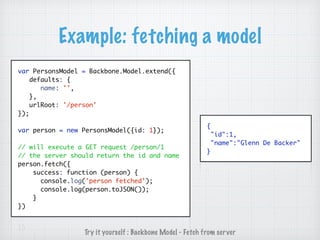
Example: fetching a model
var PersonsModel = Backbone.Model.extend({
defaults: {
name: '',
},
urlRoot: '/person'
});
var person = new PersonsModel({id: 1});
// will execute a GET request /person/1
// the server should return the id and name
person.fetch({
success: function (person) {
console.log('person fetched’);
console.log(person.toJSON());
}
})
Try it yourself : Backbone Model - Fetch from server
{
"id":1,
"name":"Glenn De Backer"
}
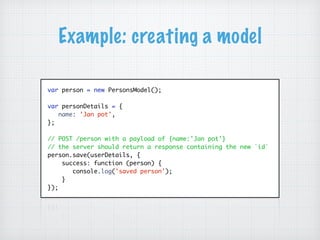
Example: creating a model
var person = new PersonsModel();
var personDetails = {
name: 'Jan pot',
};
// POST /person with a payload of {name:'Jan pot'}
// the server should return a response containing the new `id`
person.save(userDetails, {
success: function (person) {
console.log('saved person');
}
});
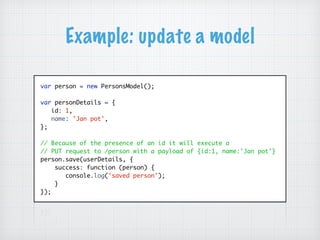
Example: update a model
var person = new PersonsModel();
var personDetails = {
id: 1,
name: 'Jan pot',
};
// Because of the presence of an id it will execute a
// PUT request to /person with a payload of {id:1, name:'Jan pot'}
person.save(userDetails, {
success: function (person) {
console.log('saved person');
}
});
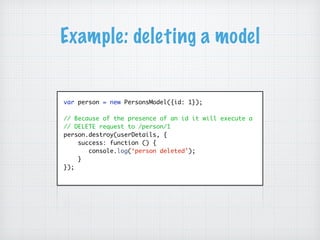
Example: deleting a model
var person = new PersonsModel({id: 1});
// Because of the presence of an id it will execute a
// DELETE request to /person/1
person.destroy(userDetails, {
success: function () {
console.log(‘person deleted');
}
});
Backbone.View
Backbone.Model
Backbone.Collection
Backbone.Router
The parts of Backbone
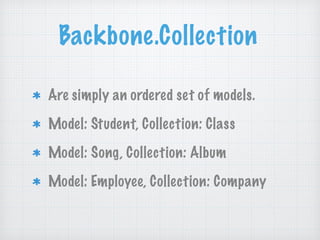
Backbone.Collection
Are simply an ordered set of models.
Model: Student, Collection: Class
Model: Song, Collection: Album
Model: Employee, Collection: Company
Example: a simple one
var Song = Backbone.Model.extend({
});
var Album = Backbone.Collection.extend({
model: Song
});
var song1 = new Song({ name: "Black Fuel", artist: "Channel Zero" });
var song2 = new Song({ name: "Roots bloody roots", artist: "Sepultura" });
var song3 = new Song({ name: "Chop suey", artist: "System of a down" });
var rockAlbum = new Album([ song1, song2, song3]);
console.log( rockAlbum.models ); // [song1, song2, song3]
Try it yourself : Backbone Collection - Creating a collection
Example: fetching from the server
var Song = Backbone.Model.extend({
});
var SongsCollection = Backbone.Collection.extend({
model: Song,
url: 'service/songs'
});
var songs = new SongsCollection();
// fetch songs
songs.fetch({
success: function(collection) {
console.log(collection.models); // [song1, song2, song3]
}
});
Try it yourself : Backbone Collection - Fetch from the server
Backbone.View
Backbone.Model
Backbone.Collection
Backbone.Router
The parts of Backbone
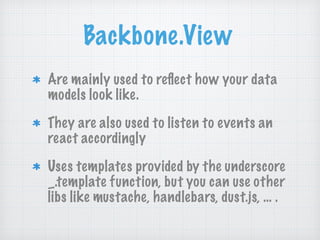
Backbone.View
Are mainly used to reflect how your data
models look like.
They are also used to listen to events an
react accordingly
Uses templates provided by the underscore
_.template function, but you can use other
libs like mustache, handlebars, dust.js, … .
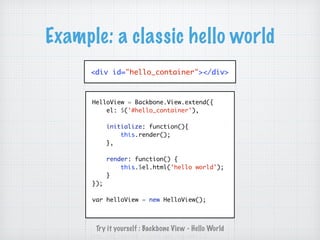
Example: a classic hello world
<div id="hello_container"></div>
HelloView = Backbone.View.extend({
el: $('#hello_container'),
initialize: function(){
this.render();
},
render: function() {
this.$el.html('hello world');
}
});
var helloView = new HelloView();
Try it yourself : Backbone View - Hello World
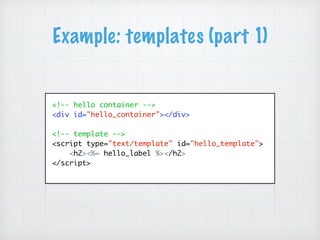
Example: templates (part 1)
<!-- hello container -->
<div id="hello_container"></div>
<!-- template -->
<script type="text/template" id="hello_template">
<h2><%= hello_label %></h2>
</script>
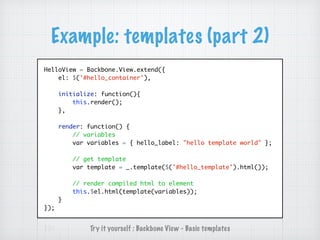
Example: templates (part 2)
HelloView = Backbone.View.extend({
el: $('#hello_container'),
initialize: function(){
this.render();
},
render: function() {
// variables
var variables = { hello_label: "hello template world" };
// get template
var template = _.template($('#hello_template').html());
// render compiled html to element
this.$el.html(template(variables));
}
});
Try it yourself : Backbone View - Basic templates
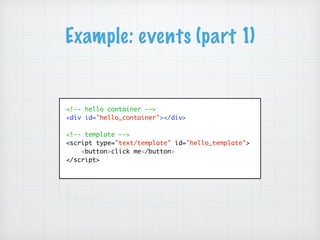
Example: events (part 1)
<!-- hello container -->
<div id="hello_container"></div>
<!-- template -->
<script type="text/template" id="hello_template">
<button>click me</button>
</script>
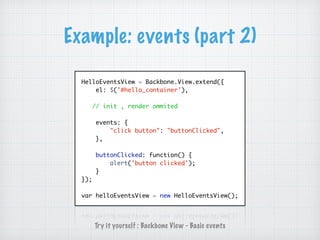
Example: events (part 2)
HelloEventsView = Backbone.View.extend({
el: $('#hello_container'),
// init , render ommited
events: {
"click button": "buttonClicked",
},
buttonClicked: function() {
alert('button clicked');
}
});
var helloEventsView = new HelloEventsView();
Try it yourself : Backbone View - Basic events
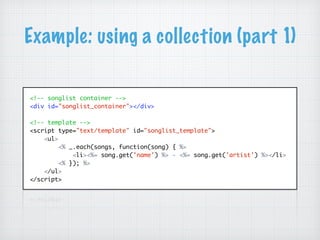
Example: using a collection (part 1)
<!-- songlist container -->
<div id="songlist_container"></div>
<!-- template -->
<script type="text/template" id="songlist_template">
<ul>
<% _.each(songs, function(song) { %>
<li><%= song.get('name') %> - <%= song.get('artist') %></li>
<% }); %>
</ul>
</script>
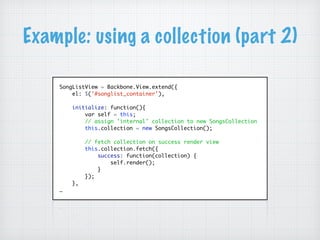
Example: using a collection (part 2)
SongListView = Backbone.View.extend({
el: $('#songlist_container'),
initialize: function(){
var self = this;
// assign 'internal' collection to new SongsCollection
this.collection = new SongsCollection();
// fetch collection on success render view
this.collection.fetch({
success: function(collection) {
self.render();
}
});
},
…
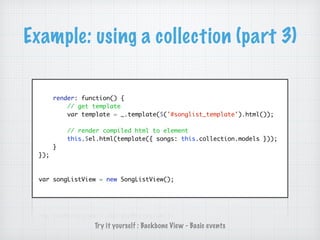
Example: using a collection (part 3)
render: function() {
// get template
var template = _.template($('#songlist_template').html());
// render compiled html to element
this.$el.html(template({ songs: this.collection.models }));
}
});
var songListView = new SongListView();
Try it yourself : Backbone View - Basic events
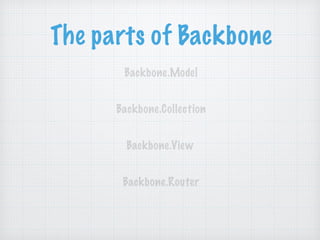
Backbone.View
Backbone.Model
Backbone.Collection
Backbone.Router
The parts of Backbone
Backbone.Router
Are used for routing your applications
URL's when using hash tags(#)
Routes interpret anything after "#" tag
in the URL
Completely optional, useful if you want
to build a single page app (SPA)
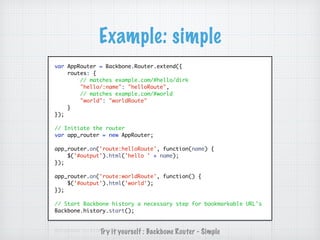
Example: simple
var AppRouter = Backbone.Router.extend({
routes: {
// matches example.com/#hello/dirk
"hello/:name": "helloRoute",
// matches example.com/#world
"world": "worldRoute"
}
});
// Initiate the router
var app_router = new AppRouter;
app_router.on('route:helloRoute', function(name) {
$('#output').html('hello ' + name);
});
app_router.on('route:worldRoute', function() {
$('#output').html('world');
});
// Start Backbone history a necessary step for bookmarkable URL's
Backbone.history.start();
Try it yourself : Backbone Router - Simple
This is only an
introductory…
Useful libraries
Marionette a composite app library for that
aims to simplify the construction of large
scale JavaScript applications. - http://
marionettejs.com/
Thorax built by walmartlabs - backbone +
handlebars framework. - http://thoraxjs.org/
A lot more… - https://github.com/jashkenas/
backbone/wiki/Extensions,-Plugins,-Resources
Some interesting links
Developing Backbone.js Applications
(free o’reilly book) - http://
addyosmani.github.io/backbone-
fundamentals/
Avoid common pitfalls - http://
ozkatz.github.io/avoiding-common-
backbonejs-pitfalls.html
Backbone patterns and tips - http://
www.smashingmagazine.com/
2013/08/09/backbone-js-tips-
patterns/
Underscore.js
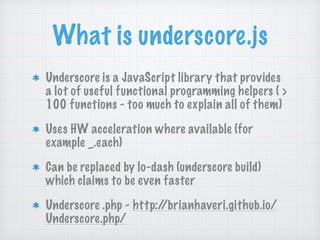
What is underscore.js
Underscore is a JavaScript library that provides
a lot of useful functional programming helpers ( >
100 functions - too much to explain all of them)
Uses HW acceleration where available (for
example _.each)
Can be replaced by lo-dash (underscore build)
which claims to be even faster
Underscore .php - http://brianhaveri.github.io/
Underscore.php/
Example: _.each
// iterate over list of objects
var items = [
{ "name" : "sylvie"},
{ "name" : "koen"},
{ "name" : "david"}
];
_.each(items, function(item) {
console.log(item.name);
});
Try it yourself : Underscore.js - _.each
Example: _.findWhere
// Looks through the list and returns the first value (!)
// that matches all of the key-value pairs
// listed in properties.
var songs = [
{ "id": 1, "artist" : "Channel Zero", "song" : "Black fuel"},
{ "id": 2, "artist" : "Channel Zero", "song" : "Call on me"},
{ "id": 3, "artist" : "The Offspring", "song" : "Self esteem"}
];
// The OffSpring - Self Esteem
var firstValue = _.findWhere(songs, { "id": 3 });
console.log(firstValue.artist + " - " + firstValue.song );
Try it yourself : Underscore.js - _.findWhere
Example: _.where
// Looks through the list and returns all values
// that matches all of the key-value pairs
// listed in properties.
var songs = [
{ "id": 1, "artist" : "Channel Zero", "song" : "Black fuel"},
{ "id": 2, "artist" : "Channel Zero", "song" : "Call on me"},
{ "id": 3, "artist" : "The Offspring", "song" : "Self esteem"}
];
// [{Channel Zero, Black Fuel}, {Channel Zero, Call on me}, … }
var songs = _.where(songs, { "artist": “Channel Zero” });
Try it yourself : Underscore.js - _.where
Example: _.pluck
// Open your browsers console to view results!
var songs = [
{ "id": 1, "artist" : "Channel Zero", "song" : "Black fuel"},
{ "id": 2, "artist" : "Channel Zero", "song" : "Call on me"},
{ "id": 3, "artist" : "Channel Zero", "song" : "Mastermind"},
{ "id": 4, "artist" : "The Offspring", "song" : "Self esteem"}
];
// [Black fuel, Call on me, ... ]
var songs = _.pluck(songs, "song");
console.log(songs);
Try it yourself : Underscore.js - _.pluck
Example: _.max
var stooges = [
{name: 'moe', age: 40},
{name: 'larry', age: 50},
{name: 'curly', age: 60}
];
var oldest = _.max(stooges, function(stooge){
return stooge.age;
});
// {name: 'curly', age: 60}
console.log(oldest);
Try it yourself : Underscore.js - _.max
Example: _.filter
// Looks through each value in the list,
// returning an array of all the values that pass a truth test
var evens = _.filter([1, 2, 3, 4, 5, 6], function(num){
return num % 2 == 0;
});
// [2,4,6]
console.log(evens);
Try it yourself : Underscore.js - _.filter
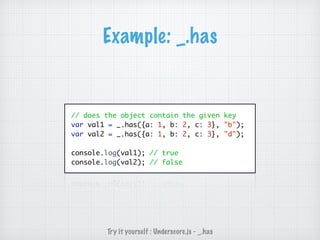
Example: _.has
// does the object contain the given key
var val1 = _.has({a: 1, b: 2, c: 3}, "b");
var val2 = _.has({a: 1, b: 2, c: 3}, "d");
console.log(val1); // true
console.log(val2); // false
Try it yourself : Underscore.js - _.has
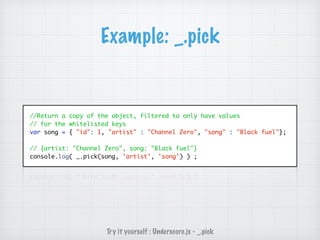
Example: _.pick
//Return a copy of the object, filtered to only have values
// for the whitelisted keys
var song = { "id": 1, "artist" : "Channel Zero", "song" : "Black fuel"};
// {artist: "Channel Zero", song: "Black fuel"}
console.log( _.pick(song, 'artist', 'song') ) ;
Try it yourself : Underscore.js - _.pick
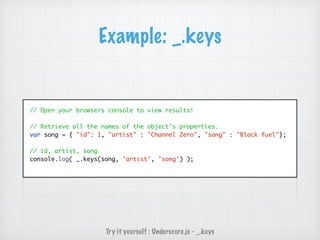
Example: _.keys
// Open your browsers console to view results!
// Retrieve all the names of the object's properties.
var song = { "id": 1, "artist" : "Channel Zero", "song" : "Black fuel"};
// id, artist, song
console.log( _.keys(song, 'artist', 'song') );
Try it yourself : Underscore.js - _.keys
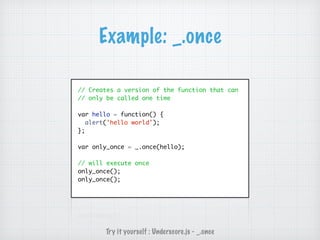
Example: _.once
// Creates a version of the function that can
// only be called one time
var hello = function() {
alert('hello world');
};
var only_once = _.once(hello);
// will execute once
only_once();
only_once();
Try it yourself : Underscore.js - _.once
And much, much
more…
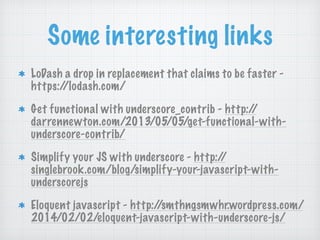
Some interesting links
LoDash a drop in replacement that claims to be faster -
https://lodash.com/
Get functional with underscore_contrib - http://
darrennewton.com/2013/05/05/get-functional-with-
underscore-contrib/
Simplify your JS with underscore - http://
singlebrook.com/blog/simplify-your-javascript-with-
underscorejs
Eloquent javascript - http://smthngsmwhr.wordpress.com/
2014/02/02/eloquent-javascript-with-underscore-js/

Backbone

  • 1.
  • 2.
    What is Backbone.js ? Backbone.jsis a library that gives structure to your javascript app by providing models, collections and views.
  • 3.
    Benefits Gives some structureto your JS Lightweight (6.9kb - +/- 1300 LOC) Low learning curve (in comparison…)
  • 4.
    Drawbacks No automatic databinding You need to write more code (in comparison…) but you have a wide ranges of helper libraries (marionette, supermodels,…) With freedom comes responsibility
  • 5.
    Dependencies Underscore.JS or Lo-Dash asutility belt jQuery for DOM scripting _.template, handlebars.js, mustache.js, … for templating
  • 6.
    MV* Backbone is morea Model - View - Presenter library than MVC. Although a lot of internet sources will (wrongfully imho) describe it as MVC You can transform it in a MVC framework by using the third party library Backbone.Controller Potato - Potatoe
  • 7.
    MVP (mpv) Warning: Backbone.view= presenter, HTML = view !
  • 8.
  • 9.
  • 10.
    Backbone.View Backbone.Model Backbone.Collection Backbone.Router The bits andpieces of Backbone You don’t need to use all parts !
  • 11.
  • 12.
  • 13.
    Backbone.Model Manages data forthe app Song, proposal, comment, course, … can be a model Not tied to markup, presentation or UI Implements data logic (conversion, validation, computed properties, … ) Implements fetch and save
  • 14.
    Example: creating amodel Person = Backbone.Model.extend({ initialize: function(){ console.log(“init”); } }); var person = new Person();
  • 15.
    Example: setting andgetting properties Person = Backbone.Model.extend({ }); // setting properties method 1 var person = new Person({ name: "Thomas", age: 67}); // setting properties method 2 var person2 = new Person(); person2.set({ name: "Thomas", age: 67}); // get properties person.get("age"); // 67 person.get("name"); // Thomas Try it yourself : Backbone Model - Getting and setting properties
  • 16.
    Example: listening forevents Phone = Backbone.Model.extend({ defaults: { name: 'Nokia Lumia' }, initialize: function(){ this.on("change:name", function(model){ var name = model.get("name"); // 'Microsoft Lumia' alert("Changed name to " + name ); }); } }); var smartphone = new Phone(); smartphone.set({name: 'Microsoft Lumia'}); Try it yourself : Backbone Model - Listening for events
  • 17.
    Interacting with aserver Models are used to represent data from your server and actions you perform on them will be translated to RESTful operations. The id attribute of a model identifies how to find it on the database
  • 18.
    Example: fetching amodel var PersonsModel = Backbone.Model.extend({ defaults: { name: '', }, urlRoot: '/person' }); var person = new PersonsModel({id: 1}); // will execute a GET request /person/1 // the server should return the id and name person.fetch({ success: function (person) { console.log('person fetched’); console.log(person.toJSON()); } }) Try it yourself : Backbone Model - Fetch from server { "id":1, "name":"Glenn De Backer" }
  • 19.
    Example: creating amodel var person = new PersonsModel(); var personDetails = { name: 'Jan pot', }; // POST /person with a payload of {name:'Jan pot'} // the server should return a response containing the new `id` person.save(userDetails, { success: function (person) { console.log('saved person'); } });
  • 20.
    Example: update amodel var person = new PersonsModel(); var personDetails = { id: 1, name: 'Jan pot', }; // Because of the presence of an id it will execute a // PUT request to /person with a payload of {id:1, name:'Jan pot'} person.save(userDetails, { success: function (person) { console.log('saved person'); } });
  • 21.
    Example: deleting amodel var person = new PersonsModel({id: 1}); // Because of the presence of an id it will execute a // DELETE request to /person/1 person.destroy(userDetails, { success: function () { console.log(‘person deleted'); } });
  • 22.
  • 23.
    Backbone.Collection Are simply anordered set of models. Model: Student, Collection: Class Model: Song, Collection: Album Model: Employee, Collection: Company
  • 24.
    Example: a simpleone var Song = Backbone.Model.extend({ }); var Album = Backbone.Collection.extend({ model: Song }); var song1 = new Song({ name: "Black Fuel", artist: "Channel Zero" }); var song2 = new Song({ name: "Roots bloody roots", artist: "Sepultura" }); var song3 = new Song({ name: "Chop suey", artist: "System of a down" }); var rockAlbum = new Album([ song1, song2, song3]); console.log( rockAlbum.models ); // [song1, song2, song3] Try it yourself : Backbone Collection - Creating a collection
  • 25.
    Example: fetching fromthe server var Song = Backbone.Model.extend({ }); var SongsCollection = Backbone.Collection.extend({ model: Song, url: 'service/songs' }); var songs = new SongsCollection(); // fetch songs songs.fetch({ success: function(collection) { console.log(collection.models); // [song1, song2, song3] } }); Try it yourself : Backbone Collection - Fetch from the server
  • 26.
  • 27.
    Backbone.View Are mainly usedto reflect how your data models look like. They are also used to listen to events an react accordingly Uses templates provided by the underscore _.template function, but you can use other libs like mustache, handlebars, dust.js, … .
  • 28.
    Example: a classichello world <div id="hello_container"></div> HelloView = Backbone.View.extend({ el: $('#hello_container'), initialize: function(){ this.render(); }, render: function() { this.$el.html('hello world'); } }); var helloView = new HelloView(); Try it yourself : Backbone View - Hello World
  • 29.
    Example: templates (part1) <!-- hello container --> <div id="hello_container"></div> <!-- template --> <script type="text/template" id="hello_template"> <h2><%= hello_label %></h2> </script>
  • 30.
    Example: templates (part2) HelloView = Backbone.View.extend({ el: $('#hello_container'), initialize: function(){ this.render(); }, render: function() { // variables var variables = { hello_label: "hello template world" }; // get template var template = _.template($('#hello_template').html()); // render compiled html to element this.$el.html(template(variables)); } }); Try it yourself : Backbone View - Basic templates
  • 31.
    Example: events (part1) <!-- hello container --> <div id="hello_container"></div> <!-- template --> <script type="text/template" id="hello_template"> <button>click me</button> </script>
  • 32.
    Example: events (part2) HelloEventsView = Backbone.View.extend({ el: $('#hello_container'), // init , render ommited events: { "click button": "buttonClicked", }, buttonClicked: function() { alert('button clicked'); } }); var helloEventsView = new HelloEventsView(); Try it yourself : Backbone View - Basic events
  • 33.
    Example: using acollection (part 1) <!-- songlist container --> <div id="songlist_container"></div> <!-- template --> <script type="text/template" id="songlist_template"> <ul> <% _.each(songs, function(song) { %> <li><%= song.get('name') %> - <%= song.get('artist') %></li> <% }); %> </ul> </script>
  • 34.
    Example: using acollection (part 2) SongListView = Backbone.View.extend({ el: $('#songlist_container'), initialize: function(){ var self = this; // assign 'internal' collection to new SongsCollection this.collection = new SongsCollection(); // fetch collection on success render view this.collection.fetch({ success: function(collection) { self.render(); } }); }, …
  • 35.
    Example: using acollection (part 3) render: function() { // get template var template = _.template($('#songlist_template').html()); // render compiled html to element this.$el.html(template({ songs: this.collection.models })); } }); var songListView = new SongListView(); Try it yourself : Backbone View - Basic events
  • 36.
  • 37.
    Backbone.Router Are used forrouting your applications URL's when using hash tags(#) Routes interpret anything after "#" tag in the URL Completely optional, useful if you want to build a single page app (SPA)
  • 38.
    Example: simple var AppRouter= Backbone.Router.extend({ routes: { // matches example.com/#hello/dirk "hello/:name": "helloRoute", // matches example.com/#world "world": "worldRoute" } }); // Initiate the router var app_router = new AppRouter; app_router.on('route:helloRoute', function(name) { $('#output').html('hello ' + name); }); app_router.on('route:worldRoute', function() { $('#output').html('world'); }); // Start Backbone history a necessary step for bookmarkable URL's Backbone.history.start(); Try it yourself : Backbone Router - Simple
  • 39.
    This is onlyan introductory…
  • 40.
    Useful libraries Marionette acomposite app library for that aims to simplify the construction of large scale JavaScript applications. - http:// marionettejs.com/ Thorax built by walmartlabs - backbone + handlebars framework. - http://thoraxjs.org/ A lot more… - https://github.com/jashkenas/ backbone/wiki/Extensions,-Plugins,-Resources
  • 41.
    Some interesting links DevelopingBackbone.js Applications (free o’reilly book) - http:// addyosmani.github.io/backbone- fundamentals/ Avoid common pitfalls - http:// ozkatz.github.io/avoiding-common- backbonejs-pitfalls.html Backbone patterns and tips - http:// www.smashingmagazine.com/ 2013/08/09/backbone-js-tips- patterns/
  • 42.
  • 43.
    What is underscore.js Underscoreis a JavaScript library that provides a lot of useful functional programming helpers ( > 100 functions - too much to explain all of them) Uses HW acceleration where available (for example _.each) Can be replaced by lo-dash (underscore build) which claims to be even faster Underscore .php - http://brianhaveri.github.io/ Underscore.php/
  • 44.
    Example: _.each // iterateover list of objects var items = [ { "name" : "sylvie"}, { "name" : "koen"}, { "name" : "david"} ]; _.each(items, function(item) { console.log(item.name); }); Try it yourself : Underscore.js - _.each
  • 45.
    Example: _.findWhere // Looksthrough the list and returns the first value (!) // that matches all of the key-value pairs // listed in properties. var songs = [ { "id": 1, "artist" : "Channel Zero", "song" : "Black fuel"}, { "id": 2, "artist" : "Channel Zero", "song" : "Call on me"}, { "id": 3, "artist" : "The Offspring", "song" : "Self esteem"} ]; // The OffSpring - Self Esteem var firstValue = _.findWhere(songs, { "id": 3 }); console.log(firstValue.artist + " - " + firstValue.song ); Try it yourself : Underscore.js - _.findWhere
  • 46.
    Example: _.where // Looksthrough the list and returns all values // that matches all of the key-value pairs // listed in properties. var songs = [ { "id": 1, "artist" : "Channel Zero", "song" : "Black fuel"}, { "id": 2, "artist" : "Channel Zero", "song" : "Call on me"}, { "id": 3, "artist" : "The Offspring", "song" : "Self esteem"} ]; // [{Channel Zero, Black Fuel}, {Channel Zero, Call on me}, … } var songs = _.where(songs, { "artist": “Channel Zero” }); Try it yourself : Underscore.js - _.where
  • 47.
    Example: _.pluck // Openyour browsers console to view results! var songs = [ { "id": 1, "artist" : "Channel Zero", "song" : "Black fuel"}, { "id": 2, "artist" : "Channel Zero", "song" : "Call on me"}, { "id": 3, "artist" : "Channel Zero", "song" : "Mastermind"}, { "id": 4, "artist" : "The Offspring", "song" : "Self esteem"} ]; // [Black fuel, Call on me, ... ] var songs = _.pluck(songs, "song"); console.log(songs); Try it yourself : Underscore.js - _.pluck
  • 48.
    Example: _.max var stooges= [ {name: 'moe', age: 40}, {name: 'larry', age: 50}, {name: 'curly', age: 60} ]; var oldest = _.max(stooges, function(stooge){ return stooge.age; }); // {name: 'curly', age: 60} console.log(oldest); Try it yourself : Underscore.js - _.max
  • 49.
    Example: _.filter // Looksthrough each value in the list, // returning an array of all the values that pass a truth test var evens = _.filter([1, 2, 3, 4, 5, 6], function(num){ return num % 2 == 0; }); // [2,4,6] console.log(evens); Try it yourself : Underscore.js - _.filter
  • 50.
    Example: _.has // doesthe object contain the given key var val1 = _.has({a: 1, b: 2, c: 3}, "b"); var val2 = _.has({a: 1, b: 2, c: 3}, "d"); console.log(val1); // true console.log(val2); // false Try it yourself : Underscore.js - _.has
  • 51.
    Example: _.pick //Return acopy of the object, filtered to only have values // for the whitelisted keys var song = { "id": 1, "artist" : "Channel Zero", "song" : "Black fuel"}; // {artist: "Channel Zero", song: "Black fuel"} console.log( _.pick(song, 'artist', 'song') ) ; Try it yourself : Underscore.js - _.pick
  • 52.
    Example: _.keys // Openyour browsers console to view results! // Retrieve all the names of the object's properties. var song = { "id": 1, "artist" : "Channel Zero", "song" : "Black fuel"}; // id, artist, song console.log( _.keys(song, 'artist', 'song') ); Try it yourself : Underscore.js - _.keys
  • 53.
    Example: _.once // Createsa version of the function that can // only be called one time var hello = function() { alert('hello world'); }; var only_once = _.once(hello); // will execute once only_once(); only_once(); Try it yourself : Underscore.js - _.once
  • 54.
  • 55.
    Some interesting links LoDasha drop in replacement that claims to be faster - https://lodash.com/ Get functional with underscore_contrib - http:// darrennewton.com/2013/05/05/get-functional-with- underscore-contrib/ Simplify your JS with underscore - http:// singlebrook.com/blog/simplify-your-javascript-with- underscorejs Eloquent javascript - http://smthngsmwhr.wordpress.com/ 2014/02/02/eloquent-javascript-with-underscore-js/