Mobile Performance Testing: Part 3: Testing the Network
Mobile Performance:
Part 3 – Testing the Network
        Alan Trefzger
          XBOSoft
  Senior Quality Consultant
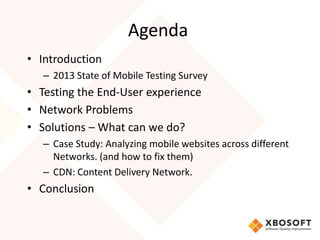
Agenda
• Introduction
   – 2013 State of Mobile Testing Survey
• Testing the End-User experience
• Network Problems
• Solutions – What can we do?
   – Case Study: Analyzing mobile websites across different
     Networks. (and how to fix them)
   – CDN: Content Delivery Network.
• Conclusion
Introduction
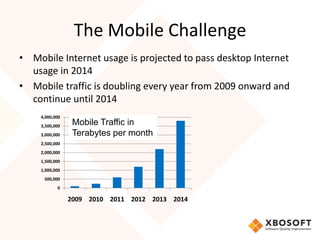
The Mobile Challenge
• Mobile Internet usage is projected to pass desktop Internet
  usage in 2014
• Mobile traffic is doubling every year from 2009 onward and
  continue until 2014
    4,000,000
    3,500,000
                 Mobile Traffic in
    3,000,000    Terabytes per month
    2,500,000
    2,000,000
    1,500,000
    1,000,000
     500,000
           0

                2009 2010 2011 2012 2013 2014
Mobile Performance
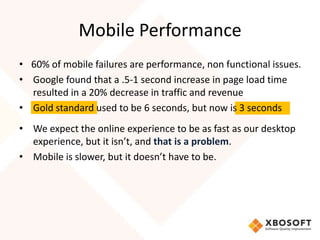
• 60% of mobile failures are performance, non functional issues.
• Google found that a .5-1 second increase in page load time
  resulted in a 20% decrease in traffic and revenue
• Gold standard used to be 6 seconds, but now is 3 seconds
• We expect the online experience to be as fast as our desktop
  experience, but it isn’t, and that is a problem.
• Mobile is slower, but it doesn’t have to be.
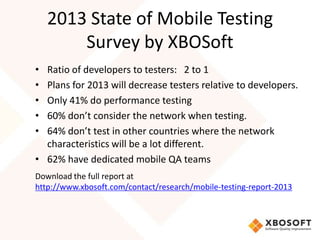
2013 State of Mobile Testing
        Survey by XBOSoft
• Ratio of developers to testers: 2 to 1
• Plans for 2013 will decrease testers relative to developers.
• Only 41% do performance testing
• 60% don’t consider the network when testing.
• 64% don’t test in other countries where the network
  characteristics will be a lot different.
• 62% have dedicated mobile QA teams
Download the full report at
http://www.xbosoft.com/contact/research/mobile-testing-report-2013
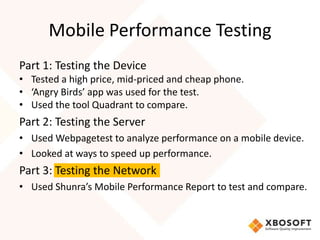
Mobile Performance Testing
Part 1: Testing the Device
• Tested a high price, mid-priced and cheap phone.
• ‘Angry Birds’ app was used for the test.
• Used the tool Quadrant to compare.
Part 2: Testing the Server
• Used Webpagetest to analyze performance on a mobile device.
• Looked at ways to speed up performance.
Part 3: Testing the Network
• Used Shunra’s Mobile Performance Report to test and compare.
If your not considering the network
   before you start developing,
you are setting yourself up for
   failure.
Testing the End-User
      Experience
Testing Goal
• Test your application as the end-user
  experiences it.
• End-to-End Testing: Testing the entire product.
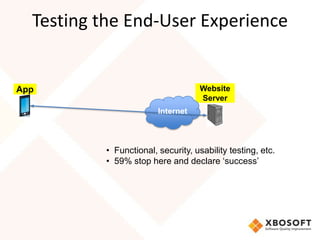
Testing the End-User Experience


App                                 Website
                                    Server
                        Internet


          • Functional, security, usability testing, etc.
          • 59% stop here and declare ‘success’
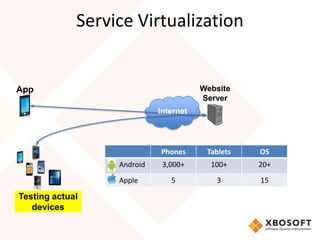
Service Virtualization


App                                        Website
                                           Server
                               Internet


                 • Functional, security, usability testing, OS
                               Phones       Tablets         etc.
                 • 59% stop here and declare ‘success’20+
                    Android    3,000+        100+
                    Apple          5           3           15

Testing actual
   devices
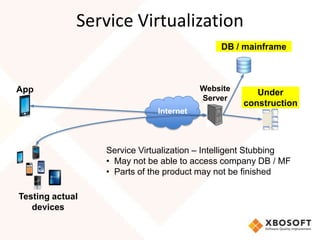
Service Virtualization
                                             DB / mainframe


App                                     Website
                                                     Under
                                        Server
                                                  construction
                             Internet


                 Service Virtualization – Intelligent Stubbing
                 • May not be able to access company DB / MF
                 • Parts of the product may not be finished

Testing actual
   devices
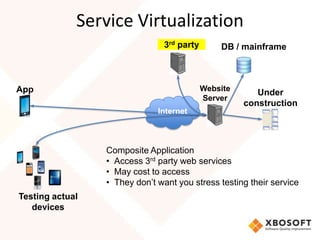
Service Virtualization
                                3rd party       DB / mainframe


App                                         Website
                                                         Under
                                            Server
                                                      construction
                              Internet


                 Composite Application
                 • Access 3rd party web services
                 • May cost to access
                 • They don’t want you stress testing their service
Testing actual
   devices
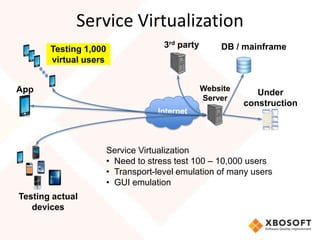
Service Virtualization
       Testing 1,000                 3rd party       DB / mainframe
       virtual users


App                                              Website
                                                              Under
                                                 Server
                                                           construction
                                   Internet


                       Service Virtualization
                       • Need to stress test 100 – 10,000 users
                       • Transport-level emulation of many users
                       • GUI emulation
Testing actual
   devices
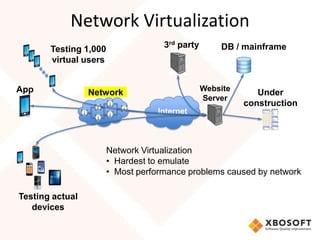
Network Virtualization
       Testing 1,000                3rd party       DB / mainframe
       virtual users


App                                             Website
                 Network                                     Under
                                                Server
                                                          construction
                                  Internet


                       Network Virtualization
                       • Hardest to emulate
                       • Most performance problems caused by network

Testing actual
   devices
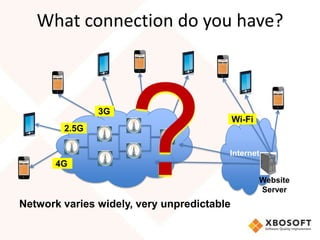
What connection do you have?


               3G
                                            Wi-Fi
        2.5G

                                        Internet
       4G
                                                    Website
                                                    Server
Network varies widely, very unpredictable
Problems of
   Mobile Networks
(that Broadband doesn’t have)
Problems of Networks
• Uncertainty – don’t know ahead of time what network you
  will be connected to.
• Uncertainty – don’t know ahead of time what the quality of
  network will be.
• Very hard to repeat network conditions for testing because
  everything is constantly changing.
• Global differences in network speeds and reliability.
• Customers don’t care where the problem is. You will get
  blamed for poor performance even if it is the network.
Problems of Networks
Can’t fine tune it later or solve it later.
•   Can’t upgrade bandwidth.
•   Can’t upgrade hw in mobile device.
•   Can’t put in an accelerator.
•   Can’t do many of the things that you could if it was a PC.


    The mobile Network is just shining a light on
    pre-existing problems.
Slow network speeds
• Long, Slow TCP connections
• Slower network speeds means strategies that worked for
  desktop/broadband connection, will not work for mobile.
  e.g. Serial connections can take very long time with a slow
  network.
• TCP Time-outs
  – Increasing TCP timers is NOT the answer.
  – Changing the timers can be high risk and cause unexpected timing
    problems.
  – Can cause application timers to timeout.
  – Whenever you see TCP timeouts, you will have significant
    performance degradation.
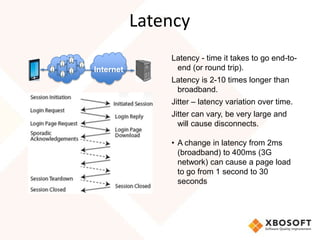
Latency
               Latency - time it takes to go end-to-
Internet        end (or round trip).
               Latency is 2-10 times longer than
                broadband.
               Jitter – latency variation over time.
               Jitter can vary, be very large and
                 will cause disconnects.

               • A change in latency from 2ms
                 (broadband) to 400ms (3G
                 network) can cause a page load
                 to go from 1 second to 30
                 seconds
Connection Disruption
• Sometimes when you are traveling and your cell phone
  connection is being passed from one cell tower to another, a
  disruption can be caused.
• Almost no packet loss for broadband, but a truck going
  passing between you and the cell tower can cause packet loss
  and re-transmission.
• Some think that bandwidth is the problem, but many times it
  is NOT, it is a latency problem.
• Packet drops with retransmissions will be common.
Global Network Issues
• Testing the same phones in USA, India, and China.
   – Phones, browsers, and websites that worked fine in the
     USA didn’t work in India.
• Data charged is a big factor in the emerging markets.
   – What network providers’ charge is not necessarily based
     on the size of the download.
   – Amount customer was charged can vary greatly depending
     on the browser or phone.
• Speed can vary greatly depending on
  phone, browser, or network
Solution
What Can We Do?
What can we do?
Many say, “How can we change our customers perception? so
  we don’t get blamed.”
Can’t do, we must change our reality.
• Developing for mobile is different than desktop.
• Developing for performance from the beginning.
• Just because we haven’t experienced a big failure yet, doesn’t
  mean won’t and soon.
Plan ahead
• Critical that you carefully plan a mobile service deployment.
• The network can make a problem an order of magnitude
  worse.
• What if your mobile service goes viral and your infrastructure
  can not support it, then all you have done is caused a large
  number of potential customers never to consider you again.
• Use Service Virtualization to test your mobile service.
Service Virtualization
Emulating services that are hard to replicate during testing
• The Network
• Third party composites
• Actual in-use internal database
• Parts of application that are under construction
• 10,000 users
Not just a stub, but emulates what is happening or what data is
   coming back
Service Virtualization = Intelligent Stubbing
Allows Test early / Test often
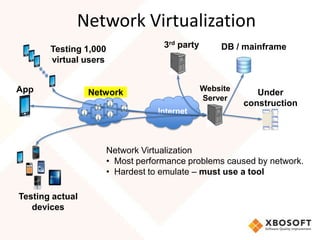
Network Virtualization
       Testing 1,000                3rd party       DB / mainframe
       virtual users


App                                             Website
                 Network                                     Under
                                                Server
                                                          construction
                                   Internet


                       Network Virtualization
                       • Most performance problems caused by network.
                       • Hardest to emulate – must use a tool

Testing actual
   devices
Tools
• Network Link Conditioner - Apple in its developer kit for
  iOS6, good place to start
   – Simulate internet connection and bandwidth speeds
   – Simulate a 3G, DSL, Edge, very bad connection, etc…


• Network Catcher – Shunra
   – can capture network profile and environment from almost anywhere
     in the world.
   – Gives details on why the problems happened.
   – Global library of networks from all over the world.
Tools
• vCat – Shunra
   – emulates a network profile
   – LoadRunner is user virtualization a
   – LR is closely integrated with vCat
   – LR controls the entire test, including vCat,
   – Very repeatable
   – What if scenarios
• Perfecto Mobile
• Device Anywhere
Live vs. Emulated Network

• Live, real Network
  – Cannot duplicate conditions
  – Too many variables
  – Actual conditions won’t be consistent
• Emulated Network
  – Repeatable
  – Can vary conditions
  – What if scenarios
Network Virtualization
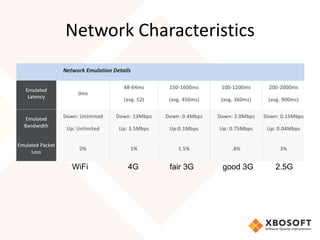
Shunra offers a free service using their NetworkCatcher
  and vCat products to analyze mobile applications on
  the various networks.
Mobile Application Performance Report
• Analysis of your mobile application on various networks.
• Recommendations on how to improve your mobile
  application.
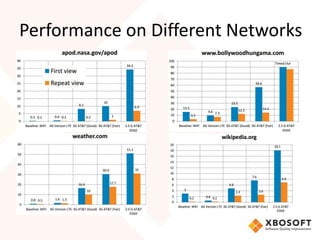
Performance on Different Networks
Network Characteristics


WiFi   4G   fair 3G   good 3G   2.5G
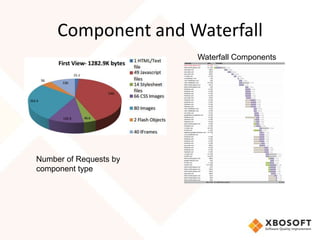
Component and Waterfall
                        Waterfall Components


Number of Requests by
component type
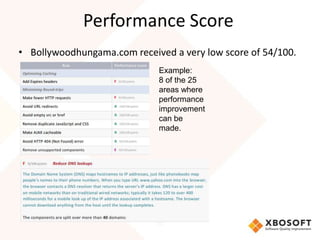
Performance Score
• Bollywoodhungama.com received a very low score of 54/100.
                             Example:
                             8 of the 25
                             areas where
                             performance
                             improvement
                             can be
                             made.
What else can be done? CDNs
CDN – Content Delivery Networks
Goal: To serve content to end users with cheapest cost or
  highest performance. Optimal situation is when these two
  goals are aligned.
• This is achieved by optimizing delivery across local networks
• Instead of accessing data from a central server, the CDN
  parses out the requests to the nearest server.
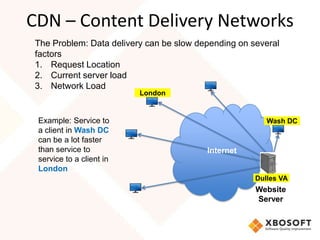
CDN – Content Delivery Networks
The Problem: Data delivery can be slow depending on several
factors
1. Request Location
2. Current server load
3. Network Load
                          London


 Example: Service to                                    Wash DC
 a client in Wash DC
 can be a lot faster
 than service to                         Internet
 service to a client in
 London
                                                     Dulles VA
                                                     Website
                                                     Server
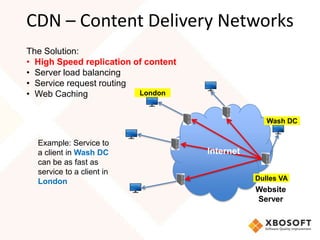
CDN – Content Delivery Networks
The Solution:
• High Speed replication of content
• Server load balancing
• Service request routing
• Web Caching             London


                                                    Wash DC


  Example: Service to
  a client in Wash DC                 Internet
  can be as fast as
  service to a client in
  London                                         Dulles VA
                                                 Website
                                                 Server
Improvements to Watch For
Better integration of CDNs to Mobile
Traffic Optimization: Wireless operators are managing
  content to provide a better overall mobile
  experience.
• Fast dormancy
• Bigger pipes
• Offloading to other networks
• Optimizing traffic
Characteristics of a Good mobile
             app/m.site
• Worrying about the end user experience ahead of
  deployment.
• Proactive engineering
• Fault tolerant
• 3 second response
• Can handle spikes in load
• Performance standards are specified in advance.
• Topology of my servers is planned and understood.
Issues to consider at beginning,
    but especially before deployment
•   Set performance service standards, e.g. 3 seconds response
•   What if your service goes viral.
•   Is it internal or external.
•   Paid/not paid.
•   Capacity planning.
•   Revenue generating.
•   Is your logo on it? Bad performance will hurt your brand.
Optimization Strategies
(Covered in Part 2: Server Performance Testing)
1. Reducing the number of HTTP Requests
  –   Consolidating Resources
  –   Embed resources in html for first-time use
  –   HTML5 Web Storage
  –   Uni-directional server updates
2. Reduce Payloads:
  –   Compress
  –   Resize
  –   Simplify
Conclusion
Moore’s Law for computer power and storage
Nielsen’s Law for Internet bandwidth
Long term looks good, but in the mean time.
• Test early, test often.
• Best way to solve mobile performance problems is
   to prevent them. Don’t wait until after deployment
   to start worrying about performance issues.
• No network performance testing will lead to
   disaster!
Q&A


Follow us on twitter: @XBOSoft

Are you ready to test Mobile Performance?
Let XBOSoft help you get started.

Mobile Network Performance Testing

  • 1.
    Mobile Performance Testing:Part 3: Testing the Network
  • 2.
    Mobile Performance: Part 3– Testing the Network Alan Trefzger XBOSoft Senior Quality Consultant
  • 3.
    Agenda • Introduction – 2013 State of Mobile Testing Survey • Testing the End-User experience • Network Problems • Solutions – What can we do? – Case Study: Analyzing mobile websites across different Networks. (and how to fix them) – CDN: Content Delivery Network. • Conclusion
  • 4.
  • 5.
    The Mobile Challenge •Mobile Internet usage is projected to pass desktop Internet usage in 2014 • Mobile traffic is doubling every year from 2009 onward and continue until 2014 4,000,000 3,500,000 Mobile Traffic in 3,000,000 Terabytes per month 2,500,000 2,000,000 1,500,000 1,000,000 500,000 0 2009 2010 2011 2012 2013 2014
  • 6.
    Mobile Performance • 60%of mobile failures are performance, non functional issues. • Google found that a .5-1 second increase in page load time resulted in a 20% decrease in traffic and revenue • Gold standard used to be 6 seconds, but now is 3 seconds • We expect the online experience to be as fast as our desktop experience, but it isn’t, and that is a problem. • Mobile is slower, but it doesn’t have to be.
  • 7.
    2013 State ofMobile Testing Survey by XBOSoft • Ratio of developers to testers: 2 to 1 • Plans for 2013 will decrease testers relative to developers. • Only 41% do performance testing • 60% don’t consider the network when testing. • 64% don’t test in other countries where the network characteristics will be a lot different. • 62% have dedicated mobile QA teams Download the full report at http://www.xbosoft.com/contact/research/mobile-testing-report-2013
  • 8.
    Mobile Performance Testing Part1: Testing the Device • Tested a high price, mid-priced and cheap phone. • ‘Angry Birds’ app was used for the test. • Used the tool Quadrant to compare. Part 2: Testing the Server • Used Webpagetest to analyze performance on a mobile device. • Looked at ways to speed up performance. Part 3: Testing the Network • Used Shunra’s Mobile Performance Report to test and compare.
  • 9.
    If your notconsidering the network before you start developing, you are setting yourself up for failure.
  • 10.
  • 11.
    Testing Goal • Testyour application as the end-user experiences it. • End-to-End Testing: Testing the entire product.
  • 12.
    Testing the End-UserExperience App Website Server Internet • Functional, security, usability testing, etc. • 59% stop here and declare ‘success’
  • 13.
    Service Virtualization App Website Server Internet • Functional, security, usability testing, OS Phones Tablets etc. • 59% stop here and declare ‘success’20+ Android 3,000+ 100+ Apple 5 3 15 Testing actual devices
  • 14.
    Service Virtualization DB / mainframe App Website Under Server construction Internet Service Virtualization – Intelligent Stubbing • May not be able to access company DB / MF • Parts of the product may not be finished Testing actual devices
  • 15.
    Service Virtualization 3rd party DB / mainframe App Website Under Server construction Internet Composite Application • Access 3rd party web services • May cost to access • They don’t want you stress testing their service Testing actual devices
  • 16.
    Service Virtualization Testing 1,000 3rd party DB / mainframe virtual users App Website Under Server construction Internet Service Virtualization • Need to stress test 100 – 10,000 users • Transport-level emulation of many users • GUI emulation Testing actual devices
  • 17.
    Network Virtualization Testing 1,000 3rd party DB / mainframe virtual users App Website Network Under Server construction Internet Network Virtualization • Hardest to emulate • Most performance problems caused by network Testing actual devices
  • 18.
    What connection doyou have? 3G Wi-Fi 2.5G Internet 4G Website Server Network varies widely, very unpredictable
  • 19.
    Problems of Mobile Networks (that Broadband doesn’t have)
  • 20.
    Problems of Networks •Uncertainty – don’t know ahead of time what network you will be connected to. • Uncertainty – don’t know ahead of time what the quality of network will be. • Very hard to repeat network conditions for testing because everything is constantly changing. • Global differences in network speeds and reliability. • Customers don’t care where the problem is. You will get blamed for poor performance even if it is the network.
  • 21.
    Problems of Networks Can’tfine tune it later or solve it later. • Can’t upgrade bandwidth. • Can’t upgrade hw in mobile device. • Can’t put in an accelerator. • Can’t do many of the things that you could if it was a PC. The mobile Network is just shining a light on pre-existing problems.
  • 22.
    Slow network speeds •Long, Slow TCP connections • Slower network speeds means strategies that worked for desktop/broadband connection, will not work for mobile. e.g. Serial connections can take very long time with a slow network. • TCP Time-outs – Increasing TCP timers is NOT the answer. – Changing the timers can be high risk and cause unexpected timing problems. – Can cause application timers to timeout. – Whenever you see TCP timeouts, you will have significant performance degradation.
  • 23.
    Latency Latency - time it takes to go end-to- Internet end (or round trip). Latency is 2-10 times longer than broadband. Jitter – latency variation over time. Jitter can vary, be very large and will cause disconnects. • A change in latency from 2ms (broadband) to 400ms (3G network) can cause a page load to go from 1 second to 30 seconds
  • 24.
    Connection Disruption • Sometimeswhen you are traveling and your cell phone connection is being passed from one cell tower to another, a disruption can be caused. • Almost no packet loss for broadband, but a truck going passing between you and the cell tower can cause packet loss and re-transmission. • Some think that bandwidth is the problem, but many times it is NOT, it is a latency problem. • Packet drops with retransmissions will be common.
  • 25.
    Global Network Issues •Testing the same phones in USA, India, and China. – Phones, browsers, and websites that worked fine in the USA didn’t work in India. • Data charged is a big factor in the emerging markets. – What network providers’ charge is not necessarily based on the size of the download. – Amount customer was charged can vary greatly depending on the browser or phone. • Speed can vary greatly depending on phone, browser, or network
  • 26.
  • 27.
    What can wedo? Many say, “How can we change our customers perception? so we don’t get blamed.” Can’t do, we must change our reality. • Developing for mobile is different than desktop. • Developing for performance from the beginning. • Just because we haven’t experienced a big failure yet, doesn’t mean won’t and soon.
  • 28.
    Plan ahead • Criticalthat you carefully plan a mobile service deployment. • The network can make a problem an order of magnitude worse. • What if your mobile service goes viral and your infrastructure can not support it, then all you have done is caused a large number of potential customers never to consider you again. • Use Service Virtualization to test your mobile service.
  • 29.
    Service Virtualization Emulating servicesthat are hard to replicate during testing • The Network • Third party composites • Actual in-use internal database • Parts of application that are under construction • 10,000 users Not just a stub, but emulates what is happening or what data is coming back Service Virtualization = Intelligent Stubbing Allows Test early / Test often
  • 30.
    Network Virtualization Testing 1,000 3rd party DB / mainframe virtual users App Website Network Under Server construction Internet Network Virtualization • Most performance problems caused by network. • Hardest to emulate – must use a tool Testing actual devices
  • 31.
    Tools • Network LinkConditioner - Apple in its developer kit for iOS6, good place to start – Simulate internet connection and bandwidth speeds – Simulate a 3G, DSL, Edge, very bad connection, etc… • Network Catcher – Shunra – can capture network profile and environment from almost anywhere in the world. – Gives details on why the problems happened. – Global library of networks from all over the world.
  • 32.
    Tools • vCat –Shunra – emulates a network profile – LoadRunner is user virtualization a – LR is closely integrated with vCat – LR controls the entire test, including vCat, – Very repeatable – What if scenarios • Perfecto Mobile • Device Anywhere
  • 33.
    Live vs. EmulatedNetwork • Live, real Network – Cannot duplicate conditions – Too many variables – Actual conditions won’t be consistent • Emulated Network – Repeatable – Can vary conditions – What if scenarios
  • 34.
    Network Virtualization Shunra offersa free service using their NetworkCatcher and vCat products to analyze mobile applications on the various networks. Mobile Application Performance Report • Analysis of your mobile application on various networks. • Recommendations on how to improve your mobile application.
  • 35.
  • 36.
    Network Characteristics WiFi 4G fair 3G good 3G 2.5G
  • 37.
    Component and Waterfall Waterfall Components Number of Requests by component type
  • 38.
    Performance Score • Bollywoodhungama.comreceived a very low score of 54/100. Example: 8 of the 25 areas where performance improvement can be made.
  • 39.
    What else canbe done? CDNs CDN – Content Delivery Networks Goal: To serve content to end users with cheapest cost or highest performance. Optimal situation is when these two goals are aligned. • This is achieved by optimizing delivery across local networks • Instead of accessing data from a central server, the CDN parses out the requests to the nearest server.
  • 40.
    CDN – ContentDelivery Networks The Problem: Data delivery can be slow depending on several factors 1. Request Location 2. Current server load 3. Network Load London Example: Service to Wash DC a client in Wash DC can be a lot faster than service to Internet service to a client in London Dulles VA Website Server
  • 41.
    CDN – ContentDelivery Networks The Solution: • High Speed replication of content • Server load balancing • Service request routing • Web Caching London Wash DC Example: Service to a client in Wash DC Internet can be as fast as service to a client in London Dulles VA Website Server
  • 42.
    Improvements to WatchFor Better integration of CDNs to Mobile Traffic Optimization: Wireless operators are managing content to provide a better overall mobile experience. • Fast dormancy • Bigger pipes • Offloading to other networks • Optimizing traffic
  • 43.
    Characteristics of aGood mobile app/m.site • Worrying about the end user experience ahead of deployment. • Proactive engineering • Fault tolerant • 3 second response • Can handle spikes in load • Performance standards are specified in advance. • Topology of my servers is planned and understood.
  • 44.
    Issues to considerat beginning, but especially before deployment • Set performance service standards, e.g. 3 seconds response • What if your service goes viral. • Is it internal or external. • Paid/not paid. • Capacity planning. • Revenue generating. • Is your logo on it? Bad performance will hurt your brand.
  • 45.
    Optimization Strategies (Covered inPart 2: Server Performance Testing) 1. Reducing the number of HTTP Requests – Consolidating Resources – Embed resources in html for first-time use – HTML5 Web Storage – Uni-directional server updates 2. Reduce Payloads: – Compress – Resize – Simplify
  • 46.
    Conclusion Moore’s Law forcomputer power and storage Nielsen’s Law for Internet bandwidth Long term looks good, but in the mean time. • Test early, test often. • Best way to solve mobile performance problems is to prevent them. Don’t wait until after deployment to start worrying about performance issues. • No network performance testing will lead to disaster!
  • 47.
    Q&A Follow us ontwitter: @XBOSoft Are you ready to test Mobile Performance? Let XBOSoft help you get started.

Editor's Notes

  • #13 Opera Mini fetches all content through a proxy server and reformats web pages into a format more suitable for small screens. A page is compressed, then delivered to the phone in a markup language called OBML (Opera Binary Markup Language), which Opera Mini can interpret. The data compression makes transfer time about two to three times faster, and the pre-processing improves the display of web pages not designed for small screens.
  • #14 Opera Mini fetches all content through a proxy server and reformats web pages into a format more suitable for small screens. A page is compressed, then delivered to the phone in a markup language called OBML (Opera Binary Markup Language), which Opera Mini can interpret. The data compression makes transfer time about two to three times faster, and the pre-processing improves the display of web pages not designed for small screens.
  • #15 Opera Mini fetches all content through a proxy server and reformats web pages into a format more suitable for small screens. A page is compressed, then delivered to the phone in a markup language called OBML (Opera Binary Markup Language), which Opera Mini can interpret. The data compression makes transfer time about two to three times faster, and the pre-processing improves the display of web pages not designed for small screens.
  • #16 Opera Mini fetches all content through a proxy server and reformats web pages into a format more suitable for small screens. A page is compressed, then delivered to the phone in a markup language called OBML (Opera Binary Markup Language), which Opera Mini can interpret. The data compression makes transfer time about two to three times faster, and the pre-processing improves the display of web pages not designed for small screens.
  • #17 Opera Mini fetches all content through a proxy server and reformats web pages into a format more suitable for small screens. A page is compressed, then delivered to the phone in a markup language called OBML (Opera Binary Markup Language), which Opera Mini can interpret. The data compression makes transfer time about two to three times faster, and the pre-processing improves the display of web pages not designed for small screens.
  • #18 Opera Mini fetches all content through a proxy server and reformats web pages into a format more suitable for small screens. A page is compressed, then delivered to the phone in a markup language called OBML (Opera Binary Markup Language), which Opera Mini can interpret. The data compression makes transfer time about two to three times faster, and the pre-processing improves the display of web pages not designed for small screens.
  • #19 Opera Mini fetches all content through a proxy server and reformats web pages into a format more suitable for small screens. A page is compressed, then delivered to the phone in a markup language called OBML (Opera Binary Markup Language), which Opera Mini can interpret. The data compression makes transfer time about two to three times faster, and the pre-processing improves the display of web pages not designed for small screens.
  • #31 Opera Mini fetches all content through a proxy server and reformats web pages into a format more suitable for small screens. A page is compressed, then delivered to the phone in a markup language called OBML (Opera Binary Markup Language), which Opera Mini can interpret. The data compression makes transfer time about two to three times faster, and the pre-processing improves the display of web pages not designed for small screens.
  • #41 Opera Mini fetches all content through a proxy server and reformats web pages into a format more suitable for small screens. A page is compressed, then delivered to the phone in a markup language called OBML (Opera Binary Markup Language), which Opera Mini can interpret. The data compression makes transfer time about two to three times faster, and the pre-processing improves the display of web pages not designed for small screens.
  • #42 Opera Mini fetches all content through a proxy server and reformats web pages into a format more suitable for small screens. A page is compressed, then delivered to the phone in a markup language called OBML (Opera Binary Markup Language), which Opera Mini can interpret. The data compression makes transfer time about two to three times faster, and the pre-processing improves the display of web pages not designed for small screens.