April 2015
Hexaware & Experitest Co-webinar:
Performance Testing- Is Your Mobile Application Ready for Scale?
Speakers
Guy Arieli
CTO
Experitest
Vinayak Gaur
Head of Mobile
Application Testing
Hexaware
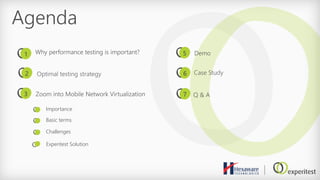
Agenda
Optimal testing strategy
1
2
3
5
6
Zoom into Mobile Network Virtualization
Why performance testing is important?
Experitest Solution
7
Case Study
Demo
Importance
Basic terms
Challenges
Q & A
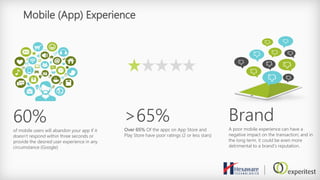
Mobile (App) Experience
60%
of mobile users will abandon your app if it
doesn’t respond within three seconds or
provide the desired user experience in any
circumstance (Google)
>65%
Over 65% Of the apps on App Store and
Play Store have poor ratings (2 or less stars)
Brand
A poor mobile experience can have a
negative impact on the transaction; and in
the long term, it could be even more
detrimental to a brand’s reputation.
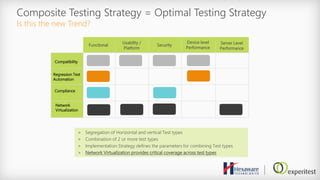
Composite Testing Strategy = Optimal Testing Strategy
Is this the new Trend?
Compatibility
Regression Test
Automation
Network
Virtualization
Functional Security
Device level
Performance
Usability /
Platform
Server Level
Performance
Compliance
> Segregation of Horizontal and vertical Test types
> Combination of 2 or more test types
> Implementation Strategy defines the parameters for combining Test types
> Network Virtualization provides critical coverage across test types
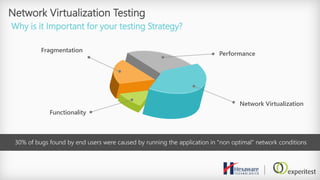
Network Virtualization Testing
Why is it Important for your testing Strategy?
30% of bugs found by end users were caused by running the application in "non optimal" network conditions
Functionality
Fragmentation
Performance
Network Virtualization
Drilling Down Into Network Virtualization
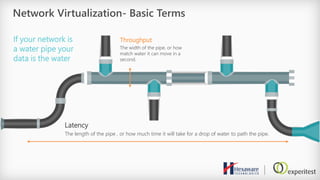
Network Virtualization- Basic Terms
If your network is
a water pipe your
data is the water
Throughput
The width of the pipe, or how
match water it can move in a
second.
Latency
The length of the pipe , or how much time it will take for a drop of water to path the pipe.
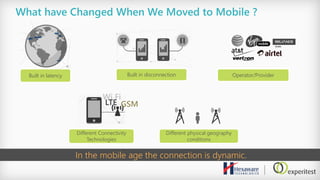
What have Changed When We Moved to Mobile ?
Built in disconnection
Different Connectivity
Technologies
Different physical geography
conditions
Built in latency Operator/Provider
In the mobile age the connection is dynamic.
Wi Fi
GSMLTE
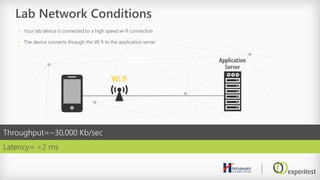
Lab Network Conditions
Latency= <2 ms
Throughput=~30,000 Kb/sec
• Your lab device is connected to a high speed wi-fi connection
• The device connects through the Wi fi to the application server
Wi fi
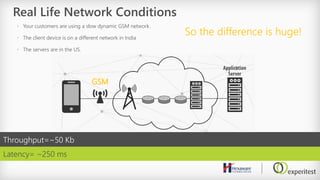
Real Life Network Conditions
So the difference is huge!
• Your customers are using a slow dynamic GSM network.
• The client device is on a different network in India
• The servers are in the US.
Throughput=~50 Kb
Latency= ~250 ms
GSM
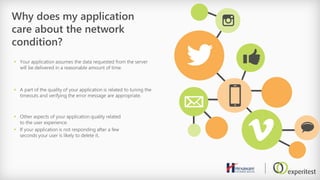
Why does my application
care about the network
condition?
 Your application assumes the data requested from the server
will be delivered in a reasonable amount of time.
 A part of the quality of your application is related to tuning the
timeouts and verifying the error message are appropriate.
 Other aspects of your application quality related
to the user experience.
 If your application is not responding after a few
seconds your user is likely to delete it.
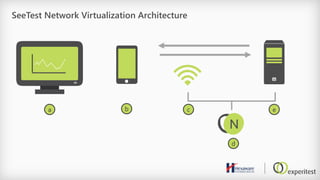
SeeTest Network Virtualization Architecture
N
a b c e
d
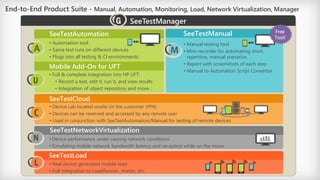
End-to-End Product Suite - Manual, Automation, Monitoring, Load, Network Virtualization, Manager
• Manual testing tool
• Mini-recorder for automating short,
repetitive, manual scenarios
• Report with screenshots of each step
• Manual to Automation Script Convertor
• Device Lab located onsite (in the customer VPN)
• Devices can be reserved and accessed by any remote user
• Used in conjunction with SeeTestAutomation/Manual for testing of remote devices
SeeTestManual
SeeTestCloud
• Automation tool
• Same test runs on different devices
• Plugs into all testing & CI environments:
SeeTestAutomation
SeeTestNetworkVirtualization
• Device performance under varying network conditions
• Simulating mobile network bandwidth latency and reception while on the move
SeeTestLoad
• Real device generated mobile load
• Full integration to LoadRunner, Jmeter, etc.
Mobile Add-On for UFT
• Full & complete integration into HP UFT:
• Record a test, edit it, run it, and view results
• Integration of object repository and more…
SeeTestManager
Free
Tool!
N
L
G
U
Demo
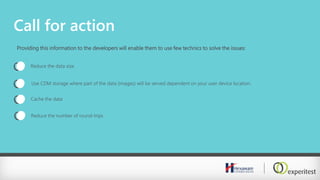
Call for action
Providing this information to the developers will enable them to use few technics to solve the issues:
Reduce the data size
Use CDM storage where part of the data (images) will be served dependent on your user device location.
Cache the data
Reduce the number of round-trips
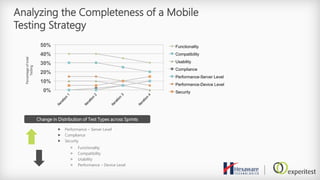
Analyzing the Completeness of a Mobile
Testing Strategy
0%
10%
20%
30%
40%
50%
Iteration
1
Iteration
2
Iteration
3
Iteration
4
Functionality
Compatibility
Usability
Compliance
Performance-Server Level
Performance-Device Level
Security
Change in Distribution of Test Types across Sprints
 Performance – Server Level
 Compliance
 Security
> Functionality
> Compatibility
> Usability
> Performance – Device Level
Percentageoftotal
Testing
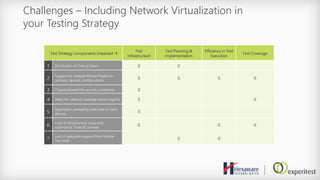
Challenges – Including Network Virtualization in
your Testing Strategy
Test Strategy Components Impacted 
Test
Infrastructure
Test Planning &
Implementation
Efficiency in Test
Execution
Test Coverage
1 Distribution of Testing teams X X
2
Support for multiple Mobile Platforms –
versions, devices, configurations X X X X
3 Organizational Info-security constraints X
4 Need for network coverage across regions X X
5
Application availability restricted to client
devices X
6
Cost of infrastructure setup and
sustenance; Tools & Licenses X X X
7
Lack of adequate support from Mobile
Test tools X X
Case Study
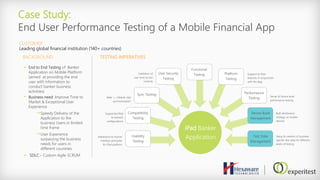
Case Study:
End User Performance Testing of a Mobile Financial App
CUSTOMER
Leading global financial institution (140+ countries)
 End to End Testing of Banker
Application on Mobile Platform
(aimed at providing the end
user with information to
conduct banker business
activities)
• Business need: Improve Time to
Market & Exceptional User
Experience
Speedy Delivery of the
Application to the
business Users in limited
time frame
User Experience
surpassing the business
needs for users in
different countries
 SDLC – Custom Agile SCRUM
BACKGROUND TESTING IMPERATIVES
iPad Banker
ApplicationUsability
Testing
Compatibility
Testing
Sync Testing
User Security
Testing
Platform
Testing
Functional
Testing
Performance
Testing
Device Build
Management
Test Data
Management
Adherence to human
interface principles
for iPad platform
Supported iPad
& network
configurations
Web <_>Mobile cliet
synchronization
Validation of
user level access
controls
Support of iPad
features in conjunction
with the App
Server & Device level
performance testing
Built distribution
strategy on mobile
devices
Setup & creation of business
specific test data for different
levels of testing
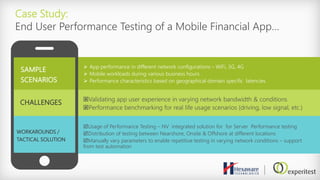
Case Study:
End User Performance Testing of a Mobile Financial App…
SAMPLE
SCENARIOS
 App performance in different network configurations – WiFi, 3G, 4G
 Mobile workloads during various business hours
 Performance characteristics based on geographical domain specific latencies
CHALLENGES Validating app user experience in varying network bandwidth & conditions
Performance benchmarking for real life usage scenarios (driving, low signal, etc.)
WORKAROUNDS /
TACTICAL SOLUTION
Usage of Performance Testing – NV integrated solution for for Server Performance testing
Distribution of testing between Nearshore, Onsite & Offshore at different locations
Manually vary parameters to enable repetitive testing in varying network conditions – support
from test automation
Thank you 

Experitest & Hexaware Co-Webinar

  • 1.
    April 2015 Hexaware &Experitest Co-webinar: Performance Testing- Is Your Mobile Application Ready for Scale?
  • 2.
    Speakers Guy Arieli CTO Experitest Vinayak Gaur Headof Mobile Application Testing Hexaware
  • 3.
    Agenda Optimal testing strategy 1 2 3 5 6 Zoominto Mobile Network Virtualization Why performance testing is important? Experitest Solution 7 Case Study Demo Importance Basic terms Challenges Q & A
  • 4.
    Mobile (App) Experience 60% ofmobile users will abandon your app if it doesn’t respond within three seconds or provide the desired user experience in any circumstance (Google) >65% Over 65% Of the apps on App Store and Play Store have poor ratings (2 or less stars) Brand A poor mobile experience can have a negative impact on the transaction; and in the long term, it could be even more detrimental to a brand’s reputation.
  • 5.
    Composite Testing Strategy= Optimal Testing Strategy Is this the new Trend? Compatibility Regression Test Automation Network Virtualization Functional Security Device level Performance Usability / Platform Server Level Performance Compliance > Segregation of Horizontal and vertical Test types > Combination of 2 or more test types > Implementation Strategy defines the parameters for combining Test types > Network Virtualization provides critical coverage across test types
  • 6.
    Network Virtualization Testing Whyis it Important for your testing Strategy? 30% of bugs found by end users were caused by running the application in "non optimal" network conditions Functionality Fragmentation Performance Network Virtualization
  • 7.
    Drilling Down IntoNetwork Virtualization
  • 8.
    Network Virtualization- BasicTerms If your network is a water pipe your data is the water Throughput The width of the pipe, or how match water it can move in a second. Latency The length of the pipe , or how much time it will take for a drop of water to path the pipe.
  • 9.
    What have ChangedWhen We Moved to Mobile ? Built in disconnection Different Connectivity Technologies Different physical geography conditions Built in latency Operator/Provider In the mobile age the connection is dynamic. Wi Fi GSMLTE
  • 10.
    Lab Network Conditions Latency=<2 ms Throughput=~30,000 Kb/sec • Your lab device is connected to a high speed wi-fi connection • The device connects through the Wi fi to the application server Wi fi
  • 11.
    Real Life NetworkConditions So the difference is huge! • Your customers are using a slow dynamic GSM network. • The client device is on a different network in India • The servers are in the US. Throughput=~50 Kb Latency= ~250 ms GSM
  • 12.
    Why does myapplication care about the network condition?  Your application assumes the data requested from the server will be delivered in a reasonable amount of time.  A part of the quality of your application is related to tuning the timeouts and verifying the error message are appropriate.  Other aspects of your application quality related to the user experience.  If your application is not responding after a few seconds your user is likely to delete it.
  • 13.
    SeeTest Network VirtualizationArchitecture N a b c e d
  • 14.
    End-to-End Product Suite- Manual, Automation, Monitoring, Load, Network Virtualization, Manager • Manual testing tool • Mini-recorder for automating short, repetitive, manual scenarios • Report with screenshots of each step • Manual to Automation Script Convertor • Device Lab located onsite (in the customer VPN) • Devices can be reserved and accessed by any remote user • Used in conjunction with SeeTestAutomation/Manual for testing of remote devices SeeTestManual SeeTestCloud • Automation tool • Same test runs on different devices • Plugs into all testing & CI environments: SeeTestAutomation SeeTestNetworkVirtualization • Device performance under varying network conditions • Simulating mobile network bandwidth latency and reception while on the move SeeTestLoad • Real device generated mobile load • Full integration to LoadRunner, Jmeter, etc. Mobile Add-On for UFT • Full & complete integration into HP UFT: • Record a test, edit it, run it, and view results • Integration of object repository and more… SeeTestManager Free Tool! N L G U
  • 15.
  • 16.
    Call for action Providingthis information to the developers will enable them to use few technics to solve the issues: Reduce the data size Use CDM storage where part of the data (images) will be served dependent on your user device location. Cache the data Reduce the number of round-trips
  • 17.
    Analyzing the Completenessof a Mobile Testing Strategy 0% 10% 20% 30% 40% 50% Iteration 1 Iteration 2 Iteration 3 Iteration 4 Functionality Compatibility Usability Compliance Performance-Server Level Performance-Device Level Security Change in Distribution of Test Types across Sprints  Performance – Server Level  Compliance  Security > Functionality > Compatibility > Usability > Performance – Device Level Percentageoftotal Testing
  • 18.
    Challenges – IncludingNetwork Virtualization in your Testing Strategy Test Strategy Components Impacted  Test Infrastructure Test Planning & Implementation Efficiency in Test Execution Test Coverage 1 Distribution of Testing teams X X 2 Support for multiple Mobile Platforms – versions, devices, configurations X X X X 3 Organizational Info-security constraints X 4 Need for network coverage across regions X X 5 Application availability restricted to client devices X 6 Cost of infrastructure setup and sustenance; Tools & Licenses X X X 7 Lack of adequate support from Mobile Test tools X X
  • 19.
  • 20.
    Case Study: End UserPerformance Testing of a Mobile Financial App CUSTOMER Leading global financial institution (140+ countries)  End to End Testing of Banker Application on Mobile Platform (aimed at providing the end user with information to conduct banker business activities) • Business need: Improve Time to Market & Exceptional User Experience Speedy Delivery of the Application to the business Users in limited time frame User Experience surpassing the business needs for users in different countries  SDLC – Custom Agile SCRUM BACKGROUND TESTING IMPERATIVES iPad Banker ApplicationUsability Testing Compatibility Testing Sync Testing User Security Testing Platform Testing Functional Testing Performance Testing Device Build Management Test Data Management Adherence to human interface principles for iPad platform Supported iPad & network configurations Web <_>Mobile cliet synchronization Validation of user level access controls Support of iPad features in conjunction with the App Server & Device level performance testing Built distribution strategy on mobile devices Setup & creation of business specific test data for different levels of testing
  • 21.
    Case Study: End UserPerformance Testing of a Mobile Financial App… SAMPLE SCENARIOS  App performance in different network configurations – WiFi, 3G, 4G  Mobile workloads during various business hours  Performance characteristics based on geographical domain specific latencies CHALLENGES Validating app user experience in varying network bandwidth & conditions Performance benchmarking for real life usage scenarios (driving, low signal, etc.) WORKAROUNDS / TACTICAL SOLUTION Usage of Performance Testing – NV integrated solution for for Server Performance testing Distribution of testing between Nearshore, Onsite & Offshore at different locations Manually vary parameters to enable repetitive testing in varying network conditions – support from test automation
  • 22.