Poznan Flutter Developer Group
Bartosz Kosarzycki
Animations in Flutter
1@bkosarzycki
Poznan Flutter Developer Group
Agenda
- Animation types
- Tween animations, physics-based animation
- Animated Container widget
- Animated CrossFade widget
- Hero animation
- Flare overview
- FlareActor, NimaActor
- Expressive animations
2
For animated version of this presentation
click HERE
Poznan Flutter Developer Group
Animation types
- Tween animations
animate value over time
- Physics-based animations
animate in response to user input/movement, animation which include real-world physics
- Animating widgets
help to simplify animations - single responsibility
3
Animations in Flutter ARE INDEPENDENT from widgets
they animate
Poznan Flutter Developer Group
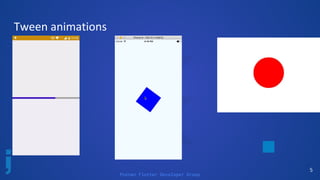
Tween animations
- Short: in-between animations
- start value, end value
- curve [ function: transition over time ]
4
Tween<double>(
begin: 0.0,
end: 5.0,
)
Tween<Position>(
begin: Position(5.0, 10.0),
end: Position(10.0, 15.0),
)
Poznan Flutter Developer Group
Tween animations
5
Poznan Flutter Developer Group
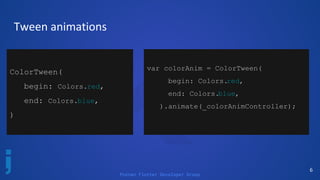
Tween animations
6
ColorTween(
begin: Colors.red,
end: Colors.blue,
)
var colorAnim = ColorTween(
begin: Colors.red,
end: Colors.blue,
).animate(_colorAnimController);
Poznan Flutter Developer Group
7
Poznan Flutter Developer Group
Tween animations - implementation
8
@override
void initState() {
super.initState();
_simpleAnimController = AnimationController(
vsync: this,
duration: Duration(milliseconds:1000))
..addListener(() => setState(() {})
);
_simpleAnim = Tween<double>(
begin: 50,
end: 300,
).animate(_simpleAnimController);
_simpleAnimController.forward();
}
Center(
child: Padding(
padding: EdgeInsets.only(top: _simpleAnim.value),
child: Container(
width: 100,
height: 100,
child: FlutterLogo(),
),
),
class _TweenAnimationPageState extends State<TweenAnimationPage>
with TickerProviderStateMixin {
AnimationController _simpleAnimController;
Animation<double> _simpleAnim;
[...]
Poznan Flutter Developer Group
Tween animations - implementation
9
Poznan Flutter Developer Group
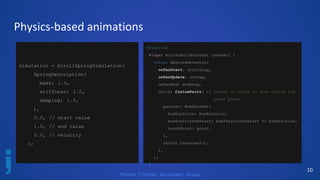
Physics-based animations
10
simulation = ScrollSpringSimulation(
SpringDescription(
mass: 1.0,
stiffness: 1.0,
damping: 1.0,
),
0.0, // start value
1.0, // end value
0.0, // velocity
);
@override
Widget build(BuildContext context) {
return GestureDetector(
onPanStart: startDrag,
onPanUpdate: onDrag,
onPanEnd: endDrag,
child: CustomPaint( // canvas on which to draw during the
paint phase
painter: BoxPainter(
boxPosition: boxPosition,
boxPositionOnStart: boxPositionOnStart ?? boxPosition,
touchPoint: point,
),
child: Container(),
),
);
}
Poznan Flutter Developer Group
Physics-based animations
11
void onDrag(DragUpdateDetails details) {
setState(() {
point = (context.findRenderObject() as RenderBox)
.globalToLocal(details.globalPosition);
final dragVec = start.dy - point.dy;
final normDragVec = (dragVec / context.size.height).clamp(- 1.0, 1.0);
boxPosition = (boxPositionOnStart + normDragVec).clamp( 0.0, 1.0);
});
}
Poznan Flutter Developer Group
Physics-based animations
- RenderBox, RenderObject
- onPanStart(), onPanUpdate(), onPanEnd()
which correspond to startDrag(), onDrag(),
endDrag() [GestureDetector]
- context.findRenderObject() as RenderBox
- DragUpdateDetails, DragStartDetails etc.
-
12
Poznan Flutter Developer Group
Physics library
13
/// Simple one-dimensional physics simulations, such as springs, friction, and
/// gravity, for use in user interface animations.
///
/// To use, import `package:flutter/physics.dart`.
library physics;
export 'src/physics/clamped_simulation.dart' ;
export 'src/physics/friction_simulation.dart' ;
export 'src/physics/gravity_simulation.dart' ;
export 'src/physics/simulation.dart' ;
export 'src/physics/spring_simulation.dart' ;
export 'src/physics/tolerance.dart' ;
export 'src/physics/utils.dart' ;
Poznan Flutter Developer Group
14
No animation object
Poznan Flutter Developer Group
15
Out of the box animations
Stack(children: <Widget>[
new Center(
child: new Container(
decoration: new BoxDecoration(
color: Colors.purple,
),
child: new FlutterLogo(
size: _boxSize,
)),
)
]
var _boxSize = 200.0;
void _startAnimation() {
setState(() {
_boxSize *= 1.3;
});
}
void _resetAnimState() {
setState(() {
_boxSize = 200;
});
}
Poznan Flutter Developer Group
16
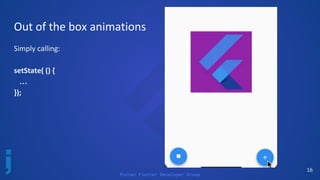
Out of the box animations
Simply calling:
setState( () {
…
});
Poznan Flutter Developer Group
Handy animation widgets
17
Poznan Flutter Developer Group
18
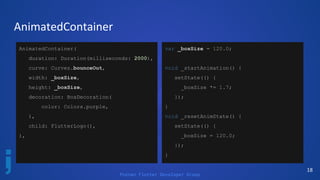
AnimatedContainer
AnimatedContainer(
duration: Duration(milliseconds: 2000),
curve: Curves.bounceOut,
width: _boxSize,
height: _boxSize,
decoration: BoxDecoration(
color: Colors.purple,
),
child: FlutterLogo(),
),
var _boxSize = 120.0;
void _startAnimation() {
setState(() {
_boxSize *= 1.7;
});
}
void _resetAnimState() {
setState(() {
_boxSize = 120.0;
});
}
Poznan Flutter Developer Group
19
AnimatedContainer
Main properties
of AnimatedContainer
widget:
- curve
[ function over time /
how the animation behaves]
- duration
[animation duration]
Poznan Flutter Developer Group
20
AnimatedContainer
Properties [of AnimatedContainer] that are null
are not animated. Its child and descendants are
not animated.
Poznan Flutter Developer Group
21
AnimatedContainer
We can also animate more properties automatically, like:
● aligment
● padding
● color
● foregroundDecoration
● constraints [BoxConstraints]
● margin
● transform [Matrix4]; transformation matrix to apply before painting the container
Poznan Flutter Developer Group
22
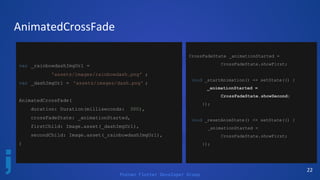
AnimatedCrossFade
var _rainbowdashImgUrl =
'assets/images/rainbowdash.png' ;
var _dashImgUrl = 'assets/images/dash.png' ;
AnimatedCrossFade(
duration: Duration(milliseconds: 300),
crossFadeState: _animationStarted,
firstChild: Image.asset(_dashImgUrl),
secondChild: Image.asset(_rainbowdashImgUrl),
)
CrossFadeState _animationStarted =
CrossFadeState.showFirst;
void _startAnimation() => setState(() {
_animationStarted =
CrossFadeState.showSecond;
});
void _resetAnimState() => setState(() {
_animationStarted =
CrossFadeState.showFirst;
});
Poznan Flutter Developer Group
23
AnimatedCrossFade
Main properties:
duration - animation length
crossFadeState - triggers the animation
[ enum showFirst, showSecond; ]
Poznan Flutter Developer Group
24
Hero animation
var _dashImgUrl = 'assets/images/dash_s.png';
ListView.builder(
[...]
itemBuilder: (context, position) {
[...]
Hero(
tag: "hero_anim_example_tag" + position.toString(),
child: Container(
width: 70,
child: Image.asset(_dashImgUrl),
),
),
)
Hero(
tag: "hero_anim_example_tag" +
widget.position,
child: Container(
width: double.infinity,
child: Image.asset(_dashImgUrl),
),
),
Poznan Flutter Developer Group
25
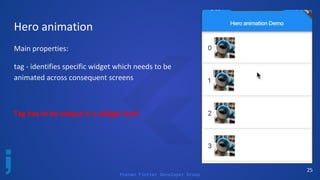
Hero animation
Main properties:
tag - identifies specific widget which needs to be
animated across consequent screens
Tag has to be unique in a widget tree!
Poznan Flutter Developer Group
26
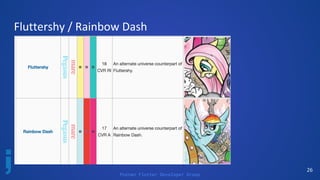
Fluttershy / Rainbow Dash
Poznan Flutter Developer Group
27
Flare overview
- Flare is built by 2dimenions.com
- Free for open-source designs
Poznan Flutter Developer Group
28
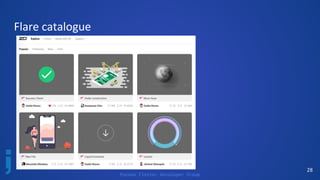
Flare catalogue
Poznan Flutter Developer Group
29
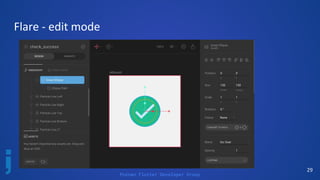
Flare - edit mode
Poznan Flutter Developer Group
30
Flare - edit mode
- easily import *.svg files
- edit layers, objects, paths
- define animations & states
- infinite loop animations
- basic concepts:
- stage
- nodes
- bones
- animations (design & animate mode)
Poznan Flutter Developer Group
31
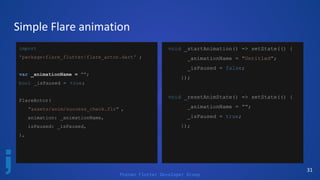
Simple Flare animation
import
'package:flare_flutter/flare_actor.dart' ;
var _animationName = "";
bool _isPaused = true;
FlareActor(
"assets/anim/success_check.flr" ,
animation: _animationName,
isPaused: _isPaused,
),
void _startAnimation() => setState(() {
_animationName = "Untitled";
_isPaused = false;
});
void _resetAnimState() => setState(() {
_animationName = "";
_isPaused = true;
});
Poznan Flutter Developer Group
32
FlareActor
Main properties:
filename - *.flr file location [String]
[e.g. ‘assets/anim/example.flr’]
animation - initial animation [String][Optional]
defined inside Flare
isPaused - animation state [Boolean]
Poznan Flutter Developer Group
33
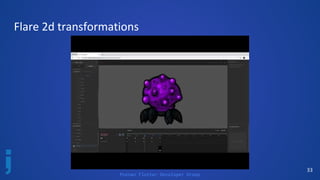
Flare 2d transformations
Poznan Flutter Developer Group
34
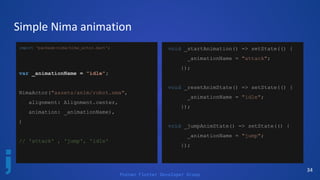
Simple Nima animation
import 'package:nima/nima_actor.dart';
var _animationName = "idle";
NimaActor("assets/anim/robot.nma",
alignment: Alignment.center,
animation: _animationName),
)
// 'attack' , 'jump', 'idle'
void _startAnimation() => setState(() {
_animationName = "attack";
});
void _resetAnimState() => setState(() {
_animationName = "idle";
});
void _jumpAnimState() => setState(() {
_animationName = "jump";
});
Poznan Flutter Developer Group
35
NimaActor
Main properties:
filename - *.nma file location [String]
[e.g. ‘assets/anim/example.nma’]
animation - initial animation [String][Optional]
defined inside Nima
Poznan Flutter Developer Group
36
Expressive animations - login experience
Poznan Flutter Developer Group
37
Expressive animations
Poznan Flutter Developer Group
38
Source code
https://github.com/kosiara/flutter-simple-animations
Poznan Flutter Developer Group
References
https://medium.com/flutterpub/widgetoftheweek-animatedcont
ainer-widget-3ebae930ebba
https://docs.2dimensions.com/support/tutorials
https://medium.com/2dimensions/building-an-interactive-login
-screen-with-flare-flutter-749db628bb51
https://docs.2dimensions.com/support/flare/core-concepts
https://medium.com/flutter-io/perspective-on-flutter-6f832f4d9
12e
https://medium.com/flutter-community/make-3d-flip-animation
-in-flutter-16c006bb3798
https://proandroiddev.com/animations-in-flutter-6e02ee91a0b
2
39
https://flutter.dev/docs/development/ui/animations
https://www.youtube.com/watch?v=LHZ0KSvTTqQ
https://proandroiddev.com/getting-your-hands-dirty-with-flutter
-basic-animations-6b9f21fa7d17
Poznan Flutter Developer Group
Summary
Bartosz Kosarzycki
Rafał Ślósarz
Poznań Flutter Developer Group
facebook.com/poznanflutter
40@bkosarzycki

Animations in Flutter

  • 1.
    Poznan Flutter DeveloperGroup Bartosz Kosarzycki Animations in Flutter 1@bkosarzycki
  • 2.
    Poznan Flutter DeveloperGroup Agenda - Animation types - Tween animations, physics-based animation - Animated Container widget - Animated CrossFade widget - Hero animation - Flare overview - FlareActor, NimaActor - Expressive animations 2 For animated version of this presentation click HERE
  • 3.
    Poznan Flutter DeveloperGroup Animation types - Tween animations animate value over time - Physics-based animations animate in response to user input/movement, animation which include real-world physics - Animating widgets help to simplify animations - single responsibility 3 Animations in Flutter ARE INDEPENDENT from widgets they animate
  • 4.
    Poznan Flutter DeveloperGroup Tween animations - Short: in-between animations - start value, end value - curve [ function: transition over time ] 4 Tween<double>( begin: 0.0, end: 5.0, ) Tween<Position>( begin: Position(5.0, 10.0), end: Position(10.0, 15.0), )
  • 5.
    Poznan Flutter DeveloperGroup Tween animations 5
  • 6.
    Poznan Flutter DeveloperGroup Tween animations 6 ColorTween( begin: Colors.red, end: Colors.blue, ) var colorAnim = ColorTween( begin: Colors.red, end: Colors.blue, ).animate(_colorAnimController);
  • 7.
  • 8.
    Poznan Flutter DeveloperGroup Tween animations - implementation 8 @override void initState() { super.initState(); _simpleAnimController = AnimationController( vsync: this, duration: Duration(milliseconds:1000)) ..addListener(() => setState(() {}) ); _simpleAnim = Tween<double>( begin: 50, end: 300, ).animate(_simpleAnimController); _simpleAnimController.forward(); } Center( child: Padding( padding: EdgeInsets.only(top: _simpleAnim.value), child: Container( width: 100, height: 100, child: FlutterLogo(), ), ), class _TweenAnimationPageState extends State<TweenAnimationPage> with TickerProviderStateMixin { AnimationController _simpleAnimController; Animation<double> _simpleAnim; [...]
  • 9.
    Poznan Flutter DeveloperGroup Tween animations - implementation 9
  • 10.
    Poznan Flutter DeveloperGroup Physics-based animations 10 simulation = ScrollSpringSimulation( SpringDescription( mass: 1.0, stiffness: 1.0, damping: 1.0, ), 0.0, // start value 1.0, // end value 0.0, // velocity ); @override Widget build(BuildContext context) { return GestureDetector( onPanStart: startDrag, onPanUpdate: onDrag, onPanEnd: endDrag, child: CustomPaint( // canvas on which to draw during the paint phase painter: BoxPainter( boxPosition: boxPosition, boxPositionOnStart: boxPositionOnStart ?? boxPosition, touchPoint: point, ), child: Container(), ), ); }
  • 11.
    Poznan Flutter DeveloperGroup Physics-based animations 11 void onDrag(DragUpdateDetails details) { setState(() { point = (context.findRenderObject() as RenderBox) .globalToLocal(details.globalPosition); final dragVec = start.dy - point.dy; final normDragVec = (dragVec / context.size.height).clamp(- 1.0, 1.0); boxPosition = (boxPositionOnStart + normDragVec).clamp( 0.0, 1.0); }); }
  • 12.
    Poznan Flutter DeveloperGroup Physics-based animations - RenderBox, RenderObject - onPanStart(), onPanUpdate(), onPanEnd() which correspond to startDrag(), onDrag(), endDrag() [GestureDetector] - context.findRenderObject() as RenderBox - DragUpdateDetails, DragStartDetails etc. - 12
  • 13.
    Poznan Flutter DeveloperGroup Physics library 13 /// Simple one-dimensional physics simulations, such as springs, friction, and /// gravity, for use in user interface animations. /// /// To use, import `package:flutter/physics.dart`. library physics; export 'src/physics/clamped_simulation.dart' ; export 'src/physics/friction_simulation.dart' ; export 'src/physics/gravity_simulation.dart' ; export 'src/physics/simulation.dart' ; export 'src/physics/spring_simulation.dart' ; export 'src/physics/tolerance.dart' ; export 'src/physics/utils.dart' ;
  • 14.
    Poznan Flutter DeveloperGroup 14 No animation object
  • 15.
    Poznan Flutter DeveloperGroup 15 Out of the box animations Stack(children: <Widget>[ new Center( child: new Container( decoration: new BoxDecoration( color: Colors.purple, ), child: new FlutterLogo( size: _boxSize, )), ) ] var _boxSize = 200.0; void _startAnimation() { setState(() { _boxSize *= 1.3; }); } void _resetAnimState() { setState(() { _boxSize = 200; }); }
  • 16.
    Poznan Flutter DeveloperGroup 16 Out of the box animations Simply calling: setState( () { … });
  • 17.
    Poznan Flutter DeveloperGroup Handy animation widgets 17
  • 18.
    Poznan Flutter DeveloperGroup 18 AnimatedContainer AnimatedContainer( duration: Duration(milliseconds: 2000), curve: Curves.bounceOut, width: _boxSize, height: _boxSize, decoration: BoxDecoration( color: Colors.purple, ), child: FlutterLogo(), ), var _boxSize = 120.0; void _startAnimation() { setState(() { _boxSize *= 1.7; }); } void _resetAnimState() { setState(() { _boxSize = 120.0; }); }
  • 19.
    Poznan Flutter DeveloperGroup 19 AnimatedContainer Main properties of AnimatedContainer widget: - curve [ function over time / how the animation behaves] - duration [animation duration]
  • 20.
    Poznan Flutter DeveloperGroup 20 AnimatedContainer Properties [of AnimatedContainer] that are null are not animated. Its child and descendants are not animated.
  • 21.
    Poznan Flutter DeveloperGroup 21 AnimatedContainer We can also animate more properties automatically, like: ● aligment ● padding ● color ● foregroundDecoration ● constraints [BoxConstraints] ● margin ● transform [Matrix4]; transformation matrix to apply before painting the container
  • 22.
    Poznan Flutter DeveloperGroup 22 AnimatedCrossFade var _rainbowdashImgUrl = 'assets/images/rainbowdash.png' ; var _dashImgUrl = 'assets/images/dash.png' ; AnimatedCrossFade( duration: Duration(milliseconds: 300), crossFadeState: _animationStarted, firstChild: Image.asset(_dashImgUrl), secondChild: Image.asset(_rainbowdashImgUrl), ) CrossFadeState _animationStarted = CrossFadeState.showFirst; void _startAnimation() => setState(() { _animationStarted = CrossFadeState.showSecond; }); void _resetAnimState() => setState(() { _animationStarted = CrossFadeState.showFirst; });
  • 23.
    Poznan Flutter DeveloperGroup 23 AnimatedCrossFade Main properties: duration - animation length crossFadeState - triggers the animation [ enum showFirst, showSecond; ]
  • 24.
    Poznan Flutter DeveloperGroup 24 Hero animation var _dashImgUrl = 'assets/images/dash_s.png'; ListView.builder( [...] itemBuilder: (context, position) { [...] Hero( tag: "hero_anim_example_tag" + position.toString(), child: Container( width: 70, child: Image.asset(_dashImgUrl), ), ), ) Hero( tag: "hero_anim_example_tag" + widget.position, child: Container( width: double.infinity, child: Image.asset(_dashImgUrl), ), ),
  • 25.
    Poznan Flutter DeveloperGroup 25 Hero animation Main properties: tag - identifies specific widget which needs to be animated across consequent screens Tag has to be unique in a widget tree!
  • 26.
    Poznan Flutter DeveloperGroup 26 Fluttershy / Rainbow Dash
  • 27.
    Poznan Flutter DeveloperGroup 27 Flare overview - Flare is built by 2dimenions.com - Free for open-source designs
  • 28.
    Poznan Flutter DeveloperGroup 28 Flare catalogue
  • 29.
    Poznan Flutter DeveloperGroup 29 Flare - edit mode
  • 30.
    Poznan Flutter DeveloperGroup 30 Flare - edit mode - easily import *.svg files - edit layers, objects, paths - define animations & states - infinite loop animations - basic concepts: - stage - nodes - bones - animations (design & animate mode)
  • 31.
    Poznan Flutter DeveloperGroup 31 Simple Flare animation import 'package:flare_flutter/flare_actor.dart' ; var _animationName = ""; bool _isPaused = true; FlareActor( "assets/anim/success_check.flr" , animation: _animationName, isPaused: _isPaused, ), void _startAnimation() => setState(() { _animationName = "Untitled"; _isPaused = false; }); void _resetAnimState() => setState(() { _animationName = ""; _isPaused = true; });
  • 32.
    Poznan Flutter DeveloperGroup 32 FlareActor Main properties: filename - *.flr file location [String] [e.g. ‘assets/anim/example.flr’] animation - initial animation [String][Optional] defined inside Flare isPaused - animation state [Boolean]
  • 33.
    Poznan Flutter DeveloperGroup 33 Flare 2d transformations
  • 34.
    Poznan Flutter DeveloperGroup 34 Simple Nima animation import 'package:nima/nima_actor.dart'; var _animationName = "idle"; NimaActor("assets/anim/robot.nma", alignment: Alignment.center, animation: _animationName), ) // 'attack' , 'jump', 'idle' void _startAnimation() => setState(() { _animationName = "attack"; }); void _resetAnimState() => setState(() { _animationName = "idle"; }); void _jumpAnimState() => setState(() { _animationName = "jump"; });
  • 35.
    Poznan Flutter DeveloperGroup 35 NimaActor Main properties: filename - *.nma file location [String] [e.g. ‘assets/anim/example.nma’] animation - initial animation [String][Optional] defined inside Nima
  • 36.
    Poznan Flutter DeveloperGroup 36 Expressive animations - login experience
  • 37.
    Poznan Flutter DeveloperGroup 37 Expressive animations
  • 38.
    Poznan Flutter DeveloperGroup 38 Source code https://github.com/kosiara/flutter-simple-animations
  • 39.
    Poznan Flutter DeveloperGroup References https://medium.com/flutterpub/widgetoftheweek-animatedcont ainer-widget-3ebae930ebba https://docs.2dimensions.com/support/tutorials https://medium.com/2dimensions/building-an-interactive-login -screen-with-flare-flutter-749db628bb51 https://docs.2dimensions.com/support/flare/core-concepts https://medium.com/flutter-io/perspective-on-flutter-6f832f4d9 12e https://medium.com/flutter-community/make-3d-flip-animation -in-flutter-16c006bb3798 https://proandroiddev.com/animations-in-flutter-6e02ee91a0b 2 39 https://flutter.dev/docs/development/ui/animations https://www.youtube.com/watch?v=LHZ0KSvTTqQ https://proandroiddev.com/getting-your-hands-dirty-with-flutter -basic-animations-6b9f21fa7d17
  • 40.
    Poznan Flutter DeveloperGroup Summary Bartosz Kosarzycki Rafał Ślósarz Poznań Flutter Developer Group facebook.com/poznanflutter 40@bkosarzycki