Mobile Homepage Design Slam
 PRESENTED BY: LACEY KRUGER, LEAD INFORMATION ARCHITECT
               MICHAEL CHANG, CREATIVE DIRECTOR


             #bbinteractive
10/15/2012   Mobile Homepage Design Slam   1
MOBILE STRATEGY BASICS


10/15/2012   Mobile Homepage Design Slam   2
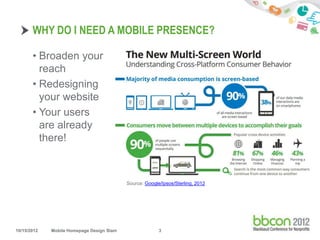
WHY DO I NEED A MOBILE PRESENCE?

       • Broaden your
         reach
       • Redesigning
         your website
       • Your users
         are already
         there!


                                           Source: Google/Ipsos/Sterling, 2012


10/15/2012   Mobile Homepage Design Slam                 3
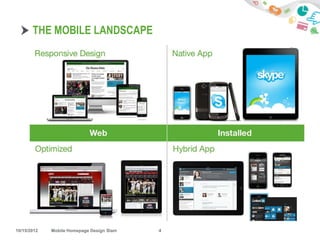
THE MOBILE LANDSCAPE


10/15/2012   Mobile Homepage Design Slam   4
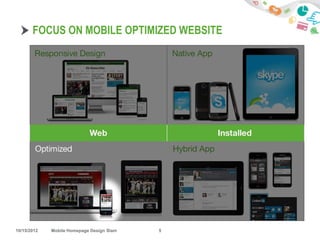
FOCUS ON MOBILE OPTIMIZED WEBSITE


10/15/2012   Mobile Homepage Design Slam   5
MOBILE OPTIMIZED WEBSITES

       • Can leverage your existing web presence
       • Can be designed/built relatively quickly
       • Can be the first step towards a Responsive Design


               MOBILE FIRST

10/15/2012   Mobile Homepage Design Slam   6
DESIGN PROCESS

       1.    Define one key message
       2.    Identify desired actions
       3.    Allocate real estate
       4.    Create design


10/15/2012   Mobile Homepage Design Slam   7
DEFINE ONE KEY MESSAGE

       • This is not your mission statement
       • Must be succinct, understandable and repeatable


       "At [org name] we [verb phrase] so that [constituent
       group] can [verb phrase].”


10/15/2012   Mobile Homepage Design Slam   8
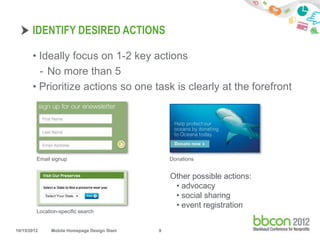
IDENTIFY DESIRED ACTIONS

       • Ideally focus on 1-2 key actions
         - No more than 5
       • Prioritize actions so one task is clearly at the forefront


         Email signup                            Donations


                                                 Other possible actions:
                                                  • advocacy
                                                  • social sharing
                                                  • event registration
         Location-specific search


10/15/2012     Mobile Homepage Design Slam   9
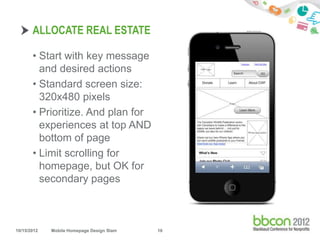
ALLOCATE REAL ESTATE

       • Start with key message
         and desired actions
       • Standard screen size:
         320x480 pixels
       • Prioritize. And plan for
         experiences at top AND
         bottom of page
       • Limit scrolling for
         homepage, but OK for
         secondary pages


10/15/2012   Mobile Homepage Design Slam   10
CREATE DESIGN

       • SIMPLY SIMPLY SIMPLIFY SIMPLIFY SIMPLIFY
       • Think touch (fingertip ~ 44x44 px)
       • Maintain consistent links, buttons, CTAs
       • Be consistent with the online and offline drivers
       • Design to decrease page load times, optimize graphics
         for fastest load
       • If designing in Photoshop, suggest use 144dpi
             • Give coders more pixels to work with
             • Prep for Retina displays

       • Rely on established design patterns* and interactions

       *Will introduce after examples.


10/15/2012   Mobile Homepage Design Slam      11
EXAMPLES


10/15/2012   Mobile Homepage Design Slam   12
UNICEF


10/15/2012   Mobile Homepage Design Slam   13
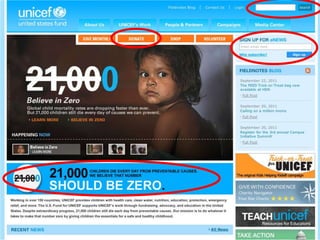
UNICEF


10/15/2012   Mobile Homepage Design Slam   14
UNICEF


10/15/2012   Mobile Homepage Design Slam   15
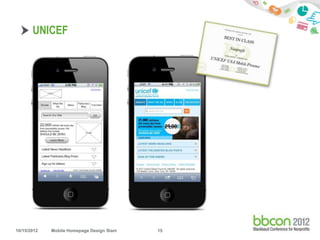
UNICEF


10/15/2012   Mobile Homepage Design Slam   16
UNICEF


10/15/2012   Mobile Homepage Design Slam   17
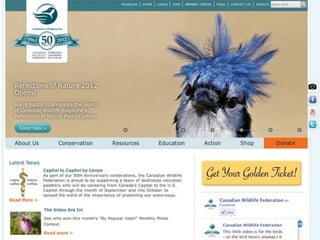
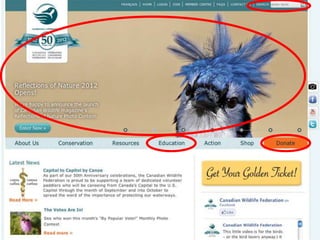
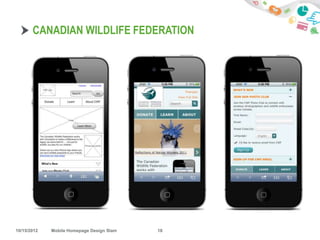
CANADIAN WILDLIFE FEDERATION


10/15/2012   Mobile Homepage Design Slam   18
UNICEF


10/15/2012   Mobile Homepage Design Slam   19
UNICEF


10/15/2012   Mobile Homepage Design Slam   20
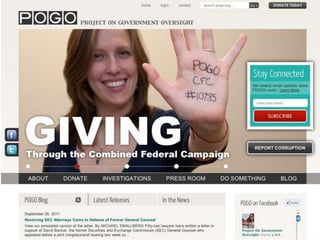
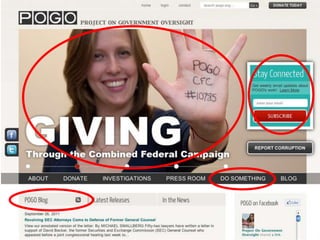
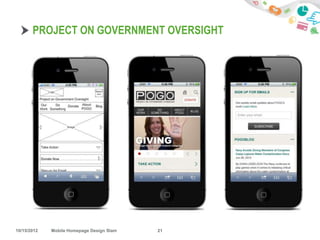
PROJECT ON GOVERNMENT OVERSIGHT


10/15/2012   Mobile Homepage Design Slam   21
UNICEF


10/15/2012   Mobile Homepage Design Slam   22
UNICEF


10/15/2012   Mobile Homepage Design Slam   23
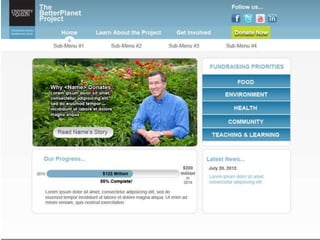
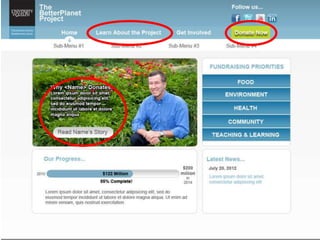
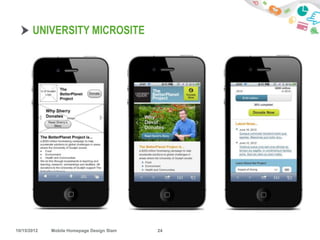
UNIVERSITY MICROSITE


10/15/2012   Mobile Homepage Design Slam   24
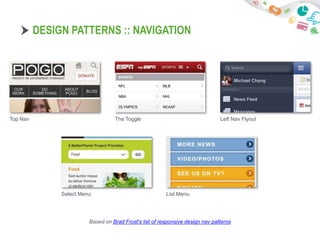
DESIGN PATTERNS :: NAVIGATION


Top Nav                                  The Toggle                                  Left Nav Flyout


                   Select Menu                                 List Menu


                              Based on Brad Frost's list of responsive design nav patterns
  10/15/2012   Mobile Homepage Design Slam                25
VOLUNTEERS FOR DESIGN SLAM

       PLEASE BE NICE AND RESPECTFUL…


10/15/2012   Mobile Homepage Design Slam   26
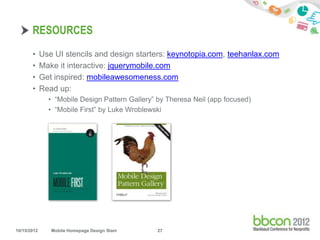
RESOURCES
       •     Use UI stencils and design starters: keynotopia.com, teehanlax.com
       •     Make it interactive: jquerymobile.com
       •     Get inspired: mobileawesomeness.com
       •     Read up:
               • “Mobile Design Pattern Gallery” by Theresa Neil (app focused)
               • “Mobile First” by Luke Wroblewski


10/15/2012      Mobile Homepage Design Slam     27

Mobile Homepage Design Slam

  • 1.
    Mobile Homepage DesignSlam PRESENTED BY: LACEY KRUGER, LEAD INFORMATION ARCHITECT MICHAEL CHANG, CREATIVE DIRECTOR #bbinteractive 10/15/2012 Mobile Homepage Design Slam 1
  • 2.
    MOBILE STRATEGY BASICS 10/15/2012 Mobile Homepage Design Slam 2
  • 3.
    WHY DO INEED A MOBILE PRESENCE? • Broaden your reach • Redesigning your website • Your users are already there! Source: Google/Ipsos/Sterling, 2012 10/15/2012 Mobile Homepage Design Slam 3
  • 4.
    THE MOBILE LANDSCAPE 10/15/2012 Mobile Homepage Design Slam 4
  • 5.
    FOCUS ON MOBILEOPTIMIZED WEBSITE 10/15/2012 Mobile Homepage Design Slam 5
  • 6.
    MOBILE OPTIMIZED WEBSITES • Can leverage your existing web presence • Can be designed/built relatively quickly • Can be the first step towards a Responsive Design MOBILE FIRST 10/15/2012 Mobile Homepage Design Slam 6
  • 7.
    DESIGN PROCESS 1. Define one key message 2. Identify desired actions 3. Allocate real estate 4. Create design 10/15/2012 Mobile Homepage Design Slam 7
  • 8.
    DEFINE ONE KEYMESSAGE • This is not your mission statement • Must be succinct, understandable and repeatable "At [org name] we [verb phrase] so that [constituent group] can [verb phrase].” 10/15/2012 Mobile Homepage Design Slam 8
  • 9.
    IDENTIFY DESIRED ACTIONS • Ideally focus on 1-2 key actions - No more than 5 • Prioritize actions so one task is clearly at the forefront Email signup Donations Other possible actions: • advocacy • social sharing • event registration Location-specific search 10/15/2012 Mobile Homepage Design Slam 9
  • 10.
    ALLOCATE REAL ESTATE • Start with key message and desired actions • Standard screen size: 320x480 pixels • Prioritize. And plan for experiences at top AND bottom of page • Limit scrolling for homepage, but OK for secondary pages 10/15/2012 Mobile Homepage Design Slam 10
  • 11.
    CREATE DESIGN • SIMPLY SIMPLY SIMPLIFY SIMPLIFY SIMPLIFY • Think touch (fingertip ~ 44x44 px) • Maintain consistent links, buttons, CTAs • Be consistent with the online and offline drivers • Design to decrease page load times, optimize graphics for fastest load • If designing in Photoshop, suggest use 144dpi • Give coders more pixels to work with • Prep for Retina displays • Rely on established design patterns* and interactions *Will introduce after examples. 10/15/2012 Mobile Homepage Design Slam 11
  • 12.
    EXAMPLES 10/15/2012 Mobile Homepage Design Slam 12
  • 13.
    UNICEF 10/15/2012 Mobile Homepage Design Slam 13
  • 14.
    UNICEF 10/15/2012 Mobile Homepage Design Slam 14
  • 15.
    UNICEF 10/15/2012 Mobile Homepage Design Slam 15
  • 16.
    UNICEF 10/15/2012 Mobile Homepage Design Slam 16
  • 17.
    UNICEF 10/15/2012 Mobile Homepage Design Slam 17
  • 18.
    CANADIAN WILDLIFE FEDERATION 10/15/2012 Mobile Homepage Design Slam 18
  • 19.
    UNICEF 10/15/2012 Mobile Homepage Design Slam 19
  • 20.
    UNICEF 10/15/2012 Mobile Homepage Design Slam 20
  • 21.
    PROJECT ON GOVERNMENTOVERSIGHT 10/15/2012 Mobile Homepage Design Slam 21
  • 22.
    UNICEF 10/15/2012 Mobile Homepage Design Slam 22
  • 23.
    UNICEF 10/15/2012 Mobile Homepage Design Slam 23
  • 24.
    UNIVERSITY MICROSITE 10/15/2012 Mobile Homepage Design Slam 24
  • 25.
    DESIGN PATTERNS ::NAVIGATION Top Nav The Toggle Left Nav Flyout Select Menu List Menu Based on Brad Frost's list of responsive design nav patterns 10/15/2012 Mobile Homepage Design Slam 25
  • 26.
    VOLUNTEERS FOR DESIGNSLAM PLEASE BE NICE AND RESPECTFUL… 10/15/2012 Mobile Homepage Design Slam 26
  • 27.
    RESOURCES • Use UI stencils and design starters: keynotopia.com, teehanlax.com • Make it interactive: jquerymobile.com • Get inspired: mobileawesomeness.com • Read up: • “Mobile Design Pattern Gallery” by Theresa Neil (app focused) • “Mobile First” by Luke Wroblewski 10/15/2012 Mobile Homepage Design Slam 27

Editor's Notes