Finding the Sweet Spot:
Ingredients for Stirring
up Elevated Online
Results
July 2014: Going Mobile
2
Housekeeping
• Please use Q&A for questions, we have folks standing by
to monitor and respond.
• You can find the recording of today’s session at
http://hello.blackbaud.com/sweetspot
3
Today’s Presenter
• Principal Information Architect
• 9 years with Blackbaud
• Specializes in User Experience
for nonprofit websites
Lacey Kruger
4Blackbaud Confidential 4
5
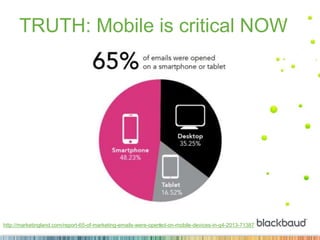
TRUTH: Mobile is critical NOW
http://marketingland.com/report-65-of-marketing-emails-were-opened-on-mobile-devices-in-q4-2013-71387
6
Poll the audience
What did your org’s
last email look like on
a mobile device?
7Blackbaud Confidential 7
Step #1:
Start with your landing pages
9
Step #1: Start with your landing
pages
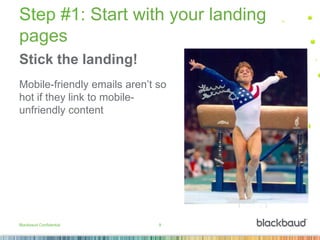
Stick the landing!
Mobile-friendly emails aren’t so
hot if they link to mobile-
unfriendly content
Blackbaud Confidential 9
10
Step #1: Start with your landing
pages
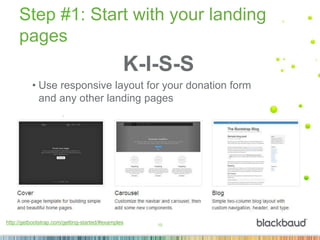
K-I-S-S
• Use responsive layout for your donation form
and any other landing pages
http://getbootstrap.com/getting-started/#examples
Step #2:
Follow with your emails
12
Step #2: Follow with your emails
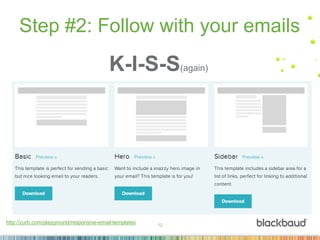
K-I-S-S(again)
http://zurb.com/playground/responsive-email-templates
13
Step #2: Follow with your emails
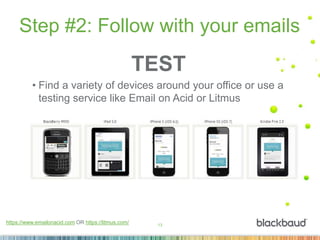
https://www.emailonacid.com OR https://litmus.com/
TEST
• Find a variety of devices around your office or use a
testing service like Email on Acid or Litmus
Step #3:
Inventory your content
15
Step #3: Inventory your content
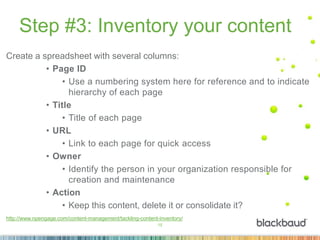
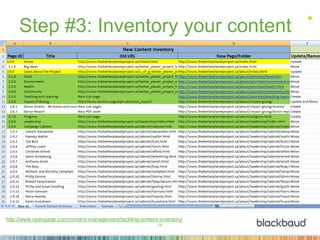
Create a spreadsheet with several columns:
• Page ID
• Use a numbering system here for reference and to indicate
hierarchy of each page
• Title
• Title of each page
• URL
• Link to each page for quick access
• Owner
• Identify the person in your organization responsible for
creation and maintenance
• Action
• Keep this content, delete it or consolidate it?
http://www.npengage.com/content-management/tackling-content-inventory/
16
Step #3: Inventory your content
http://www.npengage.com/content-management/tackling-content-inventory/
Step #4:
Content sea change
18
Step #4: Content sea change
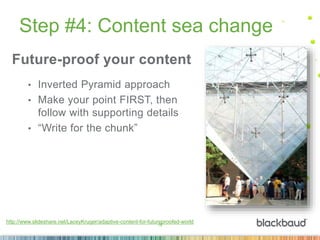
Future-proof your content
• Inverted Pyramid approach
• Make your point FIRST, then
follow with supporting details
• “Write for the chunk”
http://www.slideshare.net/LaceyKruger/adaptive-content-for-futureproofed-world
19
Step #4: Content sea change
http://www.slideshare.net/LaceyKruger/adaptive-content-for-futureproofed-world
COPE(Create Once, Publish Everywhere)
20
Step #4: Content sea change
http://www.slideshare.net/LaceyKruger/adaptive-content-for-futureproofed-world
CMS(Content Management System)
21
Step #4: Content sea change
Step #5:
Responsive Redesign
23
Step #5: Responsive Redesign
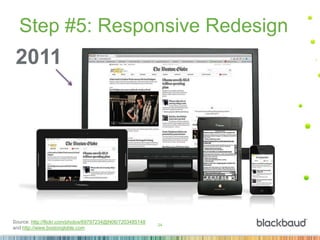
How OLDis your
website?
24
Step #5: Responsive Redesign
Source: http://flickr.com/photos/69797234@N06/7203485148
and http://www.bostongloble.com
2011
25
Step #5: Responsive Redesign
Going responsive with your redesign:
• Saves $$
• Saves TIME
• Serves ALL of your constituents
http://www.npengage.com/online-fundraising/redesigning-responsive/
26
Step #5: Responsive Redesign
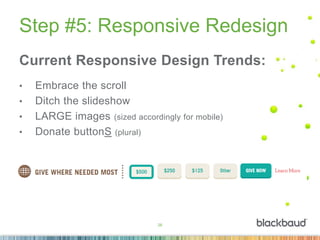
Current Responsive Design Trends:
• Embrace the scroll
• Ditch the slideshow
• LARGE images (sized accordingly for mobile)
• Donate buttonS (plural)
27
Summary
Step 1: Start with your landing pages
Step 2: Follow with your emails
Step 3: Inventory your content
Step 4: Content sea change
Step 5: Responsive Redesign
28Blackbaud Confidential 28
29Blackbaud Confidential 29
We hope to see you again soon!
Join us for the next session in our series:
• Emergency Response Preparedness
• Thursday August 21| 2:00PM ET
• http://hello.blackbaud.com/sweetspot
thank you.

Going Mobile: Tips and Tricks for Mobile-Friendly Content

  • 1.
    Finding the SweetSpot: Ingredients for Stirring up Elevated Online Results July 2014: Going Mobile
  • 2.
    2 Housekeeping • Please useQ&A for questions, we have folks standing by to monitor and respond. • You can find the recording of today’s session at http://hello.blackbaud.com/sweetspot
  • 3.
    3 Today’s Presenter • PrincipalInformation Architect • 9 years with Blackbaud • Specializes in User Experience for nonprofit websites Lacey Kruger
  • 4.
  • 5.
    5 TRUTH: Mobile iscritical NOW http://marketingland.com/report-65-of-marketing-emails-were-opened-on-mobile-devices-in-q4-2013-71387
  • 6.
    6 Poll the audience Whatdid your org’s last email look like on a mobile device?
  • 7.
  • 8.
    Step #1: Start withyour landing pages
  • 9.
    9 Step #1: Startwith your landing pages Stick the landing! Mobile-friendly emails aren’t so hot if they link to mobile- unfriendly content Blackbaud Confidential 9
  • 10.
    10 Step #1: Startwith your landing pages K-I-S-S • Use responsive layout for your donation form and any other landing pages http://getbootstrap.com/getting-started/#examples
  • 11.
  • 12.
    12 Step #2: Followwith your emails K-I-S-S(again) http://zurb.com/playground/responsive-email-templates
  • 13.
    13 Step #2: Followwith your emails https://www.emailonacid.com OR https://litmus.com/ TEST • Find a variety of devices around your office or use a testing service like Email on Acid or Litmus
  • 14.
  • 15.
    15 Step #3: Inventoryyour content Create a spreadsheet with several columns: • Page ID • Use a numbering system here for reference and to indicate hierarchy of each page • Title • Title of each page • URL • Link to each page for quick access • Owner • Identify the person in your organization responsible for creation and maintenance • Action • Keep this content, delete it or consolidate it? http://www.npengage.com/content-management/tackling-content-inventory/
  • 16.
    16 Step #3: Inventoryyour content http://www.npengage.com/content-management/tackling-content-inventory/
  • 17.
  • 18.
    18 Step #4: Contentsea change Future-proof your content • Inverted Pyramid approach • Make your point FIRST, then follow with supporting details • “Write for the chunk” http://www.slideshare.net/LaceyKruger/adaptive-content-for-futureproofed-world
  • 19.
    19 Step #4: Contentsea change http://www.slideshare.net/LaceyKruger/adaptive-content-for-futureproofed-world COPE(Create Once, Publish Everywhere)
  • 20.
    20 Step #4: Contentsea change http://www.slideshare.net/LaceyKruger/adaptive-content-for-futureproofed-world CMS(Content Management System)
  • 21.
  • 22.
  • 23.
    23 Step #5: ResponsiveRedesign How OLDis your website?
  • 24.
    24 Step #5: ResponsiveRedesign Source: http://flickr.com/photos/69797234@N06/7203485148 and http://www.bostongloble.com 2011
  • 25.
    25 Step #5: ResponsiveRedesign Going responsive with your redesign: • Saves $$ • Saves TIME • Serves ALL of your constituents http://www.npengage.com/online-fundraising/redesigning-responsive/
  • 26.
    26 Step #5: ResponsiveRedesign Current Responsive Design Trends: • Embrace the scroll • Ditch the slideshow • LARGE images (sized accordingly for mobile) • Donate buttonS (plural)
  • 27.
    27 Summary Step 1: Startwith your landing pages Step 2: Follow with your emails Step 3: Inventory your content Step 4: Content sea change Step 5: Responsive Redesign
  • 28.
  • 29.
  • 30.
    We hope tosee you again soon! Join us for the next session in our series: • Emergency Response Preparedness • Thursday August 21| 2:00PM ET • http://hello.blackbaud.com/sweetspot
  • 31.

Editor's Notes

  • #7 What did your org’s last email look like on a mobile device? Answers: Perfect! No side-scrolling or pinch and zoom Decent. The text was legible but the right column was hacked off Awful! To read the text, you had to pinch and zoom AND side-scroll I don’t know. Didn’t test it 
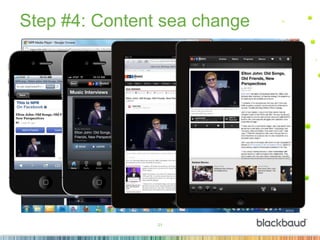
  • #22 Different devices/environments Different photo sizes Different placement of elements like date, sound clip, related item displays Different colors, backgrounds, context