Parsimonious Pixel
            Pushing
(or: how to maybe make your apps do real good or at least
  better with lots of these new big fancy picture screens)


                    John Cromartie
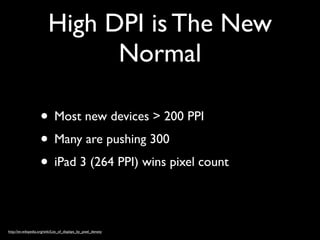
High DPI is The New
                                Normal

                     • Most new devices > 200 PPI
                     • Many are pushing 300
                     • iPad 3 (264 PPI) wins pixel count

http://en.wikipedia.org/wiki/List_of_displays_by_pixel_density
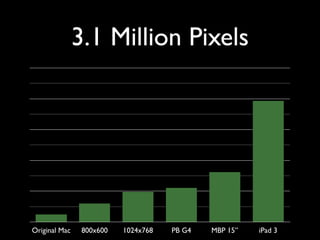
3.1 Million Pixels


Original Mac    800x600   1024x768   PB G4   MBP 15”   iPad 3
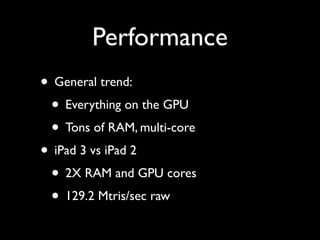
Performance
• General trend:
 • Everything on the GPU
 • Tons of RAM, multi-core
• iPad 3 vs iPad 2
 • 2X RAM and GPU cores
 • 129.2 Mtris/sec raw
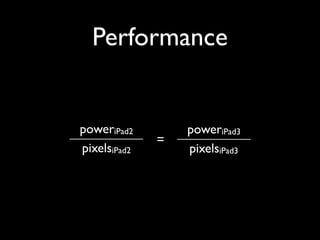
Performance


poweriPad2        poweriPad3
              =
pixelsiPad2       pixelsiPad3
So What’s the Problem?

• Load time
• Responsiveness
• App size
• Network utilization
In the Beginning...


• Default.png
• Icon.png
Today
Today
•   Default.png
Today
•   Default.png

•   Default@2x.png
Today
•   Default.png

•   Default@2x.png

•   Default-Portrait.png
Today
•   Default.png

•   Default@2x.png

•   Default-Portrait.png

•   Default-PortraitUpsideDown.png
Today
•   Default.png

•   Default@2x.png

•   Default-Portrait.png

•   Default-PortraitUpsideDown.png

•   Default-Landscape(|Left).png
Today
•   Default.png

•   Default@2x.png

•   Default-Portrait.png

•   Default-PortraitUpsideDown.png

•   Default-Landscape(|Left).png

•   Default-LandscapeRight.png
Today
•   Default.png

•   Default@2x.png

•   Default-Portrait.png

•   Default-PortraitUpsideDown.png

•   Default-Landscape(|Left).png

•   Default-LandscapeRight.png

•   Default-Portrait@2x.png
Today
•   Default.png

•   Default@2x.png

•   Default-Portrait.png

•   Default-PortraitUpsideDown.png

•   Default-Landscape(|Left).png

•   Default-LandscapeRight.png

•   Default-Portrait@2x.png

•   Default-PortraitUpsideDown@2x.png
Today
•   Default.png

•   Default@2x.png

•   Default-Portrait.png

•   Default-PortraitUpsideDown.png

•   Default-Landscape(|Left).png

•   Default-LandscapeRight.png

•   Default-Portrait@2x.png

•   Default-PortraitUpsideDown@2x.png

•   Default-Landscape(|Left)@2x.png
Today
•   Default.png

•   Default@2x.png

•   Default-Portrait.png

•   Default-PortraitUpsideDown.png

•   Default-Landscape(|Left).png

•   Default-LandscapeRight.png

•   Default-Portrait@2x.png

•   Default-PortraitUpsideDown@2x.png

•   Default-Landscape(|Left)@2x.png

•   Default-LandscapeRight@2x.png
Today
•   Default.png

•   Default@2x.png

•   Default-Portrait.png

•   Default-PortraitUpsideDown.png

•   Default-Landscape(|Left).png

•   Default-LandscapeRight.png

•   Default-Portrait@2x.png

•   Default-PortraitUpsideDown@2x.png

•   Default-Landscape(|Left)@2x.png

•   Default-LandscapeRight@2x.png

•   Default-iPhone5@2x.png...?
Today
•   Default.png                            •   Icon.png

•   Default@2x.png                         •   Icon@2x.png

•   Default-Portrait.png                   •   Icon-72.png

•   Default-PortraitUpsideDown.png         •   Icon-72@2x.png

•   Default-Landscape(|Left).png

•   Default-LandscapeRight.png

•   Default-Portrait@2x.png

•   Default-PortraitUpsideDown@2x.png

•   Default-Landscape(|Left)@2x.png

•   Default-LandscapeRight@2x.png

•   Default-iPhone5@2x.png...?
Not Just Double

• Retina Images are 4X the data, not 2X
 • X number form factors
• Retina graphics have different art
 • Sometimes makes compression hard
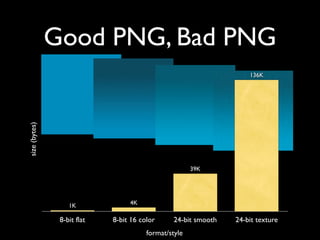
PNG

• Obviously!
• Only option for many things in iOS
• iOS optimizes around PNG
 • Xcode optimizes bundled PNGs for you
• Keep DEFLATE (zlib) in mind
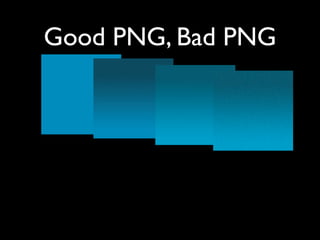
Good PNG, Bad PNG
Good PNG, Bad PNG
Good PNG, Bad PNG
Good PNG, Bad PNG
Good PNG, Bad PNG
Good PNG, Bad PNG
                                                                     136K
size (bytes)


                                                       39K


                   1K             4K

                8-bit flat   8-bit 16 color      24-bit smooth   24-bit texture
                                        format/style
JPEG?

• Almost always faster than PNG
• Lossy... not for UI elements
• Obvious choice for “content” images
• Create 100% quality JPEGs on device
 • Instead of PNG... can’t be optimized
JPEG...

• Go ahead and skimp on the JPEGs
• Quality 60 = awesome
• Q60 => 1.2MB, Q100 => 3.9MB
• Can’t tell the difference
• Even skip a Retina version
Design Trends

• Subtle gradients (more colors)
• Subtle noise textures (can’t DEFLATE)
• Shadows (other issues)
Mistakes

• Gradient, noisy Default.png’s, about 4MB
• Could be avoided by changing visual style
• How NOT to solve it:
 • Draw radial gradient in-app: SLOW!
 • Draw noise texture in-app: SLOW!
Noise

• Sometimes you just need a little texture
• Just use a single transparent PNG sized to
  the device screen
• Use 8-bit PNG, limited colors
Inner Shadows
       (or “spotlight”)
• Be lazy here
• Don’t go full-size
• Change all images, or change one?
• Extra bytes in every image, or just one?
Drop Shadows
• Use a class method to keep it easy
 • [XYZStyle addDropShadow:myView];
• ALWAYS set the path!
 • Critical for animation, table views
 • Yes, you CAN use drop shadows in table
    view cell subviews
   CGPathRef path = CGPathCreateWithRect(layer.bounds, NULL);
   layer.shadowPath = path;
   CGPathRelease(path);
The Network

• Run pngcrush on PNGs
• Q60 JPEGs, optimize
• gzip won’t help you
• server: optimize, optimize, optimize...
• device: cache, cache, cache...
Tools
• RSS media:thumbnail, media:content
 • width=640, width=1536, ...
• [UIScreen mainScreen].scale
 • Calculate pixel dimensions for loading
 • When creating images (CoreGraphics)
 • you can’t do this in HTML !
                             *
                                 *You   can with a wrapper†
                                 †Ifyou use a wrapper, then your app
                                 is bad, and you should feel bad††
                                 ††Hey, just   ask Facebook
Resizable Images


• For UI components: endcaps
  •   +[UIImage resizableImageWithCapInsets:]


• Linear gradients: just stretch it
The Pros

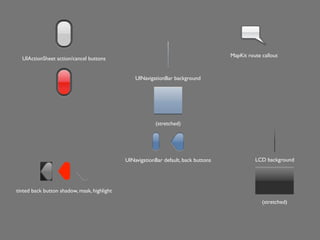
• How does Apple do it?
• Let’s find out...
• UIKit-Artwork-Extractor
•   https://github.com/0xced/UIKit-Artwork-Extractor
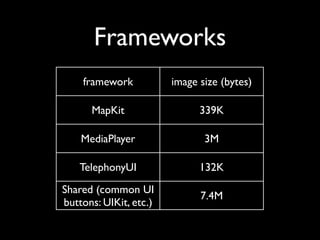
Frameworks
    framework           image size (bytes)

      MapKit                  339K

    MediaPlayer                3M

   TelephonyUI                132K
Shared (common UI
                              7.4M
buttons: UIKit, etc.)
MapKit route callout
  UIActionSheet action/cancel buttons


                                                 UINavigationBar background


                                                          (stretched)


                                             UINavigationBar default, back buttons             LCD background


tinted back button shadow, mask, highlight

                                                                                                  (stretched)
Thanks!

 john@mobomo.com
   @johncromartie
jcromartie.tumblr.com

Mo devtablet johncromartie-graphicsperformance

  • 1.
    Parsimonious Pixel Pushing (or: how to maybe make your apps do real good or at least better with lots of these new big fancy picture screens) John Cromartie
  • 2.
    High DPI isThe New Normal • Most new devices > 200 PPI • Many are pushing 300 • iPad 3 (264 PPI) wins pixel count http://en.wikipedia.org/wiki/List_of_displays_by_pixel_density
  • 3.
    3.1 Million Pixels OriginalMac 800x600 1024x768 PB G4 MBP 15” iPad 3
  • 4.
    Performance • General trend: • Everything on the GPU • Tons of RAM, multi-core • iPad 3 vs iPad 2 • 2X RAM and GPU cores • 129.2 Mtris/sec raw
  • 5.
    Performance poweriPad2 poweriPad3 = pixelsiPad2 pixelsiPad3
  • 6.
    So What’s theProblem? • Load time • Responsiveness • App size • Network utilization
  • 7.
    In the Beginning... •Default.png • Icon.png
  • 8.
  • 9.
    Today • Default.png
  • 10.
    Today • Default.png • Default@2x.png
  • 11.
    Today • Default.png • Default@2x.png • Default-Portrait.png
  • 12.
    Today • Default.png • Default@2x.png • Default-Portrait.png • Default-PortraitUpsideDown.png
  • 13.
    Today • Default.png • Default@2x.png • Default-Portrait.png • Default-PortraitUpsideDown.png • Default-Landscape(|Left).png
  • 14.
    Today • Default.png • Default@2x.png • Default-Portrait.png • Default-PortraitUpsideDown.png • Default-Landscape(|Left).png • Default-LandscapeRight.png
  • 15.
    Today • Default.png • Default@2x.png • Default-Portrait.png • Default-PortraitUpsideDown.png • Default-Landscape(|Left).png • Default-LandscapeRight.png • Default-Portrait@2x.png
  • 16.
    Today • Default.png • Default@2x.png • Default-Portrait.png • Default-PortraitUpsideDown.png • Default-Landscape(|Left).png • Default-LandscapeRight.png • Default-Portrait@2x.png • Default-PortraitUpsideDown@2x.png
  • 17.
    Today • Default.png • Default@2x.png • Default-Portrait.png • Default-PortraitUpsideDown.png • Default-Landscape(|Left).png • Default-LandscapeRight.png • Default-Portrait@2x.png • Default-PortraitUpsideDown@2x.png • Default-Landscape(|Left)@2x.png
  • 18.
    Today • Default.png • Default@2x.png • Default-Portrait.png • Default-PortraitUpsideDown.png • Default-Landscape(|Left).png • Default-LandscapeRight.png • Default-Portrait@2x.png • Default-PortraitUpsideDown@2x.png • Default-Landscape(|Left)@2x.png • Default-LandscapeRight@2x.png
  • 19.
    Today • Default.png • Default@2x.png • Default-Portrait.png • Default-PortraitUpsideDown.png • Default-Landscape(|Left).png • Default-LandscapeRight.png • Default-Portrait@2x.png • Default-PortraitUpsideDown@2x.png • Default-Landscape(|Left)@2x.png • Default-LandscapeRight@2x.png • Default-iPhone5@2x.png...?
  • 20.
    Today • Default.png • Icon.png • Default@2x.png • Icon@2x.png • Default-Portrait.png • Icon-72.png • Default-PortraitUpsideDown.png • Icon-72@2x.png • Default-Landscape(|Left).png • Default-LandscapeRight.png • Default-Portrait@2x.png • Default-PortraitUpsideDown@2x.png • Default-Landscape(|Left)@2x.png • Default-LandscapeRight@2x.png • Default-iPhone5@2x.png...?
  • 21.
    Not Just Double •Retina Images are 4X the data, not 2X • X number form factors • Retina graphics have different art • Sometimes makes compression hard
  • 22.
    PNG • Obviously! • Onlyoption for many things in iOS • iOS optimizes around PNG • Xcode optimizes bundled PNGs for you • Keep DEFLATE (zlib) in mind
  • 23.
  • 24.
  • 25.
  • 26.
  • 27.
  • 28.
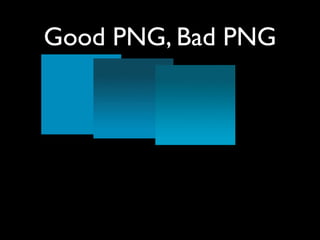
    Good PNG, BadPNG 136K size (bytes) 39K 1K 4K 8-bit flat 8-bit 16 color 24-bit smooth 24-bit texture format/style
  • 29.
    JPEG? • Almost alwaysfaster than PNG • Lossy... not for UI elements • Obvious choice for “content” images • Create 100% quality JPEGs on device • Instead of PNG... can’t be optimized
  • 30.
    JPEG... • Go aheadand skimp on the JPEGs • Quality 60 = awesome • Q60 => 1.2MB, Q100 => 3.9MB • Can’t tell the difference • Even skip a Retina version
  • 31.
    Design Trends • Subtlegradients (more colors) • Subtle noise textures (can’t DEFLATE) • Shadows (other issues)
  • 32.
    Mistakes • Gradient, noisyDefault.png’s, about 4MB • Could be avoided by changing visual style • How NOT to solve it: • Draw radial gradient in-app: SLOW! • Draw noise texture in-app: SLOW!
  • 33.
    Noise • Sometimes youjust need a little texture • Just use a single transparent PNG sized to the device screen • Use 8-bit PNG, limited colors
  • 34.
    Inner Shadows (or “spotlight”) • Be lazy here • Don’t go full-size • Change all images, or change one? • Extra bytes in every image, or just one?
  • 35.
    Drop Shadows • Usea class method to keep it easy • [XYZStyle addDropShadow:myView]; • ALWAYS set the path! • Critical for animation, table views • Yes, you CAN use drop shadows in table view cell subviews CGPathRef path = CGPathCreateWithRect(layer.bounds, NULL); layer.shadowPath = path; CGPathRelease(path);
  • 36.
    The Network • Runpngcrush on PNGs • Q60 JPEGs, optimize • gzip won’t help you • server: optimize, optimize, optimize... • device: cache, cache, cache...
  • 37.
    Tools • RSS media:thumbnail,media:content • width=640, width=1536, ... • [UIScreen mainScreen].scale • Calculate pixel dimensions for loading • When creating images (CoreGraphics) • you can’t do this in HTML ! * *You can with a wrapper† †Ifyou use a wrapper, then your app is bad, and you should feel bad†† ††Hey, just ask Facebook
  • 38.
    Resizable Images • ForUI components: endcaps • +[UIImage resizableImageWithCapInsets:] • Linear gradients: just stretch it
  • 39.
    The Pros • Howdoes Apple do it? • Let’s find out... • UIKit-Artwork-Extractor • https://github.com/0xced/UIKit-Artwork-Extractor
  • 40.
    Frameworks framework image size (bytes) MapKit 339K MediaPlayer 3M TelephonyUI 132K Shared (common UI 7.4M buttons: UIKit, etc.)
  • 41.
    MapKit route callout UIActionSheet action/cancel buttons UINavigationBar background (stretched) UINavigationBar default, back buttons LCD background tinted back button shadow, mask, highlight (stretched)
  • 42.
    Thanks! john@mobomo.com @johncromartie jcromartie.tumblr.com