Preparing for Migration and Upgrade to SharePoint 2010 – Advanced ScenariosDalton KnodererSales ManagerMetalogix SoftwareDanny BurlageCTOWortell
AgendaOverview of getting to SharePoint 2010 using out of box upgradeUnsupported and advanced scenarios Metalogix SharePoint Site Migration Manager for SharePoint 2010Addressing the WCM migration scenariosMetalogix Website Migration Manager for SharePoint 2010
SharePoint 2010How to get there using out-of-box – Option 1PreUpgradeCheck – stsadm cmdIn-place upgrade All-or-nothing upgrade requires prep workHardware / Software environment needs to be appropriate 64bit Windows Server 2008 OR 64bit Windows Server R264bit SQL Express 2008 OR 64bit SQL 2005 ExpressConsider this a minimumSource WSSv3/MOSS 2007 environment needs to have SP2Standard in-place caution recommended
SharePoint 2010How to get there – Option 2Central Admin - DB AttachContent DB, Profile DB, and Project Service DB are all supportedSupports both build-to-build (b2b) and version-to-version (v2v) scenarios*Scoped at the content database level – one at a timeIncludes visual upgrade*v2v is MOSS 2007 to SP 2010, it does not support WSSv2 or SPS 2003
SharePoint 2010How to get there - Option 3PowerShell Cmdlets – DB UpgradeUpgrade-SPContentDatabaseSupports both build-to-build (b2b) and version-to-version (v2v) scenarios*Similar to the Central Admin optionScoped at the database levelSupports parallel db upgrades Upgrade many DBs simultaneously*v2v is MOSS 2007 to SP 2010, it does not support WSSv2 or SPS 2003
SharePoint 2010Unsupported scenarios for upgradeNo support for direct WSSv2 or SPS 2003 upgrades No support for side-by-side installs of WSSv3/MOSS 2007 and WSSv4/SharePoint 2010No gradual upgradeNo support for 32bit environments (e.g. Virtual Server)Limited support for co-existenceNo support for migration to SharePoint 2010 Online
SharePoint 2010Common scenariosLooking at pilots and POCs for 2010Plan new hardware or staging servers that meet all SharePoint 2010 requirementsSplit/re-factor large content databases (<100gb), site collections, and lists over 5000 itemsLeverage best practices for site structure and template usage – not there yet
SharePoint 2010How does Metalogix help?SharePoint Site Migration Manager Direct migrations from MOSS 2007/WSSv3 and SPS 2003/WSSv2 to SharePoint 2010Granular/gradual migrationsNo service pack or hardware requirementsZero downtime migrationsCo-existence supported (e.g., schedule updates)Re-organize or re-template sitesOngoing management of SharePointSupport for SharePoint Online (BPOS)Support for migration from existing websites, WCM and ECM systems
DemoMigrating from MOSS/WSS/SPS to 2010
SharePoint 2010Taking advantage of the publishing platformEvery organization adopting SharePoint 2010 has some form of WCM investmentMoving HTML content and related resources to SharePoint publishing sites is typically labor intensiveCopy and paste is not viableYou only want to move some content from a subset of pagesLink correction is neededMetadata management
Website Migration ManagerKey featuresMigrate any HTTP- or NTFS-accessible web content to SharePointComprehensive resource managementRich content analysis and reporting capabilitiesAutomated link correctionDelegated metadata managementMigrate content to web partsConnectors for specific API-level migration of specific source systemsMCMS, Vignette, eRoom, Stellent/Oracle CS, SiteScape…Fully extensible by service providers
DemoMigrating an Internet Site to SharePoint 2010
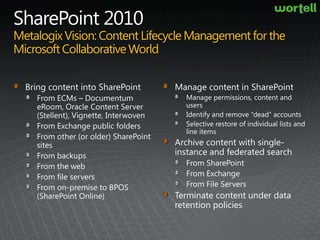
SharePoint 2010MetalogixVision: Content Lifecycle Management for the Microsoft Collaborative WorldBring content into SharePointFrom ECMs – Documentum eRoom, Oracle Content Server (Stellent), Vignette, InterwovenFrom Exchange public foldersFrom other (or older) SharePoint sitesFrom backupsFrom the webFrom file serversFrom on-premise to BPOS (SharePoint Online)Manage content in SharePointManage permissions, content and users Identify and remove “dead” accounts Selective restore of individual lists and line itemsArchive content with single-instance and federated searchFrom SharePointFrom ExchangeFrom File ServersTerminate content under data retention policies
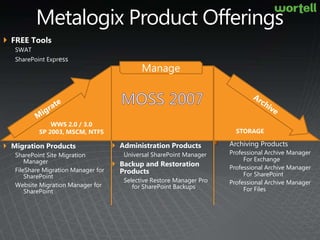
Metalogix Product OfferingsFREE ToolsSWAT SharePoint Express MigrateArchiveManageMoss2007WWS 2.0 / 3.0SP 2003, MSCM, NTFSSTORAGEArchiving ProductsProfessional Archive Manager For ExchangeProfessional Archive Manager For SharePointProfessional Archive Manager For FilesAdministration ProductsUniversal SharePoint ManagerBackup and Restoration ProductsSelective Restore Manager Pro for SharePoint BackupsMigration ProductsSharePoint Site Migration ManagerFileShare Migration Manager for SharePointWebsite Migration Manager for SharePoint
Metalogix SoftwareFounded in 2001Expanded in Q4 2008By adding of one of the leading Enterprise Archiving Solutions in EuropeNearly 100 employees and growing2000+ customersOffices in: BostonBratislavaDallasHalifaxLondonSwitzerlandVancouver	Microsoft Gold PartnerTechnology Partners
From the trenchesAmsterdam RAIWSMM 2010 (beta)Sitecore -> SP2010Tried it by hand, with Metalogix and a 3th party toolAutomated scriptsMetalogix: 6 hoursLessons learned:Not only Migrations also staging and OTAPMinisterie van ...SSMM 2010 (beta)MOSS 2007 -> SP2010OOTB proces, useful for aligning contentSkyTeamSharePoint OnlineSSMM 2007
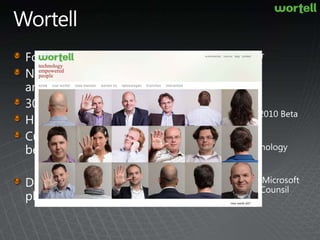
WortellFounded in 1997Nearly 130 employees and growing300+ customersHollandCurrently 12 SP2010 beta projectsDedicated on the MS platformMicrosoft Gold PartnerMicrosoft SharePoint 2010 Beta and PEP PartnerMicrosoft Online Technology PartnerActive member of the Microsoft S+S Partner Advisory Counsil
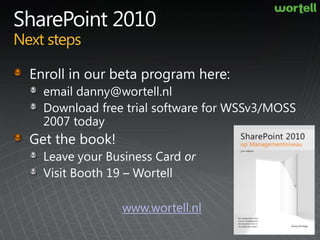
SharePoint 2010Next stepsEnroll in our beta program here:email danny@wortell.nlDownload free trial software for WSSv3/MOSS 2007 todayGet the book!Leave your Business Card orVisit Booth 19 – Wortellwww.wortell.nl
Your Feedback is ImportantPlease fill out a session evaluation form drop it off at the conference registration desk.Thank you!
DownloadsSharePoint Site Migration Manager 15 day free trialWebsite Migration Manager 15 day free trial FileShare Migration Manager 15 day free trialSelective Restore Manager 15 day free trial

Migrating To SharePoint 2010

  • 1.
    Preparing for Migrationand Upgrade to SharePoint 2010 – Advanced ScenariosDalton KnodererSales ManagerMetalogix SoftwareDanny BurlageCTOWortell
  • 2.
    AgendaOverview of gettingto SharePoint 2010 using out of box upgradeUnsupported and advanced scenarios Metalogix SharePoint Site Migration Manager for SharePoint 2010Addressing the WCM migration scenariosMetalogix Website Migration Manager for SharePoint 2010
  • 3.
    SharePoint 2010How toget there using out-of-box – Option 1PreUpgradeCheck – stsadm cmdIn-place upgrade All-or-nothing upgrade requires prep workHardware / Software environment needs to be appropriate 64bit Windows Server 2008 OR 64bit Windows Server R264bit SQL Express 2008 OR 64bit SQL 2005 ExpressConsider this a minimumSource WSSv3/MOSS 2007 environment needs to have SP2Standard in-place caution recommended
  • 4.
    SharePoint 2010How toget there – Option 2Central Admin - DB AttachContent DB, Profile DB, and Project Service DB are all supportedSupports both build-to-build (b2b) and version-to-version (v2v) scenarios*Scoped at the content database level – one at a timeIncludes visual upgrade*v2v is MOSS 2007 to SP 2010, it does not support WSSv2 or SPS 2003
  • 5.
    SharePoint 2010How toget there - Option 3PowerShell Cmdlets – DB UpgradeUpgrade-SPContentDatabaseSupports both build-to-build (b2b) and version-to-version (v2v) scenarios*Similar to the Central Admin optionScoped at the database levelSupports parallel db upgrades Upgrade many DBs simultaneously*v2v is MOSS 2007 to SP 2010, it does not support WSSv2 or SPS 2003
  • 6.
    SharePoint 2010Unsupported scenariosfor upgradeNo support for direct WSSv2 or SPS 2003 upgrades No support for side-by-side installs of WSSv3/MOSS 2007 and WSSv4/SharePoint 2010No gradual upgradeNo support for 32bit environments (e.g. Virtual Server)Limited support for co-existenceNo support for migration to SharePoint 2010 Online
  • 7.
    SharePoint 2010Common scenariosLookingat pilots and POCs for 2010Plan new hardware or staging servers that meet all SharePoint 2010 requirementsSplit/re-factor large content databases (<100gb), site collections, and lists over 5000 itemsLeverage best practices for site structure and template usage – not there yet
  • 8.
    SharePoint 2010How doesMetalogix help?SharePoint Site Migration Manager Direct migrations from MOSS 2007/WSSv3 and SPS 2003/WSSv2 to SharePoint 2010Granular/gradual migrationsNo service pack or hardware requirementsZero downtime migrationsCo-existence supported (e.g., schedule updates)Re-organize or re-template sitesOngoing management of SharePointSupport for SharePoint Online (BPOS)Support for migration from existing websites, WCM and ECM systems
  • 9.
  • 10.
    SharePoint 2010Taking advantageof the publishing platformEvery organization adopting SharePoint 2010 has some form of WCM investmentMoving HTML content and related resources to SharePoint publishing sites is typically labor intensiveCopy and paste is not viableYou only want to move some content from a subset of pagesLink correction is neededMetadata management
  • 11.
    Website Migration ManagerKeyfeaturesMigrate any HTTP- or NTFS-accessible web content to SharePointComprehensive resource managementRich content analysis and reporting capabilitiesAutomated link correctionDelegated metadata managementMigrate content to web partsConnectors for specific API-level migration of specific source systemsMCMS, Vignette, eRoom, Stellent/Oracle CS, SiteScape…Fully extensible by service providers
  • 12.
    DemoMigrating an InternetSite to SharePoint 2010
  • 13.
    SharePoint 2010MetalogixVision: ContentLifecycle Management for the Microsoft Collaborative WorldBring content into SharePointFrom ECMs – Documentum eRoom, Oracle Content Server (Stellent), Vignette, InterwovenFrom Exchange public foldersFrom other (or older) SharePoint sitesFrom backupsFrom the webFrom file serversFrom on-premise to BPOS (SharePoint Online)Manage content in SharePointManage permissions, content and users Identify and remove “dead” accounts Selective restore of individual lists and line itemsArchive content with single-instance and federated searchFrom SharePointFrom ExchangeFrom File ServersTerminate content under data retention policies
  • 14.
    Metalogix Product OfferingsFREEToolsSWAT SharePoint Express MigrateArchiveManageMoss2007WWS 2.0 / 3.0SP 2003, MSCM, NTFSSTORAGEArchiving ProductsProfessional Archive Manager For ExchangeProfessional Archive Manager For SharePointProfessional Archive Manager For FilesAdministration ProductsUniversal SharePoint ManagerBackup and Restoration ProductsSelective Restore Manager Pro for SharePoint BackupsMigration ProductsSharePoint Site Migration ManagerFileShare Migration Manager for SharePointWebsite Migration Manager for SharePoint
  • 15.
    Metalogix SoftwareFounded in2001Expanded in Q4 2008By adding of one of the leading Enterprise Archiving Solutions in EuropeNearly 100 employees and growing2000+ customersOffices in: BostonBratislavaDallasHalifaxLondonSwitzerlandVancouver Microsoft Gold PartnerTechnology Partners
  • 16.
    From the trenchesAmsterdamRAIWSMM 2010 (beta)Sitecore -> SP2010Tried it by hand, with Metalogix and a 3th party toolAutomated scriptsMetalogix: 6 hoursLessons learned:Not only Migrations also staging and OTAPMinisterie van ...SSMM 2010 (beta)MOSS 2007 -> SP2010OOTB proces, useful for aligning contentSkyTeamSharePoint OnlineSSMM 2007
  • 17.
    WortellFounded in 1997Nearly130 employees and growing300+ customersHollandCurrently 12 SP2010 beta projectsDedicated on the MS platformMicrosoft Gold PartnerMicrosoft SharePoint 2010 Beta and PEP PartnerMicrosoft Online Technology PartnerActive member of the Microsoft S+S Partner Advisory Counsil
  • 18.
    SharePoint 2010Next stepsEnrollin our beta program here:email danny@wortell.nlDownload free trial software for WSSv3/MOSS 2007 todayGet the book!Leave your Business Card orVisit Booth 19 – Wortellwww.wortell.nl
  • 19.
    Your Feedback isImportantPlease fill out a session evaluation form drop it off at the conference registration desk.Thank you!
  • 20.
    DownloadsSharePoint Site MigrationManager 15 day free trialWebsite Migration Manager 15 day free trial FileShare Migration Manager 15 day free trialSelective Restore Manager 15 day free trial