Azure Files
Our mission:
Enable you to move any on-premises file share into Azure.
M IC ROSOF T CO N F ID E N T I AL – I N T E RN A L ON LY
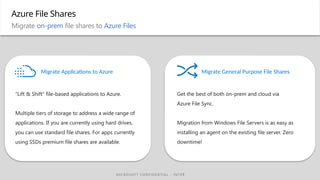
“Lift & Shift” file-based applications to Azure.
Multiple tiers of storage to address a wide range of
applications. If you are currently using hard drives,
you can use standard file shares. For apps currently
using SSDs premium file shares are available.
Get the best of both on-prem and cloud via
Azure File Sync.
Migration from Windows File Servers is as easy as
installing an agent on the existing file server. Zero
downtime!
Migrate General Purpose File Shares
Azure File Shares
Migrate on-prem file shares to Azure Files
Migrate Applications to Azure
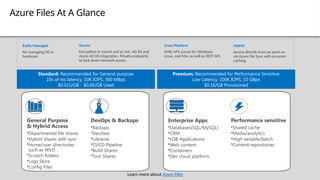
Azure Files At A Glance
Hybrid
Access directly from on prem or
via Azure File Sync with on-prem
caching.
Secure
Encryption in transit and at rest. AD DS and
Azure AD DS integration. Private endpoints
to lock down network access.
Cross Platform
SMB, NFS access for Windows,
Linux, and Mac as well as REST API.
Easily Managed
No managing OS or
hardware
Standard: Recommended for General purpose
10s of ms latency, 10K IOPS, 300 MBps
$0.015/GB - $0.06/GB Used
Premium: Recommended for Performance Sensitive
Low Latency, 100K IOPS, 10 GBps
$0.16/GB Provisioned
General Purpose
& Hybrid Access
•Departmental file shares
•Hybrid shares with sync
•Home/user directories
such as WVD
•Scratch folders
•Logs Store
•Config Files
DevOps & Backups
•Backups
•Dev/test
•Libraries
•CI/CD Pipeline
•Build Shares
•Tool Shares
Enterprise Apps
•Databases(SQL/MySQL)
•CRM
•LOB Applications
•Web content
•Containers
•Dev cloud platform
Performance sensitive
•Shared cache
•Media/analytics
•High variable/batch
•Content repositories
Learn more about Azure Files
Azure Files
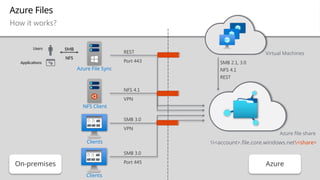
How it works?
On-premises
SMB 2.1, 3.0
NFS 4.1
REST
SMB 3.0
VPN
REST
Port 443
SMB 3.0
Port 445 Azure
Azure File Sync
Virtual Machines
NFS Client
Clients
Clients
Azure file share
<account>.file.core.windows.net<share>
NFS 4.1
VPN
SMB
NFS
Users
Applications
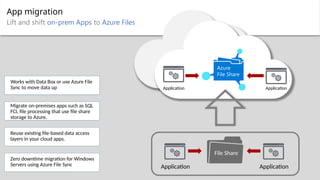
App migration
Lift and shift on-prem Apps to Azure Files
Azure
File Share
Application
Application
File Share
Application
Application
Migrate on-premises apps such as SQL
FCI, file processing that use file share
storage to Azure.
Reuse existing file-based data access
layers in your cloud apps.
Works with Data Box or use Azure File
Sync to move data up
Zero downtime migration for Windows
Servers using Azure File Sync
Azure File Sync
Hybrid file shares
SMB
NFS
Users
Applications
HQ
File Server
File Sync File Sync
Azure Backup
Azure
File Share
File 1
File 2
File 3
Cloud Tiering
File 1
File 2
File 3
Rapid DR
Branch
File Server
Cloud Tiering
Multi-site Sync
Cloud Backup
Disaster Recovery
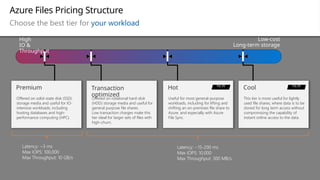
Azure Files Pricing Structure
Choose the best tier for your workload
High
IO &
Throughput
Low-cost
Long-term storage
Offered on rotational hard-disk
(HDD) storage media and useful for
general purpose file shares.
Low transaction charges make this
tier ideal for larger sets of files with
high-churn.
Transaction
optimized
Offered on solid-state disk (SSD)
storage media and useful for IO-
intensive workloads, including
hosting databases and high-
performance computing (HPC).
Premium
Useful for most general-purpose
workloads, including for lifting and
shifting an on-premises file share to
Azure, and especially with Azure
File Sync.
Hot NEW
This tier is more useful for lightly
used file shares, where data is to be
stored for long term access without
compromising the capability of
instant online access to the data.
Cool NEW
Latency: ~3 ms
Max IOPS: 100,000
Max Throughput: 10 GB/s
Latency: ~15-200 ms
Max IOPS: 10,000
Max Throughput: 300 MB/s
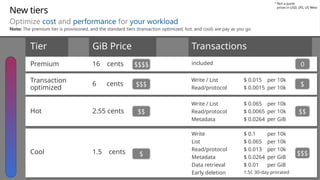
New tiers
Optimize cost and performance for your workload
Hot 2.55 cents
Write / List
Read/protocol
Metadata
$ 0.065 per 10k
$ 0.0065 per 10k
$ 0.0264 per GiB
Tier GiB Price Transactions
Cool 1.5 cents
Write
List
Read/protocol
Metadata
Data retrieval
Early deletion
$ 0.1 per 10k
$ 0.065 per 10k
$ 0.013 per 10k
$ 0.0264 per GiB
$ 0.01 per GiB
1.5¢ 30-day prorated
Transaction
optimized
6 cents
Write / List
Read/protocol
$ 0.015 per 10k
$ 0.0015 per 10k
Premium 16 cents included
$$$
$$
$
0
Not a quote
prices in USD, LRS, US West
*
$$$$
$$$
$$
$
Note: The premium tier is provisioned, and the standard tiers (transaction optimized, hot, and cool) are pay as you go
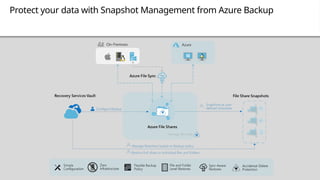
Protect your data with Snapshot Management from Azure Backup
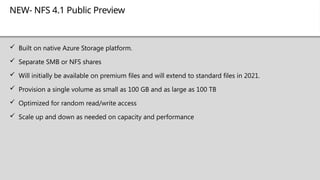
NEW- NFS 4.1 Public Preview
 Built on native Azure Storage platform.
 Separate SMB or NFS shares
 Will initially be available on premium files and will extend to standard files in 2021.
 Provision a single volume as small as 100 GB and as large as 100 TB
 Optimized for random read/write access
 Scale up and down as needed on capacity and performance

Microsoft Azure - Azure Files Overview.pptx

  • 1.
  • 2.
    Our mission: Enable youto move any on-premises file share into Azure.
  • 3.
    M IC ROSOFT CO N F ID E N T I AL – I N T E RN A L ON LY “Lift & Shift” file-based applications to Azure. Multiple tiers of storage to address a wide range of applications. If you are currently using hard drives, you can use standard file shares. For apps currently using SSDs premium file shares are available. Get the best of both on-prem and cloud via Azure File Sync. Migration from Windows File Servers is as easy as installing an agent on the existing file server. Zero downtime! Migrate General Purpose File Shares Azure File Shares Migrate on-prem file shares to Azure Files Migrate Applications to Azure
  • 4.
    Azure Files AtA Glance Hybrid Access directly from on prem or via Azure File Sync with on-prem caching. Secure Encryption in transit and at rest. AD DS and Azure AD DS integration. Private endpoints to lock down network access. Cross Platform SMB, NFS access for Windows, Linux, and Mac as well as REST API. Easily Managed No managing OS or hardware Standard: Recommended for General purpose 10s of ms latency, 10K IOPS, 300 MBps $0.015/GB - $0.06/GB Used Premium: Recommended for Performance Sensitive Low Latency, 100K IOPS, 10 GBps $0.16/GB Provisioned General Purpose & Hybrid Access •Departmental file shares •Hybrid shares with sync •Home/user directories such as WVD •Scratch folders •Logs Store •Config Files DevOps & Backups •Backups •Dev/test •Libraries •CI/CD Pipeline •Build Shares •Tool Shares Enterprise Apps •Databases(SQL/MySQL) •CRM •LOB Applications •Web content •Containers •Dev cloud platform Performance sensitive •Shared cache •Media/analytics •High variable/batch •Content repositories Learn more about Azure Files
  • 5.
    Azure Files How itworks? On-premises SMB 2.1, 3.0 NFS 4.1 REST SMB 3.0 VPN REST Port 443 SMB 3.0 Port 445 Azure Azure File Sync Virtual Machines NFS Client Clients Clients Azure file share <account>.file.core.windows.net<share> NFS 4.1 VPN SMB NFS Users Applications
  • 6.
    App migration Lift andshift on-prem Apps to Azure Files Azure File Share Application Application File Share Application Application Migrate on-premises apps such as SQL FCI, file processing that use file share storage to Azure. Reuse existing file-based data access layers in your cloud apps. Works with Data Box or use Azure File Sync to move data up Zero downtime migration for Windows Servers using Azure File Sync
  • 7.
    Azure File Sync Hybridfile shares SMB NFS Users Applications HQ File Server File Sync File Sync Azure Backup Azure File Share File 1 File 2 File 3 Cloud Tiering File 1 File 2 File 3 Rapid DR Branch File Server Cloud Tiering Multi-site Sync Cloud Backup Disaster Recovery
  • 8.
    Azure Files PricingStructure Choose the best tier for your workload High IO & Throughput Low-cost Long-term storage Offered on rotational hard-disk (HDD) storage media and useful for general purpose file shares. Low transaction charges make this tier ideal for larger sets of files with high-churn. Transaction optimized Offered on solid-state disk (SSD) storage media and useful for IO- intensive workloads, including hosting databases and high- performance computing (HPC). Premium Useful for most general-purpose workloads, including for lifting and shifting an on-premises file share to Azure, and especially with Azure File Sync. Hot NEW This tier is more useful for lightly used file shares, where data is to be stored for long term access without compromising the capability of instant online access to the data. Cool NEW Latency: ~3 ms Max IOPS: 100,000 Max Throughput: 10 GB/s Latency: ~15-200 ms Max IOPS: 10,000 Max Throughput: 300 MB/s
  • 9.
    New tiers Optimize costand performance for your workload Hot 2.55 cents Write / List Read/protocol Metadata $ 0.065 per 10k $ 0.0065 per 10k $ 0.0264 per GiB Tier GiB Price Transactions Cool 1.5 cents Write List Read/protocol Metadata Data retrieval Early deletion $ 0.1 per 10k $ 0.065 per 10k $ 0.013 per 10k $ 0.0264 per GiB $ 0.01 per GiB 1.5¢ 30-day prorated Transaction optimized 6 cents Write / List Read/protocol $ 0.015 per 10k $ 0.0015 per 10k Premium 16 cents included $$$ $$ $ 0 Not a quote prices in USD, LRS, US West * $$$$ $$$ $$ $ Note: The premium tier is provisioned, and the standard tiers (transaction optimized, hot, and cool) are pay as you go
  • 10.
    Protect your datawith Snapshot Management from Azure Backup
  • 11.
    NEW- NFS 4.1Public Preview  Built on native Azure Storage platform.  Separate SMB or NFS shares  Will initially be available on premium files and will extend to standard files in 2021.  Provision a single volume as small as 100 GB and as large as 100 TB  Optimized for random read/write access  Scale up and down as needed on capacity and performance

Editor's Notes

  • #3 ** Customers want to migrate their datacenter infrastructure to the cloud - in phases or all at once - but struggle with POSIX-compliant and legacy application data in Unix/Linux. Proprietary enterprise or line of business apps dependent on NFS storage seem too costly, old, or risky to re-factor to cloud. This is an unmet demand. E.g. - SAP has key dependencies on NFS file storage. The cost and difficulty of resolving this requirement presents a big enough hurdle to block consideration of cloud solutions. Other examples include EDA tools, Media rendering, and Oil and Gas analytics. They potentially have hundreds of petabytes of storage associated with workloads that can drive thousands of cores in consumption that they're unable to migrate to cloud. Containerization to allow high performance shared storage for new cloud-built apps is also important. And finally, consider the promise of the cloud with its vast elastic compute resources available for analytics and applying machine learning and cognitive services to data that is frequently in file format or attached to workflow applications with a hard dependency on it.
  • #8 https://docs.microsoft.com/en-us/azure/storage/files/storage-files-planning#storage-tiers https://azure.microsoft.com/en-us/blog/announcing-the-general-availability-of-azure-premium-files/