© 2013 CoSchedule | page 1
COSCHEDULE.COM|PLANNINGYOUREDITORIALCALENDAR
© 2013 CoSchedule | page 2
COSCHEDULE.COM|PLANNINGYOUREDITORIALCALENDAR
© 2013, CoSchedule
Coschedule.com
PLANNING YOUR
EDITORIAL CALENDAR
© 2013 CoSchedule | page 3
COSCHEDULE.COM|PLANNINGYOUREDITORIALCALENDAR
© 2013 CoSchedule | page 4
COSCHEDULE.COM|PLANNINGYOUREDITORIALCALENDAR
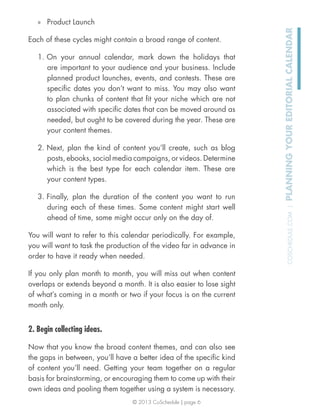
CONTENTS
Free Editorial Calendar Guide And Worksheets
Putting The Calendar To Work With A Team
Using The Editorial Calendar Worksheets
Ideas Worksheet
Monthly Calendar
© 2013 CoSchedule | page 5
COSCHEDULE.COM|PLANNINGYOUREDITORIALCALENDAR
FREE EDITORIAL CALENDAR GUIDE
AND WORKSHEETS
A paper editorial calendar can help you start the habit of using
an editorial calendar to plan your content marketing. The process
of using an editorial calendar is broken down into three key steps.
1. Start with an annual overview.
Planning the upcoming calendar year is the ultimate bird’s-eye-
view. By seeing the year’s content in broad chunks without worrying
about the details, you can create and identify the overarching
themes that your smaller components will fit into. You can also be
sure you are staying on target with what you want your content to
accomplish for you.
Consider the cycles of content you might need to cover:
» Advertising
» Events
» Holidays
© 2013 CoSchedule | page 6
COSCHEDULE.COM|PLANNINGYOUREDITORIALCALENDAR
» Product Launch
Each of these cycles might contain a broad range of content.
1. On your annual calendar, mark down the holidays that
are important to your audience and your business. Include
planned product launches, events, and contests. These are
specific dates you don’t want to miss. You may also want
to plan chunks of content that fit your niche which are not
associated with specific dates that can be moved around as
needed, but ought to be covered during the year. These are
your content themes.
2. Next, plan the kind of content you’ll create, such as blog
posts, ebooks, social media campaigns, or videos. Determine
which is the best type for each calendar item. These are
your content types.
3. Finally, plan the duration of the content you want to run
during each of these times. Some content might start well
ahead of time, some might occur only on the day of.
You will want to refer to this calendar periodically. For example,
you will want to task the production of the video far in advance in
order to have it ready when needed.
If you only plan month to month, you will miss out when content
overlaps or extends beyond a month. It is also easier to lose sight
of what’s coming in a month or two if your focus is on the current
month only.
2. Begin collecting ideas.
Now that you know the broad content themes, and can also see
the gaps in between, you’ll have a better idea of the specific kind
of content you’ll need. Getting your team together on a regular
basis for brainstorming, or encouraging them to come up with their
own ideas and pooling them together using a system is necessary.
© 2013 CoSchedule | page 7
COSCHEDULE.COM|PLANNINGYOUREDITORIALCALENDAR
Your writing team should already know the categories on the blog,
and what kind of content fits into those categories. You should
also let the team in on your annual calendar. While they might not
care about the specifics of dates, at least they know what kind of
content themes will happen in the coming year, and can get ideas
accordingly.
1. Encourage your team to find ideas that fit all of the different
categories on your blog.
2. Get together regularly to brainstorm and go over the ideas.
Come up with headlines for those you decide to keep.
3. Create a system where team members can store, pool, and
submit ideas that everyone can access. They may have ideas
that other team members would appreciate writing about.
Be sure your team has a copy of the annual calendar so that they
can see the larger roadmap and think of ideas that would fit the
broad themes. Their ideas, after all, will be what makes up the
larger theme.
3. Plug content into monthly calendars.
Your monthly editorial calendar is your go-to workhorse that you’ll
use daily. It tells you who is writing what, and when.
1. Using the annual calendar, begin filling in each month
according to the content chunks you planned.
2. Fill in the gaps in each week so that your content publishes
regularly during the “off” times. You’ll set up a publishing
schedule that your team can handle and that your audience
wants. It must be a perfect compromise between the two.
3. Make sure to keep each team member or blog category
evenly used, if that is an important goal.
© 2013 CoSchedule | page 8
COSCHEDULE.COM|PLANNINGYOUREDITORIALCALENDAR
Putting The Calendar To Work With A
Team
If you’re a solo blogger, you’re ready to go. Your calendar is set
up, and all you need to do is follow it. A team blog has a few
more things to do to make the calendar work.
1. Decide if you want your team in on the the annual
calendar overview. Maybe they don’t care, maybe they
do. The reason to do it would be to get them thinking of
ideas ahead of time, and to have a general sense of where
the blog is going. Perhaps giving them a heads-up a month
at a time will be enough.
2. Establish communication and collaboration
routines. For example, you might want to email your
writers their assignments two weeks ahead of the publishing
date so they have time to write and get a photograph. Or,
maybe you’ll need to give them three weeks. You know how
your team works best. Your routine should emphasize their
strengths.
© 2013 CoSchedule | page 9
COSCHEDULE.COM|PLANNINGYOUREDITORIALCALENDAR
Using The Editorial Calendar Worksheets
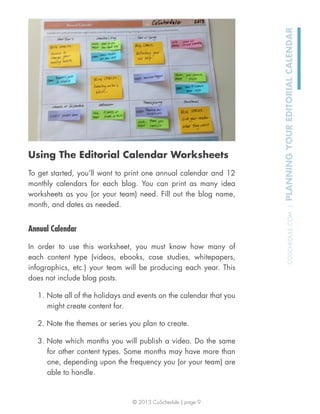
To get started, you’ll want to print one annual calendar and 12
monthly calendars for each blog. You can print as many idea
worksheets as you (or your team) need. Fill out the blog name,
month, and dates as needed.
Annual Calendar
In order to use this worksheet, you must know how many of
each content type (videos, ebooks, case studies, whitepapers,
infographics, etc.) your team will be producing each year. This
does not include blog posts.
1. Note all of the holidays and events on the calendar that you
might create content for.
2. Note the themes or series you plan to create.
3. Note which months you will publish a video. Do the same
for other content types. Some months may have more than
one, depending upon the frequency you (or your team) are
able to handle.
© 2013 CoSchedule | page 10
COSCHEDULE.COM|PLANNINGYOUREDITORIALCALENDAR
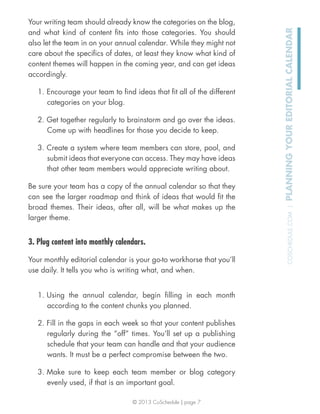
Write on the calendar directly, or use a sticky note in case you
need to adjust the schedule later.
Example: (image example)
» January:
New Year’s Resolutions series.
White paper on changing habits.
» March:
Our Big Industry Conference
Theme: Focus on conference topics and speakers.
© 2013 CoSchedule | page 11
COSCHEDULE.COM|PLANNINGYOUREDITORIALCALENDAR
Ideas Worksheet
The ideas worksheet is optional, but it gives you (or your team) a
place to store ideas and easily transfer them to your calendar.
1. Label the worksheet according to the blog the ideas are for,
and if the worksheet pertains to a specific theme or event
(optional). This will make it easier to track for the appropriate
monthly calendar later.
2. Write ideas on the worksheet directly, or use sticky notes to
make it easy to transfer to the monthly calendar.
3. Fill in the worksheet key if necessary, noting what any
colors you use mean. If your monthly calendar is using color
coding based on team member, the columns can be used for
categories (or content types), since the color will all be the
same on a team member’s worksheet.
Keep the worksheet handy for brainstorming sessions and content
planning meetings.
© 2013 CoSchedule | page 12
COSCHEDULE.COM|PLANNINGYOUREDITORIALCALENDAR
Monthly Calendar
The monthly calendar will get the heaviest use. How often you
intend to blog each week and what kind of coverage you’ll give
each of your categories will determine how you plan a month’s
worth of content.
1. Your monthly calendar should have the ideas already on it
that fit the annual calendar plan. If not, refer to the annual
calendar and make sure any events and themes for the
month are covered. Make note of specific content types.
2. Add specific headlines and content to the calendar from the
ideas worksheet. You might base your decisions on author
(e.g. Jim writes on Monday) or category (e.g. every category
used in a two-week cycle), and use color accordingly.
3. Fill out the key so that you (or your team) know what the
colors on the calendar mean.
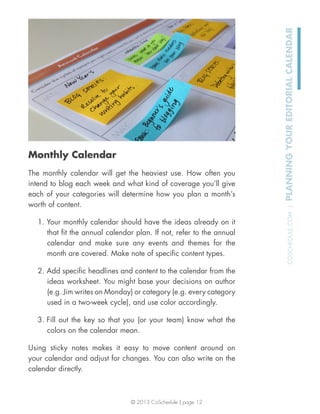
Using sticky notes makes it easy to move content around on
your calendar and adjust for changes. You can also write on the
calendar directly.
© 2013 CoSchedule | page 13
COSCHEDULE.COM|PLANNINGYOUREDITORIALCALENDAR
© 2013 CoSchedule | page 14
COSCHEDULE.COM|PLANNINGYOUREDITORIALCALENDAR
Todaymade
A web development and design company helping the world create and share great content.
701.595.0567
todaymade.com

MGC Editorial Planning

  • 1.
    © 2013 CoSchedule| page 1 COSCHEDULE.COM|PLANNINGYOUREDITORIALCALENDAR
  • 2.
    © 2013 CoSchedule| page 2 COSCHEDULE.COM|PLANNINGYOUREDITORIALCALENDAR © 2013, CoSchedule Coschedule.com PLANNING YOUR EDITORIAL CALENDAR
  • 3.
    © 2013 CoSchedule| page 3 COSCHEDULE.COM|PLANNINGYOUREDITORIALCALENDAR
  • 4.
    © 2013 CoSchedule| page 4 COSCHEDULE.COM|PLANNINGYOUREDITORIALCALENDAR CONTENTS Free Editorial Calendar Guide And Worksheets Putting The Calendar To Work With A Team Using The Editorial Calendar Worksheets Ideas Worksheet Monthly Calendar
  • 5.
    © 2013 CoSchedule| page 5 COSCHEDULE.COM|PLANNINGYOUREDITORIALCALENDAR FREE EDITORIAL CALENDAR GUIDE AND WORKSHEETS A paper editorial calendar can help you start the habit of using an editorial calendar to plan your content marketing. The process of using an editorial calendar is broken down into three key steps. 1. Start with an annual overview. Planning the upcoming calendar year is the ultimate bird’s-eye- view. By seeing the year’s content in broad chunks without worrying about the details, you can create and identify the overarching themes that your smaller components will fit into. You can also be sure you are staying on target with what you want your content to accomplish for you. Consider the cycles of content you might need to cover: » Advertising » Events » Holidays
  • 6.
    © 2013 CoSchedule| page 6 COSCHEDULE.COM|PLANNINGYOUREDITORIALCALENDAR » Product Launch Each of these cycles might contain a broad range of content. 1. On your annual calendar, mark down the holidays that are important to your audience and your business. Include planned product launches, events, and contests. These are specific dates you don’t want to miss. You may also want to plan chunks of content that fit your niche which are not associated with specific dates that can be moved around as needed, but ought to be covered during the year. These are your content themes. 2. Next, plan the kind of content you’ll create, such as blog posts, ebooks, social media campaigns, or videos. Determine which is the best type for each calendar item. These are your content types. 3. Finally, plan the duration of the content you want to run during each of these times. Some content might start well ahead of time, some might occur only on the day of. You will want to refer to this calendar periodically. For example, you will want to task the production of the video far in advance in order to have it ready when needed. If you only plan month to month, you will miss out when content overlaps or extends beyond a month. It is also easier to lose sight of what’s coming in a month or two if your focus is on the current month only. 2. Begin collecting ideas. Now that you know the broad content themes, and can also see the gaps in between, you’ll have a better idea of the specific kind of content you’ll need. Getting your team together on a regular basis for brainstorming, or encouraging them to come up with their own ideas and pooling them together using a system is necessary.
  • 7.
    © 2013 CoSchedule| page 7 COSCHEDULE.COM|PLANNINGYOUREDITORIALCALENDAR Your writing team should already know the categories on the blog, and what kind of content fits into those categories. You should also let the team in on your annual calendar. While they might not care about the specifics of dates, at least they know what kind of content themes will happen in the coming year, and can get ideas accordingly. 1. Encourage your team to find ideas that fit all of the different categories on your blog. 2. Get together regularly to brainstorm and go over the ideas. Come up with headlines for those you decide to keep. 3. Create a system where team members can store, pool, and submit ideas that everyone can access. They may have ideas that other team members would appreciate writing about. Be sure your team has a copy of the annual calendar so that they can see the larger roadmap and think of ideas that would fit the broad themes. Their ideas, after all, will be what makes up the larger theme. 3. Plug content into monthly calendars. Your monthly editorial calendar is your go-to workhorse that you’ll use daily. It tells you who is writing what, and when. 1. Using the annual calendar, begin filling in each month according to the content chunks you planned. 2. Fill in the gaps in each week so that your content publishes regularly during the “off” times. You’ll set up a publishing schedule that your team can handle and that your audience wants. It must be a perfect compromise between the two. 3. Make sure to keep each team member or blog category evenly used, if that is an important goal.
  • 8.
    © 2013 CoSchedule| page 8 COSCHEDULE.COM|PLANNINGYOUREDITORIALCALENDAR Putting The Calendar To Work With A Team If you’re a solo blogger, you’re ready to go. Your calendar is set up, and all you need to do is follow it. A team blog has a few more things to do to make the calendar work. 1. Decide if you want your team in on the the annual calendar overview. Maybe they don’t care, maybe they do. The reason to do it would be to get them thinking of ideas ahead of time, and to have a general sense of where the blog is going. Perhaps giving them a heads-up a month at a time will be enough. 2. Establish communication and collaboration routines. For example, you might want to email your writers their assignments two weeks ahead of the publishing date so they have time to write and get a photograph. Or, maybe you’ll need to give them three weeks. You know how your team works best. Your routine should emphasize their strengths.
  • 9.
    © 2013 CoSchedule| page 9 COSCHEDULE.COM|PLANNINGYOUREDITORIALCALENDAR Using The Editorial Calendar Worksheets To get started, you’ll want to print one annual calendar and 12 monthly calendars for each blog. You can print as many idea worksheets as you (or your team) need. Fill out the blog name, month, and dates as needed. Annual Calendar In order to use this worksheet, you must know how many of each content type (videos, ebooks, case studies, whitepapers, infographics, etc.) your team will be producing each year. This does not include blog posts. 1. Note all of the holidays and events on the calendar that you might create content for. 2. Note the themes or series you plan to create. 3. Note which months you will publish a video. Do the same for other content types. Some months may have more than one, depending upon the frequency you (or your team) are able to handle.
  • 10.
    © 2013 CoSchedule| page 10 COSCHEDULE.COM|PLANNINGYOUREDITORIALCALENDAR Write on the calendar directly, or use a sticky note in case you need to adjust the schedule later. Example: (image example) » January: New Year’s Resolutions series. White paper on changing habits. » March: Our Big Industry Conference Theme: Focus on conference topics and speakers.
  • 11.
    © 2013 CoSchedule| page 11 COSCHEDULE.COM|PLANNINGYOUREDITORIALCALENDAR Ideas Worksheet The ideas worksheet is optional, but it gives you (or your team) a place to store ideas and easily transfer them to your calendar. 1. Label the worksheet according to the blog the ideas are for, and if the worksheet pertains to a specific theme or event (optional). This will make it easier to track for the appropriate monthly calendar later. 2. Write ideas on the worksheet directly, or use sticky notes to make it easy to transfer to the monthly calendar. 3. Fill in the worksheet key if necessary, noting what any colors you use mean. If your monthly calendar is using color coding based on team member, the columns can be used for categories (or content types), since the color will all be the same on a team member’s worksheet. Keep the worksheet handy for brainstorming sessions and content planning meetings.
  • 12.
    © 2013 CoSchedule| page 12 COSCHEDULE.COM|PLANNINGYOUREDITORIALCALENDAR Monthly Calendar The monthly calendar will get the heaviest use. How often you intend to blog each week and what kind of coverage you’ll give each of your categories will determine how you plan a month’s worth of content. 1. Your monthly calendar should have the ideas already on it that fit the annual calendar plan. If not, refer to the annual calendar and make sure any events and themes for the month are covered. Make note of specific content types. 2. Add specific headlines and content to the calendar from the ideas worksheet. You might base your decisions on author (e.g. Jim writes on Monday) or category (e.g. every category used in a two-week cycle), and use color accordingly. 3. Fill out the key so that you (or your team) know what the colors on the calendar mean. Using sticky notes makes it easy to move content around on your calendar and adjust for changes. You can also write on the calendar directly.
  • 13.
    © 2013 CoSchedule| page 13 COSCHEDULE.COM|PLANNINGYOUREDITORIALCALENDAR
  • 14.
    © 2013 CoSchedule| page 14 COSCHEDULE.COM|PLANNINGYOUREDITORIALCALENDAR Todaymade A web development and design company helping the world create and share great content. 701.595.0567 todaymade.com