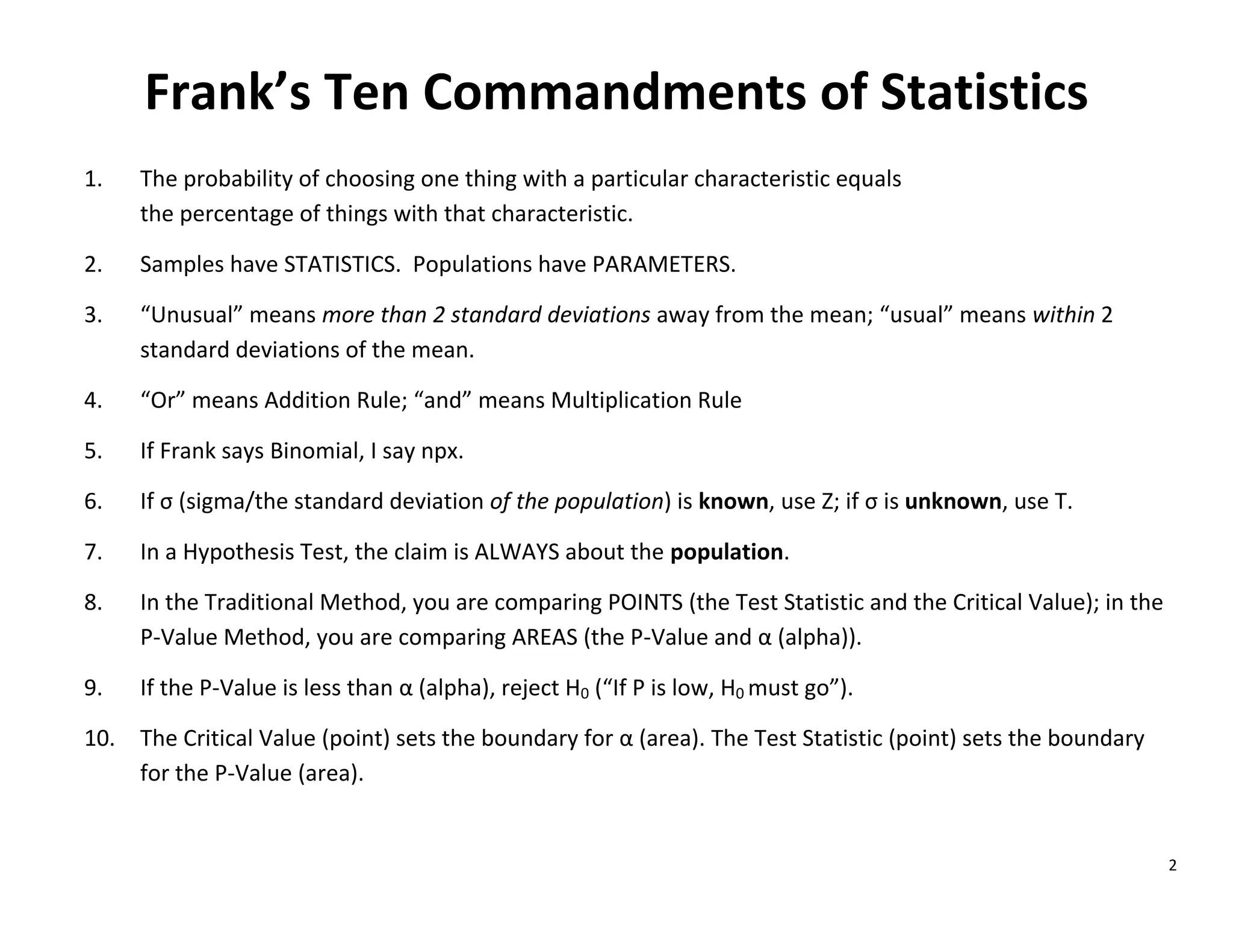
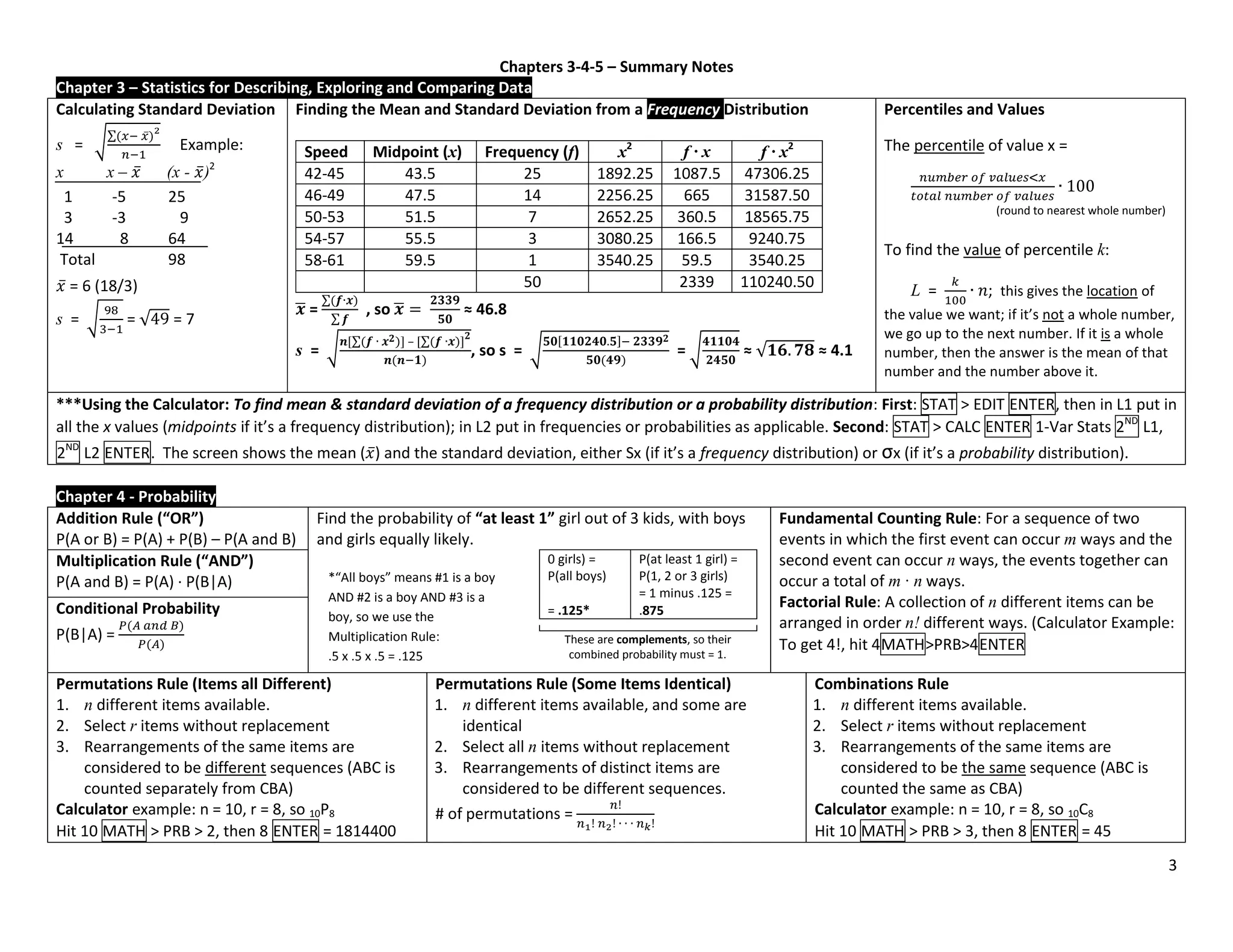
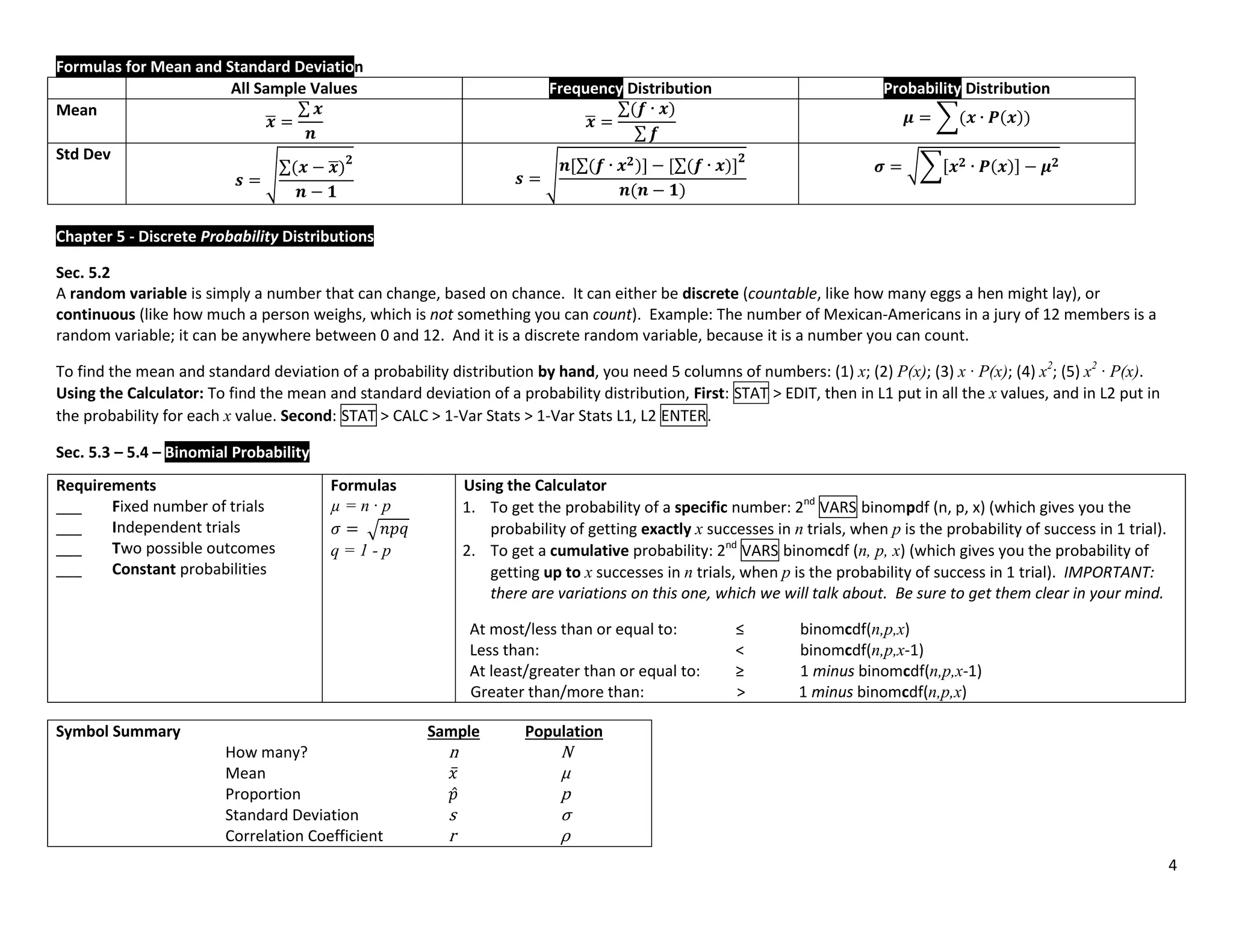
The document provides guidance on using statistical functions on the TI-83/84 calculator. It discusses how to input data into lists, calculate descriptive statistics, create graphs, and perform probability, confidence interval, and hypothesis tests. For descriptive statistics, the user selects STAT > CALC > 1-Var Stats and inputs the appropriate data list. Graphs are made by selecting 2nd STAT PLOT and choosing the desired plot type and lists. Probability, interval, and hypothesis tests are accessed through the TESTS and TESTS menus and require selecting the appropriate function and inputting parameters like sample sizes, means, and standard deviations.
![1
TI 83/84 Calculator – The Basics of Statistical Functions
What you
want to
do >>>
Put Data in Lists
Get Descriptive
Statistics
Create a histogram,
boxplot, scatterplot,
etc.
Find normal or
binomial probabilities
Confidence Intervals or
Hypothesis Tests
How to
start
STAT > EDIT > 1: EDIT
ENTER
[after putting data in a
list]
STAT > CALC >
1: 1-Var Stats ENTER
[after putting data in a
list]
2nd
STAT PLOT 1:Plot 1
ENTER
2nd
VARS STAT > TESTS
What to do
next
Clear numbers already
in a list: Arrow up to L1,
then hit CLEAR, ENTER.
Then just type the
numbers into the
appropriate list (L1, L2,
etc.)
The screen shows:
1-Var Stats
You type:
2nd L1 or
2nd L2, etc. ENTER
The calculator will tell
you ̅, s, 5-number
summary (min, Q1,
med, Q3, max), etc.
1. Select “On,” ENTER
2. Select the type of
chart you want,
ENTER
3. Make sure the
correct lists are
selected
4. ZOOM 9
The calculator will
display your chart
For normal probability,
scroll to either
2: normalcdf(,
then enter low value,
high value, mean,
standard deviation; or
3:invNorm(, then enter
area to left, mean,
standard deviation.
For binomial
probability, scroll to
either 0:binompdf(, or
A:binomcdf( , then
enter n,p,x.
Hypothesis Test:
Scroll to one of the
following:
1:Z-Test
2:T-Test
3:2-SampZTest
4:2-SampTTest
5:1-PropZTest
6:2-PropZTest
C:X2
-Test
D:2-SampFTest
E:LinRegTTest
F:ANOVA(
Confidence Interval:
Scroll to one of the
following:
7:ZInterval
8:TInterval
9:2-SampZInt
0:2-SampTInt
A:1-PropZInt
B:2-PropZIn
Other points: (1) To clear the screen, hit 2nd
, MODE, CLEAR
(2) To enter a negative number, use the negative sign at the bottom right, not the negative sign above the plus sign.
(3) To convert a decimal to a fraction: (a) type the decimal; (b) MATH > Frac ENTER](https://image.slidesharecdn.com/calculatorshortcuts1-240414135129-0b696f7a/75/Memorization-of-Various-Calculator-shortcuts-1-2048.jpg)
![5
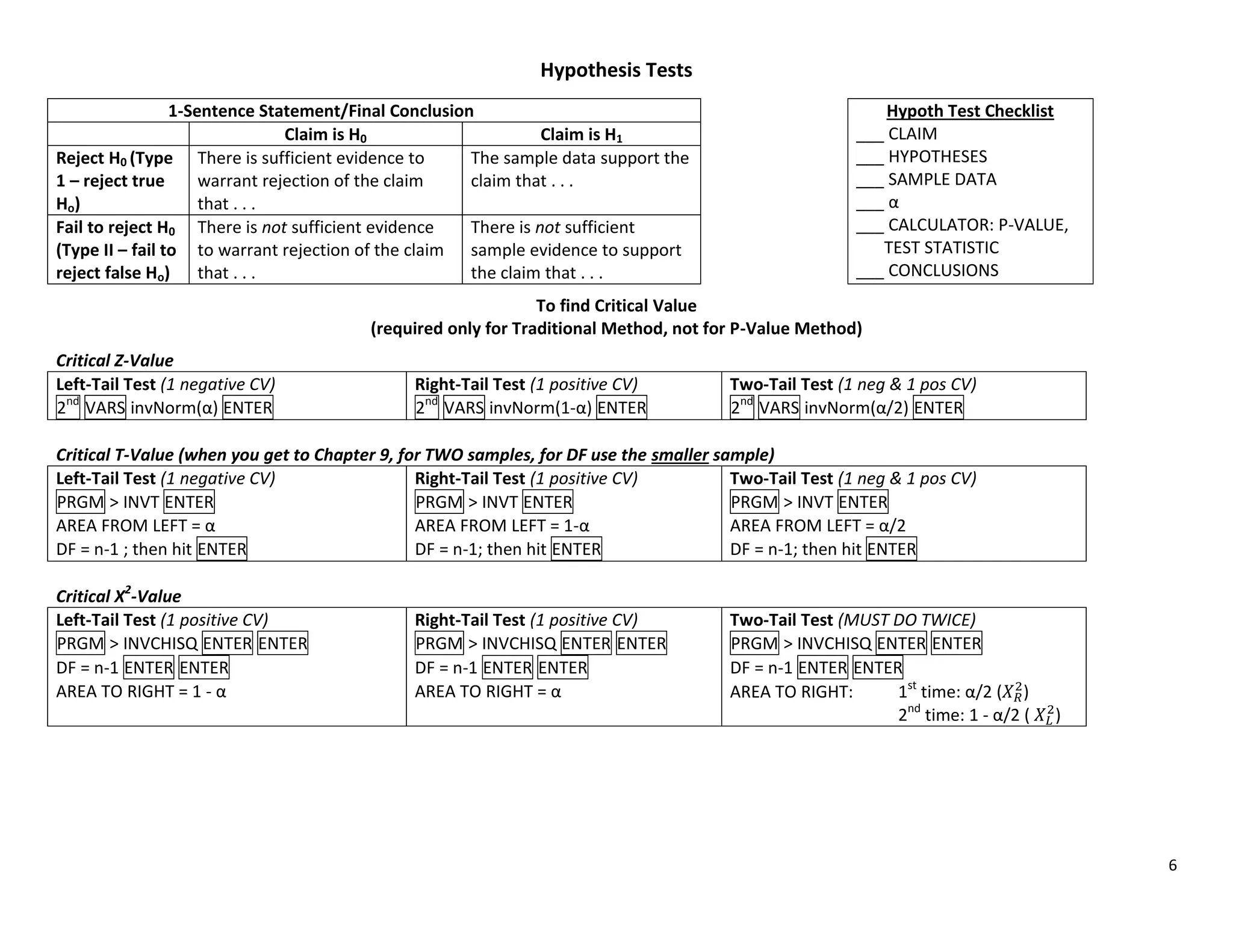
Chapters 6-7-8 – Summary Notes
Ch Topic Calculator Formulas, Tables, Etc.
6
Normal Probability Distributions
3 Kinds of problems:
1. You are given a point (value) and
asked to find the corresponding area
(probability)
1a. Central Limit Theorem. Just like #1,
except n > 1.
2. You are given an area (probability) and
asked to find the corresponding point
(value).
3. Normal as approximation to binomial
1. 2nd
VARS normalcdf (low, high, µ,σ)
1a. 2nd
VARS normalcdf (low, high, µ , √
⁄ )
2. 2nd
VARS invNorm (area to left, µ, σ)
3. Step 1: Using binomial formulas, find
mean and standard deviation.
Table A-2.
3. (cont’d – Normal as approximation to binomial) – Step 2:
If you are asked to find Then in calculator
P(at least x) normalcdf(x-.5,1E99,µ,σ)
P(more than x) normalcdf(x+.5,1E99,µ,σ)
P(x or fewer) normalcdf(-1E99,x+.5,µ,σ)
P(less than x) normalcdf(-1E99,x-.5,µ,σ)
7
Confidence Intervals
1. Proportion
̂ ̂
2. Mean (z or t?)
̅ ̅
3. Standard Deviation
√ < σ < √
1. STAT > TEST > 1PropZInt
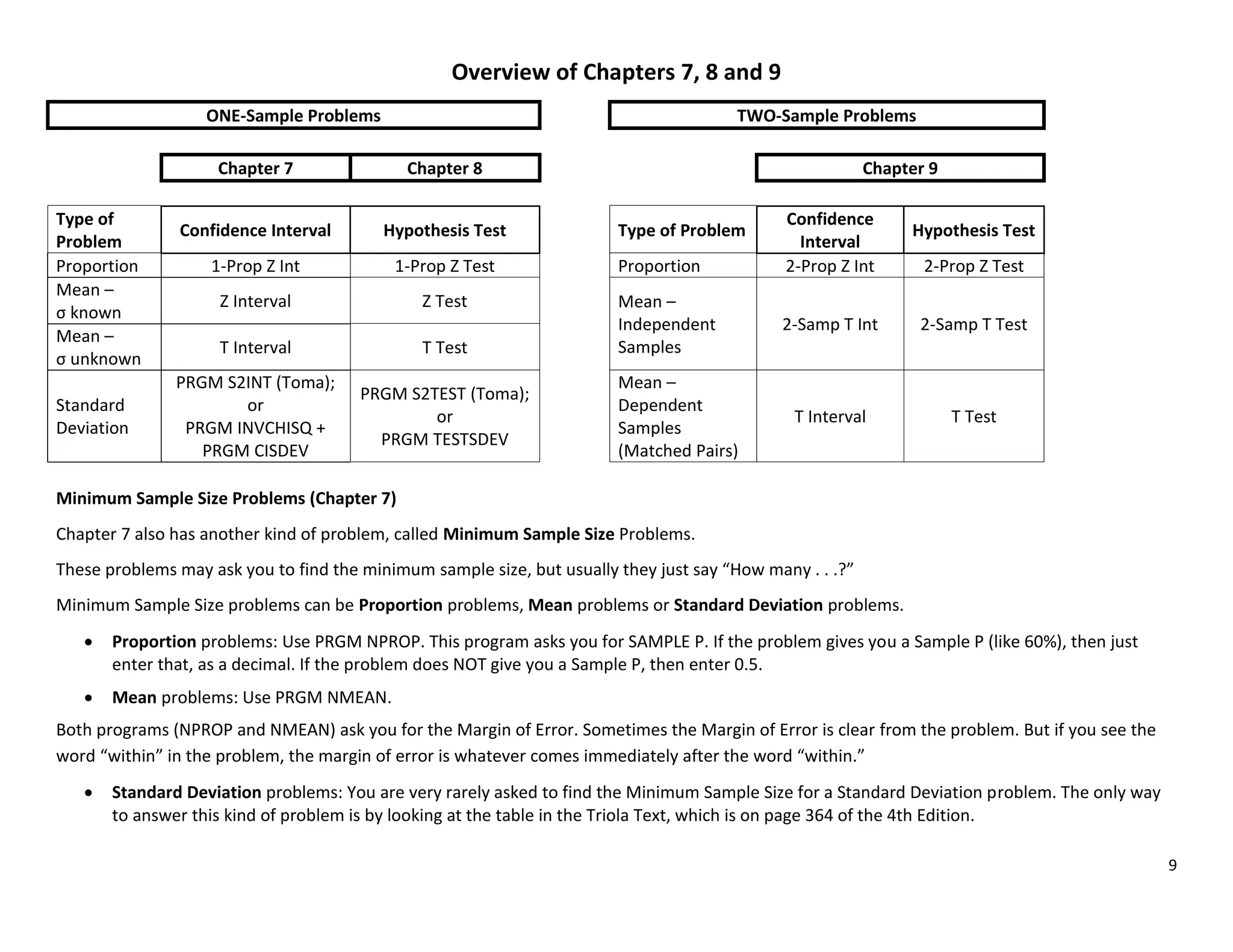
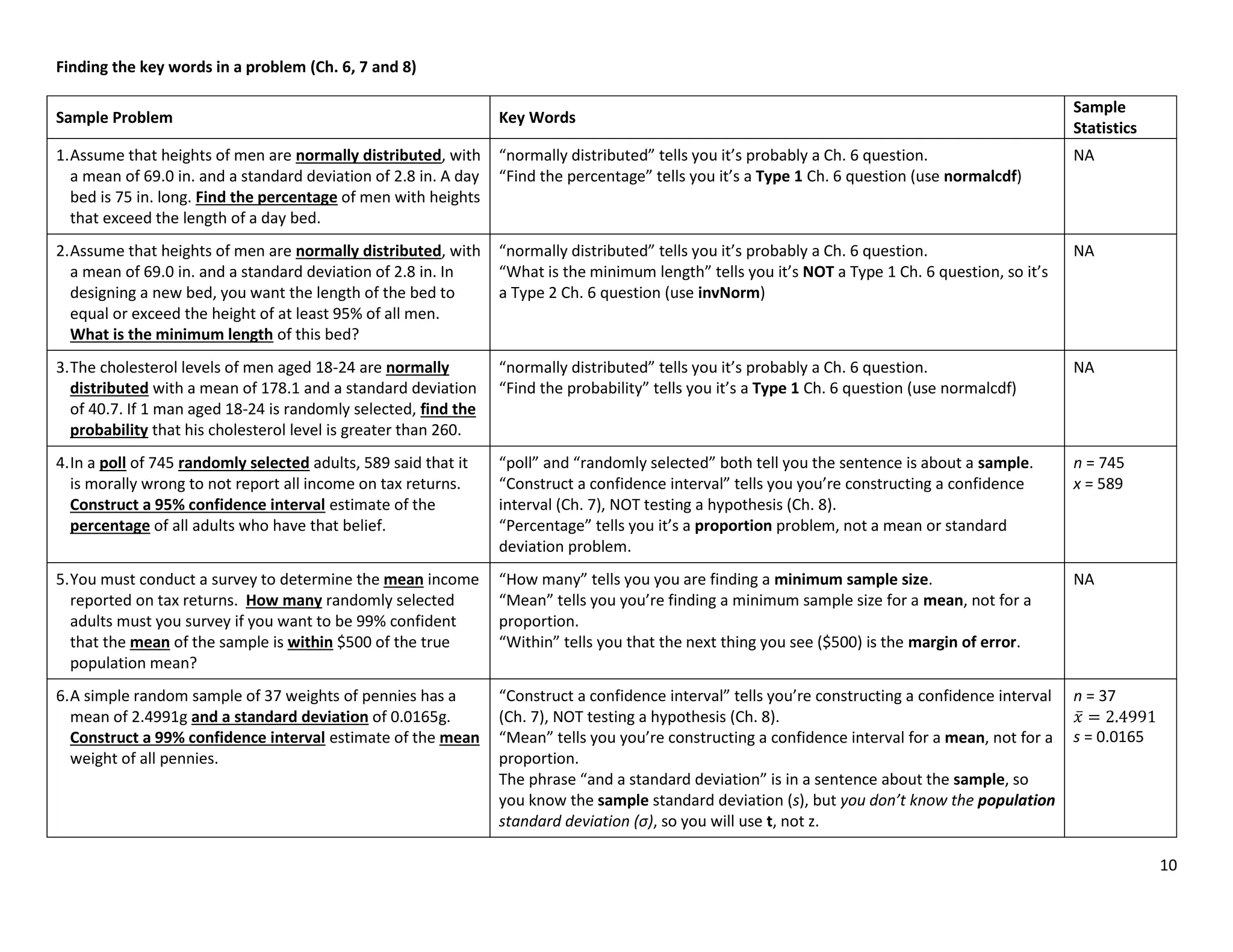
Minimum Sample Size: PRGM NPROP
2. STAT > TEST > ZInt OR STAT > TEST > TInt
(use Z if σ is known, T if σ is unknown)
Minimum Sample Size: PRGM NMEAN
3. PRGM >INVCHISQ (to find and )
PRGM > CISDEV (to find Conf. Interval.)
1. ̂ = sample proportion; E = zα/2 √ ̂ ̂⁄
Min. Sample Size ( ̂ unknown):
⁄
Min. Sample Size ( ̂ known):
⁄ ̂ ̂
2. ̅ = sample mean; E = zα/2
√
(σ known)
or E = tα/2
√
(σ unknown)
Min. Sample Size: n = [
⁄
]
3. Use Table A-4 to find and
8
Hypothesis Tests
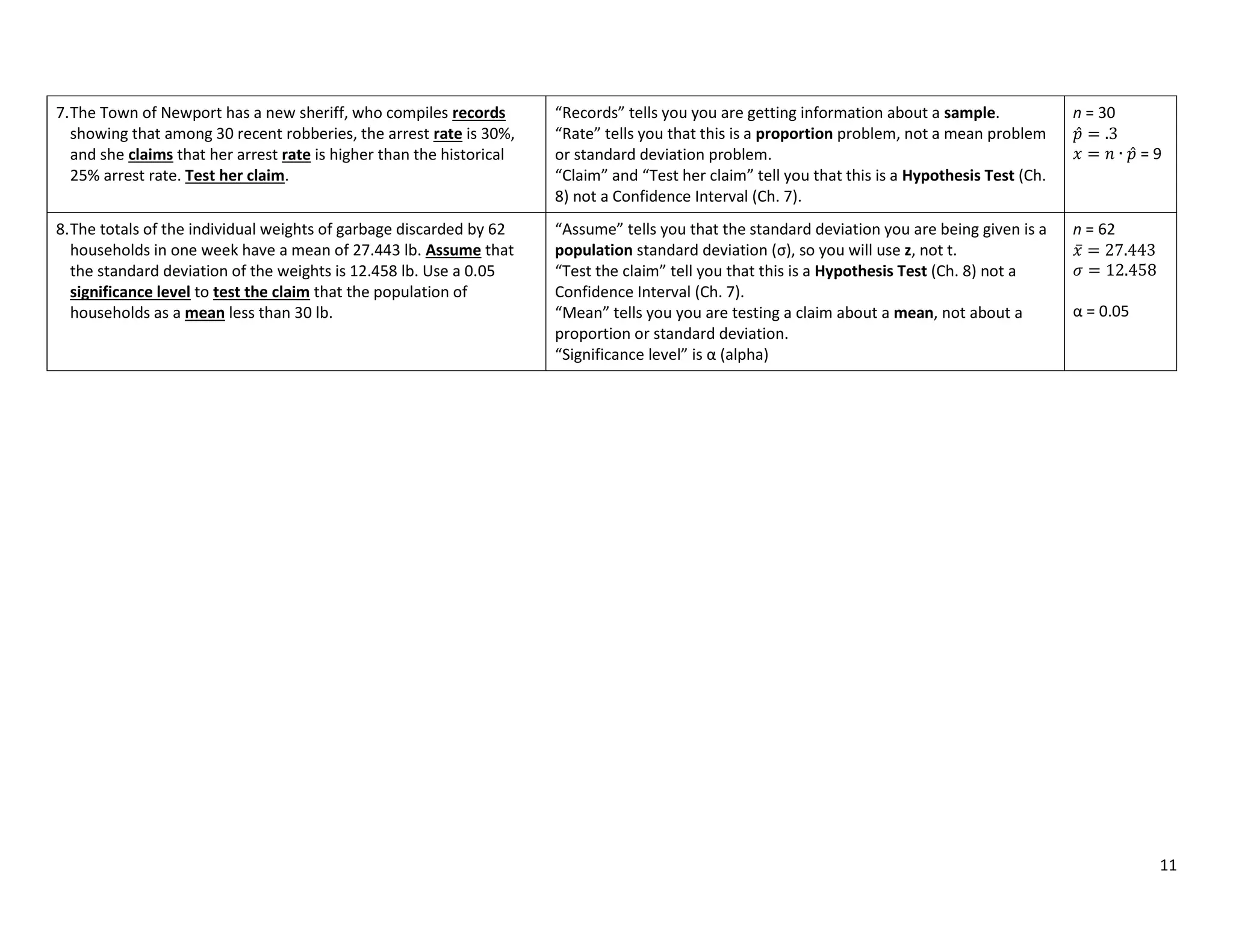
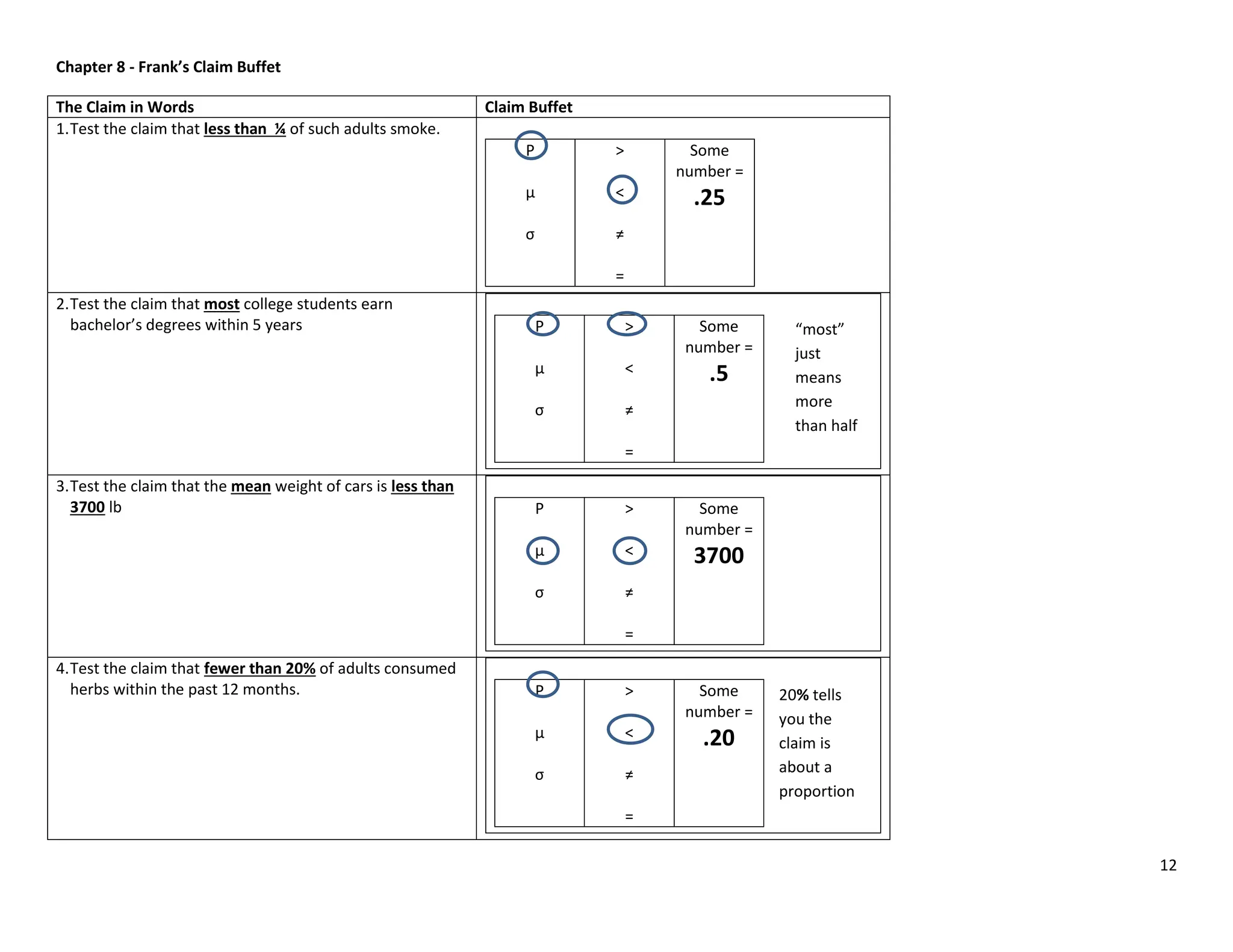
1. Proportion
2. Mean (z or t?)
3. Standard Deviation
1. STAT > TEST > 1PropZTest
2. STAT > TEST > ZTest OR TTest
3. PRGM > TESTSDEV
1. Test Statistic: z =
̂
√ ⁄
2. Test Statistic: z =
̅ ̅
√
⁄
OR t =
̅ ̅
√
⁄
3. Test Statistic: X2
=
If P-Value < α,
reject H0; if P-
Value > α fail
to reject H0.
See additional
sheet on 1-
sentence
statement and
finding Critical
Value.](https://image.slidesharecdn.com/calculatorshortcuts1-240414135129-0b696f7a/75/Memorization-of-Various-Calculator-shortcuts-5-2048.jpg)
![7
Chapters 9-10-11 – Summary Notes
Chapter 9 – Inferences from Two Samples (Be sure to use Hypothesis Test Checklist)
Proportions (9-2) Means (9-3) (independent samples) Matched Pairs (9-4) (dependent samples)
Hypothesis Test
(Be sure to use Hypoth
Test checklist)
Calculator: 2-PropZTest
Formulas:
̂ ̂
√ ̅ ̅⁄ ̅ ̅⁄
̅ ⁄
H0: p1 = p2; H1: p1 < or > or ≠ p2
Calculator: 2-SampleTTest
̅ ̅
√ ⁄ ⁄
H0: µ1 = µ2; H1: µ1 < or > or ≠ µ2
Calculator: (1) Enter data in L1 and L2, L3
equals L1 – L2; (2) TTest (which gives you all the
values you need to plug into the formula)
̅
√
⁄
H0: µd = 0; H1: µd < or > or ≠ 0
Confidence Interval Calculator: 2-PropZInt. Calculator: 2-SampleTInt Calculator: TInterval
No formulas. If interval contains 0, then fail to reject. If for a 1-tail Hypo. Test is .05, the CL for Conf. Int. is 0.9 (1 - 2).
Chapter 10 – Correlation and Regression (don’t use formulas, just calculator; the important thing is interpreting results.)
Question to be answered Calculator and Interpretation (Anderson: show value of t but not formula)
Hypothesis Test: Is there a linear
correlation between two variables,
x and y? (10-2)
r is the sample correlation
coefficient. It can be between -1
and 1.
Calculator: Enter data in L1 and L2, then STAT > Test > LinRegTTest. (Reg EQ > VARS, Y-VARS, Function, Y1). P-Value tells
you if there is a linear correlation. The test statistic is r, which measures the strength of the linear correlation.
Interpretation: x is the explanatory variable; y is the response variable. H0: there no linear correlation; H1: there is a linear
correlation. So, if P-Value < , you reject H0, so there IS a linear correlation; if P-Value > , you fail to reject H0, so there is
NO linear correlation.
Calculator: To create a scatterplot: Enter data in L1 and L2, then LinRegTTest; then 2nd
Y = Plot 1 On, select correct type
of plot. Then Zoom 9 (ZoomStat). To delete regression line from graph, Y= , then clear equation from Y1.
When you have 2 variables x and y,
how do you predict y when you are
given a particular x-value? (10-3)
Two possible answers:
(1) If there is a significant linear correlation, then you need to determine the Regression Equation (y = a + bx; LinRegTTest
gives you a and b), then just plug in the given x-value. Or the easy way to find y for any particular value of x:
Calculator: VARS Y-Vars 1:Function Enter Enter Input x-value in parentheses after Y1
(2) If there is no significant linear correlation, then the best predicted value for y = ̅. Calculator: VARS, 5, 5, ENTER.
When you have 2 variables x and y,
how do you predict an interval
estimate for y when you are given
a particular x-value? (10-4)
1. PROGRAM, INVT ENTER Area from left is 1-/2, DF = n-2. This gives you t Critical Value.
2. PROGRAM, PREDINT ENTER Input t Critical Value from Step 1, then input X value given in the problem. Hit Enter twice
to get the Interval.
How much of the variation in y is
explained by the variation in x?
(10-4)
The percentage of variation in y that is explained by variation in x is r2
, the coefficient of determination.
Calculator: to find r2
, enter data in L1 and L2, then LinRegTTest. It will give you r2
. 1 sentence conclusion: “[r2
]% of the
variation in [y-variable in words] can be explained by the variation in [x-variable in words].”
Total Variation is ∑ ̅ . Explained Variation is Total Variation times r2
. Unexplained Variation is Total Variation
minus Explained Variation. To find them all, put x values in L1; put y values in L2; LinRegTTest; then PRGM VARATION.
µ1 - µ2
always = 0
µd always = 0
p1 – p2
always = 0.](https://image.slidesharecdn.com/calculatorshortcuts1-240414135129-0b696f7a/75/Memorization-of-Various-Calculator-shortcuts-7-2048.jpg)
![8
Chapter 10 - continued
Finding Total Deviation,
Explained Deviation, and
Unexplained Deviation,
for a point. (10-4)
Variation and Deviation are similar, but different. Variation relates to ALL the points in a set of correlated data. Deviation
relates to ONE specific point in a set of correlated data. Total Deviation for a specific point = ̅ (the actual y-
coordinate of the point minus the mean of all the y values). Explained Deviation for the point = ̂ ̅ (the predicted value
of y when the x-coordinate of that point is plugged into the regression equation, minus the mean of all the y values).
Unexplained Deviation for the point = ̂ (the actual y-coordinate of the point minus the predicted value of y when the
x-coordinate of that point is plugged into the regression equation).
Chapter 11 – Chi-Square (X2
) Problems (Hypothesis Tests, use checklist)
Claim to be tested Calculator Formulas, etc.
The claim that an observed
proportion (O) < or = or > an
expected proportion (E). This
is called “goodness of fit.”
(11-2) *3 SAMPLES WITH
PROPORTION*
Enter O data in L1 and E data in L2.
PROGRAM BESTFIT ENTER
Enter number of categories (k),
then Enter,
Gives you Chi-Square (X2
) and P-
Value
Two types of claims: equal proportions or unequal proportions:
Equal: H0: p1=p2=p3; H1: at least one is not equal
Unequal: H0: p1=.45, p2 = .35, p3 = .20; H1: at least one is not equal to the claimed
proportion
Test Statistic is X2
(Chi-Square)
2
= ∑
Given a table of data with
rows and columns, the claim
that the row variable is
INDEPENDENT of the column
variable. This is called
“contingency tables.” (11-3)
2nd
MATRX EDIT, select [A], make
sure number of rows and number
of columns are correct, then enter
the values in the matrix.
STAT Tests, X2
– Test; Observed is
[A] and Expected is [B], hit Calc; it
gives you X2
and P-Value.
Example hypotheses: H0: pedestrian fatalities are independent of intoxication of driver ;
H1: pedestrian fatalities depend
on intoxication of driver.
2
= ∑
To find X2
CV, df = (r-1)(c-1).
Chapter 11 – Analysis of Variance (ANOVA) (Hypothesis Tests, use checklist)
Claim to be tested Calculator Formulas, etc. (must show formulas in both symbolic form and also with
given data plugged in, but can get the answer from calculator)
The claim that 3 or more
population means are all
equal (H0), or are not all equal
(H1). This is called “Analysis
of Variance.” (11-4) * 3
SAMPLES WITH MEAN*
Enter data in L1, L2, etc.
STAT Tests, ANOVA (L1, L2, L3). Gives you F
and PV, but also gives you Factor: df, SS and
MS, and Error: df, SS and MS, which you need
to plug into the formula.
The test statistic is F. H0: 1 = 2 = 3; H1: at least one mean is not equal.
F = SS Factor
df = MS Factor
SS Error MS Error
df
MS(total)=SS(total)/(N-1). N=total number of values in all samples combined
E (the expected value) for any cell = (row total x
column total) / grand total, OR get all E-values on
calculator with 2nd
MATRX Edit [B] Enter
SS stands for “Sum of Squares”
MS stands for “Mean Squares”
Hypothesis Test is always right-tail
To find P-Value from Test Stat: X2
cdf(TS,1E99,k-1)](https://image.slidesharecdn.com/calculatorshortcuts1-240414135129-0b696f7a/75/Memorization-of-Various-Calculator-shortcuts-8-2048.jpg)


![[DSC Europe 25] Jim Sterne - Adopting Generative AI Capabilities Into the Ent...](https://cdn.slidesharecdn.com/ss_thumbnails/sxhpofuorcagxsaulkmt-3-251204082258-7e66bc48-thumbnail.jpg?width=640&height=640&fit=bounds)

![[DSC Europe 25] Vid Stimac - Policy Parsimony: Between Oversimplifying and Ov...](https://cdn.slidesharecdn.com/ss_thumbnails/eqlepagzqp2rhg3gbluh-dsc-stimac-251120-251205090438-059e7f54-thumbnail.jpg?width=640&height=640&fit=bounds)

![[DSC Europe 25] Boris Perkovic - Lost in performance.pptx](https://cdn.slidesharecdn.com/ss_thumbnails/uq5hrp7vsuahqkxzifux-1-251204082258-fd2ee09d-thumbnail.jpg?width=640&height=640&fit=bounds)
![[DSC Europe 25] Max Talanov - Non digital NNs.pptx](https://cdn.slidesharecdn.com/ss_thumbnails/wif8tr3gtua74qvtopke-non-digital-nns-251205090438-26b0eea6-thumbnail.jpg?width=640&height=640&fit=bounds)


![[DSC Europe 25] Marija Vlajkovic & Andrea Radonjanin - Integration of AI tool...](https://cdn.slidesharecdn.com/ss_thumbnails/qf1jrglttoc3bm8s3aop-final-integration-of-ai-tools-251208151905-394f3a6a-thumbnail.jpg?width=640&height=640&fit=bounds)

![[DSC Europe 25] Dragan Vucic - Building the Learning Organization - How AI Tr...](https://cdn.slidesharecdn.com/ss_thumbnails/8brigo2sbu6qur6gxrra-7-251205085715-6ae07d24-thumbnail.jpg?width=640&height=640&fit=bounds)
