

Meetup: www.meetup.com/aws-vn/
FB: www.facebook.com/groups/amazonwebservicevietnam
Join Slack: https://aws-vn.herokuapp.com/
AWS ELB
Deep dive & Best practices
November 4, 2016
Thuan Duong-Ba
Lecturer, Hanoi University of Science and Technology
Former SDE @ AWS (SQS/SNS; ELB; Lookout-anti DDoS)
Meetup Agenda
• Introduction
• ELB Overview
• Application Load Balancer
• Demo
• Q&A
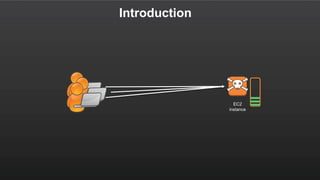
Introduction
EC2
instance
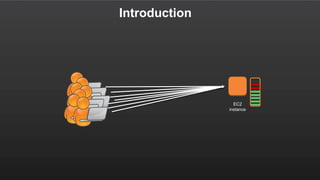
Introduction
EC2
instance
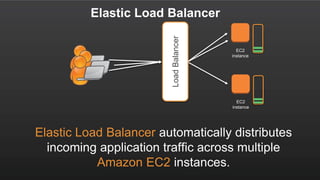
Elastic Load Balancer
EC2
instance
EC2
instance
Elastic Load
Balancer
Elastic Load Balancer automatically distributes
incoming application traffic across multiple
Amazon EC2 instances.
LoadBalancer
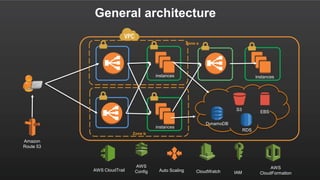
General architecture
Amazon
Route 53
instances instances
Auto Scaling
S3
instances
EBS
DynamoDB
RDS
AWS CloudTrail
AWS
Config CloudWatch IAM
AWS
CloudFormation
Zone a
Zone b
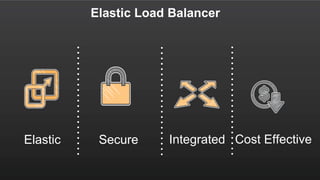
Elastic Load Balancer
SecureElastic Integrated Cost Effective
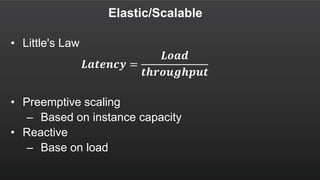
Elastic/Scalable
• Little's Law
𝑳𝒂𝒕𝒆𝒏𝒄𝒚 =
𝑳𝒐𝒂𝒅
𝒕𝒉𝒓𝒐𝒖𝒈𝒉𝒑𝒖𝒕
• Preemptive scaling
– Based on instance capacity
• Reactive
– Base on load
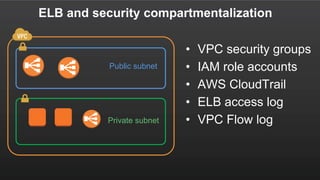
ELB and security compartmentalization
Public subnet
Private subnet
• VPC security groups
• IAM role accounts
• AWS CloudTrail
• ELB access log
• VPC Flow log
AWS Services Integration
• IAM
• CloudWatch
• CloudTrail
• AutoScaling
• S3
• ECS
• …
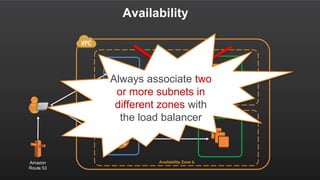
Availability
Availability Zone a
Availability Zone bAmazon
Route 53
Always associate two
or more subnets in
different zones with
the load balancer
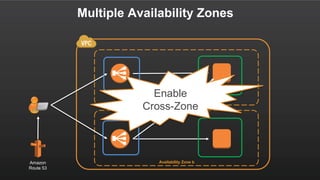
Multiple Availability Zones
Availability Zone a
Availability Zone bAmazon
Route 53
Enable
Cross-Zone
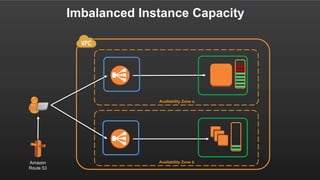
Imbalanced Instance Capacity
Availability Zone a
Availability Zone bAmazon
Route 53
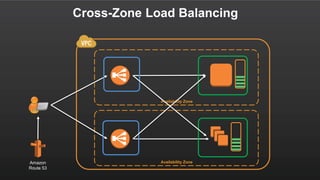
Cross-Zone Load Balancing
Availability Zone
Availability ZoneAmazon
Route 53
SSL Offloading
• Support for SSL (CLB) and HTTPs (CLB and ALB)
• Support for latest ciphers and protocols including
Elliptical Curve Ciphers and Perfect Forward
Secrecy.
• Ability to fully customize ciphers and protocols to be
used by each load balancer.
• SSL Negotiation Suites provided to remove
complexity of selecting ciphers and protocols.
DNS Optimization
• Each load balancer domain may contains
multiple records.
• Round robin used to balance traffic between
Availability Zones.
• DNS records will to change over time; never
target IP addresses directly.
• After being removed from DNS, IP addresses are
drained and quarantined for up to 7 days.
Application Load Balancer
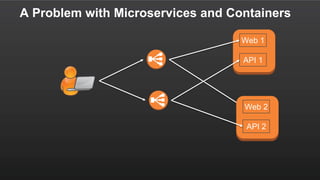
A Problem with Microservices and Containers
Web 1
API 1
Web 2
API 2
Classic LB limitation: Containerized Support
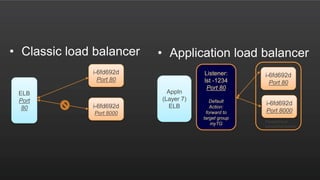
• Limits of Classic load balancer:
– 1:1 mapping of the listener port to instance port
Application
– Manage the ports each application uses
– Reduced cluster efficiency as only one task can be
placed per EC2 instance
• Containerized applications sends traffic to distinct ports
on a server
• Allows customers to run multiple copies of an application
on a single instance
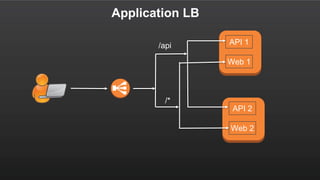
Application LB
• Platform will power all future Layer 7 features
• 2 new key concepts:
– Content-based routing
– Target groups.
• Features supported at launch
– Path-based routing
– Websockets
– HTTP/2
• Integration with other AWS Services- Auto Scaling, CloudFormation,
Amazon EC2 Container Service (ECS), AWS Certificate Manager, AWS
CodeDeploy, AWS Config, AWS Elastic Beanstalk and Amazon Identity and
Access Management (IAM)
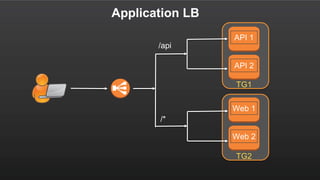
TG2
Application LB
API 1
API 2
Web 1
Web 2
TG1
/api
/*
API 1
Web 1
API 2
Web 2
Application LB
/api
/*
Application Load Balancer
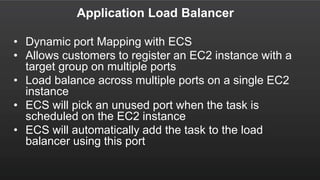
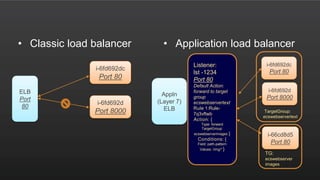
• Dynamic port Mapping with ECS
• Allows customers to register an EC2 instance with a
target group on multiple ports
• Load balance across multiple ports on a single EC2
instance
• ECS will pick an unused port when the task is
scheduled on the EC2 instance
• ECS will automatically add the task to the load
balancer using this port
ELB
Port
80
i-6fd692d
Port 80
i-6fd692d
Port 8000
Appln
(Layer 7)
ELB
Listener:
lst -1234
Port 80
Default
Action:
forward to
target group
myTG
i-6fd692d
Port 80
i-6fd692d
Port 8000
TargetGroup:
ecswebservertext
• Classic load balancer • Application load balancer
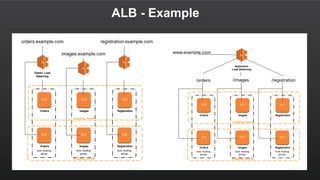
ALB - Example
ALB - Resources
• LoadBalancers – Top level resource that model the load balancer (Only resource in
“Classic” ELB)
• Listeners – Have LB Port and Protocol as well as other configurations for the LB side of
the connection
• Target Groups – A collection of targets such as EC2 instance. Have instance port,
protocol and configurations for the instance side of the connection
• Targets – Any resource or endpoint that load balancer can send traffic to
• Rule – A rule is made up of conditions and actions for routing requests. The actions are
taken when the conditions on the rule are matched. Currently, ALB only supports condition
of path and action of forward
• Classic load balancer • Application load balancer
ELB
Port
80
i-6fd692dc
Port 80
i-6fd692d
Port 8000
Appln
(Layer 7)
ELB
Listener:
lst -1234
Port 80
Default Action:
forward to target
group
ecswebservertext
Rule 1:Rule-
7q3vftwb
Action: {
Type: forward
TargetGroup:
ecswebserverimages }
Conditions: {
Field: path-pattern
Values: /img/* }
i-6fd692dc
Port 80
i-6fd692d
Port 8000
i-66cd8d5
Port 80
TargetGroup:
ecswebservertext
TG:
ecswebserver
images
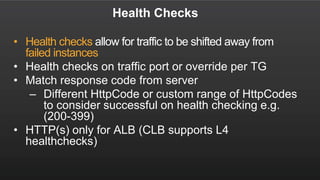
Health Checks
• Health checks allow for traffic to be shifted away from
failed instances
• Health checks on traffic port or override per TG
• Match response code from server
– Different HttpCode or custom range of HttpCodes
to consider successful on health checking e.g.
(200-399)
• HTTP(s) only for ALB (CLB supports L4
healthchecks)
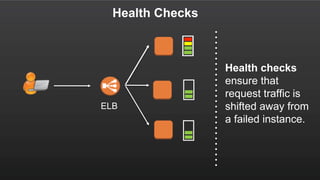
Health Checks
ELB
Health checks
ensure that
request traffic is
shifted away from
a failed instance.
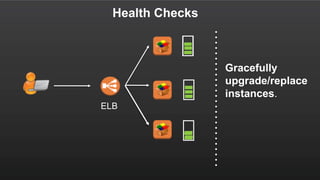
Health Checks
ELB
Gracefully
upgrade/replace
instances.
Idle Timeouts
• Idle timeouts allow for connections to be closed
by the load balancer when no longer in use.
• Length of time that an idle connection should be
kept open.
• For both client and back-end connections.
• Defaults to 60 seconds but can be set between 1
and 3,600 seconds.
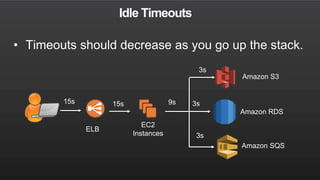
Idle Timeouts
15s
3s
3s
ELB
15s
EC2
Instances
Amazon S3
Amazon RDS
Amazon SQS
3s
9s
• Timeouts should decrease as you go up the stack.
Access Log
• Provide detailed information on each request processed
by the load balancer.
• Includes request time, client IP address, latencies,
request path, server responses, negotiated cipher.
• Delivered to your Amazon S3 bucket every 5 minutes.
• Access log files now have the .gz extension
Access Log
• S3
– bucket[/prefix]/AWSLogs/aws-account-
id/elasticloadbalancing/region/yyyy/mm/dd/aws-account-
id_elasticloadbalancing_region_load-balancer-id_end-time_ip-
address_random-string.log.gz
– ELB put files into S3 bucket(s) you own.
• Format:
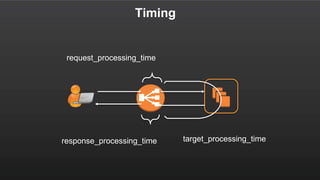
– type timestamp elb client:port target:port
request_processing_time target_processing_time
response_processing_time elb_status_code target_status_code
received_bytes sent_bytes "request" "user_agent" ssl_cipher
ssl_protocol target_group_arn
Timing
response_processing_time
request_processing_time
target_processing_time
CloudWatch Metrics
• CloudWatch metrics provided for each load
balancer and target group.
• Provide detailed insight into the health of
the load balancer and application stack.
• CloudWatch alarms can be configured to
notify or take action should any metric go
outside of the acceptable range.
• All metrics provided at the 1-minute
granularity.
CW Metric: HealthyHostCount
• The count of the number of healthy
instances/targets in each Availability
Zone/LoadBalancer/TargetGroup.
• Most common cause of unhealthy hosts are
health check exceeding the allocated timeout.
• Test by making repeated requests to the
back-end instance from another EC2
instance.
• View at the zonal dimension.
TargetResponseTime (Latency)
• Measures the time elapsed in seconds after the
request leaves the load balancer until the
response is received.
• Test by sending requests to the back-end
instance from another instance.
• Using min, average and max CloudWatch stats
provide upper and lower bounds for latency.
• Debug individual requests using Access Logs.
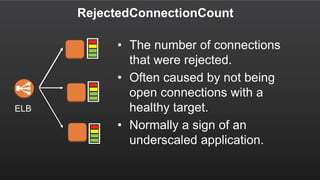
RejectedConnectionCount
• The number of connections
that were rejected.
• Often caused by not being
open connections with a
healthy target.
• Normally a sign of an
underscaled application.
ELB
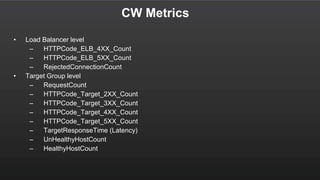
CW Metrics
• Load Balancer level
– HTTPCode_ELB_4XX_Count
– HTTPCode_ELB_5XX_Count
– RejectedConnectionCount
• Target Group level
– RequestCount
– HTTPCode_Target_2XX_Count
– HTTPCode_Target_3XX_Count
– HTTPCode_Target_4XX_Count
– HTTPCode_Target_5XX_Count
– TargetResponseTime (Latency)
– UnHealthyHostCount
– HealthyHostCount
CloudWatch and AutoScaling
• All load balancer metrics can be used for
AutoScaling.
• Allow you to scale dynamically based on
the load balancers view of the application.
• Important to consider all metrics when
using AutoScaling, may not be aware of
resource contention on another metric.
• You may be at peak multiple times a day
Websockets Native Support
• Allows a server to exchange real-time messages
with end-users without end users having to poll the
server for an update
• Provides bi-directional communication channel
between a client and a server with a long-running
TCP connection
• Allows customers to deliver real-time applications
over Websockets and Secure WebSockets
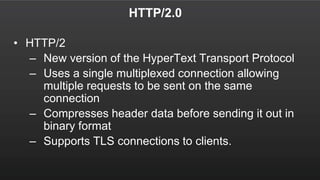
HTTP/2.0
• HTTP/2
– New version of the HyperText Transport Protocol
– Uses a single multiplexed connection allowing
multiple requests to be sent on the same
connection
– Compresses header data before sending it out in
binary format
– Supports TLS connections to clients.
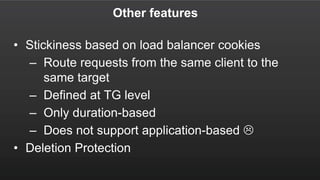
Other features
• Stickiness based on load balancer cookies
– Route requests from the same client to the
same target
– Defined at TG level
– Only duration-based
– Does not support application-based 
• Deletion Protection
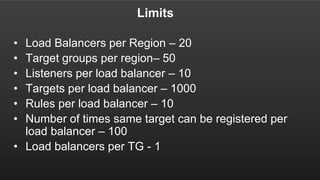
Limits
• Load Balancers per Region – 20
• Target groups per region– 50
• Listeners per load balancer – 10
• Targets per load balancer – 1000
• Rules per load balancer – 10
• Number of times same target can be registered per
load balancer – 100
• Load balancers per TG - 1
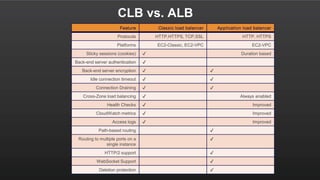
CLB vs. ALB
Feature Classic load balancer Application load balancer
Protocols HTTP,HTTPS, TCP,SSL HTTP, HTTPS
Platforms EC2-Classic, EC2-VPC EC2-VPC
Sticky sessions (cookies) ✔ Duration based
Back-end server authentication ✔
Back-end server encryption ✔ ✔
Idle connection timeout ✔ ✔
Connection Draining ✔ ✔
Cross-Zone load balancing ✔ Always enabled
Health Checks ✔ Improved
CloudWatch metrics ✔ Improved
Access logs ✔ Improved
Path-based routing ✔
Routing to multiple ports on a
single instance
✔
HTTP/2 support ✔
WebSocket Support ✔
Deletion protection ✔
Meetup: www.meetup.com/aws-vn/
FB: www.facebook.com/groups/amazonwebservicevietnam
Join Slack: https://aws-vn.herokuapp.com/

Meetup #4: AWS ELB Deep dive & Best practices

  • 1.
  • 2.
    AWS ELB Deep dive& Best practices November 4, 2016 Thuan Duong-Ba Lecturer, Hanoi University of Science and Technology Former SDE @ AWS (SQS/SNS; ELB; Lookout-anti DDoS)
  • 3.
    Meetup Agenda • Introduction •ELB Overview • Application Load Balancer • Demo • Q&A
  • 4.
  • 5.
  • 6.
    Elastic Load Balancer EC2 instance EC2 instance ElasticLoad Balancer Elastic Load Balancer automatically distributes incoming application traffic across multiple Amazon EC2 instances. LoadBalancer
  • 7.
    General architecture Amazon Route 53 instancesinstances Auto Scaling S3 instances EBS DynamoDB RDS AWS CloudTrail AWS Config CloudWatch IAM AWS CloudFormation Zone a Zone b
  • 8.
    Elastic Load Balancer SecureElasticIntegrated Cost Effective
  • 9.
    Elastic/Scalable • Little's Law 𝑳𝒂𝒕𝒆𝒏𝒄𝒚= 𝑳𝒐𝒂𝒅 𝒕𝒉𝒓𝒐𝒖𝒈𝒉𝒑𝒖𝒕 • Preemptive scaling – Based on instance capacity • Reactive – Base on load
  • 10.
    ELB and securitycompartmentalization Public subnet Private subnet • VPC security groups • IAM role accounts • AWS CloudTrail • ELB access log • VPC Flow log
  • 11.
    AWS Services Integration •IAM • CloudWatch • CloudTrail • AutoScaling • S3 • ECS • …
  • 12.
    Availability Availability Zone a AvailabilityZone bAmazon Route 53 Always associate two or more subnets in different zones with the load balancer
  • 13.
    Multiple Availability Zones AvailabilityZone a Availability Zone bAmazon Route 53 Enable Cross-Zone
  • 14.
    Imbalanced Instance Capacity AvailabilityZone a Availability Zone bAmazon Route 53
  • 15.
    Cross-Zone Load Balancing AvailabilityZone Availability ZoneAmazon Route 53
  • 16.
    SSL Offloading • Supportfor SSL (CLB) and HTTPs (CLB and ALB) • Support for latest ciphers and protocols including Elliptical Curve Ciphers and Perfect Forward Secrecy. • Ability to fully customize ciphers and protocols to be used by each load balancer. • SSL Negotiation Suites provided to remove complexity of selecting ciphers and protocols.
  • 17.
    DNS Optimization • Eachload balancer domain may contains multiple records. • Round robin used to balance traffic between Availability Zones. • DNS records will to change over time; never target IP addresses directly. • After being removed from DNS, IP addresses are drained and quarantined for up to 7 days.
  • 18.
  • 19.
    A Problem withMicroservices and Containers Web 1 API 1 Web 2 API 2
  • 20.
    Classic LB limitation:Containerized Support • Limits of Classic load balancer: – 1:1 mapping of the listener port to instance port Application – Manage the ports each application uses – Reduced cluster efficiency as only one task can be placed per EC2 instance • Containerized applications sends traffic to distinct ports on a server • Allows customers to run multiple copies of an application on a single instance
  • 21.
    Application LB • Platformwill power all future Layer 7 features • 2 new key concepts: – Content-based routing – Target groups. • Features supported at launch – Path-based routing – Websockets – HTTP/2 • Integration with other AWS Services- Auto Scaling, CloudFormation, Amazon EC2 Container Service (ECS), AWS Certificate Manager, AWS CodeDeploy, AWS Config, AWS Elastic Beanstalk and Amazon Identity and Access Management (IAM)
  • 22.
    TG2 Application LB API 1 API2 Web 1 Web 2 TG1 /api /*
  • 23.
    API 1 Web 1 API2 Web 2 Application LB /api /*
  • 24.
    Application Load Balancer •Dynamic port Mapping with ECS • Allows customers to register an EC2 instance with a target group on multiple ports • Load balance across multiple ports on a single EC2 instance • ECS will pick an unused port when the task is scheduled on the EC2 instance • ECS will automatically add the task to the load balancer using this port
  • 25.
    ELB Port 80 i-6fd692d Port 80 i-6fd692d Port 8000 Appln (Layer7) ELB Listener: lst -1234 Port 80 Default Action: forward to target group myTG i-6fd692d Port 80 i-6fd692d Port 8000 TargetGroup: ecswebservertext • Classic load balancer • Application load balancer
  • 26.
  • 27.
    ALB - Resources •LoadBalancers – Top level resource that model the load balancer (Only resource in “Classic” ELB) • Listeners – Have LB Port and Protocol as well as other configurations for the LB side of the connection • Target Groups – A collection of targets such as EC2 instance. Have instance port, protocol and configurations for the instance side of the connection • Targets – Any resource or endpoint that load balancer can send traffic to • Rule – A rule is made up of conditions and actions for routing requests. The actions are taken when the conditions on the rule are matched. Currently, ALB only supports condition of path and action of forward
  • 28.
    • Classic loadbalancer • Application load balancer ELB Port 80 i-6fd692dc Port 80 i-6fd692d Port 8000 Appln (Layer 7) ELB Listener: lst -1234 Port 80 Default Action: forward to target group ecswebservertext Rule 1:Rule- 7q3vftwb Action: { Type: forward TargetGroup: ecswebserverimages } Conditions: { Field: path-pattern Values: /img/* } i-6fd692dc Port 80 i-6fd692d Port 8000 i-66cd8d5 Port 80 TargetGroup: ecswebservertext TG: ecswebserver images
  • 30.
    Health Checks • Healthchecks allow for traffic to be shifted away from failed instances • Health checks on traffic port or override per TG • Match response code from server – Different HttpCode or custom range of HttpCodes to consider successful on health checking e.g. (200-399) • HTTP(s) only for ALB (CLB supports L4 healthchecks)
  • 31.
    Health Checks ELB Health checks ensurethat request traffic is shifted away from a failed instance.
  • 32.
  • 33.
    Idle Timeouts • Idletimeouts allow for connections to be closed by the load balancer when no longer in use. • Length of time that an idle connection should be kept open. • For both client and back-end connections. • Defaults to 60 seconds but can be set between 1 and 3,600 seconds.
  • 34.
    Idle Timeouts 15s 3s 3s ELB 15s EC2 Instances Amazon S3 AmazonRDS Amazon SQS 3s 9s • Timeouts should decrease as you go up the stack.
  • 35.
    Access Log • Providedetailed information on each request processed by the load balancer. • Includes request time, client IP address, latencies, request path, server responses, negotiated cipher. • Delivered to your Amazon S3 bucket every 5 minutes. • Access log files now have the .gz extension
  • 36.
    Access Log • S3 –bucket[/prefix]/AWSLogs/aws-account- id/elasticloadbalancing/region/yyyy/mm/dd/aws-account- id_elasticloadbalancing_region_load-balancer-id_end-time_ip- address_random-string.log.gz – ELB put files into S3 bucket(s) you own. • Format: – type timestamp elb client:port target:port request_processing_time target_processing_time response_processing_time elb_status_code target_status_code received_bytes sent_bytes "request" "user_agent" ssl_cipher ssl_protocol target_group_arn
  • 37.
  • 38.
    CloudWatch Metrics • CloudWatchmetrics provided for each load balancer and target group. • Provide detailed insight into the health of the load balancer and application stack. • CloudWatch alarms can be configured to notify or take action should any metric go outside of the acceptable range. • All metrics provided at the 1-minute granularity.
  • 39.
    CW Metric: HealthyHostCount •The count of the number of healthy instances/targets in each Availability Zone/LoadBalancer/TargetGroup. • Most common cause of unhealthy hosts are health check exceeding the allocated timeout. • Test by making repeated requests to the back-end instance from another EC2 instance. • View at the zonal dimension.
  • 40.
    TargetResponseTime (Latency) • Measuresthe time elapsed in seconds after the request leaves the load balancer until the response is received. • Test by sending requests to the back-end instance from another instance. • Using min, average and max CloudWatch stats provide upper and lower bounds for latency. • Debug individual requests using Access Logs.
  • 41.
    RejectedConnectionCount • The numberof connections that were rejected. • Often caused by not being open connections with a healthy target. • Normally a sign of an underscaled application. ELB
  • 42.
    CW Metrics • LoadBalancer level – HTTPCode_ELB_4XX_Count – HTTPCode_ELB_5XX_Count – RejectedConnectionCount • Target Group level – RequestCount – HTTPCode_Target_2XX_Count – HTTPCode_Target_3XX_Count – HTTPCode_Target_4XX_Count – HTTPCode_Target_5XX_Count – TargetResponseTime (Latency) – UnHealthyHostCount – HealthyHostCount
  • 43.
    CloudWatch and AutoScaling •All load balancer metrics can be used for AutoScaling. • Allow you to scale dynamically based on the load balancers view of the application. • Important to consider all metrics when using AutoScaling, may not be aware of resource contention on another metric. • You may be at peak multiple times a day
  • 44.
    Websockets Native Support •Allows a server to exchange real-time messages with end-users without end users having to poll the server for an update • Provides bi-directional communication channel between a client and a server with a long-running TCP connection • Allows customers to deliver real-time applications over Websockets and Secure WebSockets
  • 45.
    HTTP/2.0 • HTTP/2 – Newversion of the HyperText Transport Protocol – Uses a single multiplexed connection allowing multiple requests to be sent on the same connection – Compresses header data before sending it out in binary format – Supports TLS connections to clients.
  • 46.
    Other features • Stickinessbased on load balancer cookies – Route requests from the same client to the same target – Defined at TG level – Only duration-based – Does not support application-based  • Deletion Protection
  • 47.
    Limits • Load Balancersper Region – 20 • Target groups per region– 50 • Listeners per load balancer – 10 • Targets per load balancer – 1000 • Rules per load balancer – 10 • Number of times same target can be registered per load balancer – 100 • Load balancers per TG - 1
  • 48.
    CLB vs. ALB FeatureClassic load balancer Application load balancer Protocols HTTP,HTTPS, TCP,SSL HTTP, HTTPS Platforms EC2-Classic, EC2-VPC EC2-VPC Sticky sessions (cookies) ✔ Duration based Back-end server authentication ✔ Back-end server encryption ✔ ✔ Idle connection timeout ✔ ✔ Connection Draining ✔ ✔ Cross-Zone load balancing ✔ Always enabled Health Checks ✔ Improved CloudWatch metrics ✔ Improved Access logs ✔ Improved Path-based routing ✔ Routing to multiple ports on a single instance ✔ HTTP/2 support ✔ WebSocket Support ✔ Deletion protection ✔
  • 52.