ELB Official Documentation
1
ElasticLoadBalancer(ELB)
How Elastic Load Balancing works
A load balancer accepts incoming traffic from clients and routes requests to its registered
targets (such as EC2 instances) in one or more Availability Zones. The load balancer also
monitors the health of its registered targets and ensures that it routes traffic only to healthy
targets. When the load balancer detects an unhealthy target, it stops routing traffic to that
target. It then resumes routing traffic to that target when it detects that the target is
healthy again.
You configure your load balancer to accept incoming traffic by specifying one or
more listeners. A listener is a process that checks for connection requests. It is configured
with a protocol and port number for connections from clients to the load balancer. Likewise,
it is configured with a protocol and port number for connections from the load balancer to
the targets.
Elastic Load Balancing supports three types of load balancers:
 Application Load Balancers
 Network Load Balancers
 Classic Load Balancers
There is a key difference in how the load balancer types are configured. With Application
Load Balancers and Network Load Balancers, you register targets in target groups, and route
traffic to the target groups. With Classic Load Balancers, you register instances with the load
balancer.
Availability Zones and load balancer nodes
When you enable an Availability Zone for your load balancer, Elastic Load Balancing creates
a load balancer node in the Availability Zone. If you register targets in an Availability Zone
but do not enable the Availability Zone, these registered targets do not receive traffic. Your
load balancer is most effective when you ensure that each enabled Availability Zone has at
least one registered target.
We recommend that you enable multiple Availability Zones. (With an Application Load
Balancer, we require you to enable multiple Availability Zones.) This configuration helps
ensure that the load balancer can continue to route traffic. If one Availability Zone becomes
unavailable or has no healthy targets, the load balancer can route traffic to the healthy
targets in another Availability Zone.
After you disable an Availability Zone, the targets in that Availability Zone remain registered
with the load balancer. However, even though they remain registered, the load balancer
does not route traffic to them.
ELB Official Documentation
2
Cross-zone load balancing
The nodes for your load balancer distribute requests from clients to registered targets.
When cross-zone load balancing is enabled, each load balancer node distributes traffic
across the registered targets in all enabled Availability Zones. When cross-zone load
balancing is disabled, each load balancer node distributes traffic only across the registered
targets in its Availability Zone.
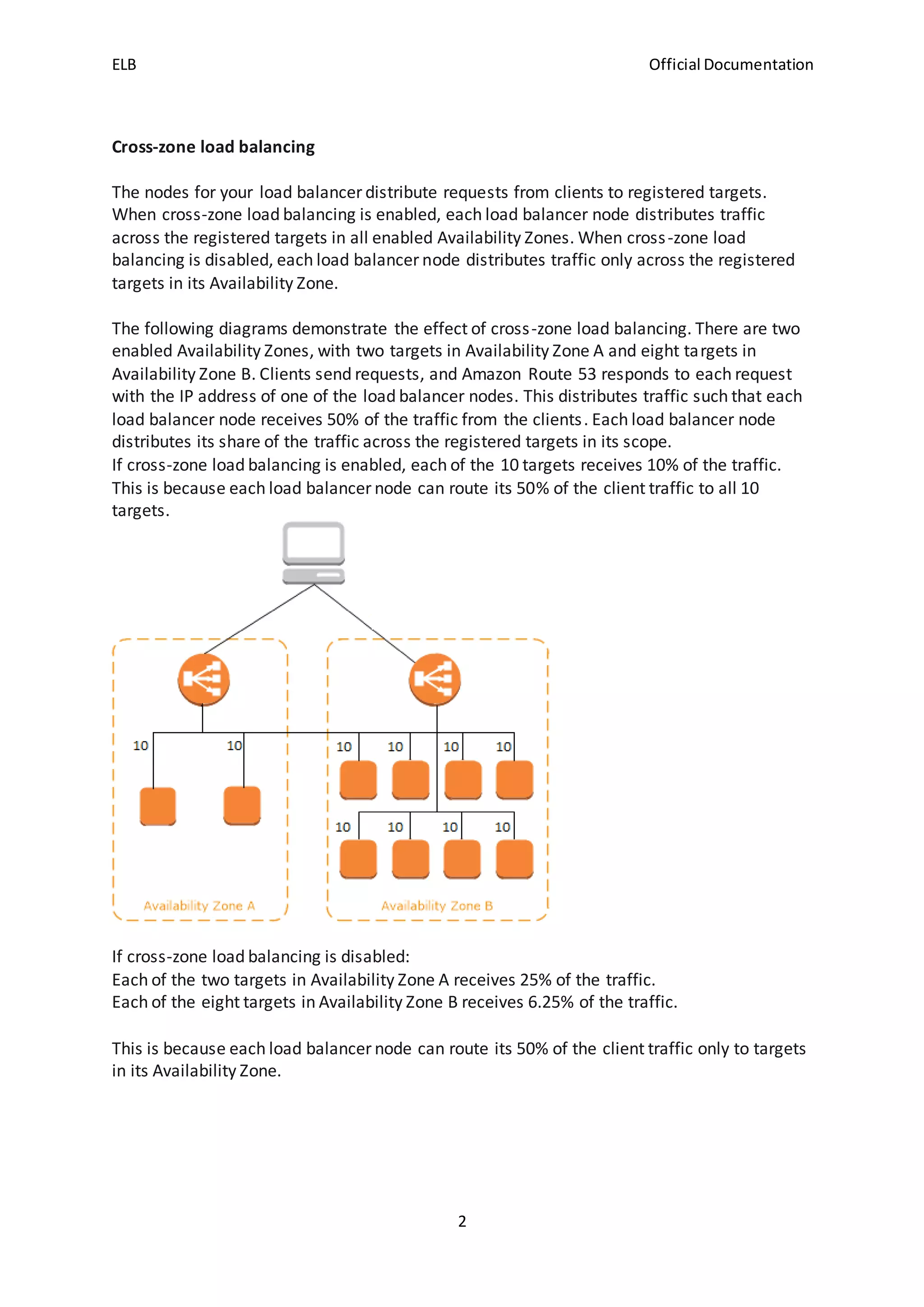
The following diagrams demonstrate the effect of cross-zone load balancing. There are two
enabled Availability Zones, with two targets in Availability Zone A and eight targets in
Availability Zone B. Clients send requests, and Amazon Route 53 responds to each request
with the IP address of one of the load balancer nodes. This distributes traffic such that each
load balancer node receives 50% of the traffic from the clients. Each load balancer node
distributes its share of the traffic across the registered targets in its scope.
If cross-zone load balancing is enabled, each of the 10 targets receives 10% of the traffic.
This is because each load balancer node can route its 50% of the client traffic to all 10
targets.
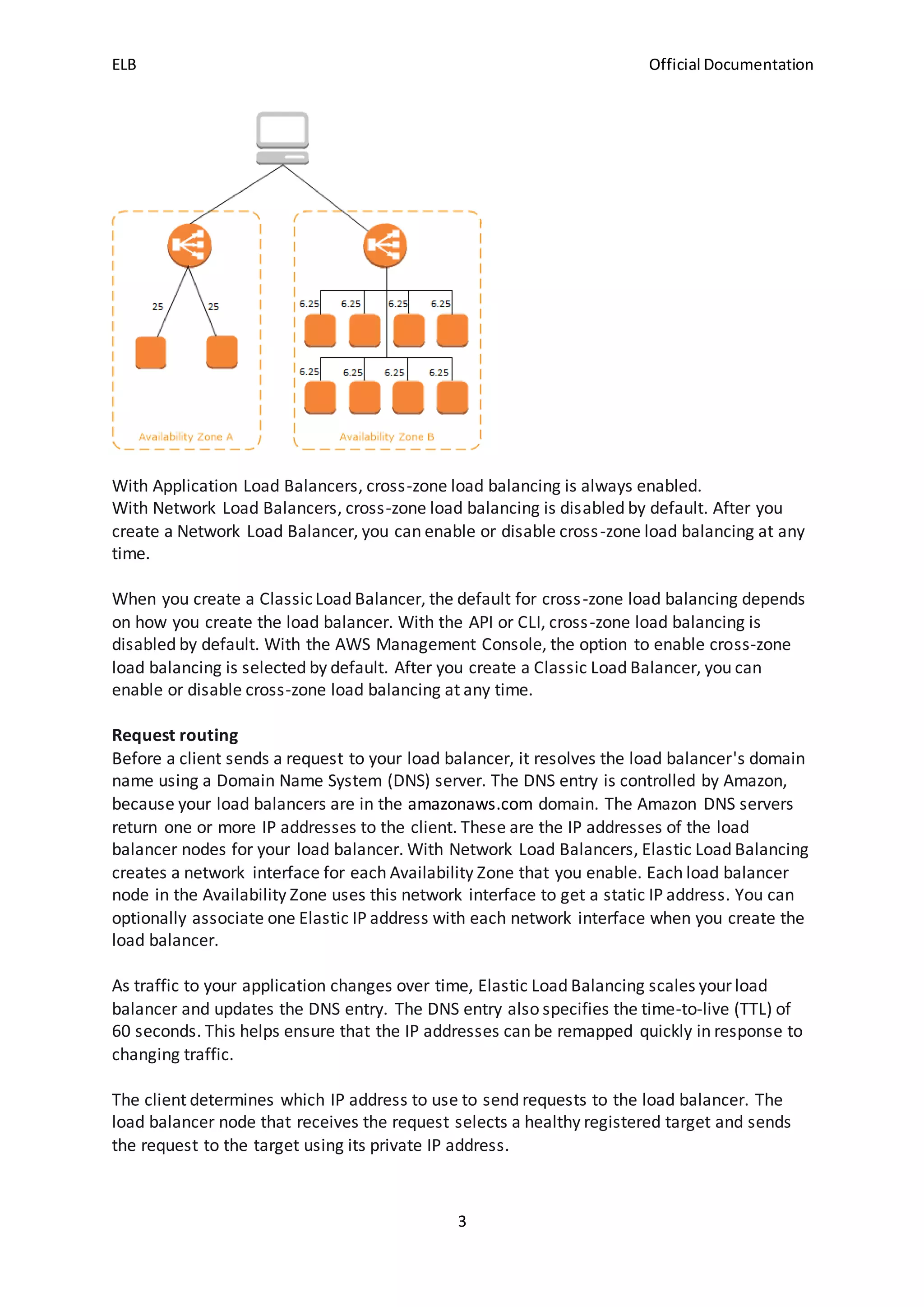
If cross-zone load balancing is disabled:
Each of the two targets in Availability Zone A receives 25% of the traffic.
Each of the eight targets in Availability Zone B receives 6.25% of the traffic.
This is because each load balancer node can route its 50% of the client traffic only to targets
in its Availability Zone.
ELB Official Documentation
3
With Application Load Balancers, cross-zone load balancing is always enabled.
With Network Load Balancers, cross-zone load balancing is disabled by default. After you
create a Network Load Balancer, you can enable or disable cross-zone load balancing at any
time.
When you create a ClassicLoad Balancer, the default for cross-zone load balancing depends
on how you create the load balancer. With the API or CLI, cross-zone load balancing is
disabled by default. With the AWS Management Console, the option to enable cross-zone
load balancing is selected by default. After you create a Classic Load Balancer, you can
enable or disable cross-zone load balancing at any time.
Request routing
Before a client sends a request to your load balancer, it resolves the load balancer's domain
name using a Domain Name System (DNS) server. The DNS entry is controlled by Amazon,
because your load balancers are in the amazonaws.com domain. The Amazon DNS servers
return one or more IP addresses to the client. These are the IP addresses of the load
balancer nodes for your load balancer. With Network Load Balancers, Elastic Load Balancing
creates a network interface for each Availability Zone that you enable. Each load balancer
node in the Availability Zone uses this network interface to get a static IP address. You can
optionally associate one Elastic IP address with each network interface when you create the
load balancer.
As traffic to your application changes over time, Elastic Load Balancing scales your load
balancer and updates the DNS entry. The DNS entry also specifies the time-to-live (TTL) of
60 seconds. This helps ensure that the IP addresses can be remapped quickly in response to
changing traffic.
The client determines which IP address to use to send requests to the load balancer. The
load balancer node that receives the request selects a healthy registered target and sends
the request to the target using its private IP address.
ELB Official Documentation
4
Routing algorithm
With Application Load Balancers, the load balancer node that receives the request uses the
following process:
Evaluates the listener rules in priority order to determine which rule to apply.
Selects a target from the target group for the rule action, using the routing algorithm
configured for the target group. The default routing algorithm is round robin. Routing is
performed independently for each target group, even when a target is registered with
multiple target groups.
With Network Load Balancers, the load balancer node that receives the connection uses the
following process:
Selects a target from the target group for the default rule using a flow hash algorithm. It
bases the algorithm on:
 The protocol
 The source IP address and source port
 The destination IP address and destination port
 The TCP sequence number
Routes each individual TCP connection to a single target for the life of the connection. The
TCP connections from a client have different source ports and sequence numbers, and can
be routed to different targets.
With Classic Load Balancers, the load balancer node that receives the request selects a
registered instance as follows:
 Uses the round robin routing algorithm for TCP listeners
 Uses the least outstanding requests routing algorithm for HTTP and HTTPS listeners
 HTTP connections
Classic Load Balancers use pre-open connections, but Application Load Balancers do not.
Both ClassicLoad Balancers and Application Load Balancers use connection multiplexing.
This means that requests from multiple clients on multiple front-end connections can be
routed to a given target through a single backend connection. Connection multiplexing
improves latency and reduces the load on your applications. To prevent connection
multiplexing, disable HTTP keep-alives by setting the Connection: close header in your HTTP
responses.
Classic Load Balancers support the following protocols on front-end connections (client to
load balancer): HTTP/0.9, HTTP/1.0, and HTTP/1.1.
Application Load Balancers support the following protocols on front-end connections:
HTTP/0.9, HTTP/1.0, HTTP/1.1, and HTTP/2. You can use HTTP/2 only with HTTPS listeners,
and can send up to 128 requests in parallel using one HTTP/2 connection. Application Load
Balancers also support connection upgrades from HTTP to WebSockets.
Both Application Load Balancers and Classic Load Balancers use HTTP/1.1 on backend
connections (load balancer to registered target). Keep-alive is supported on backend
connections by default. For HTTP/1.0 requests from clients that do not have a host header,
the load balancer generates a host header for the HTTP/1.1 requests sent on the backend
ELB Official Documentation
5
connections. For Application Load Balancer, the host header contains the DNS name of the
load balancer. For ClassicLoad Balancer, the host header contains the IP address of the load
balancer node.
Application Load Balancers and Classic Load Balancers support pipelined HTTP on front-end
connections. They do not support pipelined HTTP on backend connections.
HTTP headers
Application Load Balancers and Classic Load Balancers add X-Forwarded-For, X-Forwarded-
Proto, and X-Forwarded-Port headers to the request.
For front-end connections that use HTTP/2, the header names are in lowercase. Before the
request is sent to the target using HTTP/1.1, the following header names are converted to
mixed case: X-Forwarded-For, X-Forwarded-Proto, X-Forwarded-Port, Host, X-Amzn-Trace-
Id, Upgrade, and Connection. All other header names are in lowercase.
Application Load Balancers and Classic Load Balancers honor the connection header from
the incoming client request after proxying the response back to the client.
When Application Load Balancers and Classic Load Balancers receive an Expect header, they
respond to the client immediately with an HTTP 100 Continue without testing the content
length header, remove the Expect header, and then route the request.
HTTP header limits
The following size limits for Application Load Balancers are hard limits that cannot be
changed.
HTTP/1.x headers
 Request line: 16 K
 Single header: 16 K
 Whole header: 64 K
HTTP/2 headers
 Request line: 8 K
 Single header: 8 K
 Whole header: 64 K
Load balancer scheme
When you create a load balancer, you must choose whether to make it an internal load
balancer or an internet-facing load balancer. Note that when you create a Classic Load
Balancer in EC2-Classic, it must be an internet-facing load balancer.
The nodes of an internet-facing load balancer have public IP addresses. The DNS name of an
internet-facing load balancer is publicly resolvable to the public IP addresses of the nodes.
Therefore, internet-facing load balancers can route requests from clients over the internet.
The nodes of an internal load balancer have only private IP addresses. The DNS name of an
internal load balancer is publicly resolvable to the private IP addresses of the nodes.
Therefore, internal load balancers can only route requests from clients with access to the
VPC for the load balancer.
ELB Official Documentation
6
Both internet-facing and internal load balancers route requests to your targets using private
IP addresses. Therefore, your targets do not need public IP addresses to receive requests
from an internal or an internet-facing load balancer.
If your application has multiple tiers, you can design an architecture that uses both internal
and internet-facing load balancers. For example, this is true if your application uses web
servers that must be connected to the internet, and application servers that are only
connected to the web servers. Create an internet-facing load balancer and register the web
servers with it. Create an internal load balancer and register the application servers with it.
The web servers receive requests from the internet-facing load balancer and send requests
for the application servers to the internal load balancer. The application servers receive
requests from the internal load balancer.
Data protectioninElastic LoadBalancing
Elastic Load Balancing conforms to the AWS shared responsibility model, which includes
regulations and guidelines for data protection. AWS is responsible for protecting the global
infrastructure that runs all AWS services. AWS maintains control over data hosted on this
infrastructure, including the security configuration controls for handling customer content
and personal data. AWS customers and APN Partners, acting either as data controllers or
data processors, are responsible for any personal data that they put in the AWS Cloud.
For data protection purposes, we recommend that you protect AWS account credentials
and set up individual user accounts with AWS Identity and Access Management (IAM), so
that each user is given only the permissions necessary to fulfill their job duties. We also
recommend that you secure your data in the following ways:
 Use multi-factor authentication (MFA) with each account.
 Use TLS to communicate with AWS resources.
 Set up API and user activity logging with AWS CloudTrail.
 Use AWS encryption solutions, along with all default security controls within AWS
services.
 Use advanced managed security services such as Amazon Macie, which assists in
discovering and securing personal data that is stored in Amazon S3.
We strongly recommend that you never put sensitive identifying information, such as your
customers' account numbers, into free-form fields or metadata, such as function names and
tags. Any data that you enter into metadata might get picked up for inclusion in diagnostic
logs. When you provide a URL to an external server, don't include credential information in
the URL to validate your request to that server.
Encryption at rest
If you enable server-side encryption with Amazon S3-managed encryption keys (SSE-S3) for
your S3 bucket for Elastic Load Balancing access logs, Elastic Load Balancing automatically
encrypts each access log file before it is stored in your S3 bucket. Elastic Load Balancing also
decrypts the access log files when you access them. Each log file is encrypted with a unique
key, which is itself encrypted with a master key that is regularly rotated.
ELB Official Documentation
7
Encryption in transit
Elastic Load Balancing simplifies the process of building secure web applications by
terminating HTTPS and TLS traffic from clients at the load balancer. The load balancer
performs the work of encrypting and decrypting the traffic, instead of requiring each EC2
instance to handle the work for TLS termination. When you configure a secure listener, you
specify the cipher suites and protocol versions that are supported by your application, and a
server certificate to install on your load balancer. You can use AWS Certificate Manager
(ACM) or AWS Identity and Access Management (IAM) to manage your server certificates.
Application Load Balancers support HTTPS listeners. Network Load Balancers support TLS
listeners. Classic Load Balancers support both HTTPS and TLS listeners.
Infrastructure security inElastic LoadBalancing
Network isolation
A virtual private cloud (VPC) is a virtual network in your own logically isolated area in the
AWS Cloud. A subnet is a range of IP addresses in a VPC. When you create a load balancer,
you can specify one or more subnets for the load balancer nodes. You can deploy EC2
instances in the subnets of your VPC and register them with your load balancer.
When you create a load balancer in a VPC, it can be either internet-facing or internal. An
internal load balancer can only route requests that come from clients with access to the VPC
for the load balancer.
Your load balancer sends requests to its registered targets using private IP addresses.
Therefore, your targets do not need public IP addresses in order to receive requests from a
load balancer.
To call the Elastic Load Balancing API from your VPC without sending traffic over the public
internet, use AWS PrivateLink.
Controlling networktraffic
Elastic Load Balancing supports three types of load balancers: Application Load Balancers,
Network Load Balancers, and Classic Load Balancers. Application Load Balancers operate at
the request level (layer 7) of the Open Systems Interconnection (OSI) model. Network Load
Balancers operate at the connection level (layer 4) of the OSI model. Classic Load Balancers
operate at both the request and connection levels.
Consider the following options for securing network traffic when you use a load balancer:
Use secure listeners to support encrypted communication between clients and your load
balancers. Application Load Balancers support HTTPS listeners. Network Load Balancers
support TLS listeners. Classic Load Balancers support both HTTPS and TLS listeners. You can
choose from predefined security policies for your load balancer to specify the cipher suites
and protocol versions that are supported by your application. You can use AWS Certificate
Manager (ACM) or AWS Identity and Access Management (IAM) to manage the server
certificates installed on your load balancer. You can use the Server Name Indication (SNI)
protocol to serve multiple secure websites using a single secure listener. SNI is automatically
ELB Official Documentation
8
enabled for your load balancer when you associate more than one server certificate with a
secure listener.
Configure the security groups for your Application Load Balancers and Classic Load
Balancers to accept traffic only from specific clients. These security groups must allow
inbound traffic from clients on the listener ports and outbound traffic to the clients.
Configure the security groups for your Amazon EC2 instances to accept traffic only from the
load balancer. These security groups must allow inbound traffic from the load balancer on
the listener ports and the health check ports.
Configure your Application Load Balancer to securely authenticate users through an identity
provider or using corporate identities.
Use AWS WAF with your Application Load Balancers to allow or block requests based on the
rules in a web access control list (web ACL).
Elastic Load Balancing and interface VPC endpoints
You can establish a private connection between your virtual private cloud (VPC) and the
Elastic Load Balancing API by creating an interface VPC endpoint. You can use this
connection to call the Elastic Load Balancing API from your VPC without sending traffic over
the internet. The endpoint provides reliable, scalable connectivity to the Elastic Load
Balancing API, versions 2015-12-01 and 2012-06-01. It does this without requiring an
internet gateway, NAT instance, or VPN connection.
Interface VPC endpoints are powered by AWS PrivateLink, a feature that enables private
communication between AWS services using private IP addresses.
Limit
AWS PrivateLink does not support a Network Load Balancer with more than 50 listeners.
ApplicationLoadBalancer components
A load balancer serves as the single point of contact for clients. The load balancer
distributes incoming application traffic across multiple targets, such as EC2 instances, in
multiple Availability Zones. This increases the availability of your application. You add one or
more listeners to your load balancer.
A listener checks for connection requests from clients, using the protocol and port that you
configure. The rules that you define for a listener determine how the load balancer routes
requests to its registered targets. Each rule consists of a priority, one or more actions, and
one or more conditions. When the conditions for a rule are met, then its actions are
performed. You must define a default rule for each listener, and you can optionally define
additional rules.
Each target group routes requests to one or more registered targets, such as EC2 instances,
using the protocol and port number that you specify. You can register a target with multiple
target groups. You can configure health checks on a per target group basis. Health checks
are performed on all targets registered to a target group that is specified in a listener rule
for your load balancer.
ELB Official Documentation
9
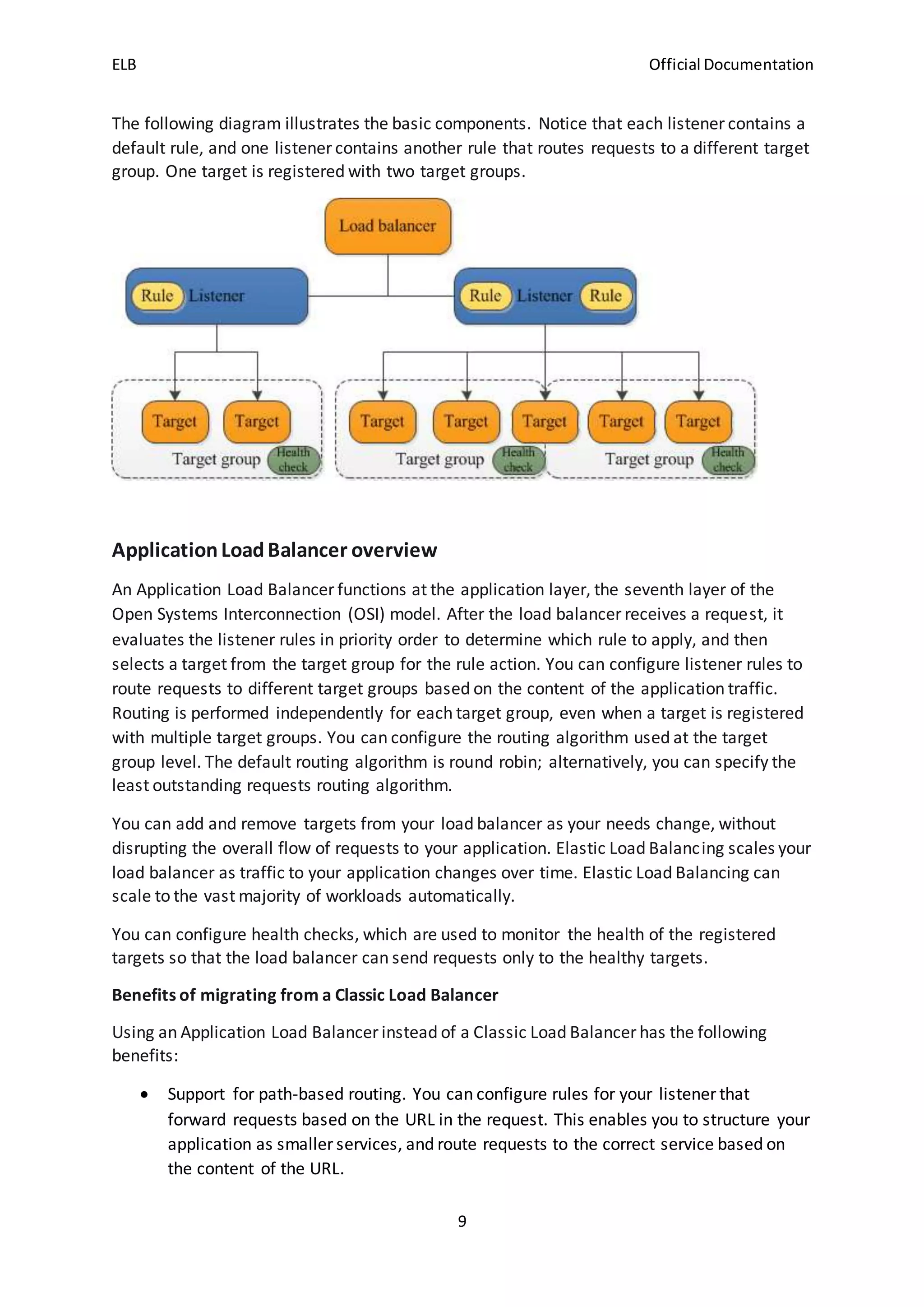
The following diagram illustrates the basic components. Notice that each listener contains a
default rule, and one listener contains another rule that routes requests to a different target
group. One target is registered with two target groups.
ApplicationLoadBalancer overview
An Application Load Balancer functions at the application layer, the seventh layer of the
Open Systems Interconnection (OSI) model. After the load balancer receives a request, it
evaluates the listener rules in priority order to determine which rule to apply, and then
selects a target from the target group for the rule action. You can configure listener rules to
route requests to different target groups based on the content of the application traffic.
Routing is performed independently for each target group, even when a target is registered
with multiple target groups. You can configure the routing algorithm used at the target
group level. The default routing algorithm is round robin; alternatively, you can specify the
least outstanding requests routing algorithm.
You can add and remove targets from your load balancer as your needs change, without
disrupting the overall flow of requests to your application. Elastic Load Balancing scales your
load balancer as traffic to your application changes over time. Elastic Load Balancing can
scale to the vast majority of workloads automatically.
You can configure health checks, which are used to monitor the health of the registered
targets so that the load balancer can send requests only to the healthy targets.
Benefits of migrating from a Classic Load Balancer
Using an Application Load Balancer instead of a Classic Load Balancer has the following
benefits:
 Support for path-based routing. You can configure rules for your listener that
forward requests based on the URL in the request. This enables you to structure your
application as smaller services, and route requests to the correct service based on
the content of the URL.
ELB Official Documentation
10
 Support for host-based routing. You can configure rules for your listener that
forward requests based on the host field in the HTTP header. This enables you to
route requests to multiple domains using a single load balancer.
 Support for routing based on fields in the request, such as standard and custom
HTTP headers and methods, query parameters, and source IP addresses.
 Support for routing requests to multiple applications on a single EC2 instance. You
can register each instance or IP address with the same target group using multiple
ports.
 Support for redirecting requests from one URL to another.
 Support for returning a custom HTTP response.
 Support for registering targets by IP address, including targets outside the VPC for
the load balancer.
 Support for registering Lambda functions as targets.
 Support for the load balancer to authenticate users of your applications through
their corporate or social identities before routing requests.
 Support for containerized applications. Amazon Elastic Container Service (Amazon
ECS) can select an unused port when scheduling a task and register the task with a
target group using this port. This enables you to make efficient use of your clusters.
 Support for monitoring the health of each service independently, as health checks
are defined at the target group level and many CloudWatch metrics are reported at
the target group level. Attaching a target group to an Auto Scaling group enables you
to scale each service dynamically based on demand.
 Access logs contain additional information and are stored in compressed format.
 Improved load balancer performance.
A load balancer serves as the single point of contact for clients. Clients send requests to the
load balancer, and the load balancer sends them to targets, such as EC2 instances. To
configure your load balancer, you create target groups, and then register targets with your
target groups. You also create listeners to check for connection requests from clients, and
listener rules to route requests from clients to the targets in one or more target groups.
Subnets for your load balancer
When you create an Application Load Balancer, you must enable at least two Availability
Zones. To enable an Availability Zone, you specify one subnet from that Availability Zone.
To ensure that your load balancer can scale properly, verify that each Availability Zone
subnet for your load balancer has a CIDR block with at least a /27 bitmask (for
example, 10.0.0.0/27) and has at least 8 free IP addresses. Your load balancer uses these IP
addresses to establish connections with the targets.
Alternatively, you can specify a Local Zone subnet for your load balancer instead of
specifying two Availability Zone subnets. If you do so, the following restrictions apply:
 If you enable a Local Zone subnet, you cannot also enable an Availability Zone
subnet.
ELB Official Documentation
11
 You cannot use AWS WAF with the load balancer.
 You cannot use a Lambda function as a target.
Load balancer security groups
A security group acts as a firewall that controls the traffic allowed to and from your load
balancer. You can choose the ports and protocols to allow for both inbound and outbound
traffic.
The rules for the security groups associated with your load balancer security group must
allow traffic in both directions on both the listener and the health check ports. Whenever
you add a listener to a load balancer or update the health check port for a target group, you
must review your security group rules to ensure that they allow traffic on the new port in
both directions.
You must ensure that your load balancer can communicate with registered targets on both
the listener port and the health check port. Whenever you add a listener to your load
balancer or update the health check port for a target group used by the load balancer to
route requests, you must verify that the security groups associated with the load balancer
allow traffic on the new port in both directions. If they do not, you can edit the rules for the
currently associated security groups or associate different security groups with the load
balancer.
Load balancer state
A load balancer can be in one of the following states:
provisioning
The load balancer is being set up.
active
The load balancer is fully set up and ready to route traffic.
failed
The load balancer could not be set up.
IP address type
You can set the types of IP addresses that clients can use with your Internet-facing load
balancer. Clients must use IPv4 addresses with internal load balancers.
The following are the IP address types:
ipv4
Clients must connect to the load balancer using IPv4 addresses (for example,
192.0.2.1)
dualstack
ELB Official Documentation
12
Clients can connect to the load balancer using both IPv4 addresses (for example,
192.0.2.1) and IPv6 addresses (for example, 2001:0db8:85a3:0:0:8a2e:0370:7334).
When you enable dual-stack mode for the load balancer, Elastic Load Balancing provides an
AAAA DNS record for the load balancer. Clients that communicate with the load balancer
using IPv4 addresses resolve the A DNS record. Clients that communicate with the load
balancer using IPv6 addresses resolve the AAAA DNS record.
The load balancer communicates with targets using IPv4 addresses, regardless of how the
client communicates with the load balancer. Therefore, the targets do not need IPv6
addresses.
Connection idle timeout
For each request that a client makes through a load balancer, the load balancer maintains
two connections. The front-end connection is between a client and the load balancer. The
back-end connection is between the load balancer and a target. The load balancer has a
configured idle timeout period that applies to its connections. If no data has been sent or
received by the time that the idle timeout period elapses, the load balancer closes the
connection. To ensure that lengthy operations such as file uploads have time to complete,
send at least 1 byte of data before each idle timeout period elapses, and increase the length
of the idle timeout period as needed.
For back-end connections, we recommend that you enable the HTTP keep-alive option for
your EC2 instances. You can enable HTTP keep-alive in the web server settings for your EC2
instances. If you enable HTTP keep-alive, the load balancer can reuse back-end connections
until the keep-alive timeout expires. We also recommend that you configure the idle
timeout of your application to be larger than the idle timeout configured for the load
balancer.
By default, Elastic Load Balancing sets the idle timeout value for your load balancer to 60
seconds.
You can use AWS WAF with your Application Load Balancer to allow or block requests based
on the rules in a web access control list (web ACL).
IPv6 requirements
 An Internet-facing load balancer with the dualstack IP address type. You can set the IP
address type when you create the load balancer and update it at any time.
 The virtual private cloud (VPC) and subnets that you specify for the load balancer must have
associated IPv6 CIDR blocks.
 The route tables for the load balancer subnets must route IPv6 traffic.
 The security groups for the load balancer must allow IPv6 traffic.
 The network ACLs for the load balancer subnets must allow IPv6 traffic.
ELB Official Documentation
13
Listeners for your Application Load Balancers
Before you start using your Application Load Balancer, you must add one or more listeners.
A listener is a process that checks for connection requests, using the protocol and port that
you configure. The rules that you define for a listener determine how the load balancer
routes requests to its registered targets.
Listener configuration
Listeners support the following protocols and ports:
 Protocols: HTTP, HTTPS
 Ports: 1-65535
You can use an HTTPS listener to offload the work of encryption and decryption to your load
balancer so that your applications can focus on their business logic. If the listener protocol is
HTTPS, you must deploy at least one SSL server certificate on the listener.
Application Load Balancers provide native support for WebSockets. You can use WebSockets
with both HTTP and HTTPS listeners.
Application Load Balancers provide native support for HTTP/2 with HTTPS listeners. You can
send up to 128 requests in parallel using one HTTP/2 connection. The load balancer converts
these to individual HTTP/1.1 requests and distributes them across the healthy targets in the
target group. Because HTTP/2 uses front-end connections more efficiently, you might notice
fewer connections between clients and the load balancer. You can't use the server-push
feature of HTTP/2.
Listener rules
Each listener has a default rule, and you can optionally define additional rules. Each rule
consists of a priority, one or more actions, and one or more conditions. You can add or edit
rules at any time.
Default rules
When you create a listener, you define actions for the default rule. Default rules can't have
conditions. If the conditions for none of a listener's rules are met, then the action for the
default rule is performed.
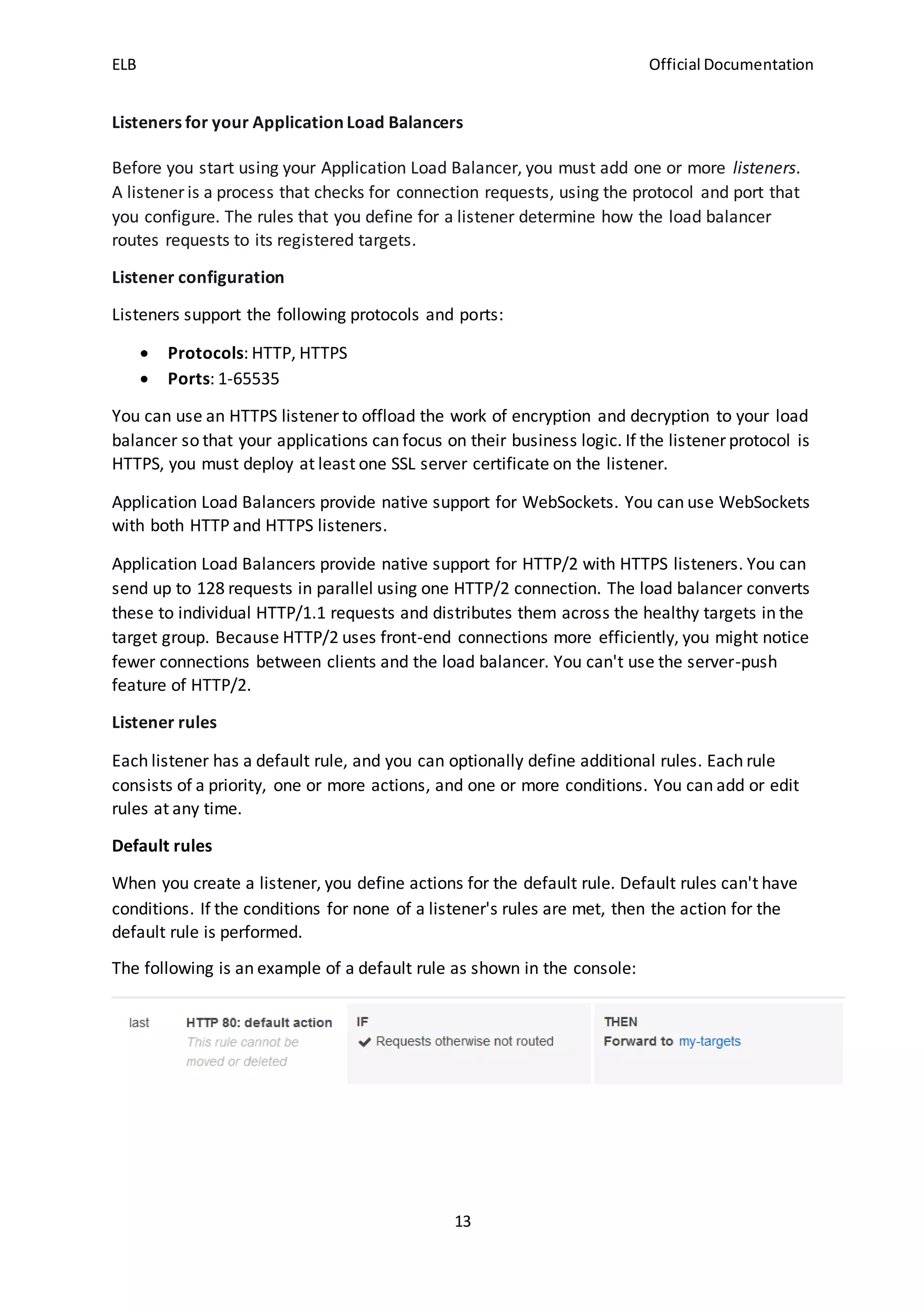
The following is an example of a default rule as shown in the console:
ELB Official Documentation
14
Rule priority
Each rule has a priority. Rules are evaluated in priority order, from the lowest value to the
highest value. The default rule is evaluated last. You can change the priority of a non-default
rule at any time. You cannot change the priority of the default rule.
Rule actions
Each rule action has a type, an order, and the information required to perform the action.
Rule conditions
Each rule condition has a type and configuration information. When the conditions for a rule
are met, then its actions are performed.
Rule action types
The following are the supported action types for a rule:
authenticate-cognito
[HTTPS listeners] Use Amazon Cognito to authenticate users.
authenticate-oidc
[HTTPS listeners] Use an identity provider that is compliant with OpenID Connect
(OIDC) to authenticate users.
fixed-response
Return a custom HTTP response.
forward
Forward requests to the specified target groups.
redirect
Redirect requests from one URL to another.
The action with the lowest order value is performed first. Each rule must include exactly one
of the following actions: forward, redirect, or fixed-response, and it must be the last action
to be performed.
Fixed-response actions
You can use fixed-response actions to drop client requests and return a custom HTTP
response. You can use this action to return a 2XX, 4XX, or 5XX response code and an
optional message.
When a fixed-response action is taken, the action and the URL of the redirect target are
recorded in the access logs. The count of successful fixed-response actions is reported in
the HTTP_Fixed_Response_Count metric.
Forward actions
ELB Official Documentation
15
You can use forward actions to route requests to one or more target groups. If you specify
multiple target groups for a forward action, you must specify a weight for each target group.
Each target group weight is a value from 0 to 999. Requests that match a listener rule with
weighted target groups are distributed to these target groups based on their weights. For
example, if you specify two target groups, each with a weight of 10, each target group
receives half the requests. If you specify two target groups, one with a weight of 10 and the
other with a weight of 20, the target group with a weight of 20 receives twice as many
requests as the other target group.
By default, configuring a rule to distribute traffic between weighted target groups does not
guarantee that sticky sessions are honored. To ensure that sticky sessions are honored,
enable target group stickiness for the rule. When the load balancer first routes a request to
a weighted target group, it generates a cookie named AWSALBTG that encodes information
about the selected target group, encrypts the cookie, and includes the cookie in the
response to the client. The client should include the cookie that it receives in subsequent
requests to the load balancer. When the load balancer receives a request that matches a
rule with target group stickiness enabled and contains the cookie, the request is routed to
the target group specified in the cookie.
Application Load Balancers do not support cookie values that are URL encoded.
With CORS (cross-origin resource sharing) requests, some browsers require SameSite=None;
Secure to enable stickiness. In this case, Elastic Load Balancing generates a second cookie,
AWSALBTGCORS, which includes the same information as the original stickiness cookie plus
this SameSite attribute. Clients receive both cookies.
Redirect actions
You can use redirect actions to redirect client requests from one URL to another. You can
configure redirects as either temporary (HTTP 302) or permanent (HTTP 301) based on your
needs.
A URI consists of the following components:
protocol://hostname:port/path?query
You must modify at least one of the following components to avoid a redirect loop:
protocol, hostname, port, or path. Any components that you do not modify retain their
original values.
protocol
The protocol (HTTP or HTTPS). You can redirect HTTP to HTTP, HTTP to HTTPS, and
HTTPS to HTTPS. You cannot redirect HTTPS to HTTP.
hostname
ELB Official Documentation
16
The hostname. A hostname is not case-sensitive, can be up to 128 characters in
length, and consists of alpha-numeric characters, wildcards (* and ?), and hyphens
(-).
port
The port (1 to 65535).
path
The absolute path, starting with the leading "/". A path is case-sensitive, can be up
to 128 characters in length, and consists of alpha-numeric characters, wildcards (*
and ?), & (using &), and the following special characters: _-.$/~"'@:+.
Query
The queryparameters.
You can reuse URI components of the original URL in the target URL using the following
reserved keywords:
 #{protocol} - Retains the protocol. Use in the protocol and query components.
 #{host} - Retains the domain. Use in the hostname, path, and query components.
 #{port} - Retains the port. Use in the port, path, and query components.
 #{path} - Retains the path. Use in the path and query components.
 #{query} - Retains the query parameters. Use in the query component.
When a redirect action is taken, the action is recorded in the access logs. The count of
successful redirect actions is reported in the HTTP_Redirect_Count metric.
Target groups for your Application Load Balancers
Each target group is used to route requests to one or more registered targets. When you
create each listener rule, you specify a target group and conditions. When a rule condition is
met, traffic is forwarded to the corresponding target group. You can create different target
groups for different types of requests. For example, create one target group for general
requests and other target groups for requests to the microservices for your application.
You define health check settings for your load balancer on a per target group basis. Each
target group uses the default health check settings, unless you override them when you
create the target group or modify them later on. After you specify a target group in a rule
for a listener, the load balancer continually monitors the health of all targets registered with
the target group that are in an Availability Zone enabled for the load balancer. The load
balancer routes requests to the registered targets that are healthy.
Routing configuration
By default, a load balancer routes requests to its targets using the protocol and port number
that you specified when you created the target group. Alternatively, you can override the
port used for routing traffic to a target when you register it with the target group.
ELB Official Documentation
17
Target groups support the following protocols and ports:
 Protocols: HTTP, HTTPS
 Ports: 1-65535
If a target group is configured with the HTTPS protocol or uses HTTPS health checks, the TLS
connections to the targets use the security settings from the ELBSecurityPolicy2016-
08 policy. The load balancer establishes TLS connections with the targets using certificates
that you install on the targets. The load balancer does not validate these certificates.
Therefore, you can use self-signed certificates or certificates that have expired. Because the
load balancer is in a virtual private cloud (VPC), traffic between the load balancer and the
targets is authenticated at the packet level, so it is not at risk of man-in-the-middle attacks
or spoofing even if the certificates on the targets are not valid.
Target type
When you create a target group, you specify its target type, which determines the type of
target you specify when registering targets with this target group. After you create a target
group, you cannot change its target type.
The following are the possible target types:
instance
The targets are specified by instance ID.
ip
The targets are IP addresses.
lambda
The target is a Lambda function.
When the target type is ip, you can specify IP addresses from one of the following CIDR
blocks:
The subnets of the VPC for the target group
 10.0.0.0/8 (RFC 1918)
 100.64.0.0/10 (RFC 6598)
 172.16.0.0/12 (RFC 1918)
 192.168.0.0/16 (RFC 1918)
These supported CIDR blocks enable you to register the following with a target group:
ClassicLink instances, instances in a VPC that is peered to the load balancer VPC, AWS
resources that are addressable by IP address and port (for example, databases), and on-
premises resources linked to AWS through AWS Direct Connect or a VPN connection.
Important
You can't specify publicly routable IP addresses.
ELB Official Documentation
18
If you specify targets using an instance ID, traffic is routed to instances using the primary
private IP address specified in the primary network interface for the instance. If you specify
targets using IP addresses, you can route traffic to an instance using any private IP address
from one or more network interfaces. This enables multiple applications on an instance to
use the same port. Each network interface can have its own security group.
If the target type of your target group is lambda, you can register a single Lambda function.
When the load balancer receives a request for the Lambda function, it invokes the Lambda
function.
Registered targets
Your load balancer serves as a single point of contact for clients and distributes incoming
traffic across its healthy registered targets. You can register each target with one or more
target groups. You can register each EC2 instance or IP address with the same target group
multiple times using different ports, which enables the load balancer to route requests to
microservices.
If demand on your application increases, you can register additional targets with one or
more target groups in order to handle the demand. The load balancer starts routing
requests to a newly registered target as soon as the registration process completes and the
target passes the initial health checks.
If demand on your application decreases, or you need to service your targets, you can
deregister targets from your target groups. Deregistering a target removes it from your
target group, but does not affect the target otherwise. The load balancer stops routing
requests to a target as soon as it is deregistered. The target enters the draining state until
in-flight requests have completed. You can register the target with the target group again
when you are ready for it to resume receiving requests.
If you are registering targets by instance ID, you can use your load balancer with an Auto
Scaling group. After you attach a target group to an Auto Scaling group, Auto Scaling
registers your targets with the target group for you when it launches them.
Limits
 You cannot register the IP addresses of another Application Load Balancer in the
same VPC. If the other Application Load Balancer is in a VPC that is peered to the
load balancer VPC, you can register its IP addresses.
Target group attributes
The following target group attributes are supported if the target group type
is instanceor ip:
deregistration_delay.timeout_seconds
The amount of time for Elastic Load Balancing to wait before deregistering a
target. The range is 0–3600 seconds. The default value is 300 seconds.
ELB Official Documentation
19
load_balancing.algorithm.type
The load balancing algorithm determines how the load balancer selects targets
when routing requests. The value is round_robin or least_outstanding_requests.
The default is round_robin.
slow_start.duration_seconds
The time period, in seconds, during which the load balancer sends a newly
registered target a linearly increasing share of the traffic to the target group. The
range is 30–900 seconds (15 minutes). The default is 0 seconds (disabled).
stickiness.enabled
Indicates whether sticky sessions are enabled.
stickiness.lb_cookie.duration_seconds
The cookie expiration period, in seconds. After this period, the cookie is
considered stale. The minimum value is 1 second and the maximum value is 7 days
(604800 seconds). The default value is 1 day (86400 seconds).
stickiness.type
The type of stickiness. The possible value is lb_cookie.
The following target group attribute is supported if the target group type is lambda:
lambda.multi_value_headers.enabled
Indicates whether the request and response headers exchanged between the load
balancer and the Lambda function include arrays of values or strings. The possible
values are true or false.
Routing algorithm
By default, the round robin routing algorithm is used to route requests at the target group
level. You can specify the least outstanding requests routing algorithm instead.
Consider using least outstanding requests when the requests for your application vary in
complexity or your targets vary in processing capability. Round robin is a good choice when
the requests and targets are similar, or if you need to distribute requests equally among
targets. You can compare the effect of round robin versus least outstanding requests using
the following CloudWatch metrics: RequestCount, TargetConnectionErrorCount,
and TargetResponseTime.
Considerations
 You cannot enable both least outstanding requests and slow start mode.
 If you enable sticky sessions, this overrides the routing algorithm of the target group
after the initial target selection.
ELB Official Documentation
20
 With HTTP/2, the load balancer converts the request to multiple HTTP/1.1 requests,
so least outstanding request treats each HTTP/2 request as multiple requests.
 When you use least outstanding requests with WebSockets, the target is selected
using least outstanding requests. The load balancer creates a connection to this
target and sends all messages over this connection.
Deregistration delay
Elastic Load Balancing stops sending requests to targets that are deregistering. By default,
Elastic Load Balancing waits 300 seconds before completing the deregistration process,
which can help in-flight requests to the target to complete. To change the amount of time
that Elastic Load Balancing waits, update the deregistration delay value.
The initial state of a deregistering target is draining. After the deregistration delay elapses,
the deregistration process completes and the state of the target is unused. If the target is
part of an Auto Scaling group, it can be terminated and replaced.
If a deregistering target has no in-flight requests and no active connections, Elastic Load
Balancing immediately completes the deregistration process, without waiting for the
deregistration delay to elapse. However, even though target deregistration is complete, the
status of the target will be displayed as draining until the deregistration delay elapses.
If a deregistering target terminates the connection before the deregistration delay elapses,
the client receives a 500-level error response.
Slow start mode
By default, a target starts to receive its full share of requests as soon as it is registered with
a target group and passes an initial health check. Using slow start mode gives targets time to
warm up before the load balancer sends them a full share of requests.
After you enable slow start for a target group, its targets enter slow start mode when they
are considered healthy by the target group. A target in slow start mode exits slow start
mode when the configured slow start duration period elapses or the target becomes
unhealthy. The load balancer linearly increases the number of requests that it can send to a
target in slow start mode. After a healthy target exits slow start mode, the load balancer can
send it a full share of requests.
Considerations
 When you enable slow start for a target group, the healthy targets registered with
the target group do not enter slow start mode.
 When you enable slow start for an empty target group and then register targets
using a single registration operation, these targets do not enter slow start mode.
Newly registered targets enter slow start mode only when there is at least one
healthy target that is not in slow start mode.
 If you deregister a target in slow start mode, the target exits slow start mode. If you
register the same target again, it enters slow start mode when it is considered
healthy by the target group.
ELB Official Documentation
21
 If a target in slow start mode becomes unhealthy, the target exits slow start mode.
When the target becomes healthy, it enters slow start mode again.
 You cannot enable both slow start mode and least outstanding requests.
Sticky sessions
Sticky sessions are a mechanism to route requests to the same target in a target group. This
is useful for servers that maintain state information in order to provide a continuous
experience to clients. To use sticky sessions, the clients must support cookies.
When a load balancer first receives a request from a client, it routes the request to a target,
generates a cookie named AWSALB that encodes information about the selected target,
encrypts the cookie, and includes the cookie in the response to the client. The client should
include the cookie that it receives in subsequent requests to the load balancer. When the
load balancer receives a request from a client that contains the cookie, if sticky sessions are
enabled for the target group and the request goes to the same target group, the load
balancer detects the cookie and routes the request to the same target. If the cookie is
present but cannot be decoded, or if it refers to a target that was deregistered or is
unhealthy, the load balancer selects a new target and updates the cookie with information
about the new target.
You enable sticky sessions at the target group level. You can also set the duration for the
stickiness of the load balancer-generated cookie, in seconds. The duration is set with each
request. Therefore, if the client sends a request before each duration period expires, the
sticky session continues.
With CORS (cross-origin resource sharing) requests, some browsers require SameSite=None;
Secure to enable stickiness. In this case, Elastic Load Balancing generates a second stickiness
cookie, AWSALBCORS, which includes the same information as the original stickiness cookie
plus this SameSite attribute. Clients receive both cookies.
Application Load Balancers support load balancer-generated cookies only. The contents of
these cookies are encrypted using a rotating key. You cannot decrypt or modify load
balancer-generated cookies.
Considerations
 If you are using multiple layers of Application Load Balancers, you can enable sticky
sessions on one layer only, because the load balancers would use the same cookie
name.
 WebSockets connections are inherently sticky. If the client requests a connection
upgrade to WebSockets, the target that returns an HTTP 101 status code to accept
the connection upgrade is the target used in the WebSockets connection. After the
WebSockets upgrade is complete, cookie-based stickiness is not used.
 Application Load Balancers use the Expires attribute in the cookie header instead of
the Max-Age header.
 Application Load Balancers do not support cookie values that are URL encoded.
ELB Official Documentation
22
Register targets with your target group
You register your targets with a target group. When you create a target group, you specify
its target type, which determines how you register its targets. For example, you can register
instance IDs, IP addresses, or Lambda functions.
If demand on your currently registered targets increases, you can register additional targets
in order to handle the demand. When your target is ready to handle requests, register it
with your target group. The load balancer starts routing requests to the target as soon as
the registration process completes and the target passes the initial health checks.
If demand on your registered targets decreases, or you need to service a target, you can
deregister it from your target group. The load balancer stops routing requests to a target as
soon as you deregister it. When the target is ready to receive requests, you can register it
with the target group again.
When you deregister a target, the load balancer waits until in-flight requests have
completed. This is known as connection draining. The status of a target is draining while
connection draining is in progress.
When you deregister a target that was registered by IP address, you must wait for the
deregistration delay to complete before you can register the same IP address again.
If you are registering targets by instance ID, you can use your load balancer with an Auto
Scaling group. After you attach a target group to an Auto Scaling group and the group scales
out, the instances launched by the Auto Scaling group are automatically registered with the
target group. If you detach the target group from the Auto Scaling group, the instances are
automatically deregistered from the target group.
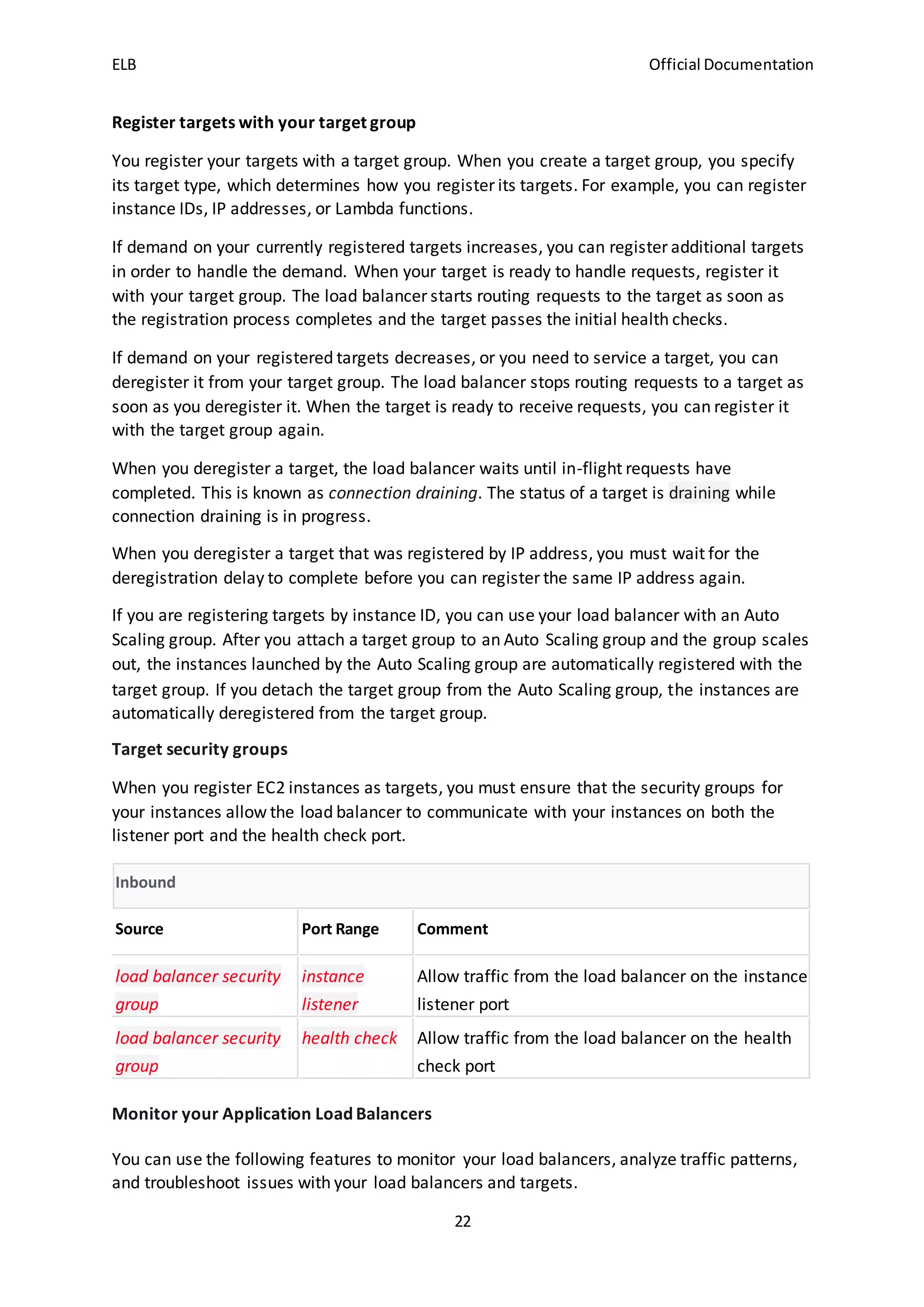
Target security groups
When you register EC2 instances as targets, you must ensure that the security groups for
your instances allow the load balancer to communicate with your instances on both the
listener port and the health check port.
Inbound
Source Port Range Comment
load balancer security
group
instance
listener
Allow traffic from the load balancer on the instance
listener port
load balancer security
group
health check Allow traffic from the load balancer on the health
check port
Monitor your Application Load Balancers
You can use the following features to monitor your load balancers, analyze traffic patterns,
and troubleshoot issues with your load balancers and targets.
ELB Official Documentation
23
CloudWatch metrics
You can use Amazon CloudWatch to retrieve statistics about data points for your load
balancers and targets as an ordered set of time-series data, known as metrics. You can use
these metrics to verify that your systemis performing as expected.
Access logs
You can use access logs to capture detailed information about the requests made to your
load balancer and store them as log files in Amazon S3. You can use these access logs to
analyze traffic patterns and to troubleshoot issues with your targets.
Request tracing
You can use request tracing to track HTTP requests. The load balancer adds a header with a
trace identifier to each request it receives.
CloudTrail logs
You can use AWS CloudTrail to capture detailed information about the calls made to the
Elastic Load Balancing API and store them as log files in Amazon S3. You can use these
CloudTrail logs to determine which calls were made, the source IP address where the call
came from, who made the call, when the call was made, and so on.
Your AWS account has the following quotas related to Application Load Balancers.
Regional
 Load balancers per Region: 50
 Target groups per Region: 3000 *
Load balancer
 Listeners per load balancer: 50
 Targets per load balancer: 1000
 Target groups per load balancer: 100
 Subnets per Availability Zone per load balancer: 1
 Security groups per load balancer: 5
 Rules per load balancer (not counting default rules): 100
 Certificates per load balancer (not counting default certificates): 25
 Number of times a target can be registered per load balancer: 100
Target group
 Load balancers per target group: 1
 Targets per target group (instances or IP addresses): 1000
 Targets per target group (Lambda functions): 1
Rule
 Target groups per action: 5
 Match evaluations per rule: 5
ELB Official Documentation
24
 Wildcards per rule: 5
 Actions per rule: 2 (one optional authentication action, one required action)
* This quota is shared by target groups for your Application Load Balancers and Network
Load Balancers.
What is a Network LoadBalancer?
Elastic Load Balancing supports the following types of load balancers: Application Load
Balancers, Network Load Balancers, and ClassicLoad Balancers.
Network Load Balancer components
A load balancer serves as the single point of contact for clients. The load balancer
distributes incoming traffic across multiple targets, such as Amazon EC2 instances. This
increases the availability of your application. You add one or more listeners to your load
balancer.
A listener checks for connection requests from clients, using the protocol and port that you
configure, and forwards requests to a target group.
Each target group routes requests to one or more registered targets, such as EC2 instances,
using the TCP protocol and the port number that you specify. You can register a target with
multiple target groups. You can configure health checks on a per target group basis. Health
checks are performed on all targets registered to a target group that is specified in a listener
rule for your load balancer.
Network Load Balancer overview
A Network Load Balancer functions at the fourth layer of the Open Systems Interconnection
(OSI) model. It can handle millions of requests per second. After the load balancer receives a
connection request, it selects a target from the target group for the default rule. It attempts
to open a TCP connection to the selected target on the port specified in the listener
configuration.
When you enable an Availability Zone for the load balancer, Elastic Load Balancing creates a
load balancer node in the Availability Zone. By default, each load balancer node distributes
traffic across the registered targets in its Availability Zone only. If you enable cross-zone load
balancing, each load balancer node distributes traffic across the registered targets in all
enabled Availability Zones.
If you enable multiple Availability Zones for your load balancer and ensure that each target
group has at least one target in each enabled Availability Zone, this increases the fault
tolerance of your applications. For example, if one or more target groups does not have a
healthy target in an Availability Zone, we remove the IP address for the corresponding
subnet from DNS, but the load balancer nodes in the other Availability Zones are still
available to route traffic. If a client doesn't honor the time-to-live (TTL) and sends requests
to the IP address after it is removed from DNS, the requests fail.
ELB Official Documentation
25
For TCP traffic, the load balancer selects a target using a flow hash algorithm based on the
protocol, source IP address, source port, destination IP address, destination port, and TCP
sequence number. The TCP connections from a client have different source ports and
sequence numbers, and can be routed to different targets. Each individual TCP connection is
routed to a single target for the life of the connection.
For UDP traffic, the load balancer selects a target using a flow hash algorithm based on the
protocol, source IP address, source port, destination IP address, and destination port. A UDP
flow has the same source and destination, so it is consistently routed to a single target
throughout its lifetime. Different UDP flows have different source IP addresses and ports, so
they can be routed to different targets.
Elastic Load Balancing creates a network interface for each Availability Zone you enable.
Each load balancer node in the Availability Zone uses this network interface to get a static IP
address. When you create an Internet-facing load balancer, you can optionally associate one
Elastic IP address per subnet.
When you create a target group, you specify its target type, which determines whether you
register targets by instance ID or IP address. If you register targets by instance ID, the source
IP addresses of the clients are preserved and provided to your applications. If you register
targets by IP address, the source IP addresses are the private IP addresses of the load
balancer nodes.
You can add and remove targets from your load balancer as your needs change, without
disrupting the overall flow of requests to your application. Elastic Load Balancing scales your
load balancer as traffic to your application changes over time. Elastic Load Balancing can
scale to the vast majority of workloads automatically.
You can configure health checks, which are used to monitor the health of the registered
targets so that the load balancer can send requests only to the healthy targets.
Benefits of migrating from a Classic Load Balancer
Using a Network Load Balancer instead of a ClassicLoad Balancer has the following benefits:
 Ability to handle volatile workloads and scale to millions of requests per second.
 Support for static IP addresses for the load balancer. You can also assign one Elastic
IP address per subnet enabled for the load balancer.
 Support for registering targets by IP address, including targets outside the VPC for
the load balancer.
 Support for routing requests to multiple applications on a single EC2 instance. You
can register each instance or IP address with the same target group using multiple
ports.
 Support for containerized applications. Amazon Elastic Container Service (Amazon
ECS) can select an unused port when scheduling a task and register the task with a
target group using this port. This enables you to make efficient use of your clusters.
 Support for monitoring the health of each service independently, as health checks
are defined at the target group level and many Amazon CloudWatch metrics are
ELB Official Documentation
26
reported at the target group level. Attaching a target group to an Auto Scaling group
enables you to scale each service dynamically based on demand.
Listener configuration
Listeners support the following protocols and ports:
 Protocols: TCP, TLS, UDP, TCP_UDP
 Ports: 1-65535
You can use a TLS listener to offload the work of encryption and decryption to your load
balancer so that your applications can focus on their business logic. If the listener protocol is
TLS, you must deploy exactly one SSL server certificate on the listener.
To support both TCP and UDP on the same port, create a TCP_UDP listener. The target
groups for a TCP_UDP listener must use the TCP_UDP protocol.
You can use WebSockets with your listeners.
Your AWS account has the following quotas related to Network Load Balancers.
Regional
 Network Load Balancers per region: 50
 Target groups per region: 3000 *
Load balancer
 Listeners per load balancer: 50
 Subnets per Availability Zone per load balancer: 1
 [Cross-zone load balancing disabled] Targets per Availability Zone per load balancer:
500
 [Cross-zone load balancing enabled] Targets per load balancer: 500
 Load balancers per target group: 1
 Certificates per load balancer (not counting default certificates): 25
* This quota is shared by target groups for your Application Load Balancers and Network
Load Balancers.
All network traffic sent to a configured listener is classified as intended traffic. Network
traffic that does not match a configured listener is classified as unintended traffic. ICMP
requests other than Type 3 are also considered unintended traffic. Network Load Balancers
drop unintended traffic without forwarding it to any targets. TCP data packets sent to the
listener port for a configured listeners that are not new connections or part of an active TCP
connection are rejected with a TCP reset (RST).

AWS- Elastic load balancing

  • 1.
    ELB Official Documentation 1 ElasticLoadBalancer(ELB) HowElastic Load Balancing works A load balancer accepts incoming traffic from clients and routes requests to its registered targets (such as EC2 instances) in one or more Availability Zones. The load balancer also monitors the health of its registered targets and ensures that it routes traffic only to healthy targets. When the load balancer detects an unhealthy target, it stops routing traffic to that target. It then resumes routing traffic to that target when it detects that the target is healthy again. You configure your load balancer to accept incoming traffic by specifying one or more listeners. A listener is a process that checks for connection requests. It is configured with a protocol and port number for connections from clients to the load balancer. Likewise, it is configured with a protocol and port number for connections from the load balancer to the targets. Elastic Load Balancing supports three types of load balancers:  Application Load Balancers  Network Load Balancers  Classic Load Balancers There is a key difference in how the load balancer types are configured. With Application Load Balancers and Network Load Balancers, you register targets in target groups, and route traffic to the target groups. With Classic Load Balancers, you register instances with the load balancer. Availability Zones and load balancer nodes When you enable an Availability Zone for your load balancer, Elastic Load Balancing creates a load balancer node in the Availability Zone. If you register targets in an Availability Zone but do not enable the Availability Zone, these registered targets do not receive traffic. Your load balancer is most effective when you ensure that each enabled Availability Zone has at least one registered target. We recommend that you enable multiple Availability Zones. (With an Application Load Balancer, we require you to enable multiple Availability Zones.) This configuration helps ensure that the load balancer can continue to route traffic. If one Availability Zone becomes unavailable or has no healthy targets, the load balancer can route traffic to the healthy targets in another Availability Zone. After you disable an Availability Zone, the targets in that Availability Zone remain registered with the load balancer. However, even though they remain registered, the load balancer does not route traffic to them.
  • 2.
    ELB Official Documentation 2 Cross-zoneload balancing The nodes for your load balancer distribute requests from clients to registered targets. When cross-zone load balancing is enabled, each load balancer node distributes traffic across the registered targets in all enabled Availability Zones. When cross-zone load balancing is disabled, each load balancer node distributes traffic only across the registered targets in its Availability Zone. The following diagrams demonstrate the effect of cross-zone load balancing. There are two enabled Availability Zones, with two targets in Availability Zone A and eight targets in Availability Zone B. Clients send requests, and Amazon Route 53 responds to each request with the IP address of one of the load balancer nodes. This distributes traffic such that each load balancer node receives 50% of the traffic from the clients. Each load balancer node distributes its share of the traffic across the registered targets in its scope. If cross-zone load balancing is enabled, each of the 10 targets receives 10% of the traffic. This is because each load balancer node can route its 50% of the client traffic to all 10 targets. If cross-zone load balancing is disabled: Each of the two targets in Availability Zone A receives 25% of the traffic. Each of the eight targets in Availability Zone B receives 6.25% of the traffic. This is because each load balancer node can route its 50% of the client traffic only to targets in its Availability Zone.
  • 3.
    ELB Official Documentation 3 WithApplication Load Balancers, cross-zone load balancing is always enabled. With Network Load Balancers, cross-zone load balancing is disabled by default. After you create a Network Load Balancer, you can enable or disable cross-zone load balancing at any time. When you create a ClassicLoad Balancer, the default for cross-zone load balancing depends on how you create the load balancer. With the API or CLI, cross-zone load balancing is disabled by default. With the AWS Management Console, the option to enable cross-zone load balancing is selected by default. After you create a Classic Load Balancer, you can enable or disable cross-zone load balancing at any time. Request routing Before a client sends a request to your load balancer, it resolves the load balancer's domain name using a Domain Name System (DNS) server. The DNS entry is controlled by Amazon, because your load balancers are in the amazonaws.com domain. The Amazon DNS servers return one or more IP addresses to the client. These are the IP addresses of the load balancer nodes for your load balancer. With Network Load Balancers, Elastic Load Balancing creates a network interface for each Availability Zone that you enable. Each load balancer node in the Availability Zone uses this network interface to get a static IP address. You can optionally associate one Elastic IP address with each network interface when you create the load balancer. As traffic to your application changes over time, Elastic Load Balancing scales your load balancer and updates the DNS entry. The DNS entry also specifies the time-to-live (TTL) of 60 seconds. This helps ensure that the IP addresses can be remapped quickly in response to changing traffic. The client determines which IP address to use to send requests to the load balancer. The load balancer node that receives the request selects a healthy registered target and sends the request to the target using its private IP address.
  • 4.
    ELB Official Documentation 4 Routingalgorithm With Application Load Balancers, the load balancer node that receives the request uses the following process: Evaluates the listener rules in priority order to determine which rule to apply. Selects a target from the target group for the rule action, using the routing algorithm configured for the target group. The default routing algorithm is round robin. Routing is performed independently for each target group, even when a target is registered with multiple target groups. With Network Load Balancers, the load balancer node that receives the connection uses the following process: Selects a target from the target group for the default rule using a flow hash algorithm. It bases the algorithm on:  The protocol  The source IP address and source port  The destination IP address and destination port  The TCP sequence number Routes each individual TCP connection to a single target for the life of the connection. The TCP connections from a client have different source ports and sequence numbers, and can be routed to different targets. With Classic Load Balancers, the load balancer node that receives the request selects a registered instance as follows:  Uses the round robin routing algorithm for TCP listeners  Uses the least outstanding requests routing algorithm for HTTP and HTTPS listeners  HTTP connections Classic Load Balancers use pre-open connections, but Application Load Balancers do not. Both ClassicLoad Balancers and Application Load Balancers use connection multiplexing. This means that requests from multiple clients on multiple front-end connections can be routed to a given target through a single backend connection. Connection multiplexing improves latency and reduces the load on your applications. To prevent connection multiplexing, disable HTTP keep-alives by setting the Connection: close header in your HTTP responses. Classic Load Balancers support the following protocols on front-end connections (client to load balancer): HTTP/0.9, HTTP/1.0, and HTTP/1.1. Application Load Balancers support the following protocols on front-end connections: HTTP/0.9, HTTP/1.0, HTTP/1.1, and HTTP/2. You can use HTTP/2 only with HTTPS listeners, and can send up to 128 requests in parallel using one HTTP/2 connection. Application Load Balancers also support connection upgrades from HTTP to WebSockets. Both Application Load Balancers and Classic Load Balancers use HTTP/1.1 on backend connections (load balancer to registered target). Keep-alive is supported on backend connections by default. For HTTP/1.0 requests from clients that do not have a host header, the load balancer generates a host header for the HTTP/1.1 requests sent on the backend
  • 5.
    ELB Official Documentation 5 connections.For Application Load Balancer, the host header contains the DNS name of the load balancer. For ClassicLoad Balancer, the host header contains the IP address of the load balancer node. Application Load Balancers and Classic Load Balancers support pipelined HTTP on front-end connections. They do not support pipelined HTTP on backend connections. HTTP headers Application Load Balancers and Classic Load Balancers add X-Forwarded-For, X-Forwarded- Proto, and X-Forwarded-Port headers to the request. For front-end connections that use HTTP/2, the header names are in lowercase. Before the request is sent to the target using HTTP/1.1, the following header names are converted to mixed case: X-Forwarded-For, X-Forwarded-Proto, X-Forwarded-Port, Host, X-Amzn-Trace- Id, Upgrade, and Connection. All other header names are in lowercase. Application Load Balancers and Classic Load Balancers honor the connection header from the incoming client request after proxying the response back to the client. When Application Load Balancers and Classic Load Balancers receive an Expect header, they respond to the client immediately with an HTTP 100 Continue without testing the content length header, remove the Expect header, and then route the request. HTTP header limits The following size limits for Application Load Balancers are hard limits that cannot be changed. HTTP/1.x headers  Request line: 16 K  Single header: 16 K  Whole header: 64 K HTTP/2 headers  Request line: 8 K  Single header: 8 K  Whole header: 64 K Load balancer scheme When you create a load balancer, you must choose whether to make it an internal load balancer or an internet-facing load balancer. Note that when you create a Classic Load Balancer in EC2-Classic, it must be an internet-facing load balancer. The nodes of an internet-facing load balancer have public IP addresses. The DNS name of an internet-facing load balancer is publicly resolvable to the public IP addresses of the nodes. Therefore, internet-facing load balancers can route requests from clients over the internet. The nodes of an internal load balancer have only private IP addresses. The DNS name of an internal load balancer is publicly resolvable to the private IP addresses of the nodes. Therefore, internal load balancers can only route requests from clients with access to the VPC for the load balancer.
  • 6.
    ELB Official Documentation 6 Bothinternet-facing and internal load balancers route requests to your targets using private IP addresses. Therefore, your targets do not need public IP addresses to receive requests from an internal or an internet-facing load balancer. If your application has multiple tiers, you can design an architecture that uses both internal and internet-facing load balancers. For example, this is true if your application uses web servers that must be connected to the internet, and application servers that are only connected to the web servers. Create an internet-facing load balancer and register the web servers with it. Create an internal load balancer and register the application servers with it. The web servers receive requests from the internet-facing load balancer and send requests for the application servers to the internal load balancer. The application servers receive requests from the internal load balancer. Data protectioninElastic LoadBalancing Elastic Load Balancing conforms to the AWS shared responsibility model, which includes regulations and guidelines for data protection. AWS is responsible for protecting the global infrastructure that runs all AWS services. AWS maintains control over data hosted on this infrastructure, including the security configuration controls for handling customer content and personal data. AWS customers and APN Partners, acting either as data controllers or data processors, are responsible for any personal data that they put in the AWS Cloud. For data protection purposes, we recommend that you protect AWS account credentials and set up individual user accounts with AWS Identity and Access Management (IAM), so that each user is given only the permissions necessary to fulfill their job duties. We also recommend that you secure your data in the following ways:  Use multi-factor authentication (MFA) with each account.  Use TLS to communicate with AWS resources.  Set up API and user activity logging with AWS CloudTrail.  Use AWS encryption solutions, along with all default security controls within AWS services.  Use advanced managed security services such as Amazon Macie, which assists in discovering and securing personal data that is stored in Amazon S3. We strongly recommend that you never put sensitive identifying information, such as your customers' account numbers, into free-form fields or metadata, such as function names and tags. Any data that you enter into metadata might get picked up for inclusion in diagnostic logs. When you provide a URL to an external server, don't include credential information in the URL to validate your request to that server. Encryption at rest If you enable server-side encryption with Amazon S3-managed encryption keys (SSE-S3) for your S3 bucket for Elastic Load Balancing access logs, Elastic Load Balancing automatically encrypts each access log file before it is stored in your S3 bucket. Elastic Load Balancing also decrypts the access log files when you access them. Each log file is encrypted with a unique key, which is itself encrypted with a master key that is regularly rotated.
  • 7.
    ELB Official Documentation 7 Encryptionin transit Elastic Load Balancing simplifies the process of building secure web applications by terminating HTTPS and TLS traffic from clients at the load balancer. The load balancer performs the work of encrypting and decrypting the traffic, instead of requiring each EC2 instance to handle the work for TLS termination. When you configure a secure listener, you specify the cipher suites and protocol versions that are supported by your application, and a server certificate to install on your load balancer. You can use AWS Certificate Manager (ACM) or AWS Identity and Access Management (IAM) to manage your server certificates. Application Load Balancers support HTTPS listeners. Network Load Balancers support TLS listeners. Classic Load Balancers support both HTTPS and TLS listeners. Infrastructure security inElastic LoadBalancing Network isolation A virtual private cloud (VPC) is a virtual network in your own logically isolated area in the AWS Cloud. A subnet is a range of IP addresses in a VPC. When you create a load balancer, you can specify one or more subnets for the load balancer nodes. You can deploy EC2 instances in the subnets of your VPC and register them with your load balancer. When you create a load balancer in a VPC, it can be either internet-facing or internal. An internal load balancer can only route requests that come from clients with access to the VPC for the load balancer. Your load balancer sends requests to its registered targets using private IP addresses. Therefore, your targets do not need public IP addresses in order to receive requests from a load balancer. To call the Elastic Load Balancing API from your VPC without sending traffic over the public internet, use AWS PrivateLink. Controlling networktraffic Elastic Load Balancing supports three types of load balancers: Application Load Balancers, Network Load Balancers, and Classic Load Balancers. Application Load Balancers operate at the request level (layer 7) of the Open Systems Interconnection (OSI) model. Network Load Balancers operate at the connection level (layer 4) of the OSI model. Classic Load Balancers operate at both the request and connection levels. Consider the following options for securing network traffic when you use a load balancer: Use secure listeners to support encrypted communication between clients and your load balancers. Application Load Balancers support HTTPS listeners. Network Load Balancers support TLS listeners. Classic Load Balancers support both HTTPS and TLS listeners. You can choose from predefined security policies for your load balancer to specify the cipher suites and protocol versions that are supported by your application. You can use AWS Certificate Manager (ACM) or AWS Identity and Access Management (IAM) to manage the server certificates installed on your load balancer. You can use the Server Name Indication (SNI) protocol to serve multiple secure websites using a single secure listener. SNI is automatically
  • 8.
    ELB Official Documentation 8 enabledfor your load balancer when you associate more than one server certificate with a secure listener. Configure the security groups for your Application Load Balancers and Classic Load Balancers to accept traffic only from specific clients. These security groups must allow inbound traffic from clients on the listener ports and outbound traffic to the clients. Configure the security groups for your Amazon EC2 instances to accept traffic only from the load balancer. These security groups must allow inbound traffic from the load balancer on the listener ports and the health check ports. Configure your Application Load Balancer to securely authenticate users through an identity provider or using corporate identities. Use AWS WAF with your Application Load Balancers to allow or block requests based on the rules in a web access control list (web ACL). Elastic Load Balancing and interface VPC endpoints You can establish a private connection between your virtual private cloud (VPC) and the Elastic Load Balancing API by creating an interface VPC endpoint. You can use this connection to call the Elastic Load Balancing API from your VPC without sending traffic over the internet. The endpoint provides reliable, scalable connectivity to the Elastic Load Balancing API, versions 2015-12-01 and 2012-06-01. It does this without requiring an internet gateway, NAT instance, or VPN connection. Interface VPC endpoints are powered by AWS PrivateLink, a feature that enables private communication between AWS services using private IP addresses. Limit AWS PrivateLink does not support a Network Load Balancer with more than 50 listeners. ApplicationLoadBalancer components A load balancer serves as the single point of contact for clients. The load balancer distributes incoming application traffic across multiple targets, such as EC2 instances, in multiple Availability Zones. This increases the availability of your application. You add one or more listeners to your load balancer. A listener checks for connection requests from clients, using the protocol and port that you configure. The rules that you define for a listener determine how the load balancer routes requests to its registered targets. Each rule consists of a priority, one or more actions, and one or more conditions. When the conditions for a rule are met, then its actions are performed. You must define a default rule for each listener, and you can optionally define additional rules. Each target group routes requests to one or more registered targets, such as EC2 instances, using the protocol and port number that you specify. You can register a target with multiple target groups. You can configure health checks on a per target group basis. Health checks are performed on all targets registered to a target group that is specified in a listener rule for your load balancer.
  • 9.
    ELB Official Documentation 9 Thefollowing diagram illustrates the basic components. Notice that each listener contains a default rule, and one listener contains another rule that routes requests to a different target group. One target is registered with two target groups. ApplicationLoadBalancer overview An Application Load Balancer functions at the application layer, the seventh layer of the Open Systems Interconnection (OSI) model. After the load balancer receives a request, it evaluates the listener rules in priority order to determine which rule to apply, and then selects a target from the target group for the rule action. You can configure listener rules to route requests to different target groups based on the content of the application traffic. Routing is performed independently for each target group, even when a target is registered with multiple target groups. You can configure the routing algorithm used at the target group level. The default routing algorithm is round robin; alternatively, you can specify the least outstanding requests routing algorithm. You can add and remove targets from your load balancer as your needs change, without disrupting the overall flow of requests to your application. Elastic Load Balancing scales your load balancer as traffic to your application changes over time. Elastic Load Balancing can scale to the vast majority of workloads automatically. You can configure health checks, which are used to monitor the health of the registered targets so that the load balancer can send requests only to the healthy targets. Benefits of migrating from a Classic Load Balancer Using an Application Load Balancer instead of a Classic Load Balancer has the following benefits:  Support for path-based routing. You can configure rules for your listener that forward requests based on the URL in the request. This enables you to structure your application as smaller services, and route requests to the correct service based on the content of the URL.
  • 10.
    ELB Official Documentation 10 Support for host-based routing. You can configure rules for your listener that forward requests based on the host field in the HTTP header. This enables you to route requests to multiple domains using a single load balancer.  Support for routing based on fields in the request, such as standard and custom HTTP headers and methods, query parameters, and source IP addresses.  Support for routing requests to multiple applications on a single EC2 instance. You can register each instance or IP address with the same target group using multiple ports.  Support for redirecting requests from one URL to another.  Support for returning a custom HTTP response.  Support for registering targets by IP address, including targets outside the VPC for the load balancer.  Support for registering Lambda functions as targets.  Support for the load balancer to authenticate users of your applications through their corporate or social identities before routing requests.  Support for containerized applications. Amazon Elastic Container Service (Amazon ECS) can select an unused port when scheduling a task and register the task with a target group using this port. This enables you to make efficient use of your clusters.  Support for monitoring the health of each service independently, as health checks are defined at the target group level and many CloudWatch metrics are reported at the target group level. Attaching a target group to an Auto Scaling group enables you to scale each service dynamically based on demand.  Access logs contain additional information and are stored in compressed format.  Improved load balancer performance. A load balancer serves as the single point of contact for clients. Clients send requests to the load balancer, and the load balancer sends them to targets, such as EC2 instances. To configure your load balancer, you create target groups, and then register targets with your target groups. You also create listeners to check for connection requests from clients, and listener rules to route requests from clients to the targets in one or more target groups. Subnets for your load balancer When you create an Application Load Balancer, you must enable at least two Availability Zones. To enable an Availability Zone, you specify one subnet from that Availability Zone. To ensure that your load balancer can scale properly, verify that each Availability Zone subnet for your load balancer has a CIDR block with at least a /27 bitmask (for example, 10.0.0.0/27) and has at least 8 free IP addresses. Your load balancer uses these IP addresses to establish connections with the targets. Alternatively, you can specify a Local Zone subnet for your load balancer instead of specifying two Availability Zone subnets. If you do so, the following restrictions apply:  If you enable a Local Zone subnet, you cannot also enable an Availability Zone subnet.
  • 11.
    ELB Official Documentation 11 You cannot use AWS WAF with the load balancer.  You cannot use a Lambda function as a target. Load balancer security groups A security group acts as a firewall that controls the traffic allowed to and from your load balancer. You can choose the ports and protocols to allow for both inbound and outbound traffic. The rules for the security groups associated with your load balancer security group must allow traffic in both directions on both the listener and the health check ports. Whenever you add a listener to a load balancer or update the health check port for a target group, you must review your security group rules to ensure that they allow traffic on the new port in both directions. You must ensure that your load balancer can communicate with registered targets on both the listener port and the health check port. Whenever you add a listener to your load balancer or update the health check port for a target group used by the load balancer to route requests, you must verify that the security groups associated with the load balancer allow traffic on the new port in both directions. If they do not, you can edit the rules for the currently associated security groups or associate different security groups with the load balancer. Load balancer state A load balancer can be in one of the following states: provisioning The load balancer is being set up. active The load balancer is fully set up and ready to route traffic. failed The load balancer could not be set up. IP address type You can set the types of IP addresses that clients can use with your Internet-facing load balancer. Clients must use IPv4 addresses with internal load balancers. The following are the IP address types: ipv4 Clients must connect to the load balancer using IPv4 addresses (for example, 192.0.2.1) dualstack
  • 12.
    ELB Official Documentation 12 Clientscan connect to the load balancer using both IPv4 addresses (for example, 192.0.2.1) and IPv6 addresses (for example, 2001:0db8:85a3:0:0:8a2e:0370:7334). When you enable dual-stack mode for the load balancer, Elastic Load Balancing provides an AAAA DNS record for the load balancer. Clients that communicate with the load balancer using IPv4 addresses resolve the A DNS record. Clients that communicate with the load balancer using IPv6 addresses resolve the AAAA DNS record. The load balancer communicates with targets using IPv4 addresses, regardless of how the client communicates with the load balancer. Therefore, the targets do not need IPv6 addresses. Connection idle timeout For each request that a client makes through a load balancer, the load balancer maintains two connections. The front-end connection is between a client and the load balancer. The back-end connection is between the load balancer and a target. The load balancer has a configured idle timeout period that applies to its connections. If no data has been sent or received by the time that the idle timeout period elapses, the load balancer closes the connection. To ensure that lengthy operations such as file uploads have time to complete, send at least 1 byte of data before each idle timeout period elapses, and increase the length of the idle timeout period as needed. For back-end connections, we recommend that you enable the HTTP keep-alive option for your EC2 instances. You can enable HTTP keep-alive in the web server settings for your EC2 instances. If you enable HTTP keep-alive, the load balancer can reuse back-end connections until the keep-alive timeout expires. We also recommend that you configure the idle timeout of your application to be larger than the idle timeout configured for the load balancer. By default, Elastic Load Balancing sets the idle timeout value for your load balancer to 60 seconds. You can use AWS WAF with your Application Load Balancer to allow or block requests based on the rules in a web access control list (web ACL). IPv6 requirements  An Internet-facing load balancer with the dualstack IP address type. You can set the IP address type when you create the load balancer and update it at any time.  The virtual private cloud (VPC) and subnets that you specify for the load balancer must have associated IPv6 CIDR blocks.  The route tables for the load balancer subnets must route IPv6 traffic.  The security groups for the load balancer must allow IPv6 traffic.  The network ACLs for the load balancer subnets must allow IPv6 traffic.
  • 13.
    ELB Official Documentation 13 Listenersfor your Application Load Balancers Before you start using your Application Load Balancer, you must add one or more listeners. A listener is a process that checks for connection requests, using the protocol and port that you configure. The rules that you define for a listener determine how the load balancer routes requests to its registered targets. Listener configuration Listeners support the following protocols and ports:  Protocols: HTTP, HTTPS  Ports: 1-65535 You can use an HTTPS listener to offload the work of encryption and decryption to your load balancer so that your applications can focus on their business logic. If the listener protocol is HTTPS, you must deploy at least one SSL server certificate on the listener. Application Load Balancers provide native support for WebSockets. You can use WebSockets with both HTTP and HTTPS listeners. Application Load Balancers provide native support for HTTP/2 with HTTPS listeners. You can send up to 128 requests in parallel using one HTTP/2 connection. The load balancer converts these to individual HTTP/1.1 requests and distributes them across the healthy targets in the target group. Because HTTP/2 uses front-end connections more efficiently, you might notice fewer connections between clients and the load balancer. You can't use the server-push feature of HTTP/2. Listener rules Each listener has a default rule, and you can optionally define additional rules. Each rule consists of a priority, one or more actions, and one or more conditions. You can add or edit rules at any time. Default rules When you create a listener, you define actions for the default rule. Default rules can't have conditions. If the conditions for none of a listener's rules are met, then the action for the default rule is performed. The following is an example of a default rule as shown in the console:
  • 14.
    ELB Official Documentation 14 Rulepriority Each rule has a priority. Rules are evaluated in priority order, from the lowest value to the highest value. The default rule is evaluated last. You can change the priority of a non-default rule at any time. You cannot change the priority of the default rule. Rule actions Each rule action has a type, an order, and the information required to perform the action. Rule conditions Each rule condition has a type and configuration information. When the conditions for a rule are met, then its actions are performed. Rule action types The following are the supported action types for a rule: authenticate-cognito [HTTPS listeners] Use Amazon Cognito to authenticate users. authenticate-oidc [HTTPS listeners] Use an identity provider that is compliant with OpenID Connect (OIDC) to authenticate users. fixed-response Return a custom HTTP response. forward Forward requests to the specified target groups. redirect Redirect requests from one URL to another. The action with the lowest order value is performed first. Each rule must include exactly one of the following actions: forward, redirect, or fixed-response, and it must be the last action to be performed. Fixed-response actions You can use fixed-response actions to drop client requests and return a custom HTTP response. You can use this action to return a 2XX, 4XX, or 5XX response code and an optional message. When a fixed-response action is taken, the action and the URL of the redirect target are recorded in the access logs. The count of successful fixed-response actions is reported in the HTTP_Fixed_Response_Count metric. Forward actions
  • 15.
    ELB Official Documentation 15 Youcan use forward actions to route requests to one or more target groups. If you specify multiple target groups for a forward action, you must specify a weight for each target group. Each target group weight is a value from 0 to 999. Requests that match a listener rule with weighted target groups are distributed to these target groups based on their weights. For example, if you specify two target groups, each with a weight of 10, each target group receives half the requests. If you specify two target groups, one with a weight of 10 and the other with a weight of 20, the target group with a weight of 20 receives twice as many requests as the other target group. By default, configuring a rule to distribute traffic between weighted target groups does not guarantee that sticky sessions are honored. To ensure that sticky sessions are honored, enable target group stickiness for the rule. When the load balancer first routes a request to a weighted target group, it generates a cookie named AWSALBTG that encodes information about the selected target group, encrypts the cookie, and includes the cookie in the response to the client. The client should include the cookie that it receives in subsequent requests to the load balancer. When the load balancer receives a request that matches a rule with target group stickiness enabled and contains the cookie, the request is routed to the target group specified in the cookie. Application Load Balancers do not support cookie values that are URL encoded. With CORS (cross-origin resource sharing) requests, some browsers require SameSite=None; Secure to enable stickiness. In this case, Elastic Load Balancing generates a second cookie, AWSALBTGCORS, which includes the same information as the original stickiness cookie plus this SameSite attribute. Clients receive both cookies. Redirect actions You can use redirect actions to redirect client requests from one URL to another. You can configure redirects as either temporary (HTTP 302) or permanent (HTTP 301) based on your needs. A URI consists of the following components: protocol://hostname:port/path?query You must modify at least one of the following components to avoid a redirect loop: protocol, hostname, port, or path. Any components that you do not modify retain their original values. protocol The protocol (HTTP or HTTPS). You can redirect HTTP to HTTP, HTTP to HTTPS, and HTTPS to HTTPS. You cannot redirect HTTPS to HTTP. hostname
  • 16.
    ELB Official Documentation 16 Thehostname. A hostname is not case-sensitive, can be up to 128 characters in length, and consists of alpha-numeric characters, wildcards (* and ?), and hyphens (-). port The port (1 to 65535). path The absolute path, starting with the leading "/". A path is case-sensitive, can be up to 128 characters in length, and consists of alpha-numeric characters, wildcards (* and ?), & (using &), and the following special characters: _-.$/~"'@:+. Query The queryparameters. You can reuse URI components of the original URL in the target URL using the following reserved keywords:  #{protocol} - Retains the protocol. Use in the protocol and query components.  #{host} - Retains the domain. Use in the hostname, path, and query components.  #{port} - Retains the port. Use in the port, path, and query components.  #{path} - Retains the path. Use in the path and query components.  #{query} - Retains the query parameters. Use in the query component. When a redirect action is taken, the action is recorded in the access logs. The count of successful redirect actions is reported in the HTTP_Redirect_Count metric. Target groups for your Application Load Balancers Each target group is used to route requests to one or more registered targets. When you create each listener rule, you specify a target group and conditions. When a rule condition is met, traffic is forwarded to the corresponding target group. You can create different target groups for different types of requests. For example, create one target group for general requests and other target groups for requests to the microservices for your application. You define health check settings for your load balancer on a per target group basis. Each target group uses the default health check settings, unless you override them when you create the target group or modify them later on. After you specify a target group in a rule for a listener, the load balancer continually monitors the health of all targets registered with the target group that are in an Availability Zone enabled for the load balancer. The load balancer routes requests to the registered targets that are healthy. Routing configuration By default, a load balancer routes requests to its targets using the protocol and port number that you specified when you created the target group. Alternatively, you can override the port used for routing traffic to a target when you register it with the target group.
  • 17.
    ELB Official Documentation 17 Targetgroups support the following protocols and ports:  Protocols: HTTP, HTTPS  Ports: 1-65535 If a target group is configured with the HTTPS protocol or uses HTTPS health checks, the TLS connections to the targets use the security settings from the ELBSecurityPolicy2016- 08 policy. The load balancer establishes TLS connections with the targets using certificates that you install on the targets. The load balancer does not validate these certificates. Therefore, you can use self-signed certificates or certificates that have expired. Because the load balancer is in a virtual private cloud (VPC), traffic between the load balancer and the targets is authenticated at the packet level, so it is not at risk of man-in-the-middle attacks or spoofing even if the certificates on the targets are not valid. Target type When you create a target group, you specify its target type, which determines the type of target you specify when registering targets with this target group. After you create a target group, you cannot change its target type. The following are the possible target types: instance The targets are specified by instance ID. ip The targets are IP addresses. lambda The target is a Lambda function. When the target type is ip, you can specify IP addresses from one of the following CIDR blocks: The subnets of the VPC for the target group  10.0.0.0/8 (RFC 1918)  100.64.0.0/10 (RFC 6598)  172.16.0.0/12 (RFC 1918)  192.168.0.0/16 (RFC 1918) These supported CIDR blocks enable you to register the following with a target group: ClassicLink instances, instances in a VPC that is peered to the load balancer VPC, AWS resources that are addressable by IP address and port (for example, databases), and on- premises resources linked to AWS through AWS Direct Connect or a VPN connection. Important You can't specify publicly routable IP addresses.
  • 18.
    ELB Official Documentation 18 Ifyou specify targets using an instance ID, traffic is routed to instances using the primary private IP address specified in the primary network interface for the instance. If you specify targets using IP addresses, you can route traffic to an instance using any private IP address from one or more network interfaces. This enables multiple applications on an instance to use the same port. Each network interface can have its own security group. If the target type of your target group is lambda, you can register a single Lambda function. When the load balancer receives a request for the Lambda function, it invokes the Lambda function. Registered targets Your load balancer serves as a single point of contact for clients and distributes incoming traffic across its healthy registered targets. You can register each target with one or more target groups. You can register each EC2 instance or IP address with the same target group multiple times using different ports, which enables the load balancer to route requests to microservices. If demand on your application increases, you can register additional targets with one or more target groups in order to handle the demand. The load balancer starts routing requests to a newly registered target as soon as the registration process completes and the target passes the initial health checks. If demand on your application decreases, or you need to service your targets, you can deregister targets from your target groups. Deregistering a target removes it from your target group, but does not affect the target otherwise. The load balancer stops routing requests to a target as soon as it is deregistered. The target enters the draining state until in-flight requests have completed. You can register the target with the target group again when you are ready for it to resume receiving requests. If you are registering targets by instance ID, you can use your load balancer with an Auto Scaling group. After you attach a target group to an Auto Scaling group, Auto Scaling registers your targets with the target group for you when it launches them. Limits  You cannot register the IP addresses of another Application Load Balancer in the same VPC. If the other Application Load Balancer is in a VPC that is peered to the load balancer VPC, you can register its IP addresses. Target group attributes The following target group attributes are supported if the target group type is instanceor ip: deregistration_delay.timeout_seconds The amount of time for Elastic Load Balancing to wait before deregistering a target. The range is 0–3600 seconds. The default value is 300 seconds.
  • 19.
    ELB Official Documentation 19 load_balancing.algorithm.type Theload balancing algorithm determines how the load balancer selects targets when routing requests. The value is round_robin or least_outstanding_requests. The default is round_robin. slow_start.duration_seconds The time period, in seconds, during which the load balancer sends a newly registered target a linearly increasing share of the traffic to the target group. The range is 30–900 seconds (15 minutes). The default is 0 seconds (disabled). stickiness.enabled Indicates whether sticky sessions are enabled. stickiness.lb_cookie.duration_seconds The cookie expiration period, in seconds. After this period, the cookie is considered stale. The minimum value is 1 second and the maximum value is 7 days (604800 seconds). The default value is 1 day (86400 seconds). stickiness.type The type of stickiness. The possible value is lb_cookie. The following target group attribute is supported if the target group type is lambda: lambda.multi_value_headers.enabled Indicates whether the request and response headers exchanged between the load balancer and the Lambda function include arrays of values or strings. The possible values are true or false. Routing algorithm By default, the round robin routing algorithm is used to route requests at the target group level. You can specify the least outstanding requests routing algorithm instead. Consider using least outstanding requests when the requests for your application vary in complexity or your targets vary in processing capability. Round robin is a good choice when the requests and targets are similar, or if you need to distribute requests equally among targets. You can compare the effect of round robin versus least outstanding requests using the following CloudWatch metrics: RequestCount, TargetConnectionErrorCount, and TargetResponseTime. Considerations  You cannot enable both least outstanding requests and slow start mode.  If you enable sticky sessions, this overrides the routing algorithm of the target group after the initial target selection.
  • 20.
    ELB Official Documentation 20 With HTTP/2, the load balancer converts the request to multiple HTTP/1.1 requests, so least outstanding request treats each HTTP/2 request as multiple requests.  When you use least outstanding requests with WebSockets, the target is selected using least outstanding requests. The load balancer creates a connection to this target and sends all messages over this connection. Deregistration delay Elastic Load Balancing stops sending requests to targets that are deregistering. By default, Elastic Load Balancing waits 300 seconds before completing the deregistration process, which can help in-flight requests to the target to complete. To change the amount of time that Elastic Load Balancing waits, update the deregistration delay value. The initial state of a deregistering target is draining. After the deregistration delay elapses, the deregistration process completes and the state of the target is unused. If the target is part of an Auto Scaling group, it can be terminated and replaced. If a deregistering target has no in-flight requests and no active connections, Elastic Load Balancing immediately completes the deregistration process, without waiting for the deregistration delay to elapse. However, even though target deregistration is complete, the status of the target will be displayed as draining until the deregistration delay elapses. If a deregistering target terminates the connection before the deregistration delay elapses, the client receives a 500-level error response. Slow start mode By default, a target starts to receive its full share of requests as soon as it is registered with a target group and passes an initial health check. Using slow start mode gives targets time to warm up before the load balancer sends them a full share of requests. After you enable slow start for a target group, its targets enter slow start mode when they are considered healthy by the target group. A target in slow start mode exits slow start mode when the configured slow start duration period elapses or the target becomes unhealthy. The load balancer linearly increases the number of requests that it can send to a target in slow start mode. After a healthy target exits slow start mode, the load balancer can send it a full share of requests. Considerations  When you enable slow start for a target group, the healthy targets registered with the target group do not enter slow start mode.  When you enable slow start for an empty target group and then register targets using a single registration operation, these targets do not enter slow start mode. Newly registered targets enter slow start mode only when there is at least one healthy target that is not in slow start mode.  If you deregister a target in slow start mode, the target exits slow start mode. If you register the same target again, it enters slow start mode when it is considered healthy by the target group.
  • 21.
    ELB Official Documentation 21 If a target in slow start mode becomes unhealthy, the target exits slow start mode. When the target becomes healthy, it enters slow start mode again.  You cannot enable both slow start mode and least outstanding requests. Sticky sessions Sticky sessions are a mechanism to route requests to the same target in a target group. This is useful for servers that maintain state information in order to provide a continuous experience to clients. To use sticky sessions, the clients must support cookies. When a load balancer first receives a request from a client, it routes the request to a target, generates a cookie named AWSALB that encodes information about the selected target, encrypts the cookie, and includes the cookie in the response to the client. The client should include the cookie that it receives in subsequent requests to the load balancer. When the load balancer receives a request from a client that contains the cookie, if sticky sessions are enabled for the target group and the request goes to the same target group, the load balancer detects the cookie and routes the request to the same target. If the cookie is present but cannot be decoded, or if it refers to a target that was deregistered or is unhealthy, the load balancer selects a new target and updates the cookie with information about the new target. You enable sticky sessions at the target group level. You can also set the duration for the stickiness of the load balancer-generated cookie, in seconds. The duration is set with each request. Therefore, if the client sends a request before each duration period expires, the sticky session continues. With CORS (cross-origin resource sharing) requests, some browsers require SameSite=None; Secure to enable stickiness. In this case, Elastic Load Balancing generates a second stickiness cookie, AWSALBCORS, which includes the same information as the original stickiness cookie plus this SameSite attribute. Clients receive both cookies. Application Load Balancers support load balancer-generated cookies only. The contents of these cookies are encrypted using a rotating key. You cannot decrypt or modify load balancer-generated cookies. Considerations  If you are using multiple layers of Application Load Balancers, you can enable sticky sessions on one layer only, because the load balancers would use the same cookie name.  WebSockets connections are inherently sticky. If the client requests a connection upgrade to WebSockets, the target that returns an HTTP 101 status code to accept the connection upgrade is the target used in the WebSockets connection. After the WebSockets upgrade is complete, cookie-based stickiness is not used.  Application Load Balancers use the Expires attribute in the cookie header instead of the Max-Age header.  Application Load Balancers do not support cookie values that are URL encoded.
  • 22.
    ELB Official Documentation 22 Registertargets with your target group You register your targets with a target group. When you create a target group, you specify its target type, which determines how you register its targets. For example, you can register instance IDs, IP addresses, or Lambda functions. If demand on your currently registered targets increases, you can register additional targets in order to handle the demand. When your target is ready to handle requests, register it with your target group. The load balancer starts routing requests to the target as soon as the registration process completes and the target passes the initial health checks. If demand on your registered targets decreases, or you need to service a target, you can deregister it from your target group. The load balancer stops routing requests to a target as soon as you deregister it. When the target is ready to receive requests, you can register it with the target group again. When you deregister a target, the load balancer waits until in-flight requests have completed. This is known as connection draining. The status of a target is draining while connection draining is in progress. When you deregister a target that was registered by IP address, you must wait for the deregistration delay to complete before you can register the same IP address again. If you are registering targets by instance ID, you can use your load balancer with an Auto Scaling group. After you attach a target group to an Auto Scaling group and the group scales out, the instances launched by the Auto Scaling group are automatically registered with the target group. If you detach the target group from the Auto Scaling group, the instances are automatically deregistered from the target group. Target security groups When you register EC2 instances as targets, you must ensure that the security groups for your instances allow the load balancer to communicate with your instances on both the listener port and the health check port. Inbound Source Port Range Comment load balancer security group instance listener Allow traffic from the load balancer on the instance listener port load balancer security group health check Allow traffic from the load balancer on the health check port Monitor your Application Load Balancers You can use the following features to monitor your load balancers, analyze traffic patterns, and troubleshoot issues with your load balancers and targets.
  • 23.
    ELB Official Documentation 23 CloudWatchmetrics You can use Amazon CloudWatch to retrieve statistics about data points for your load balancers and targets as an ordered set of time-series data, known as metrics. You can use these metrics to verify that your systemis performing as expected. Access logs You can use access logs to capture detailed information about the requests made to your load balancer and store them as log files in Amazon S3. You can use these access logs to analyze traffic patterns and to troubleshoot issues with your targets. Request tracing You can use request tracing to track HTTP requests. The load balancer adds a header with a trace identifier to each request it receives. CloudTrail logs You can use AWS CloudTrail to capture detailed information about the calls made to the Elastic Load Balancing API and store them as log files in Amazon S3. You can use these CloudTrail logs to determine which calls were made, the source IP address where the call came from, who made the call, when the call was made, and so on. Your AWS account has the following quotas related to Application Load Balancers. Regional  Load balancers per Region: 50  Target groups per Region: 3000 * Load balancer  Listeners per load balancer: 50  Targets per load balancer: 1000  Target groups per load balancer: 100  Subnets per Availability Zone per load balancer: 1  Security groups per load balancer: 5  Rules per load balancer (not counting default rules): 100  Certificates per load balancer (not counting default certificates): 25  Number of times a target can be registered per load balancer: 100 Target group  Load balancers per target group: 1  Targets per target group (instances or IP addresses): 1000  Targets per target group (Lambda functions): 1 Rule  Target groups per action: 5  Match evaluations per rule: 5
  • 24.
    ELB Official Documentation 24 Wildcards per rule: 5  Actions per rule: 2 (one optional authentication action, one required action) * This quota is shared by target groups for your Application Load Balancers and Network Load Balancers. What is a Network LoadBalancer? Elastic Load Balancing supports the following types of load balancers: Application Load Balancers, Network Load Balancers, and ClassicLoad Balancers. Network Load Balancer components A load balancer serves as the single point of contact for clients. The load balancer distributes incoming traffic across multiple targets, such as Amazon EC2 instances. This increases the availability of your application. You add one or more listeners to your load balancer. A listener checks for connection requests from clients, using the protocol and port that you configure, and forwards requests to a target group. Each target group routes requests to one or more registered targets, such as EC2 instances, using the TCP protocol and the port number that you specify. You can register a target with multiple target groups. You can configure health checks on a per target group basis. Health checks are performed on all targets registered to a target group that is specified in a listener rule for your load balancer. Network Load Balancer overview A Network Load Balancer functions at the fourth layer of the Open Systems Interconnection (OSI) model. It can handle millions of requests per second. After the load balancer receives a connection request, it selects a target from the target group for the default rule. It attempts to open a TCP connection to the selected target on the port specified in the listener configuration. When you enable an Availability Zone for the load balancer, Elastic Load Balancing creates a load balancer node in the Availability Zone. By default, each load balancer node distributes traffic across the registered targets in its Availability Zone only. If you enable cross-zone load balancing, each load balancer node distributes traffic across the registered targets in all enabled Availability Zones. If you enable multiple Availability Zones for your load balancer and ensure that each target group has at least one target in each enabled Availability Zone, this increases the fault tolerance of your applications. For example, if one or more target groups does not have a healthy target in an Availability Zone, we remove the IP address for the corresponding subnet from DNS, but the load balancer nodes in the other Availability Zones are still available to route traffic. If a client doesn't honor the time-to-live (TTL) and sends requests to the IP address after it is removed from DNS, the requests fail.
  • 25.
    ELB Official Documentation 25 ForTCP traffic, the load balancer selects a target using a flow hash algorithm based on the protocol, source IP address, source port, destination IP address, destination port, and TCP sequence number. The TCP connections from a client have different source ports and sequence numbers, and can be routed to different targets. Each individual TCP connection is routed to a single target for the life of the connection. For UDP traffic, the load balancer selects a target using a flow hash algorithm based on the protocol, source IP address, source port, destination IP address, and destination port. A UDP flow has the same source and destination, so it is consistently routed to a single target throughout its lifetime. Different UDP flows have different source IP addresses and ports, so they can be routed to different targets. Elastic Load Balancing creates a network interface for each Availability Zone you enable. Each load balancer node in the Availability Zone uses this network interface to get a static IP address. When you create an Internet-facing load balancer, you can optionally associate one Elastic IP address per subnet. When you create a target group, you specify its target type, which determines whether you register targets by instance ID or IP address. If you register targets by instance ID, the source IP addresses of the clients are preserved and provided to your applications. If you register targets by IP address, the source IP addresses are the private IP addresses of the load balancer nodes. You can add and remove targets from your load balancer as your needs change, without disrupting the overall flow of requests to your application. Elastic Load Balancing scales your load balancer as traffic to your application changes over time. Elastic Load Balancing can scale to the vast majority of workloads automatically. You can configure health checks, which are used to monitor the health of the registered targets so that the load balancer can send requests only to the healthy targets. Benefits of migrating from a Classic Load Balancer Using a Network Load Balancer instead of a ClassicLoad Balancer has the following benefits:  Ability to handle volatile workloads and scale to millions of requests per second.  Support for static IP addresses for the load balancer. You can also assign one Elastic IP address per subnet enabled for the load balancer.  Support for registering targets by IP address, including targets outside the VPC for the load balancer.  Support for routing requests to multiple applications on a single EC2 instance. You can register each instance or IP address with the same target group using multiple ports.  Support for containerized applications. Amazon Elastic Container Service (Amazon ECS) can select an unused port when scheduling a task and register the task with a target group using this port. This enables you to make efficient use of your clusters.  Support for monitoring the health of each service independently, as health checks are defined at the target group level and many Amazon CloudWatch metrics are
  • 26.
    ELB Official Documentation 26 reportedat the target group level. Attaching a target group to an Auto Scaling group enables you to scale each service dynamically based on demand. Listener configuration Listeners support the following protocols and ports:  Protocols: TCP, TLS, UDP, TCP_UDP  Ports: 1-65535 You can use a TLS listener to offload the work of encryption and decryption to your load balancer so that your applications can focus on their business logic. If the listener protocol is TLS, you must deploy exactly one SSL server certificate on the listener. To support both TCP and UDP on the same port, create a TCP_UDP listener. The target groups for a TCP_UDP listener must use the TCP_UDP protocol. You can use WebSockets with your listeners. Your AWS account has the following quotas related to Network Load Balancers. Regional  Network Load Balancers per region: 50  Target groups per region: 3000 * Load balancer  Listeners per load balancer: 50  Subnets per Availability Zone per load balancer: 1  [Cross-zone load balancing disabled] Targets per Availability Zone per load balancer: 500  [Cross-zone load balancing enabled] Targets per load balancer: 500  Load balancers per target group: 1  Certificates per load balancer (not counting default certificates): 25 * This quota is shared by target groups for your Application Load Balancers and Network Load Balancers. All network traffic sent to a configured listener is classified as intended traffic. Network traffic that does not match a configured listener is classified as unintended traffic. ICMP requests other than Type 3 are also considered unintended traffic. Network Load Balancers drop unintended traffic without forwarding it to any targets. TCP data packets sent to the listener port for a configured listeners that are not new connections or part of an active TCP connection are rejected with a TCP reset (RST).