Matlab tutorial and Linear
Algebra Review
• Today’s goals:
• Learn enough matlab to get started.
• Review some basics of Linear Algebra
• Essential for geometry of points and lines.
• But also, all math is linear algebra.
• (ok slight exaggeration).
• Many slides today adapted from Octavia
Camps, Penn State.
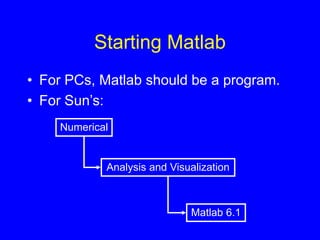
Starting Matlab
• For PCs, Matlab should be a program.
• For Sun’s:
Numerical
Analysis and Visualization
Matlab 6.1
Help
• help
• help command
Eg., help plus
• Help on toolbar
• demo
• Tutorial:
http://amath.colorado.edu/scico/tutorials
/matlab/
Matlab interpreter
• Many common functions: see help ops
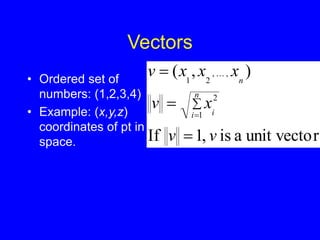
Vectors
• Ordered set of
numbers: (1,2,3,4)
• Example: (x,y,z)
coordinates of pt in
space. r
unit vecto
a
is
,
1
If
)
,
(
1
2
,
,
2
1
v
v
x
v
x
x
x
v
n
i i
n






Indexing into vectors
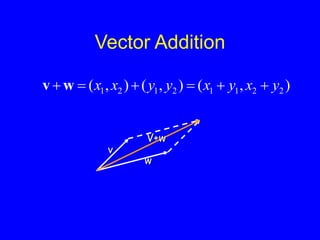
Vector Addition
)
,
(
)
,
(
)
,
( 2
2
1
1
2
1
2
1 y
x
y
x
y
y
x
x 




w
v
v
w
V+w
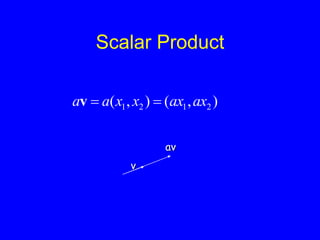
Scalar Product
)
,
(
)
,
( 2
1
2
1 ax
ax
x
x
a
a 

v
v
av
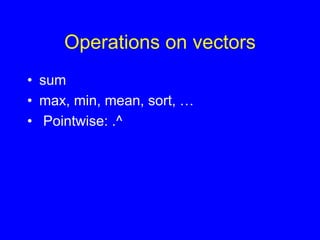
Operations on vectors
• sum
• max, min, mean, sort, …
• Pointwise: .^
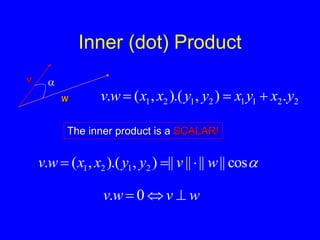
Inner (dot) Product
v
w

2
2
1
1
2
1
2
1 .
)
,
).(
,
(
. y
x
y
x
y
y
x
x
w
v 


The inner product is a SCALAR!

cos
||
||
||
||
)
,
).(
,
(
. 2
1
2
1 w
v
y
y
x
x
w
v 


w
v
w
v 

 0
.
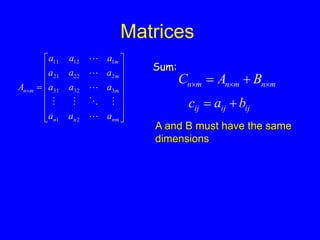
Matrices


















nm
n
n
m
m
m
m
n
a
a
a
a
a
a
a
a
a
a
a
a
A








2
1
3
32
31
2
22
21
1
12
11
m
n
m
n
m
n B
A
C 

 

Sum:
ij
ij
ij b
a
c 

A and B must have the same
dimensions
Matrices
p
m
m
n
p
n B
A
C 

 
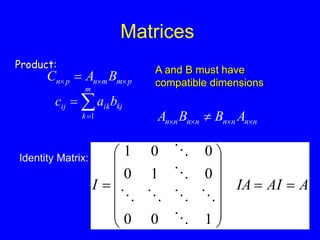
Product:



m
k
kj
ik
ij b
a
c
1
A and B must have
compatible dimensions
n
n
n
n
n
n
n
n A
B
B
A 


 
Identity Matrix:
A
AI
IA
I 
















1
0
0
0
1
0
0
0
1







Matrices
m
n
T
n
m A
C 
 
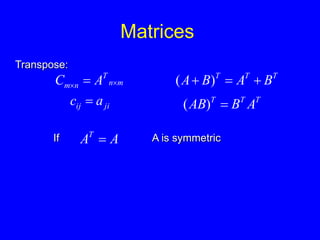
Transpose:
ji
ij a
c  T
T
T
A
B
AB 
)
(
T
T
T
B
A
B
A 

 )
(
If A
AT
 A is symmetric
Matrices
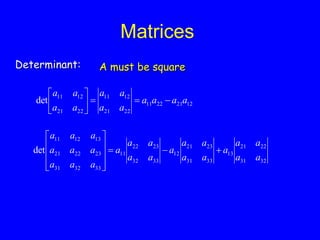
Determinant: A must be square
32
31
22
21
13
33
31
23
21
12
33
32
23
22
11
33
32
31
23
22
21
13
12
11
det
a
a
a
a
a
a
a
a
a
a
a
a
a
a
a
a
a
a
a
a
a
a
a
a













12
21
22
11
22
21
12
11
22
21
12
11
det a
a
a
a
a
a
a
a
a
a
a
a









Matrices
I
A
A
A
A n
n
n
n
n
n
n
n 
 





1
1
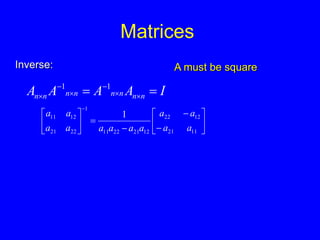
Inverse: A must be square

















11
21
12
22
12
21
22
11
1
22
21
12
11 1
a
a
a
a
a
a
a
a
a
a
a
a
Indexing into matrices
Euclidean transformations
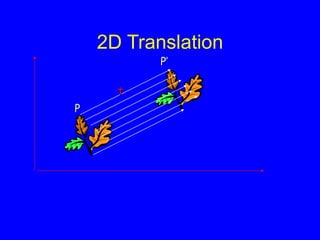
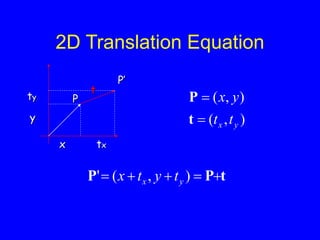
2D Translation
t
P
P’
2D Translation Equation
P
x
y
tx
ty
P’
t
t
P
P 



 )
,
(
' y
x t
y
t
x
)
,
(
)
,
(
y
x t
t
y
x


t
P
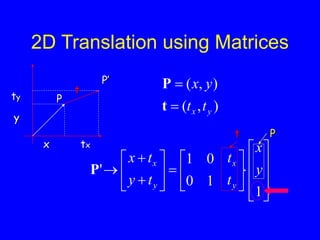
2D Translation using Matrices
P
x
y
tx
ty
P’
t
)
,
(
)
,
(
y
x t
t
y
x


t
P



























1
1
0
0
1
' y
x
t
t
t
y
t
x
y
x
y
x
P
t P
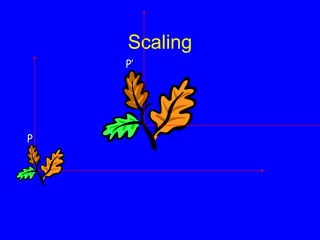
Scaling
P
P’
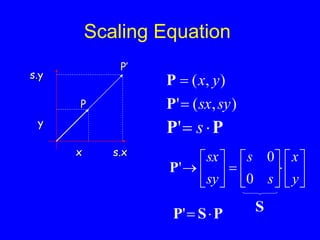
Scaling Equation
P
x
y
s.x
P’
s.y
)
,
(
'
)
,
(
sy
sx
y
x


P
P
P
P 
 s
'





















y
x
s
s
sy
sx
0
0
'
P
S
P
S
P 

'
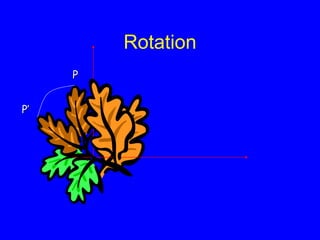
Rotation
P
P’
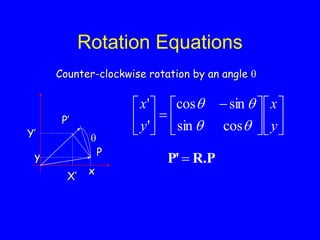
Rotation Equations
Counter-clockwise rotation by an angle 











 







y
x
y
x




cos
sin
sin
cos
'
'
P
x
Y’
P’

X’
y R.P
P'
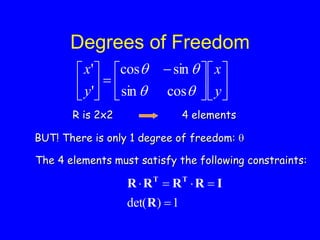
Degrees of Freedom
R is 2x2 4 elements
BUT! There is only 1 degree of freedom: 
1
)
det( 




R
I
R
R
R
R T
T
The 4 elements must satisfy the following constraints:











 







y
x
y
x




cos
sin
sin
cos
'
'
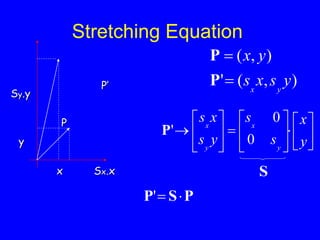
Stretching Equation
P
x
y
Sx.x
P’
Sy.y





















y
x
s
s
y
s
x
s
y
x
y
x
0
0
'
P
)
,
(
'
)
,
(
y
s
x
s
y
x
y
x


P
P
S
P
S
P 

'
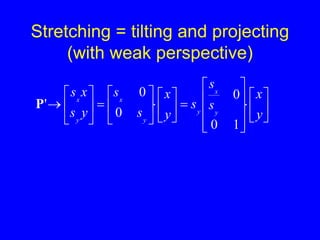
Stretching = tilting and projecting
(with weak perspective)







































y
x
s
s
s
y
x
s
s
y
s
x
s
y
x
y
y
x
y
x
1
0
0
0
0
'
P
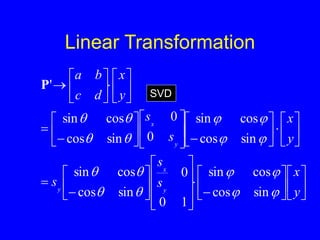
Linear Transformation










































































y
x
s
s
s
y
x
s
s
y
x
d
c
b
a
y
x
y
y
x
















sin
cos
cos
sin
1
0
0
sin
cos
cos
sin
sin
cos
cos
sin
0
0
sin
cos
cos
sin
'
P
SVD
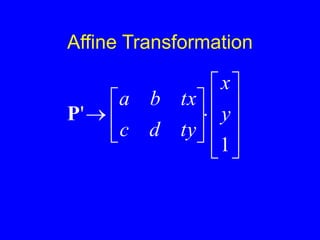
Affine Transformation


















1
' y
x
ty
d
c
tx
b
a
P
Files
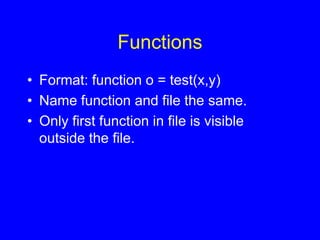
Functions
• Format: function o = test(x,y)
• Name function and file the same.
• Only first function in file is visible
outside the file.
Images
Debugging
• Add print statements to function by
leaving off ;
• keyboard
• debug and breakpoint
Conclusions
• Quick tour of matlab, you should teach
yourself the rest. We’ll give hints in
problem sets.
• Linear algebra allows geometric
manipulation of points.
• Learn to love SVD.

Matlab tutorial and Linear Algebra Review.ppt