
Material Master Scenario using Adobe
Interactive forms
Agenda
 Scenarios developed
 Earlier Process
 New Improved Process
 Developed UI Screens

2
Scenarios developed
Our Project was to implement the Material Master Process using Adobe Interactive forms and
ABAP Webdynpro.
Scenarios covered :
 Material Create --- Spare parts and Manufacturing products
 Material Modify --- Selected fields
 Material Extend --- To a new plant and Bin Location
 Material Delete --- At Company level, Plant level and Storage location level

3
Earlier Process
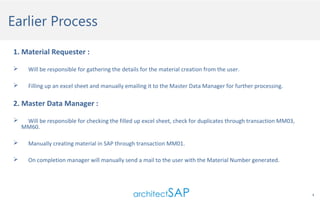
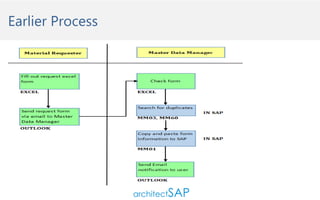
1. Material Requester :


Will be responsible for gathering the details for the material creation from the user.



Filling up an excel sheet and manually emailing it to the Master Data Manager for further processing.

2. Master Data Manager :


Will be responsible for checking the filled up excel sheet, check for duplicates through transaction MM03,
MM60.



Manually creating material in SAP through transaction MM01.



On completion manager will manually send a mail to the user with the Material Number generated.

4
Earlier Process
Drawbacks

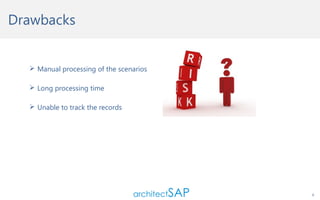
 Manual processing of the scenarios
 Long processing time
 Unable to track the records

6
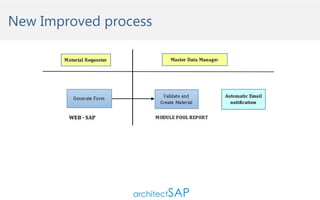
New Improved process
1. Material requester :
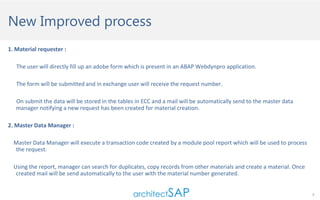
The user will directly fill up an adobe form which is present in an ABAP Webdynpro application.
The form will be submitted and in exchange user will receive the request number.
On submit the data will be stored in the tables in ECC and a mail will be automatically send to the master data
manager notifying a new request has been created for material creation.
2. Master Data Manager :
Master Data Manager will execute a transaction code created by a module pool report which will be used to process
the request.
Using the report, manager can search for duplicates, copy records from other materials and create a material. Once
created mail will be send automatically to the user with the material number generated.
7
New Improved process
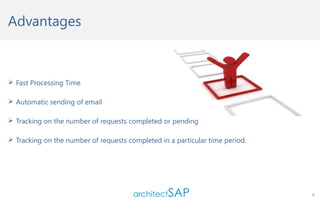
Advantages

 Fast Processing Time
 Automatic sending of email
 Tracking on the number of requests completed or pending
 Tracking on the number of requests completed in a particular time period.

9
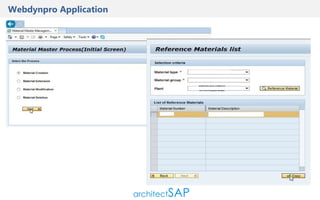
Webdynpro Application
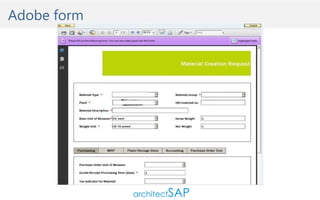
Adobe form
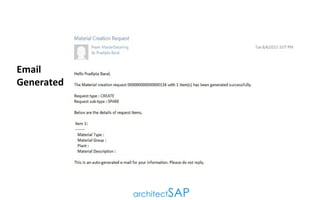
Email
Generated
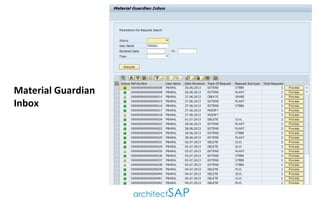
Material Guardian
Inbox
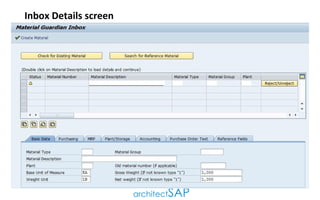
Inbox Details screen
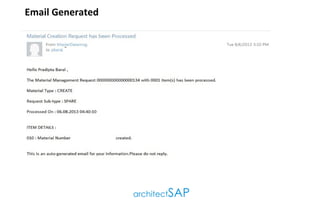
Email Generated
Questions ?

Email Us @ support@architectsap.com

16
Worldwide Offices:
                USA (Dallas)
                India (Pune)
Partner Offices:
                Monterrey (Mexico)
                Frankfurt (Germany)
                Stockholm (Sweden)
                Cape Town (South Africa)

Email:
support@architectsap.com
Corporate URL: www.architectsap.com

Adobe Interactive Forms- Get Acquainted In Material Master Scenario

  • 1.
    Material Master Scenariousing Adobe Interactive forms
  • 2.
    Agenda  Scenarios developed Earlier Process  New Improved Process  Developed UI Screens 2
  • 3.
    Scenarios developed Our Projectwas to implement the Material Master Process using Adobe Interactive forms and ABAP Webdynpro. Scenarios covered :  Material Create --- Spare parts and Manufacturing products  Material Modify --- Selected fields  Material Extend --- To a new plant and Bin Location  Material Delete --- At Company level, Plant level and Storage location level 3
  • 4.
    Earlier Process 1. MaterialRequester :  Will be responsible for gathering the details for the material creation from the user.  Filling up an excel sheet and manually emailing it to the Master Data Manager for further processing. 2. Master Data Manager :  Will be responsible for checking the filled up excel sheet, check for duplicates through transaction MM03, MM60.  Manually creating material in SAP through transaction MM01.  On completion manager will manually send a mail to the user with the Material Number generated. 4
  • 5.
  • 6.
    Drawbacks  Manual processingof the scenarios  Long processing time  Unable to track the records 6
  • 7.
    New Improved process 1.Material requester : The user will directly fill up an adobe form which is present in an ABAP Webdynpro application. The form will be submitted and in exchange user will receive the request number. On submit the data will be stored in the tables in ECC and a mail will be automatically send to the master data manager notifying a new request has been created for material creation. 2. Master Data Manager : Master Data Manager will execute a transaction code created by a module pool report which will be used to process the request. Using the report, manager can search for duplicates, copy records from other materials and create a material. Once created mail will be send automatically to the user with the material number generated. 7
  • 8.
  • 9.
    Advantages  Fast ProcessingTime  Automatic sending of email  Tracking on the number of requests completed or pending  Tracking on the number of requests completed in a particular time period. 9
  • 10.
  • 11.
  • 12.
  • 13.
  • 14.
  • 15.
  • 16.
    Questions ? Email Us@ support@architectsap.com 16
  • 17.
    Worldwide Offices:                 USA(Dallas)                 India (Pune) Partner Offices:                 Monterrey (Mexico)                 Frankfurt (Germany)                 Stockholm (Sweden)                 Cape Town (South Africa) Email: support@architectsap.com Corporate URL: www.architectsap.com