<Insert Picture Here>


Guidelines for moving from Oracle Forms to Oracle
ADF and SOA
Steven Davelaar
Oracle Consulting
Agenda

•   Some quotes and pitfalls
•   Defining a modernization strategy
•   Forms modernization tools
•   Case studies
Some Customer Quotes

• “I have 800 forms, how long will it take to migrate
  them to ADF?”
• “Other migration tools migrate PL/SQL Logic,
  JHeadstart doesn’t???”
• “Forms is dead, we need to migrate now”
• “No, we don’t need consulting, we have the
  knowledge in house“
• “We want to evaluate JHeadstart Forms2ADF
  Generator before we choose ADF and JHeadstart”
Some Pitfalls

• Lack of strategic thinking
• Lack of understanding target architecture
  • No thinking in services
  • No thinking in layers
  • Ignoring importance of decoupling
• Lack of understanding Web 2.0 / SOA-based
  development
  • ADF UI capabilities unknown or underestimated
  • Human workflow capabilities unknown
  • Risk of rebuilding monolitic, data-oriented forms app into
    monolitic data-oriented ADF app
Some More Pitfalls

• Migration tool seems more important than new
  development platform
• Modernization effort underestimated
  • There is no magic bullet
• ADF learning curve underestimated
  • ADF is by far the most feature-rich and productive framework
    in the market, but ….
  • Best-practice use of ADF has steep learning curve, is different
    from Forms development, and requires advanced ADF skills
• People are forgotten, they are more important than
  tools!
<Insert Picture Here>


Defining Modernization
Strategy
Defining a Forms Modernization
 Strategy
• Where are we now?
  • Analyze current situation
• Where do we want to go?
  • Identify top business drivers / business benefits
• How do we want to go?
  • Identify and choose modernization options
• What do we need to do when and with whom?
  • Define modernization approach/timeline/project plan
Where Are We Now - Analyze current
    System and Situation
•   Technical architecture
•   Functionality
•   Data model
•   User interface
•   Documentation
•   End user community
•   Supporting IT staff
Current technical architecture

•   Forms and DB version? Web or Client/Server?
•   Business logic coded in Forms, Libraries or in DB?
•   Generated using Oracle Designer?
•   How is Forms product used?
    • Standard: table blocks, query mode, CRUD operations, LOV’s
    • Creative: form driven by custom PL/SQL
• What generic, reusable utilities/components exist?
    • How do they map to ADF concepts?
• Desktop integration?
• Depends on interfaces with other systems?
• Which other systems depend on this system?
Current functionality

• Consists of logical subsystems?
• What functionality is obsolete?
• What functionality is duplicated in other systems?
• What functionality could be replaced with COTS
  software?
• Batch functionality?
• Reporting functionality?
Current data model

• Based on sound relation design?
• To what level is data integrity enforced in DB
• Can the datamodel be split up in logical parts: data
  services?
• Can new products/services easily be supported
  => How future-proof is the datamodel?
Current user interface

•   Considered clunky, old-fashioned?
•   “Window on data” or task-oriented screens?
•   Support for human workflow?
•   Intuitive, productive?
•   Amount of data on one screen?
Current documentation

•   State and completeness technical documentation?
•   State and completeness functional documentation?
•   Does system provide online help?
•   Stored in CASE tool (like Designer)?
Current end user community

•   Frequent, expert users?
•   Infrequent, self-service users?
•   Massive, keyboard-only data entry?
•   Data entry paper driven?
•   Geographically dispersed?
•   What other systems are used to complete tasks?
•   Are they productive (enough)?
•   Happy or unhappy? Why?
Current IT Staff

•   Afraid for or eager to learn new technologies?
•   Outsourced, now or in future?
•   Experience with Java, JEE, SOA?
•   Experience with application servers, weblogic?
•   Experience with version control tools, testing tools,
    build and deployment tools?
Where Do We Want to Go - Common
 Business Drivers
• User Interface
  • RIA, self-service, task-oriented, web 2.0, mobile,
    PDA/Smartphone
• Customization and Personalization
  • Organisation unit, user group or marketing label
• Software-as-a-Service (SAAS) Model
• Time-to-market
  • New products not held back by IT constraints
• Business process improvement
  • Internal, B2B, B2C
  • Human workflow
How do we want to go - Common
    Modernization Options
•   Move logic from Forms to database
•   Upgrade and integrate
•   Add (self service) extensions
•   Migrate functionality
•   Redesign and rebuild functionality
Move Business Logic to Database

• Create separate business logic layer in db
  • PL/SQL packages per table, or per logical entity
  • Each package contains rules
  • Optionally integrate with Designer-generated Table API
• Options to call out to business logic layer:
  • Database triggers
  • View with instead-of triggers
  • Prevent direct dml on tables, go through PL/SQL API
PL/SQL Business Logic Layer

      Rule Layer Access Layer
Data Business Logic Layer Pres.
                                                     ADF         PL/SQL     Web
                                  Forms   APEX
                                                  JDeveloper    SQL*Plus   Services

                                            Business View API
                                            with Instead Of triggers

                                                   Table API
                                                 ins    upd     del

                                             Tapi Business Rules
Layer


                                                       Tables
Move Business Logic to Database

• Why
  • Decoupling! Minimizes the impact of changes in your IT
    environment
  • Can be done with current skills, can be started today!
  • Database is very powerful programming environment!
  • Remove dead/obsolete code
  • Logic can be exposed through web services to other systems
  • Forms migration or replacement will be easier, faster and
    cheaper
Oracle Forms – upgrade and integrate

• “…There are no plans to desupport Oracle Forms and
  Reports…” – Oracle Tools Statement of Direction
  • http://www.oracle.com/technetwork/issue-
    archive/2010/toolssod-3-129969.pdf
• Clear statement of direction
  • Upgrade
  • Integrate
• Oracle Forms 11g in Oracle FMW 11g
  • Many new features
Forms 11: Major New Features

• External events
  • Allow Forms to react to events in outside world
  • BPEL integration, JMS Queue
• JavaScript integration
  • JavaScript to raise Forms event
  • Call JavaScript from Forms
• Database proxy users
  • Centralized user store, authentication through OID/LDAP
  • Increased security: Forms users cannot connect to DB
• PL/SQL Tracing
SOA Integration
             Forms                                                        Legacy Systems
                                                DB
                                                                             Batches
                                              Tables                      Packaged Apps
                                                                            Web Apps
                                              PL/SQL
                                                AQ


                                             Web Services


                                                  BPEL                        Human Workflow
Business             Rules           facts
                                                 Process                         Service
Activity             Engine                                    Assign
                                                                Task
Monitoring                       results
                                                                 Task
                                                               Complete


Monitoring       Policy evaluation             Orchestration                 Human interaction
Upgrade and Integrate

• Why Upgrade to WebForms 11
  • Runs on WebLogic 11, ensures ongoing support from Oracle
  • WebLogic 11 can be reused for ADF-based solutions
  • New features ease SOA-based integration
• Why Integrate
  • Improve operational excellence through workflow extension
  • Reduce cost through chain integration with suppliers and
    customers
  • Reduce cost through reuse: share services
Add Extensions

      Back office users
         via Forms
        Application

                                   Other systems via
                                      a Web Service


                               Self service users via
                                    online Java Web
                                          application


      Self service users via
      wireless devices
Add Extensions


• Reduce cost, increase efficiency:
  • Transform old paper-driven back office tasks into web-based
    self-service tasks
• Increase competitiveness
  • Provide self-service extensions to customers and suppliers
  • Provide mobile and PDA/Smartphone access
• Allows IT Staff to gain experience with web-based
  solutions
Migrate functionality


• Increase end user productivity
  • Leverage UI features not available or hard to build in Forms
• Consolidate on single future-proof JEE-based
  development platform
• New IT Staff skilled in JEE, not in Forms.
• Tools might be of help
• Prepare for next steps to SOA
Forms Migration – Remember the
Pitfalls

• Investment hard to justify without real BUSINESS
  benefits
• Forms apps are typically data-oriented, not
  process/task-oriented
• Keyboard-only data entry hard to do with web apps
• How future-proof is the data model?
• Migrate monolitic Forms app into monolitic web app
Redesign and re-implement
 functionality
• Put the business in the driving seat:
  • Which processes satisfy business goals in most optimal way
  • Ability to resolve biggest bottlenecks in current business
    operation
• Identify reusable services in existing systems
• Identify new services
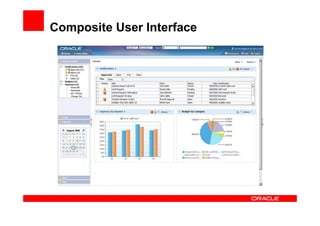
• Build composite, task-oriented user interfaces to
  access the services
Composite User Interface
<Insert Picture Here>


Oracle Forms
Modernization Tools
Forms Modernization Tools

• JHeadstart Forms2ADF Generator
• PITSS – PITSS.CON Tool
• OraFormsFaces
  ----------------------------------------------------------------
• CipherSoft - Exodus Migration Tool
• VGO Software - EVO Forms-to-Java Tool
• Imex Systems – Ormit Java/ADF Tool
• Qualogy – QAFE
JHeadstart Forms2ADF Generator

• Auto-created ADF Business Components, including model-
  based LOV’s and UI Hints
• Migrates Forms user interface to metadata, not application
  code!
  • Easy to redesign into task-oriented web 2.0 user interface.
  • Generates best-practice ADF application
• JFG provides most savings for forms with
  • Standard data blocks based on table or view
  • Complex user interface: many (stacked) canvasses, tabs, LOV’s,
    and other display types
  • PL/SQL logic mostly limited to user interface dynamics
• Best Practice ADF architecture
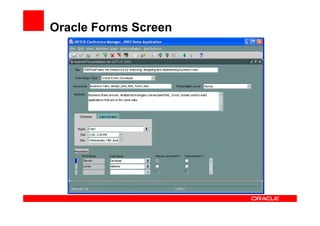
Oracle Forms Screen
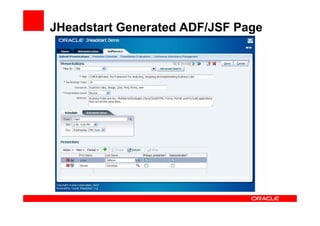
JHeadstart Generated ADF/JSF Page
PITSS – PITSS.CON Tool

• Repository driven application analysis
• Business logic assistant to move logic to DB
• Web service assistant to create web services from
  DB logic
• Forms2ADF Assistant creates ADF Business
  Components and ADF ViewController layer
• Good Forms2ADF white paper on PITSS.CON site
OraFormsFaces

• Third party product supplied by Commit Consulting
• Allows reuse of existing Forms as full featured JSF
  components
• Two-way communication between Forms and ADF
  Faces web pages
• Allows for incremental migration to ADF/SOA world
OraFormsFaces
CipherSoft - Exodus Migration Tool

• Exodus-ADF is an innovative conversion product that
  automates the migration of Oracle Forms to Oracle
  ADF, including Oracle Menus, Libraries, Triggers and
  all semantic content
• Exodus is benchmarked to be 90% faster then
  manually converting Oracle Forms and PL/SQL and
  provides as much as an 80% cost reduction for the
  client. In addition, Exodus provides an application that
  is portable, maintainable, web-enabled, and supports
  a multi-tier architecture.
VGO Software - EVO Forms-to-Java
 Tool
• Evo is certified by Oracle Corporation as 1 of only 2
  third-party solutions in the world to conduct Oracle
  Forms to Java modernizations.
• Evo preserves a customer’s investments by retaining
  existing business logic and re-architecting a system
  into a standards-compliant Java application, with the
  option of modernizing your Forms to ADF 11g or
  MyFaces JSF.
• Oracle developers who want to move to ADF can use
  Evo to convert their Forms and use JDevelopers
  intuitive wizards to work with the code that Evo
  generates.
Imex Systems – Ormit Java/ADF Tool

• ORMIT Java-ADF is the most comprehensive tool available
  today that can easily and quickly migrate Oracle Forms
  applications to 100% Java-ADF
• ORMIT Java-ADF achieves high levels of automated PL/SQL
  conversion process using a language parser to map the
  inheritances and relationships of the business logic framework,
  decompose the client-server code into object-oriented code and
  by separating the business logic into multi-tiered enterprise Java
  code.
• ORMIT Java-ADF reduces the time required to perform the
  migration of Oracle Forms applications by up to 90%. The
  process minimizes the need for manual inspection of legacy
  code.
Qualogy – QAFE

• QAFE converts the Forms application to QAML (QAFE’s markup
  language) format The only remaining step is to add some code to
  incorporate the Forms application’s business logic and complete the
  conversion process. Doing so, with QAFE, you can accomplish the
  entire conversion process in a fraction of the usual time needed. Which
  – obviously – provides you with ENORMOUS cost savings in
  comparison to other conversion tools.
• QAFE is a framework to create Web 2.0 applications with a Service
  Oriented Architecture. ADF is an extension on the Java Server Faces
  and is mainly concerned with the presentation and navigation
• QAFE is a lot easier to learn and a lot more productive compared to
  Oracle Forms (and Servoy). In order to answer the question exactly
  how many times faster than JDeveloper, you'll have to see QAFE in
  action.
<Insert Picture Here>


Forms2ADF/SOA Case
Studies
Finland - Financial Institution

• Why
  • Performance problems with Forms over WAN
  • Problems with Java applet due to different Java versions in
    browser
• Architecture Forms App
  • Simple user interface
  • Complex data retrieval: DB procs populate temp tables or
    record groups
  • Complex data manipulation through DB procs
  • Complex mexhanism to call reports through DBMS_PIPE with
    polling mechanism
• Added Value JHeadstart Forms2ADF Generator
  • None
Finland - Financial Institution

• Customer Impressed with Added Value ADF and
  JHeadstart
  • ADF Business Components well suited to reuse existing SQL
    statements
  • Reuse capabilities of ADF task flows
  • Clean MVC architecture
  • Dynamic form rebuilt in ADF in three hours with much cleaner
    architecture
  • Polling requirement: 15 minutes work with standard ADF
    Faces components
• Customer strongly considers to move to ADF and
  JHeadstart, has to do strategic thinking first!
Netherlands – ISV in Education Market

• Why
  • Wants to add self service capabilities to core app
  • Wants modern user interface
• Architecture Forms App
  • Complex user interface, many tabs, many items on canvas
  • Standard data retrieval and manipulation
  • Most business logic in database
• Added Value JHeadstart Forms2ADF Generator
  • Business Components auto-created based on forms
    definitions (1 form resulted in 162 business components)
  • Migrated metadata strongly modified to generate new
    redesigned user interface
Netherlands – Government IT
 Department
• Why
  •   Forms 4.5 and DB 8.1.7 no longer supported
  •   System integration difficult because of old/obsolete technology
  •   Character-based user interface, end users complain
  •   High maintenance cost
  •   Hard to find resources skilled with older Forms versions
• Architecture Forms App
  • Character-based 24*80 screens
  • Standard data retrieval and manipulation
  • Most business logic in forms
• Added Value JHeadstart Forms2ADF Generator
  • Business Components auto-created based on forms definitions,
    inclusing UI labels derived from boilerplate text
  • Migrated screens generated with minor changes to metadata
      • Amount of UI redesign to be decided
Netherlands – Government IT
 Department
• Migrated ADF 11 prototype used to create
  enthousiasm and gain credibility in organisation
• Existing Forms developers keen to learn ADF
• JHeadstart Migration Estimating Utility generates
  excel sheet with estimates based on forms
  characteristics
  • Used to provide insight in total migration effort
• Will start in Jan’ 2011 with migration first app (60
  forms)
Denmark- ISV in Insurance Market

• Why
  • Loosing sales because of old user interface
  • Need better SOA-based integration points
• Architecture Forms App
  • Standard data retrieval and manipulation
  • Simple to moderate user interface
  • All business logic in database
• Added Value JHeadstart Forms2ADF Generator
  • Proof of concept showed about 20-50% savings per form
  • Now deciding to move on with JHeadstart
Summary – avoiding the pitfalls

• Think strategic and big - Start small
• Do thorough analysis of current system and
  environment
• Define key business drivers for this transition
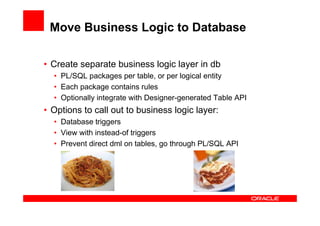
• Make Lasagna and Ravioli rather than Spaghetti
• Understand capabilities ADF, JHeadstart and SOA
  Suite
• Invest heavily in training and coaching on the job
• Do trial migrations / assessment
  • Asses added value migration tools
  • Get better insight in migration effort

Guidelines for moving from Oracle Forms to Oracle ADF and SOA

  • 1.
    <Insert Picture Here> Guidelinesfor moving from Oracle Forms to Oracle ADF and SOA Steven Davelaar Oracle Consulting
  • 2.
    Agenda • Some quotes and pitfalls • Defining a modernization strategy • Forms modernization tools • Case studies
  • 3.
    Some Customer Quotes •“I have 800 forms, how long will it take to migrate them to ADF?” • “Other migration tools migrate PL/SQL Logic, JHeadstart doesn’t???” • “Forms is dead, we need to migrate now” • “No, we don’t need consulting, we have the knowledge in house“ • “We want to evaluate JHeadstart Forms2ADF Generator before we choose ADF and JHeadstart”
  • 4.
    Some Pitfalls • Lackof strategic thinking • Lack of understanding target architecture • No thinking in services • No thinking in layers • Ignoring importance of decoupling • Lack of understanding Web 2.0 / SOA-based development • ADF UI capabilities unknown or underestimated • Human workflow capabilities unknown • Risk of rebuilding monolitic, data-oriented forms app into monolitic data-oriented ADF app
  • 5.
    Some More Pitfalls •Migration tool seems more important than new development platform • Modernization effort underestimated • There is no magic bullet • ADF learning curve underestimated • ADF is by far the most feature-rich and productive framework in the market, but …. • Best-practice use of ADF has steep learning curve, is different from Forms development, and requires advanced ADF skills • People are forgotten, they are more important than tools!
  • 6.
    <Insert Picture Here> DefiningModernization Strategy
  • 7.
    Defining a FormsModernization Strategy • Where are we now? • Analyze current situation • Where do we want to go? • Identify top business drivers / business benefits • How do we want to go? • Identify and choose modernization options • What do we need to do when and with whom? • Define modernization approach/timeline/project plan
  • 8.
    Where Are WeNow - Analyze current System and Situation • Technical architecture • Functionality • Data model • User interface • Documentation • End user community • Supporting IT staff
  • 9.
    Current technical architecture • Forms and DB version? Web or Client/Server? • Business logic coded in Forms, Libraries or in DB? • Generated using Oracle Designer? • How is Forms product used? • Standard: table blocks, query mode, CRUD operations, LOV’s • Creative: form driven by custom PL/SQL • What generic, reusable utilities/components exist? • How do they map to ADF concepts? • Desktop integration? • Depends on interfaces with other systems? • Which other systems depend on this system?
  • 10.
    Current functionality • Consistsof logical subsystems? • What functionality is obsolete? • What functionality is duplicated in other systems? • What functionality could be replaced with COTS software? • Batch functionality? • Reporting functionality?
  • 11.
    Current data model •Based on sound relation design? • To what level is data integrity enforced in DB • Can the datamodel be split up in logical parts: data services? • Can new products/services easily be supported => How future-proof is the datamodel?
  • 12.
    Current user interface • Considered clunky, old-fashioned? • “Window on data” or task-oriented screens? • Support for human workflow? • Intuitive, productive? • Amount of data on one screen?
  • 13.
    Current documentation • State and completeness technical documentation? • State and completeness functional documentation? • Does system provide online help? • Stored in CASE tool (like Designer)?
  • 14.
    Current end usercommunity • Frequent, expert users? • Infrequent, self-service users? • Massive, keyboard-only data entry? • Data entry paper driven? • Geographically dispersed? • What other systems are used to complete tasks? • Are they productive (enough)? • Happy or unhappy? Why?
  • 15.
    Current IT Staff • Afraid for or eager to learn new technologies? • Outsourced, now or in future? • Experience with Java, JEE, SOA? • Experience with application servers, weblogic? • Experience with version control tools, testing tools, build and deployment tools?
  • 16.
    Where Do WeWant to Go - Common Business Drivers • User Interface • RIA, self-service, task-oriented, web 2.0, mobile, PDA/Smartphone • Customization and Personalization • Organisation unit, user group or marketing label • Software-as-a-Service (SAAS) Model • Time-to-market • New products not held back by IT constraints • Business process improvement • Internal, B2B, B2C • Human workflow
  • 17.
    How do wewant to go - Common Modernization Options • Move logic from Forms to database • Upgrade and integrate • Add (self service) extensions • Migrate functionality • Redesign and rebuild functionality
  • 18.
    Move Business Logicto Database • Create separate business logic layer in db • PL/SQL packages per table, or per logical entity • Each package contains rules • Optionally integrate with Designer-generated Table API • Options to call out to business logic layer: • Database triggers • View with instead-of triggers • Prevent direct dml on tables, go through PL/SQL API
  • 19.
    PL/SQL Business LogicLayer Rule Layer Access Layer Data Business Logic Layer Pres. ADF PL/SQL Web Forms APEX JDeveloper SQL*Plus Services Business View API with Instead Of triggers Table API ins upd del Tapi Business Rules Layer Tables
  • 20.
    Move Business Logicto Database • Why • Decoupling! Minimizes the impact of changes in your IT environment • Can be done with current skills, can be started today! • Database is very powerful programming environment! • Remove dead/obsolete code • Logic can be exposed through web services to other systems • Forms migration or replacement will be easier, faster and cheaper
  • 21.
    Oracle Forms –upgrade and integrate • “…There are no plans to desupport Oracle Forms and Reports…” – Oracle Tools Statement of Direction • http://www.oracle.com/technetwork/issue- archive/2010/toolssod-3-129969.pdf • Clear statement of direction • Upgrade • Integrate • Oracle Forms 11g in Oracle FMW 11g • Many new features
  • 22.
    Forms 11: MajorNew Features • External events • Allow Forms to react to events in outside world • BPEL integration, JMS Queue • JavaScript integration • JavaScript to raise Forms event • Call JavaScript from Forms • Database proxy users • Centralized user store, authentication through OID/LDAP • Increased security: Forms users cannot connect to DB • PL/SQL Tracing
  • 23.
    SOA Integration Forms Legacy Systems DB Batches Tables Packaged Apps Web Apps PL/SQL AQ Web Services BPEL Human Workflow Business Rules facts Process Service Activity Engine Assign Task Monitoring results Task Complete Monitoring Policy evaluation Orchestration Human interaction
  • 24.
    Upgrade and Integrate •Why Upgrade to WebForms 11 • Runs on WebLogic 11, ensures ongoing support from Oracle • WebLogic 11 can be reused for ADF-based solutions • New features ease SOA-based integration • Why Integrate • Improve operational excellence through workflow extension • Reduce cost through chain integration with suppliers and customers • Reduce cost through reuse: share services
  • 25.
    Add Extensions Back office users via Forms Application Other systems via a Web Service Self service users via online Java Web application Self service users via wireless devices
  • 26.
    Add Extensions • Reducecost, increase efficiency: • Transform old paper-driven back office tasks into web-based self-service tasks • Increase competitiveness • Provide self-service extensions to customers and suppliers • Provide mobile and PDA/Smartphone access • Allows IT Staff to gain experience with web-based solutions
  • 27.
    Migrate functionality • Increaseend user productivity • Leverage UI features not available or hard to build in Forms • Consolidate on single future-proof JEE-based development platform • New IT Staff skilled in JEE, not in Forms. • Tools might be of help • Prepare for next steps to SOA
  • 28.
    Forms Migration –Remember the Pitfalls • Investment hard to justify without real BUSINESS benefits • Forms apps are typically data-oriented, not process/task-oriented • Keyboard-only data entry hard to do with web apps • How future-proof is the data model? • Migrate monolitic Forms app into monolitic web app
  • 29.
    Redesign and re-implement functionality • Put the business in the driving seat: • Which processes satisfy business goals in most optimal way • Ability to resolve biggest bottlenecks in current business operation • Identify reusable services in existing systems • Identify new services • Build composite, task-oriented user interfaces to access the services
  • 30.
  • 31.
    <Insert Picture Here> OracleForms Modernization Tools
  • 32.
    Forms Modernization Tools •JHeadstart Forms2ADF Generator • PITSS – PITSS.CON Tool • OraFormsFaces ---------------------------------------------------------------- • CipherSoft - Exodus Migration Tool • VGO Software - EVO Forms-to-Java Tool • Imex Systems – Ormit Java/ADF Tool • Qualogy – QAFE
  • 33.
    JHeadstart Forms2ADF Generator •Auto-created ADF Business Components, including model- based LOV’s and UI Hints • Migrates Forms user interface to metadata, not application code! • Easy to redesign into task-oriented web 2.0 user interface. • Generates best-practice ADF application • JFG provides most savings for forms with • Standard data blocks based on table or view • Complex user interface: many (stacked) canvasses, tabs, LOV’s, and other display types • PL/SQL logic mostly limited to user interface dynamics • Best Practice ADF architecture
  • 34.
  • 35.
  • 36.
    PITSS – PITSS.CONTool • Repository driven application analysis • Business logic assistant to move logic to DB • Web service assistant to create web services from DB logic • Forms2ADF Assistant creates ADF Business Components and ADF ViewController layer • Good Forms2ADF white paper on PITSS.CON site
  • 37.
    OraFormsFaces • Third partyproduct supplied by Commit Consulting • Allows reuse of existing Forms as full featured JSF components • Two-way communication between Forms and ADF Faces web pages • Allows for incremental migration to ADF/SOA world
  • 38.
  • 39.
    CipherSoft - ExodusMigration Tool • Exodus-ADF is an innovative conversion product that automates the migration of Oracle Forms to Oracle ADF, including Oracle Menus, Libraries, Triggers and all semantic content • Exodus is benchmarked to be 90% faster then manually converting Oracle Forms and PL/SQL and provides as much as an 80% cost reduction for the client. In addition, Exodus provides an application that is portable, maintainable, web-enabled, and supports a multi-tier architecture.
  • 40.
    VGO Software -EVO Forms-to-Java Tool • Evo is certified by Oracle Corporation as 1 of only 2 third-party solutions in the world to conduct Oracle Forms to Java modernizations. • Evo preserves a customer’s investments by retaining existing business logic and re-architecting a system into a standards-compliant Java application, with the option of modernizing your Forms to ADF 11g or MyFaces JSF. • Oracle developers who want to move to ADF can use Evo to convert their Forms and use JDevelopers intuitive wizards to work with the code that Evo generates.
  • 41.
    Imex Systems –Ormit Java/ADF Tool • ORMIT Java-ADF is the most comprehensive tool available today that can easily and quickly migrate Oracle Forms applications to 100% Java-ADF • ORMIT Java-ADF achieves high levels of automated PL/SQL conversion process using a language parser to map the inheritances and relationships of the business logic framework, decompose the client-server code into object-oriented code and by separating the business logic into multi-tiered enterprise Java code. • ORMIT Java-ADF reduces the time required to perform the migration of Oracle Forms applications by up to 90%. The process minimizes the need for manual inspection of legacy code.
  • 42.
    Qualogy – QAFE •QAFE converts the Forms application to QAML (QAFE’s markup language) format The only remaining step is to add some code to incorporate the Forms application’s business logic and complete the conversion process. Doing so, with QAFE, you can accomplish the entire conversion process in a fraction of the usual time needed. Which – obviously – provides you with ENORMOUS cost savings in comparison to other conversion tools. • QAFE is a framework to create Web 2.0 applications with a Service Oriented Architecture. ADF is an extension on the Java Server Faces and is mainly concerned with the presentation and navigation • QAFE is a lot easier to learn and a lot more productive compared to Oracle Forms (and Servoy). In order to answer the question exactly how many times faster than JDeveloper, you'll have to see QAFE in action.
  • 43.
  • 44.
    Finland - FinancialInstitution • Why • Performance problems with Forms over WAN • Problems with Java applet due to different Java versions in browser • Architecture Forms App • Simple user interface • Complex data retrieval: DB procs populate temp tables or record groups • Complex data manipulation through DB procs • Complex mexhanism to call reports through DBMS_PIPE with polling mechanism • Added Value JHeadstart Forms2ADF Generator • None
  • 45.
    Finland - FinancialInstitution • Customer Impressed with Added Value ADF and JHeadstart • ADF Business Components well suited to reuse existing SQL statements • Reuse capabilities of ADF task flows • Clean MVC architecture • Dynamic form rebuilt in ADF in three hours with much cleaner architecture • Polling requirement: 15 minutes work with standard ADF Faces components • Customer strongly considers to move to ADF and JHeadstart, has to do strategic thinking first!
  • 46.
    Netherlands – ISVin Education Market • Why • Wants to add self service capabilities to core app • Wants modern user interface • Architecture Forms App • Complex user interface, many tabs, many items on canvas • Standard data retrieval and manipulation • Most business logic in database • Added Value JHeadstart Forms2ADF Generator • Business Components auto-created based on forms definitions (1 form resulted in 162 business components) • Migrated metadata strongly modified to generate new redesigned user interface
  • 47.
    Netherlands – GovernmentIT Department • Why • Forms 4.5 and DB 8.1.7 no longer supported • System integration difficult because of old/obsolete technology • Character-based user interface, end users complain • High maintenance cost • Hard to find resources skilled with older Forms versions • Architecture Forms App • Character-based 24*80 screens • Standard data retrieval and manipulation • Most business logic in forms • Added Value JHeadstart Forms2ADF Generator • Business Components auto-created based on forms definitions, inclusing UI labels derived from boilerplate text • Migrated screens generated with minor changes to metadata • Amount of UI redesign to be decided
  • 48.
    Netherlands – GovernmentIT Department • Migrated ADF 11 prototype used to create enthousiasm and gain credibility in organisation • Existing Forms developers keen to learn ADF • JHeadstart Migration Estimating Utility generates excel sheet with estimates based on forms characteristics • Used to provide insight in total migration effort • Will start in Jan’ 2011 with migration first app (60 forms)
  • 49.
    Denmark- ISV inInsurance Market • Why • Loosing sales because of old user interface • Need better SOA-based integration points • Architecture Forms App • Standard data retrieval and manipulation • Simple to moderate user interface • All business logic in database • Added Value JHeadstart Forms2ADF Generator • Proof of concept showed about 20-50% savings per form • Now deciding to move on with JHeadstart
  • 50.
    Summary – avoidingthe pitfalls • Think strategic and big - Start small • Do thorough analysis of current system and environment • Define key business drivers for this transition • Make Lasagna and Ravioli rather than Spaghetti • Understand capabilities ADF, JHeadstart and SOA Suite • Invest heavily in training and coaching on the job • Do trial migrations / assessment • Asses added value migration tools • Get better insight in migration effort

Editor's Notes

  • #26 For quite some time now Oracle&apos;s message regarding Forms has been &amp;quot;Upgrade and Integrate&amp;quot;. Upgrade to the latest version and to the web and integrate with our other development tools and platforms. The rest of our offerings are almost exclusively built on Java. Forms is based on C with a Java UI. Many other of Oracle&apos;s tools are part of our Service Oriented Architecture stack of tools. Forms is more or less monolithic in nature. You have no doubt all built you entire applications in Forms and Reports?