M O B I L E B A S E D
S A L E S ( F I E L D ) F O R C E M A N A G E M E N T
S O L U T I O N
mSFM
1
mSFM – Presentation Ver 1.0
M - S F M
About the Solution
2
mSFM – Presentation Ver 1.0
About the Solution
 mSFM stands for Mobile-based Sales/Field Force Management Solution.
 It works in combination with web and mobile platform.
 It is a complete automated system to handle all the personnel working in the field whether in sales or
service or any other profile.
 —One could track and define the routes of the people in the field. While the sales staff is enabled to take
stock positions and fresh orders of the products assigned to them right from their Android mobile
phone from the retailers they are assigned to.
 The complete sales operations’ information submitted from the mobile phones is accessible from the
web along with GPS coordinates (location details) at the time of inputting the data.
 The web module has complete MIS on various parameters depicting the efficiency and productivity of
all the sales people and one could even mark attendance of the people through this; thus automating
the first part of pay-roll.
 A history of Calls and SMS logs are maintained in the system for the benefit of the organization giving
access to this crucial data of the employees.
3
mSFM – Presentation Ver 1.0
Who should use?
4
mSFM – Presentation Ver 1.0
M - S F M
Who should use?
This platform is suited for
1. All FMCG company having multiple sales people operating in multiple geographies
2. All direct marketing companies who have field executives and want to track their
movement for customer servicing
3. All service organization having field engineers
4. All kinds of DSA and insurance companies who have agents on the move in the field at
any given point of time
5. This solution can be integrated with existing ERP of the organization therefore enabling
sales order information in real-time for manufacturing purposes
6. Companies who do not have an elaborate IT infrastructure but want to make use of
technology to manage their operations from anywhere anytime
5
mSFM – Presentation Ver 1.0
Benefits
6
mSFM – Presentation Ver 1.0
M - S F M
Benefits
 Anytime Anywhere Information – The management can login from anywhere since it is a cloud
based system which in turn provides much better control over sales/service operations
 Ease of Use – It requires hardly any training for the users to adapt to and reduces the
dependency of people because of attrition
 Improves Overall Efficiency – It is a very good productivity tool in the hands of sales/service
department since it provides information about the executives in real time
 Scalability – This solution provides scalability for any number of users having multiple roles that
of Executives, Area Managers, Regional Managers and Head of Sales
 Ensuring authentic sales information - The information generated through GPS coordinates adds
to authenticity and helps tracking the fields force on real-time basis
7
mSFM – Presentation Ver 1.0
Benefits
 Removes Duplicity of effort – There is no need to do punching and consolidating the data from
different offices since the data entered is directly taken into the centralized IT system
 Maintains Confidentiality - Each sales person can view only those retailers and products which
have been assigned to him/her and similarly the team leader can view data related to his/her
own team only.
 Knowledge Management – Since a history is being created against all orders/retailers and sales
people, it acts as a very important tool for future benchmarking on various performance
parameters by applying suitable analytical tools thus enabling datamining / datawarehousing
 Reporting & Messaging - Several reports allow the sales managers and Sales Head to easily
manage the output of the entire sales team. The administrator can send customized notifications
to retailers and sales people instantly reducing the time-to-market a new product drastically
8
mSFM – Presentation Ver 1.0
Benefits
 Reporting & Messaging - Several reports allow the sales managers and Sales Head to easily
manage the output of the entire sales team. The administrator can send customized notifications
to retailers and sales people instantly reducing the time-to-market a new product drastically
 Image – The usage of this automated system greatly impacts the image of the organization in the
eyes of all the stakeholders be it channel partners, sales force and end-customers
 Data Protection – The system maintains a log of all outgoing and incoming calls and SMSs for all
the employees of the organization
9
mSFM – Presentation Ver 1.0
Screenshots
10
mSFM – Presentation Ver 1.0
M - S F M
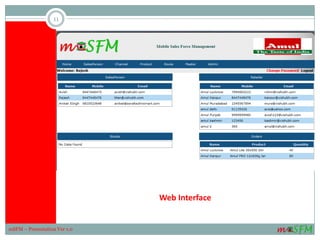
Web Interface
11
mSFM – Presentation Ver 1.0
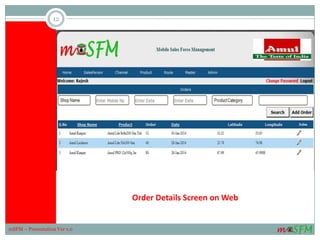
Order Details Screen on Web
12
mSFM – Presentation Ver 1.0
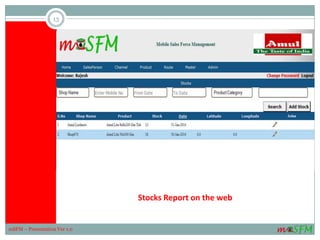
Stocks Report on the web
13
mSFM – Presentation Ver 1.0
mSFM – Main
Screen
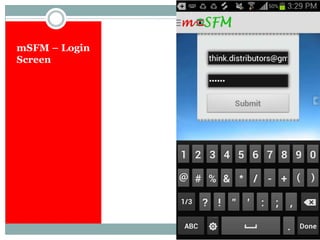
mSFM – Login
Screen
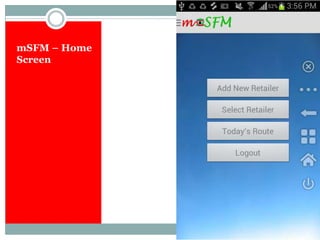
mSFM – Home
Screen
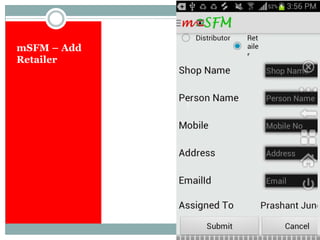
mSFM – Add
Retailer
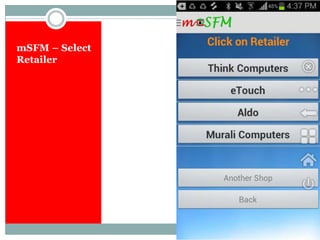
mSFM – Select
Retailer
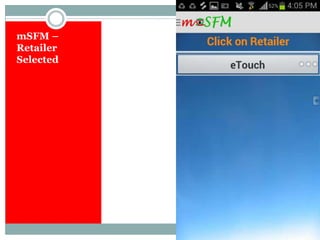
mSFM –
Retailer
Selected
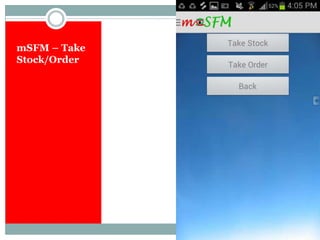
mSFM – Take
Stock/Order
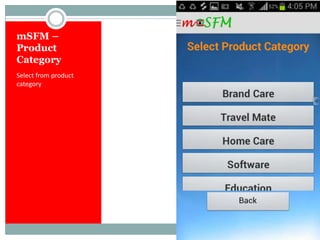
mSFM –
Product
Category
Select from product
category
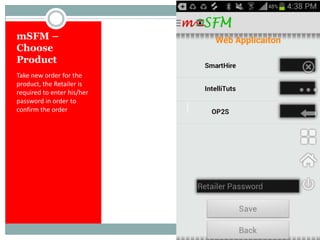
mSFM –
Choose
Product
Take new order for the
product, the Retailer is
required to enter his/her
password in order to
confirm the order
Features
23
mSFM – Presentation Ver 1.0
M - S F M
Product Features
1. Intuitive Interface
2. User-friendly, requires minimal training to users
3. Web-based and mobile based (Android), therefore platform independent
4. Enables anytime, anywhere operations
5. Multi-user, multi-location
6. Available on pay-per-use (SAAS) mode, therefore, low investment
24
mSFM – Presentation Ver 1.0
Features (Roles & Permissions)
 Flexibility to create multiple sales persons and roles within the system
 Each role has separate permissions within the system
 Admin has all rights, it can create a new user, a new sales person as well as a new
retailer
 Sales can login from his Android mobile phone and take fresh order from a retailer
assigned to him/her and also record the stocks of various products at the counter
 The records entered from the mobile phone get reflected on the web interface for the
managers to review
 The records get created along with the GPS coordinates of the sales person
 The retailer can enter his PIN in order to confirm the order
25
mSFM – Presentation Ver 1.0
Features (Control & Publishing)
 The mobile App will be sent on the mobile phone of the sales person created in the system
along with the login id and password
 The Admin can assign products and retailers to sales person and he will get access to only
those products and retailers
 When the retailer is created from the sales person’s mobile phone the GPS coordinates are
also captured
 The manager can plan routes for the field force for multiple days and has the flexibility to re-
assign to another person in case anybody is on leave
26
mSFM – Presentation Ver 1.0
High Level Process Flow
27
mSFM – Presentation Ver 1.0
M - S F M
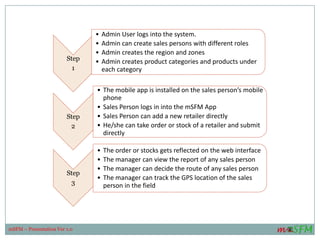
How Intellituts Delivery Works ?
Step
1
• Admin User logs into the system.
• Admin can create sales persons with different roles
• Admin creates the region and zones
• Admin creates product categories and products under
each category
Step
2
• The mobile app is installed on the sales person’s mobile
phone
• Sales Person logs in into the mSFM App
• Sales Person can add a new retailer directly
• He/she can take order or stock of a retailer and submit
directly
Step
3
• The order or stocks gets reflected on the web interface
• The manager can view the report of any sales person
• The manager can decide the route of any sales person
• The manager can track the GPS location of the sales
person in the field
mSFM – Presentation Ver 1.0
The Team
29
mSFM – Presentation Ver 1.0
M - S F M
The Team
The team behind this comprises of seasoned professionals from the field of Information Technology and Education.
The members of the team include:
Manish Kumar, BE (EEE) BITS Pilani, M. Tech, Six Sigma Black Belt
 Having more than 19 years of industry experience in hard-core software development
 Has handled several large projects during earlier tenures like TCS, HCL, BirlaSoft and Dalmia Group
 He is a natural leader & a trainer and has been grooming young professionals since long time
Rajesh Butta, MMS BITS Pilani
 He has been a co-founder of various start-up ventures in the field of IT and Education
 Comes with rich experience of more than 23 years in the service industry
 Tremendous organizational abilities to execute large & complex projects with ease
 Has very strong people skills and go-getter attitude
Naveen Khajuria, M.E. Software Systems with M.Sc. (Tech) Engg Tech, BITS Pilani
 He has worked with large companies like TCS, ST Microelectronics for several years
 He has been the architect of several path-breaking solutions in various domains
 Has capabilities to work with multiple technologies in order to create an innovative solution
 Has handled large and complex solution
 Comes with rich experience of more than 10 years in IT
30
mSFM – Presentation Ver 1.0
P L E A S E C O N T A C T :
+ 9 1 - 8 8 0 0 9 9 9 2 8 1 / + 9 1 - 8 8 0 0 2 6 7 0 7 0
rajesh@saraltechnomart.com
www.msfm.in
For More Information:
31
mSFM – Presentation Ver 1.0

Marketing Presentation on Mobile Based Sales/Field Force Management Solution

  • 1.
    M O BI L E B A S E D S A L E S ( F I E L D ) F O R C E M A N A G E M E N T S O L U T I O N mSFM 1 mSFM – Presentation Ver 1.0
  • 2.
    M - SF M About the Solution 2 mSFM – Presentation Ver 1.0
  • 3.
    About the Solution mSFM stands for Mobile-based Sales/Field Force Management Solution.  It works in combination with web and mobile platform.  It is a complete automated system to handle all the personnel working in the field whether in sales or service or any other profile.  —One could track and define the routes of the people in the field. While the sales staff is enabled to take stock positions and fresh orders of the products assigned to them right from their Android mobile phone from the retailers they are assigned to.  The complete sales operations’ information submitted from the mobile phones is accessible from the web along with GPS coordinates (location details) at the time of inputting the data.  The web module has complete MIS on various parameters depicting the efficiency and productivity of all the sales people and one could even mark attendance of the people through this; thus automating the first part of pay-roll.  A history of Calls and SMS logs are maintained in the system for the benefit of the organization giving access to this crucial data of the employees. 3 mSFM – Presentation Ver 1.0
  • 4.
    Who should use? 4 mSFM– Presentation Ver 1.0 M - S F M
  • 5.
    Who should use? Thisplatform is suited for 1. All FMCG company having multiple sales people operating in multiple geographies 2. All direct marketing companies who have field executives and want to track their movement for customer servicing 3. All service organization having field engineers 4. All kinds of DSA and insurance companies who have agents on the move in the field at any given point of time 5. This solution can be integrated with existing ERP of the organization therefore enabling sales order information in real-time for manufacturing purposes 6. Companies who do not have an elaborate IT infrastructure but want to make use of technology to manage their operations from anywhere anytime 5 mSFM – Presentation Ver 1.0
  • 6.
  • 7.
    Benefits  Anytime AnywhereInformation – The management can login from anywhere since it is a cloud based system which in turn provides much better control over sales/service operations  Ease of Use – It requires hardly any training for the users to adapt to and reduces the dependency of people because of attrition  Improves Overall Efficiency – It is a very good productivity tool in the hands of sales/service department since it provides information about the executives in real time  Scalability – This solution provides scalability for any number of users having multiple roles that of Executives, Area Managers, Regional Managers and Head of Sales  Ensuring authentic sales information - The information generated through GPS coordinates adds to authenticity and helps tracking the fields force on real-time basis 7 mSFM – Presentation Ver 1.0
  • 8.
    Benefits  Removes Duplicityof effort – There is no need to do punching and consolidating the data from different offices since the data entered is directly taken into the centralized IT system  Maintains Confidentiality - Each sales person can view only those retailers and products which have been assigned to him/her and similarly the team leader can view data related to his/her own team only.  Knowledge Management – Since a history is being created against all orders/retailers and sales people, it acts as a very important tool for future benchmarking on various performance parameters by applying suitable analytical tools thus enabling datamining / datawarehousing  Reporting & Messaging - Several reports allow the sales managers and Sales Head to easily manage the output of the entire sales team. The administrator can send customized notifications to retailers and sales people instantly reducing the time-to-market a new product drastically 8 mSFM – Presentation Ver 1.0
  • 9.
    Benefits  Reporting &Messaging - Several reports allow the sales managers and Sales Head to easily manage the output of the entire sales team. The administrator can send customized notifications to retailers and sales people instantly reducing the time-to-market a new product drastically  Image – The usage of this automated system greatly impacts the image of the organization in the eyes of all the stakeholders be it channel partners, sales force and end-customers  Data Protection – The system maintains a log of all outgoing and incoming calls and SMSs for all the employees of the organization 9 mSFM – Presentation Ver 1.0
  • 10.
  • 11.
    Web Interface 11 mSFM –Presentation Ver 1.0
  • 12.
    Order Details Screenon Web 12 mSFM – Presentation Ver 1.0
  • 13.
    Stocks Report onthe web 13 mSFM – Presentation Ver 1.0
  • 14.
  • 15.
  • 16.
  • 17.
  • 18.
  • 19.
  • 20.
  • 21.
  • 22.
    mSFM – Choose Product Take neworder for the product, the Retailer is required to enter his/her password in order to confirm the order
  • 23.
  • 24.
    Product Features 1. IntuitiveInterface 2. User-friendly, requires minimal training to users 3. Web-based and mobile based (Android), therefore platform independent 4. Enables anytime, anywhere operations 5. Multi-user, multi-location 6. Available on pay-per-use (SAAS) mode, therefore, low investment 24 mSFM – Presentation Ver 1.0
  • 25.
    Features (Roles &Permissions)  Flexibility to create multiple sales persons and roles within the system  Each role has separate permissions within the system  Admin has all rights, it can create a new user, a new sales person as well as a new retailer  Sales can login from his Android mobile phone and take fresh order from a retailer assigned to him/her and also record the stocks of various products at the counter  The records entered from the mobile phone get reflected on the web interface for the managers to review  The records get created along with the GPS coordinates of the sales person  The retailer can enter his PIN in order to confirm the order 25 mSFM – Presentation Ver 1.0
  • 26.
    Features (Control &Publishing)  The mobile App will be sent on the mobile phone of the sales person created in the system along with the login id and password  The Admin can assign products and retailers to sales person and he will get access to only those products and retailers  When the retailer is created from the sales person’s mobile phone the GPS coordinates are also captured  The manager can plan routes for the field force for multiple days and has the flexibility to re- assign to another person in case anybody is on leave 26 mSFM – Presentation Ver 1.0
  • 27.
    High Level ProcessFlow 27 mSFM – Presentation Ver 1.0 M - S F M
  • 28.
    How Intellituts DeliveryWorks ? Step 1 • Admin User logs into the system. • Admin can create sales persons with different roles • Admin creates the region and zones • Admin creates product categories and products under each category Step 2 • The mobile app is installed on the sales person’s mobile phone • Sales Person logs in into the mSFM App • Sales Person can add a new retailer directly • He/she can take order or stock of a retailer and submit directly Step 3 • The order or stocks gets reflected on the web interface • The manager can view the report of any sales person • The manager can decide the route of any sales person • The manager can track the GPS location of the sales person in the field mSFM – Presentation Ver 1.0
  • 29.
    The Team 29 mSFM –Presentation Ver 1.0 M - S F M
  • 30.
    The Team The teambehind this comprises of seasoned professionals from the field of Information Technology and Education. The members of the team include: Manish Kumar, BE (EEE) BITS Pilani, M. Tech, Six Sigma Black Belt  Having more than 19 years of industry experience in hard-core software development  Has handled several large projects during earlier tenures like TCS, HCL, BirlaSoft and Dalmia Group  He is a natural leader & a trainer and has been grooming young professionals since long time Rajesh Butta, MMS BITS Pilani  He has been a co-founder of various start-up ventures in the field of IT and Education  Comes with rich experience of more than 23 years in the service industry  Tremendous organizational abilities to execute large & complex projects with ease  Has very strong people skills and go-getter attitude Naveen Khajuria, M.E. Software Systems with M.Sc. (Tech) Engg Tech, BITS Pilani  He has worked with large companies like TCS, ST Microelectronics for several years  He has been the architect of several path-breaking solutions in various domains  Has capabilities to work with multiple technologies in order to create an innovative solution  Has handled large and complex solution  Comes with rich experience of more than 10 years in IT 30 mSFM – Presentation Ver 1.0
  • 31.
    P L EA S E C O N T A C T : + 9 1 - 8 8 0 0 9 9 9 2 8 1 / + 9 1 - 8 8 0 0 2 6 7 0 7 0 rajesh@saraltechnomart.com www.msfm.in For More Information: 31 mSFM – Presentation Ver 1.0