To cut across competition, to increase the growth rate of the organization and to be a leader in new market
YOUR
• Sales teams need immediate access to the updated business information from their organization
• Customers expect a mobile-first experience
• IT department needs a way to get on top of its mobile strategy
74% 87%
73%
77%
62%
74% Increase in customer satisfaction
due to faster response to requests and
inquiries
87% Improvement of sales and employee
productivity
73% Improvement of business process efficiency
62% Increase in usage and adoption of
CRM applications
77% boost of productivity and efficiency
of frontline employees
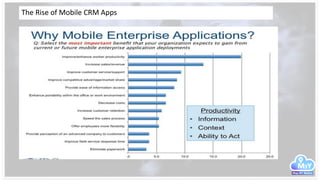
The Rise of Mobile CRM Apps
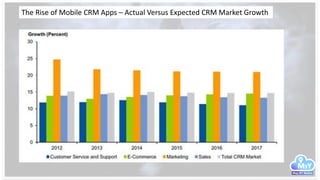
The Rise of Mobile CRM Apps – Actual Versus Expected CRM Market Growth
The Rise of Mobile CRM Apps
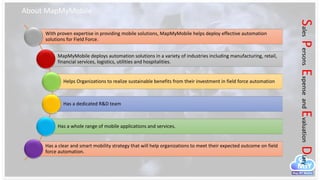
About MapMyMobile
SalesPersonsExpenseandEvaluationDiary
With proven expertise in providing mobile solutions, MapMyMobile helps deploy effective automation
solutions for Field Force.
MapMyMobile deploys automation solutions in a variety of industries including manufacturing, retail,
financial services, logistics, utilities and hospitalities.
Helps Organizations to realize sustainable benefits from their investment in field force automation
Has a dedicated R&D team
Has a whole range of mobile applications and services.
Has a clear and smart mobility strategy that will help organizations to meet their expected outcome on field
force automation.
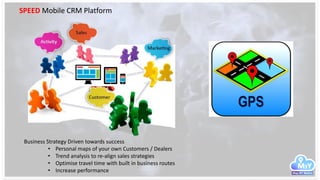
SPEED Mobile CRM Platform
Business Strategy Driven towards success
• Personal maps of your own Customers / Dealers
• Trend analysis to re-align sales strategies
• Optimise travel time with built in business routes
• Increase performance
SPEED
CRM
M3Y Customer &
Prospects
Sales
Management
Credit Limit
Management
Personalized
customer maps
Collection
Management
Lead
Management
Delivery
Management
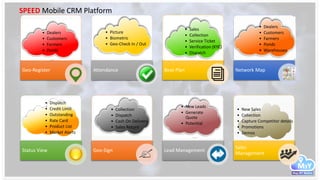
SPEED Mobile CRM Platform
Geo-Register
•
Attendance Beat Plan Network Map
Status View Geo-Sign Lead Management
Sales
Management
• Dealers
• Customers
• Farmers
• Ponds
• Picture
• Biometric
• Geo-Check In / Out
• Sales
• Collection
• Service Ticket
• Verification (KYC)
• Dispatch
• Dealers
• Customers
• Farmers
• Ponds
• Warehouses
• Dispatch
• Credit Limit
• Outstanding
• Rate Card
• Product List
• Market Alerts
• Collection
• Dispatch
• Cash On Delivery
• Sales Return
• New Sales
• Collection
• Capture Competitor details
• Promotions
• Demos
• New Leads
• Generate
Quote
• Potential
SPEED Mobile CRM Platform
Benefits of Implementing M3Y
SPEED CRM
Reduced Sales
Overheads
Reduced
Paper work
Reduced
Operational
Costs
Reduced
revenue
losses
Increased
Productivity
Increased
Customer
Retention
Increased
Business
Performance
Visibility
Increased
Profitability
SPEED
CRM
M3Y
SPEED Mobile CRM Platform
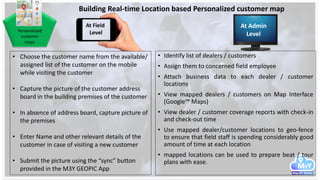
Personalized
customer
maps
• Identify list of dealers / customers
• Assign them to concerned field employee
• Attach business data to each dealer / customer
locations
• View mapped dealers / customers on Map Interface
(Google™ Maps)
• View dealer / customer coverage reports with check-in
and check-out time
• Use mapped dealer/customer locations to geo-fence
to ensure that field staff is spending considerably good
amount of time at each location
• mapped locations can be used to prepare beat / tour
plans with ease.
At Field
Level
At Admin
Level
Building Real-time Location based Personalized customer map
• Choose the customer name from the available/
assigned list of the customer on the mobile
while visiting the customer
• Capture the picture of the customer address
board in the building premises of the customer
• In absence of address board, capture picture of
the premises
• Enter Name and other relevant details of the
customer in case of visiting a new customer
• Submit the picture using the “sync” button
provided in the M3Y GEOPIC App
Lead
Management
• Register New Leads on a predefined format on the
mobile.
• Capture requirements
o with business potential
o probable closure date
o Next meeting date
o Demo Date
o other important remarks
o take signature on the mobile if required
• Submit it from the visited location
• Take Picture of Meeting Venue for mapping it on the
organization’s own customer map
Reports and Dashboards – MIS
(Daily/Weekly/Monthly/Quarterly/ Half Yearly)
• New Leads Status
• Sales Person Wise
• Region wise
• Week wise
• Month wise
• Year wise
• Existing Leads Status
• Quotes Status
• Demo Status
• Pilot Status
• Proposal Status
Instant Submission on New Sales Leads captured from Field
At Field
Level
At Admin
Level
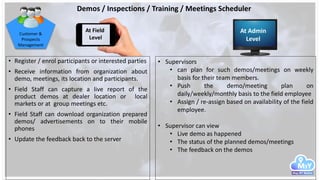
Demos / Inspections / Training / Meetings Scheduler
• Register / enrol participants or interested parties
• Receive information from organization about
demo, meetings, its location and participants.
• Field Staff can capture a live report of the
product demos at dealer location or local
markets or at group meetings etc.
• Field Staff can download organization prepared
demos/ advertisements on to their mobile
phones
• Update the feedback back to the server
Customer &
Prospects
Management
• Supervisors
• can plan for such demos/meetings on weekly
basis for their team members.
• Push the demo/meeting plan on
daily/weekly/monthly basis to the field employee
• Assign / re-assign based on availability of the field
employee.
• Supervisor can view
• Live demo as happened
• The status of the planned demos/meetings
• The feedback on the demos
At Field
Level
At Admin
Level
Sales persons can directly submit their sales order from the customer
location on their mobile or tablet device.
Process:
A master data for
• customer list
• product list
• pricing list
• credit limit list (if available)
Will be uploaded by Admin at the organization level assigning customers
to their sales employees
Registering a sales order from field on the mobile.
With easy 4 step process, the sales person
1. chooses the customer name from the available list on his
mobile
2. chooses the product
3. chooses the quantity
4. Look at the credit limit of the customer
5. Log order as per organization process
6. submits the order
Sales Admin systematically/periodically can update the information that needs
to be available at field level with simple steps.
Process:
• A master data for below items to be uploaded as an excel file with
predefined format on to the system
• customer list
• product list
• pricing list
• credit limit list (if available)
• Assign each sales person his customers/ dealers/ distributors
• Orders received from field employees to be submitted for processing :
 After approval of the supervisor
 After applying any scheme or discount available
 After getting the delivery date from the production
Sales
Management
Instant Sales Information Submission from Field
At Field
Level
At Admin
Level
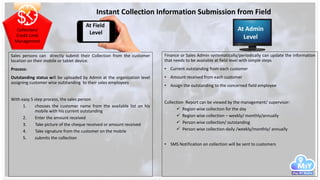
Collection/
Credit Limit
Management
Sales persons can directly submit their Collection from the customer
location on their mobile or tablet device.
Process:
Outstanding status will be uploaded by Admin at the organization level
assigning customer wise outstanding to their sales employees
With easy 5 step process, the sales person
1. chooses the customer name from the available list on his
mobile with his current outstanding
2. Enter the amount received
3. Take picture of the cheque received or amount received
4. Take signature from the customer on the mobile
5. submits the collection
Finance or Sales Admin systematically/periodically can update the information
that needs to be available at field level with simple steps
• Current outstanding from each customer
• Amount received from each customer
• Assign the outstanding to the concerned field employee
Collection Report can be viewed by the management/ supervisor:
 Region wise collection for the day
 Region wise collection – weekly/ monthly/annually
 Person wise collection/ outstanding
 Person wise collection-daily /weekly/monthly/ annually
• SMS Notification on collection will be sent to customers
Instant Collection Information Submission from Field
At Field
Level
At Admin
Level
Delivery
Management
Distribution persons can capture picture proof of the person who had
received the items from their mobile or tablet device.
Process:
Order distribution / delivery details will be uploaded by Admin at the
organization level assigning customer wise order delivery challans to
their distribution / delivery employees
Distribution team can perform
1. chooses the customer name from the available list on his
mobile
2. View Order details and quantity to deliver
3. Enter amount in case of COD orders
4. Take picture of the person received the items or package
status
5. Take signature from the customer on the mobile
6. Submit and customer receives SMS notification
Distribution department Admin systematically/periodically can update the
information that needs to be available at field level with simple steps
• Current orders to be delivered for each field staff
• Amounts to be received from each customer for COD cases
Delivery Report can be viewed by the management/ supervisor:
 Region wise delivery for the day
 Region wise delivery – weekly/ monthly/annually
 Person wise delivery Status Report
• SMS Notification on delivery will be sent to the customers
Goods Delivery and Picture Proof Authentication from Field
At Field
Level
At Admin
Level
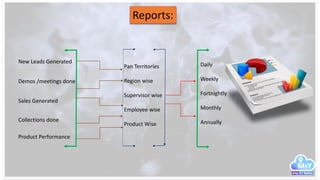
Reports:
New Leads Generated
Sales Generated
Collections done
Demos /meetings done
Pan Territories
Region wise
Supervisor wise
Employee wise
Product Wise
Daily
Weekly
Fortnightly
Monthly
Annually
Product Performance
Corporate Office
Map My Mobile
(GPS Infoway Pvt Ltd.)
267, Street 15, Block B, Phase X
Shiv Vihar, KARAWAL NAGAR, DELHI – 110 094
Visit us at www.mapmymoible.com
Write to us at: dobiz@mapmobile.com
customercare@mapmymobile.com
Mobile:+91.7093404432

SPEED-CRM-M3Y-speed

  • 2.
    To cut acrosscompetition, to increase the growth rate of the organization and to be a leader in new market YOUR • Sales teams need immediate access to the updated business information from their organization • Customers expect a mobile-first experience • IT department needs a way to get on top of its mobile strategy 74% 87% 73% 77% 62% 74% Increase in customer satisfaction due to faster response to requests and inquiries 87% Improvement of sales and employee productivity 73% Improvement of business process efficiency 62% Increase in usage and adoption of CRM applications 77% boost of productivity and efficiency of frontline employees
  • 3.
    The Rise ofMobile CRM Apps
  • 4.
    The Rise ofMobile CRM Apps – Actual Versus Expected CRM Market Growth
  • 5.
    The Rise ofMobile CRM Apps
  • 6.
    About MapMyMobile SalesPersonsExpenseandEvaluationDiary With provenexpertise in providing mobile solutions, MapMyMobile helps deploy effective automation solutions for Field Force. MapMyMobile deploys automation solutions in a variety of industries including manufacturing, retail, financial services, logistics, utilities and hospitalities. Helps Organizations to realize sustainable benefits from their investment in field force automation Has a dedicated R&D team Has a whole range of mobile applications and services. Has a clear and smart mobility strategy that will help organizations to meet their expected outcome on field force automation.
  • 7.
    SPEED Mobile CRMPlatform Business Strategy Driven towards success • Personal maps of your own Customers / Dealers • Trend analysis to re-align sales strategies • Optimise travel time with built in business routes • Increase performance
  • 8.
    SPEED CRM M3Y Customer & Prospects Sales Management CreditLimit Management Personalized customer maps Collection Management Lead Management Delivery Management SPEED Mobile CRM Platform
  • 9.
    Geo-Register • Attendance Beat PlanNetwork Map Status View Geo-Sign Lead Management Sales Management • Dealers • Customers • Farmers • Ponds • Picture • Biometric • Geo-Check In / Out • Sales • Collection • Service Ticket • Verification (KYC) • Dispatch • Dealers • Customers • Farmers • Ponds • Warehouses • Dispatch • Credit Limit • Outstanding • Rate Card • Product List • Market Alerts • Collection • Dispatch • Cash On Delivery • Sales Return • New Sales • Collection • Capture Competitor details • Promotions • Demos • New Leads • Generate Quote • Potential SPEED Mobile CRM Platform
  • 10.
    Benefits of ImplementingM3Y SPEED CRM Reduced Sales Overheads Reduced Paper work Reduced Operational Costs Reduced revenue losses Increased Productivity Increased Customer Retention Increased Business Performance Visibility Increased Profitability SPEED CRM M3Y SPEED Mobile CRM Platform
  • 11.
    Personalized customer maps • Identify listof dealers / customers • Assign them to concerned field employee • Attach business data to each dealer / customer locations • View mapped dealers / customers on Map Interface (Google™ Maps) • View dealer / customer coverage reports with check-in and check-out time • Use mapped dealer/customer locations to geo-fence to ensure that field staff is spending considerably good amount of time at each location • mapped locations can be used to prepare beat / tour plans with ease. At Field Level At Admin Level Building Real-time Location based Personalized customer map • Choose the customer name from the available/ assigned list of the customer on the mobile while visiting the customer • Capture the picture of the customer address board in the building premises of the customer • In absence of address board, capture picture of the premises • Enter Name and other relevant details of the customer in case of visiting a new customer • Submit the picture using the “sync” button provided in the M3Y GEOPIC App
  • 12.
    Lead Management • Register NewLeads on a predefined format on the mobile. • Capture requirements o with business potential o probable closure date o Next meeting date o Demo Date o other important remarks o take signature on the mobile if required • Submit it from the visited location • Take Picture of Meeting Venue for mapping it on the organization’s own customer map Reports and Dashboards – MIS (Daily/Weekly/Monthly/Quarterly/ Half Yearly) • New Leads Status • Sales Person Wise • Region wise • Week wise • Month wise • Year wise • Existing Leads Status • Quotes Status • Demo Status • Pilot Status • Proposal Status Instant Submission on New Sales Leads captured from Field At Field Level At Admin Level
  • 13.
    Demos / Inspections/ Training / Meetings Scheduler • Register / enrol participants or interested parties • Receive information from organization about demo, meetings, its location and participants. • Field Staff can capture a live report of the product demos at dealer location or local markets or at group meetings etc. • Field Staff can download organization prepared demos/ advertisements on to their mobile phones • Update the feedback back to the server Customer & Prospects Management • Supervisors • can plan for such demos/meetings on weekly basis for their team members. • Push the demo/meeting plan on daily/weekly/monthly basis to the field employee • Assign / re-assign based on availability of the field employee. • Supervisor can view • Live demo as happened • The status of the planned demos/meetings • The feedback on the demos At Field Level At Admin Level
  • 14.
    Sales persons candirectly submit their sales order from the customer location on their mobile or tablet device. Process: A master data for • customer list • product list • pricing list • credit limit list (if available) Will be uploaded by Admin at the organization level assigning customers to their sales employees Registering a sales order from field on the mobile. With easy 4 step process, the sales person 1. chooses the customer name from the available list on his mobile 2. chooses the product 3. chooses the quantity 4. Look at the credit limit of the customer 5. Log order as per organization process 6. submits the order Sales Admin systematically/periodically can update the information that needs to be available at field level with simple steps. Process: • A master data for below items to be uploaded as an excel file with predefined format on to the system • customer list • product list • pricing list • credit limit list (if available) • Assign each sales person his customers/ dealers/ distributors • Orders received from field employees to be submitted for processing :  After approval of the supervisor  After applying any scheme or discount available  After getting the delivery date from the production Sales Management Instant Sales Information Submission from Field At Field Level At Admin Level
  • 15.
    Collection/ Credit Limit Management Sales personscan directly submit their Collection from the customer location on their mobile or tablet device. Process: Outstanding status will be uploaded by Admin at the organization level assigning customer wise outstanding to their sales employees With easy 5 step process, the sales person 1. chooses the customer name from the available list on his mobile with his current outstanding 2. Enter the amount received 3. Take picture of the cheque received or amount received 4. Take signature from the customer on the mobile 5. submits the collection Finance or Sales Admin systematically/periodically can update the information that needs to be available at field level with simple steps • Current outstanding from each customer • Amount received from each customer • Assign the outstanding to the concerned field employee Collection Report can be viewed by the management/ supervisor:  Region wise collection for the day  Region wise collection – weekly/ monthly/annually  Person wise collection/ outstanding  Person wise collection-daily /weekly/monthly/ annually • SMS Notification on collection will be sent to customers Instant Collection Information Submission from Field At Field Level At Admin Level
  • 16.
    Delivery Management Distribution persons cancapture picture proof of the person who had received the items from their mobile or tablet device. Process: Order distribution / delivery details will be uploaded by Admin at the organization level assigning customer wise order delivery challans to their distribution / delivery employees Distribution team can perform 1. chooses the customer name from the available list on his mobile 2. View Order details and quantity to deliver 3. Enter amount in case of COD orders 4. Take picture of the person received the items or package status 5. Take signature from the customer on the mobile 6. Submit and customer receives SMS notification Distribution department Admin systematically/periodically can update the information that needs to be available at field level with simple steps • Current orders to be delivered for each field staff • Amounts to be received from each customer for COD cases Delivery Report can be viewed by the management/ supervisor:  Region wise delivery for the day  Region wise delivery – weekly/ monthly/annually  Person wise delivery Status Report • SMS Notification on delivery will be sent to the customers Goods Delivery and Picture Proof Authentication from Field At Field Level At Admin Level
  • 17.
    Reports: New Leads Generated SalesGenerated Collections done Demos /meetings done Pan Territories Region wise Supervisor wise Employee wise Product Wise Daily Weekly Fortnightly Monthly Annually Product Performance
  • 18.
    Corporate Office Map MyMobile (GPS Infoway Pvt Ltd.) 267, Street 15, Block B, Phase X Shiv Vihar, KARAWAL NAGAR, DELHI – 110 094 Visit us at www.mapmymoible.com Write to us at: dobiz@mapmobile.com customercare@mapmymobile.com Mobile:+91.7093404432