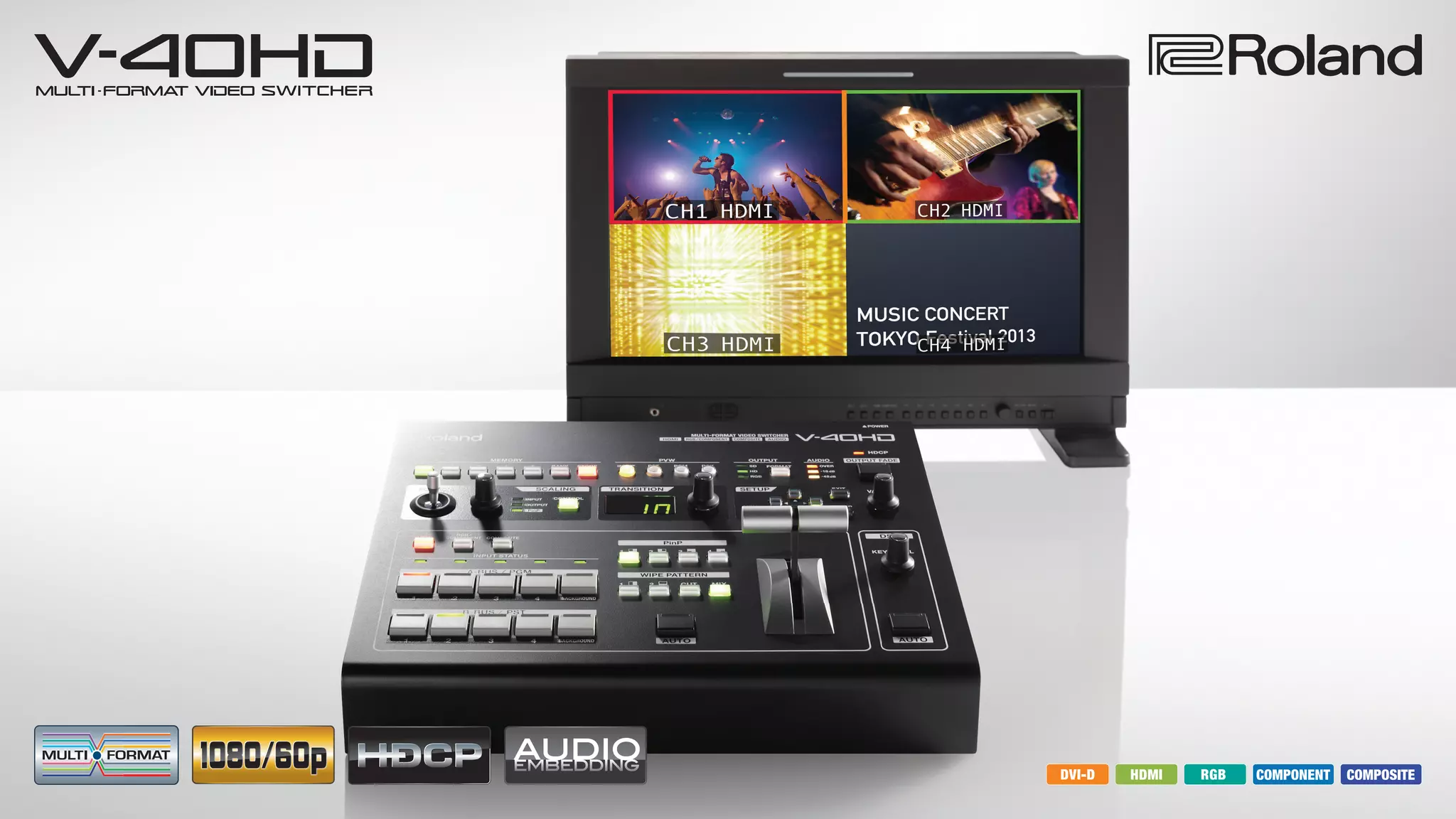
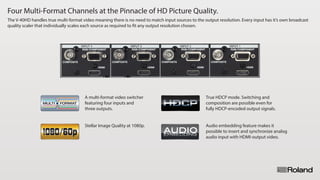
Four Multi-Format Channels at the Pinnacle of HD Picture Quality.
The V-40HD handles true multi-format video meaning there is no need to match input sources to the output resolution. Every input has it’s own broadcast
quality scaler that individually scales each source as required to fit any output resolution chosen.
A multi-format video switcher
featuring four inputs and
three outputs.
True HDCP mode. Switching and
composition are possible even for
fully HDCP-encoded output signals.
Stellar Image Quality at 1080p. Audio embedding feature makes it
possible to insert and synchronize analog
audio input with HDMI-output video.
Input / Output
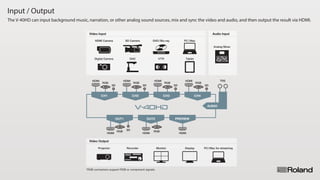
The V-40HD can input background music, narration, or other analog sound sources, mix and sync the video and audio, and then output the result via HDMI.
Audio Input
AUDIO
CH1
HDMI
RGB
SD
CH2
HDMI
RGB
SD
CH3
HDMI
RGB
SD
CH4
HDMI
RGB
SD
OUT1
HDMI
RGB SD
OUT2
HDMI
RGB
PREVIEW
HDMI
Analog Mixer
PC/Mac for streamingDisplay
Tablet
PC / Mac
Projector
HDMI Camera
Digital Camera
Monitor
DVD/Blu-ray
VTR
Recorder
SD Camera
OHC
TRS
Video Input
Video Output
*RGB connectors support RGB or component signals.
Top Panel
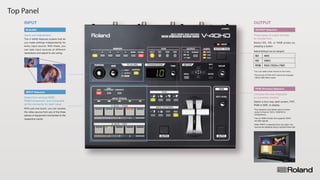
The V-40HD features scalers that let
you make settings independently for
every input source. With these, you
can take input sources of different
resolutions and adjust to any sizing.
Zoom and Adjustment.
SCALING
PVW (Preview) Selectors
Select a four-way split screen, PST,
PGM or DSK to display.
Chooses the view displayed
on a preview monitor.
INPUT Selectors
With just one touch, you can access
the video source from any of the three
pieces of equipment connected to the
respective inputs.
Select from among HDMI,
RGB/Component, and Composite
as the connector for each input.
OUTPUT Selectors
Select SD, HD, or RGB simply by
pressing a button.
Three types of output formats
to choose from.
INPUT OUTPUT
480i
1080i
XGA (1024×768)
SD
HD
RGB
*You can select other format on the menu.
*The format of PVW OUT cannot be changed.
(1920x1080/60Hz fixed)
*The resolution and refresh rate of monitor
output is fixed at 1920 x 1080/60 Hz
(progressive).
*Use an HDMI monitor that supports HDCP
and 60p signals.
*When INPUT is selected (four-way split ), the
sources are displayed using a reduced frame rate.
Default Settings (can be changed)
Rear Panel
AUDIO INPUT
INPUT Connectors 1 - 4
The V-40HD is equipped with inputs for
analog audio equipment. This enables
you to embed analog audio in the
HDMI video output.
Mix analog audio into HDMI video.
HDMI inputs support an embedded
audio signal.
Support for three formats per input.
[HDMI] Up to WUXGA, 1080p
[RGB/Component]UptoWUXGA,1080p
[Composite] 480i or 576i
Output Connectors
Connect monitors, projectors,
or recording equipment.
[HDMI] Up to WUXGA, 1080p
[RGB/Component]UptoWUXGA,1080p
[Composite] 480i or 576i
Designed for low-noise operation
that won't get in the way of your
production.
FANLESS
The design of the V-40HD features
excellent heat-radiating efficiency,
resulting in fanless operation. In
addition to ensuring quietness, this
eliminates the space needs for a
cooling fan, achieving a compact size
even with a large number of connectors.
*In HDCP mode, no video signals are output
from the RGB/Component and composite
connectors.
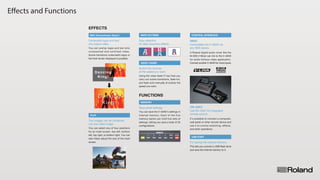
Effects and Functions
VIDEO FADER
Using the video fader (T-bar) lets you
carry out scene transitions, fade-ins,
and fade-outs manually at exactly the
speed you want.
Switch the sources
at the speed you want.
EFFECTS
Dancing
King!
DSK (Downstream Keyer)
You can overlay logos and text onto
composited and switched video.
Scene transitions underneath logos or
text that remain displayed is possible.
Composite logos and text
into output video.
WIPE PATTERN
AB ABABAAB
Easy selection
of video transition effects.
PinP
You can select any of four positions
for an inset screen: top left, bottom
left, top right, or bottom right. You can
also freely adjust the size of the inset
screen.
Two images can be combined
into one video image.
Dancing
King!
You can save the V-40HD's settings in
internal memory. Each of the five
memory banks can hold five sets of
settings, letting you save a total of 25
configurations.
Save panel settings.
MEMORY
USB PORT
This lets you connect a USB flash drive
and save the internal memory to it.
For saving the internal memory.
【RS-232C】
【MIDI】
CONTROL INTERFACE
It's possible to connect a computer,
wall panel or other remote device and
use it to control switching, effects,
and other operations.
Use RS-232C for integrated
remote control.
A Roland digital audio mixer like the
M-200i V-Mixer can link to the V-40HD
for audio-follows-video application.
Connect another V-40HD for more inputs.
Controllable the V-40HD via
any MIDI device.
FUNCTIONS
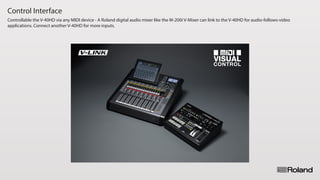
Control Interface
Controllable the V-40HD via any MIDI device - A Roland digital audio mixer like the M-200i V-Mixer can link to the V-40HD for audio-follows-video
applications. Connect another V-40HD for more inputs.
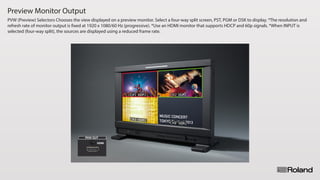
Preview Monitor Output
PVW (Preview) Selectors Chooses the view displayed on a preview monitor. Select a four-way split screen, PST, PGM or DSK to display. *The resolution and
refresh rate of monitor output is fixed at 1920 x 1080/60 Hz (progressive). *Use an HDMI monitor that supports HDCP and 60p signals. *When INPUT is
selected (four-way split), the sources are displayed using a reduced frame rate.
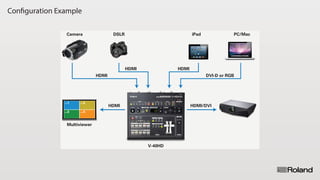
Configuration Example
CH.1 CH.2
CH.3 CH.4
HDMI
HDMI/DVIHDMI
HDMI
DVI-D or RGBHDMI
DSLRCamera PC/MaciPad
Multiviewer
V-40HD
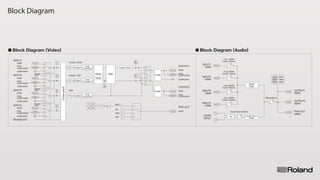
Block Diagram
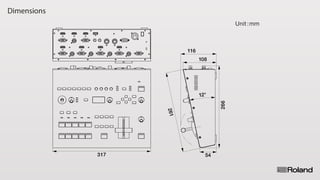
Dimensions
317
261
116
54
12°
108
266
Unit:mm

Roland V-40HD: Multi-format Video Switcher

  • 2.
    Four Multi-Format Channelsat the Pinnacle of HD Picture Quality. The V-40HD handles true multi-format video meaning there is no need to match input sources to the output resolution. Every input has it’s own broadcast quality scaler that individually scales each source as required to fit any output resolution chosen. A multi-format video switcher featuring four inputs and three outputs. True HDCP mode. Switching and composition are possible even for fully HDCP-encoded output signals. Stellar Image Quality at 1080p. Audio embedding feature makes it possible to insert and synchronize analog audio input with HDMI-output video.
  • 3.
    Input / Output TheV-40HD can input background music, narration, or other analog sound sources, mix and sync the video and audio, and then output the result via HDMI. Audio Input AUDIO CH1 HDMI RGB SD CH2 HDMI RGB SD CH3 HDMI RGB SD CH4 HDMI RGB SD OUT1 HDMI RGB SD OUT2 HDMI RGB PREVIEW HDMI Analog Mixer PC/Mac for streamingDisplay Tablet PC / Mac Projector HDMI Camera Digital Camera Monitor DVD/Blu-ray VTR Recorder SD Camera OHC TRS Video Input Video Output *RGB connectors support RGB or component signals.
  • 4.
    Top Panel The V-40HDfeatures scalers that let you make settings independently for every input source. With these, you can take input sources of different resolutions and adjust to any sizing. Zoom and Adjustment. SCALING PVW (Preview) Selectors Select a four-way split screen, PST, PGM or DSK to display. Chooses the view displayed on a preview monitor. INPUT Selectors With just one touch, you can access the video source from any of the three pieces of equipment connected to the respective inputs. Select from among HDMI, RGB/Component, and Composite as the connector for each input. OUTPUT Selectors Select SD, HD, or RGB simply by pressing a button. Three types of output formats to choose from. INPUT OUTPUT 480i 1080i XGA (1024×768) SD HD RGB *You can select other format on the menu. *The format of PVW OUT cannot be changed. (1920x1080/60Hz fixed) *The resolution and refresh rate of monitor output is fixed at 1920 x 1080/60 Hz (progressive). *Use an HDMI monitor that supports HDCP and 60p signals. *When INPUT is selected (four-way split ), the sources are displayed using a reduced frame rate. Default Settings (can be changed)
  • 5.
    Rear Panel AUDIO INPUT INPUTConnectors 1 - 4 The V-40HD is equipped with inputs for analog audio equipment. This enables you to embed analog audio in the HDMI video output. Mix analog audio into HDMI video. HDMI inputs support an embedded audio signal. Support for three formats per input. [HDMI] Up to WUXGA, 1080p [RGB/Component]UptoWUXGA,1080p [Composite] 480i or 576i Output Connectors Connect monitors, projectors, or recording equipment. [HDMI] Up to WUXGA, 1080p [RGB/Component]UptoWUXGA,1080p [Composite] 480i or 576i Designed for low-noise operation that won't get in the way of your production. FANLESS The design of the V-40HD features excellent heat-radiating efficiency, resulting in fanless operation. In addition to ensuring quietness, this eliminates the space needs for a cooling fan, achieving a compact size even with a large number of connectors. *In HDCP mode, no video signals are output from the RGB/Component and composite connectors.
  • 6.
    Effects and Functions VIDEOFADER Using the video fader (T-bar) lets you carry out scene transitions, fade-ins, and fade-outs manually at exactly the speed you want. Switch the sources at the speed you want. EFFECTS Dancing King! DSK (Downstream Keyer) You can overlay logos and text onto composited and switched video. Scene transitions underneath logos or text that remain displayed is possible. Composite logos and text into output video. WIPE PATTERN AB ABABAAB Easy selection of video transition effects. PinP You can select any of four positions for an inset screen: top left, bottom left, top right, or bottom right. You can also freely adjust the size of the inset screen. Two images can be combined into one video image. Dancing King! You can save the V-40HD's settings in internal memory. Each of the five memory banks can hold five sets of settings, letting you save a total of 25 configurations. Save panel settings. MEMORY USB PORT This lets you connect a USB flash drive and save the internal memory to it. For saving the internal memory. 【RS-232C】 【MIDI】 CONTROL INTERFACE It's possible to connect a computer, wall panel or other remote device and use it to control switching, effects, and other operations. Use RS-232C for integrated remote control. A Roland digital audio mixer like the M-200i V-Mixer can link to the V-40HD for audio-follows-video application. Connect another V-40HD for more inputs. Controllable the V-40HD via any MIDI device. FUNCTIONS
  • 7.
    Control Interface Controllable theV-40HD via any MIDI device - A Roland digital audio mixer like the M-200i V-Mixer can link to the V-40HD for audio-follows-video applications. Connect another V-40HD for more inputs.
  • 8.
    Preview Monitor Output PVW(Preview) Selectors Chooses the view displayed on a preview monitor. Select a four-way split screen, PST, PGM or DSK to display. *The resolution and refresh rate of monitor output is fixed at 1920 x 1080/60 Hz (progressive). *Use an HDMI monitor that supports HDCP and 60p signals. *When INPUT is selected (four-way split), the sources are displayed using a reduced frame rate.
  • 9.
    Configuration Example CH.1 CH.2 CH.3CH.4 HDMI HDMI/DVIHDMI HDMI DVI-D or RGBHDMI DSLRCamera PC/MaciPad Multiviewer V-40HD
  • 10.
  • 11.