MapsTran Minh Triet – Nguyen Khac HuyFaculty of Information TechnologyUniversity of Science, VNU-HCM
Texture and Frame ScrollingOne image file for one frameMany filesSlow loadingHard managementOne image file for one spriteOnly One fileLoading at once
Scrolling Map
Scrolling map
Scrolling mapVertical scrollingChicken InvadersSkyforceHorizontal scrollingMarioContraHow do they do that?
HorizontalScrolling MapSource: http://www.xnadevelopment.com/tutorials/scrollinga2dbackground/ScrollingA2DBackground.shtml
Horizontal scrolling mapCreate Sprite classAdding the following objects to the top of the Sprite class. //The size of the Spritepublic Rectangle Size;//Used to size the Sprite up or down from               // the original imagepublic float Scale = 1.0f;
Horizontal scrolling mapModify the LoadContent method of the Sprite class//Load the texture using the Content Pipelinepublic void LoadContent(ContentManager 	theContentManager, string theAssetName)        {            mSpriteTexture = theContentManager.Load<Texture2D>(theAssetName);            Size = new Rectangle(		0, 0, (int)(mSpriteTexture.Width * Scale), 		(int)(mSpriteTexture.Height * Scale));        }
Horizontal scrolling mapChange the Draw method 	//Draw the sprite to the screenpublic void Draw(SpriteBatch theSpriteBatch)        {            theSpriteBatch.Draw(mSpriteTexture,Position, new Rectangle(0, 0, SpriteTexture.Width, 		     mSpriteTexture.Height),Color.White, 0.0f, Vector2.Zero, Scale, 	       SpriteEffects.None, 0);        }
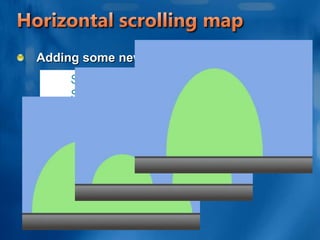
Horizontal scrolling mapAdding some new Sprites to Game class        Sprite mBackgroundOne;        Sprite mBackgroundTwo;        Sprite mBackgroundThree;
Horizontal scrolling mapModify the Initialize methodprotected override void Initialize()        {// TODO: Add your initialization logic here            mBackgroundOne = new Sprite();            mBackgroundOne.Scale = 2.0f;            mBackgroundTwo = new Sprite();            mBackgroundTwo.Scale = 2.0f;            mBackgroundThree = new Sprite();            mBackgroundThree.Scale = 2.0f;base.Initialize();        }
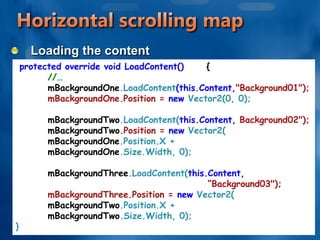
Horizontal scrolling mapLoading the contentprotected override void LoadContent()      {	//…mBackgroundOne.LoadContent(this.Content,"Background01");            	mBackgroundOne.Position = new Vector2(0, 0);mBackgroundTwo.LoadContent(this.Content, Background02");mBackgroundTwo.Position = new Vector2( 			mBackgroundOne.Position.X + 				mBackgroundOne.Size.Width, 0);mBackgroundThree.LoadContent(this.Content,“Background03");	mBackgroundThree.Position = new Vector2( 	mBackgroundTwo.Position.X + 	mBackgroundTwo.Size.Width, 0);}
Horizontal scrolling mapMoving the background images across the screen in a snake like fashionAdding the code to Update methodif (mBackgroundOne.Position.X < -mBackgroundOne.Size.Width)mBackgroundOne.Position.X = mBackgroundThree.Position.X + mBackgroundThree.Size.Width;if (mBackgroundTwo.Position.X < -mBackgroundTwo.Size.Width)mBackgroundTwo.Position.X = mBackgroundOne.Position.X + mBackgroundOne.Size.Width;if (mBackgroundThree.Position.X < -mBackgroundThree.Size.Width)mBackgroundThree.Position.X = mBackgroundTwo.Position.X + mBackgroundTwo.Size.Width;
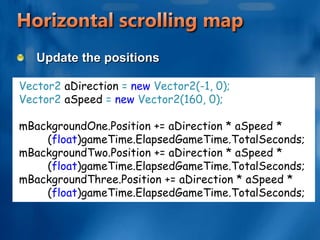
Horizontal scrolling mapUpdate the positionsVector2 aDirection = new Vector2(-1, 0); Vector2 aSpeed = new Vector2(160, 0); mBackgroundOne.Position += aDirection * aSpeed * 	(float)gameTime.ElapsedGameTime.TotalSeconds; mBackgroundTwo.Position += aDirection * aSpeed * 	(float)gameTime.ElapsedGameTime.TotalSeconds; mBackgroundThree.Position += aDirection * aSpeed * 	(float)gameTime.ElapsedGameTime.TotalSeconds;
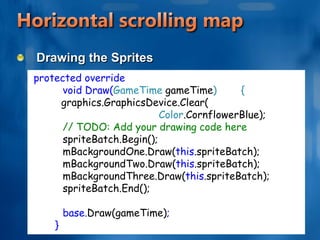
Horizontal scrolling mapDrawing the Spritesprotected override 	void Draw(GameTime gameTime)        {graphics.GraphicsDevice.Clear(Color.CornflowerBlue);	// TODO: Add your drawing code here	spriteBatch.Begin();	mBackgroundOne.Draw(this.spriteBatch);	mBackgroundTwo.Draw(this.spriteBatch);	mBackgroundThree.Draw(this.spriteBatch);	spriteBatch.End();	base.Draw(gameTime);        }
Vertical Scrolling Map
Vertical scrollingCan you think of some things you can change? How hard would it be to make this scroll vertically? Do you think you know what you might change?
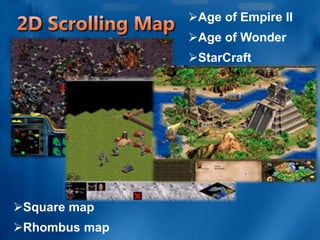
2D Scrolling Map
Age of Empire II
Age of Wonder
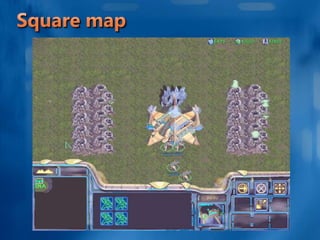
StarCraft2D Scrolling MapSquare map
Rhombus mapSquare map
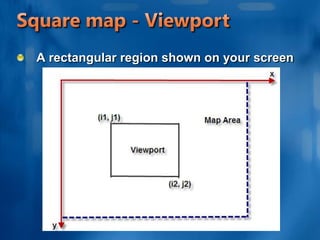
Square map - ViewportA rectangular region shown on your screen
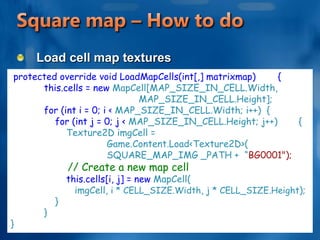
Square map – How to doLoad cell map texturesprotected override void LoadMapCells(int[,] matrixmap)        {            this.cells = new MapCell[MAP_SIZE_IN_CELL.Width,  					MAP_SIZE_IN_CELL.Height];for (int i = 0; i < MAP_SIZE_IN_CELL.Width; i++)	{for (int j = 0; j < MAP_SIZE_IN_CELL.Height; j++)	{                    Texture2D imgCell = 								Game.Content.Load<Texture2D>(			SQUARE_MAP_IMG _PATH +  “BG0001");// Create a new map cellthis.cells[i, j] = new MapCell(		imgCell, i * CELL_SIZE.Width, j * CELL_SIZE.Height);                }            }}
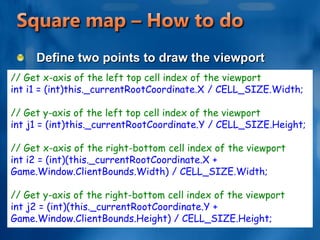
Square map – How to doDefine two points to draw the viewport// Get x-axis of the left top cell index of the viewportint i1 = (int)this._currentRootCoordinate.X / CELL_SIZE.Width;// Get y-axis of the left top cell index of the viewportint j1 = (int)this._currentRootCoordinate.Y / CELL_SIZE.Height;// Get x-axis of the right-bottom cell index of the viewportint i2 = (int)(this._currentRootCoordinate.X + Game.Window.ClientBounds.Width) / CELL_SIZE.Width; // Get y-axis of the right-bottom cell index of the viewportint j2 = (int)(this._currentRootCoordinate.Y + Game.Window.ClientBounds.Height) / CELL_SIZE.Height;
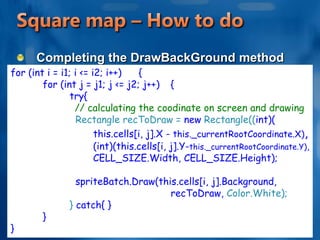
Square map – How to doCompleting the DrawBackGround methodfor (int i = i1; i <= i2; i++)	{	for (int j = j1; j <= j2; j++)	{                    try{		// calculating the coodinate on screen and drawingRectangle recToDraw = new Rectangle((int)(                            this.cells[i, j].X - this._currentRootCoordinate.X),                            (int)(this.cells[i, j].Y-this._currentRootCoordinate.Y),                            CELL_SIZE.Width, CELL_SIZE.Height);                      spriteBatch.Draw(this.cells[i, j].Background, 					recToDraw, Color.White);                    } catch{ }	}}
Rhombus map
Rhombus mapViewportWhat’s difference from the square map?Rhombus mapHow to draw a rhombus map?Find a position of 2D point
Rhombus map - Technique
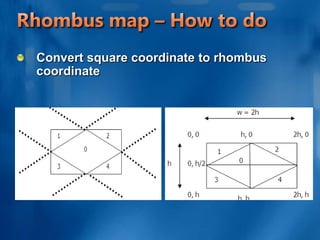
Rhombus map – How to doConvert square coordinate to rhombus coordinate
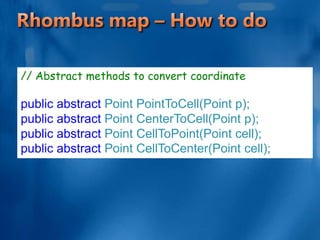
Rhombus map – How to do// Abstract methods to convert coordinatepublic abstract Point PointToCell(Point p);public abstract Point CenterToCell(Point p);public abstract Point CellToPoint(Point cell);public abstract Point CellToCenter(Point cell);
More shape mapViewportWhat’s difference from?How to change coordinate?Find a position of 2D poin
Demo Rhombus map
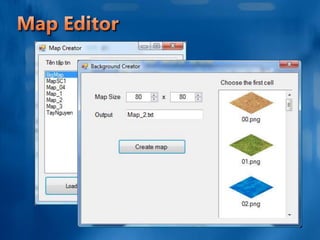
Map Editor
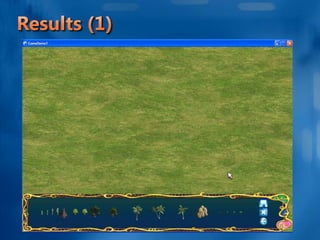
Results (1)
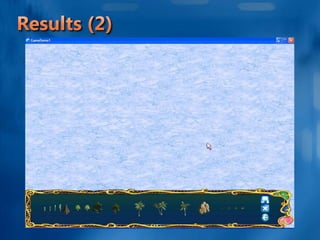
Results (2)
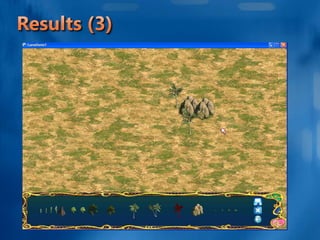
Results (3)

Maps

  • 1.
    MapsTran Minh Triet– Nguyen Khac HuyFaculty of Information TechnologyUniversity of Science, VNU-HCM
  • 2.
    Texture and FrameScrollingOne image file for one frameMany filesSlow loadingHard managementOne image file for one spriteOnly One fileLoading at once
  • 3.
  • 4.
  • 5.
    Scrolling mapVertical scrollingChickenInvadersSkyforceHorizontal scrollingMarioContraHow do they do that?
  • 6.
  • 7.
    Horizontal scrolling mapCreateSprite classAdding the following objects to the top of the Sprite class. //The size of the Spritepublic Rectangle Size;//Used to size the Sprite up or down from // the original imagepublic float Scale = 1.0f;
  • 8.
    Horizontal scrolling mapModifythe LoadContent method of the Sprite class//Load the texture using the Content Pipelinepublic void LoadContent(ContentManager theContentManager, string theAssetName) { mSpriteTexture = theContentManager.Load<Texture2D>(theAssetName); Size = new Rectangle( 0, 0, (int)(mSpriteTexture.Width * Scale), (int)(mSpriteTexture.Height * Scale)); }
  • 9.
    Horizontal scrolling mapChangethe Draw method //Draw the sprite to the screenpublic void Draw(SpriteBatch theSpriteBatch) { theSpriteBatch.Draw(mSpriteTexture,Position, new Rectangle(0, 0, SpriteTexture.Width, mSpriteTexture.Height),Color.White, 0.0f, Vector2.Zero, Scale, SpriteEffects.None, 0); }
  • 10.
    Horizontal scrolling mapAddingsome new Sprites to Game class Sprite mBackgroundOne; Sprite mBackgroundTwo; Sprite mBackgroundThree;
  • 11.
    Horizontal scrolling mapModifythe Initialize methodprotected override void Initialize() {// TODO: Add your initialization logic here mBackgroundOne = new Sprite(); mBackgroundOne.Scale = 2.0f; mBackgroundTwo = new Sprite(); mBackgroundTwo.Scale = 2.0f; mBackgroundThree = new Sprite(); mBackgroundThree.Scale = 2.0f;base.Initialize(); }
  • 12.
    Horizontal scrolling mapLoadingthe contentprotected override void LoadContent() { //…mBackgroundOne.LoadContent(this.Content,"Background01"); mBackgroundOne.Position = new Vector2(0, 0);mBackgroundTwo.LoadContent(this.Content, Background02");mBackgroundTwo.Position = new Vector2( mBackgroundOne.Position.X + mBackgroundOne.Size.Width, 0);mBackgroundThree.LoadContent(this.Content,“Background03"); mBackgroundThree.Position = new Vector2( mBackgroundTwo.Position.X + mBackgroundTwo.Size.Width, 0);}
  • 13.
    Horizontal scrolling mapMovingthe background images across the screen in a snake like fashionAdding the code to Update methodif (mBackgroundOne.Position.X < -mBackgroundOne.Size.Width)mBackgroundOne.Position.X = mBackgroundThree.Position.X + mBackgroundThree.Size.Width;if (mBackgroundTwo.Position.X < -mBackgroundTwo.Size.Width)mBackgroundTwo.Position.X = mBackgroundOne.Position.X + mBackgroundOne.Size.Width;if (mBackgroundThree.Position.X < -mBackgroundThree.Size.Width)mBackgroundThree.Position.X = mBackgroundTwo.Position.X + mBackgroundTwo.Size.Width;
  • 14.
    Horizontal scrolling mapUpdatethe positionsVector2 aDirection = new Vector2(-1, 0); Vector2 aSpeed = new Vector2(160, 0); mBackgroundOne.Position += aDirection * aSpeed * (float)gameTime.ElapsedGameTime.TotalSeconds; mBackgroundTwo.Position += aDirection * aSpeed * (float)gameTime.ElapsedGameTime.TotalSeconds; mBackgroundThree.Position += aDirection * aSpeed * (float)gameTime.ElapsedGameTime.TotalSeconds;
  • 15.
    Horizontal scrolling mapDrawingthe Spritesprotected override void Draw(GameTime gameTime) {graphics.GraphicsDevice.Clear(Color.CornflowerBlue); // TODO: Add your drawing code here spriteBatch.Begin(); mBackgroundOne.Draw(this.spriteBatch); mBackgroundTwo.Draw(this.spriteBatch); mBackgroundThree.Draw(this.spriteBatch); spriteBatch.End(); base.Draw(gameTime); }
  • 16.
  • 17.
    Vertical scrollingCan youthink of some things you can change? How hard would it be to make this scroll vertically? Do you think you know what you might change?
  • 18.
  • 19.
  • 20.
  • 21.
  • 22.
  • 23.
    Square map -ViewportA rectangular region shown on your screen
  • 24.
    Square map –How to doLoad cell map texturesprotected override void LoadMapCells(int[,] matrixmap) { this.cells = new MapCell[MAP_SIZE_IN_CELL.Width, MAP_SIZE_IN_CELL.Height];for (int i = 0; i < MAP_SIZE_IN_CELL.Width; i++) {for (int j = 0; j < MAP_SIZE_IN_CELL.Height; j++) { Texture2D imgCell = Game.Content.Load<Texture2D>( SQUARE_MAP_IMG _PATH + “BG0001");// Create a new map cellthis.cells[i, j] = new MapCell( imgCell, i * CELL_SIZE.Width, j * CELL_SIZE.Height); } }}
  • 25.
    Square map –How to doDefine two points to draw the viewport// Get x-axis of the left top cell index of the viewportint i1 = (int)this._currentRootCoordinate.X / CELL_SIZE.Width;// Get y-axis of the left top cell index of the viewportint j1 = (int)this._currentRootCoordinate.Y / CELL_SIZE.Height;// Get x-axis of the right-bottom cell index of the viewportint i2 = (int)(this._currentRootCoordinate.X + Game.Window.ClientBounds.Width) / CELL_SIZE.Width; // Get y-axis of the right-bottom cell index of the viewportint j2 = (int)(this._currentRootCoordinate.Y + Game.Window.ClientBounds.Height) / CELL_SIZE.Height;
  • 26.
    Square map –How to doCompleting the DrawBackGround methodfor (int i = i1; i <= i2; i++) { for (int j = j1; j <= j2; j++) { try{ // calculating the coodinate on screen and drawingRectangle recToDraw = new Rectangle((int)( this.cells[i, j].X - this._currentRootCoordinate.X), (int)(this.cells[i, j].Y-this._currentRootCoordinate.Y), CELL_SIZE.Width, CELL_SIZE.Height); spriteBatch.Draw(this.cells[i, j].Background, recToDraw, Color.White); } catch{ } }}
  • 27.
  • 28.
    Rhombus mapViewportWhat’s differencefrom the square map?Rhombus mapHow to draw a rhombus map?Find a position of 2D point
  • 29.
    Rhombus map -Technique
  • 30.
    Rhombus map –How to doConvert square coordinate to rhombus coordinate
  • 31.
    Rhombus map –How to do// Abstract methods to convert coordinatepublic abstract Point PointToCell(Point p);public abstract Point CenterToCell(Point p);public abstract Point CellToPoint(Point cell);public abstract Point CellToCenter(Point cell);
  • 32.
    More shape mapViewportWhat’sdifference from?How to change coordinate?Find a position of 2D poin
  • 33.
  • 34.
  • 35.
  • 36.
  • 37.

Editor's Notes

  • #8 The Size object will be used to store the height and width of the scaled sprite and the Scale object will be used to increase or decrease the size of the sprite from the original image. We are defaulting the Scale variable to 1.0 which tells the SpriteBatch to leave the image at its original size. Making Scale a larger number will increase the size of the sprite and a smaller number for scale will being to shrink the sprite.
  • #9 we will modify the LoadContent method to calculate and initialize the size of our Sprite
  • #10 Next, we want to use one of the many overrides of the SpriteBatch object to draw our image with our new Scale applied. We have added a whole lot of parameters to pass into the Draw method of the SpriteBatch, but the one we are tracking is “Scale”. This will tell the SpriteBatch object to increase or decrease the size of the sprite proportionally. Do a quick build now to make sure everything compiles. If you’re working off the source code for “Creating a 2D Sprite”, you should see the two sprites drawn to the screen.
  • #11 These Sprite objects will be used to move our background images across the screen.
  • #12 These Sprite objects will be used to move our background images across the screen. You can see we have created a new instance of each of our Sprite objects and adjusted the Scale for our background images.
  • #13 You can see that we load the content for each of the Sprite images we added for our backgrounds. We then position each of the images in a trail from left to right. The first image starts at 0,0 which is the top left corner of the screen and then each image is placed in a line after that. Scrolling backgrounds work by moving the background images across the screen in a snake like fashion. When an image moves all the way off the screen on the left, it is placed at the end of the snake tail so that the images can continually loop in that fashion giving you a seamless horizontally scrolling background.
  • #14 we need to both move the images and then check to see if the image has moved off the screen and re-position it at the end. We do that by modifying the Update method to look like this. You might expect to move the background images first, but this will actually begin to create gaps between the images. Often in game development, you have to be very aware in the order that you are doing things. If we move the images first, then check to see if they’ve moved off the screen, you have to remember that the player has never seen that happen yet because they haven’t been drawn to the screen yet! That doesn’t happen until Draw is called.
  • #15 So, instead, we first move images that have moved off the screen (and hopefully the player has seen this occur already) to the end of the trail of images. This is done by checking the Sprite’s current position and seeing if it’s moved further then it’s width off the screen. This means that the entire image is now out of the viewable area for the player. If this is true, then we move the image to the one it should be following. The first image follows the fifth, and then the fifth follows the fourth and so on and so on. Direction is just a -1 or 1 in the X and or Y direction. In our case, we want to move the sprites to the left, so we are decreasing in the X direction, so we use a negative one. We are not moving at all in the Y direction, so we leave that 0 for our Direction vector. Speed is how fast you want the sprite to move. We want the Sprite to move at a decent pace in the X direction and not at all for Y. You can increase or decrease the speed of the scrolling by increasing or decreasing this number. Now let’s look at the second part of the code, the movement.
  • #16 Finally, you multiply by time elapsed. This is done so that computers that are faster and with faster refresh rates see the same speed of scrolling that slower computers with slower refresh rates see. By default, the XNA framework tries to maintain this internally by keeping everything moving at a fixed time step, but it’s a good habit to get into. Ok, we’re re-positioning our background sprites as necessary and moving them along at a steady clip in the right direction. The only thing left to do it draw them to the screen.
  • #20 Introduce some games. How does the map look?
  • #21 A scene in Starcraft
  • #25 Drawing the viewport via the two points.Yep! Everthing done!  Trying to complete the code by yourself
  • #26 Something likes this
  • #27 How to draw a rhombus map?Change coordinate